

Installing Groovy engine in
Apache Jmeter
NAVEENKUMAR NAMACHIVAYAM
Founder – QAInsights.com
http://QAInsights.com
Introduction to Bean Scripting Framework (BSF)
• Bean Scripting Framework (BSF) is a set of Java classes which supports following languages within Java
applications and to access Java methods and objects.
• Javascript (using Rhino ECMAScript, from the Mozilla project)
• NetRexx (an extension of the IBM REXX scripting language in Java)
• Commons JEXL
• Python (using Jython)
• Tcl (using Jacl)
• XSLT Stylesheets (as a component of Apache XML project's Xalan and Xerces)
• In addition, the following languages are supported with their own BSF engines:
• Java (using BeanShell, from the BeanShell project)
• Groovy
• Groovy Monkey
• JLog (PROLOG implemented in Java)
• JRuby
• JudoScript
• ObjectScript
• ooRexx (Open Object Rexx), using BSF4ooRexx.
Introduction to Bean Scripting Framework (BSF)
• BSF can be downloaded from http://commons.apache.org/proper/commons-
bsf/download_bsf.cgi
• In this presentation, we will see how to install Groovy engine within Jmeter.
Installing Groovy Engine in Apache JMeter
Installing Groovy in Apache Jmeter – Step 1
• Download latest version of Groovy in http://groovy.codehaus.org/
Installing Groovy in Apache Jmeter – Step 2
• Extract the Groovy zip file
• Copy the *.jar files from GROOVY_HOME/lib/
Installing Groovy in Apache Jmeter – Step 3
• Paste the Groovy jar files to JMETER_HOME/lib/ext/
• Restart JMeter.
Installing Groovy in Apache Jmeter – Step 4
• Add JSR223 Sampler to your test plan
• You could see groovy in the scripting language drop down list box
Scripting in Groovy
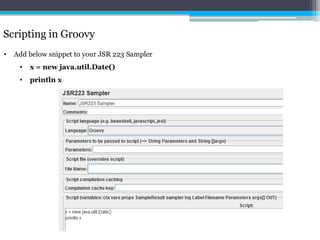
• Add below snippet to your JSR 223 Sampler
• x = new java.util.Date()
• println x
Scripting in Groovy
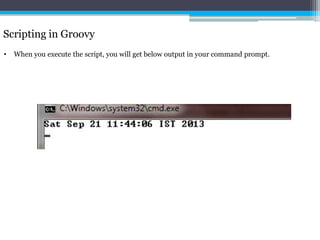
• When you execute the script, you will get below output in your command prompt.
Thank you
Please visit http://qainsights.com/services for more training programs.

Installing Groovy engine in Apache Jmeter

  • 1.
    Installing Groovy enginein Apache Jmeter NAVEENKUMAR NAMACHIVAYAM Founder – QAInsights.com http://QAInsights.com
  • 2.
    Introduction to BeanScripting Framework (BSF) • Bean Scripting Framework (BSF) is a set of Java classes which supports following languages within Java applications and to access Java methods and objects. • Javascript (using Rhino ECMAScript, from the Mozilla project) • NetRexx (an extension of the IBM REXX scripting language in Java) • Commons JEXL • Python (using Jython) • Tcl (using Jacl) • XSLT Stylesheets (as a component of Apache XML project's Xalan and Xerces) • In addition, the following languages are supported with their own BSF engines: • Java (using BeanShell, from the BeanShell project) • Groovy • Groovy Monkey • JLog (PROLOG implemented in Java) • JRuby • JudoScript • ObjectScript • ooRexx (Open Object Rexx), using BSF4ooRexx.
  • 3.
    Introduction to BeanScripting Framework (BSF) • BSF can be downloaded from http://commons.apache.org/proper/commons- bsf/download_bsf.cgi • In this presentation, we will see how to install Groovy engine within Jmeter.
  • 4.
    Installing Groovy Enginein Apache JMeter
  • 5.
    Installing Groovy inApache Jmeter – Step 1 • Download latest version of Groovy in http://groovy.codehaus.org/
  • 6.
    Installing Groovy inApache Jmeter – Step 2 • Extract the Groovy zip file • Copy the *.jar files from GROOVY_HOME/lib/
  • 7.
    Installing Groovy inApache Jmeter – Step 3 • Paste the Groovy jar files to JMETER_HOME/lib/ext/ • Restart JMeter.
  • 8.
    Installing Groovy inApache Jmeter – Step 4 • Add JSR223 Sampler to your test plan • You could see groovy in the scripting language drop down list box
  • 9.
    Scripting in Groovy •Add below snippet to your JSR 223 Sampler • x = new java.util.Date() • println x
  • 10.
    Scripting in Groovy •When you execute the script, you will get below output in your command prompt.
  • 11.
    Thank you Please visithttp://qainsights.com/services for more training programs.