Cypress
Overview
● Software Testing
● What is Cypress?
● Few use cases
● Folder structure
● Components
● Hooks
● Commands
● Demo
Software Testing
● Check whether our application matches the requirements and to make
sure it is free of bugs.
● Identify bugs early in the development process ensuring reliability and high
performance in the long run.
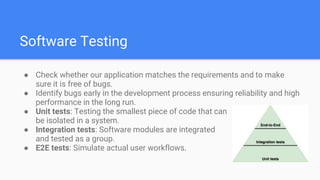
● Unit tests: Testing the smallest piece of code that can
be isolated in a system.
● Integration tests: Software modules are integrated
and tested as a group.
● E2E tests: Simulate actual user workflows.
What is Cypress?
● It is a end to end (front-end) testing tool for web test automation.
● Written in Javascript and based on Mocha/Chai.
● Available for JS framework as well as RoR.
● Provides developer console for debugging.
● Allows you to create stub methods and responses.
● Allows you to wait for network responses.
● It creates snapshot of tests. So we can jump to any state through
snapshots.
Few use cases
● Create stub functions and force them to behave as needed in your test
case.
● Test what your application does when receiving empty responses.
● Test how the application responds to server errors like 500.
● Modify DOM elements directly - like forcing hidden elements to be shown.
● Fill out a form and submit with various input values.
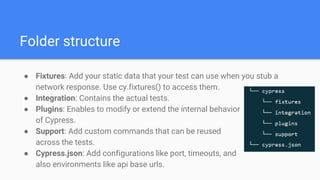
● Fixtures: Add your static data that your test can use when you stub a
network response. Use cy.fixtures() to access them.
● Integration: Contains the actual tests.
● Plugins: Enables to modify or extend the internal behavior
of Cypress.
● Support: Add custom commands that can be reused
across the tests.
● Cypress.json: Add configurations like port, timeouts, and
also environments like api base urls.
Folder structure
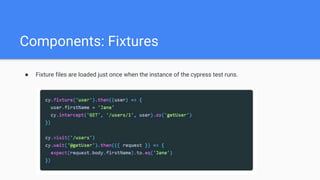
Components: Fixtures
● Fixture files are loaded just once when the instance of the cypress test runs.
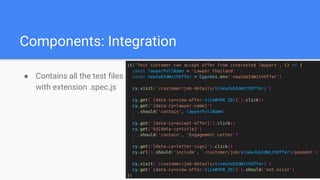
Components: Integration
● Contains all the test files
with extension .spec.js
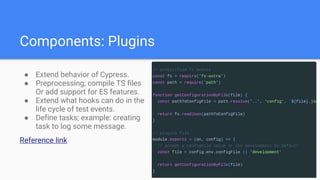
Components: Plugins
● Extend behavior of Cypress.
● Preprocessing; compile TS files
Or add support for ES features.
● Extend what hooks can do in the
life cycle of test events.
● Define tasks; example: creating
task to log some message.
Reference link
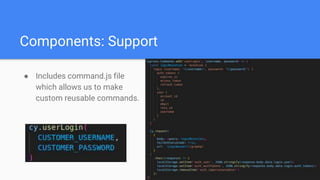
Components: Support
● Includes command.js file
which allows us to make
custom reusable commands.
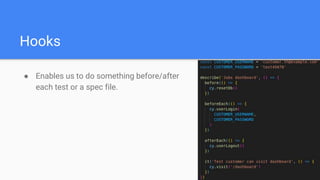
Hooks
● Enables us to do something before/after
each test or a spec file.
Commands
● Parent commands: Start a chain of commands. Includes cy.visit(), cy.get(),
cy.request(), etc
● Child commands: Used after parent commands. Includes cy.click(),
cy.trigger(), cy.find(), cy.should(), cy.as(), cy.each(), etc
● Dual commands: Can be used to start a chain or chained off. Includes
cy.contains(), cy.wait(), cy.scrollTo(), etc
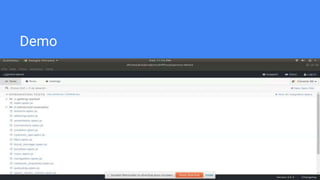
Demo
References
● https://www.webtips.dev/webtips/cypress/how-to-use-plugins-in-cypress
● https://docs.cypress.io/guides/overview/why-cypress
● https://www.programsbuzz.com/article/cypress-folder-structure
● https://www.smashingmagazine.com/2021/09/cypress-end-to-end-
testing/
● Cypress for RoR
● https://www.youtube.com/watch?v=BQqzfHQkREo
Thank You!

Cypress Testing.pptx

  • 1.
  • 2.
    Overview ● Software Testing ●What is Cypress? ● Few use cases ● Folder structure ● Components ● Hooks ● Commands ● Demo
  • 3.
    Software Testing ● Checkwhether our application matches the requirements and to make sure it is free of bugs. ● Identify bugs early in the development process ensuring reliability and high performance in the long run. ● Unit tests: Testing the smallest piece of code that can be isolated in a system. ● Integration tests: Software modules are integrated and tested as a group. ● E2E tests: Simulate actual user workflows.
  • 4.
    What is Cypress? ●It is a end to end (front-end) testing tool for web test automation. ● Written in Javascript and based on Mocha/Chai. ● Available for JS framework as well as RoR. ● Provides developer console for debugging. ● Allows you to create stub methods and responses. ● Allows you to wait for network responses. ● It creates snapshot of tests. So we can jump to any state through snapshots.
  • 5.
    Few use cases ●Create stub functions and force them to behave as needed in your test case. ● Test what your application does when receiving empty responses. ● Test how the application responds to server errors like 500. ● Modify DOM elements directly - like forcing hidden elements to be shown. ● Fill out a form and submit with various input values.
  • 6.
    ● Fixtures: Addyour static data that your test can use when you stub a network response. Use cy.fixtures() to access them. ● Integration: Contains the actual tests. ● Plugins: Enables to modify or extend the internal behavior of Cypress. ● Support: Add custom commands that can be reused across the tests. ● Cypress.json: Add configurations like port, timeouts, and also environments like api base urls. Folder structure
  • 7.
    Components: Fixtures ● Fixturefiles are loaded just once when the instance of the cypress test runs.
  • 8.
    Components: Integration ● Containsall the test files with extension .spec.js
  • 9.
    Components: Plugins ● Extendbehavior of Cypress. ● Preprocessing; compile TS files Or add support for ES features. ● Extend what hooks can do in the life cycle of test events. ● Define tasks; example: creating task to log some message. Reference link
  • 10.
    Components: Support ● Includescommand.js file which allows us to make custom reusable commands.
  • 11.
    Hooks ● Enables usto do something before/after each test or a spec file.
  • 12.
    Commands ● Parent commands:Start a chain of commands. Includes cy.visit(), cy.get(), cy.request(), etc ● Child commands: Used after parent commands. Includes cy.click(), cy.trigger(), cy.find(), cy.should(), cy.as(), cy.each(), etc ● Dual commands: Can be used to start a chain or chained off. Includes cy.contains(), cy.wait(), cy.scrollTo(), etc
  • 13.
  • 14.
    References ● https://www.webtips.dev/webtips/cypress/how-to-use-plugins-in-cypress ● https://docs.cypress.io/guides/overview/why-cypress ●https://www.programsbuzz.com/article/cypress-folder-structure ● https://www.smashingmagazine.com/2021/09/cypress-end-to-end- testing/ ● Cypress for RoR ● https://www.youtube.com/watch?v=BQqzfHQkREo
  • 15.