
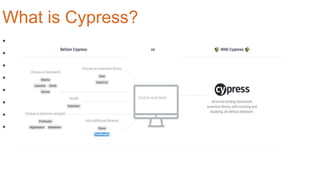
• A complete end-to-end testing experience.
Cypress
• Time travel
• Real time reloads
• Spies, stubs, and clocks
• Consistent results
• Debuggability
• Automatic waiting
• Network traffic control
• Screenshots and videos
What is Cypress?
How Cypress is Different?
• Does not use Selenium.
• Focuses on doing end-to-end testing REALLY well.
• Works on any front-end framework or website.
• Tests are only written in JavaScript.
• All in one.
• For developers and QA engineers.
• Much, much faster.
What are the features?
• Time travel
• Real time reloads
• Spies, stubs, and clocks
• Consistent results
• Debuggability
• Automatic waiting
• Screenshots and videos
Lets Start Real
Business.
• Setting up
• Writing tests with Cucumber
• Running tests
• Debugging
• Reporting
Setting Up.
• Install Node
• Install Visual Code or Atom
• Install Cypress
• Configure Cypress
Writing Test with Cucumber.
• Install Cucumber Processor
• Write Feature File
• Write Step Definition
• Assertions.
Running Tests.
• Running tests with Dash Board
• Running tests in command line
• Get locators by referring screenshots of ran tests.
Debugging.
• Google chrome developer tool.
• debugger
• debug()
• Print DEBUG logs
Reporting.
• Mochawesome Report.
• Install mochawesome.
• Install mocha.
• Report Configurations.
• Junit reports
• Report Configurations.
• Video
• Configurations
Thank You.
Questions ?

Cypress Automation

  • 1.
    • A completeend-to-end testing experience. Cypress
  • 2.
    • Time travel •Real time reloads • Spies, stubs, and clocks • Consistent results • Debuggability • Automatic waiting • Network traffic control • Screenshots and videos What is Cypress?
  • 3.
    How Cypress isDifferent? • Does not use Selenium. • Focuses on doing end-to-end testing REALLY well. • Works on any front-end framework or website. • Tests are only written in JavaScript. • All in one. • For developers and QA engineers. • Much, much faster.
  • 4.
    What are thefeatures? • Time travel • Real time reloads • Spies, stubs, and clocks • Consistent results • Debuggability • Automatic waiting • Screenshots and videos
  • 5.
    Lets Start Real Business. •Setting up • Writing tests with Cucumber • Running tests • Debugging • Reporting
  • 6.
    Setting Up. • InstallNode • Install Visual Code or Atom • Install Cypress • Configure Cypress
  • 7.
    Writing Test withCucumber. • Install Cucumber Processor • Write Feature File • Write Step Definition • Assertions.
  • 8.
    Running Tests. • Runningtests with Dash Board • Running tests in command line • Get locators by referring screenshots of ran tests.
  • 9.
    Debugging. • Google chromedeveloper tool. • debugger • debug() • Print DEBUG logs
  • 10.
    Reporting. • Mochawesome Report. •Install mochawesome. • Install mocha. • Report Configurations. • Junit reports • Report Configurations. • Video • Configurations
  • 11.
  • 12.