Installing and Upgrading AtoMInstalling and Upgrading AtoM
Recommended installation parameters, gotchas and tips for installing on
other systems. Using Ansible for deployment, managing upgrades, and
multi-site management.
Outline
1. Installation overview
2. Upgrade overview
3. Ansible demonstration
First: Ansible
Demo
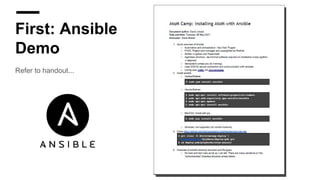
Refer to handout...
Vagrant AtoM
Image
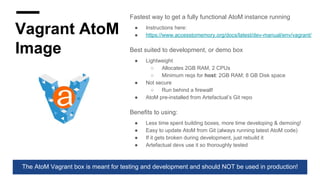
Fastest way to get a fully functional AtoM instance running
● Instructions here:
● https://www.accesstomemory.org/docs/latest/dev-manual/env/vagrant/
Best suited to development, or demo box
● Lightweight
○ Allocates 2GB RAM, 2 CPUs
○ Minimum reqs for host: 2GB RAM; 8 GB Disk space
● Not secure
○ Run behind a firewall!
● AtoM pre-installed from Artefactual’s Git repo
Benefits to using:
● Less time spent building boxes, more time developing & demoing!
● Easy to update AtoM from Git (always running latest AtoM code)
● If it gets broken during development, just rebuild it
● Artefactual devs use it so thoroughly tested
The AtoM Vagrant box is meant for testing and development and should NOT be used in production!
Installing
AtoM
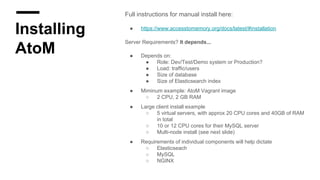
Full instructions for manual install here:
● https://www.accesstomemory.org/docs/latest/#installation
Server Requirements? It depends...
● Depends on:
● Role: Dev/Test/Demo system or Production?
● Load: traffic/users
● Size of database
● Size of Elasticsearch index
● Miminum example: AtoM Vagrant image
○ 2 CPU, 2 GB RAM
● Large client install example
○ 5 virtual servers, with approx 20 CPU cores and 40GB of RAM
in total
○ 10 or 12 CPU cores for their MySQL server
○ Multi-node install (see next slide)
● Requirements of individual components will help dictate
○ Elasticseach
○ MySQL
○ NGINX
Multi-node
Installation
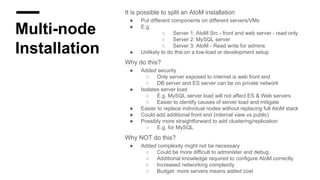
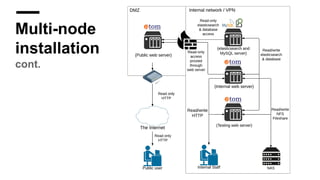
It is possible to split an AtoM installation
● Put different components on different servers/VMs
● E.g.
○ Server 1: AtoM Src - front end web server - read only
○ Server 2: MySQL server
○ Server 3: AtoM - Read write for admins
● Unlikely to do this on a low-load or development setup
Why do this?
● Added security
○ Only server exposed to internet is web front end
○ DB server and ES server can be on private network
● Isolates server load
○ E.g. MySQL server load will not affect ES & Web servers
○ Easier to identify causes of server load and mitigate
● Easier to replace individual nodes without replacing full AtoM stack
● Could add additional front end (internal view vs public)
● Possibly more straightforward to add clustering/replication
○ E.g. for MySQL
Why NOT do this?
● Added complexity might not be necessary
○ Could be more difficult to administer and debug
○ Additional knowledge required to configure AtoM correctly
○ Increased networking complexity
○ Budget: more servers means added cost
Multi-node
installation
cont.
Selecting
Operating
System
Artefactual strongly recommends running AtoM on Linux servers
● Specifically Ubuntu
● Artefactual does not test installation on non-Ubuntu systems!
● Users report running on other Linux distros
○ CentOS/Redhat Enterprise Linux
● The AtoM user forum is a great resource for reaching out to the AtoM
community for their experiences
Software dependencies listed here:
● https://www.accesstomemory.org/docs/latest/admin-manual/installation/req
uirements/#software-dependencies-required
● Includes minimum version information (e.g. PHP 5.5)
In theory, if dependencies are available for O/S choice, it could work
● Installation instructions for various O/S:
● https://www.accesstomemory.org/docs/latest/#installation
CentOS /
Redhat
Enterprise Linux
(RHEL)
CentOS likely most common alternative O/S
● Very conservative philosophy wrt package versions
● There are pros and cons to this
AtoM PHP requirement: 5.5, 5.6, 7+
● Redhat/Centos 6: 5.3.3
● Redhat/Centos 7: 5.4.16
Redhat won't provide a major software version
update to a released O/S version as it could cause
surprises after an update.
CentOS /
Redhat
Enterprise Linux
(RHEL)
cont.
Fortunately, CentOS/RHEL provide their SCL
● Redhat Software Collections Repo
○ Tested and verified to work with Redhat target
version
○ Still patched and updated with YUM - it’s just
another repo!
https://wiki.centos.org/AdditionalResources/Repositories/SCL
https://wiki.centos.org/SpecialInterestGroup/SCLo/CollectionsList
http://developerblog.redhat.com/2013/08/01/php-5-4-on-rhel-6-using-rhscl/
Upgrade
Tips
AtoM upgrade docs found here:
https://www.accesstomemory.org/docs/latest/admin-manual/installation/upgrading/
Essentially new install, followed by copying the original DB across and upgrading it
● Ensure you have backups of your original database
● Remember to create a new database if keeping original server!
○ Pick a new database name
○ Using the original database name on the same server will overwrite your original
database!!
○ Not an issue if destination server is different from original server
If running in a virtualized environment:
● Easy to create a second server to use for upgrade
○ Ensures that O/S is updated
○ Ensures that all software dependencies are current
○ Decreases chances of affecting / interrupting current live system
Back to
Ansible
Let’s check our installation demo!
Q&AQ&A
www.accesstomemory.org
www.artefactual.com

Installing and Upgrading AtoM

  • 1.
    Installing and UpgradingAtoMInstalling and Upgrading AtoM Recommended installation parameters, gotchas and tips for installing on other systems. Using Ansible for deployment, managing upgrades, and multi-site management.
  • 2.
    Outline 1. Installation overview 2.Upgrade overview 3. Ansible demonstration
  • 3.
  • 4.
    Vagrant AtoM Image Fastest wayto get a fully functional AtoM instance running ● Instructions here: ● https://www.accesstomemory.org/docs/latest/dev-manual/env/vagrant/ Best suited to development, or demo box ● Lightweight ○ Allocates 2GB RAM, 2 CPUs ○ Minimum reqs for host: 2GB RAM; 8 GB Disk space ● Not secure ○ Run behind a firewall! ● AtoM pre-installed from Artefactual’s Git repo Benefits to using: ● Less time spent building boxes, more time developing & demoing! ● Easy to update AtoM from Git (always running latest AtoM code) ● If it gets broken during development, just rebuild it ● Artefactual devs use it so thoroughly tested The AtoM Vagrant box is meant for testing and development and should NOT be used in production!
  • 5.
    Installing AtoM Full instructions formanual install here: ● https://www.accesstomemory.org/docs/latest/#installation Server Requirements? It depends... ● Depends on: ● Role: Dev/Test/Demo system or Production? ● Load: traffic/users ● Size of database ● Size of Elasticsearch index ● Miminum example: AtoM Vagrant image ○ 2 CPU, 2 GB RAM ● Large client install example ○ 5 virtual servers, with approx 20 CPU cores and 40GB of RAM in total ○ 10 or 12 CPU cores for their MySQL server ○ Multi-node install (see next slide) ● Requirements of individual components will help dictate ○ Elasticseach ○ MySQL ○ NGINX
  • 6.
    Multi-node Installation It is possibleto split an AtoM installation ● Put different components on different servers/VMs ● E.g. ○ Server 1: AtoM Src - front end web server - read only ○ Server 2: MySQL server ○ Server 3: AtoM - Read write for admins ● Unlikely to do this on a low-load or development setup Why do this? ● Added security ○ Only server exposed to internet is web front end ○ DB server and ES server can be on private network ● Isolates server load ○ E.g. MySQL server load will not affect ES & Web servers ○ Easier to identify causes of server load and mitigate ● Easier to replace individual nodes without replacing full AtoM stack ● Could add additional front end (internal view vs public) ● Possibly more straightforward to add clustering/replication ○ E.g. for MySQL Why NOT do this? ● Added complexity might not be necessary ○ Could be more difficult to administer and debug ○ Additional knowledge required to configure AtoM correctly ○ Increased networking complexity ○ Budget: more servers means added cost
  • 7.
  • 8.
    Selecting Operating System Artefactual strongly recommendsrunning AtoM on Linux servers ● Specifically Ubuntu ● Artefactual does not test installation on non-Ubuntu systems! ● Users report running on other Linux distros ○ CentOS/Redhat Enterprise Linux ● The AtoM user forum is a great resource for reaching out to the AtoM community for their experiences Software dependencies listed here: ● https://www.accesstomemory.org/docs/latest/admin-manual/installation/req uirements/#software-dependencies-required ● Includes minimum version information (e.g. PHP 5.5) In theory, if dependencies are available for O/S choice, it could work ● Installation instructions for various O/S: ● https://www.accesstomemory.org/docs/latest/#installation
  • 9.
    CentOS / Redhat Enterprise Linux (RHEL) CentOSlikely most common alternative O/S ● Very conservative philosophy wrt package versions ● There are pros and cons to this AtoM PHP requirement: 5.5, 5.6, 7+ ● Redhat/Centos 6: 5.3.3 ● Redhat/Centos 7: 5.4.16 Redhat won't provide a major software version update to a released O/S version as it could cause surprises after an update.
  • 10.
    CentOS / Redhat Enterprise Linux (RHEL) cont. Fortunately,CentOS/RHEL provide their SCL ● Redhat Software Collections Repo ○ Tested and verified to work with Redhat target version ○ Still patched and updated with YUM - it’s just another repo! https://wiki.centos.org/AdditionalResources/Repositories/SCL https://wiki.centos.org/SpecialInterestGroup/SCLo/CollectionsList http://developerblog.redhat.com/2013/08/01/php-5-4-on-rhel-6-using-rhscl/
  • 11.
    Upgrade Tips AtoM upgrade docsfound here: https://www.accesstomemory.org/docs/latest/admin-manual/installation/upgrading/ Essentially new install, followed by copying the original DB across and upgrading it ● Ensure you have backups of your original database ● Remember to create a new database if keeping original server! ○ Pick a new database name ○ Using the original database name on the same server will overwrite your original database!! ○ Not an issue if destination server is different from original server If running in a virtualized environment: ● Easy to create a second server to use for upgrade ○ Ensures that O/S is updated ○ Ensures that all software dependencies are current ○ Decreases chances of affecting / interrupting current live system
  • 12.
    Back to Ansible Let’s checkour installation demo!
  • 13.