
Contributing tothe
AtoM Documentation
An introduction to AtoM’s docs,
Sphinx, and reStructuredText
Dan Gillean
Artefactual Systems
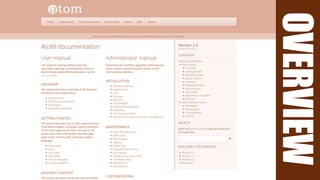
OVERVIEW
OVERVIEW
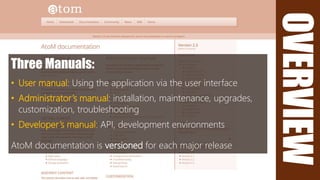
Three Manuals:
• User manual: Using the application via the user interface
• Administrator’s manual: installation, maintenance, upgrades,
customization, troubleshooting
• Developer’s manual: API, development environments
AtoM documentation is versioned for each major release
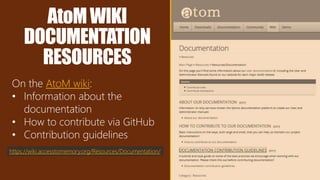
AtoMWIKI
DOCUMENTATION
RESOURCES
On the AtoM wiki:
• Information about the
documentation
• How to contribute via GitHub
• Contribution guidelines
https://wiki.accesstomemory.org/Resources/Documentation/
FIRST,ASTORY…
https://pixabay.com/en/reading-book-cat-literature-498103/
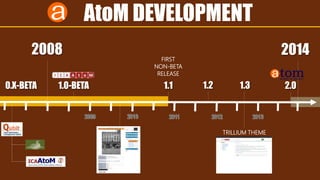
20142008
0.X-BETA 1.0-BETA
FIRST
NON-BETA
RELEASE
AtoM DEVELOPMENT
1.1 2.01.31.2
TRILLIUM THEME
20142008
0.X-BETA 1.0-BETA
FIRST
NON-BETA
RELEASE
AtoM DEVELOPMENT
1.1 2.01.31.2
TRILLIUM THEME
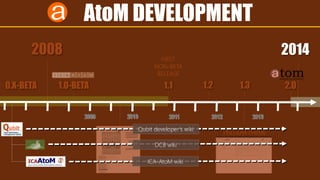
Qubit developer’s wiki
DCB wiki
ICA-AtoM wiki
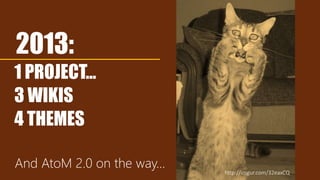
2013:
1 PROJECT…
3 WIKIS
4 THEMES
And AtoM 2.0 on the way…
http://imgur.com/32eaxCQ
WIKICHALLENGES
No versioning (e.g. ICA-AtoM 1.2, 1.3; AtoM 2.0)
No enforced structure
Too easy to create orphaned pages
No easy output to other formats
https://commons.wikimedia.org/wiki/File:Coober_Pedy_Warning_sign_02427.jpg
ENTER
http://onemillionskates.com/inside-edge/a-true-hero-dad-this-ones-for-you
OVERVIEW
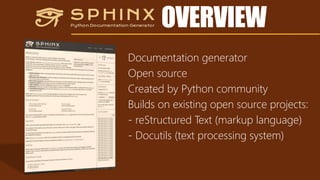
Documentation generator
Open source
Created by Python community
Builds on existing open source projects:
- reStructured Text (markup language)
- Docutils (text processing system)
OVERVIEW
ADVANTAGES
• Structured documentation
• Built around a table of contents you define
• Versioning
• Easily maintained in a repository w many branches
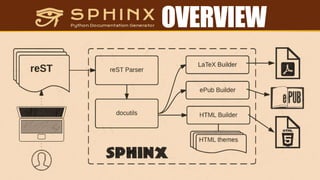
• Easy output to other formats
• Glossary, footnotes, asides,
figures, tables, etc…
• Built-in themes or custom themes
• Automated indices
• Strong support for code
documentation http://cheezburger.com/6705529088
reST BASICS
http://blog.sleepingsimple.com/wp-content/uploads/2012/03/Cat-Nap.jpg
reST BASICS
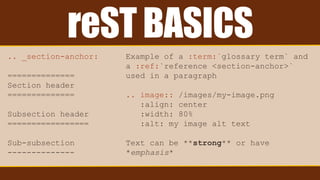
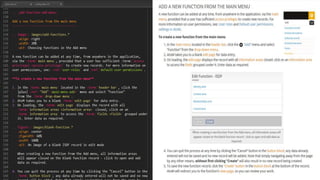
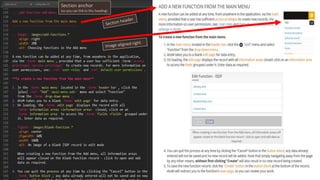
.. _section-anchor:
==============
Section header
==============
Subsection header
=================
Sub-subsection
--------------
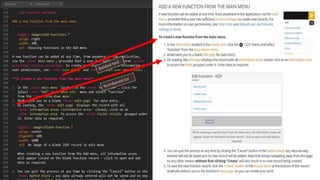
Example of a :term:`glossary term` and
a :ref:`reference <section-anchor>`
used in a paragraph
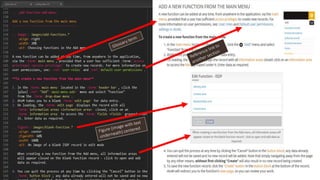
.. image:: /images/my-image.png
:align: center
:width: 80%
:alt: my image alt text
Text can be **strong** or have
*emphasis*
reST BASICS
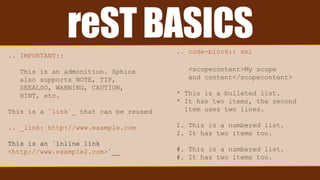
.. IMPORTANT::
This is an admonition. Sphinx
also supports NOTE, TIP,
SEEALSO, WARNING, CAUTION,
HINT, etc.
This is a `link`_ that can be reused
.. _link: http://www.example.com
This is an `inline link
<http://www.example2.com>`__
.. code-block:: xml
<scopecontent>My scope
and content</scopecontent>
* This is a bulleted list.
* It has two items, the second
item uses two lines.
1. This is a numbered list.
2. It has two items too.
#. This is a numbered list.
#. It has two items too.
Section anchor
(so you can link to this heading)
DETAILED
CONTRIBUTION
GUIDELINES
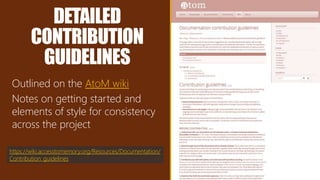
Outlined on the AtoM wiki
Notes on getting started and
elements of style for consistency
across the project
https://wiki.accesstomemory.org/Resources/Documentation/
Contribution_guidelines
LEARNMOREABOUTSPHINXANDreST
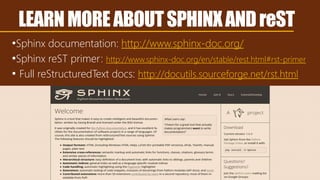
•Sphinx documentation: http://www.sphinx-doc.org/
•Sphinx reST primer: http://www.sphinx-doc.org/en/stable/rest.html#rst-primer
• Full reStructuredText docs: http://docutils.sourceforge.net/rst.html
CONTRIBUTINGDOCUMENTATION
CHANGESWITHGITHUB:
Using GitHub’s user interface to contribute
documentation changes to AtoM’s git repository
GitHub
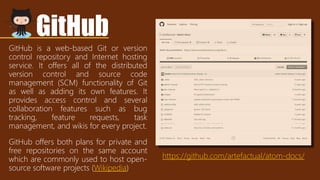
GitHub is a web-based Git or version
control repository and Internet hosting
service. It offers all of the distributed
version control and source code
management (SCM) functionality of Git
as well as adding its own features. It
provides access control and several
collaboration features such as bug
tracking, feature requests, task
management, and wikis for every project.
GitHub offers both plans for private and
free repositories on the same account
which are commonly used to host open-
source software projects (Wikipedia)
https://github.com/artefactual/atom-docs/
WAIT…WHATTHEHECKISGIT??
“Worried look” by Mark Biarnès https://www.flickr.com/photos/104318263@N04/11453255504
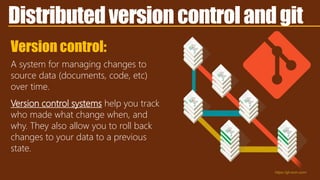
Distributedversioncontrolandgit
Version control:
A system for managing changes to
source data (documents, code, etc)
over time.
Version control systems help you track
who made what change when, and
why. They also allow you to roll back
changes to your data to a previous
state.
https://git-scm.com/
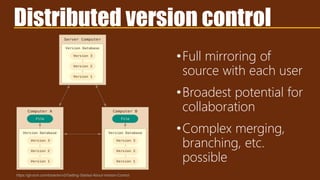
Distributed version control
https://git-scm.com/book/en/v2/Getting-Started-About-Version-Control
•Full mirroring of
source with each user
•Broadest potential for
collaboration
•Complex merging,
branching, etc.
possible
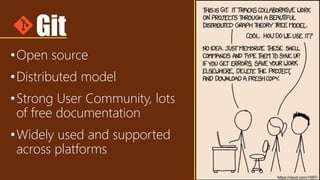
Git
•Open source
•Distributed model
•Strong User Community, lots
of free documentation
•Widely used and supported
across platforms
https://xkcd.com/1597/
Git
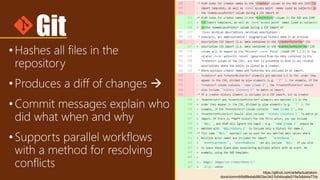
•Hashes all files in the
repository
•Produces a diff of changes 
•Commit messages explain who
did what when and why
•Supports parallel workflows
with a method for resolving
conflicts
https://github.com/artefactual/atom-
docs/commit/6d8fe4ab9803ec3421b04bcabe215e3dbb4a77dc
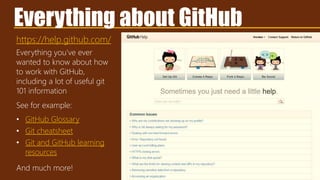
https://help.github.com/
Everything about GitHub
Everything you’ve ever
wanted to know about how
to work with GitHub,
including a lot of useful git
101 information
See for example:
• GitHub Glossary
• Git cheatsheet
• Git and GitHub learning
resources
And much more!
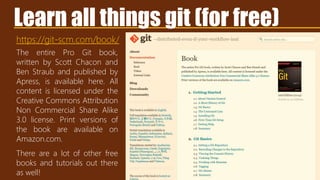
https://git-scm.com/book/
The entire Pro Git book,
written by Scott Chacon and
Ben Straub and published by
Apress, is available here. All
content is licensed under the
Creative Commons Attribution
Non Commercial Share Alike
3.0 license. Print versions of
the book are available on
Amazon.com.
There are a lot of other free
books and tutorials out there
as well!
Learn all things git (for free)
OKAYCOOLTHXKEEPGOING
http://maxpixel.freegreatpicture.com/Summer-Animal-Cat-Kitten-Tree-Domestic-Green-1647775
GitHub
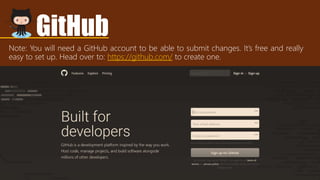
Note: You will need a GitHub account to be able to submit changes. It’s free and really
easy to set up. Head over to: https://github.com/ to create one.
CONTRIBUTECHANGESVIAGITHUB
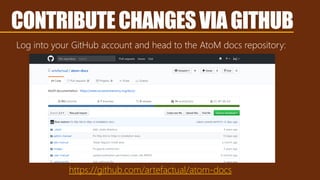
Log into your GitHub account and head to the AtoM docs repository:
https://github.com/artefactual/atom-docs
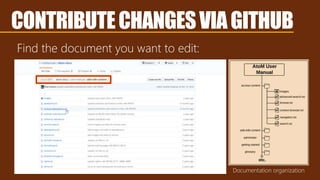
Find the document you want to edit:
Documentation organization
CONTRIBUTECHANGESVIAGITHUB
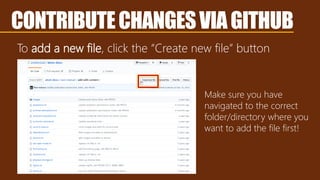
To add a new file, click the “Create new file” button
Make sure you have
navigated to the correct
folder/directory where you
want to add the file first!
CONTRIBUTECHANGESVIAGITHUB
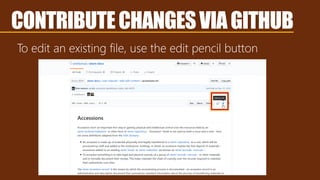
To edit an existing file, use the edit pencil button
CONTRIBUTECHANGESVIAGITHUB
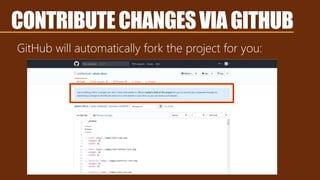
GitHub will automatically fork the project for you:
CONTRIBUTECHANGESVIAGITHUB
WAIT,WHAT’SAFORK?
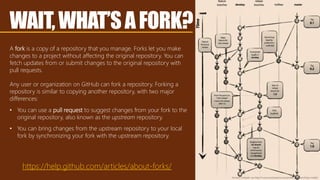
A fork is a copy of a repository that you manage. Forks let you make
changes to a project without affecting the original repository. You can
fetch updates from or submit changes to the original repository with
pull requests.
Any user or organization on GitHub can fork a repository. Forking a
repository is similar to copying another repository, with two major
differences:
• You can use a pull request to suggest changes from your fork to the
original repository, also known as the upstream repository.
• You can bring changes from the upstream repository to your local
fork by synchronizing your fork with the upstream repository.
https://help.github.com/articles/about-forks/
Vincent Driessen via http://nvie.com/posts/a-successful-git-branching-model/
WAIT,WHAT’SAFORK?
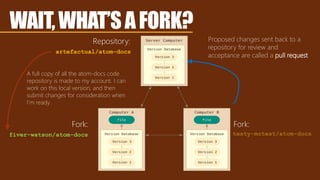
artefactual/atom-docs
Repository:
fiver-watson/atom-docs
Fork:
A full copy of all the atom-docs code
repository is made to my account. I can
work on this local version, and then
submit changes for consideration when
I’m ready
Proposed changes sent back to a
repository for review and
acceptance are called a pull request
testy-mctest/atom-docs
Fork:
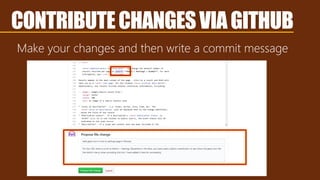
Make your changes and then write a commit message
CONTRIBUTECHANGESVIAGITHUB
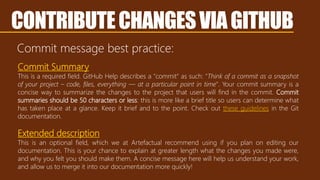
Commit message best practice:
CONTRIBUTECHANGESVIAGITHUB
Commit Summary
This is a required field. GitHub Help describes a "commit" as such: "Think of a commit as a snapshot
of your project – code, files, everything — at a particular point in time". Your commit summary is a
concise way to summarize the changes to the project that users will find in the commit. Commit
summaries should be 50 characters or less: this is more like a brief title so users can determine what
has taken place at a glance. Keep it brief and to the point. Check out these guidelines in the Git
documentation.
Extended description
This is an optional field, which we at Artefactual recommend using if you plan on editing our
documentation. This is your chance to explain at greater length what the changes you made were,
and why you felt you should make them. A concise message here will help us understand your work,
and allow us to merge it into our documentation more quickly!
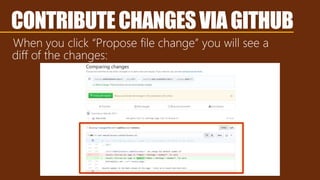
When you click “Propose file change” you will see a
diff of the changes:
CONTRIBUTECHANGESVIAGITHUB
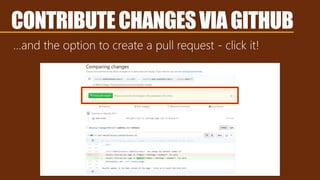
…and the option to create a pull request - click it!
CONTRIBUTECHANGESVIAGITHUB
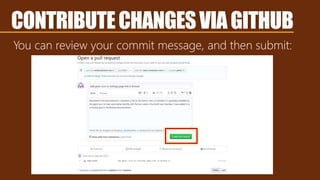
You can review your commit message, and then submit:
CONTRIBUTECHANGESVIAGITHUB
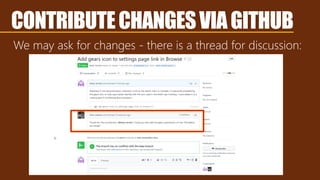
We may ask for changes - there is a thread for discussion:
CONTRIBUTECHANGESVIAGITHUB
If everything looks good, we’ll accept the change! You did it!
CONTRIBUTECHANGESVIAGITHUB
Louis Wain, “the Bachelor party.” https://commons.wikimedia.org/wiki/File:Louis_Wain_The_bachelor_party.jpg:p
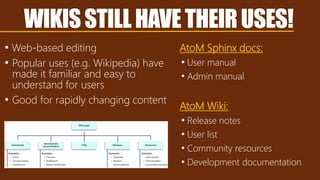
WIKISSTILLHAVETHEIRUSES!
• Web-based editing
• Popular uses (e.g. Wikipedia) have
made it familiar and easy to
understand for users
• Good for rapidly changing content
AtoM Sphinx docs:
• User manual
• Admin manual
AtoM Wiki:
• Release notes
• User list
• Community resources
• Development documentation
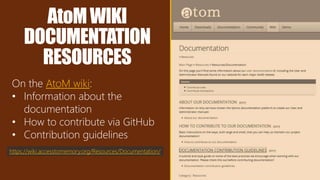
AtoMWIKI
DOCUMENTATION
RESOURCES
On the AtoM wiki:
• Information about the
documentation
• How to contribute via GitHub
• Contribution guidelines
https://wiki.accesstomemory.org/Resources/Documentation/
THANKS!
AtoM docs: https://www.accesstomemory.org/docs
Documentation repo: https://github.com/artefactual/atom-docs
Sphinx documentation: http://sphinx-doc.org/

Contributing to the AtoM documentation

  • 1.
    Contributing tothe AtoM Documentation Anintroduction to AtoM’s docs, Sphinx, and reStructuredText Dan Gillean Artefactual Systems
  • 2.
  • 3.
    OVERVIEW Three Manuals: • Usermanual: Using the application via the user interface • Administrator’s manual: installation, maintenance, upgrades, customization, troubleshooting • Developer’s manual: API, development environments AtoM documentation is versioned for each major release
  • 4.
    AtoMWIKI DOCUMENTATION RESOURCES On the AtoMwiki: • Information about the documentation • How to contribute via GitHub • Contribution guidelines https://wiki.accesstomemory.org/Resources/Documentation/
  • 5.
  • 6.
  • 7.
    20142008 0.X-BETA 1.0-BETA FIRST NON-BETA RELEASE AtoM DEVELOPMENT 1.12.01.31.2 TRILLIUM THEME Qubit developer’s wiki DCB wiki ICA-AtoM wiki
  • 8.
    2013: 1 PROJECT… 3 WIKIS 4THEMES And AtoM 2.0 on the way… http://imgur.com/32eaxCQ
  • 9.
    WIKICHALLENGES No versioning (e.g.ICA-AtoM 1.2, 1.3; AtoM 2.0) No enforced structure Too easy to create orphaned pages No easy output to other formats https://commons.wikimedia.org/wiki/File:Coober_Pedy_Warning_sign_02427.jpg
  • 10.
  • 11.
    OVERVIEW Documentation generator Open source Createdby Python community Builds on existing open source projects: - reStructured Text (markup language) - Docutils (text processing system)
  • 12.
  • 13.
    ADVANTAGES • Structured documentation •Built around a table of contents you define • Versioning • Easily maintained in a repository w many branches • Easy output to other formats • Glossary, footnotes, asides, figures, tables, etc… • Built-in themes or custom themes • Automated indices • Strong support for code documentation http://cheezburger.com/6705529088
  • 14.
  • 15.
    reST BASICS .. _section-anchor: ============== Sectionheader ============== Subsection header ================= Sub-subsection -------------- Example of a :term:`glossary term` and a :ref:`reference <section-anchor>` used in a paragraph .. image:: /images/my-image.png :align: center :width: 80% :alt: my image alt text Text can be **strong** or have *emphasis*
  • 16.
    reST BASICS .. IMPORTANT:: Thisis an admonition. Sphinx also supports NOTE, TIP, SEEALSO, WARNING, CAUTION, HINT, etc. This is a `link`_ that can be reused .. _link: http://www.example.com This is an `inline link <http://www.example2.com>`__ .. code-block:: xml <scopecontent>My scope and content</scopecontent> * This is a bulleted list. * It has two items, the second item uses two lines. 1. This is a numbered list. 2. It has two items too. #. This is a numbered list. #. It has two items too.
  • 18.
    Section anchor (so youcan link to this heading)
  • 21.
    DETAILED CONTRIBUTION GUIDELINES Outlined on theAtoM wiki Notes on getting started and elements of style for consistency across the project https://wiki.accesstomemory.org/Resources/Documentation/ Contribution_guidelines
  • 22.
    LEARNMOREABOUTSPHINXANDreST •Sphinx documentation: http://www.sphinx-doc.org/ •SphinxreST primer: http://www.sphinx-doc.org/en/stable/rest.html#rst-primer • Full reStructuredText docs: http://docutils.sourceforge.net/rst.html
  • 23.
    CONTRIBUTINGDOCUMENTATION CHANGESWITHGITHUB: Using GitHub’s userinterface to contribute documentation changes to AtoM’s git repository
  • 24.
    GitHub GitHub is aweb-based Git or version control repository and Internet hosting service. It offers all of the distributed version control and source code management (SCM) functionality of Git as well as adding its own features. It provides access control and several collaboration features such as bug tracking, feature requests, task management, and wikis for every project. GitHub offers both plans for private and free repositories on the same account which are commonly used to host open- source software projects (Wikipedia) https://github.com/artefactual/atom-docs/
  • 25.
    WAIT…WHATTHEHECKISGIT?? “Worried look” byMark Biarnès https://www.flickr.com/photos/104318263@N04/11453255504
  • 26.
    Distributedversioncontrolandgit Version control: A systemfor managing changes to source data (documents, code, etc) over time. Version control systems help you track who made what change when, and why. They also allow you to roll back changes to your data to a previous state. https://git-scm.com/
  • 27.
    Distributed version control https://git-scm.com/book/en/v2/Getting-Started-About-Version-Control •Fullmirroring of source with each user •Broadest potential for collaboration •Complex merging, branching, etc. possible
  • 28.
    Git •Open source •Distributed model •StrongUser Community, lots of free documentation •Widely used and supported across platforms https://xkcd.com/1597/
  • 29.
    Git •Hashes all filesin the repository •Produces a diff of changes  •Commit messages explain who did what when and why •Supports parallel workflows with a method for resolving conflicts https://github.com/artefactual/atom- docs/commit/6d8fe4ab9803ec3421b04bcabe215e3dbb4a77dc
  • 30.
    https://help.github.com/ Everything about GitHub Everythingyou’ve ever wanted to know about how to work with GitHub, including a lot of useful git 101 information See for example: • GitHub Glossary • Git cheatsheet • Git and GitHub learning resources And much more!
  • 31.
    https://git-scm.com/book/ The entire ProGit book, written by Scott Chacon and Ben Straub and published by Apress, is available here. All content is licensed under the Creative Commons Attribution Non Commercial Share Alike 3.0 license. Print versions of the book are available on Amazon.com. There are a lot of other free books and tutorials out there as well! Learn all things git (for free)
  • 32.
  • 33.
    GitHub Note: You willneed a GitHub account to be able to submit changes. It’s free and really easy to set up. Head over to: https://github.com/ to create one.
  • 34.
    CONTRIBUTECHANGESVIAGITHUB Log into yourGitHub account and head to the AtoM docs repository: https://github.com/artefactual/atom-docs
  • 35.
    Find the documentyou want to edit: Documentation organization CONTRIBUTECHANGESVIAGITHUB
  • 36.
    To add anew file, click the “Create new file” button Make sure you have navigated to the correct folder/directory where you want to add the file first! CONTRIBUTECHANGESVIAGITHUB
  • 37.
    To edit anexisting file, use the edit pencil button CONTRIBUTECHANGESVIAGITHUB
  • 38.
    GitHub will automaticallyfork the project for you: CONTRIBUTECHANGESVIAGITHUB
  • 39.
    WAIT,WHAT’SAFORK? A fork isa copy of a repository that you manage. Forks let you make changes to a project without affecting the original repository. You can fetch updates from or submit changes to the original repository with pull requests. Any user or organization on GitHub can fork a repository. Forking a repository is similar to copying another repository, with two major differences: • You can use a pull request to suggest changes from your fork to the original repository, also known as the upstream repository. • You can bring changes from the upstream repository to your local fork by synchronizing your fork with the upstream repository. https://help.github.com/articles/about-forks/ Vincent Driessen via http://nvie.com/posts/a-successful-git-branching-model/
  • 40.
    WAIT,WHAT’SAFORK? artefactual/atom-docs Repository: fiver-watson/atom-docs Fork: A full copyof all the atom-docs code repository is made to my account. I can work on this local version, and then submit changes for consideration when I’m ready Proposed changes sent back to a repository for review and acceptance are called a pull request testy-mctest/atom-docs Fork:
  • 41.
    Make your changesand then write a commit message CONTRIBUTECHANGESVIAGITHUB
  • 42.
    Commit message bestpractice: CONTRIBUTECHANGESVIAGITHUB Commit Summary This is a required field. GitHub Help describes a "commit" as such: "Think of a commit as a snapshot of your project – code, files, everything — at a particular point in time". Your commit summary is a concise way to summarize the changes to the project that users will find in the commit. Commit summaries should be 50 characters or less: this is more like a brief title so users can determine what has taken place at a glance. Keep it brief and to the point. Check out these guidelines in the Git documentation. Extended description This is an optional field, which we at Artefactual recommend using if you plan on editing our documentation. This is your chance to explain at greater length what the changes you made were, and why you felt you should make them. A concise message here will help us understand your work, and allow us to merge it into our documentation more quickly!
  • 43.
    When you click“Propose file change” you will see a diff of the changes: CONTRIBUTECHANGESVIAGITHUB
  • 44.
    …and the optionto create a pull request - click it! CONTRIBUTECHANGESVIAGITHUB
  • 45.
    You can reviewyour commit message, and then submit: CONTRIBUTECHANGESVIAGITHUB
  • 46.
    We may askfor changes - there is a thread for discussion: CONTRIBUTECHANGESVIAGITHUB
  • 47.
    If everything looksgood, we’ll accept the change! You did it! CONTRIBUTECHANGESVIAGITHUB Louis Wain, “the Bachelor party.” https://commons.wikimedia.org/wiki/File:Louis_Wain_The_bachelor_party.jpg:p
  • 48.
    WIKISSTILLHAVETHEIRUSES! • Web-based editing •Popular uses (e.g. Wikipedia) have made it familiar and easy to understand for users • Good for rapidly changing content AtoM Sphinx docs: • User manual • Admin manual AtoM Wiki: • Release notes • User list • Community resources • Development documentation
  • 49.
    AtoMWIKI DOCUMENTATION RESOURCES On the AtoMwiki: • Information about the documentation • How to contribute via GitHub • Contribution guidelines https://wiki.accesstomemory.org/Resources/Documentation/
  • 50.
    THANKS! AtoM docs: https://www.accesstomemory.org/docs Documentationrepo: https://github.com/artefactual/atom-docs Sphinx documentation: http://sphinx-doc.org/

Editor's Notes

  • #13  Many other formats built-in: Windows/Apple/GNOME Help books, man pages, txt files, JSON, etc. Further builders available as third-party open-source extensions
  • #25 Essentially, git applies a cryptographic SHA1 hash against all files in a repository, and will produce a diff, shown in a graphical form from GitHub here on the right, of the additions, deletions, and modifications made. Every change submitted by a contributor includes a commit message with a timestamp, which includes a short, human-readable summary of the changes and an option for a longer narrative description or justification. Platforms like GitHub, which add a web-based user interface to git repositories and workflows, also offer the ability to discuss changes on a per-line basis via comments and issues. Artefactual uses git to manage all of its software projects – but we also use it to manage our documentation. In this image, we’re actually looking at an image from a diff on GitHub, made when I submitted changes to the Access to Memory documentation.
  • #28 Finally, there are distributed VCS’s like git. In this case, each user maintains a local mirror of the entire repository. If Bob wants to include Carol, Carol ends up with the entire repo as well, and can maintain her changes as an independent fork or reconcile them at any time with the master, or with just Bob or just Alice. If the main repository goes down, every user becomes a potential point of backup.
  • #29 Git was created by the Linux community to streamline broad collaboration in distributed open-source development environments. There are many other alternative distributed VCSs out there, but git has become a de facto standard among developers.
  • #30 Essentially, git applies a cryptographic SHA1 hash against all files in a repository, and will produce a diff, shown in a graphical form from GitHub here on the right, of the additions, deletions, and modifications made. Every change submitted by a contributor includes a commit message with a timestamp, which includes a short, human-readable summary of the changes and an option for a longer narrative description or justification. Platforms like GitHub, which add a web-based user interface to git repositories and workflows, also offer the ability to discuss changes on a per-line basis via comments and issues. Artefactual uses git to manage all of its software projects – but we also use it to manage our documentation. In this image, we’re actually looking at an image from a diff on GitHub, made when I submitted changes to the Access to Memory documentation.
  • #34 Essentially, git applies a cryptographic SHA1 hash against all files in a repository, and will produce a diff, shown in a graphical form from GitHub here on the right, of the additions, deletions, and modifications made. Every change submitted by a contributor includes a commit message with a timestamp, which includes a short, human-readable summary of the changes and an option for a longer narrative description or justification. Platforms like GitHub, which add a web-based user interface to git repositories and workflows, also offer the ability to discuss changes on a per-line basis via comments and issues. Artefactual uses git to manage all of its software projects – but we also use it to manage our documentation. In this image, we’re actually looking at an image from a diff on GitHub, made when I submitted changes to the Access to Memory documentation.