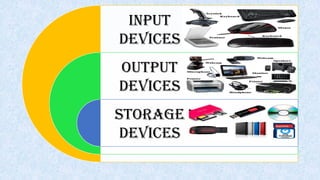
INPUT
DEVICES
OUTPUT
DEVICES
STORAGE
DEVICES
PRESENTED BY
ALI RAZA
MEHDI HASSAN
M.SOBAN SARWER
HUSNAIN MUMTAZ
Presentation layouts
Input devices
Output
devices
Storage
devices
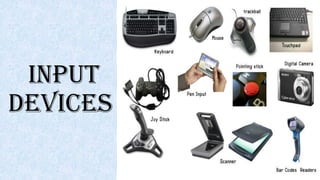
INPUT
DEVICES
What Is Input?
Input is any data
and instructions
entered into the
memory of a
computer.
Input Device
• An input device is any hardware component that allows users to enter
data and instructions into a computer.
LIST OF INPUT DEVICES
Key Board
Mouse
Pointing Devices
Pen Input
Gamepad
 Joystick
Light gun
Optical mark recognition
(OMR)
 Biometrics
MICR (magnetic ink character
recognition)
Magnetic Stripe Cards
Touch Screens and Touch-
Sensitive Pads
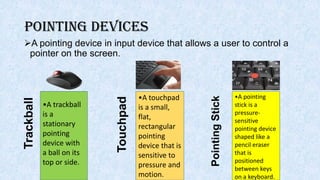
Pointing Devices
A pointing device in input device that allows a user to control a
pointer on the screen.
•A trackball
is a
stationary
pointing
device with
a ball on its
top or side.
•A touchpad
is a small,
flat,
rectangular
pointing
device that is
sensitive to
pressure and
motion.
•A pointing
stick is a
pressure-
sensitive
pointing device
shaped like a
pencil eraser
that is
positioned
between keys
on a keyboard.
Trackball
Touchpad
PointingStick
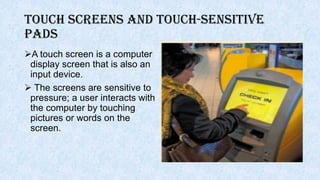
Touch Screens and Touch-Sensitive
Pads
A touch screen is a computer
display screen that is also an
input device.
 The screens are sensitive to
pressure; a user interacts with
the computer by touching
pictures or words on the
screen.
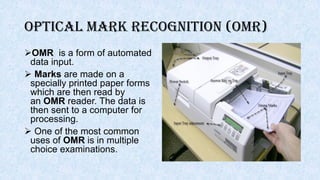
Optical mark recognition (OMR)
OMR is a form of automated
data input.
 Marks are made on a
specially printed paper forms
which are then read by
an OMR reader. The data is
then sent to a computer for
processing.
 One of the most common
uses of OMR is in multiple
choice examinations.
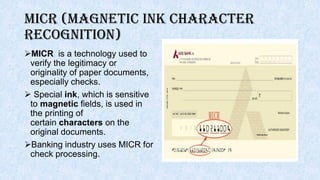
MICR (magnetic ink character
recognition)
MICR is a technology used to
verify the legitimacy or
originality of paper documents,
especially checks.
 Special ink, which is sensitive
to magnetic fields, is used in
the printing of
certain characters on the
original documents.
Banking industry uses MICR for
check processing.
Magnetic stripe card reader
Magnetic stripe card reader
reads the magnetic stripe on
the back of cards such as:
Credit cards
Entertainment
cards
Bank cards
Other similar
cards
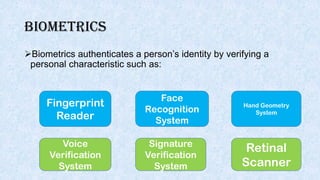
Biometrics
Biometrics authenticates a person’s identity by verifying a
personal characteristic such as:
Fingerprint
Reader
Face
Recognition
System
Hand Geometry
System
Voice
Verification
System
Signature
Verification
System
Retinal
Scanner
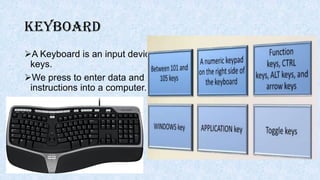
keyboard
A Keyboard is an input device
keys.
We press to enter data and
instructions into a computer.
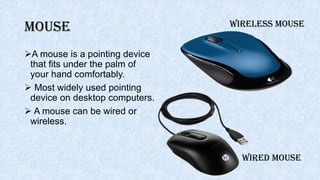
Mouse
A mouse is a pointing device
that fits under the palm of
your hand comfortably.
 Most widely used pointing
device on desktop computers.
 A mouse can be wired or
wireless.
WIRED MOUSE
WIRELESS MOUSE
Other Types of Input Devices
Joystick Light gun Gamepad Wii Remote
OUTPUT
DEVICES
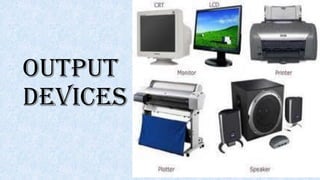
Output devices
Any hardware component that convey information to one or
more people.
Some of the most common output devices that people are
familiar with include.
monitor printer plotter
speaker projector
Monitor(display)
A display device is an output device that visually conveys text,
graphics, and video information.
 Information shown on a display device is called soft copy
because the information exists electronically and is displayed
for a temporary period of time.
Display devices include CRT monitors, LCD monitors, gas
plasma monitors etc.
Projector
A projector or image projector
is an optical device .
It projects an image (or
moving images) onto a
surface, commonly a
projection screen.
 Projectors can project the
image directly, by using
lasers.
Speaker
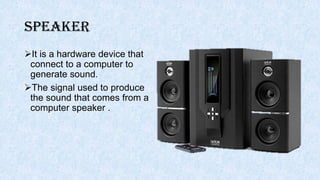
It is a hardware device that
connect to a computer to
generate sound.
The signal used to produce
the sound that comes from a
computer speaker .
Printer
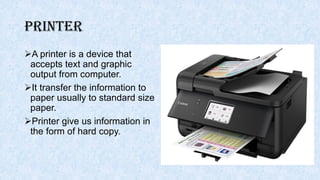
A printer is a device that
accepts text and graphic
output from computer.
It transfer the information to
paper usually to standard size
paper.
Printer give us information in
the form of hard copy.
Plotter
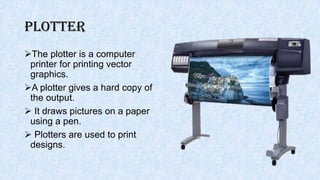
The plotter is a computer
printer for printing vector
graphics.
A plotter gives a hard copy of
the output.
 It draws pictures on a paper
using a pen.
 Plotters are used to print
designs.
STORAGE
DEVICES
Storage devices
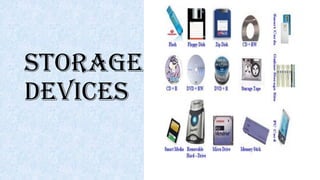
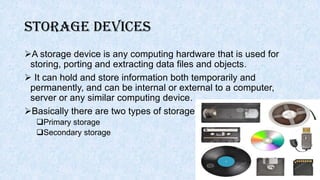
A storage device is any computing hardware that is used for
storing, porting and extracting data files and objects.
 It can hold and store information both temporarily and
permanently, and can be internal or external to a computer,
server or any similar computing device.
Basically there are two types of storage
Primary storage
Secondary storage
Primary storage
 Also known as main memory.
 Main memory is directly or indirectly connected to the central
processing unit via a memory bus.
 The CPU continuously reads instructions stored there and executes
them as required.
Example
RAM
ROM
CACHE
Primary storage
 RAM
• It is called Random Access Memory because any of the data in RAM
can be accessed just as fast as any of the other data.
 ROM
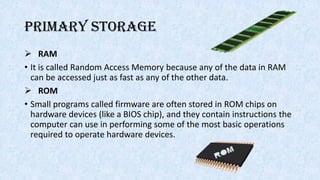
• Small programs called firmware are often stored in ROM chips on
hardware devices (like a BIOS chip), and they contain instructions the
computer can use in performing some of the most basic operations
required to operate hardware devices.
Secondary storage
It is not directly accessible by the CPU.
 Computer usually uses its input/output channels to access
secondary storage and transfers the desired data using
intermediate area in primary storage.
Storage devices
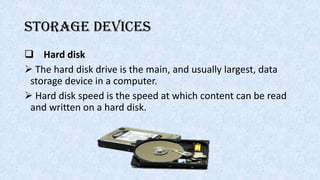
 Hard disk
 The hard disk drive is the main, and usually largest, data
storage device in a computer.
 Hard disk speed is the speed at which content can be read
and written on a hard disk.
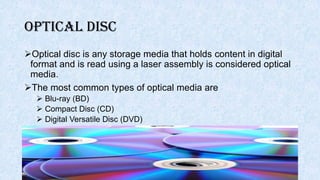
Optical Disc
Optical disc is any storage media that holds content in digital
format and is read using a laser assembly is considered optical
media.
The most common types of optical media are
 Blu-ray (BD)
 Compact Disc (CD)
 Digital Versatile Disc (DVD)
USB Flash Drive
A small, portable flash memory card that plugs into a
computer’s USB port and functions as a portable hard drive.
 Flash drives are available in sizes such as 256MB,
512MB,1GB, 5GB, and 16GB and are an easy way to transfer
and store information.
THANKS
FOR YOUR
ATTENTION
NOW YOU
CAN CLAP
IF YOU HAVE ANY
QUESTION
MY FRIEND
GOOGLE WILL
ANSWER THEM

Input out and storage devices

  • 2.
  • 3.
    PRESENTED BY ALI RAZA MEHDIHASSAN M.SOBAN SARWER HUSNAIN MUMTAZ
  • 4.
  • 5.
  • 6.
    What Is Input? Inputis any data and instructions entered into the memory of a computer.
  • 7.
    Input Device • Aninput device is any hardware component that allows users to enter data and instructions into a computer.
  • 8.
    LIST OF INPUTDEVICES Key Board Mouse Pointing Devices Pen Input Gamepad  Joystick Light gun Optical mark recognition (OMR)  Biometrics MICR (magnetic ink character recognition) Magnetic Stripe Cards Touch Screens and Touch- Sensitive Pads
  • 9.
    Pointing Devices A pointingdevice in input device that allows a user to control a pointer on the screen. •A trackball is a stationary pointing device with a ball on its top or side. •A touchpad is a small, flat, rectangular pointing device that is sensitive to pressure and motion. •A pointing stick is a pressure- sensitive pointing device shaped like a pencil eraser that is positioned between keys on a keyboard. Trackball Touchpad PointingStick
  • 10.
    Touch Screens andTouch-Sensitive Pads A touch screen is a computer display screen that is also an input device.  The screens are sensitive to pressure; a user interacts with the computer by touching pictures or words on the screen.
  • 11.
    Optical mark recognition(OMR) OMR is a form of automated data input.  Marks are made on a specially printed paper forms which are then read by an OMR reader. The data is then sent to a computer for processing.  One of the most common uses of OMR is in multiple choice examinations.
  • 12.
    MICR (magnetic inkcharacter recognition) MICR is a technology used to verify the legitimacy or originality of paper documents, especially checks.  Special ink, which is sensitive to magnetic fields, is used in the printing of certain characters on the original documents. Banking industry uses MICR for check processing.
  • 13.
    Magnetic stripe cardreader Magnetic stripe card reader reads the magnetic stripe on the back of cards such as: Credit cards Entertainment cards Bank cards Other similar cards
  • 14.
    Biometrics Biometrics authenticates aperson’s identity by verifying a personal characteristic such as: Fingerprint Reader Face Recognition System Hand Geometry System Voice Verification System Signature Verification System Retinal Scanner
  • 16.
    keyboard A Keyboard isan input device keys. We press to enter data and instructions into a computer.
  • 17.
    Mouse A mouse isa pointing device that fits under the palm of your hand comfortably.  Most widely used pointing device on desktop computers.  A mouse can be wired or wireless. WIRED MOUSE WIRELESS MOUSE
  • 18.
    Other Types ofInput Devices Joystick Light gun Gamepad Wii Remote
  • 19.
  • 20.
    Output devices Any hardwarecomponent that convey information to one or more people. Some of the most common output devices that people are familiar with include. monitor printer plotter speaker projector
  • 21.
    Monitor(display) A display deviceis an output device that visually conveys text, graphics, and video information.  Information shown on a display device is called soft copy because the information exists electronically and is displayed for a temporary period of time. Display devices include CRT monitors, LCD monitors, gas plasma monitors etc.
  • 22.
    Projector A projector orimage projector is an optical device . It projects an image (or moving images) onto a surface, commonly a projection screen.  Projectors can project the image directly, by using lasers.
  • 23.
    Speaker It is ahardware device that connect to a computer to generate sound. The signal used to produce the sound that comes from a computer speaker .
  • 24.
    Printer A printer isa device that accepts text and graphic output from computer. It transfer the information to paper usually to standard size paper. Printer give us information in the form of hard copy.
  • 25.
    Plotter The plotter isa computer printer for printing vector graphics. A plotter gives a hard copy of the output.  It draws pictures on a paper using a pen.  Plotters are used to print designs.
  • 26.
  • 27.
    Storage devices A storagedevice is any computing hardware that is used for storing, porting and extracting data files and objects.  It can hold and store information both temporarily and permanently, and can be internal or external to a computer, server or any similar computing device. Basically there are two types of storage Primary storage Secondary storage
  • 28.
    Primary storage  Alsoknown as main memory.  Main memory is directly or indirectly connected to the central processing unit via a memory bus.  The CPU continuously reads instructions stored there and executes them as required. Example RAM ROM CACHE
  • 29.
    Primary storage  RAM •It is called Random Access Memory because any of the data in RAM can be accessed just as fast as any of the other data.  ROM • Small programs called firmware are often stored in ROM chips on hardware devices (like a BIOS chip), and they contain instructions the computer can use in performing some of the most basic operations required to operate hardware devices.
  • 30.
    Secondary storage It isnot directly accessible by the CPU.  Computer usually uses its input/output channels to access secondary storage and transfers the desired data using intermediate area in primary storage.
  • 31.
    Storage devices  Harddisk  The hard disk drive is the main, and usually largest, data storage device in a computer.  Hard disk speed is the speed at which content can be read and written on a hard disk.
  • 32.
    Optical Disc Optical discis any storage media that holds content in digital format and is read using a laser assembly is considered optical media. The most common types of optical media are  Blu-ray (BD)  Compact Disc (CD)  Digital Versatile Disc (DVD)
  • 33.
    USB Flash Drive Asmall, portable flash memory card that plugs into a computer’s USB port and functions as a portable hard drive.  Flash drives are available in sizes such as 256MB, 512MB,1GB, 5GB, and 16GB and are an easy way to transfer and store information.
  • 34.
  • 35.
    IF YOU HAVEANY QUESTION MY FRIEND GOOGLE WILL ANSWER THEM