Your Interactive Guide
to the Digital World
Discovering
Computers 2012
What Is Input?
• Input is any data and instructions entered into the
memory of a computer
Discovering Computers 2012: Chapter 5
2Pages 258 – 259
Figure 5-1
What Is Input?
Discovering Computers 2012: Chapter 5
3Pages 258 - 259
• Instructions can be entered into the computer in the
form of programs, commands, and user responses
A program is a series of related
instructions that tells a computer what
tasks to perform and how to perform
them
Programs respond to commands that a
user issues
A user response is an instruction a user
issues by replying to a question
displayed by a program
What Are Input Devices
An input device
is any hardware
component that
allows users to
enter data and
instructions into
a computer
Discovering Computers 2012: Chapter 5
4Page 260
The Keyboard
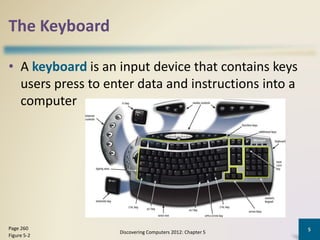
• A keyboard is an input device that contains keys
users press to enter data and instructions into a
computer
Discovering Computers 2012: Chapter 5
5Page 260
Figure 5-2
Mouse
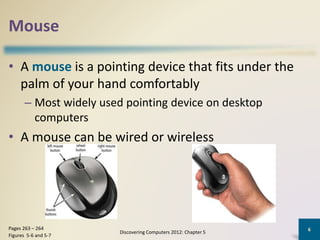
• A mouse is a pointing device that fits under the
palm of your hand comfortably
– Most widely used pointing device on desktop
computers
• A mouse can be wired or wireless
Discovering Computers 2012: Chapter 5
6Pages 263 – 264
Figures 5-6 and 5-7
Mouse
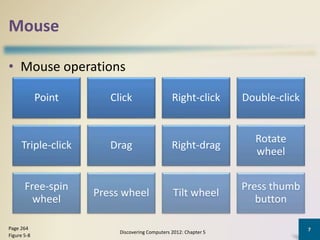
• Mouse operations
Discovering Computers 2012: Chapter 5
7Page 264
Figure 5-8
Point Click Right-click Double-click
Triple-click Drag Right-drag
Rotate
wheel
Free-spin
wheel
Press wheel Tilt wheel
Press thumb
button
Touch Screens and Touch-Sensitive Pads
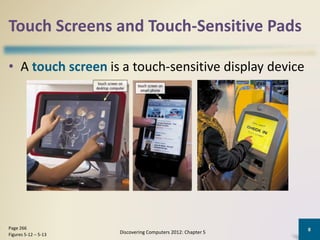
• A touch screen is a touch-sensitive display device
Discovering Computers 2012: Chapter 5
8Page 266
Figures 5-12 – 5-13
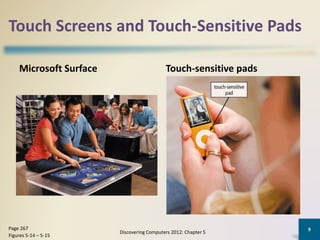
Touch Screens and Touch-Sensitive Pads
Microsoft Surface Touch-sensitive pads
Discovering Computers 2012: Chapter 5
9Page 267
Figures 5-14 – 5-15
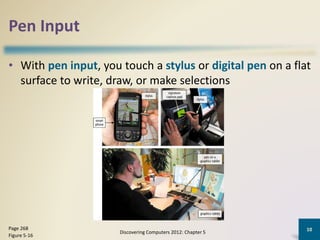
Pen Input
• With pen input, you touch a stylus or digital pen on a flat
surface to write, draw, or make selections
Discovering Computers 2012: Chapter 5
10Page 268
Figure 5-16

Input OR Input devices

  • 1.
    Your Interactive Guide tothe Digital World Discovering Computers 2012
  • 2.
    What Is Input? •Input is any data and instructions entered into the memory of a computer Discovering Computers 2012: Chapter 5 2Pages 258 – 259 Figure 5-1
  • 3.
    What Is Input? DiscoveringComputers 2012: Chapter 5 3Pages 258 - 259 • Instructions can be entered into the computer in the form of programs, commands, and user responses A program is a series of related instructions that tells a computer what tasks to perform and how to perform them Programs respond to commands that a user issues A user response is an instruction a user issues by replying to a question displayed by a program
  • 4.
    What Are InputDevices An input device is any hardware component that allows users to enter data and instructions into a computer Discovering Computers 2012: Chapter 5 4Page 260
  • 5.
    The Keyboard • Akeyboard is an input device that contains keys users press to enter data and instructions into a computer Discovering Computers 2012: Chapter 5 5Page 260 Figure 5-2
  • 6.
    Mouse • A mouseis a pointing device that fits under the palm of your hand comfortably – Most widely used pointing device on desktop computers • A mouse can be wired or wireless Discovering Computers 2012: Chapter 5 6Pages 263 – 264 Figures 5-6 and 5-7
  • 7.
    Mouse • Mouse operations DiscoveringComputers 2012: Chapter 5 7Page 264 Figure 5-8 Point Click Right-click Double-click Triple-click Drag Right-drag Rotate wheel Free-spin wheel Press wheel Tilt wheel Press thumb button
  • 8.
    Touch Screens andTouch-Sensitive Pads • A touch screen is a touch-sensitive display device Discovering Computers 2012: Chapter 5 8Page 266 Figures 5-12 – 5-13
  • 9.
    Touch Screens andTouch-Sensitive Pads Microsoft Surface Touch-sensitive pads Discovering Computers 2012: Chapter 5 9Page 267 Figures 5-14 – 5-15
  • 10.
    Pen Input • Withpen input, you touch a stylus or digital pen on a flat surface to write, draw, or make selections Discovering Computers 2012: Chapter 5 10Page 268 Figure 5-16