INPUT DEVICEs AND OUPUT
DEVICEs
Presented By
Mrs.R.Atheeswari, M.Com;M.Phil;
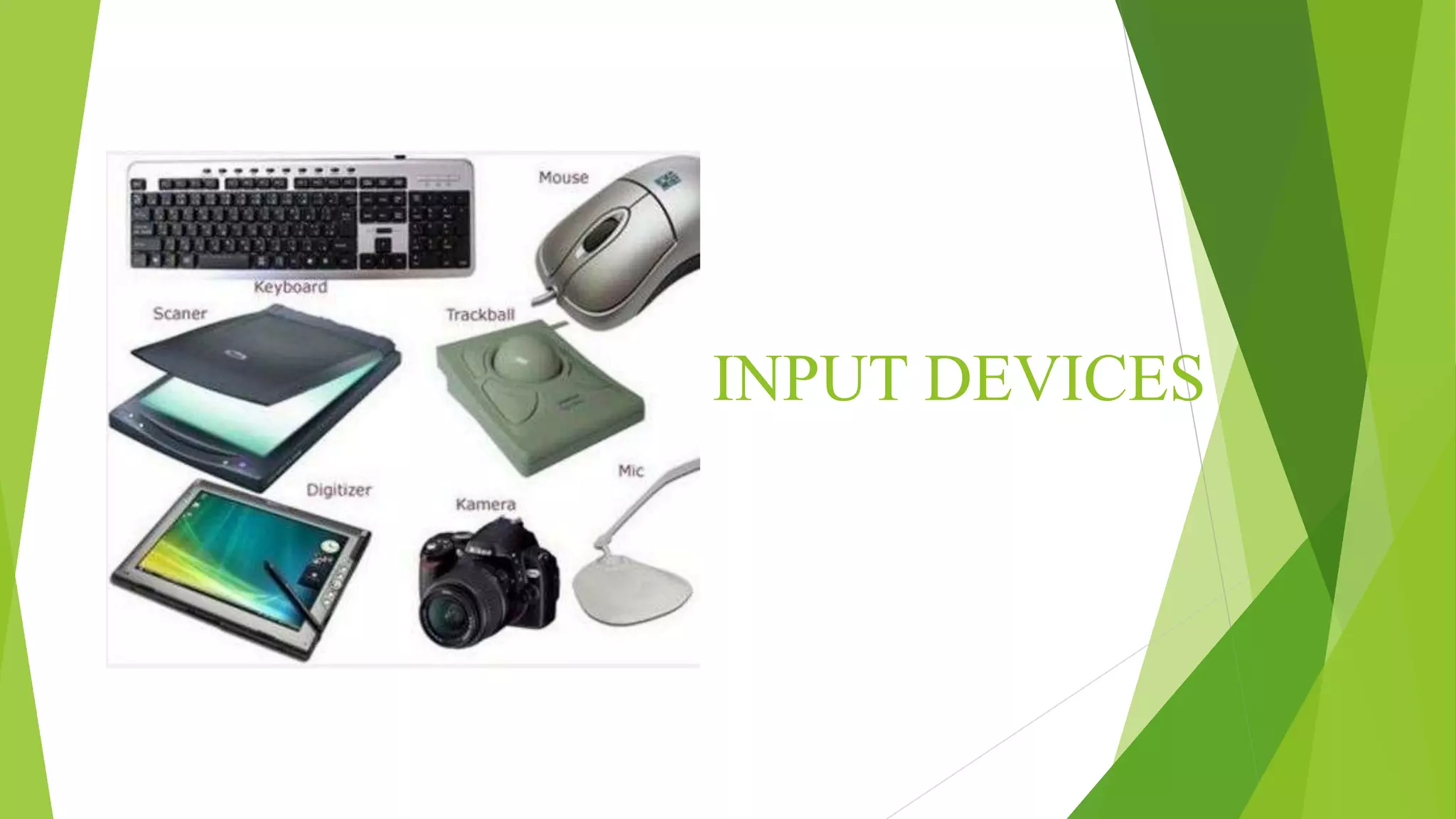
INPUT DEVICES
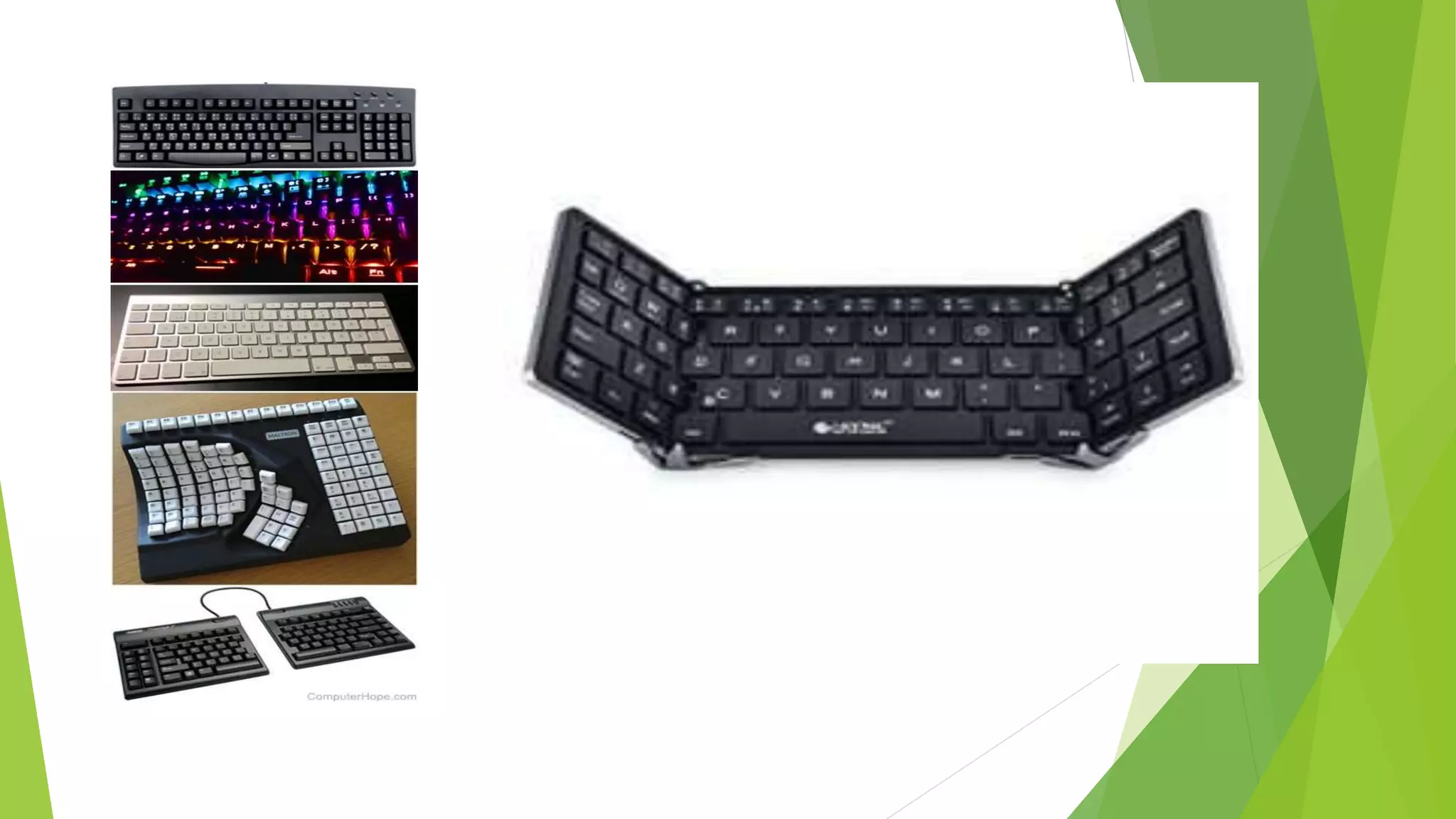
KEYBOARD
 'Keyboards' are a human interface device which is represented as
a layout of buttons.
 Each button, or key, can be used to either input a linguistic
character to a computer, or to call upon a particular function of
the computer.
 They act as the main text entry interface for most users.
 Traditional keyboards use spring-based buttons, though newer
variations employ virtual keys, or even projected keyboards.
MOUSE
 Pointing devices are the most commonly used input
devices today.
 A pointing device is any human interface device
that allows a user to input spatial data to a computer.
 Mouse and touchpads, this is usually achieved by
detecting movement across a physical surface.
 Movements of the pointing device are echoed on the
screen by movements of the pointer, creating a
simple, intuitive way to navigate a
computer's graphical user interface (GUI).
 Early mouse devices connected to computers
through a cable or cord and were characterized
by a roller ball integrated as a movement sensor
underneath the device.
 Modern mouse devices use optical technology,
where cursor movements are controlled by a
visible or invisible light beam.
 Many models feature wireless connectivity
through various wireless technologies, including
radio frequency (RF) and Bluetooth.
Voice recognition
 Voice recognition is commonly used to operate a
device, perform commands, or write without
having to use a keyboard, mouse, or press any
buttons.
 Today, this is done on a computer
with ASR (automatic speech recognition)
software programs.
 Many ASR programs require the user to "train" the
ASR program to recognize their voice so that it
can more accurately convert the speech to text.
 For example, you could say "open Internet" and
the computer would open the Internet browser.
JOY STICK  A joystick is an input
device consisting of a stick that
pivots on a base and reports its
angle or direction to the device it
is controlling.
 Joysticks are often used to
control video games, and usually
have one or more push-buttons
whose state can also be read by
the computer.
 A popular variation of the
joystick used on modern video
game consoles is the analog
stick.
 Joysticks are also used for
controlling machines such as
cranes, trucks.
TOUCHSCREEN
 A touchscreen, or touch screen, is a both input and
output device and normally layered on the top of
an electronic visual display of an information
processing system.
 The touchscreen enables the user to interact directly
with what is displayed, rather than using
a mouse, touchpad, or other such devices.
 A user can give input or control the information
processing system through simple or multi-
touch gestures by touching the screen with a
special stylus or one or more fingers OR PEN.
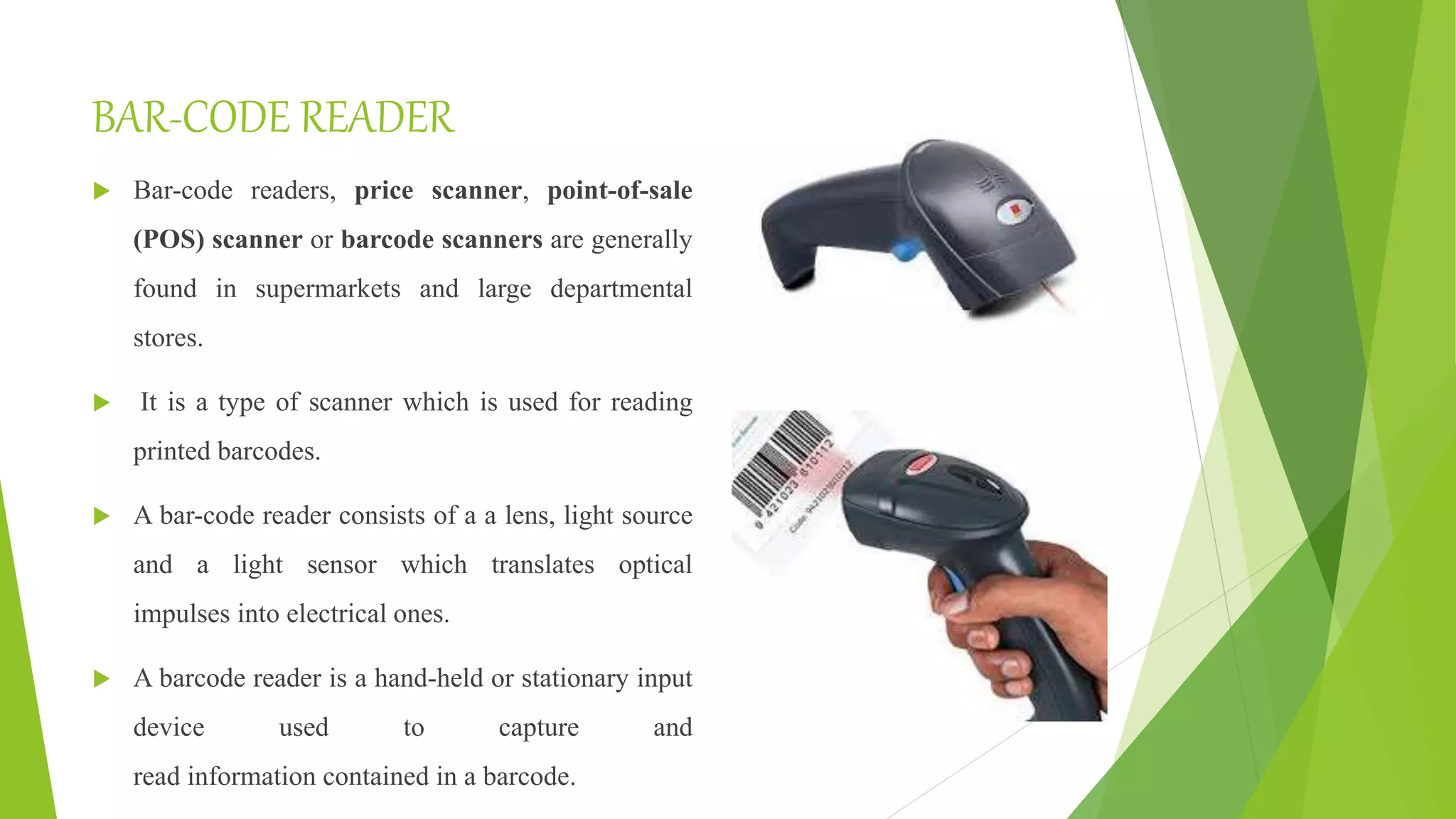
BAR-CODE READER
 Bar-code readers, price scanner, point-of-sale
(POS) scanner or barcode scanners are generally
found in supermarkets and large departmental
stores.
 It is a type of scanner which is used for reading
printed barcodes.
 A bar-code reader consists of a a lens, light source
and a light sensor which translates optical
impulses into electrical ones.
 A barcode reader is a hand-held or stationary input
device used to capture and
read information contained in a barcode.
HIGH-DEGREE OF FREEDOM INPUT DEVICES-WIRED GLOVE
 A wired glove is an input
device for human–computer
interaction worn like a glove.
 Various sensor technologies are used to
capture physical data such as bending
of fingers. Often a motion tracker, such
as a magnetic tracking device or inertial
tracking device, is attached to capture
the global position/rotation data of the
glove.
 These movements are then interpreted
by the software that accompanies the
glove, so any one movement can mean
COMPOSITE DEVICE
 Input devices, such as buttons and joysticks, can be
combined on a single physical device that could be
thought of as a composite device.
 Many gaming devices have controllers like this.
 Technically mice are composite devices, as they both
track movement and provide buttons for clicking, but
composite devices are generally considered to have more
than two different forms of input.
VIDEO INPUT DEVICES
 Video input devices are used to digitize
images or video from the outside world into
the computer.
 The information can be stored in a multitude
of formats depending on the user’s
requirement.
OUTPUT DEVICES
MONITOR
 The most common output device used with
computers is the monitor, which displays video
images and text.
 A monitor essentially consists of a screen,
circuitry, a power supply, buttons to adjust screen
settings, and a casing that contains all of these
components.
 The first monitors used the same technology as
early televisions, relying on a cathode ray tube
and fluorescent screen, but nowadays they
incorporate flat panel display technology.
 VDT(video display terminal) and VDU(video
PRINTER
 Printers are another common output device found in
homes in offices.
 In computing terms, they take electronic data stored
on a computer and generates a hard copy of it.
 Usually that means printing images and text onto
paper.
 There are numerous different types of printer, with
Inkjet and laser printers being two of the most
common.
 Modern printers usually connect to a computer with a
USB cable or via Wi-Fi.
Computer Speakers
 Computer speakers are hardware devices that
transform the signal from the computer's sound card
into audio.
 Speakers are essential if you want a louder sound,
surround sound, fuller bass, or just a better quality of
audio.
 External computer speakers began to appear in
stores in the early 1990's when computer gaming,
digital music, and other forms of media became
popular.
 Some computer speakers are wireless nowadays,
connecting to the computer via Bluetooth.
Headphones
 Headphones allow you to listen to audio
without disrupting other people in the
vicinity. They connect via the computer line
out, or to the speakers.
 The first headphones were invented in 1910
for U.S. Navy use.
 Nowadays, headphones come in all sorts of
shapes and sizes, from basic earbuds to the
more traditional style with padding around
the earpieces and a connecting band that fits
over the user's head.
Projector
 This output device "projects" computer
images onto a wall or screen.
 Projectors are typically used for
presentations, watching movies, or as a
teaching aid, as they enable an entire
roomful of people to see images generated
by a single computer.
 Modern projectors usually connect to the
computer via an HDMI cable or VGA.
GPS
 GPS (Global Positioning System) uses a network of
satellites to provide information, which can then be
used to calculate the location of a specific device.
 It is often used with other digital technology, such as
mapping apps. GPS can produce very accurate results,
it was originally developed for the U.S. military, but
following the downing of a civilian airlines flight by
Soviet jets in 1983, the system was made available for
commercial use.
THANK YOU

Information Technology

  • 1.
    INPUT DEVICEs ANDOUPUT DEVICEs Presented By Mrs.R.Atheeswari, M.Com;M.Phil;
  • 2.
  • 3.
    KEYBOARD  'Keyboards' area human interface device which is represented as a layout of buttons.  Each button, or key, can be used to either input a linguistic character to a computer, or to call upon a particular function of the computer.  They act as the main text entry interface for most users.  Traditional keyboards use spring-based buttons, though newer variations employ virtual keys, or even projected keyboards.
  • 5.
    MOUSE  Pointing devicesare the most commonly used input devices today.  A pointing device is any human interface device that allows a user to input spatial data to a computer.  Mouse and touchpads, this is usually achieved by detecting movement across a physical surface.  Movements of the pointing device are echoed on the screen by movements of the pointer, creating a simple, intuitive way to navigate a computer's graphical user interface (GUI).
  • 6.
     Early mousedevices connected to computers through a cable or cord and were characterized by a roller ball integrated as a movement sensor underneath the device.  Modern mouse devices use optical technology, where cursor movements are controlled by a visible or invisible light beam.  Many models feature wireless connectivity through various wireless technologies, including radio frequency (RF) and Bluetooth.
  • 8.
    Voice recognition  Voicerecognition is commonly used to operate a device, perform commands, or write without having to use a keyboard, mouse, or press any buttons.  Today, this is done on a computer with ASR (automatic speech recognition) software programs.  Many ASR programs require the user to "train" the ASR program to recognize their voice so that it can more accurately convert the speech to text.  For example, you could say "open Internet" and the computer would open the Internet browser.
  • 9.
    JOY STICK A joystick is an input device consisting of a stick that pivots on a base and reports its angle or direction to the device it is controlling.  Joysticks are often used to control video games, and usually have one or more push-buttons whose state can also be read by the computer.  A popular variation of the joystick used on modern video game consoles is the analog stick.  Joysticks are also used for controlling machines such as cranes, trucks.
  • 10.
    TOUCHSCREEN  A touchscreen,or touch screen, is a both input and output device and normally layered on the top of an electronic visual display of an information processing system.  The touchscreen enables the user to interact directly with what is displayed, rather than using a mouse, touchpad, or other such devices.  A user can give input or control the information processing system through simple or multi- touch gestures by touching the screen with a special stylus or one or more fingers OR PEN.
  • 11.
    BAR-CODE READER  Bar-codereaders, price scanner, point-of-sale (POS) scanner or barcode scanners are generally found in supermarkets and large departmental stores.  It is a type of scanner which is used for reading printed barcodes.  A bar-code reader consists of a a lens, light source and a light sensor which translates optical impulses into electrical ones.  A barcode reader is a hand-held or stationary input device used to capture and read information contained in a barcode.
  • 13.
    HIGH-DEGREE OF FREEDOMINPUT DEVICES-WIRED GLOVE  A wired glove is an input device for human–computer interaction worn like a glove.  Various sensor technologies are used to capture physical data such as bending of fingers. Often a motion tracker, such as a magnetic tracking device or inertial tracking device, is attached to capture the global position/rotation data of the glove.  These movements are then interpreted by the software that accompanies the glove, so any one movement can mean
  • 14.
    COMPOSITE DEVICE  Inputdevices, such as buttons and joysticks, can be combined on a single physical device that could be thought of as a composite device.  Many gaming devices have controllers like this.  Technically mice are composite devices, as they both track movement and provide buttons for clicking, but composite devices are generally considered to have more than two different forms of input.
  • 15.
    VIDEO INPUT DEVICES Video input devices are used to digitize images or video from the outside world into the computer.  The information can be stored in a multitude of formats depending on the user’s requirement.
  • 17.
  • 18.
    MONITOR  The mostcommon output device used with computers is the monitor, which displays video images and text.  A monitor essentially consists of a screen, circuitry, a power supply, buttons to adjust screen settings, and a casing that contains all of these components.  The first monitors used the same technology as early televisions, relying on a cathode ray tube and fluorescent screen, but nowadays they incorporate flat panel display technology.  VDT(video display terminal) and VDU(video
  • 20.
    PRINTER  Printers areanother common output device found in homes in offices.  In computing terms, they take electronic data stored on a computer and generates a hard copy of it.  Usually that means printing images and text onto paper.  There are numerous different types of printer, with Inkjet and laser printers being two of the most common.  Modern printers usually connect to a computer with a USB cable or via Wi-Fi.
  • 23.
    Computer Speakers  Computerspeakers are hardware devices that transform the signal from the computer's sound card into audio.  Speakers are essential if you want a louder sound, surround sound, fuller bass, or just a better quality of audio.  External computer speakers began to appear in stores in the early 1990's when computer gaming, digital music, and other forms of media became popular.  Some computer speakers are wireless nowadays, connecting to the computer via Bluetooth.
  • 24.
    Headphones  Headphones allowyou to listen to audio without disrupting other people in the vicinity. They connect via the computer line out, or to the speakers.  The first headphones were invented in 1910 for U.S. Navy use.  Nowadays, headphones come in all sorts of shapes and sizes, from basic earbuds to the more traditional style with padding around the earpieces and a connecting band that fits over the user's head.
  • 25.
    Projector  This outputdevice "projects" computer images onto a wall or screen.  Projectors are typically used for presentations, watching movies, or as a teaching aid, as they enable an entire roomful of people to see images generated by a single computer.  Modern projectors usually connect to the computer via an HDMI cable or VGA.
  • 27.
    GPS  GPS (GlobalPositioning System) uses a network of satellites to provide information, which can then be used to calculate the location of a specific device.  It is often used with other digital technology, such as mapping apps. GPS can produce very accurate results, it was originally developed for the U.S. military, but following the downing of a civilian airlines flight by Soviet jets in 1983, the system was made available for commercial use.
  • 29.