
Live Webinar:
Webinar Audio:
You can dial the telephone numbers locat headphones ed on your webinar
panel.
Or listen in using your headphones or computer speakers.
Welcome!
Live Webinar:
Importing and Exporting Data with
Abila MIP Fund Accounting
Webinar Audio:
You can dial the telephone numbers located on your webinar panel.
Or listen in using your headphones or computer speakers.
We will begin shortly.
Today’s Presenter
Jane Houle | Net@Work
Consulting Manager,
Nonprofit Solutions
Webinar Details
• Presentation is roughly 50 minutes
• All phone lines are muted to reduce background noise
• We will have about 10 minutes for questions after the
presentation. Please type your questions in the box
located at the bottom of your webinar panel.
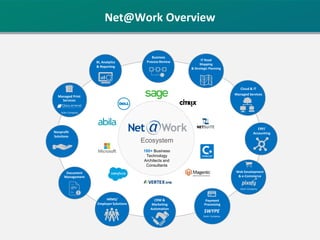
180+ Business
Technology
Architects and
Consultants
IT Road
Mapping
& Strategic Planning
Business
Process Review
Ecosystem
BI, Analytics
& Reporting
Cloud & IT
Managed Services
ERP/
Accounting
Web Development
& e-Commerce
Sister Company
Payment
Processing
SWYPE
Sister Company
CRM &
Marketing
Automation
HRMS/
Employer Solutions
Document
Management
Nonprofit
Solutions
Managed Print
Services
Sister Company
Net@Work Overview
Abila MIP Import
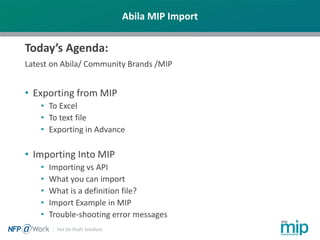
Today’s Agenda:
Latest on Abila/ Community Brands /MIP
• Exporting from MIP
• To Excel
• To text file
• Exporting in Advance
• Importing Into MIP
• Importing vs API
• What you can import
• What is a definition file?
• Import Example in MIP
• Trouble-shooting error messages
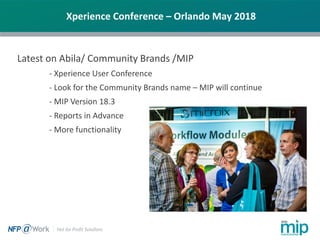
Xperience Conference – Orlando May 2018
Latest on Abila/ Community Brands /MIP
- Xperience User Conference
- Look for the Community Brands name – MIP will continue
- MIP Version 18.3
- Reports in Advance
- More functionality
Abila MIP Import
Why Import?
Importing is used to reduce manual data entry into the MIP
system. It is a faster method for setting or updating tables of data
in MIP such as Vendors, Account Codes or Distribution Codes.
Entering transactions that are lengthy to enter or are derived
from another system such as:
• Outside payroll service
• Medical billing software or other billing system,
• Donor management
Data maintained on a spread sheet
How to Import
The user initiates a process to select a customized mapping (definition)
file and the data file
Abila MIP Import versus API
The Abila MIP Application Programming Interface (API), is a service that
allows a user to access and modify your MIP Fund Accounting data. It
provides a vocabulary of requests and responses that your program code
can use to "talk" securely to MIP Fund Accounting.
• Bringing out MIP Fund Accounting functionality and up-to-the-minute data
in your own application or website.
• Writing custom integration software for transferring data between
MIP Fund Accounting and other third-party applications, such as,
paperless AP, budgeting or donor management programs.
• Use the MIP API to develop a program to schedule communication
directly with MIP Fund Accounting without user involvement. Your
program can request or modify your MIP Fund Accounting data in real
time.
• Interested? Net@Work can help!
Abila MIP Import
What can you import?
• Almost any type of information that you would normally
key into MIP can be imported, such as:
• Journal Vouchers, AP Invoices and other Transactions
• Employee Information
• Vendor and Customer Information
• Budgets
• Clearing items in Bank Reconciliation
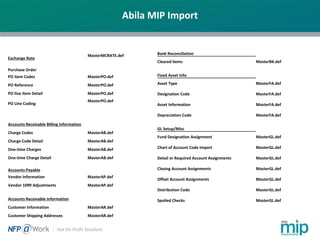
Abila MIP Import
Exchange Rate
MasterMCRATE.def
Purchase Order
PO Item Codes MasterPO.def
PO Reference MasterPO.def
PO line Item Detail MasterPO.def
PO Line Coding
MasterPO.def
Accounts Receivable Billing Information
Charge Codes MasterAB.def
Charge Code Detail MasterAB.def
One-time Charges MasterAB.def
One-time Charge Detail MasterAB.def
Accounts Payable
Vendor Information MasterAP.def
Vendor 1099 Adjustments MasterAP.def
Accounts Receivable Information
Customer Information MasterAR.def
Customer Shipping Addresses MasterAR.def
Bank Reconciliation
Cleared items MasterBK.def
Fixed Asset Info
Asset Type MasterFA.def
Designation Code MasterFA.def
Asset Information MasterFA.def
Depreciation Code MasterFA.def
GL Setup/Misc
Fund Designation Assignment MasterGL.def
Chart of Account Code Import MasterGL.def
Detail or Required Account Assignments MasterGL.def
Closing Account Assignments MasterGL.def
Offset Account Assignments MasterGL.def
Distribution Code MasterGL.def
Spoiled Checks MasterGL.def
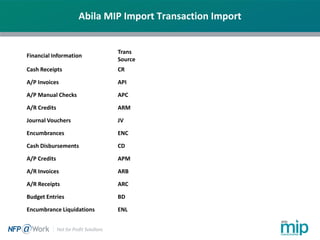
Abila MIP Import Transaction Import
Financial Information
Trans
Source
Cash Receipts CR
A/P Invoices API
A/P Manual Checks APC
A/R Credits ARM
Journal Vouchers JV
Encumbrances ENC
Cash Disbursements CD
A/P Credits APM
A/R Invoices ARB
A/R Receipts ARC
Budget Entries BD
Encumbrance Liquidations ENL
Abila MIP Import
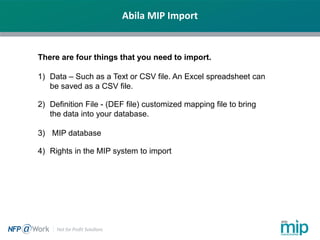
There are four things that you need to import.
1) Data – Such as a Text or CSV file. An Excel spreadsheet can
be saved as a CSV file.
2) Definition File - (DEF file) customized mapping file to bring
the data into your database.
3) MIP database
4) Rights in the MIP system to import
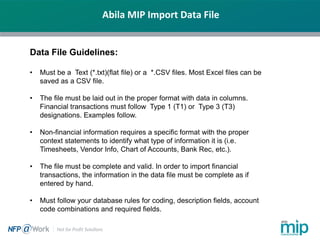
Abila MIP Import Data File
Data File Guidelines:
• Must be a Text (*.txt)(flat file) or a *.CSV files. Most Excel files can be
saved as a CSV file.
• The file must be laid out in the proper format with data in columns.
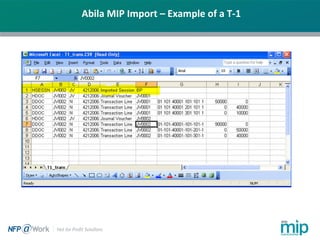
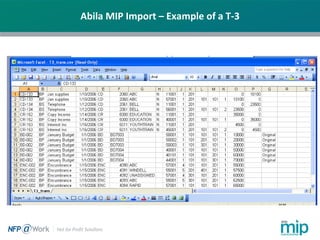
Financial transactions must follow Type 1 (T1) or Type 3 (T3)
designations. Examples follow.
• Non-financial information requires a specific format with the proper
context statements to identify what type of information it is (i.e.
Timesheets, Vendor Info, Chart of Accounts, Bank Rec, etc.).
• The file must be complete and valid. In order to import financial
transactions, the information in the data file must be complete as if
entered by hand.
• Must follow your database rules for coding, description fields, account
code combinations and required fields.
Abila MIP Import – Example of a T-1
Abila MIP Import – Example of a T-3
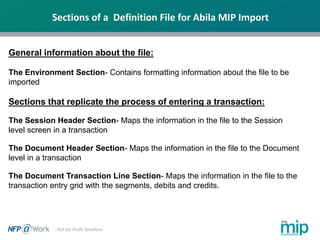
Sections of a Definition File for Abila MIP Import
General information about the file:
The Environment Section- Contains formatting information about the file to be
imported
Sections that replicate the process of entering a transaction:
The Session Header Section- Maps the information in the file to the Session
level screen in a transaction
The Document Header Section- Maps the information in the file to the Document
level in a transaction
The Document Transaction Line Section- Maps the information in the file to the
transaction entry grid with the segments, debits and credits.
Abila MIP Import – Environment Section
Common Statements in Environment Section:
SEGMENTNOTSTRING – Used when your data is a CSV type and
each and every piece of data occupies a unique column.
DISCARDFIRSTNRECORDS – Used in cases where the top rows of
your data file contain header information like column name so you tell
the system how many rows to ignore.
APPLY_OFFSETS – Used to tell the system to apply the offset account
assignments to the data that is imported.
TRANSACTION_READ,# - This is a required block and tells the
system what type of format the data in the file is in, a T1 or a T3.
Abila MIP Import – Environment Section
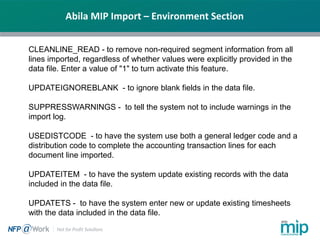
CLEANLINE_READ - to remove non-required segment information from all
lines imported, regardless of whether values were explicitly provided in the
data file. Enter a value of "1" to turn activate this feature.
UPDATEIGNOREBLANK - to ignore blank fields in the data file.
SUPPRESSWARNINGS - to tell the system not to include warnings in the
import log.
USEDISTCODE - to have the system use both a general ledger code and a
distribution code to complete the accounting transaction lines for each
document line imported.
UPDATEITEM - to have the system update existing records with the data
included in the data file.
UPDATETS - to have the system enter new or update existing timesheets
with the data included in the data file.
Abila MIP Import – Environment Section
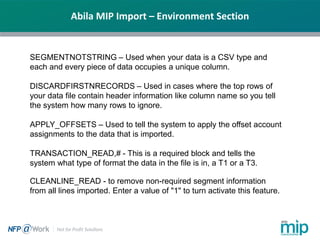
SEGMENTNOTSTRING – Used when your data is a CSV type and
each and every piece of data occupies a unique column.
DISCARDFIRSTNRECORDS – Used in cases where the top rows of
your data file contain header information like column name so you tell
the system how many rows to ignore.
APPLY_OFFSETS – Used to tell the system to apply the offset account
assignments to the data that is imported.
TRANSACTION_READ,# - This is a required block and tells the
system what type of format the data in the file is in, a T1 or a T3.
CLEANLINE_READ - to remove non-required segment information
from all lines imported. Enter a value of "1" to turn activate this feature.
Importing in MIP
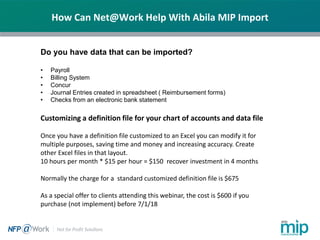
How Can Net@Work Help With Abila MIP Import
Do you have data that can be imported?
• Payroll
• Billing System
• Concur
• Journal Entries created in spreadsheet ( Reimbursement forms)
• Checks from an electronic bank statement
Customizing a definition file for your chart of accounts and data file
Once you have a definition file customized to an Excel you can modify it for
multiple purposes, saving time and money and increasing accuracy. Create
other Excel files in that layout.
10 hours per month * $15 per hour = $150 recover investment in 4 months
Normally the charge for a standard customized definition file is $675
As a special offer to clients attending this webinar, the cost is $600 if you
purchase (not implement) before 7/1/18
Please type in
your questions
Any Questions?
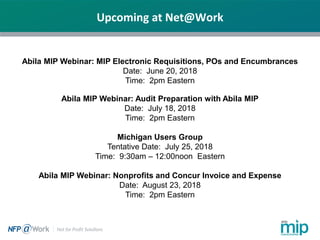
Upcoming at Net@Work
Abila MIP Webinar: MIP Electronic Requisitions, POs and Encumbrances
Date: June 20, 2018
Time: 2pm Eastern
Abila MIP Webinar: Audit Preparation with Abila MIP
Date: July 18, 2018
Time: 2pm Eastern
Michigan Users Group
Tentative Date: July 25, 2018
Time: 9:30am – 12:00noon Eastern
Abila MIP Webinar: Nonprofits and Concur Invoice and Expense
Date: August 23, 2018
Time: 2pm Eastern
Thank You For Attending!
Jane Houle | Net@Work
Nonprofit Solutions Consulting Manager
Email: jhoule@netatwork.com
Phone: 312-651-0364
800-719-3307
www.netatwork.com
netatwork.com/blog
Net@Work YouTube
Follow us on Twitter: @netatwork_corp
Follow Net@Work on LinkedIn
Follow Net@Work on Google+
Follow Net@Work on Facebook
Connect with
Net@Work
Julie Archer | Net@Work
Customer Account Manager
Email: jarcher@netatwork.com
Phone: 417-520-3718

Importing and Exporting Data with Abila MIP

  • 1.
    Live Webinar: Webinar Audio: Youcan dial the telephone numbers locat headphones ed on your webinar panel. Or listen in using your headphones or computer speakers. Welcome! Live Webinar: Importing and Exporting Data with Abila MIP Fund Accounting Webinar Audio: You can dial the telephone numbers located on your webinar panel. Or listen in using your headphones or computer speakers. We will begin shortly.
  • 2.
    Today’s Presenter Jane Houle| Net@Work Consulting Manager, Nonprofit Solutions
  • 3.
    Webinar Details • Presentationis roughly 50 minutes • All phone lines are muted to reduce background noise • We will have about 10 minutes for questions after the presentation. Please type your questions in the box located at the bottom of your webinar panel.
  • 4.
    180+ Business Technology Architects and Consultants ITRoad Mapping & Strategic Planning Business Process Review Ecosystem BI, Analytics & Reporting Cloud & IT Managed Services ERP/ Accounting Web Development & e-Commerce Sister Company Payment Processing SWYPE Sister Company CRM & Marketing Automation HRMS/ Employer Solutions Document Management Nonprofit Solutions Managed Print Services Sister Company Net@Work Overview
  • 5.
    Abila MIP Import Today’sAgenda: Latest on Abila/ Community Brands /MIP • Exporting from MIP • To Excel • To text file • Exporting in Advance • Importing Into MIP • Importing vs API • What you can import • What is a definition file? • Import Example in MIP • Trouble-shooting error messages
  • 6.
    Xperience Conference –Orlando May 2018 Latest on Abila/ Community Brands /MIP - Xperience User Conference - Look for the Community Brands name – MIP will continue - MIP Version 18.3 - Reports in Advance - More functionality
  • 7.
    Abila MIP Import WhyImport? Importing is used to reduce manual data entry into the MIP system. It is a faster method for setting or updating tables of data in MIP such as Vendors, Account Codes or Distribution Codes. Entering transactions that are lengthy to enter or are derived from another system such as: • Outside payroll service • Medical billing software or other billing system, • Donor management Data maintained on a spread sheet How to Import The user initiates a process to select a customized mapping (definition) file and the data file
  • 8.
    Abila MIP Importversus API The Abila MIP Application Programming Interface (API), is a service that allows a user to access and modify your MIP Fund Accounting data. It provides a vocabulary of requests and responses that your program code can use to "talk" securely to MIP Fund Accounting. • Bringing out MIP Fund Accounting functionality and up-to-the-minute data in your own application or website. • Writing custom integration software for transferring data between MIP Fund Accounting and other third-party applications, such as, paperless AP, budgeting or donor management programs. • Use the MIP API to develop a program to schedule communication directly with MIP Fund Accounting without user involvement. Your program can request or modify your MIP Fund Accounting data in real time. • Interested? Net@Work can help!
  • 9.
    Abila MIP Import Whatcan you import? • Almost any type of information that you would normally key into MIP can be imported, such as: • Journal Vouchers, AP Invoices and other Transactions • Employee Information • Vendor and Customer Information • Budgets • Clearing items in Bank Reconciliation
  • 10.
    Abila MIP Import ExchangeRate MasterMCRATE.def Purchase Order PO Item Codes MasterPO.def PO Reference MasterPO.def PO line Item Detail MasterPO.def PO Line Coding MasterPO.def Accounts Receivable Billing Information Charge Codes MasterAB.def Charge Code Detail MasterAB.def One-time Charges MasterAB.def One-time Charge Detail MasterAB.def Accounts Payable Vendor Information MasterAP.def Vendor 1099 Adjustments MasterAP.def Accounts Receivable Information Customer Information MasterAR.def Customer Shipping Addresses MasterAR.def Bank Reconciliation Cleared items MasterBK.def Fixed Asset Info Asset Type MasterFA.def Designation Code MasterFA.def Asset Information MasterFA.def Depreciation Code MasterFA.def GL Setup/Misc Fund Designation Assignment MasterGL.def Chart of Account Code Import MasterGL.def Detail or Required Account Assignments MasterGL.def Closing Account Assignments MasterGL.def Offset Account Assignments MasterGL.def Distribution Code MasterGL.def Spoiled Checks MasterGL.def
  • 11.
    Abila MIP ImportTransaction Import Financial Information Trans Source Cash Receipts CR A/P Invoices API A/P Manual Checks APC A/R Credits ARM Journal Vouchers JV Encumbrances ENC Cash Disbursements CD A/P Credits APM A/R Invoices ARB A/R Receipts ARC Budget Entries BD Encumbrance Liquidations ENL
  • 12.
    Abila MIP Import Thereare four things that you need to import. 1) Data – Such as a Text or CSV file. An Excel spreadsheet can be saved as a CSV file. 2) Definition File - (DEF file) customized mapping file to bring the data into your database. 3) MIP database 4) Rights in the MIP system to import
  • 13.
    Abila MIP ImportData File Data File Guidelines: • Must be a Text (*.txt)(flat file) or a *.CSV files. Most Excel files can be saved as a CSV file. • The file must be laid out in the proper format with data in columns. Financial transactions must follow Type 1 (T1) or Type 3 (T3) designations. Examples follow. • Non-financial information requires a specific format with the proper context statements to identify what type of information it is (i.e. Timesheets, Vendor Info, Chart of Accounts, Bank Rec, etc.). • The file must be complete and valid. In order to import financial transactions, the information in the data file must be complete as if entered by hand. • Must follow your database rules for coding, description fields, account code combinations and required fields.
  • 14.
    Abila MIP Import– Example of a T-1
  • 15.
    Abila MIP Import– Example of a T-3
  • 16.
    Sections of aDefinition File for Abila MIP Import General information about the file: The Environment Section- Contains formatting information about the file to be imported Sections that replicate the process of entering a transaction: The Session Header Section- Maps the information in the file to the Session level screen in a transaction The Document Header Section- Maps the information in the file to the Document level in a transaction The Document Transaction Line Section- Maps the information in the file to the transaction entry grid with the segments, debits and credits.
  • 17.
    Abila MIP Import– Environment Section Common Statements in Environment Section: SEGMENTNOTSTRING – Used when your data is a CSV type and each and every piece of data occupies a unique column. DISCARDFIRSTNRECORDS – Used in cases where the top rows of your data file contain header information like column name so you tell the system how many rows to ignore. APPLY_OFFSETS – Used to tell the system to apply the offset account assignments to the data that is imported. TRANSACTION_READ,# - This is a required block and tells the system what type of format the data in the file is in, a T1 or a T3.
  • 18.
    Abila MIP Import– Environment Section CLEANLINE_READ - to remove non-required segment information from all lines imported, regardless of whether values were explicitly provided in the data file. Enter a value of "1" to turn activate this feature. UPDATEIGNOREBLANK - to ignore blank fields in the data file. SUPPRESSWARNINGS - to tell the system not to include warnings in the import log. USEDISTCODE - to have the system use both a general ledger code and a distribution code to complete the accounting transaction lines for each document line imported. UPDATEITEM - to have the system update existing records with the data included in the data file. UPDATETS - to have the system enter new or update existing timesheets with the data included in the data file.
  • 19.
    Abila MIP Import– Environment Section SEGMENTNOTSTRING – Used when your data is a CSV type and each and every piece of data occupies a unique column. DISCARDFIRSTNRECORDS – Used in cases where the top rows of your data file contain header information like column name so you tell the system how many rows to ignore. APPLY_OFFSETS – Used to tell the system to apply the offset account assignments to the data that is imported. TRANSACTION_READ,# - This is a required block and tells the system what type of format the data in the file is in, a T1 or a T3. CLEANLINE_READ - to remove non-required segment information from all lines imported. Enter a value of "1" to turn activate this feature.
  • 20.
  • 21.
    How Can Net@WorkHelp With Abila MIP Import Do you have data that can be imported? • Payroll • Billing System • Concur • Journal Entries created in spreadsheet ( Reimbursement forms) • Checks from an electronic bank statement Customizing a definition file for your chart of accounts and data file Once you have a definition file customized to an Excel you can modify it for multiple purposes, saving time and money and increasing accuracy. Create other Excel files in that layout. 10 hours per month * $15 per hour = $150 recover investment in 4 months Normally the charge for a standard customized definition file is $675 As a special offer to clients attending this webinar, the cost is $600 if you purchase (not implement) before 7/1/18
  • 22.
    Please type in yourquestions Any Questions?
  • 23.
    Upcoming at Net@Work AbilaMIP Webinar: MIP Electronic Requisitions, POs and Encumbrances Date: June 20, 2018 Time: 2pm Eastern Abila MIP Webinar: Audit Preparation with Abila MIP Date: July 18, 2018 Time: 2pm Eastern Michigan Users Group Tentative Date: July 25, 2018 Time: 9:30am – 12:00noon Eastern Abila MIP Webinar: Nonprofits and Concur Invoice and Expense Date: August 23, 2018 Time: 2pm Eastern
  • 24.
    Thank You ForAttending! Jane Houle | Net@Work Nonprofit Solutions Consulting Manager Email: jhoule@netatwork.com Phone: 312-651-0364 800-719-3307 www.netatwork.com netatwork.com/blog Net@Work YouTube Follow us on Twitter: @netatwork_corp Follow Net@Work on LinkedIn Follow Net@Work on Google+ Follow Net@Work on Facebook Connect with Net@Work Julie Archer | Net@Work Customer Account Manager Email: jarcher@netatwork.com Phone: 417-520-3718