This 2nd VoiceThread is to
makeup for the missed
Feb. 2nd class
Topic: Database Design
By: George Saban
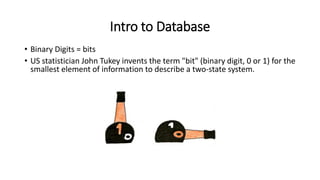
Intro to Database
• Binary Digits = bits
• US statistician John Tukey invents the term "bit" (binary digit, 0 or 1) for the
smallest element of information to describe a two-state system.
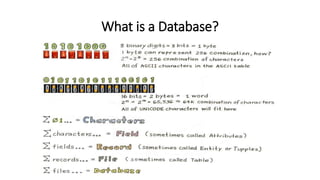
What is a Database?
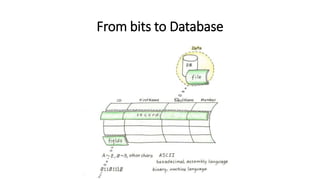
From bits to Database
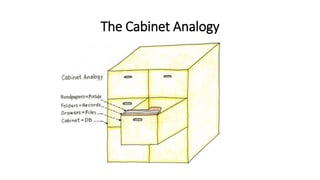
The Cabinet Analogy
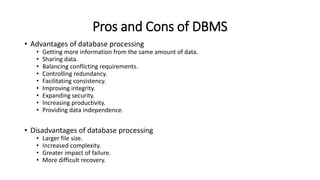
Pros and Cons of DBMS
• Advantages of database processing
• Getting more information from the same amount of data.
• Sharing data.
• Balancing conflicting requirements.
• Controlling redundancy.
• Facilitating consistency.
• Improving integrity.
• Expanding security.
• Increasing productivity.
• Providing data independence.
• Disadvantages of database processing
• Larger file size.
• Increased complexity.
• Greater impact of failure.
• More difficult recovery.
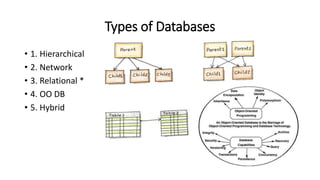
Types of Databases
• 1. Hierarchical
• 2. Network
• 3. Relational *
• 4. OO DB
• 5. Hybrid
Relational Database (RDBMS)
• A collection of interrelated tables.
• Types of Relationships: (next slides)
Types of Relationships
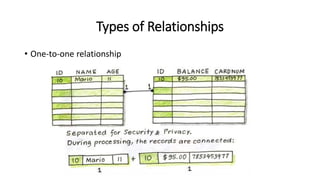
• One-to-one relationship
Types of Relationships
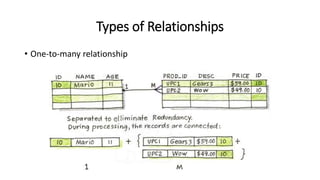
• One-to-many relationship
Types of Relationships
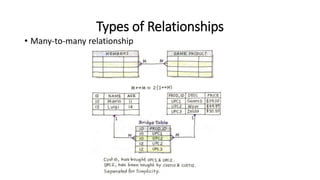
• Many-to-many relationship
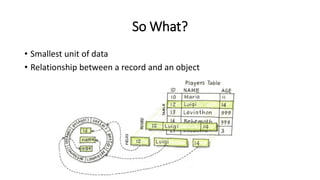
So What?
• Smallest unit of data
• Relationship between a record and an object
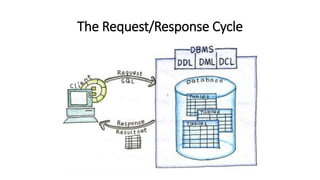
The Request/Response Cycle
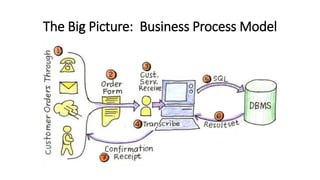
The Big Picture: Business Process Model
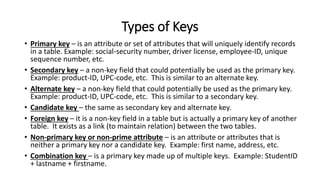
Types of Keys
• Primary key – is an attribute or set of attributes that will uniquely identify records
in a table. Example: social-security number, driver license, employee-ID, unique
sequence number, etc.
• Secondary key – a non-key field that could potentially be used as the primary key.
Example: product-ID, UPC-code, etc. This is similar to an alternate key.
• Alternate key – a non-key field that could potentially be used as the primary key.
Example: product-ID, UPC-code, etc. This is similar to a secondary key.
• Candidate key – the same as secondary key and alternate key.
• Foreign key – it is a non-key field in a table but is actually a primary key of another
table. It exists as a link (to maintain relation) between the two tables.
• Non-primary key or non-prime attribute – is an attribute or attributes that is
neither a primary key nor a candidate key. Example: first name, address, etc.
• Combination key – is a primary key made up of multiple keys. Example: StudentID
+ lastname + firstname.
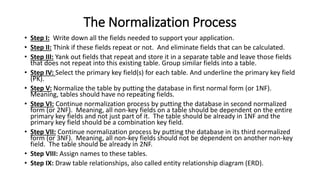
The Normalization Process
• Step I: Write down all the fields needed to support your application.
• Step II: Think if these fields repeat or not. And eliminate fields that can be calculated.
• Step III: Yank out fields that repeat and store it in a separate table and leave those fields
that does not repeat into this existing table. Group similar fields into a table.
• Step IV: Select the primary key field(s) for each table. And underline the primary key field
(PK).
• Step V: Normalize the table by putting the database in first normal form (or 1NF).
Meaning, tables should have no repeating fields.
• Step VI: Continue normalization process by putting the database in second normalized
form (or 2NF). Meaning, all non-key fields on a table should be dependent on the entire
primary key fields and not just part of it. The table should be already in 1NF and the
primary key field should be a combination key field.
• Step VII: Continue normalization process by putting the database in its third normalized
form (or 3NF). Meaning, all non-key fields should not be dependent on another non-key
field. The table should be already in 2NF.
• Step VIII: Assign names to these tables.
• Step IX: Draw table relationships, also called entity relationship diagram (ERD).
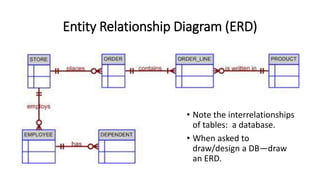
Entity Relationship Diagram (ERD)
• Note the interrelationships
of tables: a database.
• When asked to
draw/design a DB—draw
an ERD.
Thank You!
• Thank you for your patience and for being flexible in making up the
missed classes.
• Comment in as many slides to earn full credit for Week #6.
• Please make sure you digested all the artifacts posted in Canvas under
Week #6.
• Complete also the deliverable for the week.
• I hope to see you on Week #7 to have a conversation regarding
development strategies.

Feb 2nd Makeup Class

  • 1.
    This 2nd VoiceThreadis to makeup for the missed Feb. 2nd class Topic: Database Design By: George Saban
  • 2.
    Intro to Database •Binary Digits = bits • US statistician John Tukey invents the term "bit" (binary digit, 0 or 1) for the smallest element of information to describe a two-state system.
  • 3.
    What is aDatabase?
  • 4.
    From bits toDatabase
  • 5.
  • 6.
    Pros and Consof DBMS • Advantages of database processing • Getting more information from the same amount of data. • Sharing data. • Balancing conflicting requirements. • Controlling redundancy. • Facilitating consistency. • Improving integrity. • Expanding security. • Increasing productivity. • Providing data independence. • Disadvantages of database processing • Larger file size. • Increased complexity. • Greater impact of failure. • More difficult recovery.
  • 7.
    Types of Databases •1. Hierarchical • 2. Network • 3. Relational * • 4. OO DB • 5. Hybrid
  • 8.
    Relational Database (RDBMS) •A collection of interrelated tables. • Types of Relationships: (next slides)
  • 9.
    Types of Relationships •One-to-one relationship
  • 10.
    Types of Relationships •One-to-many relationship
  • 11.
    Types of Relationships •Many-to-many relationship
  • 12.
    So What? • Smallestunit of data • Relationship between a record and an object
  • 13.
  • 14.
    The Big Picture:Business Process Model
  • 15.
    Types of Keys •Primary key – is an attribute or set of attributes that will uniquely identify records in a table. Example: social-security number, driver license, employee-ID, unique sequence number, etc. • Secondary key – a non-key field that could potentially be used as the primary key. Example: product-ID, UPC-code, etc. This is similar to an alternate key. • Alternate key – a non-key field that could potentially be used as the primary key. Example: product-ID, UPC-code, etc. This is similar to a secondary key. • Candidate key – the same as secondary key and alternate key. • Foreign key – it is a non-key field in a table but is actually a primary key of another table. It exists as a link (to maintain relation) between the two tables. • Non-primary key or non-prime attribute – is an attribute or attributes that is neither a primary key nor a candidate key. Example: first name, address, etc. • Combination key – is a primary key made up of multiple keys. Example: StudentID + lastname + firstname.
  • 16.
    The Normalization Process •Step I: Write down all the fields needed to support your application. • Step II: Think if these fields repeat or not. And eliminate fields that can be calculated. • Step III: Yank out fields that repeat and store it in a separate table and leave those fields that does not repeat into this existing table. Group similar fields into a table. • Step IV: Select the primary key field(s) for each table. And underline the primary key field (PK). • Step V: Normalize the table by putting the database in first normal form (or 1NF). Meaning, tables should have no repeating fields. • Step VI: Continue normalization process by putting the database in second normalized form (or 2NF). Meaning, all non-key fields on a table should be dependent on the entire primary key fields and not just part of it. The table should be already in 1NF and the primary key field should be a combination key field. • Step VII: Continue normalization process by putting the database in its third normalized form (or 3NF). Meaning, all non-key fields should not be dependent on another non-key field. The table should be already in 2NF. • Step VIII: Assign names to these tables. • Step IX: Draw table relationships, also called entity relationship diagram (ERD).
  • 17.
    Entity Relationship Diagram(ERD) • Note the interrelationships of tables: a database. • When asked to draw/design a DB—draw an ERD.
  • 18.
    Thank You! • Thankyou for your patience and for being flexible in making up the missed classes. • Comment in as many slides to earn full credit for Week #6. • Please make sure you digested all the artifacts posted in Canvas under Week #6. • Complete also the deliverable for the week. • I hope to see you on Week #7 to have a conversation regarding development strategies.