Operate Database
Application
By: Student Abel Engida
E-mail: abelengida52@gmail.com
Page Content
 01 Database Design
Principle
• Introduction to Database
 02Types of Database
• Features of Database
 03The Design Process
• Entity Relationship Diagram and
Table Relationship
 04Introduction MS
Access
• Exploring Microsoft Access 2010
Operate
Database
Application
A Database is information that is set up for easy access,
management and updating.
 Database design is the organization of data according to a
database model.
 The designer determines what data must be stored and
how the data elements interrelate.
 Database management system manages the data
accordingly.
 Database design involves classifying data and identifying
interrelationships
Database Design Principle
 USABILITY : Any information which we are storing in any
organization should be meaningful for that organization.
 Database Extensibility: you can extend the database
based on your requirements. For example, you can modify
an existing table by adding a new column.
 Data integrity: Now at this point we understand that
information is very much important for any organization.
o Data integrity describes data that's kept complete,
accurate, consistent and safe throughout its entire
lifecycle in the following ways: Complete.
Basic Principle of Database
 Entity integrity: Involves the structure (primary key and its
attributes) of the entity.
o If the primary key is unique and all attributes are fully
dependent on the primary key, then the integrity of the
entity is good.
o In the physical schema, the table’s primary key enforces
entity integrity.
 Domain integrity: It defines that data should be of correct
type and we should handle optional data in correct way.
 We can define proper data types for different attributes
based on organization’s requirement so that correct format
data should present in system.
 Referential integrity: refers to the relationship between
tables. Because each table in a database must have a
primary key,
o this primary key can appear in other tables because of its
relationship to data within those tables.
o When a primary key from one table appears in another table,
it is called a foreign key .
 User-defined integrity: There are few business rules which
we cannot validate just by primary keys, foreign keys etc.
 There has to be some mechanism so that we can validate
complex rules for integrity.
 We can implement these rules in following ways:
Performance:
• As data in increasing day by day so at
some time there will be impact on
performance if database design is poor
or we’ll not take any actions to improve
performance.
Availability:
• The availability of information refers to the
information’s accessibility when required regarding
uptime, locations, and the availability of the data for
future analysis.
• Disaster recovery, redundancy, archiving, and
network delivery all affect availability.
Security:
• For any organizational asset, the level of security
must be secured depending on its value and
sensitivity.
• So security is one of the most important aspect of
good database design.
 A database can best be described as a way of
storing large amounts of information.
 The data can be retrieved and we can even ask
questions of the data and get answers.
For example:
◦ You may want to know how many Students
enrolled in every occupational level.
Open & Design Database Application
 MS Access (MS Office Access ) : is a database management
tool that enables one to store relevant data.
o This also has the capabilities to retrieve, sort, summarize
report and result immediately and effectively.
o It can combine data from various files (tables) through
creating relationships and can make data entry more
efficient and accurate through the use of forms.
o Microsoft Access (MS Access) enables to manage all
important information from a single database file, Within
the file can use the different objects/items:
 Determine the purpose of your database. This helps
prepare you for the remaining steps.
 Find and organize the information required. Gather all of
the types of information you might want to record in the
database, such as product name and order number.
 Divide the information into tables. Divide your
information items into major entities or subjects, such as
Products or Orders. Each subject then becomes a table.
Design process
 Turn information items into columns. Decide what
information you want to store in each table.
 Each item becomes a field, and is displayed as a
column in the table.
- For example: an Teachers table might include
fields such as Last Name and Hire Date.
Specify primary keys
• Choose each table’s have primary key.
The primary key is a column that is
used to uniquely identify each row. An
example might be Product ID or Order
ID.
Set up the table relationships
• Look at each table and decide how the
data in one table is related to the data
in other tables.
Apply the normalization rules
• Apply the data normalization rules to
see if your tables are structured
correctly.
 A database object : is any defined
object in a database that is used to
store or reference data.
o Anything which we make from create
command is known as Database Object.
o It can be used to hold and manipulate
the data.
 A database object in a relational
database is a data structure used to
Database objects
 Metadata : is a “data about data” or synonymously
called table structure that defines what type of data
your data is.
 Tables: A table is a collection of data about a specific
topic, such as products or suppliers recently,
o we define it as a file but technically it was defined as
a container or a worksheet-like container where the
collection of data has been stored.
Type of Database objects
◦Meta Data – Database
Structure
◦Field – Column – Data
◦Fieldname
◦Record - Row – Information
Basic Component of a Table
Queries
 Queries used to view, change, and analyze data in different ways.
 You can also use them as a source of records for forms, reports.
Forms
 A form is a type of a database object that is primarily used to
enter or display data in a database.
 You can also use a form as a switchboard that opens other forms
and reports in the database, or as a custom dialog box that
accepts user input and carries out an action based on the input.
Reports
 A report is an effective way to present your data in a printed
format.
 The most common object that people interact with is the
table. It can be used to hold and manipulate the data.
 Before we proceed to creating your first table, you need
to know the basic components of a table:
◦ Meta Data – Database Structure
◦ Field – Column – Data
◦ Fieldname
◦ Record - Row – Information
Create Data base Objects
 Entering unique names of the columns of the table in the
“field name” column of the design view.
 Names of fields and objects in Microsoft Access can be up
to 64characters long.
 They can include any combination of letters, numbers,
spaces, and special characters except a period (.), an
exclamation point (!), an accent grave (`), and brackets ([ ]).
 They also can't begin with leading spaces
Designing table involves
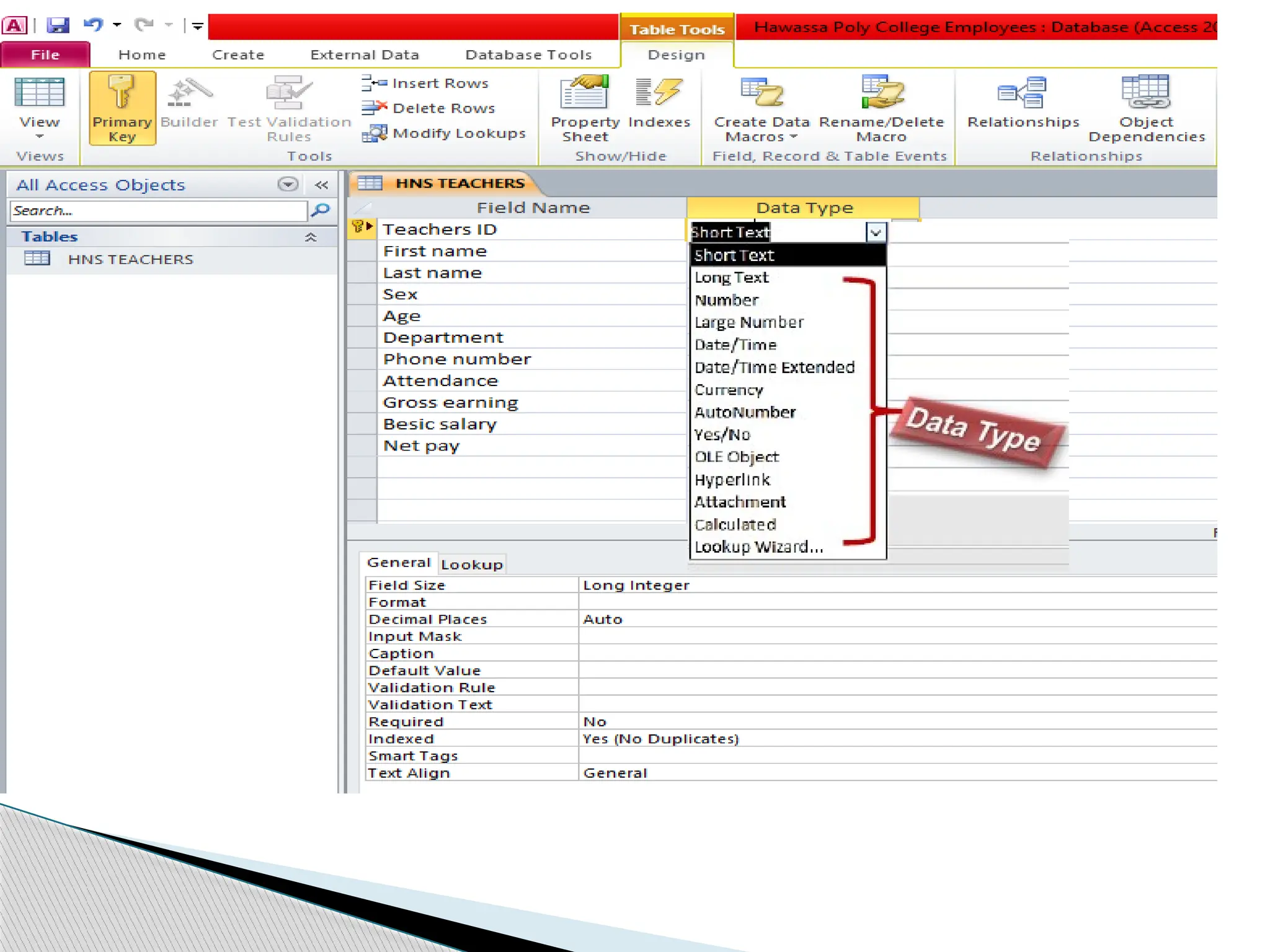
 The different kinds of MS Access data types are:
 Text: allows for the storage of any kind of data, characters,
digits and special characters.
 Memo: is used for texts of more than 255 characters such as
comments or explanations.
 Number: for numerical data used in mathematical
calculations.
 Date/Time: for the introduction of date and time from the
year 100 to 9999.
Data types in Microsoft Access
Currency : For monetary/economic values and
numerical data used in mathematical calculations
in which the data involved contains between one
and four decimals.
Auto number: a unique sequential number
( increasing one by one ), or a number that Access
assigns every time it adds a new record to a table.
Yes/No: Yes and No values: A fields that
contain one of two values (Yes/No, True/False or
Activated/Deactivated).
 OLE Object: Used to embed or link to documents
from other programs like Excel and Word.
 Hyperlink: text or a combination of text and
numbers stored as text and used as a hyperlink
address.
 Attachment :The attachment data type lets you
store one or more files per record.
 Lookup wizard…: A lookup wizard field lets the
user choose from a predefined set of options, like a
"male" or "female" selection or a "country" selection.
 Normalization is the process of organizing data in a
database.
 This includes
creating tables and
establishing relationships between those tables
according to rules designed both to protect the data and
to make the database more flexible by eliminating
redundancy and inconsistent dependency.
 It is also the process of efficiently organizing data in a
database.
Normalization
• Every template that is included with Access is a complete
tracking application that contains predefined tables,
forms, reports, queries, macros, and relationships.
 For example:
◦ to add or rename a field, or change a report.
◦ You can easily add a field to a table in Datasheet view.
 However, you can also add a field to a table in Design
view.
Modify Database object
 When you add a new field to a table, the field is not
automatically added to your existing forms and
reports.
 Before you can delete a field, you must ensure that
it doesn't participate in any table relationships.
 If you try to delete a field for which relationships
exist, Access warns you that you must first delete
the relationships
Add or delete a column in a datasheet
 Are associations between tables that are created using
join statements to retrieve data.
 Each primary key value relates to none or only one record
in the related table.
 Is a logical connection between two tables .
 One of the huge advantages of a relational database is
that, once you have your data held in clearly defined,
compact tables, you can connect or relate the data held
in different tables.
Data base Relationship
i. One-to-one relationships: occur when each entry in the
first table has one, and only one, counterpart in the second
table.
ii. One-to-many relationships: Is the most common type of
database relationship.
iii. Many-to-many relationships: occur when each record in
the first table corresponds to one or more records in the
second table and each record in the second table
corresponds to one or more records in the first table.
Types of Database Relationships
Types of key
Primary Key Foreign key
 is the unique identification of one record.
There is a uniquely identification number,
such as ID number, a serial number, a
code that serves as a primary key .
 A primary key generally focuses on the
uniqueness of the table.
 Table allows only one primary key.
 The primary key doesn’t allow null values
 It can identify the record uniquely in the
database table.
 In primary key, the value can’t be
removed from the parent table.
 Its restriction can be completely defined
on the temporary tables.
 A foreign key contains values
that correspondent to values in
the primary key of another
table.
 A foreign key is a field in the
table that is the primary key in
another table.
 Table can allow more than one
foreign key.
 Foreign key accept multiple
null values.
 In this, the value can be
deleted from the child table.
 Its restriction can not be
defined on the global or local
temporary tables.
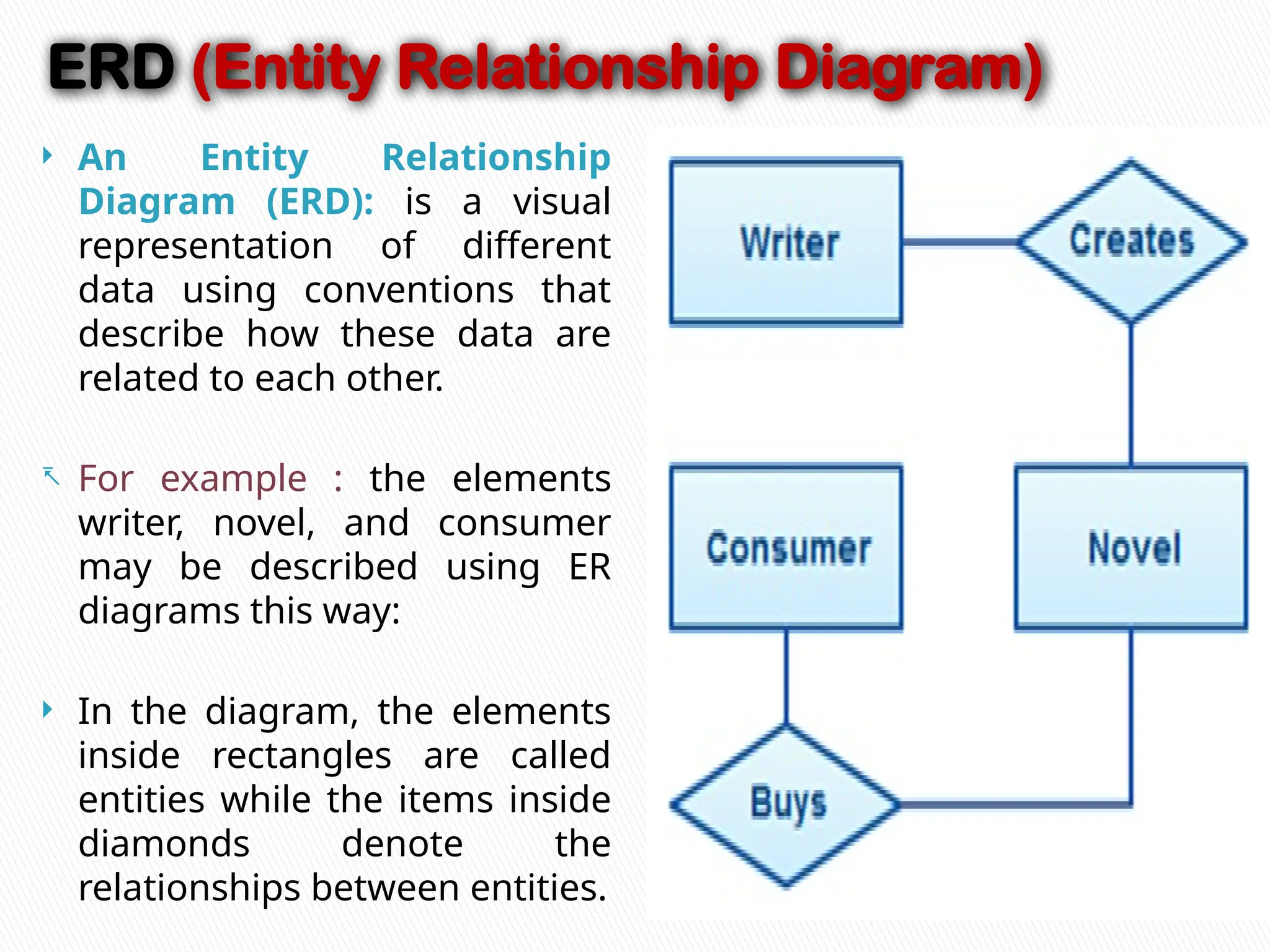
ERD (Entity Relationship Diagram)
 An Entity Relationship
Diagram (ERD): is a visual
representation of different
data using conventions that
describe how these data are
related to each other.
- For example : the elements
writer, novel, and consumer
may be described using ER
diagrams this way:
 In the diagram, the elements
inside rectangles are called
entities while the items inside
diamonds denote the
relationships between entities.
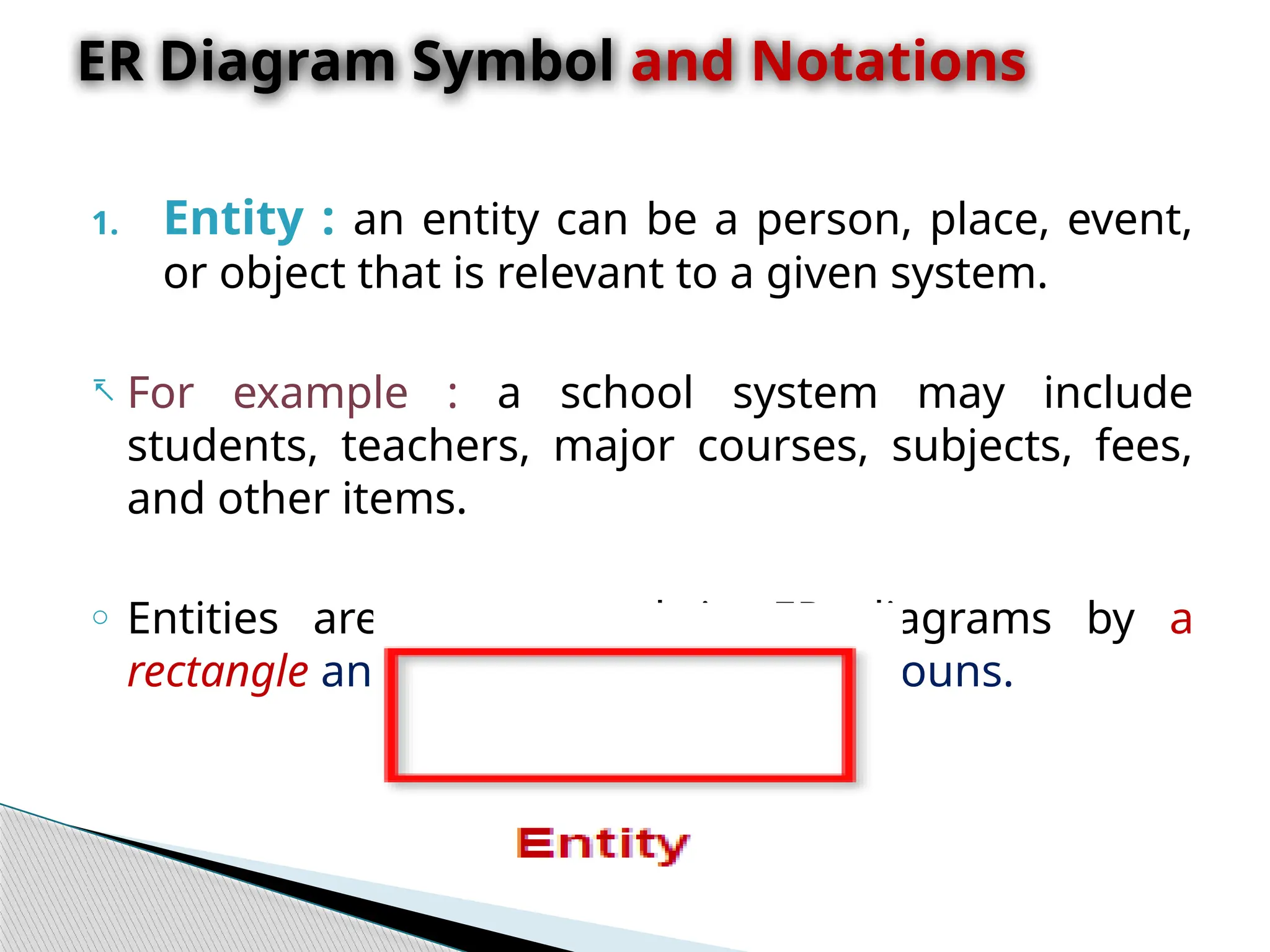
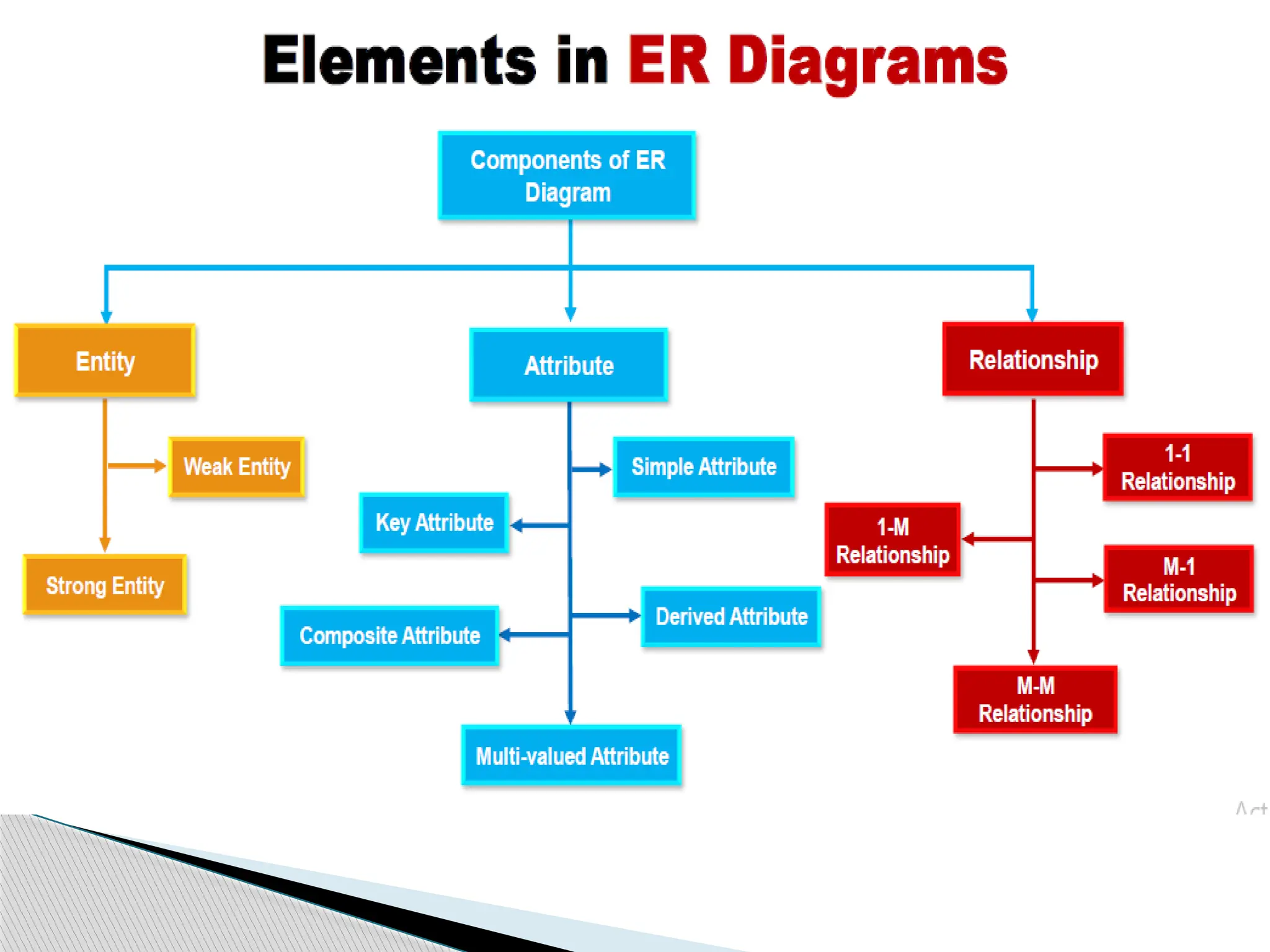
1. Entity : an entity can be a person, place, event,
or object that is relevant to a given system.
- For example : a school system may include
students, teachers, major courses, subjects, fees,
and other items.
o Entities are represented in ER diagrams by a
rectangle and named using singular nouns.
ER Diagram Symbol and Notations
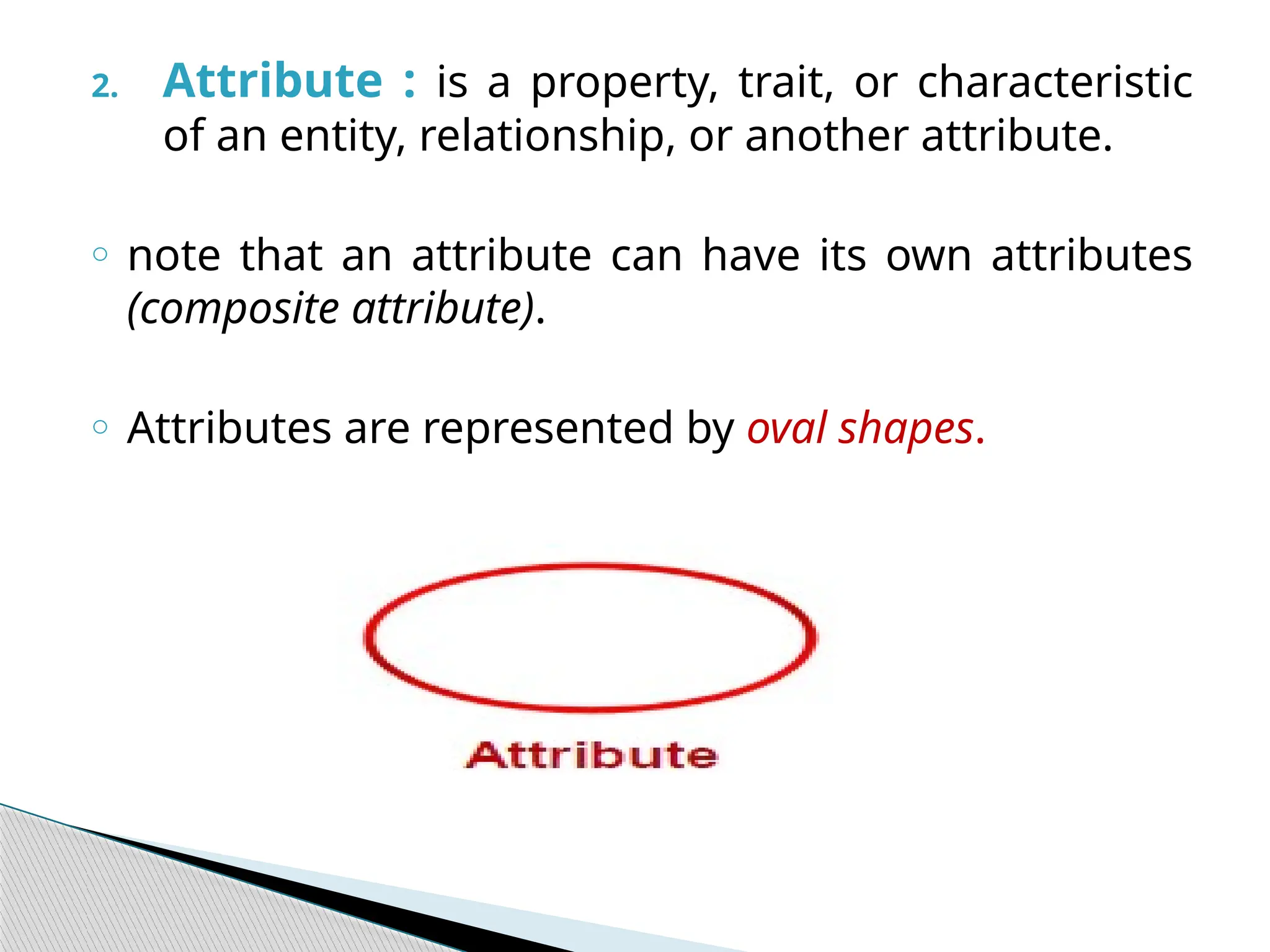
2. Attribute : is a property, trait, or characteristic
of an entity, relationship, or another attribute.
o note that an attribute can have its own attributes
(composite attribute).
o Attributes are represented by oval shapes.
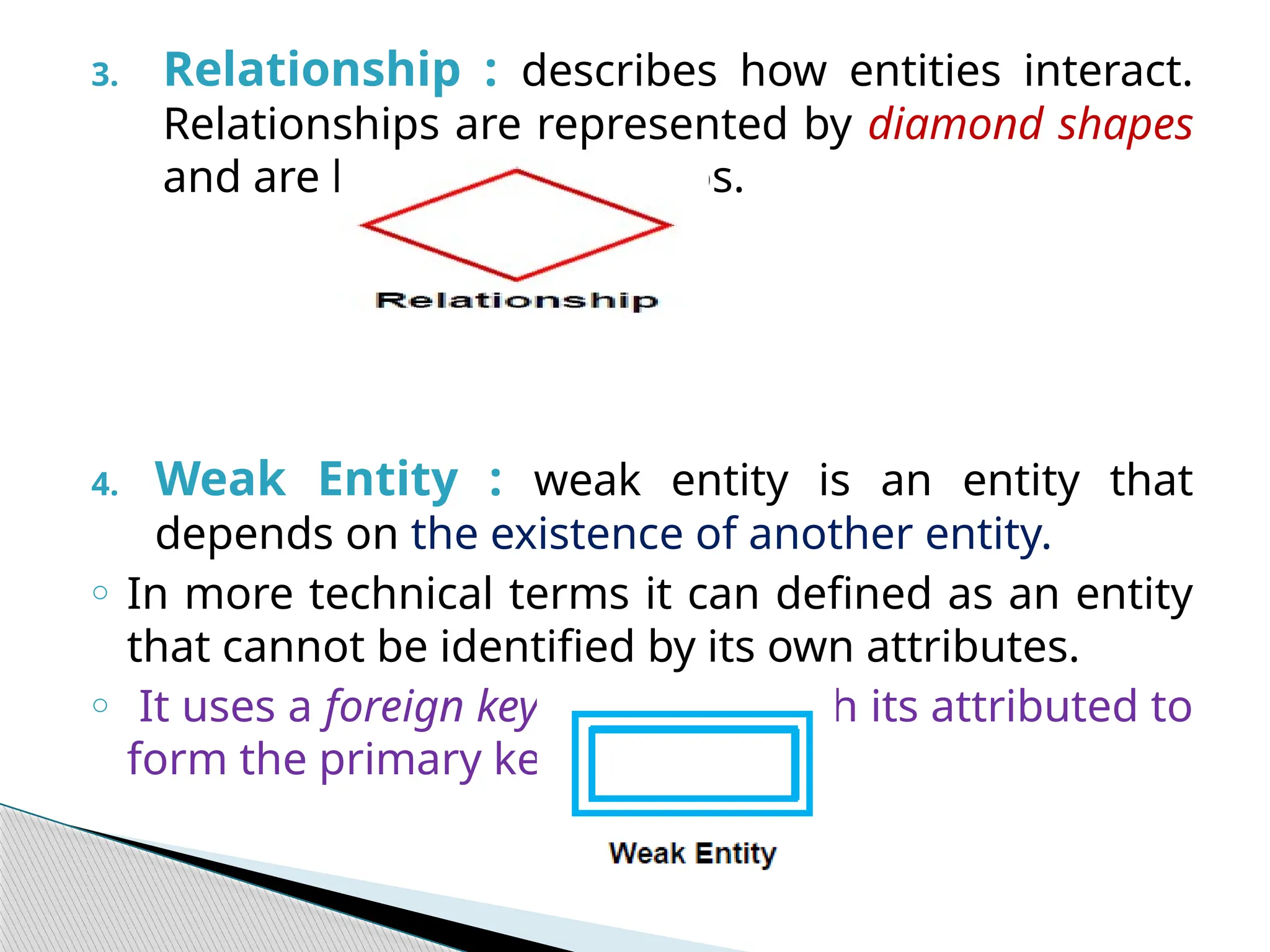
3. Relationship : describes how entities interact.
Relationships are represented by diamond shapes
and are labeled using verbs.
4. Weak Entity : weak entity is an entity that
depends on the existence of another entity.
o In more technical terms it can defined as an entity
that cannot be identified by its own attributes.
o It uses a foreign key combined with its attributed to
form the primary key.
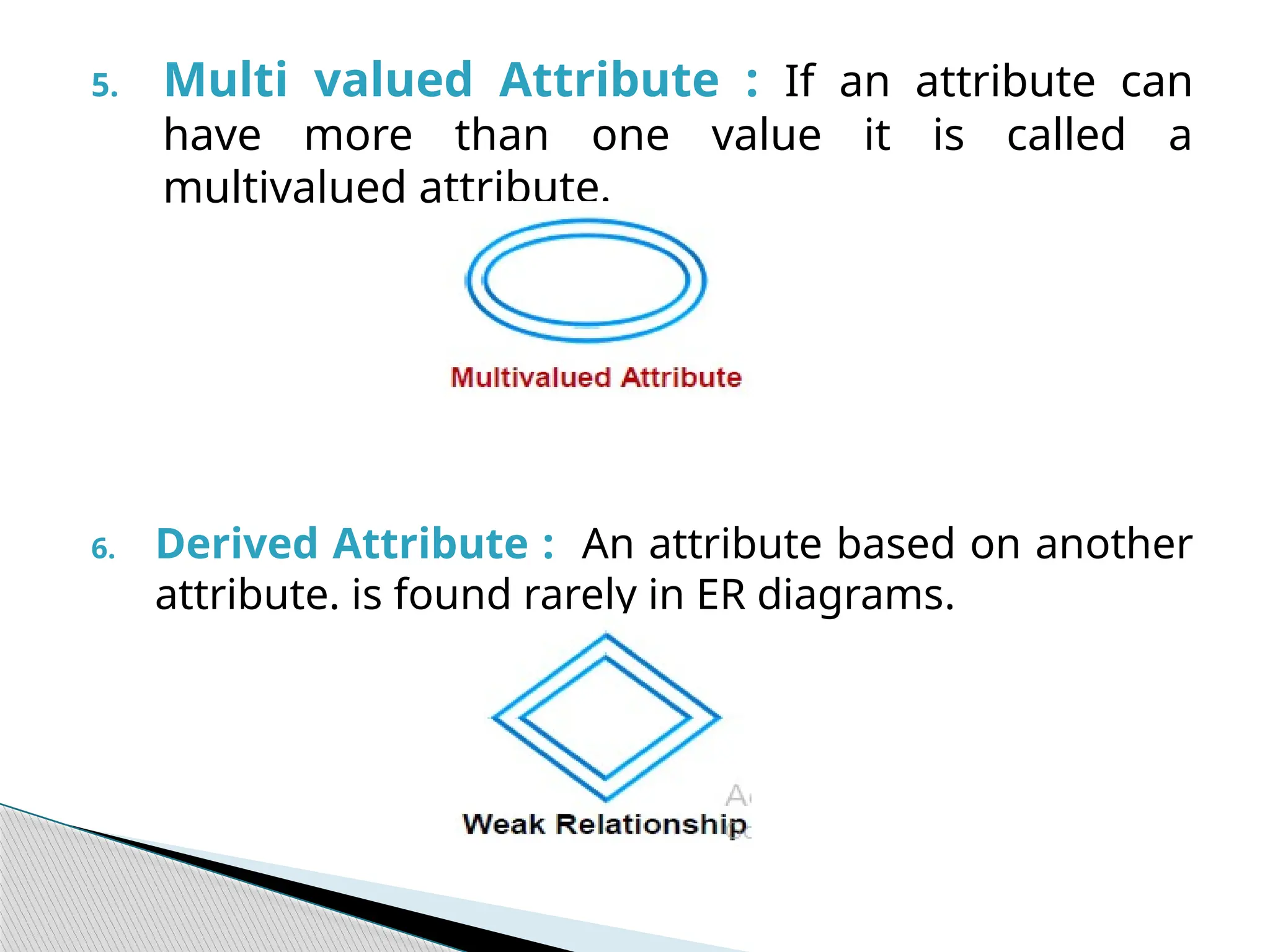
5. Multi valued Attribute : If an attribute can
have more than one value it is called a
multivalued attribute.
6. Derived Attribute : An attribute based on another
attribute. is found rarely in ER diagrams.
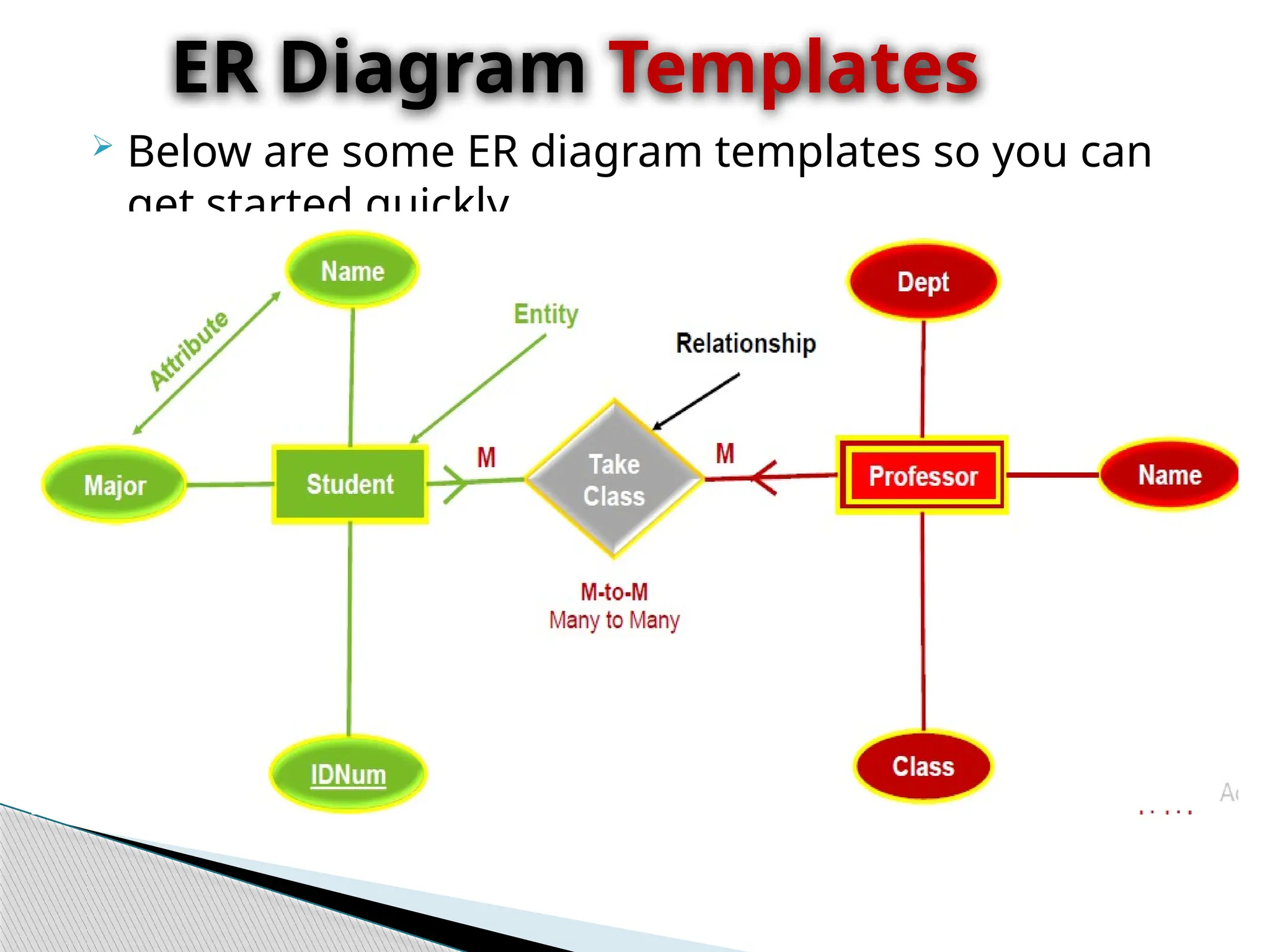
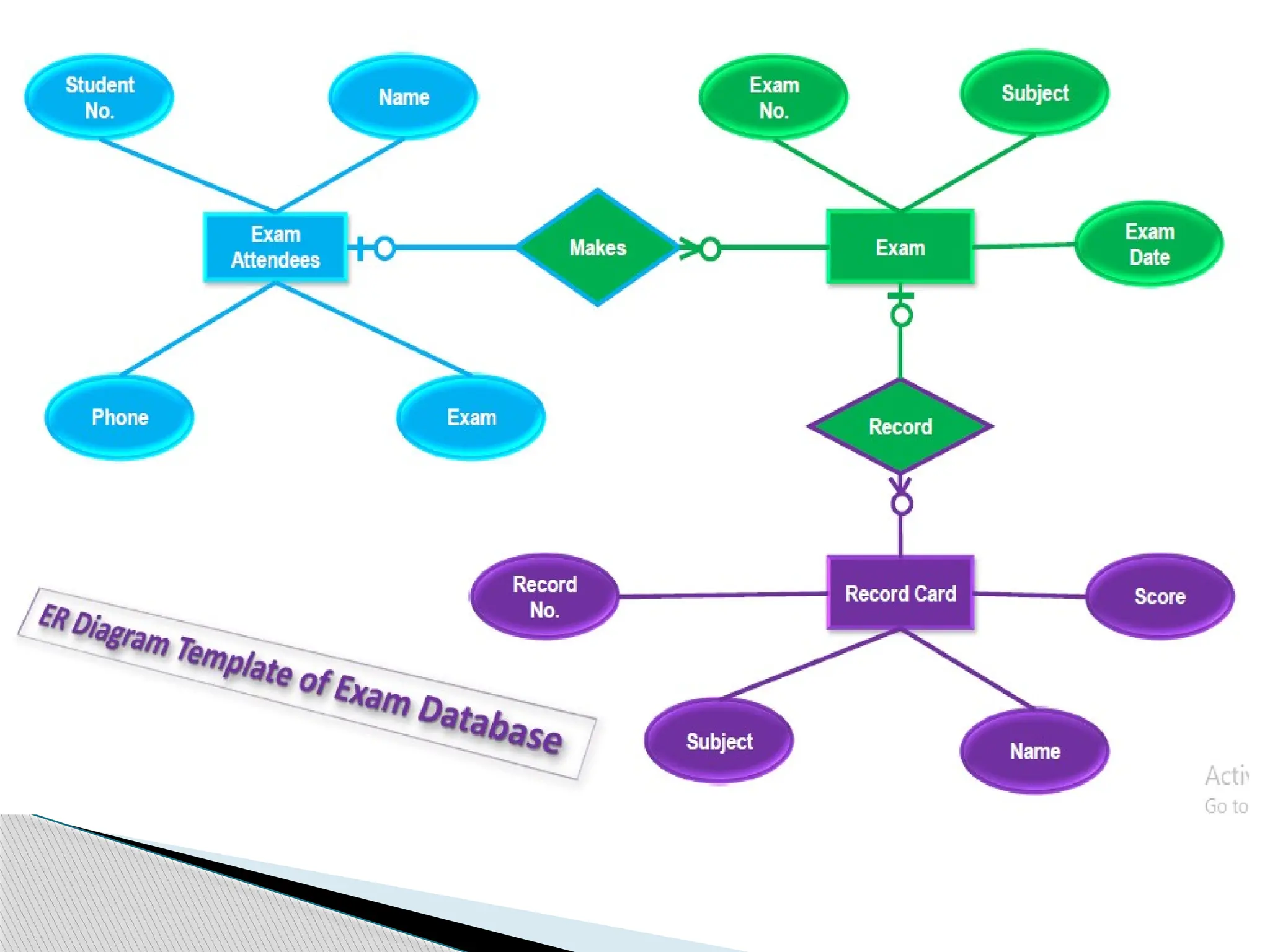
 Below are some ER diagram templates so you can
get started quickly.
ER Diagram Templates
 Constitute a very useful framework for creating
and manipulating databases.
 Are easy to understand and do not require a
person to undergo extensive training to be able to
work with it efficiently and accurately.
 Designers can use ER diagrams to easily
communicate with developers, customers, and end
users, regardless of their IT proficiency.
 Are readily translatable into relational tables which
can be used to quickly build databases.
Benefit of ER Diagram
 Can be directly used by database developers as the
blueprint for implementing data in specific
software applications.
 May be applied in other contexts such as
describing the different relationships and
operations within an organization.
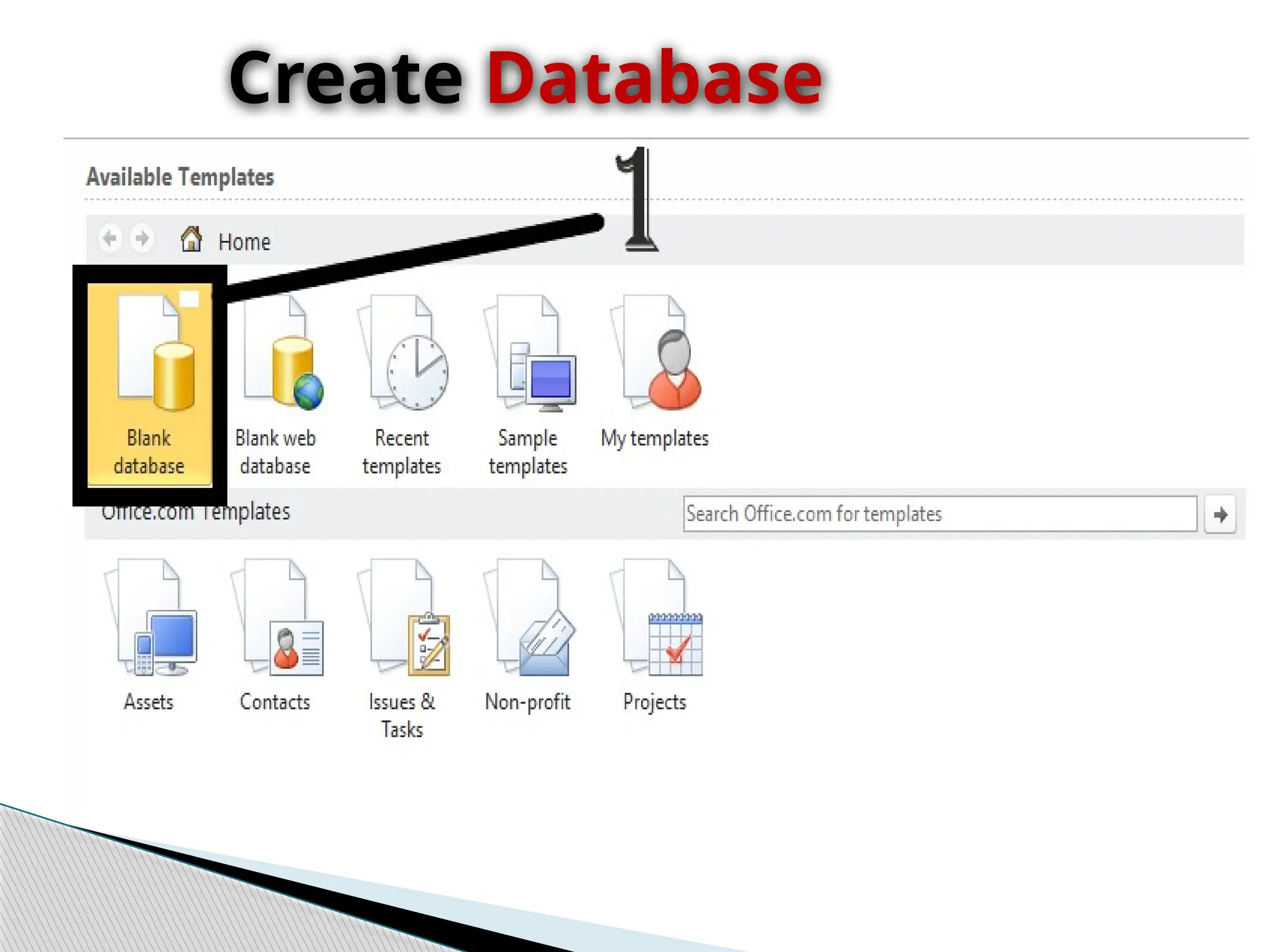
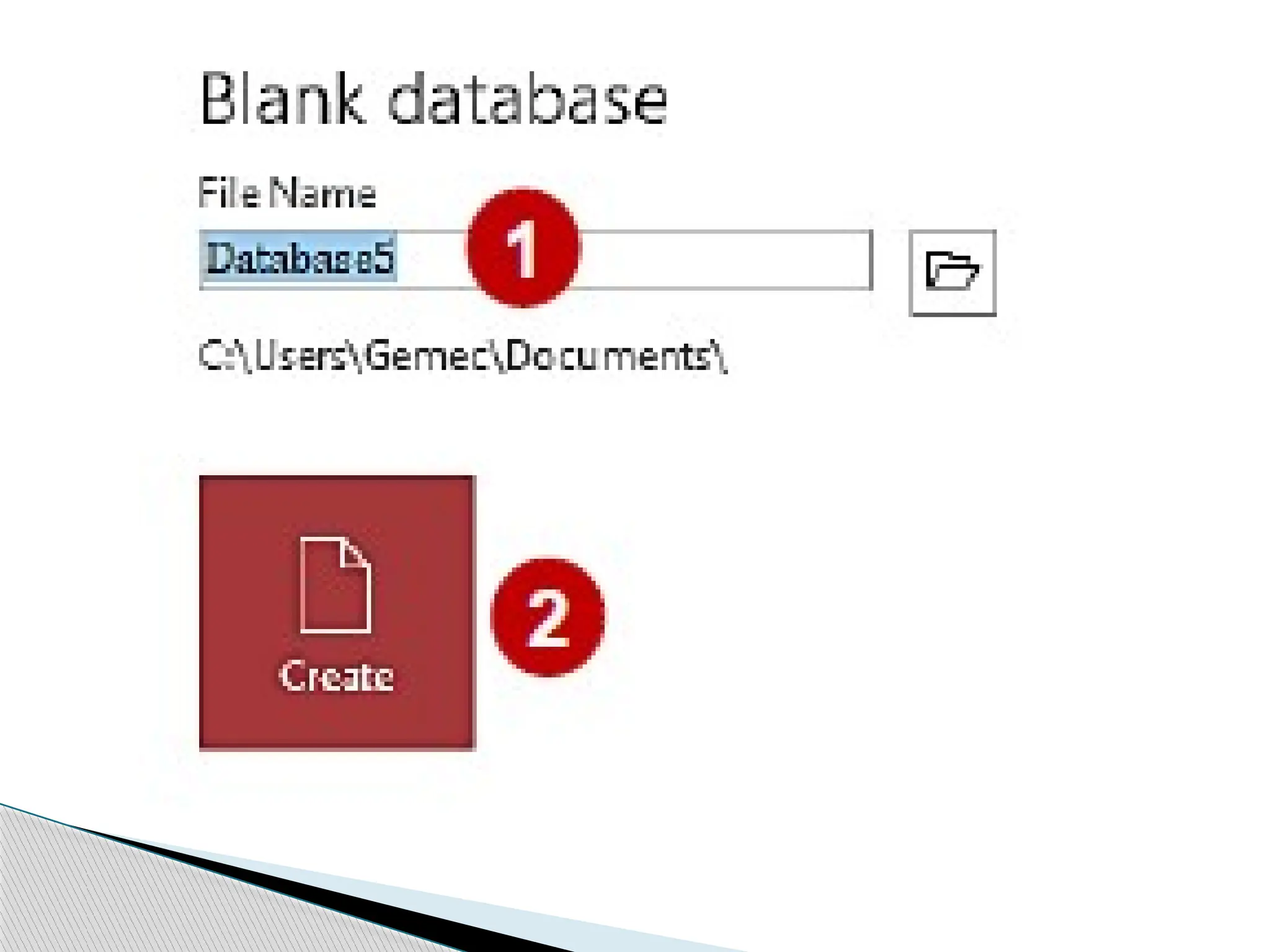
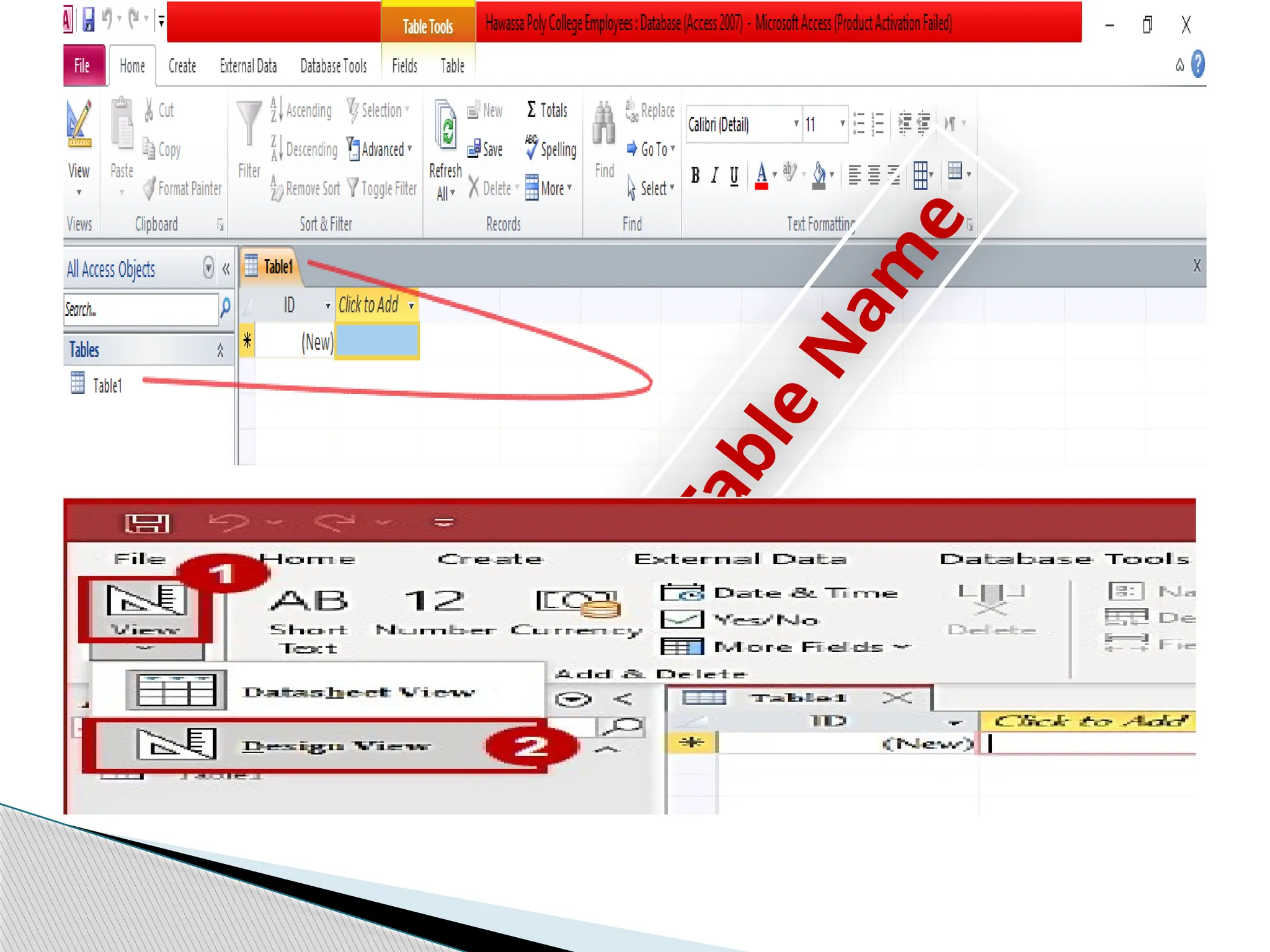
Create Database
T
a
b
l
e
N
a
m
e
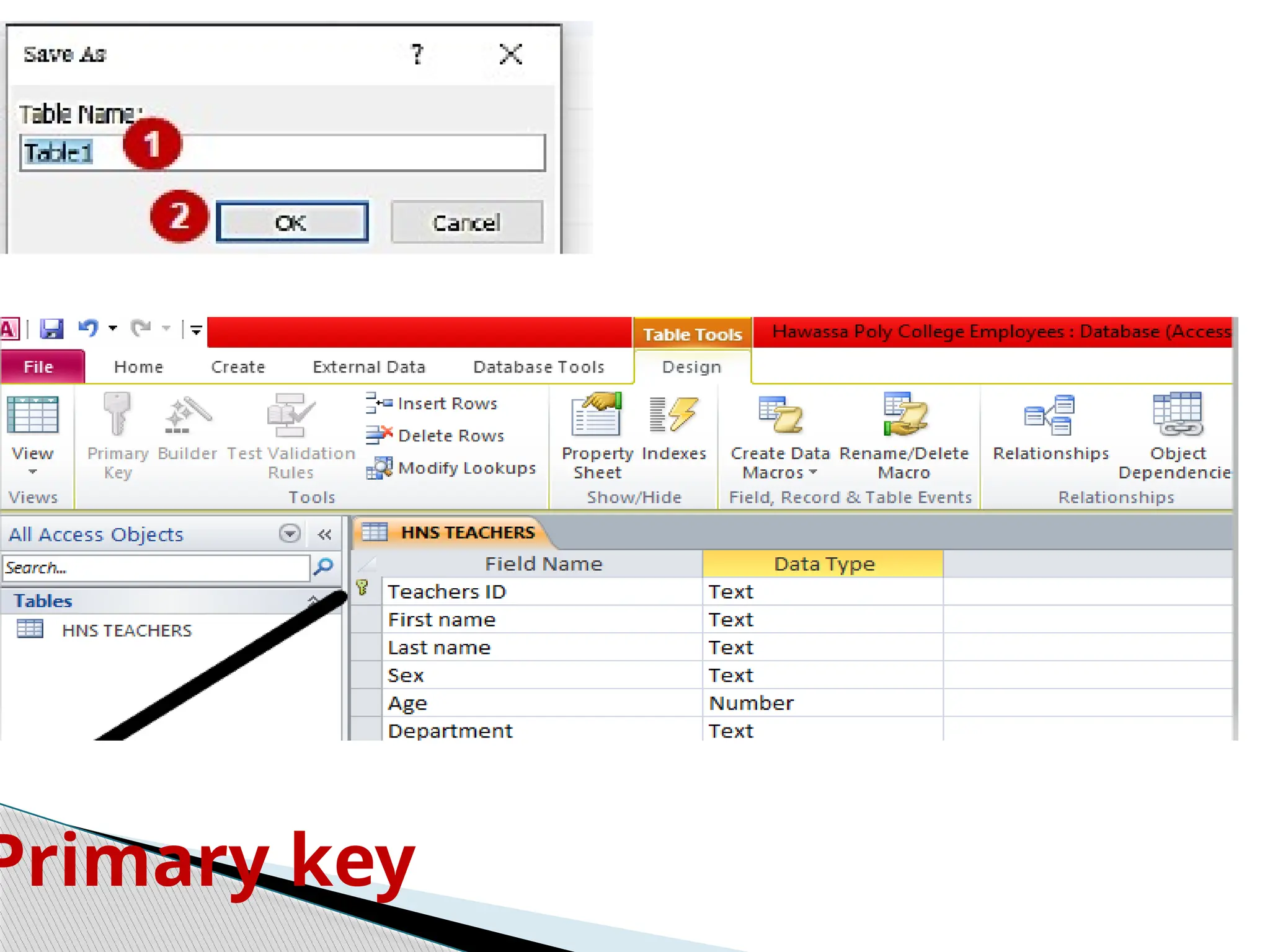
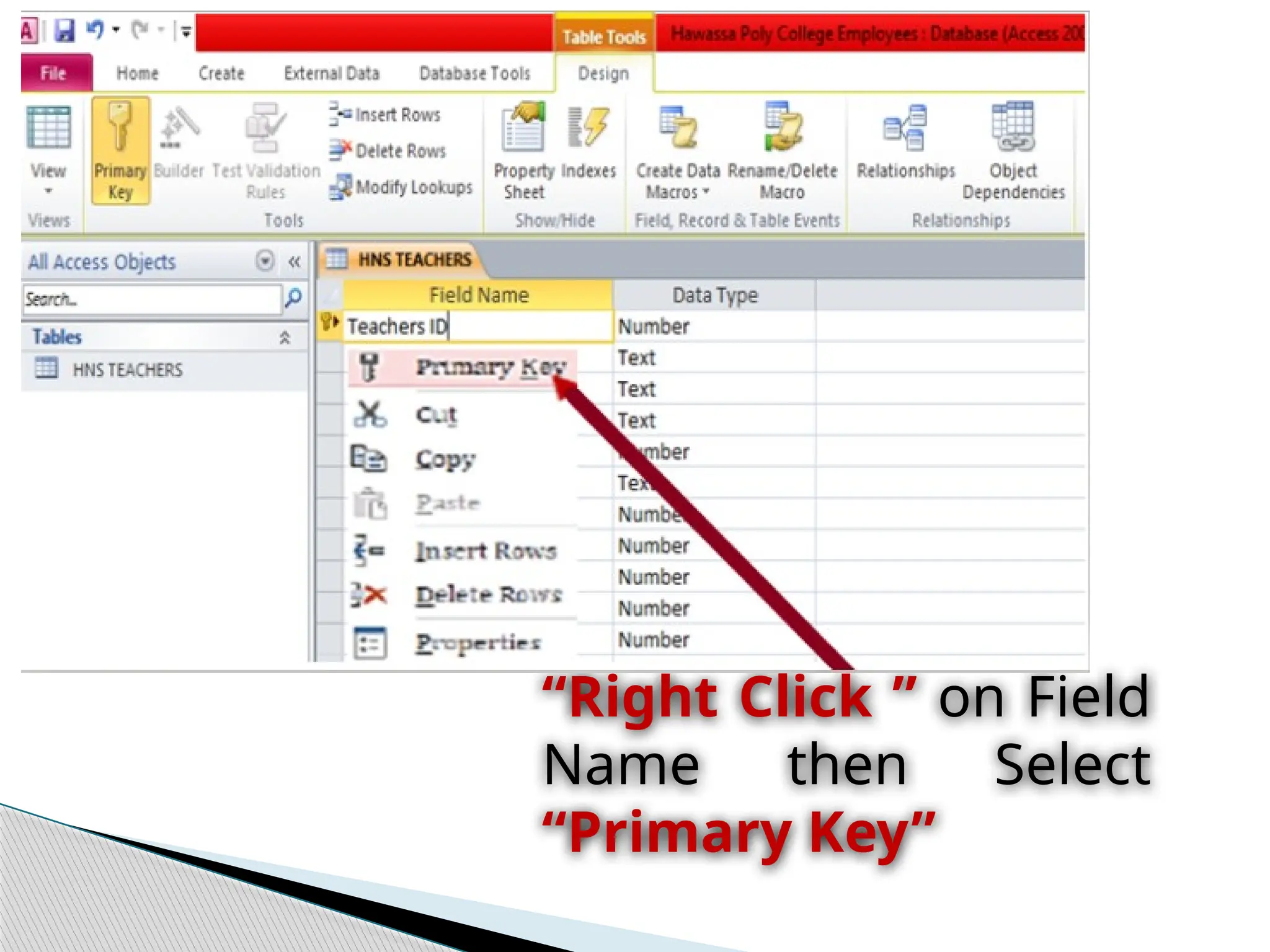
Primary key
“Right Click ” on Field
Name then Select
“Primary Key”
Operate Database
Application
E-mail: abelengida@gmail.com
Part One Thank
You.

Operate Database Applicationidentify ntrk handtools.pptx

  • 1.
    Operate Database Application By: StudentAbel Engida E-mail: abelengida52@gmail.com
  • 2.
    Page Content  01Database Design Principle • Introduction to Database  02Types of Database • Features of Database  03The Design Process • Entity Relationship Diagram and Table Relationship  04Introduction MS Access • Exploring Microsoft Access 2010 Operate Database Application
  • 3.
    A Database isinformation that is set up for easy access, management and updating.  Database design is the organization of data according to a database model.  The designer determines what data must be stored and how the data elements interrelate.  Database management system manages the data accordingly.  Database design involves classifying data and identifying interrelationships Database Design Principle
  • 4.
     USABILITY :Any information which we are storing in any organization should be meaningful for that organization.  Database Extensibility: you can extend the database based on your requirements. For example, you can modify an existing table by adding a new column.  Data integrity: Now at this point we understand that information is very much important for any organization. o Data integrity describes data that's kept complete, accurate, consistent and safe throughout its entire lifecycle in the following ways: Complete. Basic Principle of Database
  • 5.
     Entity integrity:Involves the structure (primary key and its attributes) of the entity. o If the primary key is unique and all attributes are fully dependent on the primary key, then the integrity of the entity is good. o In the physical schema, the table’s primary key enforces entity integrity.  Domain integrity: It defines that data should be of correct type and we should handle optional data in correct way.  We can define proper data types for different attributes based on organization’s requirement so that correct format data should present in system.
  • 6.
     Referential integrity:refers to the relationship between tables. Because each table in a database must have a primary key, o this primary key can appear in other tables because of its relationship to data within those tables. o When a primary key from one table appears in another table, it is called a foreign key .  User-defined integrity: There are few business rules which we cannot validate just by primary keys, foreign keys etc.  There has to be some mechanism so that we can validate complex rules for integrity.  We can implement these rules in following ways:
  • 7.
    Performance: • As datain increasing day by day so at some time there will be impact on performance if database design is poor or we’ll not take any actions to improve performance. Availability: • The availability of information refers to the information’s accessibility when required regarding uptime, locations, and the availability of the data for future analysis. • Disaster recovery, redundancy, archiving, and network delivery all affect availability. Security: • For any organizational asset, the level of security must be secured depending on its value and sensitivity. • So security is one of the most important aspect of good database design.
  • 8.
     A databasecan best be described as a way of storing large amounts of information.  The data can be retrieved and we can even ask questions of the data and get answers. For example: ◦ You may want to know how many Students enrolled in every occupational level. Open & Design Database Application
  • 9.
     MS Access(MS Office Access ) : is a database management tool that enables one to store relevant data. o This also has the capabilities to retrieve, sort, summarize report and result immediately and effectively. o It can combine data from various files (tables) through creating relationships and can make data entry more efficient and accurate through the use of forms. o Microsoft Access (MS Access) enables to manage all important information from a single database file, Within the file can use the different objects/items:
  • 10.
     Determine thepurpose of your database. This helps prepare you for the remaining steps.  Find and organize the information required. Gather all of the types of information you might want to record in the database, such as product name and order number.  Divide the information into tables. Divide your information items into major entities or subjects, such as Products or Orders. Each subject then becomes a table. Design process
  • 11.
     Turn informationitems into columns. Decide what information you want to store in each table.  Each item becomes a field, and is displayed as a column in the table. - For example: an Teachers table might include fields such as Last Name and Hire Date.
  • 12.
    Specify primary keys •Choose each table’s have primary key. The primary key is a column that is used to uniquely identify each row. An example might be Product ID or Order ID. Set up the table relationships • Look at each table and decide how the data in one table is related to the data in other tables. Apply the normalization rules • Apply the data normalization rules to see if your tables are structured correctly.
  • 13.
     A databaseobject : is any defined object in a database that is used to store or reference data. o Anything which we make from create command is known as Database Object. o It can be used to hold and manipulate the data.  A database object in a relational database is a data structure used to Database objects
  • 14.
     Metadata :is a “data about data” or synonymously called table structure that defines what type of data your data is.  Tables: A table is a collection of data about a specific topic, such as products or suppliers recently, o we define it as a file but technically it was defined as a container or a worksheet-like container where the collection of data has been stored. Type of Database objects
  • 15.
    ◦Meta Data –Database Structure ◦Field – Column – Data ◦Fieldname ◦Record - Row – Information Basic Component of a Table
  • 16.
    Queries  Queries usedto view, change, and analyze data in different ways.  You can also use them as a source of records for forms, reports. Forms  A form is a type of a database object that is primarily used to enter or display data in a database.  You can also use a form as a switchboard that opens other forms and reports in the database, or as a custom dialog box that accepts user input and carries out an action based on the input. Reports  A report is an effective way to present your data in a printed format.
  • 17.
     The mostcommon object that people interact with is the table. It can be used to hold and manipulate the data.  Before we proceed to creating your first table, you need to know the basic components of a table: ◦ Meta Data – Database Structure ◦ Field – Column – Data ◦ Fieldname ◦ Record - Row – Information Create Data base Objects
  • 18.
     Entering uniquenames of the columns of the table in the “field name” column of the design view.  Names of fields and objects in Microsoft Access can be up to 64characters long.  They can include any combination of letters, numbers, spaces, and special characters except a period (.), an exclamation point (!), an accent grave (`), and brackets ([ ]).  They also can't begin with leading spaces Designing table involves
  • 19.
     The differentkinds of MS Access data types are:  Text: allows for the storage of any kind of data, characters, digits and special characters.  Memo: is used for texts of more than 255 characters such as comments or explanations.  Number: for numerical data used in mathematical calculations.  Date/Time: for the introduction of date and time from the year 100 to 9999. Data types in Microsoft Access
  • 20.
    Currency : Formonetary/economic values and numerical data used in mathematical calculations in which the data involved contains between one and four decimals. Auto number: a unique sequential number ( increasing one by one ), or a number that Access assigns every time it adds a new record to a table. Yes/No: Yes and No values: A fields that contain one of two values (Yes/No, True/False or Activated/Deactivated).
  • 21.
     OLE Object:Used to embed or link to documents from other programs like Excel and Word.  Hyperlink: text or a combination of text and numbers stored as text and used as a hyperlink address.  Attachment :The attachment data type lets you store one or more files per record.  Lookup wizard…: A lookup wizard field lets the user choose from a predefined set of options, like a "male" or "female" selection or a "country" selection.
  • 22.
     Normalization isthe process of organizing data in a database.  This includes creating tables and establishing relationships between those tables according to rules designed both to protect the data and to make the database more flexible by eliminating redundancy and inconsistent dependency.  It is also the process of efficiently organizing data in a database. Normalization
  • 23.
    • Every templatethat is included with Access is a complete tracking application that contains predefined tables, forms, reports, queries, macros, and relationships.  For example: ◦ to add or rename a field, or change a report. ◦ You can easily add a field to a table in Datasheet view.  However, you can also add a field to a table in Design view. Modify Database object
  • 24.
     When youadd a new field to a table, the field is not automatically added to your existing forms and reports.  Before you can delete a field, you must ensure that it doesn't participate in any table relationships.  If you try to delete a field for which relationships exist, Access warns you that you must first delete the relationships Add or delete a column in a datasheet
  • 25.
     Are associationsbetween tables that are created using join statements to retrieve data.  Each primary key value relates to none or only one record in the related table.  Is a logical connection between two tables .  One of the huge advantages of a relational database is that, once you have your data held in clearly defined, compact tables, you can connect or relate the data held in different tables. Data base Relationship
  • 26.
    i. One-to-one relationships:occur when each entry in the first table has one, and only one, counterpart in the second table. ii. One-to-many relationships: Is the most common type of database relationship. iii. Many-to-many relationships: occur when each record in the first table corresponds to one or more records in the second table and each record in the second table corresponds to one or more records in the first table. Types of Database Relationships
  • 27.
    Types of key PrimaryKey Foreign key  is the unique identification of one record. There is a uniquely identification number, such as ID number, a serial number, a code that serves as a primary key .  A primary key generally focuses on the uniqueness of the table.  Table allows only one primary key.  The primary key doesn’t allow null values  It can identify the record uniquely in the database table.  In primary key, the value can’t be removed from the parent table.  Its restriction can be completely defined on the temporary tables.  A foreign key contains values that correspondent to values in the primary key of another table.  A foreign key is a field in the table that is the primary key in another table.  Table can allow more than one foreign key.  Foreign key accept multiple null values.  In this, the value can be deleted from the child table.  Its restriction can not be defined on the global or local temporary tables.
  • 28.
    ERD (Entity RelationshipDiagram)  An Entity Relationship Diagram (ERD): is a visual representation of different data using conventions that describe how these data are related to each other. - For example : the elements writer, novel, and consumer may be described using ER diagrams this way:  In the diagram, the elements inside rectangles are called entities while the items inside diamonds denote the relationships between entities.
  • 29.
    1. Entity :an entity can be a person, place, event, or object that is relevant to a given system. - For example : a school system may include students, teachers, major courses, subjects, fees, and other items. o Entities are represented in ER diagrams by a rectangle and named using singular nouns. ER Diagram Symbol and Notations
  • 30.
    2. Attribute :is a property, trait, or characteristic of an entity, relationship, or another attribute. o note that an attribute can have its own attributes (composite attribute). o Attributes are represented by oval shapes.
  • 31.
    3. Relationship :describes how entities interact. Relationships are represented by diamond shapes and are labeled using verbs. 4. Weak Entity : weak entity is an entity that depends on the existence of another entity. o In more technical terms it can defined as an entity that cannot be identified by its own attributes. o It uses a foreign key combined with its attributed to form the primary key.
  • 32.
    5. Multi valuedAttribute : If an attribute can have more than one value it is called a multivalued attribute. 6. Derived Attribute : An attribute based on another attribute. is found rarely in ER diagrams.
  • 34.
     Below aresome ER diagram templates so you can get started quickly. ER Diagram Templates
  • 36.
     Constitute avery useful framework for creating and manipulating databases.  Are easy to understand and do not require a person to undergo extensive training to be able to work with it efficiently and accurately.  Designers can use ER diagrams to easily communicate with developers, customers, and end users, regardless of their IT proficiency.  Are readily translatable into relational tables which can be used to quickly build databases. Benefit of ER Diagram
  • 37.
     Can bedirectly used by database developers as the blueprint for implementing data in specific software applications.  May be applied in other contexts such as describing the different relationships and operations within an organization.
  • 38.
  • 40.
  • 41.
  • 43.
    “Right Click ”on Field Name then Select “Primary Key”
  • 44.