IMPLEMENTING
E-LEARNING AND COMBINED
TRAINING METHODS
TO INVOLVE
A WIDE RANGE OF STUDENTS
Danil Dintsis
Ph. D.
www.ddintsis.com, www.i-mokymas.com
info@i-mokymas.com
BRIEF ABOUT THE PRESENTER
 Ph. D. in System Analysis (Doctorate degree, ISCED verified)
 Ph.D. in Technical management (Candidate degree, ISCED
verified)
 Human – machine interaction specialist
 Portfolio manager and project director in e-learning and IT
consulting at the Specialist center at BMSTU in Moscow and the
Ismanusis Mokymas in Vilnius, teacher and coach for 15+ years
 IAMCP (International Association of Microsoft Channel Partners)
EMEA Board member
WHAT IS THE GOAL
OF THE PRESENTATION
 Deliver a brief on my experience
in launching training methods
 Find colleagues and share
experiences in the EU community
 Find points of common
professional interest
 Improve my scientific and
professional experience
 Deliver projects and trainings as
“guest lecturer”
 VU “guest professor/lecturer” program
 Impressive results of the Institute of
Mathematics and Informatics and the
Informatics Methodology dept.
 Wide range of successful international
high education programs in Lithuania
and VU
LIFE LONG EDUCATION
IN THE INFORMATION SOCIETY
PORTFOLIO LEAD: COMBINED
TRAINING FORMATS
LAUNCH IN FIRST CRISIS WAVE, 2009
 Decrease of corporate trainings
 Increase number of self-payed students
 Travel and accommodation expenses
 Number of students total decrease
http://www.specialist.ru
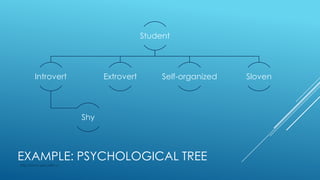
Student
Introvert
Shy
Extrovert Self-organized Sloven
EXAMPLE: PSYCHOLOGICAL TREE
http://www.specialist.ru
NEW AND OLD DEMANDS
 Learn and work
 Brief training programs – learn only “what I need here and now”
 Repeat training material after the training ends
 Individual training tempo from highly intensive 3-5 all day long studies
to one class per week.
 A trainer “is my lead”, a student needs his/her advices and
motivation actions не получать избыточных сведений («дайте мне
только то, что мне нужно»)
 Different demands for visual/audio/text training materials
 Labs, practices and cases are the MUST items of the learning process
 Prestigious certificate for career development
http://www.specialist.ru
LEARNING SUPPORT TOOLS DEMANDS
 On- and offline studies
 Based on different platforms, i.e. browsers, smartphone apps
 Search engine
 Collaboration by course and inside a certain group
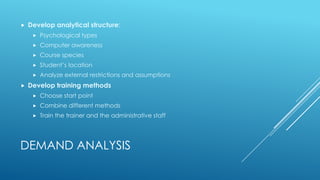
DEMAND ANALYSIS
 Develop analytical structure:
 Psychological types
 Computer awareness
 Course species
 Student’s location
 Analyze external restrictions and assumptions
 Develop training methods
 Choose start point
 Combine different methods
 Train the trainer and the administrative staff
LEARN ANYWHERE – OFFLINE REGIME WANTED
 On trip
 At home
 On vacations
 At a workplace
http:/www.i-mokymas.com
«INCLASS» WEBINAR BY “SPECIALIST” CENTER
MAIN FEATURES OF “INCLASS” WEBINAR
 Students in a class and ay webinar study together and simultaneously
 Both categories collaborate under trainer supervising
 Training materials and lab environment are the same
http://www.specialist.ru
WEBINAR INCLASS ADVANTAGES
 For students:
 Study in a comfortable environment
 Worth for people with disabilities
 Decrease travel expenses
 Communicate with colleagues worldwide
 For an educational organization:
 More students in class
 Wider group activities
 Recordings fpr second use and for control
 Trainer self control
http://www.specialist.ru
COMBINED CLASS & SELF STUDY
http://www.specialist.ru
THE METHOD MAIN FEATURES
 Provide a kick-off lesson
 Use webinar recordings and e-materials for self studies
 One study per week/fortnight in class
 Common finish
http://www.specialist.ru
CLASS AND SELF STUDY ADVANTAGES
 For students:
 Worth for busy people
 Worth for well-organized students
 The method is more friendly to students
 It’s cheaper
 For educational organization:
 Reuse of webinar recordings and training materials
 Extend training schedule (for example, once a week on Saturdays or
after work day time)
 Worth for long-term educational programs (MBA, second high
education)
http://www.specialist.ru
OPEN TRAINING
http://www.specialist.ru
EXAMPLE: OPEN GROUP
A single class group
contains many virtual
groups
Number of
students, total
Number of
webinar
students
Network Infrastructure 6 2
Database administer 3 1
Network security 3 1
Database indexing 4 2
… 1
Total 16 6
OPEN TRAINING ADVANTAGES
 For student
 Personal tempo
 Worth for introverts and shy people
 Individual communication with a teacher
 Appropriate training schedule
 For educational organization
 Reuse of webinar recordings and e-learning materials
 Full classes
 Individual contact with students
http://www.specialist.ru
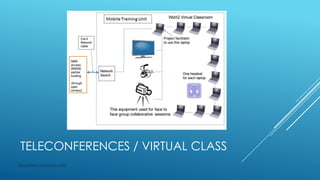
TELECONFERENCES / VIRTUAL CLASS
http://www.i-mokymas.com
TELECONFERENCE STUDY ADVANTAGES
 For students:
 No travels
 Comfortable environment
 Teacher’s control
 Visual contact and collaboration with all group members
 For educational organization
 Low expenses
 High level of student’s involvement and control
http://i-mokymas.com
TRAINING METHOD CHOICE
Training methods /
Demands
Class
based
Webinar Open
training
Combined
class and
self
Fast training
*** *** *** -
Cheap training
* ** * ***
Personal tempo
* * ** ***
Slovens
*** * ** *
Introverts
* ** *** **
Extroverts
*** ** - *
Live far
***
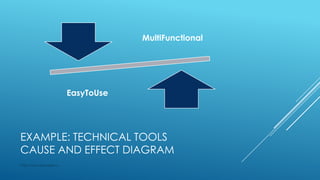
EXAMPLE: TECHNICAL TOOLS
CAUSE AND EFFECT DIAGRAM
http://www.specialist.ru
MultiFunctional
EasyToUse
COMPUTER USER SKILLS
 By professional specialization
 Technical and information areas
 Humanitarian
 Economics
 Art and design
 Management
 By age
 generation “Y”
 Generation “X”
http://www.specialist.ru
COMMUNICATION TOOLS
http:/www.i-mokymas.com
High Quality
Internet
Broadband
demands
TOOLS EXAMPLES
 Cisco webex
 Citrix GoTo platform
 Adobe Connect
 Microsofft LYNC
 TrueConf Teleconferences
ADOBE CONNECT: SYNCHRONOUS CHAT
RECORDING
CISCO WEBEX: THE MOST POWERFUL
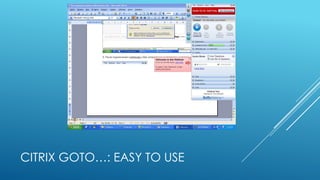
CITRIX GOTO…: EASY TO USE
MICROSOFT LYNC: FINE TO NTEGRATE
MORE…
 Lab and practices tools
 Mass webinars
 MOOCs
 LMS systems
http://www.i-mokymas.com
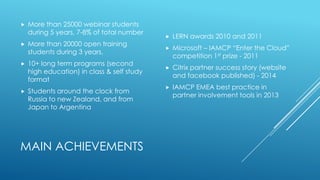
MAIN ACHIEVEMENTS
 More than 25000 webinar students
during 5 years, 7-8% of total number
 More than 20000 open training
students during 3 years,
 10+ long term programs (second
high education) in class & self study
format
 Students around the clock from
Russia to new Zealand, and from
Japan to Argentina
 LERN awards 2010 and 2011
 Microsoft – IAMCP “Enter the Cloud”
competition 1st prize - 2011
 Citrix partner success story (website
and facebook published) - 2014
 IAMCP EMEA best practice in
partner involvement tools in 2013
LOOKING FOR FURTHER COLLABORATION!
 https://www.researchgate.net/profile/Danil_Dintsis/
http://www.linkedin.com/in/dintsis
 http://www.i-mokymas.com
 info@i-mokymas.com, consult@dintsis.org
Q&A AND CONTACTS
THANK YOU!

Implementing e learning and combined training methods

  • 1.
    IMPLEMENTING E-LEARNING AND COMBINED TRAININGMETHODS TO INVOLVE A WIDE RANGE OF STUDENTS Danil Dintsis Ph. D. www.ddintsis.com, www.i-mokymas.com info@i-mokymas.com
  • 2.
    BRIEF ABOUT THEPRESENTER  Ph. D. in System Analysis (Doctorate degree, ISCED verified)  Ph.D. in Technical management (Candidate degree, ISCED verified)  Human – machine interaction specialist  Portfolio manager and project director in e-learning and IT consulting at the Specialist center at BMSTU in Moscow and the Ismanusis Mokymas in Vilnius, teacher and coach for 15+ years  IAMCP (International Association of Microsoft Channel Partners) EMEA Board member
  • 3.
    WHAT IS THEGOAL OF THE PRESENTATION  Deliver a brief on my experience in launching training methods  Find colleagues and share experiences in the EU community  Find points of common professional interest  Improve my scientific and professional experience  Deliver projects and trainings as “guest lecturer”  VU “guest professor/lecturer” program  Impressive results of the Institute of Mathematics and Informatics and the Informatics Methodology dept.  Wide range of successful international high education programs in Lithuania and VU
  • 4.
    LIFE LONG EDUCATION INTHE INFORMATION SOCIETY PORTFOLIO LEAD: COMBINED TRAINING FORMATS
  • 5.
    LAUNCH IN FIRSTCRISIS WAVE, 2009  Decrease of corporate trainings  Increase number of self-payed students  Travel and accommodation expenses  Number of students total decrease http://www.specialist.ru
  • 6.
    Student Introvert Shy Extrovert Self-organized Sloven EXAMPLE:PSYCHOLOGICAL TREE http://www.specialist.ru
  • 7.
    NEW AND OLDDEMANDS  Learn and work  Brief training programs – learn only “what I need here and now”  Repeat training material after the training ends  Individual training tempo from highly intensive 3-5 all day long studies to one class per week.  A trainer “is my lead”, a student needs his/her advices and motivation actions не получать избыточных сведений («дайте мне только то, что мне нужно»)  Different demands for visual/audio/text training materials  Labs, practices and cases are the MUST items of the learning process  Prestigious certificate for career development http://www.specialist.ru
  • 8.
    LEARNING SUPPORT TOOLSDEMANDS  On- and offline studies  Based on different platforms, i.e. browsers, smartphone apps  Search engine  Collaboration by course and inside a certain group
  • 9.
    DEMAND ANALYSIS  Developanalytical structure:  Psychological types  Computer awareness  Course species  Student’s location  Analyze external restrictions and assumptions  Develop training methods  Choose start point  Combine different methods  Train the trainer and the administrative staff
  • 10.
    LEARN ANYWHERE –OFFLINE REGIME WANTED  On trip  At home  On vacations  At a workplace http:/www.i-mokymas.com
  • 11.
    «INCLASS» WEBINAR BY“SPECIALIST” CENTER
  • 12.
    MAIN FEATURES OF“INCLASS” WEBINAR  Students in a class and ay webinar study together and simultaneously  Both categories collaborate under trainer supervising  Training materials and lab environment are the same http://www.specialist.ru
  • 13.
    WEBINAR INCLASS ADVANTAGES For students:  Study in a comfortable environment  Worth for people with disabilities  Decrease travel expenses  Communicate with colleagues worldwide  For an educational organization:  More students in class  Wider group activities  Recordings fpr second use and for control  Trainer self control http://www.specialist.ru
  • 14.
    COMBINED CLASS &SELF STUDY http://www.specialist.ru
  • 15.
    THE METHOD MAINFEATURES  Provide a kick-off lesson  Use webinar recordings and e-materials for self studies  One study per week/fortnight in class  Common finish http://www.specialist.ru
  • 16.
    CLASS AND SELFSTUDY ADVANTAGES  For students:  Worth for busy people  Worth for well-organized students  The method is more friendly to students  It’s cheaper  For educational organization:  Reuse of webinar recordings and training materials  Extend training schedule (for example, once a week on Saturdays or after work day time)  Worth for long-term educational programs (MBA, second high education) http://www.specialist.ru
  • 17.
  • 18.
    EXAMPLE: OPEN GROUP Asingle class group contains many virtual groups Number of students, total Number of webinar students Network Infrastructure 6 2 Database administer 3 1 Network security 3 1 Database indexing 4 2 … 1 Total 16 6
  • 19.
    OPEN TRAINING ADVANTAGES For student  Personal tempo  Worth for introverts and shy people  Individual communication with a teacher  Appropriate training schedule  For educational organization  Reuse of webinar recordings and e-learning materials  Full classes  Individual contact with students http://www.specialist.ru
  • 20.
    TELECONFERENCES / VIRTUALCLASS http://www.i-mokymas.com
  • 21.
    TELECONFERENCE STUDY ADVANTAGES For students:  No travels  Comfortable environment  Teacher’s control  Visual contact and collaboration with all group members  For educational organization  Low expenses  High level of student’s involvement and control http://i-mokymas.com
  • 22.
    TRAINING METHOD CHOICE Trainingmethods / Demands Class based Webinar Open training Combined class and self Fast training *** *** *** - Cheap training * ** * *** Personal tempo * * ** *** Slovens *** * ** * Introverts * ** *** ** Extroverts *** ** - * Live far ***
  • 23.
    EXAMPLE: TECHNICAL TOOLS CAUSEAND EFFECT DIAGRAM http://www.specialist.ru MultiFunctional EasyToUse
  • 24.
    COMPUTER USER SKILLS By professional specialization  Technical and information areas  Humanitarian  Economics  Art and design  Management  By age  generation “Y”  Generation “X” http://www.specialist.ru
  • 25.
  • 26.
    TOOLS EXAMPLES  Ciscowebex  Citrix GoTo platform  Adobe Connect  Microsofft LYNC  TrueConf Teleconferences
  • 27.
  • 28.
    CISCO WEBEX: THEMOST POWERFUL
  • 29.
  • 30.
  • 31.
    MORE…  Lab andpractices tools  Mass webinars  MOOCs  LMS systems http://www.i-mokymas.com
  • 32.
    MAIN ACHIEVEMENTS  Morethan 25000 webinar students during 5 years, 7-8% of total number  More than 20000 open training students during 3 years,  10+ long term programs (second high education) in class & self study format  Students around the clock from Russia to new Zealand, and from Japan to Argentina  LERN awards 2010 and 2011  Microsoft – IAMCP “Enter the Cloud” competition 1st prize - 2011  Citrix partner success story (website and facebook published) - 2014  IAMCP EMEA best practice in partner involvement tools in 2013
  • 33.
    LOOKING FOR FURTHERCOLLABORATION!  https://www.researchgate.net/profile/Danil_Dintsis/ http://www.linkedin.com/in/dintsis  http://www.i-mokymas.com  info@i-mokymas.com, consult@dintsis.org Q&A AND CONTACTS
  • 34.