

Digital IMAGE PROCESSING 
Amir Hossain 
13-23814-1
What is a image???
What is a Digital Image???
Digital Image 
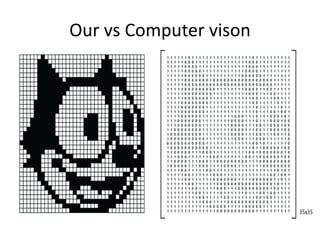
DIGITAL IMAGES are electronic snapshots taken 
of a scene or scanned from documents, such as 
photographs, manuscripts, printed texts, and 
artwork. The digital image is sampled and 
mapped as a grid of dots or picture elements 
(pixels).
Our vs Computer vison
Let’s go to the image root(Continue) 
pixel 
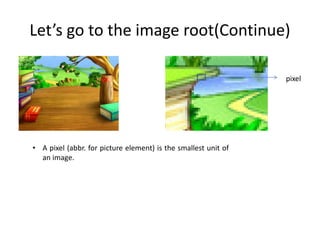
• A pixel (abbr. for picture element) is the smallest unit of 
an image.
Let’s go to the image root(Continue) 
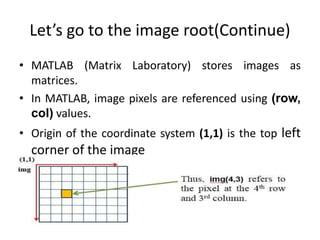
• MATLAB (Matrix Laboratory) stores images as 
matrices. 
• In MATLAB, image pixels are referenced using (row, 
col) values. 
• Origin of the coordinate system (1,1) is the top left 
corner of the image
Let’s go to the image root 
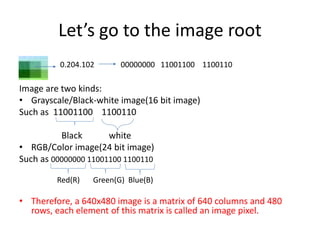
0.204.102 00000000 11001100 1100110 
Image are two kinds: 
• Grayscale/Black-white image(16 bit image) 
Such as 11001100 1100110 
Black white 
• RGB/Color image(24 bit image) 
Such as 00000000 11001100 1100110 
Red(R) Green(G) Blue(B) 
• Therefore, a 640x480 image is a matrix of 640 columns and 480 
rows, each element of this matrix is called an image pixel.
In a summary 
• Digital Image is nothing but collection of pixels 
which are arrange in matrix form 
• Pixel is consists of sub pixels(black and white 
sub pixels for grayscale and red, blue and 
green sub pixels for color image) 
• This sub pixels have value which represented 
in 8 bits binary number
What is Digital Image processing? 
• Digital image processing is the is a method to 
convert an digital Image in order to get an 
enhanced image or to extract some useful 
information from it by using 
computer algorithms
Some Applications of image 
processing
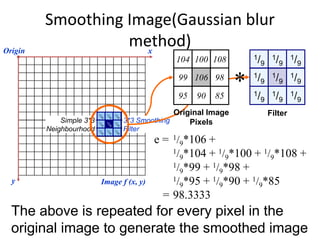
Smoothing Image(Gaussian blur 
method) 
1/9 
1/9 
1/9 
1/9 
1/9 
1/9 
1/9 
1/9 
1/9 
Origin x 
y Image f (x, y) 
e = 1/9*106 + 
Filter 
1/9*104 + 1/9*100 + 1/9*108 + 
1/9*99 + 1/9*98 + 
1/9*95 + 1/9*90 + 1/9*85 
= 98.3333 
Simple 3*3 
Neighbourhood 
106 
104 
99 
95 
100 108 
98 
90 85 
1/9 
1/9 
1/9 
1/9 
1/9 
1/9 
1/9 
1/9 
1/9 
3*3 Smoothing 
Filter 
104 100 108 
99 106 98 
95 90 85 
Original Image 
Pixels 
* 
The above is repeated for every pixel in the 
original image to generate the smoothed image
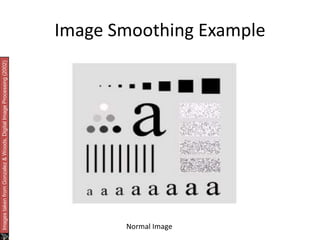
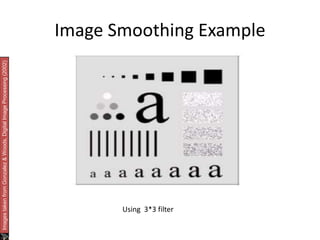
Image Smoothing Example 
Images taken from Gonzalez & Woods, Digital Image Processing (2002) 
Normal Image
Image Smoothing Example 
Images taken from Gonzalez & Woods, Digital Image Processing (2002) 
Using 3*3 filter
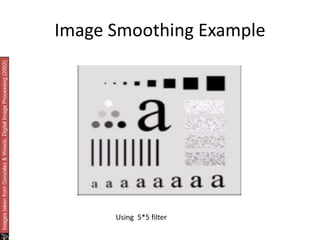
Image Smoothing Example 
Images taken from Gonzalez & Woods, Digital Image Processing (2002) 
Using 5*5 filter
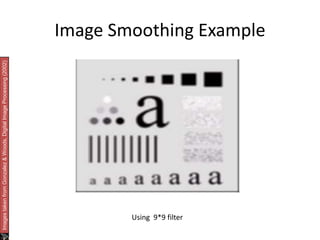
Image Smoothing Example 
Images taken from Gonzalez & Woods, Digital Image Processing (2002) 
Using 9*9 filter
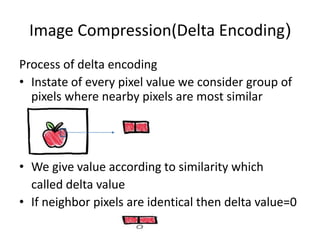
Image Compression(Delta Encoding) 
Process of delta encoding 
• Instate of every pixel value we consider group of 
pixels where nearby pixels are most similar 
• We give value according to similarity which 
called delta value 
• If neighbor pixels are identical then delta value=0
Image Compression(Delta Encoding) 
Continue 
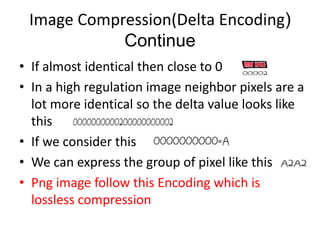
• If almost identical then close to 0 
• In a high regulation image neighbor pixels are a 
lot more identical so the delta value looks like 
this 
• If we consider this 
• We can express the group of pixel like this 
• Png image follow this Encoding which is 
lossless compression
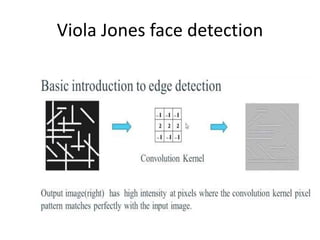
Viola Jones face detection
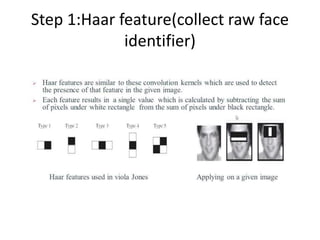
Step 1:Haar feature(collect raw face 
identifier)
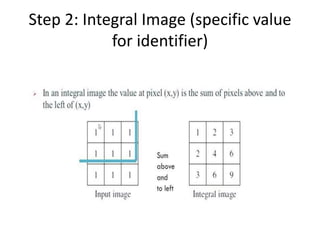
Step 2: Integral Image (specific value 
for identifier)
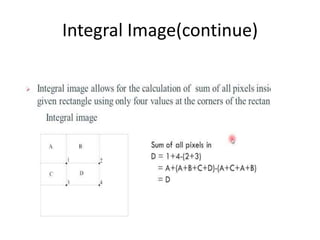
Integral Image(continue)
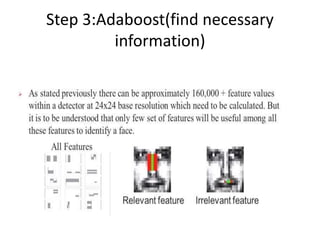
Step 3:Adaboost(find necessary 
information)
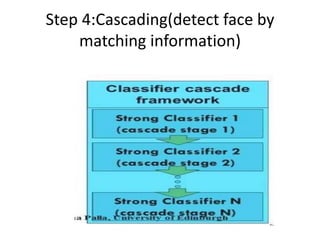
Step 4:Cascading(detect face by 
matching information)
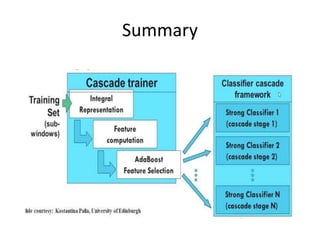
Summary
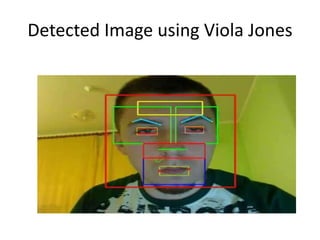
Detected Image using Viola Jones
Thank You 
Any Questions 
???

Digital Image processing

  • 1.
    Digital IMAGE PROCESSING Amir Hossain 13-23814-1
  • 2.
    What is aimage???
  • 3.
    What is aDigital Image???
  • 4.
    Digital Image DIGITALIMAGES are electronic snapshots taken of a scene or scanned from documents, such as photographs, manuscripts, printed texts, and artwork. The digital image is sampled and mapped as a grid of dots or picture elements (pixels).
  • 5.
  • 6.
    Let’s go tothe image root(Continue) pixel • A pixel (abbr. for picture element) is the smallest unit of an image.
  • 7.
    Let’s go tothe image root(Continue) • MATLAB (Matrix Laboratory) stores images as matrices. • In MATLAB, image pixels are referenced using (row, col) values. • Origin of the coordinate system (1,1) is the top left corner of the image
  • 8.
    Let’s go tothe image root 0.204.102 00000000 11001100 1100110 Image are two kinds: • Grayscale/Black-white image(16 bit image) Such as 11001100 1100110 Black white • RGB/Color image(24 bit image) Such as 00000000 11001100 1100110 Red(R) Green(G) Blue(B) • Therefore, a 640x480 image is a matrix of 640 columns and 480 rows, each element of this matrix is called an image pixel.
  • 9.
    In a summary • Digital Image is nothing but collection of pixels which are arrange in matrix form • Pixel is consists of sub pixels(black and white sub pixels for grayscale and red, blue and green sub pixels for color image) • This sub pixels have value which represented in 8 bits binary number
  • 10.
    What is DigitalImage processing? • Digital image processing is the is a method to convert an digital Image in order to get an enhanced image or to extract some useful information from it by using computer algorithms
  • 11.
    Some Applications ofimage processing
  • 12.
    Smoothing Image(Gaussian blur method) 1/9 1/9 1/9 1/9 1/9 1/9 1/9 1/9 1/9 Origin x y Image f (x, y) e = 1/9*106 + Filter 1/9*104 + 1/9*100 + 1/9*108 + 1/9*99 + 1/9*98 + 1/9*95 + 1/9*90 + 1/9*85 = 98.3333 Simple 3*3 Neighbourhood 106 104 99 95 100 108 98 90 85 1/9 1/9 1/9 1/9 1/9 1/9 1/9 1/9 1/9 3*3 Smoothing Filter 104 100 108 99 106 98 95 90 85 Original Image Pixels * The above is repeated for every pixel in the original image to generate the smoothed image
  • 13.
    Image Smoothing Example Images taken from Gonzalez & Woods, Digital Image Processing (2002) Normal Image
  • 14.
    Image Smoothing Example Images taken from Gonzalez & Woods, Digital Image Processing (2002) Using 3*3 filter
  • 15.
    Image Smoothing Example Images taken from Gonzalez & Woods, Digital Image Processing (2002) Using 5*5 filter
  • 16.
    Image Smoothing Example Images taken from Gonzalez & Woods, Digital Image Processing (2002) Using 9*9 filter
  • 17.
    Image Compression(Delta Encoding) Process of delta encoding • Instate of every pixel value we consider group of pixels where nearby pixels are most similar • We give value according to similarity which called delta value • If neighbor pixels are identical then delta value=0
  • 18.
    Image Compression(Delta Encoding) Continue • If almost identical then close to 0 • In a high regulation image neighbor pixels are a lot more identical so the delta value looks like this • If we consider this • We can express the group of pixel like this • Png image follow this Encoding which is lossless compression
  • 19.
  • 20.
    Step 1:Haar feature(collectraw face identifier)
  • 21.
    Step 2: IntegralImage (specific value for identifier)
  • 22.
  • 23.
  • 24.
    Step 4:Cascading(detect faceby matching information)
  • 25.
  • 26.
  • 27.
    Thank You AnyQuestions ???