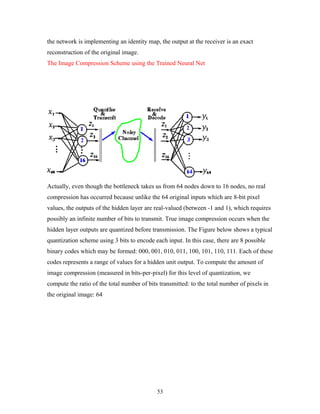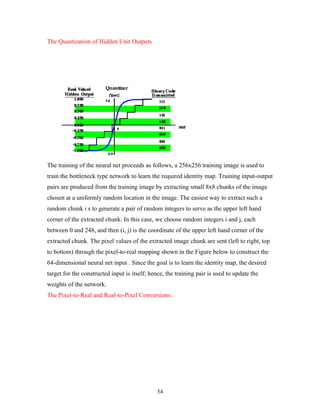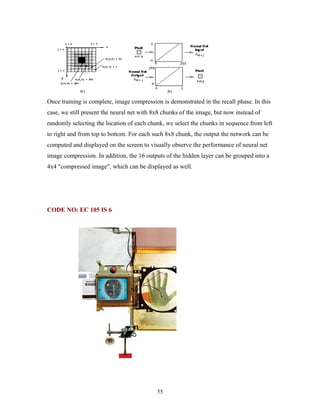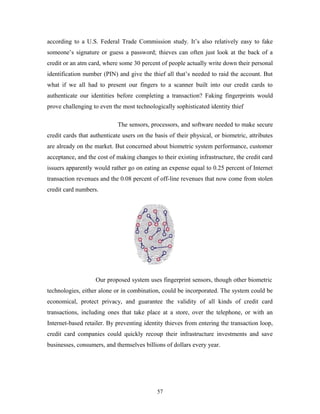
IMAGE PROCESSING 
REAL WORLD, REAL TIME AUTOMATIC RECOGNITION 
OF FACIAL EXPRESSIONS 
ABSTRACT: 
The most expressive way humans display emotions is through facial expressions. 
Enabling computer systems to recognize facial expressions and infer emotions from them 
in real time presents a challenging research topic. Most facial expression analysis systems 
attempt to recognize facial expressions from data collected in a highly controlled 
laboratory with very high resolution frontal faces (face regions greater than 200 x 200 
pixels) and also cannot handle large head motions. But in real environments such as 
smart meetings, a facial expression analysis system must be able to automatically 
recognize expressions at lower resolution and handle the full range of head motion. This 
paper describes a real-time system to automatically recognize facial expressions in 
relatively low-resolution of face images (around 50x70 to 75x100 pixels). This system 
proves to be successful in dealing with complex real world interactions and is a highly 
promising method. 
2.INTRODUCTION: 
The human face possesses superior expressive ability and provides one of the 
most powerful, versatile and natural means of communicating motivational and affective 
state. We use facial expressions not only to express our emotions, but also to provide 
important communicative cues during social interaction, such as our level of interest, our 
desire to take a speaking turn and continuous feedback signaling understanding of the 
information conveyed. Facial expression constitutes 55 percent of the effect of a 
communicated message and is hence a major modality in human communication. 
Face Recognition and face expression recognition is the inherent capability of 
human beings. Identifying a person by face is one of the most fundamental 
human functions since time immemorial. Face expression recognition by 
computer is to endow a machine with capability to approximate in some sense, a 
similar capability in human beings. To impart this basic human capability to a 
machine has been a subject of interest over the last few years. 
Before we discuss how facial expressions can be recognized we will let u know what are 
the main problems that a face recognition system faces. 
3.IMPORTANT SUB PROBLEMS: 
1
The problem of recognizing and interpreting faces comprises four main sub problem 
areas: 
· Finding faces and facial features: This problem would be considered a 
segmentation problem in the machine vision literature, and a detection problem in 
the pattern recognition literature. 
· Recognizing faces and facial features: This problem requires defining a similarity 
metric that allows comparison between examples; this is the fundamental 
operation in database access. 
· Tracking faces and facial features: Because facial motion is very fast (with respect 
to either human or biological vision systems), the techniques of optimal 
estimation and control are required to obtain robust performance. 
· Temporal interpretation. The problem of interpretation is often too difficult to 
solve from a single frame and requires temporal context for its solution. Similar 
problems of interpretation are found in speech processing, and it is likely that 
speech methods such as hidden Markov models, discrete Kalman filters, and 
dynamic time warping will prove useful in the facial domain as well. 
Current approaches to automated facial expression analysis typically attempt to 
recognize a small set of prototypic emotional expressions, i.e. joy, surprise, anger, 
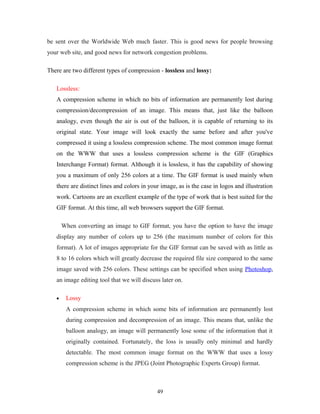
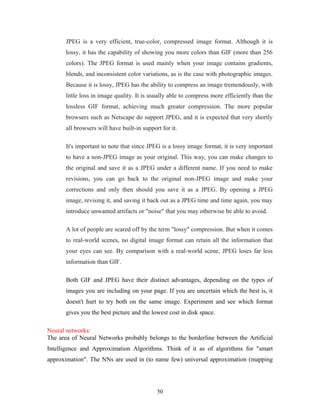
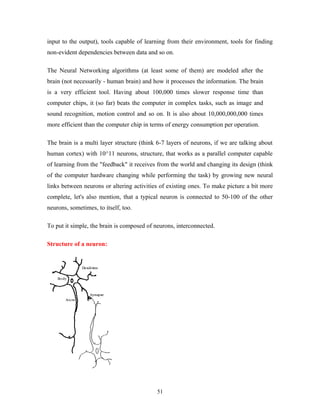
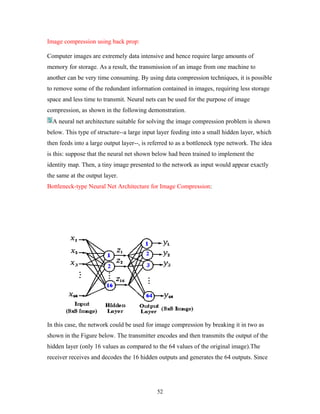
sadness, fear, and disgust. Some group of researchers presented an early attempt to 
analyze facial expressions by tracking the motion of twenty identified spots on an image 
sequence. Some developed a dynamic parametric model based on a 3D geometric mesh 
face model to recognize 5 prototypic expressions. Some selected manually selected facial 
regions that corresponded to facial muscles and computed motion within these regions 
using optical flow. Some other group of researchers used optical flow work, but tracked 
the motion of the surface regions of facial features (brows, eyes, nose, and mouth) instead 
of the motion of the underlying muscle groups. 
4. LIMITATIONS OF EXISTING SYSTEMS: 
The limitations of the existing systems are summarized as following: 
 Most systems attempt to recognize facial expressions from data collected in a 
highly controlled laboratory with very high-resolution frontal faces (face regions 
greater than 200 x 200 pixels). 
 Most system needs some manual preprocessing. 
 Most systems cannot handle large out-of-plane head motion. 
 None of these systems deals with complex real world interactions. 
 Except the system proposed by Moses et al. [14], none of those systems performs 
in real-time. 
In this paper, we report an expression recognition system, which addresses many of these 
limitations. In real environments, a facial expression analysis system must be able to: 
2
 Fully automatically recognize expressions. 
 Handle a full range of head motions. 
 Recognize expressions in face images with relatively lower resolution. 
 Recognize expressions in lower intensity. 
 Perform in real-time. 
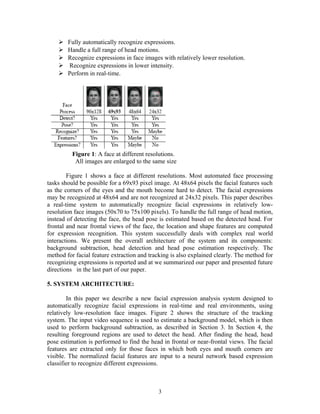
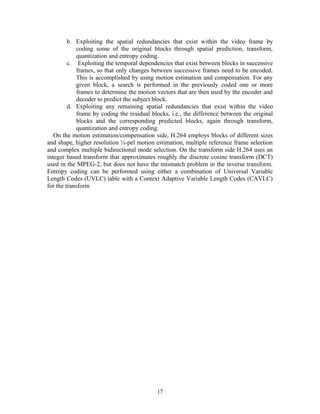
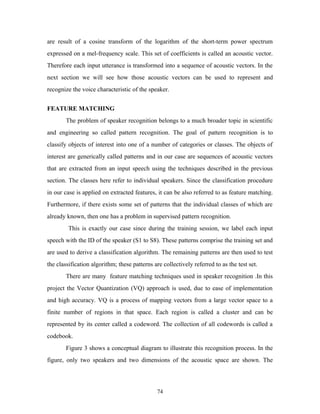
Figure 1: A face at different resolutions. 
All images are enlarged to the same size 
Figure 1 shows a face at different resolutions. Most automated face processing 
tasks should be possible for a 69x93 pixel image. At 48x64 pixels the facial features such 
as the corners of the eyes and the mouth become hard to detect. The facial expressions 
may be recognized at 48x64 and are not recognized at 24x32 pixels. This paper describes 
a real-time system to automatically recognize facial expressions in relatively low-resolution 
face images (50x70 to 75x100 pixels). To handle the full range of head motion, 
instead of detecting the face, the head pose is estimated based on the detected head. For 
frontal and near frontal views of the face, the location and shape features are computed 
for expression recognition. This system successfully deals with complex real world 
interactions. We present the overall architecture of the system and its components: 
background subtraction, head detection and head pose estimation respectively. The 
method for facial feature extraction and tracking is also explained clearly. The method for 
recognizing expressions is reported and at we summarized our paper and presented future 
directions in the last part of our paper. 
5. SYSTEM ARCHITECTURE: 
In this paper we describe a new facial expression analysis system designed to 
automatically recognize facial expressions in real-time and real environments, using 
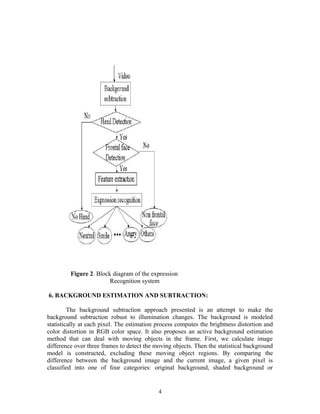
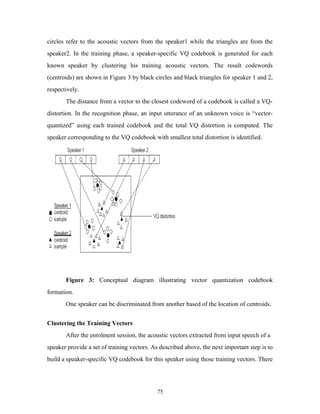
relatively low-resolution face images. Figure 2 shows the structure of the tracking 
system. The input video sequence is used to estimate a background model, which is then 
used to perform background subtraction, as described in Section 3. In Section 4, the 
resulting foreground regions are used to detect the head. After finding the head, head 
pose estimation is performed to find the head in frontal or near-frontal views. The facial 
features are extracted only for those faces in which both eyes and mouth corners are 
visible. The normalized facial features are input to a neural network based expression 
classifier to recognize different expressions. 
3
Figure 2. Block diagram of the expression 
Recognition system 
6. BACKGROUND ESTIMATION AND SUBTRACTION: 
The background subtraction approach presented is an attempt to make the 
background subtraction robust to illumination changes. The background is modeled 
statistically at each pixel. The estimation process computes the brightness distortion and 
color distortion in RGB color space. It also proposes an active background estimation 
method that can deal with moving objects in the frame. First, we calculate image 
difference over three frames to detect the moving objects. Then the statistical background 
model is constructed, excluding these moving object regions. By comparing the 
difference between the background image and the current image, a given pixel is 
classified into one of four categories: original background, shaded background or 
4
shadow, highlighted background, and foreground objects. Finally, a morphology step is 
applied to remove small isolated spots and fill holes in the foreground image. 
7.HEAD DETECTION: 
In order to handle the full range of head motion, we detect the head instead of 
detecting the face. The head detection uses the smoothed silhouette of the foreground 
object as segmented using background subtraction. Based on human intuition about the 
parts of an object, a segmentation into parts generally occurs at the negative curvature 
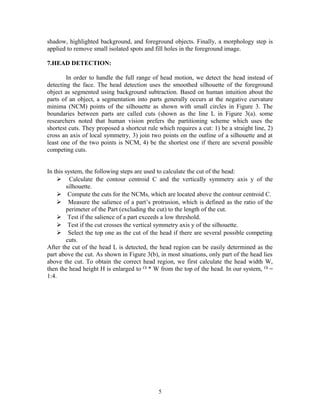
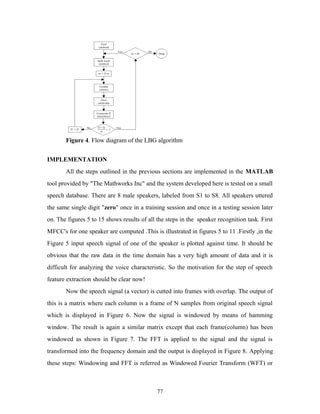
minima (NCM) points of the silhouette as shown with small circles in Figure 3. The 
boundaries between parts are called cuts (shown as the line L in Figure 3(a). some 
researchers noted that human vision prefers the partitioning scheme which uses the 
shortest cuts. They proposed a shortcut rule which requires a cut: 1) be a straight line, 2) 
cross an axis of local symmetry, 3) join two points on the outline of a silhouette and at 
least one of the two points is NCM, 4) be the shortest one if there are several possible 
competing cuts. 
In this system, the following steps are used to calculate the cut of the head: 
 Calculate the contour centroid C and the vertically symmetry axis y of the 
silhouette. 
 Compute the cuts for the NCMs, which are located above the contour centroid C. 
 Measure the salience of a part’s protrusion, which is defined as the ratio of the 
perimeter of the Part (excluding the cut) to the length of the cut. 
 Test if the salience of a part exceeds a low threshold. 
 Test if the cut crosses the vertical symmetry axis y of the silhouette. 
 Select the top one as the cut of the head if there are several possible competing 
cuts. 
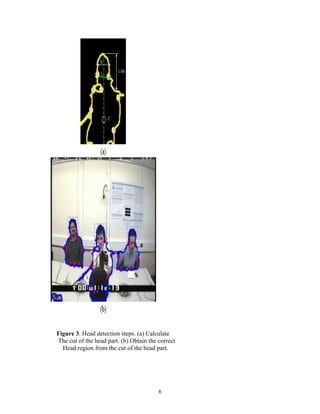
After the cut of the head L is detected, the head region can be easily determined as the 
part above the cut. As shown in Figure 3(b), in most situations, only part of the head lies 
above the cut. To obtain the correct head region, we first calculate the head width W, 
then the head height H is enlarged to * W from the top of the head. In our system, = 
1:4. 
5
Figure 3. Head detection steps. (a) Calculate 
The cut of the head part. (b) Obtain the correct 
Head region from the cut of the head part. 
6
8. HEAD POSE DETECTION: 
After the head is located, the head image is converted to gray-scale, histogram 
equalized and resized to the estimated resolution. Then we employ a three layer neural 
network (NN) to estimate the head pose. The inputs to the network are the processed head 
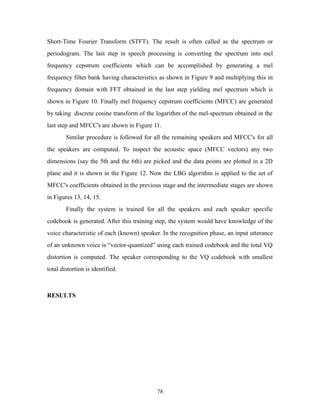
image. The outputs are the head poses. Here only 3 head pose classes are trained for 
expression analysis: 1) frontal or near frontal view, 2) side view or profile, 3) others such 
as back of the head or occluded face. 
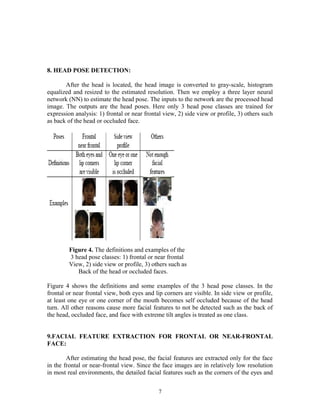
Figure 4. The definitions and examples of the 
3 head pose classes: 1) frontal or near frontal 
View, 2) side view or profile, 3) others such as 
Back of the head or occluded faces. 
Figure 4 shows the definitions and some examples of the 3 head pose classes. In the 
frontal or near frontal view, both eyes and lip corners are visible. In side view or profile, 
at least one eye or one corner of the mouth becomes self occluded because of the head 
turn. All other reasons cause more facial features to not be detected such as the back of 
the head, occluded face, and face with extreme tilt angles is treated as one class. 
9.FACIAL FEATURE EXTRACTION FOR FRONTAL OR NEAR-FRONTAL 
FACE: 
After estimating the head pose, the facial features are extracted only for the face 
in the frontal or near-frontal view. Since the face images are in relatively low resolution 
in most real environments, the detailed facial features such as the corners of the eyes and 
7
the upper or lower eyelids are not available To recognize facial expressions, however, we 
need to detect reliable facial features. We observe that most facial feature changes that 
are caused by an expression are in the areas of eyes, brows and mouth. In this paper, two 
types of facial features in these areas are extracted: location features and shape features. 
9.1 LOCATION FEATURE EXTRACTION 
In this system, six location features are extracted for expression analysis. They are 
eye centers (2), eyebrow inner endpoints (2), and corners of the mouth (2). 
Eye centers and eyebrow inner endpoints: To find the eye centers and eyebrow inner 
endpoints inside the detected frontal or near frontal face, we have developed an algorithm 
that searches for two pairs of dark regions which correspond to the eyes and the brows by 
using certain geometric constraints such as position inside the face, size and symmetry to 
the facial symmetry axis. The algorithm employs an iterative threshold method to find 
these dark regions under different or changing lighting conditions. 
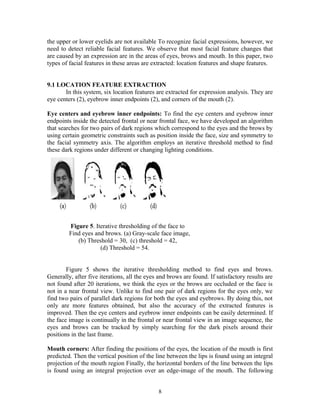
Figure 5. Iterative thresholding of the face to 
Find eyes and brows. (a) Gray-scale face image, 
(b) Threshold = 30, (c) threshold = 42, 
(d) Threshold = 54. 
Figure 5 shows the iterative thresholding method to find eyes and brows. 
Generally, after five iterations, all the eyes and brows are found. If satisfactory results are 
not found after 20 iterations, we think the eyes or the brows are occluded or the face is 
not in a near frontal view. Unlike to find one pair of dark regions for the eyes only, we 
find two pairs of parallel dark regions for both the eyes and eyebrows. By doing this, not 
only are more features obtained, but also the accuracy of the extracted features is 
improved. Then the eye centers and eyebrow inner endpoints can be easily determined. If 
the face image is continually in the frontal or near frontal view in an image sequence, the 
eyes and brows can be tracked by simply searching for the dark pixels around their 
positions in the last frame. 
Mouth corners: After finding the positions of the eyes, the location of the mouth is first 
predicted. Then the vertical position of the line between the lips is found using an integral 
projection of the mouth region Finally, the horizontal borders of the line between the lips 
is found using an integral projection over an edge-image of the mouth. The following 
8
steps are use to track the corners of the mouth: 1) Find two points on the line between the 
lips near the previous positions of the corners in the image 2) Search along the darkest 
path to the left and right, until the corners are found. Finding the points on the line 
between the lips can be done by searching for the darkest pixels in search windows near 
the previous mouth corner positions. Because there is a strong change from dark to bright 
at the location of the corners, the corners can be found by looking for the maximum 
contrast along the search path 
9.2 LOCATION FEATURE REPRESENTATION: 
After extracting the location features, the face can be normalized to a canonical 
face size based on two of these features, i.e., the eye-separation after the line connecting 
two eyes (eye-line) is rotated to horizontal. In our system, all faces are normalized to 90 x 
90 pixels by re-sampling. We transform the extracted features into a set of parameters for 
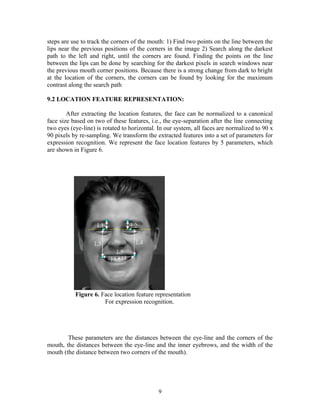
expression recognition. We represent the face location features by 5 parameters, which 
are shown in Figure 6. 
Figure 6. Face location feature representation 
For expression recognition. 
These parameters are the distances between the eye-line and the corners of the 
mouth, the distances between the eye-line and the inner eyebrows, and the width of the 
mouth (the distance between two corners of the mouth). 
9
9.3 SHAPE FEATURE EXTRACTION: 
Another type of distinguishing feature is the shape of the mouth. Global shape 
features are not adequate to describe the shape of the mouth. Therefore, in order to 
extract the mouth shape features, an edge detector is applied to the normalized face to get 
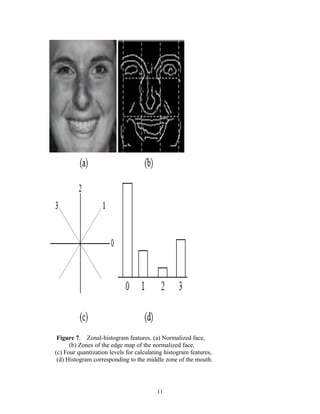
an edge map. This edge map is divided into 3 x 3 zones as shown in Figure7 (b). The size 
of the zones is selected to be half of the distance between the eyes. The mouth shape 
features are computed from zonal shape histograms of the edges in the mouth region. 
10
Figure 7. Zonal-histogram features. (a) Normalized face, 
(b) Zones of the edge map of the normalized face, 
(c) Four quantization levels for calculating histogram features, 
(d) Histogram corresponding to the middle zone of the mouth. 
11
10. EXPRESSION RECOGNITION: 
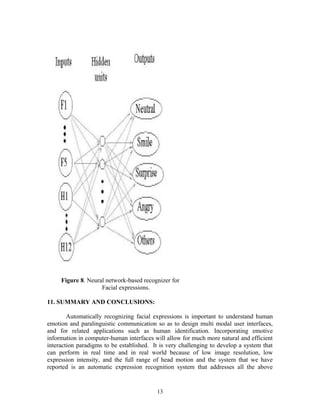
This system has neural network-based recognizer having the structure as shown in 
Figure 8. The standard back-propagation in the form of a three-layer neural network with 
one hidden layer was used to recognize facial expressions. The inputs to the network 
were the 5 location features (Figure 6) and the 12 zone components of shape features of 
the mouth (Figure7). Hence, a total of 17 features were used to represent the amount of 
expression in a face image. The outputs were a set of expressions. In this system, 5 
expressions were recognized. They were neutral, smile, angry, surprise, and others 
(including fear, sad, and disgust). Researchers tested various numbers of hidden units and 
found that 6 hidden units gave the best performance. 
12
Figure 8. Neural network-based recognizer for 
Facial expressions. 
11. SUMMARY AND CONCLUSIONS: 
Automatically recognizing facial expressions is important to understand human 
emotion and paralinguistic communication so as to design multi modal user interfaces, 
and for related applications such as human identification. Incorporating emotive 
information in computer-human interfaces will allow for much more natural and efficient 
interaction paradigms to be established. It is very challenging to develop a system that 
can perform in real time and in real world because of low image resolution, low 
expression intensity, and the full range of head motion and the system that we have 
reported is an automatic expression recognition system that addresses all the above 
13
challenges and successfully deals with complex real world interactions. In most real word 
interactions, the facial feature changes are caused by both talking and expression 
changes. We feel that further efforts will be required for distinguishing talking and 
expression changes by fusing audio signal processing and visual image analysis. Also it 
will benefit the expression recognition accuracy by using the sequential information 
instead of using each frame. 
REFERENCES: 
1. T. Kanade, J.F. Cohn, and Y.L. Tian. Comprehensive database for facial 
expression analysis. In Proceedings of International Conference on Face and 
Gesture Recognition, pages 46–53, March 2000. 
2. Z. Zhang. Feature-based facial expression recognition: Sensitivity analysis and 
experiments with a multi-layer perceptron. International Journal of Pattern 
Recognition and Artificial Intelligence, 13(6):893–911, 1999. 
3. Y. Moses, D. Reynard, and A. Blake. Determiningfacial expressions in real time. 
In Proc. Of Int. Conf.On Automatic Face and Gesture Recognition, pages 332– 
337, 1995. 
4. B. Fasel and J. Luttin. Recognition of asymmetric facial action unit 
activities and intensities. In Proceedings of International Conference of Pattern 
Recognition, 2000. 
CODE NO:EC 79 IS 2 
Advanced Video Coding : MPEG-4/H.264 and Beyond 
Bhavana, K.B.Jyothsna 
III/IV E.C.E. 
Padmasri Dr. B.V.Raju Institute of Technology 
reshaboinabhavana@yahoo.co.in, _dch_jyo@yahoo.com 
Advanced Video Coding : MPEG-4/H.264 and Beyond 
Bhavana, K.B.Jyothsna 
III/IV E.C.E. 
Padmasri Dr. B.V.Raju Institute of Technology 
reshaboinabhavana@yahoo.co.in, dch_jyo@yahoo.com 
Abstract : 
With the high demand for digital video products in popular applications such 
as video communications, security and surveillance, industrial automation and 
14
entertainment, video compression is an essential enabler for video applications design. 
The video coding standards are being under development for various applications. The 
purposes include better picture quality, higher coding efficiency and more error 
robustness. The new international video coding standard MPEG-4 part -10/H.264/AVC 
achieves significant improvements in coding efficiency and error robustness in 
comparison with the previous standards such as MPEG-2, MPEG-4 Visual. This paper 
provides an overview of H.264 and surveys the other current in use video coding 
methods. 
Introduction: 
Video coding deals with the compression of digital video data. Digital video is 
basically a three-dimensional array of color pixels. Two dimensions serve as spatial 
(horizontal and vertical) directions of the moving pictures, and one dimension represents 
the time domain. The video data contains fair amount of spatial and temporal 
redundancy. Similarities can thus be encoded by merely registering differences within a 
frame (spatial) and/or between frames (temporal). Video coding typically reduces this 
redundancy by using lossy compression. Usually this is achieved by image compression 
techniques to reduce spatial redundancy from frames (this is known as intraframe 
compression or spatial compression) and motion compensation, and other techniques to 
reduce temporal redundancy (known as interframe compression or temporal 
compression). 
Video coding for telecommunication applications has evolved through the 
development of the ITU-T H.261, H.262 (MPEG-2), H.263 (MPEG-4 Part-2, Visual) 
video coding standards (and later enhancements of known as H.263+ and H.263++) and 
now the H.264 (MPEG-4 Part-10). 
MPEG-4 Part-10 or H.264, is a high compression digital video codec 
standard written by the ITU-T Video Coding Experts Group (VCEG) together with the 
ISO/IEC Moving Pictures Experts Group (MPEG) as the product of a collective 
partnership effort known as the Joint Video Team (JVT). The ISO/IEC MPEG-4 Part-10 
standards and the ITU-T H.264 standard are technically identical and the technology is 
also known as AVC (Advanced Video Coding). The main objective behind the H.264 
project is to develop a high-performance video coding standard by adopting a “back-to-basics” 
approach with simple and straightforward design using well known building 
blocks. 
The intent of H.264/AVC project is to create a standard that would be capable 
of providing superb video quality at bitrate that is substantially lower (e.g., half or less) 
than what 
previous standards would need (e.g., relative to H.262, H.263) and to do so without so 
much of an increase in complexity as to make the design impractical (i.e. excessively 
expensive) to implement. Another ambitious goal is to do this in a flexible way that 
would allow the standard to be applied to a very wide variety of applications (e.g., for 
both low and high bitrate, and low and high resolution video) and to work well on a very 
wide variety of networks and systems (e.g., for RTP/IP packet networks, and ITU-T 
multimedia telephony systems). 
15
Overview : The Advanced Video Coding / H.264 
The new standard is designed for technical solutions including at least the 
following application areas 
* Broadcast over cable, satellite, cable modem, DSL, terrestrial, etc. 
* Interactive or serial storage on optical and magnetic devices, high definition DVD, etc. 
* Conversational services over ISDN, Ethernet, LAN, DSL, wireless and mobile 
networks, modems, etc. or mixtures of these. 
* Video-on-demand or multimedia streaming services over ISDN, cable modem, DSL, 
LAN, wireless networks, etc. 
* Multimedia messaging services (MMS) over ISDN, DSL, Ethernet, LAN, wireless and 
mobile networks, etc. 
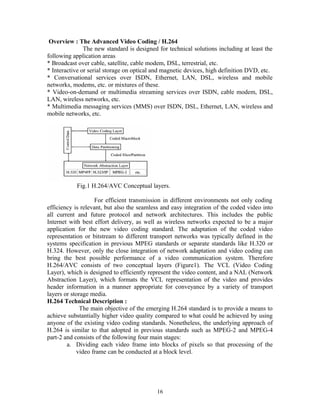
Fig.1 H.264/AVC Conceptual layers. 
For efficient transmission in different environments not only coding 
efficiency is relevant, but also the seamless and easy integration of the coded video into 
all current and future protocol and network architectures. This includes the public 
Internet with best effort delivery, as well as wireless networks expected to be a major 
application for the new video coding standard. The adaptation of the coded video 
representation or bitstream to different transport networks was typically defined in the 
systems specification in previous MPEG standards or separate standards like H.320 or 
H.324. However, only the close integration of network adaptation and video coding can 
bring the best possible performance of a video communication system. Therefore 
H.264/AVC consists of two conceptual layers (Figure1). The VCL (Video Coding 
Layer), which is designed to efficiently represent the video content, and a NAL (Network 
Abstraction Layer), which formats the VCL representation of the video and provides 
header information in a manner appropriate for conveyance by a variety of transport 
layers or storage media. 
H.264 Technical Description : 
The main objective of the emerging H.264 standard is to provide a means to 
achieve substantially higher video quality compared to what could be achieved by using 
anyone of the existing video coding standards. Nonetheless, the underlying approach of 
H.264 is similar to that adopted in previous standards such as MPEG-2 and MPEG-4 
part-2 and consists of the following four main stages: 
a. Dividing each video frame into blocks of pixels so that processing of the 
video frame can be conducted at a block level. 
16
b. Exploiting the spatial redundancies that exist within the video frame by 
coding some of the original blocks through spatial prediction, transform, 
quantization and entropy coding. 
c. Exploiting the temporal dependencies that exist between blocks in successive 
frames, so that only changes between successive frames need to be encoded. 
This is accomplished by using motion estimation and compensation. For any 
given block, a search is performed in the previously coded one or more 
frames to determine the motion vectors that are then used by the encoder and 
decoder to predict the subject block. 
d. Exploiting any remaining spatial redundancies that exist within the video 
frame by coding the residual blocks, i.e., the difference between the original 
blocks and the corresponding predicted blocks, again through transform, 
quantization and entropy coding. 
On the motion estimation/compensation side, H.264 employs blocks of different sizes 
and shape, higher resolution ¼-pel motion estimation, multiple reference frame selection 
and complex multiple bidirectional mode selection. On the transform side H.264 uses an 
integer based transform that approximates roughly the discrete cosine transform (DCT) 
used in the MPEG-2, but does not have the mismatch problem in the inverse transform. 
Entropy coding can be performed using either a combination of Universal Variable 
Length Codes (UVLC) table with a Context Adaptive Variable Length Codes (CAVLC) 
for the transform 
17
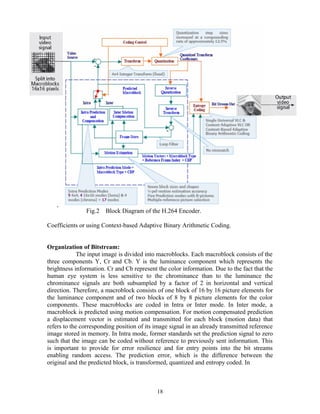
Fig.2 Block Diagram of the H.264 Encoder. 
Coefficients or using Context-based Adaptive Binary Arithmetic Coding. 
Organization of Bitstream: 
The input image is divided into macroblocks. Each macroblock consists of the 
three components Y, Cr and Cb. Y is the luminance component which represents the 
brightness information. Cr and Cb represent the color information. Due to the fact that the 
human eye system is less sensitive to the chrominance than to the luminance the 
chrominance signals are both subsampled by a factor of 2 in horizontal and vertical 
direction. Therefore, a macroblock consists of one block of 16 by 16 picture elements for 
the luminance component and of two blocks of 8 by 8 picture elements for the color 
components. These macroblocks are coded in Intra or Inter mode. In Inter mode, a 
macroblock is predicted using motion compensation. For motion compensated prediction 
a displacement vector is estimated and transmitted for each block (motion data) that 
refers to the corresponding position of its image signal in an already transmitted reference 
image stored in memory. In Intra mode, former standards set the prediction signal to zero 
such that the image can be coded without reference to previously sent information. This 
is important to provide for error resilience and for entry points into the bit streams 
enabling random access. The prediction error, which is the difference between the 
original and the predicted block, is transformed, quantized and entropy coded. In 
18
order to reconstruct the same image on the decoder side, the quantized coefficients are 
inverse transformed and added to the prediction signal. The result is the reconstructed 
macroblock that is also available at the decoder side. This macroblock is stored in a 
memory. Macroblocks are typically stored in raster scan order. H.264/AVC introduces 
the following changes: 
1. In order to reduce the block-artifacts an adaptive deblocking filter is used in 
the prediction loop. The deblocked macroblock is stored in the memory and can 
be used to predict future macroblocks. 
2. Whereas the memory contains one video frame in previous standards, 
H.264/AVC allows storing multiple video frames in the memory. 
3. In H.264/AVC a prediction scheme is used also in Intra mode that uses the 
image signal of already transmitted macro blocks of the same image in order to 
predict the block to code. 
4. The Direct Cosine Transform (DCT) used in former standards is replaced by an 
integer transform. 
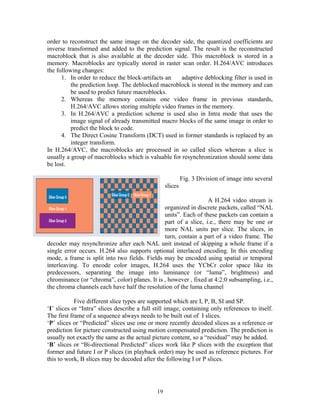
In H.264/AVC, the macroblocks are processed in so called slices whereas a slice is 
usually a group of macroblocks which is valuable for resynchronization should some data 
be lost. 
Fig. 3 Division of image into several 
slices 
A H.264 video stream is 
organized in discrete packets, called “NAL 
units”. Each of these packets can contain a 
part of a slice, i.e., there may be one or 
more NAL units per slice. The slices, in 
turn, contain a part of a video frame. The 
decoder may resynchronize after each NAL unit instead of skipping a whole frame if a 
single error occurs. H.264 also supports optional interlaced encoding. In this encoding 
mode, a frame is split into two fields. Fields may be encoded using spatial or temporal 
interleaving. To encode color images, H.264 uses the YCbCr color space like its 
predecessors, separating the image into luminance (or “luma”, brightness) and 
chrominance (or “chroma”, color) planes. It is , however , fixed at 4:2:0 subsampling, i.e., 
the chroma channels each have half the resolution of the luma channel 
Five different slice types are supported which are I, P, B, SI and SP. 
‘I’ slices or “Intra” slices describe a full still image, containing only references to itself. 
The first frame of a sequence always needs to be built out of I slices. 
‘P’ slices or “Predicted” slices use one or more recently decoded slices as a reference or 
prediction for picture constructed using motion compensated prediction. The prediction is 
usually not exactly the same as the actual picture content, so a “residual” may be added. 
‘B’ slices or “Bi-directional Predicted” slices work like P slices with the exception that 
former and future I or P slices (in playback order) may be used as reference pictures. For 
this to work, B slices may be decoded after the following I or P slices. 
19
‘SI’ or ‘SP’ slices or “Switching” slices may be used for efficient transitions between two 
different H.264 video streams. 
The tools that make H.264 such a successful video coding scheme are 
discussed below. 
Intra Prediction and Coding : 
Intra prediction means that the samples of a macroblock are predicted by using 
only information of already transmitted macroblocks of the same image thereby 
exploiting only spatial redundancies with in a video picture .The resulting frame is 
referred to as an I-picture .I-pictures are typically encoded by directly applying the 
transform to different macroblocks in the frame .in order to increase the efficiency of the 
intra coding process in H.264, spatial correlation between adjacent macrablocks in a 
given frame is exploited .The idea is based on the observation that adjacent macroblocks 
tend to have similar properties. The difference between the actual macroblock and its 
prediction is then coded, which results in fewer bits to represent the macroblocks of 
interest compared to when applying the transform directly to the macroblock itself. 
In H.264/AVC, two different types of intra prediction are possible for the 
prediction of the luminance component Y. 
The first type is called INTRA_4×4 and the second one INTRA_16×16. Using the 
INTRA_4×4 type, the macroblock, which is of the size 16 by 16 picture elements 
(16×16), is divided into sixteen 4×4 sub-blocks and a prediction for each 4×4 sub-block 
of the luminance signal is applied individually. For the prediction purpose, nine different 
prediction modes are supported. One mode is DC prediction mode, whereas all samples 
of the current 4×4 
Sub-block are predicted by the mean of all samples neighboring to the left and to the top 
of the current block and which have been already reconstructed 
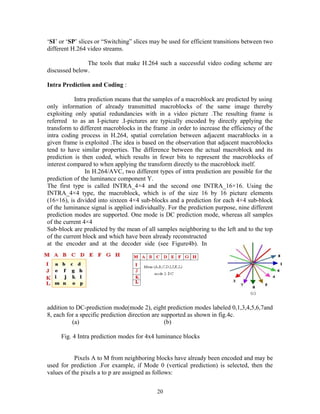
at the encoder and at the decoder side (see Figure4b). In 
addition to DC-prediction mode(mode 2), eight prediction modes labeled 0,1,3,4,5,6,7and 
8, each for a specific prediction direction are supported as shown in fig.4c. 
(a) (b) 
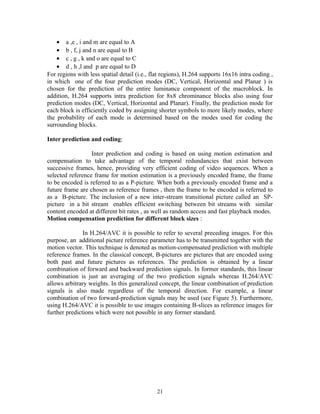
Fig. 4 Intra prediction modes for 4x4 luminance blocks 
Pixels A to M from neighboring blocks have already been encoded and may be 
used for prediction .For example, if Mode 0 (vertical prediction) is selected, then the 
values of the pixels a to p are assigned as follows: 
20
· a ,e , i and m are equal to A 
· b , f, j and n are equal to B 
· c , g , k and o are equal to C 
· d , h ,l and p are equal to D 
For regions with less spatial detail (i.e., flat regions), H.264 supports 16x16 intra coding , 
in which one of the four prediction modes (DC, Vertical, Horizontal and Planar ) is 
chosen for the prediction of the entire luminance component of the macroblock. In 
addition, H.264 supports intra prediction for 8x8 chrominance blocks also using four 
prediction modes (DC, Vertical, Horizontal and Planar). Finally, the prediction mode for 
each block is efficiently coded by assigning shorter symbols to more likely modes, where 
the probability of each mode is determined based on the modes used for coding the 
surrounding blocks. 
Inter prediction and coding: 
Inter prediction and coding is based on using motion estimation and 
compensation to take advantage of the temporal redundancies that exist between 
successive frames, hence, providing very efficient coding of video sequences. When a 
selected reference frame for motion estimation is a previously encoded frame, the frame 
to be encoded is referred to as a P-picture. When both a previously encoded frame and a 
future frame are chosen as reference frames , then the frame to be encoded is referred to 
as a B-picture. The inclusion of a new inter-stream transitional picture called an SP-picture 
in a bit stream enables efficient switching between bit streams with similar 
content encoded at different bit rates , as well as random access and fast playback modes. 
Motion compensation prediction for different block sizes : 
In H.264/AVC it is possible to refer to several preceding images. For this 
purpose, an additional picture reference parameter has to be transmitted together with the 
motion vector. This technique is denoted as motion-compensated prediction with multiple 
reference frames. In the classical concept, B-pictures are pictures that are encoded using 
both past and future pictures as references. The prediction is obtained by a linear 
combination of forward and backward prediction signals. In former standards, this linear 
combination is just an averaging of the two prediction signals whereas H.264/AVC 
allows arbitrary weights. In this generalized concept, the linear combination of prediction 
signals is also made regardless of the temporal direction. For example, a linear 
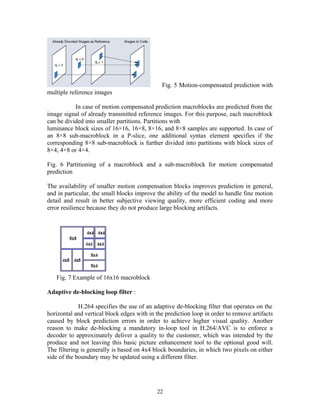
combination of two forward-prediction signals may be used (see Figure 5). Furthermore, 
using H.264/AVC it is possible to use images containing B-slices as reference images for 
further predictions which were not possible in any former standard. 
21
Fig. 5 Motion-compensated prediction with 
multiple reference images 
In case of motion compensated prediction macroblocks are predicted from the 
image signal of already transmitted reference images. For this purpose, each macroblock 
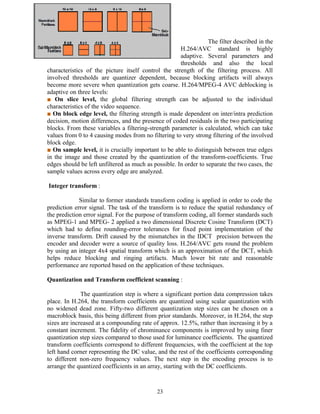
can be divided into smaller partitions. Partitions with 
luminance block sizes of 16×16, 16×8, 8×16, and 8×8 samples are supported. In case of 
an 8×8 sub-macroblock in a P-slice, one additional syntax element specifies if the 
corresponding 8×8 sub-macroblock is further divided into partitions with block sizes of 
8×4, 4×8 or 4×4. 
Fig. 6 Partitioning of a macroblock and a sub-macroblock for motion compensated 
prediction 
The availability of smaller motion compensation blocks improves prediction in general, 
and in particular, the small blocks improve the ability of the model to handle fine motion 
detail and result in better subjective viewing quality, more efficient coding and more 
error resilience because they do not produce large blocking artifacts. 
Fig. 7 Example of 16x16 macroblock 
Adaptive de-blocking loop filter : 
H.264 specifies the use of an adaptive de-blocking filter that operates on the 
horizontal and vertical block edges with in the prediction loop in order to remove artifacts 
caused by block prediction errors in order to achieve higher visual quality. Another 
reason to make de-blocking a mandatory in-loop tool in H.264/AVC is to enforce a 
decoder to approximately deliver a quality to the customer, which was intended by the 
produce and not leaving this basic picture enhancement tool to the optional good will. 
The filtering is generally is based on 4x4 block boundaries, in which two pixels on either 
side of the boundary may be updated using a different filter. 
22
The filter described in the 
H.264/AVC standard is highly 
adaptive. Several parameters and 
thresholds and also the local 
characteristics of the picture itself control the strength of the filtering process. All 
involved thresholds are quantizer dependent, because blocking artifacts will always 
become more severe when quantization gets coarse. H.264/MPEG-4 AVC deblocking is 
adaptive on three levels: 
■ On slice level, the global filtering strength can be adjusted to the individual 
characteristics of the video sequence. 
■ On block edge level, the filtering strength is made dependent on inter/intra prediction 
decision, motion differences, and the presence of coded residuals in the two participating 
blocks. From these variables a filtering-strength parameter is calculated, which can take 
values from 0 to 4 causing modes from no filtering to very strong filtering of the involved 
block edge. 
■ On sample level, it is crucially important to be able to distinguish between true edges 
in the image and those created by the quantization of the transform-coefficients. True 
edges should be left unfiltered as much as possible. In order to separate the two cases, the 
sample values across every edge are analyzed. 
Integer transform : 
Similar to former standards transform coding is applied in order to code the 
prediction error signal. The task of the transform is to reduce the spatial redundancy of 
the prediction error signal. For the purpose of transform coding, all former standards such 
as MPEG-1 and MPEG- 2 applied a two dimensional Discrete Cosine Transform (DCT) 
which had to define rounding-error tolerances for fixed point implementation of the 
inverse transform. Drift caused by the mismatches in the IDCT precision between the 
encoder and decoder were a source of quality loss. H.264/AVC gets round the problem 
by using an integer 4x4 spatial transform which is an approximation of the DCT, which 
helps reduce blocking and ringing artifacts. Much lower bit rate and reasonable 
performance are reported based on the application of these techniques. 
Quantization and Transform coefficient scanning : 
The quantization step is where a significant portion data compression takes 
place. In H.264, the transform coefficients are quantized using scalar quantization with 
no widened dead zone. Fifty-two different quantization step sizes can be chosen on a 
macroblock basis, this being different from prior standards. Moreover, in H.264, the step 
sizes are increased at a compounding rate of approx. 12.5%, rather than increasing it by a 
constant increment. The fidelity of chrominance components is improved by using finer 
quantization step sizes compared to those used for luminance coefficients. The quantized 
transform coefficients correspond to different frequencies, with the coefficient at the top 
left hand corner representing the DC value, and the rest of the coefficients corresponding 
to different non-zero frequency values. The next step in the encoding process is to 
arrange the quantized coefficients in an array, starting with the DC coefficients. 
23
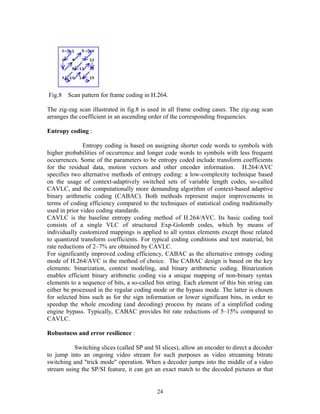
Fig.8 Scan pattern for frame coding in H.264. 
The zig-zag scan illustrated in fig.8 is used in all frame coding cases. The zig-zag scan 
arranges the coefficient in an ascending order of the corresponding frequencies. 
Entropy coding : 
Entropy coding is based on assigning shorter code words to symbols with 
higher probabilities of occurrence and longer code words to symbols with less frequent 
occurrences. Some of the parameters to be entropy coded include transform coefficients 
for the residual data, motion vectors and other encoder information. H.264/AVC 
specifies two alternative methods of entropy coding: a low-complexity technique based 
on the usage of context-adaptively switched sets of variable length codes, so-called 
CAVLC, and the computationally more demanding algorithm of context-based adaptive 
binary arithmetic coding (CABAC). Both methods represent major improvements in 
terms of coding efficiency compared to the techniques of statistical coding traditionally 
used in prior video coding standards. 
CAVLC is the baseline entropy coding method of H.264/AVC. Its basic coding tool 
consists of a single VLC of structured Exp-Golomb codes, which by means of 
individually customized mappings is applied to all syntax elements except those related 
to quantized transform coefficients. For typical coding conditions and test material, bit 
rate reductions of 2–7% are obtained by CAVLC. 
For significantly improved coding efficiency, CABAC as the alternative entropy coding 
mode of H.264/AVC is the method of choice. The CABAC design is based on the key 
elements: binarization, context modeling, and binary arithmetic coding. Binarization 
enables efficient binary arithmetic coding via a unique mapping of non-binary syntax 
elements to a sequence of bits, a so-called bin string. Each element of this bin string can 
either be processed in the regular coding mode or the bypass mode. The latter is chosen 
for selected bins such as for the sign information or lower significant bins, in order to 
speedup the whole encoding (and decoding) process by means of a simplified coding 
engine bypass. Typically, CABAC provides bit rate reductions of 5–15% compared to 
CAVLC. 
Robustness and error resilience : 
Switching slices (called SP and SI slices), allow an encoder to direct a decoder 
to jump into an ongoing video stream for such purposes as video streaming bitrate 
switching and "trick mode" operation. When a decoder jumps into the middle of a video 
stream using the SP/SI feature, it can get an exact match to the decoded pictures at that 
24
location in the video stream despite using different pictures (or no pictures at all) as 
references prior to the switch. 
Flexible macroblock ordering (FMO, also known as slice groups) and arbitrary 
slice ordering (ASO), which are techniques for restructuring the ordering of the 
representation of the fundamental regions (called macroblocks) in pictures. Typically 
considered an error/loss robustness feature, FMO and ASO can also be used for other 
purposes. 
Data partitioning (DP), a feature providing the ability to separate more 
important and less important syntax elements into different packets of data, enabling the 
application of unequal error protection (UEP) and other types of improvement of 
error/loss robustness. 
Redundant slices (RS), an error/loss robustness feature allowing an encoder to 
send an extra representation of a picture region (typically at lower fidelity) that can be 
used if the primary representation is corrupted or lost. 
Supplemental enhancement information (SEI) and video usability information 
(VUI), which are extra information that can be inserted into the bitstream to enhance the 
use of the video for a wide variety of purposes. 
Frame numbering, a feature that allows the creation of "sub-sequences" 
(enabling temporal scalability by optional inclusion of extra pictures between other 
pictures), and the detection and concealment of losses of entire pictures (which can occur 
due to network packet losses or channel errors). 
Picture order count, a feature that serves to keep the ordering of the pictures 
and the values of samples in the decoded pictures isolated from timing information 
(allowing timing information to be carried and controlled/changed separately by a system 
without affecting decoded picture content). 
These techniques, along with several others, help H.264 to perform significantly better 
than any prior standard can, under a wide variety of circumstances in a wide variety of 
application environments. H.264 can often perform radically better than MPEG-2 video 
—typically obtaining the same quality at half of the bitrate or less. 
Comparison to previous standard : 
Coding efficiency : 
The coding efficiency is measured by 
average bit rate savings for a constant peak 
25
signal to noise ratio (PSNR). Therefore the required bit rates of several test sequences 
and different qualities are taken into account. 
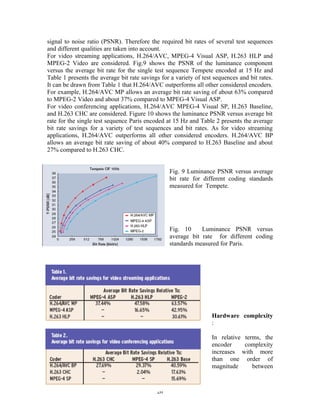
For video streaming applications, H.264/AVC, MPEG-4 Visual ASP, H.263 HLP and 
MPEG-2 Video are considered. Fig.9 shows the PSNR of the luminance component 
versus the average bit rate for the single test sequence Tempete encoded at 15 Hz and 
Table 1 presents the average bit rate savings for a variety of test sequences and bit rates. 
It can be drawn from Table 1 that H.264/AVC outperforms all other considered encoders. 
For example, H.264/AVC MP allows an average bit rate saving of about 63% compared 
to MPEG-2 Video and about 37% compared to MPEG-4 Visual ASP. 
For video conferencing applications, H.264/AVC MPEG-4 Visual SP, H.263 Baseline, 
and H.263 CHC are considered. Figure 10 shows the luminance PSNR versus average bit 
rate for the single test sequence Paris encoded at 15 Hz and Table 2 presents the average 
bit rate savings for a variety of test sequences and bit rates. As for video streaming 
applications, H.264/AVC outperforms all other considered encoders. H.264/AVC BP 
allows an average bit rate saving of about 40% compared to H.263 Baseline and about 
27% compared to H.263 CHC. 
Fig. 9 Luminance PSNR versus average 
bit rate for different coding standards 
measured for Tempete. 
Fig. 10 Luminance PSNR versus 
average bit rate for different coding 
standards measured for Paris. 
Hardware complexity 
: 
In relative terms, the 
encoder complexity 
increases with more 
than one order of 
magnitude between 
26
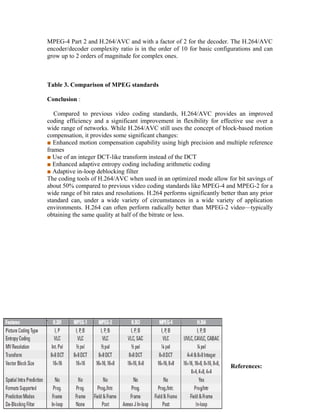
MPEG-4 Part 2 and H.264/AVC and with a factor of 2 for the decoder. The H.264/AVC 
encoder/decoder complexity ratio is in the order of 10 for basic configurations and can 
grow up to 2 orders of magnitude for complex ones. 
Table 3. Comparison of MPEG standards 
Conclusion : 
Compared to previous video coding standards, H.264/AVC provides an improved 
coding efficiency and a significant improvement in flexibility for effective use over a 
wide range of networks. While H.264/AVC still uses the concept of block-based motion 
compensation, it provides some significant changes: 
■ Enhanced motion compensation capability using high precision and multiple reference 
frames 
■ Use of an integer DCT-like transform instead of the DCT 
■ Enhanced adaptive entropy coding including arithmetic coding 
■ Adaptive in-loop deblocking filter 
The coding tools of H.264/AVC when used in an optimized mode allow for bit savings of 
about 50% compared to previous video coding standards like MPEG-4 and MPEG-2 for a 
wide range of bit rates and resolutions. H.264 performs significantly better than any prior 
standard can, under a wide variety of circumstances in a wide variety of application 
environments. H.264 can often perform radically better than MPEG-2 video—typically 
obtaining the same quality at half of the bitrate or less. 
References: 
27
1. www.scientificatlanta.com 
2. www.techrepublic.com 
3. www.mpeg.org 
4. www.vcodex.com/h.264.html 
5. www.sciencedirect.org 
6. www.ieee.org 
7. The MPEG hand book by John Watkinson. 
CODE NO: EC 66 IS 3 
HUMAN-ROBOT INTERFACE BASED ON THE 
Mutual Assistance between Speech and Vision 
. 
Submitted by: 
1.Harleen Kaur Chadha 2.Sonia Kapoor 
EEE-3rd year, EEE-3rd year, 
Guru Nanak Engineering College, Guru Nanak Engineering College, 
Ibrahimpatnam, Ibrahimpatnam, 
Hyderabad Hyderabad 
Abstract: 
In this paper we are developing a helper robot that brings the objects ordered by user with the 
mutual assistance between speech and vision. The robot needs a vision system to recognize 
objects appearing in the orders. However, conventional vision systems cannot recognize objects 
in complex scenes. They may find many objects and cannot determine which the target is. This 
paper proposes a method of using a conversation with the user to solve this problem. Speech 
based interface is appropriate for this application. The robot asks a question to which the user can 
easily answer and whose answer can efficiently reduce the number of candidate objects. It 
28
considers the characteristics of features used for object recognition such as the easiness for 
humans to specify them by word, generating a user-friendly and efficient sequence of questions. 
Robot can detect target objects by asking the questions generated by the method. After the target 
object has been detected by the robot it will handover that target object to its master and for doing 
this we equip the robot with sensors, lasers and pan-tilt camera. 
I. INTRODUCTION 
Helper robots or service robots in welfare domain have attracted much attention of researchers for 
the coming aged society. Here we are developing a helper robot that carries out tasks ordered by the user 
through voice and/or gestures. In addition to gesture recognition, such robots need to have vision systems 
that can recognize the objects mentioned in speech. It is, however, difficult to realize vision systems that 
can work in various conditions. Thus, we have proposed to use the human user’s assistance through speech. 
When the vision system cannot achieve a task, the robot makes a speech to the user so that the natural 
response by the user can give helpful information for its vision system. Thus, even though detecting the 
target object may be difficult and need the user’s assistance, once the robot has detected an object, it can 
assume the object as the target. However, in actual complex scenes, the vision system may detect various 
objects. The robot must choose the target object among them, which is a hard problem especially if it does 
not have much a priori knowledge about the object. This paper tackles this problem. The robot determines 
the target through a conversation with the user. The point of research is how to generate a sequence of 
utterances that can lead to determine the object efficiently and user-friendly. This paper presents such a 
dialog generation method. It determines what and how to ask the user by considering image processing 
results and the characteristics of object attributes. 
After the object has been selected by the mutual assistance between the speech and vision 
capabilities of the robot with the help of master it should be handed over to its master, for this we are going 
to use robot that is equipped with the sonar, laser, infrared and pan-tilt camera. 
II. SYSTEM CONFIGURATION 
Our system consists of a speech module, a gesture module, a vision module, an action module and 
a central processing module. 
Speech Module: The speech module consists of a voice 
recognition sub module and a text-to-speech sub 
module. Via Voice Millennium is used for speech 
recognition, and ProTalker97 software is used to do 
text-to-speech. 
Vision Module: The vision module performs image 
processing when the central processing module sends it 
a command. We have equipped it with the ability to 
recognize objects based on color segmentation and 
simple shape detection. Gesture recognition methods 
are also used to detect the objects and its result is sent to 
the central processing module. 
Action Module: The action module waits for commands 
from the central processing module to carry out the 
actions intended for the robot and the camera. 
29
Central Processing Module: The Central processing module is the center of the system. It uses various 
information and knowledge to analyze the meanings of recognized voice input. It sends commands to the 
Vision module when it thinks that visual information is needed and sends commands to the Speech module 
to make sentences when it thinks that that it needs to ask the user for additional information, it sends 
commands to action module when action is to be carried out by the robot . 
III. FEATURE CHARACTERISTICS 
We consider the characteristics of features todetermine which feature the robot uses and how to 
use it from the following four viewpoints. In the current implementation, we use four features: color, size, 
position, and shape. Here, we classify recognized words into thedifferent categories: objects, actions, 
directions, adjectives, adverbs, emergency words, numerals, colors, names of people and others and we 
train the robot that it can understand any of these features. 
A. Vocabulary 
Humans can easily describe some features by word .If we can represent a particular feature easily 
by word for any given object, we call it a vocabulary-rich feature. The robot can ask relatively complex 
questions such as ‘what-type’ questions for a vocabulary-rich feature since we can easily find an 
appropriate word for answer. 
For example, we have rich vocabulary for color description: such as, red, green, blue, etc. When the robot 
asks what color it is, we can easily give an 
answer. Position is also a vocabulary-rich 
feature. We have a large vocabulary to express 
position such as left, right, upper, and lower. 
B. Distribution 
Although we consider features for 
each object, we may find it difficult to express 
some features by word depending on the 
spatial distribution of objects. We call a feature 
with this problem a distribution-dependent feature. Position is a distribution-dependent feature. If several 
objects exist close together, it is difficult specify the position of each object. Color, size, and shape are not 
such features. 
C.Uniqueness: 
If the value of a particular feature is different for eachobject, we call it a unique feature. Position 
can be a unique feature since no multiple objects share the same position. 
D. Absoluteness/Relativeness: 
If we can describe a particular feature by word even if only an object exists, we call it an absolute 
feature. Otherwise, we call it a relative feature. Color and shape are absolute features in general. Size and 
position are not absolute features but relative features. We say ‘big’ or ‘small’ by comparing with other 
objects. 
IV. ASSISTANCE BY SPEECH 
The basic strategy for generating dialog is ‘ask-and remove’. The robot asks the user about a 
certain feature. Then, it removes unrelated objects from the detected objects using the information given by 
the user. It iterates this process until only an object remains. The robot applies color segmentation .When 
the number of object is large; it may be difficult to use distribution-dependent, relative features. So we 
30
mainly consider vocabulary-rich, absolute features. We consider unique features only when the other 
features cannot work, because in the current implementation, position is the only unique feature, and it is a 
distribution-dependent feature. The robot generates its utterances for dialog with the useras follows. First, it 
classifies the features of all regions into classes. For example, it assigns a color label to each region based 
on the average hue value of the region. How to classify the data is determined for each feature in advance. 
For color, it classifies them into seven colors: blue, yellow, green, red, magenta, white, and black. Then, the 
robot computes the percentage of the number of objects in each class to the total number of objects. It 
classifies the situation of each feature into three categories depending on the maximum percentage: the 
variation category, the mediumcategory, and the concentration category. The variation category is the case 
where the maximum percentage is less than 33% (1/3), for concentration category it is about 67% (2/3), for 
the medium category it is from 33% through 67%. These percentage values are experimentally determined. 
If the robot can obtain information about any feature classified as the variation category, it can reduce 
many unrelated objects among the regions. Therefore, the first rule for determining what feature the robot 
chooses for its question to the user is to give a priority to the variation category features. If no such feature 
exists, the medium category features are given the second priority and the concentration category features 
the last. 
A. Case with variation category features: 
If there are any variation category features, the robot asks the features to the user. If the present 
features classified into the variation category include a vocabulary-rich feature, the robot asks the user 
‘what-type’ questions. For example, if the color feature satisfies the variation category condition, the robot 
asks, “What is the color of the target object?” as color is a vocabulary-rich feature. If there are multiple 
vocabulary-rich features, the first priority is given to the feature with the smallest maximum percentage. If 
question. Thus, the there is no such vocabulary-rich feature, the robot needs to adopt absolute features. 
Since they are not vocabulary-rich features, the user may find it difficult to answer the question if the robot 
asks a ‘what-type’ robot examines whether or not each region can be described easily by word in terms of 
the feature. If all regions satisfy this, the robot adopts a ‘what-type’ question. Otherwise, it uses a multiple 
choice question such as, “Is the target object A, B, or others?” where ‘A’ and ‘B’ are features that can be 
expressed by word easily. For example, in the case of shape, the robot sees for the shape factor which helps 
to decide shape and we will deal about this concept in coming session. There could be a case where all 
regions are hard to be expressed by word.. It classifies the regions into classes that can be expressed by 
word; and it assigns the label ‘others’ to the regions that cannot be expressed by word. Thus, the number of 
regions with the ‘others’ label should be less than one third of the total number if the feature is classified 
into the variation category. 
B. Case with medium category features 
If no features are classified into the variation category but any into the medium category, the robot 
considers using the features in the medium category. In this case, the robot uses a ‘yes/no-type’ question. 
The robot generates a question such as, “Is the target object A, B, or others?” where ‘A’ is the label of 
feature with the largest percentage. An example is, “Is the target object red?” The robot can reduce the 
number of candidates into half on average by one question. If there are multiple such features, the robot 
gives them priorities according to the order fixed in advance. We determine the priority in the order that we 
can obtain reliable information. 
C. Case with concentration category features 
This is the case where all features are classified into the concentration category, which means that all 
regions (objects) are similar in several respects. Thus, the robot considers using unique features. The robot 
asks a ‘yes/no-type’ question about unique features. In the current implementation, position is the only 
unique feature. An example question is, “Is the target 
31
Object on the right?” The robot computes the spatial distribution pattern of the objects. The word 
specifying the positional relationship, ‘right’ in the above example, is determined by this pattern. We 
determine the relationships between the pattern and the word in advance. When we use position, we need to 
consider two things. One is that position is a distribution-dependent feature. As we have trained robot about 
the position relation-ships the user can use words specifying positional relationships, such as ‘right’ and 
‘left’ by considering the robot’s camera direction. Thus, ‘right’ means the right part to robot, and ‘close’ 
means the lower part to the robot. However, such interpretation may be wrong and asking the not conform 
to the purpose of this research. To solve such problems, we are planning to specify positional relationships 
with respect to some distinguished objects in the scene. For example, if the robot finds a red object in the 
scene where no other red objects can be seen, it asks the user such as if the target object is on the right of 
the red object. 
V. IMAGE PROCESSING 
In current implementation we apply color segmentation and compute four features for each foreground 
region in the segmentation result: color, shape, position, and size. The size is the number of pixels of the 
region. 
A. Color Segmentation 
We use a robust approach of features space method: the mean shift algorithm combined with HSI (Hue, 
Saturation, and Intensity) color space for color image segmentation. Although the mean shift algorithm and 
HSI 
Color space can be separately used for color image segmentation; they surely fail to segment object when 
illumination condition will change. To solve this problem, we use the mean shift algorithm as an image 
preprocessing tool to reduce regions and number of colors used and then uses HIS color space for merging 
regions to segment single colored objects in different illumination conditions. Our method consists of the 
following parts: • Apply the mean shift algorithm into a real image to reduce colors and divide it into 
several regions. 
· Merge regions of a specific color based on H, S, I components of HSI color space. 
· Filter the result using median filter. 
· Eliminate the small regions using region growing algorithm. 
The input image is first analyzed using the mean shift algorithm. The image may contain many colors 
and several regions. The algorithm significantly and accurately reduces the number of colors and regions. 
Thus, the output of the mean shift algorithm is several regions with a few numbers of colors in comparisons 
with the input image. These regions, however, do not imply that each comes from a single object. The 
mean shift algorithm may divide even a single color object into several regions with more than one color. 
To remove this ambiguity, we use the Hue, Saturation and 
Intensity components of the HSI color space to merge the homogeneous regions which likely come from a 
single object. We use threshold values for each component of HSI to obtain homogeneous regions. The 
threshold values are selected dynamically. Then, we use the median filter as image post processing. This 
may help to smooth the image boundary and 
also helps to reduce the unwanted regions. Finally, we use the region growing procedure as another image 
post-processing procedure to avoid over segmentation or remove small highlights from the objects. 
B. Shape Detection 
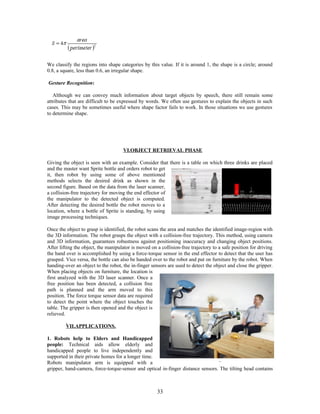
We compute the shape factor S for each segmented region 
32
We classify the regions into shape categories by this value. If it is around 1, the shape is a circle; around 
0.8, a square, less than 0.6, an irregular shape. 
Gesture Recognition: 
Although we can convey much information about target objects by speech, there still remain some 
attributes that are difficult to be expressed by words. We often use gestures to explain the objects in such 
cases. This may be sometimes useful where shape factor fails to work. In those situations we use gestures 
to determine shape. 
VI.OBJECT RETRIEVAL PHASE 
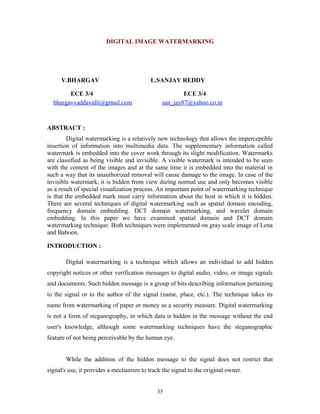
Giving the object is seen with an example. Consider that there is a table on which three drinks are placed 
and the master want Sprite bottle and orders robot to get 
it, then robot by using some of above mentioned 
methods selects the desired drink as shown in the 
second figure. Based on the data from the laser scanner, 
a collision-free trajectory for moving the end effector of 
the manipulator to the detected object is computed. 
After detecting the desired bottle the robot moves to a 
location, where a bottle of Sprite is standing, by using 
image processing techniques. 
Once the object to grasp is identified, the robot scans the area and matches the identified image-region with 
the 3D information. The robot grasps the object with a collision-free trajectory. This method, using camera 
and 3D information, guarantees robustness against positioning inaccuracy and changing object positions. 
After lifting the object, the manipulator is moved on a collision-free trajectory to a safe position for driving 
the hand over is accomplished by using a force-torque sensor in the end effector to detect that the user has 
grasped. Vice versa, the bottle can also be handed over to the robot and put on furniture by the robot. When 
handing-over an object to the robot, the in-finger sensors are used to detect the object and close the gripper. 
When placing objects on furniture, the location is 
first analyzed with the 3D laser scanner. Once a 
free position has been detected, a collision free 
path is planned and the arm moved to this 
position. The force torque sensor data are required 
to detect the point where the object touches the 
table. The gripper is then opened and the object is 
relieved. 
VII.APPLICATIONS. 
1. Robots help to Elders and Handicapped 
people: Technical aids allow elderly and 
handicapped people to live independently and 
supported in their private homes for a longer time. 
Robots manipulator arm is equipped with a 
gripper, hand-camera, force-torque-sensor and optical in-finger distance sensors. The tilting head contains 
33
two cameras, a laser scanner and speakers. A hand-held panel with touch-screen on the robot’s back is 
detachable to keep in touch even if the robot moves in a different room, and depending upon the necessity 
of the user he will order it to the robot which in turn can perform the retrieval of the object, thus helping the 
people as though equal to a human-being. 
2. Robots help during Surgery time: Robots can be used during the surgeries to help the surgeon to bring 
the operational equipment. 
3. Robots help in Industries: In an industry there may be circumstances where we can replace mankind 
with the robot and for this we should have robot equipped with the above mentioned facilities and by this 
we can reduce the human labour, money etc. 
VIII.CONCLUSION 
We have proposed a human-robot interface based on the mutual assistance between speech and vision. 
Robots need vision to carry out their tasks. We have proposed to use human user’s assistance to solve this 
problem. The robot asks a question to the user when it cannot detect the target object. It generates a 
sequence of utterances that can lead to determine the object efficiently and user friendly. It determines what 
and how to ask the user by considering the image processing results and the characteristics of object 
(image) attributes. After the target object is detected that object is handed over to its user with the help of 
the robot. 
References: 
[1] D.Comaniciu and P. Meer, “Mean shift: A robust approach toward feature space analysis” 
IEEE Transactions on Pattern Analysis and Machine Intelligence, Vol. 24, pp. 603 – 619, 2002 
[2] T.Takahashi, S.Nakanishi, Y.Kuno and Y.Shirai “Human-robot interface by verbal and non-verbal 
communication” Proceedings 1998 IEEE/RSJ International Conference on intellengent 
Robots and Systems. 
[3] P. McGuire, J.Fritsch, J.J.Steil, F.Roothling, G.A.Fink, S.Wachsmuth,G. Sagerer, H. Ritter, 
“Multi-modal human machine communication for instruction robot grasping tasks,” in Proc 
.International Conference on Intelligent Robots and System, pp. 1082-1089, September – October 
2002. 
[4] D. Roy, B. Schiele, and A. Pentland, “Learning audio-visual associations using mutual information,” 
International Conference on Computer Vision, Workshop on Integrating Speech and Image Understanding, 
1999. 
CODE NO:EC 23 IS 4 
34
DIGITAL IMAGE WATERMARKING 
V.BHARGAV L.SANJAY REDDY 
ECE 3/4 ECE 3/4 
bhargavvaddavalli@gmail.com san_jay87@yahoo.co.in 
ABSTRACT : 
Digital watermarking is a relatively new technology that allows the imperceptible 
insertion of information into multimedia data. The supplementary information called 
watermark is embedded into the cover work through its slight modification. Watermarks 
are classified as being visible and invisible. A visible watermark is intended to be seen 
with the content of the images and at the same time it is embedded into the material in 
such a way that its unauthorized removal will cause damage to the image. In case of the 
invisible watermark, it is hidden from view during normal use and only becomes visible 
as a result of special visualization process. An important point of watermarking technique 
is that the embedded mark must carry information about the host in which it is hidden. 
There are several techniques of digital watermarking such as spatial domain encoding, 
frequency domain embedding. DCT domain watermarking, and wavelet domain 
embedding. In this paper we have examined spatial domain and DCT domain 
watermarking technique. Both techniques were implemented on gray scale image of Lena 
and Baboon. 
INTRODUCTION : 
Digital watermarking is a technique which allows an individual to add hidden 
copyright notices or other verification messages to digital audio, video, or image signals 
and documents. Such hidden message is a group of bits describing information pertaining 
to the signal or to the author of the signal (name, place, etc.). The technique takes its 
name from watermarking of paper or money as a security measure. Digital watermarking 
is not a form of steganography, in which data is hidden in the message without the end 
user's knowledge, although some watermarking techniques have the steganographic 
feature of not being perceivable by the human eye. 
While the addition of the hidden message to the signal does not restrict that 
signal's use, it provides a mechanism to track the signal to the original owner. 
35
A watermark can be classified into two sub-types: visible and invisible. Visible 
watermarks change the signal altogether such that the watermarked signal is totally 
different from the actual signal, e.g., adding an image as a watermark to another image. 
Invisible watermarks do not change the signal to a perceptually great extent, i.e., there are 
only minor variations in 'the output "Signal. An example of an invisible watermark is 
when some bits are added to an image modifying only its least significant bits. 
1. Spatial Domain Watermarking 
One of the simplest technique in digital watermarking is in spatial domain using 
the two dimensional army of pixels in the container image to hold hidden data using the 
least significant bits (LSB) method. Note that the human eyes are not very attuned to 
small variance in color and therefore processing of small difference in the LSB will not 
noticeable. The slops to embed watermark image are given below. 
1.1 Steps of Spatial Domain Watermarking 
1) Convert RGB image to gray scale image. 
2) Make double-precision for image. 
3) Shift most significant bits to low significant bits of watermark image. 
4) Make least significant bits of host image to zero 
5) Add shifted version (step 3) of watermarked image to modified (step 4) host 
image. 
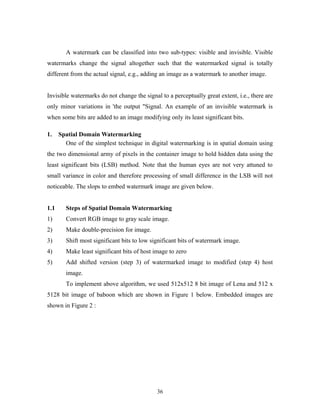
To implement above algorithm, we used 512x512 8 bit image of Lena and 512 x 
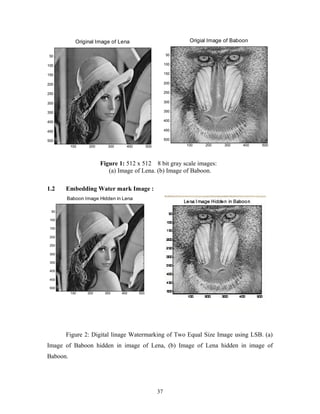
5128 bit image of baboon which are shown in Figure 1 below. Embedded images are 
shown in Figure 2 : 
36
Original Image of Lena 
100 200 300 400 500 
50 
100 
150 
200 
250 
300 
350 
400 
450 
500 
Origial Image of Baboon 
100 200 300 400 500 
50 
100 
150 
200 
250 
300 
350 
400 
450 
500 
Figure 1: 512 x 512 8 bit gray scale images: 
(a) Image of Lena. (b) Image of Baboon. 
1.2 Embedding Water mark Image : 
Figure 2: Digital linage Watermarking of Two Equal Size Image using LSB. (a) 
Image of Baboon hidden in image of Lena, (b) Image of Lena hidden in image of 
Baboon. 
37 
Baboon Image Hidden in Lena 
100 200 300 400 500 
50 
100 
150 
200 
250 
300 
350 
400 
450 
500
Note that it was determined that 5 most significant bits represents good 
visualization of any image. Figure 2(a) shows the host image of Lena where 3 MSB of 
baboon is represented as 3 LSB of Lena. The same experiment was performed for 
Baboon as host image. Figure 1(b) shows the Baboon as host image where 3 MSB of 
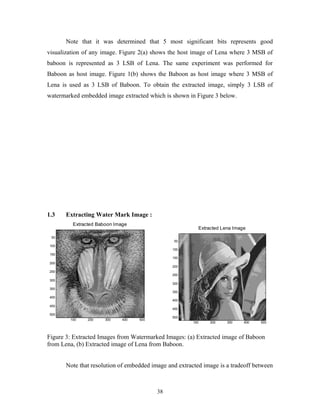
Lena is used as 3 LSB of Baboon. To obtain the extracted image, simply 3 LSB of 
watermarked embedded image extracted which is shown in Figure 3 below. 
1.3 Extracting Water Mark Image : 
Extracted Baboon Image 
100 200 300 400 500 
50 
100 
150 
200 
250 
300 
350 
400 
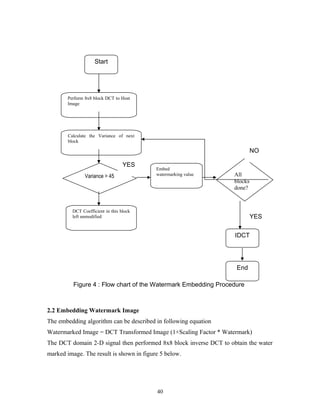
450 
500 
Figure 3: Extracted Images from Watermarked Images: (a) Extracted image of Baboon 
from Lena, (b) Extracted image of Lena from Baboon. 
Note that resolution of embedded image and extracted image is a tradeoff between 
38 
Extracted Lena Image 
100 200 300 400 500 
50 
100 
150 
200 
250 
300 
350 
400 
450 
500
each other. If the requirement of high resolution of extracted image than the more MSB 
of watermark image can be used to get embedded image however in this case, resolution 
of embedded image will be reduce. 
To compare the resolution of embedded image and extracted image, MSB and 
PSNR were calculated between original host image and embedded image as well as 
original watermark image and extracted image. The result is shown in Table 1 below. 
Table 1: MSB / PSNR of embedded and extracted images. 
Lena Baboon 
Embedded Image 1.0861*10-4/87.77dB/ 1.1642*10-4/87.47dB 
Extracted Image 1.3898*10-4/6.7011dB 1.4557*104/6.5002dB 
Notice from Table I that MSE for Baboon image for embedded and extracted image is 
more compare to (he image of Lena which was expected since the variation in gray scale 
is more in baboon than image of Lena. 
2. DCT Domain Water Marking : 
The classic and still popular domain for image processing is that of the discrete 
cosine-transform (DCT). The DCT allows an image to be broken up in to different 
frequency bands. Making it much easier to embed watermarking information into the 
middle frequency bands of an image. The middle frequency bands are chosen such that 
they have minimized they avoid the most visual important parts of the image (low 
frequency) without over-exposing themselves to removal through compression and noise 
attacks. 
Flow chart of DCT Domain Watermarking : 
39
NO 
2.2 Embedding Watermark Image 
The embedding algorithm can be described in following equation 
Watermarked Image = DCT Transformed Image (1+Scaling Factor * Watermark) 
The DCT domain 2-D signal then performed 8x8 block inverse DCT to obtain the water 
marked image. The result is shown in figure 5 below. 
40 
Start 
Perform 8x8 block DCT to Host 
Image 
Calculate the Variance of next 
block 
Variance > 45 
Embed 
watermarking value All 
blocks 
done? 
DCT Coefficient in this block 
left unmodified 
IDCT 
End 
YES 
YES 
Figure 4 : Flow chart of the Watermark Embedding Procedure
Original Image of Lena 
100 200 300 400 500 
50 
100 
150 
200 
250 
300 
350 
400 
450 
500 
Figure 5 shows the DCT based embedding on 512 x 512 image of Lena. A binary (2 
level) 16 x 16 image of Temple logo was taken as watermark image. 
Figure 5 shows the DCT based embedding on 512 x 512 image of Lena. A binary (2 
level) 16 x 16 image of Temple logo was taken as watermark image. The watermark 
image was embedded in Image of Lena and resultant watermarked image is shown in 
Figure 5(c). 
2.3 Extracting Watermark Image 
To obtain the extracted watermark from watermarked image, following procedure 
was performed. 
41
1. Perform DCT transform on watermarked image and original host image. 
2. Substract original host image from watermarked image. 
3. Multiply extracted watermark by scaling factor to display. 
The extracted temple logo is shown in Figure 5(d). Note that due to the DCT 
transformed of watermarked image, recovered massage is not exactly same as the 
original, however contains enough information for authentication. Also it should be noted 
that the watermark was only 16x16 binary images, in the case of larger image, extracted 
watermark would be expected in better resolution. 
Scaled difference of Original Image and Watermarked Image 
Figure 6 : Scaled difference between original image of 
Lena and watermarked image. 
Finally the scaled difference between the original image of Lena and watermarked 
image of Lean is shown in Figure 6. The difference is not noticeable that proves that the 
watermarked image is close to the original host image. 
The same experiment was performed on image of baboon and result is shown in 
Figure 7 below : 
42
Figure 7 shows : DCT based watermarking (a) 512 x 512 8 bit original image of Baboon. 
(b) 16 x 16 2 bit image of Temple logo (c) DCT Watermarked image (d) recovered 
Temple Logo from watermarked image. 
Applications: 
 Steganography 
 Copyright protection and authentication 
 Anti-piracy 
 Broadcast monitoring 
43
Limitations of Spatial Domain Watermarking: 
This method is comparatively simple, lacks the basic robustness that may he 
expected in any watermarking applications. It can survive simple operation such as 
cropping, any addition of noise. However lossy compression is going to defeat the 
watermark. An even better attack is to set all the LSB bits to bits to ‘I’ fully defeating the 
watermark at the cost of negligible perceptual impact on the cover object. Furthermore, 
once the algorithm was discovered, it would be very easy for an intermediate party to 
alter the watermark. To overcome this problem, we have investigated DCT domain 
watermarking which discussed in next section. 
Conclusion: 
Two different technique of digital watermarking is investigated in this project, It 
was determine that DCT domain watermarking is comparatively much better than the 
spatial domain encoding since DCT domain watermarking can survive against the attacks 
such as noising, compression, sharpening, and filtering. Also the extraction of watermark 
image is depends on the original host image. It was noted that the PSNR is less in the 
case of Baboon host image than the Lena host image. 
References : 
 "Digital Watermarking Alliance - Furthering the Adoption of Digital 
Watermarking (http/www, digitalwatermarkingalliance.org/) 
 Digital Watermarking & Data Hiding research papers 
(http://www.forensics.nl/digital-watermarking) at Forensics.nl 
 "Retrieved from "http://en.wikipedia.org/wiki/Digital_ watermarking" 
 Digital Image Processing – Rofal C Gonzalez, Richard E woods – 2n edition 
pearson Education (PHI) 
 Digital processing using Matlab – Rafeal C Gonzalez, - Richard E woods – 
Steven L Eddins – Pearson Education 
 Digital Image Processing and Analysis B Chande, D Datta Majunder Prentice 
Hall as India, 2003. 
 Under the Guidance of Associate Prof. Mr. Kishore kumar Bapatla Engg College 
44
CODE NO:93 IS 5 
By: 
B.Jeevan Jyothi Kumar. 
K.Sri Sai Koteswara Rao. 
Email:jeevan_koti@yahoo.co.in 
Abstract: 
The influx of sophisticated technologies in the field of image processing was concomitant 
with that of digitization in the computers arena. Today image processing is used in fields 
of astronomy, medicine, crime &finger print analysis, remote sensing, manufacturing, 
aerospace &defense, movies & entertainment, and multimedia. 
In this paper, we propose a new scheme for image compression using neural networks. 
Image data compression deals with minimization of the amount of data required to 
represent an image while maintaining an acceptable quality. Several image compression 
techniques have been developed in recent years Over the last few years neural network 
has emerged as an effective tool for solving a wide range of problems involving 
adaptivity and learning. A multilayer feed-forward neural network trained using the 
backward error propagation algorithm is used in many applications. However, this model 
is not suitable for image compression because of its poor coding performance. Recently, 
a self-organizing feature map (SOFM) algorithm has been proposed which yields a good 
coding performance. However, this algorithm requires a long training time because the 
network starts with random initial weights. In this paper we have used the backward error 
propagation algorithm (BEP) to quickly obtain the initial weights which are then used to 
speedup the training time required by the SOFM algorithm .In this paper we propose an 
architecture and an improved training method to attempt to solve some of the 
shortcomings of traditional data compression systems based on feed forward neural 
networks trained with back propagation—the dynamic auto association neural network 
(DANN).Image compression will be of rigorous use where the crucial factor is the utmost 
45
efficacy Quality of the image process varies according to specialized image signal 
processing. 
History: 
The history of digital image processing and analysis is quite short. It cannot be older than 
the first electronic computer which was built. However, the concept of digital image 
could be found in literature as early as in 1920 with transmission of images through the 
Bart lane cable picture transmission system (McFarlane, 1972). Images were coded for 
submarine cable transmission and then reconstructed at the receiving end by a specialized 
printing device. The first computers powerful enough to carry out image processing tasks 
appeared in the early 1960’s.the birth of what we call digital image processing today can 
be traced to the availability of those machines and the onset of the space program during 
that period. Attention was then concentrated on improving visual quality of transmitter 
(or reconstructed) images. In fact, potentials of image processing techniques came into 
focus with the advancement of large scale digital computer and with the journey to the 
moon. Improving image quality using computer, started at Jet Propulsion Laboratory, 
California, USA in 1964, and the images of the moon transmitted by RANGER-7 were 
processed. In parallel with space applications, digital image processing techniques begun 
in the late 1960’s and early 1970’s to be used in medical imaging, remote earth resources 
observations and astronomy. Since 1964, the field has experienced vigorous growth] 
certain efficient computer processing techniques (ex: fast Fourier transform) have also 
contributed to this development. 
Introduction 
Modern digital technology has made it possible to manipulate multi-dimensional image 
signals with systems that range from simple digital circuits to advanced parallel 
computers. The goal of this manipulation can be divided into three categories: 
* Image Processing image in -> image out 
* Image Analysis image in -> measurements out 
* Image Understanding image in -> high-level description out 
46
We will focus on the fundamental concepts of image processing. Space does not permit 
us to make more than a few introductory remarks about image analysis. Image 
understanding requires an approach that differs fundamentally from the theme of our 
discussion. Further, we will restrict ourselves to two-dimensional (2D) image processing 
although most of the concepts and techniques that are to be described can be extended 
easily to three or more dimensions. We begin with certain basic definitions. 
An image defined in the "real world" is considered to be a function of two real variables, 
for example, a(x, y) with a as the amplitude (e.g. brightness) of the image at the real 
coordinate position (x, y). An image may be considered to contain sub-images sometimes 
referred to as regions-of-interest, ROIs, or simply regions. This concept reflects the fact 
that images frequently contain collections of objects each of which can be the basis for a 
region.. In certain image-forming processes, however, the signal may involve photon 
counting which implies that the amplitude would be inherently quantized. 
47
Image Computer 
Display 
Mass 
Storage 
Hard 
Copy 
Specialized 
Image 
Processing 
Hardware 
Image 
Processing 
Software 
Image 
Sensors 
Image compression: 
Compression is one of the techniques used to make the file size of an image smaller. The 
file size may decrease only slightly or tremendously depending upon the type of 
compression used. Think of compression much like you would a balloon. You start out 
with a balloon filled with air - this is your image. By squeezing out (or compressing) all 
of the air, your balloon shrinks to a fraction of the size of the air-filled original. This 
balloon will now fit in a lot of spaces that were initially impossible. The end result is that 
you still have the exact same balloon, but just in a slightly different form. To get back the 
original balloon, simply blow up the balloon to its original size. A direct analogy can be 
drawn with image compression. You start out with a very large file size of an image. By 
applying compression to the file, the file shrinks to a fraction of its original size. You can 
now fit more images onto a floppy disk or hard disk because they have been compressed 
and take up less space. More importantly, the smaller file size also means that the file can 
48
be sent over the Worldwide Web much faster. This is good news for people browsing 
your web site, and good news for network congestion problems. 
There are two different types of compression - lossless and lossy: 
Lossless: 
A compression scheme in which no bits of information are permanently lost during 
compression/decompression of an image. This means that, just like the balloon 
analogy, even though the air is out of the balloon, it is capable of returning to its 
original state. Your image will look exactly the same before and after you've 
compressed it using a lossless compression scheme. The most common image format 
on the WWW that uses a lossless compression scheme is the GIF (Graphics 
Interchange Format) format. Although it is lossless, it has the capability of showing 
you a maximum of only 256 colors at a time. The GIF format is used mainly when 
there are distinct lines and colors in your image, as is the case in logos and illustration 
work. Cartoons are an excellent example of the type of work that is best suited for the 
GIF format. At this time, all web browsers support the GIF format. 
When converting an image to GIF format, you have the option to have the image 
display any number of colors up to 256 (the maximum number of colors for this 
format). A lot of images appropriate for the GIF format can be saved with as little as 
8 to 16 colors which will greatly decrease the required file size compared to the same 
image saved with 256 colors. These settings can be specified when using Photoshop, 
an image editing tool that we will discuss later on. 
· Lossy 
A compression scheme in which some bits of information are permanently lost 
during compression and decompression of an image. This means that, unlike the 
balloon analogy, an image will permanently lose some of the information that it 
originally contained. Fortunately, the loss is usually only minimal and hardly 
detectable. The most common image format on the WWW that uses a lossy 
compression scheme is the JPEG (Joint Photographic Experts Group) format. 
49
JPEG is a very efficient, true-color, compressed image format. Although it is 
lossy, it has the capability of showing you more colors than GIF (more than 256 
colors). The JPEG format is used mainly when your image contains gradients, 
blends, and inconsistent color variations, as is the case with photographic images. 
Because it is lossy, JPEG has the ability to compress an image tremendously, with 
little loss in image quality. It is usually able to compress more efficiently than the 
lossless GIF format, achieving much greater compression. The more popular 
browsers such as Netscape do support JPEG, and it is expected that very shortly 
all browsers will have built-in support for it. 
It's important to note that since JPEG is a lossy image format, it is very important 
to have a non-JPEG image as your original. This way, you can make changes to 
the original and save it as a JPEG under a different name. If you need to make 
revisions, you can go back to the original non-JPEG image and make your 
corrections and only then should you save it as a JPEG. By opening a JPEG 
image, revising it, and saving it back out as a JPEG time and time again, you may 
introduce unwanted artifacts or "noise" that you may otherwise be able to avoid. 
A lot of people are scared off by the term "lossy" compression. But when it comes 
to real-world scenes, no digital image format can retain all the information that 
your eyes can see. By comparison with a real-world scene, JPEG loses far less 
information than GIF. 
Both GIF and JPEG have their distinct advantages, depending on the types of 
images you are including on your page. If you are uncertain which the best is, it 
doesn't hurt to try both on the same image. Experiment and see which format 
gives you the best picture and the lowest cost in disk space. 
Neural networks: 
The area of Neural Networks probably belongs to the borderline between the Artificial 
Intelligence and Approximation Algorithms. Think of it as of algorithms for "smart 
approximation". The NNs are used in (to name few) universal approximation (mapping 
50
input to the output), tools capable of learning from their environment, tools for finding 
non-evident dependencies between data and so on. 
The Neural Networking algorithms (at least some of them) are modeled after the 
brain (not necessarily - human brain) and how it processes the information. The brain 
is a very efficient tool. Having about 100,000 times slower response time than 
computer chips, it (so far) beats the computer in complex tasks, such as image and 
sound recognition, motion control and so on. It is also about 10,000,000,000 times 
more efficient than the computer chip in terms of energy consumption per operation. 
The brain is a multi layer structure (think 6-7 layers of neurons, if we are talking about 
human cortex) with 10^11 neurons, structure, that works as a parallel computer capable 
of learning from the "feedback" it receives from the world and changing its design (think 
of the computer hardware changing while performing the task) by growing new neural 
links between neurons or altering activities of existing ones. To make picture a bit more 
complete, let's also mention, that a typical neuron is connected to 50-100 of the other 
neurons, sometimes, to itself, too. 
To put it simple, the brain is composed of neurons, interconnected. 
Structure of a neuron: 
51
Image compression using back prop: 
Computer images are extremely data intensive and hence require large amounts of 
memory for storage. As a result, the transmission of an image from one machine to 
another can be very time consuming. By using data compression techniques, it is possible 
to remove some of the redundant information contained in images, requiring less storage 
space and less time to transmit. Neural nets can be used for the purpose of image 
compression, as shown in the following demonstration. 
A neural net architecture suitable for solving the image compression problem is shown 
below. This type of structure--a large input layer feeding into a small hidden layer, which 
then feeds into a large output layer--, is referred to as a bottleneck type network. The idea 
is this: suppose that the neural net shown below had been trained to implement the 
identity map. Then, a tiny image presented to the network as input would appear exactly 
the same at the output layer. 
Bottleneck-type Neural Net Architecture for Image Compression: 
In this case, the network could be used for image compression by breaking it in two as 
shown in the Figure below. The transmitter encodes and then transmits the output of the 
hidden layer (only 16 values as compared to the 64 values of the original image).The 
receiver receives and decodes the 16 hidden outputs and generates the 64 outputs. Since 
52
the network is implementing an identity map, the output at the receiver is an exact 
reconstruction of the original image. 
The Image Compression Scheme using the Trained Neural Net 
Actually, even though the bottleneck takes us from 64 nodes down to 16 nodes, no real 
compression has occurred because unlike the 64 original inputs which are 8-bit pixel 
values, the outputs of the hidden layer are real-valued (between -1 and 1), which requires 
possibly an infinite number of bits to transmit. True image compression occurs when the 
hidden layer outputs are quantized before transmission. The Figure below shows a typical 
quantization scheme using 3 bits to encode each input. In this case, there are 8 possible 
binary codes which may be formed: 000, 001, 010, 011, 100, 101, 110, 111. Each of these 
codes represents a range of values for a hidden unit output. To compute the amount of 
image compression (measured in bits-per-pixel) for this level of quantization, we 
compute the ratio of the total number of bits transmitted: to the total number of pixels in 
the original image: 64 
53
The Quantization of Hidden Unit Outputs 
The training of the neural net proceeds as follows, a 256x256 training image is used to 
train the bottleneck type network to learn the required identity map. Training input-output 
pairs are produced from the training image by extracting small 8x8 chunks of the image 
chosen at a uniformly random location in the image. The easiest way to extract such a 
random chunk i s to generate a pair of random integers to serve as the upper left hand 
corner of the extracted chunk. In this case, we choose random integers i and j, each 
between 0 and 248, and then (i, j) is the coordinate of the upper left hand corner of the 
extracted chunk. The pixel values of the extracted image chunk are sent (left to right, top 
to bottom) through the pixel-to-real mapping shown in the Figure below to construct the 
64-dimensional neural net input . Since the goal is to learn the identity map, the desired 
target for the constructed input is itself; hence, the training pair is used to update the 
weights of the network. 
The Pixel-to-Real and Real-to-Pixel Conversions: 
54
Once training is complete, image compression is demonstrated in the recall phase. In this 
case, we still present the neural net with 8x8 chunks of the image, but now instead of 
randomly selecting the location of each chunk, we select the chunks in sequence from left 
to right and from top to bottom. For each such 8x8 chunk, the output the network can be 
computed and displayed on the screen to visually observe the performance of neural net 
image compression. In addition, the 16 outputs of the hidden layer can be grouped into a 
4x4 "compressed image", which can be displayed as well. 
CODE NO: EC 105 IS 6 
55
BIOMETRIC ATHENTICATION 
SYSTEM IN CREDIT CARDS 
By 
B.VARSHA (04251A1711) 
C.NITHYA (04251A1712) 
ETM 3/4 
GNITS 
ID:b_varshareddy@yahoo.com 
nitchunduri_87@ yahoo.com 
ABSTRACT: 
Catching ID thieves is like spear fishing during a salmon run: 
skewering one big fish barely registers when the vast majority just keeps on going. With 
birth dates, addresses, and Social Security and credit card numbers in hand, we can use a 
computer at a public library to order merchandise online, withdraw money from 
brokerage accounts, and apply for credit cards in other people’s names. 
It's a security-obsessed world. Identity thefts, racial profiling, border checkpoints, 
computer passwords ... it all boils down to a simple question: "Are you who you say you 
are?" 
Biometrics has developed a means to reliably answer this 
deceptively simple question by using fingerprint sensing in any type of wallet-sized 
plastic card-credit cards, ID cards, smart cards, drivers licenses, passports and more. 
In this paper we discuss biometric credit cards which use finger 
print sensing,, it’s functioning, and its improvement over conventional authentication 
techniques & how effective it has been in increasing the security & preventing ID thefts, 
its limitations& how it can be made more effective in future. 
INTRODUCTION: 
It is far too easy to steal personal information these days, especially 
credit card numbers, which are involved in more than 67 percent of identity thefts, 
56
according to a U.S. Federal Trade Commission study. It’s also relatively easy to fake 
someone’s signature or guess a password; thieves can often just look at the back of a 
credit or an atm card, where some 30 percent of people actually write down their personal 
identification number (PIN) and give the thief all that’s needed to raid the account. But 
what if we all had to present our fingers to a scanner built into our credit cards to 
authenticate our identities before completing a transaction? Faking fingerprints would 
prove challenging to even the most technologically sophisticated identity thief 
The sensors, processors, and software needed to make secure 
credit cards that authenticate users on the basis of their physical, or biometric, attributes 
are already on the market. But concerned about biometric system performance, customer 
acceptance, and the cost of making changes to their existing infrastructure, the credit card 
issuers apparently would rather go on eating an expense equal to 0.25 percent of Internet 
transaction revenues and the 0.08 percent of off-line revenues that now come from stolen 
credit card numbers. 
Our proposed system uses fingerprint sensors, though other biometric 
technologies, either alone or in combination, could be incorporated. The system could be 
economical, protect privacy, and guarantee the validity of all kinds of credit card 
transactions, including ones that take place at a store, over the telephone, or with an 
Internet-based retailer. By preventing identity thieves from entering the transaction loop, 
credit card companies could quickly recoup their infrastructure investments and save 
businesses, consumers, and themselves billions of dollars every year. 
57
Current credit card authentication systems validate anyone, including 
impostors, who can reproduce the exclusive possessions or knowledge of legitimate 
cardholders. Presenting a physical card at a cash register proves only that you have a 
credit card in your possession, not that you are who the card says you are. Similarly, 
passwords or Pins do not authenticate your identity but rather your knowledge. Most 
passwords or Pins can be guessed with just a little information: an address, license plate 
number, birth date, or pet’s name. Patient thieves can and do take pieces of information 
gleaned from the Internet or from mail found in the trash and eventually associate enough 
bits to bring a victim to financial grief. 
To ensure truly secure credit card transactions, we need to minimize this 
kind of human intervention in the authentication process. Such a major transition will 
come by using fingerprint sensing in credit cards at a cost that credit card companies have 
so far declined to pay. They are particularly worried about the cost of transmitting and 
receiving biometric information between point-of-sale terminals and the credit card 
payment system. They also fret that some customers, anxious about having their 
biometric information floating around cyberspace, might not adopt the cards. To address 
these concerns, we offer an outline for a self-contained smart-card system that we believe 
could be implemented within the next few years. 
WORKING OF THIS AUTHETICATION SYSTEM: 
When activating your new card, you would load an image of your 
fingerprint onto the card. To do this, you would press your finger against a sensor in the 
card—a silicon chip containing an array of microcapacitor plates. (In large quantities, 
these fingerprint-sensing chips cost only about $5 each.) The surface of the skin serves as 
a second layer of plates for each microcapacitor, and the air gap acts as the dielectric 
medium. A small electrical charge is created between the finger surface and the capacitor 
plates in the chip. The magnitude of the charge depends on the distance between the skin 
surface and the plates. Because the ridges in the fingerprint pattern are closer to the 
silicon chip than the valleys, ridges and valleys result in different capacitance values 
across the matrix of plates. The capacitance values of different plates are measured and 
58
converted into pixel intensities to form a digital image of the fingerprint(with reference to 
the figure). 
Next, a microprocessor in the smart card extracts a few specific 
details, called minutiae, from the digital image of the fingerprint. Minutiae include 
locations where the ridges end abruptly and locations where two or more ridges merge, or 
a single ridge branches out into two or more ridges. Typically, in a live-scan fingerprint 
image of good quality, there are 20 to 70 minutiae; the actual number depends on the size 
of the sensor surface and the placement of the finger on the sensor. The minutiae 
information is encrypted and stored, along with the cardholder’s identifying information, 
as a template in the smart card’s flash memory. 
At the start of a credit card transaction, you would present your smart 
credit card to a point-of-sale terminal. The terminal would establish secure 
communications channels between itself and your card via communications chips 
embedded in the card and with the credit card company’s central database via Ethernet. 
The terminal then would verify that your card has not been reported lost or stolen, by 
exchanging encrypted information with the card in a predetermined sequence and 
checking its responses against the credit card database. 
Next, you would touch your credit card’s fingerprint sensor pad. The 
matcher, a software program running on the card’s microprocessor, would compare the 
signals from the sensor to the biometric template stored in the card’s memory. The 
matcher would determine the number of corresponding minutiae and calculate a 
fingerprint similarity result, known as a matching score. Even in ideal situations, not all 
minutiae from the input and template prints taken from the same finger will match. So the 
matcher uses what’s called a threshold parameter to decide whether a given pair of 
feature sets belong to the same finger or not. If there’s a match, the card sends a digital 
signature and a time stamp to the point-of-sale terminal. The entire matching process 
could take less than a second, after which the card is accepted or rejected. 
59
The point-of-sale terminal sends both the vendor information and your 
account information to the credit card company’s transaction-processing system. Your 
private biometric information remains safely on the card, which ideally never leaves your 
possession. 
But say your card is lost or stolen. First of all, it is unlikely that a thief 
could recover your fingerprint data, because it is encrypted and stored on a flash memory 
chip that very, very few thieves would have the resources to access and decrypt. 
Nevertheless, suppose that an especially industrious, and perhaps unusually attractive, 
operator does get hold of the fingerprint of your right index finger—say, off a cocktail 
glass at a hotel bar where you really should not have been drinking. Then this industrious 
thief manages to fashion a latex glove molded in a slab of gelatin containing a nearly 
flawless print of your right index finger, painstakingly transferred from the cocktail glass. 
Even such an effort would fail, thanks to new applications that test 
the vitality of the biometric signal. One identifies sweat pores, which are just 0.1 
millimeter across, in the ridges using high-resolution fingerprint sensors. We could also 
detect spoofs by measuring the conduction properties of the finger using electric field 
sensors. Software-based spoof detectors aren’t far behind. Researchers are differentiating 
the way a live finger deforms the surface of a sensor from the way a dummy finger does. 
With software that applies the deformation parameters to live scans, we can automatically 
distinguish between a real and a dummy finger 85 percent of the time—enough to make 
your average identity thief think twice before fashioning a fake finger. 
60
FINGERPRINT MATCHING: In this simplified diagram, the matching process 
consists of minutiae extraction followed by alignment and determination of 
corresponding minutiae stored as a template in the card’s flash memory. Even prints from 
the same finger won’t ever exactly match, because of dirt, sweat, smudging, or placement 
on the sensor. Therefore, the system has a threshold parameter: a maximum number of 
mismatched minutiae that a scanned fingerprint can have, beyond which the card will 
reject the print as inauthentic. In the case shown, just three minutiae don’t match up, and 
the user is positively authenticated 
A version of the system designed to protect Internet shoppers might be 
even easier to implement, and less expensive, too. When mulling the costs and benefits of 
biometric credit cards, card issuers might well decide to first deploy biometric 
authentication systems for Internet transactions, which is where ID thieves cause them 
61
the most pain. A number of approaches could work, but here’s a simple one that adapts 
some of the basic concepts from our proposed smart-card system. 
To begin with, you’d need a PC equipped with a biometric sensing 
device such as a fingerprint sensor, a camera for iris scans, or a microphone for taking a 
voice signature. Next, you’d need to enroll in your credit card company’s secure e-commerce 
system. You would first download and install a biometric credit card protocol 
plug-in for your Web browser. The plug-in, certified by the credit card company, would 
enable the computer to identify its sensor peripherals so that biometric information 
registered during the enrollment process could be traced back to specific sensors on a 
specific PC. After the sensor scanned your fingerprints, you would have to answer some 
of the old authentication questions—such as your Social Security number, mother’s 
maiden name, or PIN. Once the system authenticated you, the biometric information 
would be officially certified as valid by the credit card company and stored as an 
encrypted template on your PC’s hard drive. 
During your initial purchase after enrollment, perhaps buying a nice 
shirt from your favorite online retailer, you would go through a conventional 
authentication procedure that would prompt you to touch your PC’s finger scanner. The 
credit card protocol plug-in would then function as a matcher and would compare the live 
biometric scan with the encrypted, certified template on the hard drive. If there were a 
match, your PC would send a certified digital signature to the credit card company, which 
would release funds to the retailer, and your shirt would be on its way. Accepting the 
charge for the shirt on the next bill by paying for it would confirm to the card issuer that 
you are the person who enrolled the fingerprints stored on the PC. From then on, each 
time you made an online purchase, you would touch the fingerprint sensor, the plug-in 
would confirm your identity, and your PC would send the digital signature to your credit 
card company, authorizing it to release funds to the vendor. 
62
If someone else tried to use his fingerprints on your machine, the plug-in would 
recognize that the live scan didn’t match the stored template and would reject the 
attempted purchase. If someone stole your credit card number, enrolled her own 
fingerprints on her own PC, and went on an online shopping spree, you would dispute the 
charges on your next bill and the credit card issuer would have to investigate. 
63
OTHER APPLICATIONS OF FINGER PRINT SENSING: 
· Fingerprint sensing biometric pen: The new pen uses biometric authentication 
to verify the identity of a signer. This occurs in less than one second after the 
singer grips the pen. 
· Fingerprint sensing biometrics can also be used in ID Cards, Passport & visas, 
driver’s license, traffic control. 
· Access control: Since the 9-11 tragedy, the need for 
secure access to buildings and various facilities 
became more apparent .Each person needing access 
to the facility has ID card contains their personal 
biometric information and any other additional data 
necessary for the particular application. All 
information is stored in the printed on the ID card. Building entrances are 
equipped with fingerprint scanner and a control box connects the security system 
to the "building local area network" and/or the Internet. The security systems can 
then be accessed either through the facility LAN via a "INTRANET METHOD" 
or through the internet "INTERNET METHOD" to monitor the entire security 
system in the building or facility, including access, video monitoring system, 
visitor passes, entry and exit times, etc. 
· Pay by touch fingerprint scanners are used to buy groceries. 
· Fingerprint sensors are used in mobile phones for security. 
64
ADVANTAGES: 
· High Security 
· Reduces ID thefts 
· Reduces the burden of remembering passwords 
· Easier to implement 
LIMITATIONS & REMEDIES: 
Any biometric system is prone to two basic types of errors 
· False positive: In a false positive, the system incorrectly declares a successful 
match between, in our case, the fingerprint of an impostor and that of the 
legitimate cardholder, in other words, a thief manages to pass himself off as you 
and gains access to your accounts. 
· False negative: In the case of a false negative, on the other hand, the system fails 
to make a match between your fingerprint and your stored template i.e, the 
system doesn’t recognize you and therefore denies you access to your own 
account. 
Some errors might be avoided by using improved sensors. For 
instance, optical sensors capture fingerprint details better than capacitive fingerprint 
sensors and are as much as four times as accurate. Even more accurate than 
conventional optical sensors, the new multi-spectral sensor distinguishes structures in 
living skin according to the light-absorbing and -scattering properties of different 
layers. By illuminating the finger surface with light of different wavelengths, the 
sensor captures an especially detailed image of the fingerprint pattern just below the 
skin surface to do a better job of taking prints from dry, wet, or dirty fingers. 
65
· Cost: 
But costs are declining for all of the major smart-card 
components, including flash memory, microprocessors, communications chips, and 
fingerprint sensors. 
CONCLUSION: 
Biometric authentication systems based on available technology 
would be a major improvement over conventional authentication techniques. If widely 
implemented, such systems could put thousands of ID thieves out of business and spare 
countless individuals the nightmare of trying to get their good names and credit back. 
Though the technology to implement these systems already exists, ongoing research 
efforts aimed at improving the performance of biometric systems in general and sensors 
in particular will make them even more reliable, robust, and convenient. 
REFERENCES: 
· www.ieee.org 
· www.spectrum.ieee.org 
· www.howstuffworks.com 
· www.google.com 
· IEEE Journals 
CODE NO: EC 108 IS 7 
AUTOMATIC SPEAKER RECOGNITION SYSTEM 
66
BBYY 
PP..MMEEGGHHAANNAA RREEDDDDYY (( 00660050044775 )) DD..VVEEEENNAA RRAAOO (( 00660050051166 )) 
EECCEE TTHHIIRRDD YYEEAARR,, EECCEE TTHHIIRRDD YYEEAARR,, 
VVAASSAAVVII CCOOLLLLEEGGEE OOFF EENNGGGG.. VVAASSAAVVII CCOOLLLLEEGGEE OOFF EENNGGGG.. 
IIBBRRAAHHIIMMBBAAGGHH,, IIBBRRAAHHIIMMBBAAGGHH,, 
HHYYDDEERRAABBAADD.. HHYYDDEERRAABBAADD.. MMAAIILL 
IIDD:: mmeegghhaa22882288@@ggmmaaiill..ccoomm MMAAIILL IIDD::vveeeennaarraaoo__sseepp@@yyaahhoooo..ccoo..uukk 
PH.NO: 9989194272 PH NO: 9866160356 
ABSTRACT 
Speaker recognition is the process of automatically recognizing who is 
speaking on the basis of individual information included in speech waves. This 
technique makes it possible to use the speaker’s voice to verify their identity and 
control access to services such as voice dialing, banking by telephone, telephone 
shopping, database access services, information services, voice mail, security control 
for confidential information areas, and remote access to computers. 
The goal of this work is to build a simple, yet complete and representative 
automatic speaker recognition system using MATLAB software. The system 
developed here is tested on a small (but already non-trivial) speech database. There 
are 8 male speakers, labeled from S1 to S8. All speakers uttered the same single 
digit "zero" once in a training session and once in a testing session later on. The 
vocabulary of digit is used very often in testing speaker recognition because of its 
applicability to many security applications. For example, users have to speak a PIN 
(Personal Identification Number) in order to gain access to the laboratory door, or 
users have to speak their credit card number over the telephone line. By checking 
the voice characteristics of the input utterance using an automatic speaker 
67
recognition system similar to the one that has been developed now, the system is 
able to add an extra level of security. 
INTRODUCTION 
Speaker recognition can be classified into identification and verification. Speaker 
identification is the process of determining which registered speaker provides a given 
utterance. Speaker verification, on the other hand, is the process of accepting or rejecting 
the identity claim of a speaker. Figure1 shows the basic structures of speaker 
identification and verification systems. Speaker recognition methods can also be divided 
into text-independent and text-dependent methods. In a text-independent system, speaker 
models capture characteristics of somebody’s speech which show up irrespective of what 
one is saying. In a text-dependent system, on the other hand, the recognition of the 
speaker’s identity is based on his speaking one or more specific phrases, like passwords, 
card numbers, PIN codes, etc. When the task is to identify the person talking rather than 
what he is saying, the speech signal must be processed to extract measures of speaker 
variability instead of segmental features. There are two sources of variation among 
speakers: differences in vocal cords and vocal tract shape, and differences in speaking 
style. 
At the highest level, all speaker recognition systems contain two main modules 
(refer to Figure 1): feature extraction and feature matching. Feature extraction is the 
process that extracts a small amount of data from the voice signal that can later be used to 
represent each speaker. Feature matching involves the actual procedure to identify the 
unknown speaker by comparing extracted features from his voice input with the ones 
from a set of known speakers. We will discuss each module in detail in later sections. 
All speaker recognition systems have to serve two distinguish phases. The first 
one is referred to as the enrollment session or training phase while the second one is 
referred to as the operation session or testing phase. In the training phase, each registered 
speaker has to provide samples of their speech so that the system can build or train a 
68
reference model for that speaker. In case of speaker verification systems, in addition, a 
speaker-specific threshold is also computed from the training samples. During the testing 
(operational) phase (see Figure 1), the input speech is matched with stored reference 
model(s) and recognition decision is made. 
Figure 1(a): Speakeridentification 
Figure 1(b): Speaker verification 
Automatic speaker recognition works based on the premise that a person’s speech 
exhibits characteristics that are unique to the speaker. However this task has been 
challenged by the highly variant of input speech signals. The principle source of variance 
comes form the speakers themselves. Speech signals in training and testing sessions can 
be greatly different due to many facts such as people voice change with time, health 
69
conditions (e.g. the speaker has a cold), speaking rates, etc. There are also other factors, 
beyond speaker variability, that present a challenge to speaker recognition technology. 
Examples of these are acoustical noise and variations in recording environments 
(e.g.speaker uses different telephone handsets). 
Speech Feature Extraction 
The purpose of this module is to convert the speech waveform to some type of 
parametric representation (at a considerably lower information rate) for further analysis 
and processing. This is often referred as the signal-processing front end. The speech 
signal is a slowly timed varying signal (it is called quasi-stationary). When examined 
over a sufficiently short period of time (between 5 and 100 msec), its characteristics are 
fairly stationary. However, over long periods of time (of the order of 1/5 seconds or 
more) the signal characteristic change to reflect the different speech sounds being spoken. 
Therefore, short-time spectral analysis is the most common way to characterize the 
speech signal. 
A wide range of possibilities exist for parametrically representing the speech 
signal for the speaker recognition task. Mel-Frequency Cepstrum Coefficients (MFCC), 
is perhaps the best known and most popular, and these will be used in this project. 
MFCC’s are based on the known variation of the human ear’s critical bandwidths with 
frequency, filters spaced linearly at low frequencies and logarithmically at high 
frequencies have been used to capture the phonetically important characteristics of 
speech. This is expressed in the mel-frequency scale, which is a linear frequency spacing 
below 1000 Hz and a logarithmic spacing above 1000 Hz. The process of computing 
MFCCs is described in more detail next. 
Mel-frequency cepstrum coefficients processor 
A block diagram of the structure of an MFCC processor is given in Figure 2. The 
speech input is typically recorded at a sampling rate above 10000 Hz. This sampling 
frequency was chosen to minimize the effects of aliasing in the analog-to-digital 
70
conversion. These sampled signals can capture all frequencies up to 5 kHz, which cover 
most energy of sounds that are generated by humans. As been discussed previously, the 
main purpose of the MFCC processor is to mimic the behavior of the human ears. In 
addition, rather than the speech waveforms themselves, MFFC’s are shown to be less 
susceptible to mentioned variations. 
Figure 2. Block diagram of the MFCC processor 
1.Frame Blocking 
In this step the continuous speech signal is blocked into frames of N samples, 
with adjacent frames being separated by M (M < N). The first frame consists of the first 
N samples. The second frame begins M samples after the first frame,and overlaps it by 
N-M samples. Similarly, the third frame begins 2M samples after the first frame (or M 
samples after the second frame) and overlaps it by N - 2M samples. This process 
continues until all the speech is accounted for within one or more frames. 
2.Windowing 
The next step in the processing is to window each individual frame so as to 
minimize the signal discontinuities at the beginning and end of each frame. The concept 
here is to minimize the spectral distortion by using the window to taper the signal to zero 
at the beginning and end of each frame. If we define the window as w(n),0 n N-1, 
71
where N is the number of samples in each frame, then the result of windowing is the 
signal , 
Typically the Hamming window is used, which has the form, 
3. Fast Fourier Transform (FFT) 
The next processing step is the Fast Fourier Transform, which converts each 
frame of N samples from the time domain into the frequency domain. The FFT is a 
fast algorithm to implement the Discrete Fourier Transform (DFT) which is defined on 
the set of N samples {xn}, as follow: 
In general Xn’s are complex numbers. The resulting sequence {Xn} is interpreted 
as follow: the zero frequency corresponds to n = 0, positive frequencies 0 < f < Fs / 2, 
correspond to values 1nN /2-1, while negative frequencies -Fs / 2 < f < 0 correspond 
to N /2+1nN-1. Here, Fs denotes the sampling frequency. The result obtained after 
this step is often referred to as signal’s spectrum or periodogram. 
4. Mel-frequency Wrapping 
As mentioned above, psychophysical studies have shown that human perception 
of the frequency contents of sounds for speech signals does not follow a linear scale. 
Thus for each tone with an actual frequency, f, measured in Hz, a subjective pitch is 
measured on a scale called the ‘mel’ scale. The mel-frequency scale is a linear frequency 
spacing below 1000 Hz and a logarithmic spacing above 1000 Hz. As a reference point, 
the pitch of a 1 kHz tone, 40 dB above the perceptual hearing threshold, is defined as 
72
1000 mels. Therefore we can use the following approximate formula to compute the mels 
for a given frequency f in Hz: 
One approach to simulating the subjective spectrum is to use a filter bank, one 
filter for each desired mel-frequency component. That filter bank has a triangular 
bandpass frequency response, and the spacing as well as the bandwidth is determined by 
a constant mel-frequency interval. The modified spectrum of S( ) thus consists of the 
output power of these filters when S( ) is the input. Note that this filter bank is applied 
in the frequency domain. 
5. Cepstrum: 
In this final step, log mel spectrum is converted back to time. The result is called 
the mel frequency cepstrum coefficients (MFCC). The cepstral representation of the 
speech spectrum provides a good representation of the local spectral properties of the 
signal for the given frame analysis. 
Because the mel spectrum coefficients (and so their logarithm) are real numbers, 
it can be converted into the time domain using the Discrete Cosine Transform (DCT). 
Therefore if we denote those mel power spectrum coefficients that are the result of the 
last step are S 
, k=1,2,3,…..K, we can calculate the MFCC’s as, 
k 
Note that we exclude the first component, c 
0 
from the DCT since it represents the 
mean value of the input signal which carried little speaker specific information. 
Summary 
By applying the procedure described above, for each speech frame of around 
30msec with overlap, a set of mel-frequency cepstrum coefficients is computed. These 
73
are result of a cosine transform of the logarithm of the short-term power spectrum 
expressed on a mel-frequency scale. This set of coefficients is called an acoustic vector. 
Therefore each input utterance is transformed into a sequence of acoustic vectors. In the 
next section we will see how those acoustic vectors can be used to represent and 
recognize the voice characteristic of the speaker. 
FEATURE MATCHING 
The problem of speaker recognition belongs to a much broader topic in scientific 
and engineering so called pattern recognition. The goal of pattern recognition is to 
classify objects of interest into one of a number of categories or classes. The objects of 
interest are generically called patterns and in our case are sequences of acoustic vectors 
that are extracted from an input speech using the techniques described in the previous 
section. The classes here refer to individual speakers. Since the classification procedure 
in our case is applied on extracted features, it can be also referred to as feature matching. 
Furthermore, if there exists some set of patterns that the individual classes of which are 
already known, then one has a problem in supervised pattern recognition. 
This is exactly our case since during the training session, we label each input 
speech with the ID of the speaker (S1 to S8). These patterns comprise the training set and 
are used to derive a classification algorithm. The remaining patterns are then used to test 
the classification algorithm; these patterns are collectively referred to as the test set. 
There are many feature matching techniques used in speaker recognition .In this 
project the Vector Quantization (VQ) approach is used, due to ease of implementation 
and high accuracy. VQ is a process of mapping vectors from a large vector space to a 
finite number of regions in that space. Each region is called a cluster and can be 
represented by its center called a codeword. The collection of all codewords is called a 
codebook. 
Figure 3 shows a conceptual diagram to illustrate this recognition process. In the 
figure, only two speakers and two dimensions of the acoustic space are shown. The 
74
circles refer to the acoustic vectors from the speaker1 while the triangles are from the 
speaker2. In the training phase, a speaker-specific VQ codebook is generated for each 
known speaker by clustering his training acoustic vectors. The result codewords 
(centroids) are shown in Figure 3 by black circles and black triangles for speaker 1 and 2, 
respectively. 
The distance from a vector to the closest codeword of a codebook is called a VQ-distortion. 
In the recognition phase, an input utterance of an unknown voice is “vector-quantized” 
using each trained codebook and the total VQ distortion is computed. The 
speaker corresponding to the VQ codebook with smallest total distortion is identified. 
Figure 3: Conceptual diagram illustrating vector quantization codebook 
formation. 
One speaker can be discriminated from another based of the location of centroids. 
Clustering the Training Vectors 
After the enrolment session, the acoustic vectors extracted from input speech of a 
speaker provide a set of training vectors. As described above, the next important step is to 
build a speaker-specific VQ codebook for this speaker using those training vectors. There 
75
is a well-know algorithm, namely LBG algorithm [Linde, Buzo and Gray], for clustering 
a set of L training vectors into a set of M codebook vectors. 
The algorithm is formally implemented by the following recursive procedure: 
1. Design a 1-vector codebook; this is the centroid of the entire set of training vectors 
(hence, no iteration is required here). 
2. Double the size of the codebook by splitting each current codebook yn according 
to the rule 
where n varies from 1 to the current size of the codebook, and is a splitting parameter 
(we choose =0.01). 
3. Nearest-Neighbor Search: for each training vector, find the codeword in the current 
codebook that is closest (in terms of similarity measurement), and assign that vector to 
the corresponding cell (associated with the closest codeword). 
4. Centroid Update: update the codeword in each cell using the centroid of the training 
vectors assigned to that cell. 
5. Iteration 1: repeat steps 3 and 4 until the average distance falls below a preset threshold 
6. Iteration 2: repeat steps 2, 3 and 4 until a codebook size of M is designed. 
Intuitively, the LBG algorithm designs an M-vector codebook in stages. It starts 
first by designing a 1-vector codebook, then uses a splitting technique on the codewords 
to initialize the search for a 2-vector codebook, and continues the splitting process until 
the desired M-vector codebook is obtained. 
Figure 4 shows, in a flow diagram, the detailed steps of the LBG algorithm. 
“Cluster vectors” is the nearest-neighbor search procedure which assigns each training 
vector to a cluster associated with the closest codeword. “Find centroids” is the centroid 
update procedure. “Compute D (distortion)” sums the distances of all training vectors in 
the nearest-neighbor search so as to determine whether the procedure has converged. 
76
Figure 4. Flow diagram of the LBG algorithm 
IMPLEMENTATION 
All the steps outlined in the previous sections are implemented in the MATLAB 
tool provided by "The Mathworks Inc" and the system developed here is tested on a small 
speech database. There are 8 male speakers, labeled from S1 to S8. All speakers uttered 
the same single digit "zero" once in a training session and once in a testing session later 
on. The figures 5 to 15 shows results of all the steps in the speaker recognition task. First 
MFCC's for one speaker are computed .This is illustrated in figures 5 to 11 .Firstly ,in the 
Figure 5 input speech signal of one of the speaker is plotted against time. It should be 
obvious that the raw data in the time domain has a very high amount of data and it is 
difficult for analyzing the voice characteristic. So the motivation for the step of speech 
feature extraction should be clear now! 
Now the speech signal (a vector) is cutted into frames with overlap. The output of 
this is a matrix where each column is a frame of N samples from original speech signal 
which is displayed in Figure 6. Now the signal is windowed by means of hamming 
window. The result is again a similar matrix except that each frame(column) has been 
windowed as shown in Figure 7. The FFT is applied to the signal and the signal is 
transformed into the frequency domain and the output is displayed in Figure 8. Applying 
these steps: Windowing and FFT is referred as Windowed Fourier Transform (WFT) or 
77
Short-Time Fourier Transform (STFT). The result is often called as the spectrum or 
periodogram. The last step in speech processing is converting the spectrum into mel 
frequency cepstrum coefficients which can be accomplished by generating a mel 
frequency filter bank having characteristics as shown in Figure 9 and multiplying this in 
frequency domain with FFT obtained in the last step yielding mel spectrum which is 
shown in Figure 10. Finally mel frequency cepstrum coefficients (MFCC) are generated 
by taking discrete cosine transform of the logarithm of the mel-spectrum obtained in the 
last step and MFCC's are shown in Figure 11. 
Similar procedure is followed for all the remaining speakers and MFCC's for all 
the speakers are computed. To inspect the acoustic space (MFCC vectors) any two 
dimensions (say the 5th and the 6th) are picked and the data points are plotted in a 2D 
plane and it is shown in the Figure 12. Now the LBG algorithm is applied to the set of 
MFCC's coefficients obtained in the previous stage and the intermediate stages are shown 
in Figures 13, 14, 15. 
Finally the system is trained for all the speakers and each speaker specific 
codebook is generated. After this training step, the system would have knowledge of the 
voice characteristic of each (known) speaker. In the recognition phase, an input utterance 
of an unknown voice is “vector-quantized” using each trained codebook and the total VQ 
distortion is computed. The speaker corresponding to the VQ codebook with smallest 
total distortion is identified. 
RESULTS 
78
Figure 5: An Input Speech Signal 
Figure 6: After Frame Blocking 
Figure 7: After Windowing 
79
Figure 8: After short-time fourier transform 
Figure 9: A Mel Spaced Filter Bank 
Figure 10: After mel frequency wrapping 
80
Figure 11: Mel Frequency Cepstrum Coeffecients 
Figure 12: Training Vectors as points in a 2D-space 
Figure 13: The centroid of the entire set. 
81
Figure 14: The centroid is splitted into 2 using LBG algorithm. 
Figure 15: Finally an 16-vector codebook is generated using LBG algorithm. 
CONCLUSIONS & DISCUSSIONS 
As the codebook size is increased the recognition performance has been improved 
but as it is still increased further the performance has not improved as expected i.e., the 
rate of the increase of performance has been decreased as code book size is increased. 
The most distinctive feature of the proposed speaker-based VQ model is its multiple 
representation or partitioning of a speaker's spectral space. The VQ speaker model, while 
allowing some amount of overlap between different speaker's codebooks, is quite capable 
of discriminating impostors from a true speaker because of this distinctive feature. 
82
MFCC allow better suppression of insignificant spectral variation in the higher 
frequency bands. Another obvious advantage is that mel-frequency cepstrum coefficients 
form a particular compact representation. 
It is useful to examine the lack of commercial success for Automatic Speaker 
Recognition compared to that for speech recognition. Both speech and speaker 
recognition analyze speech signals to extract spectral parameters such as cepstral 
coefficients. Both often employ similar template matching methods, the same distance 
measures, and similar decision procedures. Speech and speaker recognition, however, 
have different objectives: selecting which of M words was spoken vs. which of N 
speakers spoke. Speech analysis techniques have primarily been developed for phonemic 
analysis, e.g., to preserve phonemic content during speech coding or to aid phoneme 
identification in speech recognition. Our understanding of how listeners exploit spectral 
cues to identify human sounds exceeds our knowledge of how we distinguish speakers. 
For text-dependent Automatic Speaker Recognition, using template-matching methods 
borrowed directly from speech recognition yields good results in limited tests, but 
performance decreases under adverse conditions that might be found in practical 
applications. For example, telephone distortions, uncooperative speakers, and speaker 
variability over time often lead to accuracy levels unacceptable for many applications. 
REFERENCES 
[1] L.R. Rabiner and B.H. Juang, Fundamentals of Speech Recognition, Prentice- Hall, 
Englewood Cliffs, N.J., 1993. 
[2] L.R Rabiner and R.W. Schafer, Digital Processing of Speech Signals, Prentice- Hall, 
Englewood Cliffs, N.J., 1978. 
83
[3] S.B. Davis and P. Mermelstein, “Comparison of parametric representations for 
monosyllabic word recognition in continuously spoken sentences". 
[4] F.K. Song, A.E. Rosenberg and B.H. Juang, “A vector quantisation approach to 
speaker recognition”, AT&T Technical Journal, March 1987. 
[5] Douglas O'Shaughnessy, "Speaker Recognition", IEEE Acoustic, Speech, Signal 
Processing Magazine, October 1986. 
[6] S. Furui, "A Training Procedure for Isolated Word Recognition Systems", IEEE 
Transactions on Acoustic, Speech, Signal Processing, April 1980. 
84

Image processing

  • 1.
    IMAGE PROCESSING REALWORLD, REAL TIME AUTOMATIC RECOGNITION OF FACIAL EXPRESSIONS ABSTRACT: The most expressive way humans display emotions is through facial expressions. Enabling computer systems to recognize facial expressions and infer emotions from them in real time presents a challenging research topic. Most facial expression analysis systems attempt to recognize facial expressions from data collected in a highly controlled laboratory with very high resolution frontal faces (face regions greater than 200 x 200 pixels) and also cannot handle large head motions. But in real environments such as smart meetings, a facial expression analysis system must be able to automatically recognize expressions at lower resolution and handle the full range of head motion. This paper describes a real-time system to automatically recognize facial expressions in relatively low-resolution of face images (around 50x70 to 75x100 pixels). This system proves to be successful in dealing with complex real world interactions and is a highly promising method. 2.INTRODUCTION: The human face possesses superior expressive ability and provides one of the most powerful, versatile and natural means of communicating motivational and affective state. We use facial expressions not only to express our emotions, but also to provide important communicative cues during social interaction, such as our level of interest, our desire to take a speaking turn and continuous feedback signaling understanding of the information conveyed. Facial expression constitutes 55 percent of the effect of a communicated message and is hence a major modality in human communication. Face Recognition and face expression recognition is the inherent capability of human beings. Identifying a person by face is one of the most fundamental human functions since time immemorial. Face expression recognition by computer is to endow a machine with capability to approximate in some sense, a similar capability in human beings. To impart this basic human capability to a machine has been a subject of interest over the last few years. Before we discuss how facial expressions can be recognized we will let u know what are the main problems that a face recognition system faces. 3.IMPORTANT SUB PROBLEMS: 1
  • 2.
    The problem ofrecognizing and interpreting faces comprises four main sub problem areas: · Finding faces and facial features: This problem would be considered a segmentation problem in the machine vision literature, and a detection problem in the pattern recognition literature. · Recognizing faces and facial features: This problem requires defining a similarity metric that allows comparison between examples; this is the fundamental operation in database access. · Tracking faces and facial features: Because facial motion is very fast (with respect to either human or biological vision systems), the techniques of optimal estimation and control are required to obtain robust performance. · Temporal interpretation. The problem of interpretation is often too difficult to solve from a single frame and requires temporal context for its solution. Similar problems of interpretation are found in speech processing, and it is likely that speech methods such as hidden Markov models, discrete Kalman filters, and dynamic time warping will prove useful in the facial domain as well. Current approaches to automated facial expression analysis typically attempt to recognize a small set of prototypic emotional expressions, i.e. joy, surprise, anger, sadness, fear, and disgust. Some group of researchers presented an early attempt to analyze facial expressions by tracking the motion of twenty identified spots on an image sequence. Some developed a dynamic parametric model based on a 3D geometric mesh face model to recognize 5 prototypic expressions. Some selected manually selected facial regions that corresponded to facial muscles and computed motion within these regions using optical flow. Some other group of researchers used optical flow work, but tracked the motion of the surface regions of facial features (brows, eyes, nose, and mouth) instead of the motion of the underlying muscle groups. 4. LIMITATIONS OF EXISTING SYSTEMS: The limitations of the existing systems are summarized as following:  Most systems attempt to recognize facial expressions from data collected in a highly controlled laboratory with very high-resolution frontal faces (face regions greater than 200 x 200 pixels).  Most system needs some manual preprocessing.  Most systems cannot handle large out-of-plane head motion.  None of these systems deals with complex real world interactions.  Except the system proposed by Moses et al. [14], none of those systems performs in real-time. In this paper, we report an expression recognition system, which addresses many of these limitations. In real environments, a facial expression analysis system must be able to: 2
  • 3.
     Fully automaticallyrecognize expressions.  Handle a full range of head motions.  Recognize expressions in face images with relatively lower resolution.  Recognize expressions in lower intensity.  Perform in real-time. Figure 1: A face at different resolutions. All images are enlarged to the same size Figure 1 shows a face at different resolutions. Most automated face processing tasks should be possible for a 69x93 pixel image. At 48x64 pixels the facial features such as the corners of the eyes and the mouth become hard to detect. The facial expressions may be recognized at 48x64 and are not recognized at 24x32 pixels. This paper describes a real-time system to automatically recognize facial expressions in relatively low-resolution face images (50x70 to 75x100 pixels). To handle the full range of head motion, instead of detecting the face, the head pose is estimated based on the detected head. For frontal and near frontal views of the face, the location and shape features are computed for expression recognition. This system successfully deals with complex real world interactions. We present the overall architecture of the system and its components: background subtraction, head detection and head pose estimation respectively. The method for facial feature extraction and tracking is also explained clearly. The method for recognizing expressions is reported and at we summarized our paper and presented future directions in the last part of our paper. 5. SYSTEM ARCHITECTURE: In this paper we describe a new facial expression analysis system designed to automatically recognize facial expressions in real-time and real environments, using relatively low-resolution face images. Figure 2 shows the structure of the tracking system. The input video sequence is used to estimate a background model, which is then used to perform background subtraction, as described in Section 3. In Section 4, the resulting foreground regions are used to detect the head. After finding the head, head pose estimation is performed to find the head in frontal or near-frontal views. The facial features are extracted only for those faces in which both eyes and mouth corners are visible. The normalized facial features are input to a neural network based expression classifier to recognize different expressions. 3
  • 4.
    Figure 2. Blockdiagram of the expression Recognition system 6. BACKGROUND ESTIMATION AND SUBTRACTION: The background subtraction approach presented is an attempt to make the background subtraction robust to illumination changes. The background is modeled statistically at each pixel. The estimation process computes the brightness distortion and color distortion in RGB color space. It also proposes an active background estimation method that can deal with moving objects in the frame. First, we calculate image difference over three frames to detect the moving objects. Then the statistical background model is constructed, excluding these moving object regions. By comparing the difference between the background image and the current image, a given pixel is classified into one of four categories: original background, shaded background or 4
  • 5.
    shadow, highlighted background,and foreground objects. Finally, a morphology step is applied to remove small isolated spots and fill holes in the foreground image. 7.HEAD DETECTION: In order to handle the full range of head motion, we detect the head instead of detecting the face. The head detection uses the smoothed silhouette of the foreground object as segmented using background subtraction. Based on human intuition about the parts of an object, a segmentation into parts generally occurs at the negative curvature minima (NCM) points of the silhouette as shown with small circles in Figure 3. The boundaries between parts are called cuts (shown as the line L in Figure 3(a). some researchers noted that human vision prefers the partitioning scheme which uses the shortest cuts. They proposed a shortcut rule which requires a cut: 1) be a straight line, 2) cross an axis of local symmetry, 3) join two points on the outline of a silhouette and at least one of the two points is NCM, 4) be the shortest one if there are several possible competing cuts. In this system, the following steps are used to calculate the cut of the head:  Calculate the contour centroid C and the vertically symmetry axis y of the silhouette.  Compute the cuts for the NCMs, which are located above the contour centroid C.  Measure the salience of a part’s protrusion, which is defined as the ratio of the perimeter of the Part (excluding the cut) to the length of the cut.  Test if the salience of a part exceeds a low threshold.  Test if the cut crosses the vertical symmetry axis y of the silhouette.  Select the top one as the cut of the head if there are several possible competing cuts. After the cut of the head L is detected, the head region can be easily determined as the part above the cut. As shown in Figure 3(b), in most situations, only part of the head lies above the cut. To obtain the correct head region, we first calculate the head width W, then the head height H is enlarged to * W from the top of the head. In our system, = 1:4. 5
  • 6.
    Figure 3. Headdetection steps. (a) Calculate The cut of the head part. (b) Obtain the correct Head region from the cut of the head part. 6
  • 7.
    8. HEAD POSEDETECTION: After the head is located, the head image is converted to gray-scale, histogram equalized and resized to the estimated resolution. Then we employ a three layer neural network (NN) to estimate the head pose. The inputs to the network are the processed head image. The outputs are the head poses. Here only 3 head pose classes are trained for expression analysis: 1) frontal or near frontal view, 2) side view or profile, 3) others such as back of the head or occluded face. Figure 4. The definitions and examples of the 3 head pose classes: 1) frontal or near frontal View, 2) side view or profile, 3) others such as Back of the head or occluded faces. Figure 4 shows the definitions and some examples of the 3 head pose classes. In the frontal or near frontal view, both eyes and lip corners are visible. In side view or profile, at least one eye or one corner of the mouth becomes self occluded because of the head turn. All other reasons cause more facial features to not be detected such as the back of the head, occluded face, and face with extreme tilt angles is treated as one class. 9.FACIAL FEATURE EXTRACTION FOR FRONTAL OR NEAR-FRONTAL FACE: After estimating the head pose, the facial features are extracted only for the face in the frontal or near-frontal view. Since the face images are in relatively low resolution in most real environments, the detailed facial features such as the corners of the eyes and 7
  • 8.
    the upper orlower eyelids are not available To recognize facial expressions, however, we need to detect reliable facial features. We observe that most facial feature changes that are caused by an expression are in the areas of eyes, brows and mouth. In this paper, two types of facial features in these areas are extracted: location features and shape features. 9.1 LOCATION FEATURE EXTRACTION In this system, six location features are extracted for expression analysis. They are eye centers (2), eyebrow inner endpoints (2), and corners of the mouth (2). Eye centers and eyebrow inner endpoints: To find the eye centers and eyebrow inner endpoints inside the detected frontal or near frontal face, we have developed an algorithm that searches for two pairs of dark regions which correspond to the eyes and the brows by using certain geometric constraints such as position inside the face, size and symmetry to the facial symmetry axis. The algorithm employs an iterative threshold method to find these dark regions under different or changing lighting conditions. Figure 5. Iterative thresholding of the face to Find eyes and brows. (a) Gray-scale face image, (b) Threshold = 30, (c) threshold = 42, (d) Threshold = 54. Figure 5 shows the iterative thresholding method to find eyes and brows. Generally, after five iterations, all the eyes and brows are found. If satisfactory results are not found after 20 iterations, we think the eyes or the brows are occluded or the face is not in a near frontal view. Unlike to find one pair of dark regions for the eyes only, we find two pairs of parallel dark regions for both the eyes and eyebrows. By doing this, not only are more features obtained, but also the accuracy of the extracted features is improved. Then the eye centers and eyebrow inner endpoints can be easily determined. If the face image is continually in the frontal or near frontal view in an image sequence, the eyes and brows can be tracked by simply searching for the dark pixels around their positions in the last frame. Mouth corners: After finding the positions of the eyes, the location of the mouth is first predicted. Then the vertical position of the line between the lips is found using an integral projection of the mouth region Finally, the horizontal borders of the line between the lips is found using an integral projection over an edge-image of the mouth. The following 8
  • 9.
    steps are useto track the corners of the mouth: 1) Find two points on the line between the lips near the previous positions of the corners in the image 2) Search along the darkest path to the left and right, until the corners are found. Finding the points on the line between the lips can be done by searching for the darkest pixels in search windows near the previous mouth corner positions. Because there is a strong change from dark to bright at the location of the corners, the corners can be found by looking for the maximum contrast along the search path 9.2 LOCATION FEATURE REPRESENTATION: After extracting the location features, the face can be normalized to a canonical face size based on two of these features, i.e., the eye-separation after the line connecting two eyes (eye-line) is rotated to horizontal. In our system, all faces are normalized to 90 x 90 pixels by re-sampling. We transform the extracted features into a set of parameters for expression recognition. We represent the face location features by 5 parameters, which are shown in Figure 6. Figure 6. Face location feature representation For expression recognition. These parameters are the distances between the eye-line and the corners of the mouth, the distances between the eye-line and the inner eyebrows, and the width of the mouth (the distance between two corners of the mouth). 9
  • 10.
    9.3 SHAPE FEATUREEXTRACTION: Another type of distinguishing feature is the shape of the mouth. Global shape features are not adequate to describe the shape of the mouth. Therefore, in order to extract the mouth shape features, an edge detector is applied to the normalized face to get an edge map. This edge map is divided into 3 x 3 zones as shown in Figure7 (b). The size of the zones is selected to be half of the distance between the eyes. The mouth shape features are computed from zonal shape histograms of the edges in the mouth region. 10
  • 11.
    Figure 7. Zonal-histogramfeatures. (a) Normalized face, (b) Zones of the edge map of the normalized face, (c) Four quantization levels for calculating histogram features, (d) Histogram corresponding to the middle zone of the mouth. 11
  • 12.
    10. EXPRESSION RECOGNITION: This system has neural network-based recognizer having the structure as shown in Figure 8. The standard back-propagation in the form of a three-layer neural network with one hidden layer was used to recognize facial expressions. The inputs to the network were the 5 location features (Figure 6) and the 12 zone components of shape features of the mouth (Figure7). Hence, a total of 17 features were used to represent the amount of expression in a face image. The outputs were a set of expressions. In this system, 5 expressions were recognized. They were neutral, smile, angry, surprise, and others (including fear, sad, and disgust). Researchers tested various numbers of hidden units and found that 6 hidden units gave the best performance. 12
  • 13.
    Figure 8. Neuralnetwork-based recognizer for Facial expressions. 11. SUMMARY AND CONCLUSIONS: Automatically recognizing facial expressions is important to understand human emotion and paralinguistic communication so as to design multi modal user interfaces, and for related applications such as human identification. Incorporating emotive information in computer-human interfaces will allow for much more natural and efficient interaction paradigms to be established. It is very challenging to develop a system that can perform in real time and in real world because of low image resolution, low expression intensity, and the full range of head motion and the system that we have reported is an automatic expression recognition system that addresses all the above 13
  • 14.
    challenges and successfullydeals with complex real world interactions. In most real word interactions, the facial feature changes are caused by both talking and expression changes. We feel that further efforts will be required for distinguishing talking and expression changes by fusing audio signal processing and visual image analysis. Also it will benefit the expression recognition accuracy by using the sequential information instead of using each frame. REFERENCES: 1. T. Kanade, J.F. Cohn, and Y.L. Tian. Comprehensive database for facial expression analysis. In Proceedings of International Conference on Face and Gesture Recognition, pages 46–53, March 2000. 2. Z. Zhang. Feature-based facial expression recognition: Sensitivity analysis and experiments with a multi-layer perceptron. International Journal of Pattern Recognition and Artificial Intelligence, 13(6):893–911, 1999. 3. Y. Moses, D. Reynard, and A. Blake. Determiningfacial expressions in real time. In Proc. Of Int. Conf.On Automatic Face and Gesture Recognition, pages 332– 337, 1995. 4. B. Fasel and J. Luttin. Recognition of asymmetric facial action unit activities and intensities. In Proceedings of International Conference of Pattern Recognition, 2000. CODE NO:EC 79 IS 2 Advanced Video Coding : MPEG-4/H.264 and Beyond Bhavana, K.B.Jyothsna III/IV E.C.E. Padmasri Dr. B.V.Raju Institute of Technology reshaboinabhavana@yahoo.co.in, _dch_jyo@yahoo.com Advanced Video Coding : MPEG-4/H.264 and Beyond Bhavana, K.B.Jyothsna III/IV E.C.E. Padmasri Dr. B.V.Raju Institute of Technology reshaboinabhavana@yahoo.co.in, dch_jyo@yahoo.com Abstract : With the high demand for digital video products in popular applications such as video communications, security and surveillance, industrial automation and 14
  • 15.
    entertainment, video compressionis an essential enabler for video applications design. The video coding standards are being under development for various applications. The purposes include better picture quality, higher coding efficiency and more error robustness. The new international video coding standard MPEG-4 part -10/H.264/AVC achieves significant improvements in coding efficiency and error robustness in comparison with the previous standards such as MPEG-2, MPEG-4 Visual. This paper provides an overview of H.264 and surveys the other current in use video coding methods. Introduction: Video coding deals with the compression of digital video data. Digital video is basically a three-dimensional array of color pixels. Two dimensions serve as spatial (horizontal and vertical) directions of the moving pictures, and one dimension represents the time domain. The video data contains fair amount of spatial and temporal redundancy. Similarities can thus be encoded by merely registering differences within a frame (spatial) and/or between frames (temporal). Video coding typically reduces this redundancy by using lossy compression. Usually this is achieved by image compression techniques to reduce spatial redundancy from frames (this is known as intraframe compression or spatial compression) and motion compensation, and other techniques to reduce temporal redundancy (known as interframe compression or temporal compression). Video coding for telecommunication applications has evolved through the development of the ITU-T H.261, H.262 (MPEG-2), H.263 (MPEG-4 Part-2, Visual) video coding standards (and later enhancements of known as H.263+ and H.263++) and now the H.264 (MPEG-4 Part-10). MPEG-4 Part-10 or H.264, is a high compression digital video codec standard written by the ITU-T Video Coding Experts Group (VCEG) together with the ISO/IEC Moving Pictures Experts Group (MPEG) as the product of a collective partnership effort known as the Joint Video Team (JVT). The ISO/IEC MPEG-4 Part-10 standards and the ITU-T H.264 standard are technically identical and the technology is also known as AVC (Advanced Video Coding). The main objective behind the H.264 project is to develop a high-performance video coding standard by adopting a “back-to-basics” approach with simple and straightforward design using well known building blocks. The intent of H.264/AVC project is to create a standard that would be capable of providing superb video quality at bitrate that is substantially lower (e.g., half or less) than what previous standards would need (e.g., relative to H.262, H.263) and to do so without so much of an increase in complexity as to make the design impractical (i.e. excessively expensive) to implement. Another ambitious goal is to do this in a flexible way that would allow the standard to be applied to a very wide variety of applications (e.g., for both low and high bitrate, and low and high resolution video) and to work well on a very wide variety of networks and systems (e.g., for RTP/IP packet networks, and ITU-T multimedia telephony systems). 15
  • 16.
    Overview : TheAdvanced Video Coding / H.264 The new standard is designed for technical solutions including at least the following application areas * Broadcast over cable, satellite, cable modem, DSL, terrestrial, etc. * Interactive or serial storage on optical and magnetic devices, high definition DVD, etc. * Conversational services over ISDN, Ethernet, LAN, DSL, wireless and mobile networks, modems, etc. or mixtures of these. * Video-on-demand or multimedia streaming services over ISDN, cable modem, DSL, LAN, wireless networks, etc. * Multimedia messaging services (MMS) over ISDN, DSL, Ethernet, LAN, wireless and mobile networks, etc. Fig.1 H.264/AVC Conceptual layers. For efficient transmission in different environments not only coding efficiency is relevant, but also the seamless and easy integration of the coded video into all current and future protocol and network architectures. This includes the public Internet with best effort delivery, as well as wireless networks expected to be a major application for the new video coding standard. The adaptation of the coded video representation or bitstream to different transport networks was typically defined in the systems specification in previous MPEG standards or separate standards like H.320 or H.324. However, only the close integration of network adaptation and video coding can bring the best possible performance of a video communication system. Therefore H.264/AVC consists of two conceptual layers (Figure1). The VCL (Video Coding Layer), which is designed to efficiently represent the video content, and a NAL (Network Abstraction Layer), which formats the VCL representation of the video and provides header information in a manner appropriate for conveyance by a variety of transport layers or storage media. H.264 Technical Description : The main objective of the emerging H.264 standard is to provide a means to achieve substantially higher video quality compared to what could be achieved by using anyone of the existing video coding standards. Nonetheless, the underlying approach of H.264 is similar to that adopted in previous standards such as MPEG-2 and MPEG-4 part-2 and consists of the following four main stages: a. Dividing each video frame into blocks of pixels so that processing of the video frame can be conducted at a block level. 16
  • 17.
    b. Exploiting thespatial redundancies that exist within the video frame by coding some of the original blocks through spatial prediction, transform, quantization and entropy coding. c. Exploiting the temporal dependencies that exist between blocks in successive frames, so that only changes between successive frames need to be encoded. This is accomplished by using motion estimation and compensation. For any given block, a search is performed in the previously coded one or more frames to determine the motion vectors that are then used by the encoder and decoder to predict the subject block. d. Exploiting any remaining spatial redundancies that exist within the video frame by coding the residual blocks, i.e., the difference between the original blocks and the corresponding predicted blocks, again through transform, quantization and entropy coding. On the motion estimation/compensation side, H.264 employs blocks of different sizes and shape, higher resolution ¼-pel motion estimation, multiple reference frame selection and complex multiple bidirectional mode selection. On the transform side H.264 uses an integer based transform that approximates roughly the discrete cosine transform (DCT) used in the MPEG-2, but does not have the mismatch problem in the inverse transform. Entropy coding can be performed using either a combination of Universal Variable Length Codes (UVLC) table with a Context Adaptive Variable Length Codes (CAVLC) for the transform 17
  • 18.
    Fig.2 Block Diagramof the H.264 Encoder. Coefficients or using Context-based Adaptive Binary Arithmetic Coding. Organization of Bitstream: The input image is divided into macroblocks. Each macroblock consists of the three components Y, Cr and Cb. Y is the luminance component which represents the brightness information. Cr and Cb represent the color information. Due to the fact that the human eye system is less sensitive to the chrominance than to the luminance the chrominance signals are both subsampled by a factor of 2 in horizontal and vertical direction. Therefore, a macroblock consists of one block of 16 by 16 picture elements for the luminance component and of two blocks of 8 by 8 picture elements for the color components. These macroblocks are coded in Intra or Inter mode. In Inter mode, a macroblock is predicted using motion compensation. For motion compensated prediction a displacement vector is estimated and transmitted for each block (motion data) that refers to the corresponding position of its image signal in an already transmitted reference image stored in memory. In Intra mode, former standards set the prediction signal to zero such that the image can be coded without reference to previously sent information. This is important to provide for error resilience and for entry points into the bit streams enabling random access. The prediction error, which is the difference between the original and the predicted block, is transformed, quantized and entropy coded. In 18
  • 19.
    order to reconstructthe same image on the decoder side, the quantized coefficients are inverse transformed and added to the prediction signal. The result is the reconstructed macroblock that is also available at the decoder side. This macroblock is stored in a memory. Macroblocks are typically stored in raster scan order. H.264/AVC introduces the following changes: 1. In order to reduce the block-artifacts an adaptive deblocking filter is used in the prediction loop. The deblocked macroblock is stored in the memory and can be used to predict future macroblocks. 2. Whereas the memory contains one video frame in previous standards, H.264/AVC allows storing multiple video frames in the memory. 3. In H.264/AVC a prediction scheme is used also in Intra mode that uses the image signal of already transmitted macro blocks of the same image in order to predict the block to code. 4. The Direct Cosine Transform (DCT) used in former standards is replaced by an integer transform. In H.264/AVC, the macroblocks are processed in so called slices whereas a slice is usually a group of macroblocks which is valuable for resynchronization should some data be lost. Fig. 3 Division of image into several slices A H.264 video stream is organized in discrete packets, called “NAL units”. Each of these packets can contain a part of a slice, i.e., there may be one or more NAL units per slice. The slices, in turn, contain a part of a video frame. The decoder may resynchronize after each NAL unit instead of skipping a whole frame if a single error occurs. H.264 also supports optional interlaced encoding. In this encoding mode, a frame is split into two fields. Fields may be encoded using spatial or temporal interleaving. To encode color images, H.264 uses the YCbCr color space like its predecessors, separating the image into luminance (or “luma”, brightness) and chrominance (or “chroma”, color) planes. It is , however , fixed at 4:2:0 subsampling, i.e., the chroma channels each have half the resolution of the luma channel Five different slice types are supported which are I, P, B, SI and SP. ‘I’ slices or “Intra” slices describe a full still image, containing only references to itself. The first frame of a sequence always needs to be built out of I slices. ‘P’ slices or “Predicted” slices use one or more recently decoded slices as a reference or prediction for picture constructed using motion compensated prediction. The prediction is usually not exactly the same as the actual picture content, so a “residual” may be added. ‘B’ slices or “Bi-directional Predicted” slices work like P slices with the exception that former and future I or P slices (in playback order) may be used as reference pictures. For this to work, B slices may be decoded after the following I or P slices. 19
  • 20.
    ‘SI’ or ‘SP’slices or “Switching” slices may be used for efficient transitions between two different H.264 video streams. The tools that make H.264 such a successful video coding scheme are discussed below. Intra Prediction and Coding : Intra prediction means that the samples of a macroblock are predicted by using only information of already transmitted macroblocks of the same image thereby exploiting only spatial redundancies with in a video picture .The resulting frame is referred to as an I-picture .I-pictures are typically encoded by directly applying the transform to different macroblocks in the frame .in order to increase the efficiency of the intra coding process in H.264, spatial correlation between adjacent macrablocks in a given frame is exploited .The idea is based on the observation that adjacent macroblocks tend to have similar properties. The difference between the actual macroblock and its prediction is then coded, which results in fewer bits to represent the macroblocks of interest compared to when applying the transform directly to the macroblock itself. In H.264/AVC, two different types of intra prediction are possible for the prediction of the luminance component Y. The first type is called INTRA_4×4 and the second one INTRA_16×16. Using the INTRA_4×4 type, the macroblock, which is of the size 16 by 16 picture elements (16×16), is divided into sixteen 4×4 sub-blocks and a prediction for each 4×4 sub-block of the luminance signal is applied individually. For the prediction purpose, nine different prediction modes are supported. One mode is DC prediction mode, whereas all samples of the current 4×4 Sub-block are predicted by the mean of all samples neighboring to the left and to the top of the current block and which have been already reconstructed at the encoder and at the decoder side (see Figure4b). In addition to DC-prediction mode(mode 2), eight prediction modes labeled 0,1,3,4,5,6,7and 8, each for a specific prediction direction are supported as shown in fig.4c. (a) (b) Fig. 4 Intra prediction modes for 4x4 luminance blocks Pixels A to M from neighboring blocks have already been encoded and may be used for prediction .For example, if Mode 0 (vertical prediction) is selected, then the values of the pixels a to p are assigned as follows: 20
  • 21.
    · a ,e, i and m are equal to A · b , f, j and n are equal to B · c , g , k and o are equal to C · d , h ,l and p are equal to D For regions with less spatial detail (i.e., flat regions), H.264 supports 16x16 intra coding , in which one of the four prediction modes (DC, Vertical, Horizontal and Planar ) is chosen for the prediction of the entire luminance component of the macroblock. In addition, H.264 supports intra prediction for 8x8 chrominance blocks also using four prediction modes (DC, Vertical, Horizontal and Planar). Finally, the prediction mode for each block is efficiently coded by assigning shorter symbols to more likely modes, where the probability of each mode is determined based on the modes used for coding the surrounding blocks. Inter prediction and coding: Inter prediction and coding is based on using motion estimation and compensation to take advantage of the temporal redundancies that exist between successive frames, hence, providing very efficient coding of video sequences. When a selected reference frame for motion estimation is a previously encoded frame, the frame to be encoded is referred to as a P-picture. When both a previously encoded frame and a future frame are chosen as reference frames , then the frame to be encoded is referred to as a B-picture. The inclusion of a new inter-stream transitional picture called an SP-picture in a bit stream enables efficient switching between bit streams with similar content encoded at different bit rates , as well as random access and fast playback modes. Motion compensation prediction for different block sizes : In H.264/AVC it is possible to refer to several preceding images. For this purpose, an additional picture reference parameter has to be transmitted together with the motion vector. This technique is denoted as motion-compensated prediction with multiple reference frames. In the classical concept, B-pictures are pictures that are encoded using both past and future pictures as references. The prediction is obtained by a linear combination of forward and backward prediction signals. In former standards, this linear combination is just an averaging of the two prediction signals whereas H.264/AVC allows arbitrary weights. In this generalized concept, the linear combination of prediction signals is also made regardless of the temporal direction. For example, a linear combination of two forward-prediction signals may be used (see Figure 5). Furthermore, using H.264/AVC it is possible to use images containing B-slices as reference images for further predictions which were not possible in any former standard. 21
  • 22.
    Fig. 5 Motion-compensatedprediction with multiple reference images In case of motion compensated prediction macroblocks are predicted from the image signal of already transmitted reference images. For this purpose, each macroblock can be divided into smaller partitions. Partitions with luminance block sizes of 16×16, 16×8, 8×16, and 8×8 samples are supported. In case of an 8×8 sub-macroblock in a P-slice, one additional syntax element specifies if the corresponding 8×8 sub-macroblock is further divided into partitions with block sizes of 8×4, 4×8 or 4×4. Fig. 6 Partitioning of a macroblock and a sub-macroblock for motion compensated prediction The availability of smaller motion compensation blocks improves prediction in general, and in particular, the small blocks improve the ability of the model to handle fine motion detail and result in better subjective viewing quality, more efficient coding and more error resilience because they do not produce large blocking artifacts. Fig. 7 Example of 16x16 macroblock Adaptive de-blocking loop filter : H.264 specifies the use of an adaptive de-blocking filter that operates on the horizontal and vertical block edges with in the prediction loop in order to remove artifacts caused by block prediction errors in order to achieve higher visual quality. Another reason to make de-blocking a mandatory in-loop tool in H.264/AVC is to enforce a decoder to approximately deliver a quality to the customer, which was intended by the produce and not leaving this basic picture enhancement tool to the optional good will. The filtering is generally is based on 4x4 block boundaries, in which two pixels on either side of the boundary may be updated using a different filter. 22
  • 23.
    The filter describedin the H.264/AVC standard is highly adaptive. Several parameters and thresholds and also the local characteristics of the picture itself control the strength of the filtering process. All involved thresholds are quantizer dependent, because blocking artifacts will always become more severe when quantization gets coarse. H.264/MPEG-4 AVC deblocking is adaptive on three levels: ■ On slice level, the global filtering strength can be adjusted to the individual characteristics of the video sequence. ■ On block edge level, the filtering strength is made dependent on inter/intra prediction decision, motion differences, and the presence of coded residuals in the two participating blocks. From these variables a filtering-strength parameter is calculated, which can take values from 0 to 4 causing modes from no filtering to very strong filtering of the involved block edge. ■ On sample level, it is crucially important to be able to distinguish between true edges in the image and those created by the quantization of the transform-coefficients. True edges should be left unfiltered as much as possible. In order to separate the two cases, the sample values across every edge are analyzed. Integer transform : Similar to former standards transform coding is applied in order to code the prediction error signal. The task of the transform is to reduce the spatial redundancy of the prediction error signal. For the purpose of transform coding, all former standards such as MPEG-1 and MPEG- 2 applied a two dimensional Discrete Cosine Transform (DCT) which had to define rounding-error tolerances for fixed point implementation of the inverse transform. Drift caused by the mismatches in the IDCT precision between the encoder and decoder were a source of quality loss. H.264/AVC gets round the problem by using an integer 4x4 spatial transform which is an approximation of the DCT, which helps reduce blocking and ringing artifacts. Much lower bit rate and reasonable performance are reported based on the application of these techniques. Quantization and Transform coefficient scanning : The quantization step is where a significant portion data compression takes place. In H.264, the transform coefficients are quantized using scalar quantization with no widened dead zone. Fifty-two different quantization step sizes can be chosen on a macroblock basis, this being different from prior standards. Moreover, in H.264, the step sizes are increased at a compounding rate of approx. 12.5%, rather than increasing it by a constant increment. The fidelity of chrominance components is improved by using finer quantization step sizes compared to those used for luminance coefficients. The quantized transform coefficients correspond to different frequencies, with the coefficient at the top left hand corner representing the DC value, and the rest of the coefficients corresponding to different non-zero frequency values. The next step in the encoding process is to arrange the quantized coefficients in an array, starting with the DC coefficients. 23
  • 24.
    Fig.8 Scan patternfor frame coding in H.264. The zig-zag scan illustrated in fig.8 is used in all frame coding cases. The zig-zag scan arranges the coefficient in an ascending order of the corresponding frequencies. Entropy coding : Entropy coding is based on assigning shorter code words to symbols with higher probabilities of occurrence and longer code words to symbols with less frequent occurrences. Some of the parameters to be entropy coded include transform coefficients for the residual data, motion vectors and other encoder information. H.264/AVC specifies two alternative methods of entropy coding: a low-complexity technique based on the usage of context-adaptively switched sets of variable length codes, so-called CAVLC, and the computationally more demanding algorithm of context-based adaptive binary arithmetic coding (CABAC). Both methods represent major improvements in terms of coding efficiency compared to the techniques of statistical coding traditionally used in prior video coding standards. CAVLC is the baseline entropy coding method of H.264/AVC. Its basic coding tool consists of a single VLC of structured Exp-Golomb codes, which by means of individually customized mappings is applied to all syntax elements except those related to quantized transform coefficients. For typical coding conditions and test material, bit rate reductions of 2–7% are obtained by CAVLC. For significantly improved coding efficiency, CABAC as the alternative entropy coding mode of H.264/AVC is the method of choice. The CABAC design is based on the key elements: binarization, context modeling, and binary arithmetic coding. Binarization enables efficient binary arithmetic coding via a unique mapping of non-binary syntax elements to a sequence of bits, a so-called bin string. Each element of this bin string can either be processed in the regular coding mode or the bypass mode. The latter is chosen for selected bins such as for the sign information or lower significant bins, in order to speedup the whole encoding (and decoding) process by means of a simplified coding engine bypass. Typically, CABAC provides bit rate reductions of 5–15% compared to CAVLC. Robustness and error resilience : Switching slices (called SP and SI slices), allow an encoder to direct a decoder to jump into an ongoing video stream for such purposes as video streaming bitrate switching and "trick mode" operation. When a decoder jumps into the middle of a video stream using the SP/SI feature, it can get an exact match to the decoded pictures at that 24
  • 25.
    location in thevideo stream despite using different pictures (or no pictures at all) as references prior to the switch. Flexible macroblock ordering (FMO, also known as slice groups) and arbitrary slice ordering (ASO), which are techniques for restructuring the ordering of the representation of the fundamental regions (called macroblocks) in pictures. Typically considered an error/loss robustness feature, FMO and ASO can also be used for other purposes. Data partitioning (DP), a feature providing the ability to separate more important and less important syntax elements into different packets of data, enabling the application of unequal error protection (UEP) and other types of improvement of error/loss robustness. Redundant slices (RS), an error/loss robustness feature allowing an encoder to send an extra representation of a picture region (typically at lower fidelity) that can be used if the primary representation is corrupted or lost. Supplemental enhancement information (SEI) and video usability information (VUI), which are extra information that can be inserted into the bitstream to enhance the use of the video for a wide variety of purposes. Frame numbering, a feature that allows the creation of "sub-sequences" (enabling temporal scalability by optional inclusion of extra pictures between other pictures), and the detection and concealment of losses of entire pictures (which can occur due to network packet losses or channel errors). Picture order count, a feature that serves to keep the ordering of the pictures and the values of samples in the decoded pictures isolated from timing information (allowing timing information to be carried and controlled/changed separately by a system without affecting decoded picture content). These techniques, along with several others, help H.264 to perform significantly better than any prior standard can, under a wide variety of circumstances in a wide variety of application environments. H.264 can often perform radically better than MPEG-2 video —typically obtaining the same quality at half of the bitrate or less. Comparison to previous standard : Coding efficiency : The coding efficiency is measured by average bit rate savings for a constant peak 25
  • 26.
    signal to noiseratio (PSNR). Therefore the required bit rates of several test sequences and different qualities are taken into account. For video streaming applications, H.264/AVC, MPEG-4 Visual ASP, H.263 HLP and MPEG-2 Video are considered. Fig.9 shows the PSNR of the luminance component versus the average bit rate for the single test sequence Tempete encoded at 15 Hz and Table 1 presents the average bit rate savings for a variety of test sequences and bit rates. It can be drawn from Table 1 that H.264/AVC outperforms all other considered encoders. For example, H.264/AVC MP allows an average bit rate saving of about 63% compared to MPEG-2 Video and about 37% compared to MPEG-4 Visual ASP. For video conferencing applications, H.264/AVC MPEG-4 Visual SP, H.263 Baseline, and H.263 CHC are considered. Figure 10 shows the luminance PSNR versus average bit rate for the single test sequence Paris encoded at 15 Hz and Table 2 presents the average bit rate savings for a variety of test sequences and bit rates. As for video streaming applications, H.264/AVC outperforms all other considered encoders. H.264/AVC BP allows an average bit rate saving of about 40% compared to H.263 Baseline and about 27% compared to H.263 CHC. Fig. 9 Luminance PSNR versus average bit rate for different coding standards measured for Tempete. Fig. 10 Luminance PSNR versus average bit rate for different coding standards measured for Paris. Hardware complexity : In relative terms, the encoder complexity increases with more than one order of magnitude between 26
  • 27.
    MPEG-4 Part 2and H.264/AVC and with a factor of 2 for the decoder. The H.264/AVC encoder/decoder complexity ratio is in the order of 10 for basic configurations and can grow up to 2 orders of magnitude for complex ones. Table 3. Comparison of MPEG standards Conclusion : Compared to previous video coding standards, H.264/AVC provides an improved coding efficiency and a significant improvement in flexibility for effective use over a wide range of networks. While H.264/AVC still uses the concept of block-based motion compensation, it provides some significant changes: ■ Enhanced motion compensation capability using high precision and multiple reference frames ■ Use of an integer DCT-like transform instead of the DCT ■ Enhanced adaptive entropy coding including arithmetic coding ■ Adaptive in-loop deblocking filter The coding tools of H.264/AVC when used in an optimized mode allow for bit savings of about 50% compared to previous video coding standards like MPEG-4 and MPEG-2 for a wide range of bit rates and resolutions. H.264 performs significantly better than any prior standard can, under a wide variety of circumstances in a wide variety of application environments. H.264 can often perform radically better than MPEG-2 video—typically obtaining the same quality at half of the bitrate or less. References: 27
  • 28.
    1. www.scientificatlanta.com 2.www.techrepublic.com 3. www.mpeg.org 4. www.vcodex.com/h.264.html 5. www.sciencedirect.org 6. www.ieee.org 7. The MPEG hand book by John Watkinson. CODE NO: EC 66 IS 3 HUMAN-ROBOT INTERFACE BASED ON THE Mutual Assistance between Speech and Vision . Submitted by: 1.Harleen Kaur Chadha 2.Sonia Kapoor EEE-3rd year, EEE-3rd year, Guru Nanak Engineering College, Guru Nanak Engineering College, Ibrahimpatnam, Ibrahimpatnam, Hyderabad Hyderabad Abstract: In this paper we are developing a helper robot that brings the objects ordered by user with the mutual assistance between speech and vision. The robot needs a vision system to recognize objects appearing in the orders. However, conventional vision systems cannot recognize objects in complex scenes. They may find many objects and cannot determine which the target is. This paper proposes a method of using a conversation with the user to solve this problem. Speech based interface is appropriate for this application. The robot asks a question to which the user can easily answer and whose answer can efficiently reduce the number of candidate objects. It 28
  • 29.
    considers the characteristicsof features used for object recognition such as the easiness for humans to specify them by word, generating a user-friendly and efficient sequence of questions. Robot can detect target objects by asking the questions generated by the method. After the target object has been detected by the robot it will handover that target object to its master and for doing this we equip the robot with sensors, lasers and pan-tilt camera. I. INTRODUCTION Helper robots or service robots in welfare domain have attracted much attention of researchers for the coming aged society. Here we are developing a helper robot that carries out tasks ordered by the user through voice and/or gestures. In addition to gesture recognition, such robots need to have vision systems that can recognize the objects mentioned in speech. It is, however, difficult to realize vision systems that can work in various conditions. Thus, we have proposed to use the human user’s assistance through speech. When the vision system cannot achieve a task, the robot makes a speech to the user so that the natural response by the user can give helpful information for its vision system. Thus, even though detecting the target object may be difficult and need the user’s assistance, once the robot has detected an object, it can assume the object as the target. However, in actual complex scenes, the vision system may detect various objects. The robot must choose the target object among them, which is a hard problem especially if it does not have much a priori knowledge about the object. This paper tackles this problem. The robot determines the target through a conversation with the user. The point of research is how to generate a sequence of utterances that can lead to determine the object efficiently and user-friendly. This paper presents such a dialog generation method. It determines what and how to ask the user by considering image processing results and the characteristics of object attributes. After the object has been selected by the mutual assistance between the speech and vision capabilities of the robot with the help of master it should be handed over to its master, for this we are going to use robot that is equipped with the sonar, laser, infrared and pan-tilt camera. II. SYSTEM CONFIGURATION Our system consists of a speech module, a gesture module, a vision module, an action module and a central processing module. Speech Module: The speech module consists of a voice recognition sub module and a text-to-speech sub module. Via Voice Millennium is used for speech recognition, and ProTalker97 software is used to do text-to-speech. Vision Module: The vision module performs image processing when the central processing module sends it a command. We have equipped it with the ability to recognize objects based on color segmentation and simple shape detection. Gesture recognition methods are also used to detect the objects and its result is sent to the central processing module. Action Module: The action module waits for commands from the central processing module to carry out the actions intended for the robot and the camera. 29
  • 30.
    Central Processing Module:The Central processing module is the center of the system. It uses various information and knowledge to analyze the meanings of recognized voice input. It sends commands to the Vision module when it thinks that visual information is needed and sends commands to the Speech module to make sentences when it thinks that that it needs to ask the user for additional information, it sends commands to action module when action is to be carried out by the robot . III. FEATURE CHARACTERISTICS We consider the characteristics of features todetermine which feature the robot uses and how to use it from the following four viewpoints. In the current implementation, we use four features: color, size, position, and shape. Here, we classify recognized words into thedifferent categories: objects, actions, directions, adjectives, adverbs, emergency words, numerals, colors, names of people and others and we train the robot that it can understand any of these features. A. Vocabulary Humans can easily describe some features by word .If we can represent a particular feature easily by word for any given object, we call it a vocabulary-rich feature. The robot can ask relatively complex questions such as ‘what-type’ questions for a vocabulary-rich feature since we can easily find an appropriate word for answer. For example, we have rich vocabulary for color description: such as, red, green, blue, etc. When the robot asks what color it is, we can easily give an answer. Position is also a vocabulary-rich feature. We have a large vocabulary to express position such as left, right, upper, and lower. B. Distribution Although we consider features for each object, we may find it difficult to express some features by word depending on the spatial distribution of objects. We call a feature with this problem a distribution-dependent feature. Position is a distribution-dependent feature. If several objects exist close together, it is difficult specify the position of each object. Color, size, and shape are not such features. C.Uniqueness: If the value of a particular feature is different for eachobject, we call it a unique feature. Position can be a unique feature since no multiple objects share the same position. D. Absoluteness/Relativeness: If we can describe a particular feature by word even if only an object exists, we call it an absolute feature. Otherwise, we call it a relative feature. Color and shape are absolute features in general. Size and position are not absolute features but relative features. We say ‘big’ or ‘small’ by comparing with other objects. IV. ASSISTANCE BY SPEECH The basic strategy for generating dialog is ‘ask-and remove’. The robot asks the user about a certain feature. Then, it removes unrelated objects from the detected objects using the information given by the user. It iterates this process until only an object remains. The robot applies color segmentation .When the number of object is large; it may be difficult to use distribution-dependent, relative features. So we 30
  • 31.
    mainly consider vocabulary-rich,absolute features. We consider unique features only when the other features cannot work, because in the current implementation, position is the only unique feature, and it is a distribution-dependent feature. The robot generates its utterances for dialog with the useras follows. First, it classifies the features of all regions into classes. For example, it assigns a color label to each region based on the average hue value of the region. How to classify the data is determined for each feature in advance. For color, it classifies them into seven colors: blue, yellow, green, red, magenta, white, and black. Then, the robot computes the percentage of the number of objects in each class to the total number of objects. It classifies the situation of each feature into three categories depending on the maximum percentage: the variation category, the mediumcategory, and the concentration category. The variation category is the case where the maximum percentage is less than 33% (1/3), for concentration category it is about 67% (2/3), for the medium category it is from 33% through 67%. These percentage values are experimentally determined. If the robot can obtain information about any feature classified as the variation category, it can reduce many unrelated objects among the regions. Therefore, the first rule for determining what feature the robot chooses for its question to the user is to give a priority to the variation category features. If no such feature exists, the medium category features are given the second priority and the concentration category features the last. A. Case with variation category features: If there are any variation category features, the robot asks the features to the user. If the present features classified into the variation category include a vocabulary-rich feature, the robot asks the user ‘what-type’ questions. For example, if the color feature satisfies the variation category condition, the robot asks, “What is the color of the target object?” as color is a vocabulary-rich feature. If there are multiple vocabulary-rich features, the first priority is given to the feature with the smallest maximum percentage. If question. Thus, the there is no such vocabulary-rich feature, the robot needs to adopt absolute features. Since they are not vocabulary-rich features, the user may find it difficult to answer the question if the robot asks a ‘what-type’ robot examines whether or not each region can be described easily by word in terms of the feature. If all regions satisfy this, the robot adopts a ‘what-type’ question. Otherwise, it uses a multiple choice question such as, “Is the target object A, B, or others?” where ‘A’ and ‘B’ are features that can be expressed by word easily. For example, in the case of shape, the robot sees for the shape factor which helps to decide shape and we will deal about this concept in coming session. There could be a case where all regions are hard to be expressed by word.. It classifies the regions into classes that can be expressed by word; and it assigns the label ‘others’ to the regions that cannot be expressed by word. Thus, the number of regions with the ‘others’ label should be less than one third of the total number if the feature is classified into the variation category. B. Case with medium category features If no features are classified into the variation category but any into the medium category, the robot considers using the features in the medium category. In this case, the robot uses a ‘yes/no-type’ question. The robot generates a question such as, “Is the target object A, B, or others?” where ‘A’ is the label of feature with the largest percentage. An example is, “Is the target object red?” The robot can reduce the number of candidates into half on average by one question. If there are multiple such features, the robot gives them priorities according to the order fixed in advance. We determine the priority in the order that we can obtain reliable information. C. Case with concentration category features This is the case where all features are classified into the concentration category, which means that all regions (objects) are similar in several respects. Thus, the robot considers using unique features. The robot asks a ‘yes/no-type’ question about unique features. In the current implementation, position is the only unique feature. An example question is, “Is the target 31
  • 32.
    Object on theright?” The robot computes the spatial distribution pattern of the objects. The word specifying the positional relationship, ‘right’ in the above example, is determined by this pattern. We determine the relationships between the pattern and the word in advance. When we use position, we need to consider two things. One is that position is a distribution-dependent feature. As we have trained robot about the position relation-ships the user can use words specifying positional relationships, such as ‘right’ and ‘left’ by considering the robot’s camera direction. Thus, ‘right’ means the right part to robot, and ‘close’ means the lower part to the robot. However, such interpretation may be wrong and asking the not conform to the purpose of this research. To solve such problems, we are planning to specify positional relationships with respect to some distinguished objects in the scene. For example, if the robot finds a red object in the scene where no other red objects can be seen, it asks the user such as if the target object is on the right of the red object. V. IMAGE PROCESSING In current implementation we apply color segmentation and compute four features for each foreground region in the segmentation result: color, shape, position, and size. The size is the number of pixels of the region. A. Color Segmentation We use a robust approach of features space method: the mean shift algorithm combined with HSI (Hue, Saturation, and Intensity) color space for color image segmentation. Although the mean shift algorithm and HSI Color space can be separately used for color image segmentation; they surely fail to segment object when illumination condition will change. To solve this problem, we use the mean shift algorithm as an image preprocessing tool to reduce regions and number of colors used and then uses HIS color space for merging regions to segment single colored objects in different illumination conditions. Our method consists of the following parts: • Apply the mean shift algorithm into a real image to reduce colors and divide it into several regions. · Merge regions of a specific color based on H, S, I components of HSI color space. · Filter the result using median filter. · Eliminate the small regions using region growing algorithm. The input image is first analyzed using the mean shift algorithm. The image may contain many colors and several regions. The algorithm significantly and accurately reduces the number of colors and regions. Thus, the output of the mean shift algorithm is several regions with a few numbers of colors in comparisons with the input image. These regions, however, do not imply that each comes from a single object. The mean shift algorithm may divide even a single color object into several regions with more than one color. To remove this ambiguity, we use the Hue, Saturation and Intensity components of the HSI color space to merge the homogeneous regions which likely come from a single object. We use threshold values for each component of HSI to obtain homogeneous regions. The threshold values are selected dynamically. Then, we use the median filter as image post processing. This may help to smooth the image boundary and also helps to reduce the unwanted regions. Finally, we use the region growing procedure as another image post-processing procedure to avoid over segmentation or remove small highlights from the objects. B. Shape Detection We compute the shape factor S for each segmented region 32
  • 33.
    We classify theregions into shape categories by this value. If it is around 1, the shape is a circle; around 0.8, a square, less than 0.6, an irregular shape. Gesture Recognition: Although we can convey much information about target objects by speech, there still remain some attributes that are difficult to be expressed by words. We often use gestures to explain the objects in such cases. This may be sometimes useful where shape factor fails to work. In those situations we use gestures to determine shape. VI.OBJECT RETRIEVAL PHASE Giving the object is seen with an example. Consider that there is a table on which three drinks are placed and the master want Sprite bottle and orders robot to get it, then robot by using some of above mentioned methods selects the desired drink as shown in the second figure. Based on the data from the laser scanner, a collision-free trajectory for moving the end effector of the manipulator to the detected object is computed. After detecting the desired bottle the robot moves to a location, where a bottle of Sprite is standing, by using image processing techniques. Once the object to grasp is identified, the robot scans the area and matches the identified image-region with the 3D information. The robot grasps the object with a collision-free trajectory. This method, using camera and 3D information, guarantees robustness against positioning inaccuracy and changing object positions. After lifting the object, the manipulator is moved on a collision-free trajectory to a safe position for driving the hand over is accomplished by using a force-torque sensor in the end effector to detect that the user has grasped. Vice versa, the bottle can also be handed over to the robot and put on furniture by the robot. When handing-over an object to the robot, the in-finger sensors are used to detect the object and close the gripper. When placing objects on furniture, the location is first analyzed with the 3D laser scanner. Once a free position has been detected, a collision free path is planned and the arm moved to this position. The force torque sensor data are required to detect the point where the object touches the table. The gripper is then opened and the object is relieved. VII.APPLICATIONS. 1. Robots help to Elders and Handicapped people: Technical aids allow elderly and handicapped people to live independently and supported in their private homes for a longer time. Robots manipulator arm is equipped with a gripper, hand-camera, force-torque-sensor and optical in-finger distance sensors. The tilting head contains 33
  • 34.
    two cameras, alaser scanner and speakers. A hand-held panel with touch-screen on the robot’s back is detachable to keep in touch even if the robot moves in a different room, and depending upon the necessity of the user he will order it to the robot which in turn can perform the retrieval of the object, thus helping the people as though equal to a human-being. 2. Robots help during Surgery time: Robots can be used during the surgeries to help the surgeon to bring the operational equipment. 3. Robots help in Industries: In an industry there may be circumstances where we can replace mankind with the robot and for this we should have robot equipped with the above mentioned facilities and by this we can reduce the human labour, money etc. VIII.CONCLUSION We have proposed a human-robot interface based on the mutual assistance between speech and vision. Robots need vision to carry out their tasks. We have proposed to use human user’s assistance to solve this problem. The robot asks a question to the user when it cannot detect the target object. It generates a sequence of utterances that can lead to determine the object efficiently and user friendly. It determines what and how to ask the user by considering the image processing results and the characteristics of object (image) attributes. After the target object is detected that object is handed over to its user with the help of the robot. References: [1] D.Comaniciu and P. Meer, “Mean shift: A robust approach toward feature space analysis” IEEE Transactions on Pattern Analysis and Machine Intelligence, Vol. 24, pp. 603 – 619, 2002 [2] T.Takahashi, S.Nakanishi, Y.Kuno and Y.Shirai “Human-robot interface by verbal and non-verbal communication” Proceedings 1998 IEEE/RSJ International Conference on intellengent Robots and Systems. [3] P. McGuire, J.Fritsch, J.J.Steil, F.Roothling, G.A.Fink, S.Wachsmuth,G. Sagerer, H. Ritter, “Multi-modal human machine communication for instruction robot grasping tasks,” in Proc .International Conference on Intelligent Robots and System, pp. 1082-1089, September – October 2002. [4] D. Roy, B. Schiele, and A. Pentland, “Learning audio-visual associations using mutual information,” International Conference on Computer Vision, Workshop on Integrating Speech and Image Understanding, 1999. CODE NO:EC 23 IS 4 34
  • 35.
    DIGITAL IMAGE WATERMARKING V.BHARGAV L.SANJAY REDDY ECE 3/4 ECE 3/4 bhargavvaddavalli@gmail.com san_jay87@yahoo.co.in ABSTRACT : Digital watermarking is a relatively new technology that allows the imperceptible insertion of information into multimedia data. The supplementary information called watermark is embedded into the cover work through its slight modification. Watermarks are classified as being visible and invisible. A visible watermark is intended to be seen with the content of the images and at the same time it is embedded into the material in such a way that its unauthorized removal will cause damage to the image. In case of the invisible watermark, it is hidden from view during normal use and only becomes visible as a result of special visualization process. An important point of watermarking technique is that the embedded mark must carry information about the host in which it is hidden. There are several techniques of digital watermarking such as spatial domain encoding, frequency domain embedding. DCT domain watermarking, and wavelet domain embedding. In this paper we have examined spatial domain and DCT domain watermarking technique. Both techniques were implemented on gray scale image of Lena and Baboon. INTRODUCTION : Digital watermarking is a technique which allows an individual to add hidden copyright notices or other verification messages to digital audio, video, or image signals and documents. Such hidden message is a group of bits describing information pertaining to the signal or to the author of the signal (name, place, etc.). The technique takes its name from watermarking of paper or money as a security measure. Digital watermarking is not a form of steganography, in which data is hidden in the message without the end user's knowledge, although some watermarking techniques have the steganographic feature of not being perceivable by the human eye. While the addition of the hidden message to the signal does not restrict that signal's use, it provides a mechanism to track the signal to the original owner. 35
  • 36.
    A watermark canbe classified into two sub-types: visible and invisible. Visible watermarks change the signal altogether such that the watermarked signal is totally different from the actual signal, e.g., adding an image as a watermark to another image. Invisible watermarks do not change the signal to a perceptually great extent, i.e., there are only minor variations in 'the output "Signal. An example of an invisible watermark is when some bits are added to an image modifying only its least significant bits. 1. Spatial Domain Watermarking One of the simplest technique in digital watermarking is in spatial domain using the two dimensional army of pixels in the container image to hold hidden data using the least significant bits (LSB) method. Note that the human eyes are not very attuned to small variance in color and therefore processing of small difference in the LSB will not noticeable. The slops to embed watermark image are given below. 1.1 Steps of Spatial Domain Watermarking 1) Convert RGB image to gray scale image. 2) Make double-precision for image. 3) Shift most significant bits to low significant bits of watermark image. 4) Make least significant bits of host image to zero 5) Add shifted version (step 3) of watermarked image to modified (step 4) host image. To implement above algorithm, we used 512x512 8 bit image of Lena and 512 x 5128 bit image of baboon which are shown in Figure 1 below. Embedded images are shown in Figure 2 : 36
  • 37.
    Original Image ofLena 100 200 300 400 500 50 100 150 200 250 300 350 400 450 500 Origial Image of Baboon 100 200 300 400 500 50 100 150 200 250 300 350 400 450 500 Figure 1: 512 x 512 8 bit gray scale images: (a) Image of Lena. (b) Image of Baboon. 1.2 Embedding Water mark Image : Figure 2: Digital linage Watermarking of Two Equal Size Image using LSB. (a) Image of Baboon hidden in image of Lena, (b) Image of Lena hidden in image of Baboon. 37 Baboon Image Hidden in Lena 100 200 300 400 500 50 100 150 200 250 300 350 400 450 500
  • 38.
    Note that itwas determined that 5 most significant bits represents good visualization of any image. Figure 2(a) shows the host image of Lena where 3 MSB of baboon is represented as 3 LSB of Lena. The same experiment was performed for Baboon as host image. Figure 1(b) shows the Baboon as host image where 3 MSB of Lena is used as 3 LSB of Baboon. To obtain the extracted image, simply 3 LSB of watermarked embedded image extracted which is shown in Figure 3 below. 1.3 Extracting Water Mark Image : Extracted Baboon Image 100 200 300 400 500 50 100 150 200 250 300 350 400 450 500 Figure 3: Extracted Images from Watermarked Images: (a) Extracted image of Baboon from Lena, (b) Extracted image of Lena from Baboon. Note that resolution of embedded image and extracted image is a tradeoff between 38 Extracted Lena Image 100 200 300 400 500 50 100 150 200 250 300 350 400 450 500
  • 39.
    each other. Ifthe requirement of high resolution of extracted image than the more MSB of watermark image can be used to get embedded image however in this case, resolution of embedded image will be reduce. To compare the resolution of embedded image and extracted image, MSB and PSNR were calculated between original host image and embedded image as well as original watermark image and extracted image. The result is shown in Table 1 below. Table 1: MSB / PSNR of embedded and extracted images. Lena Baboon Embedded Image 1.0861*10-4/87.77dB/ 1.1642*10-4/87.47dB Extracted Image 1.3898*10-4/6.7011dB 1.4557*104/6.5002dB Notice from Table I that MSE for Baboon image for embedded and extracted image is more compare to (he image of Lena which was expected since the variation in gray scale is more in baboon than image of Lena. 2. DCT Domain Water Marking : The classic and still popular domain for image processing is that of the discrete cosine-transform (DCT). The DCT allows an image to be broken up in to different frequency bands. Making it much easier to embed watermarking information into the middle frequency bands of an image. The middle frequency bands are chosen such that they have minimized they avoid the most visual important parts of the image (low frequency) without over-exposing themselves to removal through compression and noise attacks. Flow chart of DCT Domain Watermarking : 39
  • 40.
    NO 2.2 EmbeddingWatermark Image The embedding algorithm can be described in following equation Watermarked Image = DCT Transformed Image (1+Scaling Factor * Watermark) The DCT domain 2-D signal then performed 8x8 block inverse DCT to obtain the water marked image. The result is shown in figure 5 below. 40 Start Perform 8x8 block DCT to Host Image Calculate the Variance of next block Variance > 45 Embed watermarking value All blocks done? DCT Coefficient in this block left unmodified IDCT End YES YES Figure 4 : Flow chart of the Watermark Embedding Procedure
  • 41.
    Original Image ofLena 100 200 300 400 500 50 100 150 200 250 300 350 400 450 500 Figure 5 shows the DCT based embedding on 512 x 512 image of Lena. A binary (2 level) 16 x 16 image of Temple logo was taken as watermark image. Figure 5 shows the DCT based embedding on 512 x 512 image of Lena. A binary (2 level) 16 x 16 image of Temple logo was taken as watermark image. The watermark image was embedded in Image of Lena and resultant watermarked image is shown in Figure 5(c). 2.3 Extracting Watermark Image To obtain the extracted watermark from watermarked image, following procedure was performed. 41
  • 42.
    1. Perform DCTtransform on watermarked image and original host image. 2. Substract original host image from watermarked image. 3. Multiply extracted watermark by scaling factor to display. The extracted temple logo is shown in Figure 5(d). Note that due to the DCT transformed of watermarked image, recovered massage is not exactly same as the original, however contains enough information for authentication. Also it should be noted that the watermark was only 16x16 binary images, in the case of larger image, extracted watermark would be expected in better resolution. Scaled difference of Original Image and Watermarked Image Figure 6 : Scaled difference between original image of Lena and watermarked image. Finally the scaled difference between the original image of Lena and watermarked image of Lean is shown in Figure 6. The difference is not noticeable that proves that the watermarked image is close to the original host image. The same experiment was performed on image of baboon and result is shown in Figure 7 below : 42
  • 43.
    Figure 7 shows: DCT based watermarking (a) 512 x 512 8 bit original image of Baboon. (b) 16 x 16 2 bit image of Temple logo (c) DCT Watermarked image (d) recovered Temple Logo from watermarked image. Applications:  Steganography  Copyright protection and authentication  Anti-piracy  Broadcast monitoring 43
  • 44.
    Limitations of SpatialDomain Watermarking: This method is comparatively simple, lacks the basic robustness that may he expected in any watermarking applications. It can survive simple operation such as cropping, any addition of noise. However lossy compression is going to defeat the watermark. An even better attack is to set all the LSB bits to bits to ‘I’ fully defeating the watermark at the cost of negligible perceptual impact on the cover object. Furthermore, once the algorithm was discovered, it would be very easy for an intermediate party to alter the watermark. To overcome this problem, we have investigated DCT domain watermarking which discussed in next section. Conclusion: Two different technique of digital watermarking is investigated in this project, It was determine that DCT domain watermarking is comparatively much better than the spatial domain encoding since DCT domain watermarking can survive against the attacks such as noising, compression, sharpening, and filtering. Also the extraction of watermark image is depends on the original host image. It was noted that the PSNR is less in the case of Baboon host image than the Lena host image. References :  "Digital Watermarking Alliance - Furthering the Adoption of Digital Watermarking (http/www, digitalwatermarkingalliance.org/)  Digital Watermarking & Data Hiding research papers (http://www.forensics.nl/digital-watermarking) at Forensics.nl  "Retrieved from "http://en.wikipedia.org/wiki/Digital_ watermarking"  Digital Image Processing – Rofal C Gonzalez, Richard E woods – 2n edition pearson Education (PHI)  Digital processing using Matlab – Rafeal C Gonzalez, - Richard E woods – Steven L Eddins – Pearson Education  Digital Image Processing and Analysis B Chande, D Datta Majunder Prentice Hall as India, 2003.  Under the Guidance of Associate Prof. Mr. Kishore kumar Bapatla Engg College 44
  • 45.
    CODE NO:93 IS5 By: B.Jeevan Jyothi Kumar. K.Sri Sai Koteswara Rao. Email:jeevan_koti@yahoo.co.in Abstract: The influx of sophisticated technologies in the field of image processing was concomitant with that of digitization in the computers arena. Today image processing is used in fields of astronomy, medicine, crime &finger print analysis, remote sensing, manufacturing, aerospace &defense, movies & entertainment, and multimedia. In this paper, we propose a new scheme for image compression using neural networks. Image data compression deals with minimization of the amount of data required to represent an image while maintaining an acceptable quality. Several image compression techniques have been developed in recent years Over the last few years neural network has emerged as an effective tool for solving a wide range of problems involving adaptivity and learning. A multilayer feed-forward neural network trained using the backward error propagation algorithm is used in many applications. However, this model is not suitable for image compression because of its poor coding performance. Recently, a self-organizing feature map (SOFM) algorithm has been proposed which yields a good coding performance. However, this algorithm requires a long training time because the network starts with random initial weights. In this paper we have used the backward error propagation algorithm (BEP) to quickly obtain the initial weights which are then used to speedup the training time required by the SOFM algorithm .In this paper we propose an architecture and an improved training method to attempt to solve some of the shortcomings of traditional data compression systems based on feed forward neural networks trained with back propagation—the dynamic auto association neural network (DANN).Image compression will be of rigorous use where the crucial factor is the utmost 45
  • 46.
    efficacy Quality ofthe image process varies according to specialized image signal processing. History: The history of digital image processing and analysis is quite short. It cannot be older than the first electronic computer which was built. However, the concept of digital image could be found in literature as early as in 1920 with transmission of images through the Bart lane cable picture transmission system (McFarlane, 1972). Images were coded for submarine cable transmission and then reconstructed at the receiving end by a specialized printing device. The first computers powerful enough to carry out image processing tasks appeared in the early 1960’s.the birth of what we call digital image processing today can be traced to the availability of those machines and the onset of the space program during that period. Attention was then concentrated on improving visual quality of transmitter (or reconstructed) images. In fact, potentials of image processing techniques came into focus with the advancement of large scale digital computer and with the journey to the moon. Improving image quality using computer, started at Jet Propulsion Laboratory, California, USA in 1964, and the images of the moon transmitted by RANGER-7 were processed. In parallel with space applications, digital image processing techniques begun in the late 1960’s and early 1970’s to be used in medical imaging, remote earth resources observations and astronomy. Since 1964, the field has experienced vigorous growth] certain efficient computer processing techniques (ex: fast Fourier transform) have also contributed to this development. Introduction Modern digital technology has made it possible to manipulate multi-dimensional image signals with systems that range from simple digital circuits to advanced parallel computers. The goal of this manipulation can be divided into three categories: * Image Processing image in -> image out * Image Analysis image in -> measurements out * Image Understanding image in -> high-level description out 46
  • 47.
    We will focuson the fundamental concepts of image processing. Space does not permit us to make more than a few introductory remarks about image analysis. Image understanding requires an approach that differs fundamentally from the theme of our discussion. Further, we will restrict ourselves to two-dimensional (2D) image processing although most of the concepts and techniques that are to be described can be extended easily to three or more dimensions. We begin with certain basic definitions. An image defined in the "real world" is considered to be a function of two real variables, for example, a(x, y) with a as the amplitude (e.g. brightness) of the image at the real coordinate position (x, y). An image may be considered to contain sub-images sometimes referred to as regions-of-interest, ROIs, or simply regions. This concept reflects the fact that images frequently contain collections of objects each of which can be the basis for a region.. In certain image-forming processes, however, the signal may involve photon counting which implies that the amplitude would be inherently quantized. 47
  • 48.
    Image Computer Display Mass Storage Hard Copy Specialized Image Processing Hardware Image Processing Software Image Sensors Image compression: Compression is one of the techniques used to make the file size of an image smaller. The file size may decrease only slightly or tremendously depending upon the type of compression used. Think of compression much like you would a balloon. You start out with a balloon filled with air - this is your image. By squeezing out (or compressing) all of the air, your balloon shrinks to a fraction of the size of the air-filled original. This balloon will now fit in a lot of spaces that were initially impossible. The end result is that you still have the exact same balloon, but just in a slightly different form. To get back the original balloon, simply blow up the balloon to its original size. A direct analogy can be drawn with image compression. You start out with a very large file size of an image. By applying compression to the file, the file shrinks to a fraction of its original size. You can now fit more images onto a floppy disk or hard disk because they have been compressed and take up less space. More importantly, the smaller file size also means that the file can 48
  • 49.
    be sent overthe Worldwide Web much faster. This is good news for people browsing your web site, and good news for network congestion problems. There are two different types of compression - lossless and lossy: Lossless: A compression scheme in which no bits of information are permanently lost during compression/decompression of an image. This means that, just like the balloon analogy, even though the air is out of the balloon, it is capable of returning to its original state. Your image will look exactly the same before and after you've compressed it using a lossless compression scheme. The most common image format on the WWW that uses a lossless compression scheme is the GIF (Graphics Interchange Format) format. Although it is lossless, it has the capability of showing you a maximum of only 256 colors at a time. The GIF format is used mainly when there are distinct lines and colors in your image, as is the case in logos and illustration work. Cartoons are an excellent example of the type of work that is best suited for the GIF format. At this time, all web browsers support the GIF format. When converting an image to GIF format, you have the option to have the image display any number of colors up to 256 (the maximum number of colors for this format). A lot of images appropriate for the GIF format can be saved with as little as 8 to 16 colors which will greatly decrease the required file size compared to the same image saved with 256 colors. These settings can be specified when using Photoshop, an image editing tool that we will discuss later on. · Lossy A compression scheme in which some bits of information are permanently lost during compression and decompression of an image. This means that, unlike the balloon analogy, an image will permanently lose some of the information that it originally contained. Fortunately, the loss is usually only minimal and hardly detectable. The most common image format on the WWW that uses a lossy compression scheme is the JPEG (Joint Photographic Experts Group) format. 49
  • 50.
    JPEG is avery efficient, true-color, compressed image format. Although it is lossy, it has the capability of showing you more colors than GIF (more than 256 colors). The JPEG format is used mainly when your image contains gradients, blends, and inconsistent color variations, as is the case with photographic images. Because it is lossy, JPEG has the ability to compress an image tremendously, with little loss in image quality. It is usually able to compress more efficiently than the lossless GIF format, achieving much greater compression. The more popular browsers such as Netscape do support JPEG, and it is expected that very shortly all browsers will have built-in support for it. It's important to note that since JPEG is a lossy image format, it is very important to have a non-JPEG image as your original. This way, you can make changes to the original and save it as a JPEG under a different name. If you need to make revisions, you can go back to the original non-JPEG image and make your corrections and only then should you save it as a JPEG. By opening a JPEG image, revising it, and saving it back out as a JPEG time and time again, you may introduce unwanted artifacts or "noise" that you may otherwise be able to avoid. A lot of people are scared off by the term "lossy" compression. But when it comes to real-world scenes, no digital image format can retain all the information that your eyes can see. By comparison with a real-world scene, JPEG loses far less information than GIF. Both GIF and JPEG have their distinct advantages, depending on the types of images you are including on your page. If you are uncertain which the best is, it doesn't hurt to try both on the same image. Experiment and see which format gives you the best picture and the lowest cost in disk space. Neural networks: The area of Neural Networks probably belongs to the borderline between the Artificial Intelligence and Approximation Algorithms. Think of it as of algorithms for "smart approximation". The NNs are used in (to name few) universal approximation (mapping 50
  • 51.
    input to theoutput), tools capable of learning from their environment, tools for finding non-evident dependencies between data and so on. The Neural Networking algorithms (at least some of them) are modeled after the brain (not necessarily - human brain) and how it processes the information. The brain is a very efficient tool. Having about 100,000 times slower response time than computer chips, it (so far) beats the computer in complex tasks, such as image and sound recognition, motion control and so on. It is also about 10,000,000,000 times more efficient than the computer chip in terms of energy consumption per operation. The brain is a multi layer structure (think 6-7 layers of neurons, if we are talking about human cortex) with 10^11 neurons, structure, that works as a parallel computer capable of learning from the "feedback" it receives from the world and changing its design (think of the computer hardware changing while performing the task) by growing new neural links between neurons or altering activities of existing ones. To make picture a bit more complete, let's also mention, that a typical neuron is connected to 50-100 of the other neurons, sometimes, to itself, too. To put it simple, the brain is composed of neurons, interconnected. Structure of a neuron: 51
  • 52.
    Image compression usingback prop: Computer images are extremely data intensive and hence require large amounts of memory for storage. As a result, the transmission of an image from one machine to another can be very time consuming. By using data compression techniques, it is possible to remove some of the redundant information contained in images, requiring less storage space and less time to transmit. Neural nets can be used for the purpose of image compression, as shown in the following demonstration. A neural net architecture suitable for solving the image compression problem is shown below. This type of structure--a large input layer feeding into a small hidden layer, which then feeds into a large output layer--, is referred to as a bottleneck type network. The idea is this: suppose that the neural net shown below had been trained to implement the identity map. Then, a tiny image presented to the network as input would appear exactly the same at the output layer. Bottleneck-type Neural Net Architecture for Image Compression: In this case, the network could be used for image compression by breaking it in two as shown in the Figure below. The transmitter encodes and then transmits the output of the hidden layer (only 16 values as compared to the 64 values of the original image).The receiver receives and decodes the 16 hidden outputs and generates the 64 outputs. Since 52
  • 53.
    the network isimplementing an identity map, the output at the receiver is an exact reconstruction of the original image. The Image Compression Scheme using the Trained Neural Net Actually, even though the bottleneck takes us from 64 nodes down to 16 nodes, no real compression has occurred because unlike the 64 original inputs which are 8-bit pixel values, the outputs of the hidden layer are real-valued (between -1 and 1), which requires possibly an infinite number of bits to transmit. True image compression occurs when the hidden layer outputs are quantized before transmission. The Figure below shows a typical quantization scheme using 3 bits to encode each input. In this case, there are 8 possible binary codes which may be formed: 000, 001, 010, 011, 100, 101, 110, 111. Each of these codes represents a range of values for a hidden unit output. To compute the amount of image compression (measured in bits-per-pixel) for this level of quantization, we compute the ratio of the total number of bits transmitted: to the total number of pixels in the original image: 64 53
  • 54.
    The Quantization ofHidden Unit Outputs The training of the neural net proceeds as follows, a 256x256 training image is used to train the bottleneck type network to learn the required identity map. Training input-output pairs are produced from the training image by extracting small 8x8 chunks of the image chosen at a uniformly random location in the image. The easiest way to extract such a random chunk i s to generate a pair of random integers to serve as the upper left hand corner of the extracted chunk. In this case, we choose random integers i and j, each between 0 and 248, and then (i, j) is the coordinate of the upper left hand corner of the extracted chunk. The pixel values of the extracted image chunk are sent (left to right, top to bottom) through the pixel-to-real mapping shown in the Figure below to construct the 64-dimensional neural net input . Since the goal is to learn the identity map, the desired target for the constructed input is itself; hence, the training pair is used to update the weights of the network. The Pixel-to-Real and Real-to-Pixel Conversions: 54
  • 55.
    Once training iscomplete, image compression is demonstrated in the recall phase. In this case, we still present the neural net with 8x8 chunks of the image, but now instead of randomly selecting the location of each chunk, we select the chunks in sequence from left to right and from top to bottom. For each such 8x8 chunk, the output the network can be computed and displayed on the screen to visually observe the performance of neural net image compression. In addition, the 16 outputs of the hidden layer can be grouped into a 4x4 "compressed image", which can be displayed as well. CODE NO: EC 105 IS 6 55
  • 56.
    BIOMETRIC ATHENTICATION SYSTEMIN CREDIT CARDS By B.VARSHA (04251A1711) C.NITHYA (04251A1712) ETM 3/4 GNITS ID:b_varshareddy@yahoo.com nitchunduri_87@ yahoo.com ABSTRACT: Catching ID thieves is like spear fishing during a salmon run: skewering one big fish barely registers when the vast majority just keeps on going. With birth dates, addresses, and Social Security and credit card numbers in hand, we can use a computer at a public library to order merchandise online, withdraw money from brokerage accounts, and apply for credit cards in other people’s names. It's a security-obsessed world. Identity thefts, racial profiling, border checkpoints, computer passwords ... it all boils down to a simple question: "Are you who you say you are?" Biometrics has developed a means to reliably answer this deceptively simple question by using fingerprint sensing in any type of wallet-sized plastic card-credit cards, ID cards, smart cards, drivers licenses, passports and more. In this paper we discuss biometric credit cards which use finger print sensing,, it’s functioning, and its improvement over conventional authentication techniques & how effective it has been in increasing the security & preventing ID thefts, its limitations& how it can be made more effective in future. INTRODUCTION: It is far too easy to steal personal information these days, especially credit card numbers, which are involved in more than 67 percent of identity thefts, 56
  • 57.
    according to aU.S. Federal Trade Commission study. It’s also relatively easy to fake someone’s signature or guess a password; thieves can often just look at the back of a credit or an atm card, where some 30 percent of people actually write down their personal identification number (PIN) and give the thief all that’s needed to raid the account. But what if we all had to present our fingers to a scanner built into our credit cards to authenticate our identities before completing a transaction? Faking fingerprints would prove challenging to even the most technologically sophisticated identity thief The sensors, processors, and software needed to make secure credit cards that authenticate users on the basis of their physical, or biometric, attributes are already on the market. But concerned about biometric system performance, customer acceptance, and the cost of making changes to their existing infrastructure, the credit card issuers apparently would rather go on eating an expense equal to 0.25 percent of Internet transaction revenues and the 0.08 percent of off-line revenues that now come from stolen credit card numbers. Our proposed system uses fingerprint sensors, though other biometric technologies, either alone or in combination, could be incorporated. The system could be economical, protect privacy, and guarantee the validity of all kinds of credit card transactions, including ones that take place at a store, over the telephone, or with an Internet-based retailer. By preventing identity thieves from entering the transaction loop, credit card companies could quickly recoup their infrastructure investments and save businesses, consumers, and themselves billions of dollars every year. 57
  • 58.
    Current credit cardauthentication systems validate anyone, including impostors, who can reproduce the exclusive possessions or knowledge of legitimate cardholders. Presenting a physical card at a cash register proves only that you have a credit card in your possession, not that you are who the card says you are. Similarly, passwords or Pins do not authenticate your identity but rather your knowledge. Most passwords or Pins can be guessed with just a little information: an address, license plate number, birth date, or pet’s name. Patient thieves can and do take pieces of information gleaned from the Internet or from mail found in the trash and eventually associate enough bits to bring a victim to financial grief. To ensure truly secure credit card transactions, we need to minimize this kind of human intervention in the authentication process. Such a major transition will come by using fingerprint sensing in credit cards at a cost that credit card companies have so far declined to pay. They are particularly worried about the cost of transmitting and receiving biometric information between point-of-sale terminals and the credit card payment system. They also fret that some customers, anxious about having their biometric information floating around cyberspace, might not adopt the cards. To address these concerns, we offer an outline for a self-contained smart-card system that we believe could be implemented within the next few years. WORKING OF THIS AUTHETICATION SYSTEM: When activating your new card, you would load an image of your fingerprint onto the card. To do this, you would press your finger against a sensor in the card—a silicon chip containing an array of microcapacitor plates. (In large quantities, these fingerprint-sensing chips cost only about $5 each.) The surface of the skin serves as a second layer of plates for each microcapacitor, and the air gap acts as the dielectric medium. A small electrical charge is created between the finger surface and the capacitor plates in the chip. The magnitude of the charge depends on the distance between the skin surface and the plates. Because the ridges in the fingerprint pattern are closer to the silicon chip than the valleys, ridges and valleys result in different capacitance values across the matrix of plates. The capacitance values of different plates are measured and 58
  • 59.
    converted into pixelintensities to form a digital image of the fingerprint(with reference to the figure). Next, a microprocessor in the smart card extracts a few specific details, called minutiae, from the digital image of the fingerprint. Minutiae include locations where the ridges end abruptly and locations where two or more ridges merge, or a single ridge branches out into two or more ridges. Typically, in a live-scan fingerprint image of good quality, there are 20 to 70 minutiae; the actual number depends on the size of the sensor surface and the placement of the finger on the sensor. The minutiae information is encrypted and stored, along with the cardholder’s identifying information, as a template in the smart card’s flash memory. At the start of a credit card transaction, you would present your smart credit card to a point-of-sale terminal. The terminal would establish secure communications channels between itself and your card via communications chips embedded in the card and with the credit card company’s central database via Ethernet. The terminal then would verify that your card has not been reported lost or stolen, by exchanging encrypted information with the card in a predetermined sequence and checking its responses against the credit card database. Next, you would touch your credit card’s fingerprint sensor pad. The matcher, a software program running on the card’s microprocessor, would compare the signals from the sensor to the biometric template stored in the card’s memory. The matcher would determine the number of corresponding minutiae and calculate a fingerprint similarity result, known as a matching score. Even in ideal situations, not all minutiae from the input and template prints taken from the same finger will match. So the matcher uses what’s called a threshold parameter to decide whether a given pair of feature sets belong to the same finger or not. If there’s a match, the card sends a digital signature and a time stamp to the point-of-sale terminal. The entire matching process could take less than a second, after which the card is accepted or rejected. 59
  • 60.
    The point-of-sale terminalsends both the vendor information and your account information to the credit card company’s transaction-processing system. Your private biometric information remains safely on the card, which ideally never leaves your possession. But say your card is lost or stolen. First of all, it is unlikely that a thief could recover your fingerprint data, because it is encrypted and stored on a flash memory chip that very, very few thieves would have the resources to access and decrypt. Nevertheless, suppose that an especially industrious, and perhaps unusually attractive, operator does get hold of the fingerprint of your right index finger—say, off a cocktail glass at a hotel bar where you really should not have been drinking. Then this industrious thief manages to fashion a latex glove molded in a slab of gelatin containing a nearly flawless print of your right index finger, painstakingly transferred from the cocktail glass. Even such an effort would fail, thanks to new applications that test the vitality of the biometric signal. One identifies sweat pores, which are just 0.1 millimeter across, in the ridges using high-resolution fingerprint sensors. We could also detect spoofs by measuring the conduction properties of the finger using electric field sensors. Software-based spoof detectors aren’t far behind. Researchers are differentiating the way a live finger deforms the surface of a sensor from the way a dummy finger does. With software that applies the deformation parameters to live scans, we can automatically distinguish between a real and a dummy finger 85 percent of the time—enough to make your average identity thief think twice before fashioning a fake finger. 60
  • 61.
    FINGERPRINT MATCHING: Inthis simplified diagram, the matching process consists of minutiae extraction followed by alignment and determination of corresponding minutiae stored as a template in the card’s flash memory. Even prints from the same finger won’t ever exactly match, because of dirt, sweat, smudging, or placement on the sensor. Therefore, the system has a threshold parameter: a maximum number of mismatched minutiae that a scanned fingerprint can have, beyond which the card will reject the print as inauthentic. In the case shown, just three minutiae don’t match up, and the user is positively authenticated A version of the system designed to protect Internet shoppers might be even easier to implement, and less expensive, too. When mulling the costs and benefits of biometric credit cards, card issuers might well decide to first deploy biometric authentication systems for Internet transactions, which is where ID thieves cause them 61
  • 62.
    the most pain.A number of approaches could work, but here’s a simple one that adapts some of the basic concepts from our proposed smart-card system. To begin with, you’d need a PC equipped with a biometric sensing device such as a fingerprint sensor, a camera for iris scans, or a microphone for taking a voice signature. Next, you’d need to enroll in your credit card company’s secure e-commerce system. You would first download and install a biometric credit card protocol plug-in for your Web browser. The plug-in, certified by the credit card company, would enable the computer to identify its sensor peripherals so that biometric information registered during the enrollment process could be traced back to specific sensors on a specific PC. After the sensor scanned your fingerprints, you would have to answer some of the old authentication questions—such as your Social Security number, mother’s maiden name, or PIN. Once the system authenticated you, the biometric information would be officially certified as valid by the credit card company and stored as an encrypted template on your PC’s hard drive. During your initial purchase after enrollment, perhaps buying a nice shirt from your favorite online retailer, you would go through a conventional authentication procedure that would prompt you to touch your PC’s finger scanner. The credit card protocol plug-in would then function as a matcher and would compare the live biometric scan with the encrypted, certified template on the hard drive. If there were a match, your PC would send a certified digital signature to the credit card company, which would release funds to the retailer, and your shirt would be on its way. Accepting the charge for the shirt on the next bill by paying for it would confirm to the card issuer that you are the person who enrolled the fingerprints stored on the PC. From then on, each time you made an online purchase, you would touch the fingerprint sensor, the plug-in would confirm your identity, and your PC would send the digital signature to your credit card company, authorizing it to release funds to the vendor. 62
  • 63.
    If someone elsetried to use his fingerprints on your machine, the plug-in would recognize that the live scan didn’t match the stored template and would reject the attempted purchase. If someone stole your credit card number, enrolled her own fingerprints on her own PC, and went on an online shopping spree, you would dispute the charges on your next bill and the credit card issuer would have to investigate. 63
  • 64.
    OTHER APPLICATIONS OFFINGER PRINT SENSING: · Fingerprint sensing biometric pen: The new pen uses biometric authentication to verify the identity of a signer. This occurs in less than one second after the singer grips the pen. · Fingerprint sensing biometrics can also be used in ID Cards, Passport & visas, driver’s license, traffic control. · Access control: Since the 9-11 tragedy, the need for secure access to buildings and various facilities became more apparent .Each person needing access to the facility has ID card contains their personal biometric information and any other additional data necessary for the particular application. All information is stored in the printed on the ID card. Building entrances are equipped with fingerprint scanner and a control box connects the security system to the "building local area network" and/or the Internet. The security systems can then be accessed either through the facility LAN via a "INTRANET METHOD" or through the internet "INTERNET METHOD" to monitor the entire security system in the building or facility, including access, video monitoring system, visitor passes, entry and exit times, etc. · Pay by touch fingerprint scanners are used to buy groceries. · Fingerprint sensors are used in mobile phones for security. 64
  • 65.
    ADVANTAGES: · HighSecurity · Reduces ID thefts · Reduces the burden of remembering passwords · Easier to implement LIMITATIONS & REMEDIES: Any biometric system is prone to two basic types of errors · False positive: In a false positive, the system incorrectly declares a successful match between, in our case, the fingerprint of an impostor and that of the legitimate cardholder, in other words, a thief manages to pass himself off as you and gains access to your accounts. · False negative: In the case of a false negative, on the other hand, the system fails to make a match between your fingerprint and your stored template i.e, the system doesn’t recognize you and therefore denies you access to your own account. Some errors might be avoided by using improved sensors. For instance, optical sensors capture fingerprint details better than capacitive fingerprint sensors and are as much as four times as accurate. Even more accurate than conventional optical sensors, the new multi-spectral sensor distinguishes structures in living skin according to the light-absorbing and -scattering properties of different layers. By illuminating the finger surface with light of different wavelengths, the sensor captures an especially detailed image of the fingerprint pattern just below the skin surface to do a better job of taking prints from dry, wet, or dirty fingers. 65
  • 66.
    · Cost: Butcosts are declining for all of the major smart-card components, including flash memory, microprocessors, communications chips, and fingerprint sensors. CONCLUSION: Biometric authentication systems based on available technology would be a major improvement over conventional authentication techniques. If widely implemented, such systems could put thousands of ID thieves out of business and spare countless individuals the nightmare of trying to get their good names and credit back. Though the technology to implement these systems already exists, ongoing research efforts aimed at improving the performance of biometric systems in general and sensors in particular will make them even more reliable, robust, and convenient. REFERENCES: · www.ieee.org · www.spectrum.ieee.org · www.howstuffworks.com · www.google.com · IEEE Journals CODE NO: EC 108 IS 7 AUTOMATIC SPEAKER RECOGNITION SYSTEM 66
  • 67.
    BBYY PP..MMEEGGHHAANNAA RREEDDDDYY(( 00660050044775 )) DD..VVEEEENNAA RRAAOO (( 00660050051166 )) EECCEE TTHHIIRRDD YYEEAARR,, EECCEE TTHHIIRRDD YYEEAARR,, VVAASSAAVVII CCOOLLLLEEGGEE OOFF EENNGGGG.. VVAASSAAVVII CCOOLLLLEEGGEE OOFF EENNGGGG.. IIBBRRAAHHIIMMBBAAGGHH,, IIBBRRAAHHIIMMBBAAGGHH,, HHYYDDEERRAABBAADD.. HHYYDDEERRAABBAADD.. MMAAIILL IIDD:: mmeegghhaa22882288@@ggmmaaiill..ccoomm MMAAIILL IIDD::vveeeennaarraaoo__sseepp@@yyaahhoooo..ccoo..uukk PH.NO: 9989194272 PH NO: 9866160356 ABSTRACT Speaker recognition is the process of automatically recognizing who is speaking on the basis of individual information included in speech waves. This technique makes it possible to use the speaker’s voice to verify their identity and control access to services such as voice dialing, banking by telephone, telephone shopping, database access services, information services, voice mail, security control for confidential information areas, and remote access to computers. The goal of this work is to build a simple, yet complete and representative automatic speaker recognition system using MATLAB software. The system developed here is tested on a small (but already non-trivial) speech database. There are 8 male speakers, labeled from S1 to S8. All speakers uttered the same single digit "zero" once in a training session and once in a testing session later on. The vocabulary of digit is used very often in testing speaker recognition because of its applicability to many security applications. For example, users have to speak a PIN (Personal Identification Number) in order to gain access to the laboratory door, or users have to speak their credit card number over the telephone line. By checking the voice characteristics of the input utterance using an automatic speaker 67
  • 68.
    recognition system similarto the one that has been developed now, the system is able to add an extra level of security. INTRODUCTION Speaker recognition can be classified into identification and verification. Speaker identification is the process of determining which registered speaker provides a given utterance. Speaker verification, on the other hand, is the process of accepting or rejecting the identity claim of a speaker. Figure1 shows the basic structures of speaker identification and verification systems. Speaker recognition methods can also be divided into text-independent and text-dependent methods. In a text-independent system, speaker models capture characteristics of somebody’s speech which show up irrespective of what one is saying. In a text-dependent system, on the other hand, the recognition of the speaker’s identity is based on his speaking one or more specific phrases, like passwords, card numbers, PIN codes, etc. When the task is to identify the person talking rather than what he is saying, the speech signal must be processed to extract measures of speaker variability instead of segmental features. There are two sources of variation among speakers: differences in vocal cords and vocal tract shape, and differences in speaking style. At the highest level, all speaker recognition systems contain two main modules (refer to Figure 1): feature extraction and feature matching. Feature extraction is the process that extracts a small amount of data from the voice signal that can later be used to represent each speaker. Feature matching involves the actual procedure to identify the unknown speaker by comparing extracted features from his voice input with the ones from a set of known speakers. We will discuss each module in detail in later sections. All speaker recognition systems have to serve two distinguish phases. The first one is referred to as the enrollment session or training phase while the second one is referred to as the operation session or testing phase. In the training phase, each registered speaker has to provide samples of their speech so that the system can build or train a 68
  • 69.
    reference model forthat speaker. In case of speaker verification systems, in addition, a speaker-specific threshold is also computed from the training samples. During the testing (operational) phase (see Figure 1), the input speech is matched with stored reference model(s) and recognition decision is made. Figure 1(a): Speakeridentification Figure 1(b): Speaker verification Automatic speaker recognition works based on the premise that a person’s speech exhibits characteristics that are unique to the speaker. However this task has been challenged by the highly variant of input speech signals. The principle source of variance comes form the speakers themselves. Speech signals in training and testing sessions can be greatly different due to many facts such as people voice change with time, health 69
  • 70.
    conditions (e.g. thespeaker has a cold), speaking rates, etc. There are also other factors, beyond speaker variability, that present a challenge to speaker recognition technology. Examples of these are acoustical noise and variations in recording environments (e.g.speaker uses different telephone handsets). Speech Feature Extraction The purpose of this module is to convert the speech waveform to some type of parametric representation (at a considerably lower information rate) for further analysis and processing. This is often referred as the signal-processing front end. The speech signal is a slowly timed varying signal (it is called quasi-stationary). When examined over a sufficiently short period of time (between 5 and 100 msec), its characteristics are fairly stationary. However, over long periods of time (of the order of 1/5 seconds or more) the signal characteristic change to reflect the different speech sounds being spoken. Therefore, short-time spectral analysis is the most common way to characterize the speech signal. A wide range of possibilities exist for parametrically representing the speech signal for the speaker recognition task. Mel-Frequency Cepstrum Coefficients (MFCC), is perhaps the best known and most popular, and these will be used in this project. MFCC’s are based on the known variation of the human ear’s critical bandwidths with frequency, filters spaced linearly at low frequencies and logarithmically at high frequencies have been used to capture the phonetically important characteristics of speech. This is expressed in the mel-frequency scale, which is a linear frequency spacing below 1000 Hz and a logarithmic spacing above 1000 Hz. The process of computing MFCCs is described in more detail next. Mel-frequency cepstrum coefficients processor A block diagram of the structure of an MFCC processor is given in Figure 2. The speech input is typically recorded at a sampling rate above 10000 Hz. This sampling frequency was chosen to minimize the effects of aliasing in the analog-to-digital 70
  • 71.
    conversion. These sampledsignals can capture all frequencies up to 5 kHz, which cover most energy of sounds that are generated by humans. As been discussed previously, the main purpose of the MFCC processor is to mimic the behavior of the human ears. In addition, rather than the speech waveforms themselves, MFFC’s are shown to be less susceptible to mentioned variations. Figure 2. Block diagram of the MFCC processor 1.Frame Blocking In this step the continuous speech signal is blocked into frames of N samples, with adjacent frames being separated by M (M < N). The first frame consists of the first N samples. The second frame begins M samples after the first frame,and overlaps it by N-M samples. Similarly, the third frame begins 2M samples after the first frame (or M samples after the second frame) and overlaps it by N - 2M samples. This process continues until all the speech is accounted for within one or more frames. 2.Windowing The next step in the processing is to window each individual frame so as to minimize the signal discontinuities at the beginning and end of each frame. The concept here is to minimize the spectral distortion by using the window to taper the signal to zero at the beginning and end of each frame. If we define the window as w(n),0 n N-1, 71
  • 72.
    where N isthe number of samples in each frame, then the result of windowing is the signal , Typically the Hamming window is used, which has the form, 3. Fast Fourier Transform (FFT) The next processing step is the Fast Fourier Transform, which converts each frame of N samples from the time domain into the frequency domain. The FFT is a fast algorithm to implement the Discrete Fourier Transform (DFT) which is defined on the set of N samples {xn}, as follow: In general Xn’s are complex numbers. The resulting sequence {Xn} is interpreted as follow: the zero frequency corresponds to n = 0, positive frequencies 0 < f < Fs / 2, correspond to values 1nN /2-1, while negative frequencies -Fs / 2 < f < 0 correspond to N /2+1nN-1. Here, Fs denotes the sampling frequency. The result obtained after this step is often referred to as signal’s spectrum or periodogram. 4. Mel-frequency Wrapping As mentioned above, psychophysical studies have shown that human perception of the frequency contents of sounds for speech signals does not follow a linear scale. Thus for each tone with an actual frequency, f, measured in Hz, a subjective pitch is measured on a scale called the ‘mel’ scale. The mel-frequency scale is a linear frequency spacing below 1000 Hz and a logarithmic spacing above 1000 Hz. As a reference point, the pitch of a 1 kHz tone, 40 dB above the perceptual hearing threshold, is defined as 72
  • 73.
    1000 mels. Thereforewe can use the following approximate formula to compute the mels for a given frequency f in Hz: One approach to simulating the subjective spectrum is to use a filter bank, one filter for each desired mel-frequency component. That filter bank has a triangular bandpass frequency response, and the spacing as well as the bandwidth is determined by a constant mel-frequency interval. The modified spectrum of S( ) thus consists of the output power of these filters when S( ) is the input. Note that this filter bank is applied in the frequency domain. 5. Cepstrum: In this final step, log mel spectrum is converted back to time. The result is called the mel frequency cepstrum coefficients (MFCC). The cepstral representation of the speech spectrum provides a good representation of the local spectral properties of the signal for the given frame analysis. Because the mel spectrum coefficients (and so their logarithm) are real numbers, it can be converted into the time domain using the Discrete Cosine Transform (DCT). Therefore if we denote those mel power spectrum coefficients that are the result of the last step are S , k=1,2,3,…..K, we can calculate the MFCC’s as, k Note that we exclude the first component, c 0 from the DCT since it represents the mean value of the input signal which carried little speaker specific information. Summary By applying the procedure described above, for each speech frame of around 30msec with overlap, a set of mel-frequency cepstrum coefficients is computed. These 73
  • 74.
    are result ofa cosine transform of the logarithm of the short-term power spectrum expressed on a mel-frequency scale. This set of coefficients is called an acoustic vector. Therefore each input utterance is transformed into a sequence of acoustic vectors. In the next section we will see how those acoustic vectors can be used to represent and recognize the voice characteristic of the speaker. FEATURE MATCHING The problem of speaker recognition belongs to a much broader topic in scientific and engineering so called pattern recognition. The goal of pattern recognition is to classify objects of interest into one of a number of categories or classes. The objects of interest are generically called patterns and in our case are sequences of acoustic vectors that are extracted from an input speech using the techniques described in the previous section. The classes here refer to individual speakers. Since the classification procedure in our case is applied on extracted features, it can be also referred to as feature matching. Furthermore, if there exists some set of patterns that the individual classes of which are already known, then one has a problem in supervised pattern recognition. This is exactly our case since during the training session, we label each input speech with the ID of the speaker (S1 to S8). These patterns comprise the training set and are used to derive a classification algorithm. The remaining patterns are then used to test the classification algorithm; these patterns are collectively referred to as the test set. There are many feature matching techniques used in speaker recognition .In this project the Vector Quantization (VQ) approach is used, due to ease of implementation and high accuracy. VQ is a process of mapping vectors from a large vector space to a finite number of regions in that space. Each region is called a cluster and can be represented by its center called a codeword. The collection of all codewords is called a codebook. Figure 3 shows a conceptual diagram to illustrate this recognition process. In the figure, only two speakers and two dimensions of the acoustic space are shown. The 74
  • 75.
    circles refer tothe acoustic vectors from the speaker1 while the triangles are from the speaker2. In the training phase, a speaker-specific VQ codebook is generated for each known speaker by clustering his training acoustic vectors. The result codewords (centroids) are shown in Figure 3 by black circles and black triangles for speaker 1 and 2, respectively. The distance from a vector to the closest codeword of a codebook is called a VQ-distortion. In the recognition phase, an input utterance of an unknown voice is “vector-quantized” using each trained codebook and the total VQ distortion is computed. The speaker corresponding to the VQ codebook with smallest total distortion is identified. Figure 3: Conceptual diagram illustrating vector quantization codebook formation. One speaker can be discriminated from another based of the location of centroids. Clustering the Training Vectors After the enrolment session, the acoustic vectors extracted from input speech of a speaker provide a set of training vectors. As described above, the next important step is to build a speaker-specific VQ codebook for this speaker using those training vectors. There 75
  • 76.
    is a well-knowalgorithm, namely LBG algorithm [Linde, Buzo and Gray], for clustering a set of L training vectors into a set of M codebook vectors. The algorithm is formally implemented by the following recursive procedure: 1. Design a 1-vector codebook; this is the centroid of the entire set of training vectors (hence, no iteration is required here). 2. Double the size of the codebook by splitting each current codebook yn according to the rule where n varies from 1 to the current size of the codebook, and is a splitting parameter (we choose =0.01). 3. Nearest-Neighbor Search: for each training vector, find the codeword in the current codebook that is closest (in terms of similarity measurement), and assign that vector to the corresponding cell (associated with the closest codeword). 4. Centroid Update: update the codeword in each cell using the centroid of the training vectors assigned to that cell. 5. Iteration 1: repeat steps 3 and 4 until the average distance falls below a preset threshold 6. Iteration 2: repeat steps 2, 3 and 4 until a codebook size of M is designed. Intuitively, the LBG algorithm designs an M-vector codebook in stages. It starts first by designing a 1-vector codebook, then uses a splitting technique on the codewords to initialize the search for a 2-vector codebook, and continues the splitting process until the desired M-vector codebook is obtained. Figure 4 shows, in a flow diagram, the detailed steps of the LBG algorithm. “Cluster vectors” is the nearest-neighbor search procedure which assigns each training vector to a cluster associated with the closest codeword. “Find centroids” is the centroid update procedure. “Compute D (distortion)” sums the distances of all training vectors in the nearest-neighbor search so as to determine whether the procedure has converged. 76
  • 77.
    Figure 4. Flowdiagram of the LBG algorithm IMPLEMENTATION All the steps outlined in the previous sections are implemented in the MATLAB tool provided by "The Mathworks Inc" and the system developed here is tested on a small speech database. There are 8 male speakers, labeled from S1 to S8. All speakers uttered the same single digit "zero" once in a training session and once in a testing session later on. The figures 5 to 15 shows results of all the steps in the speaker recognition task. First MFCC's for one speaker are computed .This is illustrated in figures 5 to 11 .Firstly ,in the Figure 5 input speech signal of one of the speaker is plotted against time. It should be obvious that the raw data in the time domain has a very high amount of data and it is difficult for analyzing the voice characteristic. So the motivation for the step of speech feature extraction should be clear now! Now the speech signal (a vector) is cutted into frames with overlap. The output of this is a matrix where each column is a frame of N samples from original speech signal which is displayed in Figure 6. Now the signal is windowed by means of hamming window. The result is again a similar matrix except that each frame(column) has been windowed as shown in Figure 7. The FFT is applied to the signal and the signal is transformed into the frequency domain and the output is displayed in Figure 8. Applying these steps: Windowing and FFT is referred as Windowed Fourier Transform (WFT) or 77
  • 78.
    Short-Time Fourier Transform(STFT). The result is often called as the spectrum or periodogram. The last step in speech processing is converting the spectrum into mel frequency cepstrum coefficients which can be accomplished by generating a mel frequency filter bank having characteristics as shown in Figure 9 and multiplying this in frequency domain with FFT obtained in the last step yielding mel spectrum which is shown in Figure 10. Finally mel frequency cepstrum coefficients (MFCC) are generated by taking discrete cosine transform of the logarithm of the mel-spectrum obtained in the last step and MFCC's are shown in Figure 11. Similar procedure is followed for all the remaining speakers and MFCC's for all the speakers are computed. To inspect the acoustic space (MFCC vectors) any two dimensions (say the 5th and the 6th) are picked and the data points are plotted in a 2D plane and it is shown in the Figure 12. Now the LBG algorithm is applied to the set of MFCC's coefficients obtained in the previous stage and the intermediate stages are shown in Figures 13, 14, 15. Finally the system is trained for all the speakers and each speaker specific codebook is generated. After this training step, the system would have knowledge of the voice characteristic of each (known) speaker. In the recognition phase, an input utterance of an unknown voice is “vector-quantized” using each trained codebook and the total VQ distortion is computed. The speaker corresponding to the VQ codebook with smallest total distortion is identified. RESULTS 78
  • 79.
    Figure 5: AnInput Speech Signal Figure 6: After Frame Blocking Figure 7: After Windowing 79
  • 80.
    Figure 8: Aftershort-time fourier transform Figure 9: A Mel Spaced Filter Bank Figure 10: After mel frequency wrapping 80
  • 81.
    Figure 11: MelFrequency Cepstrum Coeffecients Figure 12: Training Vectors as points in a 2D-space Figure 13: The centroid of the entire set. 81
  • 82.
    Figure 14: Thecentroid is splitted into 2 using LBG algorithm. Figure 15: Finally an 16-vector codebook is generated using LBG algorithm. CONCLUSIONS & DISCUSSIONS As the codebook size is increased the recognition performance has been improved but as it is still increased further the performance has not improved as expected i.e., the rate of the increase of performance has been decreased as code book size is increased. The most distinctive feature of the proposed speaker-based VQ model is its multiple representation or partitioning of a speaker's spectral space. The VQ speaker model, while allowing some amount of overlap between different speaker's codebooks, is quite capable of discriminating impostors from a true speaker because of this distinctive feature. 82
  • 83.
    MFCC allow bettersuppression of insignificant spectral variation in the higher frequency bands. Another obvious advantage is that mel-frequency cepstrum coefficients form a particular compact representation. It is useful to examine the lack of commercial success for Automatic Speaker Recognition compared to that for speech recognition. Both speech and speaker recognition analyze speech signals to extract spectral parameters such as cepstral coefficients. Both often employ similar template matching methods, the same distance measures, and similar decision procedures. Speech and speaker recognition, however, have different objectives: selecting which of M words was spoken vs. which of N speakers spoke. Speech analysis techniques have primarily been developed for phonemic analysis, e.g., to preserve phonemic content during speech coding or to aid phoneme identification in speech recognition. Our understanding of how listeners exploit spectral cues to identify human sounds exceeds our knowledge of how we distinguish speakers. For text-dependent Automatic Speaker Recognition, using template-matching methods borrowed directly from speech recognition yields good results in limited tests, but performance decreases under adverse conditions that might be found in practical applications. For example, telephone distortions, uncooperative speakers, and speaker variability over time often lead to accuracy levels unacceptable for many applications. REFERENCES [1] L.R. Rabiner and B.H. Juang, Fundamentals of Speech Recognition, Prentice- Hall, Englewood Cliffs, N.J., 1993. [2] L.R Rabiner and R.W. Schafer, Digital Processing of Speech Signals, Prentice- Hall, Englewood Cliffs, N.J., 1978. 83
  • 84.
    [3] S.B. Davisand P. Mermelstein, “Comparison of parametric representations for monosyllabic word recognition in continuously spoken sentences". [4] F.K. Song, A.E. Rosenberg and B.H. Juang, “A vector quantisation approach to speaker recognition”, AT&T Technical Journal, March 1987. [5] Douglas O'Shaughnessy, "Speaker Recognition", IEEE Acoustic, Speech, Signal Processing Magazine, October 1986. [6] S. Furui, "A Training Procedure for Isolated Word Recognition Systems", IEEE Transactions on Acoustic, Speech, Signal Processing, April 1980. 84