Mock design of my 
magazine front cover 
Here I experimented with Publisher 
to play around with its features and I 
used Photoshop to play around with 
manipulating my images. It gave me 
an idea of how both software's 
worked and also allowed me to make 
a ‘mock’ of my magazine front cover 
so that I could experiment and see 
what looked good
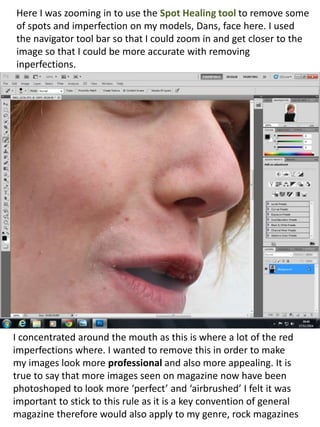
Here I was zooming in to use the Spot Healing tool to remove some 
of spots and imperfection on my models, Dans, face here. I used 
the navigator tool bar so that I could zoom in and get closer to the 
image so that I could be more accurate with removing 
inperfections. 
I concentrated around the mouth as this is where a lot of the red 
imperfections where. I wanted to remove this in order to make 
my images look more professional and also more appealing. It is 
true to say that more images seen on magazine now have been 
photoshoped to look more ‘perfect’ and ‘airbrushed’ I felt it was 
important to stick to this rule as it is a key convention of general 
magazine therefore would also apply to my genre, rock magazines
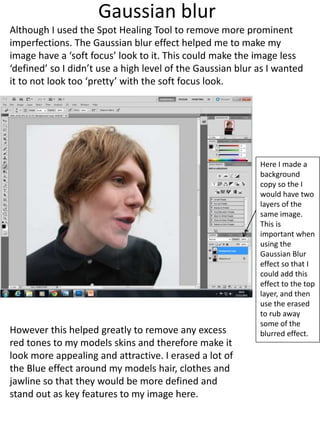
Gaussian blur 
Although I used the Spot Healing Tool to remove more prominent 
imperfections. The Gaussian blur effect helped me to make my 
image have a ‘soft focus’ look to it. This could make the image less 
‘defined’ so I didn’t use a high level of the Gaussian blur as I wanted 
it to not look too ‘pretty’ with the soft focus look. 
Here I made a 
background 
copy so the I 
would have two 
layers of the 
same image. 
This is 
important when 
using the 
Gaussian Blur 
effect so that I 
could add this 
effect to the top 
layer, and then 
use the erased 
to rub away 
some of the 
blurred effect. 
However this helped greatly to remove any excess 
red tones to my models skins and therefore make it 
look more appealing and attractive. I erased a lot of 
the Blue effect around my models hair, clothes and 
jawline so that they would be more defined and 
stand out as key features to my image here.
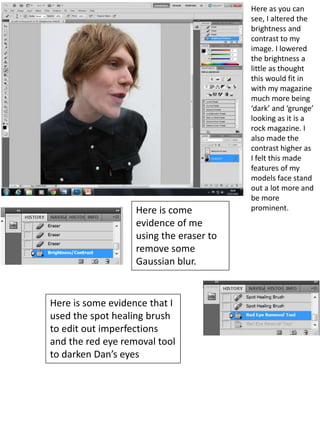
Here as you can 
see, I altered the 
brightness and 
contrast to my 
image. I lowered 
the brightness a 
little as thought 
this would fit in 
with my magazine 
much more being 
‘dark’ and ‘grunge’ 
looking as it is a 
rock magazine. I 
also made the 
contrast higher as 
I felt this made 
features of my 
models face stand 
out a lot more and 
be more 
Here is come prominent. 
evidence of me 
using the eraser to 
remove some 
Gaussian blur. 
Here is some evidence that I 
used the spot healing brush 
to edit out imperfections 
and the red eye removal tool 
to darken Dan’s eyes
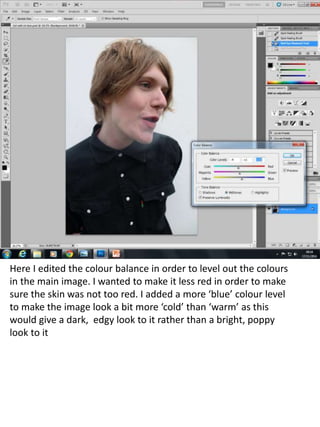
Here I edited the colour balance in order to level out the colours 
in the main image. I wanted to make it less red in order to make 
sure the skin was not too red. I added a more ‘blue’ colour level 
to make the image look a bit more ‘cold’ than ‘warm’ as this 
would give a dark, edgy look to it rather than a bright, poppy 
look to it
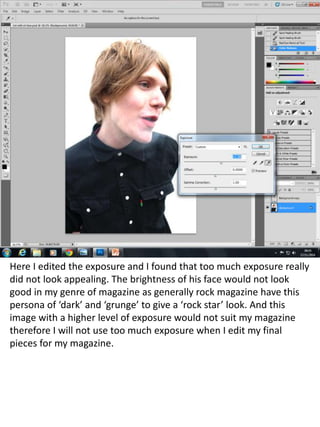
Here I edited the exposure and I found that too much exposure really 
did not look appealing. The brightness of his face would not look 
good in my genre of magazine as generally rock magazine have this 
persona of ‘dark’ and ‘grunge’ to give a ‘rock star’ look. And this 
image with a higher level of exposure would not suit my magazine 
therefore I will not use too much exposure when I edit my final 
pieces for my magazine.
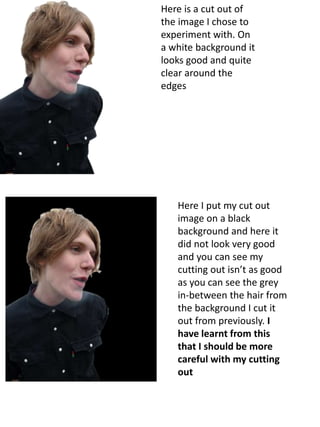
Here is a cut out of 
the image I chose to 
experiment with. On 
a white background it 
looks good and quite 
clear around the 
edges 
Here I put my cut out 
image on a black 
background and here it 
did not look very good 
and you can see my 
cutting out isn’t as good 
as you can see the grey 
in-between the hair from 
the background I cut it 
out from previously. I 
have learnt from this 
that I should be more 
careful with my cutting 
out
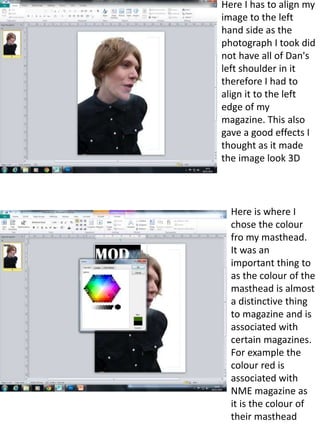
Here I has to align my 
image to the left 
hand side as the 
photograph I took did 
not have all of Dan's 
left shoulder in it 
therefore I had to 
align it to the left 
edge of my 
magazine. This also 
gave a good effects I 
thought as it made 
the image look 3D 
Here is where I 
chose the colour 
fro my masthead. 
It was an 
important thing to 
as the colour of the 
masthead is almost 
a distinctive thing 
to magazine and is 
associated with 
certain magazines. 
For example the 
colour red is 
associated with 
NME magazine as 
it is the colour of 
their masthead
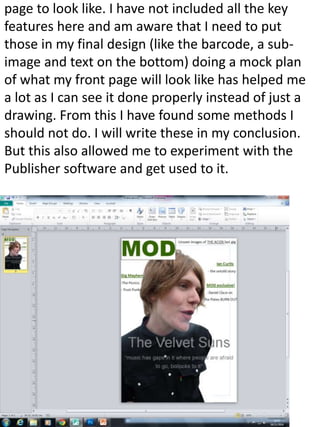
page to look like. I have not included all the key 
features here and am aware that I need to put 
those in my final design (like the barcode, a sub-image 
and text on the bottom) doing a mock plan 
of what my front page will look like has helped me 
a lot as I can see it done properly instead of just a 
drawing. From this I have found some methods I 
should not do. I will write these in my conclusion. 
But this also allowed me to experiment with the 
Publisher software and get used to it.

Image manipulation

  • 1.
    Mock design ofmy magazine front cover Here I experimented with Publisher to play around with its features and I used Photoshop to play around with manipulating my images. It gave me an idea of how both software's worked and also allowed me to make a ‘mock’ of my magazine front cover so that I could experiment and see what looked good
  • 2.
    Here I waszooming in to use the Spot Healing tool to remove some of spots and imperfection on my models, Dans, face here. I used the navigator tool bar so that I could zoom in and get closer to the image so that I could be more accurate with removing inperfections. I concentrated around the mouth as this is where a lot of the red imperfections where. I wanted to remove this in order to make my images look more professional and also more appealing. It is true to say that more images seen on magazine now have been photoshoped to look more ‘perfect’ and ‘airbrushed’ I felt it was important to stick to this rule as it is a key convention of general magazine therefore would also apply to my genre, rock magazines
  • 3.
    Gaussian blur AlthoughI used the Spot Healing Tool to remove more prominent imperfections. The Gaussian blur effect helped me to make my image have a ‘soft focus’ look to it. This could make the image less ‘defined’ so I didn’t use a high level of the Gaussian blur as I wanted it to not look too ‘pretty’ with the soft focus look. Here I made a background copy so the I would have two layers of the same image. This is important when using the Gaussian Blur effect so that I could add this effect to the top layer, and then use the erased to rub away some of the blurred effect. However this helped greatly to remove any excess red tones to my models skins and therefore make it look more appealing and attractive. I erased a lot of the Blue effect around my models hair, clothes and jawline so that they would be more defined and stand out as key features to my image here.
  • 4.
    Here as youcan see, I altered the brightness and contrast to my image. I lowered the brightness a little as thought this would fit in with my magazine much more being ‘dark’ and ‘grunge’ looking as it is a rock magazine. I also made the contrast higher as I felt this made features of my models face stand out a lot more and be more Here is come prominent. evidence of me using the eraser to remove some Gaussian blur. Here is some evidence that I used the spot healing brush to edit out imperfections and the red eye removal tool to darken Dan’s eyes
  • 5.
    Here I editedthe colour balance in order to level out the colours in the main image. I wanted to make it less red in order to make sure the skin was not too red. I added a more ‘blue’ colour level to make the image look a bit more ‘cold’ than ‘warm’ as this would give a dark, edgy look to it rather than a bright, poppy look to it
  • 6.
    Here I editedthe exposure and I found that too much exposure really did not look appealing. The brightness of his face would not look good in my genre of magazine as generally rock magazine have this persona of ‘dark’ and ‘grunge’ to give a ‘rock star’ look. And this image with a higher level of exposure would not suit my magazine therefore I will not use too much exposure when I edit my final pieces for my magazine.
  • 7.
    Here is acut out of the image I chose to experiment with. On a white background it looks good and quite clear around the edges Here I put my cut out image on a black background and here it did not look very good and you can see my cutting out isn’t as good as you can see the grey in-between the hair from the background I cut it out from previously. I have learnt from this that I should be more careful with my cutting out
  • 8.
    Here I hasto align my image to the left hand side as the photograph I took did not have all of Dan's left shoulder in it therefore I had to align it to the left edge of my magazine. This also gave a good effects I thought as it made the image look 3D Here is where I chose the colour fro my masthead. It was an important thing to as the colour of the masthead is almost a distinctive thing to magazine and is associated with certain magazines. For example the colour red is associated with NME magazine as it is the colour of their masthead
  • 9.
    page to looklike. I have not included all the key features here and am aware that I need to put those in my final design (like the barcode, a sub-image and text on the bottom) doing a mock plan of what my front page will look like has helped me a lot as I can see it done properly instead of just a drawing. From this I have found some methods I should not do. I will write these in my conclusion. But this also allowed me to experiment with the Publisher software and get used to it.