RONT COVER, THE MAKING
PROCESS
MAIN IMAGE
The initial image of Kyle I am going
to be using as my main image.
I started out by adjust the photographs conditions
via the use of Camera Raw, a Photoshop plug-in.
I then began to erase the
background with an eraser.
After this I made a selection around Kyle
via the use of the quick selection tool
BACKGROUND
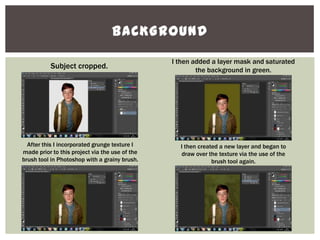
Subject cropped.
I then added a layer mask and saturated
the background in green.
After this I incorporated grunge texture I
made prior to this project via the use of the
brush tool in Photoshop with a grainy brush.
I then created a new layer and began to
draw over the texture via the use of the
brush tool again.
BACKGROUND
I then added to almost tornado like, in shape, shadows you
could call them in order to frame the cover line I was going
to incorporate.
After so I incorporated another shadow using
the same method only this time to frame the
masthead.
I added another shadow here again only
this time to frame the main cover line.
I added another shadow for the main
cover line to enhance the framing of it.
CONVENTIONS
I added a final shadow to the framing of the main
cover line which is green as I believed the blacks
were too harsh.
Next I began to incorporate text, pictured here, my main cover
line. I used a drop shadow to enhance the noticeability of the
text and used the eraser to distort the text to tie in with my
grungy theme.
Here I added a white text box to frame the strip that
I had distorted through the use of a grainy brush
and the opacity of the brush tool.
I then incorporated my masthead which I
created prior.
CONVENTIONS
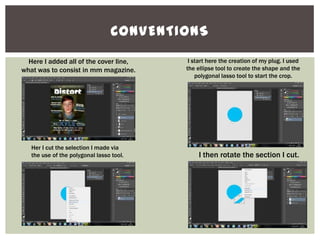
Here I added all of the cover line,
what was to consist in mm magazine.
I start here the creation of my plug. I used
the ellipse tool to create the shape and the
polygonal lasso tool to start the crop.
Her I cut the selection I made via
the use of the polygonal lasso tool. I then rotate the section I cut.
PLUG
I then colour overlay the segment to
distinguish it from the main shape.
I then here use the brush tool with a soft brush selected in order to
give the effect that the sticker had been peeled as these strokes I
created were to show resemblance to a shadow.
After this I use the warp tool to
emphasise the fact that the sticker
had been peeled off.
I then used the gradient editor to impersonate
that of a shadow on the bottom of the sticker.
FINAL TOUCHES
THE END

Her I incorporated my sticker to the cover. Here I added an almost chalk-like effect to the
cover segregating features and conventions. I did
this via the use of a grainy square-like brush tool.
I then altered the colour curves in
order to darken the image some as I
believed it was too bright.

Front cover

  • 1.
    RONT COVER, THEMAKING PROCESS
  • 2.
    MAIN IMAGE The initialimage of Kyle I am going to be using as my main image. I started out by adjust the photographs conditions via the use of Camera Raw, a Photoshop plug-in. I then began to erase the background with an eraser. After this I made a selection around Kyle via the use of the quick selection tool
  • 3.
    BACKGROUND Subject cropped. I thenadded a layer mask and saturated the background in green. After this I incorporated grunge texture I made prior to this project via the use of the brush tool in Photoshop with a grainy brush. I then created a new layer and began to draw over the texture via the use of the brush tool again.
  • 4.
    BACKGROUND I then addedto almost tornado like, in shape, shadows you could call them in order to frame the cover line I was going to incorporate. After so I incorporated another shadow using the same method only this time to frame the masthead. I added another shadow here again only this time to frame the main cover line. I added another shadow for the main cover line to enhance the framing of it.
  • 5.
    CONVENTIONS I added afinal shadow to the framing of the main cover line which is green as I believed the blacks were too harsh. Next I began to incorporate text, pictured here, my main cover line. I used a drop shadow to enhance the noticeability of the text and used the eraser to distort the text to tie in with my grungy theme. Here I added a white text box to frame the strip that I had distorted through the use of a grainy brush and the opacity of the brush tool. I then incorporated my masthead which I created prior.
  • 6.
    CONVENTIONS Here I addedall of the cover line, what was to consist in mm magazine. I start here the creation of my plug. I used the ellipse tool to create the shape and the polygonal lasso tool to start the crop. Her I cut the selection I made via the use of the polygonal lasso tool. I then rotate the section I cut.
  • 7.
    PLUG I then colouroverlay the segment to distinguish it from the main shape. I then here use the brush tool with a soft brush selected in order to give the effect that the sticker had been peeled as these strokes I created were to show resemblance to a shadow. After this I use the warp tool to emphasise the fact that the sticker had been peeled off. I then used the gradient editor to impersonate that of a shadow on the bottom of the sticker.
  • 8.
    FINAL TOUCHES THE END  HerI incorporated my sticker to the cover. Here I added an almost chalk-like effect to the cover segregating features and conventions. I did this via the use of a grainy square-like brush tool. I then altered the colour curves in order to darken the image some as I believed it was too bright.