Introduction to
Streamlit
Karthik Venkatachalam
Data Science- Subject Matter
What is Streamlit ?
Streamlit is a Python library that allows you to
create interactive web applications with
minimal code.
You can use Streamlit to display and style data,
create widgets, plot charts, and more.
 Streamlit is compatible with major Python
libraries such as scikit-learn, Keras, PyTorch,
SymPy (latex), NumPy, pandas, Matplotlib etc.
Why Streamlit?
Streamlit is a versatile framework designed for
building data applications in Python.
It enables rapid prototyping and iteration, making
development efficient.
Supports a wide range of interactive web elements,
including charts, maps, tables, sliders, buttons, and
more.
Deployment is simple - you can deploy your app with a
single command or host it in the cloud.
With a large and active community of users and
developers, you'll always have the support and resources
you need.
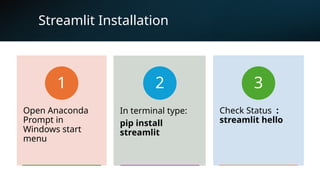
Streamlit Installation
Open Anaconda
Prompt in
Windows start
menu
1
In terminal type:
pip install
streamlit
2
Check Status :
streamlit hello
3
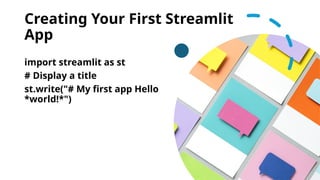
Creating Your First Streamlit
App
import streamlit as st
# Display a title
st.write("# My first app Hello
*world!*")
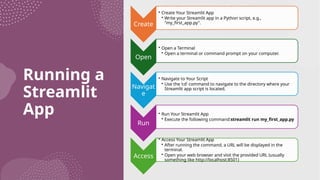
Running a
Streamlit
App
Create
• Create Your Streamlit App
• Write your Streamlit app in a Python script, e.g.,
"my_first_app.py".
Open
• Open a Terminal
• Open a terminal or command prompt on your computer.
Navigat
e
• Navigate to Your Script
• Use the 'cd' command to navigate to the directory where your
Streamlit app script is located.
Run
• Run Your Streamlit App
• Execute the following command:streamlit run my_first_app.py
Access
• Access Your Streamlit App
• After running the command, a URL will be displayed in the
terminal.
• Open your web browser and visit the provided URL (usually
something like http://localhost:8501)
Result
Thank You
Any Query : Contact me at
svkarthik86@gmail.com

Introduction to Streamlit Web Application

  • 1.
  • 2.
    What is Streamlit? Streamlit is a Python library that allows you to create interactive web applications with minimal code. You can use Streamlit to display and style data, create widgets, plot charts, and more.  Streamlit is compatible with major Python libraries such as scikit-learn, Keras, PyTorch, SymPy (latex), NumPy, pandas, Matplotlib etc.
  • 3.
    Why Streamlit? Streamlit isa versatile framework designed for building data applications in Python. It enables rapid prototyping and iteration, making development efficient. Supports a wide range of interactive web elements, including charts, maps, tables, sliders, buttons, and more. Deployment is simple - you can deploy your app with a single command or host it in the cloud. With a large and active community of users and developers, you'll always have the support and resources you need.
  • 4.
    Streamlit Installation Open Anaconda Promptin Windows start menu 1 In terminal type: pip install streamlit 2 Check Status : streamlit hello 3
  • 5.
    Creating Your FirstStreamlit App import streamlit as st # Display a title st.write("# My first app Hello *world!*")
  • 6.
    Running a Streamlit App Create • CreateYour Streamlit App • Write your Streamlit app in a Python script, e.g., "my_first_app.py". Open • Open a Terminal • Open a terminal or command prompt on your computer. Navigat e • Navigate to Your Script • Use the 'cd' command to navigate to the directory where your Streamlit app script is located. Run • Run Your Streamlit App • Execute the following command:streamlit run my_first_app.py Access • Access Your Streamlit App • After running the command, a URL will be displayed in the terminal. • Open your web browser and visit the provided URL (usually something like http://localhost:8501)
  • 7.
  • 8.
    Thank You Any Query: Contact me at svkarthik86@gmail.com