11
2
 Portable computers and mobile devices often use:
 Built in or slide-out keyboard
 Pen or touch input (on-screen keyboard)
 Voice
input
3
 Pointing devices: Used to select and manipulate
objects
 Used to input data
 Used to issue commands to the computer
 Common types of pointing devices:
 Mouse, touchpad, touchpoint, rollerball, joystick
 Pen/stylus
 Touch screen
4
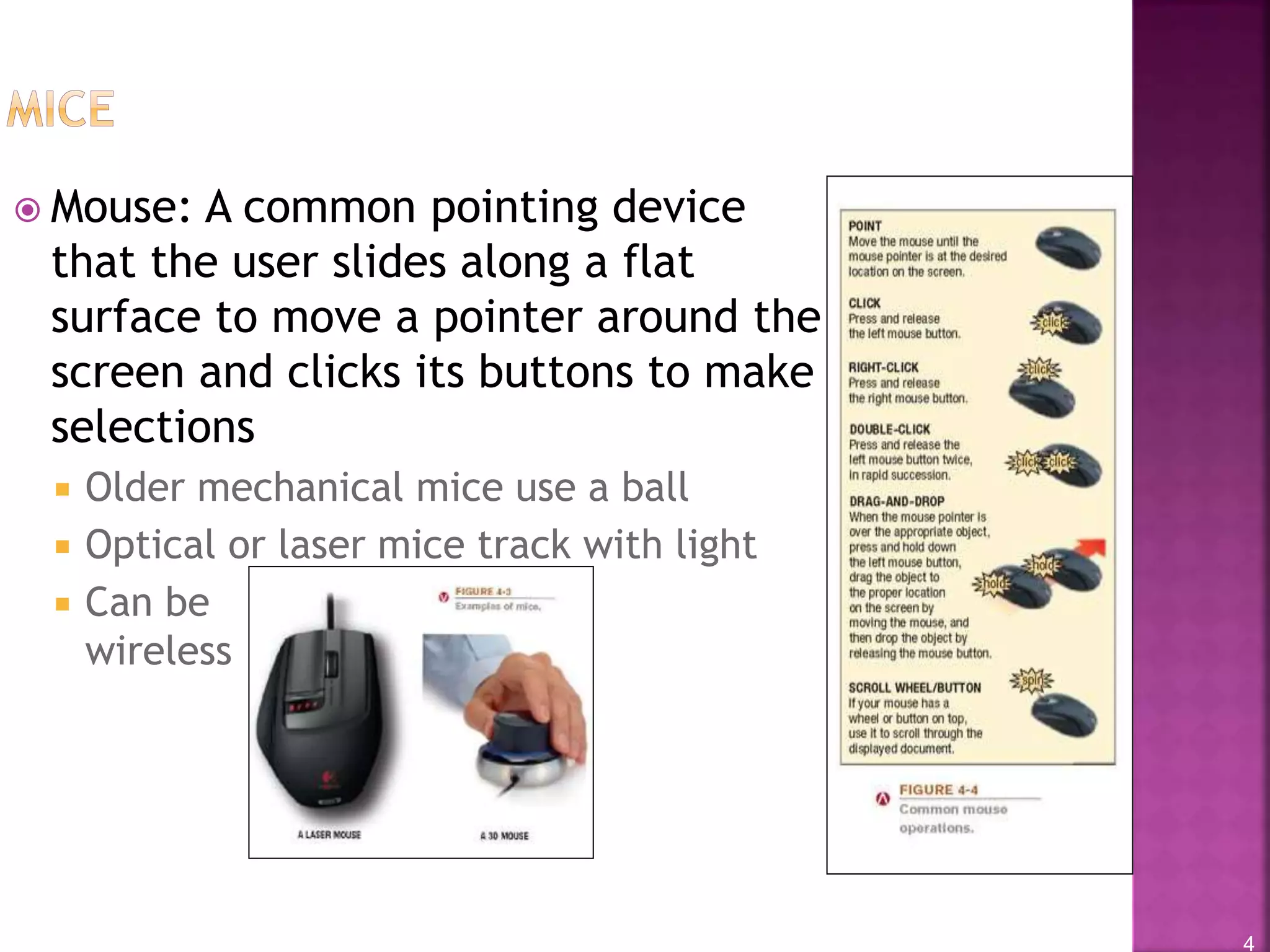
 Mouse: A common pointing device
that the user slides along a flat
surface to move a pointer around the
screen and clicks its buttons to make
selections
 Older mechanical mice use a ball
 Optical or laser mice track with light
 Can be
wireless
5
 Stylus: Pen-like device used to draw or write
electronically on the screen
 Also called digital pen, electronic pen, tablet pen
 Commonly used with pen-based computers
 Used to issue commands and input data
 If handwriting recognition is used, written text can be
converted to editable typed text
6
• Digital form: Used to
input handwritten
data into the
computer and then
convert it to editable
text
7
 Other uses for pens/styluses:
 Digital writing systems
 Graphics tablets
 Signature capture devices
8
9
 Other pointing
devices:
 Joysticks,
gamepads, and
other gaming
devices
 Trackballs
 Buttons and wheels
 Touch pads
10
 Scanner (optical scanner): Input device that
captures an image of an object and transfers them
to a computer in digital form
 Can scan photos, documents, drawings, (flat objects)
 Data is typically input as a single image
 If optical character recognition (OCR) is used, text is
input as individual text characters
 Types of scanners
 Flatbed
 Portable
 3D
 Integrated (ATMs, etc.)
11
12
 Optical resolution: Quality of
scanned images
 Measured in number of dots per
inch (dpi)
 Can often be specified when image
is scanned
 Can be changed when scanned
image is edited
 Varies with scanner used
 Higher resolution = better
quality but larger file size
13
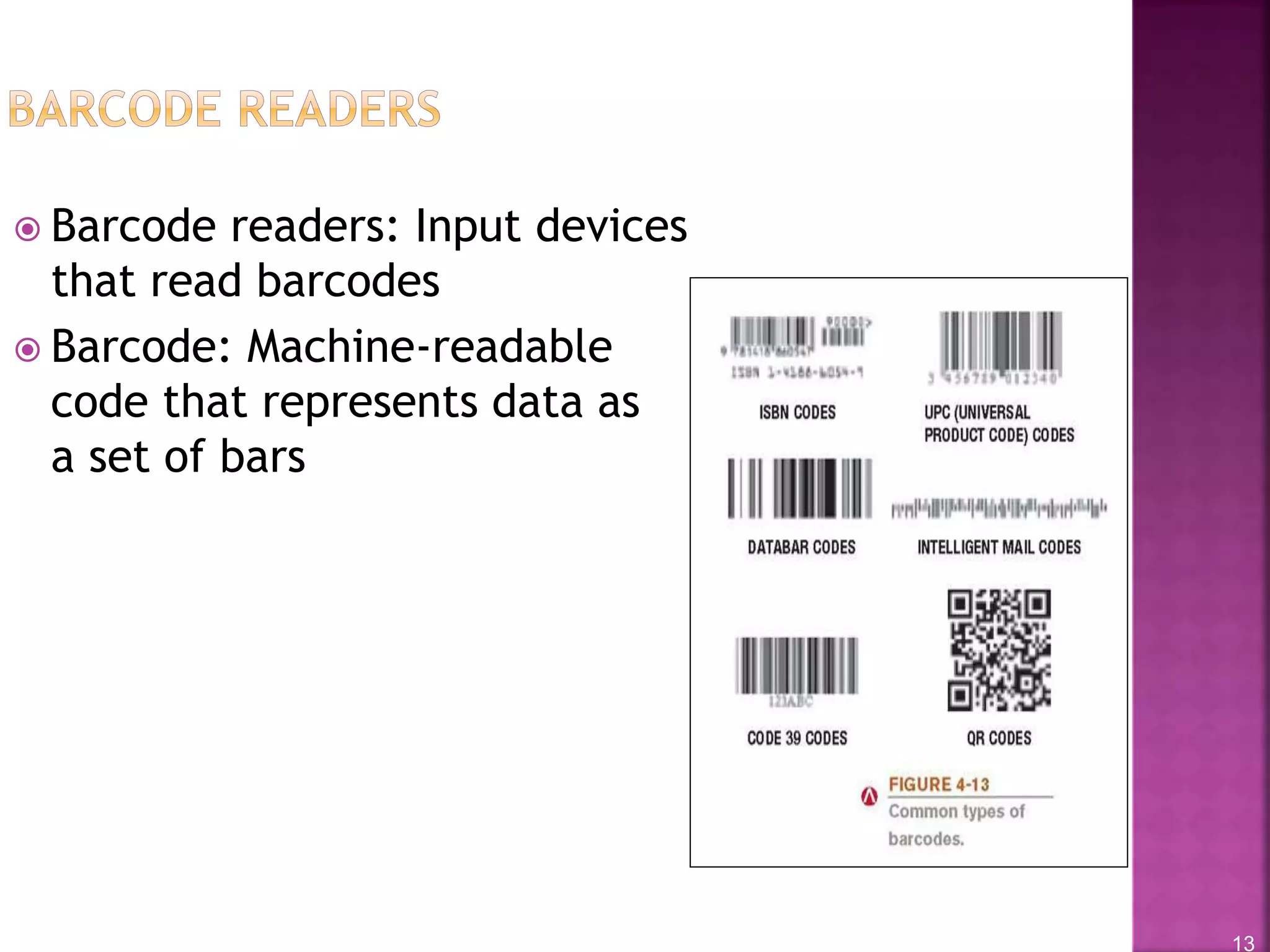
 Barcode readers: Input devices
that read barcodes
 Barcode: Machine-readable
code that represents data as
a set of bars
14
15
 Radio frequency identification (RFID): Technology
used to store and transmit data located in RFID tags
 RFID tag: Contains tiny chips and radio antennas
 Attached to objects for identification purposes
 Read by RFID readers
 Tags only need to be within range of the reader, rather
than in the line of sight
 Applications
 Tracking inventory and assets
 Electronic tolls
 Tracking patients in hospitals
 Ticketing applications
 Security: Speeding up ID process
16
17
 Optical mark readers (OMRs):
Input data from special forms
to score or tally exams,
questionnaires, ballots
 Optical character recognition
(OCR): The ability of a
computer to recognize scanned
text characters and convert
them to electronic form as
text, not images
 OCR readers can recognize many
typed fonts
 Used to process turnaround
documents like monthly
bills
18
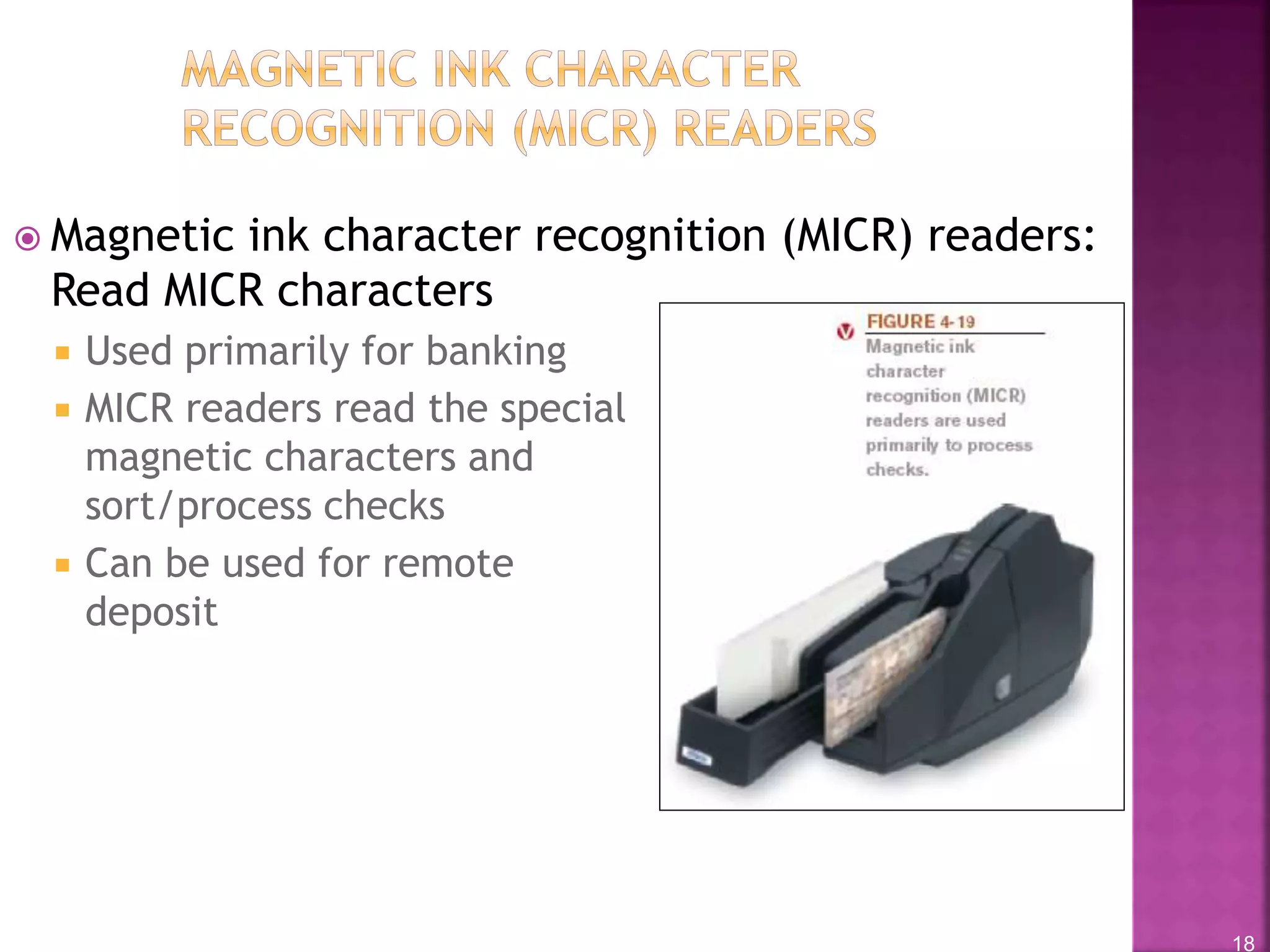
 Magnetic ink character recognition (MICR) readers:
Read MICR characters
 Used primarily for banking
 MICR readers read the special
magnetic characters and
sort/process checks
 Can be used for remote
deposit
19
 Biometric data: Based on unique physiological
characteristics or personal trait
 Fingerprint
 Hand or face geometry
 Iris of the eye
 Voice or signature
 Biometric readers: Used to input biometric data
 Can be stand-alone or built into another piece of
hardware
 Used to allow access only by authorized individuals
 Most often used for access control and to verify
transactions
20
21
22
 Digital video cameras
 Digital camcorders
 PC video cameras (PC cams, Web cam)
 Store images on digital media (flash memory, DVDs, hard
drives, etc.)
 Applications:
 Surveillance video
cameras
 Video conferences
and Webinars
 Face recognition
systems
23
 Audio input: The process of entering audio data
into the computer
 Voice input: Inputting spoken words and
converting them to digital form
 Via microphone or headset
 Recorded for narrations, podcasts, etc.
 VoIP (Voice over IP systems) applications
 To provide spoken instructions to computer (speech
recognition systems)
 Music input systems are used to input music
 Microphones, keyboard controllers, etc.
24
25
26
 Color vs. monochrome
 CRT vs. flat-panel displays
 Size and aspect ratio
 Screen resolution
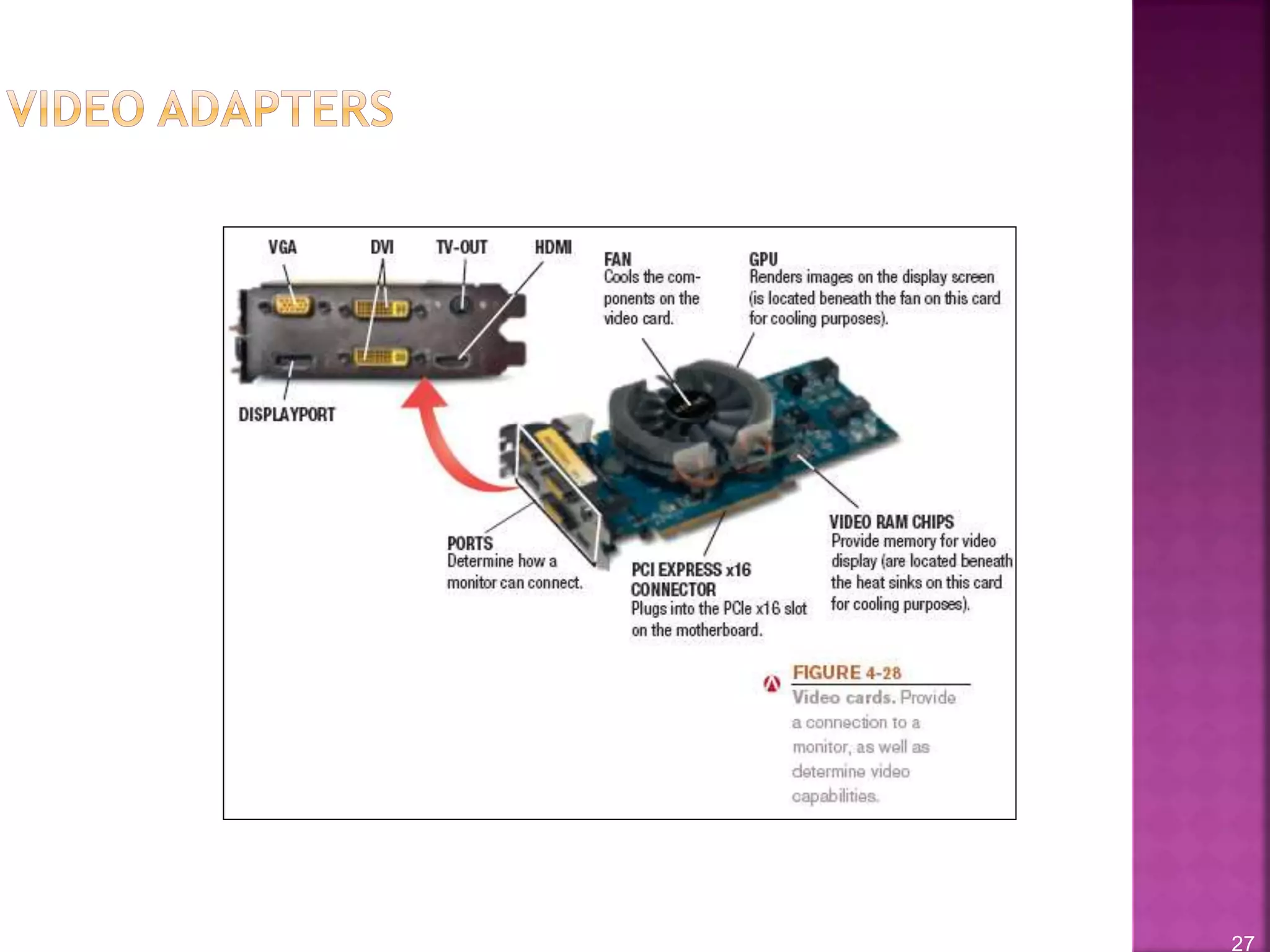
 Video adapters, interfaces,
and ports
 Wired vs. wireless displays
 2D vs. 3D
 Touch and gesture capabilities
27
28
 Liquid crystal displays (LCDs): Use charged liquid
crystals between sheets of glass or plastic
 Requires backlighting
 LED (Light emitting diode): Used in displays as well
as a variety of consumer products
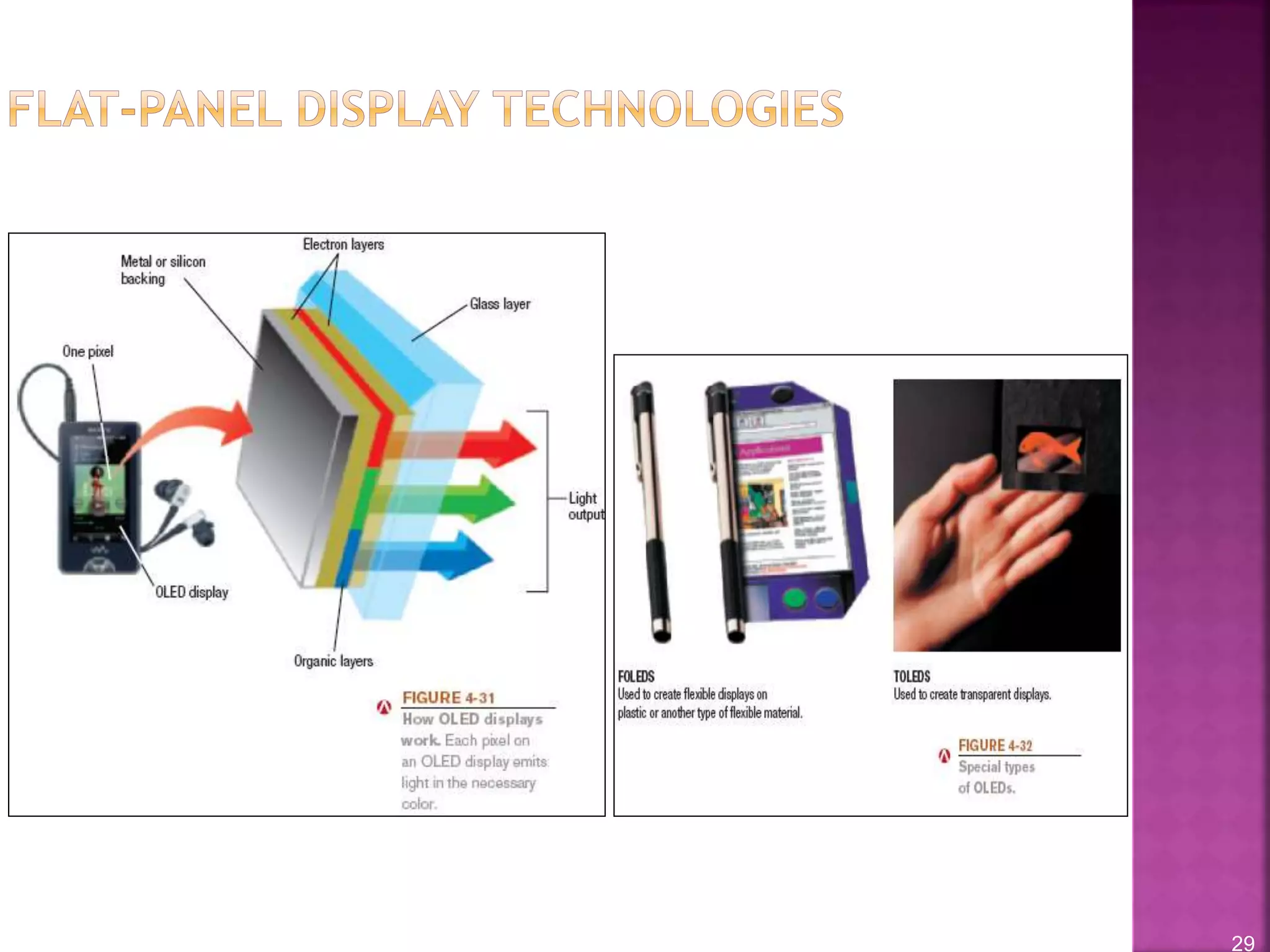
 OLED (Organic Light emitting diode) – Uses layers of
organic material
 Emit visible light when current is applied
 FOLED (Flexible OLED)
 TOLED (Transparent OLED)
 PHOLED (Phosphorescent OLED)
29
30
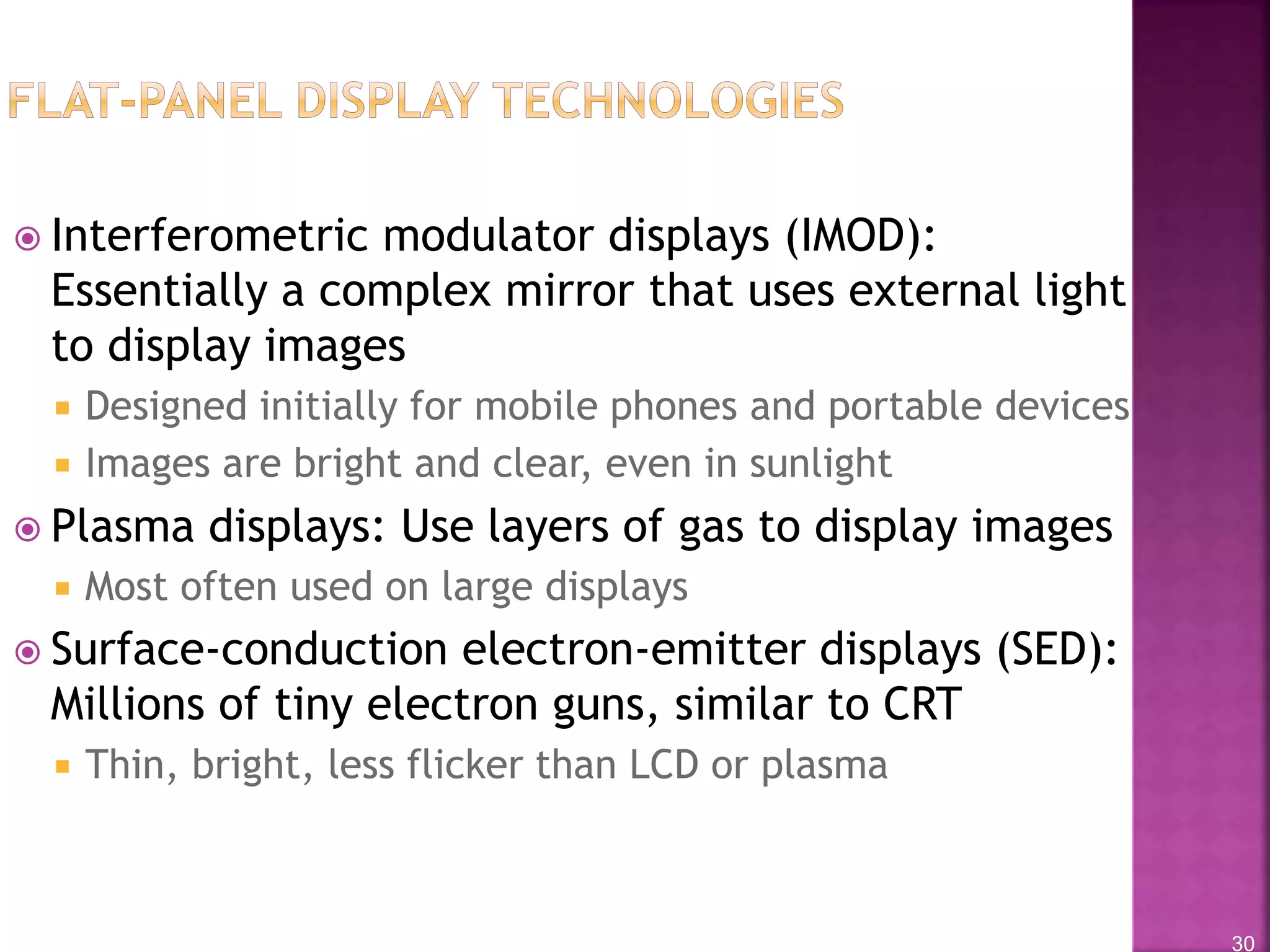
 Interferometric modulator displays (IMOD):
Essentially a complex mirror that uses external light
to display images
 Designed initially for mobile phones and portable devices
 Images are bright and clear, even in sunlight
 Plasma displays: Use layers of gas to display images
 Most often used on large displays
 Surface-conduction electron-emitter displays (SED):
Millions of tiny electron guns, similar to CRT
 Thin, bright, less flicker than LCD or plasma
31
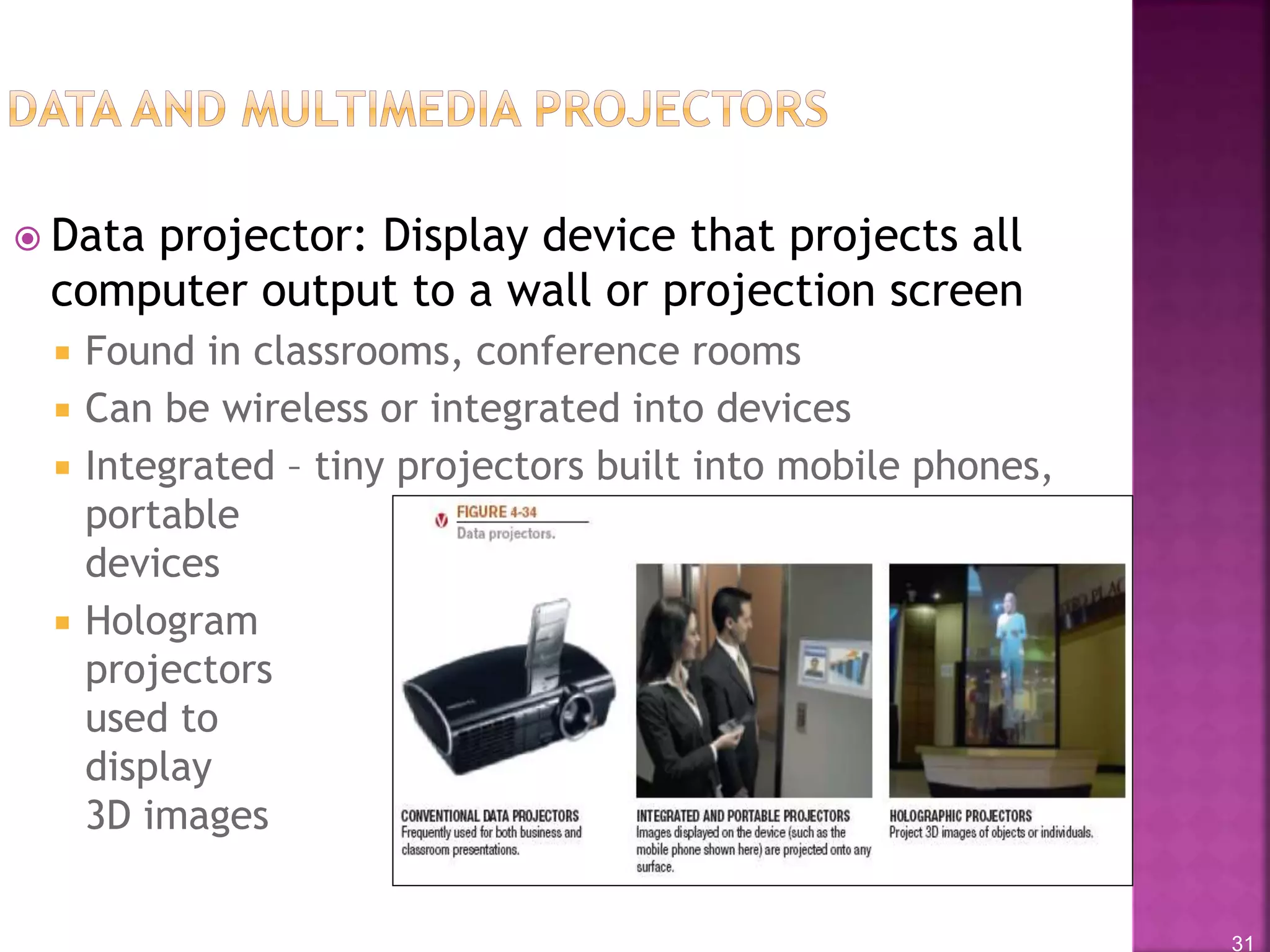
 Data projector: Display device that projects all
computer output to a wall or projection screen
 Found in classrooms, conference rooms
 Can be wireless or integrated into devices
 Integrated – tiny projectors built into mobile phones,
portable
devices
 Hologram
projectors
used to
display
3D images
32
 Printers: Produce hard copy
 Printer characteristics
 Printing technology used
 Impact vs. nonimpact
 Color vs. black and white
 Personal vs. network printers
 Print resolution (measured in dpi)
 Print speed (measured in pages per
minute (PPM))
 Connection (USB, Ethernet, Wi-Fi, etc.)
 Multifunction capabilities
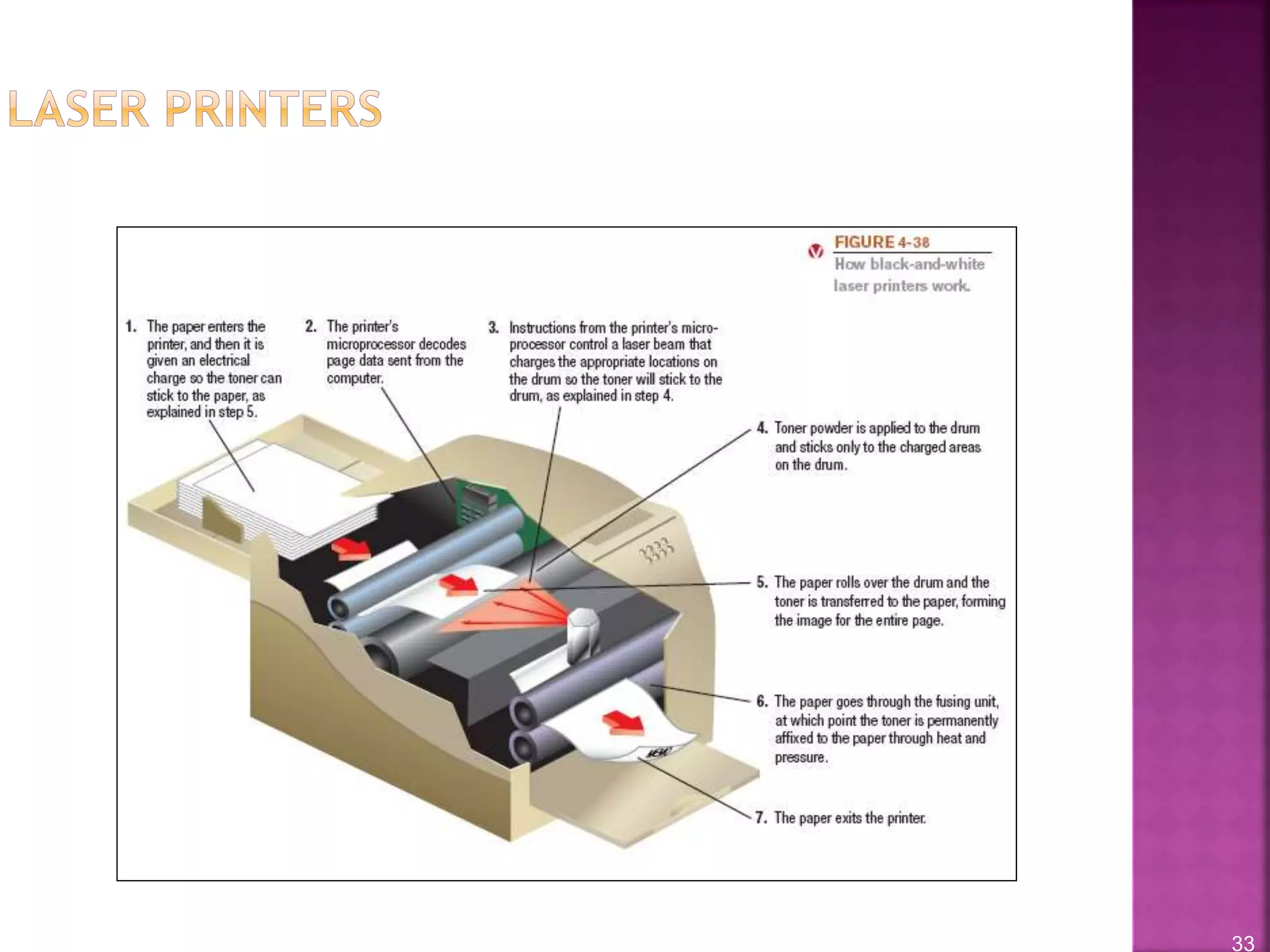
33
34
 Ink-jet printer: Sprays droplets of ink to produce
images on paper
 Usually print in color
 Often the choice for home use
 Print fairly slowly, one line at a time
 Quality not quite as good as a laser printer
 Use ink-jet cartridges
 Newer printers with full width printheads are much
faster
 Potential applications for the future
 Dispensing liquid metal, aromas, computer chips and
other circuitry, “printing” human tissue
35
36
 Photo printers
 Barcode,
label, and
postage
printers
 Portable
printers
 Plotters and
wide-format
ink-jet
printers
 3-D printers
37
 Audio output: Output in the form of voice, music,
and other audible sounds
 Speakers
 Headphones and headsets
 Earphones and earbuds

Ict 4

  • 1.
  • 2.
    2  Portable computersand mobile devices often use:  Built in or slide-out keyboard  Pen or touch input (on-screen keyboard)  Voice input
  • 3.
    3  Pointing devices:Used to select and manipulate objects  Used to input data  Used to issue commands to the computer  Common types of pointing devices:  Mouse, touchpad, touchpoint, rollerball, joystick  Pen/stylus  Touch screen
  • 4.
    4  Mouse: Acommon pointing device that the user slides along a flat surface to move a pointer around the screen and clicks its buttons to make selections  Older mechanical mice use a ball  Optical or laser mice track with light  Can be wireless
  • 5.
    5  Stylus: Pen-likedevice used to draw or write electronically on the screen  Also called digital pen, electronic pen, tablet pen  Commonly used with pen-based computers  Used to issue commands and input data  If handwriting recognition is used, written text can be converted to editable typed text
  • 6.
    6 • Digital form:Used to input handwritten data into the computer and then convert it to editable text
  • 7.
    7  Other usesfor pens/styluses:  Digital writing systems  Graphics tablets  Signature capture devices
  • 8.
  • 9.
    9  Other pointing devices: Joysticks, gamepads, and other gaming devices  Trackballs  Buttons and wheels  Touch pads
  • 10.
    10  Scanner (opticalscanner): Input device that captures an image of an object and transfers them to a computer in digital form  Can scan photos, documents, drawings, (flat objects)  Data is typically input as a single image  If optical character recognition (OCR) is used, text is input as individual text characters  Types of scanners  Flatbed  Portable  3D  Integrated (ATMs, etc.)
  • 11.
  • 12.
    12  Optical resolution:Quality of scanned images  Measured in number of dots per inch (dpi)  Can often be specified when image is scanned  Can be changed when scanned image is edited  Varies with scanner used  Higher resolution = better quality but larger file size
  • 13.
    13  Barcode readers:Input devices that read barcodes  Barcode: Machine-readable code that represents data as a set of bars
  • 14.
  • 15.
    15  Radio frequencyidentification (RFID): Technology used to store and transmit data located in RFID tags  RFID tag: Contains tiny chips and radio antennas  Attached to objects for identification purposes  Read by RFID readers  Tags only need to be within range of the reader, rather than in the line of sight  Applications  Tracking inventory and assets  Electronic tolls  Tracking patients in hospitals  Ticketing applications  Security: Speeding up ID process
  • 16.
  • 17.
    17  Optical markreaders (OMRs): Input data from special forms to score or tally exams, questionnaires, ballots  Optical character recognition (OCR): The ability of a computer to recognize scanned text characters and convert them to electronic form as text, not images  OCR readers can recognize many typed fonts  Used to process turnaround documents like monthly bills
  • 18.
    18  Magnetic inkcharacter recognition (MICR) readers: Read MICR characters  Used primarily for banking  MICR readers read the special magnetic characters and sort/process checks  Can be used for remote deposit
  • 19.
    19  Biometric data:Based on unique physiological characteristics or personal trait  Fingerprint  Hand or face geometry  Iris of the eye  Voice or signature  Biometric readers: Used to input biometric data  Can be stand-alone or built into another piece of hardware  Used to allow access only by authorized individuals  Most often used for access control and to verify transactions
  • 20.
  • 21.
  • 22.
    22  Digital videocameras  Digital camcorders  PC video cameras (PC cams, Web cam)  Store images on digital media (flash memory, DVDs, hard drives, etc.)  Applications:  Surveillance video cameras  Video conferences and Webinars  Face recognition systems
  • 23.
    23  Audio input:The process of entering audio data into the computer  Voice input: Inputting spoken words and converting them to digital form  Via microphone or headset  Recorded for narrations, podcasts, etc.  VoIP (Voice over IP systems) applications  To provide spoken instructions to computer (speech recognition systems)  Music input systems are used to input music  Microphones, keyboard controllers, etc.
  • 24.
  • 25.
  • 26.
    26  Color vs.monochrome  CRT vs. flat-panel displays  Size and aspect ratio  Screen resolution  Video adapters, interfaces, and ports  Wired vs. wireless displays  2D vs. 3D  Touch and gesture capabilities
  • 27.
  • 28.
    28  Liquid crystaldisplays (LCDs): Use charged liquid crystals between sheets of glass or plastic  Requires backlighting  LED (Light emitting diode): Used in displays as well as a variety of consumer products  OLED (Organic Light emitting diode) – Uses layers of organic material  Emit visible light when current is applied  FOLED (Flexible OLED)  TOLED (Transparent OLED)  PHOLED (Phosphorescent OLED)
  • 29.
  • 30.
    30  Interferometric modulatordisplays (IMOD): Essentially a complex mirror that uses external light to display images  Designed initially for mobile phones and portable devices  Images are bright and clear, even in sunlight  Plasma displays: Use layers of gas to display images  Most often used on large displays  Surface-conduction electron-emitter displays (SED): Millions of tiny electron guns, similar to CRT  Thin, bright, less flicker than LCD or plasma
  • 31.
    31  Data projector:Display device that projects all computer output to a wall or projection screen  Found in classrooms, conference rooms  Can be wireless or integrated into devices  Integrated – tiny projectors built into mobile phones, portable devices  Hologram projectors used to display 3D images
  • 32.
    32  Printers: Producehard copy  Printer characteristics  Printing technology used  Impact vs. nonimpact  Color vs. black and white  Personal vs. network printers  Print resolution (measured in dpi)  Print speed (measured in pages per minute (PPM))  Connection (USB, Ethernet, Wi-Fi, etc.)  Multifunction capabilities
  • 33.
  • 34.
    34  Ink-jet printer:Sprays droplets of ink to produce images on paper  Usually print in color  Often the choice for home use  Print fairly slowly, one line at a time  Quality not quite as good as a laser printer  Use ink-jet cartridges  Newer printers with full width printheads are much faster  Potential applications for the future  Dispensing liquid metal, aromas, computer chips and other circuitry, “printing” human tissue
  • 35.
  • 36.
    36  Photo printers Barcode, label, and postage printers  Portable printers  Plotters and wide-format ink-jet printers  3-D printers
  • 37.
    37  Audio output:Output in the form of voice, music, and other audible sounds  Speakers  Headphones and headsets  Earphones and earbuds