Bridge kloud
Line Drawing Algorithms
Lesson 3
1Bridgekloud: https://www.bridgekloud.com Unit: Computer Graphics ICS2311
ArchitectureOfAGraphicsSystem
 [remember this?]
System Bus
CPU
Display
Processor
System
Memory
Display
Processor
Memory
Frame
Buffer
Video
Controller
MonitorMonitor
2Bridgekloud: https://www.bridgekloud.com Unit: Computer Graphics ICS2311
BasicDefinitions
 A line drawing algorithm is a graphical
algorithm for approximating a line segment
on discrete graphical media.
 On discrete media, such as pixel-based
displays and printers, line drawing requires
such an approximation (in nontrivial cases).
Bridgekloud: https://www.bridgekloud.com Unit: Computer Graphics ICS2311 3
 2D Raster Scan Conversion
 'Scan conversion' is a general term for
drawing methods which create (or 'digitise')
raster images according to given picture
'primitives'.
 The term is mainly used for drawing methods
for 2D picture elements or primitives such as
lines, polygons and text.
 All three of these are used in Java and C++
programs we shall be considering.
4Bridgekloud: https://www.bridgekloud.com Unit: Computer Graphics ICS2311
 Most (straight) lines and curves drawn in
computer graphics satisfy equating a function of
x and y with zero.
 For example, we can re-express the line equation
y=mx+c as 0=mx+c−y.
 Most line and curve drawing methods effectively
hunt along a pixel at a time, steering left or right
as needed to find a trail of pixels to be drawn, by
calculating which next pixel will keep the
relevant function closest to zero.
5Bridgekloud: https://www.bridgekloud.com Unit: Computer Graphics ICS2311
TheProblemOfScanConversion
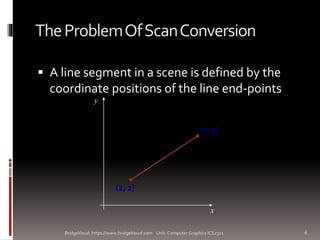
 A line segment in a scene is defined by the
coordinate positions of the line end-points
x
y
(2, 2)
(7, 5)
6Bridgekloud: https://www.bridgekloud.com Unit: Computer Graphics ICS2311
TheProblem(cont…)
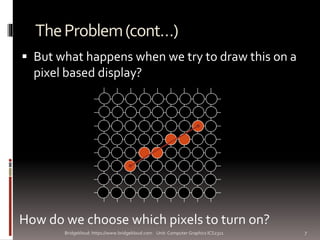
 But what happens when we try to draw this on a
pixel based display?
How do we choose which pixels to turn on?
7Bridgekloud: https://www.bridgekloud.com Unit: Computer Graphics ICS2311
Considerations
 Considerations to keep in mind:
 The line has to look good
 Avoid jaggies
 It has to be lightening fast!
 How many lines need to be drawn in a typical scene?
 This is going to come back to bite us again and again
8Bridgekloud: https://www.bridgekloud.com Unit: Computer Graphics ICS2311
Aliasing
 Simply choosing some pixels to draw often
results in the familiar 'jaggies'.
 This is a form of aliasing.
 Aliasing in computing generally is
substitution of something (e.g. some pixels)
for something else (e.g. an ideal area to
draw).
 In computer graphics, aliasing denotes
distortion or noise in images due to
approximation.
9Bridgekloud: https://www.bridgekloud.com Unit: Computer Graphics ICS2311
Aliasing….
 Three main forms of aliasing:
 Outline aliasing
 Motion aliasing
 Color aliasing
10Bridgekloud: https://www.bridgekloud.com Unit: Computer Graphics ICS2311
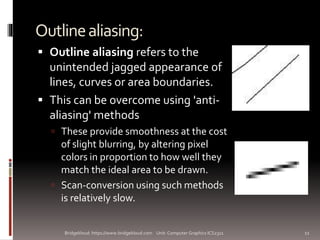
Outlinealiasing:
 Outline aliasing refers to the
unintended jagged appearance of
lines, curves or area boundaries.
 This can be overcome using 'anti-
aliasing' methods
 These provide smoothness at the cost
of slight blurring, by altering pixel
colors in proportion to how well they
match the ideal area to be drawn.
 Scan-conversion using such methods
is relatively slow.
11Bridgekloud: https://www.bridgekloud.com Unit: Computer Graphics ICS2311
Motionaliasing:
 The use of integers in scan-conversion methods is
usually taken to the logical extreme of eliminating
any use of floating point numbers, thus using only
integer pixel coordinates as parameters of the
method.
 This often results in motion aliasing,
 This is most noticeable when using 2D scan
conversion in 3D rendering.
 A different kind of motion aliasing can come from
irregularity in the timing of repainting of successive
frames.
12Bridgekloud: https://www.bridgekloud.com Unit: Computer Graphics ICS2311
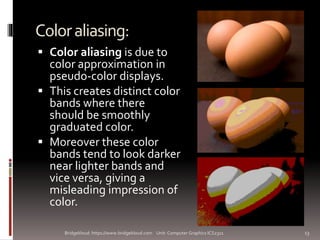
Coloraliasing:
 Color aliasing is due to
color approximation in
pseudo-color displays.
 This creates distinct color
bands where there
should be smoothly
graduated color.
 Moreover these color
bands tend to look darker
near lighter bands and
vice versa, giving a
misleading impression of
color.
13Bridgekloud: https://www.bridgekloud.com Unit: Computer Graphics ICS2311
LineDrawingalgorithms:
 The screen of a computer is a rectangular grid
of evenly aligned pixels.
 The computer produces images on raster
devices only by turning the approximate
pixels ON or OFF.
 To draw a line on the screen, we first need to
determine which pixels are to be switched
ON.
14Bridgekloud: https://www.bridgekloud.com Unit: Computer Graphics ICS2311
 The process of determining which
combination of pixels provide the best
approximation to the desired line is called
rasterization.
 When rasterization is combined with
rendering of a picture in a scan-line order,
then it is known as scan-conversion.
15Bridgekloud: https://www.bridgekloud.com Unit: Computer Graphics ICS2311
 The choice of the pixels is determined by the
orientation of the line which is to be drawn:
 There is little difficulty for straight line.
 For other orientation of lines, selection of pixel is a
difficult process.
16Bridgekloud: https://www.bridgekloud.com Unit: Computer Graphics ICS2311
 There are four general requirements for line
drawing:
 Lines must appear to be straight
 Lines should start and end accurately
 Lines should have constant brightness along their
length
 Lines should be drawn rapidly.
17Bridgekloud: https://www.bridgekloud.com Unit: Computer Graphics ICS2311
 For straight lines, the equation of a straight
line is used to determine the pixels:
 y = mx + c
 Where:
 M = (y2 – y1)/(x2-x1)
18Bridgekloud: https://www.bridgekloud.com Unit: Computer Graphics ICS2311
 Several algorithms:
 A naïve line-drawing algorithm
 Digital Differential Analyzer (graphics algorithm) —
Similar to the naive line-drawing algorithm, with minor
variations.
 Bresenham's line algorithm — optimized to use only
additions (i.e. no divisions or multiplications); it also avoids
floating-point computations.
 The general breesenham’s algorithm
 The bresenham’s circle generation algorithm.
 Xiaolin Wu's line algorithm — can perform spatial anti-
aliasing
 The algorithms are discussed in class
19Bridgekloud: https://www.bridgekloud.com Unit: Computer Graphics ICS2311
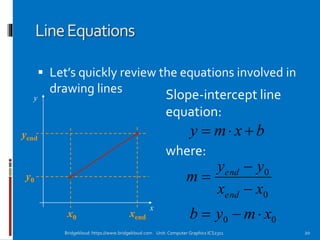
LineEquations
 Let’s quickly review the equations involved in
drawing lines
x
y
y0
yend
xendx0
Slope-intercept line
equation:
bxmy 
where:
0
0
xx
yy
m
end
end



00 xmyb 
20Bridgekloud: https://www.bridgekloud.com Unit: Computer Graphics ICS2311
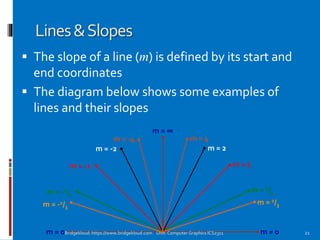
Lines&Slopes
 The slope of a line (m) is defined by its start and
end coordinates
 The diagram below shows some examples of
lines and their slopes
m = 0
m = -1/3
m = -1/2
m = -1
m = -2
m = -4
m = ∞
m = 1/3
m = 1/2
m = 1
m = 2
m = 4
m = 0 21Bridgekloud: https://www.bridgekloud.com Unit: Computer Graphics ICS2311
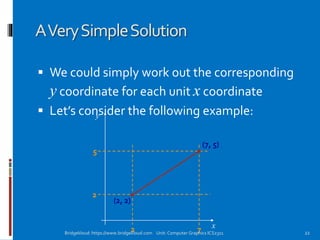
AVerySimpleSolution
 We could simply work out the corresponding
y coordinate for each unit x coordinate
 Let’s consider the following example:
x
y
(2, 2)
(7, 5)
2 7
2
5
22Bridgekloud: https://www.bridgekloud.com Unit: Computer Graphics ICS2311
AVerySimpleSolution(cont…)
1
2
3
4
5
0
1 2 3 4 5 60 7 23Bridgekloud: https://www.bridgekloud.com Unit: Computer Graphics ICS2311
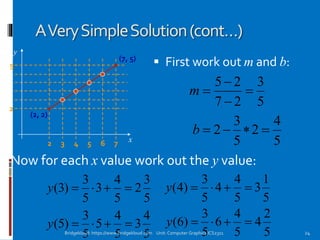
AVerySimpleSolution(cont…)
x
y
(2, 2)
(7, 5)
2 3 4 5 6 7
2
5
5
3
27
25



m
5
4
2
5
3
2 b
 First work out m and b:
Now for each x value work out the y value:
5
3
2
5
4
3
5
3
)3( y
5
1
3
5
4
4
5
3
)4( y
5
4
3
5
4
5
5
3
)5( y
5
2
4
5
4
6
5
3
)6( y
24Bridgekloud: https://www.bridgekloud.com Unit: Computer Graphics ICS2311
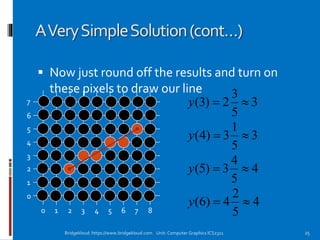
AVerySimpleSolution(cont…)
 Now just round off the results and turn on
these pixels to draw our line
3
5
3
2)3( y
3
5
1
3)4( y
4
5
4
3)5( y
4
5
2
4)6( y
0 1 2 3 4 5 6 7 8
0
1
2
3
4
5
6
7
25Bridgekloud: https://www.bridgekloud.com Unit: Computer Graphics ICS2311
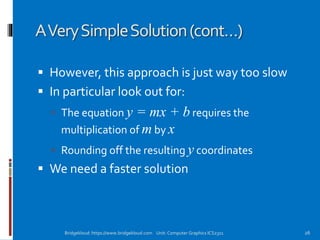
AVerySimpleSolution(cont…)
 However, this approach is just way too slow
 In particular look out for:
 The equation y = mx + b requires the
multiplication of m by x
 Rounding off the resulting y coordinates
 We need a faster solution
26Bridgekloud: https://www.bridgekloud.com Unit: Computer Graphics ICS2311
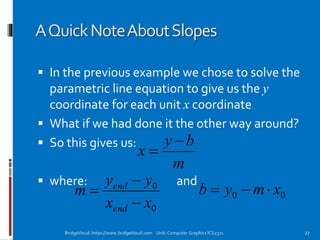
AQuickNoteAboutSlopes
 In the previous example we chose to solve the
parametric line equation to give us the y
coordinate for each unit x coordinate
 What if we had done it the other way around?
 So this gives us:
 where: and
m
by
x


0
0
xx
yy
m
end
end


 00 xmyb 
27Bridgekloud: https://www.bridgekloud.com Unit: Computer Graphics ICS2311
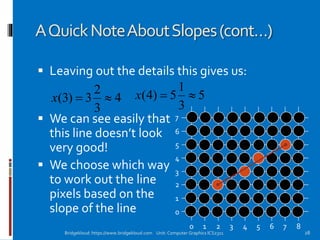
AQuickNoteAboutSlopes(cont…)
 Leaving out the details this gives us:
 We can see easily that
this line doesn’t look
very good!
 We choose which way
to work out the line
pixels based on the
slope of the line
0 1 2 3 4 5 6 7 8
0
1
2
3
4
5
6
7
4
3
2
3)3( x 5
3
1
5)4( x
28Bridgekloud: https://www.bridgekloud.com Unit: Computer Graphics ICS2311
AQuickNoteAboutSlopes(cont…)
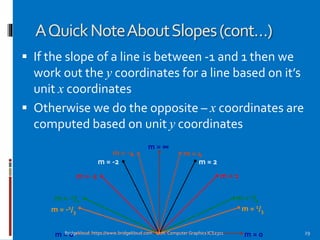
 If the slope of a line is between -1 and 1 then we
work out the y coordinates for a line based on it’s
unit x coordinates
 Otherwise we do the opposite – x coordinates are
computed based on unit y coordinates
m = 0
m = -1/3
m = -1/2
m = -1
m = -2
m = -4
m = ∞
m = 1/3
m = 1/2
m = 1
m = 2
m = 4
m = 0 29Bridgekloud: https://www.bridgekloud.com Unit: Computer Graphics ICS2311
AQuickNoteAboutSlopes(cont…)
1
2
3
4
5
0
1 2 3 4 5 60 7 30Bridgekloud: https://www.bridgekloud.com Unit: Computer Graphics ICS2311
TheDDAAlgorithm
 The digital differential
analyzer (DDA) algorithm
takes an incremental
approach in order to speed
up scan conversion
 Simply calculate yk+1
based on yk
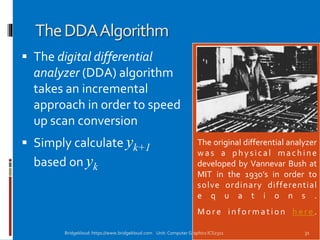
The original differential analyzer
was a physical machine
developed by Vannevar Bush at
MIT in the 1930’s in order to
solve ordinary differential
e q u a t i o n s .
Mor e in fo r mation h e re .
31Bridgekloud: https://www.bridgekloud.com Unit: Computer Graphics ICS2311
TheDDAAlgorithm(cont…)
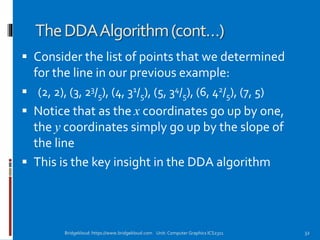
 Consider the list of points that we determined
for the line in our previous example:
 (2, 2), (3, 23/5), (4, 31/5), (5, 34/5), (6, 42/5), (7, 5)
 Notice that as the x coordinates go up by one,
the y coordinates simply go up by the slope of
the line
 This is the key insight in the DDA algorithm
32Bridgekloud: https://www.bridgekloud.com Unit: Computer Graphics ICS2311
TheDDAAlgorithm(cont…)
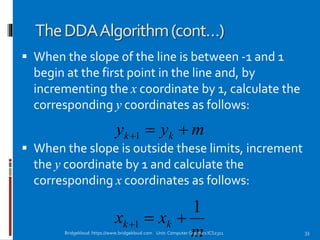
 When the slope of the line is between -1 and 1
begin at the first point in the line and, by
incrementing the x coordinate by 1, calculate the
corresponding y coordinates as follows:
 When the slope is outside these limits, increment
the y coordinate by 1 and calculate the
corresponding x coordinates as follows:
myy kk 1
m
xx kk
1
1 
33Bridgekloud: https://www.bridgekloud.com Unit: Computer Graphics ICS2311
TheDDAAlgorithm(cont…)
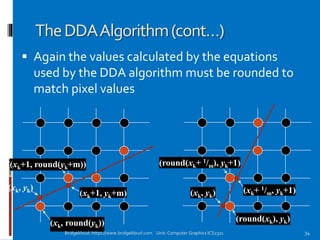
 Again the values calculated by the equations
used by the DDA algorithm must be rounded to
match pixel values
(xk, yk)
(xk+1, yk+m)
(xk, round(yk))
(xk+1, round(yk+m))
(xk, yk) (xk+ 1/m, yk+1)
(round(xk), yk)
(round(xk+ 1/m), yk+1)
34Bridgekloud: https://www.bridgekloud.com Unit: Computer Graphics ICS2311
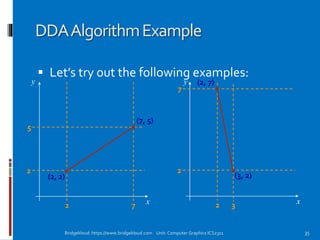
DDAAlgorithmExample
 Let’s try out the following examples:
x
y
(2, 2)
(7, 5)
2 7
2
5
x
y (2, 7)
(3, 2)
2 3
2
7
35Bridgekloud: https://www.bridgekloud.com Unit: Computer Graphics ICS2311
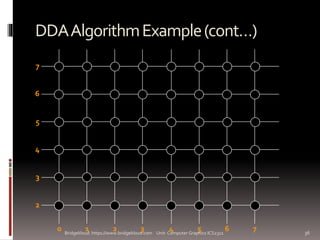
DDAAlgorithmExample(cont…)
7
2
3
4
5
6
1 2 3 4 5 60 7 36Bridgekloud: https://www.bridgekloud.com Unit: Computer Graphics ICS2311
TheDDAAlgorithmSummary
 The DDA algorithm is much faster than our
previous attempt
 In particular, there are no longer any
multiplications involved
 However, there are still two big issues:
 Accumulation of round-off errors can make the
pixelated line drift away from what was intended
 The rounding operations and floating point
arithmetic involved are time consuming
37Bridgekloud: https://www.bridgekloud.com Unit: Computer Graphics ICS2311
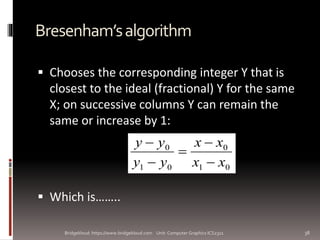
Bresenham’salgorithm
 Chooses the corresponding integer Y that is
closest to the ideal (fractional) Y for the same
X; on successive columns Y can remain the
same or increase by 1:
 Which is……..
Bridgekloud: https://www.bridgekloud.com Unit: Computer Graphics ICS2311 38
01
0
01
0
xx
xx
yy
yy





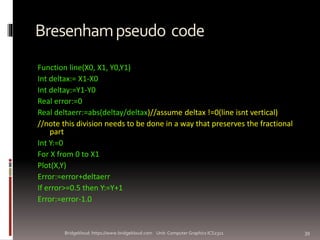
Bresenhampseudo code
Function line(X0, X1, Y0,Y1)
Int deltax:= X1-X0
Int deltay:=Y1-Y0
Real error:=0
Real deltaerr:=abs(deltay/deltax)//assume deltax !=0(line isnt vertical)
//note this division needs to be done in a way that preserves the fractional
part
Int Y:=0
For X from 0 to X1
Plot(X,Y)
Error:=error+deltaerr
If error>=0.5 then Y:=Y+1
Error:=error-1.0
Bridgekloud: https://www.bridgekloud.com Unit: Computer Graphics ICS2311 39
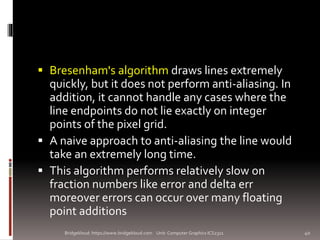
 Bresenham's algorithm draws lines extremely
quickly, but it does not perform anti-aliasing. In
addition, it cannot handle any cases where the
line endpoints do not lie exactly on integer
points of the pixel grid.
 A naive approach to anti-aliasing the line would
take an extremely long time.
 This algorithm performs relatively slow on
fraction numbers like error and delta err
moreover errors can occur over many floating
point additions
Bridgekloud: https://www.bridgekloud.com Unit: Computer Graphics ICS2311 40
 Working with integers will be faster and more
accurate.
 The trick is to multiply all fractional numbers
by deltax, which enables us to express them
as integers.
Bridgekloud: https://www.bridgekloud.com Unit: Computer Graphics ICS2311 41
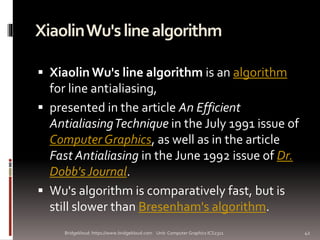
XiaolinWu'slinealgorithm
 Xiaolin Wu's line algorithm is an algorithm
for line antialiasing,
 presented in the article An Efficient
AntialiasingTechnique in the July 1991 issue of
Computer Graphics, as well as in the article
Fast Antialiasing in the June 1992 issue of Dr.
Dobb's Journal.
 Wu's algorithm is comparatively fast, but is
still slower than Bresenham's algorithm.
Bridgekloud: https://www.bridgekloud.com Unit: Computer Graphics ICS2311 42
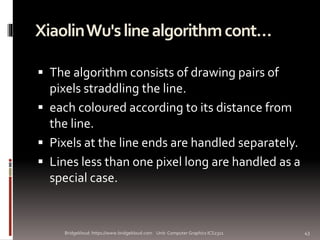
XiaolinWu'slinealgorithmcont…
 The algorithm consists of drawing pairs of
pixels straddling the line.
 each coloured according to its distance from
the line.
 Pixels at the line ends are handled separately.
 Lines less than one pixel long are handled as a
special case.
Bridgekloud: https://www.bridgekloud.com Unit: Computer Graphics ICS2311 43
Conclusion
 In this lecture we took a very brief look at
how graphics hardware works
 Drawing lines to pixel based displays is time
consuming so we need good ways to do it
 The DDA algorithm is pretty good – but we
can do better
44Bridgekloud: https://www.bridgekloud.com Unit: Computer Graphics ICS2311
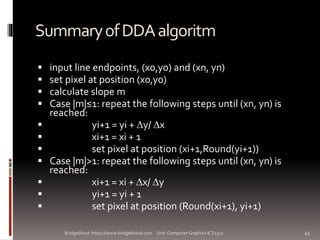
SummaryofDDAalgoritm
 input line endpoints, (x0,y0) and (xn, yn)
 set pixel at position (x0,y0)
 calculate slope m
 Case |m|≤1: repeat the following steps until (xn, yn) is
reached:
 yi+1 = yi + y/ x
 xi+1 = xi + 1
 set pixel at position (xi+1,Round(yi+1))
 Case |m|>1: repeat the following steps until (xn, yn) is
reached:
 xi+1 = xi + x/ y
 yi+1 = yi + 1
 set pixel at position (Round(xi+1), yi+1)
45Bridgekloud: https://www.bridgekloud.com Unit: Computer Graphics ICS2311

line drawing algorithms COMPUTER GRAPHICS & Graphical Programming

  • 1.
    Bridge kloud Line DrawingAlgorithms Lesson 3 1Bridgekloud: https://www.bridgekloud.com Unit: Computer Graphics ICS2311
  • 2.
    ArchitectureOfAGraphicsSystem  [remember this?] SystemBus CPU Display Processor System Memory Display Processor Memory Frame Buffer Video Controller MonitorMonitor 2Bridgekloud: https://www.bridgekloud.com Unit: Computer Graphics ICS2311
  • 3.
    BasicDefinitions  A linedrawing algorithm is a graphical algorithm for approximating a line segment on discrete graphical media.  On discrete media, such as pixel-based displays and printers, line drawing requires such an approximation (in nontrivial cases). Bridgekloud: https://www.bridgekloud.com Unit: Computer Graphics ICS2311 3
  • 4.
     2D RasterScan Conversion  'Scan conversion' is a general term for drawing methods which create (or 'digitise') raster images according to given picture 'primitives'.  The term is mainly used for drawing methods for 2D picture elements or primitives such as lines, polygons and text.  All three of these are used in Java and C++ programs we shall be considering. 4Bridgekloud: https://www.bridgekloud.com Unit: Computer Graphics ICS2311
  • 5.
     Most (straight)lines and curves drawn in computer graphics satisfy equating a function of x and y with zero.  For example, we can re-express the line equation y=mx+c as 0=mx+c−y.  Most line and curve drawing methods effectively hunt along a pixel at a time, steering left or right as needed to find a trail of pixels to be drawn, by calculating which next pixel will keep the relevant function closest to zero. 5Bridgekloud: https://www.bridgekloud.com Unit: Computer Graphics ICS2311
  • 6.
    TheProblemOfScanConversion  A linesegment in a scene is defined by the coordinate positions of the line end-points x y (2, 2) (7, 5) 6Bridgekloud: https://www.bridgekloud.com Unit: Computer Graphics ICS2311
  • 7.
    TheProblem(cont…)  But whathappens when we try to draw this on a pixel based display? How do we choose which pixels to turn on? 7Bridgekloud: https://www.bridgekloud.com Unit: Computer Graphics ICS2311
  • 8.
    Considerations  Considerations tokeep in mind:  The line has to look good  Avoid jaggies  It has to be lightening fast!  How many lines need to be drawn in a typical scene?  This is going to come back to bite us again and again 8Bridgekloud: https://www.bridgekloud.com Unit: Computer Graphics ICS2311
  • 9.
    Aliasing  Simply choosingsome pixels to draw often results in the familiar 'jaggies'.  This is a form of aliasing.  Aliasing in computing generally is substitution of something (e.g. some pixels) for something else (e.g. an ideal area to draw).  In computer graphics, aliasing denotes distortion or noise in images due to approximation. 9Bridgekloud: https://www.bridgekloud.com Unit: Computer Graphics ICS2311
  • 10.
    Aliasing….  Three mainforms of aliasing:  Outline aliasing  Motion aliasing  Color aliasing 10Bridgekloud: https://www.bridgekloud.com Unit: Computer Graphics ICS2311
  • 11.
    Outlinealiasing:  Outline aliasingrefers to the unintended jagged appearance of lines, curves or area boundaries.  This can be overcome using 'anti- aliasing' methods  These provide smoothness at the cost of slight blurring, by altering pixel colors in proportion to how well they match the ideal area to be drawn.  Scan-conversion using such methods is relatively slow. 11Bridgekloud: https://www.bridgekloud.com Unit: Computer Graphics ICS2311
  • 12.
    Motionaliasing:  The useof integers in scan-conversion methods is usually taken to the logical extreme of eliminating any use of floating point numbers, thus using only integer pixel coordinates as parameters of the method.  This often results in motion aliasing,  This is most noticeable when using 2D scan conversion in 3D rendering.  A different kind of motion aliasing can come from irregularity in the timing of repainting of successive frames. 12Bridgekloud: https://www.bridgekloud.com Unit: Computer Graphics ICS2311
  • 13.
    Coloraliasing:  Color aliasingis due to color approximation in pseudo-color displays.  This creates distinct color bands where there should be smoothly graduated color.  Moreover these color bands tend to look darker near lighter bands and vice versa, giving a misleading impression of color. 13Bridgekloud: https://www.bridgekloud.com Unit: Computer Graphics ICS2311
  • 14.
    LineDrawingalgorithms:  The screenof a computer is a rectangular grid of evenly aligned pixels.  The computer produces images on raster devices only by turning the approximate pixels ON or OFF.  To draw a line on the screen, we first need to determine which pixels are to be switched ON. 14Bridgekloud: https://www.bridgekloud.com Unit: Computer Graphics ICS2311
  • 15.
     The processof determining which combination of pixels provide the best approximation to the desired line is called rasterization.  When rasterization is combined with rendering of a picture in a scan-line order, then it is known as scan-conversion. 15Bridgekloud: https://www.bridgekloud.com Unit: Computer Graphics ICS2311
  • 16.
     The choiceof the pixels is determined by the orientation of the line which is to be drawn:  There is little difficulty for straight line.  For other orientation of lines, selection of pixel is a difficult process. 16Bridgekloud: https://www.bridgekloud.com Unit: Computer Graphics ICS2311
  • 17.
     There arefour general requirements for line drawing:  Lines must appear to be straight  Lines should start and end accurately  Lines should have constant brightness along their length  Lines should be drawn rapidly. 17Bridgekloud: https://www.bridgekloud.com Unit: Computer Graphics ICS2311
  • 18.
     For straightlines, the equation of a straight line is used to determine the pixels:  y = mx + c  Where:  M = (y2 – y1)/(x2-x1) 18Bridgekloud: https://www.bridgekloud.com Unit: Computer Graphics ICS2311
  • 19.
     Several algorithms: A naïve line-drawing algorithm  Digital Differential Analyzer (graphics algorithm) — Similar to the naive line-drawing algorithm, with minor variations.  Bresenham's line algorithm — optimized to use only additions (i.e. no divisions or multiplications); it also avoids floating-point computations.  The general breesenham’s algorithm  The bresenham’s circle generation algorithm.  Xiaolin Wu's line algorithm — can perform spatial anti- aliasing  The algorithms are discussed in class 19Bridgekloud: https://www.bridgekloud.com Unit: Computer Graphics ICS2311
  • 20.
    LineEquations  Let’s quicklyreview the equations involved in drawing lines x y y0 yend xendx0 Slope-intercept line equation: bxmy  where: 0 0 xx yy m end end    00 xmyb  20Bridgekloud: https://www.bridgekloud.com Unit: Computer Graphics ICS2311
  • 21.
    Lines&Slopes  The slopeof a line (m) is defined by its start and end coordinates  The diagram below shows some examples of lines and their slopes m = 0 m = -1/3 m = -1/2 m = -1 m = -2 m = -4 m = ∞ m = 1/3 m = 1/2 m = 1 m = 2 m = 4 m = 0 21Bridgekloud: https://www.bridgekloud.com Unit: Computer Graphics ICS2311
  • 22.
    AVerySimpleSolution  We couldsimply work out the corresponding y coordinate for each unit x coordinate  Let’s consider the following example: x y (2, 2) (7, 5) 2 7 2 5 22Bridgekloud: https://www.bridgekloud.com Unit: Computer Graphics ICS2311
  • 23.
    AVerySimpleSolution(cont…) 1 2 3 4 5 0 1 2 34 5 60 7 23Bridgekloud: https://www.bridgekloud.com Unit: Computer Graphics ICS2311
  • 24.
    AVerySimpleSolution(cont…) x y (2, 2) (7, 5) 23 4 5 6 7 2 5 5 3 27 25    m 5 4 2 5 3 2 b  First work out m and b: Now for each x value work out the y value: 5 3 2 5 4 3 5 3 )3( y 5 1 3 5 4 4 5 3 )4( y 5 4 3 5 4 5 5 3 )5( y 5 2 4 5 4 6 5 3 )6( y 24Bridgekloud: https://www.bridgekloud.com Unit: Computer Graphics ICS2311
  • 25.
    AVerySimpleSolution(cont…)  Now justround off the results and turn on these pixels to draw our line 3 5 3 2)3( y 3 5 1 3)4( y 4 5 4 3)5( y 4 5 2 4)6( y 0 1 2 3 4 5 6 7 8 0 1 2 3 4 5 6 7 25Bridgekloud: https://www.bridgekloud.com Unit: Computer Graphics ICS2311
  • 26.
    AVerySimpleSolution(cont…)  However, thisapproach is just way too slow  In particular look out for:  The equation y = mx + b requires the multiplication of m by x  Rounding off the resulting y coordinates  We need a faster solution 26Bridgekloud: https://www.bridgekloud.com Unit: Computer Graphics ICS2311
  • 27.
    AQuickNoteAboutSlopes  In theprevious example we chose to solve the parametric line equation to give us the y coordinate for each unit x coordinate  What if we had done it the other way around?  So this gives us:  where: and m by x   0 0 xx yy m end end    00 xmyb  27Bridgekloud: https://www.bridgekloud.com Unit: Computer Graphics ICS2311
  • 28.
    AQuickNoteAboutSlopes(cont…)  Leaving outthe details this gives us:  We can see easily that this line doesn’t look very good!  We choose which way to work out the line pixels based on the slope of the line 0 1 2 3 4 5 6 7 8 0 1 2 3 4 5 6 7 4 3 2 3)3( x 5 3 1 5)4( x 28Bridgekloud: https://www.bridgekloud.com Unit: Computer Graphics ICS2311
  • 29.
    AQuickNoteAboutSlopes(cont…)  If theslope of a line is between -1 and 1 then we work out the y coordinates for a line based on it’s unit x coordinates  Otherwise we do the opposite – x coordinates are computed based on unit y coordinates m = 0 m = -1/3 m = -1/2 m = -1 m = -2 m = -4 m = ∞ m = 1/3 m = 1/2 m = 1 m = 2 m = 4 m = 0 29Bridgekloud: https://www.bridgekloud.com Unit: Computer Graphics ICS2311
  • 30.
    AQuickNoteAboutSlopes(cont…) 1 2 3 4 5 0 1 2 34 5 60 7 30Bridgekloud: https://www.bridgekloud.com Unit: Computer Graphics ICS2311
  • 31.
    TheDDAAlgorithm  The digitaldifferential analyzer (DDA) algorithm takes an incremental approach in order to speed up scan conversion  Simply calculate yk+1 based on yk The original differential analyzer was a physical machine developed by Vannevar Bush at MIT in the 1930’s in order to solve ordinary differential e q u a t i o n s . Mor e in fo r mation h e re . 31Bridgekloud: https://www.bridgekloud.com Unit: Computer Graphics ICS2311
  • 32.
    TheDDAAlgorithm(cont…)  Consider thelist of points that we determined for the line in our previous example:  (2, 2), (3, 23/5), (4, 31/5), (5, 34/5), (6, 42/5), (7, 5)  Notice that as the x coordinates go up by one, the y coordinates simply go up by the slope of the line  This is the key insight in the DDA algorithm 32Bridgekloud: https://www.bridgekloud.com Unit: Computer Graphics ICS2311
  • 33.
    TheDDAAlgorithm(cont…)  When theslope of the line is between -1 and 1 begin at the first point in the line and, by incrementing the x coordinate by 1, calculate the corresponding y coordinates as follows:  When the slope is outside these limits, increment the y coordinate by 1 and calculate the corresponding x coordinates as follows: myy kk 1 m xx kk 1 1  33Bridgekloud: https://www.bridgekloud.com Unit: Computer Graphics ICS2311
  • 34.
    TheDDAAlgorithm(cont…)  Again thevalues calculated by the equations used by the DDA algorithm must be rounded to match pixel values (xk, yk) (xk+1, yk+m) (xk, round(yk)) (xk+1, round(yk+m)) (xk, yk) (xk+ 1/m, yk+1) (round(xk), yk) (round(xk+ 1/m), yk+1) 34Bridgekloud: https://www.bridgekloud.com Unit: Computer Graphics ICS2311
  • 35.
    DDAAlgorithmExample  Let’s tryout the following examples: x y (2, 2) (7, 5) 2 7 2 5 x y (2, 7) (3, 2) 2 3 2 7 35Bridgekloud: https://www.bridgekloud.com Unit: Computer Graphics ICS2311
  • 36.
    DDAAlgorithmExample(cont…) 7 2 3 4 5 6 1 2 34 5 60 7 36Bridgekloud: https://www.bridgekloud.com Unit: Computer Graphics ICS2311
  • 37.
    TheDDAAlgorithmSummary  The DDAalgorithm is much faster than our previous attempt  In particular, there are no longer any multiplications involved  However, there are still two big issues:  Accumulation of round-off errors can make the pixelated line drift away from what was intended  The rounding operations and floating point arithmetic involved are time consuming 37Bridgekloud: https://www.bridgekloud.com Unit: Computer Graphics ICS2311
  • 38.
    Bresenham’salgorithm  Chooses thecorresponding integer Y that is closest to the ideal (fractional) Y for the same X; on successive columns Y can remain the same or increase by 1:  Which is…….. Bridgekloud: https://www.bridgekloud.com Unit: Computer Graphics ICS2311 38 01 0 01 0 xx xx yy yy     
  • 39.
    Bresenhampseudo code Function line(X0,X1, Y0,Y1) Int deltax:= X1-X0 Int deltay:=Y1-Y0 Real error:=0 Real deltaerr:=abs(deltay/deltax)//assume deltax !=0(line isnt vertical) //note this division needs to be done in a way that preserves the fractional part Int Y:=0 For X from 0 to X1 Plot(X,Y) Error:=error+deltaerr If error>=0.5 then Y:=Y+1 Error:=error-1.0 Bridgekloud: https://www.bridgekloud.com Unit: Computer Graphics ICS2311 39
  • 40.
     Bresenham's algorithmdraws lines extremely quickly, but it does not perform anti-aliasing. In addition, it cannot handle any cases where the line endpoints do not lie exactly on integer points of the pixel grid.  A naive approach to anti-aliasing the line would take an extremely long time.  This algorithm performs relatively slow on fraction numbers like error and delta err moreover errors can occur over many floating point additions Bridgekloud: https://www.bridgekloud.com Unit: Computer Graphics ICS2311 40
  • 41.
     Working withintegers will be faster and more accurate.  The trick is to multiply all fractional numbers by deltax, which enables us to express them as integers. Bridgekloud: https://www.bridgekloud.com Unit: Computer Graphics ICS2311 41
  • 42.
    XiaolinWu'slinealgorithm  Xiaolin Wu'sline algorithm is an algorithm for line antialiasing,  presented in the article An Efficient AntialiasingTechnique in the July 1991 issue of Computer Graphics, as well as in the article Fast Antialiasing in the June 1992 issue of Dr. Dobb's Journal.  Wu's algorithm is comparatively fast, but is still slower than Bresenham's algorithm. Bridgekloud: https://www.bridgekloud.com Unit: Computer Graphics ICS2311 42
  • 43.
    XiaolinWu'slinealgorithmcont…  The algorithmconsists of drawing pairs of pixels straddling the line.  each coloured according to its distance from the line.  Pixels at the line ends are handled separately.  Lines less than one pixel long are handled as a special case. Bridgekloud: https://www.bridgekloud.com Unit: Computer Graphics ICS2311 43
  • 44.
    Conclusion  In thislecture we took a very brief look at how graphics hardware works  Drawing lines to pixel based displays is time consuming so we need good ways to do it  The DDA algorithm is pretty good – but we can do better 44Bridgekloud: https://www.bridgekloud.com Unit: Computer Graphics ICS2311
  • 45.
    SummaryofDDAalgoritm  input lineendpoints, (x0,y0) and (xn, yn)  set pixel at position (x0,y0)  calculate slope m  Case |m|≤1: repeat the following steps until (xn, yn) is reached:  yi+1 = yi + y/ x  xi+1 = xi + 1  set pixel at position (xi+1,Round(yi+1))  Case |m|>1: repeat the following steps until (xn, yn) is reached:  xi+1 = xi + x/ y  yi+1 = yi + 1  set pixel at position (Round(xi+1), yi+1) 45Bridgekloud: https://www.bridgekloud.com Unit: Computer Graphics ICS2311