CASE STUDY
 Free version of DB2 Express-C server
 The “C” in the name stands for community
 Free to develop, deploy and distribute…no limits
 No user limits
 No DB2 instance limits
 No database size limit
What is DB2 Express-C ?
Where can DB2 Express-C run?
 Windows
• Windows workstation platforms(XP, Vista, Windows 7)
• Windows server platforms (2003,2008)
 Linux
• Red Hat, Suse, Ubuntu and more
 Mac OS X(beta)
 Solaris
 Supported on 32-bit and 64-bit systems
What are DB2 Express-C Requirements?
 Minimum Requirements
 Memory:
(256MB, 512MB(DB2 GUI tools), 1GB( recommended)
 Disk:
-Depends on number and size of database to create
-On Linux, 2GB on /tmp is recommended
 Maximum requirements:
 System of any size
 Uses at most 2 cores and 2 GB of RAM
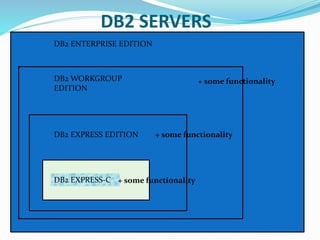
DB2 ENTERPRISE EDITION
DB2 WORKGROUP
EDITION
DB2 EXPRESS EDITION
DB2 EXPRESS-C + some functionality
+ some functionality
DB2 SERVERS
DB2 clients and drivers
 DB2 Runtime Client Merge Modules for Windows: mainly used to embed a
DB2 runtime client as part of a Windows application installation
 IBM Data Server Driver for JDBC and SQLJ: allows Java applications to connect
to DB2 servers without having to install a full client
 IBM Data Server Driver for ODBC and CLI: allows ODBC and CLI applications
to connect to a DB2 server without the large footprint of having to install a
client
 IBM Data Server Driver Package: Includes a Windows-specific driver with
support for .NET environments in addition to ODBC, CLI and open source.
This driver was previously known as the IBM Data Server Driver for ODBC, CLI
and .NET.
Concurrency and Locking
 What is a Transaction?
Savings account Checking account
Balance =$1000 Balance =$200
Transfer $100 from Savings to Checking account
•Debit $100 from Savings account
•Credit $100 from Checking account
Concurrency Overview
APP 1
APP 2
APP 3
APP 4
ID NAME AGE
JAMES4
8
12
2
PETER
MARY
22
30
28
31
TOM
Locking Overview
APP 1
APP 2
APP 3
APP 4
ID NAME AGE
JAMES4
8
12
2
PETER
MARY
22
30
28
31
TOM
Concurrency
 Db2 was designed as a multi-user database
 Access to data must be coordinated properly and
transparently
 Without some form of concurrency control the
following problems may be encountered.
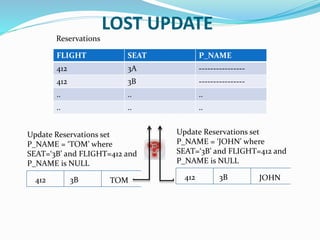
 Lost update
 Uncommitted read
 Non-repeatable read
 Phantom read
LOST UPDATE
FLIGHT SEAT P_NAME
412 3A ----------------
412 3B ----------------
.. .. ..
.. .. ..
Update Reservations set
P_NAME = ‘TOM’ where
SEAT=‘3B’ and FLIGHT=412 and
P_NAME is NULL
412 3B TOM
Update Reservations set
P_NAME = ‘JOHN’ where
SEAT=‘3B’ and FLIGHT=412 and
P_NAME is NULL
412 3B JOHN
Reservations
UNCOMMITTED READ
FLIGHT SEAT P_NAME
412 3A ----------------
412 3B ----------------
.. .. ..
.. .. ..
Update Reservations set
P_NAME = ‘TOM’ where
SEAT=‘3B’ and FLIGHT=412 and
P_NAME is NULL
412 3B TOM
Reservations
Select SEAT from
Reservations where
P_NAME is NULL
1
43
2
Rollback Incorrect Results
NON-REPEATABLE READ
FLIGHT SEAT NAME DESTINATIO
N
ORIGIN
212 7S --------- DENVER DALLAS
……
……
309 6A --------- SANJOSE DENVER
……
134 4B --------- HONOLU SANJOSE
…….
Implies that you cannot obtain the same result after performing
the same read after some other operations like deletion.
PHANTOM READ
FLIGHT SEAT P_NAME
412 3A ----------------
412 3B TOM
.. .. ..
.. .. ..
412 3B TOM
Reservations
Select SEAT from
Reservations where
P_NAME is NULL
1
3
2
Repetition of one
row (3B is now
available)
Update Reservations set
P_NAME = ‘NULL’ where
SEAT=‘3B’ and FLIGHT=412 and
P_NAME =‘TOM’
LOCKING
 DB2 uses locking to maintain data integrity.
 Locks are acquired automatically as a need to support
transaction and are released when a transaction
terminates(commit/rollback)
 Locks can be acquired on tables and rows
 Two basic types of locks:
 Share locks(S locks): acquired when an application wants to
read and prevent others from updating the same row
 Exclusive locks(X locks): acquired when an application
updates, deletes or inserts any row
ISOLATION LEVELS
DB2 provides different levels of protection to isolate
data:
 Uncommitted Read (UR)
 Cursor Stability (CS)
 Read Stability (RS)
 Repeatable Read (RR)
Isolation levels can be specified at many levels
 Session
 Connection
 Statement
Isolation levels - UNCOMMITTED
READ
 Uncommitted read is also known as ‘DIRTY READ’
o Lowest level of isolation
o Provides highest degree of concurrency
 No row locks are obtained on read operations
 Unless other application attempts to drop or alter table
 Update operations act as if using cursor stability
 Possible situations
o Uncommitted Read
o Non-Repeatable Read
o Phantom Read
 Situations Prevented
o Loss of Update
Isolation levels - Cursor Stability
 Cursor stability is the default isolation level
 Minimal degree of locking
 Locks the current row of a cursor
 If the row is only read
 The lock is held until a new row is fetched or the unit of work is terminated
 If the row is updated
 The lock is held until the unit of work is terminated
 Possible Situations
 Non-Repeatable Read
 Phantom Read
 Prevented Situations
 Loss of update
 Uncommitted Read
Isolation levels – Read Stability
 Locks all the rows, an application retrieves within a unit of
work
o For a given cursor, it locks all rows that qualify for the result
set
o Moderate degree of locking
 Possible Situations
o Phantom read
 Prevented Situations
o Loss of update
o uncommitted Read
o Non-repeatable Read
Isolation levels – Repeatable Read
 Highest isolation level, least concurrency
 Some query issued by the application more than once in a unit of work will give the
same result each time
 High degree of locking
 Locks held on all rows processed to build the result set
 i.e. rows not necessarily in the final result set may be locked
 No other application can update, delete, or insert a row that would affect the result
set until the unit of work completes
 Possible situations
 None
 Prevented Situations
 Loss of Update
 Uncommitted Read
 Non-repeatable Read
 Phantom Read
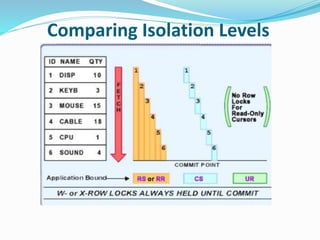
Comparing Isolation Levels
Comparison of Isolation level terminology
Example Scenario:
Application needs to get a rough count of how many rows are in table.
Performance is of utmost importance. Cursor stability isolation level is required
With the exception of one SQL statement
Lock Escalation
Lock Escalation
 When optimizer thinks it is better to have one lock on the entire table
rather than multiple row locks
 Database configuration parameters that affect lock escalation:
1. LOCKLIST- the amount of memory(4k pages) to manage locks for
all connected applications (default is 50 * 4k pages on Windows
2. MAXLOCKS – Max percentage of the entire lock list that a single
application can use up Default is 22 percent
 The DB2 diagnostic log file (db2diag.log) can be used to determine
whether lock escalation is occurring.
 Lock escalation is not good for performance as it reduces
concurrency.
LOCK MONITORING
•View locks currently
held by an application
•UPDATE MONITOR SWITCHES
USING LOCK ON
•GET SNAPSHOT FOR LOCKS
FOR APPLICATION
AGENT ID <handle>
Lock Wait
 By default an application waits indefinitely to obtain any needed
locks
 LOCKTIMEOUT (db cfg):
 Default value is -1 or infinite wait
 Change to specify the number of seconds to wait for a lock
 A database connection also has a user-definable CURRENT
LOCK TIMEOUT register
 By default inherits its value from the LOCKTIMEOUT parameter
 Use the SET LOCK TIMEOUT statement to change its value
 Once it is set for a connection, it persists across transactions
 e.g. SET LOCK TIMEOUT-WAIT n
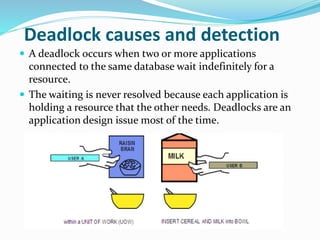
Deadlock causes and detection
 A deadlock occurs when two or more applications
connected to the same database wait indefinitely for a
resource.
 The waiting is never resolved because each application is
holding a resource that the other needs. Deadlocks are an
application design issue most of the time.
Deadlock Settings
 Deadlocks are an application design issue most of the time
 DLCHKTIME(db cfg) sets the time interval for checking for
deadlocks
 It defines the frequency that the database manager checks for
deadlocks among all the applications connected to a database
If you are experiencing many deadlocks, you should re-
examine your existing transactions and see if any re-
structuring is possible
Best Practices
 Keep transactions as short as possible
 Issue frequent COMMIT statements even for read-only transactions
 Log transaction information only when required
 Purge data quick using:
 ALTER TABLE ACTIVATE NOT LOGGED INITIALLY WITH EMPTY TABLE
 Perform data modifications in batches/groups
 DELETE FORM (SELECT * FROM ABCD WHERE C1=..FETCH FIRST 3000
ROWS ONLY)
 Use concurrency features in DB2 data movement tools
 Set the database level LOCKTIMEOUT parameter (usually between 30-
120 seconds)
 Can also use session-based lock timeout
 Do not retrieve more data than is required
 Use the FETCH FIRST n ROWS ONLY clause in SELECT statements
How IBM DB2 helpful in Parallel
Processing?
Parallelism in SMP environments
 intra-partition parallelism is the subdivision of a single database operation into
multiple parts, which are then executed in parallel within a single database
partition.
 use the CURRENT DEGREE special register, or the DEGREE bind option to
specify number of queries that can be executed concurrently.
 Database manager configuration parameters
 Intra-parallel : to enable or disable parallelism
 Max_querydegree: sets an upper limit on the degree of parallelism for any
query in the database.
 dft_degree: sets the default value of degree of parallelism
Parallelism in non-SMP environments
 Degree of parallelism can be specified without having an SMP machine
 The processor might not have to wait for I/O tasks to complete before starting
to process a new query.
How IBM DB2 helpful in
Distributed query processing?
 The database partitioning feature (DPF) provides distributed
query processing across a cluster of database servers.
 It is only available with InfoSphere Warehouse Editions and
allows data to be spread across multiple database partitions or
nodes which can reside in several different servers.
 DPF is based on a shared-nothing architecture where each
database partition has a subset of the overall data on its own
independent disks.
 Each computer, as it is added to the database cluster, brings
additional data processing power with its own CPUs,
memory, and disks, allowing for large tasks and complex queries
to be broken down into smaller pieces and distributed across the
various database nodes to be executed in parallel.
 This results in higher concurrency and faster response times
than would be possible if the database resided on a single server.
BIBLIOGRAPHY
 Getting_Started_with_DB2_Express_v9.7_p4
 INTERNET
END OF DOCUMENT
THANKS
M.ISHVITHA

Ibm db2 case study

  • 1.
  • 2.
     Free versionof DB2 Express-C server  The “C” in the name stands for community  Free to develop, deploy and distribute…no limits  No user limits  No DB2 instance limits  No database size limit What is DB2 Express-C ?
  • 3.
    Where can DB2Express-C run?  Windows • Windows workstation platforms(XP, Vista, Windows 7) • Windows server platforms (2003,2008)  Linux • Red Hat, Suse, Ubuntu and more  Mac OS X(beta)  Solaris  Supported on 32-bit and 64-bit systems
  • 4.
    What are DB2Express-C Requirements?  Minimum Requirements  Memory: (256MB, 512MB(DB2 GUI tools), 1GB( recommended)  Disk: -Depends on number and size of database to create -On Linux, 2GB on /tmp is recommended  Maximum requirements:  System of any size  Uses at most 2 cores and 2 GB of RAM
  • 5.
    DB2 ENTERPRISE EDITION DB2WORKGROUP EDITION DB2 EXPRESS EDITION DB2 EXPRESS-C + some functionality + some functionality + some functionality DB2 SERVERS
  • 6.
    DB2 clients anddrivers  DB2 Runtime Client Merge Modules for Windows: mainly used to embed a DB2 runtime client as part of a Windows application installation  IBM Data Server Driver for JDBC and SQLJ: allows Java applications to connect to DB2 servers without having to install a full client  IBM Data Server Driver for ODBC and CLI: allows ODBC and CLI applications to connect to a DB2 server without the large footprint of having to install a client  IBM Data Server Driver Package: Includes a Windows-specific driver with support for .NET environments in addition to ODBC, CLI and open source. This driver was previously known as the IBM Data Server Driver for ODBC, CLI and .NET.
  • 7.
    Concurrency and Locking What is a Transaction? Savings account Checking account Balance =$1000 Balance =$200 Transfer $100 from Savings to Checking account •Debit $100 from Savings account •Credit $100 from Checking account
  • 8.
    Concurrency Overview APP 1 APP2 APP 3 APP 4 ID NAME AGE JAMES4 8 12 2 PETER MARY 22 30 28 31 TOM
  • 9.
    Locking Overview APP 1 APP2 APP 3 APP 4 ID NAME AGE JAMES4 8 12 2 PETER MARY 22 30 28 31 TOM
  • 10.
    Concurrency  Db2 wasdesigned as a multi-user database  Access to data must be coordinated properly and transparently  Without some form of concurrency control the following problems may be encountered.  Lost update  Uncommitted read  Non-repeatable read  Phantom read
  • 11.
    LOST UPDATE FLIGHT SEATP_NAME 412 3A ---------------- 412 3B ---------------- .. .. .. .. .. .. Update Reservations set P_NAME = ‘TOM’ where SEAT=‘3B’ and FLIGHT=412 and P_NAME is NULL 412 3B TOM Update Reservations set P_NAME = ‘JOHN’ where SEAT=‘3B’ and FLIGHT=412 and P_NAME is NULL 412 3B JOHN Reservations
  • 12.
    UNCOMMITTED READ FLIGHT SEATP_NAME 412 3A ---------------- 412 3B ---------------- .. .. .. .. .. .. Update Reservations set P_NAME = ‘TOM’ where SEAT=‘3B’ and FLIGHT=412 and P_NAME is NULL 412 3B TOM Reservations Select SEAT from Reservations where P_NAME is NULL 1 43 2 Rollback Incorrect Results
  • 13.
    NON-REPEATABLE READ FLIGHT SEATNAME DESTINATIO N ORIGIN 212 7S --------- DENVER DALLAS …… …… 309 6A --------- SANJOSE DENVER …… 134 4B --------- HONOLU SANJOSE ……. Implies that you cannot obtain the same result after performing the same read after some other operations like deletion.
  • 14.
    PHANTOM READ FLIGHT SEATP_NAME 412 3A ---------------- 412 3B TOM .. .. .. .. .. .. 412 3B TOM Reservations Select SEAT from Reservations where P_NAME is NULL 1 3 2 Repetition of one row (3B is now available) Update Reservations set P_NAME = ‘NULL’ where SEAT=‘3B’ and FLIGHT=412 and P_NAME =‘TOM’
  • 15.
    LOCKING  DB2 useslocking to maintain data integrity.  Locks are acquired automatically as a need to support transaction and are released when a transaction terminates(commit/rollback)  Locks can be acquired on tables and rows  Two basic types of locks:  Share locks(S locks): acquired when an application wants to read and prevent others from updating the same row  Exclusive locks(X locks): acquired when an application updates, deletes or inserts any row
  • 16.
    ISOLATION LEVELS DB2 providesdifferent levels of protection to isolate data:  Uncommitted Read (UR)  Cursor Stability (CS)  Read Stability (RS)  Repeatable Read (RR) Isolation levels can be specified at many levels  Session  Connection  Statement
  • 17.
    Isolation levels -UNCOMMITTED READ  Uncommitted read is also known as ‘DIRTY READ’ o Lowest level of isolation o Provides highest degree of concurrency  No row locks are obtained on read operations  Unless other application attempts to drop or alter table  Update operations act as if using cursor stability  Possible situations o Uncommitted Read o Non-Repeatable Read o Phantom Read  Situations Prevented o Loss of Update
  • 18.
    Isolation levels -Cursor Stability  Cursor stability is the default isolation level  Minimal degree of locking  Locks the current row of a cursor  If the row is only read  The lock is held until a new row is fetched or the unit of work is terminated  If the row is updated  The lock is held until the unit of work is terminated  Possible Situations  Non-Repeatable Read  Phantom Read  Prevented Situations  Loss of update  Uncommitted Read
  • 19.
    Isolation levels –Read Stability  Locks all the rows, an application retrieves within a unit of work o For a given cursor, it locks all rows that qualify for the result set o Moderate degree of locking  Possible Situations o Phantom read  Prevented Situations o Loss of update o uncommitted Read o Non-repeatable Read
  • 20.
    Isolation levels –Repeatable Read  Highest isolation level, least concurrency  Some query issued by the application more than once in a unit of work will give the same result each time  High degree of locking  Locks held on all rows processed to build the result set  i.e. rows not necessarily in the final result set may be locked  No other application can update, delete, or insert a row that would affect the result set until the unit of work completes  Possible situations  None  Prevented Situations  Loss of Update  Uncommitted Read  Non-repeatable Read  Phantom Read
  • 21.
  • 22.
    Comparison of Isolationlevel terminology
  • 23.
    Example Scenario: Application needsto get a rough count of how many rows are in table. Performance is of utmost importance. Cursor stability isolation level is required With the exception of one SQL statement
  • 24.
  • 25.
    Lock Escalation  Whenoptimizer thinks it is better to have one lock on the entire table rather than multiple row locks  Database configuration parameters that affect lock escalation: 1. LOCKLIST- the amount of memory(4k pages) to manage locks for all connected applications (default is 50 * 4k pages on Windows 2. MAXLOCKS – Max percentage of the entire lock list that a single application can use up Default is 22 percent  The DB2 diagnostic log file (db2diag.log) can be used to determine whether lock escalation is occurring.  Lock escalation is not good for performance as it reduces concurrency.
  • 26.
    LOCK MONITORING •View lockscurrently held by an application •UPDATE MONITOR SWITCHES USING LOCK ON •GET SNAPSHOT FOR LOCKS FOR APPLICATION AGENT ID <handle>
  • 27.
    Lock Wait  Bydefault an application waits indefinitely to obtain any needed locks  LOCKTIMEOUT (db cfg):  Default value is -1 or infinite wait  Change to specify the number of seconds to wait for a lock  A database connection also has a user-definable CURRENT LOCK TIMEOUT register  By default inherits its value from the LOCKTIMEOUT parameter  Use the SET LOCK TIMEOUT statement to change its value  Once it is set for a connection, it persists across transactions  e.g. SET LOCK TIMEOUT-WAIT n
  • 28.
    Deadlock causes anddetection  A deadlock occurs when two or more applications connected to the same database wait indefinitely for a resource.  The waiting is never resolved because each application is holding a resource that the other needs. Deadlocks are an application design issue most of the time.
  • 29.
    Deadlock Settings  Deadlocksare an application design issue most of the time  DLCHKTIME(db cfg) sets the time interval for checking for deadlocks  It defines the frequency that the database manager checks for deadlocks among all the applications connected to a database If you are experiencing many deadlocks, you should re- examine your existing transactions and see if any re- structuring is possible
  • 30.
    Best Practices  Keeptransactions as short as possible  Issue frequent COMMIT statements even for read-only transactions  Log transaction information only when required  Purge data quick using:  ALTER TABLE ACTIVATE NOT LOGGED INITIALLY WITH EMPTY TABLE  Perform data modifications in batches/groups  DELETE FORM (SELECT * FROM ABCD WHERE C1=..FETCH FIRST 3000 ROWS ONLY)  Use concurrency features in DB2 data movement tools  Set the database level LOCKTIMEOUT parameter (usually between 30- 120 seconds)  Can also use session-based lock timeout  Do not retrieve more data than is required  Use the FETCH FIRST n ROWS ONLY clause in SELECT statements
  • 31.
    How IBM DB2helpful in Parallel Processing? Parallelism in SMP environments  intra-partition parallelism is the subdivision of a single database operation into multiple parts, which are then executed in parallel within a single database partition.  use the CURRENT DEGREE special register, or the DEGREE bind option to specify number of queries that can be executed concurrently.  Database manager configuration parameters  Intra-parallel : to enable or disable parallelism  Max_querydegree: sets an upper limit on the degree of parallelism for any query in the database.  dft_degree: sets the default value of degree of parallelism Parallelism in non-SMP environments  Degree of parallelism can be specified without having an SMP machine  The processor might not have to wait for I/O tasks to complete before starting to process a new query.
  • 32.
    How IBM DB2helpful in Distributed query processing?  The database partitioning feature (DPF) provides distributed query processing across a cluster of database servers.  It is only available with InfoSphere Warehouse Editions and allows data to be spread across multiple database partitions or nodes which can reside in several different servers.  DPF is based on a shared-nothing architecture where each database partition has a subset of the overall data on its own independent disks.  Each computer, as it is added to the database cluster, brings additional data processing power with its own CPUs, memory, and disks, allowing for large tasks and complex queries to be broken down into smaller pieces and distributed across the various database nodes to be executed in parallel.  This results in higher concurrency and faster response times than would be possible if the database resided on a single server.
  • 33.
  • 34.