1http://www.mycertprofile.com/Profile/3992184764
iSCSI storage in Windows Server 2016
Complete Lab (v1.0)
Ahmed Abdelwahed
Microsoft Certified Trainer
Ahmed_abdulwahed@outlook.com
iSCSI storage in Windows Server 2016
http://www.mycertprofile.com/Profile/3992184764
Contents
ISCSI Storage Overview ...........................................................................................................................................3
Existing environment ..............................................................................................................................................3
Configuring iSCSI storage ........................................................................................................................................3
Task 1: Install the Internet small computer system interface (iSCSI) target role services..............................................3
Task 2: Configure the iSCSI targets........................................................................................................................4
Task 4: Connect to and configure the iSCSI targets..................................................................................................8
iSCSI storage in Windows Server 2016
http://www.mycertprofile.com/Profile/3992184764
ISCSI Storage Overview
With iSCSI storage, it allows your Windows Server to share storage remotely using Ethernet network and does
not require any specialized hardware.
Existing environment
1. OS: Windows server 2016
2. Domain Name: ITPROLABS.XYZ
3. Domain IP: 192.168.153.10/24
4. IP Scheme: 192.168.153.0/24
5. Storage server Name: FSRM01 (our test server)
6. Storage server IP: 192.168.153.60
Configuring iSCSI storage
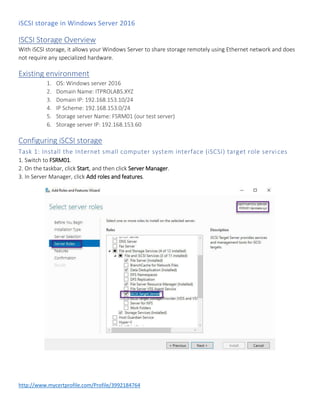
Task 1: Install the Internet small computer system interface (iSCSI) target role services
1. Switch to FSRM01.
2. On the taskbar, click Start, and then click Server Manager.
3. In Server Manager, click Add roles and features.
iSCSI storage in Windows Server 2016
http://www.mycertprofile.com/Profile/3992184764
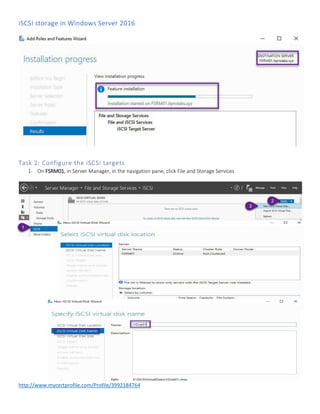
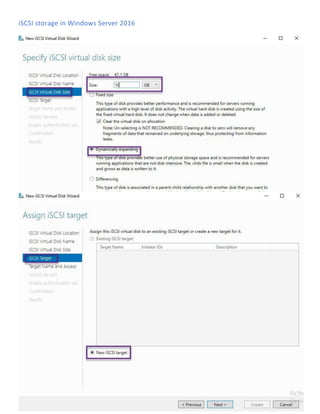
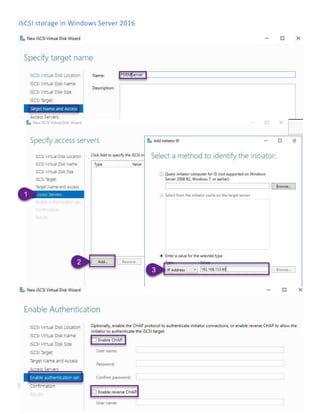
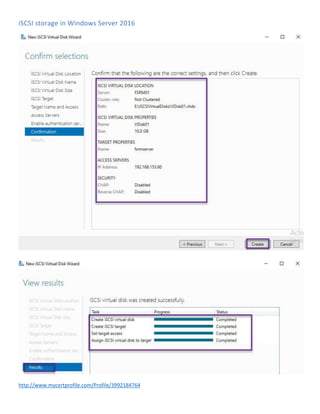
Task 2: Configure the iSCSI targets
1- On FSRM01, in Server Manager, in the navigation pane, click File and Storage Services
iSCSI storage in Windows Server 2016
http://www.mycertprofile.com/Profile/3992184764
iSCSI storage in Windows Server 2016
http://www.mycertprofile.com/Profile/3992184764
iSCSI storage in Windows Server 2016
http://www.mycertprofile.com/Profile/3992184764
iSCSI storage in Windows Server 2016
http://www.mycertprofile.com/Profile/3992184764
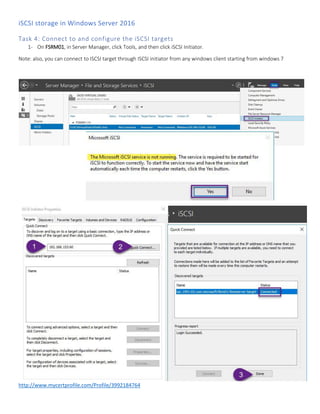
Task 4: Connect to and configure the iSCSI targets
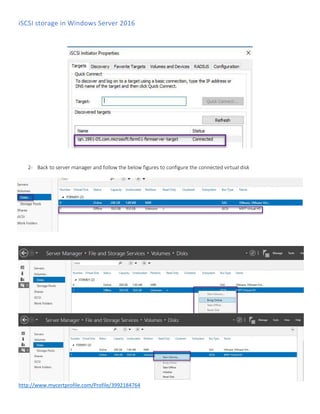
1- On FSRM01, in Server Manager, click Tools, and then click iSCSI Initiator.
Note: also, you can connect to ISCSI target through ISCSI initiator from any windows client starting from windows 7
iSCSI storage in Windows Server 2016
http://www.mycertprofile.com/Profile/3992184764
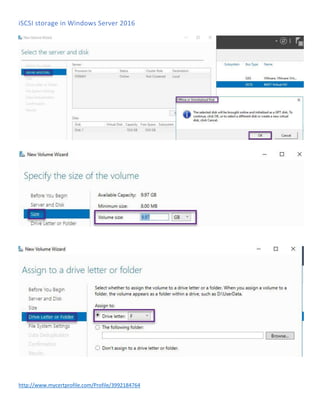
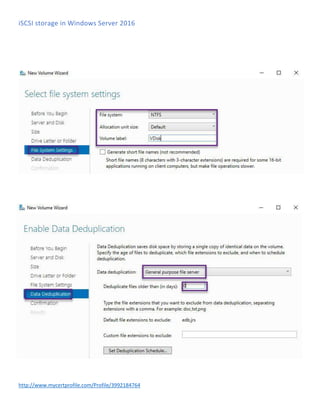
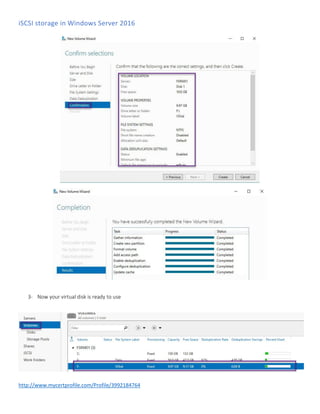
2- Back to server manager and follow the below figures to configure the connected virtual disk
iSCSI storage in Windows Server 2016
http://www.mycertprofile.com/Profile/3992184764
iSCSI storage in Windows Server 2016
http://www.mycertprofile.com/Profile/3992184764
iSCSI storage in Windows Server 2016
http://www.mycertprofile.com/Profile/3992184764
3- Now your virtual disk is ready to use

Iscsi storage in windows server 2016 step by step

  • 1.
    1http://www.mycertprofile.com/Profile/3992184764 iSCSI storage inWindows Server 2016 Complete Lab (v1.0) Ahmed Abdelwahed Microsoft Certified Trainer Ahmed_abdulwahed@outlook.com
  • 2.
    iSCSI storage inWindows Server 2016 http://www.mycertprofile.com/Profile/3992184764 Contents ISCSI Storage Overview ...........................................................................................................................................3 Existing environment ..............................................................................................................................................3 Configuring iSCSI storage ........................................................................................................................................3 Task 1: Install the Internet small computer system interface (iSCSI) target role services..............................................3 Task 2: Configure the iSCSI targets........................................................................................................................4 Task 4: Connect to and configure the iSCSI targets..................................................................................................8
  • 3.
    iSCSI storage inWindows Server 2016 http://www.mycertprofile.com/Profile/3992184764 ISCSI Storage Overview With iSCSI storage, it allows your Windows Server to share storage remotely using Ethernet network and does not require any specialized hardware. Existing environment 1. OS: Windows server 2016 2. Domain Name: ITPROLABS.XYZ 3. Domain IP: 192.168.153.10/24 4. IP Scheme: 192.168.153.0/24 5. Storage server Name: FSRM01 (our test server) 6. Storage server IP: 192.168.153.60 Configuring iSCSI storage Task 1: Install the Internet small computer system interface (iSCSI) target role services 1. Switch to FSRM01. 2. On the taskbar, click Start, and then click Server Manager. 3. In Server Manager, click Add roles and features.
  • 4.
    iSCSI storage inWindows Server 2016 http://www.mycertprofile.com/Profile/3992184764 Task 2: Configure the iSCSI targets 1- On FSRM01, in Server Manager, in the navigation pane, click File and Storage Services
  • 5.
    iSCSI storage inWindows Server 2016 http://www.mycertprofile.com/Profile/3992184764
  • 6.
    iSCSI storage inWindows Server 2016 http://www.mycertprofile.com/Profile/3992184764
  • 7.
    iSCSI storage inWindows Server 2016 http://www.mycertprofile.com/Profile/3992184764
  • 8.
    iSCSI storage inWindows Server 2016 http://www.mycertprofile.com/Profile/3992184764 Task 4: Connect to and configure the iSCSI targets 1- On FSRM01, in Server Manager, click Tools, and then click iSCSI Initiator. Note: also, you can connect to ISCSI target through ISCSI initiator from any windows client starting from windows 7
  • 9.
    iSCSI storage inWindows Server 2016 http://www.mycertprofile.com/Profile/3992184764 2- Back to server manager and follow the below figures to configure the connected virtual disk
  • 10.
    iSCSI storage inWindows Server 2016 http://www.mycertprofile.com/Profile/3992184764
  • 11.
    iSCSI storage inWindows Server 2016 http://www.mycertprofile.com/Profile/3992184764
  • 12.
    iSCSI storage inWindows Server 2016 http://www.mycertprofile.com/Profile/3992184764 3- Now your virtual disk is ready to use