e-mail: wondemule@yahoo.com
Office: Eshetu Chole Building, Office No. : 114
Introduction to
Information Storage and Retrieval
1
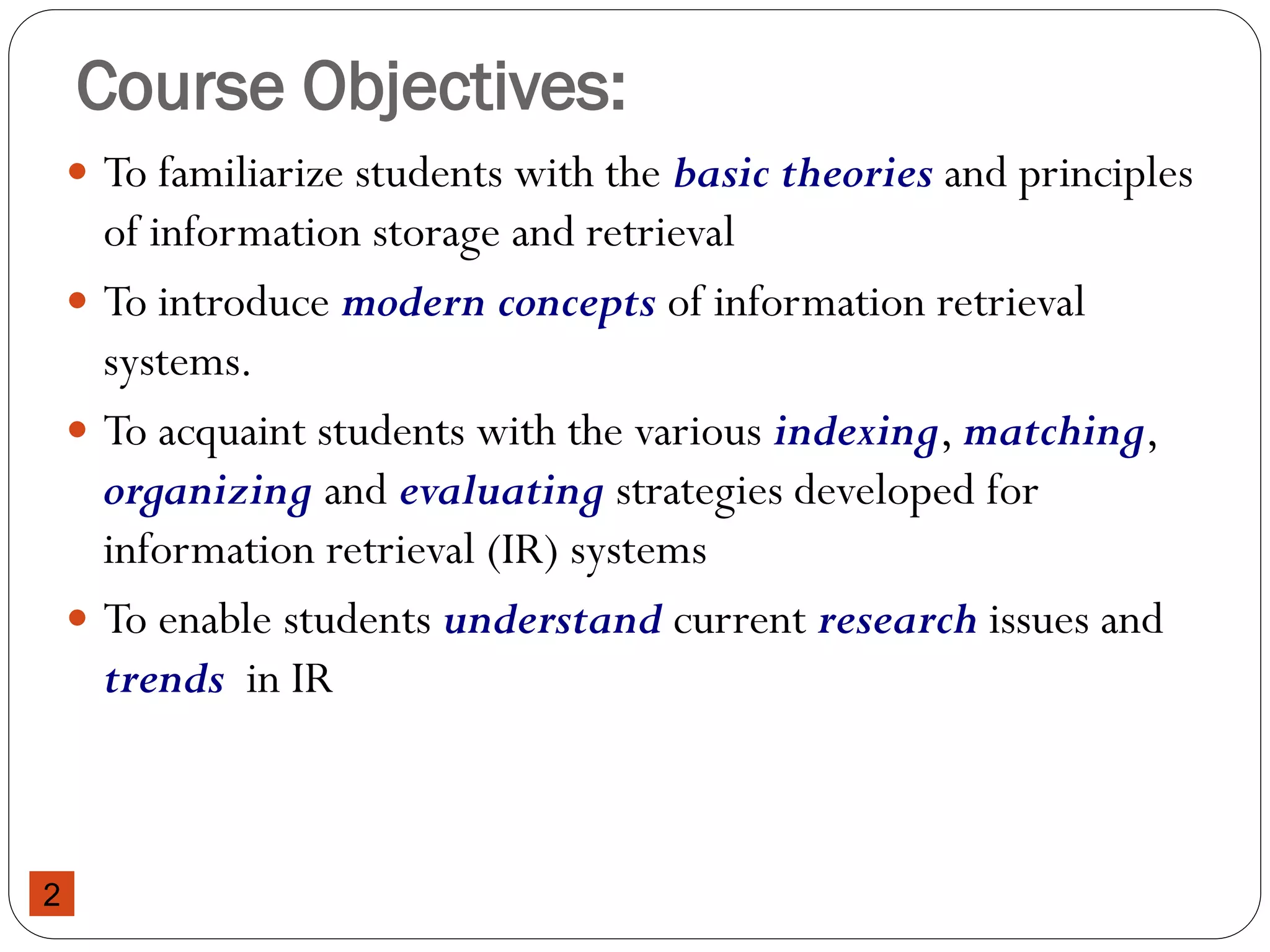
Course Objectives:
 To familiarize students with the basic theories and principles
of information storage and retrieval
 To introduce modern concepts of information retrieval
systems.
 To acquaint students with the various indexing, matching,
organizing and evaluating strategies developed for
information retrieval (IR) systems
 To enable students understand current research issues and
trends in IR
2
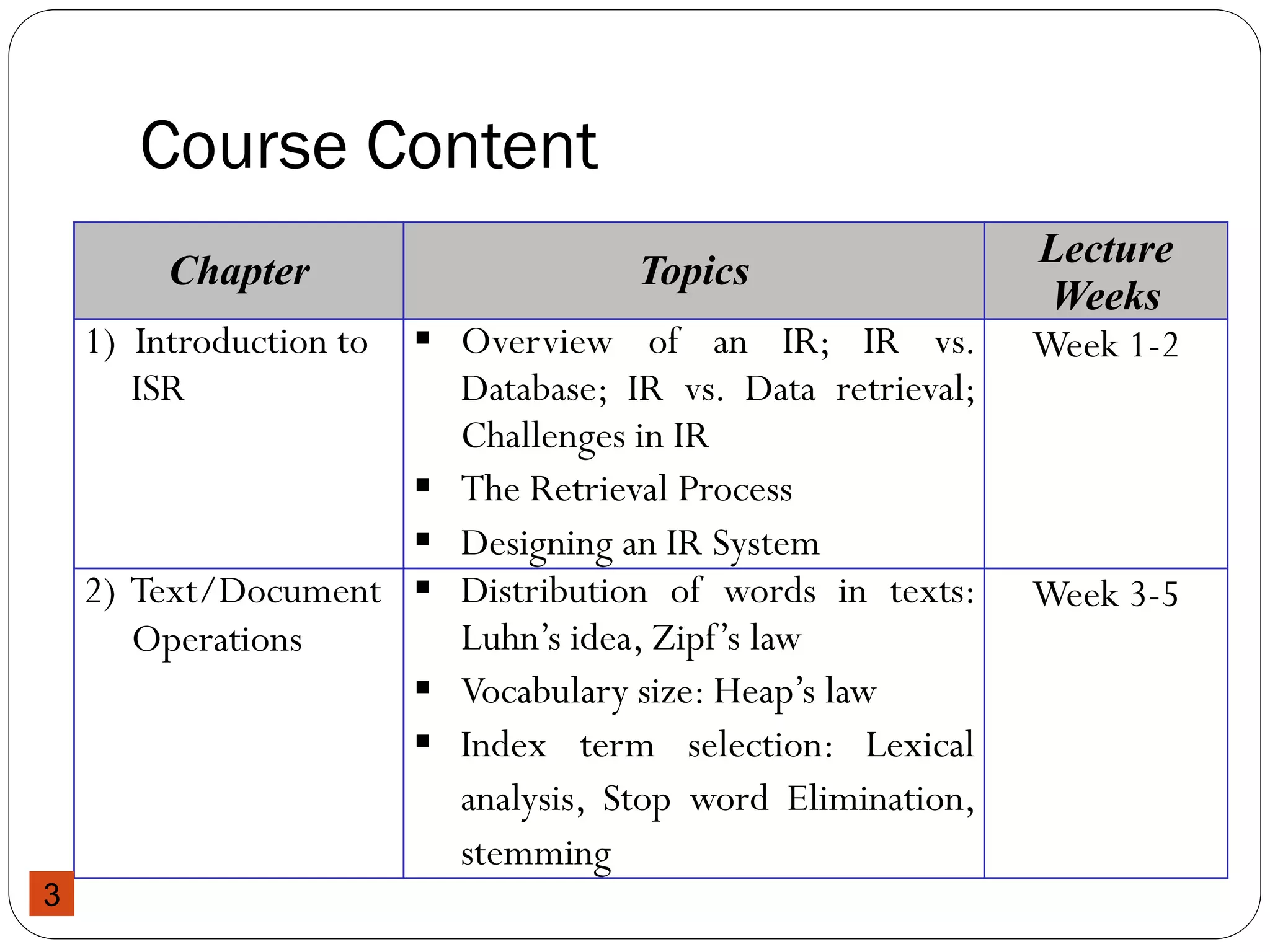
Course Content
Chapter Topics
Lecture
Weeks
1) Introduction to
ISR
 Overview of an IR; IR vs.
Database; IR vs. Data retrieval;
Challenges in IR
 The Retrieval Process
 Designing an IR System
Week 1-2
2) Text/Document
Operations
 Distribution of words in texts:
Luhn’s idea, Zipf’s law
 Vocabulary size: Heap’s law
 Index term selection: Lexical
analysis, Stop word Elimination,
stemming
Week 3-5
3
Course Content
Chapter Topics
Lecture
Weeks
3) Term
weighting and
similarity
measures
 Term weighting techniques: Term
frequency (TF), Inverse document
frequency (IDF),TF*IDF
 Algorithms for Similarity
Measures: Euclidean distance, inner
distance, cosine similarity
Week 5-6
4) Indexing
Structures
 What is indexing? Why Indexing?
Effectiveness vs. Efficiency
 Indexing process
 Indexing structures: Sequential file,
Inverted file, Suffix tree
Week 7-9
4
Course Content
Chapter Topics
Lecture
Weeks
5) IR Models  A Formal Characterization of IR Models
 Boolean model
 Vector space model
Week 9-11
6) Retrieval
Evaluation
 Why IR systems Evaluation?
 Challenges in IR evaluation
 Measuring Performance (Recall,
Precision, Single-valued measures)
Week 11-13
7) Query
Languages
and
Operations
 Keyword-based queries (Boolean queries,
weighted queries, etc.)
 Relevance feedback: users relevance
feedback vs. pseudo relevance feedback
Week 13-14
5
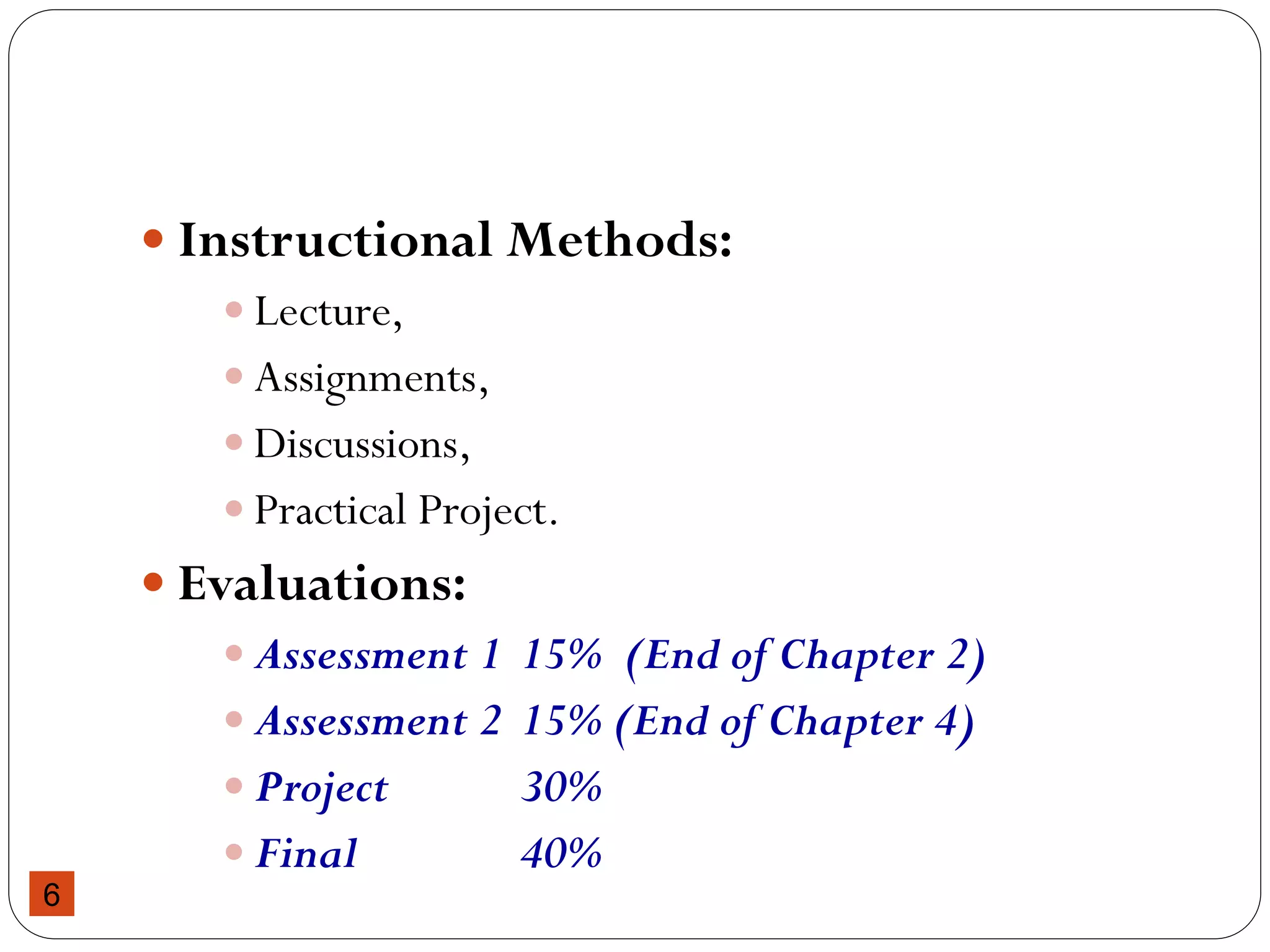
 Instructional Methods:
 Lecture,
 Assignments,
 Discussions,
 Practical Project.
 Evaluations:
 Assessment 1 15% (End of Chapter 2)
 Assessment 2 15% (End of Chapter 4)
 Project 30%
 Final 40%
6
Chapter One: Introduction to ISR
Introduction to
Information Storage and Retrieval
7
Information Retrieval Systems?
Document (Web page)
retrieval in response to a
query
 Quite effective (at some
things)
 Commercially successful
(some of them)
But what goes on behind
the scenes?
 How do they work?
 What happens beyond
theWeb?
8
9
Examples of IR systems
 Conventional (library catalog): by keyword, title, author, etc.
 E.g.:You are probably familiar with AAU library catalog
 Text-based (Google,Yahoo, msn, etc): Search by keywords.
Limited search using queries in natural language.
 Multimedia (QBIC,WebSeek, SaFe): Search by visual
appearance (shapes, colors,… ).
 Question answering systems (AskJeeves,Answerbus):
Search in (restricted) natural language
 Other:
 Cross language information retrieval (uses multiple languages),
 Music retrieval
10
Information Retrieval
 Information retrieval (IR) is the process of finding material (usually
documents) of an unstructured nature (usually text) that satisfies an
information need of the user from within large collections (usually
stored on computers).
 Information is organized into (a large number of) documents
 Large collections of documents from various sources:
 news articles,
 research papers,
 books,
 digital libraries,
 Web pages,etc.
 Example: Google indexing size
 in 1998 Google already had 26 million pages
 Now: 1 trillion (as in 1,000,000,000,000) unique URLs
11
General Goal of Information Retrieval
 To help users find useful/relevant information based on their
information needs (with a minimum effort) despite
The challenge is:
Increasing complexity of Information
Changing needs of user
 Provide immediate random access to the document collection.
 Retrieval systems, such as Google, Yahoo, are developed with
this aim.
12
Information Retrieval vs. Data Retrieval
 Emphasis of IR is on the retrieval of information, rather than on the
retrieval of data
 Data retrieval
 Consists mainly of determining which documents contain a set of
keywords in the user query (which is not enough to satisfy the user
information need)
 Aims at retrieving all objects that satisfy well defined semantics
 a single erroneous object among a thousand retrieved objects implies
failure
 Information retrieval
 Is concerned with retrieving information about a subject or topic than
retrieving data which satisfies a given query
 semantics is frequently loose: the retrieved objects might be inaccurate
 small errors are tolerated
13
Information Retrieval vs. Data Retrieval
 Example of data retrieval system is a relational database
Data Retrieval Info Retrieval
Data organization Structured Unstructured
Fields Clear Semantics
(ID, Name, age,…)
No fields (other
than text)
Query Language Artificial (defined, SQL) Free text (“natural
language”), Boolean
Matching Exact (results are
always “correct”)
Partial match, best match
Query specification Complete Incomplete
Items wanted Matching Relevant
Accuracy 100% < 50%
Error response Sensitive Insensitive
14
Why is IR so hard?
 Information retrieval problem: locating relevant
documents based on user input, such as keywords or example
documents
 The real problem boils down to matching the language of the
query to the language of the document.
 Simply matching on words is a very weak approach. One word can
have different semantic meanings. Consider:Take
 “take a place at the table”
 “take money to the bank”
 “take a picture”
 InAmharic
 ገና ……...ትፈራለህ …….
15
More Problems with IR
 You can’t even tell what part of speech a word has:
 “I saw her duck”
 Duck---the animal
 Duck----to lower head quickly
 A query that searches for “pictures of a duck” will find documents that
contains:
 “I saw her duck away from the ball falling from the sky”
 Proper Nouns often use regular old nouns
 Consider a document with “a man named Abraham owned a Lincoln”
 A word matching query for “Abraham Lincoln” may well find the above
document.
16
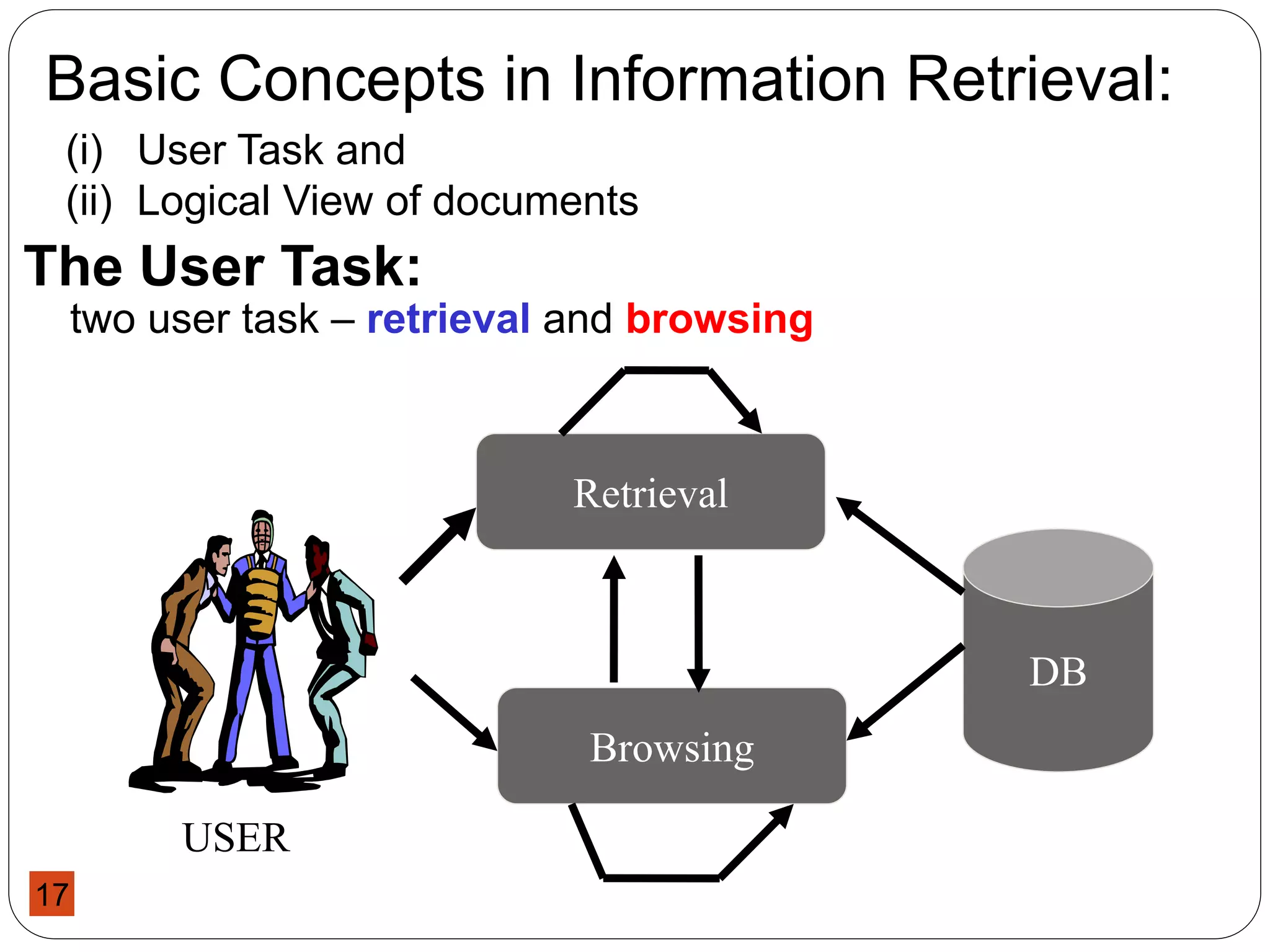
Basic Concepts in Information Retrieval:
The User Task:
two user task – retrieval and browsing
(i) User Task and
(ii) Logical View of documents
Retrieval
Browsing
DB
USER
17
The User Task
• Retrieval
• It is the process of retrieving information whereby
the main objective is clearly defined from the
onset of searching process.
• The user of a retrieval system has to translate his
information need into a query in the language
provided by the system.
• In this context (i.e. by specifying a set of words),
the user searches for useful information executing
a retrieval task
• English Language Statement :
I want a book by J. K Rowling titled The Chamber of Secrets
18
The User Task
• Browsing
• It is the process of retrieving information,
whereby the main objective is not clearly defined
from the beginning and whose purpose might
change during the interaction with the system.
• E.g. User might search for documents about ‘car racing’ .
Meanwhile he might find interesting documents about ‘car
manufacturers’. While reading about car manufacturers in
Addis, he might turn his attention to a document providing
‘direction to Addis’, and from this to documents which cover
‘Tourism in Ethiopia’.
• In this context, user is said to be browsing in the
collection and not searching, since a user may has
an interest of glancing around
19
Logical View of Documents
 Documents in a collection are frequently represented by a set
of index terms or keywords
 Such keywords are mostly extracted directly from the text of
the document
 These representative keywords provide a logical view of the
document
 Document representation viewed as a continuum, in which
logical view of documents might shift from full text to index
terms
Document Tokenization Stop-word Stemming Indexing
FullText Index
Terms
20
A fat book which
many people own is
Shakespeare's
Collected Works.
Suppose you wanted
to determine which
plays of Shakespeare
contain the words
Brutus AND Caesar
and NOT Calpurnia.
One way to do that is
to start at the
beginning and to read
through all the text,
noting for each play
whether it contains
Brutus and Caesar
and excluding it from
consideration if it
contains Calpurnia.
No Token
1 A
2 all
3 and
4 at
5 beginning
6 book
7 Brutus
8 Caesar
9 Calpurnia
10 Collected
11 consideration
12 contain
13 contains
14 determine
15 do
16 each
17 excluding
18 fat
19 for
20 from
21 if
22 is
23 it
24 many
25 NOT
No Token
26 noting
27 of
28 One
29 own
30 people
31 play
32 plays
33 read
34 Shakespeare
35 Shakespeare's
36 start
37 Suppose
38 text
39 that
40 the
41 through
42 to
43 wanted
44 way
45 whether
46 which
47 words
48 Works
49 you
No Token
1 beginning
2 book
3 Brutus
4 Caesar
5 Calpurnia
6 Collected
7 consideration
8 contain
9 contains
10 determine
11 excluding
12 fat
13 noting
14 own
15 people
16 play
17 plays
18 read
19 Shakespeare
20 Shakespeare's
21 start
22 Suppose
23 text
24 wanted
25 words
26 Works
Text Document Tokens Stopwords Removed
21
Logical view of documents
 If full text :
 Each word in the text is a keyword
 Most complex form….why?
 Expensive….why?
 If full text is too large, the set of representative keywords can
be reduced through transformation process called:
Text operation
 It reduce the complexity of the document representation and
allow moving the logical view from that of a full text to a set of
index terms
22
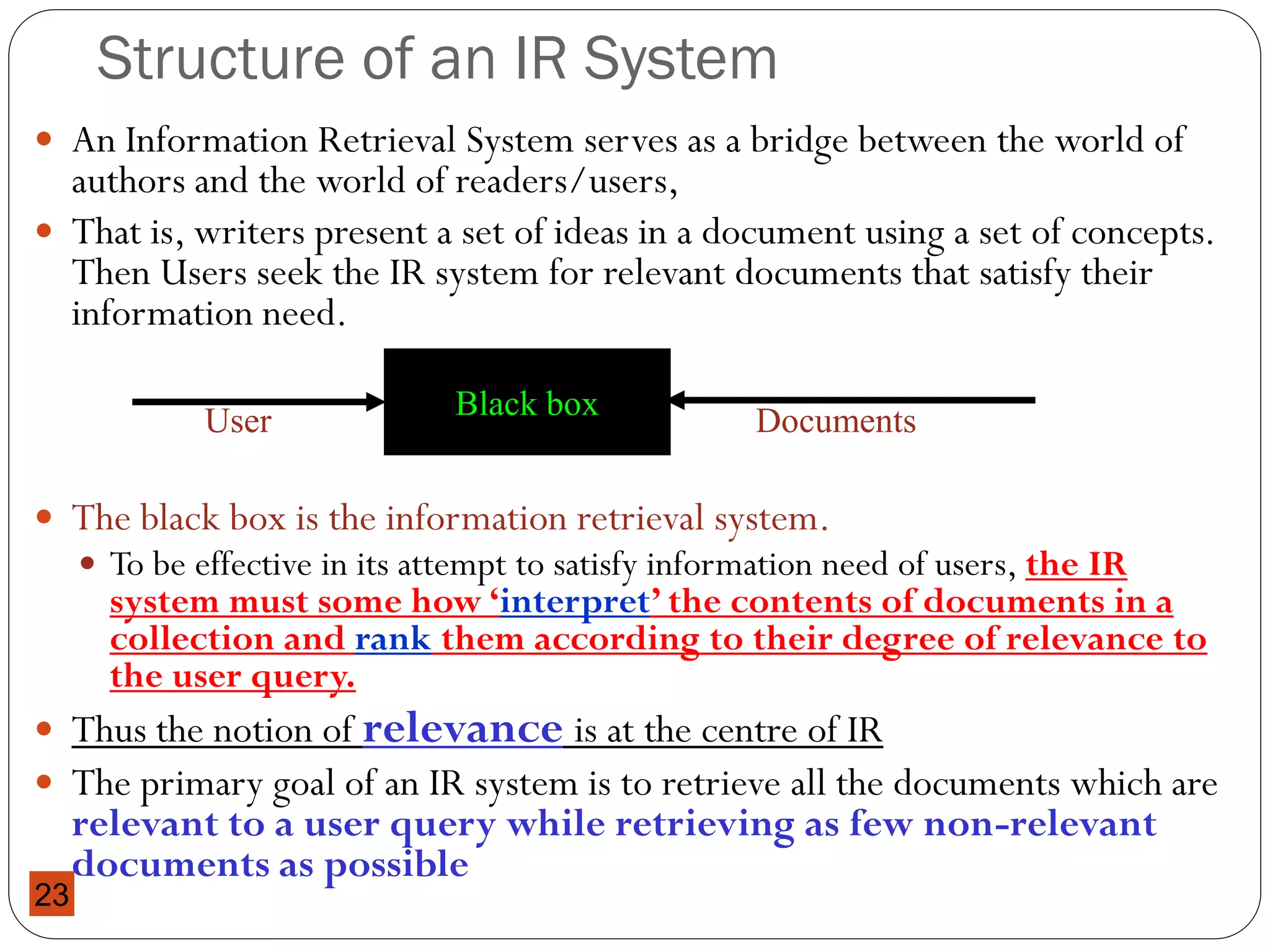
Structure of an IR System
 An Information Retrieval System serves as a bridge between the world of
authors and the world of readers/users,
 That is, writers present a set of ideas in a document using a set of concepts.
Then Users seek the IR system for relevant documents that satisfy their
information need.
 The black box is the information retrieval system.
 To be effective in its attempt to satisfy information need of users, the IR
system must some how ‘interpret’ the contents of documents in a
collection and rank them according to their degree of relevance to
the user query.
 Thus the notion of relevance is at the centre of IR
 The primary goal of an IR system is to retrieve all the documents which are
relevant to a user query while retrieving as few non-relevant
documents as possible
Black box
User Documents
23
Typical IR Task
 Given:
1. A collection of textual natural-language documents
2. A user query in the form of a textual string
 Process:
 The various activities required to select the
relevant document
 Result:
 A ranked set of documents that are assumed to be
relevant to the user query
 Measure of Effectiveness:
 Number of relevant docs from the retrieved collection
 Number of relevant docs retrieved from the whole
collection
24
Measure of Accuracy
25
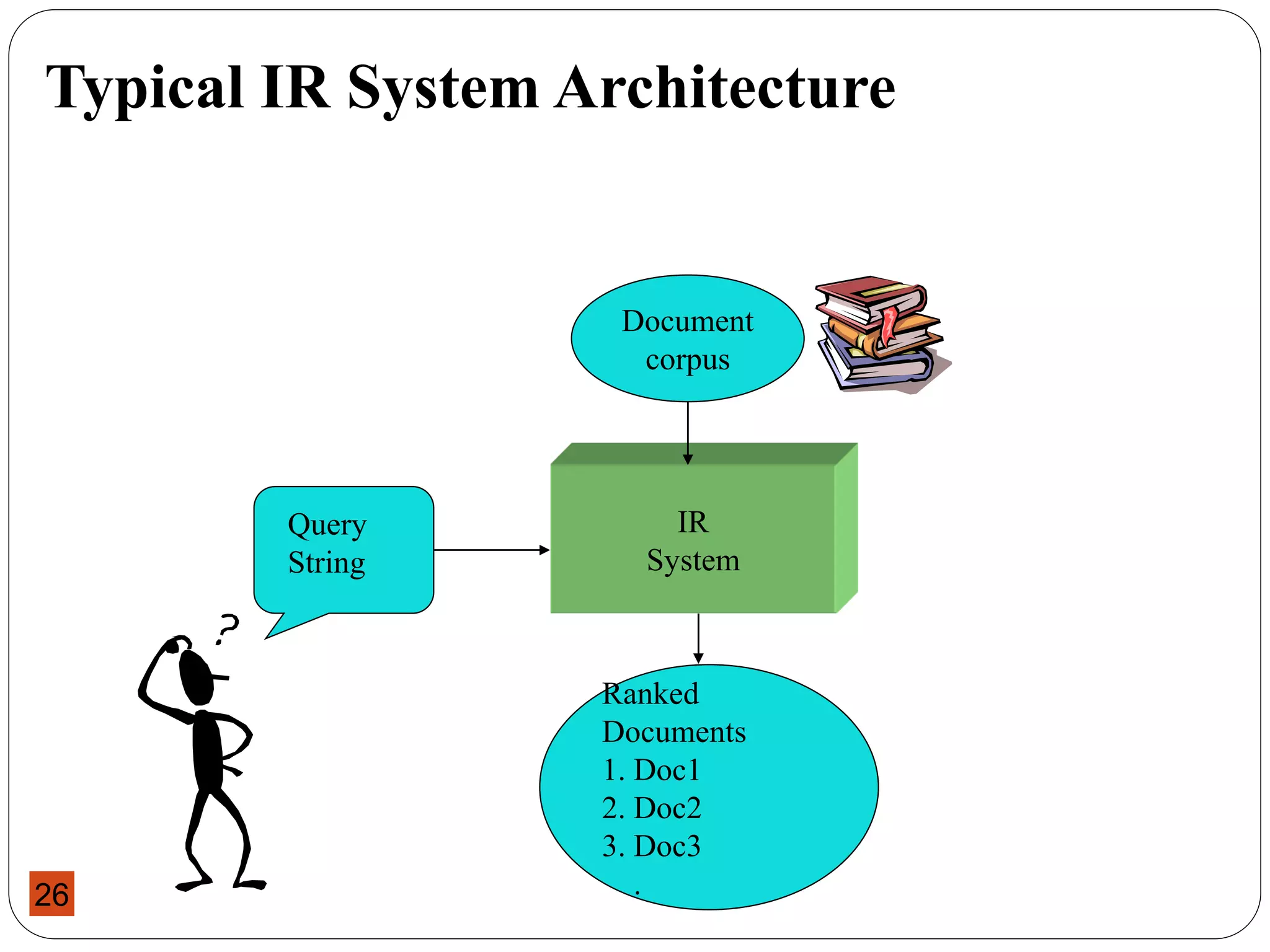
Typical IR System Architecture
IR
System
Query
String
Document
corpus
Ranked
Documents
1. Doc1
2. Doc2
3. Doc3
.
26
Web Search System (e.g.: Google)
Query
String
IR
System
Ranked
Documents
1. Page1
2. Page2
3. Page3
.
Document
corpus
Web Spider
Web crawler
27
What is Information Retrieval ?
 A good formal definition of information retrieval is given in
Baeze-Yates & Riberio-Neto (1990, p1)
“Information retrieval deals with representation, storage,
organization of, and access to information items. The
organization and access of information items should provide the
user with easy access to the information in which he is
interested”
 The definition incorporates all important features of a good
information retrieval system
 Representation
 Storage
 Organization
 Access
 The focus is on the user information need
28
Overview of the Retrieval process
29
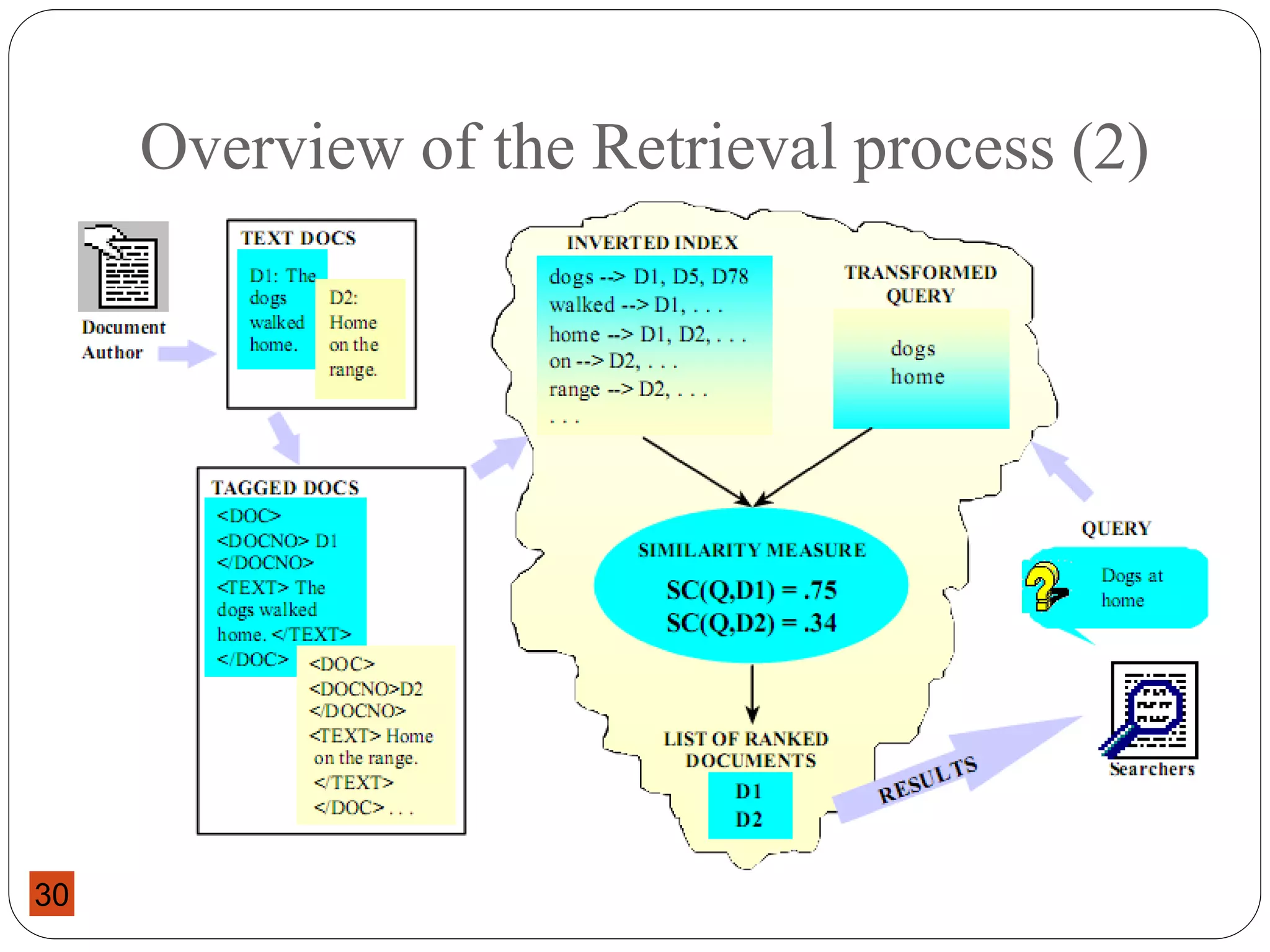
Overview of the Retrieval process (2)
30
The Retrieval Process
 It is necessary to define the text collection before any of
the retrieval processes are initiated
 This is usually done by the manager of the database and
includes specifying the following
 The documents to be used
 The operations to be performed on the text
 The text model to be used (the text structure and what elements can be
retrieved)
 The text operations transform the original documents and
the information needs and generate a logical view of each
document
31
The Retrieval Process
 Once the logical view of the documents is defined, the database
module builds an index of the text
 An index is a critical data structure
 It allows fast searching over large volumes of data
 Reduces the vocabulary of the collection
 Different index structures might be used , but the most popular one
is the inverted file (more on this later)
 Given the document database is indexed, the retrieval process
can be initiated
32
The Retrieval Process …
1. The user first specifies a user need using words
which is then parsed and transformed by the same text
operation applied to the text
2. Next the query operations is applied before the
actual query, which provides a system representation for
the user need, is generated
3. The query is then processed (compared with the
document) to obtain the relevant documents
Before the retrieved documents are presented to the
user, the retrieved documents are ranked according
to the likelihood of relevance
33
The Retrieval Process …(2)
4. The user then examines the list of ranked retrieved
documents for useful information: and the user is not
satisfied with the result:
i. reformulate query, run on entire collection or
ii. reformulate query, run on displayed result set
5. At this point, the user might pinpoint a subset of the
documents seen as definitely of interest and initiate a user
feedback cycle
In such a cycle, the system uses the documents selected
by the user to change the query formulation.
Hopefully, this modified query is a better
representation of the real user need
34
User
Interface
Text Operations
Query Language
& Operations
Indexing
Searching
Ranking
Index
Text
Query
User
need
User
feedback
Ranked docs
Retrieved docs
Logical view
logical view
Inverted file
DB
manager
Module
Text
Database
Text
Detail view of the Retrieval Process
35
Issues in IR
 Text representation
 what makes a “good” representation?
 how is a representation generated from text?
 what are retrievable objects and how are they organized?
 Information needs representation
 what is an appropriate query language?
 how can interactive query formulation and refinement be
supported?
 Comparing representations
 to identify relevant documents
 What weighting scheme and similarity measure to be used?
 what is a “good” model of retrieval?
 Evaluating effectiveness of retrieval
 what are good metrics?
 what constitutes a good experimental test bed?
36
Focus in IR System Design
Our focus during IR system design is:
 In improving performance effectiveness of the system
Effectiveness of the system is measured in terms of:
 Precision,
 Recall, …
Stemming, stop words, weighting schemes, matching algorithms will
help to improve effectiveness of the IR system
 In improving performance efficiency
The concern here is storage space usage, access time, searching time,
data transfer time …
There is space – time tradeoffs !!
Use Compression techniques, data/file structures, etc.
37
Subsystems of an IR system
The two subsystems of an IR system:
Indexing: is an offline process of organizing documents
using keywords extracted from the collection
Searching: is an online process of finding relevant
documents in the index list as per users query
Indexing and searching: are unavoidably connected
you cannot search that was not first indexed in some manner
indexing of documents is done in order to be searchable
there are many ways to do indexing
to index one needs an indexing language
there are many indexing languages
every word in a document could be an indexing language
38
Indexing Subsystem
Documents
Tokenize
Stopword Removal
Stemming & Normalize
Term weighting
Index
text
non-stoplist tokens
tokens
stemmed terms
terms with weights
Assign document identifier
documents
document
IDs
39
Searching Subsystem
Index
query
parse query
Stemming & Normalize stemmed
terms
Stop list
non-stoplist tokens
query tokens
Similarity
Measure
ranking
Index terms
ranked
document set
relevant documents
Term weighting
Query
terms
40
End of Chapter One
41

Chapter 1 Introduction to ISR (1).pdf

  • 1.
    e-mail: wondemule@yahoo.com Office: EshetuChole Building, Office No. : 114 Introduction to Information Storage and Retrieval 1
  • 2.
    Course Objectives:  Tofamiliarize students with the basic theories and principles of information storage and retrieval  To introduce modern concepts of information retrieval systems.  To acquaint students with the various indexing, matching, organizing and evaluating strategies developed for information retrieval (IR) systems  To enable students understand current research issues and trends in IR 2
  • 3.
    Course Content Chapter Topics Lecture Weeks 1)Introduction to ISR  Overview of an IR; IR vs. Database; IR vs. Data retrieval; Challenges in IR  The Retrieval Process  Designing an IR System Week 1-2 2) Text/Document Operations  Distribution of words in texts: Luhn’s idea, Zipf’s law  Vocabulary size: Heap’s law  Index term selection: Lexical analysis, Stop word Elimination, stemming Week 3-5 3
  • 4.
    Course Content Chapter Topics Lecture Weeks 3)Term weighting and similarity measures  Term weighting techniques: Term frequency (TF), Inverse document frequency (IDF),TF*IDF  Algorithms for Similarity Measures: Euclidean distance, inner distance, cosine similarity Week 5-6 4) Indexing Structures  What is indexing? Why Indexing? Effectiveness vs. Efficiency  Indexing process  Indexing structures: Sequential file, Inverted file, Suffix tree Week 7-9 4
  • 5.
    Course Content Chapter Topics Lecture Weeks 5)IR Models  A Formal Characterization of IR Models  Boolean model  Vector space model Week 9-11 6) Retrieval Evaluation  Why IR systems Evaluation?  Challenges in IR evaluation  Measuring Performance (Recall, Precision, Single-valued measures) Week 11-13 7) Query Languages and Operations  Keyword-based queries (Boolean queries, weighted queries, etc.)  Relevance feedback: users relevance feedback vs. pseudo relevance feedback Week 13-14 5
  • 6.
     Instructional Methods: Lecture,  Assignments,  Discussions,  Practical Project.  Evaluations:  Assessment 1 15% (End of Chapter 2)  Assessment 2 15% (End of Chapter 4)  Project 30%  Final 40% 6
  • 7.
    Chapter One: Introductionto ISR Introduction to Information Storage and Retrieval 7
  • 8.
    Information Retrieval Systems? Document(Web page) retrieval in response to a query  Quite effective (at some things)  Commercially successful (some of them) But what goes on behind the scenes?  How do they work?  What happens beyond theWeb? 8
  • 9.
  • 10.
    Examples of IRsystems  Conventional (library catalog): by keyword, title, author, etc.  E.g.:You are probably familiar with AAU library catalog  Text-based (Google,Yahoo, msn, etc): Search by keywords. Limited search using queries in natural language.  Multimedia (QBIC,WebSeek, SaFe): Search by visual appearance (shapes, colors,… ).  Question answering systems (AskJeeves,Answerbus): Search in (restricted) natural language  Other:  Cross language information retrieval (uses multiple languages),  Music retrieval 10
  • 11.
    Information Retrieval  Informationretrieval (IR) is the process of finding material (usually documents) of an unstructured nature (usually text) that satisfies an information need of the user from within large collections (usually stored on computers).  Information is organized into (a large number of) documents  Large collections of documents from various sources:  news articles,  research papers,  books,  digital libraries,  Web pages,etc.  Example: Google indexing size  in 1998 Google already had 26 million pages  Now: 1 trillion (as in 1,000,000,000,000) unique URLs 11
  • 12.
    General Goal ofInformation Retrieval  To help users find useful/relevant information based on their information needs (with a minimum effort) despite The challenge is: Increasing complexity of Information Changing needs of user  Provide immediate random access to the document collection.  Retrieval systems, such as Google, Yahoo, are developed with this aim. 12
  • 13.
    Information Retrieval vs.Data Retrieval  Emphasis of IR is on the retrieval of information, rather than on the retrieval of data  Data retrieval  Consists mainly of determining which documents contain a set of keywords in the user query (which is not enough to satisfy the user information need)  Aims at retrieving all objects that satisfy well defined semantics  a single erroneous object among a thousand retrieved objects implies failure  Information retrieval  Is concerned with retrieving information about a subject or topic than retrieving data which satisfies a given query  semantics is frequently loose: the retrieved objects might be inaccurate  small errors are tolerated 13
  • 14.
    Information Retrieval vs.Data Retrieval  Example of data retrieval system is a relational database Data Retrieval Info Retrieval Data organization Structured Unstructured Fields Clear Semantics (ID, Name, age,…) No fields (other than text) Query Language Artificial (defined, SQL) Free text (“natural language”), Boolean Matching Exact (results are always “correct”) Partial match, best match Query specification Complete Incomplete Items wanted Matching Relevant Accuracy 100% < 50% Error response Sensitive Insensitive 14
  • 15.
    Why is IRso hard?  Information retrieval problem: locating relevant documents based on user input, such as keywords or example documents  The real problem boils down to matching the language of the query to the language of the document.  Simply matching on words is a very weak approach. One word can have different semantic meanings. Consider:Take  “take a place at the table”  “take money to the bank”  “take a picture”  InAmharic  ገና ……...ትፈራለህ ……. 15
  • 16.
    More Problems withIR  You can’t even tell what part of speech a word has:  “I saw her duck”  Duck---the animal  Duck----to lower head quickly  A query that searches for “pictures of a duck” will find documents that contains:  “I saw her duck away from the ball falling from the sky”  Proper Nouns often use regular old nouns  Consider a document with “a man named Abraham owned a Lincoln”  A word matching query for “Abraham Lincoln” may well find the above document. 16
  • 17.
    Basic Concepts inInformation Retrieval: The User Task: two user task – retrieval and browsing (i) User Task and (ii) Logical View of documents Retrieval Browsing DB USER 17
  • 18.
    The User Task •Retrieval • It is the process of retrieving information whereby the main objective is clearly defined from the onset of searching process. • The user of a retrieval system has to translate his information need into a query in the language provided by the system. • In this context (i.e. by specifying a set of words), the user searches for useful information executing a retrieval task • English Language Statement : I want a book by J. K Rowling titled The Chamber of Secrets 18
  • 19.
    The User Task •Browsing • It is the process of retrieving information, whereby the main objective is not clearly defined from the beginning and whose purpose might change during the interaction with the system. • E.g. User might search for documents about ‘car racing’ . Meanwhile he might find interesting documents about ‘car manufacturers’. While reading about car manufacturers in Addis, he might turn his attention to a document providing ‘direction to Addis’, and from this to documents which cover ‘Tourism in Ethiopia’. • In this context, user is said to be browsing in the collection and not searching, since a user may has an interest of glancing around 19
  • 20.
    Logical View ofDocuments  Documents in a collection are frequently represented by a set of index terms or keywords  Such keywords are mostly extracted directly from the text of the document  These representative keywords provide a logical view of the document  Document representation viewed as a continuum, in which logical view of documents might shift from full text to index terms Document Tokenization Stop-word Stemming Indexing FullText Index Terms 20
  • 21.
    A fat bookwhich many people own is Shakespeare's Collected Works. Suppose you wanted to determine which plays of Shakespeare contain the words Brutus AND Caesar and NOT Calpurnia. One way to do that is to start at the beginning and to read through all the text, noting for each play whether it contains Brutus and Caesar and excluding it from consideration if it contains Calpurnia. No Token 1 A 2 all 3 and 4 at 5 beginning 6 book 7 Brutus 8 Caesar 9 Calpurnia 10 Collected 11 consideration 12 contain 13 contains 14 determine 15 do 16 each 17 excluding 18 fat 19 for 20 from 21 if 22 is 23 it 24 many 25 NOT No Token 26 noting 27 of 28 One 29 own 30 people 31 play 32 plays 33 read 34 Shakespeare 35 Shakespeare's 36 start 37 Suppose 38 text 39 that 40 the 41 through 42 to 43 wanted 44 way 45 whether 46 which 47 words 48 Works 49 you No Token 1 beginning 2 book 3 Brutus 4 Caesar 5 Calpurnia 6 Collected 7 consideration 8 contain 9 contains 10 determine 11 excluding 12 fat 13 noting 14 own 15 people 16 play 17 plays 18 read 19 Shakespeare 20 Shakespeare's 21 start 22 Suppose 23 text 24 wanted 25 words 26 Works Text Document Tokens Stopwords Removed 21
  • 22.
    Logical view ofdocuments  If full text :  Each word in the text is a keyword  Most complex form….why?  Expensive….why?  If full text is too large, the set of representative keywords can be reduced through transformation process called: Text operation  It reduce the complexity of the document representation and allow moving the logical view from that of a full text to a set of index terms 22
  • 23.
    Structure of anIR System  An Information Retrieval System serves as a bridge between the world of authors and the world of readers/users,  That is, writers present a set of ideas in a document using a set of concepts. Then Users seek the IR system for relevant documents that satisfy their information need.  The black box is the information retrieval system.  To be effective in its attempt to satisfy information need of users, the IR system must some how ‘interpret’ the contents of documents in a collection and rank them according to their degree of relevance to the user query.  Thus the notion of relevance is at the centre of IR  The primary goal of an IR system is to retrieve all the documents which are relevant to a user query while retrieving as few non-relevant documents as possible Black box User Documents 23
  • 24.
    Typical IR Task Given: 1. A collection of textual natural-language documents 2. A user query in the form of a textual string  Process:  The various activities required to select the relevant document  Result:  A ranked set of documents that are assumed to be relevant to the user query  Measure of Effectiveness:  Number of relevant docs from the retrieved collection  Number of relevant docs retrieved from the whole collection 24
  • 25.
  • 26.
    Typical IR SystemArchitecture IR System Query String Document corpus Ranked Documents 1. Doc1 2. Doc2 3. Doc3 . 26
  • 27.
    Web Search System(e.g.: Google) Query String IR System Ranked Documents 1. Page1 2. Page2 3. Page3 . Document corpus Web Spider Web crawler 27
  • 28.
    What is InformationRetrieval ?  A good formal definition of information retrieval is given in Baeze-Yates & Riberio-Neto (1990, p1) “Information retrieval deals with representation, storage, organization of, and access to information items. The organization and access of information items should provide the user with easy access to the information in which he is interested”  The definition incorporates all important features of a good information retrieval system  Representation  Storage  Organization  Access  The focus is on the user information need 28
  • 29.
    Overview of theRetrieval process 29
  • 30.
    Overview of theRetrieval process (2) 30
  • 31.
    The Retrieval Process It is necessary to define the text collection before any of the retrieval processes are initiated  This is usually done by the manager of the database and includes specifying the following  The documents to be used  The operations to be performed on the text  The text model to be used (the text structure and what elements can be retrieved)  The text operations transform the original documents and the information needs and generate a logical view of each document 31
  • 32.
    The Retrieval Process Once the logical view of the documents is defined, the database module builds an index of the text  An index is a critical data structure  It allows fast searching over large volumes of data  Reduces the vocabulary of the collection  Different index structures might be used , but the most popular one is the inverted file (more on this later)  Given the document database is indexed, the retrieval process can be initiated 32
  • 33.
    The Retrieval Process… 1. The user first specifies a user need using words which is then parsed and transformed by the same text operation applied to the text 2. Next the query operations is applied before the actual query, which provides a system representation for the user need, is generated 3. The query is then processed (compared with the document) to obtain the relevant documents Before the retrieved documents are presented to the user, the retrieved documents are ranked according to the likelihood of relevance 33
  • 34.
    The Retrieval Process…(2) 4. The user then examines the list of ranked retrieved documents for useful information: and the user is not satisfied with the result: i. reformulate query, run on entire collection or ii. reformulate query, run on displayed result set 5. At this point, the user might pinpoint a subset of the documents seen as definitely of interest and initiate a user feedback cycle In such a cycle, the system uses the documents selected by the user to change the query formulation. Hopefully, this modified query is a better representation of the real user need 34
  • 35.
    User Interface Text Operations Query Language &Operations Indexing Searching Ranking Index Text Query User need User feedback Ranked docs Retrieved docs Logical view logical view Inverted file DB manager Module Text Database Text Detail view of the Retrieval Process 35
  • 36.
    Issues in IR Text representation  what makes a “good” representation?  how is a representation generated from text?  what are retrievable objects and how are they organized?  Information needs representation  what is an appropriate query language?  how can interactive query formulation and refinement be supported?  Comparing representations  to identify relevant documents  What weighting scheme and similarity measure to be used?  what is a “good” model of retrieval?  Evaluating effectiveness of retrieval  what are good metrics?  what constitutes a good experimental test bed? 36
  • 37.
    Focus in IRSystem Design Our focus during IR system design is:  In improving performance effectiveness of the system Effectiveness of the system is measured in terms of:  Precision,  Recall, … Stemming, stop words, weighting schemes, matching algorithms will help to improve effectiveness of the IR system  In improving performance efficiency The concern here is storage space usage, access time, searching time, data transfer time … There is space – time tradeoffs !! Use Compression techniques, data/file structures, etc. 37
  • 38.
    Subsystems of anIR system The two subsystems of an IR system: Indexing: is an offline process of organizing documents using keywords extracted from the collection Searching: is an online process of finding relevant documents in the index list as per users query Indexing and searching: are unavoidably connected you cannot search that was not first indexed in some manner indexing of documents is done in order to be searchable there are many ways to do indexing to index one needs an indexing language there are many indexing languages every word in a document could be an indexing language 38
  • 39.
    Indexing Subsystem Documents Tokenize Stopword Removal Stemming& Normalize Term weighting Index text non-stoplist tokens tokens stemmed terms terms with weights Assign document identifier documents document IDs 39
  • 40.
    Searching Subsystem Index query parse query Stemming& Normalize stemmed terms Stop list non-stoplist tokens query tokens Similarity Measure ranking Index terms ranked document set relevant documents Term weighting Query terms 40
  • 41.