Cookies and Sessions in PHP
Why Cookies and Sessions are Used?

   HTTP is a stateless protocol. This means that each request is handled
    independently of all the other requests and it means that a server or a
    script cannot remember if a user has been there before.
   However, knowing if a user has been there before is often required and
    therefore something known as cookies and sessions have been
    implemented.
What is a Cookie?

   A cookie is a piece of text that a Web server can store on a user's hard
    disk.
   A cookie is a variable, sent by the server to the browser.
   Cookies allow a Web site to store information on a user's machine and
    later retrieve it. The pieces of information are stored as name-value pairs.
What is a Cookie?
   Each cookie on the user’s computer is connected to a particular domain.
   Each time the same computer requests a page with a browser, it will send
    the cookie too.
   Each cookie can store up to 4kB of data.
   A maximum of 20 cookies can be stored on a user’s PC per domain.
When are Cookies Created?
   When a new webpage is loaded - for example after a 'submit' button is
    pressed the data handling page would be responsible for storing the
    values in a cookie.
   If the user has elected to disable cookies then the write operation will
    fail, and subsequent sites which rely on the cookie will either have to
    take a default action.
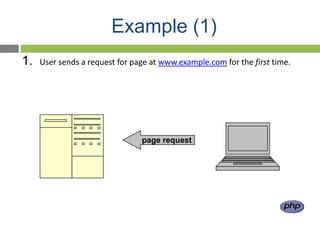
Example (1)
1.   User sends a request for page at www.example.com for the first time.


                                page request
Example (2)
2.   Server sends back the page html to the browser AND stores some data in
      a cookie on the user’s PC.


                           html


                           cookie data
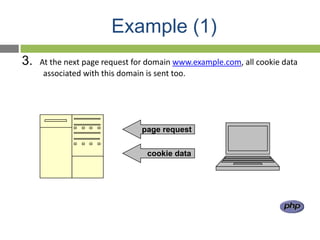
Example (1)
3.   At the next page request for domain www.example.com, all cookie data
      associated with this domain is sent too.


                               page request


                                 cookie data
What's in a Cookie?
   Each cookie is effectively a small lookup table containing pairs of (key,
    data) values - for example (firstname, John) (lastname,Peter).
    Once the cookie has been read by the code on the server or client
    computer, the data can be retrieved and used to customise the web page
    appropriately.
Set a cookie
setcookie(name [,value [,expire [,path [,domain [,secure]]]]])

name = cookie name
value = data to store (string)
expire = UNIX timestamp when the cookie expires. Default is that cookie
   expires when browser is closed.
path = Path on the server within and below which the cookie is available on.
domain = Domain at which the cookie is available for.
secure = If cookie should be sent over HTTPS connection only. Default false.
Set a cookie - examples
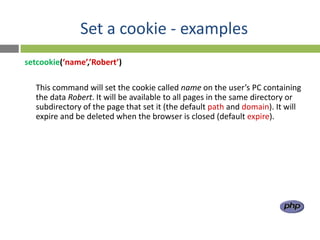
setcookie(‘name’,’Robert’)

  This command will set the cookie called name on the user’s PC containing
  the data Robert. It will be available to all pages in the same directory or
  subdirectory of the page that set it (the default path and domain). It will
  expire and be deleted when the browser is closed (default expire).
Set a cookie - examples
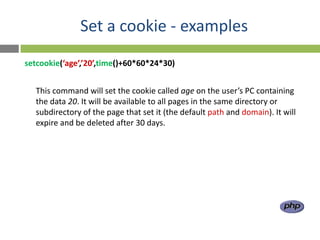
setcookie(‘age’,’20’,time()+60*60*24*30)


  This command will set the cookie called age on the user’s PC containing
  the data 20. It will be available to all pages in the same directory or
  subdirectory of the page that set it (the default path and domain). It will
  expire and be deleted after 30 days.
Set a cookie - examples
setcookie(‘gender’,’male’,0,’/’)


   This command will set the cookie called gender on the user’s PC containing
   the data male. It will be available within the entire domain that set it. It
   will expire and be deleted when the browser is closed.
Read cookie data

   All cookie data is available through the superglobal
    $_COOKIE:
    $variable = $_COOKIE[‘cookie_name’]

    or
    $variable = $HTTP_COOKIE_VARS[‘cookie_name’];

    e.g.
    $age = $_COOKIE[‘age’]
Delete a cookie
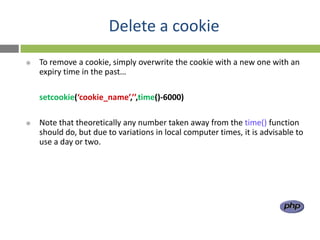
   To remove a cookie, simply overwrite the cookie with a new one with an
    expiry time in the past…

    setcookie(‘cookie_name’,’’,time()-6000)

   Note that theoretically any number taken away from the time() function
    should do, but due to variations in local computer times, it is advisable to
    use a day or two.
Problems with Cookies
   Browsers can refuse to accept cookies.
   Additionally, it adds network overhead to
    send lots of information back and forth.
   There are also limits to the amount of
    information that can be sent
   Some information you just don’t want to save on the client’s computer.
Sessions

   A Session allows to store user information on the server for later use (i.e.
    username, shopping cart items, etc).
   However, this session information is temporary and is usually deleted very
    quickly after the user has left the website that uses sessions.
   Session variables hold information about one single user, and are available
    to all pages in one application.
How Session Works?
   Sessions work by creating a unique identification(UID) number for each
    visitor and storing variables based on this ID.
   This helps to prevent two users data from getting confused with one
    another when visiting the same webpage.
   The UID is either stored in a cookie or is propagated in the URL.
Starting a PHP Session

   Before you can store user information in your PHP
    session, you must first start up the session.
   The session_start() function must appear BEFORE
    the <html> tag.
   <?php session_start(); ?>
    <html>
    <body>

    </body>
    </html>
Storing a Session Variable
   The correct way to store and retrieve session variables is to use the PHP
    $_SESSION variable.
   <?php
    session_start();
    // store session data
    $_SESSION['views']=1;
    ?>
    <html>
    <body

    </body>
    </html>
Retrieving a Session Variable

   <html>
    <body>

    <?php
    //retrieve session data
    echo "Pageviews=". $_SESSION['views'];
    ?>
    </body>
    </html>
   Display:
               Pageviews = 1
Destroying a Session
   The unset() function is used to free the specified session variable.
   <?php
    unset($_SESSION['views']);
    ?>
   You can also completely destroy the session by calling the
    session_destroy() function:
   <?php
    session_destroy();
    ?>
   session_destroy() will reset your session and you will lose all your stored
    session data.
Cookies vs. Sessions

               Cookies                                Sessions

                                           Sessions are stored on server
   Cookies are stored on client side       side
   Cookies can only store strings.        Sessions can store objects.
   Cookies can be set to a long           When users close their browser,
    lifespan.                               they also lost the session.
Thanks!

Sessions and cookies

  • 1.
  • 2.
    Why Cookies andSessions are Used?  HTTP is a stateless protocol. This means that each request is handled independently of all the other requests and it means that a server or a script cannot remember if a user has been there before.  However, knowing if a user has been there before is often required and therefore something known as cookies and sessions have been implemented.
  • 3.
    What is aCookie?  A cookie is a piece of text that a Web server can store on a user's hard disk.  A cookie is a variable, sent by the server to the browser.  Cookies allow a Web site to store information on a user's machine and later retrieve it. The pieces of information are stored as name-value pairs.
  • 4.
    What is aCookie?  Each cookie on the user’s computer is connected to a particular domain.  Each time the same computer requests a page with a browser, it will send the cookie too.  Each cookie can store up to 4kB of data.  A maximum of 20 cookies can be stored on a user’s PC per domain.
  • 5.
    When are CookiesCreated?  When a new webpage is loaded - for example after a 'submit' button is pressed the data handling page would be responsible for storing the values in a cookie.  If the user has elected to disable cookies then the write operation will fail, and subsequent sites which rely on the cookie will either have to take a default action.
  • 6.
    Example (1) 1. User sends a request for page at www.example.com for the first time. page request
  • 7.
    Example (2) 2. Server sends back the page html to the browser AND stores some data in a cookie on the user’s PC. html cookie data
  • 8.
    Example (1) 3. At the next page request for domain www.example.com, all cookie data associated with this domain is sent too. page request cookie data
  • 9.
    What's in aCookie?  Each cookie is effectively a small lookup table containing pairs of (key, data) values - for example (firstname, John) (lastname,Peter).  Once the cookie has been read by the code on the server or client computer, the data can be retrieved and used to customise the web page appropriately.
  • 10.
    Set a cookie setcookie(name[,value [,expire [,path [,domain [,secure]]]]]) name = cookie name value = data to store (string) expire = UNIX timestamp when the cookie expires. Default is that cookie expires when browser is closed. path = Path on the server within and below which the cookie is available on. domain = Domain at which the cookie is available for. secure = If cookie should be sent over HTTPS connection only. Default false.
  • 11.
    Set a cookie- examples setcookie(‘name’,’Robert’) This command will set the cookie called name on the user’s PC containing the data Robert. It will be available to all pages in the same directory or subdirectory of the page that set it (the default path and domain). It will expire and be deleted when the browser is closed (default expire).
  • 12.
    Set a cookie- examples setcookie(‘age’,’20’,time()+60*60*24*30) This command will set the cookie called age on the user’s PC containing the data 20. It will be available to all pages in the same directory or subdirectory of the page that set it (the default path and domain). It will expire and be deleted after 30 days.
  • 13.
    Set a cookie- examples setcookie(‘gender’,’male’,0,’/’) This command will set the cookie called gender on the user’s PC containing the data male. It will be available within the entire domain that set it. It will expire and be deleted when the browser is closed.
  • 14.
    Read cookie data  All cookie data is available through the superglobal $_COOKIE: $variable = $_COOKIE[‘cookie_name’] or $variable = $HTTP_COOKIE_VARS[‘cookie_name’]; e.g. $age = $_COOKIE[‘age’]
  • 15.
    Delete a cookie  To remove a cookie, simply overwrite the cookie with a new one with an expiry time in the past… setcookie(‘cookie_name’,’’,time()-6000)  Note that theoretically any number taken away from the time() function should do, but due to variations in local computer times, it is advisable to use a day or two.
  • 16.
    Problems with Cookies  Browsers can refuse to accept cookies.  Additionally, it adds network overhead to send lots of information back and forth.  There are also limits to the amount of information that can be sent  Some information you just don’t want to save on the client’s computer.
  • 17.
    Sessions  A Session allows to store user information on the server for later use (i.e. username, shopping cart items, etc).  However, this session information is temporary and is usually deleted very quickly after the user has left the website that uses sessions.  Session variables hold information about one single user, and are available to all pages in one application.
  • 18.
    How Session Works?  Sessions work by creating a unique identification(UID) number for each visitor and storing variables based on this ID.  This helps to prevent two users data from getting confused with one another when visiting the same webpage.  The UID is either stored in a cookie or is propagated in the URL.
  • 19.
    Starting a PHPSession  Before you can store user information in your PHP session, you must first start up the session.  The session_start() function must appear BEFORE the <html> tag.  <?php session_start(); ?> <html> <body> </body> </html>
  • 20.
    Storing a SessionVariable  The correct way to store and retrieve session variables is to use the PHP $_SESSION variable.  <?php session_start(); // store session data $_SESSION['views']=1; ?> <html> <body </body> </html>
  • 21.
    Retrieving a SessionVariable  <html> <body> <?php //retrieve session data echo "Pageviews=". $_SESSION['views']; ?> </body> </html>  Display: Pageviews = 1
  • 22.
    Destroying a Session  The unset() function is used to free the specified session variable.  <?php unset($_SESSION['views']); ?>  You can also completely destroy the session by calling the session_destroy() function:  <?php session_destroy(); ?>  session_destroy() will reset your session and you will lose all your stored session data.
  • 23.
    Cookies vs. Sessions Cookies Sessions  Sessions are stored on server  Cookies are stored on client side side  Cookies can only store strings.  Sessions can store objects.  Cookies can be set to a long  When users close their browser, lifespan. they also lost the session.
  • 24.