Google Earth in Inquiry-based Learning
Presented to you by
Mrs Lily Lee
Ms June Cheong
Ms Kelly Tan
Google Earth in inquiry-based learning
Integrating the use of Google Earth in
inquiry-based learning helps the students
to better understand geographical issues
in a more dynamic and interactive spatial
context.
Google Earth
Sparkling curiosity
• The use of Google Earth helps to sparkle the
curiosity in the students to raise questions on
authentic geographical issues.
• Navigating Google Earth using street views, the
students can better compare the features of places
supporting authentic learning with the virtual
fieldtrips.
Google Earth
Collecting data
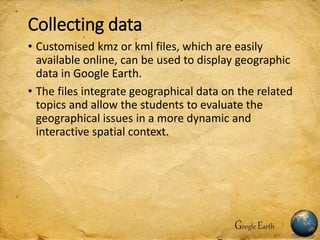
• Customised kmz or kml files, which are easily
available online, can be used to display geographic
data in Google Earth.
• The files integrate geographical data on the related
topics and allow the students to evaluate the
geographical issues in a more dynamic and
interactive spatial context.
Google Earth
Reflecting on data
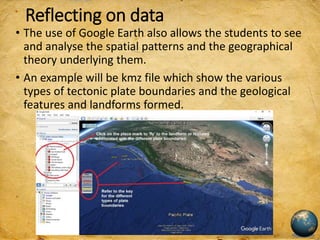
• The use of Google Earth also allows the students to see
and analyse the spatial patterns and the geographical
theory underlying them.
• An example will be kmz file which show the various
types of tectonic plate boundaries and the geological
features and landforms formed.
Reflecting on the data
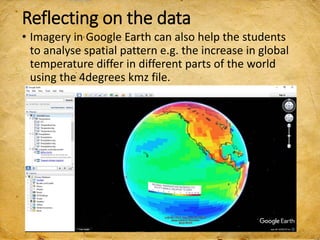
• Imagery in Google Earth can also help the students
to analyse spatial pattern e.g. the increase in global
temperature differ in different parts of the world
using the 4degrees kmz file.
Reflecting on the data
• Imagery in Google Earth can also help the students
to see the changes over time. An example will the
kmz file on the Hurricane Katrina over New
Orleans.
Map reading and Google Earth
• Google Earth allows the students to see the
authenticity of the data from topographical maps
and better interpret them. I have created a kmz file
which I have place marked and added information
from the topographical map.
Google Earth in Geographical Investigation
• A virtual trip/recee can be done before the actual
fieldwork.
Using Google Earth to investigate rate of
deforestation in different countries.
Google Earth for Lower Secondary (Sec 1)
Google Earth for Lower Secondary (Sec 2)
• Using Google Earth for case study. The Favela kmz
file define the boundary of the slum area in Brazil.
• Taking a virtual trip to the favela using street view.
Observe the living conditions of the people.
Google Earth for Lower Secondary
Use of Google Earth
• You can download Google Earth free
@ http://www.google.com/earth/download/ge/agr
ee.html
• Use of Google Earth for Physical Geography
https://sites.google.com/a/moe.edu.sg/sec3geog/google-earth
• Use of Google Earth for Sec 1 Geography -
deforestation
https://sites.google.com/a/moe.edu.sg/sec-1-geog/google-earth
• Use of Google Earth for Sec 2 Geography
https://sites.google.com/a/moe.edu.sg/sec-2-geog/using-google-earth
Google Earth
More of Mrs Lily Lee’s sharing on http://geogshare.blogspot.com

Humanities google earth

  • 1.
    Google Earth inInquiry-based Learning Presented to you by Mrs Lily Lee Ms June Cheong Ms Kelly Tan
  • 2.
    Google Earth ininquiry-based learning Integrating the use of Google Earth in inquiry-based learning helps the students to better understand geographical issues in a more dynamic and interactive spatial context. Google Earth
  • 3.
    Sparkling curiosity • Theuse of Google Earth helps to sparkle the curiosity in the students to raise questions on authentic geographical issues. • Navigating Google Earth using street views, the students can better compare the features of places supporting authentic learning with the virtual fieldtrips. Google Earth
  • 4.
    Collecting data • Customisedkmz or kml files, which are easily available online, can be used to display geographic data in Google Earth. • The files integrate geographical data on the related topics and allow the students to evaluate the geographical issues in a more dynamic and interactive spatial context. Google Earth
  • 5.
    Reflecting on data •The use of Google Earth also allows the students to see and analyse the spatial patterns and the geographical theory underlying them. • An example will be kmz file which show the various types of tectonic plate boundaries and the geological features and landforms formed.
  • 6.
    Reflecting on thedata • Imagery in Google Earth can also help the students to analyse spatial pattern e.g. the increase in global temperature differ in different parts of the world using the 4degrees kmz file.
  • 7.
    Reflecting on thedata • Imagery in Google Earth can also help the students to see the changes over time. An example will the kmz file on the Hurricane Katrina over New Orleans.
  • 8.
    Map reading andGoogle Earth • Google Earth allows the students to see the authenticity of the data from topographical maps and better interpret them. I have created a kmz file which I have place marked and added information from the topographical map.
  • 9.
    Google Earth inGeographical Investigation • A virtual trip/recee can be done before the actual fieldwork.
  • 10.
    Using Google Earthto investigate rate of deforestation in different countries. Google Earth for Lower Secondary (Sec 1)
  • 11.
    Google Earth forLower Secondary (Sec 2) • Using Google Earth for case study. The Favela kmz file define the boundary of the slum area in Brazil.
  • 12.
    • Taking avirtual trip to the favela using street view. Observe the living conditions of the people. Google Earth for Lower Secondary
  • 13.
    Use of GoogleEarth • You can download Google Earth free @ http://www.google.com/earth/download/ge/agr ee.html • Use of Google Earth for Physical Geography https://sites.google.com/a/moe.edu.sg/sec3geog/google-earth • Use of Google Earth for Sec 1 Geography - deforestation https://sites.google.com/a/moe.edu.sg/sec-1-geog/google-earth • Use of Google Earth for Sec 2 Geography https://sites.google.com/a/moe.edu.sg/sec-2-geog/using-google-earth Google Earth
  • 14.
    More of MrsLily Lee’s sharing on http://geogshare.blogspot.com