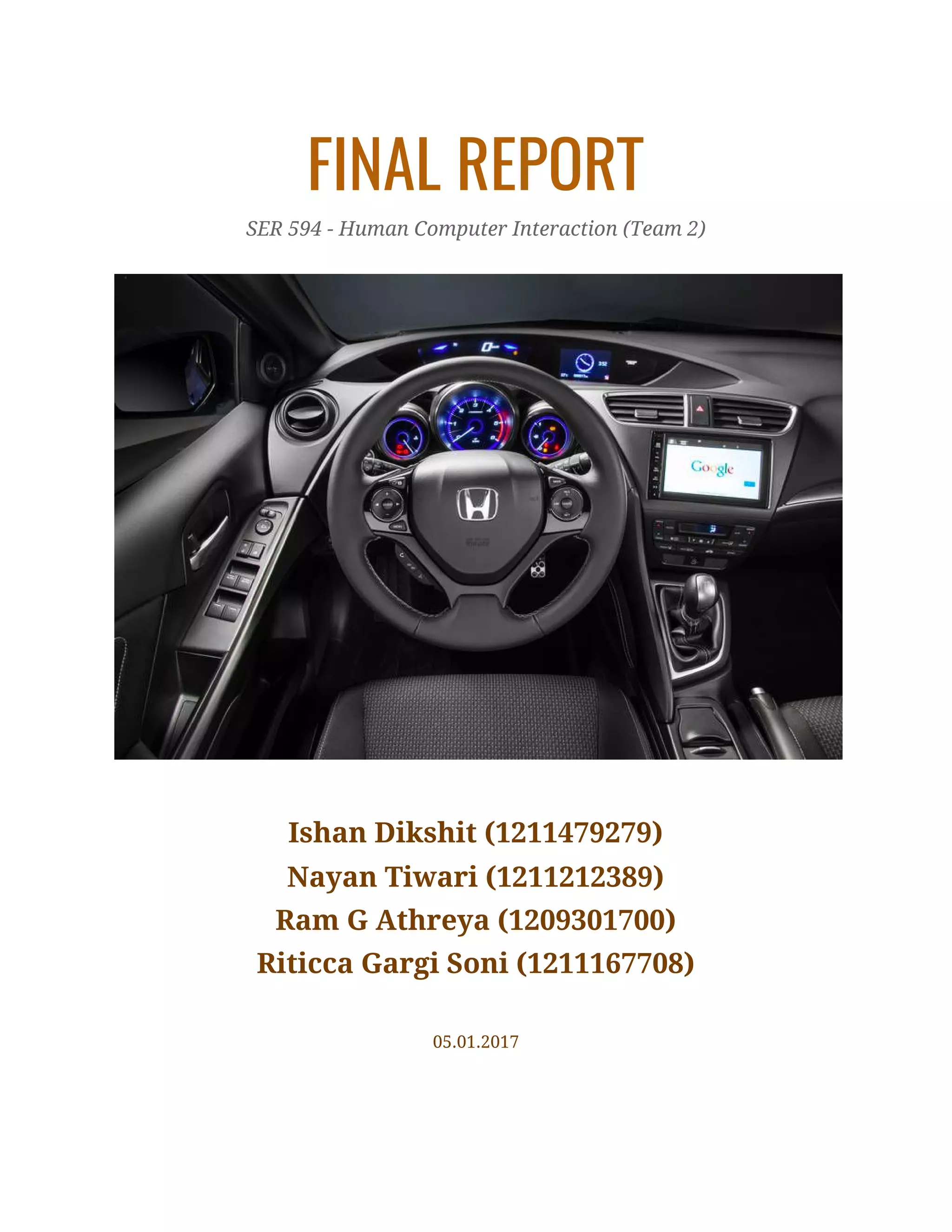
FINAL REPORT 
SER 594 - Human Computer Interaction (Team 2) 
 
Ishan Dikshit (1211479279) 
Nayan Tiwari (1211212389) 
Ram G Athreya (1209301700) 
Riticca Gargi Soni (1211167708) 
 
05.01.2017 
 
2
TABLE OF CONTENTS 
 
1 INTRODUCTION 3
2 HONDA INFOTAINMENT SYSTEM 3
3 RESEARCH 7
3.1 ONLINE RESEARCH 7
3.2 FIELDWORK IN A HONDA DEALERSHIP 9
3.3 SURVEY QUESTIONNAIRE 10
3.4 CONCLUSIONS 15
4 OUR DESIGN PROTOTYPE 15
4.1 STEERING WHEEL DESIGN 16
4.2 CENTRE STACK DESIGN 18
4.3 CONNECTIVITY 24
5 REFERENCES 28
 
   
2
3
1 INTRODUCTION 
A car infotainment system is a collection of hardware and software in automobiles that 
provides audio or video entertainment. It originated with car audio systems that 
consisted of radios and cassette or CD players. Once controlled by simple dashboards 
knobs and dials, ICE systems can include steering wheel audio controls and handsfree 
voice control. 
In-vehicle infotainment systems have a profound effect on the way we interact with our 
cars. They connect us to the outside world, richen the driving experience, and help 
mitigate distracted driving -- or at least that's the idea, for the only means by which an 
infotainment system can deliver on these promises is with a human-machine interface 
that's equal parts responsive and intuitive. Now that the average consumer has become 
accustomed to tinkering with virtually every aspect of their cell phone, television, or 
tablet, vehicle customization plays a significant role in the automotive space as well. 
2 HONDA INFOTAINMENT SYSTEM 
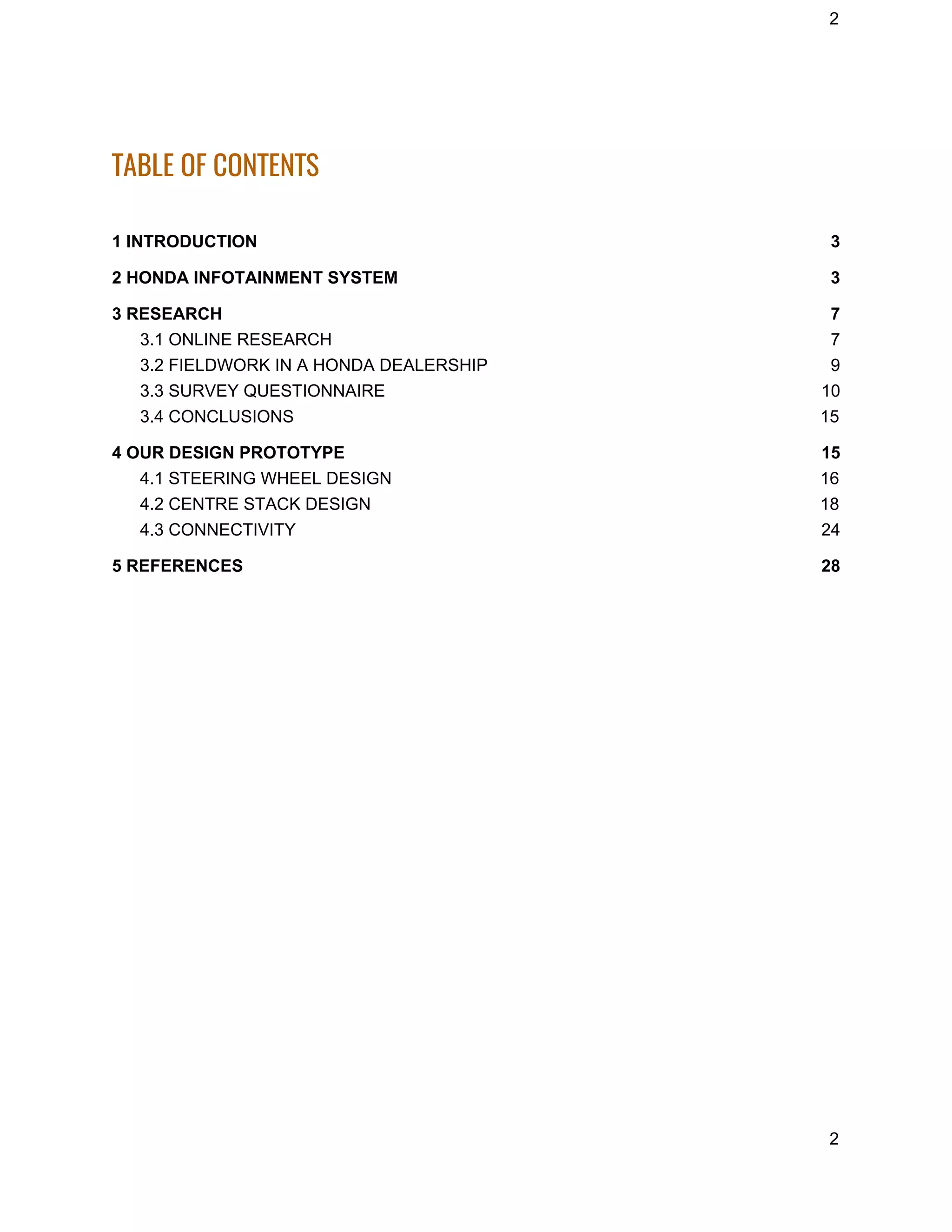
The Honda Infotainment System consists of the following components: 
1. Steering Wheel 
2. Screen behind Wheel 
3. Centre Stack 
4. Voice System 
 
 
3
4
Through this system the driver can access all the features offered from Honda such as 
Navigation, Phone Call, Radio, Audio, Climate Control, etc. using the support of either 
touch buttons, physical button or voice commands. 
The Honda Infotainment System has been evolving through years and the latest 2017 
models have relatively high level of connectivity and infotainment features even in the 
base Accord LX, which should please budget shoppers. 
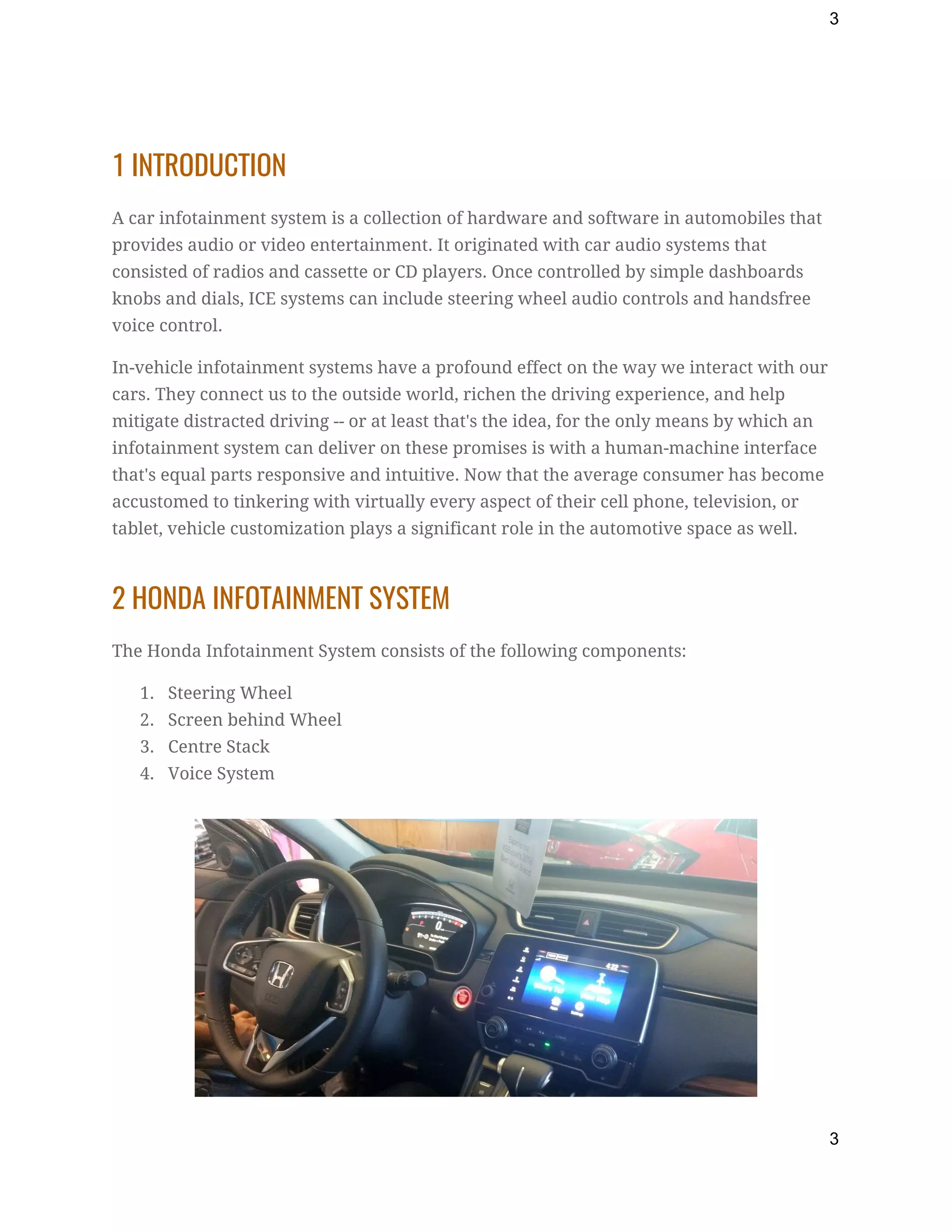
The current generation of Honda’s infotainment system has a larger 8-inch color touch 
screen. The navigation system is provided by Garmin. It contains several on-screen 
buttons, such as power button, home, etc. It is based on the Open Source Android 
operating system. They provide three USB ports and all of them are accessible through 
the system. The one present on the back is not immediately accessible but can be used 
for charging. The default audio application connects to Honda’s Aha Server. The system 
has complete access of the audio files present in the system it is connected to such as a 
phone or iPod. Navigation can be done via scrolling and just like android devices and iOS 
devices it provides an arrow key to minimize and maximize while listening to music, 
thus showing album art of the song that’s playing right now and several options similar 
to phones. Various gestures are provided such as tap, swipe, pinch, zoom etc similar to 
smartphones. 
 
 
Navigation 
The navigation system provided by Garmin provides pinch zoom-in, zoom-out, traffic 
information, etc. It runs on android and is faster than other aftermarket navigation 
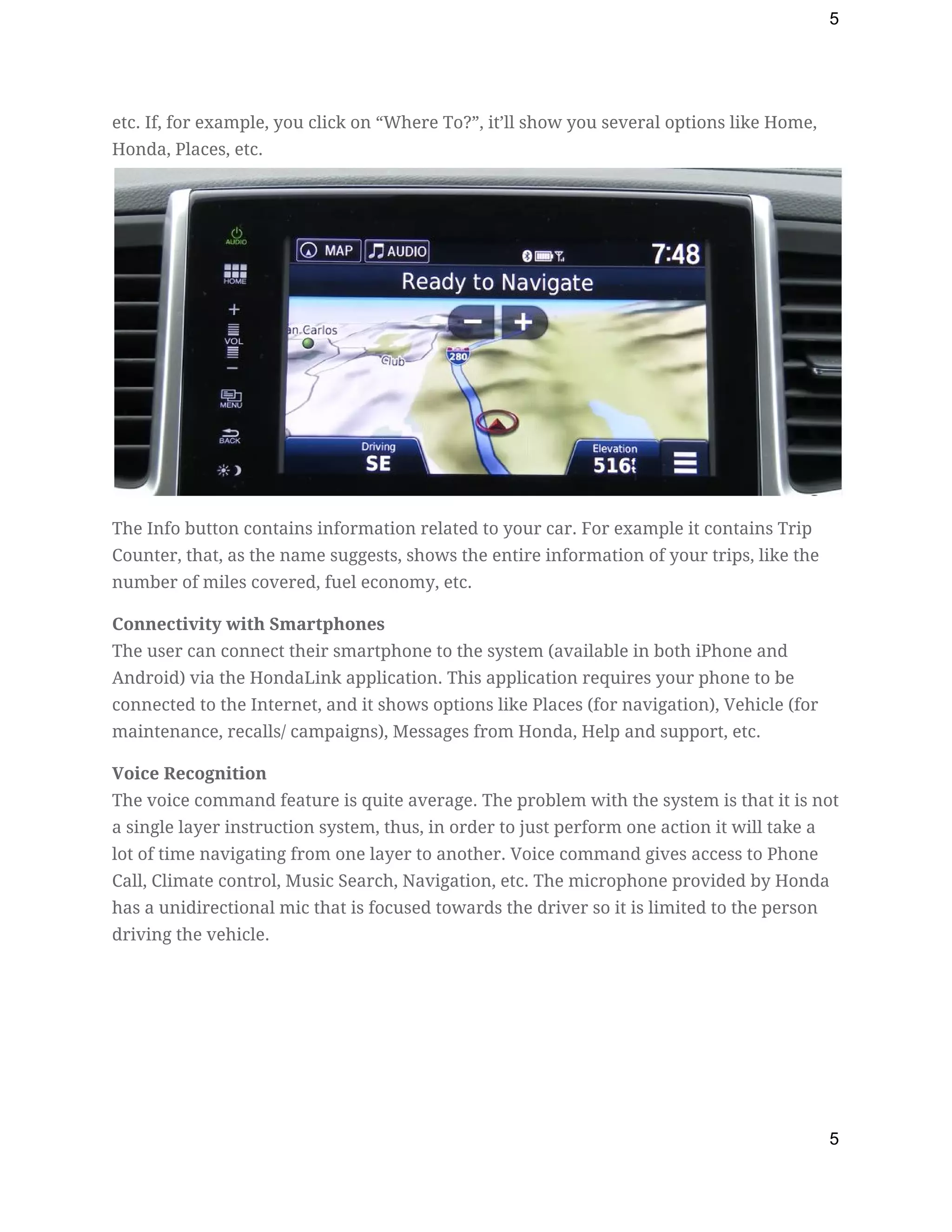
system. The built-in menu shows you navigation options like Where To?, Traffic, Detour, 
4
5
etc. If, for example, you click on “Where To?”, it’ll show you several options like Home, 
Honda, Places, etc.  
The Info button contains information related to your car. For example it contains Trip 
Counter, that, as the name suggests, shows the entire information of your trips, like the 
number of miles covered, fuel economy, etc. 
Connectivity with Smartphones 
The user can connect their smartphone to the system (available in both iPhone and 
Android) via the HondaLink application. This application requires your phone to be 
connected to the Internet, and it shows options like Places (for navigation), Vehicle (for 
maintenance, recalls/ campaigns), Messages from Honda, Help and support, etc. 
Voice Recognition 
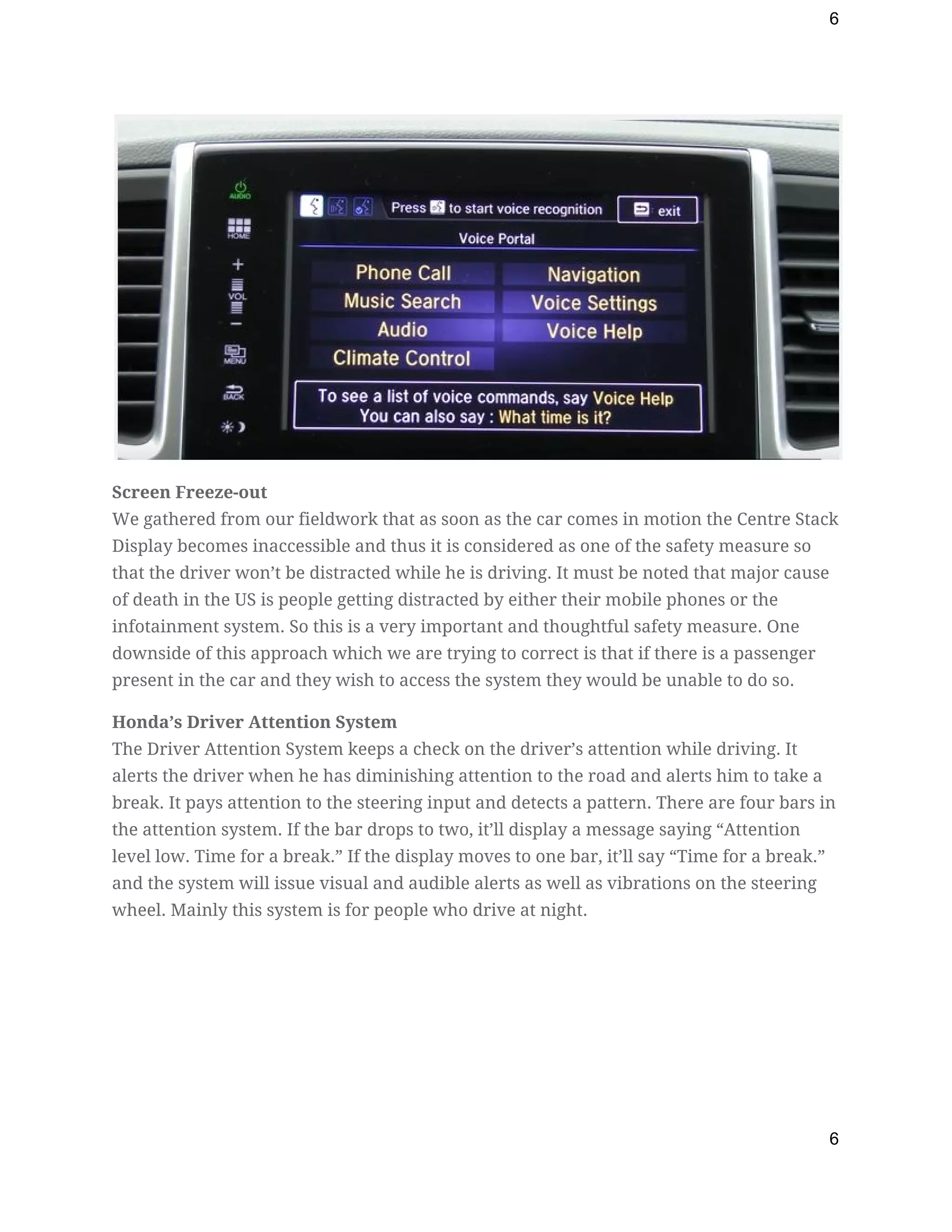
The voice command feature is quite average. The problem with the system is that it is not 
a single layer instruction system, thus, in order to just perform one action it will take a 
lot of time navigating from one layer to another. Voice command gives access to Phone 
Call, Climate control, Music Search, Navigation, etc. The microphone provided by Honda 
has a unidirectional mic that is focused towards the driver so it is limited to the person 
driving the vehicle. 
5
6
 
Screen Freeze-out 
We gathered from our fieldwork that as soon as the car comes in motion the Centre Stack 
Display becomes inaccessible and thus it is considered as one of the safety measure so 
that the driver won’t be distracted while he is driving. It must be noted that major cause 
of death in the US is people getting distracted by either their mobile phones or the 
infotainment system. So this is a very important and thoughtful safety measure. One 
downside of this approach which we are trying to correct is that if there is a passenger 
present in the car and they wish to access the system they would be unable to do so. 
Honda’s Driver Attention System 
The Driver Attention System keeps a check on the driver’s attention while driving. It 
alerts the driver when he has diminishing attention to the road and alerts him to take a 
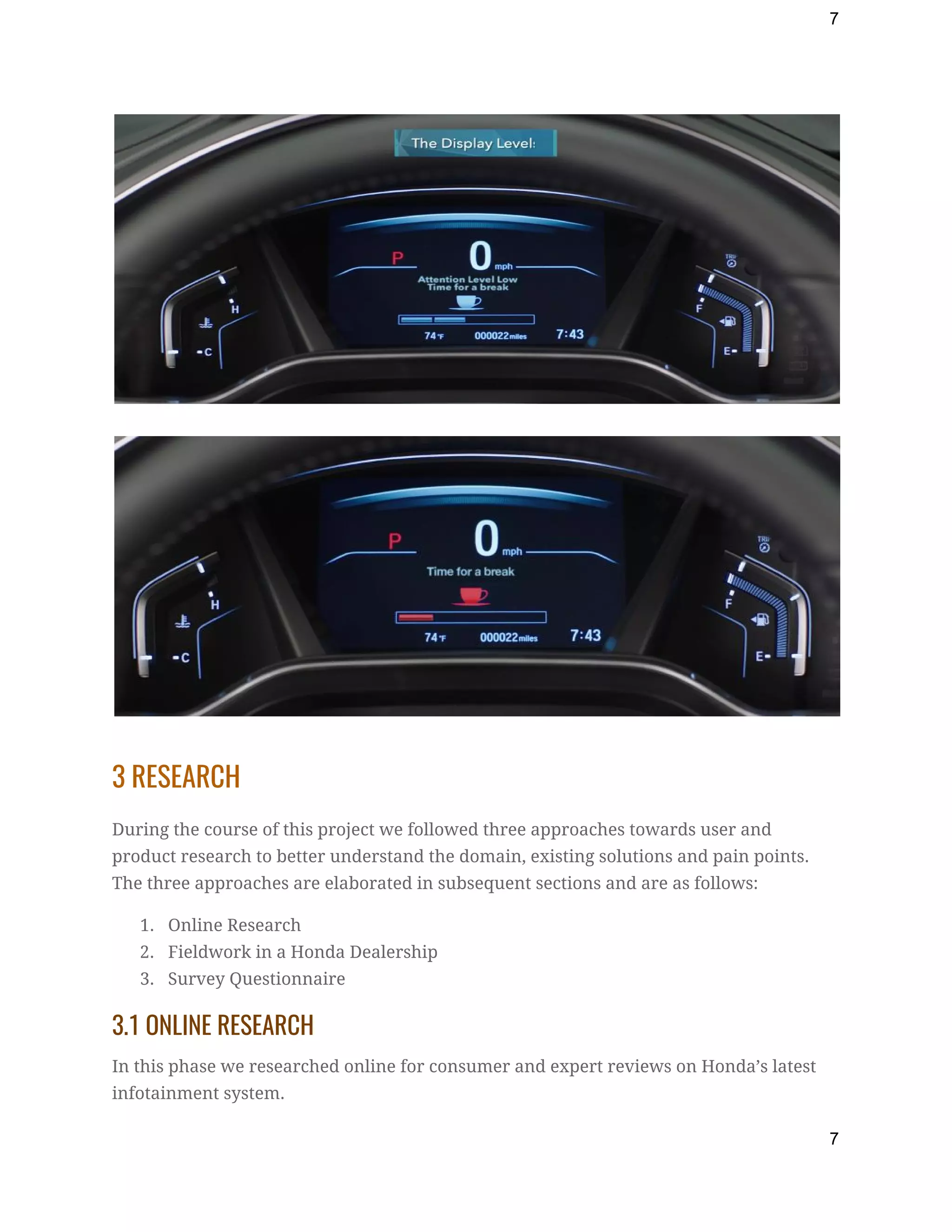
break. It pays attention to the steering input and detects a pattern. There are four bars in 
the attention system. If the bar drops to two, it’ll display a message saying “Attention 
level low. Time for a break.” If the display moves to one bar, it’ll say “Time for a break.” 
and the system will issue visual and audible alerts as well as vibrations on the steering 
wheel. Mainly this system is for people who drive at night. 
 
6
7


3 RESEARCH 
During the course of this project we followed three approaches towards user and 
product research to better understand the domain, existing solutions and pain points. 
The three approaches are elaborated in subsequent sections and are as follows: 
1. Online Research 
2. Fieldwork in a Honda Dealership 
3. Survey Questionnaire 
3.1 ONLINE RESEARCH 
In this phase we researched online for consumer and expert reviews on Honda’s latest 
infotainment system. 
7
8
Online Research Approach 
In our research we have only taken credible and reliable sources of reviews such as 
Google App store, ConsumerReports.org, CarAndDriver.com etc. 
Key Findings 
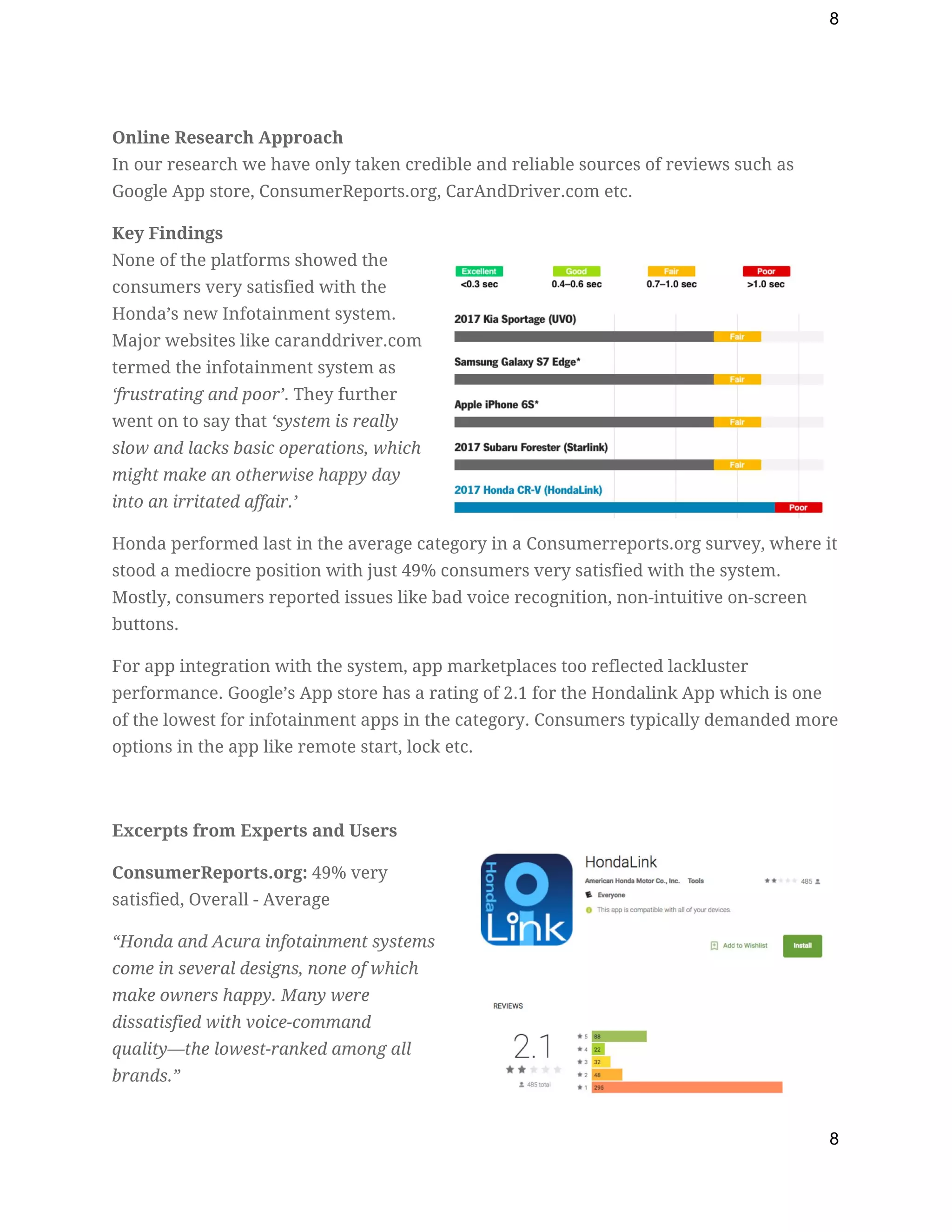
None of the platforms showed the 
consumers very satisfied with the 
Honda’s new Infotainment system. 
Major websites like caranddriver.com 
termed the infotainment system as 
‘frustrating and poor’​. They further 
went on to say that ​‘system is really 
slow and lacks basic operations, which 
might make an otherwise happy day 
into an irritated affair.’ 
Honda performed last in the average category in a Consumerreports.org survey, where it 
stood a mediocre position with just 49% consumers very satisfied with the system. 
Mostly, consumers reported issues like bad voice recognition, non-intuitive on-screen 
buttons. 
For app integration with the system, app marketplaces too reflected lackluster 
performance. Google’s App store has a rating of 2.1 for the Hondalink App which is one 
of the lowest for infotainment apps in the category. Consumers typically demanded more 
options in the app like remote start, lock etc.   
 
Excerpts from Experts and Users 
ConsumerReports.org:​ 49% very 
satisfied, Overall - Average 
“Honda and Acura info​tainment systems 
come in several designs, none of which 
make owners happy. Many were 
dissatisfied with voice-command 
quality​—the lowest-ranked among all 
brands.” 
8
9
Google Playstore HondaLink App:​ 2.1/5 
“It's 2017, the app should have many more features like remote start, locking / unlocking 
doors...etc.” 
CarAndDriver.com:​ 3/5 
“Frustratingly, the infotainment system’s responses to touch inputs are among the slowest 
of any system we’ve tested, with an average response time of more than a second.” 
3.2 FIELDWORK IN A HONDA DEALERSHIP 
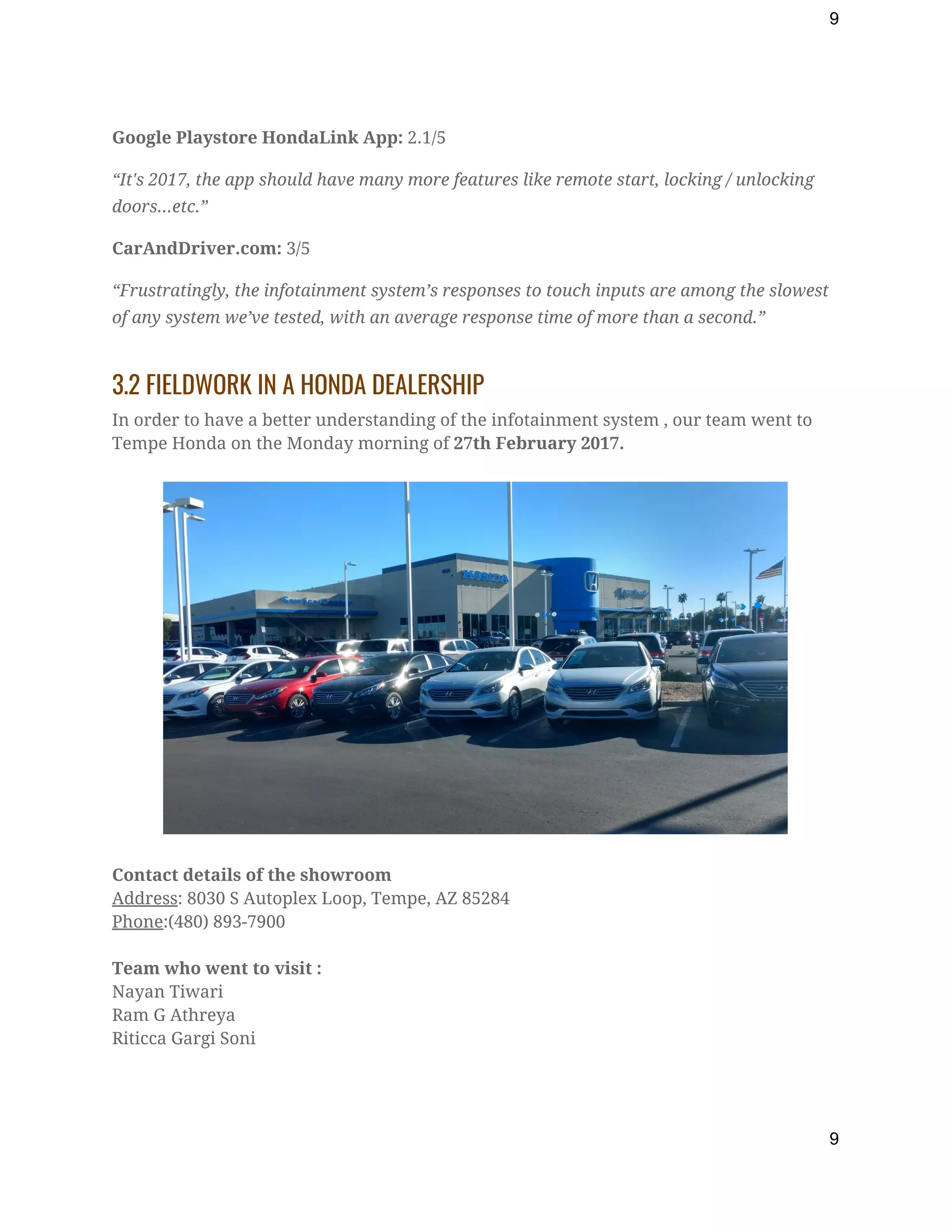
In order to have a better understanding of the infotainment system , our team went to 
Tempe Honda on the Monday morning of ​27th February 2017. 


Contact details of the showroom 
Address​: 8030 S Autoplex Loop, Tempe, AZ 85284 
Phone​:(480) 893-7900 
 
Team who went to visit : 
Nayan Tiwari 
Ram G Athreya 
Riticca Gargi Soni 
 
9
10
We met ​Richard Lim ​(Sales Consultant) who briefed us with the Honda system, and gave 
us a lot of useful information regarding the infotainment system, which we may have not 
realized by ourselves. 
 
The following are our observations based on our interaction with Richard and our own 
experience while using the infotainment system: 
 
1. The infotainment system has 3 modes of interaction: 
a. Touch Screen Display (Touch and Gesture Control) 
b. Steering Controls (Buttons) 
c. Voice (Speech Recognition) 
2. Although a number of features are packed into the touch screen display climate 
control is still provided as buttons and volume control as a knob 
3. While driving, the infotainment system screen freezes out. That is that all the 
features are disabled for touch use and it can be operated either using voice 
commands(for Calling purpose) or physical buttons present on the Steering wheel. 
4. The BSI System contains sensors in front and back of the car which try to prevent 
driver distraction. These sensors get activated at the time the vehicle ‘s relative 
distance approaches for a possible clash. This might be a bit irritating as it gets 
activated at odd timings. 
5. Buttons are still available mainly catering to the older generation i.e. there are 
still few features which have the access using physical button either below the 
centre stack or on the steering wheel. 
6. Seamless smartphone connectivity and provides syncing with phone contacts, 
messaging, calls as well as music and apps. The connectivity we performed was 
using a bluetooth connections which was synced with our smartphone on the 
second time we tried to connect. Once the phone gets connected, the music files 
can be retrieved and played. 
3.3 SURVEY QUESTIONNAIRE 
As part of our research we also conducted an online survey to better understand user’s 
needs and expectations from a car infotainment system as well as existing satisfaction 
levels with their present systems. We created the survey online using TypeForm and 
distributed through social media. The survey garnered 17 unique responses and the 
questions as well as their results are presented below. 
1. What is your age 
2. What is your gender 
3. The Car Infotainment system is a very important factor in my purchasing decision 
for a new car 
10
11
4. I find my infotainment system complicated and confusing  
5. What features are must haves for you 
6. What attributes matter to you the most  
7. What is your most preferred method of interaction 
8. How often do you get distracted when operating the infotainment system while 
driving 
9. Support for Third Party Apps (eg: Pandora, Waze, WhatsApp etc) are very 
important for me  
10. Overall, I am very satisfied with my infotainment system  
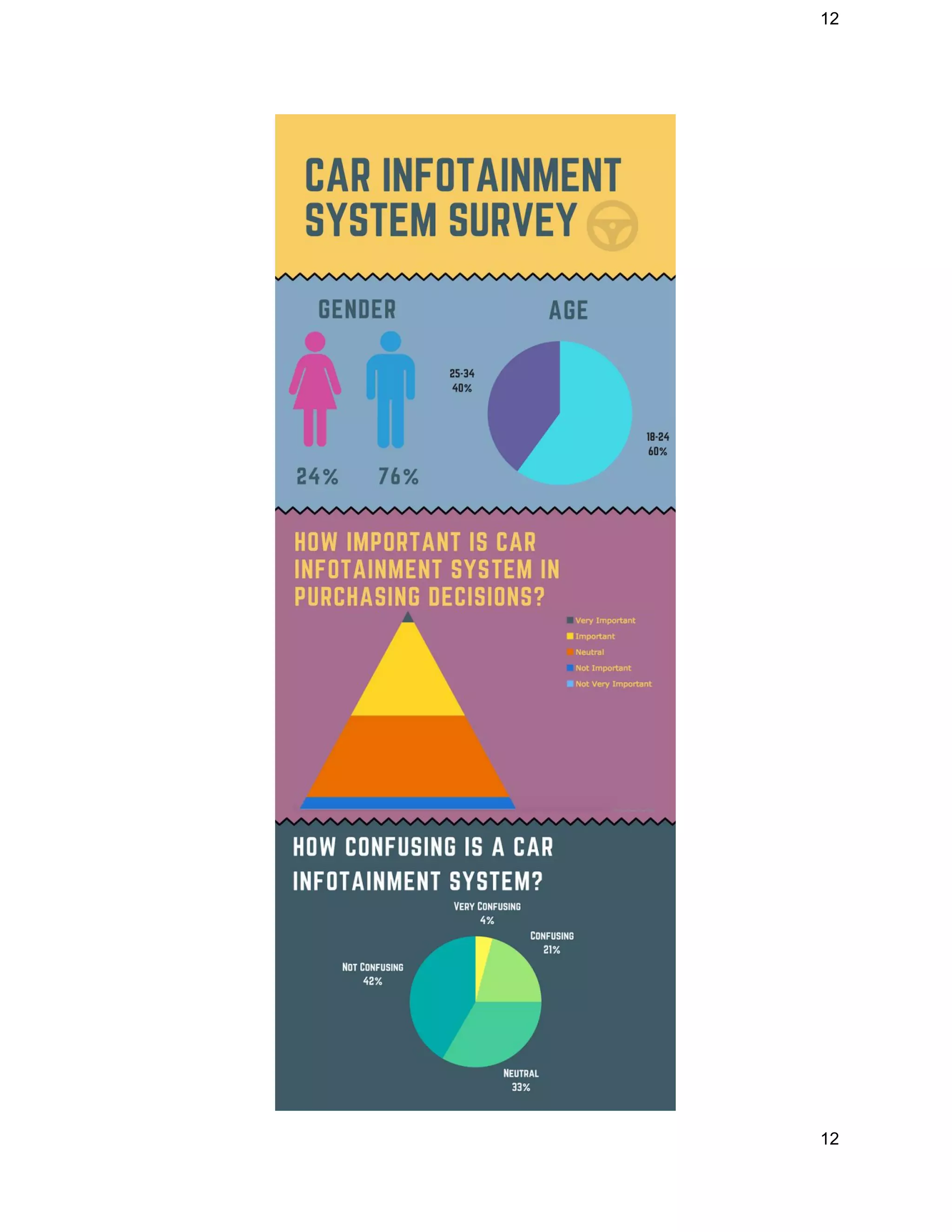
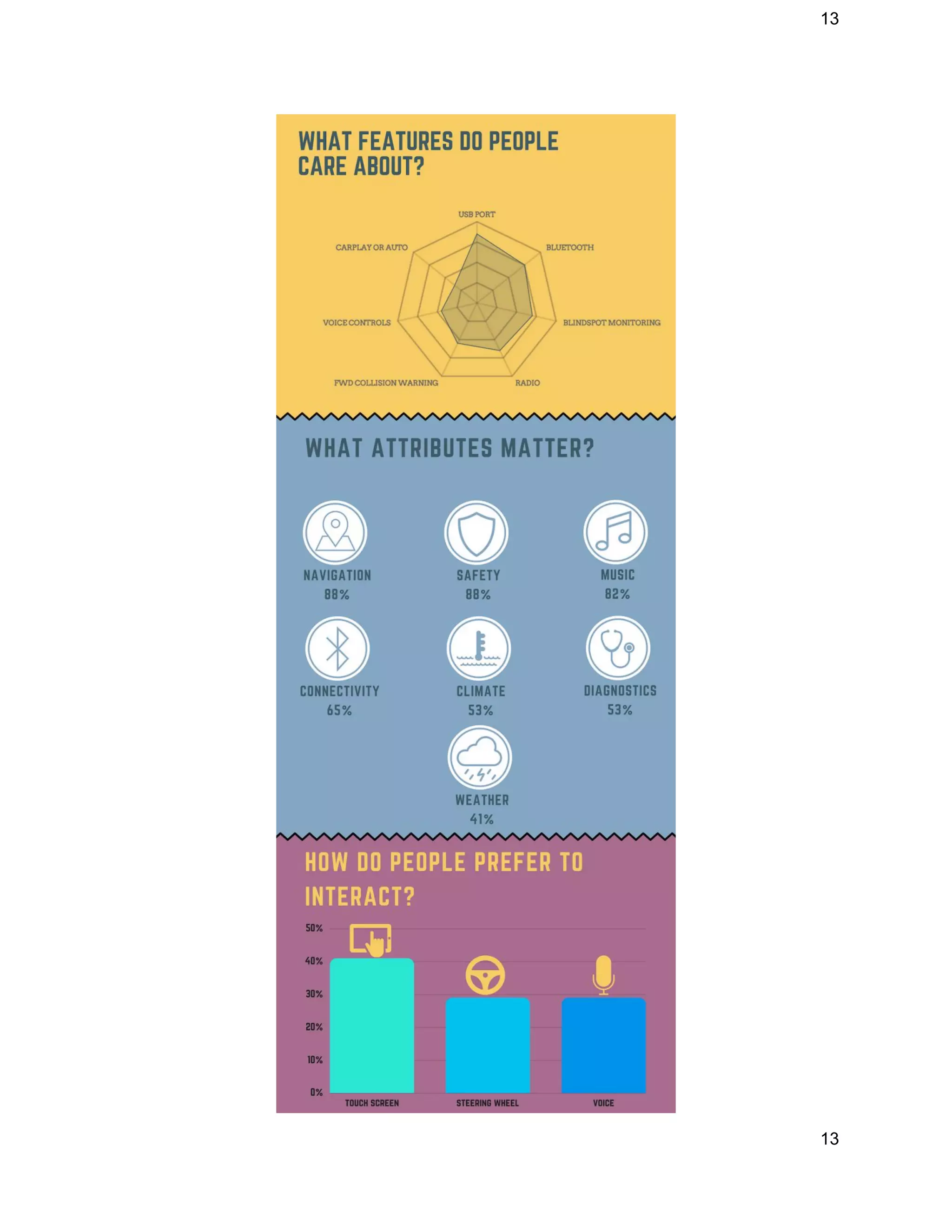
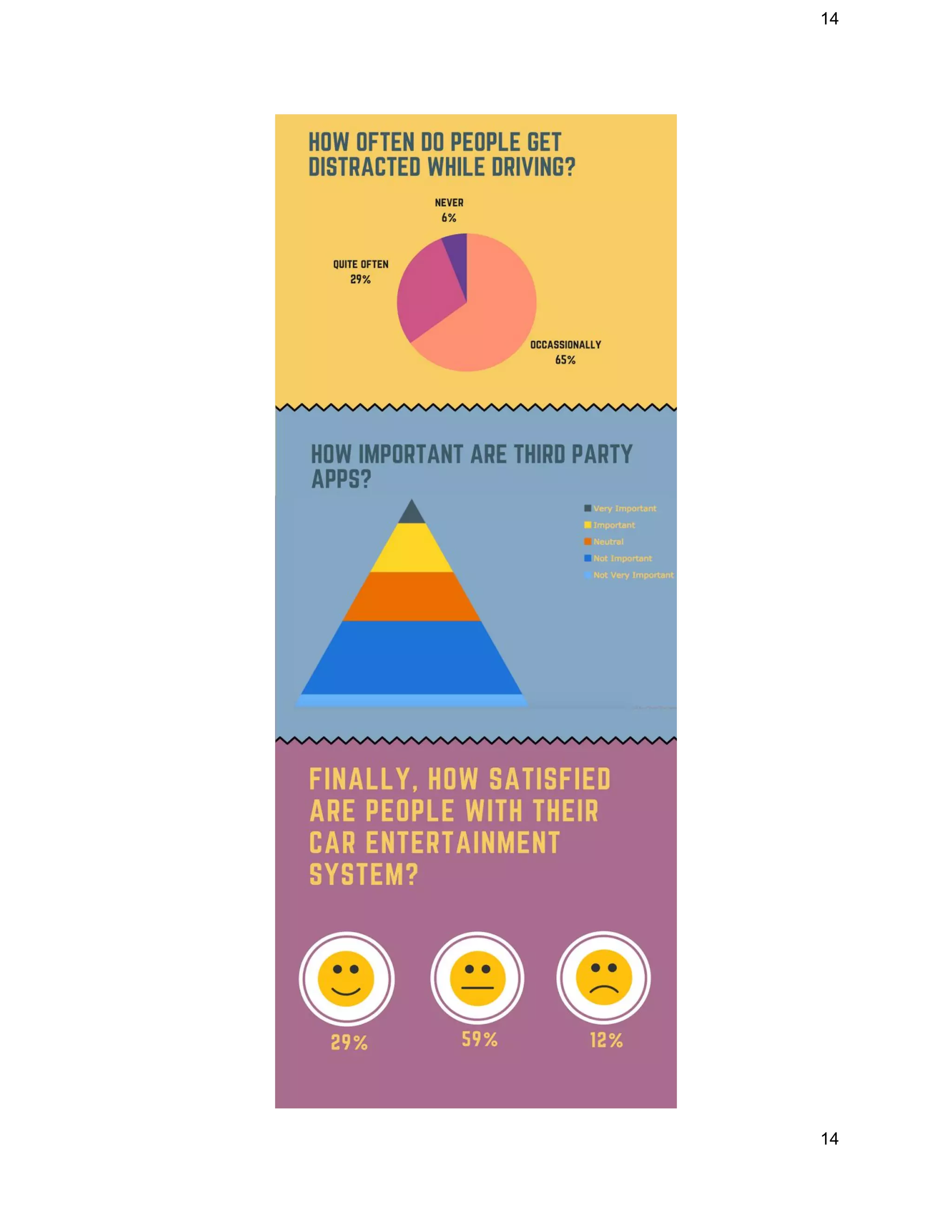
We created an infographic of the results of the survey to present our findings in a more 
visual appealing form. A detailed breakdown of our findings through all three forms of 
our research(fieldwork, online research and survey questionnaire) are presented in the 
next section. 
11
12
 
12
13
 
13
14
 
14
15
3.4 CONCLUSIONS 
The following sections presents the key findings from our research through fieldwork, 
online research and questionnaire. 
1. Consumers are confused with existing systems:​ Our research suggests a sizable 
percentage of people (25%) find the infotainment   system confusing which 
indicates that there is scope for improvement in this area 
2. Touch System is one of the slowest around:​ Our research indicates that a 
sizeable amount of people find the Honda’s touch screen slow 
3. Voice Recognition needs improvement:​ The voice parser is slow, it needs 
accurate english phrases. Voice as a method of interaction is preferred only by 
25% of consumers 
4. Blind Spot Information (BSI) System fails to work in certain situations:​ The 
sensors used in BSI system in Honda was not able to recognize many nearby 
objects and often gave bad results 
5. More thought should be put into dual screen:​ The two screens duplicate the 
data displayed and freezes up the screen even for the passenger which makes 
accessibility available only for the driver 
6. Car Infotainment Systems need to be prioritized higher:​ We collected several 
brochures (about half dozen) from the dealership as part of our fieldwork but 
none of them had any information on the infotainment system 
7. People are not that into 3rd Party Apps:​ Marketing materials of Honda’s system 
and several other manufacturers focus heavily on 3rd party apps (the Aha App for 
Honda) even though our survey suggests consumers are not particularly 
interested in it 
8. Navigation, Safety and Music are must haves:​ Navigation, Safety and Music are 
paramount concerns for consumers with over 85% asking for it 
9. High Scope for Improvement:​ Finally only 29% of respondents in the survey 
were satisfied with existing systems which indicates that there is much work that 
needs to be done 
4 OUR DESIGN PROTOTYPE 
Based on our introspections we drew two important conclusions during our research 
and brainstorming process. The first is that the existing infotainment system packs too 
15
16
many features which are functional and useful but are not easily accessible. For example 
when trying to find a nearby gas station a user would typically have to navigate 3 or 4 
levels deep into the navigation app to access that information. This is suboptimal and can 
be vastly improved. Another realization was the fact that existing systems both by Honda 
and other manufacturers primarily focus on the centre stack or the middle of the 
steering wheel while the wheel itself is underutilized. We have also tried to incorporate 
our learnings from our research and interviews to better inform us on our design 
decisions. 
Based on the above mentioned points we propose a design concept that focuses on the 
following attributes: 
1. Personalization through Context 
2. Adaptive Based on Usage 
3. Organization 
4. Customization 
The motivations behind our concept are simple. The existing system has features that are 
relevant only in some context so we propose to surface them only when the context 
demands. We propose a framework to organize existing features, apps etc to streamline 
the user experience and make it easier for the user to get to what they want when they 
want it. Finally, we have added a customization layer throughout our design to give 
more power to the user and ensure that they are always in control. 
We have identified three target areas that we would like to improve and modify to 
realize our vision. They are: 
1. Steering Wheel 
2. Centre Stack 
3. Connectivity 
In subsequent sections we will elaborate on 
how we plan to redesign and reimagine 
these parts of the infotainment system to 
enhance the user experience and reduce 
driver distraction. 
 
4.1 STEERING WHEEL DESIGN 
16
17
Motivations behind redesigning the Steering Wheel 
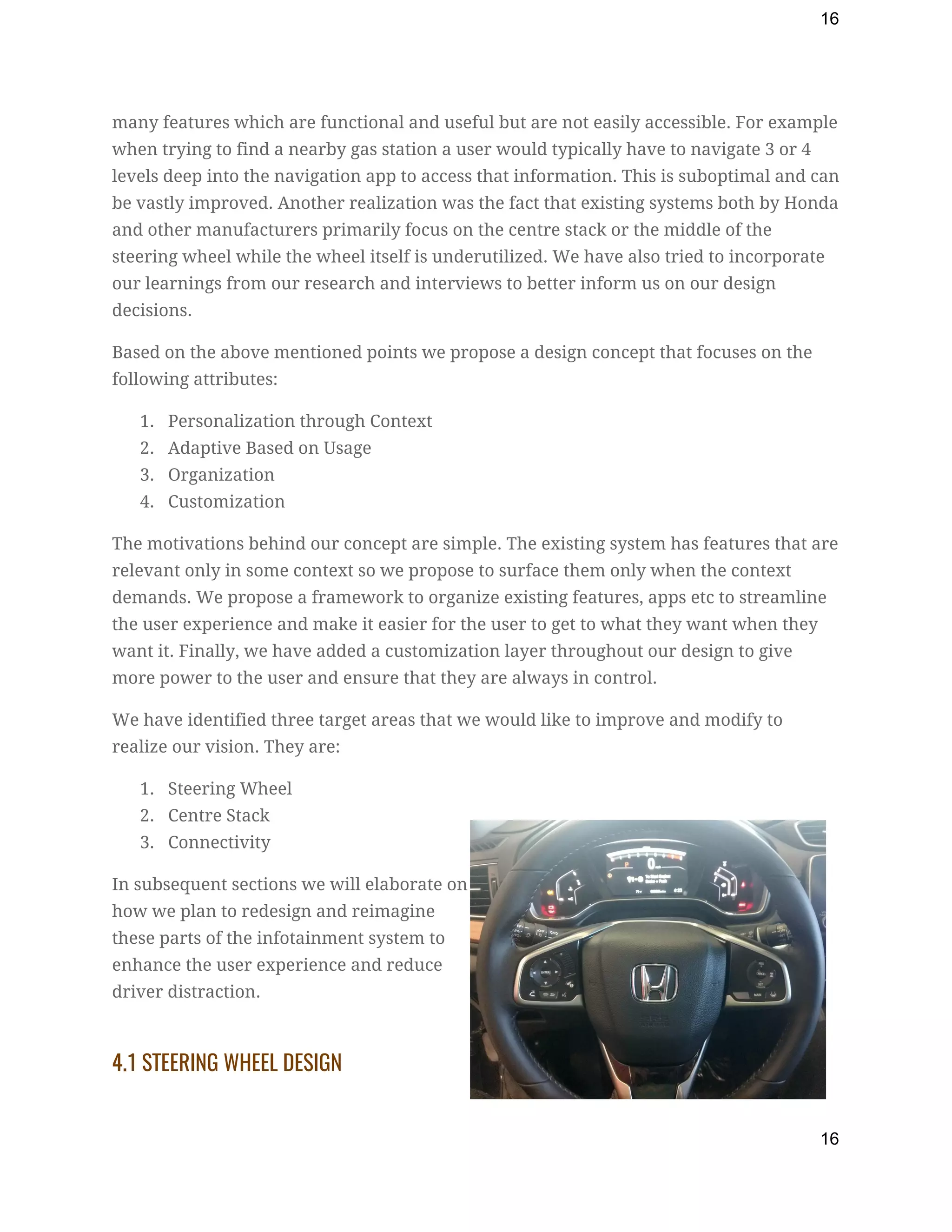
We wanted to design a feature that gets the task done with little or no distraction to the 
driver. The design of the features had to be in such a way that it is reachable to the 
driver easily. We also wanted to exploit the unused space on the steering wheel to 
display minimal and unobtrusive context aware information. 
Following changes are proposed for the Steering Wheel: 
1. Trackball in the place of arrow buttons for menu navigation:  
This will help bring a five button complex navigation to a single 
button one and prevent user making erroneous inputs. Also, it 
brings the volume tracker closer to the driver’s hand solving 
another major interaction problem in the interaction design. 
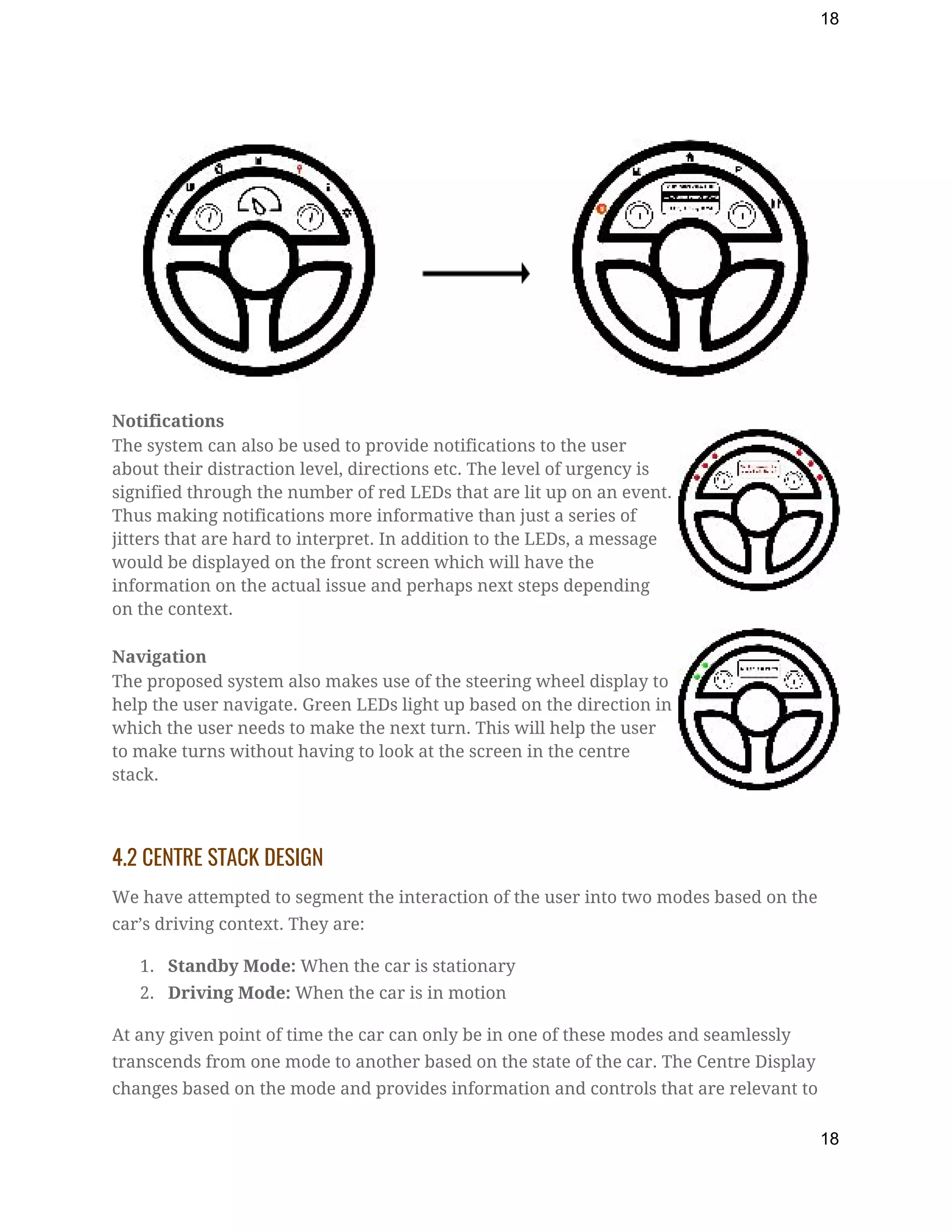
2. Contextual Information displayed on the upper part of the 
steering wheel: ​As we know the main screen freezes while driving for safety 
reasons. The only way to interact with the system is voice or the small screen at 
the back of the wheel which presents only one menu option at a time. It is also 
hard to reach the option you are looking for due to lack of screen space. 
The steering wheel provides three kinds of information which are: 
1. Menu 
2. Notifications 
3. Navigation 
Menu  
The proposed system on invocation will display the contextual menu to the driver which 
can be navigated and accessed through the trackball on the left side of the steering 
wheel. This menu is extended on the front screen where the user can see a list of choices 
to select from.  
For example, if a user selects Places from the main menu on the wheel, the wheel menu 
changes to icons like restaurants, hospitals, gas stations etc. Whenever a user navigates 
to any icon using left-right interaction, a list of those places are displayed in the front 
screen which can be accessed using the up-down interaction of the trackball. 
17
18
 
Notifications  
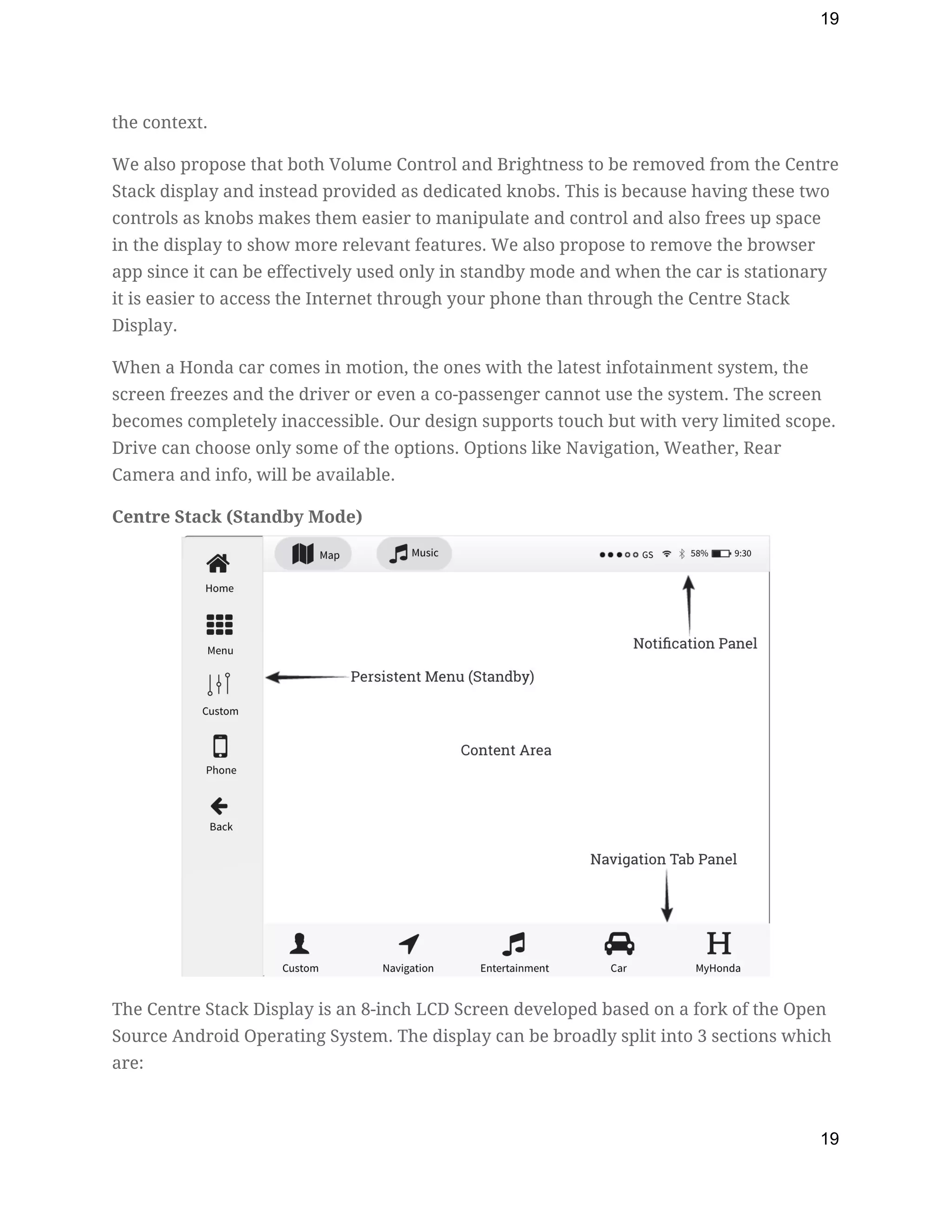
The system can also be used to provide notifications to the user 
about their distraction level, directions etc. The level of urgency is 
signified through the number of red LEDs that are lit up on an event. 
Thus making notifications more informative than just a series of 
jitters that are hard to interpret. In addition to the LEDs, a message 
would be displayed on the front screen which will have the 
information on the actual issue and perhaps next steps depending 
on the context. 
Navigation  
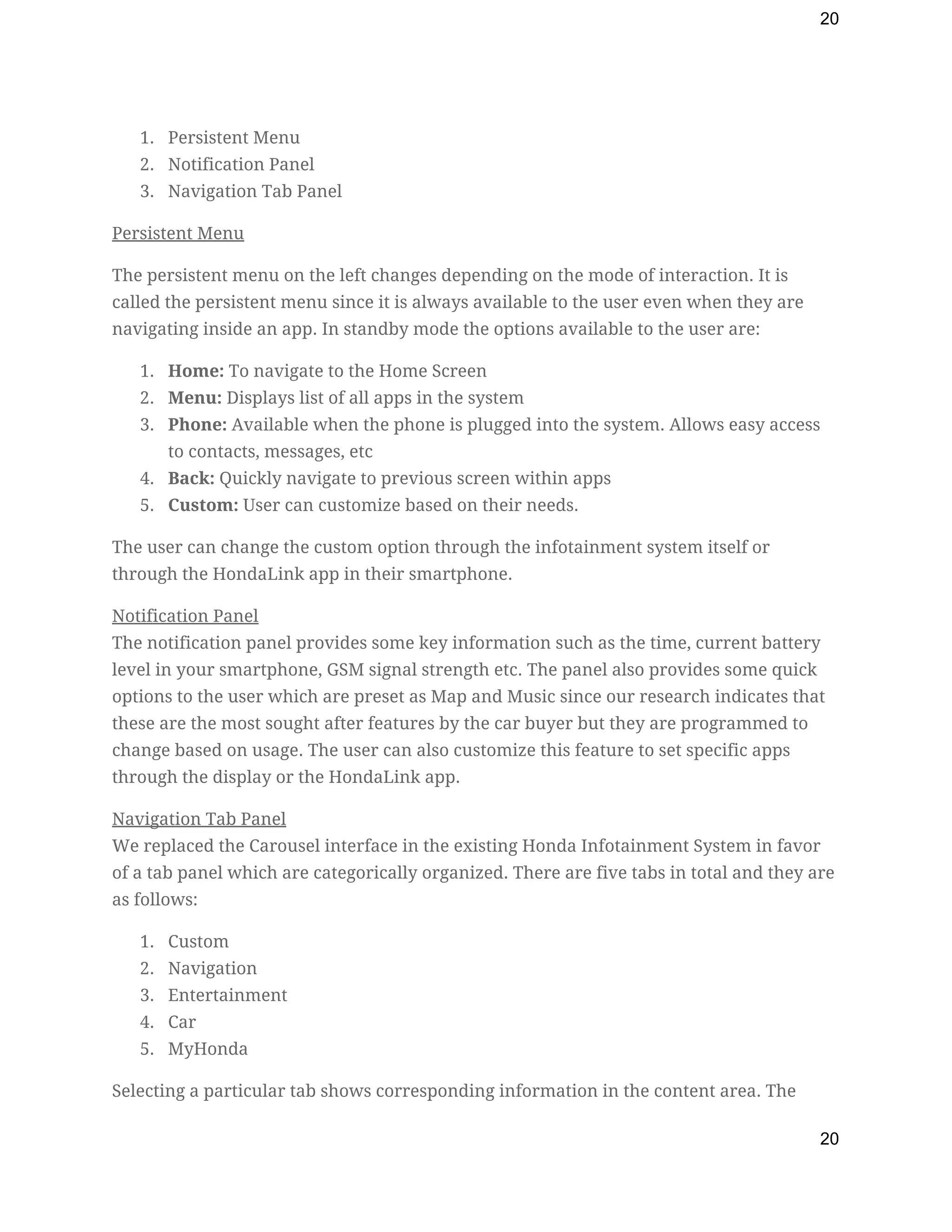
The proposed system also makes use of the steering wheel display to 
help the user navigate. Green LEDs light up based on the direction in 
which the user needs to make the next turn. This will help the user 
to make turns without having to look at the screen in the centre 
stack. 
 
4.2 CENTRE STACK DESIGN 
We have attempted to segment the interaction of the user into two modes based on the 
car’s driving context. They are: 
1. Standby Mode:​ When the car is stationary  
2. Driving Mode:​ When the car is in motion 
At any given point of time the car can only be in one of these modes and seamlessly 
transcends from one mode to another based on the state of the car. The Centre Display 
changes based on the mode and provides information and controls that are relevant to 
18
19
the context. 
We also propose that both Volume Control and Brightness to be removed from the Centre 
Stack display and instead provided as dedicated knobs. This is because having these two 
controls as knobs makes them easier to manipulate and control and also frees up space 
in the display to show more relevant features. We also propose to remove the browser 
app since it can be effectively used only in standby mode and when the car is stationary 
it is easier to access the Internet through your phone than through the Centre Stack 
Display. 
When a Honda car comes in motion, the ones with the latest infotainment system, the 
screen freezes and the driver or even a co-passenger cannot use the system. The screen 
becomes completely inaccessible. Our design supports touch but with very limited scope. 
Drive can choose only some of the options. Options like Navigation, Weather, Rear 
Camera and info, will be available. 
Centre Stack (Standby Mode) 
 
The Centre Stack Display is an 8-inch LCD Screen developed based on a fork of the Open 
Source Android Operating System. The display can be broadly split into 3 sections which 
are: 
19
20
1. Persistent Menu 
2. Notification Panel 
3. Navigation Tab Panel 
Persistent Menu 
The persistent menu on the left changes depending on the mode of interaction. It is 
called the persistent menu since it is always available to the user even when they are 
navigating inside an app. In standby mode the options available to the user are: 
1. Home:​ To navigate to the Home Screen 
2. Menu:​ Displays list of all apps in the system 
3. Phone:​ Available when the phone is plugged into the system. Allows easy access 
to contacts, messages, etc 
4. Back:​ Quickly navigate to previous screen within apps 
5. Custom:​ User can customize based on their needs.  
The user can change the custom option through the infotainment system itself or 
through the HondaLink app in their smartphone. 
Notification Panel 
The notification panel provides some key information such as the time, current battery 
level in your smartphone, GSM signal strength etc. The panel also provides some quick 
options to the user which are preset as Map and Music since our research indicates that 
these are the most sought after features by the car buyer but they are programmed to 
change based on usage. The user can also customize this feature to set specific apps 
through the display or the HondaLink app. 
Navigation Tab Panel 
We replaced the Carousel interface in the existing Honda Infotainment System in favor 
of a tab panel which are categorically organized. There are five tabs in total and they are 
as follows: 
1. Custom 
2. Navigation 
3. Entertainment 
4. Car 
5. MyHonda 
Selecting a particular tab shows corresponding information in the content area. The 
20
21
custom tab is preset with most used apps but is entirely customizable to the user. The 
rest of the tabs provide only minimal customization.  
There are three types of UI elements which can be found in the content area. They are: 
1. Apps:​ Pre-existing apps provided by the system such as Navigation, Music etc. 
2. Shortcuts:​ This is a big feature of our proposal. Shortcuts are specific actions 
within apps. Shortcuts are bookmarks to features within apps. We hope to use 
shortcuts to solve existing problems such as accessing inner features within apps. 
For example nearest gas station could be a shortcut that you can place in your 
home screen. This would reduce multiple taps on the screen to just two taps. One 
to access the navigation tab and another to select the shortcut. 
3. Widgets:​ Since the system is built using Android we can leverage the native 
widgets feature available in the operating system to provide custom widgets that 
can provide key information in a more interactive manner. For example the 
Music Player could be a widget right in your home screen similar to existing 
Android Systems. We hope using existing smartphone features also help the user 
to intuitively understand the system with minimal cognitive load. 
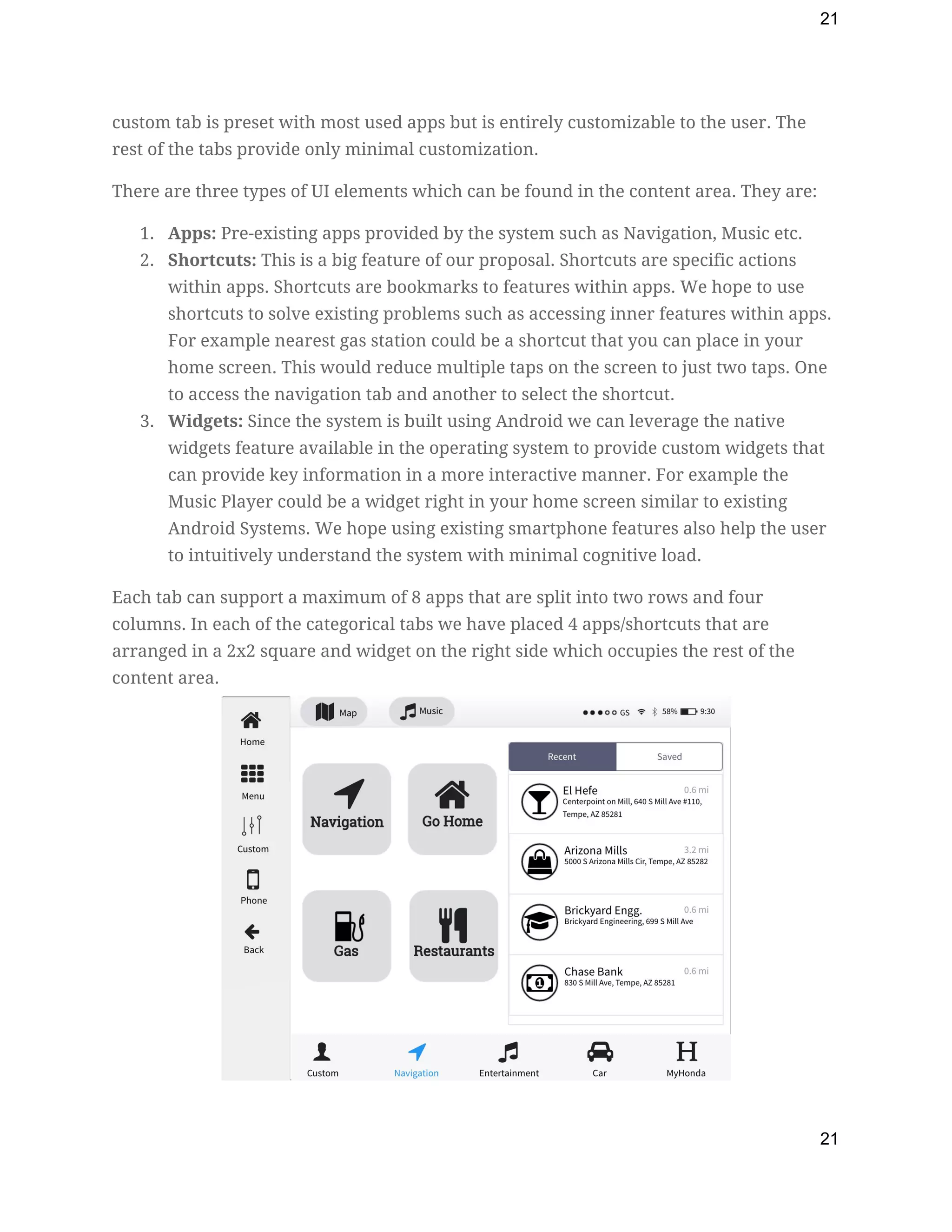
Each tab can support a maximum of 8 apps that are split into two rows and four 
columns. In each of the categorical tabs we have placed 4 apps/shortcuts that are 
arranged in a 2x2 square and widget on the right side which occupies the rest of the 
content area. 
 
21
22
The Navigation Tab contains the Navigation app along with quick shortcuts for directions 
to Home, the Nearest Gas Station and Restaurants. These shortcuts can be configured to 
user’s needs although the layout cannot be changed. The widget on the right side shows 
recent and saved locations in the form of a tab list. Icons are provided to differentiate 
different places such as restaurants, malls, schools, banks etc. which makes identification 
easier for the user. 
 
 
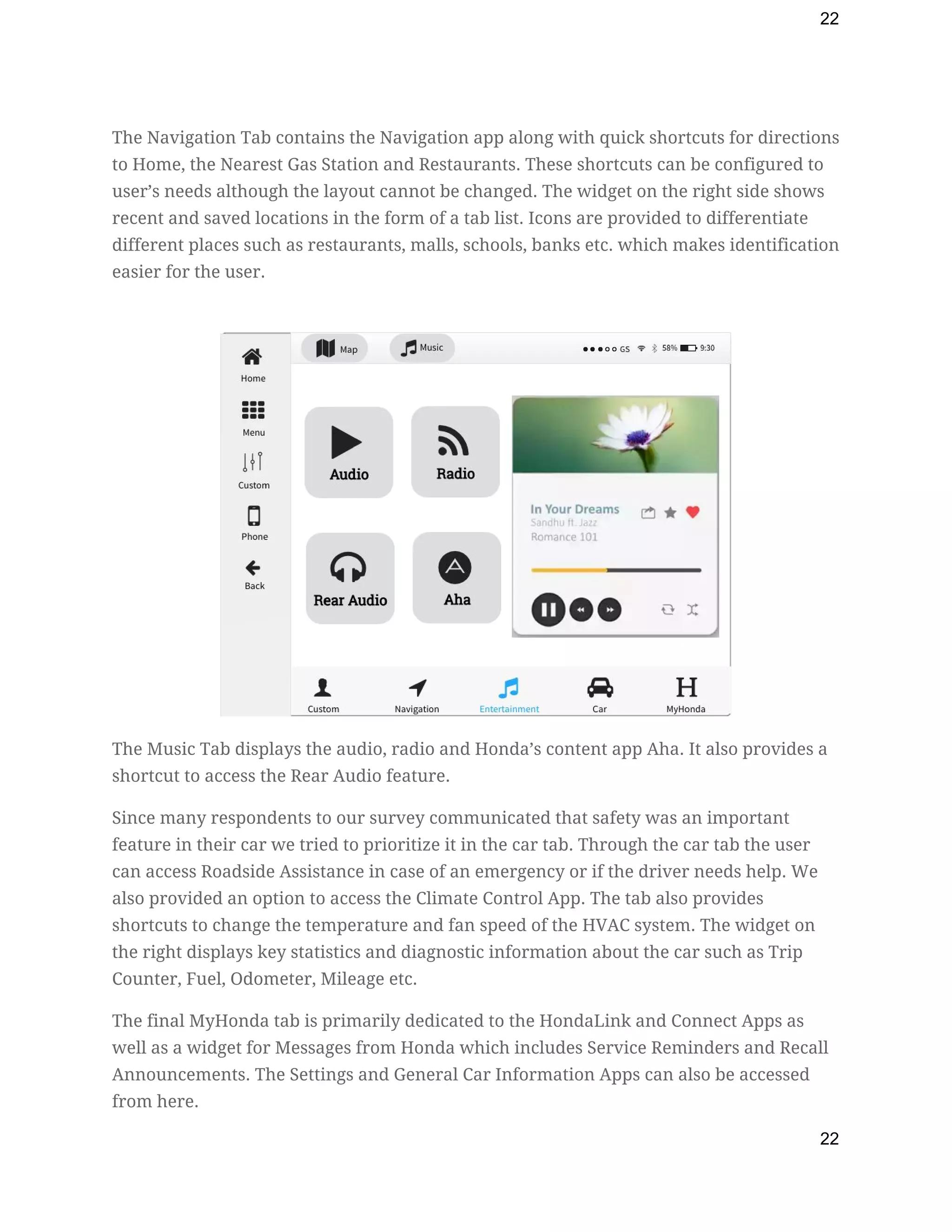
The Music Tab displays the audio, radio and Honda’s content app Aha. It also provides a 
shortcut to access the Rear Audio feature. 
Since many respondents to our survey communicated that safety was an important 
feature in their car we tried to prioritize it in the car tab. Through the car tab the user 
can access Roadside Assistance in case of an emergency or if the driver needs help. We 
also provided an option to access the Climate Control App. The tab also provides 
shortcuts to change the temperature and fan speed of the HVAC system. The widget on 
the right displays key statistics and diagnostic information about the car such as Trip 
Counter, Fuel, Odometer, Mileage etc. 
The final MyHonda tab is primarily dedicated to the HondaLink and Connect Apps as 
well as a widget for Messages from Honda which includes Service Reminders and Recall 
Announcements. The Settings and General Car Information Apps can also be accessed 
from here. 
22
23
 
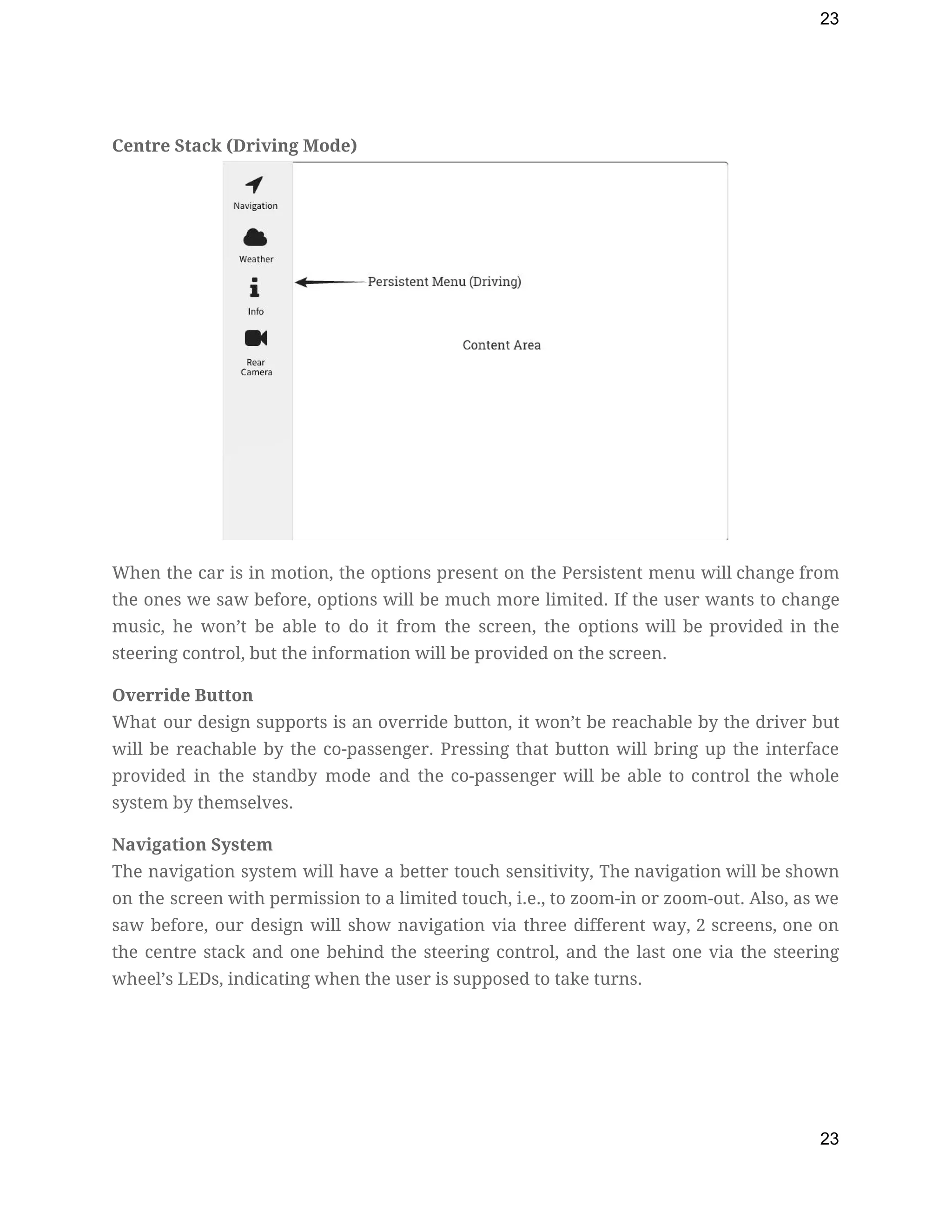
Centre Stack (Driving Mode) 
 
When the car is in motion, the options present on the Persistent menu will change from                               
the ones we saw before, options will be much more limited. If the user wants to change                                 
music, he won’t be able to do it from the screen, the options will be provided in the                                   
steering control, but the information will be provided on the screen. 
Override Button 
What our design supports is an override button, it won’t be reachable by the driver but                               
will be reachable by the co-passenger. Pressing that button will bring up the interface                           
provided in the standby mode and the co-passenger will be able to control the whole                             
system by themselves. 
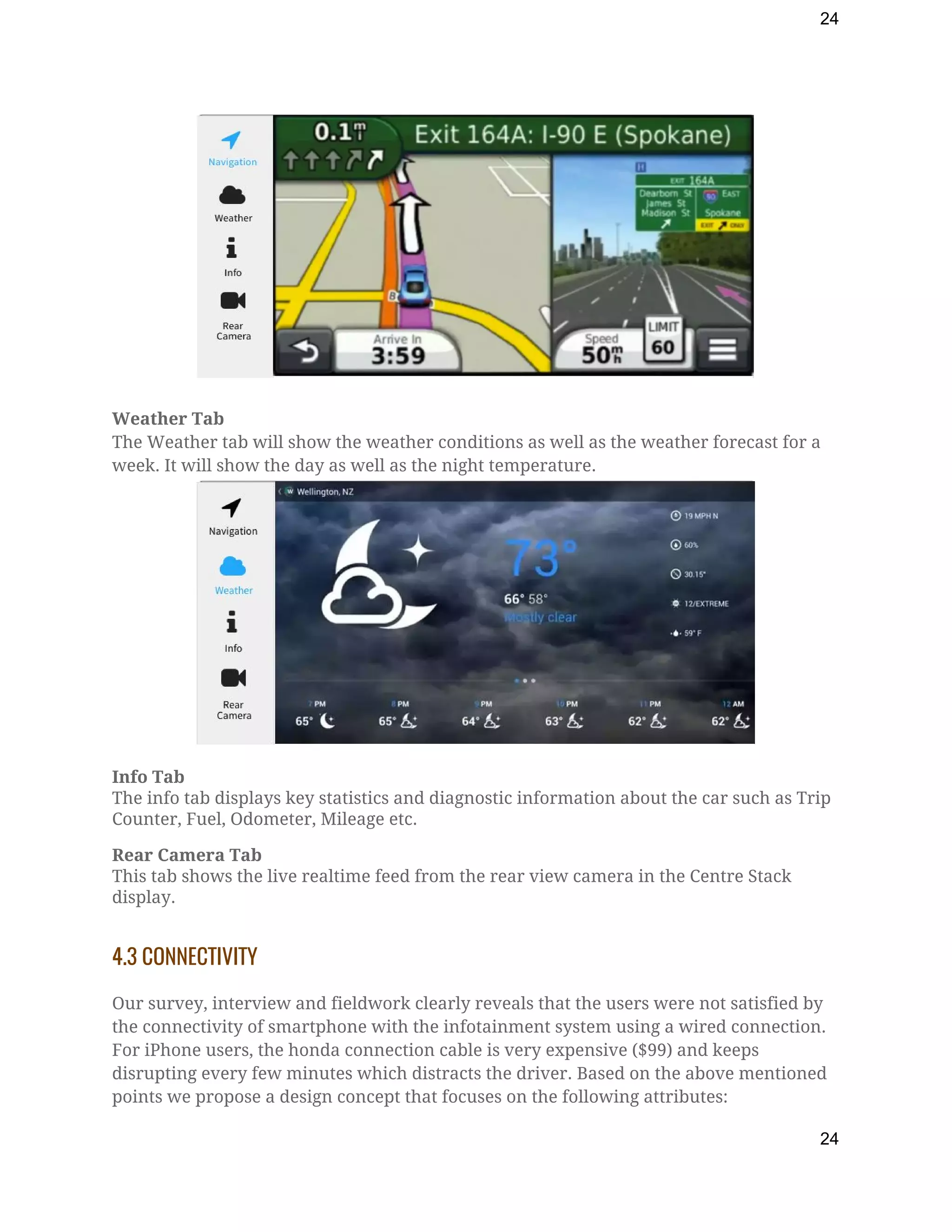
Navigation System 
The navigation system will have a better touch sensitivity, The navigation will be shown                           
on the screen with permission to a limited touch, i.e., to zoom-in or zoom-out. Also, as we                                 
saw before, our design will show navigation via three different way, 2 screens, one on                             
the centre stack and one behind the steering control, and the last one via the steering                               
wheel’s LEDs, indicating when the user is supposed to take turns. 
 
23
24
Weather Tab 
The Weather tab will show the weather conditions as well as the weather forecast for a 
week. It will show the day as well as the night temperature. 
 
Info Tab 
The info tab displays key statistics and diagnostic information about the car such as Trip 
Counter, Fuel, Odometer, Mileage etc. 
Rear Camera Tab 
This tab shows the live realtime feed from the rear view camera in the Centre Stack 
display. 
 
4.3 CONNECTIVITY 
 
Our survey, interview and fieldwork clearly reveals that the users were not satisfied by 
the connectivity of smartphone with the infotainment system using a wired connection. 
For iPhone users, the honda connection cable is very expensive ($99) and keeps 
disrupting every few minutes which distracts the driver. Based on the above mentioned 
points we propose a design concept that focuses on the following attributes: 
24
25
1. A foolproof wireless connectivity. 
2. No extra charges for the user. 
3. Better connectivity. 


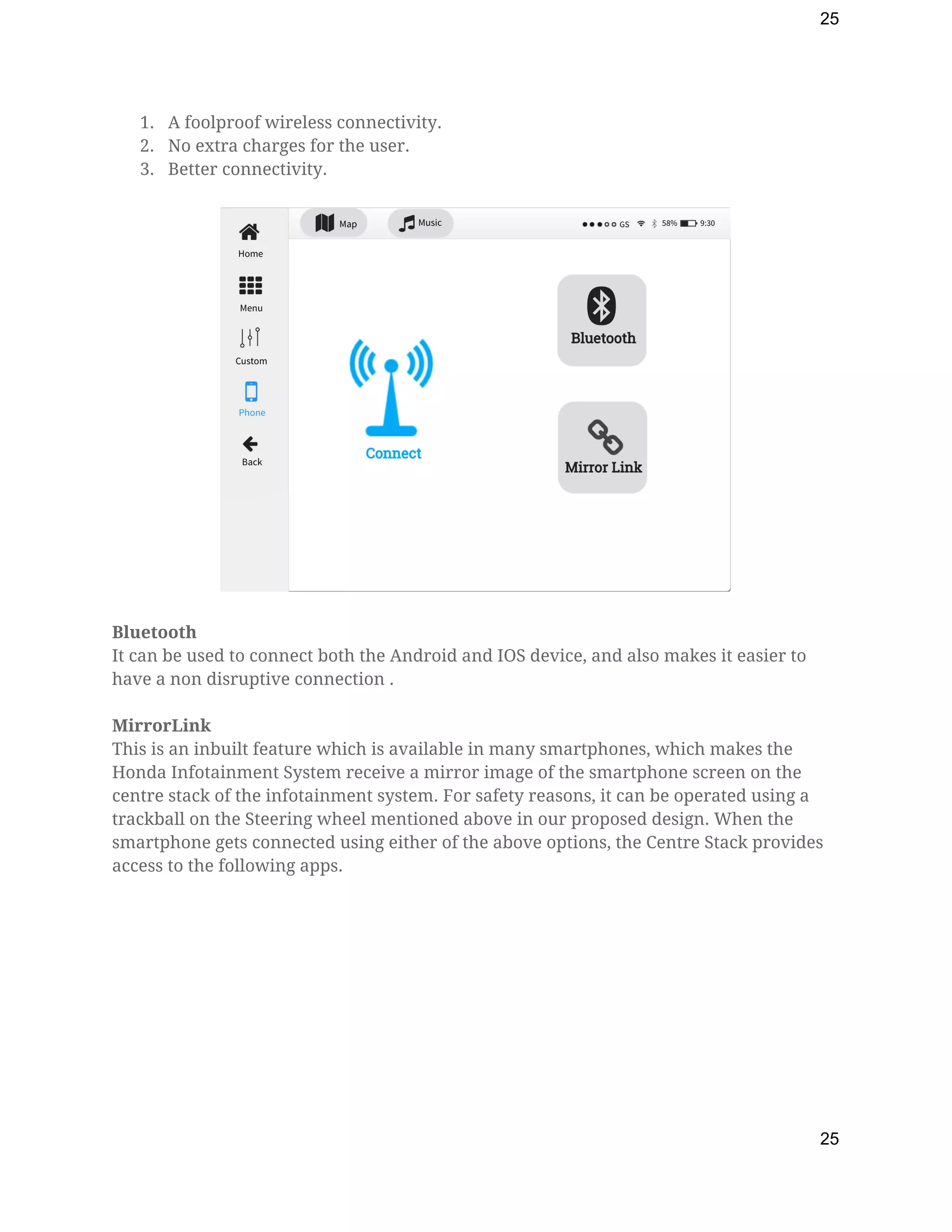
Bluetooth 
It can be used to connect both the Android and IOS device, and also makes it easier to 
have a non disruptive connection . 
 
MirrorLink 
This is an inbuilt feature which is available in many smartphones, which makes the 
Honda Infotainment System receive a mirror image of the smartphone screen on the 
centre stack of the infotainment system. For safety reasons, it can be operated using a 
trackball on the Steering wheel mentioned above in our proposed design. When the 
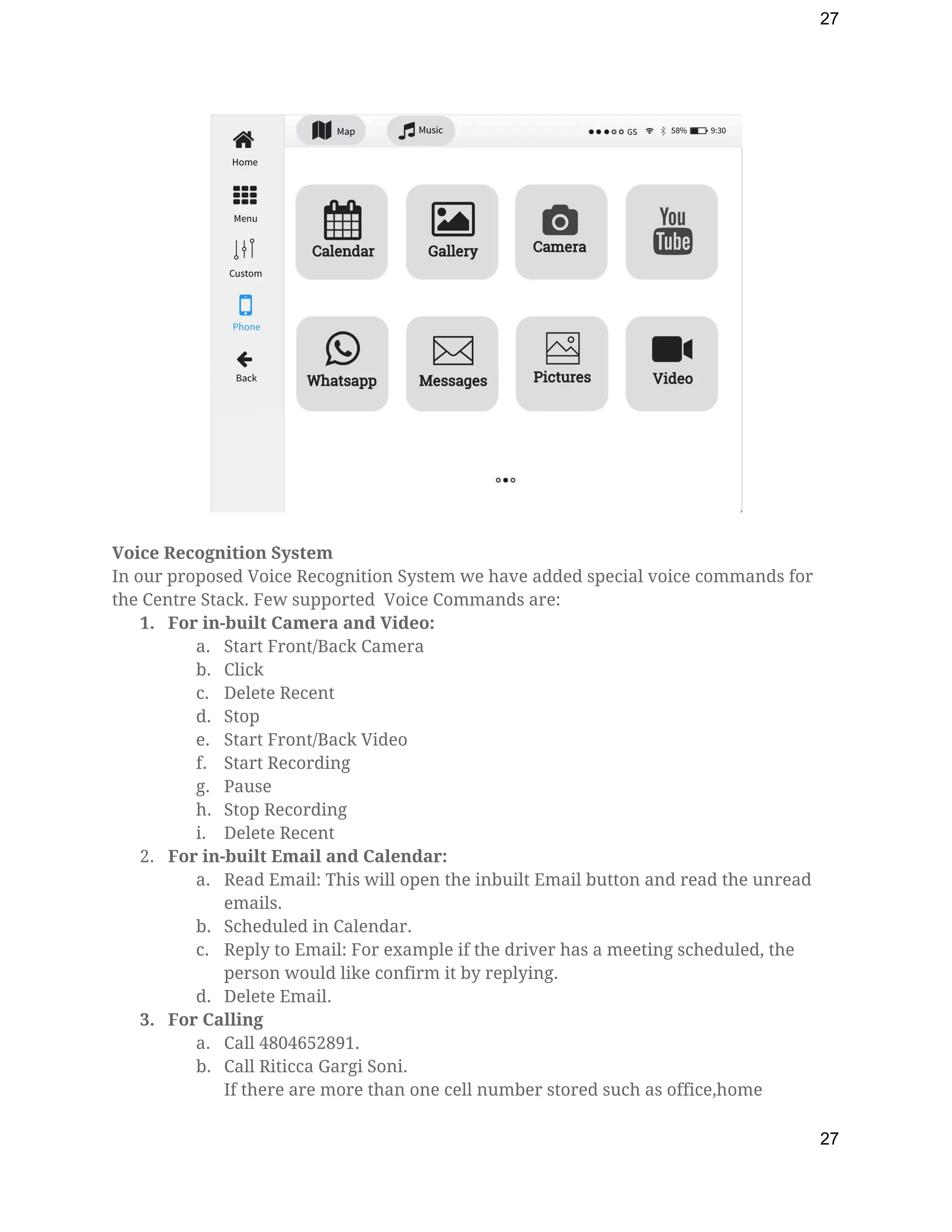
smartphone gets connected using either of the above options, the Centre Stack provides 
access to the following apps.  
 
25
26
 
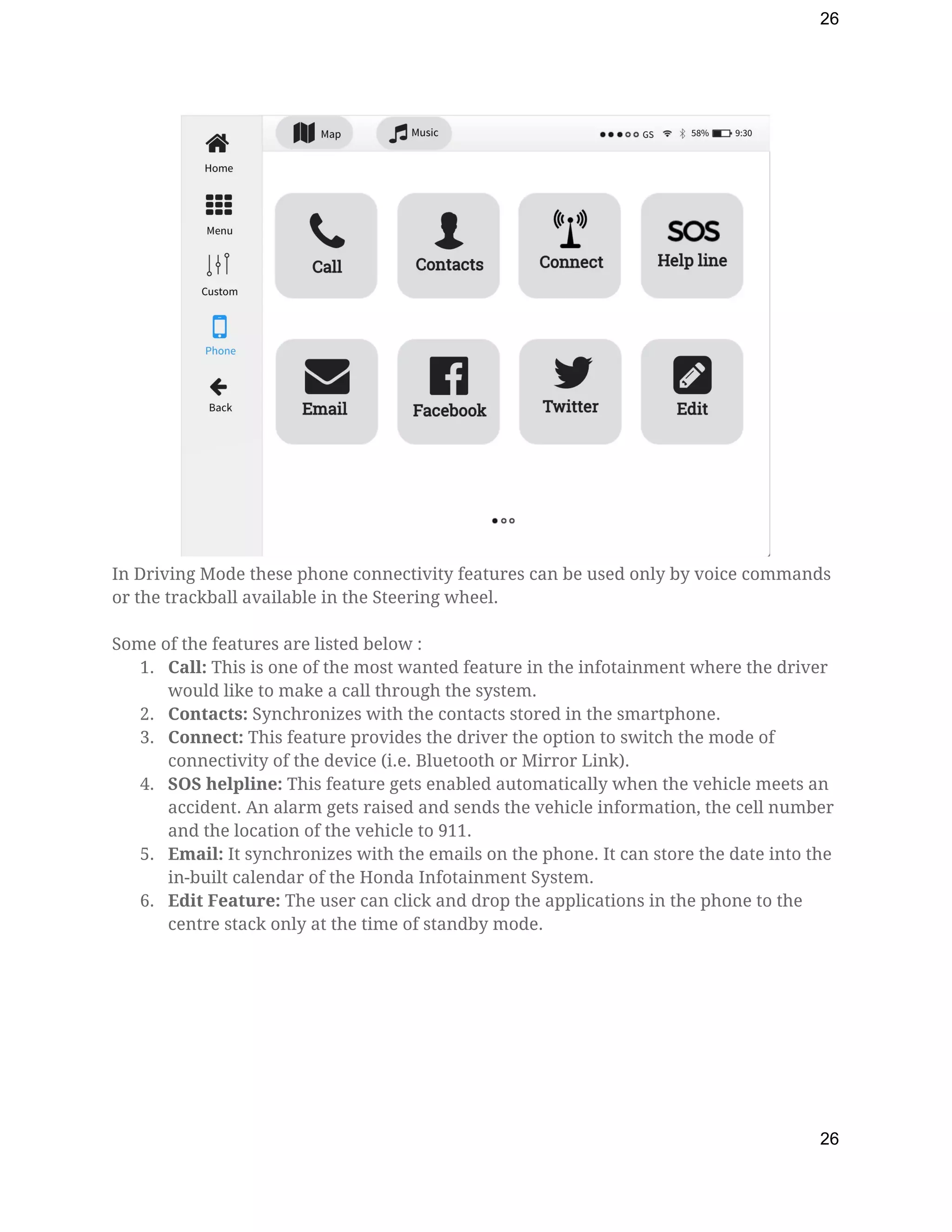
In Driving Mode these phone connectivity features can be used only by voice commands 
or the trackball available in the Steering wheel. 
  
Some of the features are listed below : 
1. Call: ​This is one of the most wanted feature in the infotainment where the driver 
would like to make a call through the system. 
2. Contacts: ​Synchronizes with the contacts stored in the smartphone. 
3. Connect:​ This feature provides the driver the option to switch the mode of 
connectivity of the device (i.e. Bluetooth or Mirror Link). 
4. SOS helpline: ​This feature gets enabled automatically when the vehicle meets an 
accident. An alarm gets raised and sends the vehicle information, the cell number 
and the location of the vehicle to 911. 
5. Email: ​It synchronizes with the emails on the phone. It can store the date into the 
in-built calendar of the Honda Infotainment System. 
6. Edit Feature: ​The user can click and drop the applications in the phone to the 
centre stack only at the time of standby mode.  
26
27
 
 
Voice Recognition System 
In our proposed Voice Recognition System we have added special voice commands for 
the Centre Stack. Few supported  Voice Commands are: 
1. For in-built Camera and Video: 
a. Start Front/Back Camera 
b. Click 
c. Delete Recent 
d. Stop 
e. Start Front/Back Video 
f. Start Recording 
g. Pause 
h. Stop Recording 
i. Delete Recent 
2. For in-built Email and Calendar: 
a. Read Email: This will open the inbuilt Email button and read the unread 
emails. 
b. Scheduled in Calendar. 
c. Reply to Email: For example if the driver has a meeting scheduled, the 
person would like confirm it by replying. 
d. Delete Email. 
3. For Calling 
a. Call 4804652891. 
b. Call Riticca Gargi Soni. 
If there are more than one cell number stored such as office,home 
27
28
numbers, the voice command will ask : Which number ? Home ...Pause… 
Office. 
c. Office: And you ring the call. 
d. Call Speed Dial 5: It calls the speed dial number stored in your phone 
through the system. 
4. For Phone Connectivity:​ If the voice commands are made active, it will respond 
to actions performed so that the driver can have a smooth driving experience. 
a. Phone is now charging This comes once a smartphone is plugged in for 
charging purpose. 
b. Phone is now connected: This comes up when the phone is either 
connected through mirror link or bluetooth. 
c. Bluetooth is now activated: When the user selects the bluetooth option to 
connect the smartphone to the infotainment system. 
5 REFERENCES 
1. http://blog.caasco.com/automotive/60-dashboard-symbols-and-what-they-mean/ 
2. http://www.consumerreports.org/cars-infotainment-system-brand-by-brand-guide
/ 
3. http://owners.honda.com/vehicles/information/2017/CR-V/features/blind-spot-infor
mation-system 
4. https://www.hondacarindia.com/areas/hondaconnect/ 
5. http://owners.honda.com/hondalink 
6. https://www.engadget.com/2014/10/03/hondas-in-car-connect-system-does-android
-its-own-way-hands-on/ 
7. https://www.youtube.com/watch?v=3__xnvJNrX0 
8. http://owners.honda.com/vehicles/information/2017/CR-V/features/blind-spot-infor
mation-system  
9. https://www.hondacarindia.com/areas/hondaconnect/ 
10. http://www.consumerreports.org/cars-infotainment-system-brand-by-brand-guide
/ 
11. https://en.wikipedia.org/wiki/In-car_entertainment 
12. http://www.drdobbs.com/embedded-systems/an-architecture-for-in-vehicle-infotai
nm/222600438?pgno=1 
13. http://www.autoguide.com/auto-news/2014/09/hondalink.html 
 
28

Human Computer Interaction - Final Report of a concept Car Infotainment System