How (and why)
to write memory-efficient code?
JAX Online 2020 conference
Ram Lakshmanan
Architect: GCeasy.io, fastThread.io, HeapHero.io
https://tinyurl.com/y3q5j5oj
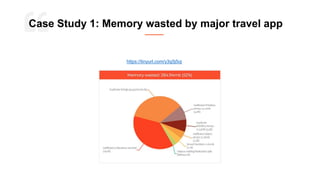
Case Study 1: Memory wasted by major travel app
https://dzone.com/articles/memory-wasted-by-spring-boot-application
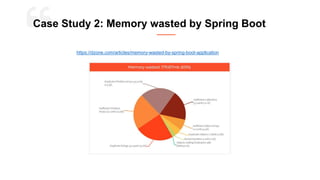
Case Study 2: Memory wasted by Spring Boot
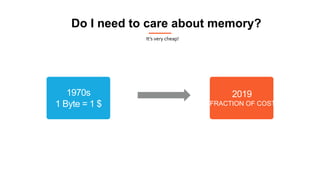
Do I need to care about memory?
It’s very cheap!
1970s
1 Byte = 1 $
2019
FRACTION OF COST
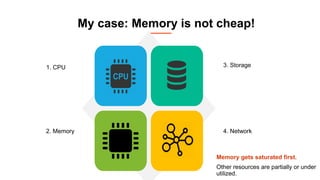
My case: Memory is not cheap!
Memory gets saturated first.
Other resources are partially or under
utilized.
3. Storage
4. Network
1. CPU
2. Memory
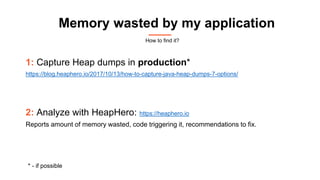
Memory wasted by my application
1: Capture Heap dumps in production*
https://blog.heaphero.io/2017/10/13/how-to-capture-java-heap-dumps-7-options/
2: Analyze with HeapHero: https://heaphero.io
Reports amount of memory wasted, code triggering it, recommendations to fix.
* - if possible
How to find it?
Inefficient Collections
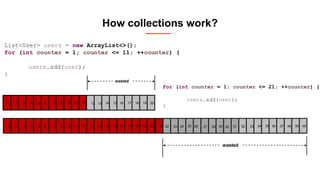
How collections work?
List<User> users = new ArrayList<>();
users.add(user);
2 54 6 7 8 1093
wasted
11
ArrayList underlyingly maintains
Object[]
initial capacity = 10
How collections work?
1 2 54 6 7 8 1093
wasted
List<User> users = new ArrayList<>();
for (int counter = 1; counter <= 11; ++counter) {
users.add(user);
}
1 2 54 6 7 8 1093 11 12 1514 17 18 201913 16
1 2 54 6 7 8 93 11 12 1514 17 18 201913 16 21 22 2524 26 27 28 2923 31 32 3534 37 38 403933 3630
wasted
10
for (int counter = 1; counter <= 21; ++counter) {
users.add(user);
}
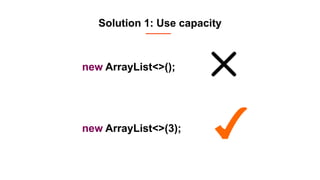
Solution 1: Use capacity
new ArrayList<>(3);
new ArrayList<>();
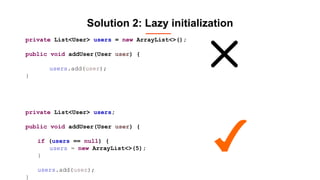
Solution 2: Lazy initialization
private List<User> users = new ArrayList<>();
public void addUser(User user) {
users.add(user);
}
private List<User> users;
public void addUser(User user) {
if (users == null) {
users = new ArrayList<>(5);
}
users.add(user);
}
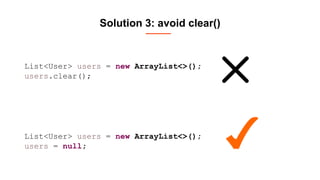
Solution 3: avoid clear()
List<User> users = new ArrayList<>();
users = null;
List<User> users = new ArrayList<>();
users.clear();
Duplicate Strings
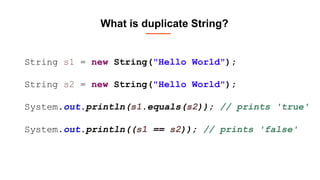
What is duplicate String?
String s1 = new String("Hello World");
String s2 = new String("Hello World");
System.out.println(s1.equals(s2)); // prints 'true'
System.out.println((s1 == s2)); // prints 'false'
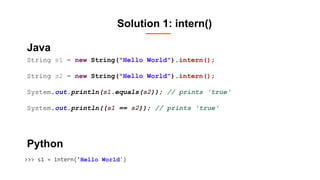
Solution 1: intern()
String s1 = new String("Hello World").intern();
String s2 = new String("Hello World").intern();
System.out.println(s1.equals(s2)); // prints 'true'
System.out.println((s1 == s2)); // prints 'true'
>>> s1 = intern(’Hello World')
Java
Python
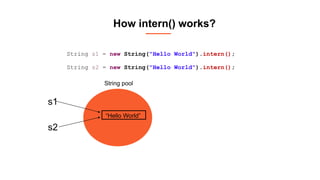
How intern() works?
“Hello World”
s1
s2
String pool
String s1 = new String("Hello World").intern();
String s2 = new String("Hello World").intern();
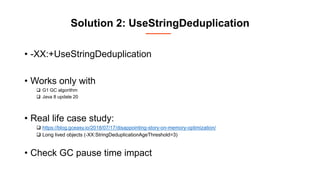
Solution 2: UseStringDeduplication
• -XX:+UseStringDeduplication
• Works only with
 G1 GC algorithm
 Java 8 update 20
• Real life case study:
 https://blog.gceasy.io/2018/07/17/disappointing-story-on-memory-optimization/
 Long lived objects (-XX:StringDeduplicationAgeThreshold=3)
• Check GC pause time impact
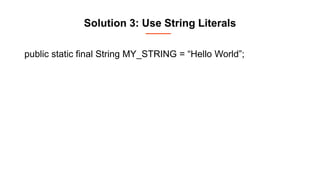
Solution 3: Use String Literals
public static final String MY_STRING = “Hello World”;
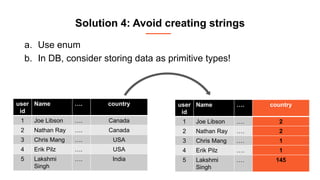
Solution 4: Avoid creating strings
a. Use enum
b. In DB, consider storing data as primitive types!
user
id
Name …. country
1 Joe Libson …. Canada
2 Nathan Ray …. Canada
3 Chris Mang …. USA
4 Erik Pilz …. USA
5 Lakshmi
Singh
…. India
user
id
Name …. country
1 Joe Libson …. 2
2 Nathan Ray …. 2
3 Chris Mang …. 1
4 Erik Pilz …. 1
5 Lakshmi
Singh
…. 145
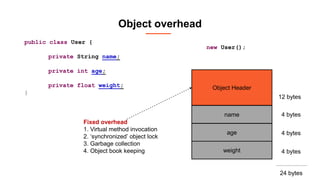
Object Overhead
public class User {
private String name;
private int age;
private float weight;
}
new User();
Object Header
name
age
weight
12 bytes
4 bytes
4 bytes
4 bytes
Fixed overhead
1. Virtual method invocation
2. ‘synchronized’ object lock
3. Garbage collection
4. Object book keeping
24 bytes
Object overhead
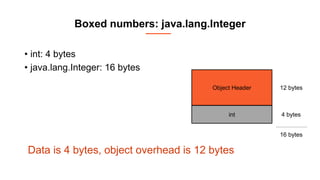
Boxed numbers: java.lang.Integer
• int: 4 bytes
• java.lang.Integer: 16 bytes
Data is 4 bytes, object overhead is 12 bytes
Object Header
int
12 bytes
4 bytes
16 bytes
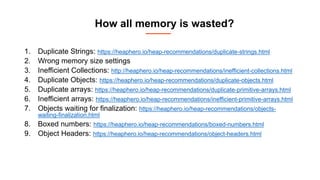
How all memory is wasted?
1. Duplicate Strings: https://heaphero.io/heap-recommendations/duplicate-strings.html
2. Wrong memory size settings
3. Inefficient Collections: http://heaphero.io/heap-recommendations/inefficient-collections.html
4. Duplicate Objects: https://heaphero.io/heap-recommendations/duplicate-objects.html
5. Duplicate arrays: https://heaphero.io/heap-recommendations/duplicate-primitive-arrays.html
6. Inefficient arrays: https://heaphero.io/heap-recommendations/inefficient-primitive-arrays.html
7. Objects waiting for finalization: https://heaphero.io/heap-recommendations/objects-
waiting-finalization.html
8. Boxed numbers: https://heaphero.io/heap-recommendations/boxed-numbers.html
9. Object Headers: https://heaphero.io/heap-recommendations/object-headers.html
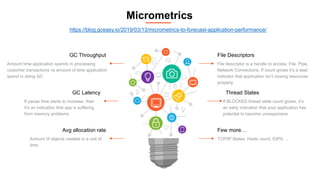
File Descriptors
File descriptor is a handle to access: File, Pipe,
Network Connections. If count grows it’s a lead
indicator that application isn’t closing resources
properly.
Few more…
TCP/IP States, Hosts count, IOPS, ..
Thread States
If BLOCKED thread state count grows, it’s
an early indication that your application has
potential to become unresponsive
GC Throughput
Amount time application spends in processing
customer transactions vs amount of time application
spend in doing GC
Avg allocation rate
Amount of objects created in a unit of
time
GC Latency
If pause time starts to increase, then
it’s an indication that app is suffering
from memory problems
Micrometrics
https://blog.gceasy.io/2019/03/13/micrometrics-to-forecast-application-performance/
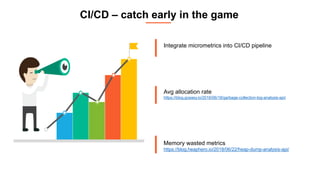
CI/CD – catch early in the game
Integrate micrometrics into CI/CD pipeline
Avg allocation rate
https://blog.gceasy.io/2016/06/18/garbage-collection-log-analysis-api/
Memory wasted metrics
https://blog.heaphero.io/2018/06/22/heap-dump-analysis-api/
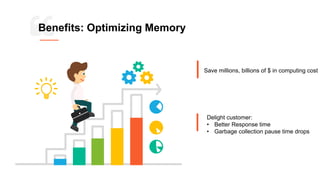
Benefits: Optimizing Memory
Save millions, billions of $ in computing cost
Delight customer:
• Better Response time
• Garbage collection pause time drops
Fascinating to read
Thank You my Friends!
Ram Lakshmanan
ram@tier1app.com
@tier1app
linkedin.com/company/gceasy
This deck will be published in: https://blog.heaphero.io

How & why-memory-efficient?

  • 1.
    How (and why) towrite memory-efficient code? JAX Online 2020 conference Ram Lakshmanan Architect: GCeasy.io, fastThread.io, HeapHero.io
  • 2.
    https://tinyurl.com/y3q5j5oj Case Study 1:Memory wasted by major travel app
  • 3.
  • 4.
    Do I needto care about memory? It’s very cheap! 1970s 1 Byte = 1 $ 2019 FRACTION OF COST
  • 5.
    My case: Memoryis not cheap! Memory gets saturated first. Other resources are partially or under utilized. 3. Storage 4. Network 1. CPU 2. Memory
  • 6.
    Memory wasted bymy application 1: Capture Heap dumps in production* https://blog.heaphero.io/2017/10/13/how-to-capture-java-heap-dumps-7-options/ 2: Analyze with HeapHero: https://heaphero.io Reports amount of memory wasted, code triggering it, recommendations to fix. * - if possible How to find it?
  • 7.
  • 8.
    How collections work? List<User>users = new ArrayList<>(); users.add(user); 2 54 6 7 8 1093 wasted 11 ArrayList underlyingly maintains Object[] initial capacity = 10
  • 9.
    How collections work? 12 54 6 7 8 1093 wasted List<User> users = new ArrayList<>(); for (int counter = 1; counter <= 11; ++counter) { users.add(user); } 1 2 54 6 7 8 1093 11 12 1514 17 18 201913 16 1 2 54 6 7 8 93 11 12 1514 17 18 201913 16 21 22 2524 26 27 28 2923 31 32 3534 37 38 403933 3630 wasted 10 for (int counter = 1; counter <= 21; ++counter) { users.add(user); }
  • 10.
    Solution 1: Usecapacity new ArrayList<>(3); new ArrayList<>();
  • 11.
    Solution 2: Lazyinitialization private List<User> users = new ArrayList<>(); public void addUser(User user) { users.add(user); } private List<User> users; public void addUser(User user) { if (users == null) { users = new ArrayList<>(5); } users.add(user); }
  • 12.
    Solution 3: avoidclear() List<User> users = new ArrayList<>(); users = null; List<User> users = new ArrayList<>(); users.clear();
  • 13.
  • 14.
    What is duplicateString? String s1 = new String("Hello World"); String s2 = new String("Hello World"); System.out.println(s1.equals(s2)); // prints 'true' System.out.println((s1 == s2)); // prints 'false'
  • 15.
    Solution 1: intern() Strings1 = new String("Hello World").intern(); String s2 = new String("Hello World").intern(); System.out.println(s1.equals(s2)); // prints 'true' System.out.println((s1 == s2)); // prints 'true' >>> s1 = intern(’Hello World') Java Python
  • 16.
    How intern() works? “HelloWorld” s1 s2 String pool String s1 = new String("Hello World").intern(); String s2 = new String("Hello World").intern();
  • 17.
    Solution 2: UseStringDeduplication •-XX:+UseStringDeduplication • Works only with  G1 GC algorithm  Java 8 update 20 • Real life case study:  https://blog.gceasy.io/2018/07/17/disappointing-story-on-memory-optimization/  Long lived objects (-XX:StringDeduplicationAgeThreshold=3) • Check GC pause time impact
  • 18.
    Solution 3: UseString Literals public static final String MY_STRING = “Hello World”;
  • 19.
    Solution 4: Avoidcreating strings a. Use enum b. In DB, consider storing data as primitive types! user id Name …. country 1 Joe Libson …. Canada 2 Nathan Ray …. Canada 3 Chris Mang …. USA 4 Erik Pilz …. USA 5 Lakshmi Singh …. India user id Name …. country 1 Joe Libson …. 2 2 Nathan Ray …. 2 3 Chris Mang …. 1 4 Erik Pilz …. 1 5 Lakshmi Singh …. 145
  • 20.
  • 21.
    public class User{ private String name; private int age; private float weight; } new User(); Object Header name age weight 12 bytes 4 bytes 4 bytes 4 bytes Fixed overhead 1. Virtual method invocation 2. ‘synchronized’ object lock 3. Garbage collection 4. Object book keeping 24 bytes Object overhead
  • 22.
    Boxed numbers: java.lang.Integer •int: 4 bytes • java.lang.Integer: 16 bytes Data is 4 bytes, object overhead is 12 bytes Object Header int 12 bytes 4 bytes 16 bytes
  • 23.
    How all memoryis wasted? 1. Duplicate Strings: https://heaphero.io/heap-recommendations/duplicate-strings.html 2. Wrong memory size settings 3. Inefficient Collections: http://heaphero.io/heap-recommendations/inefficient-collections.html 4. Duplicate Objects: https://heaphero.io/heap-recommendations/duplicate-objects.html 5. Duplicate arrays: https://heaphero.io/heap-recommendations/duplicate-primitive-arrays.html 6. Inefficient arrays: https://heaphero.io/heap-recommendations/inefficient-primitive-arrays.html 7. Objects waiting for finalization: https://heaphero.io/heap-recommendations/objects- waiting-finalization.html 8. Boxed numbers: https://heaphero.io/heap-recommendations/boxed-numbers.html 9. Object Headers: https://heaphero.io/heap-recommendations/object-headers.html
  • 24.
    File Descriptors File descriptoris a handle to access: File, Pipe, Network Connections. If count grows it’s a lead indicator that application isn’t closing resources properly. Few more… TCP/IP States, Hosts count, IOPS, .. Thread States If BLOCKED thread state count grows, it’s an early indication that your application has potential to become unresponsive GC Throughput Amount time application spends in processing customer transactions vs amount of time application spend in doing GC Avg allocation rate Amount of objects created in a unit of time GC Latency If pause time starts to increase, then it’s an indication that app is suffering from memory problems Micrometrics https://blog.gceasy.io/2019/03/13/micrometrics-to-forecast-application-performance/
  • 25.
    CI/CD – catchearly in the game Integrate micrometrics into CI/CD pipeline Avg allocation rate https://blog.gceasy.io/2016/06/18/garbage-collection-log-analysis-api/ Memory wasted metrics https://blog.heaphero.io/2018/06/22/heap-dump-analysis-api/
  • 26.
    Benefits: Optimizing Memory Savemillions, billions of $ in computing cost Delight customer: • Better Response time • Garbage collection pause time drops
  • 27.
  • 28.
    Thank You myFriends! Ram Lakshmanan ram@tier1app.com @tier1app linkedin.com/company/gceasy This deck will be published in: https://blog.heaphero.io