JOOMLA! PERFORMANCE
ON STEROIDS
Tenko Nikolov
SiteGround CEO
Marian Marinov
1H CEO
DOUBLE SESSION
HOW TO MAKE YOUR JOOMLA LOAD
FASTER
Level: Beginner to intermediate
Presented by: Tenko
PART 1
SETUP JOOMLA FOR HIGH-PERFORMANCE
(OR JOOMLA AND SERVER SIDE CACHING)
Level: Advanced
Presented by: Tenko & Marian
PART 2
Ask us
questions
at
anytime!
INTERACTIVE SESSIONS
A LITTLE BIT ABOU
T US
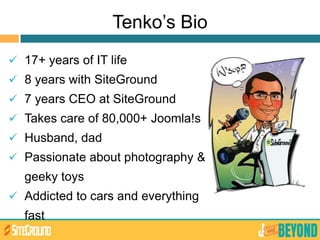
Tenko’s Bio
 17+ years of IT life
 8 years with SiteGround
 7 years CEO at SiteGround
 Takes care of 80,000+ Joomla!s
 Husband, dad
 Passionate about photography &
geeky toys
 Addicted to cars and everything
fast
Marian’s Bio
 Sysadmin since 1996
 CEO and Co-Founder of 1H Ltd. and
mastermind behind 1H Hive
 Computer science teacher at Sofia
University since 2007
 Coordinator of OpenFest (Bulgaria's
biggest FOSS conference) since 2005
 Regular speaker at FOSS conferences
in the Balkan region
 Devs/Sysadmins who love to ssh and do everything on
their own – cloud/vps/dedicated server owners
 Large/high traffic Joomla websites owners
 Multiple Joomla websites owners
 Performance Geeks
WHO CARES ABOUT
PERFORMANCE?
EVERYONE!
WHO SHOULD CARE?
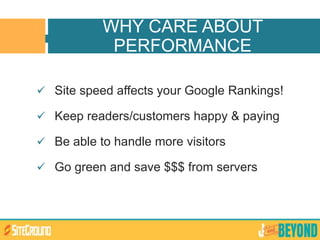
 Site speed affects your Google Rankings!
 Keep readers/customers happy & paying
 Be able to handle more visitors
 Go green and save $$$ from servers
WHY CARE ABOUT
PERFORMANCE
Faster Joomla = Optimizations
KEEP
CALM
IT’S NOT
ROCKET
SCIENCE
PART 1
Let’s get the basics
done
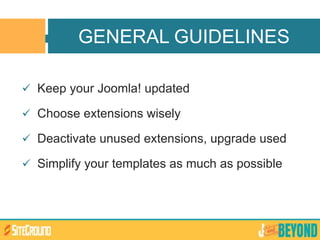
 Keep your Joomla! updated
 Choose extensions wisely
 Deactivate unused extensions, upgrade used
 Simplify your templates as much as possible
GENERAL GUIDELINES
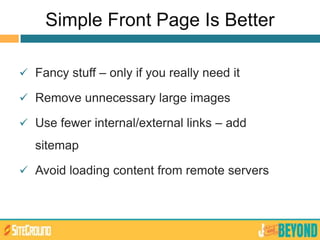
Simple Front Page Is Better
 Fancy stuff – only if you really need it
 Remove unnecessary large images
 Use fewer internal/external links – add
sitemap
 Avoid loading content from remote servers
APPLICATION LEVEL
OPTIMIZATIONS
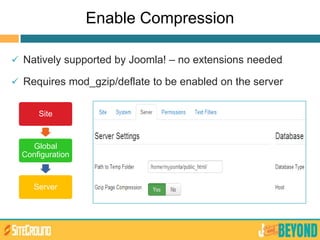
Enable Compression
 Natively supported by Joomla! – no extensions needed
 Requires mod_gzip/deflate to be enabled on the server
Site
Global
Configuration
Server
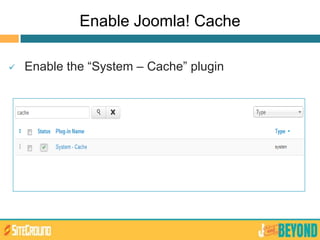
Enable Joomla! Cache
 Enable the “System – Cache” plugin
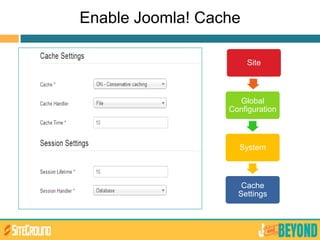
Enable Joomla! Cache
Site
Global
Configuration
System
Cache
Settings
Some .htaccess Magic
 Get the code:
http://goo.gl/ze09B
 How it works:
- Etag – Tells browsers that an image/unit does not need to be
reloaded
- Expires Headers – Set different expiration dates for various file
types
- AddOutputFilterByType DEFLATE – minifies the compiled HTML
source code
Some .htaccess Magic
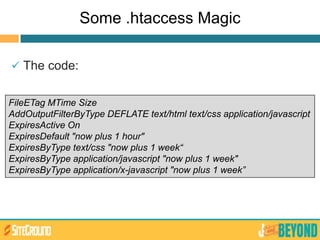
 The code:
FileETag MTime Size
AddOutputFilterByType DEFLATE text/html text/css application/javascript
ExpiresActive On
ExpiresDefault "now plus 1 hour"
ExpiresByType text/css "now plus 1 week“
ExpiresByType application/javascript "now plus 1 week"
ExpiresByType application/x-javascript "now plus 1 week”
More Optimizations: Images, CSS & JS
 Resize images – never upload 2560x1600 pictures
 Smush your images
 Minify and combine CSS and JS files
 Use image sprites
Sounds Nice, How Do I Begin?
 Use smush.it
 Photoshop/Fireworks
 Joomla! Extensions
Some Highly Rated Extensions
 JCH Optimize – Combines JS and CSS,
Combines images in sprites, Minify and Compress
 Jbetolo – same as above but + CDN support
 JotCache – improves the Joomla! built in Core
Cache
 Cache Cleaner – easily clean the cache from the
Joomla! admin panel
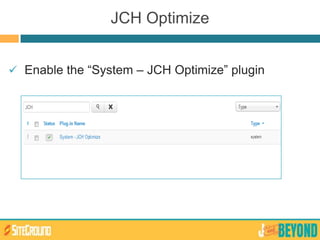
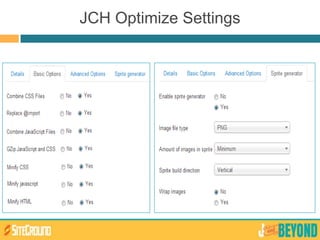
JCH Optimize
 Enable the “System – JCH Optimize” plugin
JCH Optimize Settings
Google mod_pagespeed
 An open-source Apache module - compress,
combine and cache
 Needs to be installed/configured by a System
Administrator
 Available on SiteGround servers
Check How’s Your Website Doing
 Google Page Speed Insights -
http://goo.gl/zPkxx
 YSlow - http://goo.gl/qIios
 GTmetrix - http://gtmetrix.com/
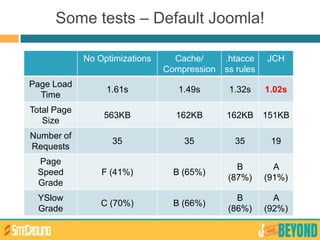
Some tests – Default Joomla!
No Optimizations Cache/
Compression
.htacce
ss rules
JCH
Page Load
Time
1.61s 1.49s 1.32s 1.02s
Total Page
Size
563KB 162KB 162KB 151KB
Number of
Requests
35 35 35 19
Page
Speed
Grade
F (41%) B (65%)
B
(87%)
A
(91%)
YSlow
Grade
C (70%) B (66%)
B
(86%)
A
(92%)
SERVER LEVEL
OPTIMIZATIONS
YOUR VISITORS
LOCATION
MATTERS!
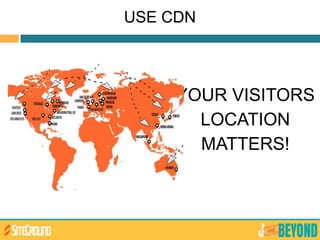
USE CDN
CDN Features
 CDN will make your website faster
 CDN will help avoid unneeded I/O on your hard
drives
 CDN will appeal to both Google and your visitors
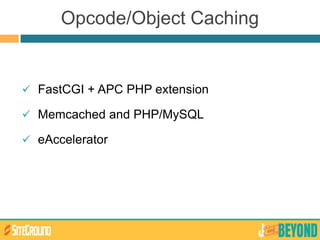
Opcode/Object Caching
 FastCGI + APC PHP extension
 Memcached and PHP/MySQL
 eAccelerator
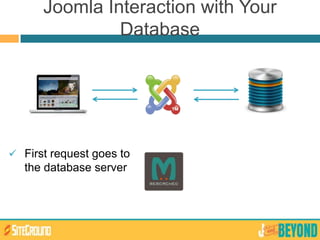
Joomla Interaction with Your
Database
 First request goes to
the database server
Object Caching
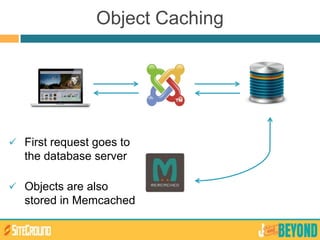
 First request goes to
the database server
 Objects are also
stored in Memcached
Object Caching
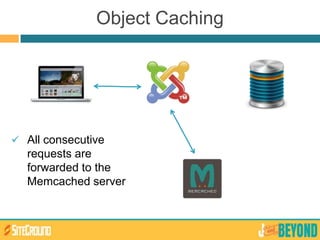
 All consecutive
requests are
forwarded to the
Memcached server
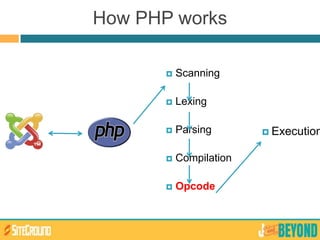
How PHP works
 Scanning
 Lexing
 Parsing
 Compilation
 Opcode
 Execution
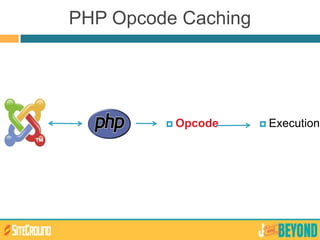
 Opcode  Execution
PHP Opcode Caching
Reverse Proxy Servers
 Custom PHP/MySQL
configuration
 Memcached/PHP APC
 Joomla! friendly reverse proxy
setup
Our Own Solution: The SUPERCACHER
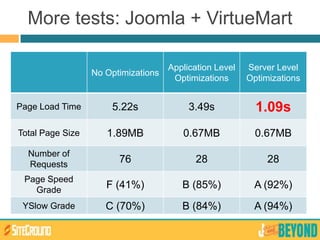
More tests: Joomla + VirtueMart
No Optimizations
Application Level
Optimizations
Server Level
Optimizations
Page Load Time 5.22s 3.49s 1.09s
Total Page Size 1.89MB 0.67MB 0.67MB
Number of
Requests
76 28 28
Page Speed
Grade
F (41%) B (85%) A (92%)
YSlow Grade C (70%) B (84%) A (94%)
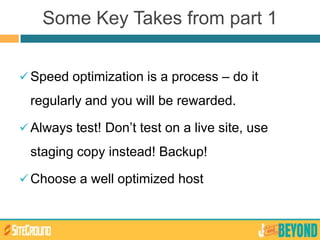
Some Key Takes from part 1
Speed optimization is a process – do it
regularly and you will be rewarded.
Always test! Don’t test on a live site, use
staging copy instead! Backup!
Choose a well optimized host
TAKE A BREAK
back in 5!
PART 2
Let’s get our hands
dirty
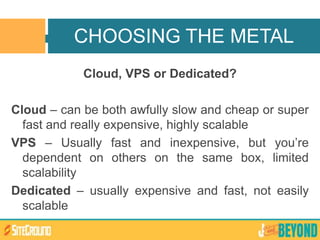
Cloud, VPS or Dedicated?
Cloud – can be both awfully slow and cheap or super
fast and really expensive, highly scalable
VPS – Usually fast and inexpensive, but you’re
dependent on others on the same box, limited
scalability
Dedicated – usually expensive and fast, not easily
scalable
CHOOSING THE METAL
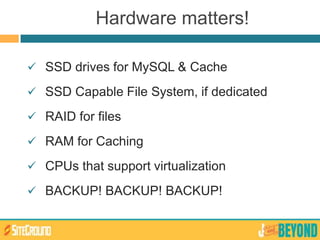
Hardware matters!
 SSD drives for MySQL & Cache
 SSD Capable File System, if dedicated
 RAID for files
 RAM for Caching
 CPUs that support virtualization
 BACKUP! BACKUP! BACKUP!
We need to install some software on it:
1. Web Server
2. MySQL
3. PHP with Cache
4. Memcached
5. Static and Reverse Proxy server
NOW THAT YOU HAVE YOUR
BOX
Web server choice
WEB SERVER CHOICE
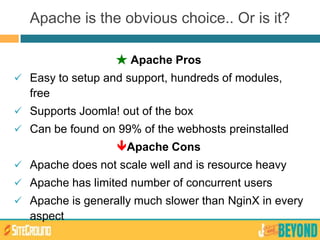
★ Apache Pros
 Easy to setup and support, hundreds of modules,
free
 Supports Joomla! out of the box
 Can be found on 99% of the webhosts preinstalled
Apache Cons
 Apache does not scale well and is resource heavy
 Apache has limited number of concurrent users
 Apache is generally much slower than NginX in every
aspect
Apache is the obvious choice.. Or is it?
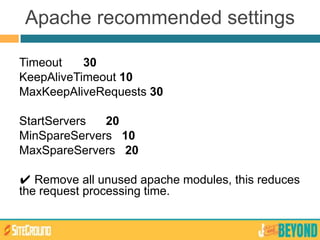
Timeout 30
KeepAliveTimeout 10
MaxKeepAliveRequests 30
StartServers 20
MinSpareServers 10
MaxSpareServers 20
✔ Remove all unused apache modules, this reduces
the request processing time.
Apache recommended settings
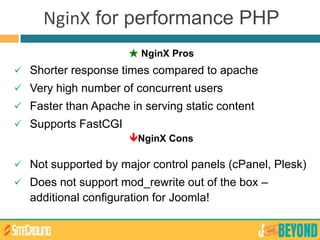
★ NginX Pros
 Shorter response times compared to apache
 Very high number of concurrent users
 Faster than Apache in serving static content
 Supports FastCGI
NginX Cons
 Not supported by major control panels (cPanel, Plesk)
 Does not support mod_rewrite out of the box –
additional configuration for Joomla!
NginX for performance PHP
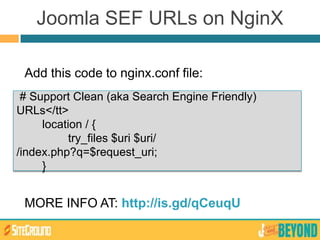
Joomla SEF URLs on NginX
Add this code to nginx.conf file:
MORE INFO AT: http://is.gd/qCeuqU
# Support Clean (aka Search Engine Friendly)
URLs</tt>
location / {
try_files $uri $uri/
/index.php?q=$request_uri;
}
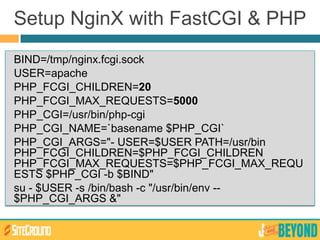
BIND=/tmp/nginx.fcgi.sock
USER=apache
PHP_FCGI_CHILDREN=20
PHP_FCGI_MAX_REQUESTS=5000
PHP_CGI=/usr/bin/php-cgi
PHP_CGI_NAME=`basename $PHP_CGI`
PHP_CGI_ARGS="- USER=$USER PATH=/usr/bin
PHP_FCGI_CHILDREN=$PHP_FCGI_CHILDREN
PHP_FCGI_MAX_REQUESTS=$PHP_FCGI_MAX_REQU
ESTS $PHP_CGI -b $BIND"
su - $USER -s /bin/bash -c "/usr/bin/env --
$PHP_CGI_ARGS &"
Setup NginX with FastCGI & PHP
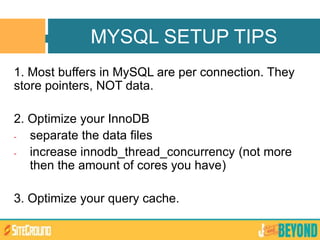
1. Most buffers in MySQL are per connection. They
store pointers, NOT data.
2. Optimize your InnoDB
- separate the data files
- increase innodb_thread_concurrency (not more
then the amount of cores you have)
3. Optimize your query cache.
MYSQL SETUP TIPS
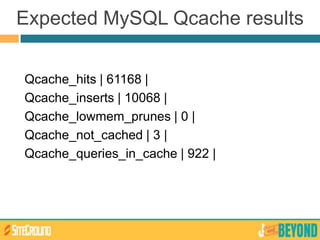
Expected MySQL Qcache results
Qcache_hits | 61168 |
Qcache_inserts | 10068 |
Qcache_lowmem_prunes | 0 |
Qcache_not_cached | 3 |
Qcache_queries_in_cache | 922 |
LET’S MAKE PHP FLY
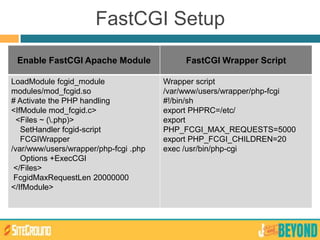
FastCGI Setup
Enable FastCGI Apache Module FastCGI Wrapper Script
LoadModule fcgid_module
modules/mod_fcgid.so
# Activate the PHP handling
<IfModule mod_fcgid.c>
<Files ~ (.php)>
SetHandler fcgid-script
FCGIWrapper
/var/www/users/wrapper/php-fcgi .php
Options +ExecCGI
</Files>
FcgidMaxRequestLen 20000000
</IfModule>
Wrapper script
/var/www/users/wrapper/php-fcgi
#!/bin/sh
export PHPRC=/etc/
export
PHP_FCGI_MAX_REQUESTS=5000
export PHP_FCGI_CHILDREN=20
exec /usr/bin/php-cgi
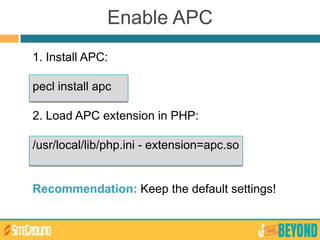
1. Install APC:
pecl install apc
2. Load APC extension in PHP:
/usr/local/lib/php.ini - extension=apc.so
Recommendation: Keep the default settings!
Enable APC
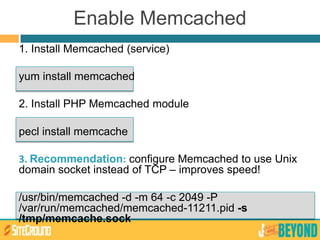
Enable Memcached
1. Install Memcached (service)
yum install memcached
2. Install PHP Memcached module
pecl install memcache
3. Recommendation: configure Memcached to use Unix
domain socket instead of TCP – improves speed!
/usr/bin/memcached -d -m 64 -c 2049 -P
/var/run/memcached/memcached-11211.pid -s
/tmp/memcache.sock
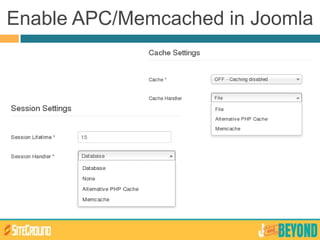
Enable APC/Memcached in Joomla
Joomla Patch for Unix Socket Connecti
ons
Edit the following file:
libraries/joomla/cache/storage/memcache.php
Change the code on lines 86-88 from
self::$_db->addServer($server['host'], $server['port'], $this-
>_persistent);
$memcachetest = @self::$_db->connect($server['host'],
$server['port']);
To:
self::$_db->addServer('unix:///tmp/memcache.sock', 0);
$memcachetest = @self::$_db-
>connect('unix:///tmp/memcache.sock', 0);
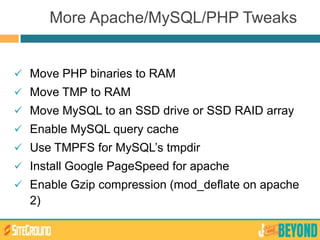
 Move PHP binaries to RAM
 Move TMP to RAM
 Move MySQL to an SSD drive or SSD RAID array
 Enable MySQL query cache
 Use TMPFS for MySQL’s tmpdir
 Install Google PageSpeed for apache
 Enable Gzip compression (mod_deflate on apache
2)
More Apache/MySQL/PHP Tweaks
EVEN BETTER
PERFORMANCE?
 Also known as Reverse HTTP Proxy
 Install it in front of any server that speaks HTTP
 Blazing fast – usually speeds up 300-1000x
 Performance is usually bound by the speed of
LAN
 Free, Open Source software
Varnish - The ultimate web app acceler
ator
 Can be harder to setup and configure than NginX
 You still need Apache (or NginX, varnish does not
know PHP)
 Dramatic performance increase – only when
caching dynamic content
 Caching dynamic content might lead to
unexpected troubles!!! Cache should be properly
invalidated!!!
Varnish Cons
Varnish VCL?
 Exclude non-cacheable pages:
• registration form
• administrator
• installation folder
 Set objects expiration time
Sample Varnish Joomla VCL
joomla.vcl:
# Bypass Varnish if the request is to the registration form
if (req.url ~ "task=registration.register" || req.url ~ "view=registration") {
return(pipe);
}
# Never cache administrator/installation
if (req.url ~ "/administrator" || req.url ~ "/installation") {
return (pass);
}
return (lookup);
----
sub vcl_recv {
set req.backend = default;
include "joomla.vcl";
if (req.url ~ ".(png|gif|jpg|swf|css|js)([?].*)?$") {
return (lookup);
}
How we tested?
 We use Siege - http://www.joedog.org/siege-
home/
 Siege command: siege -b -t 60S -f urls.txt -c 20
 We use 20 number of simultaneous connections
 We use a predefined list of URLs – all URLs from
the default Joomla main page + sample data
 We measure the number of hits taken for 60
seconds
TEST THE OPTIMIZATIONS
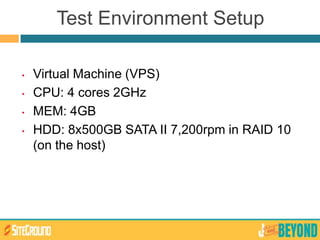
Test Environment Setup
• Virtual Machine (VPS)
• CPU: 4 cores 2GHz
• MEM: 4GB
• HDD: 8x500GB SATA II 7,200rpm in RAID 10
(on the host)
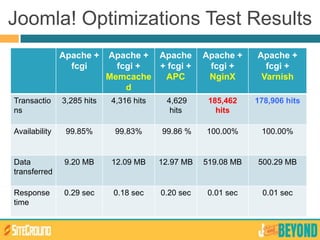
Joomla! Optimizations Test Results
Apache +
fcgi
Apache +
fcgi +
Memcache
d
Apache
+ fcgi +
APC
Apache +
fcgi +
NginX
Apache +
fcgi +
Varnish
Transactio
ns
3,285 hits 4,316 hits 4,629
hits
185,462
hits
178,906 hits
Availability 99.85% 99.83% 99.86 % 100.00% 100.00%
Data
transferred
9.20 MB 12.09 MB 12.97 MB 519.08 MB 500.29 MB
Response
time
0.29 sec 0.18 sec 0.20 sec 0.01 sec 0.01 sec
QUESTION
S TIME
THANK YOU!
Tenko Nikolov
tenko@siteground.com
@tnikolov
Marian Marinov
mm@1h.com

Joomla! Performance on Steroids

  • 1.
    JOOMLA! PERFORMANCE ON STEROIDS TenkoNikolov SiteGround CEO Marian Marinov 1H CEO
  • 2.
  • 3.
    HOW TO MAKEYOUR JOOMLA LOAD FASTER Level: Beginner to intermediate Presented by: Tenko PART 1
  • 4.
    SETUP JOOMLA FORHIGH-PERFORMANCE (OR JOOMLA AND SERVER SIDE CACHING) Level: Advanced Presented by: Tenko & Marian PART 2
  • 5.
  • 6.
    A LITTLE BITABOU T US
  • 7.
    Tenko’s Bio  17+years of IT life  8 years with SiteGround  7 years CEO at SiteGround  Takes care of 80,000+ Joomla!s  Husband, dad  Passionate about photography & geeky toys  Addicted to cars and everything fast
  • 8.
    Marian’s Bio  Sysadminsince 1996  CEO and Co-Founder of 1H Ltd. and mastermind behind 1H Hive  Computer science teacher at Sofia University since 2007  Coordinator of OpenFest (Bulgaria's biggest FOSS conference) since 2005  Regular speaker at FOSS conferences in the Balkan region
  • 9.
     Devs/Sysadmins wholove to ssh and do everything on their own – cloud/vps/dedicated server owners  Large/high traffic Joomla websites owners  Multiple Joomla websites owners  Performance Geeks WHO CARES ABOUT PERFORMANCE?
  • 10.
  • 11.
     Site speedaffects your Google Rankings!  Keep readers/customers happy & paying  Be able to handle more visitors  Go green and save $$$ from servers WHY CARE ABOUT PERFORMANCE
  • 12.
    Faster Joomla =Optimizations KEEP CALM IT’S NOT ROCKET SCIENCE
  • 13.
    PART 1 Let’s getthe basics done
  • 14.
     Keep yourJoomla! updated  Choose extensions wisely  Deactivate unused extensions, upgrade used  Simplify your templates as much as possible GENERAL GUIDELINES
  • 15.
    Simple Front PageIs Better  Fancy stuff – only if you really need it  Remove unnecessary large images  Use fewer internal/external links – add sitemap  Avoid loading content from remote servers
  • 16.
  • 17.
    Enable Compression  Nativelysupported by Joomla! – no extensions needed  Requires mod_gzip/deflate to be enabled on the server Site Global Configuration Server
  • 18.
    Enable Joomla! Cache Enable the “System – Cache” plugin
  • 19.
  • 20.
    Some .htaccess Magic Get the code: http://goo.gl/ze09B  How it works: - Etag – Tells browsers that an image/unit does not need to be reloaded - Expires Headers – Set different expiration dates for various file types - AddOutputFilterByType DEFLATE – minifies the compiled HTML source code
  • 21.
    Some .htaccess Magic The code: FileETag MTime Size AddOutputFilterByType DEFLATE text/html text/css application/javascript ExpiresActive On ExpiresDefault "now plus 1 hour" ExpiresByType text/css "now plus 1 week“ ExpiresByType application/javascript "now plus 1 week" ExpiresByType application/x-javascript "now plus 1 week”
  • 22.
    More Optimizations: Images,CSS & JS  Resize images – never upload 2560x1600 pictures  Smush your images  Minify and combine CSS and JS files  Use image sprites
  • 23.
    Sounds Nice, HowDo I Begin?  Use smush.it  Photoshop/Fireworks  Joomla! Extensions
  • 24.
    Some Highly RatedExtensions  JCH Optimize – Combines JS and CSS, Combines images in sprites, Minify and Compress  Jbetolo – same as above but + CDN support  JotCache – improves the Joomla! built in Core Cache  Cache Cleaner – easily clean the cache from the Joomla! admin panel
  • 25.
    JCH Optimize  Enablethe “System – JCH Optimize” plugin
  • 26.
  • 27.
    Google mod_pagespeed  Anopen-source Apache module - compress, combine and cache  Needs to be installed/configured by a System Administrator  Available on SiteGround servers
  • 28.
    Check How’s YourWebsite Doing  Google Page Speed Insights - http://goo.gl/zPkxx  YSlow - http://goo.gl/qIios  GTmetrix - http://gtmetrix.com/
  • 29.
    Some tests –Default Joomla! No Optimizations Cache/ Compression .htacce ss rules JCH Page Load Time 1.61s 1.49s 1.32s 1.02s Total Page Size 563KB 162KB 162KB 151KB Number of Requests 35 35 35 19 Page Speed Grade F (41%) B (65%) B (87%) A (91%) YSlow Grade C (70%) B (66%) B (86%) A (92%)
  • 30.
  • 31.
  • 32.
    CDN Features  CDNwill make your website faster  CDN will help avoid unneeded I/O on your hard drives  CDN will appeal to both Google and your visitors
  • 33.
    Opcode/Object Caching  FastCGI+ APC PHP extension  Memcached and PHP/MySQL  eAccelerator
  • 34.
    Joomla Interaction withYour Database  First request goes to the database server
  • 35.
    Object Caching  Firstrequest goes to the database server  Objects are also stored in Memcached
  • 36.
    Object Caching  Allconsecutive requests are forwarded to the Memcached server
  • 37.
    How PHP works Scanning  Lexing  Parsing  Compilation  Opcode  Execution
  • 38.
     Opcode Execution PHP Opcode Caching
  • 39.
  • 40.
  • 41.
  • 42.
  • 43.
     Custom PHP/MySQL configuration Memcached/PHP APC  Joomla! friendly reverse proxy setup Our Own Solution: The SUPERCACHER
  • 44.
    More tests: Joomla+ VirtueMart No Optimizations Application Level Optimizations Server Level Optimizations Page Load Time 5.22s 3.49s 1.09s Total Page Size 1.89MB 0.67MB 0.67MB Number of Requests 76 28 28 Page Speed Grade F (41%) B (85%) A (92%) YSlow Grade C (70%) B (84%) A (94%)
  • 45.
    Some Key Takesfrom part 1 Speed optimization is a process – do it regularly and you will be rewarded. Always test! Don’t test on a live site, use staging copy instead! Backup! Choose a well optimized host
  • 46.
  • 47.
    PART 2 Let’s getour hands dirty
  • 48.
    Cloud, VPS orDedicated? Cloud – can be both awfully slow and cheap or super fast and really expensive, highly scalable VPS – Usually fast and inexpensive, but you’re dependent on others on the same box, limited scalability Dedicated – usually expensive and fast, not easily scalable CHOOSING THE METAL
  • 49.
    Hardware matters!  SSDdrives for MySQL & Cache  SSD Capable File System, if dedicated  RAID for files  RAM for Caching  CPUs that support virtualization  BACKUP! BACKUP! BACKUP!
  • 50.
    We need toinstall some software on it: 1. Web Server 2. MySQL 3. PHP with Cache 4. Memcached 5. Static and Reverse Proxy server NOW THAT YOU HAVE YOUR BOX
  • 51.
    Web server choice WEBSERVER CHOICE
  • 52.
    ★ Apache Pros Easy to setup and support, hundreds of modules, free  Supports Joomla! out of the box  Can be found on 99% of the webhosts preinstalled Apache Cons  Apache does not scale well and is resource heavy  Apache has limited number of concurrent users  Apache is generally much slower than NginX in every aspect Apache is the obvious choice.. Or is it?
  • 53.
    Timeout 30 KeepAliveTimeout 10 MaxKeepAliveRequests30 StartServers 20 MinSpareServers 10 MaxSpareServers 20 ✔ Remove all unused apache modules, this reduces the request processing time. Apache recommended settings
  • 54.
    ★ NginX Pros Shorter response times compared to apache  Very high number of concurrent users  Faster than Apache in serving static content  Supports FastCGI NginX Cons  Not supported by major control panels (cPanel, Plesk)  Does not support mod_rewrite out of the box – additional configuration for Joomla! NginX for performance PHP
  • 55.
    Joomla SEF URLson NginX Add this code to nginx.conf file: MORE INFO AT: http://is.gd/qCeuqU # Support Clean (aka Search Engine Friendly) URLs</tt> location / { try_files $uri $uri/ /index.php?q=$request_uri; }
  • 56.
    BIND=/tmp/nginx.fcgi.sock USER=apache PHP_FCGI_CHILDREN=20 PHP_FCGI_MAX_REQUESTS=5000 PHP_CGI=/usr/bin/php-cgi PHP_CGI_NAME=`basename $PHP_CGI` PHP_CGI_ARGS="- USER=$USERPATH=/usr/bin PHP_FCGI_CHILDREN=$PHP_FCGI_CHILDREN PHP_FCGI_MAX_REQUESTS=$PHP_FCGI_MAX_REQU ESTS $PHP_CGI -b $BIND" su - $USER -s /bin/bash -c "/usr/bin/env -- $PHP_CGI_ARGS &" Setup NginX with FastCGI & PHP
  • 57.
    1. Most buffersin MySQL are per connection. They store pointers, NOT data. 2. Optimize your InnoDB - separate the data files - increase innodb_thread_concurrency (not more then the amount of cores you have) 3. Optimize your query cache. MYSQL SETUP TIPS
  • 58.
    Expected MySQL Qcacheresults Qcache_hits | 61168 | Qcache_inserts | 10068 | Qcache_lowmem_prunes | 0 | Qcache_not_cached | 3 | Qcache_queries_in_cache | 922 |
  • 59.
  • 60.
    FastCGI Setup Enable FastCGIApache Module FastCGI Wrapper Script LoadModule fcgid_module modules/mod_fcgid.so # Activate the PHP handling <IfModule mod_fcgid.c> <Files ~ (.php)> SetHandler fcgid-script FCGIWrapper /var/www/users/wrapper/php-fcgi .php Options +ExecCGI </Files> FcgidMaxRequestLen 20000000 </IfModule> Wrapper script /var/www/users/wrapper/php-fcgi #!/bin/sh export PHPRC=/etc/ export PHP_FCGI_MAX_REQUESTS=5000 export PHP_FCGI_CHILDREN=20 exec /usr/bin/php-cgi
  • 61.
    1. Install APC: peclinstall apc 2. Load APC extension in PHP: /usr/local/lib/php.ini - extension=apc.so Recommendation: Keep the default settings! Enable APC
  • 62.
    Enable Memcached 1. InstallMemcached (service) yum install memcached 2. Install PHP Memcached module pecl install memcache 3. Recommendation: configure Memcached to use Unix domain socket instead of TCP – improves speed! /usr/bin/memcached -d -m 64 -c 2049 -P /var/run/memcached/memcached-11211.pid -s /tmp/memcache.sock
  • 63.
  • 64.
    Joomla Patch forUnix Socket Connecti ons Edit the following file: libraries/joomla/cache/storage/memcache.php Change the code on lines 86-88 from self::$_db->addServer($server['host'], $server['port'], $this- >_persistent); $memcachetest = @self::$_db->connect($server['host'], $server['port']); To: self::$_db->addServer('unix:///tmp/memcache.sock', 0); $memcachetest = @self::$_db- >connect('unix:///tmp/memcache.sock', 0);
  • 65.
     Move PHPbinaries to RAM  Move TMP to RAM  Move MySQL to an SSD drive or SSD RAID array  Enable MySQL query cache  Use TMPFS for MySQL’s tmpdir  Install Google PageSpeed for apache  Enable Gzip compression (mod_deflate on apache 2) More Apache/MySQL/PHP Tweaks
  • 66.
  • 67.
     Also knownas Reverse HTTP Proxy  Install it in front of any server that speaks HTTP  Blazing fast – usually speeds up 300-1000x  Performance is usually bound by the speed of LAN  Free, Open Source software Varnish - The ultimate web app acceler ator
  • 68.
     Can beharder to setup and configure than NginX  You still need Apache (or NginX, varnish does not know PHP)  Dramatic performance increase – only when caching dynamic content  Caching dynamic content might lead to unexpected troubles!!! Cache should be properly invalidated!!! Varnish Cons
  • 69.
    Varnish VCL?  Excludenon-cacheable pages: • registration form • administrator • installation folder  Set objects expiration time
  • 70.
    Sample Varnish JoomlaVCL joomla.vcl: # Bypass Varnish if the request is to the registration form if (req.url ~ "task=registration.register" || req.url ~ "view=registration") { return(pipe); } # Never cache administrator/installation if (req.url ~ "/administrator" || req.url ~ "/installation") { return (pass); } return (lookup); ---- sub vcl_recv { set req.backend = default; include "joomla.vcl"; if (req.url ~ ".(png|gif|jpg|swf|css|js)([?].*)?$") { return (lookup); }
  • 71.
    How we tested? We use Siege - http://www.joedog.org/siege- home/  Siege command: siege -b -t 60S -f urls.txt -c 20  We use 20 number of simultaneous connections  We use a predefined list of URLs – all URLs from the default Joomla main page + sample data  We measure the number of hits taken for 60 seconds TEST THE OPTIMIZATIONS
  • 72.
    Test Environment Setup •Virtual Machine (VPS) • CPU: 4 cores 2GHz • MEM: 4GB • HDD: 8x500GB SATA II 7,200rpm in RAID 10 (on the host)
  • 73.
    Joomla! Optimizations TestResults Apache + fcgi Apache + fcgi + Memcache d Apache + fcgi + APC Apache + fcgi + NginX Apache + fcgi + Varnish Transactio ns 3,285 hits 4,316 hits 4,629 hits 185,462 hits 178,906 hits Availability 99.85% 99.83% 99.86 % 100.00% 100.00% Data transferred 9.20 MB 12.09 MB 12.97 MB 519.08 MB 500.29 MB Response time 0.29 sec 0.18 sec 0.20 sec 0.01 sec 0.01 sec
  • 74.
  • 75.