Using the Clemson Library Website
to Find Articles, Journals, and
Databases
How to Locate Prior Research
Summer 2015
Need help finding prior research?
• CU Libraries can help!
• This PowerPoint will explain how you can access
a variety of resources using the CU Libraries
website.
• But first…a little vocabulary….
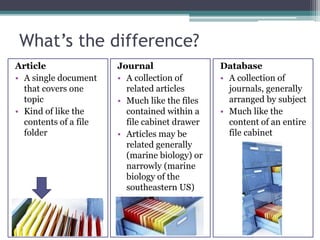
What’s the difference?
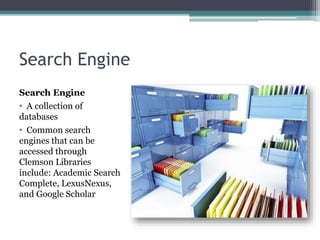
Search Engine
Search Engine
• A collection of
databases
• Common search
engines that can be
accessed through
Clemson Libraries
include: Academic Search
Complete, LexusNexus,
and Google Scholar
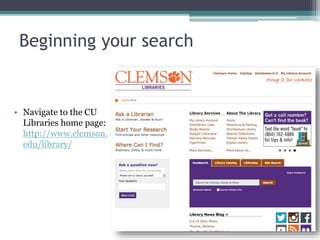
Beginning your search
• Navigate to the CU
Libraries home page:
http://www.clemson.
edu/library/
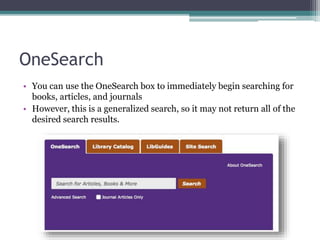
OneSearch
• You can use the OneSearch box to immediately begin searching for
books, articles, and journals
• However, this is a generalized search, so it may not return all of the
desired search results.
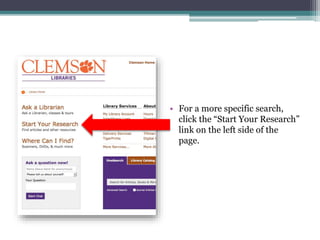
• For a more specific search,
click the “Start Your Research”
link on the left side of the
page.
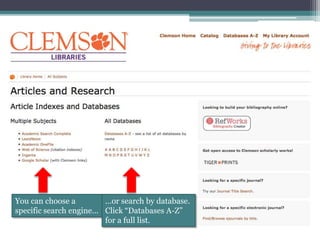
You can choose a
specific search engine…
…or search by database.
Click “Databases A-Z”
for a full list.
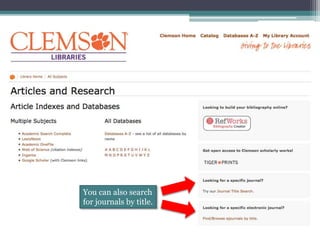
You can also search
for journals by title.
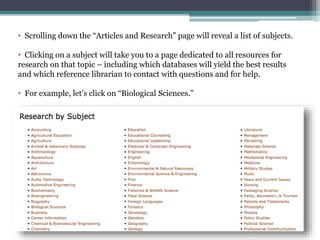
• Scrolling down the “Articles and Research” page will reveal a list of subjects.
• Clicking on a subject will take you to a page dedicated to all resources for
research on that topic – including which databases will yield the best results
and which reference librarian to contact with questions and for help.
• For example, let’s click on “Biological Sciences.”
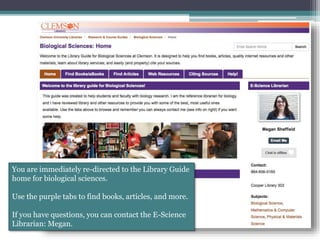
You are immediately re-directed to the Library Guide
home for biological sciences.
Use the purple tabs to find books, articles, and more.
If you have questions, you can contact the E-Science
Librarian: Megan.
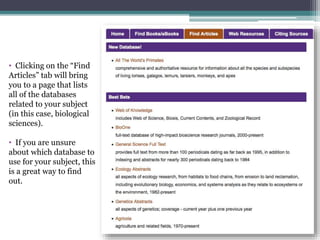
• Clicking on the “Find
Articles” tab will bring
you to a page that lists
all of the databases
related to your subject
(in this case, biological
sciences).
• If you are unsure
about which database to
use for your subject, this
is a great way to find
out.
Questions?
• This is not the only way to search for prior
research using the Clemson Libraries website.
You are encouraged to explore the site and see
what you can find!
• If you have any additional questions about using
Clemson Libraries’ online resources, please post
to the “Week 2 – Chapter 5” discussion board.
• Happy researching!

How to Find Articles Journals and Databases

  • 1.
    Using the ClemsonLibrary Website to Find Articles, Journals, and Databases How to Locate Prior Research Summer 2015
  • 2.
    Need help findingprior research? • CU Libraries can help! • This PowerPoint will explain how you can access a variety of resources using the CU Libraries website. • But first…a little vocabulary….
  • 3.
  • 4.
    Search Engine Search Engine •A collection of databases • Common search engines that can be accessed through Clemson Libraries include: Academic Search Complete, LexusNexus, and Google Scholar
  • 5.
    Beginning your search •Navigate to the CU Libraries home page: http://www.clemson. edu/library/
  • 6.
    OneSearch • You canuse the OneSearch box to immediately begin searching for books, articles, and journals • However, this is a generalized search, so it may not return all of the desired search results.
  • 7.
    • For amore specific search, click the “Start Your Research” link on the left side of the page.
  • 8.
    You can choosea specific search engine… …or search by database. Click “Databases A-Z” for a full list.
  • 9.
    You can alsosearch for journals by title.
  • 10.
    • Scrolling downthe “Articles and Research” page will reveal a list of subjects. • Clicking on a subject will take you to a page dedicated to all resources for research on that topic – including which databases will yield the best results and which reference librarian to contact with questions and for help. • For example, let’s click on “Biological Sciences.”
  • 11.
    You are immediatelyre-directed to the Library Guide home for biological sciences. Use the purple tabs to find books, articles, and more. If you have questions, you can contact the E-Science Librarian: Megan.
  • 12.
    • Clicking onthe “Find Articles” tab will bring you to a page that lists all of the databases related to your subject (in this case, biological sciences). • If you are unsure about which database to use for your subject, this is a great way to find out.
  • 13.
    Questions? • This isnot the only way to search for prior research using the Clemson Libraries website. You are encouraged to explore the site and see what you can find! • If you have any additional questions about using Clemson Libraries’ online resources, please post to the “Week 2 – Chapter 5” discussion board. • Happy researching!