CMPD273 Multimedia System
Prepared by Nazrita Ibrahim © UNITEN2002
Multimedia Building Block : Animation
References:
T. Vaughan, “Multimedia: Making It Works 5th Edition”, Osborne/McGraw-Hill, 2001
S. McGloughlin, “Multimedia: Concepts and Practice”, Prentice Hall, 2001
CMPD273 Multimedia System
Prepared by Nazrita Ibrahim © UNITEN2002
The power of animation
• Animation is achieved by adding motion to still
image/object.
• creation of moving pictures one frame at a time.
• Animation grabs attention.
CMPD273 Multimedia System
Prepared by Nazrita Ibrahim © UNITEN2002
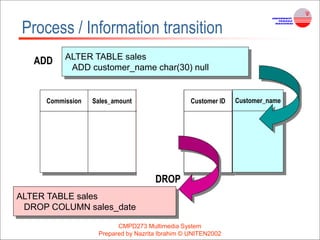
Process / Information transition
• Animation can be used to describe complex
information / process in an easier way
– Perform visual cues (e.g. how things work)
CMPD273 Multimedia System
Prepared by Nazrita Ibrahim © UNITEN2002
Process / Information transition
Commission Sales_amount Sales_date Customer ID
ALTER TABLE sales
ADD customer_name char(30) null
ADD
Customer_name
DROP
ALTER TABLE sales
DROP COLUMN sales_date
CMPD273 Multimedia System
Prepared by Nazrita Ibrahim © UNITEN2002
Object movement
• Simple animated GIF
• Complex scene
CMPD273 Multimedia System
Prepared by Nazrita Ibrahim © UNITEN2002
How animation works
Animation is possible because of
• a biological phenomenon known as persistence
of vision
– An object seen by human eye remains chemically
mapped on the eye’s retina for a brief time after
viewing
• a psychological phenomenon called Phi
– Human’s mind need to conceptually complete the
perceived action i.e. translating the action
CMPD273 Multimedia System
Prepared by Nazrita Ibrahim © UNITEN2002
How animation works
• Combination of these two (persistence of vision + phi)
make it possible for a series of images that are changed
very slightly and very rapidly, one after another, to
seemingly blend together into a visual illusion of
movement.
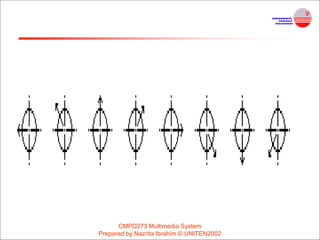
• E.g. a few cells or frames of rotating logo, when
continuously and rapidly changed, the arrow of the
compass is perceived to be spinning.
CMPD273 Multimedia System
Prepared by Nazrita Ibrahim © UNITEN2002
CMPD273 Multimedia System
Prepared by Nazrita Ibrahim © UNITEN2002
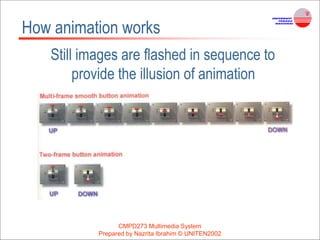
How animation works
Still images are flashed in sequence to
provide the illusion of animation
CMPD273 Multimedia System
Prepared by Nazrita Ibrahim © UNITEN2002
How animation works
• The speed of the image changes is called the frame rate.
• Film is typically delivered at 24 frames per second (fps)
• In reality, the projector light flashes twice per frame, thus
increasing the flicker rate to 48 times per second to
remove any flicker effect.
• The more interruptions per second, the more continuous
the beam of light appears, the smoother the animation.
CMPD273 Multimedia System
Prepared by Nazrita Ibrahim © UNITEN2002
Animation techniques
• Cel animation
• Computer animation
– Digital cel & sprite animation
– Key frame animation
• Hybrid technique
• Kinematics
• Morphing
Animation by Computer
• Types of Animation:-
• Two-dimensional (2-D)space.(simple)
• “2½-D” space (More complicated )
(where shadowing, highlights, and forced
perspective provide an illusion of depth, the third
dimension)
•
CMPD273 Multimedia System
Prepared by Nazrita Ibrahim © UNITEN2002
• 3-D space (complex)
• virtual realm in three dimensions, and changes
(motion) are calculated along all three axes (x, y,
and z),
• allowing an image or object that itself is created
with a front, back, sides,top, and bottom to move
toward or away from the viewer,
CMPD273 Multimedia System
Prepared by Nazrita Ibrahim © UNITEN2002
• 2-D animations- simple and static,
not changing their position on the screen
• Path animation - provides motion, changing
the location of an image along a predetermined
path (position) during a specified amount of time
CMPD273 Multimedia System
Prepared by Nazrita Ibrahim © UNITEN2002
In path-based 2-D and 2½-D animation
• Animator
– creates an object
– describes a path for the object to follow
• Software
– creating the animation
CMPD273 Multimedia System
Prepared by Nazrita Ibrahim © UNITEN2002
In cel-based 2-D animation
• Animator
– Provides each frame of an animation
• Software
– Putting together the frames into a single fie of images
CMPD273 Multimedia System
Prepared by Nazrita Ibrahim © UNITEN2002
In 3-D animation
• Animator
– creating the models of individual objects
– designing the characteristics of their
shapes and surfaces.
• Software
– computes the movement of the objects within the 3-D
space
– renders each frame, in the end stitching them together
in a digital output fie
CMPD273 Multimedia System
Prepared by Nazrita Ibrahim © UNITEN2002
CMPD273 Multimedia System
Prepared by Nazrita Ibrahim © UNITEN2002
Animation techniques – Cel Animation
Made famous by Disney
1) A series of progressively different graphics are used for
each frame of film
2) Elements in a scene that might move are drawn on
sheets of transparent material called ‘cel’,
3) It is laid over a background which is drawn separately
4) In producing a sequence, only the moving elements
on the cel need to be redrawn for each frame, the fixed
part of the scene need only be made once.
CMPD273 Multimedia System
Prepared by Nazrita Ibrahim © UNITEN2002
Animation techniques – Cel Animation
• Animation is drawn between keyframes.
– Key frames identify the start and end of some action
– The process of filling in the action is called tweening.
• Tweening is a process which requires calculating the
number of frames between keyframes and the path the
action takes, and then actually sketching on to a cel the
series of progressively different outlines.
• Pencil test-As tweening progresses, the action
sequence is checked by flipping through
the frames.
• The penciled frames are assembled and then
actually fimed as a
• pencil test to check smoothness, continuity, and
timing
• If satisfactory, they are permanently inked,
photocopied onto cels, and given to artists who
use acrylic colors to paint the details for each cel
CMPD273 Multimedia System
Prepared by Nazrita Ibrahim © UNITEN2002
CMPD273 Multimedia System
Prepared by Nazrita Ibrahim © UNITEN2002
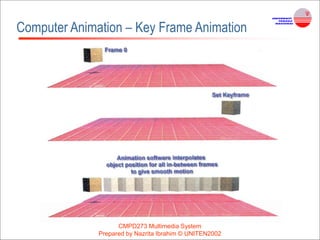
Computer Animation – Key Frame Animation
• Keyframes :
– Are drawn to provide the detailed characteristic of
characters at important points in the animation.
– Example, specify the start and end of a walk, the top
and bottom of the fall.
• 3D modeling and animation software will do the
tweening process
– It fill in the gaps between the keyframes and create a
smooth animation.
– You just set the value of frames per second (fps) for
your animation.
CMPD273 Multimedia System
Prepared by Nazrita Ibrahim © UNITEN2002
Computer Animation – Key Frame Animation
CMPD273 Multimedia System
Prepared by Nazrita Ibrahim © UNITEN2002
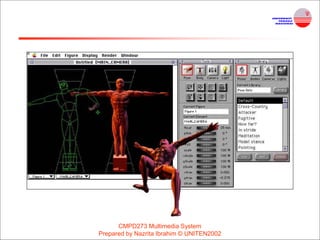
Animation Techniques - Kinematics
• The study of the movement and motion of
structures that have joints, such as a walking man.
• Need to calculate the position, rotation, velocity,
and acceleration of all the joints and articulated parts
involved—knees ,bend, hips flex, shoulders swing, and
the head
• 3-D modeling program, provides preassembled adjustable
human models (male, female, infant, teenage, and
superhero) in many poses, such as “walking” or “thinking.”
Inverse kinematics
• Process by which you link objects such as hands
to arms and define their relationships and limits
– for example, elbows cannot bend backward
CMPD273 Multimedia System
Prepared by Nazrita Ibrahim © UNITEN2002
CMPD273 Multimedia System
Prepared by Nazrita Ibrahim © UNITEN2002
CMPD273 Multimedia System
Prepared by Nazrita Ibrahim © UNITEN2002
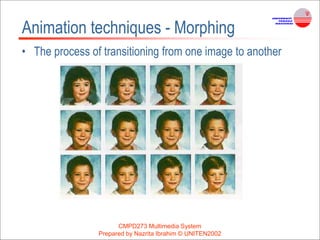
Animation techniques - Morphing
• The process of transitioning from one image to another
CMPD273 Multimedia System
Prepared by Nazrita Ibrahim © UNITEN2002
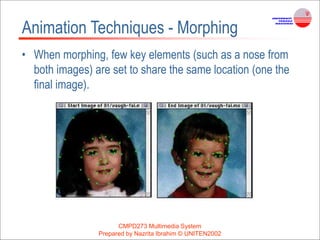
Animation Techniques - Morphing
• When morphing, few key elements (such as a nose from
both images) are set to share the same location (one the
final image).
CMPD273 Multimedia System
Prepared by Nazrita Ibrahim © UNITEN2002
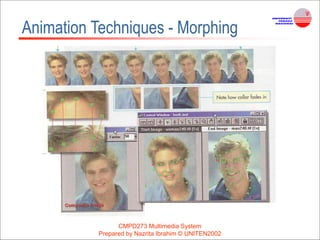
Animation Techniques - Morphing
CMPD273 Multimedia System
Prepared by Nazrita Ibrahim © UNITEN2002
Animation File Formats
• Windows Media files : .avi, .asf or .wmv
• Apple QuickTime files: .qt or .mov
• Motion video files : .mpeg or .mpg
• Flash files : .swf
• Shockwaves files : .dcr
• Animated GIF : .gif
CMPD273 Multimedia System
Prepared by Nazrita Ibrahim © UNITEN2002
Creating Animation
• Use digital camera to capture each drawn frame.
• Scan the drawn image/frame.
• Video camera (connected through video capture
card) is connected directly to computer to capture
each frame of animation on disk – let it be on
paper, cel, constructed on 3D set or by any other
techniques discussed.
CMPD273 Multimedia System
Prepared by Nazrita Ibrahim © UNITEN2002
Creating Animation
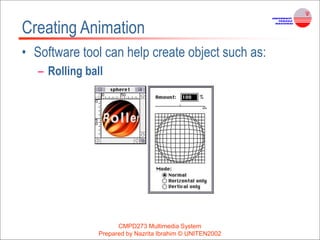
• Software tool can help create object such as:
– Rolling ball
CMPD273 Multimedia System
Prepared by Nazrita Ibrahim © UNITEN2002
Creating Animation
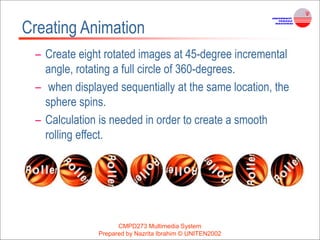
– Create eight rotated images at 45-degree incremental
angle, rotating a full circle of 360-degrees.
– when displayed sequentially at the same location, the
sphere spins.
– Calculation is needed in order to create a smooth
rolling effect.
CMPD273 Multimedia System
Prepared by Nazrita Ibrahim © UNITEN2002
Creating Animation
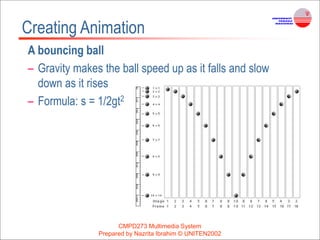
A bouncing ball
– Gravity makes the ball speed up as it falls and slow
down as it rises
– Formula: s = 1/2gt2
CMPD273 Multimedia System
Prepared by Nazrita Ibrahim © UNITEN2002
Creating Animation
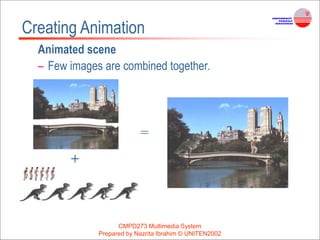
Animated scene
– Few images are combined together.
+
=

How to create an Animation using Multimedia .ppt

  • 1.
    CMPD273 Multimedia System Preparedby Nazrita Ibrahim © UNITEN2002 Multimedia Building Block : Animation References: T. Vaughan, “Multimedia: Making It Works 5th Edition”, Osborne/McGraw-Hill, 2001 S. McGloughlin, “Multimedia: Concepts and Practice”, Prentice Hall, 2001
  • 2.
    CMPD273 Multimedia System Preparedby Nazrita Ibrahim © UNITEN2002 The power of animation • Animation is achieved by adding motion to still image/object. • creation of moving pictures one frame at a time. • Animation grabs attention.
  • 3.
    CMPD273 Multimedia System Preparedby Nazrita Ibrahim © UNITEN2002 Process / Information transition • Animation can be used to describe complex information / process in an easier way – Perform visual cues (e.g. how things work)
  • 4.
    CMPD273 Multimedia System Preparedby Nazrita Ibrahim © UNITEN2002 Process / Information transition Commission Sales_amount Sales_date Customer ID ALTER TABLE sales ADD customer_name char(30) null ADD Customer_name DROP ALTER TABLE sales DROP COLUMN sales_date
  • 5.
    CMPD273 Multimedia System Preparedby Nazrita Ibrahim © UNITEN2002 Object movement • Simple animated GIF • Complex scene
  • 6.
    CMPD273 Multimedia System Preparedby Nazrita Ibrahim © UNITEN2002 How animation works Animation is possible because of • a biological phenomenon known as persistence of vision – An object seen by human eye remains chemically mapped on the eye’s retina for a brief time after viewing • a psychological phenomenon called Phi – Human’s mind need to conceptually complete the perceived action i.e. translating the action
  • 7.
    CMPD273 Multimedia System Preparedby Nazrita Ibrahim © UNITEN2002 How animation works • Combination of these two (persistence of vision + phi) make it possible for a series of images that are changed very slightly and very rapidly, one after another, to seemingly blend together into a visual illusion of movement. • E.g. a few cells or frames of rotating logo, when continuously and rapidly changed, the arrow of the compass is perceived to be spinning.
  • 8.
    CMPD273 Multimedia System Preparedby Nazrita Ibrahim © UNITEN2002
  • 9.
    CMPD273 Multimedia System Preparedby Nazrita Ibrahim © UNITEN2002 How animation works Still images are flashed in sequence to provide the illusion of animation
  • 10.
    CMPD273 Multimedia System Preparedby Nazrita Ibrahim © UNITEN2002 How animation works • The speed of the image changes is called the frame rate. • Film is typically delivered at 24 frames per second (fps) • In reality, the projector light flashes twice per frame, thus increasing the flicker rate to 48 times per second to remove any flicker effect. • The more interruptions per second, the more continuous the beam of light appears, the smoother the animation.
  • 11.
    CMPD273 Multimedia System Preparedby Nazrita Ibrahim © UNITEN2002 Animation techniques • Cel animation • Computer animation – Digital cel & sprite animation – Key frame animation • Hybrid technique • Kinematics • Morphing
  • 12.
    Animation by Computer •Types of Animation:- • Two-dimensional (2-D)space.(simple) • “2½-D” space (More complicated ) (where shadowing, highlights, and forced perspective provide an illusion of depth, the third dimension) • CMPD273 Multimedia System Prepared by Nazrita Ibrahim © UNITEN2002
  • 13.
    • 3-D space(complex) • virtual realm in three dimensions, and changes (motion) are calculated along all three axes (x, y, and z), • allowing an image or object that itself is created with a front, back, sides,top, and bottom to move toward or away from the viewer, CMPD273 Multimedia System Prepared by Nazrita Ibrahim © UNITEN2002
  • 14.
    • 2-D animations-simple and static, not changing their position on the screen • Path animation - provides motion, changing the location of an image along a predetermined path (position) during a specified amount of time CMPD273 Multimedia System Prepared by Nazrita Ibrahim © UNITEN2002
  • 15.
    In path-based 2-Dand 2½-D animation • Animator – creates an object – describes a path for the object to follow • Software – creating the animation CMPD273 Multimedia System Prepared by Nazrita Ibrahim © UNITEN2002
  • 16.
    In cel-based 2-Danimation • Animator – Provides each frame of an animation • Software – Putting together the frames into a single fie of images CMPD273 Multimedia System Prepared by Nazrita Ibrahim © UNITEN2002
  • 17.
    In 3-D animation •Animator – creating the models of individual objects – designing the characteristics of their shapes and surfaces. • Software – computes the movement of the objects within the 3-D space – renders each frame, in the end stitching them together in a digital output fie CMPD273 Multimedia System Prepared by Nazrita Ibrahim © UNITEN2002
  • 18.
    CMPD273 Multimedia System Preparedby Nazrita Ibrahim © UNITEN2002 Animation techniques – Cel Animation Made famous by Disney 1) A series of progressively different graphics are used for each frame of film 2) Elements in a scene that might move are drawn on sheets of transparent material called ‘cel’, 3) It is laid over a background which is drawn separately 4) In producing a sequence, only the moving elements on the cel need to be redrawn for each frame, the fixed part of the scene need only be made once.
  • 19.
    CMPD273 Multimedia System Preparedby Nazrita Ibrahim © UNITEN2002 Animation techniques – Cel Animation • Animation is drawn between keyframes. – Key frames identify the start and end of some action – The process of filling in the action is called tweening. • Tweening is a process which requires calculating the number of frames between keyframes and the path the action takes, and then actually sketching on to a cel the series of progressively different outlines.
  • 20.
    • Pencil test-Astweening progresses, the action sequence is checked by flipping through the frames. • The penciled frames are assembled and then actually fimed as a • pencil test to check smoothness, continuity, and timing • If satisfactory, they are permanently inked, photocopied onto cels, and given to artists who use acrylic colors to paint the details for each cel CMPD273 Multimedia System Prepared by Nazrita Ibrahim © UNITEN2002
  • 21.
    CMPD273 Multimedia System Preparedby Nazrita Ibrahim © UNITEN2002 Computer Animation – Key Frame Animation • Keyframes : – Are drawn to provide the detailed characteristic of characters at important points in the animation. – Example, specify the start and end of a walk, the top and bottom of the fall. • 3D modeling and animation software will do the tweening process – It fill in the gaps between the keyframes and create a smooth animation. – You just set the value of frames per second (fps) for your animation.
  • 22.
    CMPD273 Multimedia System Preparedby Nazrita Ibrahim © UNITEN2002 Computer Animation – Key Frame Animation
  • 23.
    CMPD273 Multimedia System Preparedby Nazrita Ibrahim © UNITEN2002 Animation Techniques - Kinematics • The study of the movement and motion of structures that have joints, such as a walking man. • Need to calculate the position, rotation, velocity, and acceleration of all the joints and articulated parts involved—knees ,bend, hips flex, shoulders swing, and the head • 3-D modeling program, provides preassembled adjustable human models (male, female, infant, teenage, and superhero) in many poses, such as “walking” or “thinking.”
  • 24.
    Inverse kinematics • Processby which you link objects such as hands to arms and define their relationships and limits – for example, elbows cannot bend backward CMPD273 Multimedia System Prepared by Nazrita Ibrahim © UNITEN2002
  • 25.
    CMPD273 Multimedia System Preparedby Nazrita Ibrahim © UNITEN2002
  • 26.
    CMPD273 Multimedia System Preparedby Nazrita Ibrahim © UNITEN2002 Animation techniques - Morphing • The process of transitioning from one image to another
  • 27.
    CMPD273 Multimedia System Preparedby Nazrita Ibrahim © UNITEN2002 Animation Techniques - Morphing • When morphing, few key elements (such as a nose from both images) are set to share the same location (one the final image).
  • 28.
    CMPD273 Multimedia System Preparedby Nazrita Ibrahim © UNITEN2002 Animation Techniques - Morphing
  • 29.
    CMPD273 Multimedia System Preparedby Nazrita Ibrahim © UNITEN2002 Animation File Formats • Windows Media files : .avi, .asf or .wmv • Apple QuickTime files: .qt or .mov • Motion video files : .mpeg or .mpg • Flash files : .swf • Shockwaves files : .dcr • Animated GIF : .gif
  • 30.
    CMPD273 Multimedia System Preparedby Nazrita Ibrahim © UNITEN2002 Creating Animation • Use digital camera to capture each drawn frame. • Scan the drawn image/frame. • Video camera (connected through video capture card) is connected directly to computer to capture each frame of animation on disk – let it be on paper, cel, constructed on 3D set or by any other techniques discussed.
  • 31.
    CMPD273 Multimedia System Preparedby Nazrita Ibrahim © UNITEN2002 Creating Animation • Software tool can help create object such as: – Rolling ball
  • 32.
    CMPD273 Multimedia System Preparedby Nazrita Ibrahim © UNITEN2002 Creating Animation – Create eight rotated images at 45-degree incremental angle, rotating a full circle of 360-degrees. – when displayed sequentially at the same location, the sphere spins. – Calculation is needed in order to create a smooth rolling effect.
  • 33.
    CMPD273 Multimedia System Preparedby Nazrita Ibrahim © UNITEN2002 Creating Animation A bouncing ball – Gravity makes the ball speed up as it falls and slow down as it rises – Formula: s = 1/2gt2
  • 34.
    CMPD273 Multimedia System Preparedby Nazrita Ibrahim © UNITEN2002 Creating Animation Animated scene – Few images are combined together. + =