How To Connect Amazon AWS EC2 with Key Pair – Linux
i | P a g e
Table of Contents
Overview.......................................................................................................................................................1
Applies To......................................................................................................................................................1
Pre-requisites................................................................................................................................................1
Key Pair .........................................................................................................................................................1
Key Name / Key Pair..................................................................................................................................1
Instance – Public IP ...................................................................................................................................2
Copy Key Pair ............................................................................................................................................2
Modify Permissions...................................................................................................................................2
Connect Instance – Public IP.....................................................................................................................3
Connect Instance – Instance.....................................................................................................................3
How To Connect Amazon AWS EC2 with Key Pair – Linux
1 | P a g e
Overview
The purpose of this guide is to assist the users to connect the Amazon AWS EC2 Instance(s). This guide
demonstrate connecting from a Linux host.
Applies To
Linux Server (Instance)
Pre-requisites
 Key Pair associated with the EC2 Instance
 Download and copy PEM Key to the Linux Box, from where you would like to connect
 Open inbound connection rule for port “22” on the security group associated to the instance
 Public IP association
Key Pair
A key pair is an encrypted RSA Private Key that’s generated and associated to a new instance when you
build it. You can choose existing key pair or create new one.
Note: When you create a new pair ensure that you download the copy of key pair, else you will not be
able to login to the box.
Key Name / Key Pair
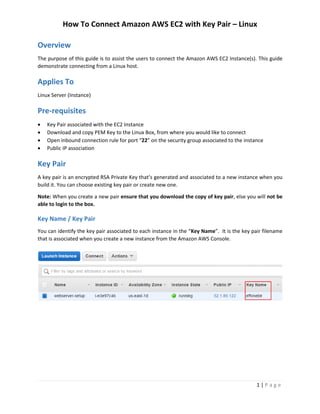
You can identify the key pair associated to each instance in the “Key Name”. It is the key pair filename
that is associated when you create a new instance from the Amazon AWS Console.
How To Connect Amazon AWS EC2 with Key Pair – Linux
2 | P a g e
Instance – Public IP
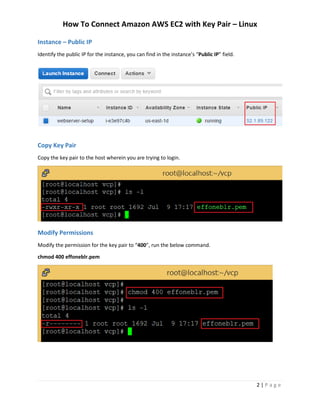
Identify the public IP for the instance, you can find in the instance’s “Public IP” field.
Copy Key Pair
Copy the key pair to the host wherein you are trying to login.
Modify Permissions
Modify the permission for the key pair to “400”, run the below command.
chmod 400 effoneblr.pem
How To Connect Amazon AWS EC2 with Key Pair – Linux
3 | P a g e
Connect Instance – Public IP
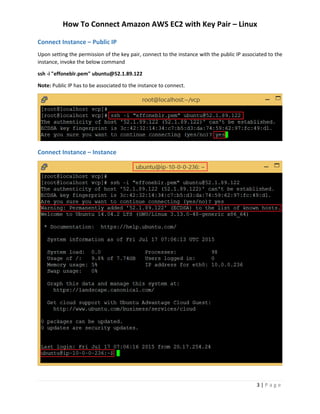
Upon setting the permission of the key pair, connect to the instance with the public IP associated to the
instance, invoke the below command
ssh -i "effoneblr.pem" ubuntu@52.1.89.122
Note: Public IP has to be associated to the instance to connect.
Connect Instance – Instance

How To Connect Amazon AWS EC2 with Key Pair – Linux

  • 1.
    How To ConnectAmazon AWS EC2 with Key Pair – Linux i | P a g e Table of Contents Overview.......................................................................................................................................................1 Applies To......................................................................................................................................................1 Pre-requisites................................................................................................................................................1 Key Pair .........................................................................................................................................................1 Key Name / Key Pair..................................................................................................................................1 Instance – Public IP ...................................................................................................................................2 Copy Key Pair ............................................................................................................................................2 Modify Permissions...................................................................................................................................2 Connect Instance – Public IP.....................................................................................................................3 Connect Instance – Instance.....................................................................................................................3
  • 2.
    How To ConnectAmazon AWS EC2 with Key Pair – Linux 1 | P a g e Overview The purpose of this guide is to assist the users to connect the Amazon AWS EC2 Instance(s). This guide demonstrate connecting from a Linux host. Applies To Linux Server (Instance) Pre-requisites  Key Pair associated with the EC2 Instance  Download and copy PEM Key to the Linux Box, from where you would like to connect  Open inbound connection rule for port “22” on the security group associated to the instance  Public IP association Key Pair A key pair is an encrypted RSA Private Key that’s generated and associated to a new instance when you build it. You can choose existing key pair or create new one. Note: When you create a new pair ensure that you download the copy of key pair, else you will not be able to login to the box. Key Name / Key Pair You can identify the key pair associated to each instance in the “Key Name”. It is the key pair filename that is associated when you create a new instance from the Amazon AWS Console.
  • 3.
    How To ConnectAmazon AWS EC2 with Key Pair – Linux 2 | P a g e Instance – Public IP Identify the public IP for the instance, you can find in the instance’s “Public IP” field. Copy Key Pair Copy the key pair to the host wherein you are trying to login. Modify Permissions Modify the permission for the key pair to “400”, run the below command. chmod 400 effoneblr.pem
  • 4.
    How To ConnectAmazon AWS EC2 with Key Pair – Linux 3 | P a g e Connect Instance – Public IP Upon setting the permission of the key pair, connect to the instance with the public IP associated to the instance, invoke the below command ssh -i "effoneblr.pem" ubuntu@52.1.89.122 Note: Public IP has to be associated to the instance to connect. Connect Instance – Instance