How To Check File and Delete – PowerShell
i | P a g e
Table of Contents
Overview.......................................................................................................................................................1
Applies To..................................................................................................................................................1
Pre-Requisites ...........................................................................................................................................1
Current Execution Policy.......................................................................................................................1
PowerShell Script – Delete File .....................................................................................................................2
PowerShell Snippet...................................................................................................................................2
PowerShell Script – Result ....................................................................................................................2
How To Check File and Delete – PowerShell
1 | P a g e
Overview
In this post / snippet we will demonstrate, deleting a file on the system if the file exists.
1) If the file exists it will be deleted
2) If the file doesn’t exist a message box will be displayed
3) If the user doesn’t key any file, an error message will be displayed.
Applies To
Tested on Windows 10, Windows 2008 R2, Windows 2012.
Pre-Requisites
To run this script, Execution Policy should be set to either of these “AllSigned” or “RemoteSigned” or
“Unrestricted”, you can get current execution policy by running the command; “Get-ExecutionPolicy”.
Policy Type Purpose
Restricted No scripts can be run. Windows PowerShell can be used only in interactive mode.
AllSigned Only scripts signed by a trusted publisher can be run.
RemoteSigned Downloaded scripts must be signed by a trusted publisher before they can be run.
Unrestricted No restrictions; all Windows PowerShell scripts can be run.
Current Execution Policy
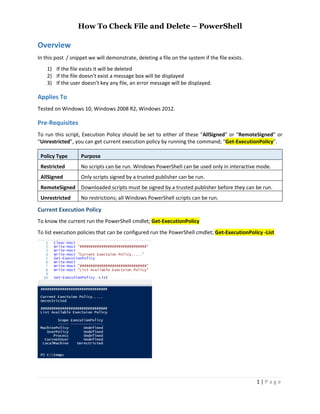
To know the current run the PowerShell cmdlet; Get-ExecutionPolicy
To list execution policies that can be configured run the PowerShell cmdlet; Get-ExecutionPolicy -List
How To Check File and Delete – PowerShell
2 | P a g e
PowerShell Script – Delete File
This script read filename from user input, check if file exists and delete it.
PowerShell Snippet
Clear-Host
#
# Read filename
#
$ReadFileName=Read-Host -Prompt "Enter file to be deleted"
if ($ReadFileName -eq "") {
Write-Host "No Filename Issued..."
[console]::beep(900,300)
[System.Windows.MessageBox]::Show($ReadFileName + ' - No Filename Issued ', "Delete File Status")
return
}
if (Test-Path $ReadFileName) {
del $ReadFileName
}
else {
Write-Host $ReadFileName does not exists!
[console]::beep(900,300)
[System.Windows.MessageBox]::Show($ReadFileName + ' - File does not exists.', "Delete File Status")
}
PowerShell Script – Result
When the script is executed, if the file exists file will be deleted or an error message will be shown.

How To Check file exists and Delete PowerShell

  • 1.
    How To CheckFile and Delete – PowerShell i | P a g e Table of Contents Overview.......................................................................................................................................................1 Applies To..................................................................................................................................................1 Pre-Requisites ...........................................................................................................................................1 Current Execution Policy.......................................................................................................................1 PowerShell Script – Delete File .....................................................................................................................2 PowerShell Snippet...................................................................................................................................2 PowerShell Script – Result ....................................................................................................................2
  • 2.
    How To CheckFile and Delete – PowerShell 1 | P a g e Overview In this post / snippet we will demonstrate, deleting a file on the system if the file exists. 1) If the file exists it will be deleted 2) If the file doesn’t exist a message box will be displayed 3) If the user doesn’t key any file, an error message will be displayed. Applies To Tested on Windows 10, Windows 2008 R2, Windows 2012. Pre-Requisites To run this script, Execution Policy should be set to either of these “AllSigned” or “RemoteSigned” or “Unrestricted”, you can get current execution policy by running the command; “Get-ExecutionPolicy”. Policy Type Purpose Restricted No scripts can be run. Windows PowerShell can be used only in interactive mode. AllSigned Only scripts signed by a trusted publisher can be run. RemoteSigned Downloaded scripts must be signed by a trusted publisher before they can be run. Unrestricted No restrictions; all Windows PowerShell scripts can be run. Current Execution Policy To know the current run the PowerShell cmdlet; Get-ExecutionPolicy To list execution policies that can be configured run the PowerShell cmdlet; Get-ExecutionPolicy -List
  • 3.
    How To CheckFile and Delete – PowerShell 2 | P a g e PowerShell Script – Delete File This script read filename from user input, check if file exists and delete it. PowerShell Snippet Clear-Host # # Read filename # $ReadFileName=Read-Host -Prompt "Enter file to be deleted" if ($ReadFileName -eq "") { Write-Host "No Filename Issued..." [console]::beep(900,300) [System.Windows.MessageBox]::Show($ReadFileName + ' - No Filename Issued ', "Delete File Status") return } if (Test-Path $ReadFileName) { del $ReadFileName } else { Write-Host $ReadFileName does not exists! [console]::beep(900,300) [System.Windows.MessageBox]::Show($ReadFileName + ' - File does not exists.', "Delete File Status") } PowerShell Script – Result When the script is executed, if the file exists file will be deleted or an error message will be shown.