Nginx – bind() to 0.0.0.0:9080 failed
i | P a g e
Table of Contents
Overview.......................................................................................................................................................1
Applies To......................................................................................................................................................1
Pre-Requisites ...............................................................................................................................................1
Start Service – Nginx .....................................................................................................................................1
Bind Port issue - 9080 ...................................................................................................................................2
Cause – Service Start.................................................................................................................................2
Solution – Reconfigure SELinux.................................................................................................................3
Validation – Service Start..........................................................................................................................3
Validation – Service Accessible.................................................................................................................3
Nginx – bind() to 0.0.0.0:9080 failed
1 | P a g e
Overview
Nginx is an open-source, high performance HTTP & ReverseProxy Server, it can also be configured to
operate as IMAP / POP3 Server.
It’s well-known for high performance, stability, rich feature set, simple configuration and low resource
consumption.
In this guide we will troubleshoot nginx bind port issue on a Linux based operating system.
Applies To
 CentOS 7, tested on CentOS Linux release 7.1.1503 (Core)
 SELinux enable operating systems
Pre-Requisites
1) sudo or superuser access, for configuration changes (Nginx and SELinx).
2) Policycoreutils package has to be installed to run semange command.
a) If the package is not installed run the command;
i) yum install policycoreutils -y
ii) yum install policycoreutils-python -y
Start Service – Nginx
After reconfiguring ngnix server to start on non-default port, to start the service run the command;
systemctl start nginx
Also, to view the service status logs, run the command;
journalctl –xe or cat /var/log/messages
Nginx – bind() to 0.0.0.0:9080 failed
2 | P a g e
Bind Port issue - 9080
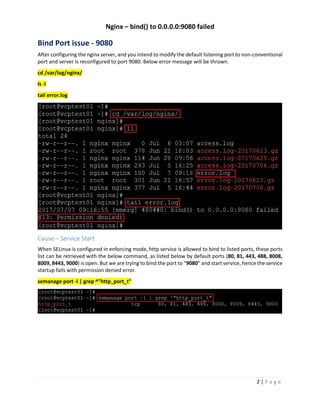
After configuring the nginx server, and you intend to modify the default listening port to non-conventional
port and server is reconfigured to port 9080. Below error message will be thrown.
cd /var/log/nginx/
ls -l
tail error.log
Cause – Service Start
When SELinux is configured in enforcing mode, http service is allowed to bind to listed ports, these ports
list can be retrieved with the below command, as listed below by default ports (80, 81, 443, 488, 8008,
8009, 8443, 9000) is open. But we are trying to bind the port to “9080” and start service, hence the service
startup fails with permission denied error.
semanage port -l | grep ^"http_port_t"
Nginx – bind() to 0.0.0.0:9080 failed
3 | P a g e
Solution – Reconfigure SELinux
Add the http bind port to authorized port list, the port can be added by running the command;
semanage port -a -t http_port_t -p tcp 9080
semanage port -l | grep ^http_port_t
Validation – Service Start
Once you have reconfigure SELinux port, restart the nginx service and check the service status, telnet to
hostname along with bind port, also additionally you can launch website, for which nginx start service has
to be started, run the command;
systemctl start nginx
systemctl status nginx -l
Validation – Service Accessible
After starting the service you can check the service is accessible via telnet session, to know the status of
service, run the command; the port should listen, alternately you can access the webpage from the
browser.
telnet `hostname` '9080'
Nginx – bind() to 0.0.0.0:9080 failed
4 | P a g e

Nginx bind() to 0.0.0.0:9080 failed

  • 1.
    Nginx – bind()to 0.0.0.0:9080 failed i | P a g e Table of Contents Overview.......................................................................................................................................................1 Applies To......................................................................................................................................................1 Pre-Requisites ...............................................................................................................................................1 Start Service – Nginx .....................................................................................................................................1 Bind Port issue - 9080 ...................................................................................................................................2 Cause – Service Start.................................................................................................................................2 Solution – Reconfigure SELinux.................................................................................................................3 Validation – Service Start..........................................................................................................................3 Validation – Service Accessible.................................................................................................................3
  • 2.
    Nginx – bind()to 0.0.0.0:9080 failed 1 | P a g e Overview Nginx is an open-source, high performance HTTP & ReverseProxy Server, it can also be configured to operate as IMAP / POP3 Server. It’s well-known for high performance, stability, rich feature set, simple configuration and low resource consumption. In this guide we will troubleshoot nginx bind port issue on a Linux based operating system. Applies To  CentOS 7, tested on CentOS Linux release 7.1.1503 (Core)  SELinux enable operating systems Pre-Requisites 1) sudo or superuser access, for configuration changes (Nginx and SELinx). 2) Policycoreutils package has to be installed to run semange command. a) If the package is not installed run the command; i) yum install policycoreutils -y ii) yum install policycoreutils-python -y Start Service – Nginx After reconfiguring ngnix server to start on non-default port, to start the service run the command; systemctl start nginx Also, to view the service status logs, run the command; journalctl –xe or cat /var/log/messages
  • 3.
    Nginx – bind()to 0.0.0.0:9080 failed 2 | P a g e Bind Port issue - 9080 After configuring the nginx server, and you intend to modify the default listening port to non-conventional port and server is reconfigured to port 9080. Below error message will be thrown. cd /var/log/nginx/ ls -l tail error.log Cause – Service Start When SELinux is configured in enforcing mode, http service is allowed to bind to listed ports, these ports list can be retrieved with the below command, as listed below by default ports (80, 81, 443, 488, 8008, 8009, 8443, 9000) is open. But we are trying to bind the port to “9080” and start service, hence the service startup fails with permission denied error. semanage port -l | grep ^"http_port_t"
  • 4.
    Nginx – bind()to 0.0.0.0:9080 failed 3 | P a g e Solution – Reconfigure SELinux Add the http bind port to authorized port list, the port can be added by running the command; semanage port -a -t http_port_t -p tcp 9080 semanage port -l | grep ^http_port_t Validation – Service Start Once you have reconfigure SELinux port, restart the nginx service and check the service status, telnet to hostname along with bind port, also additionally you can launch website, for which nginx start service has to be started, run the command; systemctl start nginx systemctl status nginx -l Validation – Service Accessible After starting the service you can check the service is accessible via telnet session, to know the status of service, run the command; the port should listen, alternately you can access the webpage from the browser. telnet `hostname` '9080'
  • 5.
    Nginx – bind()to 0.0.0.0:9080 failed 4 | P a g e