How To Upgrade Openfire on CentOS 7
i | P a g e
Table of Contents
Overview.......................................................................................................................................................1
Applies To......................................................................................................................................................1
Pre-requisites................................................................................................................................................1
Openfire Upgrade .........................................................................................................................................1
Launch Openfire – Admin Console............................................................................................................1
Stop Openfire Service ...............................................................................................................................2
Backup Database (MySQL)........................................................................................................................2
Backup Configuration File – Openfire.xml................................................................................................3
Download Openfire Package.....................................................................................................................3
Install Openfire Package ...........................................................................................................................3
Query the Package Installation.................................................................................................................4
Start Openfire Service...............................................................................................................................4
Launch Openfire – Admin Console............................................................................................................4
How To Upgrade Openfire on CentOS 7
1 | P a g e
Overview
Openfire is an open source instant messaging chat server that runs on XMPP, which is a server that
facilitates XML based communication, such as chatting services. In this guide we will look into the process
of upgrading the Openfire.
Applies To
CentOS 7, RHEL 7; tested on CentOS 7
Pre-requisites
Backup Database (MySQL)
Backup Openfire configuration file openfire.xml
Openfire Portal Access
Openfire Upgrade
Openfire upgrade consists of 3 step process, in this guide we will go through this process step by step.
Launch Openfire – Admin Console
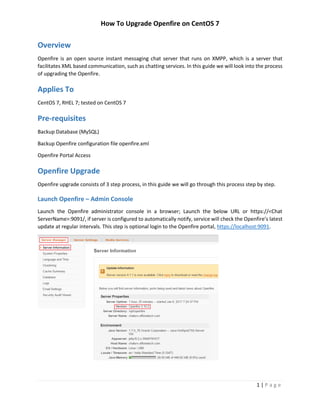
Launch the Openfire administrator console in a browser; Launch the below URL or https://<Chat
ServerName>:9091/, if server is configured to automatically notify, service will check the Openfire’s latest
update at regular intervals. This step is optional login to the Openfire portal, https://localhost:9091.
How To Upgrade Openfire on CentOS 7
2 | P a g e
Stop Openfire Service
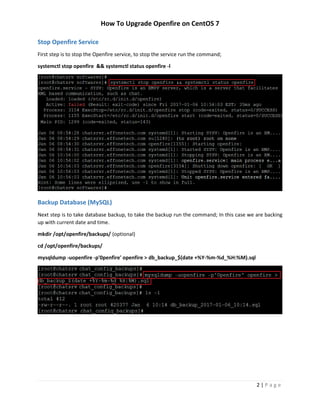
First step is to stop the Openfire service, to stop the service run the command;
systemctl stop openfire && systemctl status openfire -l
Backup Database (MySQL)
Next step is to take database backup, to take the backup run the command; In this case we are backing
up with current date and time.
mkdir /opt/openfire/backups/ (optional)
cd /opt/openfire/backups/
mysqldump -uopenfire -p'0penfire' openfire > db_backup_$(date +%Y-%m-%d_%H:%M).sql
How To Upgrade Openfire on CentOS 7
3 | P a g e
Backup Configuration File – Openfire.xml
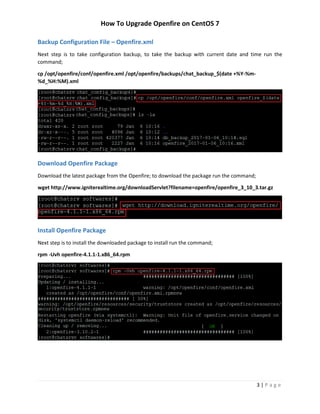
Next step is to take configuration backup, to take the backup with current date and time run the
command;
cp /opt/openfire/conf/openfire.xml /opt/openfire/backups/chat_backup_$(date +%Y-%m-
%d_%H:%M).xml
Download Openfire Package
Download the latest package from the Openfire; to download the package run the command;
wget http://www.igniterealtime.org/downloadServlet?filename=openfire/openfire_3_10_3.tar.gz
Install Openfire Package
Next step is to install the downloaded package to install run the command;
rpm -Uvh openfire-4.1.1-1.x86_64.rpm
How To Upgrade Openfire on CentOS 7
4 | P a g e
Query the Package Installation
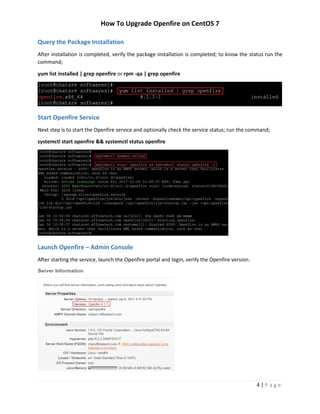
After installation is completed, verify the package installation is completed; to know the status run the
command;
yum list installed | grep openfire or rpm -qa | grep openfire
Start Openfire Service
Next step is to start the Openfire service and optionally check the service status; run the command;
systemctl start openfire && systemctl status openfire
Launch Openfire – Admin Console
After starting the service, launch the Openfire portal and login, verify the Openfire version.

How to Upgrade Openfire on CentOS 7

  • 1.
    How To UpgradeOpenfire on CentOS 7 i | P a g e Table of Contents Overview.......................................................................................................................................................1 Applies To......................................................................................................................................................1 Pre-requisites................................................................................................................................................1 Openfire Upgrade .........................................................................................................................................1 Launch Openfire – Admin Console............................................................................................................1 Stop Openfire Service ...............................................................................................................................2 Backup Database (MySQL)........................................................................................................................2 Backup Configuration File – Openfire.xml................................................................................................3 Download Openfire Package.....................................................................................................................3 Install Openfire Package ...........................................................................................................................3 Query the Package Installation.................................................................................................................4 Start Openfire Service...............................................................................................................................4 Launch Openfire – Admin Console............................................................................................................4
  • 2.
    How To UpgradeOpenfire on CentOS 7 1 | P a g e Overview Openfire is an open source instant messaging chat server that runs on XMPP, which is a server that facilitates XML based communication, such as chatting services. In this guide we will look into the process of upgrading the Openfire. Applies To CentOS 7, RHEL 7; tested on CentOS 7 Pre-requisites Backup Database (MySQL) Backup Openfire configuration file openfire.xml Openfire Portal Access Openfire Upgrade Openfire upgrade consists of 3 step process, in this guide we will go through this process step by step. Launch Openfire – Admin Console Launch the Openfire administrator console in a browser; Launch the below URL or https://<Chat ServerName>:9091/, if server is configured to automatically notify, service will check the Openfire’s latest update at regular intervals. This step is optional login to the Openfire portal, https://localhost:9091.
  • 3.
    How To UpgradeOpenfire on CentOS 7 2 | P a g e Stop Openfire Service First step is to stop the Openfire service, to stop the service run the command; systemctl stop openfire && systemctl status openfire -l Backup Database (MySQL) Next step is to take database backup, to take the backup run the command; In this case we are backing up with current date and time. mkdir /opt/openfire/backups/ (optional) cd /opt/openfire/backups/ mysqldump -uopenfire -p'0penfire' openfire > db_backup_$(date +%Y-%m-%d_%H:%M).sql
  • 4.
    How To UpgradeOpenfire on CentOS 7 3 | P a g e Backup Configuration File – Openfire.xml Next step is to take configuration backup, to take the backup with current date and time run the command; cp /opt/openfire/conf/openfire.xml /opt/openfire/backups/chat_backup_$(date +%Y-%m- %d_%H:%M).xml Download Openfire Package Download the latest package from the Openfire; to download the package run the command; wget http://www.igniterealtime.org/downloadServlet?filename=openfire/openfire_3_10_3.tar.gz Install Openfire Package Next step is to install the downloaded package to install run the command; rpm -Uvh openfire-4.1.1-1.x86_64.rpm
  • 5.
    How To UpgradeOpenfire on CentOS 7 4 | P a g e Query the Package Installation After installation is completed, verify the package installation is completed; to know the status run the command; yum list installed | grep openfire or rpm -qa | grep openfire Start Openfire Service Next step is to start the Openfire service and optionally check the service status; run the command; systemctl start openfire && systemctl status openfire Launch Openfire – Admin Console After starting the service, launch the Openfire portal and login, verify the Openfire version.