Batch Script for nslookup range of IP Address
i | P a g e
Contents
Overview.......................................................................................................................................................1
Applies To......................................................................................................................................................1
Pre-requisites................................................................................................................................................1
DNS Search - Create......................................................................................................................................1
DNS Lookup – Test ........................................................................................................................................2
Create Batch script........................................................................................................................................2
Resolved IP Addresses ..............................................................................................................................3
Unresolved IP Addresses...........................................................................................................................3
Batch Script for nslookup range of IP Address
1 | P a g e
Overview
The purpose of this document is to resolve DNS for a range of IP Address.
Applies To
Windows Operating systems.
Pre-requisites
Any system running Windows OS, tested on windows 2008, Windows 2008 R2, Windows 8.1
DNS Search - Create
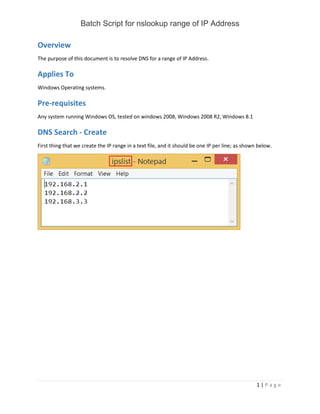
First thing that we create the IP range in a text file, and it should be one IP per line; as shown below.
Batch Script for nslookup range of IP Address
2 | P a g e
DNS Lookup – Test
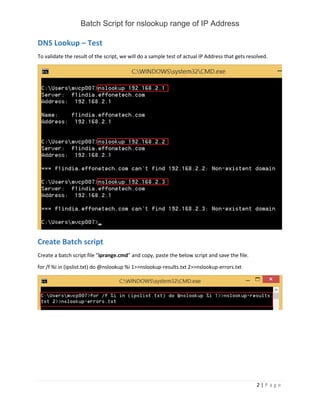
To validate the result of the script, we will do a sample test of actual IP Address that gets resolved.
Create Batch script
Create a batch script file “iprange.cmd” and copy, paste the below script and save the file.
for /f %i in (ipslist.txt) do @nslookup %i 1>>nslookup-results.txt 2>>nslookup-errors.txt
Batch Script for nslookup range of IP Address
3 | P a g e
Resolved IP Addresses
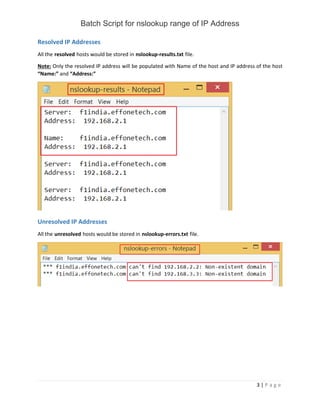
All the resolved hosts would be stored in nslookup-results.txt file.
Note: Only the resolved IP address will be populated with Name of the host and IP address of the host
“Name:” and “Address:”
Unresolved IP Addresses
All the unresolved hosts would be stored in nslookup-errors.txt file.

Batch script for nslookup range of ip address

  • 1.
    Batch Script fornslookup range of IP Address i | P a g e Contents Overview.......................................................................................................................................................1 Applies To......................................................................................................................................................1 Pre-requisites................................................................................................................................................1 DNS Search - Create......................................................................................................................................1 DNS Lookup – Test ........................................................................................................................................2 Create Batch script........................................................................................................................................2 Resolved IP Addresses ..............................................................................................................................3 Unresolved IP Addresses...........................................................................................................................3
  • 2.
    Batch Script fornslookup range of IP Address 1 | P a g e Overview The purpose of this document is to resolve DNS for a range of IP Address. Applies To Windows Operating systems. Pre-requisites Any system running Windows OS, tested on windows 2008, Windows 2008 R2, Windows 8.1 DNS Search - Create First thing that we create the IP range in a text file, and it should be one IP per line; as shown below.
  • 3.
    Batch Script fornslookup range of IP Address 2 | P a g e DNS Lookup – Test To validate the result of the script, we will do a sample test of actual IP Address that gets resolved. Create Batch script Create a batch script file “iprange.cmd” and copy, paste the below script and save the file. for /f %i in (ipslist.txt) do @nslookup %i 1>>nslookup-results.txt 2>>nslookup-errors.txt
  • 4.
    Batch Script fornslookup range of IP Address 3 | P a g e Resolved IP Addresses All the resolved hosts would be stored in nslookup-results.txt file. Note: Only the resolved IP address will be populated with Name of the host and IP address of the host “Name:” and “Address:” Unresolved IP Addresses All the unresolved hosts would be stored in nslookup-errors.txt file.