How to Develop a Website
Amarpreet Kaur
Digital Marketing Manager, RIC Centre
@akamarpreet | @riccentre
Who am I?
• Molecular Biology

• Biomedical Communications

• Biotechnology

• Real Estate Broker

• Digital Marketing Manager

• Creative Professional

• Photographer
@akamarpreet | @riccentre
Should my
business have
a website?
Yes please!
Why?
• Using the internet like a phonebook

• Instant credibility

• Sales and marketing channel

• Data collection and lead generation

• If you don’t have a website, you don’t want more business…
@akamarpreet | @riccentre
Today’s presentation
1. Choose the right platform for your website

2. Choose the right website name (domain) and hosting

3. Configure your newly created website
@akamarpreet | @riccentre
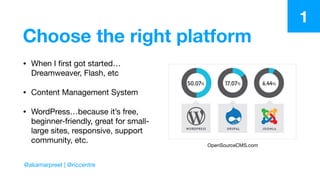
Choose the right platform
• When I first got started…
Dreamweaver, Flash, etc

• Content Management System

• WordPress…because it’s free,
beginner-friendly, great for small-
large sites, responsive, support
community, etc.
OpenSourceCMS.com
1
@akamarpreet | @riccentre
Beginner?
• Stick with WordPress. Keep your life easy. As a business owner, that’s
something you shouldn’t worry about.
1
@akamarpreet | @riccentre
Choose a domain name
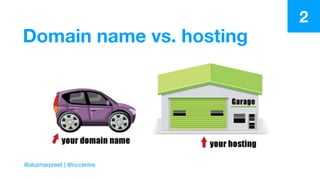
• WordPress is free, but you need to purchase a domain name and hosting
in order to run your website

• bluehost.com, GoDaddy.com, one.com, etc

• Short, memorable, brandable, catchy, easy to type

• Try to Google it before you purchase it (does auto-correct on Google
provide some odd search result?)
2
@akamarpreet | @riccentre
Domain name vs. hosting
2
@akamarpreet | @riccentre
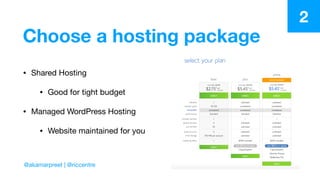
Choose a hosting package
• Shared Hosting

• Good for tight budget

• Managed WordPress Hosting

• Website maintained for you
2
@akamarpreet | @riccentre
Configure your website
• Domain and hosting from same service provider? 

• Use one-click installation

• Manual Install Guide

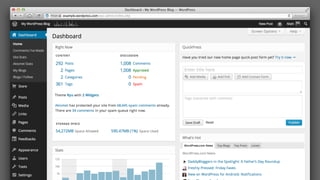
• yourwebsitename.com/wp-admin 

• Now we get to the fun part…
3
@akamarpreet | @riccentre
Configure your website
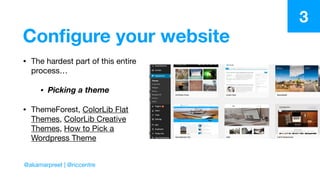
• The hardest part of this entire
process…

• Picking a theme
• ThemeForest, ColorLib Flat
Themes, ColorLib Creative
Themes, How to Pick a
Wordpress Theme
3
@akamarpreet | @riccentre
Configure your website
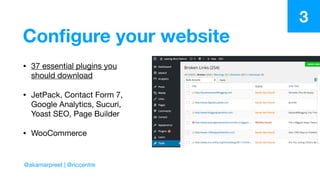
• 37 essential plugins you
should download

• JetPack, Contact Form 7,
Google Analytics, Sucuri,
Yoast SEO, Page Builder

• WooCommerce
3
@akamarpreet | @riccentre
Configure your website
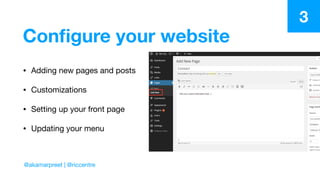
• Adding new pages and posts

• Customizations

• Setting up your front page

• Updating your menu
3
@akamarpreet | @riccentre
Configure your website
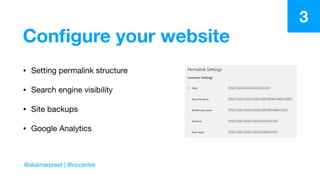
• Setting permalink structure

• Search engine visibility

• Site backups

• Google Analytics
3
@akamarpreet | @riccentre
Configure your website
• Here are some important pages
that you should consider adding:

• About

• Contact

• Portfolio

• Services and Products

• Team

• Testimonials

• Support

• Careers

• FAQ
3
@akamarpreet | @riccentre
Ok, so now what?
• Add content! Customize it to your business. Make it stand out. And now
I’ll show you how to take it to the next level.
@akamarpreet | @riccentre
Questions?
The magic of SEO
• Crucial part of
website
customization -
without it, your
customers probably
won’t find you via
Google or any other
search engine
@akamarpreet | @riccentre
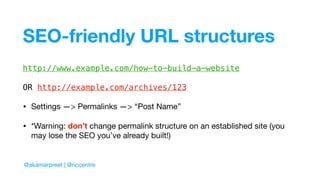
SEO-friendly URL structures
http://www.example.com/how-to-build-a-website
OR http://example.com/archives/123
• Settings —> Permalinks —> “Post Name”

• *Warning: don’t change permalink structure on an established site (you
may lose the SEO you’ve already built!)
@akamarpreet | @riccentre
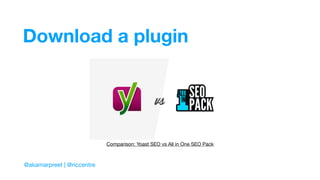
Download a plugin
@akamarpreet | @riccentre
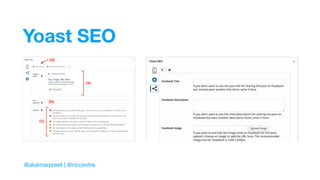
Comparison: Yoast SEO vs All in One SEO Pack
Yoast SEO
@akamarpreet | @riccentre
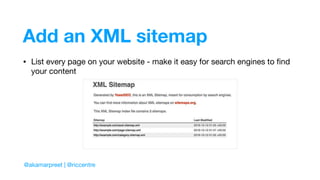
Add an XML sitemap
• List every page on your website - make it easy for search engines to find
your content
@akamarpreet | @riccentre
Use Google Search Console
• Provides reports and data to help you understand how your pages appear
in search results - use Yoast SEO to set this up!

• What search terms are people using?

• Add your sitemap to Google Search Console

• Check Search Console 1x/month
@akamarpreet | @riccentre
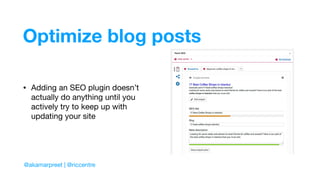
Optimize blog posts
• Adding an SEO plugin doesn’t
actually do anything until you
actively try to keep up with
updating your site
@akamarpreet | @riccentre
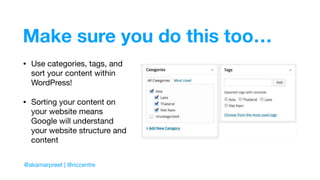
Make sure you do this too…
• Use categories, tags, and
sort your content within
WordPress! 

• Sorting your content on
your website means
Google will understand
your website structure and
content
@akamarpreet | @riccentre
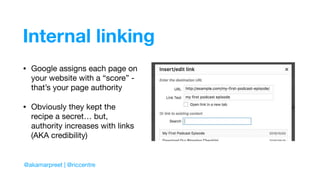
Internal linking
• Google assigns each page on
your website with a “score” -
that’s your page authority

• Obviously they kept the
recipe a secret… but,
authority increases with links
(AKA credibility)
@akamarpreet | @riccentre
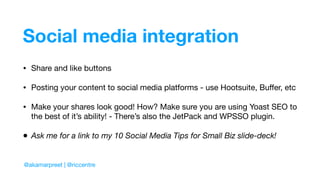
Social media integration
@akamarpreet | @riccentre
• Share and like buttons

• Posting your content to social media platforms - use Hootsuite, Buffer, etc

• Make your shares look good! How? Make sure you are using Yoast SEO to
the best of it’s ability! - There’s also the JetPack and WPSSO plugin.

• Ask me for a link to my 10 Social Media Tips for Small Biz slide-deck!
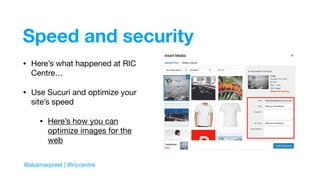
Speed and security
• Here’s what happened at RIC
Centre…

• Use Sucuri and optimize your
site’s speed

• Here’s how you can
optimize images for the
web
@akamarpreet | @riccentre
Google Analytics
@akamarpreet | @riccentre
• Who visits your website?

• What do people do on your
website?

• When do people visit your
website?

• How do people find your
website?

• How do people interact with your
content?

• Signup for Google Analytics here

• Install Google Analytics on
Wordpress using MonsterInsights

• Track, measure, change, and
repeat!
But I don’t have time…
• There’s lots of different platforms available out there if you are looking for
a drag-and-drop builder type of site, but it depends on your budget.
These can sometimes get expensive.

• Wix | SquareSpace | Weebly
@akamarpreet | @riccentre
What else?
• Just remember to really put thought into the goals of your website!

• What do you want to promote? How do you want to promote it?

• Wireframe your website! Sketch out your concept before you go
looking for themes, building your navigation, adding content.

• How much time will you have to manage it?
@akamarpreet | @riccentre
Questions?

How to Build a Website - Wordpress Basics

  • 1.
    How to Developa Website Amarpreet Kaur Digital Marketing Manager, RIC Centre @akamarpreet | @riccentre
  • 2.
    Who am I? •Molecular Biology • Biomedical Communications • Biotechnology • Real Estate Broker • Digital Marketing Manager • Creative Professional • Photographer @akamarpreet | @riccentre
  • 3.
  • 4.
  • 5.
    Why? • Using theinternet like a phonebook • Instant credibility • Sales and marketing channel • Data collection and lead generation • If you don’t have a website, you don’t want more business… @akamarpreet | @riccentre
  • 6.
    Today’s presentation 1. Choosethe right platform for your website 2. Choose the right website name (domain) and hosting 3. Configure your newly created website @akamarpreet | @riccentre
  • 7.
    Choose the rightplatform • When I first got started… Dreamweaver, Flash, etc • Content Management System • WordPress…because it’s free, beginner-friendly, great for small- large sites, responsive, support community, etc. OpenSourceCMS.com 1 @akamarpreet | @riccentre
  • 8.
    Beginner? • Stick withWordPress. Keep your life easy. As a business owner, that’s something you shouldn’t worry about. 1 @akamarpreet | @riccentre
  • 9.
    Choose a domainname • WordPress is free, but you need to purchase a domain name and hosting in order to run your website • bluehost.com, GoDaddy.com, one.com, etc • Short, memorable, brandable, catchy, easy to type • Try to Google it before you purchase it (does auto-correct on Google provide some odd search result?) 2 @akamarpreet | @riccentre
  • 10.
    Domain name vs.hosting 2 @akamarpreet | @riccentre
  • 11.
    Choose a hostingpackage • Shared Hosting • Good for tight budget • Managed WordPress Hosting • Website maintained for you 2 @akamarpreet | @riccentre
  • 12.
    Configure your website •Domain and hosting from same service provider? • Use one-click installation • Manual Install Guide • yourwebsitename.com/wp-admin • Now we get to the fun part… 3 @akamarpreet | @riccentre
  • 14.
    Configure your website •The hardest part of this entire process… • Picking a theme • ThemeForest, ColorLib Flat Themes, ColorLib Creative Themes, How to Pick a Wordpress Theme 3 @akamarpreet | @riccentre
  • 15.
    Configure your website •37 essential plugins you should download • JetPack, Contact Form 7, Google Analytics, Sucuri, Yoast SEO, Page Builder • WooCommerce 3 @akamarpreet | @riccentre
  • 16.
    Configure your website •Adding new pages and posts • Customizations • Setting up your front page • Updating your menu 3 @akamarpreet | @riccentre
  • 17.
    Configure your website •Setting permalink structure • Search engine visibility • Site backups • Google Analytics 3 @akamarpreet | @riccentre
  • 18.
    Configure your website •Here are some important pages that you should consider adding: • About • Contact • Portfolio • Services and Products • Team • Testimonials • Support • Careers • FAQ 3 @akamarpreet | @riccentre
  • 19.
    Ok, so nowwhat? • Add content! Customize it to your business. Make it stand out. And now I’ll show you how to take it to the next level. @akamarpreet | @riccentre
  • 20.
  • 21.
    The magic ofSEO • Crucial part of website customization - without it, your customers probably won’t find you via Google or any other search engine @akamarpreet | @riccentre
  • 22.
    SEO-friendly URL structures http://www.example.com/how-to-build-a-website ORhttp://example.com/archives/123 • Settings —> Permalinks —> “Post Name” • *Warning: don’t change permalink structure on an established site (you may lose the SEO you’ve already built!) @akamarpreet | @riccentre
  • 23.
    Download a plugin @akamarpreet| @riccentre Comparison: Yoast SEO vs All in One SEO Pack
  • 24.
  • 25.
    Add an XMLsitemap • List every page on your website - make it easy for search engines to find your content @akamarpreet | @riccentre
  • 26.
    Use Google SearchConsole • Provides reports and data to help you understand how your pages appear in search results - use Yoast SEO to set this up! • What search terms are people using? • Add your sitemap to Google Search Console • Check Search Console 1x/month @akamarpreet | @riccentre
  • 27.
    Optimize blog posts •Adding an SEO plugin doesn’t actually do anything until you actively try to keep up with updating your site @akamarpreet | @riccentre
  • 28.
    Make sure youdo this too… • Use categories, tags, and sort your content within WordPress! • Sorting your content on your website means Google will understand your website structure and content @akamarpreet | @riccentre
  • 29.
    Internal linking • Googleassigns each page on your website with a “score” - that’s your page authority • Obviously they kept the recipe a secret… but, authority increases with links (AKA credibility) @akamarpreet | @riccentre
  • 30.
    Social media integration @akamarpreet| @riccentre • Share and like buttons • Posting your content to social media platforms - use Hootsuite, Buffer, etc • Make your shares look good! How? Make sure you are using Yoast SEO to the best of it’s ability! - There’s also the JetPack and WPSSO plugin. • Ask me for a link to my 10 Social Media Tips for Small Biz slide-deck!
  • 31.
    Speed and security •Here’s what happened at RIC Centre… • Use Sucuri and optimize your site’s speed • Here’s how you can optimize images for the web @akamarpreet | @riccentre
  • 32.
    Google Analytics @akamarpreet |@riccentre • Who visits your website? • What do people do on your website? • When do people visit your website? • How do people find your website? • How do people interact with your content? • Signup for Google Analytics here • Install Google Analytics on Wordpress using MonsterInsights • Track, measure, change, and repeat!
  • 33.
    But I don’thave time… • There’s lots of different platforms available out there if you are looking for a drag-and-drop builder type of site, but it depends on your budget. These can sometimes get expensive. • Wix | SquareSpace | Weebly @akamarpreet | @riccentre
  • 34.
    What else? • Justremember to really put thought into the goals of your website! • What do you want to promote? How do you want to promote it? • Wireframe your website! Sketch out your concept before you go looking for themes, building your navigation, adding content. • How much time will you have to manage it? @akamarpreet | @riccentre
  • 35.