How Microsoft Will
MiTM Your Network
And how to use tools
without a toolkit!
601 AOC / 101 ACOMS
Tyndall AFB, FL
Active Defense - July 2017
(FY18 Pathfinders)
(FY19 Pathfinders)
Brandon DeVault
GCIA, GCED, Sec+
Aaron Rosenmund - @Arosenmund
aaron.rosenmund@gmail.com
https://github.com/arosenmund
https://www.pluralsight.com/profile/author/aaron-rosenmund
Overview
Event Scenario & Discovery
Microsoft Wake-Up Proxy Service
Tools that aren't tools?
Key Takeaways
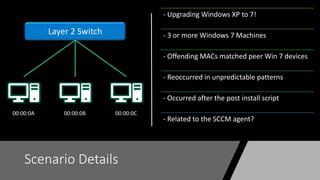
Scenario Details
- Upgrading Windows XP to 7!
- 3 or more Windows 7 Machines
- Offending MACs matched peer Win 7 devices
- Reoccurred in unpredictable patterns
- Occurred after the post install script
- Related to the SCCM agent?
Layer 2 Switch
00:00:0A 00:00:0B 00:00:0C
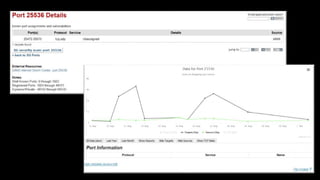
Netstat - Scenario
ā€œnetstat –anoā€
UDP [IP]:25536 *:* 3480
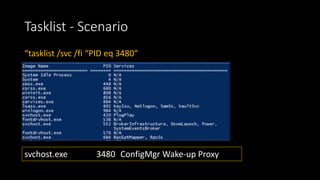
Tasklist - Scenario
ā€œtasklist /svc /fi ā€œPID eq 3480ā€
svchost.exe 3480 ConfigMgr Wake-up Proxy
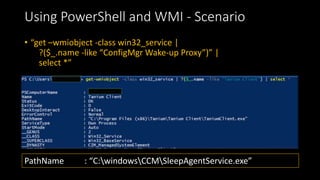
Using PowerShell and WMI - Scenario
• ā€œget –wmiobject -class win32_service |
?($_.name -like ā€œConfigMgr Wake-up Proxyā€)ā€ |
select *ā€
PathName : ā€œC:windowsCCMSleepAgentService.exeā€
Log Files
• <![LOG[Not becoming a guardian because we are the only machine in
the subnet running WakeUp Proxy Service]LOG]!><time=ā€œx:x:x.xxxā€
component=ā€œSleepAgentā€ … >
• <![LOG[Sending a port-grabbing frame for x.x.x.x / xxMACxx from
xxMACxx]LOG]!><time=ā€œx:x:x.xxxā€ component=ā€œSleepAgentā€ … >
Microsoft Wake-Up Proxy Service
• SCCM 2012 SP1
• ā€œConfiguration Manager supports traditional wake-up packets to wake up
computers in sleep mode when you want to install required software, such as
software updates and applications.ā€
• ā€œā€¦on a network that uses 802.1X network access control, wake-up proxy will not
work and can disrupt the network service.ā€
https://docs.microsoft.com/en-us/sccm/core/clients/deploy/plan/plan-wake-up-clients
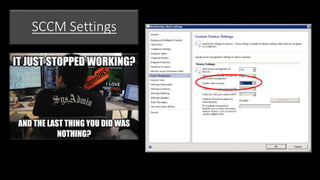
SCCM Settings
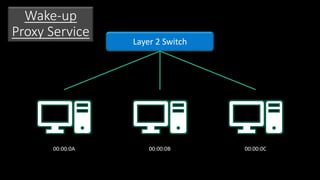
Layer 2 Switch
00:00:0A 00:00:0B 00:00:0C
Wake-up
Proxy Service
00:00:0A
00:00:0B
00:00:0C
00:00:0A
00:00:0B
00:00:0C
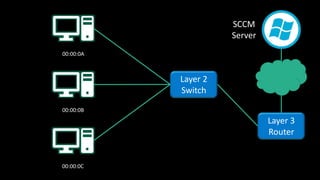
Layer 2
Switch
Layer 3
Router
SCCM
Server
00:00:0A
00:00:0B
00:00:0C
Layer 2
Switch
Layer 3
Router
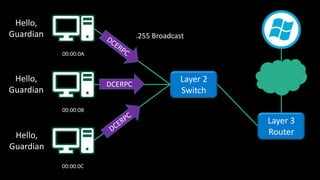
Hello,
Guardian
Hello,
Guardian
Hello,
Guardian
.255 Broadcast
DCERPC
00:00:0A
00:00:0B
00:00:0C
Layer 2
Switch
Layer 3
Router
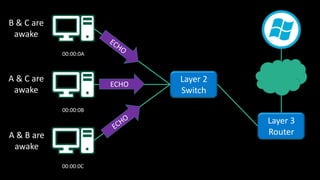
B & C are
awake
A & C are
awake
A & B are
awake
ECHO
00:00:0A
00:00:0B
00:00:0C
Layer 2
Switch
Layer 3
Router
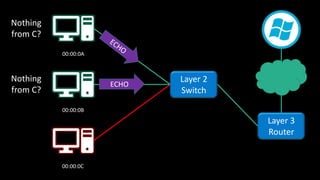
Nothing
from C?
Nothing
from C?
ECHO
00:00:0A
00:00:0B
00:00:0C
Layer 2
Switch
Layer 3
Router
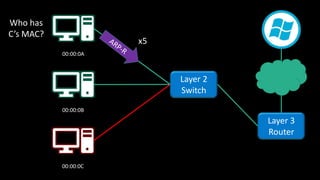
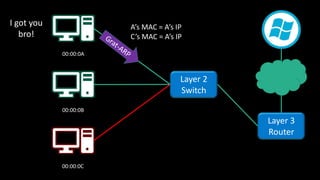
Who has
C’s MAC?
x5
00:00:0A
00:00:0B
00:00:0C
Layer 2
Switch
Layer 3
Router
I got you
bro!
A’s MAC = A’s IP
C’s MAC = A’s IP
00:00:0A
00:00:0B
00:00:0C
Layer 2
Switch
Layer 3
Router
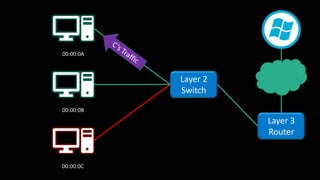
00:00:0A
00:00:0B
00:00:0C
Layer 2
Switch
Layer 3
Router
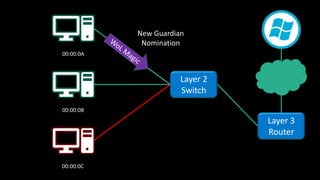
New Guardian
Nomination
00:00:0A
00:00:0B
00:00:0C
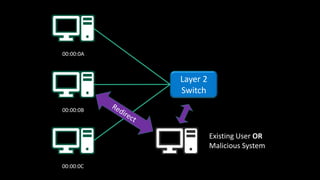
Layer 2
Switch
Existing User OR
Malicious System
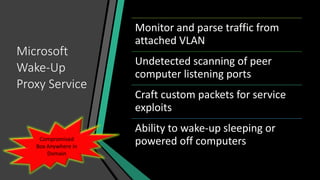
Microsoft
Wake-Up
Proxy Service
Monitor and parse traffic from
attached VLAN
Undetected scanning of peer
computer listening ports
Craft custom packets for service
exploits
Ability to wake-up sleeping or
powered off computersCompromised
Box Anywhere in
Domain
Tools that aren't tools?
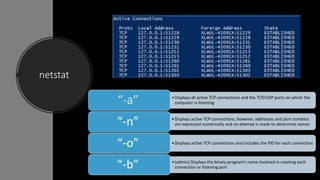
netstat
•Displays all active TCP connections and the TCP/UDP ports on which the
computer is listeningā€œ-aā€
•Displays active TCP connections, however, addresses and port numbers
are expressed numerically and no attempt is made to determine namesā€œ-nā€
•Displays active TCP connections and includes the PID for each connection
ā€œ-oā€
•(admin) Displays the binary program’s name involved in creating each
connection or listening portā€œ-bā€
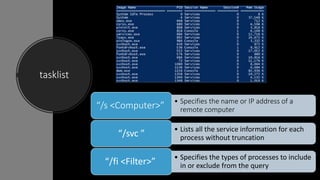
tasklist
• Specifies the name or IP address of a
remote computerā€œ/s <Computer>ā€
• Lists all the service information for each
process without truncationā€œ/svc ā€
• Specifies the types of processes to include
in or exclude from the queryā€œ/fi <Filter>ā€
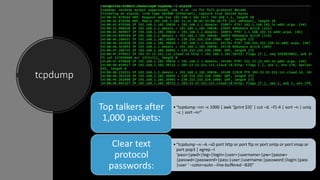
tcpdump
ā€¢ā€œtcpdump –nn –c 1000 | awk ā€˜{print $3}’ | cut –d. –f1-4 | sort –n | uniq
–c | sort –nrā€
Top talkers after
1,000 packets:
ā€¢ā€œtcpdump –n –A –s0 port http or port ftp or port smtp or port imap or
port pop3 | egrep –I
ā€˜pass=|pwd=|log=|login=|user=|username=|pw=|passw=
|passwd=|password=|pass:|user:|username:|password:|login:|pass
|user ā€˜ –color=auto --line-buffered –B20ā€
Clear text
protocol
passwords:
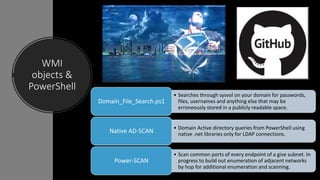
WMI
objects &
PowerShell
• Searches through sysvol on your domain for passwords,
files, usernames and anything else that may be
erroneously stored in a publicly readable space.
Domain_File_Search.ps1
• Domain Active directory queries from PowerShell using
native .net libraries only for LDAP connections.Native AD-SCAN
• Scan common ports of every endpoint of a give subnet. In
progress to build out enumeration of adjacent networks
by hop for additional enumeration and scanning.
Power-SCAN
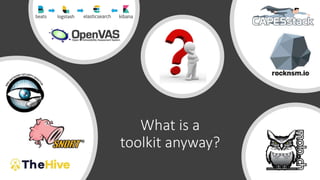
What is a
toolkit anyway?
Key Takeaways!
• Understand the ports and protocols on your network!
• Server + Network Administration knowledge is a must!
• Expensive Tools
Questions?
• 601AOC.MDT.OMB@us.af.mil
• Office: (850) 283-5280
• https://github.com/1dentified/
• Brandon DeVault - @SolderSwag
• brandondevault@gmail.com
• brandon.devault@us.af.mil

How Microsoft will MiTM your network