Horizon Report
BYOD
Professional Development
Drew Elrod
Georgia Southern University
The Internet in Schools
What is BYOD?
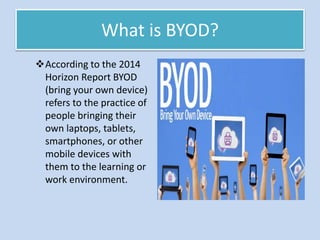
According to the 2014
Horizon Report BYOD
(bring your own device)
refers to the practice of
people bringing their
own laptops, tablets,
smartphones, or other
mobile devices with
them to the learning or
work environment.
Why BYOD?
• Benefits for students
– Many students are
entering the classroom
with their own devices,
which they use to connect
to the school’s network.
– Gives the students
opportunities to choose
their device, which saves
time and effort needed to
get accustomed to new
devices and can therefore
accomplish tasks with ease
and efficiency.
BYOD Increases Productivity
• The 2014 Horizon Report indicates:
– “The link between the use of personal devices
and increases in productivity gets stronger each
passing year as more organizations adopt BYOD
policies. The integration of personal
smartphones, tablets, and PCs into the workflow
supports an on-the-go mentality, changing the
nature of work and learning activities so that
they can happen anywhere, at anytime.”
Personalized Learning Possibilities
• Devices have become
the gateways to
personal working and
learning environments
that facilitate the
exploration to new
subjects at a pace that
is unique to each
learner.
• BYOD gives learners
ownership of their
learning.
• Education researchers
highlight BYOD as the
technology practice that
will best accommodate
personalized learning.
• “Achieving one-to-one status is essential because it is
the pathway to access. In a one-to-one classroom, all
students have Internet-capable devices that they have
possession of and use to own their own learning. This
access is what enables the shift in focus of the
classroom process from the teacher to the learner. To
build 21st century skills, a student needs ready use of
the tools to do so. It is the difference between teacher-
centered technology—using a PowerPoint
presentation—and student-centered technology—
giving students access to the web to solve problems,
create work, and add value to their educational
journeys.”
Costa, J. P. (2012). Digital Learning For All. Now. Principal
Leadership, 13(1), 54-58.
Training for the Future
• Numerous companies
and organizations are
using BYOD policies.
– Intel has reported up
to 5 million hours of
annual productivity
gains since
implementing BYOD
policies.
• The success of BYOD
aligns with global
trends toward mobility
as more people, from
children to adults, own
smartphones and are
accessing the Internet
in increasingly different
environments.
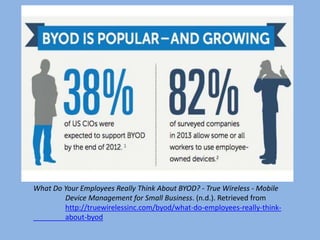
What Do Your Employees Really Think About BYOD? - True Wireless - Mobile
Device Management for Small Business. (n.d.). Retrieved from
http://truewirelessinc.com/byod/what-do-employees-really-think-
about-byod
• Research conducted by Jonathan Costa
concerning early BYOD participation revealed
the following:
– In an average community between 60% and 80%
of students will eventually take advantage of this
option and bring devices with them to school.
– When the majority of students come to school
with learning capable devices in-hand, districts
can then redeploy the resources saved from
redesigning software and purchasing instructional
materials to buy devices for those students who
either cannot afford or do not want to bring one
of their own.
Advantages/Organization
• Mobile learning affords
many benefits to learners.
Some of the benefits of m-
learning are increased
access, convenience,
anytime learning, anywhere
learning, as needed learning,
quick reference and
troubleshooting,
personalized learning,
autonomous learning, and
social media integration.
Estable, M. (2013). A review of considerations for
BYOD M-learning design. In: Distance
Learning, 10(3), 21-26.
• The better the organization
of the learning content then
the higher the student
autonomy. Start by
analyzing the learning goals,
and then mapping that back
to the main topics that will
support those goals, and
then break those main
topics further into
supporting subtopics that
can be ordered and
arranged to guide the
learner, step by step.
Estable, M. (2013). A review of considerations for
BYOD M-learning design. In: Distance
Learning, 10(3), 21-26.
Factors Contributing to BYOD
• Tablets, netbooks, laptops,
multi purpose e-book
readers, and smartphones
have become affordable for
an increasing number of
families.
• More adults are
experiencing the power of
ubiquitous communication
and information access in
their own lives.
• Teachers are becoming
aware of applications and
teaching strategies that use
personal technologies to
increase student
engagement.
• Districts are recognizing
that they may never have
adequate funding to
provide a school-owned
computing device to every
child.
Johnson, D. (2012). Power Up! On
board with BYOD. Educational
Leadership, 70(2), 84-85.
What School Leaders Can Do:
• Help set school wide rules on the use of student-owned devices
and assist teachers in establishing classroom expectations for use.
• Let parents know what they should look for as they purchase
personal technologies for their children.
• Recognize the need for staff development in classroom
management and teaching strategies for students who have their
own technologies.
• Encourage the selection of digital resources that can be used on as
wide a range of devices as possible.
• Provide ways to access online resources and learning
opportunities for students who do not have personal computing
devices.
Adaptive Technology Resources
• Click the link below to
see how students and
teachers can use BYOD.
https://www.youtube.com
/watch?v=2BdV9Bq81X4
Think about the
question… How are you
going to BYOD?
• Click the link below to
see students
perspective of BYOD
https://www.youtube.com
/watch?v=W9mobocxdnc
What are some key words
and concepts used by the
students being
interviewed?
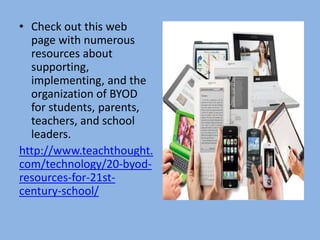
• Check out this web
page with numerous
resources about
supporting,
implementing, and the
organization of BYOD
for students, parents,
teachers, and school
leaders.
http://www.teachthought.
com/technology/20-byod-
resources-for-21st-
century-school/
References
10 Ways Students Can BYOD [Video file]. (n.d.). Retrieved from
https://www.youtube.com/watch?v=2BdV9Bq81X4
20 BYOD Resources For The 21st Century Schools. (n.d.). Retrieved from
http://www.teachthought.com/technology/20-byod-resources-for-21st-
century-school/
BYOD Student Perspective [Video file]. (n.d.). Retrieved from
https://www.youtube.com/watch?v=W9mobocxdnc
Costa, J. P. (2012). Digital Learning For All. NOw. Principla Leadership, 13(1), 54-58
Estable, M. (2013). A review of considerations for BYOD M-learning design. In: Distance
Learning, 10(3), 21-26.
Johnson, D. (2012). Power Up! On board with BYOD. Educational Leadership, 70(2),
84-85.
What Do Your Employees Really Think About BYOD? - True Wireless - Mobile Device
Management for Small Business. (n.d.). Retrieved from
http://truewirelessinc.com/byod/what-do-employees-really-think-about-byod/

Horizon report

  • 1.
    Horizon Report BYOD Professional Development DrewElrod Georgia Southern University The Internet in Schools
  • 2.
    What is BYOD? Accordingto the 2014 Horizon Report BYOD (bring your own device) refers to the practice of people bringing their own laptops, tablets, smartphones, or other mobile devices with them to the learning or work environment.
  • 3.
    Why BYOD? • Benefitsfor students – Many students are entering the classroom with their own devices, which they use to connect to the school’s network. – Gives the students opportunities to choose their device, which saves time and effort needed to get accustomed to new devices and can therefore accomplish tasks with ease and efficiency.
  • 4.
    BYOD Increases Productivity •The 2014 Horizon Report indicates: – “The link between the use of personal devices and increases in productivity gets stronger each passing year as more organizations adopt BYOD policies. The integration of personal smartphones, tablets, and PCs into the workflow supports an on-the-go mentality, changing the nature of work and learning activities so that they can happen anywhere, at anytime.”
  • 5.
    Personalized Learning Possibilities •Devices have become the gateways to personal working and learning environments that facilitate the exploration to new subjects at a pace that is unique to each learner. • BYOD gives learners ownership of their learning. • Education researchers highlight BYOD as the technology practice that will best accommodate personalized learning.
  • 6.
    • “Achieving one-to-onestatus is essential because it is the pathway to access. In a one-to-one classroom, all students have Internet-capable devices that they have possession of and use to own their own learning. This access is what enables the shift in focus of the classroom process from the teacher to the learner. To build 21st century skills, a student needs ready use of the tools to do so. It is the difference between teacher- centered technology—using a PowerPoint presentation—and student-centered technology— giving students access to the web to solve problems, create work, and add value to their educational journeys.” Costa, J. P. (2012). Digital Learning For All. Now. Principal Leadership, 13(1), 54-58.
  • 7.
    Training for theFuture • Numerous companies and organizations are using BYOD policies. – Intel has reported up to 5 million hours of annual productivity gains since implementing BYOD policies. • The success of BYOD aligns with global trends toward mobility as more people, from children to adults, own smartphones and are accessing the Internet in increasingly different environments.
  • 8.
    What Do YourEmployees Really Think About BYOD? - True Wireless - Mobile Device Management for Small Business. (n.d.). Retrieved from http://truewirelessinc.com/byod/what-do-employees-really-think- about-byod
  • 9.
    • Research conductedby Jonathan Costa concerning early BYOD participation revealed the following: – In an average community between 60% and 80% of students will eventually take advantage of this option and bring devices with them to school. – When the majority of students come to school with learning capable devices in-hand, districts can then redeploy the resources saved from redesigning software and purchasing instructional materials to buy devices for those students who either cannot afford or do not want to bring one of their own.
  • 10.
    Advantages/Organization • Mobile learningaffords many benefits to learners. Some of the benefits of m- learning are increased access, convenience, anytime learning, anywhere learning, as needed learning, quick reference and troubleshooting, personalized learning, autonomous learning, and social media integration. Estable, M. (2013). A review of considerations for BYOD M-learning design. In: Distance Learning, 10(3), 21-26. • The better the organization of the learning content then the higher the student autonomy. Start by analyzing the learning goals, and then mapping that back to the main topics that will support those goals, and then break those main topics further into supporting subtopics that can be ordered and arranged to guide the learner, step by step. Estable, M. (2013). A review of considerations for BYOD M-learning design. In: Distance Learning, 10(3), 21-26.
  • 11.
    Factors Contributing toBYOD • Tablets, netbooks, laptops, multi purpose e-book readers, and smartphones have become affordable for an increasing number of families. • More adults are experiencing the power of ubiquitous communication and information access in their own lives. • Teachers are becoming aware of applications and teaching strategies that use personal technologies to increase student engagement. • Districts are recognizing that they may never have adequate funding to provide a school-owned computing device to every child. Johnson, D. (2012). Power Up! On board with BYOD. Educational Leadership, 70(2), 84-85.
  • 12.
    What School LeadersCan Do: • Help set school wide rules on the use of student-owned devices and assist teachers in establishing classroom expectations for use. • Let parents know what they should look for as they purchase personal technologies for their children. • Recognize the need for staff development in classroom management and teaching strategies for students who have their own technologies. • Encourage the selection of digital resources that can be used on as wide a range of devices as possible. • Provide ways to access online resources and learning opportunities for students who do not have personal computing devices.
  • 13.
    Adaptive Technology Resources •Click the link below to see how students and teachers can use BYOD. https://www.youtube.com /watch?v=2BdV9Bq81X4 Think about the question… How are you going to BYOD? • Click the link below to see students perspective of BYOD https://www.youtube.com /watch?v=W9mobocxdnc What are some key words and concepts used by the students being interviewed?
  • 14.
    • Check outthis web page with numerous resources about supporting, implementing, and the organization of BYOD for students, parents, teachers, and school leaders. http://www.teachthought. com/technology/20-byod- resources-for-21st- century-school/
  • 15.
    References 10 Ways StudentsCan BYOD [Video file]. (n.d.). Retrieved from https://www.youtube.com/watch?v=2BdV9Bq81X4 20 BYOD Resources For The 21st Century Schools. (n.d.). Retrieved from http://www.teachthought.com/technology/20-byod-resources-for-21st- century-school/ BYOD Student Perspective [Video file]. (n.d.). Retrieved from https://www.youtube.com/watch?v=W9mobocxdnc Costa, J. P. (2012). Digital Learning For All. NOw. Principla Leadership, 13(1), 54-58 Estable, M. (2013). A review of considerations for BYOD M-learning design. In: Distance Learning, 10(3), 21-26. Johnson, D. (2012). Power Up! On board with BYOD. Educational Leadership, 70(2), 84-85. What Do Your Employees Really Think About BYOD? - True Wireless - Mobile Device Management for Small Business. (n.d.). Retrieved from http://truewirelessinc.com/byod/what-do-employees-really-think-about-byod/