A
Mini-Project Report on
“VOICE ACTIVATED HOME AUTOMATION USING NODEMCU ESP8266”
Submitted by,
MR. ADHYAY MAHESH DESHMUKH
Bachelor of Technology in Electrical Engineering
(PRN-23030331293509)
Under the Guidance of
PROF.A.M. BHAWARE
(Professor of Electrical Engineering Department)
In Partial Fulfilment of Bachelor of Technology Course in Electrical Engineering.
For the Academic Year 2023-24
DEPARTMENT OF ELECTRICAL ENGINEERING,
DR. BABASAHEB AMBEDKAR TECHNOLOGICAL UNIVERSITY
LONERE, RAIGAD, MAHARASHTRA-402103
DR. BABASAHEB AMBEDKAR TECHNOLOGICAL
UNIVERSITY LONERE, RAIGAD, MAHARASHTRA-402103
DEPARTMENT OF ELECTRICAL ENGINEERING
CERTIFICATE
This is to certify that a Mini-Project Report entitled “Voice Activated Home Automation
using NodeMCU ESP8266” is being submitted by Mr. Adhyay Mahesh Deshmukh
[PRN-23030331293509] in partial requirement of the award of Degree of Bachelor of
Technology in Electrical Engineering is a record of own work carried by him under my
supervision as prescribed in the syllabus of Dr. Babasaheb Ambedkar Technological
University, Lonere during the Academic Year 2023-24.
Prof.A.M. Bhaware Prof. M.F.A.R. Satarkar
Guide Head of The Department
Department of Electrical Engineering Department of Electrical Engineering
Examiners:
1]
2]
Date:
Place: Lonere
ACKNOWLEDGEMENT
I would like to thanks and profound gratitude towards my guide A.M. Bhaware, Professor,
Department of Electrical Engineering, Dr. Babasaheb Ambedkar Technological University,
Lonere, for his proficient and enthusiastic guidance, which served as a constant source of
inspiration for the completion of this work. His painstaking support and exhaustive involvement
in the conceptual understanding, conduction of simulation studies and hardware structure are
gratefully acknowledged. I sincerely appreciate his pronounced individuality, humanistic and
warm personal approach and excellent facilities provided in the laboratory, which has given me
strength to carry out this work on steady and smooth course. I humbly acknowledge a lifetime’s
gratitude to him. I express my deep sense of gratitude to the Head of Electrical Engineering
Department, Prof. M.F.A.R. Satarkar, for providing excellent laboratory and computing
facilities of department for this work.
Mr. Adhyay Mahesh Deshmukh
(23030331293509)
ABSTRACT
The rapid advancement of Internet of Things (IoT) technology has paved the way for
innovative and intelligent solutions in the field of home automation. This paper presents a
comprehensive study and implementation of home automation using the NodeMCU ESP8266
microcontroller, with a focus on voice and mobile control as the primary interfaces for user
interaction.
The proposed system leverages the NodeMCU ESP8266, a cost-effective and versatile
microcontroller, as the core of the automation system. By connecting various sensors and
actuators to the NodeMCU, users can remotely monitor and control their home environment.
The system offers an effective integration of smart devices, such as lights, fans, and appliances,
making it possible to create a seamless and interconnected smart home ecosystem.
Voice control, powered by voice recognition technology, provides an intuitive and hands-free
approach to managing smart devices within the home. Users can issue voice commands to
control lighting, climate, and security systems, enhancing convenience and accessibility for
individuals of all abilities.
Mobile control is another key feature of the system, enabling users to control their smart home
from anywhere in the world through a dedicated mobile application. The mobile app offers a
user-friendly interface, providing real-time status updates and control options for all connected
devices. Additionally, it allows users to schedule and automate routine tasks, further optimizing
energy efficiency and comfort.
Security and data privacy are paramount concerns in smart home automation. The paper
discusses measures to secure the system, such as user authentication and encrypted
communication, to protect against unauthorized access and data breaches.
This research and implementation showcase the potential of the NodeMCU ESP8266
microcontroller in creating a cost-effective, flexible, and user-friendly home automation system.
The integration of voice and mobile control not only improves the accessibility of smart homes
but also contributes to the overall efficiency and convenience of daily life. As IoT technology
continues to evolve, this study provides valuable insights into the development of smarter and
more secure homes.
LIST OF FIGURES
Figure No. Name Page No.
1. Block Diagram for
Home Automation
2
2. Construction of
NodeMCU
ESP8266
4
3. Construction of 5V
4-Channel Relay
Module
6
4. Circuit Diagram for
Home Automation
7
5. Circuit Diagram of
5V 4-Channel
Relay Module
11
6. Pinout Diagram of
NodeMCU
ESP8266
14
7. Home Automation
Actual Working
Model
23
INDEX
Chapter No. Content Page No.
1. Introduction 1
2.
Construction of the
Model
3
2.1
Construction of
NodeMCU ESP8266
3
2.2
Construction of 5V 4-
Channel Relay Module
5
3. Working 7
3.1 Working of the Model 7
3.1.1 Working of NodeMCU 8
3.1.2 Working of 5V 4-
Channel Relay Module
10
3.2 Explanation of the Code 12
3.3 Explanation of various
Pins of NodeMCU
14
4.
Advantages and
Disadvantages of Home
Automation using
NodeMCU
16
4.1 Advantages
16
4.2 Disadvantages
18
5. Applications of Home
Automation using
NodeMCU
20
6. Future Scope of this
Project
22
Conclusion 24
References 25
1
CHAPTER 1
Introduction
1. Introduction:
Home automation using a 4-channel relay module and NodeMCU represents a dynamic and
accessible approach to transforming a conventional home into a smart and interconnected living
space. The 4-channel relay module, equipped with four independently controllable switches,
serves as a pivotal component in this system. Paired with the NodeMCU, a versatile and cost-
effective IoT platform, this combination enables users to remotely control and automate various
electrical appliances and devices within their homes.
The 4-channel relay module acts as a relay switchboard, facilitating the control of multiple
electronic devices such as lights, fans, or other household appliances. The NodeMCU, based on
the ESP8266 Wi-Fi module, seamlessly integrates into home automation projects, providing Wi-
Fi connectivity that enables communication between the relay module and the user's smartphone
or other smart devices. This connectivity empowers users to remotely manage and monitor their
home environment, fostering convenience, energy efficiency, and a heightened level of control.
With the ability to program the NodeMCU using the Arduino IDE, users can easily develop
custom applications and automation sequences tailored to their specific needs. This may include
setting up schedules, implementing conditional logic, or integrating voice control for a hands-
free experience. The synergy between the 4-channel relay module and NodeMCU not only
simplifies the implementation of home automation but also opens the door to creative and
personalized solutions that enhance the overall functionality and intelligence of a modern home.
Whether it's turning off lights from a mobile app, automating home security systems, or creating
a smart garden irrigation system, this combination provides an accessible entry point into the
exciting realm of DIY home automation.
2
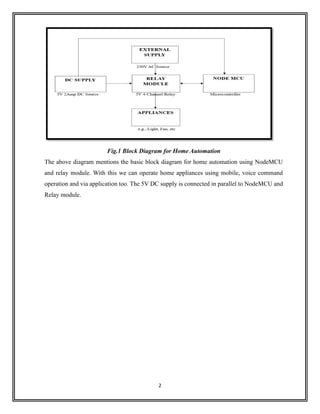
Fig.1 Block Diagram for Home Automation
The above diagram mentions the basic block diagram for home automation using NodeMCU
and relay module. With this we can operate home appliances using mobile, voice command
operation and via application too. The 5V DC supply is connected in parallel to NodeMCU and
Relay module.
3
CHAPTER 2
Construction of the Model
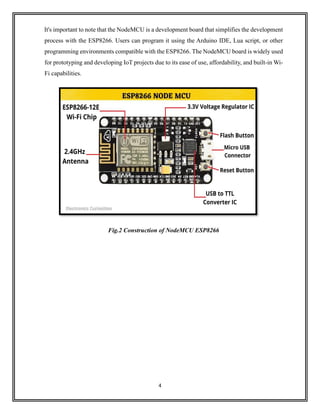
2.1 NodeMCU ESP8266:
The NodeMCU is not a device that is physically constructed by end-users; instead, it is a pre-
built development board that incorporates the ESP8266 Wi-Fi module. The ESP8266 is a
system-on-a-chip (SoC) that integrates a microcontroller and Wi-Fi capabilities, making it
suitable for IoT (Internet of Things) applications. The NodeMCU development board simplifies
the programming and interfacing with the ESP8266, providing an easy-to-use platform for
developers and hobbyists.
Here's a brief overview of the key components on the NodeMCU development board:
1. ESP8266 Module: The heart of the NodeMCU is the ESP8266 Wi-Fi module. This module
houses the microcontroller unit (MCU) and the Wi-Fi transceiver.
2. USB-to-Serial Converter: The NodeMCU board typically includes a USB-to-Serial converter,
allowing it to be easily connected to a computer for programming and debugging. This
eliminates the need for an external USB-to-Serial adapter.
3. Voltage Regulator: The board often features a voltage regulator that regulates the input voltage
to provide a stable supply voltage for the ESP8266.
4. Flash Memory: NodeMCU boards come equipped with flash memory to store the firmware
and user programs. The flash memory size can vary among different NodeMCU versions.
5. GPIO Pins: General Purpose Input/Output (GPIO) pins are available for connecting external
sensors, actuators, and other electronic components. These pins allow users to interface with the
physical world.
6. Micro USB Port: The NodeMCU typically has a micro-USB port for power supply and
communication with a computer.
7. LEDs: Some NodeMCU boards have LEDs that can be controlled via GPIO pins, providing a
visual indication of the board's status or user-defined conditions.
8. Reset and Flash Buttons: There are usually buttons on the board for resetting the
microcontroller and initiating firmware flashing.
4
It's important to note that the NodeMCU is a development board that simplifies the development
process with the ESP8266. Users can program it using the Arduino IDE, Lua script, or other
programming environments compatible with the ESP8266. The NodeMCU board is widely used
for prototyping and developing IoT projects due to its ease of use, affordability, and built-in Wi-
Fi capabilities.
Fig.2 Construction of NodeMCU ESP8266
5
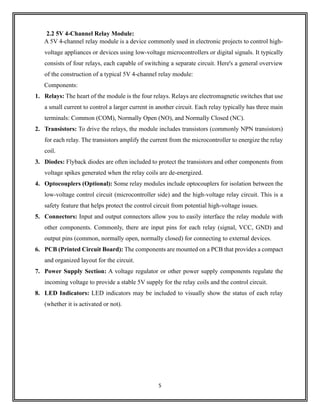
2.2 5V 4-Channel Relay Module:
A 5V 4-channel relay module is a device commonly used in electronic projects to control high-
voltage appliances or devices using low-voltage microcontrollers or digital signals. It typically
consists of four relays, each capable of switching a separate circuit. Here's a general overview
of the construction of a typical 5V 4-channel relay module:
Components:
1. Relays: The heart of the module is the four relays. Relays are electromagnetic switches that use
a small current to control a larger current in another circuit. Each relay typically has three main
terminals: Common (COM), Normally Open (NO), and Normally Closed (NC).
2. Transistors: To drive the relays, the module includes transistors (commonly NPN transistors)
for each relay. The transistors amplify the current from the microcontroller to energize the relay
coil.
3. Diodes: Flyback diodes are often included to protect the transistors and other components from
voltage spikes generated when the relay coils are de-energized.
4. Optocouplers (Optional): Some relay modules include optocouplers for isolation between the
low-voltage control circuit (microcontroller side) and the high-voltage relay circuit. This is a
safety feature that helps protect the control circuit from potential high-voltage issues.
5. Connectors: Input and output connectors allow you to easily interface the relay module with
other components. Commonly, there are input pins for each relay (signal, VCC, GND) and
output pins (common, normally open, normally closed) for connecting to external devices.
6. PCB (Printed Circuit Board): The components are mounted on a PCB that provides a compact
and organized layout for the circuit.
7. Power Supply Section: A voltage regulator or other power supply components regulate the
incoming voltage to provide a stable 5V supply for the relay coils and the control circuit.
8. LED Indicators: LED indicators may be included to visually show the status of each relay
(whether it is activated or not).
6
Fig.3 Construction of 5V 4-Channel Relay Module
The above figure shows the detailed construction of 5V 4-Channel Relay Module for the
operation of AC appliances up-to 230V, 10 A max and for DC up-to 30V, 10A.
7
CHAPTER 3
Working
3.1 Working of the model:
The NodeMCU is connected to the Wi-Fi network and awaits voice commands and mobile app
requests. When a voice command is detected by the voice recognition module, the NodeMCU
processes the command and sends corresponding signals to the actuators. The mobile app
communicates with the NodeMCU to send control commands and receive the status of
connected devices. Users can control devices using the app from anywhere with an internet
connection. The operation of connected devices is done with the help of relay module, in this
project the signal of operation is given by NodeMCU microcontroller. Users can set up
automation rules within the mobile app. For example, turning on lights at a specific time or
when motion is detected. The system provides real-time feedback on the status of connected
devices, ensuring users are informed about the state of their home environment. Security
measures are in place to prevent unauthorized access to the system and protect user data.
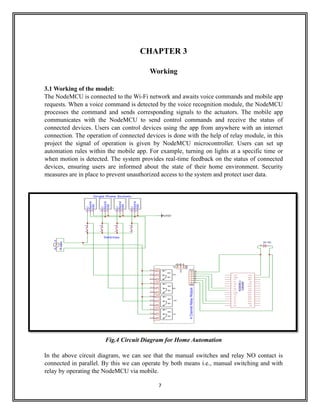
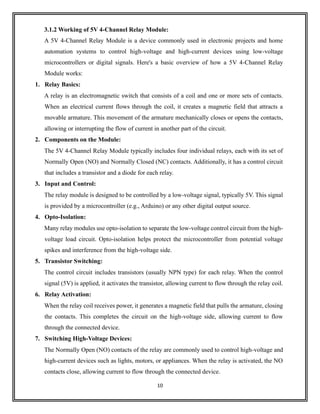
Fig.4 Circuit Diagram for Home Automation
In the above circuit diagram, we can see that the manual switches and relay NO contact is
connected in parallel. By this we can operate by both means i.e., manual switching and with
relay by operating the NodeMCU via mobile.
8
3.1.1 Working of NodeMCU ESP8266:
The NodeMCU is a low-cost open-source IoT platform based on the ESP8266 Wi-Fi module.
The ESP8266 is a popular and versatile microcontroller with built-in Wi-Fi capabilities, making
it suitable for various IoT (Internet of Things) applications. NodeMCU, in particular, is a
development board that simplifies the use of the ESP8266 by providing a convenient
programming interface and power supply circuitry. Here's a basic overview of the working of
NodeMCU (ESP8266):
1. Microcontroller and Wi-Fi Module:
The NodeMCU board is built around the ESP8266 microcontroller, which integrates a Tensilica
L106 32-bit microcontroller unit (MCU) and a Wi-Fi stack.
2. Programming Interface:
NodeMCU can be programmed using the Arduino IDE or Lua scripting language. This makes
it accessible to a broad community of developers and allows for easy prototyping.
3. Power Supply:
NodeMCU typically operates on a 3.3V power supply. The board includes a voltage regulator
that allows it to be powered directly from USB or an external power source.
4. GPIO Pins:
The ESP8266 has a set of General-Purpose Input/Output (GPIO) pins that can be used to
interface with various sensors, actuators, and other electronic components. These pins can be
configured as digital input/output or analog input.
5. Wi-Fi Connectivity:
One of the key features of the ESP8266 is its built-in Wi-Fi module. This allows the NodeMCU
to connect to Wi-Fi networks, making it suitable for IoT applications that require wireless
communication.
6. Programming and Flash Memory:
NodeMCU has flash memory for storing the firmware and user programs. It is important to note
that the available flash memory is limited, and developers need to manage it efficiently.
9
7. Firmware and Libraries:
NodeMCU comes with its firmware, and it supports various libraries that simplify the
implementation of common tasks, such as handling HTTP requests, interfacing with sensors,
and managing Wi-Fi connections.
8. Development Environment:
NodeMCU can be programmed using the Arduino IDE or other development environments that
support the ESP8266 platform. Arduino-compatible libraries and tools make it easier for
developers to create applications for NodeMCU.
9. Serial Communication:
NodeMCU communicates with the host computer for programming and debugging purposes
through a USB-to-serial interface. This is facilitated by a USB-to-serial chip on the NodeMCU
board.
10. IoT Applications:
With its built-in Wi-Fi capabilities, NodeMCU is commonly used for IoT applications, such as
home automation, sensor networks, and remote monitoring. It can communicate with cloud
services, web servers, and other devices over Wi-Fi.
In summary, NodeMCU is a versatile platform for IoT development based on the ESP8266
microcontroller. It simplifies the development process by providing an easy-to-use
programming interface and built-in Wi-Fi capabilities, making it suitable for a wide range of
IoT projects.
10
3.1.2 Working of 5V 4-Channel Relay Module:
A 5V 4-Channel Relay Module is a device commonly used in electronic projects and home
automation systems to control high-voltage and high-current devices using low-voltage
microcontrollers or digital signals. Here's a basic overview of how a 5V 4-Channel Relay
Module works:
1. Relay Basics:
A relay is an electromagnetic switch that consists of a coil and one or more sets of contacts.
When an electrical current flows through the coil, it creates a magnetic field that attracts a
movable armature. This movement of the armature mechanically closes or opens the contacts,
allowing or interrupting the flow of current in another part of the circuit.
2. Components on the Module:
The 5V 4-Channel Relay Module typically includes four individual relays, each with its set of
Normally Open (NO) and Normally Closed (NC) contacts. Additionally, it has a control circuit
that includes a transistor and a diode for each relay.
3. Input and Control:
The relay module is designed to be controlled by a low-voltage signal, typically 5V. This signal
is provided by a microcontroller (e.g., Arduino) or any other digital output source.
4. Opto-Isolation:
Many relay modules use opto-isolation to separate the low-voltage control circuit from the high-
voltage load circuit. Opto-isolation helps protect the microcontroller from potential voltage
spikes and interference from the high-voltage side.
5. Transistor Switching:
The control circuit includes transistors (usually NPN type) for each relay. When the control
signal (5V) is applied, it activates the transistor, allowing current to flow through the relay coil.
6. Relay Activation:
When the relay coil receives power, it generates a magnetic field that pulls the armature, closing
the contacts. This completes the circuit on the high-voltage side, allowing current to flow
through the connected device.
7. Switching High-Voltage Devices:
The Normally Open (NO) contacts of the relay are commonly used to control high-voltage and
high-current devices such as lights, motors, or appliances. When the relay is activated, the NO
contacts close, allowing current to flow through the connected device.
11
8. Diode for Back-EMF Protection:
A diode (usually a flyback diode or freewheeling diode) is connected in parallel with the relay
coil. This diode is crucial for protecting the rest of the circuit from voltage spikes (back-EMF)
generated when the magnetic field collapses as the relay is turned off.
9. Status LEDs:
Many relay modules include status LEDs that indicate whether a particular relay is in the ON or
OFF state. This can be helpful for visual feedback during testing or operation.
In summary, a 5V 4-Channel Relay Module serves as an interface between a low-voltage
microcontroller or digital signal and high-voltage/high-current devices. It uses relays to
mechanically switch the electrical connections, providing isolation and protection for the control
circuit. These modules are commonly used in various applications, including home automation,
robotics, and industrial control systems.
Fig.5 Circuit Diagram of 5V 4-Channel Relay Module
12
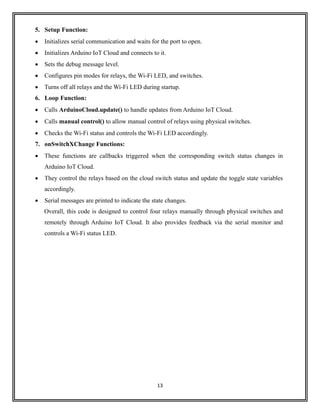
3.2 Explanation of the code:
Pin Definitions:
1. Relays:
• RelayPin1: Connected to pin D1 (GPIO 5)
• RelayPin2: Connected to pin D2 (GPIO 4)
• RelayPin3: Connected to pin D5 (GPIO 14)
• RelayPin4: Connected to pin D6 (GPIO 12)
2. Switches:
• SwitchPin1: Connected to pin SD3 (GPIO 10)
• SwitchPin2: Connected to pin D3 (GPIO 0)
• SwitchPin3: Connected to pin D7 (GPIO 13)
• SwitchPin4: Connected to pin RX (GPIO 3)
• Wi-Fi LED: WIFI Led Connected to pin D0 (GPIO 16)
3. Toggle State Variables:
toggleState_1, toggleState_2, toggleState_3, toggleState_4: Integer variables to remember
the toggle state for each relay. They are used to keep track of whether a relay is currently ON
(1) or OFF (0).
relayOnOff Function:
This function takes an integer argument relay and toggles the corresponding relay.
It uses a switch statement to determine which relay to control.
If the toggle state is 0, it turns the relay ON (LOW) and updates the toggle state to 1. If the
toggle state is 1, it turns the relay OFF (HIGH) and updates the toggle state to 0.
Serial messages are printed to indicate the state changes, and there's a delay of 100 milliseconds.
4. Manual Control Function:
Checks the state of physical switches (SwitchPin1 to SwitchPin4).
If a switch is pressed (LOW), it calls the relayOnOff function to control the corresponding relay
(1 to 4).
13
5. Setup Function:
• Initializes serial communication and waits for the port to open.
• Initializes Arduino IoT Cloud and connects to it.
• Sets the debug message level.
• Configures pin modes for relays, the Wi-Fi LED, and switches.
• Turns off all relays and the Wi-Fi LED during startup.
6. Loop Function:
• Calls ArduinoCloud.update() to handle updates from Arduino IoT Cloud.
• Calls manual control() to allow manual control of relays using physical switches.
• Checks the Wi-Fi status and controls the Wi-Fi LED accordingly.
7. onSwitchXChange Functions:
• These functions are callbacks triggered when the corresponding switch status changes in
Arduino IoT Cloud.
• They control the relays based on the cloud switch status and update the toggle state variables
accordingly.
• Serial messages are printed to indicate the state changes.
Overall, this code is designed to control four relays manually through physical switches and
remotely through Arduino IoT Cloud. It also provides feedback via the serial monitor and
controls a Wi-Fi status LED.
14
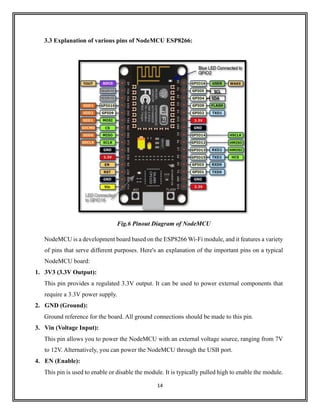
3.3 Explanation of various pins of NodeMCU ESP8266:
Fig.6 Pinout Diagram of NodeMCU
NodeMCU is a development board based on the ESP8266 Wi-Fi module, and it features a variety
of pins that serve different purposes. Here's an explanation of the important pins on a typical
NodeMCU board:
1. 3V3 (3.3V Output):
This pin provides a regulated 3.3V output. It can be used to power external components that
require a 3.3V power supply.
2. GND (Ground):
Ground reference for the board. All ground connections should be made to this pin.
3. Vin (Voltage Input):
This pin allows you to power the NodeMCU with an external voltage source, ranging from 7V
to 12V. Alternatively, you can power the NodeMCU through the USB port.
4. EN (Enable):
This pin is used to enable or disable the module. It is typically pulled high to enable the module.
15
5. RST (Reset):
This pin is used to reset the microcontroller. You can connect a push-button between RST and
GND to manually reset the NodeMCU.
6. D0 to D10 (Digital I/O Pins):
These pins are general-purpose digital input/output pins. They can be configured as either input
or output and used for interfacing with sensors, LEDs, and other digital components.
7. A0 (Analog Input):
This pin can be used as an analog-to-digital converter (ADC) to read analog sensor values. It
has a range of 0 to 1.0V when used as an ADC.
8. TX and RX (Serial Communication Pins):
These pins are used for serial communication. TX (transmit) is used for sending data, while RX
(receive) is used for receiving data.
9. SDA and SCL (I2C Pins):
These pins are used for I2C communication. SDA is the data line, and SCL is the clock line. I2C
is a common protocol for communication between microcontrollers and peripheral devices.
10. GPIO16 (Special Purpose Pin):
GPIO16 is a special-purpose pin on the NodeMCU, and it is commonly used for wake-up from
deep sleep mode.
11. USB Port:
The USB port is used for programming the NodeMCU and providing power to the board. It is
connected to the USB-to-serial converter chip on the NodeMCU.
12. CH_PD (Chip Power Down):
This pin is used to power down or enable the ESP8266 chip. It is typically pulled high to enable
the chip.
16
CHAPTER 4
Advantages and Disadvantages of Home Automation using NodeMCU
4.1 Advantages:
1. Cost-Effective Solution:
NodeMCU and 4-channel relay modules are relatively inexpensive components, making home
automation accessible to a wide range of users.
2. Wireless Connectivity:
NodeMCU, based on the ESP8266 Wi-Fi module, provides wireless connectivity. This
eliminates the need for complex wiring and allows for remote control of devices through a
smartphone or computer.
3. Scalability:
The 4-channel relay module allows you to control multiple devices simultaneously. This makes
the system scalable, allowing you to expand and add more devices as needed.
4. Compatibility:
NodeMCU can be easily programmed using the Arduino IDE, and there is a vast community
and resources available for support. This makes it easy to integrate with various sensors,
actuators, and other components.
5. Remote Control and Monitoring:
With wireless connectivity, you can control and monitor your home devices remotely. This is
especially useful for turning appliances on or off when you are away from home.
6. Customization and Flexibility:
NodeMCU allows for custom programming, enabling you to tailor the automation system to
your specific needs. You can create schedules, automation rules, and implement various sensors
for more advanced functionalities.
7. Energy Efficiency:
Home automation systems can be programmed to optimize energy usage. For example, you can
set schedules to turn off lights or appliances when they are not needed, contributing to energy
savings.
17
8. Integration with IoT Platforms:
NodeMCU can be integrated with various Internet of Things (IoT) platforms, allowing for more
advanced automation scenarios. This can include data logging, analytics, and integration with
other smart devices.
9. Easy to Install and Configure:
NodeMCU and relay modules are easy to install, and the setup process is straightforward. This
simplicity makes them suitable for DIY enthusiasts and those who are new to home automation.
10. Open-Source Community:
NodeMCU is an open-source platform, and there is a large community of developers and
enthusiasts. This means continuous improvements, updates, and a wealth of resources for
troubleshooting and development.
18
4.2 Disadvantages:
1. Limited Processing Power:
NodeMCU, while capable for many home automation tasks, has limited processing power
compared to more robust systems. This limitation may affect the speed and complexity of certain
automation processes.
2. Reliability on Wi-Fi:
Home automation systems using NodeMCU rely on Wi-Fi connectivity. If there are Wi-Fi
network issues or interruptions, it can lead to a loss of control over connected devices.
3. Security Concerns:
IoT devices, including NodeMCU, may be susceptible to security vulnerabilities. If not properly
secured, there is a risk of unauthorized access to your home automation system.
4. Complexity for Non-Tech Users:
Setting up and programming NodeMCU for home automation may be challenging for
individuals who are not familiar with programming or electronics. This complexity could limit
its widespread adoption.
5. Dependency on Power Supply:
NodeMCU and relay modules need a stable power supply. Power outages or fluctuations could
disrupt the functioning of the automation system, especially if there is no backup power source.
6. Scalability Limits:
While the 4-channel relay module allows control of multiple devices, there may be scalability
limits based on the processing power of NodeMCU. For very large-scale home automation,
more powerful systems might be required.
7. Potential for Interference:
Wi-Fi networks can experience interference from other electronic devices, neighbouring
networks, or physical obstacles. This interference may impact the reliability of communication
between NodeMCU and the relay module.
8. Lack of Standardization:
The field of home automation lacks standardization, leading to potential compatibility issues
between devices from different manufacturers. Ensuring seamless integration and
communication may require additional effort.
19
9. Limited Range:
The range of Wi-Fi connectivity may limit the control and monitoring of devices to within the
range of the home network. Extending the range may require additional equipment or signal
boosters.
10. Ongoing Maintenance:
Home automation systems may require regular updates, maintenance, and troubleshooting. This
can be a drawback for users who prefer a set-and-forget solution.
20
CHAPTER 5
Applications of Home Automation using NodeMCU
5. Applications:
Home automation using NodeMCU and a 4-channel relay module can be applied to various
scenarios, enhancing convenience, efficiency, and control within a household. Here are some
common applications:
1. Lighting Control:
Automate the control of lights in different rooms. Schedule lighting based on time of day or
occupancy, and remotely control lights from a smartphone or computer.
2. Appliance Automation:
Connect appliances such as fans, air conditioners, or heaters to the relay module for remote
control and automation based on temperature, time, or user preferences.
3. Security Systems:
Integrate the system with security devices such as door/window sensors, motion detectors, and
surveillance cameras. Receive alerts or automate actions based on detected events.
4. Smart Doorbell:
Implement a smart doorbell system that allows users to see and communicate with visitors
remotely using a camera and microphone connected to NodeMCU.
5. Smart Locks:
Integrate smart locks to remotely control and monitor door access. Provide temporary access
codes or receive notifications when doors are unlocked.
6. Climate Control:
Automate heating, ventilation, and air conditioning (HVAC) systems based on temperature or
occupancy. Optimize energy usage and create personalized comfort settings.
7. Irrigation System:
Control and schedule an automated irrigation system for the garden or lawn based on weather
conditions or soil moisture levels.
8. Media Center Control:
Automate the control of home entertainment systems, including TVs, audio systems, and
streaming devices. Create scenes for different viewing experiences.
21
9. Garage Door Opener:
Connect the garage door opener to NodeMCU for remote control and monitoring. Receive alerts
when the garage door is opened or closed.
10. Smart Home Monitoring:
Implement a comprehensive monitoring system that tracks energy usage, temperature, and other
environmental factors. Receive notifications and insights for better home management.
11. Pet Care:
Use automated systems for feeding pets, controlling pet doors, or monitoring their activities
using connected cameras.
12. Water Leak Detection:
Integrate water leak sensors and valves to shut off water automatically in case of a leak,
preventing potential water damage.
13. Voice Control:
Implement voice-controlled automation using platforms like Amazon Alexa or Google Assistant
to control various devices and systems in the home.
14. Energy Efficiency:
Monitor and control energy-consuming devices to optimize energy usage, leading to cost
savings and a reduced environmental footprint.
15. Notification Systems:
Receive notifications or alerts for specific events, such as when someone arrives home, if a
window or door is left open, or when a device is activated.
These applications demonstrate the versatility of NodeMCU and 4-channel relay modules in
creating a customized and interconnected smart home ecosystem.
22
CHAPTER 6
Future Scope of this Project
6. Future Scope:
1. Integration with Voice Assistants:
Integration with popular voice assistants such as Amazon Alexa, Google Assistant, or Apple's
Siri is becoming increasingly common. This allows users to control their smart homes using
voice commands.
2. Machine Learning and Artificial Intelligence:
Implementation of machine learning algorithms to understand user behaviour and preferences,
leading to more intelligent and personalized automation. This could involve predicting user
actions and adjusting home settings accordingly.
3. Energy Efficiency and Sustainability:
Future home automation systems may focus more on energy efficiency and sustainability. Smart
devices could optimize energy usage based on real-time data and user patterns, contributing to
greener and more environmentally friendly homes.
4. Edge Computing:
Processing data locally on the NodeMCU or other devices (edge computing) can reduce latency
and enhance the overall responsiveness of the home automation system.
5. Security Enhancements:
Strengthening the security of home automation systems will likely be a key focus. This includes
improved encryption, secure authentication methods, and protection against cyber threats.
6. Interoperability and Standardization:
Efforts to establish common standards for communication between different smart devices to
enhance interoperability. This would allow devices from different manufacturers to work
seamlessly together.
7. Augmented Reality (AR) and Virtual Reality (VR):
Integration of AR and VR technologies for more immersive control and monitoring of smart
home devices. Users could interact with their home automation system in virtual environments.
23
8. Health and Well-being Applications:
Integration of health monitoring devices and applications into home automation systems,
providing insights into the well-being of occupants. For example, monitoring air quality or
adjusting lighting based on circadian rhythms.
9. 5G Connectivity:
The rollout of 5G networks may enable faster and more reliable communication between
devices, leading to improved performance and new possibilities in home automation.
10. Customization and DIY Solutions:
Increased availability of tools and platforms that empower users to create custom automation
solutions tailored to their specific needs.
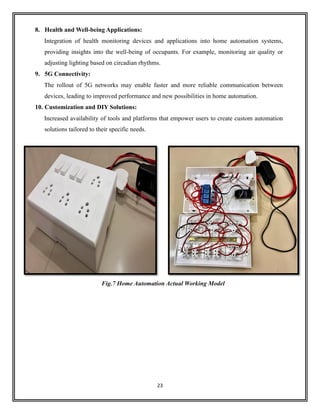
Fig.7 Home Automation Actual Working Model
24
CONCLUSION
In conclusion, the integration of NodeMCU and a 5V 4-channel relay module for home
automation introduces a cost-effective and versatile solution for transforming conventional
residences into smart, interconnected spaces. The NodeMCU's compatibility with the Arduino
IDE and its built-in Wi-Fi capabilities make it an accessible platform for both beginners and
experienced developers, enabling seamless communication and control over a home network.
The 5V 4-channel relay module adds a crucial layer by allowing the NodeMCU to manage and
automate the control of multiple high-voltage devices, such as lights, appliances, or other home
systems.
This home automation combination excels not only in its capacity for real-time control and
monitoring but also in its potential for scalability. The four relay channels provide flexibility for
expanding the system to accommodate additional devices, offering homeowners the ability to
customize their smart environments based on evolving needs. Whether users seek energy
efficiency, enhanced security, or personalized comfort, the NodeMCU and 5V 4-channel relay
module combination lays a foundation for DIY enthusiasts to create intelligent, responsive home
automation systems that align with their unique preferences and requirements.
Nevertheless, as with any technological advancement, considerations for security and privacy
are paramount. Implementing robust security measures and staying abreast of best practices in
home automation ensures a safe and reliable experience for users. In conclusion, the NodeMCU
and 5V 4-channel relay module collaboration empowers individuals to take charge of their living
spaces, turning ordinary homes into smart, adaptive environments that seamlessly blend
convenience with innovation.
25
REFERENCES
❖ www.component101.com
❖ www.circuits4you.com
❖ www.nodemcu.readthedocs.io
❖ www.arduino.cc
❖ www.esp8266.com
❖ www.circuitdigest.com
❖ www.wiki.sunfounder.cc
❖ www.wikipedia.com
❖ www.electronicwings.com
❖ www.github.com
❖ www.cloud.arduino.cc
❖ www.mechatronicblog.com
❖ Zohaib Hassan,Abhijeet, andApoorva Sharma. "Internet of Life (IOL)." (2015). ISBN 978-
93-5156-328-0
❖ Brian Benchoff (25 October 2014). "An SDK for the ESP8266 Wi-Fi chip". Hackaday.
Retrieved 2 April 2015.
❖ Vowstar. "NodeMCU Devkit". GitHub. NodeMCU Team. Retrieved 2 April 2015.
❖ Zeroday. "A Lua based firmware for WIFI-soc esp8266". GitHub. Retrieved 2 April 2015.
❖ Hari Wiguna. "NodeMCU LUA Firmware". Hackaday. Retrieved 2 April 2015.
❖ Jump up to: Systems, Espressif. "Espressif Systems". Espressif-WikiDevi. Archived
from the original on 1 December 2017. Retrieved 3 June 2017.
❖ Brian Benchoff (2 January 2015). "A DEV BOARD FOR THE ESP LUA
INTERPRETER". Hackaday. Retrieved 2 April 2015.
❖ Jump up to: “IBM.
❖ Mpx. "Lua CJSON is a fast JSON encoding/parsing module for Lua". GitHub. Retrieved 2
April 2015.
❖ Pellepl. "Wear-levelled SPI flash file system for embedded devices". GitHub. Retrieved 2
April 2015.

Home Automation Using NodeMCU ESP8266 project

  • 1.
    A Mini-Project Report on “VOICEACTIVATED HOME AUTOMATION USING NODEMCU ESP8266” Submitted by, MR. ADHYAY MAHESH DESHMUKH Bachelor of Technology in Electrical Engineering (PRN-23030331293509) Under the Guidance of PROF.A.M. BHAWARE (Professor of Electrical Engineering Department) In Partial Fulfilment of Bachelor of Technology Course in Electrical Engineering. For the Academic Year 2023-24 DEPARTMENT OF ELECTRICAL ENGINEERING, DR. BABASAHEB AMBEDKAR TECHNOLOGICAL UNIVERSITY LONERE, RAIGAD, MAHARASHTRA-402103
  • 2.
    DR. BABASAHEB AMBEDKARTECHNOLOGICAL UNIVERSITY LONERE, RAIGAD, MAHARASHTRA-402103 DEPARTMENT OF ELECTRICAL ENGINEERING CERTIFICATE This is to certify that a Mini-Project Report entitled “Voice Activated Home Automation using NodeMCU ESP8266” is being submitted by Mr. Adhyay Mahesh Deshmukh [PRN-23030331293509] in partial requirement of the award of Degree of Bachelor of Technology in Electrical Engineering is a record of own work carried by him under my supervision as prescribed in the syllabus of Dr. Babasaheb Ambedkar Technological University, Lonere during the Academic Year 2023-24. Prof.A.M. Bhaware Prof. M.F.A.R. Satarkar Guide Head of The Department Department of Electrical Engineering Department of Electrical Engineering Examiners: 1] 2] Date: Place: Lonere
  • 3.
    ACKNOWLEDGEMENT I would liketo thanks and profound gratitude towards my guide A.M. Bhaware, Professor, Department of Electrical Engineering, Dr. Babasaheb Ambedkar Technological University, Lonere, for his proficient and enthusiastic guidance, which served as a constant source of inspiration for the completion of this work. His painstaking support and exhaustive involvement in the conceptual understanding, conduction of simulation studies and hardware structure are gratefully acknowledged. I sincerely appreciate his pronounced individuality, humanistic and warm personal approach and excellent facilities provided in the laboratory, which has given me strength to carry out this work on steady and smooth course. I humbly acknowledge a lifetime’s gratitude to him. I express my deep sense of gratitude to the Head of Electrical Engineering Department, Prof. M.F.A.R. Satarkar, for providing excellent laboratory and computing facilities of department for this work. Mr. Adhyay Mahesh Deshmukh (23030331293509)
  • 4.
    ABSTRACT The rapid advancementof Internet of Things (IoT) technology has paved the way for innovative and intelligent solutions in the field of home automation. This paper presents a comprehensive study and implementation of home automation using the NodeMCU ESP8266 microcontroller, with a focus on voice and mobile control as the primary interfaces for user interaction. The proposed system leverages the NodeMCU ESP8266, a cost-effective and versatile microcontroller, as the core of the automation system. By connecting various sensors and actuators to the NodeMCU, users can remotely monitor and control their home environment. The system offers an effective integration of smart devices, such as lights, fans, and appliances, making it possible to create a seamless and interconnected smart home ecosystem. Voice control, powered by voice recognition technology, provides an intuitive and hands-free approach to managing smart devices within the home. Users can issue voice commands to control lighting, climate, and security systems, enhancing convenience and accessibility for individuals of all abilities. Mobile control is another key feature of the system, enabling users to control their smart home from anywhere in the world through a dedicated mobile application. The mobile app offers a user-friendly interface, providing real-time status updates and control options for all connected devices. Additionally, it allows users to schedule and automate routine tasks, further optimizing energy efficiency and comfort. Security and data privacy are paramount concerns in smart home automation. The paper discusses measures to secure the system, such as user authentication and encrypted communication, to protect against unauthorized access and data breaches. This research and implementation showcase the potential of the NodeMCU ESP8266 microcontroller in creating a cost-effective, flexible, and user-friendly home automation system. The integration of voice and mobile control not only improves the accessibility of smart homes but also contributes to the overall efficiency and convenience of daily life. As IoT technology continues to evolve, this study provides valuable insights into the development of smarter and more secure homes.
  • 5.
    LIST OF FIGURES FigureNo. Name Page No. 1. Block Diagram for Home Automation 2 2. Construction of NodeMCU ESP8266 4 3. Construction of 5V 4-Channel Relay Module 6 4. Circuit Diagram for Home Automation 7 5. Circuit Diagram of 5V 4-Channel Relay Module 11 6. Pinout Diagram of NodeMCU ESP8266 14 7. Home Automation Actual Working Model 23
  • 6.
    INDEX Chapter No. ContentPage No. 1. Introduction 1 2. Construction of the Model 3 2.1 Construction of NodeMCU ESP8266 3 2.2 Construction of 5V 4- Channel Relay Module 5 3. Working 7 3.1 Working of the Model 7 3.1.1 Working of NodeMCU 8 3.1.2 Working of 5V 4- Channel Relay Module 10 3.2 Explanation of the Code 12 3.3 Explanation of various Pins of NodeMCU 14 4. Advantages and Disadvantages of Home Automation using NodeMCU 16 4.1 Advantages 16 4.2 Disadvantages 18 5. Applications of Home Automation using NodeMCU 20 6. Future Scope of this Project 22 Conclusion 24 References 25
  • 7.
    1 CHAPTER 1 Introduction 1. Introduction: Homeautomation using a 4-channel relay module and NodeMCU represents a dynamic and accessible approach to transforming a conventional home into a smart and interconnected living space. The 4-channel relay module, equipped with four independently controllable switches, serves as a pivotal component in this system. Paired with the NodeMCU, a versatile and cost- effective IoT platform, this combination enables users to remotely control and automate various electrical appliances and devices within their homes. The 4-channel relay module acts as a relay switchboard, facilitating the control of multiple electronic devices such as lights, fans, or other household appliances. The NodeMCU, based on the ESP8266 Wi-Fi module, seamlessly integrates into home automation projects, providing Wi- Fi connectivity that enables communication between the relay module and the user's smartphone or other smart devices. This connectivity empowers users to remotely manage and monitor their home environment, fostering convenience, energy efficiency, and a heightened level of control. With the ability to program the NodeMCU using the Arduino IDE, users can easily develop custom applications and automation sequences tailored to their specific needs. This may include setting up schedules, implementing conditional logic, or integrating voice control for a hands- free experience. The synergy between the 4-channel relay module and NodeMCU not only simplifies the implementation of home automation but also opens the door to creative and personalized solutions that enhance the overall functionality and intelligence of a modern home. Whether it's turning off lights from a mobile app, automating home security systems, or creating a smart garden irrigation system, this combination provides an accessible entry point into the exciting realm of DIY home automation.
  • 8.
    2 Fig.1 Block Diagramfor Home Automation The above diagram mentions the basic block diagram for home automation using NodeMCU and relay module. With this we can operate home appliances using mobile, voice command operation and via application too. The 5V DC supply is connected in parallel to NodeMCU and Relay module.
  • 9.
    3 CHAPTER 2 Construction ofthe Model 2.1 NodeMCU ESP8266: The NodeMCU is not a device that is physically constructed by end-users; instead, it is a pre- built development board that incorporates the ESP8266 Wi-Fi module. The ESP8266 is a system-on-a-chip (SoC) that integrates a microcontroller and Wi-Fi capabilities, making it suitable for IoT (Internet of Things) applications. The NodeMCU development board simplifies the programming and interfacing with the ESP8266, providing an easy-to-use platform for developers and hobbyists. Here's a brief overview of the key components on the NodeMCU development board: 1. ESP8266 Module: The heart of the NodeMCU is the ESP8266 Wi-Fi module. This module houses the microcontroller unit (MCU) and the Wi-Fi transceiver. 2. USB-to-Serial Converter: The NodeMCU board typically includes a USB-to-Serial converter, allowing it to be easily connected to a computer for programming and debugging. This eliminates the need for an external USB-to-Serial adapter. 3. Voltage Regulator: The board often features a voltage regulator that regulates the input voltage to provide a stable supply voltage for the ESP8266. 4. Flash Memory: NodeMCU boards come equipped with flash memory to store the firmware and user programs. The flash memory size can vary among different NodeMCU versions. 5. GPIO Pins: General Purpose Input/Output (GPIO) pins are available for connecting external sensors, actuators, and other electronic components. These pins allow users to interface with the physical world. 6. Micro USB Port: The NodeMCU typically has a micro-USB port for power supply and communication with a computer. 7. LEDs: Some NodeMCU boards have LEDs that can be controlled via GPIO pins, providing a visual indication of the board's status or user-defined conditions. 8. Reset and Flash Buttons: There are usually buttons on the board for resetting the microcontroller and initiating firmware flashing.
  • 10.
    4 It's important tonote that the NodeMCU is a development board that simplifies the development process with the ESP8266. Users can program it using the Arduino IDE, Lua script, or other programming environments compatible with the ESP8266. The NodeMCU board is widely used for prototyping and developing IoT projects due to its ease of use, affordability, and built-in Wi- Fi capabilities. Fig.2 Construction of NodeMCU ESP8266
  • 11.
    5 2.2 5V 4-ChannelRelay Module: A 5V 4-channel relay module is a device commonly used in electronic projects to control high- voltage appliances or devices using low-voltage microcontrollers or digital signals. It typically consists of four relays, each capable of switching a separate circuit. Here's a general overview of the construction of a typical 5V 4-channel relay module: Components: 1. Relays: The heart of the module is the four relays. Relays are electromagnetic switches that use a small current to control a larger current in another circuit. Each relay typically has three main terminals: Common (COM), Normally Open (NO), and Normally Closed (NC). 2. Transistors: To drive the relays, the module includes transistors (commonly NPN transistors) for each relay. The transistors amplify the current from the microcontroller to energize the relay coil. 3. Diodes: Flyback diodes are often included to protect the transistors and other components from voltage spikes generated when the relay coils are de-energized. 4. Optocouplers (Optional): Some relay modules include optocouplers for isolation between the low-voltage control circuit (microcontroller side) and the high-voltage relay circuit. This is a safety feature that helps protect the control circuit from potential high-voltage issues. 5. Connectors: Input and output connectors allow you to easily interface the relay module with other components. Commonly, there are input pins for each relay (signal, VCC, GND) and output pins (common, normally open, normally closed) for connecting to external devices. 6. PCB (Printed Circuit Board): The components are mounted on a PCB that provides a compact and organized layout for the circuit. 7. Power Supply Section: A voltage regulator or other power supply components regulate the incoming voltage to provide a stable 5V supply for the relay coils and the control circuit. 8. LED Indicators: LED indicators may be included to visually show the status of each relay (whether it is activated or not).
  • 12.
    6 Fig.3 Construction of5V 4-Channel Relay Module The above figure shows the detailed construction of 5V 4-Channel Relay Module for the operation of AC appliances up-to 230V, 10 A max and for DC up-to 30V, 10A.
  • 13.
    7 CHAPTER 3 Working 3.1 Workingof the model: The NodeMCU is connected to the Wi-Fi network and awaits voice commands and mobile app requests. When a voice command is detected by the voice recognition module, the NodeMCU processes the command and sends corresponding signals to the actuators. The mobile app communicates with the NodeMCU to send control commands and receive the status of connected devices. Users can control devices using the app from anywhere with an internet connection. The operation of connected devices is done with the help of relay module, in this project the signal of operation is given by NodeMCU microcontroller. Users can set up automation rules within the mobile app. For example, turning on lights at a specific time or when motion is detected. The system provides real-time feedback on the status of connected devices, ensuring users are informed about the state of their home environment. Security measures are in place to prevent unauthorized access to the system and protect user data. Fig.4 Circuit Diagram for Home Automation In the above circuit diagram, we can see that the manual switches and relay NO contact is connected in parallel. By this we can operate by both means i.e., manual switching and with relay by operating the NodeMCU via mobile.
  • 14.
    8 3.1.1 Working ofNodeMCU ESP8266: The NodeMCU is a low-cost open-source IoT platform based on the ESP8266 Wi-Fi module. The ESP8266 is a popular and versatile microcontroller with built-in Wi-Fi capabilities, making it suitable for various IoT (Internet of Things) applications. NodeMCU, in particular, is a development board that simplifies the use of the ESP8266 by providing a convenient programming interface and power supply circuitry. Here's a basic overview of the working of NodeMCU (ESP8266): 1. Microcontroller and Wi-Fi Module: The NodeMCU board is built around the ESP8266 microcontroller, which integrates a Tensilica L106 32-bit microcontroller unit (MCU) and a Wi-Fi stack. 2. Programming Interface: NodeMCU can be programmed using the Arduino IDE or Lua scripting language. This makes it accessible to a broad community of developers and allows for easy prototyping. 3. Power Supply: NodeMCU typically operates on a 3.3V power supply. The board includes a voltage regulator that allows it to be powered directly from USB or an external power source. 4. GPIO Pins: The ESP8266 has a set of General-Purpose Input/Output (GPIO) pins that can be used to interface with various sensors, actuators, and other electronic components. These pins can be configured as digital input/output or analog input. 5. Wi-Fi Connectivity: One of the key features of the ESP8266 is its built-in Wi-Fi module. This allows the NodeMCU to connect to Wi-Fi networks, making it suitable for IoT applications that require wireless communication. 6. Programming and Flash Memory: NodeMCU has flash memory for storing the firmware and user programs. It is important to note that the available flash memory is limited, and developers need to manage it efficiently.
  • 15.
    9 7. Firmware andLibraries: NodeMCU comes with its firmware, and it supports various libraries that simplify the implementation of common tasks, such as handling HTTP requests, interfacing with sensors, and managing Wi-Fi connections. 8. Development Environment: NodeMCU can be programmed using the Arduino IDE or other development environments that support the ESP8266 platform. Arduino-compatible libraries and tools make it easier for developers to create applications for NodeMCU. 9. Serial Communication: NodeMCU communicates with the host computer for programming and debugging purposes through a USB-to-serial interface. This is facilitated by a USB-to-serial chip on the NodeMCU board. 10. IoT Applications: With its built-in Wi-Fi capabilities, NodeMCU is commonly used for IoT applications, such as home automation, sensor networks, and remote monitoring. It can communicate with cloud services, web servers, and other devices over Wi-Fi. In summary, NodeMCU is a versatile platform for IoT development based on the ESP8266 microcontroller. It simplifies the development process by providing an easy-to-use programming interface and built-in Wi-Fi capabilities, making it suitable for a wide range of IoT projects.
  • 16.
    10 3.1.2 Working of5V 4-Channel Relay Module: A 5V 4-Channel Relay Module is a device commonly used in electronic projects and home automation systems to control high-voltage and high-current devices using low-voltage microcontrollers or digital signals. Here's a basic overview of how a 5V 4-Channel Relay Module works: 1. Relay Basics: A relay is an electromagnetic switch that consists of a coil and one or more sets of contacts. When an electrical current flows through the coil, it creates a magnetic field that attracts a movable armature. This movement of the armature mechanically closes or opens the contacts, allowing or interrupting the flow of current in another part of the circuit. 2. Components on the Module: The 5V 4-Channel Relay Module typically includes four individual relays, each with its set of Normally Open (NO) and Normally Closed (NC) contacts. Additionally, it has a control circuit that includes a transistor and a diode for each relay. 3. Input and Control: The relay module is designed to be controlled by a low-voltage signal, typically 5V. This signal is provided by a microcontroller (e.g., Arduino) or any other digital output source. 4. Opto-Isolation: Many relay modules use opto-isolation to separate the low-voltage control circuit from the high- voltage load circuit. Opto-isolation helps protect the microcontroller from potential voltage spikes and interference from the high-voltage side. 5. Transistor Switching: The control circuit includes transistors (usually NPN type) for each relay. When the control signal (5V) is applied, it activates the transistor, allowing current to flow through the relay coil. 6. Relay Activation: When the relay coil receives power, it generates a magnetic field that pulls the armature, closing the contacts. This completes the circuit on the high-voltage side, allowing current to flow through the connected device. 7. Switching High-Voltage Devices: The Normally Open (NO) contacts of the relay are commonly used to control high-voltage and high-current devices such as lights, motors, or appliances. When the relay is activated, the NO contacts close, allowing current to flow through the connected device.
  • 17.
    11 8. Diode forBack-EMF Protection: A diode (usually a flyback diode or freewheeling diode) is connected in parallel with the relay coil. This diode is crucial for protecting the rest of the circuit from voltage spikes (back-EMF) generated when the magnetic field collapses as the relay is turned off. 9. Status LEDs: Many relay modules include status LEDs that indicate whether a particular relay is in the ON or OFF state. This can be helpful for visual feedback during testing or operation. In summary, a 5V 4-Channel Relay Module serves as an interface between a low-voltage microcontroller or digital signal and high-voltage/high-current devices. It uses relays to mechanically switch the electrical connections, providing isolation and protection for the control circuit. These modules are commonly used in various applications, including home automation, robotics, and industrial control systems. Fig.5 Circuit Diagram of 5V 4-Channel Relay Module
  • 18.
    12 3.2 Explanation ofthe code: Pin Definitions: 1. Relays: • RelayPin1: Connected to pin D1 (GPIO 5) • RelayPin2: Connected to pin D2 (GPIO 4) • RelayPin3: Connected to pin D5 (GPIO 14) • RelayPin4: Connected to pin D6 (GPIO 12) 2. Switches: • SwitchPin1: Connected to pin SD3 (GPIO 10) • SwitchPin2: Connected to pin D3 (GPIO 0) • SwitchPin3: Connected to pin D7 (GPIO 13) • SwitchPin4: Connected to pin RX (GPIO 3) • Wi-Fi LED: WIFI Led Connected to pin D0 (GPIO 16) 3. Toggle State Variables: toggleState_1, toggleState_2, toggleState_3, toggleState_4: Integer variables to remember the toggle state for each relay. They are used to keep track of whether a relay is currently ON (1) or OFF (0). relayOnOff Function: This function takes an integer argument relay and toggles the corresponding relay. It uses a switch statement to determine which relay to control. If the toggle state is 0, it turns the relay ON (LOW) and updates the toggle state to 1. If the toggle state is 1, it turns the relay OFF (HIGH) and updates the toggle state to 0. Serial messages are printed to indicate the state changes, and there's a delay of 100 milliseconds. 4. Manual Control Function: Checks the state of physical switches (SwitchPin1 to SwitchPin4). If a switch is pressed (LOW), it calls the relayOnOff function to control the corresponding relay (1 to 4).
  • 19.
    13 5. Setup Function: •Initializes serial communication and waits for the port to open. • Initializes Arduino IoT Cloud and connects to it. • Sets the debug message level. • Configures pin modes for relays, the Wi-Fi LED, and switches. • Turns off all relays and the Wi-Fi LED during startup. 6. Loop Function: • Calls ArduinoCloud.update() to handle updates from Arduino IoT Cloud. • Calls manual control() to allow manual control of relays using physical switches. • Checks the Wi-Fi status and controls the Wi-Fi LED accordingly. 7. onSwitchXChange Functions: • These functions are callbacks triggered when the corresponding switch status changes in Arduino IoT Cloud. • They control the relays based on the cloud switch status and update the toggle state variables accordingly. • Serial messages are printed to indicate the state changes. Overall, this code is designed to control four relays manually through physical switches and remotely through Arduino IoT Cloud. It also provides feedback via the serial monitor and controls a Wi-Fi status LED.
  • 20.
    14 3.3 Explanation ofvarious pins of NodeMCU ESP8266: Fig.6 Pinout Diagram of NodeMCU NodeMCU is a development board based on the ESP8266 Wi-Fi module, and it features a variety of pins that serve different purposes. Here's an explanation of the important pins on a typical NodeMCU board: 1. 3V3 (3.3V Output): This pin provides a regulated 3.3V output. It can be used to power external components that require a 3.3V power supply. 2. GND (Ground): Ground reference for the board. All ground connections should be made to this pin. 3. Vin (Voltage Input): This pin allows you to power the NodeMCU with an external voltage source, ranging from 7V to 12V. Alternatively, you can power the NodeMCU through the USB port. 4. EN (Enable): This pin is used to enable or disable the module. It is typically pulled high to enable the module.
  • 21.
    15 5. RST (Reset): Thispin is used to reset the microcontroller. You can connect a push-button between RST and GND to manually reset the NodeMCU. 6. D0 to D10 (Digital I/O Pins): These pins are general-purpose digital input/output pins. They can be configured as either input or output and used for interfacing with sensors, LEDs, and other digital components. 7. A0 (Analog Input): This pin can be used as an analog-to-digital converter (ADC) to read analog sensor values. It has a range of 0 to 1.0V when used as an ADC. 8. TX and RX (Serial Communication Pins): These pins are used for serial communication. TX (transmit) is used for sending data, while RX (receive) is used for receiving data. 9. SDA and SCL (I2C Pins): These pins are used for I2C communication. SDA is the data line, and SCL is the clock line. I2C is a common protocol for communication between microcontrollers and peripheral devices. 10. GPIO16 (Special Purpose Pin): GPIO16 is a special-purpose pin on the NodeMCU, and it is commonly used for wake-up from deep sleep mode. 11. USB Port: The USB port is used for programming the NodeMCU and providing power to the board. It is connected to the USB-to-serial converter chip on the NodeMCU. 12. CH_PD (Chip Power Down): This pin is used to power down or enable the ESP8266 chip. It is typically pulled high to enable the chip.
  • 22.
    16 CHAPTER 4 Advantages andDisadvantages of Home Automation using NodeMCU 4.1 Advantages: 1. Cost-Effective Solution: NodeMCU and 4-channel relay modules are relatively inexpensive components, making home automation accessible to a wide range of users. 2. Wireless Connectivity: NodeMCU, based on the ESP8266 Wi-Fi module, provides wireless connectivity. This eliminates the need for complex wiring and allows for remote control of devices through a smartphone or computer. 3. Scalability: The 4-channel relay module allows you to control multiple devices simultaneously. This makes the system scalable, allowing you to expand and add more devices as needed. 4. Compatibility: NodeMCU can be easily programmed using the Arduino IDE, and there is a vast community and resources available for support. This makes it easy to integrate with various sensors, actuators, and other components. 5. Remote Control and Monitoring: With wireless connectivity, you can control and monitor your home devices remotely. This is especially useful for turning appliances on or off when you are away from home. 6. Customization and Flexibility: NodeMCU allows for custom programming, enabling you to tailor the automation system to your specific needs. You can create schedules, automation rules, and implement various sensors for more advanced functionalities. 7. Energy Efficiency: Home automation systems can be programmed to optimize energy usage. For example, you can set schedules to turn off lights or appliances when they are not needed, contributing to energy savings.
  • 23.
    17 8. Integration withIoT Platforms: NodeMCU can be integrated with various Internet of Things (IoT) platforms, allowing for more advanced automation scenarios. This can include data logging, analytics, and integration with other smart devices. 9. Easy to Install and Configure: NodeMCU and relay modules are easy to install, and the setup process is straightforward. This simplicity makes them suitable for DIY enthusiasts and those who are new to home automation. 10. Open-Source Community: NodeMCU is an open-source platform, and there is a large community of developers and enthusiasts. This means continuous improvements, updates, and a wealth of resources for troubleshooting and development.
  • 24.
    18 4.2 Disadvantages: 1. LimitedProcessing Power: NodeMCU, while capable for many home automation tasks, has limited processing power compared to more robust systems. This limitation may affect the speed and complexity of certain automation processes. 2. Reliability on Wi-Fi: Home automation systems using NodeMCU rely on Wi-Fi connectivity. If there are Wi-Fi network issues or interruptions, it can lead to a loss of control over connected devices. 3. Security Concerns: IoT devices, including NodeMCU, may be susceptible to security vulnerabilities. If not properly secured, there is a risk of unauthorized access to your home automation system. 4. Complexity for Non-Tech Users: Setting up and programming NodeMCU for home automation may be challenging for individuals who are not familiar with programming or electronics. This complexity could limit its widespread adoption. 5. Dependency on Power Supply: NodeMCU and relay modules need a stable power supply. Power outages or fluctuations could disrupt the functioning of the automation system, especially if there is no backup power source. 6. Scalability Limits: While the 4-channel relay module allows control of multiple devices, there may be scalability limits based on the processing power of NodeMCU. For very large-scale home automation, more powerful systems might be required. 7. Potential for Interference: Wi-Fi networks can experience interference from other electronic devices, neighbouring networks, or physical obstacles. This interference may impact the reliability of communication between NodeMCU and the relay module. 8. Lack of Standardization: The field of home automation lacks standardization, leading to potential compatibility issues between devices from different manufacturers. Ensuring seamless integration and communication may require additional effort.
  • 25.
    19 9. Limited Range: Therange of Wi-Fi connectivity may limit the control and monitoring of devices to within the range of the home network. Extending the range may require additional equipment or signal boosters. 10. Ongoing Maintenance: Home automation systems may require regular updates, maintenance, and troubleshooting. This can be a drawback for users who prefer a set-and-forget solution.
  • 26.
    20 CHAPTER 5 Applications ofHome Automation using NodeMCU 5. Applications: Home automation using NodeMCU and a 4-channel relay module can be applied to various scenarios, enhancing convenience, efficiency, and control within a household. Here are some common applications: 1. Lighting Control: Automate the control of lights in different rooms. Schedule lighting based on time of day or occupancy, and remotely control lights from a smartphone or computer. 2. Appliance Automation: Connect appliances such as fans, air conditioners, or heaters to the relay module for remote control and automation based on temperature, time, or user preferences. 3. Security Systems: Integrate the system with security devices such as door/window sensors, motion detectors, and surveillance cameras. Receive alerts or automate actions based on detected events. 4. Smart Doorbell: Implement a smart doorbell system that allows users to see and communicate with visitors remotely using a camera and microphone connected to NodeMCU. 5. Smart Locks: Integrate smart locks to remotely control and monitor door access. Provide temporary access codes or receive notifications when doors are unlocked. 6. Climate Control: Automate heating, ventilation, and air conditioning (HVAC) systems based on temperature or occupancy. Optimize energy usage and create personalized comfort settings. 7. Irrigation System: Control and schedule an automated irrigation system for the garden or lawn based on weather conditions or soil moisture levels. 8. Media Center Control: Automate the control of home entertainment systems, including TVs, audio systems, and streaming devices. Create scenes for different viewing experiences.
  • 27.
    21 9. Garage DoorOpener: Connect the garage door opener to NodeMCU for remote control and monitoring. Receive alerts when the garage door is opened or closed. 10. Smart Home Monitoring: Implement a comprehensive monitoring system that tracks energy usage, temperature, and other environmental factors. Receive notifications and insights for better home management. 11. Pet Care: Use automated systems for feeding pets, controlling pet doors, or monitoring their activities using connected cameras. 12. Water Leak Detection: Integrate water leak sensors and valves to shut off water automatically in case of a leak, preventing potential water damage. 13. Voice Control: Implement voice-controlled automation using platforms like Amazon Alexa or Google Assistant to control various devices and systems in the home. 14. Energy Efficiency: Monitor and control energy-consuming devices to optimize energy usage, leading to cost savings and a reduced environmental footprint. 15. Notification Systems: Receive notifications or alerts for specific events, such as when someone arrives home, if a window or door is left open, or when a device is activated. These applications demonstrate the versatility of NodeMCU and 4-channel relay modules in creating a customized and interconnected smart home ecosystem.
  • 28.
    22 CHAPTER 6 Future Scopeof this Project 6. Future Scope: 1. Integration with Voice Assistants: Integration with popular voice assistants such as Amazon Alexa, Google Assistant, or Apple's Siri is becoming increasingly common. This allows users to control their smart homes using voice commands. 2. Machine Learning and Artificial Intelligence: Implementation of machine learning algorithms to understand user behaviour and preferences, leading to more intelligent and personalized automation. This could involve predicting user actions and adjusting home settings accordingly. 3. Energy Efficiency and Sustainability: Future home automation systems may focus more on energy efficiency and sustainability. Smart devices could optimize energy usage based on real-time data and user patterns, contributing to greener and more environmentally friendly homes. 4. Edge Computing: Processing data locally on the NodeMCU or other devices (edge computing) can reduce latency and enhance the overall responsiveness of the home automation system. 5. Security Enhancements: Strengthening the security of home automation systems will likely be a key focus. This includes improved encryption, secure authentication methods, and protection against cyber threats. 6. Interoperability and Standardization: Efforts to establish common standards for communication between different smart devices to enhance interoperability. This would allow devices from different manufacturers to work seamlessly together. 7. Augmented Reality (AR) and Virtual Reality (VR): Integration of AR and VR technologies for more immersive control and monitoring of smart home devices. Users could interact with their home automation system in virtual environments.
  • 29.
    23 8. Health andWell-being Applications: Integration of health monitoring devices and applications into home automation systems, providing insights into the well-being of occupants. For example, monitoring air quality or adjusting lighting based on circadian rhythms. 9. 5G Connectivity: The rollout of 5G networks may enable faster and more reliable communication between devices, leading to improved performance and new possibilities in home automation. 10. Customization and DIY Solutions: Increased availability of tools and platforms that empower users to create custom automation solutions tailored to their specific needs. Fig.7 Home Automation Actual Working Model
  • 30.
    24 CONCLUSION In conclusion, theintegration of NodeMCU and a 5V 4-channel relay module for home automation introduces a cost-effective and versatile solution for transforming conventional residences into smart, interconnected spaces. The NodeMCU's compatibility with the Arduino IDE and its built-in Wi-Fi capabilities make it an accessible platform for both beginners and experienced developers, enabling seamless communication and control over a home network. The 5V 4-channel relay module adds a crucial layer by allowing the NodeMCU to manage and automate the control of multiple high-voltage devices, such as lights, appliances, or other home systems. This home automation combination excels not only in its capacity for real-time control and monitoring but also in its potential for scalability. The four relay channels provide flexibility for expanding the system to accommodate additional devices, offering homeowners the ability to customize their smart environments based on evolving needs. Whether users seek energy efficiency, enhanced security, or personalized comfort, the NodeMCU and 5V 4-channel relay module combination lays a foundation for DIY enthusiasts to create intelligent, responsive home automation systems that align with their unique preferences and requirements. Nevertheless, as with any technological advancement, considerations for security and privacy are paramount. Implementing robust security measures and staying abreast of best practices in home automation ensures a safe and reliable experience for users. In conclusion, the NodeMCU and 5V 4-channel relay module collaboration empowers individuals to take charge of their living spaces, turning ordinary homes into smart, adaptive environments that seamlessly blend convenience with innovation.
  • 31.
    25 REFERENCES ❖ www.component101.com ❖ www.circuits4you.com ❖www.nodemcu.readthedocs.io ❖ www.arduino.cc ❖ www.esp8266.com ❖ www.circuitdigest.com ❖ www.wiki.sunfounder.cc ❖ www.wikipedia.com ❖ www.electronicwings.com ❖ www.github.com ❖ www.cloud.arduino.cc ❖ www.mechatronicblog.com ❖ Zohaib Hassan,Abhijeet, andApoorva Sharma. "Internet of Life (IOL)." (2015). ISBN 978- 93-5156-328-0 ❖ Brian Benchoff (25 October 2014). "An SDK for the ESP8266 Wi-Fi chip". Hackaday. Retrieved 2 April 2015. ❖ Vowstar. "NodeMCU Devkit". GitHub. NodeMCU Team. Retrieved 2 April 2015. ❖ Zeroday. "A Lua based firmware for WIFI-soc esp8266". GitHub. Retrieved 2 April 2015. ❖ Hari Wiguna. "NodeMCU LUA Firmware". Hackaday. Retrieved 2 April 2015. ❖ Jump up to: Systems, Espressif. "Espressif Systems". Espressif-WikiDevi. Archived from the original on 1 December 2017. Retrieved 3 June 2017. ❖ Brian Benchoff (2 January 2015). "A DEV BOARD FOR THE ESP LUA INTERPRETER". Hackaday. Retrieved 2 April 2015. ❖ Jump up to: “IBM. ❖ Mpx. "Lua CJSON is a fast JSON encoding/parsing module for Lua". GitHub. Retrieved 2 April 2015. ❖ Pellepl. "Wear-levelled SPI flash file system for embedded devices". GitHub. Retrieved 2 April 2015.