Pradipta Banerjee
(@pradipta_kr, www.cloudgeekz.com)
§ Cloud Native Stack
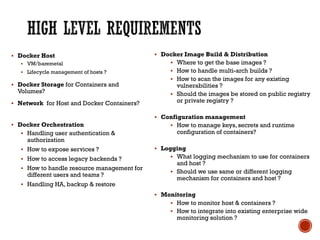
§ High Level requirements
§ Details
§ Whether to Dockerize ?
§ Which orchestration tool to use?
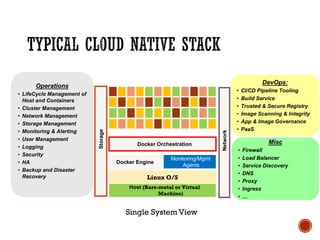
Host (Bare-metal or Virtual
Machine)
Linux O/S
Monitoring/Mgmt
Agents
Docker Engine
Docker Orchestration
DevOps:
• CI/CD Pipeline Tooling
• Build Service
• Trusted & Secure Registry
• Image Scanning & Integrity
• App & Image Governance
• PaaS
Operations
• LifeCycle Management of
Host and Containers
• Cluster Management
• Network Management
• Storage Management
• Monitoring & Alerting
• User Management
• Logging
• Security
• HA
• Backup and Disaster
Recovery
Misc
• Firewall
• Load Balancer
• Service Discovery
• DNS
• Proxy
• Ingress
• …
Storage
Network
Single System View
§ Docker Host
§ VM/baremetal
§ Lifecycle management of hosts ?
§ Docker Storage for Containers and
Volumes?
§ Network for Host and Docker Containers?
§ Docker Orchestration
§ Handling user authentication &
authorization
§ How to expose services ?
§ How to access legacy backends ?
§ How to handle resource management for
different users and teams ?
§ Handling HA, backup & restore
§ Docker Image Build & Distribution
§ Where to get the base images ?
§ How to handle multi-arch builds ?
§ How to scan the images for any existing
vulnerabilities ?
§ Should the images be stored on public registry
or private registry ?
§ Configuration management
§ How to manage keys, secrets and runtime
configuration of containers?
§ Logging
§ What logging mechanism to use for containers
and host ?
§ Should we use same or different logging
mechanism for containers and host ?
§ Monitoring
§ How to monitor host & containers ?
§ How to integrate into existing enterprise wide
monitoring solution ?
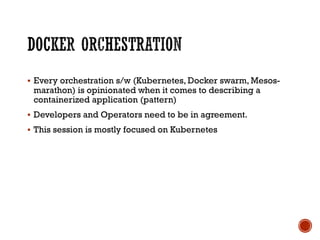
§ Every orchestration s/w (Kubernetes, Docker swarm, Mesos-
marathon) is opinionated when it comes to describing a
containerized application (pattern)
§ Developers and Operators need to be in agreement.
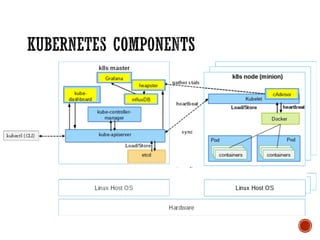
§ This session is mostly focused on Kubernetes
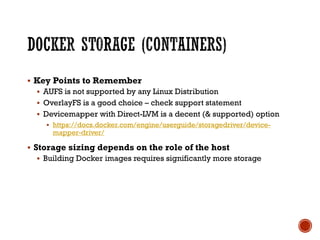
§ Key Points to Remember
§ AUFS is not supported by any Linux Distribution
§ OverlayFS is a good choice – check support statement
§ Devicemapper with Direct-LVM is a decent (& supported) option
§ https://docs.docker.com/engine/userguide/storagedriver/device-
mapper-driver/
§ Storage sizing depends on the role of the host
§ Building Docker images requires significantly more storage
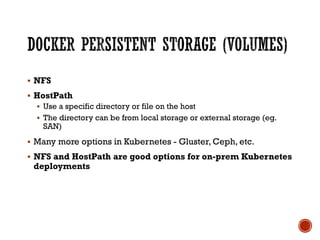
§ NFS
§ HostPath
§ Use a specific directory or file on the host
§ The directory can be from local storage or external storage (eg.
SAN)
§ Many more options in Kubernetes - Gluster, Ceph, etc.
§ NFS and HostPath are good options for on-prem Kubernetes
deployments
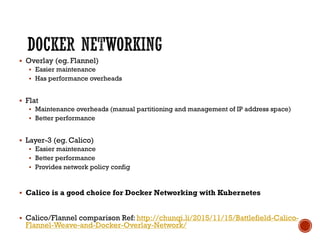
§ Overlay (eg. Flannel)
§ Easier maintenance
§ Has performance overheads
§ Flat
§ Maintenance overheads (manual partitioning and management of IP address space)
§ Better performance
§ Layer-3 (eg. Calico)
§ Easier maintenance
§ Better performance
§ Provides network policy config
§ Calico is a good choice for Docker Networking with Kubernetes
§ Calico/Flannel comparison Ref: http://chunqi.li/2015/11/15/Battlefield-Calico-
Flannel-Weave-and-Docker-Overlay-Network/
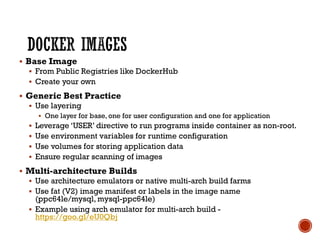
§ Base Image
§ From Public Registries like DockerHub
§ Create your own
§ Generic Best Practice
§ Use layering
§ One layer for base, one for user configuration and one for application
§ Leverage ‘USER’ directive to run programs inside container as non-root.
§ Use environment variables for runtime configuration
§ Use volumes for storing application data
§ Ensure regular scanning of images
§ Multi-architecture Builds
§ Use architecture emulators or native multi-arch build farms
§ Use fat (V2) image manifest or labels in the image name
(ppc64le/mysql, mysql-ppc64le)
§ Example using arch emulator for multi-arch build -
https://goo.gl/eU0Qbj
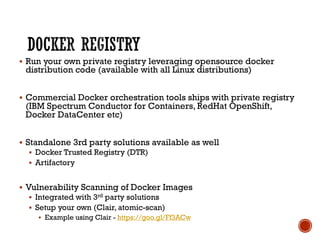
§ Run your own private registry leveraging opensource docker
distribution code (available with all Linux distributions)
§ Commercial Docker orchestration tools ships with private registry
(IBM Spectrum Conductor for Containers, RedHat OpenShift,
Docker DataCenter etc)
§ Standalone 3rd party solutions available as well
§ Docker Trusted Registry (DTR)
§ Artifactory
§ Vulnerability Scanning of Docker Images
§ Integrated with 3rd party solutions
§ Setup your own (Clair, atomic-scan)
§ Example using Clair - https://goo.gl/Ff3ACw
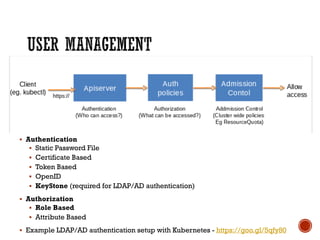
§ Authentication
§ Static Password File
§ Certificate Based
§ Token Based
§ OpenID
§ KeyStone (required for LDAP/AD authentication)
§ Authorization
§ Role Based
§ Attribute Based
§ Example LDAP/AD authentication setup with Kubernetes - https://goo.gl/5qfy80
§ Use Kubernetes Namespaces
§ One namespace per user or group
§ Separate namespaces for Dev/Test/Staging/Build
§ Specify Resource Quota (cpu, mem, #pods, #services, #RCs,
#PersistentVolumeClaims) for each namespace
§ Use the same Kubernetes cluster for dynamic builds
§ Example Jenkins Build Pipeline Setup: https://goo.gl/OvHKm1
§ Security Constraints
§ Allowed/Disallowed container operations
§ Explicitly add/remove Linux capabilities from containers
§ Disable Linux system calls
§ Allow/Disallow container to run as root
§ Pod Security Policy
§ Governs what actions a pod can perform
§ Selinux/AppArmor rules
§ Network Policies
§ Governs how Pods communicates with each other
§ Always set Kubernetes cluster wide security policies for production
deployments
§ Example Cluster-wide Security Policy Setup - https://goo.gl/oBKm2S
§ Internal (service not accessible outside of Kubernetes cluster)
§ ClusterIP (kube-proxy)
§ External
§ External IPs
§ NodePort
§ Cloud Loadbalancer (for off-prem)
§ Ingress
§ Requires supported Ingress controllers eg. nginx, ha-proxy
§ 3rd party controllers (check with vendors) – F5, NetScaler etc.
§ Use Ingress for exposing services in Kubernetes
§ Kubernetes state is maintained in ETCD which is a distributed
key-value store
§ Deployment considerations for ETCD
§ Fault-tolerant cluster
§ Storage for ETCD (Network and IO latency directly affects ETCD)
§ ETCD data backup and restore
§ Enable TLS
§ Deployment considerations for ETCD - https://goo.gl/n5VX1f
§ Explicitly create a Kubernetes Endpoint and a Service
§ Create a Kubernetes Endpoint with IP and Port details of the Legacy
Backend
§ Create a Kubernetes Service to expose the Endpoint
§ Complete Example - https://goo.gl/V8TKnK
§ Docker Logging
§ Which docker logging driver to use – json, syslog, journald etc.
§ Kubernetes metadata is available as part of docker labels
§ Kubernetes Logging
§ If using systemd based Linux distro, then by default all logging is to journald
§ If ForwardToSyslog (/etc/systemd/journald.conf) is set to Yes, then logs will be available in
syslog (rsyslog) as well
§ All kubernetes logs are in journald or /var/log/messages (if ForwardToSyslog is set to Yes).
§ Centralized logging
§ Docker/Kubernetes -> Rsyslog -> ELK
§ Docker/Kubernetes -> Rsyslog -> Splunk
§ Log rotation for Docker and Kubernetes is external and needs to be handled accordingly
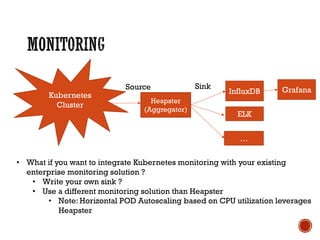
Kubernetes
Cluster
Heapster
(Aggregator)
InfluxDB
SinkSource Grafana
• What if you want to integrate Kubernetes monitoring with your existing
enterprise monitoring solution ?
• Write your own sink ?
• Use a different monitoring solution than Heapster
• Note: Horizontal POD Autoscaling based on CPU utilization leverages
Heapster
ELK
…
§ Docker Orchestration options are opinionated
§ OverlayFS or Devicemapper with Direct-LVM for Docker Storage
§ Plan for ETCD fault-tolerance, backup and restore
§ NFS and HostPath for Docker Volumes
§ Use Image Signing and Scanning
§ Calico for Docker networking (low-overhead, supports Kubernetes
Network Policy)
§ Use Kubernetes Security Policies
§ Use Ingress for exposing Services
§ Use Kubernetes Authentication and RBAC Authorization
§ Use Kubernetes namespaces for efficient cluster resource
management
On Prem Container Cloud - Lessons Learned

On Prem Container Cloud - Lessons Learned

  • 1.
  • 2.
    § Cloud NativeStack § High Level requirements § Details
  • 3.
    § Whether toDockerize ? § Which orchestration tool to use?
  • 4.
    Host (Bare-metal orVirtual Machine) Linux O/S Monitoring/Mgmt Agents Docker Engine Docker Orchestration DevOps: • CI/CD Pipeline Tooling • Build Service • Trusted & Secure Registry • Image Scanning & Integrity • App & Image Governance • PaaS Operations • LifeCycle Management of Host and Containers • Cluster Management • Network Management • Storage Management • Monitoring & Alerting • User Management • Logging • Security • HA • Backup and Disaster Recovery Misc • Firewall • Load Balancer • Service Discovery • DNS • Proxy • Ingress • … Storage Network Single System View
  • 5.
    § Docker Host §VM/baremetal § Lifecycle management of hosts ? § Docker Storage for Containers and Volumes? § Network for Host and Docker Containers? § Docker Orchestration § Handling user authentication & authorization § How to expose services ? § How to access legacy backends ? § How to handle resource management for different users and teams ? § Handling HA, backup & restore § Docker Image Build & Distribution § Where to get the base images ? § How to handle multi-arch builds ? § How to scan the images for any existing vulnerabilities ? § Should the images be stored on public registry or private registry ? § Configuration management § How to manage keys, secrets and runtime configuration of containers? § Logging § What logging mechanism to use for containers and host ? § Should we use same or different logging mechanism for containers and host ? § Monitoring § How to monitor host & containers ? § How to integrate into existing enterprise wide monitoring solution ?
  • 7.
    § Every orchestrations/w (Kubernetes, Docker swarm, Mesos- marathon) is opinionated when it comes to describing a containerized application (pattern) § Developers and Operators need to be in agreement. § This session is mostly focused on Kubernetes
  • 9.
    § Key Pointsto Remember § AUFS is not supported by any Linux Distribution § OverlayFS is a good choice – check support statement § Devicemapper with Direct-LVM is a decent (& supported) option § https://docs.docker.com/engine/userguide/storagedriver/device- mapper-driver/ § Storage sizing depends on the role of the host § Building Docker images requires significantly more storage
  • 10.
    § NFS § HostPath §Use a specific directory or file on the host § The directory can be from local storage or external storage (eg. SAN) § Many more options in Kubernetes - Gluster, Ceph, etc. § NFS and HostPath are good options for on-prem Kubernetes deployments
  • 11.
    § Overlay (eg.Flannel) § Easier maintenance § Has performance overheads § Flat § Maintenance overheads (manual partitioning and management of IP address space) § Better performance § Layer-3 (eg. Calico) § Easier maintenance § Better performance § Provides network policy config § Calico is a good choice for Docker Networking with Kubernetes § Calico/Flannel comparison Ref: http://chunqi.li/2015/11/15/Battlefield-Calico- Flannel-Weave-and-Docker-Overlay-Network/
  • 12.
    § Base Image §From Public Registries like DockerHub § Create your own § Generic Best Practice § Use layering § One layer for base, one for user configuration and one for application § Leverage ‘USER’ directive to run programs inside container as non-root. § Use environment variables for runtime configuration § Use volumes for storing application data § Ensure regular scanning of images § Multi-architecture Builds § Use architecture emulators or native multi-arch build farms § Use fat (V2) image manifest or labels in the image name (ppc64le/mysql, mysql-ppc64le) § Example using arch emulator for multi-arch build - https://goo.gl/eU0Qbj
  • 13.
    § Run yourown private registry leveraging opensource docker distribution code (available with all Linux distributions) § Commercial Docker orchestration tools ships with private registry (IBM Spectrum Conductor for Containers, RedHat OpenShift, Docker DataCenter etc) § Standalone 3rd party solutions available as well § Docker Trusted Registry (DTR) § Artifactory § Vulnerability Scanning of Docker Images § Integrated with 3rd party solutions § Setup your own (Clair, atomic-scan) § Example using Clair - https://goo.gl/Ff3ACw
  • 14.
    § Authentication § StaticPassword File § Certificate Based § Token Based § OpenID § KeyStone (required for LDAP/AD authentication) § Authorization § Role Based § Attribute Based § Example LDAP/AD authentication setup with Kubernetes - https://goo.gl/5qfy80
  • 15.
    § Use KubernetesNamespaces § One namespace per user or group § Separate namespaces for Dev/Test/Staging/Build § Specify Resource Quota (cpu, mem, #pods, #services, #RCs, #PersistentVolumeClaims) for each namespace § Use the same Kubernetes cluster for dynamic builds § Example Jenkins Build Pipeline Setup: https://goo.gl/OvHKm1
  • 16.
    § Security Constraints §Allowed/Disallowed container operations § Explicitly add/remove Linux capabilities from containers § Disable Linux system calls § Allow/Disallow container to run as root § Pod Security Policy § Governs what actions a pod can perform § Selinux/AppArmor rules § Network Policies § Governs how Pods communicates with each other § Always set Kubernetes cluster wide security policies for production deployments § Example Cluster-wide Security Policy Setup - https://goo.gl/oBKm2S
  • 17.
    § Internal (servicenot accessible outside of Kubernetes cluster) § ClusterIP (kube-proxy) § External § External IPs § NodePort § Cloud Loadbalancer (for off-prem) § Ingress § Requires supported Ingress controllers eg. nginx, ha-proxy § 3rd party controllers (check with vendors) – F5, NetScaler etc. § Use Ingress for exposing services in Kubernetes
  • 18.
    § Kubernetes stateis maintained in ETCD which is a distributed key-value store § Deployment considerations for ETCD § Fault-tolerant cluster § Storage for ETCD (Network and IO latency directly affects ETCD) § ETCD data backup and restore § Enable TLS § Deployment considerations for ETCD - https://goo.gl/n5VX1f
  • 19.
    § Explicitly createa Kubernetes Endpoint and a Service § Create a Kubernetes Endpoint with IP and Port details of the Legacy Backend § Create a Kubernetes Service to expose the Endpoint § Complete Example - https://goo.gl/V8TKnK
  • 20.
    § Docker Logging §Which docker logging driver to use – json, syslog, journald etc. § Kubernetes metadata is available as part of docker labels § Kubernetes Logging § If using systemd based Linux distro, then by default all logging is to journald § If ForwardToSyslog (/etc/systemd/journald.conf) is set to Yes, then logs will be available in syslog (rsyslog) as well § All kubernetes logs are in journald or /var/log/messages (if ForwardToSyslog is set to Yes). § Centralized logging § Docker/Kubernetes -> Rsyslog -> ELK § Docker/Kubernetes -> Rsyslog -> Splunk § Log rotation for Docker and Kubernetes is external and needs to be handled accordingly
  • 21.
    Kubernetes Cluster Heapster (Aggregator) InfluxDB SinkSource Grafana • Whatif you want to integrate Kubernetes monitoring with your existing enterprise monitoring solution ? • Write your own sink ? • Use a different monitoring solution than Heapster • Note: Horizontal POD Autoscaling based on CPU utilization leverages Heapster ELK …
  • 22.
    § Docker Orchestrationoptions are opinionated § OverlayFS or Devicemapper with Direct-LVM for Docker Storage § Plan for ETCD fault-tolerance, backup and restore § NFS and HostPath for Docker Volumes § Use Image Signing and Scanning § Calico for Docker networking (low-overhead, supports Kubernetes Network Policy) § Use Kubernetes Security Policies § Use Ingress for exposing Services § Use Kubernetes Authentication and RBAC Authorization § Use Kubernetes namespaces for efficient cluster resource management