Data Modeling
SYSTEMS ANALYSIS AND DESIGN, 6TH EDITION
DENNIS, WIXOM, AND ROTH
© 2015 JOHN WILEY & SONS. ALL RIGHTS RESERVED. 1
Learning Objectives
 Explain the rules and style guidelines for creating entity
relationship diagrams (ERDs).
 Create an ERD.
 Describe the use of a data dictionary and metadata.
 Explain how to balance ERDs and data flow diagrams.
 Describe the process of normalization.
© 2015 JOHN WILEY & SONS. ALL RIGHTS RESERVED. 2
Key Definitions
 Data model
o A formal way of representing the data that are used and created by
a business system
o Shows the people, places and things about which data is captured
and the relationships among them.
o Logical data model shows the organization of data without indicating
how it is stored, created, or manipulated
o Physical data model shows how the data will actually be stored in
databases or files.
© 2015 JOHN WILEY & SONS. ALL RIGHTS RESERVED. 3
Key Definitions
 Entity Relationship Diagram (ERD)
o A popular way to depict the data model
 Normalization is the process analysts use to
validate data models.
 Data models should balance with process models
© 2015 JOHN WILEY & SONS. ALL RIGHTS RESERVED. 4
Why Is Data Modeling Crucial?
 Data is a resource to be shared by as many
processes as possible.
 Data organization must be flexible and
adaptable to unanticipated business
requirements – and that is the purpose of data
modeling.
© 2015 JOHN WILEY & SONS. ALL RIGHTS RESERVED. 5
Other Data Modeling Issues…
 Data structures and properties are reasonably permanent –
more stable than the processes that use the data.
 Typically very similar to the existing system.
 Data models are much smaller than process models and are
constructed more rapidly.
 Constructing the data model helps analysts and users quickly
reach consensus on business terminology and rules.
© 2015 JOHN WILEY & SONS. ALL RIGHTS RESERVED. 6
Entity Relationship
Diagrams
WHAT DO ERDS TELL US?
© 2015 JOHN WILEY & SONS. ALL RIGHTS RESERVED. 7
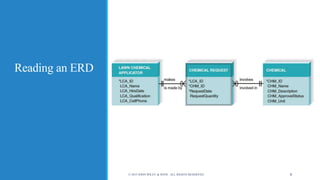
Reading an ERD
© 2015 JOHN WILEY & SONS. ALL RIGHTS RESERVED. 8
Using the ERD to Show Business Rules
 Business rules are constraints that are followed when the
system is in operation.
 ERD symbols can show when one instance of an entity must
exist for an instance of another to exist
o The chemical must exist before chemical requests can be created for
that chemical
o The lawn chemical applicator must exist before chemical requests
can be created by that lawn chemical applicator
© 2015 JOHN WILEY & SONS. ALL RIGHTS RESERVED. 9
Using the ERD to Show Business Rules,
con’t.
 ERD symbols can show when one instance of
an entity can be related to only one or to many
instances of another entity
o One LCA can create many chemical requests; each
chemical request is created by only one LCA
o A chemical can be included on many chemical
requests; a chemical request is for only one
chemical
© 2015 JOHN WILEY & SONS. ALL RIGHTS RESERVED. 10
Using the ERD to Show Business Rules,
con’t.
 ERD symbols show when the existence of an
entity instance is optional for a related entity
instance
o A chemical may exist without being included on
any chemical requests
© 2015 JOHN WILEY & SONS. ALL RIGHTS RESERVED. 11
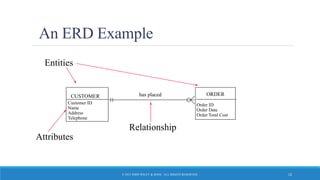
An ERD Example
CUSTOMER ORDER
Entities
Attributes
Customer ID
Name
Address
Telephone
Order ID
Order Date
Order Total Cost
has placed
Relationship
© 2015 JOHN WILEY & SONS. ALL RIGHTS RESERVED. 12
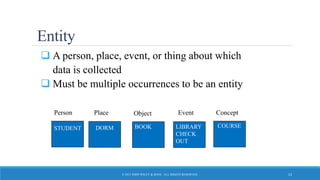
Entity
 A person, place, event, or thing about which
data is collected
 Must be multiple occurrences to be an entity
STUDENT
Person
DORM
Place
BOOK
Object
LIBRARY
CHECK-
OUT
Event
COURSE
Concept
STUDENT LIBRARY
CHECK
OUT
BOOK
© 2015 JOHN WILEY & SONS. ALL RIGHTS RESERVED. 13
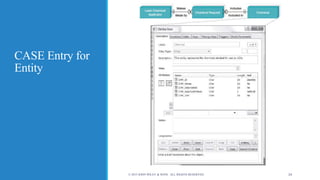
CASE Entry for
Entity
© 2015 JOHN WILEY & SONS. ALL RIGHTS RESERVED. 14
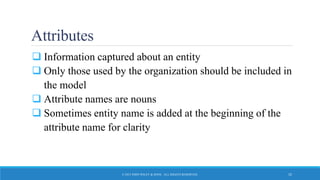
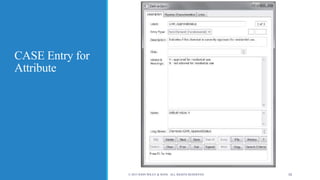
Attributes
 Information captured about an entity
 Only those used by the organization should be included in
the model
 Attribute names are nouns
 Sometimes entity name is added at the beginning of the
attribute name for clarity
© 2015 JOHN WILEY & SONS. ALL RIGHTS RESERVED. 15
CASE Entry for
Attribute
© 2015 JOHN WILEY & SONS. ALL RIGHTS RESERVED. 16
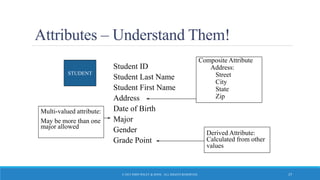
Attributes – Understand Them!
Student ID
Student Last Name
Student First Name
Address
Date of Birth
Major
Gender
Grade Point
Composite Attribute
Address:
Street
City
State
Zip
Multi-valued attribute:
May be more than one
major allowed
Derived Attribute:
Calculated from other
values
STUDENT
© 2015 JOHN WILEY & SONS. ALL RIGHTS RESERVED. 17
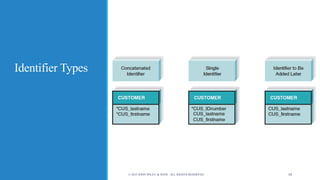
Identifier Types
 One or more attributes can serve as the entity identifier,
uniquely identifying each entity instance
 Concatenated identifier consists of several attributes
 An identifier may be ‘artificial,’ such as creating an ID
number
 Final decision on identifiers may postponed to the Design
Phase
© 2015 JOHN WILEY & SONS. ALL RIGHTS RESERVED. 18
Identifier Types
© 2015 JOHN WILEY & SONS. ALL RIGHTS RESERVED. 19
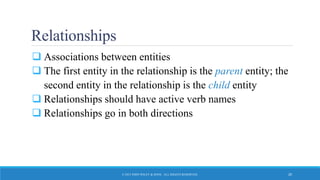
Relationships
 Associations between entities
 The first entity in the relationship is the parent entity; the
second entity in the relationship is the child entity
 Relationships should have active verb names
 Relationships go in both directions
© 2015 JOHN WILEY & SONS. ALL RIGHTS RESERVED. 20
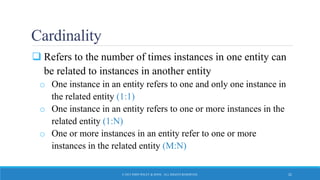
Cardinality
 Refers to the number of times instances in one entity can
be related to instances in another entity
o One instance in an entity refers to one and only one instance in
the related entity (1:1)
o One instance in an entity refers to one or more instances in the
related entity (1:N)
o One or more instances in an entity refer to one or more
instances in the related entity (M:N)
© 2015 JOHN WILEY & SONS. ALL RIGHTS RESERVED. 21
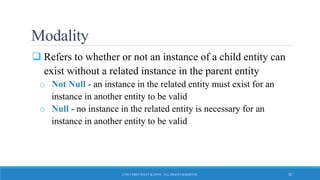
Modality
 Refers to whether or not an instance of a child entity can
exist without a related instance in the parent entity
o Not Null - an instance in the related entity must exist for an
instance in another entity to be valid
o Null - no instance in the related entity is necessary for an
instance in another entity to be valid
© 2015 JOHN WILEY & SONS. ALL RIGHTS RESERVED. 22
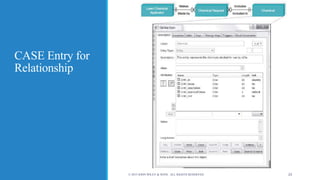
CASE Entry for
Relationship
© 2015 JOHN WILEY & SONS. ALL RIGHTS RESERVED. 23
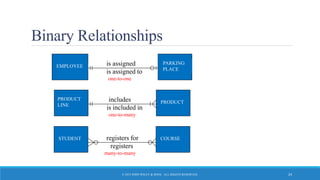
Binary Relationships
EMPLOYEE
PARKING
PLACE
is assigned
one-to-one
is assigned to
PRODUCT
LINE
PRODUCTincludes
one-to-many
is included in
STUDENT COURSEregisters for
many-to-many
registers
© 2015 JOHN WILEY & SONS. ALL RIGHTS RESERVED. 24
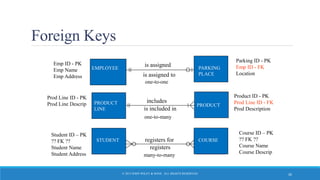
Foreign Keys
 A relationship implies that instances of one entity are related to
instances of another entity
 The primary key of one entity is migrated into the other entity as a
foreign key.
 A foreign key is a primary key of one entity that is contributed to
(duplicated in) another entity for the purpose of identifying
instances of a relationship. A foreign key (always in a child entity)
always matches the primary key (in a parent entity).
© 2015 JOHN WILEY & SONS. ALL RIGHTS RESERVED. 25
Foreign Keys
PRODUCT
LINE
PRODUCTincludes
one-to-many
one-to-one
is included in
Product ID - PK
Prod Line ID - FK
Prod Description
Prod Line ID - PK
Prod Line Descrip
Emp ID - PK
Emp Name
Emp Address
Parking ID - PK
Emp ID - FK
Location
STUDENT COURSEregisters for
many-to-many
Student ID – PK
?? FK ??
Student Name
Student Address
Course ID – PK
?? FK ??
Course Name
Course Descrip
PRODUCTPRODUCT
LINE
EMPLOYEE PARKING
PLACEis assigned to
is assigned
STUDENT COURSE
registers
© 2015 JOHN WILEY & SONS. ALL RIGHTS RESERVED. 26
Creating an ERD
HOW ERDS ARE DEVELOPED
© 2015 JOHN WILEY & SONS. ALL RIGHTS RESERVED. 27
Overview
 Drawing the ERD is an iterative process of trial and
revision
 ERDs can become quite complex
 Steps in building ERDs…
o Identify the entities
o Add appropriate attributes for each entity
o Draw the relationships that connect associated entities
© 2015 JOHN WILEY & SONS. ALL RIGHTS RESERVED. 28
Identify the Entities
 Identify major categories of information
o If available, check the process models for data stores, external
entities, and data flows
o Check the major inputs and outputs from the use cases
 Verify that there is more than one instance of the entity
that occurs in the system
© 2015 JOHN WILEY & SONS. ALL RIGHTS RESERVED. 29
Add Appropriate Attributes
 Identify attributes of the entity that are relevant to the system
under development
o Check the process model repository entries for details on data flows
and data stores
o Check the data requirements of the requirements definition
o Interview knowledgeable users
o Perform document analysis on existing forms and reports
 Select the entity’s candidate identifier (final decision may be
postponed until Design phase)
© 2015 JOHN WILEY & SONS. ALL RIGHTS RESERVED. 30
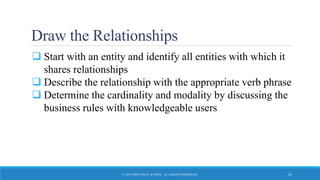
Draw the Relationships
 Start with an entity and identify all entities with which it
shares relationships
 Describe the relationship with the appropriate verb phrase
 Determine the cardinality and modality by discussing the
business rules with knowledgeable users
© 2015 JOHN WILEY & SONS. ALL RIGHTS RESERVED. 31
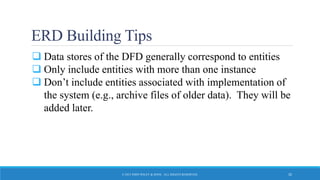
ERD Building Tips
 Data stores of the DFD generally correspond to entities
 Only include entities with more than one instance
 Don’t include entities associated with implementation of
the system (e.g., archive files of older data). They will be
added later.
© 2015 JOHN WILEY & SONS. ALL RIGHTS RESERVED. 32
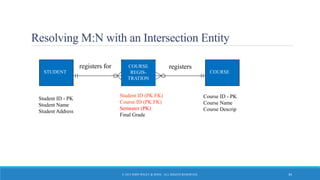
Advanced Syntax - Intersection Entities
 A new entity is created to store information about two
entities sharing an M:N relationship
o Remove the M:N relationship between two entities and insert
new entity between them
o Create two 1:N relationships: original entities are parents to the
new child intersection entity
o Name the intersection entity
o Migrate parent entity primary keys to new entity as foreign keys
(possibly also concatenated primary key)
© 2015 JOHN WILEY & SONS. ALL RIGHTS RESERVED. 33
Resolving M:N with an Intersection Entity
STUDENT COURSE
registers for
Student ID (PK FK)
Course ID (PK FK)
Semester (PK)
Final Grade
Student ID - PK
Student Name
Student Address
Course ID - PK
Course Name
Course Descrip
COURSE
REGIS-
TRATION
registers
© 2015 JOHN WILEY & SONS. ALL RIGHTS RESERVED. 34
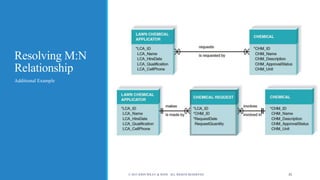
Resolving M:N
Relationship
Additional Example
© 2015 JOHN WILEY & SONS. ALL RIGHTS RESERVED. 35
Validating an ERD
ENSURING A QUALITY DATA MODEL
© 2015 JOHN WILEY & SONS. ALL RIGHTS RESERVED. 36
Design Guidelines
 Best practices rather than rigid rules
 Entities should have many occurrences
 Avoid unnecessary attributes
 Clearly label all components
 Apply correct cardinality and modality
 Break attributes into lowest level needed
 Labels should reflect common business terms
 Assumptions should be clearly stated
© 2015 JOHN WILEY & SONS. ALL RIGHTS RESERVED. 37
Balancing ERDs with DFDs
 All analysis activities are interrelated
 Process models contain two data components
o Data flows and data stores
 The DFD data components need to balance the ERD’s data stores
(entities) and data elements (attributes)
 Many CASE tools provide features to check for imbalance
 Check that all data stores and elements correspond between
models
o Data that is not used is unnecessary
o Data that has been omitted results in an incomplete system
 Do not follow thoughtlessly -- check that the models make sense!
© 2015 JOHN WILEY & SONS. ALL RIGHTS RESERVED. 38
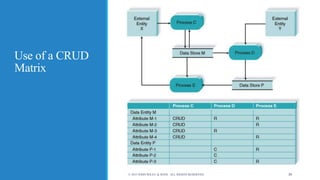
Use of a CRUD
Matrix
© 2015 JOHN WILEY & SONS. ALL RIGHTS RESERVED. 39
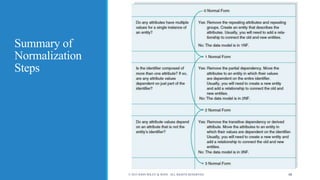
Normalization
 Technique used to validate data models
 Series of rules applied to logical data model to improve its
organization
 Three normalization rules are common
© 2015 JOHN WILEY & SONS. ALL RIGHTS RESERVED. 40
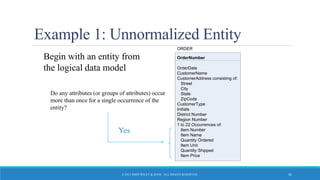
Example 1: Unnormalized Entity
Begin with an entity from
the logical data model
OrderNumber
OrderDate
CustomerName
CustomerAddress consisting of:
Street
City
State
ZipCode
CustomerType
Initials
District Number
Region Number
1 to 22 Occurrences of:
Item Number
Item Name
Quantity Ordered
Item Unit
Quantity Shipped
Item Price
ORDER
Do any attributes (or groups of attributes) occur
more than once for a single occurrence of the
entity?
Yes
© 2015 JOHN WILEY & SONS. ALL RIGHTS RESERVED. 41
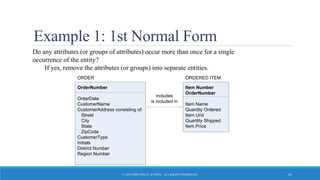
Example 1: 1st Normal Form
Do any attributes (or groups of attributes) occur more than once for a single
occurrence of the entity?
If yes, remove the attributes (or groups) into separate entities.
OrderNumber
OrderDate
CustomerName
CustomerAddress consisting of:
Street
City
State
ZipCode
CustomerType
Initials
District Number
Region Number
ORDER
Item Number
OrderNumber
Item Name
Quantity Ordered
Item Unit
Quantity Shipped
Item Price
ORDERED ITEM
includes
is included in
© 2015 JOHN WILEY & SONS. ALL RIGHTS RESERVED. 42
© 2015 JOHN WILEY & SONS. ALL RIGHTS RESERVED. 43
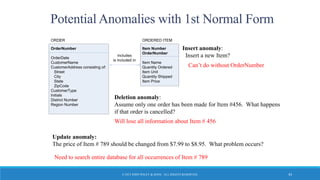
Potential Anomalies with 1st Normal Form
Update anomaly:
The price of Item # 789 should be changed from $7.99 to $8.95. What problem occurs?
OrderNumber
OrderDate
CustomerName
CustomerAddress consisting of:
Street
City
State
ZipCode
CustomerType
Initials
District Number
Region Number
ORDER
Item Number
OrderNumber
Item Name
Quantity Ordered
Item Unit
Quantity Shipped
Item Price
ORDERED ITEM
includes
is included in
Insert anomaly:
Insert a new Item?
Will lose all information about Item # 456
Can’t do without OrderNumber
Deletion anomaly:
Assume only one order has been made for Item #456. What happens
if that order is cancelled?
Need to search entire database for all occurrences of Item # 789
© 2015 JOHN WILEY & SONS. ALL RIGHTS RESERVED. 44
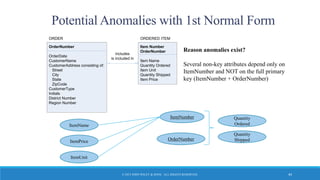
Potential Anomalies with 1st Normal Form
OrderNumber
OrderDate
CustomerName
CustomerAddress consisting of:
Street
City
State
ZipCode
CustomerType
Initials
District Number
Region Number
ORDER
Item Number
OrderNumber
Item Name
Quantity Ordered
Item Unit
Quantity Shipped
Item Price
ORDERED ITEM
includes
is included in
Reason anomalies exist?
Several non-key attributes depend only on
ItemNumber and NOT on the full primary
key (ItemNumber + OrderNumber)
ItemNumber
OrderNumber
Quantity
Ordered
Quantity
ShippedItemPrice
ItemName
ItemUnit
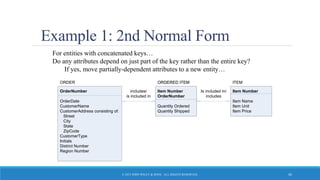
Example 1: 2nd Normal Form
For entities with concatenated keys…
Do any attributes depend on just part of the key rather than the entire key?
If yes, move partially-dependent attributes to a new entity…
OrderNumber
OrderDate
CustomerName
CustomerAddress consisting of:
Street
City
State
ZipCode
CustomerType
Initials
District Number
Region Number
ORDER
Item Number
OrderNumber
Quantity Ordered
Quantity Shipped
ORDERED ITEM
includes/
is included in
ORDERED ITEM
Item Number
Item Name
Item Unit
Item Price
ITEM
Is included in/
includes
© 2015 JOHN WILEY & SONS. ALL RIGHTS RESERVED. 45
© 2015 JOHN WILEY & SONS. ALL RIGHTS RESERVED. 46
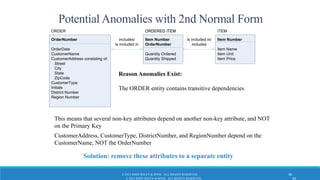
Potential Anomalies with 2nd Normal Form
Solution: remove these attributes to a separate entity
OrderNumber
OrderDate
CustomerName
CustomerAddress consisting of:
Street
City
State
ZipCode
CustomerType
Initials
District Number
Region Number
ORDER
Item Number
OrderNumber
Quantity Ordered
Quantity Shipped
ORDERED ITEM
includes/
is included in
ORDERED ITEM
Item Number
Item Name
Item Unit
Item Price
ITEM
Is included in/
includes
Reason Anomalies Exist:
The ORDER entity contains transitive dependencies
This means that several non-key attributes depend on another non-key attribute, and NOT
on the Primary Key
CustomerAddress, CustomerType, DistrictNumber, and RegionNumber depend on the
CustomerName, NOT the OrderNumber
© 2015 JOHN WILEY & SONS. ALL RIGHTS RESERVED. 46
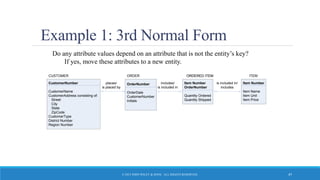
Example 1: 3rd Normal Form
Do any attribute values depend on an attribute that is not the entity’s key?
If yes, move these attributes to a new entity.
OrderNumber
OrderDate
CustomerNumber
Initials
ORDER
Item Number
OrderNumber
Quantity Ordered
Quantity Shipped
ORDERED ITEM
includes/
is included in
ORDERED ITEM
Item Number
Item Name
Item Unit
Item Price
ITEM
is included in/
includes
CustomerNumber
CustomerName
CustomerAddress consisting of:
Street
City
State
ZipCode
CustomerType
District Number
Region Number
CUSTOMER
places/
is placed by
© 2015 JOHN WILEY & SONS. ALL RIGHTS RESERVED. 47
Summary of
Normalization
Steps
© 2015 JOHN WILEY & SONS. ALL RIGHTS RESERVED. 48

Hi600 ch06_text_slides

  • 1.
    Data Modeling SYSTEMS ANALYSISAND DESIGN, 6TH EDITION DENNIS, WIXOM, AND ROTH © 2015 JOHN WILEY & SONS. ALL RIGHTS RESERVED. 1
  • 2.
    Learning Objectives  Explainthe rules and style guidelines for creating entity relationship diagrams (ERDs).  Create an ERD.  Describe the use of a data dictionary and metadata.  Explain how to balance ERDs and data flow diagrams.  Describe the process of normalization. © 2015 JOHN WILEY & SONS. ALL RIGHTS RESERVED. 2
  • 3.
    Key Definitions  Datamodel o A formal way of representing the data that are used and created by a business system o Shows the people, places and things about which data is captured and the relationships among them. o Logical data model shows the organization of data without indicating how it is stored, created, or manipulated o Physical data model shows how the data will actually be stored in databases or files. © 2015 JOHN WILEY & SONS. ALL RIGHTS RESERVED. 3
  • 4.
    Key Definitions  EntityRelationship Diagram (ERD) o A popular way to depict the data model  Normalization is the process analysts use to validate data models.  Data models should balance with process models © 2015 JOHN WILEY & SONS. ALL RIGHTS RESERVED. 4
  • 5.
    Why Is DataModeling Crucial?  Data is a resource to be shared by as many processes as possible.  Data organization must be flexible and adaptable to unanticipated business requirements – and that is the purpose of data modeling. © 2015 JOHN WILEY & SONS. ALL RIGHTS RESERVED. 5
  • 6.
    Other Data ModelingIssues…  Data structures and properties are reasonably permanent – more stable than the processes that use the data.  Typically very similar to the existing system.  Data models are much smaller than process models and are constructed more rapidly.  Constructing the data model helps analysts and users quickly reach consensus on business terminology and rules. © 2015 JOHN WILEY & SONS. ALL RIGHTS RESERVED. 6
  • 7.
    Entity Relationship Diagrams WHAT DOERDS TELL US? © 2015 JOHN WILEY & SONS. ALL RIGHTS RESERVED. 7
  • 8.
    Reading an ERD ©2015 JOHN WILEY & SONS. ALL RIGHTS RESERVED. 8
  • 9.
    Using the ERDto Show Business Rules  Business rules are constraints that are followed when the system is in operation.  ERD symbols can show when one instance of an entity must exist for an instance of another to exist o The chemical must exist before chemical requests can be created for that chemical o The lawn chemical applicator must exist before chemical requests can be created by that lawn chemical applicator © 2015 JOHN WILEY & SONS. ALL RIGHTS RESERVED. 9
  • 10.
    Using the ERDto Show Business Rules, con’t.  ERD symbols can show when one instance of an entity can be related to only one or to many instances of another entity o One LCA can create many chemical requests; each chemical request is created by only one LCA o A chemical can be included on many chemical requests; a chemical request is for only one chemical © 2015 JOHN WILEY & SONS. ALL RIGHTS RESERVED. 10
  • 11.
    Using the ERDto Show Business Rules, con’t.  ERD symbols show when the existence of an entity instance is optional for a related entity instance o A chemical may exist without being included on any chemical requests © 2015 JOHN WILEY & SONS. ALL RIGHTS RESERVED. 11
  • 12.
    An ERD Example CUSTOMERORDER Entities Attributes Customer ID Name Address Telephone Order ID Order Date Order Total Cost has placed Relationship © 2015 JOHN WILEY & SONS. ALL RIGHTS RESERVED. 12
  • 13.
    Entity  A person,place, event, or thing about which data is collected  Must be multiple occurrences to be an entity STUDENT Person DORM Place BOOK Object LIBRARY CHECK- OUT Event COURSE Concept STUDENT LIBRARY CHECK OUT BOOK © 2015 JOHN WILEY & SONS. ALL RIGHTS RESERVED. 13
  • 14.
    CASE Entry for Entity ©2015 JOHN WILEY & SONS. ALL RIGHTS RESERVED. 14
  • 15.
    Attributes  Information capturedabout an entity  Only those used by the organization should be included in the model  Attribute names are nouns  Sometimes entity name is added at the beginning of the attribute name for clarity © 2015 JOHN WILEY & SONS. ALL RIGHTS RESERVED. 15
  • 16.
    CASE Entry for Attribute ©2015 JOHN WILEY & SONS. ALL RIGHTS RESERVED. 16
  • 17.
    Attributes – UnderstandThem! Student ID Student Last Name Student First Name Address Date of Birth Major Gender Grade Point Composite Attribute Address: Street City State Zip Multi-valued attribute: May be more than one major allowed Derived Attribute: Calculated from other values STUDENT © 2015 JOHN WILEY & SONS. ALL RIGHTS RESERVED. 17
  • 18.
    Identifier Types  Oneor more attributes can serve as the entity identifier, uniquely identifying each entity instance  Concatenated identifier consists of several attributes  An identifier may be ‘artificial,’ such as creating an ID number  Final decision on identifiers may postponed to the Design Phase © 2015 JOHN WILEY & SONS. ALL RIGHTS RESERVED. 18
  • 19.
    Identifier Types © 2015JOHN WILEY & SONS. ALL RIGHTS RESERVED. 19
  • 20.
    Relationships  Associations betweenentities  The first entity in the relationship is the parent entity; the second entity in the relationship is the child entity  Relationships should have active verb names  Relationships go in both directions © 2015 JOHN WILEY & SONS. ALL RIGHTS RESERVED. 20
  • 21.
    Cardinality  Refers tothe number of times instances in one entity can be related to instances in another entity o One instance in an entity refers to one and only one instance in the related entity (1:1) o One instance in an entity refers to one or more instances in the related entity (1:N) o One or more instances in an entity refer to one or more instances in the related entity (M:N) © 2015 JOHN WILEY & SONS. ALL RIGHTS RESERVED. 21
  • 22.
    Modality  Refers towhether or not an instance of a child entity can exist without a related instance in the parent entity o Not Null - an instance in the related entity must exist for an instance in another entity to be valid o Null - no instance in the related entity is necessary for an instance in another entity to be valid © 2015 JOHN WILEY & SONS. ALL RIGHTS RESERVED. 22
  • 23.
    CASE Entry for Relationship ©2015 JOHN WILEY & SONS. ALL RIGHTS RESERVED. 23
  • 24.
    Binary Relationships EMPLOYEE PARKING PLACE is assigned one-to-one isassigned to PRODUCT LINE PRODUCTincludes one-to-many is included in STUDENT COURSEregisters for many-to-many registers © 2015 JOHN WILEY & SONS. ALL RIGHTS RESERVED. 24
  • 25.
    Foreign Keys  Arelationship implies that instances of one entity are related to instances of another entity  The primary key of one entity is migrated into the other entity as a foreign key.  A foreign key is a primary key of one entity that is contributed to (duplicated in) another entity for the purpose of identifying instances of a relationship. A foreign key (always in a child entity) always matches the primary key (in a parent entity). © 2015 JOHN WILEY & SONS. ALL RIGHTS RESERVED. 25
  • 26.
    Foreign Keys PRODUCT LINE PRODUCTincludes one-to-many one-to-one is includedin Product ID - PK Prod Line ID - FK Prod Description Prod Line ID - PK Prod Line Descrip Emp ID - PK Emp Name Emp Address Parking ID - PK Emp ID - FK Location STUDENT COURSEregisters for many-to-many Student ID – PK ?? FK ?? Student Name Student Address Course ID – PK ?? FK ?? Course Name Course Descrip PRODUCTPRODUCT LINE EMPLOYEE PARKING PLACEis assigned to is assigned STUDENT COURSE registers © 2015 JOHN WILEY & SONS. ALL RIGHTS RESERVED. 26
  • 27.
    Creating an ERD HOWERDS ARE DEVELOPED © 2015 JOHN WILEY & SONS. ALL RIGHTS RESERVED. 27
  • 28.
    Overview  Drawing theERD is an iterative process of trial and revision  ERDs can become quite complex  Steps in building ERDs… o Identify the entities o Add appropriate attributes for each entity o Draw the relationships that connect associated entities © 2015 JOHN WILEY & SONS. ALL RIGHTS RESERVED. 28
  • 29.
    Identify the Entities Identify major categories of information o If available, check the process models for data stores, external entities, and data flows o Check the major inputs and outputs from the use cases  Verify that there is more than one instance of the entity that occurs in the system © 2015 JOHN WILEY & SONS. ALL RIGHTS RESERVED. 29
  • 30.
    Add Appropriate Attributes Identify attributes of the entity that are relevant to the system under development o Check the process model repository entries for details on data flows and data stores o Check the data requirements of the requirements definition o Interview knowledgeable users o Perform document analysis on existing forms and reports  Select the entity’s candidate identifier (final decision may be postponed until Design phase) © 2015 JOHN WILEY & SONS. ALL RIGHTS RESERVED. 30
  • 31.
    Draw the Relationships Start with an entity and identify all entities with which it shares relationships  Describe the relationship with the appropriate verb phrase  Determine the cardinality and modality by discussing the business rules with knowledgeable users © 2015 JOHN WILEY & SONS. ALL RIGHTS RESERVED. 31
  • 32.
    ERD Building Tips Data stores of the DFD generally correspond to entities  Only include entities with more than one instance  Don’t include entities associated with implementation of the system (e.g., archive files of older data). They will be added later. © 2015 JOHN WILEY & SONS. ALL RIGHTS RESERVED. 32
  • 33.
    Advanced Syntax -Intersection Entities  A new entity is created to store information about two entities sharing an M:N relationship o Remove the M:N relationship between two entities and insert new entity between them o Create two 1:N relationships: original entities are parents to the new child intersection entity o Name the intersection entity o Migrate parent entity primary keys to new entity as foreign keys (possibly also concatenated primary key) © 2015 JOHN WILEY & SONS. ALL RIGHTS RESERVED. 33
  • 34.
    Resolving M:N withan Intersection Entity STUDENT COURSE registers for Student ID (PK FK) Course ID (PK FK) Semester (PK) Final Grade Student ID - PK Student Name Student Address Course ID - PK Course Name Course Descrip COURSE REGIS- TRATION registers © 2015 JOHN WILEY & SONS. ALL RIGHTS RESERVED. 34
  • 35.
    Resolving M:N Relationship Additional Example ©2015 JOHN WILEY & SONS. ALL RIGHTS RESERVED. 35
  • 36.
    Validating an ERD ENSURINGA QUALITY DATA MODEL © 2015 JOHN WILEY & SONS. ALL RIGHTS RESERVED. 36
  • 37.
    Design Guidelines  Bestpractices rather than rigid rules  Entities should have many occurrences  Avoid unnecessary attributes  Clearly label all components  Apply correct cardinality and modality  Break attributes into lowest level needed  Labels should reflect common business terms  Assumptions should be clearly stated © 2015 JOHN WILEY & SONS. ALL RIGHTS RESERVED. 37
  • 38.
    Balancing ERDs withDFDs  All analysis activities are interrelated  Process models contain two data components o Data flows and data stores  The DFD data components need to balance the ERD’s data stores (entities) and data elements (attributes)  Many CASE tools provide features to check for imbalance  Check that all data stores and elements correspond between models o Data that is not used is unnecessary o Data that has been omitted results in an incomplete system  Do not follow thoughtlessly -- check that the models make sense! © 2015 JOHN WILEY & SONS. ALL RIGHTS RESERVED. 38
  • 39.
    Use of aCRUD Matrix © 2015 JOHN WILEY & SONS. ALL RIGHTS RESERVED. 39
  • 40.
    Normalization  Technique usedto validate data models  Series of rules applied to logical data model to improve its organization  Three normalization rules are common © 2015 JOHN WILEY & SONS. ALL RIGHTS RESERVED. 40
  • 41.
    Example 1: UnnormalizedEntity Begin with an entity from the logical data model OrderNumber OrderDate CustomerName CustomerAddress consisting of: Street City State ZipCode CustomerType Initials District Number Region Number 1 to 22 Occurrences of: Item Number Item Name Quantity Ordered Item Unit Quantity Shipped Item Price ORDER Do any attributes (or groups of attributes) occur more than once for a single occurrence of the entity? Yes © 2015 JOHN WILEY & SONS. ALL RIGHTS RESERVED. 41
  • 42.
    Example 1: 1stNormal Form Do any attributes (or groups of attributes) occur more than once for a single occurrence of the entity? If yes, remove the attributes (or groups) into separate entities. OrderNumber OrderDate CustomerName CustomerAddress consisting of: Street City State ZipCode CustomerType Initials District Number Region Number ORDER Item Number OrderNumber Item Name Quantity Ordered Item Unit Quantity Shipped Item Price ORDERED ITEM includes is included in © 2015 JOHN WILEY & SONS. ALL RIGHTS RESERVED. 42
  • 43.
    © 2015 JOHNWILEY & SONS. ALL RIGHTS RESERVED. 43 Potential Anomalies with 1st Normal Form Update anomaly: The price of Item # 789 should be changed from $7.99 to $8.95. What problem occurs? OrderNumber OrderDate CustomerName CustomerAddress consisting of: Street City State ZipCode CustomerType Initials District Number Region Number ORDER Item Number OrderNumber Item Name Quantity Ordered Item Unit Quantity Shipped Item Price ORDERED ITEM includes is included in Insert anomaly: Insert a new Item? Will lose all information about Item # 456 Can’t do without OrderNumber Deletion anomaly: Assume only one order has been made for Item #456. What happens if that order is cancelled? Need to search entire database for all occurrences of Item # 789
  • 44.
    © 2015 JOHNWILEY & SONS. ALL RIGHTS RESERVED. 44 Potential Anomalies with 1st Normal Form OrderNumber OrderDate CustomerName CustomerAddress consisting of: Street City State ZipCode CustomerType Initials District Number Region Number ORDER Item Number OrderNumber Item Name Quantity Ordered Item Unit Quantity Shipped Item Price ORDERED ITEM includes is included in Reason anomalies exist? Several non-key attributes depend only on ItemNumber and NOT on the full primary key (ItemNumber + OrderNumber) ItemNumber OrderNumber Quantity Ordered Quantity ShippedItemPrice ItemName ItemUnit
  • 45.
    Example 1: 2ndNormal Form For entities with concatenated keys… Do any attributes depend on just part of the key rather than the entire key? If yes, move partially-dependent attributes to a new entity… OrderNumber OrderDate CustomerName CustomerAddress consisting of: Street City State ZipCode CustomerType Initials District Number Region Number ORDER Item Number OrderNumber Quantity Ordered Quantity Shipped ORDERED ITEM includes/ is included in ORDERED ITEM Item Number Item Name Item Unit Item Price ITEM Is included in/ includes © 2015 JOHN WILEY & SONS. ALL RIGHTS RESERVED. 45
  • 46.
    © 2015 JOHNWILEY & SONS. ALL RIGHTS RESERVED. 46 Potential Anomalies with 2nd Normal Form Solution: remove these attributes to a separate entity OrderNumber OrderDate CustomerName CustomerAddress consisting of: Street City State ZipCode CustomerType Initials District Number Region Number ORDER Item Number OrderNumber Quantity Ordered Quantity Shipped ORDERED ITEM includes/ is included in ORDERED ITEM Item Number Item Name Item Unit Item Price ITEM Is included in/ includes Reason Anomalies Exist: The ORDER entity contains transitive dependencies This means that several non-key attributes depend on another non-key attribute, and NOT on the Primary Key CustomerAddress, CustomerType, DistrictNumber, and RegionNumber depend on the CustomerName, NOT the OrderNumber © 2015 JOHN WILEY & SONS. ALL RIGHTS RESERVED. 46
  • 47.
    Example 1: 3rdNormal Form Do any attribute values depend on an attribute that is not the entity’s key? If yes, move these attributes to a new entity. OrderNumber OrderDate CustomerNumber Initials ORDER Item Number OrderNumber Quantity Ordered Quantity Shipped ORDERED ITEM includes/ is included in ORDERED ITEM Item Number Item Name Item Unit Item Price ITEM is included in/ includes CustomerNumber CustomerName CustomerAddress consisting of: Street City State ZipCode CustomerType District Number Region Number CUSTOMER places/ is placed by © 2015 JOHN WILEY & SONS. ALL RIGHTS RESERVED. 47
  • 48.
    Summary of Normalization Steps © 2015JOHN WILEY & SONS. ALL RIGHTS RESERVED. 48