Requirements
Determination
SYSTEMS ANALYSIS AND DESIGN, 6TH EDITION
DENNIS, WIXOM, AND ROTH
© 2015 JOHN WILEY & SONS. ALL RIGHTS RESERVED. 1Roberta M. Roth
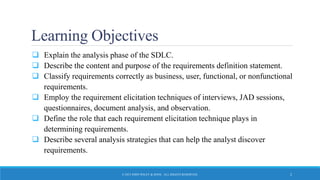
Learning Objectives
 Explain the analysis phase of the SDLC.
 Describe the content and purpose of the requirements definition statement.
 Classify requirements correctly as business, user, functional, or nonfunctional
requirements.
 Employ the requirement elicitation techniques of interviews, JAD sessions,
questionnaires, document analysis, and observation.
 Define the role that each requirement elicitation technique plays in
determining requirements.
 Describe several analysis strategies that can help the analyst discover
requirements.
© 2015 JOHN WILEY & SONS. ALL RIGHTS RESERVED. 2
The Analysis Phase
DETERMINING WHAT THE NEW SYSTEM SHOULD DO
© 2015 JOHN WILEY & SONS. ALL RIGHTS RESERVED. 3
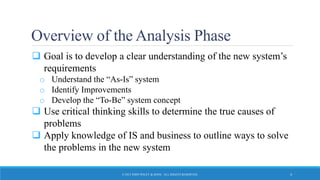
Overview of the Analysis Phase
 Goal is to develop a clear understanding of the new system’s
requirements
o Understand the “As-Is” system
o Identify Improvements
o Develop the “To-Be” system concept
 Use critical thinking skills to determine the true causes of
problems
 Apply knowledge of IS and business to outline ways to solve
the problems in the new system
© 2015 JOHN WILEY & SONS. ALL RIGHTS RESERVED. 4
Requirements
Determination
UNDERSTANDING REQUIREMENTS
© 2015 JOHN WILEY & SONS. ALL RIGHTS RESERVED. 5
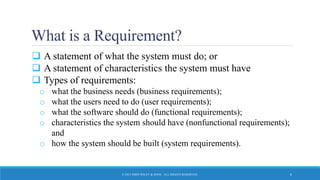
What is a Requirement?
 A statement of what the system must do; or
 A statement of characteristics the system must have
 Types of requirements:
o what the business needs (business requirements);
o what the users need to do (user requirements);
o what the software should do (functional requirements);
o characteristics the system should have (nonfunctional requirements);
and
o how the system should be built (system requirements).
© 2015 JOHN WILEY & SONS. ALL RIGHTS RESERVED. 6
User Requirements
 What the user needs to do to complete a needed job or
task
 Focus on user tasks that are integral to business
operations
 Understanding user tasks helps reveal ways that the new
system can support those tasks
© 2015 JOHN WILEY & SONS. ALL RIGHTS RESERVED. 7
Functional Requirements
 A process the system should perform as a part of
supporting a user task, or
 Information the system should provide as the user
performs a task
 Specify the support the system will provide to the user in
fulfilling his/her work tasks
© 2015 JOHN WILEY & SONS. ALL RIGHTS RESERVED. 8
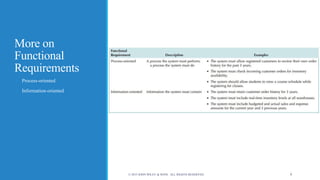
More on
Functional
Requirements
o Process-oriented
o Information-oriented
© 2015 JOHN WILEY & SONS. ALL RIGHTS RESERVED. 9
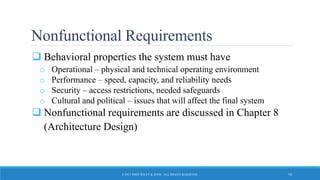
Nonfunctional Requirements
 Behavioral properties the system must have
o Operational – physical and technical operating environment
o Performance – speed, capacity, and reliability needs
o Security – access restrictions, needed safeguards
o Cultural and political – issues that will affect the final system
 Nonfunctional requirements are discussed in Chapter 8
(Architecture Design)
© 2015 JOHN WILEY & SONS. ALL RIGHTS RESERVED. 10
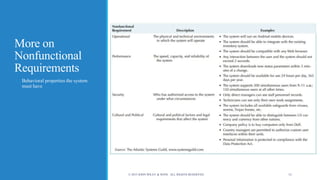
More on
Nonfunctional
Requirements
o Behavioral properties the system
must have
© 2015 JOHN WILEY & SONS. ALL RIGHTS RESERVED. 11
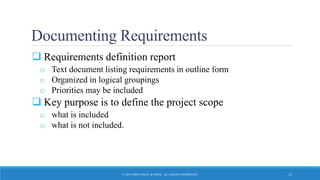
Documenting Requirements
 Requirements definition report
o Text document listing requirements in outline form
o Organized in logical groupings
o Priorities may be included
 Key purpose is to define the project scope
o what is included
o what is not included.
© 2015 JOHN WILEY & SONS. ALL RIGHTS RESERVED. 12
Requirements
Elicitation Techniques
WAYS TO DISCOVER REQUIREMENTS
© 2015 JOHN WILEY & SONS. ALL RIGHTS RESERVED. 13
Requirements Elicitation in Practice
 Use every interaction with managers and users to garner
interest, support, and enthusiasm for project
 Choose participants carefully
 Make respectful use of people’s time
© 2015 JOHN WILEY & SONS. ALL RIGHTS RESERVED. 14
Interviews
 Most important and most used fact-finding technique
o The systems analysts collects information from individuals face to
face
 Who should be interviewed?
o Managers in early project stages to get broad understanding
o Staff can provide details and specifics later.
o Political issues are important – may be necessary to interview
influential people, even if they are not too knowledgeable
© 2015 JOHN WILEY & SONS. ALL RIGHTS RESERVED. 15
Interviews, con’t.
 Interview Structure
o Top-Down (broad to specific; most common)
o Bottom-up (specific to broad; useful for collecting details)
 Question Type
o Open-ended – broad concepts; opinions
o Closed-ended – learn or confirm facts and details
o Probing – resolve confusion; follow-up
© 2015 JOHN WILEY & SONS. ALL RIGHTS RESERVED. 16
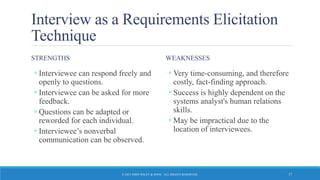
Interview as a Requirements Elicitation
Technique
STRENGTHS
◦ Interviewee can respond freely and
openly to questions.
◦ Interviewee can be asked for more
feedback.
◦ Questions can be adapted or
reworded for each individual.
◦ Interviewee’s nonverbal
communication can be observed.
WEAKNESSES
◦ Very time-consuming, and therefore
costly, fact-finding approach.
◦ Success is highly dependent on the
systems analyst's human relations
skills.
◦ May be impractical due to the
location of interviewees.
© 2015 JOHN WILEY & SONS. ALL RIGHTS RESERVED. 17
Interviewing – Practical Tips
 Prepare, prepare, prepare!
 Don’t waste the interviewee’s time
 Take notes during and after the interview
 Don’t be afraid to ask for clarification
 Be aware of non-verbal cues (body language)
 Send interview summary as soon as possible. Request
confirmation and corrections
© 2015 JOHN WILEY & SONS. ALL RIGHTS RESERVED. 18
JAD – Joint Application Development
 An extensive, structured group process
 GOAL: produce complete requirements definition document
 Directly involves project sponsor, key managers, and key
users with systems analysts
 Requires a trained facilitator
 Requires a comfortable facility for long-term, intensive group
work; preferably off-site
 Expensive but valuable
© 2015 JOHN WILEY & SONS. ALL RIGHTS RESERVED. 19
Electronic JAD – e-JAD
 Any group activity may experience problems with group
dynamics
 e-JAD helps group overcome group dynamic issues –
dominance, status differences, fear of reprisal
 e-JAD provides ways for members to contribute,
comment on, and rate ideas anonymously
 Requires a trained e-JAD facilitator and groupware
software
© 2015 JOHN WILEY & SONS. ALL RIGHTS RESERVED. 20
JAD Practical Tips
 Obtain training as a facilitator
 Top management support needed to enable the right
people to commit to the JAD sessions
 Following completion of JAD sessions, distribute
Requirements Definition document to group for
confirmation and correction
 Introduce JAD to organization with small demo project
and build on that experience
© 2015 JOHN WILEY & SONS. ALL RIGHTS RESERVED. 21
Questionnaires
 Special-purpose documents that allow the analyst to
collect information and opinions from respondents.
o Mass produced and distributed.
o Respondents complete the questionnaire on their own time.
 Facts are collected from a large number of people while
maintaining uniform responses.
o When dealing with a large audience, no other fact-finding technique
can tabulate the same facts as efficiently.
© 2015 JOHN WILEY & SONS. ALL RIGHTS RESERVED. 22
Questionnaires, con’t.
 Fixed-format questions
o Similar to a multiple choice exam question
o Must be able to anticipate potential answers to questions
o Easy to tabulate results
 Free-format questions
o Like an essay question – open-ended
o Response is unpredictable
o Harder to tabulate results
© 2015 JOHN WILEY & SONS. ALL RIGHTS RESERVED. 23
Questionnaires as a Requirements
Elicitation Technique
STRENGTHS
◦ Most can be answered quickly (if
properly designed).
◦ Relatively inexpensive.
◦ Allow individuals to maintain
anonymity.
◦ Can be tabulated and analyzed
quickly (if properly designed).
WEAKNESSES
◦ Response is often low. How to motivate
participation?
◦ Incomplete questionnaires returned –
are these worthless?
◦ Tend to be inflexible.
◦ Body language cannot be observed.
◦ Cannot clarify a vague or incomplete
answer to any question.
◦ Difficult to prepare a successful
questionnaire.
© 2015 JOHN WILEY & SONS. ALL RIGHTS RESERVED. 24
Questionnaires – Practical Tips
 To Develop a (Good) Questionnaire
o Determine what facts and opinions must be collected and from whom you
should get them
o Based on the needed facts and opinions, determine whether free- or fixed-
format questions will produce the best answers. A mix of types may be
ideal.
o Write the questions
o Pretest the questions on a small sample of “typical” respondents – not just
other systems analysts
o Use random sampling if necessary
© 2015 JOHN WILEY & SONS. ALL RIGHTS RESERVED. 25
Observation
 Participate in or watch a person perform activities to learn
about the system
 Use when the validity of data collected using other
methods is in question.
 Use when the complexity of certain aspects of the system
prevents end-users from providing a clear explanation
© 2015 JOHN WILEY & SONS. ALL RIGHTS RESERVED. 26
Observation as a Requirements
Elicitation Technique
STRENGTHS
◦ Data gathered may be highly
reliable.
◦ Can see exactly what is being done.
◦ Relatively inexpensive (compared
with other fact-finding techniques).
◦ Can do work measurements (if
needed).
WEAKNESSES
◦ People may perform differently
when being observed.
◦ Work may vary in difficulty and
volume.
◦ Some activities may take place at
odd times.
◦ The tasks being observed are subject
to various types of interruptions.
© 2015 JOHN WILEY & SONS. ALL RIGHTS RESERVED. 27
Observation– Practical Tips
 To Do Observation Well…
o Properly plan for observation.
o Obtain approval and inform people of your purpose.
o Conduct observations first when the work load is normal, followed
by observations during peak periods.
o Obtain samples of documents or forms that will be used by those
being observed.
o Apply the sampling techniques discussed earlier for observation.
o Review observation notes with appropriate individuals.
© 2015 JOHN WILEY & SONS. ALL RIGHTS RESERVED. 28
Document Analysis
 Collect Facts from Existing Documentation
o Organizational chart.
o History that led to the project.
o Documentation of previous system studies and designs performed by
systems analysts and consultants.
 Analyze Facts to Determine Currency
o Even outdated documentation may be useful, but recognize what is
current and what is outdated.
© 2015 JOHN WILEY & SONS. ALL RIGHTS RESERVED. 29
Document Analysis, con’t.
 Analyze to Understand the Documentation
o Take notes, draw pictures, and use systems analysis and design tools
to model what you are learning or proposing for the system.
 Use Appropriate Sampling Techniques
© 2015 JOHN WILEY & SONS. ALL RIGHTS RESERVED. 30
Document Analysis – Practical Tips
 To Employ Document Analysis Well…
o Good place to start
• History
• Vocabulary
• Key personnel
o Learn as much as you can from existing documentation. No one
wants to spend time talking about things you could have learned
about from existing documentation.
© 2015 JOHN WILEY & SONS. ALL RIGHTS RESERVED. 31
Comparing
Techniques
o Depth
o Breadth
o Integration
o User involvement
o Cost
© 2015 JOHN WILEY & SONS. ALL RIGHTS RESERVED. 32
Requirements Analysis
Strategies
WAYS TO DISCOVER TRUE UNDERLYING REQUIREMENTS
© 2015 JOHN WILEY & SONS. ALL RIGHTS RESERVED. 33
To Identify Small Improvements
 Problem Analysis
o Ask users to identify problems and solutions
o Improvements tend to be small and incremental
o Rarely finds improvements with significant business value
 Root Cause Analysis
o Challenge assumptions about why problem exists
o Trace symptoms to their causes to discover the “real” problem
© 2015 JOHN WILEY & SONS. ALL RIGHTS RESERVED. 34
To Identify Moderate Improvements
 Goal is to improve efficiency and effectiveness
 Expect moderate changes to existing systems
 Expect moderate impact and value to organization
 Types of activities:
o Duration Analysis
o Activity-Based Costing
o Informal Benchmarking
© 2015 JOHN WILEY & SONS. ALL RIGHTS RESERVED. 35
To Identify Major Improvements
 Goal is radical redesign of business processes
 Expect significant impact and value to organization
 Existing system is “obliterated:
 Activities focus on envisioning the business in new ways:
o Outcome Analysis
o Technology Analysis
o Activity Elimination
© 2015 JOHN WILEY & SONS. ALL RIGHTS RESERVED. 36
Outcome Analysis
 Consider desirable outcomes from customers’ perspective
 Consider what the organization could enable the customer
to do
 Brainstorm on desirable customer outcomes enabled by
IS
© 2015 JOHN WILEY & SONS. ALL RIGHTS RESERVED. 37
Technology Analysis
 Analysts list important and interesting technologies
 Managers list important and interesting technologies
 The group goes through each list and identifies how each
might be applied to the business and how the business
might benefit
 Brainstorming with special emphasis on technology use
© 2015 JOHN WILEY & SONS. ALL RIGHTS RESERVED. 38
Activity Elimination
 Identify what would happen if each organizational
activity were eliminated
 Use “force-fit” to test all possibilities
 Insist that all activities are potentially eliminated, even if
it seems preposterous.
 Brainstorming technique that helps to overcome “but
we’ve always done it that way” limitations on thinking
© 2015 JOHN WILEY & SONS. ALL RIGHTS RESERVED. 39
Practical Tips – Summing It Up
 Do your homework
o Use indirect sources to get oriented to the environment (research,
document analysis)
 Respect the participants’ time
 Select participants carefully – political influence can be
important
 Use requirements-gathering process to “promote” the
project
© 2015 JOHN WILEY & SONS. ALL RIGHTS RESERVED. 40
Practical Tips – Summing It Up, con’t.
 Document analysis
o Problem history, terminology/vocabulary; key players
 Observation
o Rich data source but remember to interpret carefully. Focus on “real”
system, not by-the-book
 Surveys/questionnaires
o Broad coverage, lower costs
o Pretest with “typical” respondents
o Be creative to encourage participation
© 2015 JOHN WILEY & SONS. ALL RIGHTS RESERVED. 41
Practical Tips – Summing It Up, con’t.
 Joint Application Development (JAD/e-JAD)
o Trained facilitator is essential to success
o Select participants carefully
o Proven to reduce scope creep because participants understand the
process of identifying requirements
© 2015 JOHN WILEY & SONS. ALL RIGHTS RESERVED. 42
Practical Tips – Summing It Up, con’t.
 Interviews
o NOT a simple conversational dialogue
o Planning and preparation pay off
o Get a range of perspectives – managerial to operational
o Use an approach that suits the interviewee
o Allow time to digest what you have learned
o Remember to follow-up to confirm/clarify
o Be ready to handle unexpected behaviors
© 2015 JOHN WILEY & SONS. ALL RIGHTS RESERVED. 43

Hi600 ch03_text_slides

  • 1.
    Requirements Determination SYSTEMS ANALYSIS ANDDESIGN, 6TH EDITION DENNIS, WIXOM, AND ROTH © 2015 JOHN WILEY & SONS. ALL RIGHTS RESERVED. 1Roberta M. Roth
  • 2.
    Learning Objectives  Explainthe analysis phase of the SDLC.  Describe the content and purpose of the requirements definition statement.  Classify requirements correctly as business, user, functional, or nonfunctional requirements.  Employ the requirement elicitation techniques of interviews, JAD sessions, questionnaires, document analysis, and observation.  Define the role that each requirement elicitation technique plays in determining requirements.  Describe several analysis strategies that can help the analyst discover requirements. © 2015 JOHN WILEY & SONS. ALL RIGHTS RESERVED. 2
  • 3.
    The Analysis Phase DETERMININGWHAT THE NEW SYSTEM SHOULD DO © 2015 JOHN WILEY & SONS. ALL RIGHTS RESERVED. 3
  • 4.
    Overview of theAnalysis Phase  Goal is to develop a clear understanding of the new system’s requirements o Understand the “As-Is” system o Identify Improvements o Develop the “To-Be” system concept  Use critical thinking skills to determine the true causes of problems  Apply knowledge of IS and business to outline ways to solve the problems in the new system © 2015 JOHN WILEY & SONS. ALL RIGHTS RESERVED. 4
  • 5.
    Requirements Determination UNDERSTANDING REQUIREMENTS © 2015JOHN WILEY & SONS. ALL RIGHTS RESERVED. 5
  • 6.
    What is aRequirement?  A statement of what the system must do; or  A statement of characteristics the system must have  Types of requirements: o what the business needs (business requirements); o what the users need to do (user requirements); o what the software should do (functional requirements); o characteristics the system should have (nonfunctional requirements); and o how the system should be built (system requirements). © 2015 JOHN WILEY & SONS. ALL RIGHTS RESERVED. 6
  • 7.
    User Requirements  Whatthe user needs to do to complete a needed job or task  Focus on user tasks that are integral to business operations  Understanding user tasks helps reveal ways that the new system can support those tasks © 2015 JOHN WILEY & SONS. ALL RIGHTS RESERVED. 7
  • 8.
    Functional Requirements  Aprocess the system should perform as a part of supporting a user task, or  Information the system should provide as the user performs a task  Specify the support the system will provide to the user in fulfilling his/her work tasks © 2015 JOHN WILEY & SONS. ALL RIGHTS RESERVED. 8
  • 9.
    More on Functional Requirements o Process-oriented oInformation-oriented © 2015 JOHN WILEY & SONS. ALL RIGHTS RESERVED. 9
  • 10.
    Nonfunctional Requirements  Behavioralproperties the system must have o Operational – physical and technical operating environment o Performance – speed, capacity, and reliability needs o Security – access restrictions, needed safeguards o Cultural and political – issues that will affect the final system  Nonfunctional requirements are discussed in Chapter 8 (Architecture Design) © 2015 JOHN WILEY & SONS. ALL RIGHTS RESERVED. 10
  • 11.
    More on Nonfunctional Requirements o Behavioralproperties the system must have © 2015 JOHN WILEY & SONS. ALL RIGHTS RESERVED. 11
  • 12.
    Documenting Requirements  Requirementsdefinition report o Text document listing requirements in outline form o Organized in logical groupings o Priorities may be included  Key purpose is to define the project scope o what is included o what is not included. © 2015 JOHN WILEY & SONS. ALL RIGHTS RESERVED. 12
  • 13.
    Requirements Elicitation Techniques WAYS TODISCOVER REQUIREMENTS © 2015 JOHN WILEY & SONS. ALL RIGHTS RESERVED. 13
  • 14.
    Requirements Elicitation inPractice  Use every interaction with managers and users to garner interest, support, and enthusiasm for project  Choose participants carefully  Make respectful use of people’s time © 2015 JOHN WILEY & SONS. ALL RIGHTS RESERVED. 14
  • 15.
    Interviews  Most importantand most used fact-finding technique o The systems analysts collects information from individuals face to face  Who should be interviewed? o Managers in early project stages to get broad understanding o Staff can provide details and specifics later. o Political issues are important – may be necessary to interview influential people, even if they are not too knowledgeable © 2015 JOHN WILEY & SONS. ALL RIGHTS RESERVED. 15
  • 16.
    Interviews, con’t.  InterviewStructure o Top-Down (broad to specific; most common) o Bottom-up (specific to broad; useful for collecting details)  Question Type o Open-ended – broad concepts; opinions o Closed-ended – learn or confirm facts and details o Probing – resolve confusion; follow-up © 2015 JOHN WILEY & SONS. ALL RIGHTS RESERVED. 16
  • 17.
    Interview as aRequirements Elicitation Technique STRENGTHS ◦ Interviewee can respond freely and openly to questions. ◦ Interviewee can be asked for more feedback. ◦ Questions can be adapted or reworded for each individual. ◦ Interviewee’s nonverbal communication can be observed. WEAKNESSES ◦ Very time-consuming, and therefore costly, fact-finding approach. ◦ Success is highly dependent on the systems analyst's human relations skills. ◦ May be impractical due to the location of interviewees. © 2015 JOHN WILEY & SONS. ALL RIGHTS RESERVED. 17
  • 18.
    Interviewing – PracticalTips  Prepare, prepare, prepare!  Don’t waste the interviewee’s time  Take notes during and after the interview  Don’t be afraid to ask for clarification  Be aware of non-verbal cues (body language)  Send interview summary as soon as possible. Request confirmation and corrections © 2015 JOHN WILEY & SONS. ALL RIGHTS RESERVED. 18
  • 19.
    JAD – JointApplication Development  An extensive, structured group process  GOAL: produce complete requirements definition document  Directly involves project sponsor, key managers, and key users with systems analysts  Requires a trained facilitator  Requires a comfortable facility for long-term, intensive group work; preferably off-site  Expensive but valuable © 2015 JOHN WILEY & SONS. ALL RIGHTS RESERVED. 19
  • 20.
    Electronic JAD –e-JAD  Any group activity may experience problems with group dynamics  e-JAD helps group overcome group dynamic issues – dominance, status differences, fear of reprisal  e-JAD provides ways for members to contribute, comment on, and rate ideas anonymously  Requires a trained e-JAD facilitator and groupware software © 2015 JOHN WILEY & SONS. ALL RIGHTS RESERVED. 20
  • 21.
    JAD Practical Tips Obtain training as a facilitator  Top management support needed to enable the right people to commit to the JAD sessions  Following completion of JAD sessions, distribute Requirements Definition document to group for confirmation and correction  Introduce JAD to organization with small demo project and build on that experience © 2015 JOHN WILEY & SONS. ALL RIGHTS RESERVED. 21
  • 22.
    Questionnaires  Special-purpose documentsthat allow the analyst to collect information and opinions from respondents. o Mass produced and distributed. o Respondents complete the questionnaire on their own time.  Facts are collected from a large number of people while maintaining uniform responses. o When dealing with a large audience, no other fact-finding technique can tabulate the same facts as efficiently. © 2015 JOHN WILEY & SONS. ALL RIGHTS RESERVED. 22
  • 23.
    Questionnaires, con’t.  Fixed-formatquestions o Similar to a multiple choice exam question o Must be able to anticipate potential answers to questions o Easy to tabulate results  Free-format questions o Like an essay question – open-ended o Response is unpredictable o Harder to tabulate results © 2015 JOHN WILEY & SONS. ALL RIGHTS RESERVED. 23
  • 24.
    Questionnaires as aRequirements Elicitation Technique STRENGTHS ◦ Most can be answered quickly (if properly designed). ◦ Relatively inexpensive. ◦ Allow individuals to maintain anonymity. ◦ Can be tabulated and analyzed quickly (if properly designed). WEAKNESSES ◦ Response is often low. How to motivate participation? ◦ Incomplete questionnaires returned – are these worthless? ◦ Tend to be inflexible. ◦ Body language cannot be observed. ◦ Cannot clarify a vague or incomplete answer to any question. ◦ Difficult to prepare a successful questionnaire. © 2015 JOHN WILEY & SONS. ALL RIGHTS RESERVED. 24
  • 25.
    Questionnaires – PracticalTips  To Develop a (Good) Questionnaire o Determine what facts and opinions must be collected and from whom you should get them o Based on the needed facts and opinions, determine whether free- or fixed- format questions will produce the best answers. A mix of types may be ideal. o Write the questions o Pretest the questions on a small sample of “typical” respondents – not just other systems analysts o Use random sampling if necessary © 2015 JOHN WILEY & SONS. ALL RIGHTS RESERVED. 25
  • 26.
    Observation  Participate inor watch a person perform activities to learn about the system  Use when the validity of data collected using other methods is in question.  Use when the complexity of certain aspects of the system prevents end-users from providing a clear explanation © 2015 JOHN WILEY & SONS. ALL RIGHTS RESERVED. 26
  • 27.
    Observation as aRequirements Elicitation Technique STRENGTHS ◦ Data gathered may be highly reliable. ◦ Can see exactly what is being done. ◦ Relatively inexpensive (compared with other fact-finding techniques). ◦ Can do work measurements (if needed). WEAKNESSES ◦ People may perform differently when being observed. ◦ Work may vary in difficulty and volume. ◦ Some activities may take place at odd times. ◦ The tasks being observed are subject to various types of interruptions. © 2015 JOHN WILEY & SONS. ALL RIGHTS RESERVED. 27
  • 28.
    Observation– Practical Tips To Do Observation Well… o Properly plan for observation. o Obtain approval and inform people of your purpose. o Conduct observations first when the work load is normal, followed by observations during peak periods. o Obtain samples of documents or forms that will be used by those being observed. o Apply the sampling techniques discussed earlier for observation. o Review observation notes with appropriate individuals. © 2015 JOHN WILEY & SONS. ALL RIGHTS RESERVED. 28
  • 29.
    Document Analysis  CollectFacts from Existing Documentation o Organizational chart. o History that led to the project. o Documentation of previous system studies and designs performed by systems analysts and consultants.  Analyze Facts to Determine Currency o Even outdated documentation may be useful, but recognize what is current and what is outdated. © 2015 JOHN WILEY & SONS. ALL RIGHTS RESERVED. 29
  • 30.
    Document Analysis, con’t. Analyze to Understand the Documentation o Take notes, draw pictures, and use systems analysis and design tools to model what you are learning or proposing for the system.  Use Appropriate Sampling Techniques © 2015 JOHN WILEY & SONS. ALL RIGHTS RESERVED. 30
  • 31.
    Document Analysis –Practical Tips  To Employ Document Analysis Well… o Good place to start • History • Vocabulary • Key personnel o Learn as much as you can from existing documentation. No one wants to spend time talking about things you could have learned about from existing documentation. © 2015 JOHN WILEY & SONS. ALL RIGHTS RESERVED. 31
  • 32.
    Comparing Techniques o Depth o Breadth oIntegration o User involvement o Cost © 2015 JOHN WILEY & SONS. ALL RIGHTS RESERVED. 32
  • 33.
    Requirements Analysis Strategies WAYS TODISCOVER TRUE UNDERLYING REQUIREMENTS © 2015 JOHN WILEY & SONS. ALL RIGHTS RESERVED. 33
  • 34.
    To Identify SmallImprovements  Problem Analysis o Ask users to identify problems and solutions o Improvements tend to be small and incremental o Rarely finds improvements with significant business value  Root Cause Analysis o Challenge assumptions about why problem exists o Trace symptoms to their causes to discover the “real” problem © 2015 JOHN WILEY & SONS. ALL RIGHTS RESERVED. 34
  • 35.
    To Identify ModerateImprovements  Goal is to improve efficiency and effectiveness  Expect moderate changes to existing systems  Expect moderate impact and value to organization  Types of activities: o Duration Analysis o Activity-Based Costing o Informal Benchmarking © 2015 JOHN WILEY & SONS. ALL RIGHTS RESERVED. 35
  • 36.
    To Identify MajorImprovements  Goal is radical redesign of business processes  Expect significant impact and value to organization  Existing system is “obliterated:  Activities focus on envisioning the business in new ways: o Outcome Analysis o Technology Analysis o Activity Elimination © 2015 JOHN WILEY & SONS. ALL RIGHTS RESERVED. 36
  • 37.
    Outcome Analysis  Considerdesirable outcomes from customers’ perspective  Consider what the organization could enable the customer to do  Brainstorm on desirable customer outcomes enabled by IS © 2015 JOHN WILEY & SONS. ALL RIGHTS RESERVED. 37
  • 38.
    Technology Analysis  Analystslist important and interesting technologies  Managers list important and interesting technologies  The group goes through each list and identifies how each might be applied to the business and how the business might benefit  Brainstorming with special emphasis on technology use © 2015 JOHN WILEY & SONS. ALL RIGHTS RESERVED. 38
  • 39.
    Activity Elimination  Identifywhat would happen if each organizational activity were eliminated  Use “force-fit” to test all possibilities  Insist that all activities are potentially eliminated, even if it seems preposterous.  Brainstorming technique that helps to overcome “but we’ve always done it that way” limitations on thinking © 2015 JOHN WILEY & SONS. ALL RIGHTS RESERVED. 39
  • 40.
    Practical Tips –Summing It Up  Do your homework o Use indirect sources to get oriented to the environment (research, document analysis)  Respect the participants’ time  Select participants carefully – political influence can be important  Use requirements-gathering process to “promote” the project © 2015 JOHN WILEY & SONS. ALL RIGHTS RESERVED. 40
  • 41.
    Practical Tips –Summing It Up, con’t.  Document analysis o Problem history, terminology/vocabulary; key players  Observation o Rich data source but remember to interpret carefully. Focus on “real” system, not by-the-book  Surveys/questionnaires o Broad coverage, lower costs o Pretest with “typical” respondents o Be creative to encourage participation © 2015 JOHN WILEY & SONS. ALL RIGHTS RESERVED. 41
  • 42.
    Practical Tips –Summing It Up, con’t.  Joint Application Development (JAD/e-JAD) o Trained facilitator is essential to success o Select participants carefully o Proven to reduce scope creep because participants understand the process of identifying requirements © 2015 JOHN WILEY & SONS. ALL RIGHTS RESERVED. 42
  • 43.
    Practical Tips –Summing It Up, con’t.  Interviews o NOT a simple conversational dialogue o Planning and preparation pay off o Get a range of perspectives – managerial to operational o Use an approach that suits the interviewee o Allow time to digest what you have learned o Remember to follow-up to confirm/clarify o Be ready to handle unexpected behaviors © 2015 JOHN WILEY & SONS. ALL RIGHTS RESERVED. 43