Moving into Design
SYSTEMS ANALYSIS AND DESIGN, 6TH EDITION
DENNIS, WIXOM, AND ROTH
© 2015 JOHN WILEY & SONS. ALL RIGHTS RESERVED. 1Roberta M. Roth
Learning Objectives
 Explain the initial transition from analysis to design.
 Create a system specification.
 Describe three ways to acquire a system: custom,
packaged, and outsourced alternatives.
 Create an alternative matrix.
© 2015 JOHN WILEY & SONS. ALL RIGHTS RESERVED. 2
Transition from
Requirements to Design
BRIEF PREVIEW
© 2015 JOHN WILEY & SONS. ALL RIGHTS RESERVED. 3
Key Ideas
 In Systems Analysis we figure out…
o What the business needs
 In System Design we figure out…
o How to build the system that fulfills those needs
 All of the “logical” work from Systems Analysis is
converted to the “physical”
© 2015 JOHN WILEY & SONS. ALL RIGHTS RESERVED. 4
Key Definitions
 Design phase
o Decide how to build the system
o Create system requirements that describe all technical details for
building the system
 System specification
o Final deliverable from design phase
o Conveys exactly what system the development team will implement
during the implementation phase
© 2015 JOHN WILEY & SONS. ALL RIGHTS RESERVED. 5
Design Phase Steps
 Determine system acquisition strategy (make, buy, or outsource)
 Determine the technical architecture for the system
 Address security concerns and globalization issues
 Make hardware and software selections
 Determine the way that users will interact with the system
(interface, inputs, and outputs)
 Design the programs for the underlying processes
 Design the way data will be stored
 Create final deliverable - the system specification
© 2015 JOHN WILEY & SONS. ALL RIGHTS RESERVED. 6
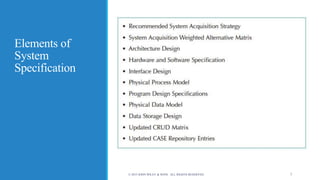
Elements of
System
Specification
© 2015 JOHN WILEY & SONS. ALL RIGHTS RESERVED. 7
System Acquisition
Strategies
WHAT IS THE BEST WAY TO ACQUIRE THIS SYSTEM?
© 2015 JOHN WILEY & SONS. ALL RIGHTS RESERVED. 8
Ways to Acquire a New System
 Custom development (build from scratch) in-house
 Purchase software package (and possibly customize it)
o Install on our own computers, or
o Obtain access from a software provider (host)
 Outsource development to third party, who might
o Build system from scratch for us, or
o Purchase software for us, customize and install it
© 2015 JOHN WILEY & SONS. ALL RIGHTS RESERVED. 9
Custom Development
PROS
 Get exactly what we want
 New system built consistently with
existing technology and standards
 Build and retain technical skills and
function knowledge in-house
 Allows team flexibility and creativity
 Unique solutions created for strategic
advantage
CONS
 Requires significant time and effort
 May add to existing backlogs
 May require skills we do not have
 Often costs more
 Often takes more calendar time
 Risk of project failure
© 2015 JOHN WILEY & SONS. ALL RIGHTS RESERVED. 10
Purchased Software
Packages (purchased or obtained from ASP or SaaS)
PROS
 No need to “reinvent the wheel” for
common business needs
 Tested, proven product
 Cost savings
 Time savings
 Utilize vendors’ expertise
 Some customization may be possible
CONS
 Rarely a perfect fit
 Organizational processes must adapt to
software
 Reliance on vendor for maintenance
and future enhancements
 Won’t develop in-house functional and
technical skills
 Unique needs may go unmet
 May require system integration
© 2015 JOHN WILEY & SONS. ALL RIGHTS RESERVED. 11
Purchased Software
 Application service providers (ASP) supply access to
software on a pay-as-you-go basis
 Many applications today are “in the cloud”…
o ASP – provider hosts someone else’s software
o SaaS – software vendor hosts its own software
o Considerable savings – no hosting infrastructure needed; host provides
everything
 Risks include
o Fear of losing confidential information
o Performance
© 2015 JOHN WILEY & SONS. ALL RIGHTS RESERVED. 12
Purchased Software
 Analyze the vendor as well as the software functionality
 Verify vendor claims with others
 Look carefully at vendor support
 Assess long-term viability of vendor as an on-going business
o A new software company may have a great idea, but can they survive
as a business over the long haul?
o If the vendor is an acquisition target, what will happen to the
product?
© 2015 JOHN WILEY & SONS. ALL RIGHTS RESERVED. 13
Systems Integration
 Building systems by combining packages, existing (legacy)
systems, and custom software written for integration
 Integrating data between various parts of the system is the
key challenge
 Many consultants specialize in systems integration
© 2015 JOHN WILEY & SONS. ALL RIGHTS RESERVED. 14
Outsourced Development
PROS
 Hire expertise we don’t have
 May save time and money
 Lower risk
CONS
 No opportunity to build in-house
expertise
 Reliance on vendor
 Future options limited
 Security – potential loss of confidential
information
 Performance based on contract terms
© 2015 JOHN WILEY & SONS. ALL RIGHTS RESERVED. 15
Outsourcing
 Hiring an external vendor, developer, or service provider to
supply the system
 Can also obtain custom system created by outsourcer
 Can reduce costs and/or add value (resources, experience)
 Risks include
o Losing confidential information
o Losing control over future development
o Losing learning opportunities
© 2015 JOHN WILEY & SONS. ALL RIGHTS RESERVED. 16
Outsourcing Contracts
 Time and arrangements
 Fixed-price
 Value-added
© 2015 JOHN WILEY & SONS. ALL RIGHTS RESERVED.
8 - 17
Outsourcing Guidelines
 Keep lines of communication open
 Define and stabilize requirements before signing the contract
 View the relationship as a partnership
 Select vendor, developer, or provider carefully
 Assign someone to manage the relationship
 Don’t outsource what you don’t understand
 Emphasize flexible requirements, long-term relationships,
and short-term contracts
© 2015 JOHN WILEY & SONS. ALL RIGHTS RESERVED. 18
Influences on the
Acquisition Strategy
WHAT FACTORS DO WE CONSIDER?
© 2015 JOHN WILEY & SONS. ALL RIGHTS RESERVED. 19
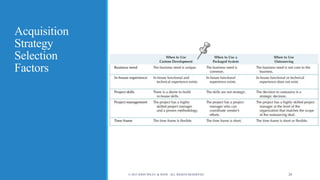
Acquisition
Strategy
Selection
Factors
© 2015 JOHN WILEY & SONS. ALL RIGHTS RESERVED. 20
Selecting an Acquisition
Strategy
HOW DO WE CHOOSE?
© 2015 JOHN WILEY & SONS. ALL RIGHTS RESERVED. 21
Developing Our Options
 Need to collect information
o What tools and technologies are needed for a custom development
project?
o What vendors make products that address the project needs?
o What service providers would be able to build this application if
outsourced?
© 2015 JOHN WILEY & SONS. ALL RIGHTS RESERVED. 22
Request for Proposals (RFP)
 Solicits proposals from vendor, developer, or service provider
 Explains the system to be built and criteria for selecting
among applicants
 Request for Information (RFI) -- a shorter and less detailed
version
 Request for Quote (RFQ) – use when you just need a price
© 2015 JOHN WILEY & SONS. ALL RIGHTS RESERVED. 23
Request for Proposal Contents
 Description of desired system
 Special technical needs or circumstances
 Evaluation criteria
 Instructions on how to respond
 Desired schedule
 Other information that will help the submitter to make a more
complete or accurate proposal
© 2015 JOHN WILEY & SONS. ALL RIGHTS RESERVED. 24
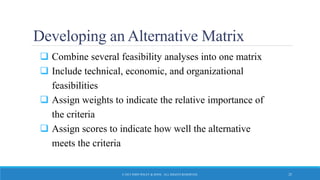
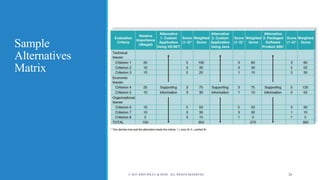
Developing an Alternative Matrix
 Combine several feasibility analyses into one matrix
 Include technical, economic, and organizational
feasibilities
 Assign weights to indicate the relative importance of
the criteria
 Assign scores to indicate how well the alternative
meets the criteria
© 2015 JOHN WILEY & SONS. ALL RIGHTS RESERVED. 25
Sample
Alternatives
Matrix
© 2015 JOHN WILEY & SONS. ALL RIGHTS RESERVED. 26
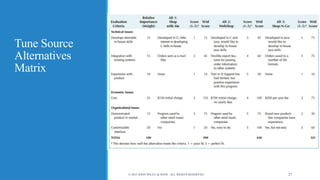
Tune Source
Alternatives
Matrix
© 2015 JOHN WILEY & SONS. ALL RIGHTS RESERVED. 27

Hi600ch07_text_slides

  • 1.
    Moving into Design SYSTEMSANALYSIS AND DESIGN, 6TH EDITION DENNIS, WIXOM, AND ROTH © 2015 JOHN WILEY & SONS. ALL RIGHTS RESERVED. 1Roberta M. Roth
  • 2.
    Learning Objectives  Explainthe initial transition from analysis to design.  Create a system specification.  Describe three ways to acquire a system: custom, packaged, and outsourced alternatives.  Create an alternative matrix. © 2015 JOHN WILEY & SONS. ALL RIGHTS RESERVED. 2
  • 3.
    Transition from Requirements toDesign BRIEF PREVIEW © 2015 JOHN WILEY & SONS. ALL RIGHTS RESERVED. 3
  • 4.
    Key Ideas  InSystems Analysis we figure out… o What the business needs  In System Design we figure out… o How to build the system that fulfills those needs  All of the “logical” work from Systems Analysis is converted to the “physical” © 2015 JOHN WILEY & SONS. ALL RIGHTS RESERVED. 4
  • 5.
    Key Definitions  Designphase o Decide how to build the system o Create system requirements that describe all technical details for building the system  System specification o Final deliverable from design phase o Conveys exactly what system the development team will implement during the implementation phase © 2015 JOHN WILEY & SONS. ALL RIGHTS RESERVED. 5
  • 6.
    Design Phase Steps Determine system acquisition strategy (make, buy, or outsource)  Determine the technical architecture for the system  Address security concerns and globalization issues  Make hardware and software selections  Determine the way that users will interact with the system (interface, inputs, and outputs)  Design the programs for the underlying processes  Design the way data will be stored  Create final deliverable - the system specification © 2015 JOHN WILEY & SONS. ALL RIGHTS RESERVED. 6
  • 7.
    Elements of System Specification © 2015JOHN WILEY & SONS. ALL RIGHTS RESERVED. 7
  • 8.
    System Acquisition Strategies WHAT ISTHE BEST WAY TO ACQUIRE THIS SYSTEM? © 2015 JOHN WILEY & SONS. ALL RIGHTS RESERVED. 8
  • 9.
    Ways to Acquirea New System  Custom development (build from scratch) in-house  Purchase software package (and possibly customize it) o Install on our own computers, or o Obtain access from a software provider (host)  Outsource development to third party, who might o Build system from scratch for us, or o Purchase software for us, customize and install it © 2015 JOHN WILEY & SONS. ALL RIGHTS RESERVED. 9
  • 10.
    Custom Development PROS  Getexactly what we want  New system built consistently with existing technology and standards  Build and retain technical skills and function knowledge in-house  Allows team flexibility and creativity  Unique solutions created for strategic advantage CONS  Requires significant time and effort  May add to existing backlogs  May require skills we do not have  Often costs more  Often takes more calendar time  Risk of project failure © 2015 JOHN WILEY & SONS. ALL RIGHTS RESERVED. 10
  • 11.
    Purchased Software Packages (purchasedor obtained from ASP or SaaS) PROS  No need to “reinvent the wheel” for common business needs  Tested, proven product  Cost savings  Time savings  Utilize vendors’ expertise  Some customization may be possible CONS  Rarely a perfect fit  Organizational processes must adapt to software  Reliance on vendor for maintenance and future enhancements  Won’t develop in-house functional and technical skills  Unique needs may go unmet  May require system integration © 2015 JOHN WILEY & SONS. ALL RIGHTS RESERVED. 11
  • 12.
    Purchased Software  Applicationservice providers (ASP) supply access to software on a pay-as-you-go basis  Many applications today are “in the cloud”… o ASP – provider hosts someone else’s software o SaaS – software vendor hosts its own software o Considerable savings – no hosting infrastructure needed; host provides everything  Risks include o Fear of losing confidential information o Performance © 2015 JOHN WILEY & SONS. ALL RIGHTS RESERVED. 12
  • 13.
    Purchased Software  Analyzethe vendor as well as the software functionality  Verify vendor claims with others  Look carefully at vendor support  Assess long-term viability of vendor as an on-going business o A new software company may have a great idea, but can they survive as a business over the long haul? o If the vendor is an acquisition target, what will happen to the product? © 2015 JOHN WILEY & SONS. ALL RIGHTS RESERVED. 13
  • 14.
    Systems Integration  Buildingsystems by combining packages, existing (legacy) systems, and custom software written for integration  Integrating data between various parts of the system is the key challenge  Many consultants specialize in systems integration © 2015 JOHN WILEY & SONS. ALL RIGHTS RESERVED. 14
  • 15.
    Outsourced Development PROS  Hireexpertise we don’t have  May save time and money  Lower risk CONS  No opportunity to build in-house expertise  Reliance on vendor  Future options limited  Security – potential loss of confidential information  Performance based on contract terms © 2015 JOHN WILEY & SONS. ALL RIGHTS RESERVED. 15
  • 16.
    Outsourcing  Hiring anexternal vendor, developer, or service provider to supply the system  Can also obtain custom system created by outsourcer  Can reduce costs and/or add value (resources, experience)  Risks include o Losing confidential information o Losing control over future development o Losing learning opportunities © 2015 JOHN WILEY & SONS. ALL RIGHTS RESERVED. 16
  • 17.
    Outsourcing Contracts  Timeand arrangements  Fixed-price  Value-added © 2015 JOHN WILEY & SONS. ALL RIGHTS RESERVED. 8 - 17
  • 18.
    Outsourcing Guidelines  Keeplines of communication open  Define and stabilize requirements before signing the contract  View the relationship as a partnership  Select vendor, developer, or provider carefully  Assign someone to manage the relationship  Don’t outsource what you don’t understand  Emphasize flexible requirements, long-term relationships, and short-term contracts © 2015 JOHN WILEY & SONS. ALL RIGHTS RESERVED. 18
  • 19.
    Influences on the AcquisitionStrategy WHAT FACTORS DO WE CONSIDER? © 2015 JOHN WILEY & SONS. ALL RIGHTS RESERVED. 19
  • 20.
    Acquisition Strategy Selection Factors © 2015 JOHNWILEY & SONS. ALL RIGHTS RESERVED. 20
  • 21.
    Selecting an Acquisition Strategy HOWDO WE CHOOSE? © 2015 JOHN WILEY & SONS. ALL RIGHTS RESERVED. 21
  • 22.
    Developing Our Options Need to collect information o What tools and technologies are needed for a custom development project? o What vendors make products that address the project needs? o What service providers would be able to build this application if outsourced? © 2015 JOHN WILEY & SONS. ALL RIGHTS RESERVED. 22
  • 23.
    Request for Proposals(RFP)  Solicits proposals from vendor, developer, or service provider  Explains the system to be built and criteria for selecting among applicants  Request for Information (RFI) -- a shorter and less detailed version  Request for Quote (RFQ) – use when you just need a price © 2015 JOHN WILEY & SONS. ALL RIGHTS RESERVED. 23
  • 24.
    Request for ProposalContents  Description of desired system  Special technical needs or circumstances  Evaluation criteria  Instructions on how to respond  Desired schedule  Other information that will help the submitter to make a more complete or accurate proposal © 2015 JOHN WILEY & SONS. ALL RIGHTS RESERVED. 24
  • 25.
    Developing an AlternativeMatrix  Combine several feasibility analyses into one matrix  Include technical, economic, and organizational feasibilities  Assign weights to indicate the relative importance of the criteria  Assign scores to indicate how well the alternative meets the criteria © 2015 JOHN WILEY & SONS. ALL RIGHTS RESERVED. 25
  • 26.
    Sample Alternatives Matrix © 2015 JOHNWILEY & SONS. ALL RIGHTS RESERVED. 26
  • 27.
    Tune Source Alternatives Matrix © 2015JOHN WILEY & SONS. ALL RIGHTS RESERVED. 27