HI-600: Analysis and Design of Health Information Systems
Design: Part II
Architecture Design
Architectural Components
• Software Components
• Data Storage
• Data Access Logic
• Application Logic
• Presentation Logic
• Hardware Components
• Client Computers
• Servers
• The network
Client-Server Architectures
Balances processing between clients and server(s)
• Client: Presentation logic
• Server(s): Data storage and data access logic
• Thick (fat) / thin clients
• Thick/fat client: All or most application logic
• Thin client: Small part of the application logic
Client-Server Architectures (con’t)
• Scalable
• Can support different types of clients and
servers through middleware
• The logical software components can be
independent
• Server failure only affects dependent
applications
• Software development is more complex.
Client-Server Tiers
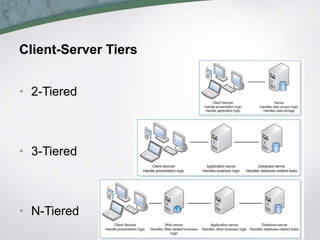
• 2-Tiered
• 3-Tiered
• N-Tiered
Less Common Architectures
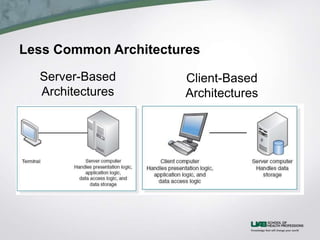
Server-Based
Architectures
Client-Based
Architectures
Advances in Architecture Configurations
• Virtualization refers to a creation of a virtual device or
resource, such as a server or storage device
• Cloud computing – everything from computing power to
computing infrastructure, to applications can be
delivered as a service wherever and whenever needed
Comparing architecture options: Often the current
infrastructure restricts the choice of architecture; client-
server architectures are more cost- effective
CREATING AN ARCHITECTURE DESIGN
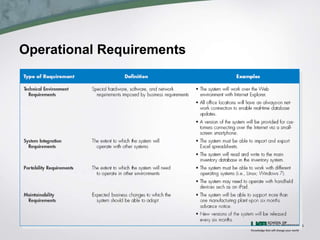
• Operational Requirements
• Technical Environment, System Integration, Portability,
Maintainability
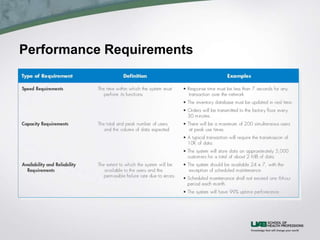
• Performance Requirements
• Speed, Capacity, Availability and Reliability
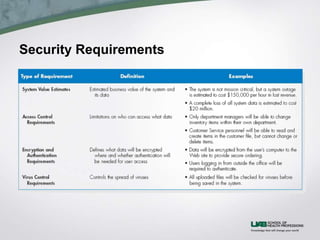
• Security Requirements
• System Value, Access Control, Encryption and Authentication,
Virus Control
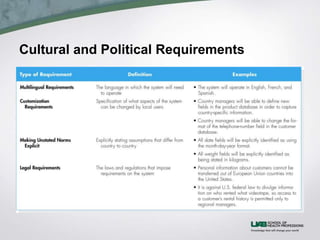
• Cultural and Political Requirements
• Multilingual, Customization, Unstated Norms, Legal
Operational Requirements
Performance Requirements
Security Requirements
Cultural and Political Requirements
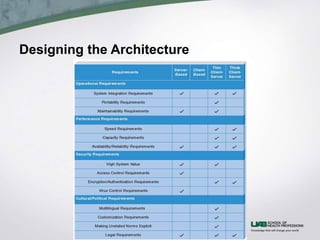
Designing the Architecture
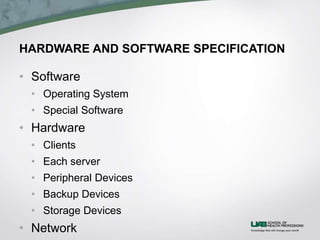
HARDWARE AND SOFTWARE SPECIFICATION
• Software
• Operating System
• Special Software
• Hardware
• Clients
• Each server
• Peripheral Devices
• Backup Devices
• Storage Devices
• Network
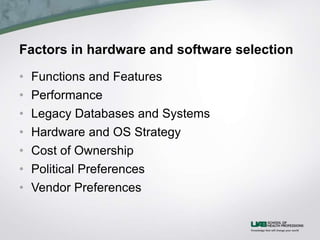
Factors in hardware and software selection
• Functions and Features
• Performance
• Legacy Databases and Systems
• Hardware and OS Strategy
• Cost of Ownership
• Political Preferences
• Vendor Preferences
SUMMARY
• Application architecture
• Client-server architecture
• Advances in architecture configurations: virtualization
and cloud computing
• Architecture Design
• Nonfunctional requirements
• Hardware and software specification
• A document that describes what hardware and
software are needed to support the application

Hi600 u08_inst_slides

  • 1.
    HI-600: Analysis andDesign of Health Information Systems Design: Part II Architecture Design
  • 2.
    Architectural Components • SoftwareComponents • Data Storage • Data Access Logic • Application Logic • Presentation Logic • Hardware Components • Client Computers • Servers • The network
  • 3.
    Client-Server Architectures Balances processingbetween clients and server(s) • Client: Presentation logic • Server(s): Data storage and data access logic • Thick (fat) / thin clients • Thick/fat client: All or most application logic • Thin client: Small part of the application logic
  • 4.
    Client-Server Architectures (con’t) •Scalable • Can support different types of clients and servers through middleware • The logical software components can be independent • Server failure only affects dependent applications • Software development is more complex.
  • 5.
  • 6.
  • 7.
    Advances in ArchitectureConfigurations • Virtualization refers to a creation of a virtual device or resource, such as a server or storage device • Cloud computing – everything from computing power to computing infrastructure, to applications can be delivered as a service wherever and whenever needed Comparing architecture options: Often the current infrastructure restricts the choice of architecture; client- server architectures are more cost- effective
  • 8.
    CREATING AN ARCHITECTUREDESIGN • Operational Requirements • Technical Environment, System Integration, Portability, Maintainability • Performance Requirements • Speed, Capacity, Availability and Reliability • Security Requirements • System Value, Access Control, Encryption and Authentication, Virus Control • Cultural and Political Requirements • Multilingual, Customization, Unstated Norms, Legal
  • 9.
  • 10.
  • 11.
  • 12.
  • 13.
  • 14.
    HARDWARE AND SOFTWARESPECIFICATION • Software • Operating System • Special Software • Hardware • Clients • Each server • Peripheral Devices • Backup Devices • Storage Devices • Network
  • 15.
    Factors in hardwareand software selection • Functions and Features • Performance • Legacy Databases and Systems • Hardware and OS Strategy • Cost of Ownership • Political Preferences • Vendor Preferences
  • 16.
    SUMMARY • Application architecture •Client-server architecture • Advances in architecture configurations: virtualization and cloud computing • Architecture Design • Nonfunctional requirements • Hardware and software specification • A document that describes what hardware and software are needed to support the application

Editor's Notes

  • #2 Last week, we talked about the design phase in general, what activities it includes and we learned about the first decision we make as we start the design phase, that is the decision of selecting of a strategy to acquire a system from the list of strategies of custom development, purchasing a packaged software, and outsourcing. This week, we are at the second step of the design phase. Now that we know what strategy we will use to acquire the system, we will discuss the concepts about software and hardware for the system by learning about the two deliverables: the “architecture design” and the “hardware and software specification”. The objective of architecture design is to determine how the software components of the information system will be assigned to the hardware devices of the system. We will first talk about elements of architecture design, then how to create it for the system at hand. During the architecture design, we plan for how the system will be distributed across multiple computers and what hardware, operating system software, and application software will be used for each computer. The key factors in architecture design are the nonfunctional requirements that are developed earlier in the analysis phase. Then, we will talk about the hardware and software specification document that describes what specific hardware and software are needed to support the application.
  • #3 In order to assign software tasks to hardware computers as it is the goal of the architecture design, we first look at the major components of software and hardware for any system. All software systems can be divided into four basic functions: - First of which is the Data storage. Whether in a simple single file or an enterprise level database, all systems need a place to store information for the system that are documented in ERDs as the data entities. - Another software component called Data access logic is needed that encompasses the processing required to access stored data. This component is usually composed of the database queries that read, create, update, or delete data in the data storage. - The Application logic includes the logic documented in the DFDs, use cases, and functional requirements. - And finally the Presentation logic is used to interact with the user through the display of information to the user and the acceptance of the user’s commands. The three primary hardware components include: - Client computers: Input-output devices employed by users (e.g., PCs, laptops, handheld devices, smart phones) - Servers: Larger multi-user computers used to store software and data. - The network: Connects the computers. Many variations of networks are possible in terms of size, security, speed, and bandwidth, but the network types is outside of the scope of our course, so we will not get into too much details.
  • #4 The software components can be placed on the hardware components in many different combinations, however, following the textbook, we will only cover the most commonly used client-server architecture and a couple of less common client-based and server-based architectures. We will also mention a couple of advances in architecture configuration: virtualization and cloud computing. Client-server architectures balance the processing between client devices and one or more server devices. The client is responsible for the presentation logic, whereas the server is responsible for the data access logic and data storage. The application logic can be allocated in couple of different ways: when most of the application logic is assigned to the clients, then the clients require more processing power and are referred as thick or fat clients and when the clients only handle only a small portion of application logic; they require less resources and they are referred as thin clients. As web browsers are becoming more and more capable, more systems are built to be web-based systems, which are an example of thin client client-server architecture, because the web browser (thin client) handles only a small part of the presentation logic using scripting and markup languages, whereas majority of the presentation logic and all of the data storage and data access logic is handled by the server(s).
  • #5 The most important benefit of the client-server architectures is that they are very scalable, meaning that it is relatively easy to increase or decrease the storage and processing capabilities. This way, your initial cost could be less and you still have the option to gradually upgrade your servers in small increments as your number of clients increase. This architecture also allows clients with different operating systems through the use of additional software called middleware. Middleware is a type of system software installed on both client and server sides to translate between different vendor’s software (ex: server side Microsoft and Client side Apple). Middleware is needed less and less as number standard protocols increase, but still very necessary (ex: ODBC: Open Database Connectivity). Another benefit of client-server architecture is that not only the data storage software component, but also the presentation logic, the application logic, and the data processing logic can be independent. So, each of the software components can be updated without affecting the other software components. Also, this architecture allows a server failure, which only effects the applications requiring that sever and let the other applications keep running while that server is being replaced. However a major limitation of client-server architectures is their complexity. Software needs to be developed for server-side and client-side versus in server-based architectures, whole software is designed for the server-side. This makes updates more complicated as well, since you have to update both client and server sides simultaneously and ensure that you are running compatible versions.
  • #6 There are many ways in which the application logic can be partitioned between the client and the server. The arrangement in the top figure is a common configuration, called two-tiered architecture, since there are only two sets of computers involved. In two-tiered architecture, servers are responsible for data storage and data access logic, whereas the clients handle both presentation logic and application logic. In three-tiered architecture there are two sets of servers and a set of clients. It is similar to the two-tiered architecture, except that the application logic is now running on application server(s), whereas the clients are only responsible for the presentation logic. The middle tier of the three-tiered architecture can be divided into tiers, assigning different types of the application logic to different application servers, such as web servers or directory servers. This type of architecture is called n-tiered architecture, where business logic is handled by separate server(s) than web server or mail server. Three or n-tiered architectures allow balancing the load on different servers, therefore they are more scalable than the two-tiered servers. On the other hand, there is a greater load on the network, because of the busy server-to-server traffic and it is harder to program for an n-tiered architecture, because server-to-server communication should also be properly programmed.
  • #7 A couple of the less common architecture puts almost all of the software on the server side or on the client side. The server-based architectures let everything handled by the server and the client is merely an input/output device where user keystrokes are transferred to the server and server instructions are displayed on the client-side. This most primitive architecture is easier to develop and manage software for and is still in use. As demand from systems grew in terms of their processing requirements and the number of clients they need to handle, it became harder to handle all that demand on the server side, using expensive mainframes. However, server-based architecture is still viable today in a slightly different way in the form of virtual desktop infrastructure, where you have zero (or ultrathin) clients that have their operating systems running on the server (ex: Citrix). The benefits of zero-client computing include - having significantly less power consumption, - significant cost savings compared to fat-clients, where large number of clients are needed, - less vulnerability to malware and less cost of maintenance, - and inherent reduction of non-business use The client-based architectures, on the other hand, let all logical computing be handled by the client and use the server only for data storage. It works well for the systems with less number of users or limited data access requirements. Because data access logic is not where data is stored, every time data is needed by a client entire database needs to travel over the network to the client where data access logic can be executed.
  • #8 Advances in hardware, software, and networking have given rise to a number of new architecture options and a couple that get more attention are Virtualization and Cloud computing. Virtualization refers to a creation of a virtual device or resource, such as a server or storage device. We have already talked about desktop virtualization infrastructure in server-based architectures. Here we are talking about server, storage or network virtualization. Server virtualization involves partitioning a physical server hardware into smaller virtual servers using software. As hardware technology has improved, it became wasteful to spend all of the resources a physical server provides to a single server. So, thanks to virtualization, many servers can run on a single physical server hardware independently, which optimizes the operational costs. Storage virtualization involves combining multiple network storage devices into what appears to be a single storage unit. A high-speed sub-network, called storage area network (SAN), is established among smaller shared storage devices to enable the storage virtualization. So in general, virtualization adds a level of abstraction between actual physical servers and what systems perceive as their servers. Although there are many storage devices with smaller capacity, the system sees it as a single large storage device; OR Although there are only a few physical servers, the system sees many server resources that it can utilize. As we see with the virtualization, there are systems between the system we want to run and the hardware resources And these systems make it unnecessary for our system to know about the actual physical hardware it runs on. So, thinking a step further, all our system needs actually is a bunch of resources and it can be blind to where those resources are. That brings us to Cloud computing. Cloud computing refers to everything from computing power to computing infrastructure, applications, business processes to personal collaboration can be delivered as a service wherever and whenever needed. The “cloud” in cloud computing can be defined as the set of hardware, networks, storages, devices, and interfaces that combine to deliver aspects of computing as a service. Cloud computing can be implemented in three ways: - private cloud, where everything is provided “as a service” over the internet without much control over the underlying technology infrastructure - public cloud, where the services are provided over a company intranet or a hosted data center and - hybrid cloud, where based on requirements private and public cloud options are combined. Advantages of cloud computing include 1. Scaling resource allocation based on demand. 2. Cloud customers can obtain cloud resources in a straightforward fashion. 3. Cloud services typically have standardized APIs (application program interfaces). 4. The cloud computing model enables customers to be billed for resources based on usage, which makes it very attractive as it does not require as large of an initial investment. Although it is very promising, at this time, cloud computing is in its early stage of development. You are probably aware of the multiple breaches recently. It is still very risky for healthcare organizations to move their systems to any type of public or even hybrid cloud solution. Before, we move into how we create architecture design, let us note that we are not completely free to choose an architecture for our system among the options: Most systems are built to use the existing infrastructure in the organization, so often the current infrastructure restricts the choice of architecture. Each of the architectures we discussed has its strengths and weaknesses, but Client-server architectures are usually favored on the basis of the cost of infrastructure.
  • #9 Architecture design creation is a complex process and often requires help from experts. Creating an architecture design begins with the nonfunctional requirements that were created in the analysis phase. Then, the nonfunctional requirements are refined into more detailed requirements and the architecture is selected based on refined non-functional requirements. An finally the refined nonfunctional requirements and the architecture design are used to develop the hardware and software specification. Like we saw in the analysis phase, the nonfunctional requirements can be categorized into four primary groups: operational, performance, security, and cultural and political requirements. Let us examine them in more detail and then we will talk about how they may affect the architecture design.
  • #10 The textbook covers each type of the nonfunctional requirements in great detail. So, I will leave the textbook definitions to the textbook and just talk about examples of nonfunctional requirements in health information systems: The system should have its dashboard measures and reports interface to be optimized both for mobile devices and desktop browsers. The nurse documentation system should be able to work with the different ADT system that is used by the new hospital that will be acquiring next year. As our infrastructure will be upgraded in 4 to 6 months, the system must be compatible with the new operating system version. The system must interface with specific medical equipment to record data. Operational Requirements Technical Environment Requirements, System Integration Requirements, Portability Requirements, Maintainability Requirements
  • #11 The intraoperative record must be available to the PACU providers in real-time. The system must be able to handle 250 concurrent documentations. The intra-op module must be available 24x7. In case of a disaster at the data center, the system must be able to be turned back online within a day with only at most 6 hours of data loss Performance Requirements Speed Requirements, Capacity Requirements, Availability and Reliability Requirements
  • #12 Pharmacy inventory updates can be only done by pharmacy staff All users of the system must have an Active Directory account All data that transmits between computers must be encrypted Security Requirements System Value Estimates, Access Control Requirements, Encryption and Authentication Requirements, Virus Control Requirements
  • #13 All patient interfaces must have both English and Spanish versions Medication formulary has to be completely configurable The system must allow nurse managers to set hypotension alarm threshold for their units All weight fields should allow data entry as lb or as kg The system must allow both ICD-9 and ICD-10 coding Cultural and Political Requirements Multilingual Requirements, Customization Requirements, Making Unstated Norms Explicit, Legal Requirements
  • #14 As I said before usually, the technical environment requirements as driven by the business requirements define the application architecture. We will not spend too much time on this, but if the technical environment requirements do not require the choice of a specific architecture, then other nonfunctional requirements become important for designing the architecture and the textbook gives a good summary of Implications of nonfunctional requirements on architecture design in Figure 8-10. For example for the systems where performance requirements are more important client-server architecture is a much better option over server based architecture.
  • #15 Once we have the architecture design determined, we also need to select the hardware and software that will be needed for the system. The hardware and software specification is a document that describes what hardware and software are needed to support the application. In creating the hardware and software specification, we first define software by Defining the operating system and any special purpose software we also consider additional costs such as training, warranty, maintenance, licensing agreements. Next, we create a list of the hardware needed Database servers, network servers, peripheral devices, clients, backup devices, storage components, and others. Finally, we describe the minimum requirements for each piece of hardware. Depending on the existing infrastructure, sometimes, we also determine the network needs for the system.
  • #16 Some of the factors that influence hardware and software selection includes searching nonfunctional requirements for Compatibility concerns regarding the legacy systems, cost concerns, and limitations such as vendors that have existing contracts with the organization. Once the hardware and software specification is ready, then the project team works with the purchasing department to prepare a Request for Proposal (RFP). Then the proposals received from vendors are evaluated with the help of the purchasing department.
  • #17 So, this week, we have learned about architecture design elements and advanced architecture options virtualization and cloud computing. Then we re-iterated that the architecture design and hardware and software design are almost entirely based on nonfunctional requirements.