CHAPTER 3
Data Modeling Using the
Entity-Relationship (ER) Model
Slide 1- 1
Slide 3- 2
Chapter Outline
 Overview of Database Design Process
 Example Database Application (COMPANY)
 ER Model Concepts
 Entities and Attributes
 Entity Types, Value Sets, and Key Attributes
 Relationships and Relationship Types
 Weak Entity Types
 Roles and Attributes in Relationship Types
 ER Diagrams - Notation
 ER Diagram for COMPANY Schema
 Alternative Notations – UML class diagrams, others
 Relationships of Higher Degree
Slide 3- 3
Overview of Database Design Process
 Two main activities:
 Database design
 Applications design
 Focus in this chapter on conceptual database
design
 To design the conceptual schema for a database
application
 Applications design focuses on the programs and
interfaces that access the database
 Generally considered part of software engineering
Slide 3- 4
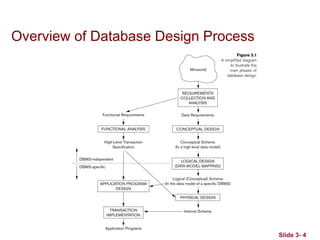
Overview of Database Design Process
Methodologies for Conceptual
Design
 Entity Relationship (ER) Diagrams (This Chapter)
 Enhanced Entity Relationship (EER) Diagrams
(Chapter 4)
 Use of Design Tools in industry for designing and
documenting large scale designs
 The UML (Unified Modeling Language) Class
Diagrams are popular in industry to document
conceptual database designs
Slide 3- 5
Slide 3- 6
Example COMPANY Database
 We need to create a database schema design
based on the following (simplified) requirements
of the COMPANY Database:
 The company is organized into DEPARTMENTs.
Each department has a name, number and an
employee who manages the department. We keep
track of the start date of the department manager.
A department may have several locations.
 Each department controls a number of
PROJECTs. Each project has a unique name,
unique number and is located at a single location.
Slide 3- 7
Example COMPANY Database
(Continued)
 The database will store each EMPLOYEE’s social
security number, address, salary, sex, and birthdate.

Each employee works for one department but may work
on several projects.

The DB will keep track of the number of hours per week
that an employee currently works on each project.

It is required to keep track of the direct supervisor of
each employee.
 Each employee may have a number of
DEPENDENTs.

For each dependent, the DB keeps a record of name,
sex, birthdate, and relationship to the employee.
Slide 3- 8
ER Model Concepts
 Entities and Attributes

Entity is a basic concept for the ER model. Entities are
specific things or objects in the mini-world that are
represented in the database.

For example the EMPLOYEE John Smith, the Research
DEPARTMENT, the ProductX PROJECT

Attributes are properties used to describe an entity.

For example an EMPLOYEE entity may have the attributes
Name, SSN, Address, Sex, BirthDate

A specific entity will have a value for each of its attributes.

For example a specific employee entity may have
Name='John Smith', SSN='123456789', Address ='731,
Fondren, Houston, TX', Sex='M', BirthDate='09-JAN-55‘
 Each attribute has a value set (or data type) associated with
it – e.g. integer, string, date, enumerated type, …
Slide 3- 9
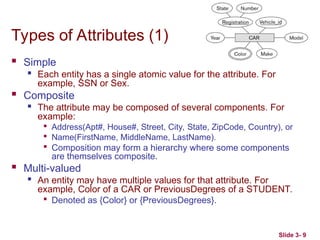
Types of Attributes (1)
 Simple

Each entity has a single atomic value for the attribute. For
example, SSN or Sex.
 Composite
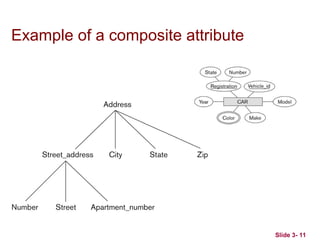
 The attribute may be composed of several components. For
example:

Address(Apt#, House#, Street, City, State, ZipCode, Country), or

Name(FirstName, MiddleName, LastName).

Composition may form a hierarchy where some components
are themselves composite.
 Multi-valued

An entity may have multiple values for that attribute. For
example, Color of a CAR or PreviousDegrees of a STUDENT.

Denoted as {Color} or {PreviousDegrees}.
Slide 3- 10
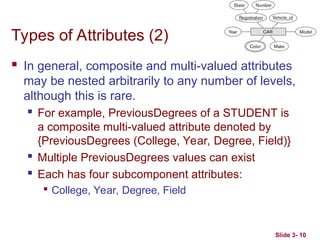
Types of Attributes (2)
 In general, composite and multi-valued attributes
may be nested arbitrarily to any number of levels,
although this is rare.
 For example, PreviousDegrees of a STUDENT is
a composite multi-valued attribute denoted by
{PreviousDegrees (College, Year, Degree, Field)}
 Multiple PreviousDegrees values can exist
 Each has four subcomponent attributes:

College, Year, Degree, Field
Slide 3- 11
Example of a composite attribute
Slide 3- 12
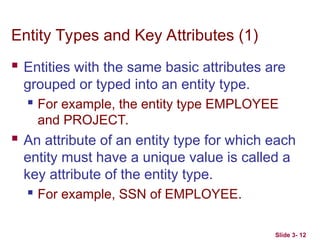
Entity Types and Key Attributes (1)
 Entities with the same basic attributes are
grouped or typed into an entity type.
 For example, the entity type EMPLOYEE
and PROJECT.
 An attribute of an entity type for which each
entity must have a unique value is called a
key attribute of the entity type.
 For example, SSN of EMPLOYEE.
Slide 3- 13
Entity Types and Key Attributes (2)
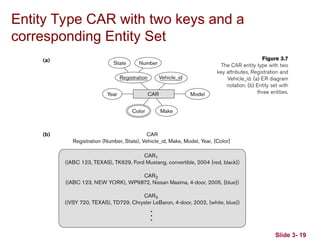
 A key attribute may be composite.

VehicleTagNumber is a key of the CAR entity type
with components (Number, State).
 An entity type may have more than one key.

The CAR entity type may have two keys:

VehicleIdentificationNumber (popularly called VIN)

VehicleTagNumber (Number, State), aka license plate
number.
 Each key is underlined (Note: this is different from the
relational schema where only one “primary key is
underlined).
Slide 3- 14
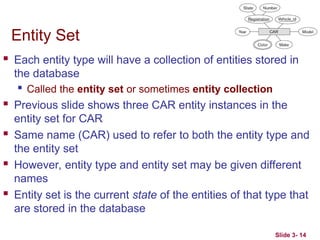
Entity Set
 Each entity type will have a collection of entities stored in
the database
 Called the entity set or sometimes entity collection
 Previous slide shows three CAR entity instances in the
entity set for CAR
 Same name (CAR) used to refer to both the entity type and
the entity set
 However, entity type and entity set may be given different
names
 Entity set is the current state of the entities of that type that
are stored in the database
Value Sets (Domains) of Attributes
 Each simple attribute is associated with a value
set
 E.g., Lastname has a value which is a character
string of upto 15 characters, say
 Date has a value consisting of MM-DD-YYYY
where each letter is an integer
 A value set specifies the set of values associated
with an attribute
Slide 3- 15
Slide 3- 17
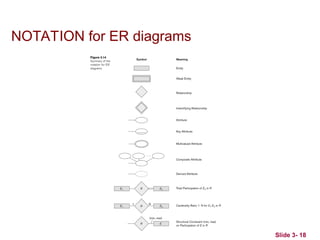
Displaying an Entity type
 In ER diagrams, an entity type is displayed in a
rectangular box
 Attributes are displayed in ovals
 Each attribute is connected to its entity type
 Components of a composite attribute are connected
to the oval representing the composite attribute
 Each key attribute is underlined
 Multivalued attributes displayed in double ovals
 See the full ER notation in advance on the next
slide
Slide 3- 18
NOTATION for ER diagrams
Slide 3- 19
Entity Type CAR with two keys and a
corresponding Entity Set
Slide 3- 20
Initial Conceptual Design of Entity Types
for the COMPANY Database Schema
 Based on the requirements, we can identify four
initial entity types in the COMPANY database:

DEPARTMENT

PROJECT

EMPLOYEE

DEPENDENT
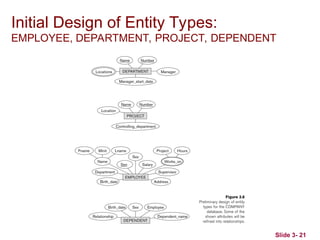
 Their initial conceptual design is shown on the
following slide
 The initial attributes shown are derived from the
requirements description
Slide 3- 21
Initial Design of Entity Types:
EMPLOYEE, DEPARTMENT, PROJECT, DEPENDENT
Slide 3- 22
Refining the initial design by introducing
relationships
 The initial design is typically not complete
 Some aspects in the requirements will be
represented as relationships
 ER model has three main concepts:
 Entities (and their entity types and entity sets)
 Attributes (simple, composite, multivalued)
 Relationships (and their relationship types and
relationship sets)
 We introduce relationship concepts next
Slide 3- 23
Relationships and Relationship Types (1)
 A relationship relates two or more distinct entities with a
specific meaning.

For example, EMPLOYEE John Smith works on the ProductX
PROJECT, or EMPLOYEE Franklin Wong manages the
Research DEPARTMENT.
 Relationships of the same type are grouped or typed into
a relationship type.

For example, the WORKS_ON relationship type in which
EMPLOYEEs and PROJECTs participate, or the MANAGES
relationship type in which EMPLOYEEs and DEPARTMENTs
participate.
 The degree of a relationship type is the number of
participating entity types.
 Both MANAGES and WORKS_ON are binary relationships.
Slide 3- 24
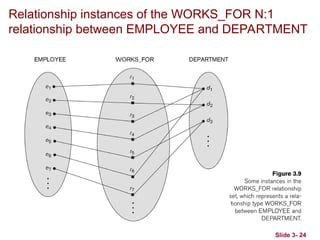
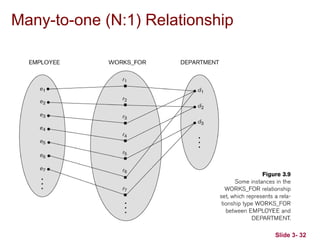
Relationship instances of the WORKS_FOR N:1
relationship between EMPLOYEE and DEPARTMENT
Slide 3- 25
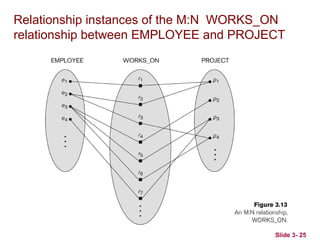
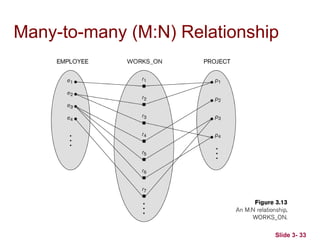
Relationship instances of the M:N WORKS_ON
relationship between EMPLOYEE and PROJECT
Slide 3- 26
Relationship type vs. relationship set (1)
 Relationship Type:
 Is the schema description of a relationship
 Identifies the relationship name and the
participating entity types
 Also identifies certain relationship constraints
 Relationship Set:
 The current set of relationship instances
represented in the database
 The current state of a relationship type
Slide 3- 27
Relationship type vs. relationship set (2)
 Previous figures displayed the relationship sets
 Each instance in the set relates individual participating
entities – one from each participating entity type
 In ER diagrams, we represent the relationship type as follows:

Diamond-shaped box is used to display a relationship type

Connected to the participating entity types via straight lines

Note that the relationship type is not shown with an arrow.
The name should be typically be readable from left to right
and top to bottom.
Slide 3- 28
Refining the COMPANY database
schema by introducing relationships
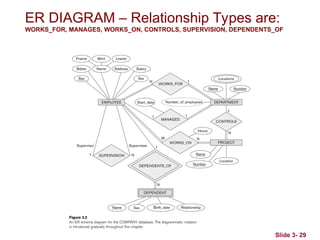
 By examining the requirements, six relationship types are
identified
 All are binary relationships( degree 2)
 Listed below with their participating entity types:
 WORKS_FOR (between EMPLOYEE, DEPARTMENT)
 MANAGES (also between EMPLOYEE, DEPARTMENT)
 CONTROLS (between DEPARTMENT, PROJECT)
 WORKS_ON (between EMPLOYEE, PROJECT)
 SUPERVISION (between EMPLOYEE (as subordinate),
EMPLOYEE (as supervisor))
 DEPENDENTS_OF (between EMPLOYEE, DEPENDENT)
Slide 3- 29
ER DIAGRAM – Relationship Types are:
WORKS_FOR, MANAGES, WORKS_ON, CONTROLS, SUPERVISION, DEPENDENTS_OF
Slide 3- 30
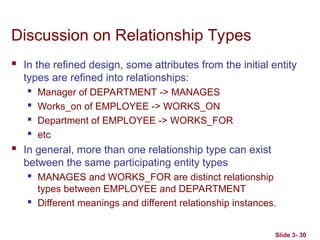
Discussion on Relationship Types
 In the refined design, some attributes from the initial entity
types are refined into relationships:
 Manager of DEPARTMENT -> MANAGES
 Works_on of EMPLOYEE -> WORKS_ON
 Department of EMPLOYEE -> WORKS_FOR
 etc
 In general, more than one relationship type can exist
between the same participating entity types
 MANAGES and WORKS_FOR are distinct relationship
types between EMPLOYEE and DEPARTMENT
 Different meanings and different relationship instances.
Slide 3- 31
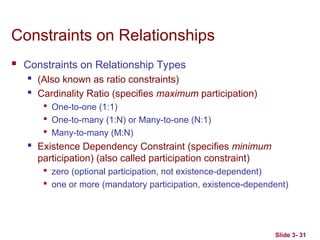
Constraints on Relationships
 Constraints on Relationship Types
 (Also known as ratio constraints)
 Cardinality Ratio (specifies maximum participation)

One-to-one (1:1)

One-to-many (1:N) or Many-to-one (N:1)

Many-to-many (M:N)
 Existence Dependency Constraint (specifies minimum
participation) (also called participation constraint)

zero (optional participation, not existence-dependent)

one or more (mandatory participation, existence-dependent)
Slide 3- 32
Many-to-one (N:1) Relationship
Slide 3- 33
Many-to-many (M:N) Relationship
Slide 3- 34
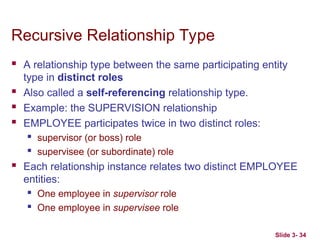
Recursive Relationship Type
 A relationship type between the same participating entity
type in distinct roles
 Also called a self-referencing relationship type.
 Example: the SUPERVISION relationship
 EMPLOYEE participates twice in two distinct roles:
 supervisor (or boss) role
 supervisee (or subordinate) role
 Each relationship instance relates two distinct EMPLOYEE
entities:
 One employee in supervisor role
 One employee in supervisee role
Slide 3- 35
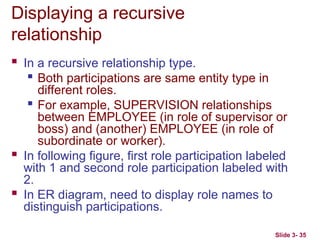
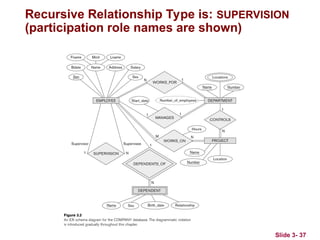
Displaying a recursive
relationship
 In a recursive relationship type.
 Both participations are same entity type in
different roles.

For example, SUPERVISION relationships
between EMPLOYEE (in role of supervisor or
boss) and (another) EMPLOYEE (in role of
subordinate or worker).
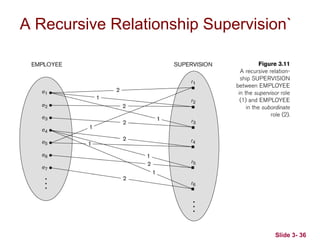
 In following figure, first role participation labeled
with 1 and second role participation labeled with
2.
 In ER diagram, need to display role names to
distinguish participations.
Slide 3- 36
A Recursive Relationship Supervision`
Slide 3- 37
Recursive Relationship Type is: SUPERVISION
(participation role names are shown)
Slide 3- 38
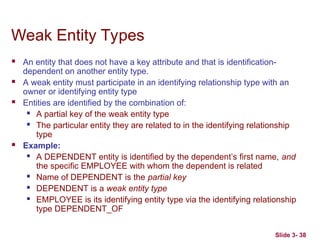
Weak Entity Types
 An entity that does not have a key attribute and that is identification-
dependent on another entity type.
 A weak entity must participate in an identifying relationship type with an
owner or identifying entity type
 Entities are identified by the combination of:
 A partial key of the weak entity type
 The particular entity they are related to in the identifying relationship
type
 Example:
 A DEPENDENT entity is identified by the dependent’s first name, and
the specific EMPLOYEE with whom the dependent is related
 Name of DEPENDENT is the partial key
 DEPENDENT is a weak entity type
 EMPLOYEE is its identifying entity type via the identifying relationship
type DEPENDENT_OF
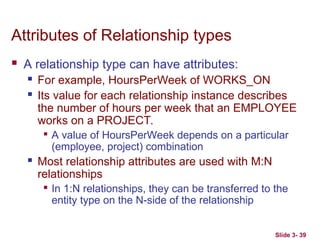
Slide 3- 39
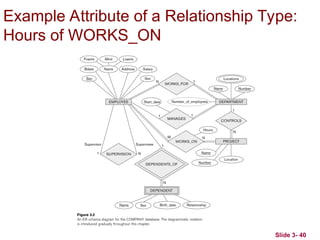
Attributes of Relationship types
 A relationship type can have attributes:
 For example, HoursPerWeek of WORKS_ON
 Its value for each relationship instance describes
the number of hours per week that an EMPLOYEE
works on a PROJECT.

A value of HoursPerWeek depends on a particular
(employee, project) combination
 Most relationship attributes are used with M:N
relationships

In 1:N relationships, they can be transferred to the
entity type on the N-side of the relationship
Slide 3- 40
Example Attribute of a Relationship Type:
Hours of WORKS_ON
Slide 3- 41
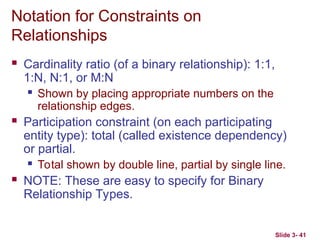
Notation for Constraints on
Relationships
 Cardinality ratio (of a binary relationship): 1:1,
1:N, N:1, or M:N
 Shown by placing appropriate numbers on the
relationship edges.
 Participation constraint (on each participating
entity type): total (called existence dependency)
or partial.
 Total shown by double line, partial by single line.
 NOTE: These are easy to specify for Binary
Relationship Types.
Slide 3- 42
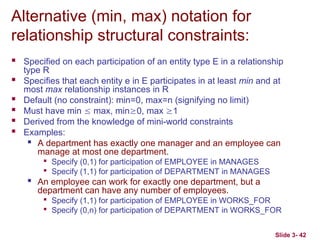
Alternative (min, max) notation for
relationship structural constraints:
 Specified on each participation of an entity type E in a relationship
type R
 Specifies that each entity e in E participates in at least min and at
most max relationship instances in R
 Default (no constraint): min=0, max=n (signifying no limit)
 Must have min  max, min0, max 1
 Derived from the knowledge of mini-world constraints
 Examples:

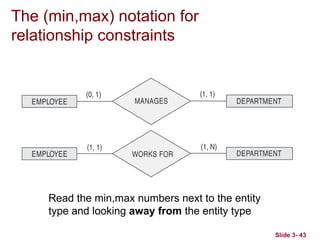
A department has exactly one manager and an employee can
manage at most one department.

Specify (0,1) for participation of EMPLOYEE in MANAGES

Specify (1,1) for participation of DEPARTMENT in MANAGES

An employee can work for exactly one department, but a
department can have any number of employees.

Specify (1,1) for participation of EMPLOYEE in WORKS_FOR

Specify (0,n) for participation of DEPARTMENT in WORKS_FOR
Slide 3- 43
The (min,max) notation for
relationship constraints
Read the min,max numbers next to the entity
type and looking away from the entity type
Slide 3- 44
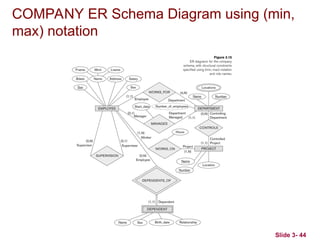
COMPANY ER Schema Diagram using (min,
max) notation
Slide 3- 45
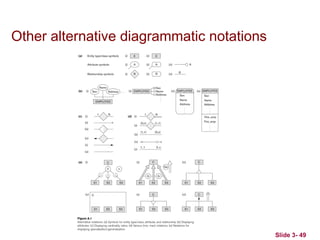
Alternative diagrammatic notation
 ER diagrams is one popular example for
displaying database schemas
 Many other notations exist in the literature and in
various database design and modeling tools
 Appendix A illustrates some of the alternative
notations that have been used
 UML class diagrams is representative of another
way of displaying ER concepts that is used in
several commercial design tools
Slide 3- 46
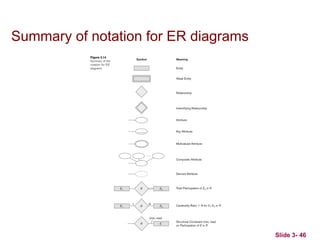
Summary of notation for ER diagrams
Slide 3- 47
UML class diagrams
 Represent classes (similar to entity types) as large
rounded boxes with three sections:

Top section includes entity type (class) name

Second section includes attributes

Third section includes class operations (operations are not
in basic ER model)
 Relationships (called associations) represented as lines
connecting the classes

Other UML terminology also differs from ER terminology
 Used in database design and object-oriented software
design
 UML has many other types of diagrams for software
design
Slide 3- 48
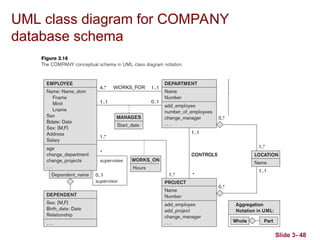
UML class diagram for COMPANY
database schema
Slide 3- 49
Other alternative diagrammatic notations
Slide 3- 50
Relationships of Higher Degree
 Relationship types of degree 2 are called binary
 Relationship types of degree 3 are called ternary
and of degree n are called n-ary
 In general, an n-ary relationship is not equivalent
to n binary relationships
 Constraints are harder to specify for higher-
degree relationships (n > 2) than for binary
relationships
Slide 3- 51
Discussion of n-ary relationships (n > 2)
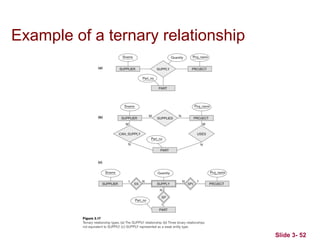
 In general, 3 binary relationships can represent different
information than a single ternary relationship (see Figure
3.17a and b on next slide)
 If needed, the binary and n-ary relationships can all be
included in the schema design (see Figure 3.17a and b,
where all relationships convey different meanings)
 In some cases, a ternary relationship can be represented
as a weak entity if the data model allows a weak entity
type to have multiple identifying relationships (and hence
multiple owner entity types) (see Figure 3.17c)
Slide 3- 52
Example of a ternary relationship
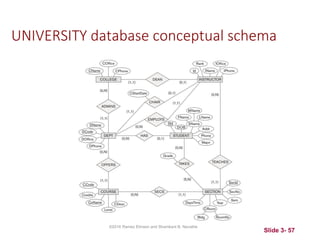
Another Example: A UNIVERSITY
Database
 To keep track of the enrollments in classes and
student grades, another database is to be designed.
 It keeps track of the COLLEGEs, DEPARTMENTs
within each college, the COURSEs offered by
departments, and SECTIONs of courses,
INSTRUCTORs who teach the sections etc.
 These entity types and the relationships among
these entity types are shown on the next slide in
Figure 3.20.
Slide 3- 56
UNIVERSITY database conceptual schema
Slide 3- 57
©2016 Ramez Elmasri and Shamkant B. Navathe
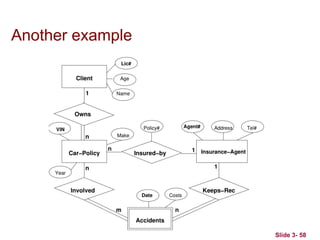
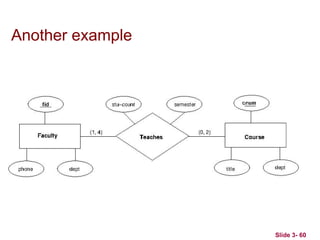
Another example
Slide 3- 58
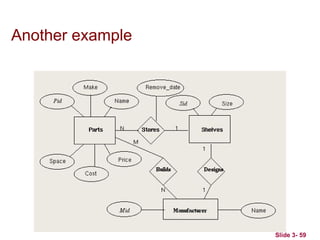
Another example
Slide 3- 59
Another example
Slide 3- 60
Slide 3- 61
Chapter Summary
 ER Model Concepts: Entities, attributes,
relationships
 Constraints in the ER model
 Using ER in step-by-step mode conceptual schema
design for the COMPANY database
 ER Diagrams - Notation
 Alternative Notations – UML class diagrams, others
 Binary Relationship types and those of higher
degree.

Chapter03.ppt,tables,rows,data,powerbidd

  • 1.
    CHAPTER 3 Data ModelingUsing the Entity-Relationship (ER) Model Slide 1- 1
  • 2.
    Slide 3- 2 ChapterOutline  Overview of Database Design Process  Example Database Application (COMPANY)  ER Model Concepts  Entities and Attributes  Entity Types, Value Sets, and Key Attributes  Relationships and Relationship Types  Weak Entity Types  Roles and Attributes in Relationship Types  ER Diagrams - Notation  ER Diagram for COMPANY Schema  Alternative Notations – UML class diagrams, others  Relationships of Higher Degree
  • 3.
    Slide 3- 3 Overviewof Database Design Process  Two main activities:  Database design  Applications design  Focus in this chapter on conceptual database design  To design the conceptual schema for a database application  Applications design focuses on the programs and interfaces that access the database  Generally considered part of software engineering
  • 4.
    Slide 3- 4 Overviewof Database Design Process
  • 5.
    Methodologies for Conceptual Design Entity Relationship (ER) Diagrams (This Chapter)  Enhanced Entity Relationship (EER) Diagrams (Chapter 4)  Use of Design Tools in industry for designing and documenting large scale designs  The UML (Unified Modeling Language) Class Diagrams are popular in industry to document conceptual database designs Slide 3- 5
  • 6.
    Slide 3- 6 ExampleCOMPANY Database  We need to create a database schema design based on the following (simplified) requirements of the COMPANY Database:  The company is organized into DEPARTMENTs. Each department has a name, number and an employee who manages the department. We keep track of the start date of the department manager. A department may have several locations.  Each department controls a number of PROJECTs. Each project has a unique name, unique number and is located at a single location.
  • 7.
    Slide 3- 7 ExampleCOMPANY Database (Continued)  The database will store each EMPLOYEE’s social security number, address, salary, sex, and birthdate.  Each employee works for one department but may work on several projects.  The DB will keep track of the number of hours per week that an employee currently works on each project.  It is required to keep track of the direct supervisor of each employee.  Each employee may have a number of DEPENDENTs.  For each dependent, the DB keeps a record of name, sex, birthdate, and relationship to the employee.
  • 8.
    Slide 3- 8 ERModel Concepts  Entities and Attributes  Entity is a basic concept for the ER model. Entities are specific things or objects in the mini-world that are represented in the database.  For example the EMPLOYEE John Smith, the Research DEPARTMENT, the ProductX PROJECT  Attributes are properties used to describe an entity.  For example an EMPLOYEE entity may have the attributes Name, SSN, Address, Sex, BirthDate  A specific entity will have a value for each of its attributes.  For example a specific employee entity may have Name='John Smith', SSN='123456789', Address ='731, Fondren, Houston, TX', Sex='M', BirthDate='09-JAN-55‘  Each attribute has a value set (or data type) associated with it – e.g. integer, string, date, enumerated type, …
  • 9.
    Slide 3- 9 Typesof Attributes (1)  Simple  Each entity has a single atomic value for the attribute. For example, SSN or Sex.  Composite  The attribute may be composed of several components. For example:  Address(Apt#, House#, Street, City, State, ZipCode, Country), or  Name(FirstName, MiddleName, LastName).  Composition may form a hierarchy where some components are themselves composite.  Multi-valued  An entity may have multiple values for that attribute. For example, Color of a CAR or PreviousDegrees of a STUDENT.  Denoted as {Color} or {PreviousDegrees}.
  • 10.
    Slide 3- 10 Typesof Attributes (2)  In general, composite and multi-valued attributes may be nested arbitrarily to any number of levels, although this is rare.  For example, PreviousDegrees of a STUDENT is a composite multi-valued attribute denoted by {PreviousDegrees (College, Year, Degree, Field)}  Multiple PreviousDegrees values can exist  Each has four subcomponent attributes:  College, Year, Degree, Field
  • 11.
    Slide 3- 11 Exampleof a composite attribute
  • 12.
    Slide 3- 12 EntityTypes and Key Attributes (1)  Entities with the same basic attributes are grouped or typed into an entity type.  For example, the entity type EMPLOYEE and PROJECT.  An attribute of an entity type for which each entity must have a unique value is called a key attribute of the entity type.  For example, SSN of EMPLOYEE.
  • 13.
    Slide 3- 13 EntityTypes and Key Attributes (2)  A key attribute may be composite.  VehicleTagNumber is a key of the CAR entity type with components (Number, State).  An entity type may have more than one key.  The CAR entity type may have two keys:  VehicleIdentificationNumber (popularly called VIN)  VehicleTagNumber (Number, State), aka license plate number.  Each key is underlined (Note: this is different from the relational schema where only one “primary key is underlined).
  • 14.
    Slide 3- 14 EntitySet  Each entity type will have a collection of entities stored in the database  Called the entity set or sometimes entity collection  Previous slide shows three CAR entity instances in the entity set for CAR  Same name (CAR) used to refer to both the entity type and the entity set  However, entity type and entity set may be given different names  Entity set is the current state of the entities of that type that are stored in the database
  • 15.
    Value Sets (Domains)of Attributes  Each simple attribute is associated with a value set  E.g., Lastname has a value which is a character string of upto 15 characters, say  Date has a value consisting of MM-DD-YYYY where each letter is an integer  A value set specifies the set of values associated with an attribute Slide 3- 15
  • 16.
    Slide 3- 17 Displayingan Entity type  In ER diagrams, an entity type is displayed in a rectangular box  Attributes are displayed in ovals  Each attribute is connected to its entity type  Components of a composite attribute are connected to the oval representing the composite attribute  Each key attribute is underlined  Multivalued attributes displayed in double ovals  See the full ER notation in advance on the next slide
  • 17.
    Slide 3- 18 NOTATIONfor ER diagrams
  • 18.
    Slide 3- 19 EntityType CAR with two keys and a corresponding Entity Set
  • 19.
    Slide 3- 20 InitialConceptual Design of Entity Types for the COMPANY Database Schema  Based on the requirements, we can identify four initial entity types in the COMPANY database:  DEPARTMENT  PROJECT  EMPLOYEE  DEPENDENT  Their initial conceptual design is shown on the following slide  The initial attributes shown are derived from the requirements description
  • 20.
    Slide 3- 21 InitialDesign of Entity Types: EMPLOYEE, DEPARTMENT, PROJECT, DEPENDENT
  • 21.
    Slide 3- 22 Refiningthe initial design by introducing relationships  The initial design is typically not complete  Some aspects in the requirements will be represented as relationships  ER model has three main concepts:  Entities (and their entity types and entity sets)  Attributes (simple, composite, multivalued)  Relationships (and their relationship types and relationship sets)  We introduce relationship concepts next
  • 22.
    Slide 3- 23 Relationshipsand Relationship Types (1)  A relationship relates two or more distinct entities with a specific meaning.  For example, EMPLOYEE John Smith works on the ProductX PROJECT, or EMPLOYEE Franklin Wong manages the Research DEPARTMENT.  Relationships of the same type are grouped or typed into a relationship type.  For example, the WORKS_ON relationship type in which EMPLOYEEs and PROJECTs participate, or the MANAGES relationship type in which EMPLOYEEs and DEPARTMENTs participate.  The degree of a relationship type is the number of participating entity types.  Both MANAGES and WORKS_ON are binary relationships.
  • 23.
    Slide 3- 24 Relationshipinstances of the WORKS_FOR N:1 relationship between EMPLOYEE and DEPARTMENT
  • 24.
    Slide 3- 25 Relationshipinstances of the M:N WORKS_ON relationship between EMPLOYEE and PROJECT
  • 25.
    Slide 3- 26 Relationshiptype vs. relationship set (1)  Relationship Type:  Is the schema description of a relationship  Identifies the relationship name and the participating entity types  Also identifies certain relationship constraints  Relationship Set:  The current set of relationship instances represented in the database  The current state of a relationship type
  • 26.
    Slide 3- 27 Relationshiptype vs. relationship set (2)  Previous figures displayed the relationship sets  Each instance in the set relates individual participating entities – one from each participating entity type  In ER diagrams, we represent the relationship type as follows:  Diamond-shaped box is used to display a relationship type  Connected to the participating entity types via straight lines  Note that the relationship type is not shown with an arrow. The name should be typically be readable from left to right and top to bottom.
  • 27.
    Slide 3- 28 Refiningthe COMPANY database schema by introducing relationships  By examining the requirements, six relationship types are identified  All are binary relationships( degree 2)  Listed below with their participating entity types:  WORKS_FOR (between EMPLOYEE, DEPARTMENT)  MANAGES (also between EMPLOYEE, DEPARTMENT)  CONTROLS (between DEPARTMENT, PROJECT)  WORKS_ON (between EMPLOYEE, PROJECT)  SUPERVISION (between EMPLOYEE (as subordinate), EMPLOYEE (as supervisor))  DEPENDENTS_OF (between EMPLOYEE, DEPENDENT)
  • 28.
    Slide 3- 29 ERDIAGRAM – Relationship Types are: WORKS_FOR, MANAGES, WORKS_ON, CONTROLS, SUPERVISION, DEPENDENTS_OF
  • 29.
    Slide 3- 30 Discussionon Relationship Types  In the refined design, some attributes from the initial entity types are refined into relationships:  Manager of DEPARTMENT -> MANAGES  Works_on of EMPLOYEE -> WORKS_ON  Department of EMPLOYEE -> WORKS_FOR  etc  In general, more than one relationship type can exist between the same participating entity types  MANAGES and WORKS_FOR are distinct relationship types between EMPLOYEE and DEPARTMENT  Different meanings and different relationship instances.
  • 30.
    Slide 3- 31 Constraintson Relationships  Constraints on Relationship Types  (Also known as ratio constraints)  Cardinality Ratio (specifies maximum participation)  One-to-one (1:1)  One-to-many (1:N) or Many-to-one (N:1)  Many-to-many (M:N)  Existence Dependency Constraint (specifies minimum participation) (also called participation constraint)  zero (optional participation, not existence-dependent)  one or more (mandatory participation, existence-dependent)
  • 31.
    Slide 3- 32 Many-to-one(N:1) Relationship
  • 32.
    Slide 3- 33 Many-to-many(M:N) Relationship
  • 33.
    Slide 3- 34 RecursiveRelationship Type  A relationship type between the same participating entity type in distinct roles  Also called a self-referencing relationship type.  Example: the SUPERVISION relationship  EMPLOYEE participates twice in two distinct roles:  supervisor (or boss) role  supervisee (or subordinate) role  Each relationship instance relates two distinct EMPLOYEE entities:  One employee in supervisor role  One employee in supervisee role
  • 34.
    Slide 3- 35 Displayinga recursive relationship  In a recursive relationship type.  Both participations are same entity type in different roles.  For example, SUPERVISION relationships between EMPLOYEE (in role of supervisor or boss) and (another) EMPLOYEE (in role of subordinate or worker).  In following figure, first role participation labeled with 1 and second role participation labeled with 2.  In ER diagram, need to display role names to distinguish participations.
  • 35.
    Slide 3- 36 ARecursive Relationship Supervision`
  • 36.
    Slide 3- 37 RecursiveRelationship Type is: SUPERVISION (participation role names are shown)
  • 37.
    Slide 3- 38 WeakEntity Types  An entity that does not have a key attribute and that is identification- dependent on another entity type.  A weak entity must participate in an identifying relationship type with an owner or identifying entity type  Entities are identified by the combination of:  A partial key of the weak entity type  The particular entity they are related to in the identifying relationship type  Example:  A DEPENDENT entity is identified by the dependent’s first name, and the specific EMPLOYEE with whom the dependent is related  Name of DEPENDENT is the partial key  DEPENDENT is a weak entity type  EMPLOYEE is its identifying entity type via the identifying relationship type DEPENDENT_OF
  • 38.
    Slide 3- 39 Attributesof Relationship types  A relationship type can have attributes:  For example, HoursPerWeek of WORKS_ON  Its value for each relationship instance describes the number of hours per week that an EMPLOYEE works on a PROJECT.  A value of HoursPerWeek depends on a particular (employee, project) combination  Most relationship attributes are used with M:N relationships  In 1:N relationships, they can be transferred to the entity type on the N-side of the relationship
  • 39.
    Slide 3- 40 ExampleAttribute of a Relationship Type: Hours of WORKS_ON
  • 40.
    Slide 3- 41 Notationfor Constraints on Relationships  Cardinality ratio (of a binary relationship): 1:1, 1:N, N:1, or M:N  Shown by placing appropriate numbers on the relationship edges.  Participation constraint (on each participating entity type): total (called existence dependency) or partial.  Total shown by double line, partial by single line.  NOTE: These are easy to specify for Binary Relationship Types.
  • 41.
    Slide 3- 42 Alternative(min, max) notation for relationship structural constraints:  Specified on each participation of an entity type E in a relationship type R  Specifies that each entity e in E participates in at least min and at most max relationship instances in R  Default (no constraint): min=0, max=n (signifying no limit)  Must have min  max, min0, max 1  Derived from the knowledge of mini-world constraints  Examples:  A department has exactly one manager and an employee can manage at most one department.  Specify (0,1) for participation of EMPLOYEE in MANAGES  Specify (1,1) for participation of DEPARTMENT in MANAGES  An employee can work for exactly one department, but a department can have any number of employees.  Specify (1,1) for participation of EMPLOYEE in WORKS_FOR  Specify (0,n) for participation of DEPARTMENT in WORKS_FOR
  • 42.
    Slide 3- 43 The(min,max) notation for relationship constraints Read the min,max numbers next to the entity type and looking away from the entity type
  • 43.
    Slide 3- 44 COMPANYER Schema Diagram using (min, max) notation
  • 44.
    Slide 3- 45 Alternativediagrammatic notation  ER diagrams is one popular example for displaying database schemas  Many other notations exist in the literature and in various database design and modeling tools  Appendix A illustrates some of the alternative notations that have been used  UML class diagrams is representative of another way of displaying ER concepts that is used in several commercial design tools
  • 45.
    Slide 3- 46 Summaryof notation for ER diagrams
  • 46.
    Slide 3- 47 UMLclass diagrams  Represent classes (similar to entity types) as large rounded boxes with three sections:  Top section includes entity type (class) name  Second section includes attributes  Third section includes class operations (operations are not in basic ER model)  Relationships (called associations) represented as lines connecting the classes  Other UML terminology also differs from ER terminology  Used in database design and object-oriented software design  UML has many other types of diagrams for software design
  • 47.
    Slide 3- 48 UMLclass diagram for COMPANY database schema
  • 48.
    Slide 3- 49 Otheralternative diagrammatic notations
  • 49.
    Slide 3- 50 Relationshipsof Higher Degree  Relationship types of degree 2 are called binary  Relationship types of degree 3 are called ternary and of degree n are called n-ary  In general, an n-ary relationship is not equivalent to n binary relationships  Constraints are harder to specify for higher- degree relationships (n > 2) than for binary relationships
  • 50.
    Slide 3- 51 Discussionof n-ary relationships (n > 2)  In general, 3 binary relationships can represent different information than a single ternary relationship (see Figure 3.17a and b on next slide)  If needed, the binary and n-ary relationships can all be included in the schema design (see Figure 3.17a and b, where all relationships convey different meanings)  In some cases, a ternary relationship can be represented as a weak entity if the data model allows a weak entity type to have multiple identifying relationships (and hence multiple owner entity types) (see Figure 3.17c)
  • 51.
    Slide 3- 52 Exampleof a ternary relationship
  • 52.
    Another Example: AUNIVERSITY Database  To keep track of the enrollments in classes and student grades, another database is to be designed.  It keeps track of the COLLEGEs, DEPARTMENTs within each college, the COURSEs offered by departments, and SECTIONs of courses, INSTRUCTORs who teach the sections etc.  These entity types and the relationships among these entity types are shown on the next slide in Figure 3.20. Slide 3- 56
  • 53.
    UNIVERSITY database conceptualschema Slide 3- 57 ©2016 Ramez Elmasri and Shamkant B. Navathe
  • 54.
  • 55.
  • 56.
  • 57.
    Slide 3- 61 ChapterSummary  ER Model Concepts: Entities, attributes, relationships  Constraints in the ER model  Using ER in step-by-step mode conceptual schema design for the COMPANY database  ER Diagrams - Notation  Alternative Notations – UML class diagrams, others  Binary Relationship types and those of higher degree.