Transition to the New
System
SYSTEMS ANALYSIS AND DESIGN, 6TH EDITION
DENNIS, WIXOM, AND ROTH
© 2015 JOHN WILEY & SONS. ALL RIGHTS RESERVED. 1
Learning Objectives
 Explain the system installation process.
 Describe the elements of a migration plan.
 Explain different types of conversion strategies and when
to use them.
 Describe several techniques for managing change.
 Outline postinstallation processes.
© 2015 JOHN WILEY & SONS. ALL RIGHTS RESERVED. 2
Making the Transition
to the New System
SMOOTHING THE PATH
© 2015 JOHN WILEY & SONS. ALL RIGHTS RESERVED. 3
Key Ideas
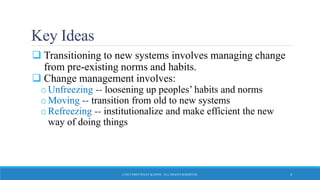
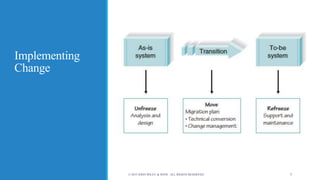
 Transitioning to new systems involves managing change
from pre-existing norms and habits.
 Change management involves:
oUnfreezing -- loosening up peoples’ habits and norms
oMoving -- transition from old to new systems
oRefreezing -- institutionalize and make efficient the new
way of doing things
© 2015 JOHN WILEY & SONS. ALL RIGHTS RESERVED. 4
Implementing
Change
© 2015 JOHN WILEY & SONS. ALL RIGHTS RESERVED. 5
Migration Planning
GUIDING THE PROCESS
© 2015 JOHN WILEY & SONS. ALL RIGHTS RESERVED. 6
Migration Planning
 What activities will be performed when and by whom
o Technical aspects
 Installing hardware and software
 Converting data
o Organizational aspects
 Training users on the system
 Motivating employees to use the new system to aid in their work
© 2015 JOHN WILEY & SONS. ALL RIGHTS RESERVED. 7
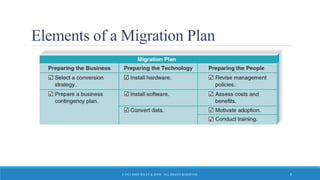
Elements of a Migration Plan
© 2015 JOHN WILEY & SONS. ALL RIGHTS RESERVED. 8
Business Contingency Plan
 What do we do if things go very wrong during
conversion?
o Technical glitches may occur during the transition
o Is the old system still available?
o If not, how do we keep the business running?
o Can manual procedures be used for a short time?
 Be prepared for the worst case scenario!
o Think about the consequences of being unable to operate
normally…lost sales, unhappy customers… could we stay afloat?
© 2015 JOHN WILEY & SONS. ALL RIGHTS RESERVED. 9
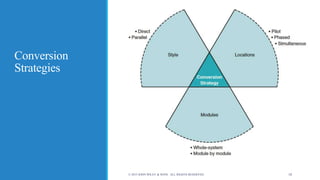
Conversion
Strategies
© 2015 JOHN WILEY & SONS. ALL RIGHTS RESERVED. 10
Conversion Styles
 Direct conversion
o The new system instantly replaces the old
 Parallel conversion
o For a time both old and new systems are used. The old is abandoned
when the new is proven fully capable.
© 2015 JOHN WILEY & SONS. ALL RIGHTS RESERVED. 11
Conversion Location
 Pilot conversion
o One or more locations are converted to work out bugs before
extending to other locations
 Phased conversion
o Locations are converted in sets
 Simultaneous conversion
o All locations are converted at the same time
© 2015 JOHN WILEY & SONS. ALL RIGHTS RESERVED. 12
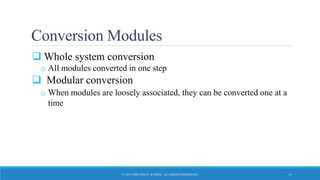
Conversion Modules
 Whole system conversion
o All modules converted in one step
 Modular conversion
o When modules are loosely associated, they can be converted one at a
time
© 2015 JOHN WILEY & SONS. ALL RIGHTS RESERVED. 13
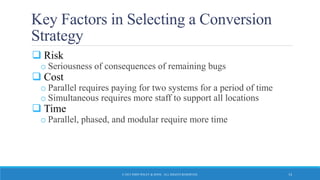
Key Factors in Selecting a Conversion
Strategy
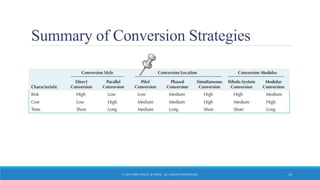
 Risk
o Seriousness of consequences of remaining bugs
 Cost
o Parallel requires paying for two systems for a period of time
o Simultaneous requires more staff to support all locations
 Time
o Parallel, phased, and modular require more time
© 2015 JOHN WILEY & SONS. ALL RIGHTS RESERVED. 14
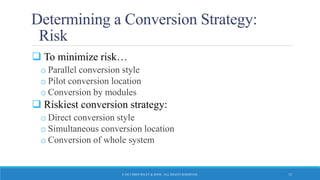
Determining a Conversion Strategy:
Risk
 To minimize risk…
o Parallel conversion style
o Pilot conversion location
o Conversion by modules
 Riskiest conversion strategy:
o Direct conversion style
o Simultaneous conversion location
o Conversion of whole system
© 2015 JOHN WILEY & SONS. ALL RIGHTS RESERVED. 15
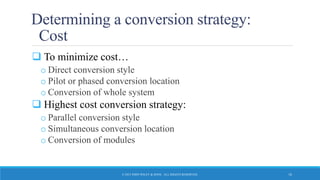
Determining a conversion strategy:
Cost
 To minimize cost…
o Direct conversion style
o Pilot or phased conversion location
o Conversion of whole system
 Highest cost conversion strategy:
o Parallel conversion style
o Simultaneous conversion location
o Conversion of modules
© 2015 JOHN WILEY & SONS. ALL RIGHTS RESERVED. 16
Determining a Conversion Strategy:
Time
 To minimize time…
o Direct conversion style
o Simultaneous conversion location
o Conversion of whole system
 Longest time conversion strategy:
o Parallel conversion style
o Phased conversion location
o Conversion of modules
© 2015 JOHN WILEY & SONS. ALL RIGHTS RESERVED. 17
Summary of Conversion Strategies
© 2015 JOHN WILEY & SONS. ALL RIGHTS RESERVED. 18
Change Management
PREPARING THE PEOPLE FOR THE NEW SYSTEM
© 2015 JOHN WILEY & SONS. ALL RIGHTS RESERVED. 19
Key Roles in Change Management
 The sponsor is the business person who initiated the
request for the new system
 The change agent is the person(s) who lead the change
effort
 The potential adopter(s) are the people who must change.
© 2015 JOHN WILEY & SONS. ALL RIGHTS RESERVED. 20
Steps in Change Management
1. Revise management policies
2. Assess costs and benefits models of potential adopters
3. Motivate adoption
4. Enable people to adopt
© 2015 JOHN WILEY & SONS. ALL RIGHTS RESERVED. 21
Understanding Resistance to Change
 Even changes that benefit an organization do not
necessarily benefit each individual
 Adapting to new work processes requires effort, for
which there may be no additional compensation
© 2015 JOHN WILEY & SONS. ALL RIGHTS RESERVED. 22
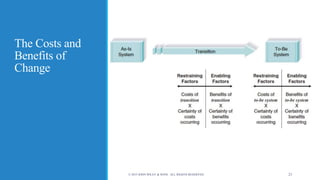
The Costs and
Benefits of
Change
© 2015 JOHN WILEY & SONS. ALL RIGHTS RESERVED. 23
Revising Management Policies
 No computer system will be successfully adopted unless
management policies support its adoption
 Management tools for supporting adoption
o Standard operating procedures (SOPs)
o Measurements and rewards
o Resource allocation
© 2015 JOHN WILEY & SONS. ALL RIGHTS RESERVED. 24
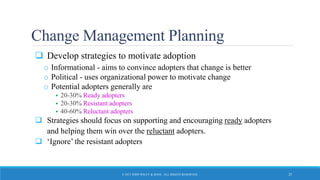
Change Management Planning
 Develop strategies to motivate adoption
o Informational - aims to convince adopters that change is better
o Political - uses organizational power to motivate change
o Potential adopters generally are
 20-30% Ready adopters
 20-30% Resistant adopters
 40-60% Reluctant adopters
 Strategies should focus on supporting and encouraging ready adopters
and helping them win over the reluctant adopters.
 ‘Ignore’ the resistant adopters
© 2015 JOHN WILEY & SONS. ALL RIGHTS RESERVED. 25
Training
 Every new system requires new skills
 New skills may involve use of the technology itself
 New skills may be needed to handle the changed business
processes
© 2015 JOHN WILEY & SONS. ALL RIGHTS RESERVED. 26
What to Train
 IT specialists tend to focus training around system
features
 Should focus on helping users accomplish their tasks
 Use scenarios provide an outline for common activities
and a basis to plan training
© 2015 JOHN WILEY & SONS. ALL RIGHTS RESERVED. 27
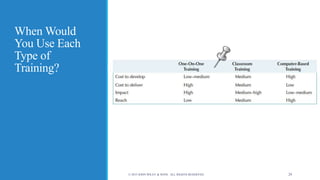
Types of Training
 Classroom
 One-on-one
 Computer-based
© 2015 JOHN WILEY & SONS. ALL RIGHTS RESERVED. 28
When Would
You Use Each
Type of
Training?
© 2015 JOHN WILEY & SONS. ALL RIGHTS RESERVED. 29
Postimplementation
Activities
INSTITUTIONALIZING THE NEW SYSTEM
© 2015 JOHN WILEY & SONS. ALL RIGHTS RESERVED. 30
Institutionalizing the System
 Provide support
o Assistance in using the system
 Provide maintenance
o Repair or fix discovered bugs or errors
o Add minor enhancements to provide added value
 Assess the project
o Analyze what was done well
o Discover what activities need improvement in the future
© 2015 JOHN WILEY & SONS. ALL RIGHTS RESERVED. 31
Types of System Support
 On-demand training at time of user need
 Online support
o Frequently asked questions (FAQ)
 Help desk
o Phone service for known issues
o Level 1 Support – Broad knowledge
o Unresolved issues passed to Level 2 Support – specialists in the application
system
© 2015 JOHN WILEY & SONS. ALL RIGHTS RESERVED. 32
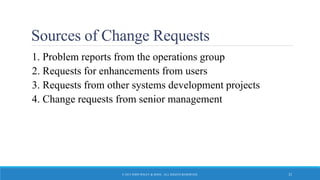
Sources of Change Requests
1. Problem reports from the operations group
2. Requests for enhancements from users
3. Requests from other systems development projects
4. Change requests from senior management
© 2015 JOHN WILEY & SONS. ALL RIGHTS RESERVED. 33
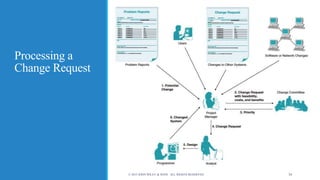
Processing a
Change Request
© 2015 JOHN WILEY & SONS. ALL RIGHTS RESERVED. 34
Project Assessment
 Important for continued project improvement
o Were cost estimates accurate?
o Did expected benefits actually materialize?
o Was this project really worth doing?
 Especially important for junior personnel to improve
quickly
Project Team Review
 Each member prepares 2-3 page document regarding her
or his actions during the project
 Focus on improvement not penalties
 Excellent behaviors are acknowledged and diffused to
others
 Team leader summarizes and distributes lessons learned
System Review
 Examine the extent to which the costs and benefits of the
system are realized
 Use this information to help in more accurately
estimating costs and benefits for future projects

Hi600 ch13_text_slides

  • 1.
    Transition to theNew System SYSTEMS ANALYSIS AND DESIGN, 6TH EDITION DENNIS, WIXOM, AND ROTH © 2015 JOHN WILEY & SONS. ALL RIGHTS RESERVED. 1
  • 2.
    Learning Objectives  Explainthe system installation process.  Describe the elements of a migration plan.  Explain different types of conversion strategies and when to use them.  Describe several techniques for managing change.  Outline postinstallation processes. © 2015 JOHN WILEY & SONS. ALL RIGHTS RESERVED. 2
  • 3.
    Making the Transition tothe New System SMOOTHING THE PATH © 2015 JOHN WILEY & SONS. ALL RIGHTS RESERVED. 3
  • 4.
    Key Ideas  Transitioningto new systems involves managing change from pre-existing norms and habits.  Change management involves: oUnfreezing -- loosening up peoples’ habits and norms oMoving -- transition from old to new systems oRefreezing -- institutionalize and make efficient the new way of doing things © 2015 JOHN WILEY & SONS. ALL RIGHTS RESERVED. 4
  • 5.
    Implementing Change © 2015 JOHNWILEY & SONS. ALL RIGHTS RESERVED. 5
  • 6.
    Migration Planning GUIDING THEPROCESS © 2015 JOHN WILEY & SONS. ALL RIGHTS RESERVED. 6
  • 7.
    Migration Planning  Whatactivities will be performed when and by whom o Technical aspects  Installing hardware and software  Converting data o Organizational aspects  Training users on the system  Motivating employees to use the new system to aid in their work © 2015 JOHN WILEY & SONS. ALL RIGHTS RESERVED. 7
  • 8.
    Elements of aMigration Plan © 2015 JOHN WILEY & SONS. ALL RIGHTS RESERVED. 8
  • 9.
    Business Contingency Plan What do we do if things go very wrong during conversion? o Technical glitches may occur during the transition o Is the old system still available? o If not, how do we keep the business running? o Can manual procedures be used for a short time?  Be prepared for the worst case scenario! o Think about the consequences of being unable to operate normally…lost sales, unhappy customers… could we stay afloat? © 2015 JOHN WILEY & SONS. ALL RIGHTS RESERVED. 9
  • 10.
    Conversion Strategies © 2015 JOHNWILEY & SONS. ALL RIGHTS RESERVED. 10
  • 11.
    Conversion Styles  Directconversion o The new system instantly replaces the old  Parallel conversion o For a time both old and new systems are used. The old is abandoned when the new is proven fully capable. © 2015 JOHN WILEY & SONS. ALL RIGHTS RESERVED. 11
  • 12.
    Conversion Location  Pilotconversion o One or more locations are converted to work out bugs before extending to other locations  Phased conversion o Locations are converted in sets  Simultaneous conversion o All locations are converted at the same time © 2015 JOHN WILEY & SONS. ALL RIGHTS RESERVED. 12
  • 13.
    Conversion Modules  Wholesystem conversion o All modules converted in one step  Modular conversion o When modules are loosely associated, they can be converted one at a time © 2015 JOHN WILEY & SONS. ALL RIGHTS RESERVED. 13
  • 14.
    Key Factors inSelecting a Conversion Strategy  Risk o Seriousness of consequences of remaining bugs  Cost o Parallel requires paying for two systems for a period of time o Simultaneous requires more staff to support all locations  Time o Parallel, phased, and modular require more time © 2015 JOHN WILEY & SONS. ALL RIGHTS RESERVED. 14
  • 15.
    Determining a ConversionStrategy: Risk  To minimize risk… o Parallel conversion style o Pilot conversion location o Conversion by modules  Riskiest conversion strategy: o Direct conversion style o Simultaneous conversion location o Conversion of whole system © 2015 JOHN WILEY & SONS. ALL RIGHTS RESERVED. 15
  • 16.
    Determining a conversionstrategy: Cost  To minimize cost… o Direct conversion style o Pilot or phased conversion location o Conversion of whole system  Highest cost conversion strategy: o Parallel conversion style o Simultaneous conversion location o Conversion of modules © 2015 JOHN WILEY & SONS. ALL RIGHTS RESERVED. 16
  • 17.
    Determining a ConversionStrategy: Time  To minimize time… o Direct conversion style o Simultaneous conversion location o Conversion of whole system  Longest time conversion strategy: o Parallel conversion style o Phased conversion location o Conversion of modules © 2015 JOHN WILEY & SONS. ALL RIGHTS RESERVED. 17
  • 18.
    Summary of ConversionStrategies © 2015 JOHN WILEY & SONS. ALL RIGHTS RESERVED. 18
  • 19.
    Change Management PREPARING THEPEOPLE FOR THE NEW SYSTEM © 2015 JOHN WILEY & SONS. ALL RIGHTS RESERVED. 19
  • 20.
    Key Roles inChange Management  The sponsor is the business person who initiated the request for the new system  The change agent is the person(s) who lead the change effort  The potential adopter(s) are the people who must change. © 2015 JOHN WILEY & SONS. ALL RIGHTS RESERVED. 20
  • 21.
    Steps in ChangeManagement 1. Revise management policies 2. Assess costs and benefits models of potential adopters 3. Motivate adoption 4. Enable people to adopt © 2015 JOHN WILEY & SONS. ALL RIGHTS RESERVED. 21
  • 22.
    Understanding Resistance toChange  Even changes that benefit an organization do not necessarily benefit each individual  Adapting to new work processes requires effort, for which there may be no additional compensation © 2015 JOHN WILEY & SONS. ALL RIGHTS RESERVED. 22
  • 23.
    The Costs and Benefitsof Change © 2015 JOHN WILEY & SONS. ALL RIGHTS RESERVED. 23
  • 24.
    Revising Management Policies No computer system will be successfully adopted unless management policies support its adoption  Management tools for supporting adoption o Standard operating procedures (SOPs) o Measurements and rewards o Resource allocation © 2015 JOHN WILEY & SONS. ALL RIGHTS RESERVED. 24
  • 25.
    Change Management Planning Develop strategies to motivate adoption o Informational - aims to convince adopters that change is better o Political - uses organizational power to motivate change o Potential adopters generally are  20-30% Ready adopters  20-30% Resistant adopters  40-60% Reluctant adopters  Strategies should focus on supporting and encouraging ready adopters and helping them win over the reluctant adopters.  ‘Ignore’ the resistant adopters © 2015 JOHN WILEY & SONS. ALL RIGHTS RESERVED. 25
  • 26.
    Training  Every newsystem requires new skills  New skills may involve use of the technology itself  New skills may be needed to handle the changed business processes © 2015 JOHN WILEY & SONS. ALL RIGHTS RESERVED. 26
  • 27.
    What to Train IT specialists tend to focus training around system features  Should focus on helping users accomplish their tasks  Use scenarios provide an outline for common activities and a basis to plan training © 2015 JOHN WILEY & SONS. ALL RIGHTS RESERVED. 27
  • 28.
    Types of Training Classroom  One-on-one  Computer-based © 2015 JOHN WILEY & SONS. ALL RIGHTS RESERVED. 28
  • 29.
    When Would You UseEach Type of Training? © 2015 JOHN WILEY & SONS. ALL RIGHTS RESERVED. 29
  • 30.
    Postimplementation Activities INSTITUTIONALIZING THE NEWSYSTEM © 2015 JOHN WILEY & SONS. ALL RIGHTS RESERVED. 30
  • 31.
    Institutionalizing the System Provide support o Assistance in using the system  Provide maintenance o Repair or fix discovered bugs or errors o Add minor enhancements to provide added value  Assess the project o Analyze what was done well o Discover what activities need improvement in the future © 2015 JOHN WILEY & SONS. ALL RIGHTS RESERVED. 31
  • 32.
    Types of SystemSupport  On-demand training at time of user need  Online support o Frequently asked questions (FAQ)  Help desk o Phone service for known issues o Level 1 Support – Broad knowledge o Unresolved issues passed to Level 2 Support – specialists in the application system © 2015 JOHN WILEY & SONS. ALL RIGHTS RESERVED. 32
  • 33.
    Sources of ChangeRequests 1. Problem reports from the operations group 2. Requests for enhancements from users 3. Requests from other systems development projects 4. Change requests from senior management © 2015 JOHN WILEY & SONS. ALL RIGHTS RESERVED. 33
  • 34.
    Processing a Change Request ©2015 JOHN WILEY & SONS. ALL RIGHTS RESERVED. 34
  • 35.
    Project Assessment  Importantfor continued project improvement o Were cost estimates accurate? o Did expected benefits actually materialize? o Was this project really worth doing?  Especially important for junior personnel to improve quickly
  • 36.
    Project Team Review Each member prepares 2-3 page document regarding her or his actions during the project  Focus on improvement not penalties  Excellent behaviors are acknowledged and diffused to others  Team leader summarizes and distributes lessons learned
  • 37.
    System Review  Examinethe extent to which the costs and benefits of the system are realized  Use this information to help in more accurately estimating costs and benefits for future projects