Taha İslamYILMAZ
Computer Engineering
TOBB ETU
ADEO IWS - Digital Forensics
HARD DISK DATA
ACQUISITION
Hard Disk Data Acquisition
• System Preservation Phase ✔
• Evidence Searching Phase
• Event Reconstruction Phase
General Acquisition Procedure
•
• Copy one byte and repeat the process
• Like copying a letter by hand
• Sector by sector
Data Acquition Layers
• Disk
• Volume
• File
• Application
Acquisition Tool Testing
• National Institute of Standards andTechnology (NIST)
• The Computer ForensicToolTesting (CFTT)
• Results and specifications can be found on their website
https://www.cftt.nist.gov/disk_imaging.htm
•
Requirements For Mandatory Features-1
• The tool shall be able to acquire a digital source using each access interface visible to
the tool.
• The tool shall be able to create either a clone of a digital source, or an image of a digital
source, or provide the capability for the user to select and then create either a clone or
an image of a digital source.
• The tool shall operate in at least one execution environment and shall be able to
acquire digital sources in each execution environment.
• The tool shall completely acquire all visible data sectors from the digital source.
• The tool shall completely acquire all hidden data sectors from the digital source.
Requirements For Mandatory Features-2
• All data sectors acquired by the tool from the digital source shall be
accurately acquired.
• If there are unresolved errors reading from a digital source then the tool
shall notify the user of the error type and the error location.
• If there are unresolved errors reading from a digital source then the tool
shall use a benign fill in the destination object in place of the inaccessible
data.
Accessing to Hard Disk – Direct vs BIOS
• Accessing the hard disk directly is the fastest way to get data to and
from the disk, but it requires the software to know quite a bit about the
hardware.
• The BIOS knows about the hardware, and it provides services to the
software so that they can more easily communicate with hardware.
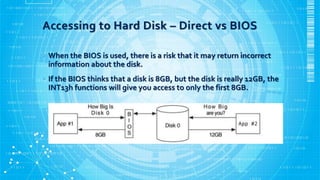
Accessing to Hard Disk – Direct vs BIOS
• When the BIOS is used, there is a risk that it may return incorrect
information about the disk.
• If the BIOS thinks that a disk is 8GB, but the disk is really 12GB, the
INT13h functions will give you access to only the first 8GB.
Dead vs Live Acquisition
• A dead acquisition occurs when the data from a suspect system is being
copied without the assistance of the suspect operating system.
• A live acquisition is one where the suspect operating system is still
running and being used to copy data.
• The risk of conducting a live acquisition is that the attacker has modified
the operating system or other software to provide false data during the
acquisition.
• Attackers may install tools called rootkits into systems that they
compromise, and they return false information to a user
Host Protected Area (HPA)
• Special area of the disk that can be used to save data, and a casual
observer might not see it.
• The HPA is at the end of the disk and, when used, can only be accessed
by reconfiguring the hard disk.
• It could contain hidden data.
Host Protected Area (HPA)
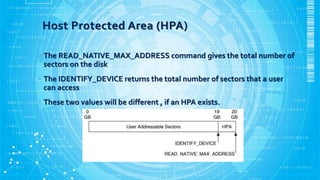
• The READ_NATIVE_MAX_ADDRESS command gives the total number of
sectors on the disk
• The IDENTIFY_DEVICE returns the total number of sectors that a user
can access
• These two values will be different , if an HPA exists.
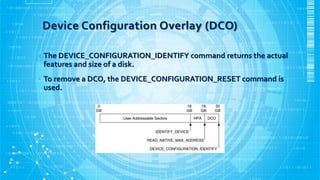
Device Configuration Overlay (DCO)
• Similar to an HPA a DCO may contain hidden data.They can exist at
the same time.
• A DCO could show a smaller disk size and show that supported features
are not supported.
• The DCO allows system vendors configure all HDDs to have the same
number of sectors.
Device Configuration Overlay (DCO)
• The DEVICE_CONFIGURATION_IDENTIFY command returns the actual
features and size of a disk.
• To remove a DCO, the DEVICE_CONFIGURATION_RESET command is
used.
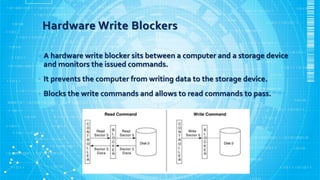
Hardware Write Blockers
• A hardware write blocker sits between a computer and a storage device
and monitors the issued commands.
• It prevents the computer from writing data to the storage device.
• Blocks the write commands and allows to read commands to pass.
Requirements For Hardware Write Blockers
• A hardware write block (HWB) device shall not transmit a command to a
protected storage device that modifies the data on the storage device.
• An HWB device shall return the data requested by a read operation.
• An HWB device shall return without modification any access-significant
information requested from the drive.
• Any error condition reported by the storage device to the HWB device
shall be reported to the host.
• Source: http://www.cftt.nist.gov/hardware_write_block.htm
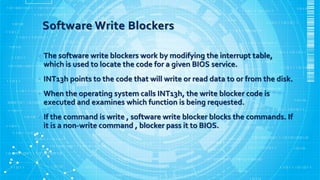
Software Write Blockers
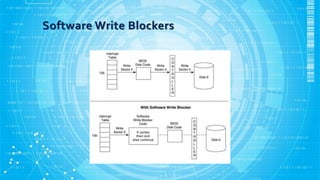
• The software write blockers work by modifying the interrupt table,
which is used to locate the code for a given BIOS service.
• INT13h points to the code that will write or read data to or from the disk.
• When the operating system calls INT13h, the write blocker code is
executed and examines which function is being requested.
• If the command is write , software write blocker blocks the commands. If
it is a non-write command , blocker pass it to BIOS.
Software Write Blockers
Requirements For Software Write Blockers
• The tool shall not allow a protected drive to be changed.
• The tool shall not prevent obtaining any information from or
about any drive.
• The tool shall not prevent any operations to a drive that is not
protected.
• Source: http://www.cftt.nist.gov/software_write_block.htm
Writing The Output Data
• We can write the output data either directly to a disk or to a file.
• Disk should be wiped with zeros before acquisitions.
• Original and destination disks should have the same geometries.
Image File Format
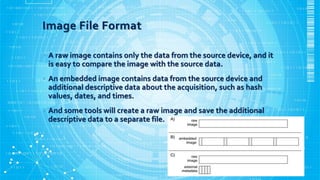
• A raw image contains only the data from the source device, and it
is easy to compare the image with the source data.
• An embedded image contains data from the source device and
additional descriptive data about the acquisition, such as hash
values, dates, and times.
• And some tools will create a raw image and save the additional
descriptive data to a separate file.
Thank you for listening to me !

Hard Disk Data Acquisition

  • 1.
    Taha İslamYILMAZ Computer Engineering TOBBETU ADEO IWS - Digital Forensics HARD DISK DATA ACQUISITION
  • 2.
    Hard Disk DataAcquisition • System Preservation Phase ✔ • Evidence Searching Phase • Event Reconstruction Phase
  • 3.
    General Acquisition Procedure • •Copy one byte and repeat the process • Like copying a letter by hand • Sector by sector
  • 4.
    Data Acquition Layers •Disk • Volume • File • Application
  • 5.
    Acquisition Tool Testing •National Institute of Standards andTechnology (NIST) • The Computer ForensicToolTesting (CFTT) • Results and specifications can be found on their website https://www.cftt.nist.gov/disk_imaging.htm •
  • 6.
    Requirements For MandatoryFeatures-1 • The tool shall be able to acquire a digital source using each access interface visible to the tool. • The tool shall be able to create either a clone of a digital source, or an image of a digital source, or provide the capability for the user to select and then create either a clone or an image of a digital source. • The tool shall operate in at least one execution environment and shall be able to acquire digital sources in each execution environment. • The tool shall completely acquire all visible data sectors from the digital source. • The tool shall completely acquire all hidden data sectors from the digital source.
  • 7.
    Requirements For MandatoryFeatures-2 • All data sectors acquired by the tool from the digital source shall be accurately acquired. • If there are unresolved errors reading from a digital source then the tool shall notify the user of the error type and the error location. • If there are unresolved errors reading from a digital source then the tool shall use a benign fill in the destination object in place of the inaccessible data.
  • 8.
    Accessing to HardDisk – Direct vs BIOS • Accessing the hard disk directly is the fastest way to get data to and from the disk, but it requires the software to know quite a bit about the hardware. • The BIOS knows about the hardware, and it provides services to the software so that they can more easily communicate with hardware.
  • 9.
    Accessing to HardDisk – Direct vs BIOS • When the BIOS is used, there is a risk that it may return incorrect information about the disk. • If the BIOS thinks that a disk is 8GB, but the disk is really 12GB, the INT13h functions will give you access to only the first 8GB.
  • 10.
    Dead vs LiveAcquisition • A dead acquisition occurs when the data from a suspect system is being copied without the assistance of the suspect operating system. • A live acquisition is one where the suspect operating system is still running and being used to copy data. • The risk of conducting a live acquisition is that the attacker has modified the operating system or other software to provide false data during the acquisition. • Attackers may install tools called rootkits into systems that they compromise, and they return false information to a user
  • 11.
    Host Protected Area(HPA) • Special area of the disk that can be used to save data, and a casual observer might not see it. • The HPA is at the end of the disk and, when used, can only be accessed by reconfiguring the hard disk. • It could contain hidden data.
  • 12.
    Host Protected Area(HPA) • The READ_NATIVE_MAX_ADDRESS command gives the total number of sectors on the disk • The IDENTIFY_DEVICE returns the total number of sectors that a user can access • These two values will be different , if an HPA exists.
  • 13.
    Device Configuration Overlay(DCO) • Similar to an HPA a DCO may contain hidden data.They can exist at the same time. • A DCO could show a smaller disk size and show that supported features are not supported. • The DCO allows system vendors configure all HDDs to have the same number of sectors.
  • 14.
    Device Configuration Overlay(DCO) • The DEVICE_CONFIGURATION_IDENTIFY command returns the actual features and size of a disk. • To remove a DCO, the DEVICE_CONFIGURATION_RESET command is used.
  • 15.
    Hardware Write Blockers •A hardware write blocker sits between a computer and a storage device and monitors the issued commands. • It prevents the computer from writing data to the storage device. • Blocks the write commands and allows to read commands to pass.
  • 16.
    Requirements For HardwareWrite Blockers • A hardware write block (HWB) device shall not transmit a command to a protected storage device that modifies the data on the storage device. • An HWB device shall return the data requested by a read operation. • An HWB device shall return without modification any access-significant information requested from the drive. • Any error condition reported by the storage device to the HWB device shall be reported to the host. • Source: http://www.cftt.nist.gov/hardware_write_block.htm
  • 17.
    Software Write Blockers •The software write blockers work by modifying the interrupt table, which is used to locate the code for a given BIOS service. • INT13h points to the code that will write or read data to or from the disk. • When the operating system calls INT13h, the write blocker code is executed and examines which function is being requested. • If the command is write , software write blocker blocks the commands. If it is a non-write command , blocker pass it to BIOS.
  • 18.
  • 19.
    Requirements For SoftwareWrite Blockers • The tool shall not allow a protected drive to be changed. • The tool shall not prevent obtaining any information from or about any drive. • The tool shall not prevent any operations to a drive that is not protected. • Source: http://www.cftt.nist.gov/software_write_block.htm
  • 20.
    Writing The OutputData • We can write the output data either directly to a disk or to a file. • Disk should be wiped with zeros before acquisitions. • Original and destination disks should have the same geometries.
  • 21.
    Image File Format •A raw image contains only the data from the source device, and it is easy to compare the image with the source data. • An embedded image contains data from the source device and additional descriptive data about the acquisition, such as hash values, dates, and times. • And some tools will create a raw image and save the additional descriptive data to a separate file.
  • 22.
    Thank you forlistening to me !