World®
’16
Hands-On	Lab:	Master	REST	APIs	in	
CA	Application	Performance	Management
Andreas	Reiss	- Sr.	Principal	Engineering	Services	Architect	- CA	Technologies
DO4X153L
DEVOPS	– AGILE	OPERATIONS
2 ©	2016	CA.	ALL	RIGHTS	RESERVED.@CAWORLD				#CAWORLD
©	2016	CA.	All	rights	reserved.	All	trademarks	referenced	herein	belong	to	their	respective	companies.
The	content	provided	in	this CA	World	2016	presentation	is	intended	for	informational	purposes	only	and	does	not	form	any	type	of	
warranty. The information	provided	by	a	CA	partner	and/or	CA	customer	has	not	been	reviewed	for	accuracy	by	CA.	
For	Informational	Purposes	Only	
Terms	of	this	Presentation
3 ©	2016	CA.	ALL	RIGHTS	RESERVED.@CAWORLD				#CAWORLD
Abstract
Enterprises	with	complex,	large-scale	environments	manage	hundreds	of	CA	Application	
Performance	Management	(CA	APM)	agents	in	highly	dynamic	environments	and	are	great	
candidates	for	the	advantages	offered	by	automation.	The	CA	APM	Command	Center	feature	
provides	new	APIs	that	can	be	easily	integrated	with	scripts	to	connect	with	deployment	tools	
such	as	Chef,	Puppet	and	CA	Release	Automation.	Learn	how	to	harness	these	APIs	to	simplify	
the	management	of	CA	APM	agents.	
Andreas	
Reiss
CA	Technologies	
Sr.	Principal	
Engineering	Services	
Architect
4 ©	2016	CA.	ALL	RIGHTS	RESERVED.@CAWORLD				#CAWORLD
Agenda
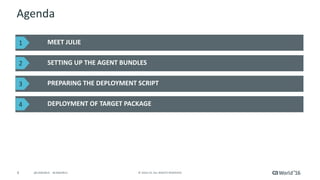
MEET	JULIE
SETTING	UP	THE	AGENT	BUNDLES
PREPARING	THE	DEPLOYMENT	SCRIPT
DEPLOYMENT	OF	TARGET	PACKAGE
1
2
3
4
5 ©	2016	CA.	ALL	RIGHTS	RESERVED.@CAWORLD				#CAWORLD
Meet	Julie
6 ©	2016	CA.	ALL	RIGHTS	RESERVED.@CAWORLD				#CAWORLD
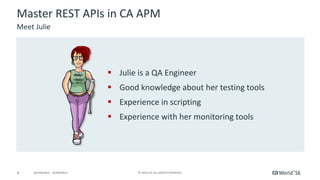
§ Julie	is	a	QA	Engineer
§ Good	knowledge	about	her	testing	tools
§ Experience	in	scripting
§ Experience	with	her	monitoring	tools
Master	REST	APIs	in	CA	APM
Meet	Julie
7 ©	2016	CA.	ALL	RIGHTS	RESERVED.@CAWORLD				#CAWORLD
Master	REST	APIs	in	CA	APM
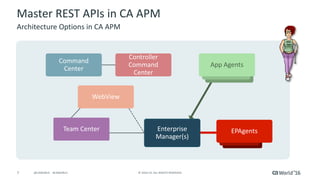
Architecture	Options	in	CA	APM
App	AgentsApp	Agents
App	
Agents
App	
Agents
EPAgents
Command	
Center
App	Agents
Controller	
Command	
Center
WebView
Enterprise
Manager(s)
Team	Center
8 ©	2016	CA.	ALL	RIGHTS	RESERVED.@CAWORLD				#CAWORLD
Master	REST	APIs	in	CA	APM
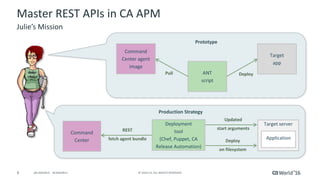
Julie’s	Mission
Command
Center
REST
fetch	agent	bundle
Updated
start	arguments
Target	server
Application
Prototype
Production	Strategy
Command	
Center	agent	
image
Target
app
ANT
script
Deploy
on	filesystem
Pull Deploy
Deployment
tool
(Chef, Puppet,	CA	
Release	Automation)
9 ©	2016	CA.	ALL	RIGHTS	RESERVED.@CAWORLD				#CAWORLD
Setting	Up	the	Agent	Bundles
10 ©	2016	CA.	ALL	RIGHTS	RESERVED.@CAWORLD				#CAWORLD
Master	REST	APIs	in	CA	APM
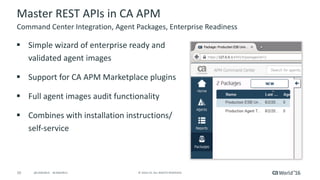
§ Simple	wizard	of	enterprise	ready	and	
validated	agent	images
§ Support	for	CA	APM	Marketplace	plugins
§ Full	agent	images	audit	functionality
§ Combines	with	installation	instructions/	
self-service
Command	Center	Integration,	Agent	Packages,	Enterprise	Readiness
11 ©	2016	CA.	ALL	RIGHTS	RESERVED.@CAWORLD				#CAWORLD
Master	REST	APIs	in	CA	APM
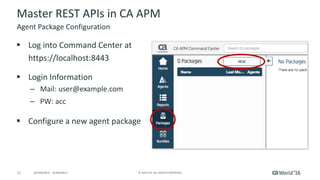
§ Log	into	Command	Center	at	
https://localhost:8443
§ Login	Information
– Mail:	user@example.com
– PW:	acc
§ Configure	a	new	agent	package
Agent	Package	Configuration
12 ©	2016	CA.	ALL	RIGHTS	RESERVED.@CAWORLD				#CAWORLD
Preparing	the	Deployment	Script
13 ©	2016	CA.	ALL	RIGHTS	RESERVED.@CAWORLD				#CAWORLD
Master	REST	APIs	in	CA	APM
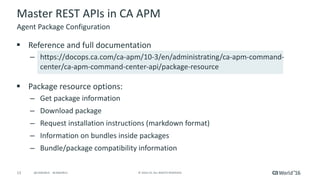
§ Reference	and	full	documentation
– https://docops.ca.com/ca-apm/10-3/en/administrating/ca-apm-command-
center/ca-apm-command-center-api/package-resource
§ Package	resource	options:
– Get	package	information
– Download	package
– Request	installation	instructions	(markdown	format)
– Information	on	bundles	inside	packages
– Bundle/package	compatibility	information
Agent	Package	Configuration
14 ©	2016	CA.	ALL	RIGHTS	RESERVED.@CAWORLD				#CAWORLD
Master	REST	APIs	in	CA	APM
Agent	Package	Configuration
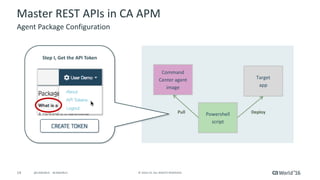
Step	I,	Get	the	API	Token
Command	
Center	agent	
image
Target
app
Powershell
script
Pull Deploy
15 ©	2016	CA.	ALL	RIGHTS	RESERVED.@CAWORLD				#CAWORLD
Master	REST	APIs	in	CA	APM
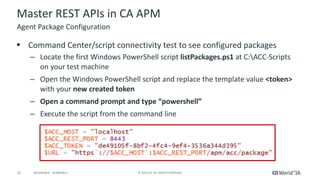
§ Command	Center/script	connectivity	test	to	see	configured	packages
– Locate	the	first	Windows	PowerShell	script	listPackages.ps1 at	C:ACC-Scripts	
on	your	test	machine
– Open	the	Windows	PowerShell	script	and	replace	the	template	value	<token>	
with	your	new	created	token
– Open	a	command	prompt	and	type	“powershell”
– Execute	the	script	from	the	command	line
Agent	Package	Configuration
16 ©	2016	CA.	ALL	RIGHTS	RESERVED.@CAWORLD				#CAWORLD
Master	REST	APIs	in	CA	APM
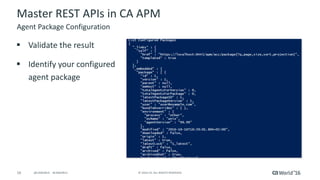
§ Validate	the	result
§ Identify	your	configured	
agent	package
Agent	Package	Configuration
17 ©	2016	CA.	ALL	RIGHTS	RESERVED.@CAWORLD				#CAWORLD
Deployment	of	Target	Package
18 ©	2016	CA.	ALL	RIGHTS	RESERVED.@CAWORLD				#CAWORLD
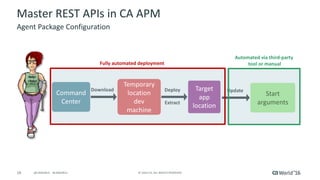
Download Deploy
Extract
Update
Master	REST	APIs	in	CA	APM
Agent	Package	Configuration
Command	
Center
Start
arguments
Temporary
location
dev
machine
Target
app
location
Fully	automated	deployment
Automated	via	third-party	
tool	or	manual
19 ©	2016	CA.	ALL	RIGHTS	RESERVED.@CAWORLD				#CAWORLD
Master	REST	APIs	in	CA	APM
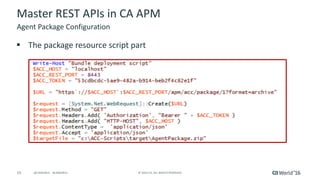
§ The	package	resource	script	part	
Agent	Package	Configuration
20 ©	2016	CA.	ALL	RIGHTS	RESERVED.@CAWORLD				#CAWORLD
Master	REST	APIs	in	CA	APM
§ Command	Center/script	connectivity	test	to	see	configured	packages
– Locate	the	Windows	PowerShell	script deployAgent.ps1 at	C:ACC-Scripts	on	
your	test	machine
– Update	your	token
– Execute	the	script	from	the	command	line
– Validate the	extracted	agent	at	C:ACC-Scriptstarget
Agent	Package	Configuration
21 ©	2016	CA.	ALL	RIGHTS	RESERVED.@CAWORLD				#CAWORLD
Thank	you.
Stay	connected	at	communities.ca.com
22 ©	2016	CA.	ALL	RIGHTS	RESERVED.@CAWORLD				#CAWORLD
DevOps	– Agile	Ops
For	more	information	on	DevOps	– Agile	Ops,	please	visit:	
http://cainc.to/wYXSg6

Hands-On Lab: Master REST APIs in CA Application Performance Management