Pre Conference Education:
CA Spectrum Just Keeps Getting
Better and Better
Kiran Diwakar
DevOps: Agile Ops
CA Technologies
Director, Product Management
DO5X88E
@Kiran_Diwakar
#CAWorld
Jayakrishna Karicharla (JK)
CA Technologies
Principal Software Engineer
2 © 2015 CA. ALL RIGHTS RESERVED.@CAWORLD #CAWORLD
© 2015 CA. All rights reserved. All trademarks referenced herein belong to their respective companies.
The content provided in this CA World 2015 presentation is intended for informational purposes only and does not form any type of
warranty. The information provided by a CA partner and/or CA customer has not been reviewed for accuracy by CA.
For Informational Purposes Only
Terms of this Presentation
3 © 2015 CA. ALL RIGHTS RESERVED.@CAWORLD #CAWORLD
Abstract
Recent years have seen more substantial releases from
Spectrum. Join us in this session to explore some of the
new features, such as Spectrum 64 bit, the new Web
Client for Operators, Software-Defined Networks (SDN)
support, Bi-directional integration with CA Unified
Infrastructure Management, support for ModSecurity,
and simplified reporting. This will be a combination of
slides, demos and hands-on practice.
Kiran Diwakar
Jayakrishna
Karicharla (JK)
CA Technologies
4 © 2015 CA. ALL RIGHTS RESERVED.@CAWORLD #CAWORLD
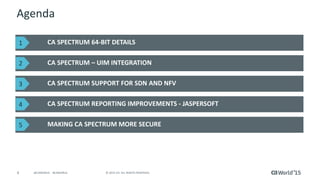
Agenda
CA SPECTRUM 64-BIT DETAILS
CA SPECTRUM – UIM INTEGRATION
CA SPECTRUM SUPPORT FOR SDN AND NFV
CA SPECTRUM REPORTING IMPROVEMENTS - JASPERSOFT
MAKING CA SPECTRUM MORE SECURE
1
2
3
4
5
CA Spectrum
A Critical Component of the CA IM Portfolio
6 © 2015 CA. ALL RIGHTS RESERVED.@CAWORLD #CAWORLD
CA Spectrum
 Only fault management component in the portfolio
 1000s of enterprise customers globally, monitoring mission critical
infrastructure components
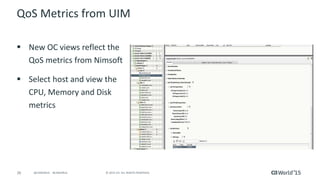
 Complementing the capabilities of CA UIM aka Nimsoft and strengthening
those capabilities through the bi-directional integration
 Extensive work ongoing for UI Refresh
 Extensive work initiated for the Reporting Platform Refresh
 New technology support…
Join us for the roadmap session to know more...
CA Spectrum 64-Bit Support
8 © 2015 CA. ALL RIGHTS RESERVED.@CAWORLD #CAWORLD
Overview
 Help large scale Spectrum delpoyments to:
– Grow Spectrum scale without fear of hitting memory ceiling - model
more devices on a single landscape
– Help consolidate multiple landscapes/servers
– Simplify management and reduce TCO
9 © 2015 CA. ALL RIGHTS RESERVED.@CAWORLD #CAWORLD
How Was x64 Done…
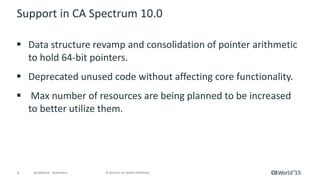
 Data structure revamp and consolidation of pointer arithmetic
to hold 64-bit pointers.
 Deprecated unused code without affecting core functionality.
 Max number of resources are being planned to be increased
to better utilize them.
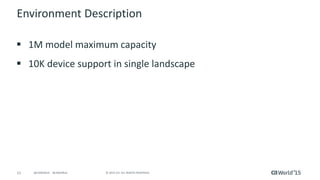
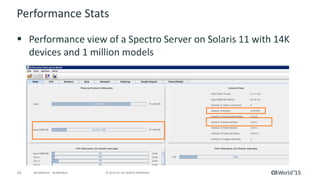
 1M model maximum capacity
 10K-15K device support in single landscape
10 © 2015 CA. ALL RIGHTS RESERVED.@CAWORLD #CAWORLD
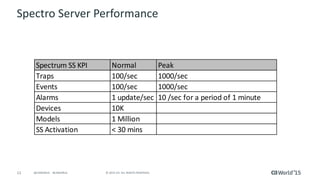
Extensive Performance Benchmarking
Spectrum SS KPI Normal Peak
Traps 100/sec 1000/sec
Events 100/sec 1000/sec
Alarms 1 update/sec 10 /sec for a period of 1 minute
Devices 10K
Models 1 Million
SS Activation < 30 mins
11 © 2015 CA. ALL RIGHTS RESERVED.@CAWORLD #CAWORLD
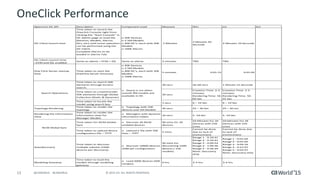
OneClick Performance Benchmarking
Spectrum OC KPI Description Component Load Measure Win Lin Sol
OC Client launch time
Time taken to launch the
Oneclick Console right from
clicking the “Start Console” in
OC Admin page to load the
(Devices, Models, Alarms,
GCs, etc) until some operation
can be performed using the
OC Client.
Complete Alarms to be
loaded in alarms Tab.
o 40K Devices
o 2.5M Models
o 400 GC’s, each with 30K
Models
o 100K Alarms
2 Minutes
2 Minutes 20
Seconds
2 Minutes 10 Seconds
OC Client Launch time
–EEM and SSL enabled
Same as above + EEM + SSL Same as above 3 minutes TBD TBD
One Click Server startup
time
Time taken to start the
OneClick Server (Tomcat)
o 40K Devices
o 2.5M Models
o 400 GC’s, each with 30K
Models
o 100K Alarms
5 minutes 0:01:15 0:01:05
Time taken to search 50K
elements through locator
search.
30 secs 56-60 secs 1 Minute 15 Seconds
Time taken to createrender
50K elements through Global
Collection (Static & Dynamic).
30 secs
Creation Time: 2-5
minutes
Rendering Time: 56-
60 Sec
Creation Time: 2-5
minutes
Rendering Time: 50-
55 Sec
Time taken to locate the
model using search box
3 secs 6 – 10 Sec 6 – 10 Sec
Topology Rendering
Time taken to render the
topology
o Topology with 10K
devices and 1M Models
30 secs 25 – 30 Sec 25 – 30 sec
Rendering the Information
View
Time taken to render the
Information view for
Manager Models
o Managers with dynamic
information tables
10 secs 5 -10 Sec 5 -10 Sec
Time taken for NCM Global
Sync
o Discover 2K NCM
enabled devices
90 mins for 2K
devices.
59 Minutes for 2K
Devices with 25K
Lines
59 Minutes for 2K
Devices with 25K
Lines
Time taken to upload device
configuration file – TFTP
o Upload a file with 50K
lines – TFPT
5 mins.
Cannot be done
due to lack of
environment.
Cannot be done due
to lack of
environment.
Autodiscovery
Time taken to discover
multiple subnets (1500
devices per discovery)
o Discover 10000 devices
1500 per configuration
20 mins for
discovering 1500
devices ( 15K
models)
Range 1 - 0:10:41
Range 2 - 0:10:41
Range 3 - 0:09:54
Range 4 - 1:09:36
Range 5 - 0:39:29
Note: Discovery
Only
Range 1 - 0:01:02
Range 2 - 0:01:05
Range 3 - 0:03:16
Range 4 - 0:57:07
Range 5 - 0:03:47
Note: Discovery Only
Modeling Gateway
Time taken to load the
models through modeling
gateway
o Load 5000 devices (50K
models)
6 hrs. 3-4 hrs. 3-4 hrs.
Search Operations
o Query is run when
overall 3M models are
available in OC
NCM Global Sync
12 © 2015 CA. ALL RIGHTS RESERVED.@CAWORLD #CAWORLD
CA Spectrum 64-bit Support – Caveats
 64-bit clients are required to take advantage of the increased capacity of
64-bit Spectrum 10
 As a general rule, the maximum heap size of 32-bit clients on Windows
systems will range from 1.4 to 1.6G of memory, while on 32-bit Solaris the
address space is limited to 2G
– If this is exceeded the client will no longer launch until a 64-bit client is utilized
 Spectrum 10 does not officially support 32-bit java clients as it has not
been QA tested
13 © 2015 CA. ALL RIGHTS RESERVED.@CAWORLD #CAWORLD
Upgrade/Migration Considerations
 Upgrade as-is, same number of SS
 Migrate data as-is, same number of SS
 Consolidation of SS, leverage scale improvements best
practice
– MLS (and key servers) should be upgraded only
 The servers with data, like Archive Manager etc
– Use Modelling Gateway to converge the remaining SS
 Export from multiple SS & import into 1 new scaled SS
CA Spectrum x64 – Live In Action
CA Spectrum – CA UIM Integration
16 © 2015 CA. ALL RIGHTS RESERVED.@CAWORLD #CAWORLD
Overview
Current Spectrum – UIM Integration
 Spectrum is integrated with Unified Infrastructure Management (UIM) for
managing Servers and Virtual environments (VMware)
 UIM discovered CI’s (Servers, VM elements) are synchronized with
Spectrum and corresponding models are created
 Spectrum powerful RCA/FI is leveraged to identify root cause and suppress
symptomatic alarms
17 © 2015 CA. ALL RIGHTS RESERVED.@CAWORLD #CAWORLD
Workflows
18 © 2015 CA. ALL RIGHTS RESERVED.@CAWORLD #CAWORLD
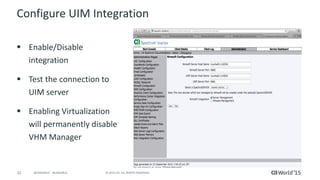
Configure UIM Integration
 Enable/Disable
integration
 Test the connection to
UIM server
 Enabling Virtualization
will permanently disable
VHM Manager
19 © 2015 CA. ALL RIGHTS RESERVED.@CAWORLD #CAWORLD
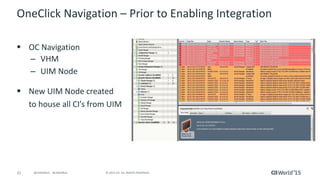
What Happens After Enabling Integration?
 Spectrum contacts UIM Server
 Retrieves all server CI’s discovered by UIM
 Creates/augments models in Spectrum for the
corresponding CI’s
 Rediscovers the L2 connectivity for these new models
 Establishes connections in Spectrum topology
20 © 2015 CA. ALL RIGHTS RESERVED.@CAWORLD #CAWORLD
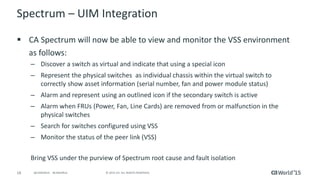
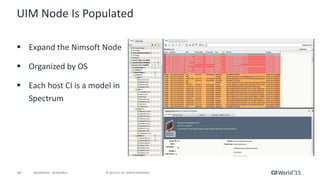
UIM Node/Folder Is Populated
 Expand the Nimsoft Node
 Organized by OS
 Each host CI is a model in
Spectrum
21 © 2015 CA. ALL RIGHTS RESERVED.@CAWORLD #CAWORLD
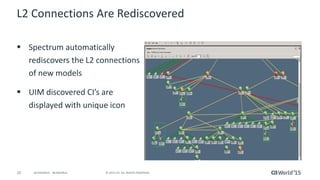
L2 Connections Are (Re) discovered
 Spectrum automatically
rediscovers the L2 connections
of new models
 UIM discovered CI’s are
displayed with unique icon
22 © 2015 CA. ALL RIGHTS RESERVED.@CAWORLD #CAWORLD
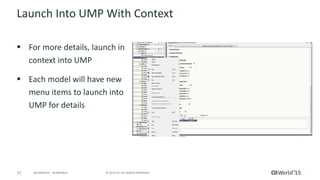
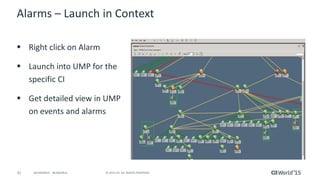
Launch Into UMP with Context
 For more details, launch in
context into UMP
 Each model will have new
menu items to launch into
UMP for details
23 © 2015 CA. ALL RIGHTS RESERVED.@CAWORLD #CAWORLD
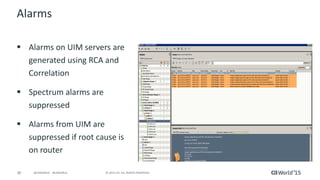
Alarms
 Alarms on UIM servers are
generated using RCA and
Correlation
 Spectrum alarms are
suppressed
 Alarms from UIM are
suppressed if root cause is
on router
24 © 2015 CA. ALL RIGHTS RESERVED.@CAWORLD #CAWORLD
Spectrum-UIM Integration- Live In Action
CA Spectrum UIM Bi-Directional
Integration
26 © 2015 CA. ALL RIGHTS RESERVED.@CAWORLD #CAWORLD
Intent
 Building out the vision will be iterative – need to make solution relevant and still
attractive to over 2000 existing customers across both tools
 Allow users to use the same console for managing their networks as well as
systems (and other IT domains)
– Drive fault, performance, flows alarm management from either tool
 Same, synchronized data across both consoles (Spectrum and UIM) with capability
to drive actions from either
 Leverage complementing capabilities from the other tool, providing higher value
to users (more than 1+1)
 Build on top of the current, existing solution – a step towards the broader strategy
27 © 2015 CA. ALL RIGHTS RESERVED.@CAWORLD #CAWORLD
Priority Use Case: Spectrum Alarms in UIM
 Theme: Leverage world-class Spectrum Fault, Impact Management
capabilities in UIM
 Allow UIM users, comfortable with their console, to drive infrastructure
fault and root cause from their current console
 UIM leverages the RCA information and suppresses symptomatic alarms –
reduction in alarms, in turn tickets
 So faster triage of problems and outages, while using the current console
– with more efficiency
28 © 2015 CA. ALL RIGHTS RESERVED.@CAWORLD #CAWORLD
Priority Use Case: Spectrum Network Inventory UIM
 Theme: Ensure operators/administrators can look at the same set of network
devices for fault & performance for faster triage
 With UIM performance management capabilities now beefed up, aligning
Spectrum with it (like eHealth)
 Ensure customers have ability to selectively pass network inventory from Spectrum
to UIM
 Use the inventory to drive performance metrics collection as well as
trends/reports on those devices
 Drives easier and faster triage of issues
– Both performance and fault data on the same set of devices across both tools
 Optional launch-in-context on both sides for deep-dive analysis
29 © 2015 CA. ALL RIGHTS RESERVED.@CAWORLD #CAWORLD
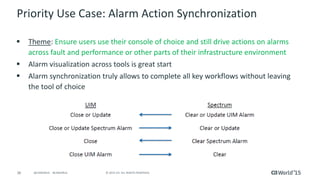
Priority Use Case: Alarm Action Synchronization
 Theme: Ensure users use their console of choice and still drive actions on alarms
across fault and performance or other parts of their infrastructure environment
 Alarm visualization across tools is great start
 Alarm synchronization truly allows to complete all key workflows without leaving
the tool of choice
30 © 2015 CA. ALL RIGHTS RESERVED.@CAWORLD #CAWORLD
Additional Use Cases Being Researched
 Embed alarm consoles in portals directly
 Domain specific inventory sync up across tools
 Expand RCA across storage, DB and other domains
 Enhance the scale of the solution
 Lot more……
31 © 2015 CA. ALL RIGHTS RESERVED.@CAWORLD #CAWORLD
Architecture
32 © 2015 CA. ALL RIGHTS RESERVED.@CAWORLD #CAWORLD
Current UIM to Spectrum Integration: View UIM
alarms in Spectrum
nas
Spectro
Server
SNMP
traps
NAS
lifecycle
alarms
alarm_new
alarm_close
alarm_update
snmpgtw
alarm_close
_gtw
alarm_close2
AlertMap EventDisp
Southbound
Interface
Spectrum
events
Nis db
Nisapi
(REST)
Pull
• Inventory pull triggered on new alarms
• Uses hostname in alarm as inventory key
• Attempts to match IP address
• Creates new model in Spectrum
UIM
Alarm
Spectrum
View
Approach: UIM alarms sent as SNMP traps via UIM snmpgtw to Spectrum southbound interface
Drilldown/cross launch
33 © 2015 CA. ALL RIGHTS RESERVED.@CAWORLD #CAWORLD
2-Way Architecture
UIM
View/Manage Alarms
Spectrum
View/Manage Alarms
Drilldown/cross launch
UDM Probe
Drilldown/cross launch
Enrich alarms
Inventory sync
RESTAPI
Integration
probe
OneClick
Server
EMS Probe
Spectrum and
EMS Alarms
NAS Probe
NAS Alarms
AlarmAPI
Loop prevention
Update/close alarms via EmsClient API
Query alarms via EmsClient API
Discovery
ServerReconcile
Query inventory changes
Query alarm changes
Open/update/close alarms
Create Spectrum alarms via EmsEvent API
34 © 2015 CA. ALL RIGHTS RESERVED.@CAWORLD #CAWORLD
Chassis 4
Inventory Sync
Goal: Synchronize inventory to ensure alarms go to the right Spectrum/UIM device
Serve
r 1
Disk
1
Serve
r 2
Disk
2
Server 1
Server 2
Server 4
Chassis 4
Spectrum UIM
Server 1
Disk 1
Server 2
Disk 2
Server 3
Disk 3
Inventory
Serve
r 3
Disk
3
Serve
r 1
Disk
1
Serve
r 2
Disk
2
Serve
r 3
Disk
3
Server
4
Serve
r 4
Server 1
Server 2
Server 4
Chassis 4
Spectrum UIM
Server 1
Disk 1
Server 2
Disk 2
Server 3
Disk 3
Server 4
InventoryBeforeAfter
Sync Sync
Chassis 4
Server
4
• IP devices only
• UIM Discovery Server correlates and
reconciles between Spectrum and
UIM
Key
35 © 2015 CA. ALL RIGHTS RESERVED.@CAWORLD #CAWORLD
Example Inventory and Alarm Sync
Serve
r 1
Disk
1
Serve
r 2
Disk
2
Server 1
Server 2
Server 4
Spectrum UIM
Server 1
Disk 1
Server 2
Disk 2
Server 3
Disk 3
Inventory
Server 1
S Server Alarm 1
U Server Alarm 1
U Disk Alarm 1
EventModel
U Server Alarm 3
Server 4
S Server Alarm 4
Spectrum UIM
Server 1
S Server Alarm 1
U Server Alarm 1
U Disk Alarm 1
Server 3
U Server Alarm 3
Server 4
S Server Alarm 4
Alarms
Serve
r 3
Disk
3
Server
4
Serve
r 1
Disk
1
Serve
r 2
Disk
2
Serve
r 3
Disk
3
Server
4
Serve
r 4
Server 1
Server 2
Server 4
Spectrum UIM
Server 1
Disk 1
Server 2
Disk 2
Server 3
Disk 3
Server 4
Inventory
Server 1
S Server Alarm 1
Server 4
S Server Alarm 4
Spectrum UIM
Server 1
U Server Alarm 1
U Disk Alarm 1
Server 3
U Server Alarm 3
Alarms
BeforeAfter
Sync Sync Sync
CA Spectrum Support for Software-defined
Networks (SDN) and Network Functions
Virtualization (NFV)
37 © 2015 CA. ALL RIGHTS RESERVED.@CAWORLD #CAWORLD
Motivation
 Extend Spectrum capabilities to support next-generation technologies
 New services will include physical as well as virtual elements
 Single console and tool to manage and monitor different infrastructure
types
 Leverage core Spectrum capabilities like discovery, topology, fault isolation
and root cause analysis
 Targeting 3 key use cases for customer/user value
38 © 2015 CA. ALL RIGHTS RESERVED.@CAWORLD #CAWORLD
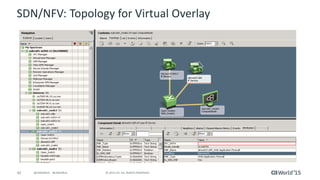
SDN/NFV Use Case #1
 Topology for Virtual Overlay
– Showcase the service chain, the virtual topology in Spectrum
 Also show the individual virtual elements and their status
– Use the Spectrum tried and tested discovery and modelling capabilities
– Visual representation vis-à-vis the other elements in the IT
infrastructure
 All this from the same console, Spectrum OneClick
39 © 2015 CA. ALL RIGHTS RESERVED.@CAWORLD #CAWORLD
SDN/NFV: Topology for Virtual Overlay
40 © 2015 CA. ALL RIGHTS RESERVED.@CAWORLD #CAWORLD
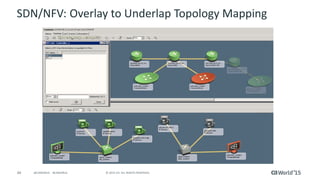
SDN/NFV Use Case #2
 How does the virtual overlay map to the physical
infrastructure (underlay)?
– The most critical part for understanding and triaging problems
– Holistic topology of the virtual (overlay) environment with the mapping
to the physical (underlay) infrastructure, the compute nodes
– Will help visually see the services and their physical dependencies
 Facilitate identifying bottleneck and then take appropriate actions on those
41 © 2015 CA. ALL RIGHTS RESERVED.@CAWORLD #CAWORLD
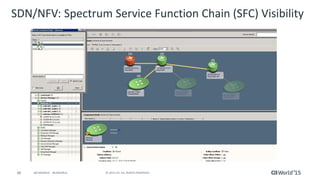
Complete End to End Visibility in Single View
SFC View, gives a
logical representation
of typical flow of
packets defined in
that SFC
42 © 2015 CA. ALL RIGHTS RESERVED.@CAWORLD #CAWORLD
SDN/NFV Use Case #3
 Fault isolation
– What Spectrum does best, pin point the problem/s, minimize the
number of actionable alarms
– Use relationships and information acquired through implementation of
UC1 & UC2
– Which VM, which tunnel, which logical and/or physical entity is
affected
– In lieu of that, which users/subscribers are affected
43 © 2015 CA. ALL RIGHTS RESERVED.@CAWORLD #CAWORLD
Root Cause Analysis & Fault Management
Spectrum SDN/NFV Support Demo
CA Spectrum Reporting Improvements
46 © 2015 CA. ALL RIGHTS RESERVED.@CAWORLD #CAWORLD
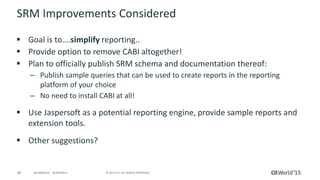
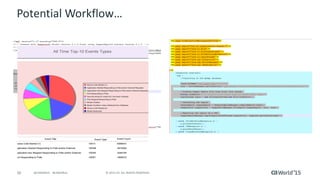
SRM Refresh..
 Goal is to….simplify reporting..
 Provide option to remove CABI altogether!
 Plan to officially publish SRM schema and documentation thereof:
– Publish sample queries that can be used to create reports in the reporting
platform of your choice
– No need to install CABI at all!
 Use Jaspersoft as a potential reporting engine, provide sample reports and
extension tools.
47 © 2015 CA. ALL RIGHTS RESERVED.@CAWORLD #CAWORLD
Work in Progress..
48 © 2015 CA. ALL RIGHTS RESERVED.@CAWORLD #CAWORLD
Schema & Table Documentation Structure Review..
49 © 2015 CA. ALL RIGHTS RESERVED.@CAWORLD #CAWORLD
Jaspersoft Performance Benchmarking
50 © 2015 CA. ALL RIGHTS RESERVED.@CAWORLD #CAWORLD
Jaspersoft Reporting – Live In Action
Making CA Spectrum More Secure
CA Spectrum: Notified Vulnerability
Assessment:
The Three Step Approach
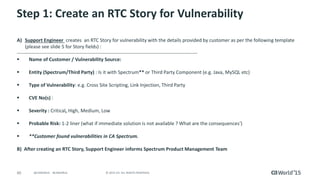
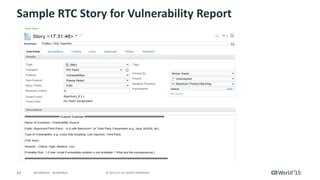
Step 1: Create an RTC Story for vulnerability
A) Support Engineer creates an RTC Story for vulnerability with the details provided by customer as per the
following template (please see slide 5 for Story fields) :
----------------------------------------------------------------------------------------------------------------
Name of Customer / Vulnerability Source:
Entity (Spectrum/Third Party) : Is it with Spectrum** or Third Party Component (e.g. Java, MySQL etc)
Type of Vulnerability: e.g. Cross Site Scripting, Link Injection, Third Party
CVE No(s) :
Severity : Critical, High, Medium, Low
Probable Risk: 1-2 liner (what if immediate solution is not available ? What are the consequences‘)
**Customer found vulnerabilities in CA Spectrum.
B) After creating an RTC Story, Support Engineer informs Spectrum Product Management Team
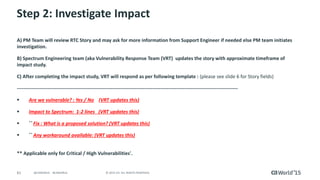
Step 2: Investigate Impact
A) PM Team will review RTC Story and may ask for more information from Support Engineer if needed else PM
team initiates investigation.
B) Spectrum Engineering team (aka Vulnerability Response Team (VRT) updates the story with approximate
timeframe of impact study.
C) After completing the impact study, VRT will respond as per following template : (please see slide 6 for Story
fields)
-----------------------------------------------------------------------------------------------------------------------------------------
Are we vulnerable? : Yes / No (VRT updates this)
Impact to Spectrum: 1-2 lines (VRT updates this)
** Fix : What is a proposed solution? (VRT updates this)
** Any workaround available: (VRT updates this)
** Applicable only for Critical / High Vulnerabilities'.
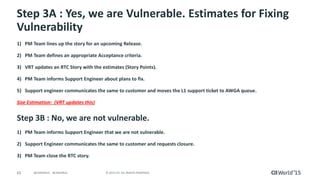
Step 3A : Yes, we are vulnerable. Estimates for fixing vulnerability
1) PM Team lines up the story for an upcoming Release.
2) PM Team defines an appropriate Acceptance criteria.
3) VRT updates an RTC Story with the estimates (Story Points).
4) PM Team informs Support Engineer about plans to fix.
5) Support engineer communicates the same to customer and moves the L1 support ticket to AWGA queue.
Size Estimation: (VRT updates this)
Step 3B : No, we are not vulnerable.
1) PM Team informs Support Engineer that we are not vulnerable.
2) Support Engineer communicates the same to customer and requests closure.
3) PM Team close the RTC story.
Sample RTC Story for Vulnerability Report
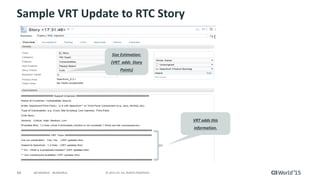
Sample VRT Update to RTC Story
Size Estimation:
(VRT adds Story
Points)
VRT adds this
information.
58 © 2015 CA. ALL RIGHTS RESERVED.@CAWORLD #CAWORLD
Proactive Strengthening For Security Vulnerabilities
 Research new OS versions and plan to support those
 Review new versions of 3rd Party Components – Java, MySQL, PKI, Apache
etc
 Product Managers a lot more aggressive and conscious about
vulnerabilities
 Helping customers and partners run and evaluate penetration tests
 Recent PEN tests did not uncover any critical or high impacting items –
only low
59 © 2015 CA. ALL RIGHTS RESERVED.@CAWORLD #CAWORLD
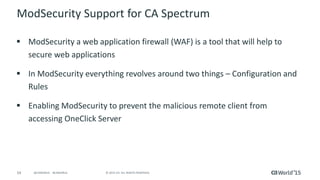
ModSecurity Support for CA Spectrum
 ModSecurity a web application firewall (WAF) is a tool that will help to
secure web applications
 In ModSecurity everything revolves around two things – Configuration and
Rules
 Enabling ModSecurity to prevent the malicious remote client from
accessing OneClick Server
60 © 2015 CA. ALL RIGHTS RESERVED.@CAWORLD #CAWORLD
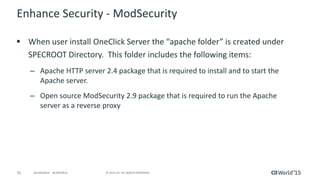
Enhance Security - ModSecurity
 When user install OneClick Server the “apache folder” is created under
SPECROOT Directory. This folder includes the following items:
– Apache HTTP server 2.4 package that is required to install and to start the
Apache server.
– Open source ModSecurity 2.9 package that is required to run the Apache
server as a reverse proxy
61 © 2015 CA. ALL RIGHTS RESERVED.@CAWORLD #CAWORLD
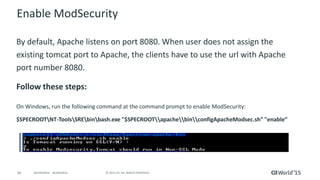
Enable ModSecurity
By default, Apache listens on port 8080. When user does not assign the
existing tomcat port to Apache, the clients have to use the url with Apache
port number 8080.
Follow these steps:
On Windows, run the following command at the command prompt to enable ModSecurity:
$SPECROOTNT-ToolsSREbinbash.exe "$SPECROOTapachebinconfigApacheModsec.sh" "enable“
62 © 2015 CA. ALL RIGHTS RESERVED.@CAWORLD #CAWORLD
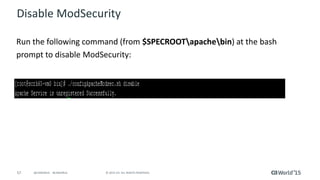
Disable ModSecurity
Run the following command (from $SPECROOTapachebin) at the bash
prompt to disable ModSecurity:
63 © 2015 CA. ALL RIGHTS RESERVED.@CAWORLD #CAWORLD
ModSecurity Logs
 When ModSecurity is enabled, the following types of log files are
generated:
- Install Log: The "install.log" is created when you first enable ModSecurity using the
script
- Error Log: The "error.log" file is generated when an error or any malicious attempt is
encountered on OneClick Server
- Audit Log: The "audit.log" file contains the detailed information about all of the HTTP
client intrusions that are detected by ModSecurity
- Debug Log: The "debug.log" file logs all of the ModSecurity errors and exceptions that
are useful for debugging
ModSecurity – Live In Action
65 © 2015 CA. ALL RIGHTS RESERVED.@CAWORLD #CAWORLD
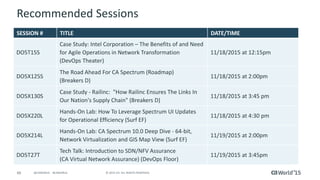
Recommended Sessions
SESSION # TITLE DATE/TIME
DO5T15S
Case Study: Intel Corporation – The Benefits of and Need
for Agile Operations in Network Transformation
(DevOps Theater)
11/18/2015 at 12:15pm
DO5X125S
The Road Ahead For CA Spectrum (Roadmap)
(Breakers D)
11/18/2015 at 2:00pm
DO5X130S
Case Study - Railinc: "How Railinc Ensures The Links In
Our Nation's Supply Chain" (Breakers D)
11/18/2015 at 3:45 pm
DO5X220L
Hands-On Lab: How To Leverage Spectrum UI Updates
for Operational Efficiency (Surf EF)
11/18/2015 at 4:30 pm
DO5X214L
Hands-On Lab: CA Spectrum 10.0 Deep Dive - 64-bit,
Network Virtualization and GIS Map View (Surf EF)
11/19/2015 at 2:00pm
DO5T27T
Tech Talk: Introduction to SDN/NFV Assurance
(CA Virtual Network Assurance) (DevOps Floor)
11/19/2015 at 3:45pm
66 © 2015 CA. ALL RIGHTS RESERVED.@CAWORLD #CAWORLD
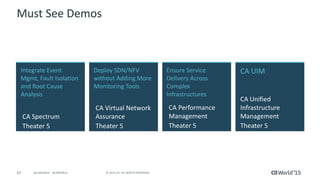
Must See Demos
Integrate Event
Mgmt, Fault Isolation
and Root Cause
Analysis
CA Spectrum
Theater 5
CA UIM
CA Unified
Infrastructure
Management
Theater 5
Deploy SDN/NFV
without Adding More
Monitoring Tools
CA Virtual Network
Assurance
Theater 5
Ensure Service
Delivery Across
Complex
Infrastructures
CA Performance
Management
Theater 5
67 © 2015 CA. ALL RIGHTS RESERVED.@CAWORLD #CAWORLD
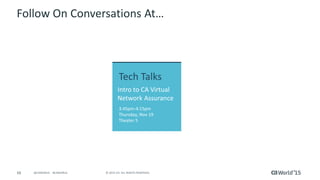
Follow On Conversations At…
Tech Talks
Intro to CA Virtual
Network Assurance
3:45pm-4:15pm
Thursday, Nov 19
Theater 5
68 © 2015 CA. ALL RIGHTS RESERVED.@CAWORLD #CAWORLD
Q & A
69 © 2015 CA. ALL RIGHTS RESERVED.@CAWORLD #CAWORLD
For More Information
To learn more, please visit:
http://cainc.to/Nv2VOe
CA World ’15

CA Spectrum® Just Keeps Getting Better and Better

  • 1.
    Pre Conference Education: CASpectrum Just Keeps Getting Better and Better Kiran Diwakar DevOps: Agile Ops CA Technologies Director, Product Management DO5X88E @Kiran_Diwakar #CAWorld Jayakrishna Karicharla (JK) CA Technologies Principal Software Engineer
  • 2.
    2 © 2015CA. ALL RIGHTS RESERVED.@CAWORLD #CAWORLD © 2015 CA. All rights reserved. All trademarks referenced herein belong to their respective companies. The content provided in this CA World 2015 presentation is intended for informational purposes only and does not form any type of warranty. The information provided by a CA partner and/or CA customer has not been reviewed for accuracy by CA. For Informational Purposes Only Terms of this Presentation
  • 3.
    3 © 2015CA. ALL RIGHTS RESERVED.@CAWORLD #CAWORLD Abstract Recent years have seen more substantial releases from Spectrum. Join us in this session to explore some of the new features, such as Spectrum 64 bit, the new Web Client for Operators, Software-Defined Networks (SDN) support, Bi-directional integration with CA Unified Infrastructure Management, support for ModSecurity, and simplified reporting. This will be a combination of slides, demos and hands-on practice. Kiran Diwakar Jayakrishna Karicharla (JK) CA Technologies
  • 4.
    4 © 2015CA. ALL RIGHTS RESERVED.@CAWORLD #CAWORLD Agenda CA SPECTRUM 64-BIT DETAILS CA SPECTRUM – UIM INTEGRATION CA SPECTRUM SUPPORT FOR SDN AND NFV CA SPECTRUM REPORTING IMPROVEMENTS - JASPERSOFT MAKING CA SPECTRUM MORE SECURE 1 2 3 4 5
  • 5.
    CA Spectrum A CriticalComponent of the CA IM Portfolio
  • 6.
    6 © 2015CA. ALL RIGHTS RESERVED.@CAWORLD #CAWORLD CA Spectrum  Only fault management component in the portfolio  1000s of enterprise customers globally, monitoring mission critical infrastructure components  Complementing the capabilities of CA UIM aka Nimsoft and strengthening those capabilities through the bi-directional integration  Extensive work ongoing for UI Refresh  Extensive work initiated for the Reporting Platform Refresh  New technology support… Join us for the roadmap session to know more...
  • 7.
  • 8.
    8 © 2015CA. ALL RIGHTS RESERVED.@CAWORLD #CAWORLD Overview  Help large scale Spectrum delpoyments to: – Grow Spectrum scale without fear of hitting memory ceiling - model more devices on a single landscape – Help consolidate multiple landscapes/servers – Simplify management and reduce TCO
  • 9.
    9 © 2015CA. ALL RIGHTS RESERVED.@CAWORLD #CAWORLD How Was x64 Done…  Data structure revamp and consolidation of pointer arithmetic to hold 64-bit pointers.  Deprecated unused code without affecting core functionality.  Max number of resources are being planned to be increased to better utilize them.  1M model maximum capacity  10K-15K device support in single landscape
  • 10.
    10 © 2015CA. ALL RIGHTS RESERVED.@CAWORLD #CAWORLD Extensive Performance Benchmarking Spectrum SS KPI Normal Peak Traps 100/sec 1000/sec Events 100/sec 1000/sec Alarms 1 update/sec 10 /sec for a period of 1 minute Devices 10K Models 1 Million SS Activation < 30 mins
  • 11.
    11 © 2015CA. ALL RIGHTS RESERVED.@CAWORLD #CAWORLD OneClick Performance Benchmarking Spectrum OC KPI Description Component Load Measure Win Lin Sol OC Client launch time Time taken to launch the Oneclick Console right from clicking the “Start Console” in OC Admin page to load the (Devices, Models, Alarms, GCs, etc) until some operation can be performed using the OC Client. Complete Alarms to be loaded in alarms Tab. o 40K Devices o 2.5M Models o 400 GC’s, each with 30K Models o 100K Alarms 2 Minutes 2 Minutes 20 Seconds 2 Minutes 10 Seconds OC Client Launch time –EEM and SSL enabled Same as above + EEM + SSL Same as above 3 minutes TBD TBD One Click Server startup time Time taken to start the OneClick Server (Tomcat) o 40K Devices o 2.5M Models o 400 GC’s, each with 30K Models o 100K Alarms 5 minutes 0:01:15 0:01:05 Time taken to search 50K elements through locator search. 30 secs 56-60 secs 1 Minute 15 Seconds Time taken to createrender 50K elements through Global Collection (Static & Dynamic). 30 secs Creation Time: 2-5 minutes Rendering Time: 56- 60 Sec Creation Time: 2-5 minutes Rendering Time: 50- 55 Sec Time taken to locate the model using search box 3 secs 6 – 10 Sec 6 – 10 Sec Topology Rendering Time taken to render the topology o Topology with 10K devices and 1M Models 30 secs 25 – 30 Sec 25 – 30 sec Rendering the Information View Time taken to render the Information view for Manager Models o Managers with dynamic information tables 10 secs 5 -10 Sec 5 -10 Sec Time taken for NCM Global Sync o Discover 2K NCM enabled devices 90 mins for 2K devices. 59 Minutes for 2K Devices with 25K Lines 59 Minutes for 2K Devices with 25K Lines Time taken to upload device configuration file – TFTP o Upload a file with 50K lines – TFPT 5 mins. Cannot be done due to lack of environment. Cannot be done due to lack of environment. Autodiscovery Time taken to discover multiple subnets (1500 devices per discovery) o Discover 10000 devices 1500 per configuration 20 mins for discovering 1500 devices ( 15K models) Range 1 - 0:10:41 Range 2 - 0:10:41 Range 3 - 0:09:54 Range 4 - 1:09:36 Range 5 - 0:39:29 Note: Discovery Only Range 1 - 0:01:02 Range 2 - 0:01:05 Range 3 - 0:03:16 Range 4 - 0:57:07 Range 5 - 0:03:47 Note: Discovery Only Modeling Gateway Time taken to load the models through modeling gateway o Load 5000 devices (50K models) 6 hrs. 3-4 hrs. 3-4 hrs. Search Operations o Query is run when overall 3M models are available in OC NCM Global Sync
  • 12.
    12 © 2015CA. ALL RIGHTS RESERVED.@CAWORLD #CAWORLD CA Spectrum 64-bit Support – Caveats  64-bit clients are required to take advantage of the increased capacity of 64-bit Spectrum 10  As a general rule, the maximum heap size of 32-bit clients on Windows systems will range from 1.4 to 1.6G of memory, while on 32-bit Solaris the address space is limited to 2G – If this is exceeded the client will no longer launch until a 64-bit client is utilized  Spectrum 10 does not officially support 32-bit java clients as it has not been QA tested
  • 13.
    13 © 2015CA. ALL RIGHTS RESERVED.@CAWORLD #CAWORLD Upgrade/Migration Considerations  Upgrade as-is, same number of SS  Migrate data as-is, same number of SS  Consolidation of SS, leverage scale improvements best practice – MLS (and key servers) should be upgraded only  The servers with data, like Archive Manager etc – Use Modelling Gateway to converge the remaining SS  Export from multiple SS & import into 1 new scaled SS
  • 14.
    CA Spectrum x64– Live In Action
  • 15.
    CA Spectrum –CA UIM Integration
  • 16.
    16 © 2015CA. ALL RIGHTS RESERVED.@CAWORLD #CAWORLD Overview Current Spectrum – UIM Integration  Spectrum is integrated with Unified Infrastructure Management (UIM) for managing Servers and Virtual environments (VMware)  UIM discovered CI’s (Servers, VM elements) are synchronized with Spectrum and corresponding models are created  Spectrum powerful RCA/FI is leveraged to identify root cause and suppress symptomatic alarms
  • 17.
    17 © 2015CA. ALL RIGHTS RESERVED.@CAWORLD #CAWORLD Workflows
  • 18.
    18 © 2015CA. ALL RIGHTS RESERVED.@CAWORLD #CAWORLD Configure UIM Integration  Enable/Disable integration  Test the connection to UIM server  Enabling Virtualization will permanently disable VHM Manager
  • 19.
    19 © 2015CA. ALL RIGHTS RESERVED.@CAWORLD #CAWORLD What Happens After Enabling Integration?  Spectrum contacts UIM Server  Retrieves all server CI’s discovered by UIM  Creates/augments models in Spectrum for the corresponding CI’s  Rediscovers the L2 connectivity for these new models  Establishes connections in Spectrum topology
  • 20.
    20 © 2015CA. ALL RIGHTS RESERVED.@CAWORLD #CAWORLD UIM Node/Folder Is Populated  Expand the Nimsoft Node  Organized by OS  Each host CI is a model in Spectrum
  • 21.
    21 © 2015CA. ALL RIGHTS RESERVED.@CAWORLD #CAWORLD L2 Connections Are (Re) discovered  Spectrum automatically rediscovers the L2 connections of new models  UIM discovered CI’s are displayed with unique icon
  • 22.
    22 © 2015CA. ALL RIGHTS RESERVED.@CAWORLD #CAWORLD Launch Into UMP with Context  For more details, launch in context into UMP  Each model will have new menu items to launch into UMP for details
  • 23.
    23 © 2015CA. ALL RIGHTS RESERVED.@CAWORLD #CAWORLD Alarms  Alarms on UIM servers are generated using RCA and Correlation  Spectrum alarms are suppressed  Alarms from UIM are suppressed if root cause is on router
  • 24.
    24 © 2015CA. ALL RIGHTS RESERVED.@CAWORLD #CAWORLD Spectrum-UIM Integration- Live In Action
  • 25.
    CA Spectrum UIMBi-Directional Integration
  • 26.
    26 © 2015CA. ALL RIGHTS RESERVED.@CAWORLD #CAWORLD Intent  Building out the vision will be iterative – need to make solution relevant and still attractive to over 2000 existing customers across both tools  Allow users to use the same console for managing their networks as well as systems (and other IT domains) – Drive fault, performance, flows alarm management from either tool  Same, synchronized data across both consoles (Spectrum and UIM) with capability to drive actions from either  Leverage complementing capabilities from the other tool, providing higher value to users (more than 1+1)  Build on top of the current, existing solution – a step towards the broader strategy
  • 27.
    27 © 2015CA. ALL RIGHTS RESERVED.@CAWORLD #CAWORLD Priority Use Case: Spectrum Alarms in UIM  Theme: Leverage world-class Spectrum Fault, Impact Management capabilities in UIM  Allow UIM users, comfortable with their console, to drive infrastructure fault and root cause from their current console  UIM leverages the RCA information and suppresses symptomatic alarms – reduction in alarms, in turn tickets  So faster triage of problems and outages, while using the current console – with more efficiency
  • 28.
    28 © 2015CA. ALL RIGHTS RESERVED.@CAWORLD #CAWORLD Priority Use Case: Spectrum Network Inventory UIM  Theme: Ensure operators/administrators can look at the same set of network devices for fault & performance for faster triage  With UIM performance management capabilities now beefed up, aligning Spectrum with it (like eHealth)  Ensure customers have ability to selectively pass network inventory from Spectrum to UIM  Use the inventory to drive performance metrics collection as well as trends/reports on those devices  Drives easier and faster triage of issues – Both performance and fault data on the same set of devices across both tools  Optional launch-in-context on both sides for deep-dive analysis
  • 29.
    29 © 2015CA. ALL RIGHTS RESERVED.@CAWORLD #CAWORLD Priority Use Case: Alarm Action Synchronization  Theme: Ensure users use their console of choice and still drive actions on alarms across fault and performance or other parts of their infrastructure environment  Alarm visualization across tools is great start  Alarm synchronization truly allows to complete all key workflows without leaving the tool of choice
  • 30.
    30 © 2015CA. ALL RIGHTS RESERVED.@CAWORLD #CAWORLD Additional Use Cases Being Researched  Embed alarm consoles in portals directly  Domain specific inventory sync up across tools  Expand RCA across storage, DB and other domains  Enhance the scale of the solution  Lot more……
  • 31.
    31 © 2015CA. ALL RIGHTS RESERVED.@CAWORLD #CAWORLD Architecture
  • 32.
    32 © 2015CA. ALL RIGHTS RESERVED.@CAWORLD #CAWORLD Current UIM to Spectrum Integration: View UIM alarms in Spectrum nas Spectro Server SNMP traps NAS lifecycle alarms alarm_new alarm_close alarm_update snmpgtw alarm_close _gtw alarm_close2 AlertMap EventDisp Southbound Interface Spectrum events Nis db Nisapi (REST) Pull • Inventory pull triggered on new alarms • Uses hostname in alarm as inventory key • Attempts to match IP address • Creates new model in Spectrum UIM Alarm Spectrum View Approach: UIM alarms sent as SNMP traps via UIM snmpgtw to Spectrum southbound interface Drilldown/cross launch
  • 33.
    33 © 2015CA. ALL RIGHTS RESERVED.@CAWORLD #CAWORLD 2-Way Architecture UIM View/Manage Alarms Spectrum View/Manage Alarms Drilldown/cross launch UDM Probe Drilldown/cross launch Enrich alarms Inventory sync RESTAPI Integration probe OneClick Server EMS Probe Spectrum and EMS Alarms NAS Probe NAS Alarms AlarmAPI Loop prevention Update/close alarms via EmsClient API Query alarms via EmsClient API Discovery ServerReconcile Query inventory changes Query alarm changes Open/update/close alarms Create Spectrum alarms via EmsEvent API
  • 34.
    34 © 2015CA. ALL RIGHTS RESERVED.@CAWORLD #CAWORLD Chassis 4 Inventory Sync Goal: Synchronize inventory to ensure alarms go to the right Spectrum/UIM device Serve r 1 Disk 1 Serve r 2 Disk 2 Server 1 Server 2 Server 4 Chassis 4 Spectrum UIM Server 1 Disk 1 Server 2 Disk 2 Server 3 Disk 3 Inventory Serve r 3 Disk 3 Serve r 1 Disk 1 Serve r 2 Disk 2 Serve r 3 Disk 3 Server 4 Serve r 4 Server 1 Server 2 Server 4 Chassis 4 Spectrum UIM Server 1 Disk 1 Server 2 Disk 2 Server 3 Disk 3 Server 4 InventoryBeforeAfter Sync Sync Chassis 4 Server 4 • IP devices only • UIM Discovery Server correlates and reconciles between Spectrum and UIM Key
  • 35.
    35 © 2015CA. ALL RIGHTS RESERVED.@CAWORLD #CAWORLD Example Inventory and Alarm Sync Serve r 1 Disk 1 Serve r 2 Disk 2 Server 1 Server 2 Server 4 Spectrum UIM Server 1 Disk 1 Server 2 Disk 2 Server 3 Disk 3 Inventory Server 1 S Server Alarm 1 U Server Alarm 1 U Disk Alarm 1 EventModel U Server Alarm 3 Server 4 S Server Alarm 4 Spectrum UIM Server 1 S Server Alarm 1 U Server Alarm 1 U Disk Alarm 1 Server 3 U Server Alarm 3 Server 4 S Server Alarm 4 Alarms Serve r 3 Disk 3 Server 4 Serve r 1 Disk 1 Serve r 2 Disk 2 Serve r 3 Disk 3 Server 4 Serve r 4 Server 1 Server 2 Server 4 Spectrum UIM Server 1 Disk 1 Server 2 Disk 2 Server 3 Disk 3 Server 4 Inventory Server 1 S Server Alarm 1 Server 4 S Server Alarm 4 Spectrum UIM Server 1 U Server Alarm 1 U Disk Alarm 1 Server 3 U Server Alarm 3 Alarms BeforeAfter Sync Sync Sync
  • 36.
    CA Spectrum Supportfor Software-defined Networks (SDN) and Network Functions Virtualization (NFV)
  • 37.
    37 © 2015CA. ALL RIGHTS RESERVED.@CAWORLD #CAWORLD Motivation  Extend Spectrum capabilities to support next-generation technologies  New services will include physical as well as virtual elements  Single console and tool to manage and monitor different infrastructure types  Leverage core Spectrum capabilities like discovery, topology, fault isolation and root cause analysis  Targeting 3 key use cases for customer/user value
  • 38.
    38 © 2015CA. ALL RIGHTS RESERVED.@CAWORLD #CAWORLD SDN/NFV Use Case #1  Topology for Virtual Overlay – Showcase the service chain, the virtual topology in Spectrum  Also show the individual virtual elements and their status – Use the Spectrum tried and tested discovery and modelling capabilities – Visual representation vis-à-vis the other elements in the IT infrastructure  All this from the same console, Spectrum OneClick
  • 39.
    39 © 2015CA. ALL RIGHTS RESERVED.@CAWORLD #CAWORLD SDN/NFV: Topology for Virtual Overlay
  • 40.
    40 © 2015CA. ALL RIGHTS RESERVED.@CAWORLD #CAWORLD SDN/NFV Use Case #2  How does the virtual overlay map to the physical infrastructure (underlay)? – The most critical part for understanding and triaging problems – Holistic topology of the virtual (overlay) environment with the mapping to the physical (underlay) infrastructure, the compute nodes – Will help visually see the services and their physical dependencies  Facilitate identifying bottleneck and then take appropriate actions on those
  • 41.
    41 © 2015CA. ALL RIGHTS RESERVED.@CAWORLD #CAWORLD Complete End to End Visibility in Single View SFC View, gives a logical representation of typical flow of packets defined in that SFC
  • 42.
    42 © 2015CA. ALL RIGHTS RESERVED.@CAWORLD #CAWORLD SDN/NFV Use Case #3  Fault isolation – What Spectrum does best, pin point the problem/s, minimize the number of actionable alarms – Use relationships and information acquired through implementation of UC1 & UC2 – Which VM, which tunnel, which logical and/or physical entity is affected – In lieu of that, which users/subscribers are affected
  • 43.
    43 © 2015CA. ALL RIGHTS RESERVED.@CAWORLD #CAWORLD Root Cause Analysis & Fault Management
  • 44.
  • 45.
  • 46.
    46 © 2015CA. ALL RIGHTS RESERVED.@CAWORLD #CAWORLD SRM Refresh..  Goal is to….simplify reporting..  Provide option to remove CABI altogether!  Plan to officially publish SRM schema and documentation thereof: – Publish sample queries that can be used to create reports in the reporting platform of your choice – No need to install CABI at all!  Use Jaspersoft as a potential reporting engine, provide sample reports and extension tools.
  • 47.
    47 © 2015CA. ALL RIGHTS RESERVED.@CAWORLD #CAWORLD Work in Progress..
  • 48.
    48 © 2015CA. ALL RIGHTS RESERVED.@CAWORLD #CAWORLD Schema & Table Documentation Structure Review..
  • 49.
    49 © 2015CA. ALL RIGHTS RESERVED.@CAWORLD #CAWORLD Jaspersoft Performance Benchmarking
  • 50.
    50 © 2015CA. ALL RIGHTS RESERVED.@CAWORLD #CAWORLD Jaspersoft Reporting – Live In Action
  • 51.
    Making CA SpectrumMore Secure
  • 52.
    CA Spectrum: NotifiedVulnerability Assessment: The Three Step Approach
  • 53.
    Step 1: Createan RTC Story for vulnerability A) Support Engineer creates an RTC Story for vulnerability with the details provided by customer as per the following template (please see slide 5 for Story fields) : ---------------------------------------------------------------------------------------------------------------- Name of Customer / Vulnerability Source: Entity (Spectrum/Third Party) : Is it with Spectrum** or Third Party Component (e.g. Java, MySQL etc) Type of Vulnerability: e.g. Cross Site Scripting, Link Injection, Third Party CVE No(s) : Severity : Critical, High, Medium, Low Probable Risk: 1-2 liner (what if immediate solution is not available ? What are the consequences‘) **Customer found vulnerabilities in CA Spectrum. B) After creating an RTC Story, Support Engineer informs Spectrum Product Management Team
  • 54.
    Step 2: InvestigateImpact A) PM Team will review RTC Story and may ask for more information from Support Engineer if needed else PM team initiates investigation. B) Spectrum Engineering team (aka Vulnerability Response Team (VRT) updates the story with approximate timeframe of impact study. C) After completing the impact study, VRT will respond as per following template : (please see slide 6 for Story fields) ----------------------------------------------------------------------------------------------------------------------------------------- Are we vulnerable? : Yes / No (VRT updates this) Impact to Spectrum: 1-2 lines (VRT updates this) ** Fix : What is a proposed solution? (VRT updates this) ** Any workaround available: (VRT updates this) ** Applicable only for Critical / High Vulnerabilities'.
  • 55.
    Step 3A :Yes, we are vulnerable. Estimates for fixing vulnerability 1) PM Team lines up the story for an upcoming Release. 2) PM Team defines an appropriate Acceptance criteria. 3) VRT updates an RTC Story with the estimates (Story Points). 4) PM Team informs Support Engineer about plans to fix. 5) Support engineer communicates the same to customer and moves the L1 support ticket to AWGA queue. Size Estimation: (VRT updates this) Step 3B : No, we are not vulnerable. 1) PM Team informs Support Engineer that we are not vulnerable. 2) Support Engineer communicates the same to customer and requests closure. 3) PM Team close the RTC story.
  • 56.
    Sample RTC Storyfor Vulnerability Report
  • 57.
    Sample VRT Updateto RTC Story Size Estimation: (VRT adds Story Points) VRT adds this information.
  • 58.
    58 © 2015CA. ALL RIGHTS RESERVED.@CAWORLD #CAWORLD Proactive Strengthening For Security Vulnerabilities  Research new OS versions and plan to support those  Review new versions of 3rd Party Components – Java, MySQL, PKI, Apache etc  Product Managers a lot more aggressive and conscious about vulnerabilities  Helping customers and partners run and evaluate penetration tests  Recent PEN tests did not uncover any critical or high impacting items – only low
  • 59.
    59 © 2015CA. ALL RIGHTS RESERVED.@CAWORLD #CAWORLD ModSecurity Support for CA Spectrum  ModSecurity a web application firewall (WAF) is a tool that will help to secure web applications  In ModSecurity everything revolves around two things – Configuration and Rules  Enabling ModSecurity to prevent the malicious remote client from accessing OneClick Server
  • 60.
    60 © 2015CA. ALL RIGHTS RESERVED.@CAWORLD #CAWORLD Enhance Security - ModSecurity  When user install OneClick Server the “apache folder” is created under SPECROOT Directory. This folder includes the following items: – Apache HTTP server 2.4 package that is required to install and to start the Apache server. – Open source ModSecurity 2.9 package that is required to run the Apache server as a reverse proxy
  • 61.
    61 © 2015CA. ALL RIGHTS RESERVED.@CAWORLD #CAWORLD Enable ModSecurity By default, Apache listens on port 8080. When user does not assign the existing tomcat port to Apache, the clients have to use the url with Apache port number 8080. Follow these steps: On Windows, run the following command at the command prompt to enable ModSecurity: $SPECROOTNT-ToolsSREbinbash.exe "$SPECROOTapachebinconfigApacheModsec.sh" "enable“
  • 62.
    62 © 2015CA. ALL RIGHTS RESERVED.@CAWORLD #CAWORLD Disable ModSecurity Run the following command (from $SPECROOTapachebin) at the bash prompt to disable ModSecurity:
  • 63.
    63 © 2015CA. ALL RIGHTS RESERVED.@CAWORLD #CAWORLD ModSecurity Logs  When ModSecurity is enabled, the following types of log files are generated: - Install Log: The "install.log" is created when you first enable ModSecurity using the script - Error Log: The "error.log" file is generated when an error or any malicious attempt is encountered on OneClick Server - Audit Log: The "audit.log" file contains the detailed information about all of the HTTP client intrusions that are detected by ModSecurity - Debug Log: The "debug.log" file logs all of the ModSecurity errors and exceptions that are useful for debugging
  • 64.
  • 65.
    65 © 2015CA. ALL RIGHTS RESERVED.@CAWORLD #CAWORLD Recommended Sessions SESSION # TITLE DATE/TIME DO5T15S Case Study: Intel Corporation – The Benefits of and Need for Agile Operations in Network Transformation (DevOps Theater) 11/18/2015 at 12:15pm DO5X125S The Road Ahead For CA Spectrum (Roadmap) (Breakers D) 11/18/2015 at 2:00pm DO5X130S Case Study - Railinc: "How Railinc Ensures The Links In Our Nation's Supply Chain" (Breakers D) 11/18/2015 at 3:45 pm DO5X220L Hands-On Lab: How To Leverage Spectrum UI Updates for Operational Efficiency (Surf EF) 11/18/2015 at 4:30 pm DO5X214L Hands-On Lab: CA Spectrum 10.0 Deep Dive - 64-bit, Network Virtualization and GIS Map View (Surf EF) 11/19/2015 at 2:00pm DO5T27T Tech Talk: Introduction to SDN/NFV Assurance (CA Virtual Network Assurance) (DevOps Floor) 11/19/2015 at 3:45pm
  • 66.
    66 © 2015CA. ALL RIGHTS RESERVED.@CAWORLD #CAWORLD Must See Demos Integrate Event Mgmt, Fault Isolation and Root Cause Analysis CA Spectrum Theater 5 CA UIM CA Unified Infrastructure Management Theater 5 Deploy SDN/NFV without Adding More Monitoring Tools CA Virtual Network Assurance Theater 5 Ensure Service Delivery Across Complex Infrastructures CA Performance Management Theater 5
  • 67.
    67 © 2015CA. ALL RIGHTS RESERVED.@CAWORLD #CAWORLD Follow On Conversations At… Tech Talks Intro to CA Virtual Network Assurance 3:45pm-4:15pm Thursday, Nov 19 Theater 5
  • 68.
    68 © 2015CA. ALL RIGHTS RESERVED.@CAWORLD #CAWORLD Q & A
  • 69.
    69 © 2015CA. ALL RIGHTS RESERVED.@CAWORLD #CAWORLD For More Information To learn more, please visit: http://cainc.to/Nv2VOe CA World ’15