Välkommen!
IBM
Introduction to IBM Connections
Föreläsare:
Alan Hamilton, IBM Collaboration Solutions
@alanghamilton
© 2013 IBM Corporation
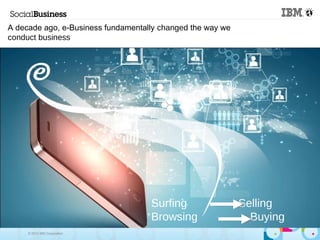
A decade ago, e-Business fundamentally changed the way we
conduct business
Surfing Selling
Browsing Buying
© 2013 IBM Corporation
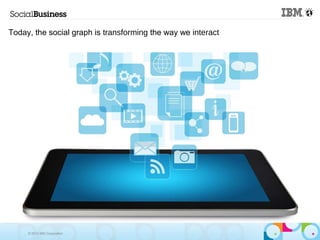
Today, the social graph is transforming the way we interact
© 2013 IBM Corporation
6
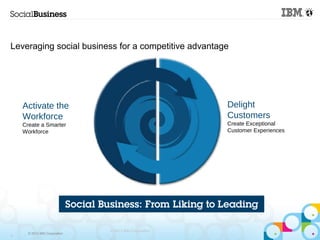
Leveraging social business for a competitive advantage
Activate the
Workforce
Create a Smarter
Workforce
Delight
Customers
Create Exceptional
Customer Experiences
© 2013 IBM Corporation
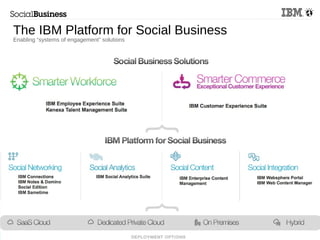
The IBM Platform for Social Business
Enabling “systems of engagement” solutions
© 2013 IBM Corporation
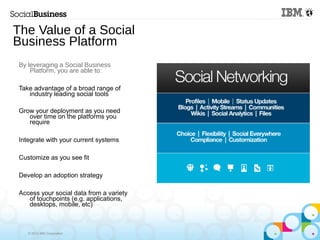
The Value of a Social
Business Platform
By leveraging a Social Business
Platform, you are able to:
Take advantage of a broad range of
industry leading social tools
Grow your deployment as you need
over time on the platforms you
require
Integrate with your current systems
Customize as you see fit
Develop an adoption strategy
Access your social data from a variety
of touchpoints (e.g. applications,
desktops, mobile, etc)
© 2013 IBM Corporation10
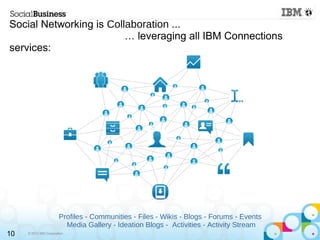
Social Networking is Collaboration ...
… leveraging all IBM Connections
services:
Profiles - Communities - Files - Wikis - Blogs - Forums - Events
Media Gallery - Ideation Blogs - Activities - Activity Stream
© 2013 IBM Corporation
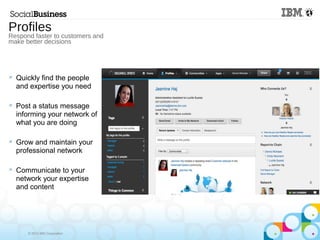
 Quickly find the people
and expertise you need
 Post a status message
informing your network of
what you are doing
 Grow and maintain your
professional network
 Communicate to your
network your expertise
and content
Profiles
Respond faster to customers and
make better decisions
© 2013 IBM Corporation
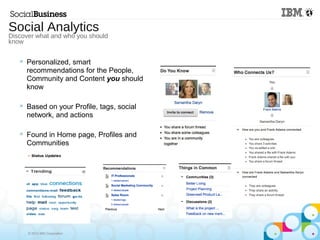
 Personalized, smart
recommendations for the People,
Community and Content you should
know
 Based on your Profile, tags, social
network, and actions
 Found in Home page, Profiles and
Communities
Social Analytics
Discover what and who you should
know
© 2013 IBM Corporation
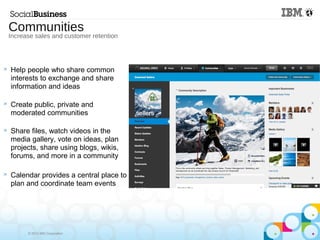
 Help people who share common
interests to exchange and share
information and ideas
 Create public, private and
moderated communities
 Share files, watch videos in the
media gallery, vote on ideas, plan
projects, share using blogs, wikis,
forums, and more in a community
 Calendar provides a central place to
plan and coordinate team events
Communities
Increase sales and customer retention
© 2013 IBM Corporation
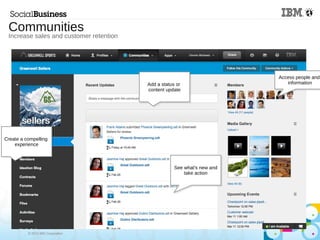
Communities
Increase sales and customer retention
Add a status or
content update
Create a compelling
experience
See what's new and
take action
Access people and
information
© 2013 IBM Corporation15
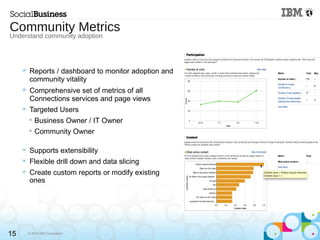
 Reports / dashboard to monitor adoption and
community vitality
 Comprehensive set of metrics of all
Connections services and page views
 Targeted Users

Business Owner / IT Owner

Community Owner
 Supports extensibility
 Flexible drill down and data slicing
 Create custom reports or modify existing
ones
Community Metrics
Understand community adoption
© 2013 IBM Corporation
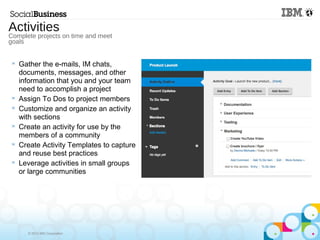
 Gather the e-mails, IM chats,
documents, messages, and other
information that you and your team
need to accomplish a project
 Assign To Dos to project members
 Customize and organize an activity
with sections
 Create an activity for use by the
members of a community
 Create Activity Templates to capture
and reuse best practices
 Leverage activities in small groups
or large communities
Activities
Complete projects on time and meet
goals
© 2013 IBM Corporation
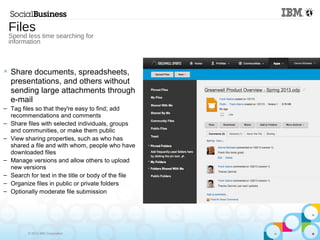
 Share documents, spreadsheets,
presentations, and others without
sending large attachments through
e-mail
– Tag files so that they're easy to find; add
recommendations and comments
– Share files with selected individuals, groups
and communities, or make them public
– View sharing properties, such as who has
shared a file and with whom, people who have
downloaded files
– Manage versions and allow others to upload
new versions
– Search for text in the title or body of the file
– Organize files in public or private folders
– Optionally moderate file submission
Files
Spend less time searching for
information

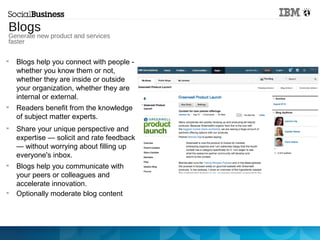
Blogs help you connect with people -
whether you know them or not,
whether they are inside or outside
your organization, whether they are
internal or external.

Readers benefit from the knowledge
of subject matter experts.

Share your unique perspective and
expertise — solicit and rate feedback
— without worrying about filling up
everyone's inbox.

Blogs help you communicate with
your peers or colleagues and
accelerate innovation.

Optionally moderate blog content
Generate new product
and services faster
Blogs
Generate new product and services
faster
© 2013 IBM Corporation
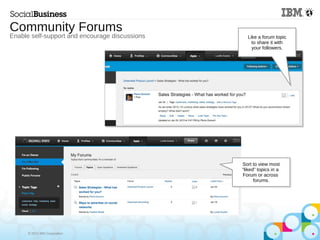
Community Forums
Enable self-support and encourage discussions Like a forum topic
to share it with
your followers.
Sort to view most
“liked” topics in a
Forum or across
forums.
© 2013 IBM Corporation
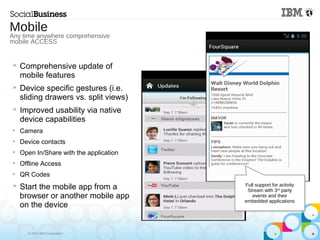
 Comprehensive update of
mobile features
 Device specific gestures (i.e.
sliding drawers vs. split views)
 Improved usability via native
device capabilities

Camera

Device contacts

Open In/Share with the application

Offline Access

QR Codes
 Start the mobile app from a
browser or another mobile app
on the device
Mobile
Any time anywhere comprehensive
mobile ACCESS
Full support for activity
Stream with 3rd
party
events and their
embedded applications
© 2013 IBM Corporation
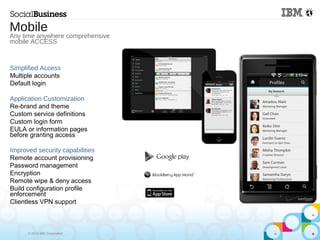
Simplified Access
Multiple accounts
Default login
Application Customization
Re-brand and theme
Custom service definitions
Custom login form
EULA or information pages
before granting access
Improved security capabilities
Remote account provisioning
Password management
Encryption
Remote wipe & deny access
Build configuration profile
enforcement
Clientless VPN support
Mobile
Any time anywhere comprehensive
mobile ACCESS
© 2013 IBM Corporation
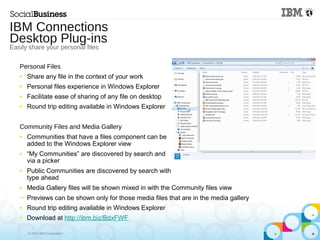
Personal Files
■ Share any file in the context of your work
■ Personal files experience in Windows Explorer
■ Facilitate ease of sharing of any file on desktop
■ Round trip editing available in Windows Explorer
Community Files and Media Gallery
■ Communities that have a files component can be
added to the Windows Explorer view
■ “My Communities” are discovered by search and
via a picker
■ Public Communities are discovered by search with
type ahead
■ Media Gallery files will be shown mixed in with the Community files view
─ Previews can be shown only for those media files that are in the media gallery
■ Round trip editing available in Windows Explorer
■ Download at http://ibm.biz/BdxFWF
IBM Connections
Desktop Plug-ins
Easily share your personal files
© 2013 IBM Corporation
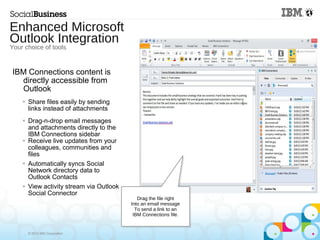
IBM Connections content is
directly accessible from
Outlook
 Share files easily by sending
links instead of attachments
 Drag-n-drop email messages
and attachments directly to the
IBM Connections sidebar
 Receive live updates from your
colleagues, communities and
files

Automatically syncs Social
Network directory data to
Outlook Contacts
 View activity stream via Outlook
Social Connector
Enhanced Microsoft
Outlook Integration
Your choice of tools
Drag the file right
Into an email message
To send a link to an
IBM Connections file.
© 2013 IBM Corporation
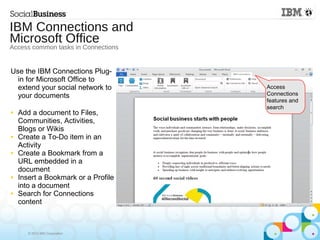
Access
Connections
features and
search
Use the IBM Connections Plug-
in for Microsoft Office to
extend your social network to
your documents
■ Add a document to Files,
Communities, Activities,
Blogs or Wikis
■ Create a To-Do item in an
Activity
■ Create a Bookmark from a
URL embedded in a
document
■ Insert a Bookmark or a Profile
into a document
■ Search for Connections
content
IBM Connections and
Microsoft Office
Access common tasks in Connections

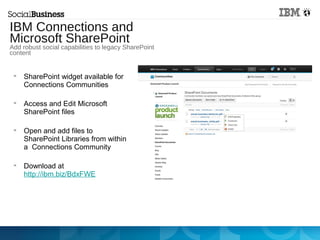
SharePoint widget available for
Connections Communities

Access and Edit Microsoft
SharePoint files

Open and add files to
SharePoint Libraries from within
a Connections Community

Download at
http://ibm.biz/BdxFWE
IBM Connections and
Microsoft SharePoint
Add robust social capabilities to legacy SharePoint
content
© 2013 IBM Corporation
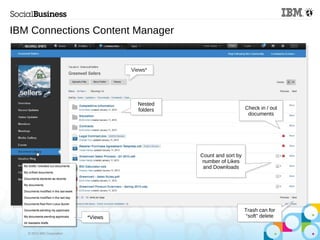
*Views
Nested
folders
Trash can for
“soft” delete
Check in / out
documents
Count and sort by
number of Likes
and Downloads
IBM Connections Content Manager
Views*Views*
*Views
Nested
folders
Trash can for
“soft” delete
Check in / out
documents
Count and sort by
number of Likes
and Downloads
© 2013 IBM Corporation
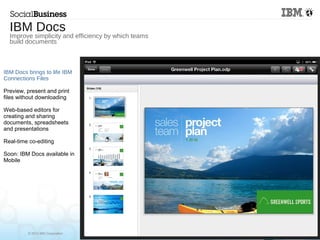
IBM Docs brings to life IBM
Connections Files
Preview, present and print
files without downloading
Web-based editors for
creating and sharing
documents, spreadsheets
and presentations
Real-time co-editing
Soon: IBM Docs available in
Mobile
IBM Docs
Improve simplicity and efficiency by which teams
build documents
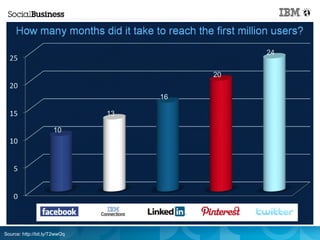
Source: http://bit.ly/T2wwOq
© 2013 IBM Corporation
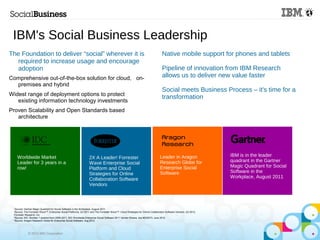
IBM's Social Business Leadership
The Foundation to deliver “social” wherever it is
required to increase usage and encourage
adoption
Comprehensive out-of-the-box solution for cloud, on-
premises and hybrid
Widest range of deployment options to protect
existing information technology investments
Proven Scalability and Open Standards based
architecture
2X A Leader! Forrester
Wave Enterprise Social
Platform and Cloud
Strategies for Online
Collaboration Software
Vendors
Worldwide Market
Leader for 3 years in a
row!
Leader in Aragon
Research Globe for
Enterprise Social
Software
IBM is in the leader
quadrant in the Gartner
Magic Quadrant for Social
Software in the
Workplace, August 2011
1
Source: Gartner Magic Quadrant for Social Software in the Workplace, August 2011
2
Source: The Forrester Wave™: Enterprise Social Platforms, Q3 2011 and The Forrester Wave™: Cloud Strategies for Online Collaboraton Software Vendors, Q3 2012,
Forrester Research, Inc
3
Source: IDC: Number 1 position from 2009-2011, IDC Worldwide Enterprise Social Software 2011 Vendor Shares, doc #235273, June 2012.
4
Source: Aragon Research Globe for Enterprise Social Software, Aug 2012
Native mobile support for phones and tablets
Pipeline of innovation from IBM Research
allows us to deliver new value faster
Social meets Business Process – it's time for a
transformation
© 2013 IBM Corporation31
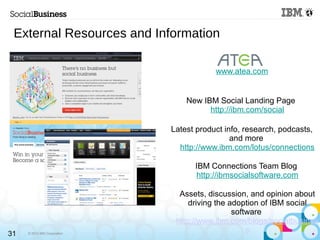
www.atea.com
New IBM Social Landing Page
http://ibm.com/social
Latest product info, research, podcasts,
and more
http://www.ibm.com/lotus/connections
IBM Connections Team Blog
http://ibmsocialsoftware.com
Assets, discussion, and opinion about
driving the adoption of IBM social
software
http://www.ibm.com/blogs/socialbusines
s
External Resources and Information
Tack för mig!
IBM
Vill du veta mer,
registrera dig vid utgången.
Betygsätt gärna passet i appen
För frågor kontakta mig på:
Alan Hamilton
alan.hamilton@uk.ibm.com
+44 1475 893 483
På svenska eller engelska

Halmstad Atea Bootcamp 2013

  • 1.
    Välkommen! IBM Introduction to IBMConnections Föreläsare: Alan Hamilton, IBM Collaboration Solutions @alanghamilton
  • 2.
    © 2013 IBMCorporation A decade ago, e-Business fundamentally changed the way we conduct business Surfing Selling Browsing Buying
  • 3.
    © 2013 IBMCorporation Today, the social graph is transforming the way we interact
  • 4.
    © 2013 IBMCorporation © 2013 IBM Corporation 6 Leveraging social business for a competitive advantage Activate the Workforce Create a Smarter Workforce Delight Customers Create Exceptional Customer Experiences
  • 5.
    © 2013 IBMCorporation The IBM Platform for Social Business Enabling “systems of engagement” solutions
  • 6.
    © 2013 IBMCorporation The Value of a Social Business Platform By leveraging a Social Business Platform, you are able to: Take advantage of a broad range of industry leading social tools Grow your deployment as you need over time on the platforms you require Integrate with your current systems Customize as you see fit Develop an adoption strategy Access your social data from a variety of touchpoints (e.g. applications, desktops, mobile, etc)
  • 7.
    © 2013 IBMCorporation10 Social Networking is Collaboration ... … leveraging all IBM Connections services: Profiles - Communities - Files - Wikis - Blogs - Forums - Events Media Gallery - Ideation Blogs - Activities - Activity Stream
  • 8.
    © 2013 IBMCorporation  Quickly find the people and expertise you need  Post a status message informing your network of what you are doing  Grow and maintain your professional network  Communicate to your network your expertise and content Profiles Respond faster to customers and make better decisions
  • 9.
    © 2013 IBMCorporation  Personalized, smart recommendations for the People, Community and Content you should know  Based on your Profile, tags, social network, and actions  Found in Home page, Profiles and Communities Social Analytics Discover what and who you should know
  • 10.
    © 2013 IBMCorporation  Help people who share common interests to exchange and share information and ideas  Create public, private and moderated communities  Share files, watch videos in the media gallery, vote on ideas, plan projects, share using blogs, wikis, forums, and more in a community  Calendar provides a central place to plan and coordinate team events Communities Increase sales and customer retention
  • 11.
    © 2013 IBMCorporation Communities Increase sales and customer retention Add a status or content update Create a compelling experience See what's new and take action Access people and information
  • 12.
    © 2013 IBMCorporation15  Reports / dashboard to monitor adoption and community vitality  Comprehensive set of metrics of all Connections services and page views  Targeted Users  Business Owner / IT Owner  Community Owner  Supports extensibility  Flexible drill down and data slicing  Create custom reports or modify existing ones Community Metrics Understand community adoption
  • 13.
    © 2013 IBMCorporation  Gather the e-mails, IM chats, documents, messages, and other information that you and your team need to accomplish a project  Assign To Dos to project members  Customize and organize an activity with sections  Create an activity for use by the members of a community  Create Activity Templates to capture and reuse best practices  Leverage activities in small groups or large communities Activities Complete projects on time and meet goals
  • 14.
    © 2013 IBMCorporation  Share documents, spreadsheets, presentations, and others without sending large attachments through e-mail – Tag files so that they're easy to find; add recommendations and comments – Share files with selected individuals, groups and communities, or make them public – View sharing properties, such as who has shared a file and with whom, people who have downloaded files – Manage versions and allow others to upload new versions – Search for text in the title or body of the file – Organize files in public or private folders – Optionally moderate file submission Files Spend less time searching for information
  • 15.
     Blogs help youconnect with people - whether you know them or not, whether they are inside or outside your organization, whether they are internal or external.  Readers benefit from the knowledge of subject matter experts.  Share your unique perspective and expertise — solicit and rate feedback — without worrying about filling up everyone's inbox.  Blogs help you communicate with your peers or colleagues and accelerate innovation.  Optionally moderate blog content Generate new product and services faster Blogs Generate new product and services faster
  • 16.
    © 2013 IBMCorporation Community Forums Enable self-support and encourage discussions Like a forum topic to share it with your followers. Sort to view most “liked” topics in a Forum or across forums.
  • 17.
    © 2013 IBMCorporation  Comprehensive update of mobile features  Device specific gestures (i.e. sliding drawers vs. split views)  Improved usability via native device capabilities  Camera  Device contacts  Open In/Share with the application  Offline Access  QR Codes  Start the mobile app from a browser or another mobile app on the device Mobile Any time anywhere comprehensive mobile ACCESS Full support for activity Stream with 3rd party events and their embedded applications
  • 18.
    © 2013 IBMCorporation Simplified Access Multiple accounts Default login Application Customization Re-brand and theme Custom service definitions Custom login form EULA or information pages before granting access Improved security capabilities Remote account provisioning Password management Encryption Remote wipe & deny access Build configuration profile enforcement Clientless VPN support Mobile Any time anywhere comprehensive mobile ACCESS
  • 19.
    © 2013 IBMCorporation Personal Files ■ Share any file in the context of your work ■ Personal files experience in Windows Explorer ■ Facilitate ease of sharing of any file on desktop ■ Round trip editing available in Windows Explorer Community Files and Media Gallery ■ Communities that have a files component can be added to the Windows Explorer view ■ “My Communities” are discovered by search and via a picker ■ Public Communities are discovered by search with type ahead ■ Media Gallery files will be shown mixed in with the Community files view ─ Previews can be shown only for those media files that are in the media gallery ■ Round trip editing available in Windows Explorer ■ Download at http://ibm.biz/BdxFWF IBM Connections Desktop Plug-ins Easily share your personal files
  • 20.
    © 2013 IBMCorporation IBM Connections content is directly accessible from Outlook  Share files easily by sending links instead of attachments  Drag-n-drop email messages and attachments directly to the IBM Connections sidebar  Receive live updates from your colleagues, communities and files  Automatically syncs Social Network directory data to Outlook Contacts  View activity stream via Outlook Social Connector Enhanced Microsoft Outlook Integration Your choice of tools Drag the file right Into an email message To send a link to an IBM Connections file.
  • 21.
    © 2013 IBMCorporation Access Connections features and search Use the IBM Connections Plug- in for Microsoft Office to extend your social network to your documents ■ Add a document to Files, Communities, Activities, Blogs or Wikis ■ Create a To-Do item in an Activity ■ Create a Bookmark from a URL embedded in a document ■ Insert a Bookmark or a Profile into a document ■ Search for Connections content IBM Connections and Microsoft Office Access common tasks in Connections
  • 22.
     SharePoint widget availablefor Connections Communities  Access and Edit Microsoft SharePoint files  Open and add files to SharePoint Libraries from within a Connections Community  Download at http://ibm.biz/BdxFWE IBM Connections and Microsoft SharePoint Add robust social capabilities to legacy SharePoint content
  • 23.
    © 2013 IBMCorporation *Views Nested folders Trash can for “soft” delete Check in / out documents Count and sort by number of Likes and Downloads IBM Connections Content Manager Views*Views* *Views Nested folders Trash can for “soft” delete Check in / out documents Count and sort by number of Likes and Downloads
  • 24.
    © 2013 IBMCorporation IBM Docs brings to life IBM Connections Files Preview, present and print files without downloading Web-based editors for creating and sharing documents, spreadsheets and presentations Real-time co-editing Soon: IBM Docs available in Mobile IBM Docs Improve simplicity and efficiency by which teams build documents
  • 25.
  • 26.
    © 2013 IBMCorporation IBM's Social Business Leadership The Foundation to deliver “social” wherever it is required to increase usage and encourage adoption Comprehensive out-of-the-box solution for cloud, on- premises and hybrid Widest range of deployment options to protect existing information technology investments Proven Scalability and Open Standards based architecture 2X A Leader! Forrester Wave Enterprise Social Platform and Cloud Strategies for Online Collaboration Software Vendors Worldwide Market Leader for 3 years in a row! Leader in Aragon Research Globe for Enterprise Social Software IBM is in the leader quadrant in the Gartner Magic Quadrant for Social Software in the Workplace, August 2011 1 Source: Gartner Magic Quadrant for Social Software in the Workplace, August 2011 2 Source: The Forrester Wave™: Enterprise Social Platforms, Q3 2011 and The Forrester Wave™: Cloud Strategies for Online Collaboraton Software Vendors, Q3 2012, Forrester Research, Inc 3 Source: IDC: Number 1 position from 2009-2011, IDC Worldwide Enterprise Social Software 2011 Vendor Shares, doc #235273, June 2012. 4 Source: Aragon Research Globe for Enterprise Social Software, Aug 2012 Native mobile support for phones and tablets Pipeline of innovation from IBM Research allows us to deliver new value faster Social meets Business Process – it's time for a transformation
  • 27.
    © 2013 IBMCorporation31 www.atea.com New IBM Social Landing Page http://ibm.com/social Latest product info, research, podcasts, and more http://www.ibm.com/lotus/connections IBM Connections Team Blog http://ibmsocialsoftware.com Assets, discussion, and opinion about driving the adoption of IBM social software http://www.ibm.com/blogs/socialbusines s External Resources and Information
  • 28.
    Tack för mig! IBM Villdu veta mer, registrera dig vid utgången. Betygsätt gärna passet i appen För frågor kontakta mig på: Alan Hamilton alan.hamilton@uk.ibm.com +44 1475 893 483 På svenska eller engelska

Editor's Notes

  • #4 A decade ago, e-business changed the way we use the internet forever when people and organizations went from browsing to buying and from surfing to selling. The internet evolved from being a new way of communicating and getting information to becoming the way that we conduct business and drive real business value. (Point of this slide) IBM was a leader and innovator in making e-Business a reality for our customers, and now we are doing it again. As social networks change the landscape of the internet, IBM again leads by defining how social networking for business can greatly improve business outcomes and helps our customers excel.
  • #5 Today, social media is making an equally significant impact and has become an increasingly important tool in our daily lives – helping people connect, communicate and share information – forever changing the way people interact. Here are some additional facts: Today, more than 2 billion people use the internet. By the end of this year, Gen Y will outnumber Baby Boomers….and 96% of them have joined a social network. The second largest search engine in the world is YouTube 25% of search results for the World’s Top 20 largest brands are links to user-generated content. (Point of this slide) The social graph is simply the deep way in which people can now connect. As an analogy, all websites on the internet can be connected via links, the social graph simply means that now all people are connected as well. These rich relationships are changing the way we treat our friends, our colleagues and our customers. Social Business means that our traditional ways of marketing and selling are radically different from just e-business. Selling is based on reaching networks of people, and marketing means building trust among communities by influencing advocates and tippers. How we work together also has changed dramatically as we search expertise and learn to share to solve business problems. This is the new way of working.
  • #6 Integrating social into your workforce and into customer experiences creates real business outcomes. This can happen in various business processes. On the slide are just a few examples of real customer results. Customer service: Profitable growth depends social, mobile customer self-service $44.6B lost in one year due to online customer experience problems (6) Sales: Improving sales skills and matching the right people can help close more deals Top 10% of sellers often generate 30-50% of a company’s revenue. (2) Product Development Accelerating innovation to deliver better products faster In software, the top programmers write 10 times the code of average performers (2) Marketing Gather insights into what customers will buy next 81% received product purchase advice from friends and followers through a social site (7) (Point of this slide) IBM makes sure that our customers can take advantage of social business to be competitive, and we help them apply it to their business situations . This infers that Facebook, Twitter ,etc are fun, but not productive. IBM makes social networking productive. Connections is “Facebook for the Enterprise”, but with real business focus and results.
  • #7 Thank you Ray... powerful stuff. I would like to pick up on a couple of points from Ray.... Choosing the right Platform for Social Business is TOP of mind... and two of the leading challenges are: to Foster Internal Collaboration and to Incorporate Social into Business Models. At IBM we have seen and embraced these challenges from the onset... and some of the announcements we are making today will positively disrupt these challenges. Organizations are now moving from “liking” – simply using social technology for basic communication, to "leading" – where they are applying social tools and culture to fundamentally change their core business processes, leading to positive disruption within their organizations and their industries. Today, organizations are recognizing that there are numerous opportunities for them to rethink their core business processes through the application of social. Business is ready for social. They are leveraging social to activate people to create a smarter workforce and delight customers by creating exceptional customer experiences. And by creating a smarter workforce, customers are further enhancing their ability to delight customers.
  • #13 Evolution of Social Search in Lotus Connections Lotus Connections 2.0 introduced “Social Search” Innovation from IBM Research Lab in Haifa, Israel System wide search infrastructure based on open standards Social search introduced concept of 'facets' weaving additional connections between results Lotus Connections 2.5 expanded on “Social Search” User Interface become more intuitive Consistency through provision of single search engine across the product Added additional services, Files and Wikis Document Conversion services, advanced language analytics Lotus Connections “Next” Adds Analytics Enhance with 'Social and Network Discovery' (SaND) technology Analytics leveraging the Social Search Information (indexes+facets) to discover and present relationships
  • #16 In the next major release of IBM Connections, we are adding a visual layer to our out of box reporting and metrics. This will be featured within a community for community managers to understand adoption of the tools, content, and people interacting in their communities. This will also be available system wide for organizational understanding of metrics across all of the Connections tools. On the back end, Cognos is being utilized to consume the reports generated by Connections, and customers can create their own custom visualizations on the data.
  • #17 New in 3.0: subcommunities
  • #25 Use the IBM Connections Plug-in for Microsoft Office to extend your social network to your documents From Office you can: Add a document to an Activity, Wikis, Files and Communities Create a To-Do item in an Activity Search Connections Additionally From Microsoft Word, you can: Create a Bookmark from a URL embedded in a document Insert a Bookmark or a Profile info into a document Publish a Document to a Blog
  • #29 Actiance is an IBM business partner focussing on Compliance solutions for the social business. IBM is re-marketing Vantage for IBM Connections which allows customers to archive comments, posts, files, blogs, wikis, forums, etc from IBM Connections into the Vantage archive to keep a record for future use (e.g. for litigation scenarios). No matter how small or out-of-context a remark or comment might be, every post can be captured and put into the larger context of a holistic compliance solution for the social business. Actiance solutions are critical components designed to help all organizations, protect their corporate brand and reputation, ensure ethical practices, and maintain compliance with applicable regulations and legislation. Key Features of the Actiance solutions for IBM Connections: Content logging and archiving Capture social data from all Connections applications eDiscovery to show the content in context of other related items Content inspection includes filtering, alerts, and rules engine Policies can map to governance standards